This week in KDE: a smooth release of Plasma 5.27

This week we finally released Plasma 5.27 and so far it’s been very smooth! The only significant regressions found so far are already fixed, ready for release in a few days. There have been some grumblings about the new window outlines feature, but you can’t please everyone, and there’s a chance we’ll end up making them optional.

New Features

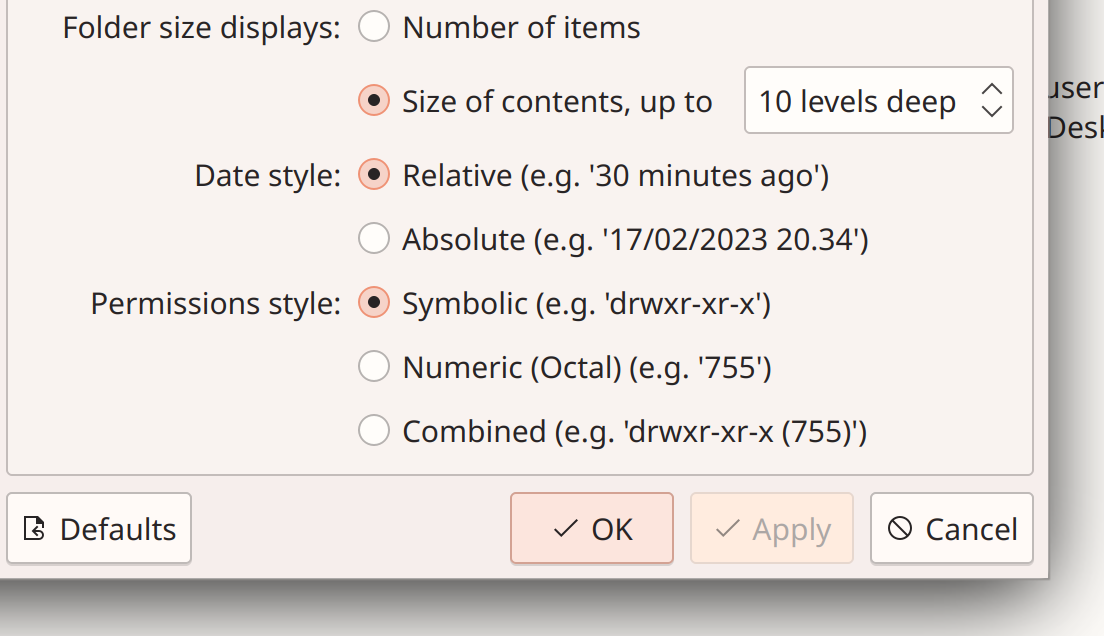
Dolphin now lets you configure how permissions are shown in Details view (Serg Podtynnyi, Dolphin 23.04. Link)

Dolphin settings window showing new setting to control "Permissions style", with the options "Symbolic (e.g. 'drwxr-xr-x')", "Numeric (Octal) (e.g. '755')", and "Combined (e.g. 'drwxr-xr-x' (755)')"

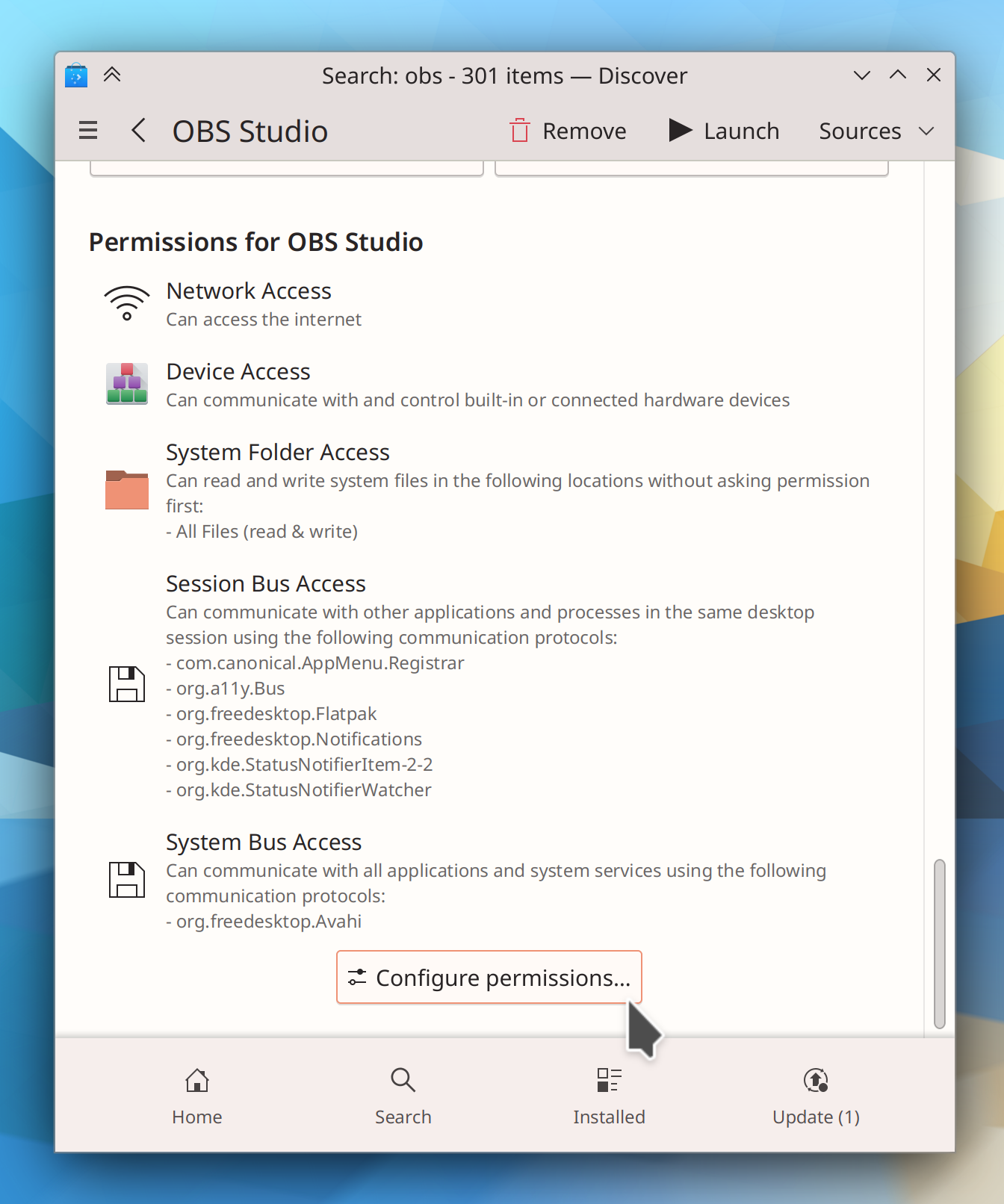
While you’re viewing the page for an installed Flatpak app in Discover, you can now jump straight to the System Settings page for configuring its permissions (Ivan Tkachenko, Plasma 6.0. Link 1 and link 2):

Discover window showing OBS packaged via Flatpak with list of permissions and "Configure Permissions…" button

User Interface Improvements

Dolphin’s code for counting directory sizes has been made faster, improving performance especially with manually-mounted network shares that for some reason aren’t detected as such (Méven Car, Dolphin 23.04. Link)

Gwenview now zooms smoothly rather than in steps when you Ctrl+scroll using a touchpad (Friso Smit, Gwenview 23.04. Link)

Holiday calendars no longer include astronomical events, so when you also have the Astronomical Events calendar plugin active, you won’t see the same astronomical events twice in the same day anymore (me: Nate Graham, Plasma 5.27.1. Link)

When you search for apps in the portal-based app chooser dialog, it now automatically searches through all of them rather than just the limited set of “recommended” apps that are shown by default (me: Nate Graham, Plasma 5.27.1. Link)

When apps using the portal-based system ask for you to allow screen sharing, you can now give them a specific screen region, not just the whole screen or a single window (Dominique Hummel, Plasma 6.0. Link)

The Task Manager’s “Close” context menu item now says “Close All” for clarity if you right-clicked on a grouped task (Fushan Wen, Plasma 6.0. Link)

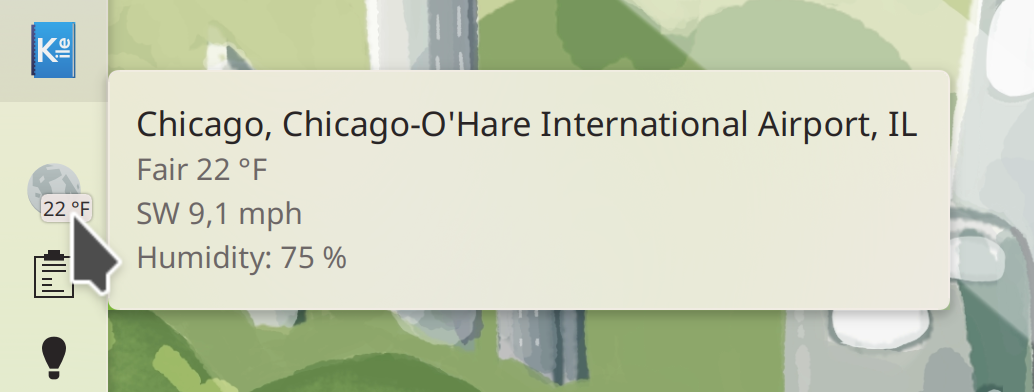
The Weather Report widget’s tooltip now shows wind speed and humidity by default (Guilherme Marçal Silva, Plasma 6.0. Link):

Weather Widget tooltip showing city name, temperature, wind speed, and humidity

All System Settings pages that were missing “file a bug on this specific page” support should now have it (Alexander Lohnau and me: Nate Graham, Frameworks 5.104 and the next versions of a couple other things on different release schedules. Link)

Significant Bugfixes

(This is a curated list of e.g. HI and VHI priority bugs, Wayland showstoppers, major regressions, etc.)

The Deutscher Wetterdienst (DWD) weather provider now works again after they changed their data format (Emily Ehlert, Plasma 5.24.8. Link)

Fixed a case where KWin could crash after waking from sleep while using multiple screens with windows tiled to a screen that wakes up very slowly after the system wakes from sleep (Dominique Hummel, Plasma 5.27.1. Link)

Fixed a recent regression in 5.27 that could, under certain circumstances, cause desktop icons to disappear after waking the system from sleep until Plasma was manually restarted (Marco Martin, Plasma 5.27.1. Link)

Fixed a recent regression in 5.27 that caused XWayland-using Electron apps (such as VSCode, Discord, and Element) to be displayed too small when using scaling (me: Nate Graham, Plasma 5.27.1. Link)

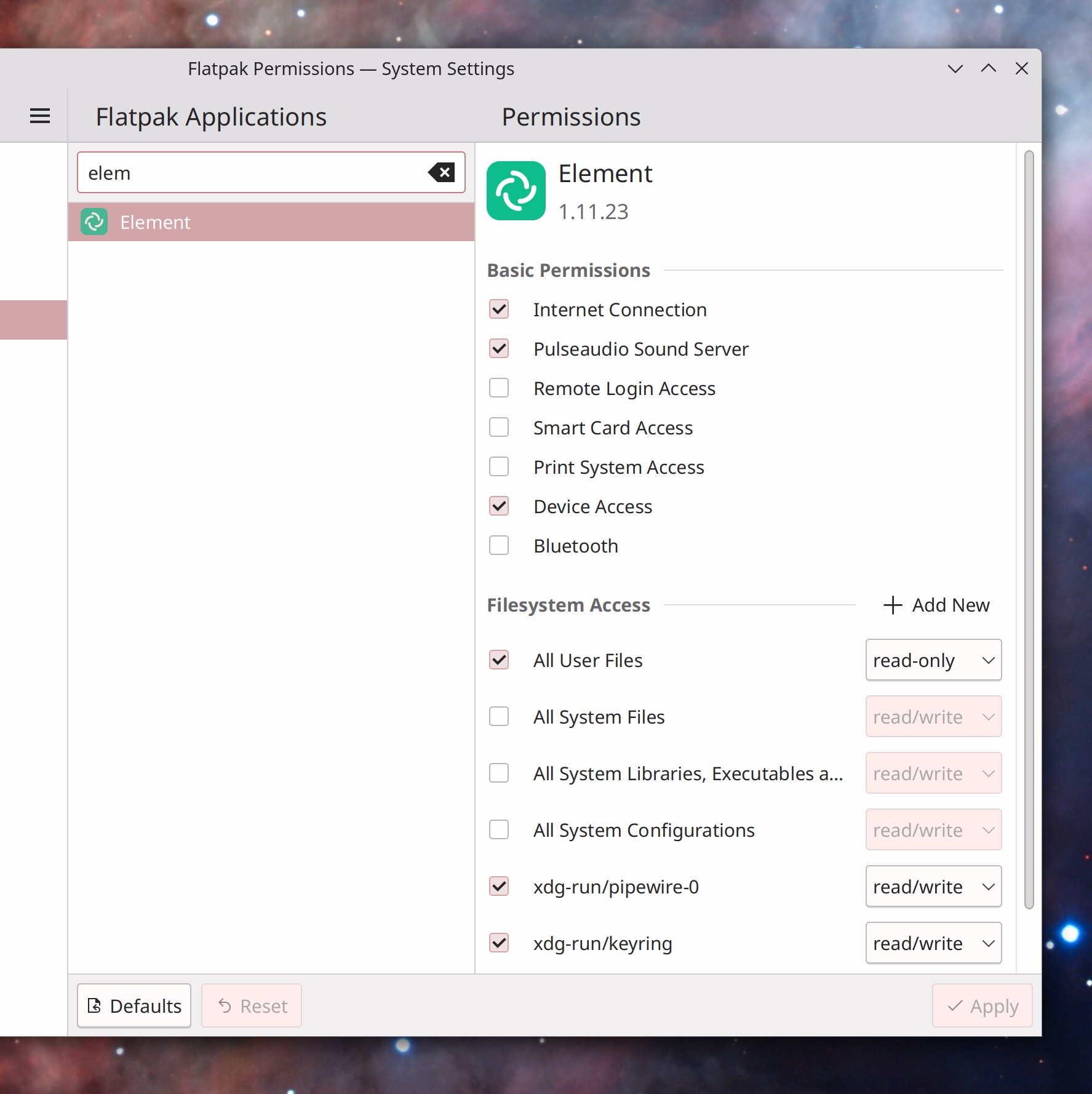
The new Flatpak Permissions page in System Settings will now create app-specific overrides properly when using the system in a language other than English (Harald Sitter, Plasma 5.27.1. Link)

Fixed a case where Plasma could crash after waking from sleep after the set of connected screens changed while it was asleep (Marco Martin, Plasma 5.27.1. Link)

Fixed showing information about NVIDIA GPUs in System Monitor, again. This time, for real! (David Redondo, Plasma 5.27.1. Link)

Fixed a recent regression in 5.27 that caused the Digital Clock’s tooltip to redundantly show the current time and timezone even when no additional timezones are configured (me: Nate Graham, Plasma 5.27.1. Link)

The Networks widget will no longer unnecessarily show the loopback interface when using NetworkManager 1.42 (David Redondo, Plasma 5.27.1. Link)

Setting charge limits for batteries that supports charge limits but not charge minimums now works (Fabian Vogt, Plasma 5.27.1. Link)

In the Plasma Wayland session, KDE app windows once again correctly remember their size when using more than one screen (me: Nate Graham, Frameworks 5.104. Link)

Removing content downloaded using the Get New <thing> system is now significantly more robust (Fushan Wen, Frameworks 5.104. Link)

Other bug-related information of interest:

Automation & Systematization

Added an autotest for the Media Player widget’s interactions with the MPRIS2 data interface (Fushan Wen, Plasma 5.27.1. Link)

Changes not in KDE that affect KDE

In the Plasma Wayland session, non-fullscreen Chromium web apps will no longer hijack all global keyboard shortcuts (Nick Diego Yamane, Chromium 111. Link)

…And everything else

This blog only covers the tip of the iceberg! If you’re hungry for more, check out https://planet.kde.org, where you can find more news from other KDE contributors.

How You Can Help

If you’re a user, upgrade to Plasma 5.27! If your distro doesn’t offer it and won’t anytime soon, consider switching to a different one that ships software closer to its developer’s schedules.

If you’re a developer, consider working on known Plasma 5.27 regressions! You might also want to check out our 15-Minute Bug Initiative. Working on these issues makes a big difference quickly!

Otherwise, visit https://community.kde.org/Get_Involved to discover other ways to be part of a project that really matters. Each contributor makes a huge difference in KDE; you are not a number or a cog in a machine! You don’t have to already be a programmer, either. I wasn’t when I got started. Try it, you’ll like it! We don’t bite!

And finally, KDE can’t work without financial support, so consider making a donation today! This stuff ain’t cheap and KDE e.V. has ambitious hiring goals. We can’t meet them without your generous donations!

This week in KDE: The best Plasma 5 version ever… again!

Plasma 5.27 LTS will be released in just a few days. And so far it’s on track to be the least-buggy version in memory! At the time of writing there are only three known regressions, down from the dozen or more we usually ship with. A focus on stability pays off!

As part of that effort, you might have heard we did a major push to fix multi-monitor issues for this release, and so far it looks to have worked: tons of people are reporting that their longstanding issues are fixed in the beta! But there are sure to be a few more. When you do encounter an issue, I’d encourage you to read this blog post by Marco Martin before submitting a bug report. In it, you’ll learn how best to submit a bug report for multi-monitor issues and what data to gather, so that it has the best chance of being actionable.

But that’s not all! We landed some great new features for Plasma 6 and made good progress on the 15-minute bugs, too!

New Features

Dolphin can now show you how many pages a document has in its additional metadata display (Serg Podtynnyi, Dolphin 23.04. Link)

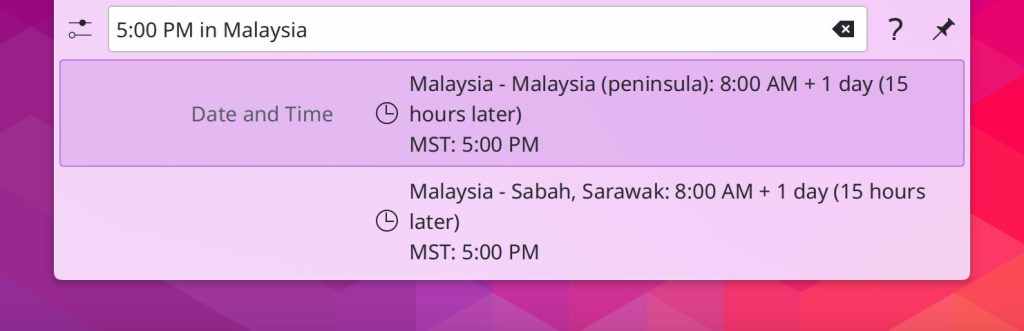
KRunner can now convert between time zones. Now it’s easy to find out what any time in your local time zone will be anywhere else in the world! (Natalie Clarius, Plasma 6.0. Link):

User Interface Improvements

When you delete a file in Dolphin, it now selects the next one automatically (Serg Podtynnyi, Dolphin 23.04. Link)

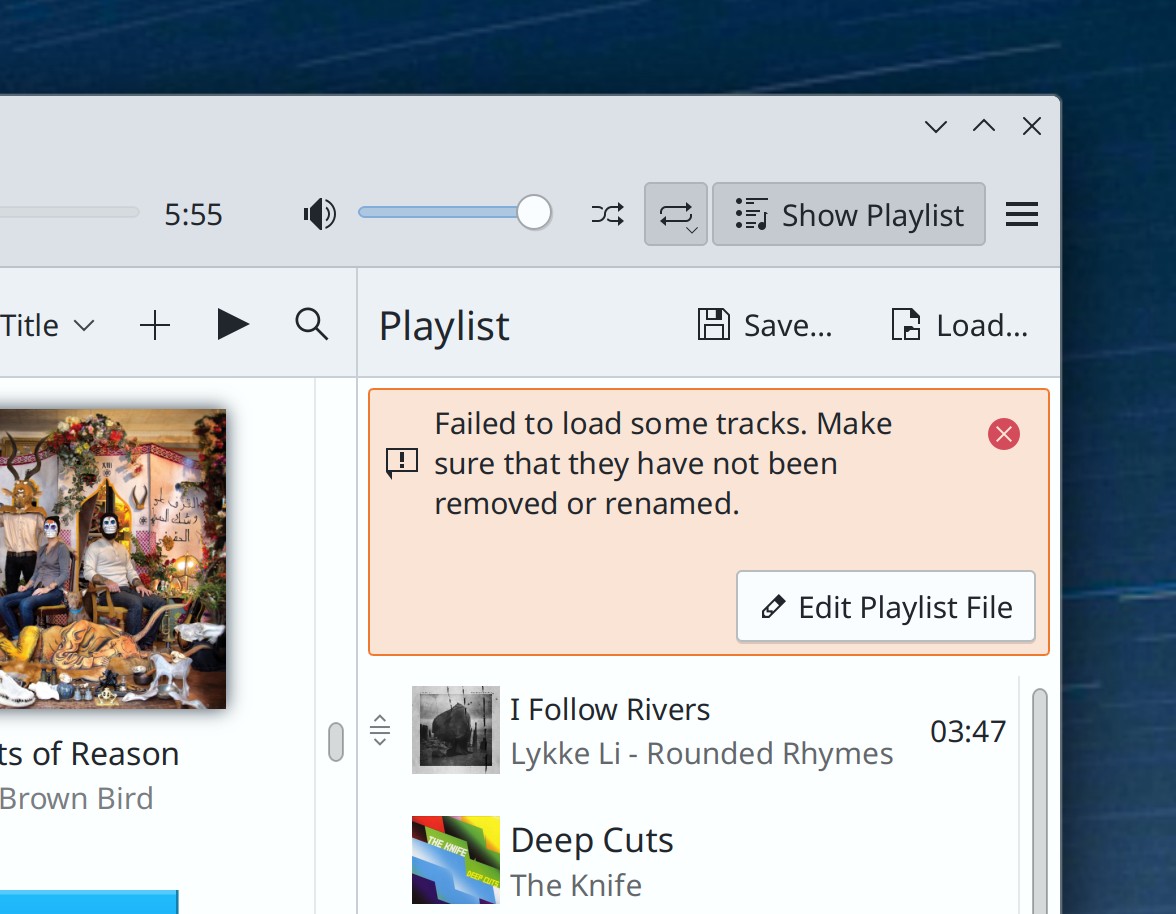
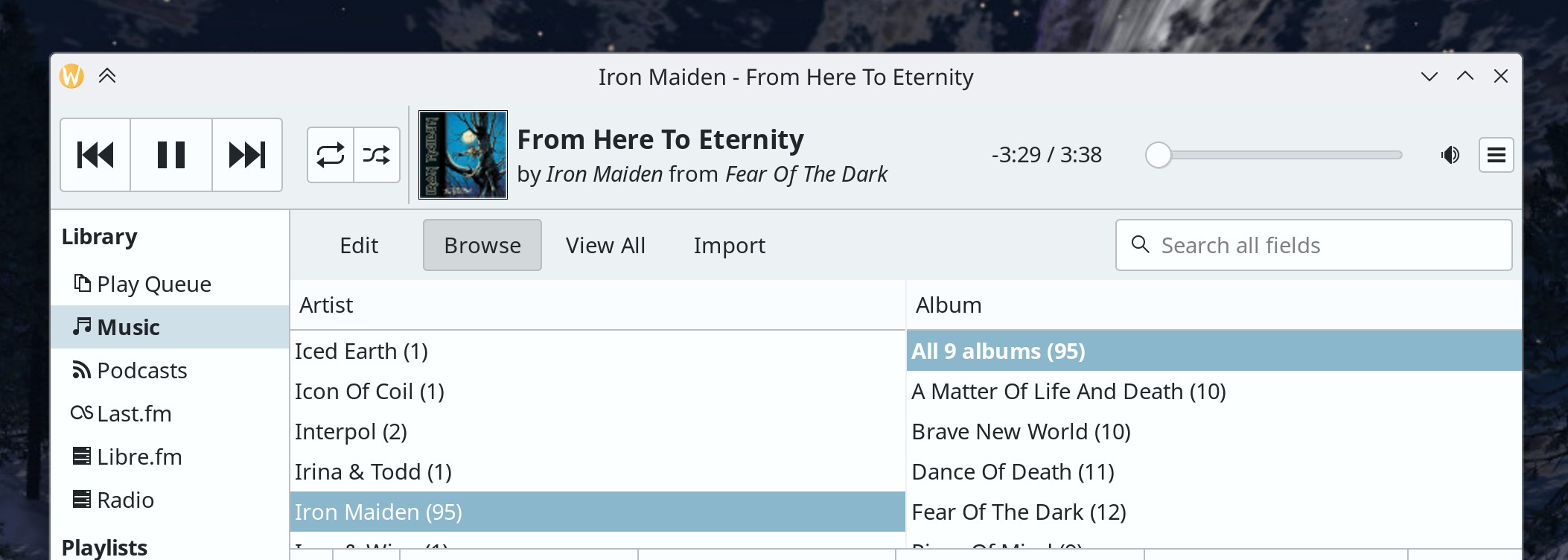
When you ask Elisa to open a Playlist file with invalid paths, it now skips them, shows you a message explaining what happened, and offers you the possibility to open the file you can edit it to fix the broken paths (Nikita Karpei, Elisa 23.04. Link):

Part of Elisa music player's main window showing inline error message that says, "Failed to load some tracks. Make sure they have not been removed or renamed" plus a button labeled "Edit Playlist File"

When Discover’s Flatpak backend is installed and in use, it should now be significantly faster when using version 0.16.0 of the AppStream library (Aleix Pol Gonzalez, Plasma 5.27.1. Link)

System Settings’ Window Decorations page now uses the more modern frameless style, rather than a tabbed view (Joshua Goins, Plasma 6.0. Link):

System Settings main window showing Window Decorations page in a modern frameless style

KRunner will now find files that it previously wouldn’t because they didn’t fall into a common category (Natalie Clarius, Plasma 6.0. Link)

In System Settings’ Region & Language page, the warning that appears when you configure languages in an invalid way by placing any languages below American English in the priority list now displays it as well when you do that for British English or Australian English, which will generally produce a weird mix of languages in your apps (me: Nate Graham, Plasma 6.0. Link)

When you set an opacity window rule, it now defaults to 100% opacity rather than 0% opacity, and if you manually lower it down to 25% or less, it will show a warning that this may make the window difficult to interact with (Ismael Asensio and Natalie Clarius, Plasma 6.0. Link 1 and link 2)

Throughout KDE software, when trying to run a command-line program that doesn’t exist or can’t be found, you’ll now see an appropriate error message telling you this (Thenujan Sandramohan, Frameworks 5.103. Link)

Significant Bugfixes

(This is a curated list of e.g. HI and VHI priority bugs, Wayland showstoppers, major regressions, etc.)

Dolphin should now be significantly less likely to lag or hang while browsing manually mounted network shares. There’s still more to do, and you should still try to access network locations from their network URLs, but this should still help! (Andrew Gunnerson, Dolphin 23.04. Link)

In the Plasma Wayland session, Okular’s main window will now raise as expected when it’s already open and a document is opened from another app (Nicolas Fella, Okular 23.04. Link)

The Digital Clock Widget’s Month View is no longer sometimes empty (Someone awesome, Plasma 5.27. Link)

Performing system updates on some distros no longer sometimes resets your touchpad settings (David Edmundson, Plasma 5.27. Link)

Fixed a source of hangs and lags in Plasma (Arjen Hiemstra, Plasma 5.27. Link)

Apps with System Tray icons are no longer sometimes missing from the Tray when autostarted (David Redondo, Plasma 5.27. Link)

When hovering over a Task Manager icon to show the preview for that window or group of windows, moving the cursor diagonally to the preview in such a manner that it passes over another icon in the process no longer causes the preview to disappear before the cursor gets there. This also fixes a related issue where it was impossible to reach the preview for a window located in the bottom row of a multi-row Task Manager! (Bharadwaj Raju, Plasma 5.27. Link 1 and link 2)

In the Plasma Wayland session, when using a GPU that doesn’t support atomic modesetting, the cursor will no longer disappear when it touches the bottom or right screen edge in WINE games (Xaver Hugl, Plasma 5.27.1. Link)

Dolphin can no longer hang while trying to display metadata and previews for .mobi files (Méven Car, Frameworks 5.104. Link)

Other bug-related information of interest:

Automation & Systematization

Added a new autotest for the Task manager to test the integrity of the data model (Fushan Wen, Plasma 6.0. Link)

Added a new UI test to make sure that the Plasma logout screen works properly (Marco Martin, Plasma 5.27.1. Link)

Added a tutorial for writing Kate plugins (Waqar Ahmed, Link)

Brought the documentation for System Settings’ Workspace Options page up to date (Natalie Clarius, Plasma 6.0. Link)

…And everything else

This blog only covers the tip of the iceberg! If you’re hungry for more, check out https://planet.kde.org, where you can find more news from other KDE contributors.

How You Can Help

Please test the Plasma 5.27 beta! Bug reports filed against the beta version (5.26.90) get looked at and prioritized. It really helps. And of course, if you’re a developer, fixing those bugs is massively impactful too. You might also want to check out our 15-Minute Bug Initiative. Working on these issues makes a big difference quickly!

Otherwise, visit https://community.kde.org/Get_Involved to discover ways to be part of a project that really matters. Each contributor makes a huge difference in KDE; you are not a number or a cog in a machine! You don’t have to already be a programmer, either. I wasn’t when I got started. Try it, you’ll like it! We don’t bite!

And finally, KDE can’t work without financial support, so consider making a donation today!

Packaging recommendations

I’d like to draw attention to a fairly new wiki page that might be of interest to both packagers and users of DIY-style distros like Arch Linux: our Packaging Recommendations. This page is a reference for how Plasma developers would like to see Plasma set up, and it goes over topics like packages to pre-install by default, packages to avoid, and recommended system configuration tweaks.

This data comes from years of experience with distros that didn’t ship a complete Plasma experience, not out of malice or neglect, but rather because it’s really hard to know the full list of things to do and install! Most of us have had the experience of distro-hopping, only to discover that some issue that was solved in one distro is present in another. Maybe you gained video thumbnails by default after switching, but KDE Connect stopped working, or maybe color Emojis started working but Samba sharing broke. Not fun! This page aims to solve that by providing a reference of how to ship and configure Plasma vis-a-vis these topics for an optimal user experience.

So if you’re a KDE packager, please have a look and adjust your packaging if you find that you’re currently missing anything!

This week in KDE: Plasma 6 starts to take shape

While we hammer away at polishing up Plasma 5.27, features and user interface changes are starting to land for Plasma 6! We took a big bite out of the 15-minute bugs, too. Goodies for everyone!

New Features

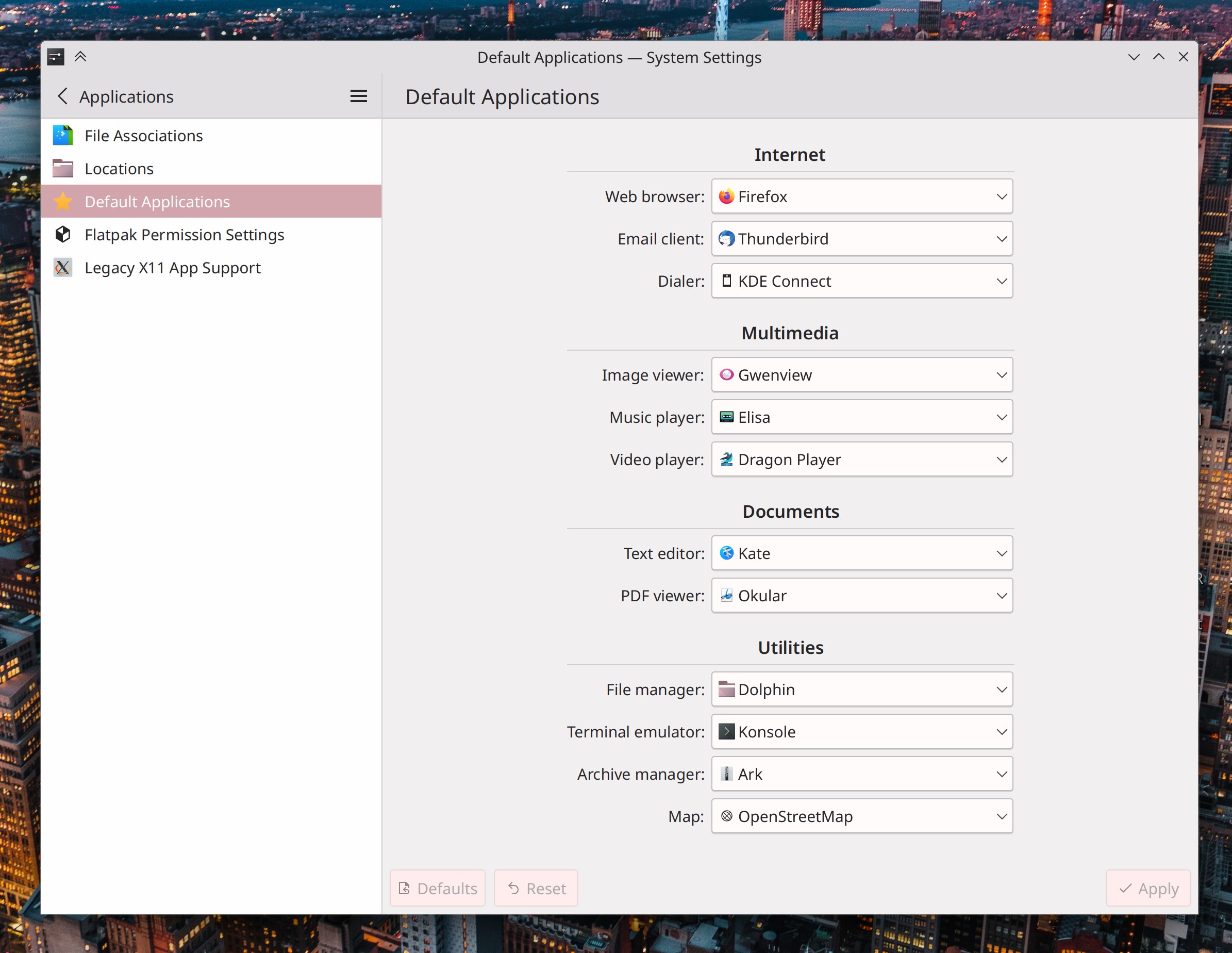
System Settings’ Default Applications page now lets you choose your preferred application for a much wider variety of file types! (Méven Car, Plasma 6.0. Link):

System Settings main window showing "Default Applications" page with large list of URL protocols and file formats that you can choose your preferred app for, including "Web browser," "Email client," "Dialer," "Image viewer," "Music player," "Video player," "Text editor," PDF viewer," File manager," Terminal emulator," "Archive manager," and "Map"
You can still override these broad mappings with per-file-type mappings in the File Associations page, of course. And when you do so, those overrides will be displayed here!

Throughout Kirigami-based apps, standard list items with elided text now display a tooltip on hover showing the full text (Ivan Tkachenko, Frameworks 5.103. Link)

User Interface Improvements

Elisa now increments a song’s play count when it finishes playing, not when it starts (Frisco Smit, Elisa 23.04. Link)

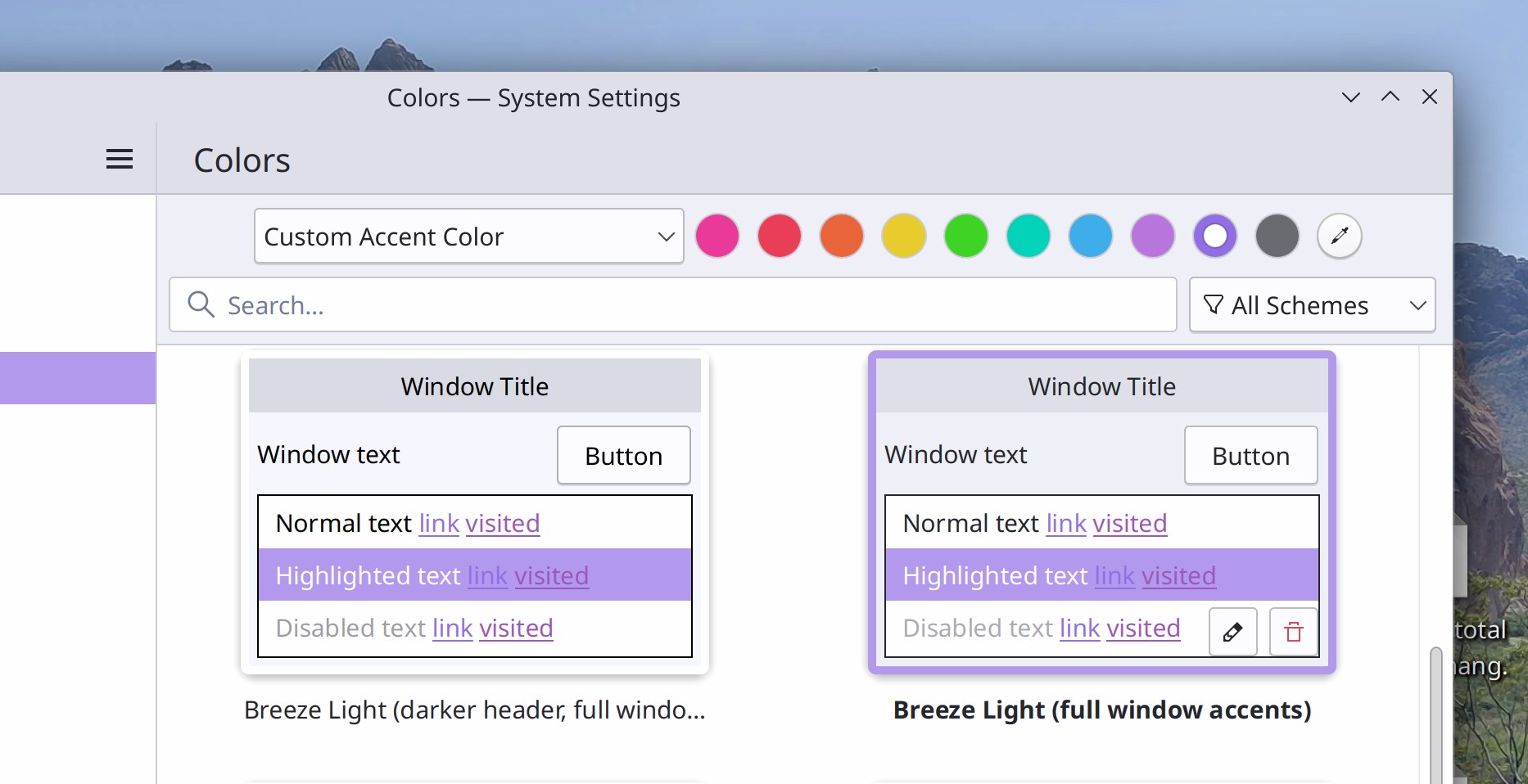
The accent color picking UI has been condensed to it takes up less space, which opens up room for us to add other settings there in the future, such as day/night color scheme switching, which is in progress! (Tanbir Jishan, Plasma 6.0. Link):

System Settings main window showing Colors page with accent color choosing user interface that fits entirely on one row, with a combobox on the left showing "Custom accent color" and a row of dots beside it, with a purple dot selected

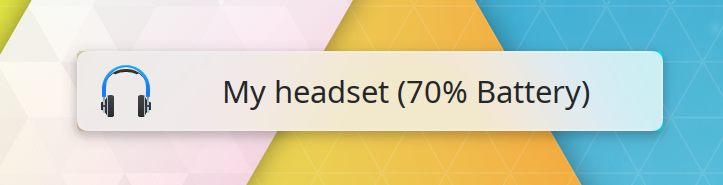
The OSD that appears when you switch audio devices now also shows the battery level of the new audio device you switched to (if that device has a battery and reports battery info, of course) (Kai Uwe Broulik, Plasma 6.0. Link):

OSD showing an image of a headset beside the text "My headset (70% battery)"

Framed views with rounded corners in QtQuick-based software no longer have tiny “korners”-style visual glitches in the corners (Ivan Tkachenko, Frameworks 5.103. Link):

Close-up view of a rounded corner in a framed scrollable view of a Qt-Quick-based user interface that shows perfect roundned both inside and outside the frame

Significant Bugfixes

(This is a curated list of e.g. HI and VHI priority bugs, Wayland showstoppers, major regressions, etc.)

Using a keyboard shortcut to close a window by dragging it around no longer causes it to leave a ghostly non-interactive shadow of itself hanging around (Marco Martin, Plasma 5.27. Link)

Upgrades of Flatpak runtimes with have a new version available are once again marked as such appropriately in Discover, rather than being listed as a “refresh” of the existing version (though that’s still possible too) (Aleix Pol Gonzalez, Plasma 5.27. Link)

Viewing System Settings’ Application Style page no longer sometimes causes the CPU usage to spike when certain 3rd-party application styles are installed (Fushan Wen, Plasma 6.0. Link)

Fixed two issues with Plasma panel widget pop-up placement that could cause popups to be inappropriately centered on their panels when using a multi-monitor setup or when the panel is not maximized to take up all available space on its screen edge (Niccolò Venerandi, Frameworks 5.103. Link)

Spectacle’s “Copy to clipboard right after taking a screenshot” feature once again works in the Plasma Wayland session (David Redondo, Frameworks 5.103. Link)

In QtQuick-based software, it’s no longer possible to drag things around in scrollable views that shouldn’t be draggable, like items in sidebars and lists (Marco Martin, Frameworks 5.103. Link)

Fixed a ton of little miscellaneous glitches with scrollbars in QtQuick-based software (Ivan Tkachenko, Frameworks 5.103. Link)

Other bug-related information of interest:

Automation & Systematization

Updated the included documentation for System Settings’ Global Themes, Colors, Cursors, Desktop Session, Plasma Search, Task Switcher, Screen Edges, General behavior pages! (Natalie Clarius, Plasma 5.27. Link 1, link 2, link 3, link 4, link 5, link 6, link 7, link 8, link 9)

Added documentation for Aurorae window decorations! (Natalie Clarius. Link)

…And everything else

This blog only covers the tip of the iceberg! If you’re hungry for more, check out https://planet.kde.org, where you can find more news from other KDE contributors.

How You Can Help

Please test the Plasma 5.27 beta! Bug reports filed against the beta version (5.26.90) get looked at and prioritized. It really helps. And of course, if you’re a developer, fixing those bugs is massively impactful too. You might also want to check out our 15-Minute Bug Initiative. Working on these issues makes a big difference quickly!

Otherwise, visit https://community.kde.org/Get_Involved to discover ways to be part of a project that really matters. Each contributor makes a huge difference in KDE; you are not a number or a cog in a machine! You don’t have to already be a programmer, either. I wasn’t when I got started. Try it, you’ll like it! We don’t bite!

And finally, KDE can’t work without financial support, so consider making a donation today!

This week in KDE: Major bugfixing and screen recording in Spectacle

The team is in full-on bugfixing mode and we’re knocking out issues left and right in preparation for the Plasma 5.27 final release! I bet everyone reading can find at least one fix for a bug that’s annoyed them at some point, because we have a few big ones here! We want this to be the best, most stable, most awesome Plasma 5 release ever, so folks are happy with it for 8 months or longer before Plasma 6 drops.

We did manage to sneak in some feature work too (you know us!) including screen recording for Spectacle! Check it out:

New Features

Spectacle now includes video recording on Wayland! (Aleix Pol Gonzalez, Spectacle 23.04. Link):

Spectacle main window showing a tab bar on the right with the tabs "Screenshot" and "Recording", demonstrating the new screen recording functionality

OpenConnect VPNs now support double-authentication mode using SAML authentication (Rahul Rameshbabu, Plasma 6.0, Link)

By default, the tooltips for all of our various clock widgets now show seconds, just in case you need to see them quickly, but don’t want the overhead of manually turning on the display of settings. This is also configurable, of course! (Alessio Bonfiglio, Plasma 6.0. Link 1 and link 2)

When you’re using the Unsplash Picture of the Day wallpaper plugin, you can now choose to only show results from the “Cyber” category (David Elliott, Plasma 6.0. Link):

Plasma desktop wit wallpaper depicting a  turquoise colored sci-fi subway station from Unsplash's "cyber-world", with Plasma's configuration window open in front of it demonstrating how to configure Plasma to show these kinds of wallpapers

User Interface Improvements

When you have the filter bar open in Dolphin and it’s filtering the view, clicking on a Places panel for the current view entry now resets the filter and shows you everything (Serg Podtynnyi, Dolphin 23.04. Link)

Spectacle’s “Capture the current pop-up only” checkbox is no longer present on Wayland, because it doesn’t do anything there (me: Nate Graham, Spectacle 23.04. Link)

System Settings’ Icons page now shows a “Help” button that takes you to the documentation for it (Natalie Clarius, Plasma 5.27. Link)

It’s now possible to delete Global Themes right from the grid view in System Settings, without having to go into the “Get New Global Themes…” window to do it, just like in most other System Settings pages for choosing visual theming options (Fushan Wen, Plasma 6.0 Link)

Scrolling over scrollbars (not dragging them; actually scrolling over them) now works consistently in QtQuick-based apps. And they also look better when using a right-to-left language, to! (Ivan Tkachenko, Frameworks 5.103. Link 1 and link 2)

Significant Bugfixes

(This is a curated list of e.g. HI and VHI priority bugs, Wayland showstoppers, major regressions, Plasma 5.27 beta bugs, etc.)

Spectacle FINALLY no longer includes itself in screenshots taken without a 1-second or longer delay using the main window (David Redondo, Spectacle 23.04. Link)

Under certain circumstances, Discover no longer always crashes on launch unless its cache folder (~/.cache/discover) is empty (Fabian Vogt, Plasma 5.24.8. Link)

KWin can no longer sometimes crash when you rapidly resize a quick-tiled window adjacent to another quick-tiled window (Vlad Zahorodnii, Plasma 5.27. Link)

Fixed a recent regression in the Plasma Wayland session that could cause GTK apps to succeed at sending clipboard data to Plasma only once and then fail on all subsequent times (David Redondo, Plasma 5.27. Link)

GTK4 apps are no longer double-scaled when using screen scaling (Luca Bacci, Plasma 5.27. Link)

When you’ve set up a window rule that wants to move a window to a screen location that doesn’t exist (e.g. because that location is on another screen that’s no longer connected), it will no longer be moved to an offscreen location where it’s open but inaccessible; instead the rule simply doesn’t execute at all until the location it wants to move the window to exists again (Xaver Hugl, Plasma 5.27. Link)

When an app requests that the system inhibit the system from going to sleep–and only from going to sleep–Plasma no longer inappropriately inhibits screen locking too (Kai Uwe Broulik, Plasma 5.27. Link)

In the Plasma Wayland session, fixed another bug that could cause you to be unable to choose a screen resolution other than your screen’s native resolution (Vlad Zahorodnii, Plasma 5.27. Link)

In the Plasma Wayland session, GTK2 apps minimized to their System Tray icon can now be restored (Fushan Wen, Plasma 5.27. Link)

Fixed a variety of subtle bugs in desktop widget positioning, so your widgets should FINALLY no longer move slightly every time you start the system (Marco Martin, Plasma 5.27. Link)

In the Notifications widget, the “show more” text FINALLY no longer ever overlaps other notifications in the history (Marco Martin, Plasma 5.27. Link)

If you’ve resized the Kickoff Application Launcher’s popup, searching in it no longer sometimes resets it to the default size (Fushan Wen, Plasma 5.27. Link)

After installing a new font, clicking on the “OK” button for the “job’s finished” message now makes it go away as expected (me: Nate Graham, Plasma 5.27. Link)

The entire system will no longer sometimes (but especially when using the Btrfs filesystem) hang while Flatpak apps are installed or updated (David Redondo, Frameworks 5.103. Link)

Fixed a whole buttload of weird, random-seeming clipboard issues in the Plasma Wayland session (David Redondo, Frameworks 5.103. Link 1, link 2, link 3, and link 4)

Other bug-related information of interest:

Automation & Systematization

Added UI tests to the Kirigami.Avatar component to make sure it always works as expected when clicked or tapped (Ivan Tkachenko, Frameworks 5.103. Link)

…And everything else

This blog only covers the tip of the iceberg! If you’re hungry for more, check out https://planet.kde.org, where you can find more news from other KDE contributors.

How You Can Help

Please test the Plasma 5.27 beta! Bug reports filed against the beta version (5.26.90) get looked at and prioritized. It really helps. And of course, if you’re a developer, fixing those bugs is massively impactful too. You might also want to check out our 15-Minute Bug Initiative. Working on these issues makes a big difference quickly!

Otherwise, visit https://community.kde.org/Get_Involved to discover ways to be part of a project that really matters. Each contributor makes a huge difference in KDE; you are not a number or a cog in a machine! You don’t have to already be a programmer, either. I wasn’t when I got started. Try it, you’ll like it! We don’t bite!

And finally, KDE can’t work without financial support, so consider making a donation today!

This week in KDE: The best Plasma 5 version ever

Plasma 5 has officially branched for the beta version of its 5.27 release. Go check out the announcement and test out the beta! You’ll probably have noticed the number of 15-minute and very high priority Plasma bugs creeping up, and during this 3-week beta period, we’re going to be focusing on those to ensure that 5.27’s release is as bug-free as possible. Beyond that, Plasma 5.27 will continue to get periodic bugfix releases until and a bit beyond the release of Plasma 6, which we are very much hoping to have ready by late this year! Exciting times.

New Features

The Digital Clock widget’s ever-growing list of alternate calendars now includes the Islamic Astronomical and Umm al-Qura calendars (Fushan Wen, Plasma 6. Link)

Wallpaper creators can now define a custom accent color for their wallpaper that will be automatically used when the user is using the “Wallpaper from accent color” feature, rather than letting the system calculate an accent color automatically (Fushan Wen, Plasma 5.27. Link)

You can now enter Do Not Disturb mode using the command line by running kde-inhibit --notifications (Jakub Nowak, Plasma 5.27. Link)

User Interface Improvements

High-resolution album art in Elisa is now sharper and better-looking when using scaling (me: Nate Graham, Elisa 22.12.2. Link)

KWin now tries its best to force the smoothest animations by default (the balance of smoothness vs latency is user-configurable) which improves performance on integrated Intel GPUs in the Plasma Wayland session (Vlad Zahorodnii, Plasma 5.27. Link)

In the Plasma Calculator widget, you can now copy the output or delete a digit with the backspace key (Martin Frueh, Plasma 5.27. Link 1 and link 2)

The Plasma Calculator widget no longer appears as a search result in KRunner, Kickoff, and Overview where activating it would open it in a standalone window, which made people believe that it was the default calculator app or confused them regarding why two calculators were installed (me: Nate Graham, Plasma 5.27. Link)

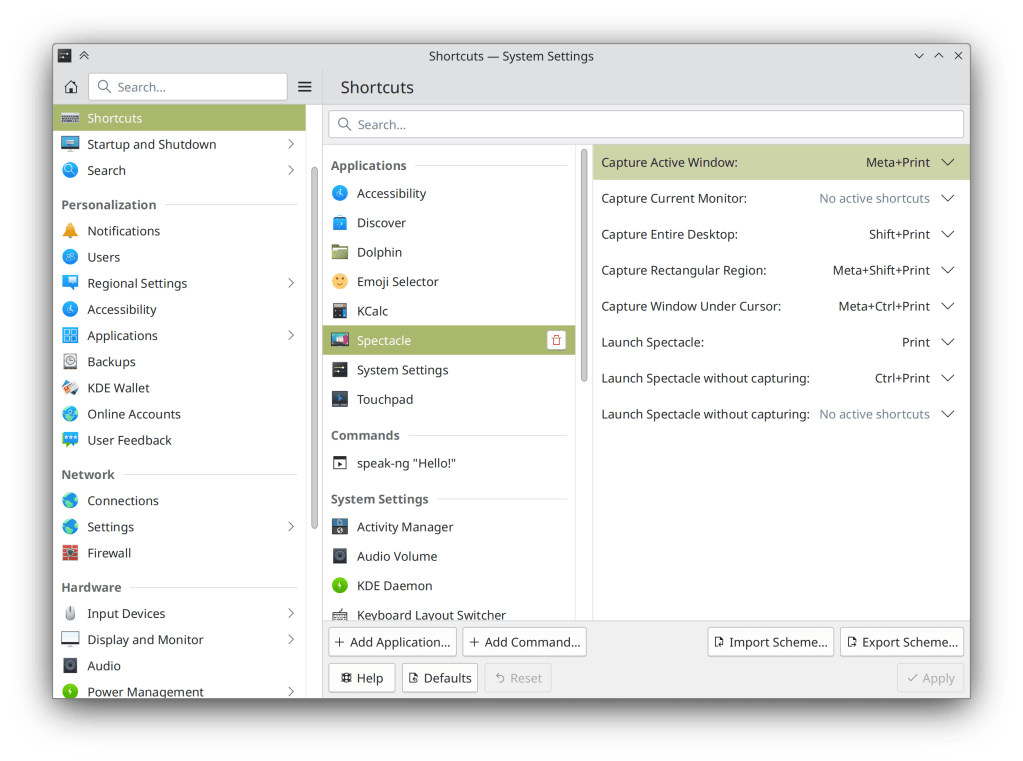
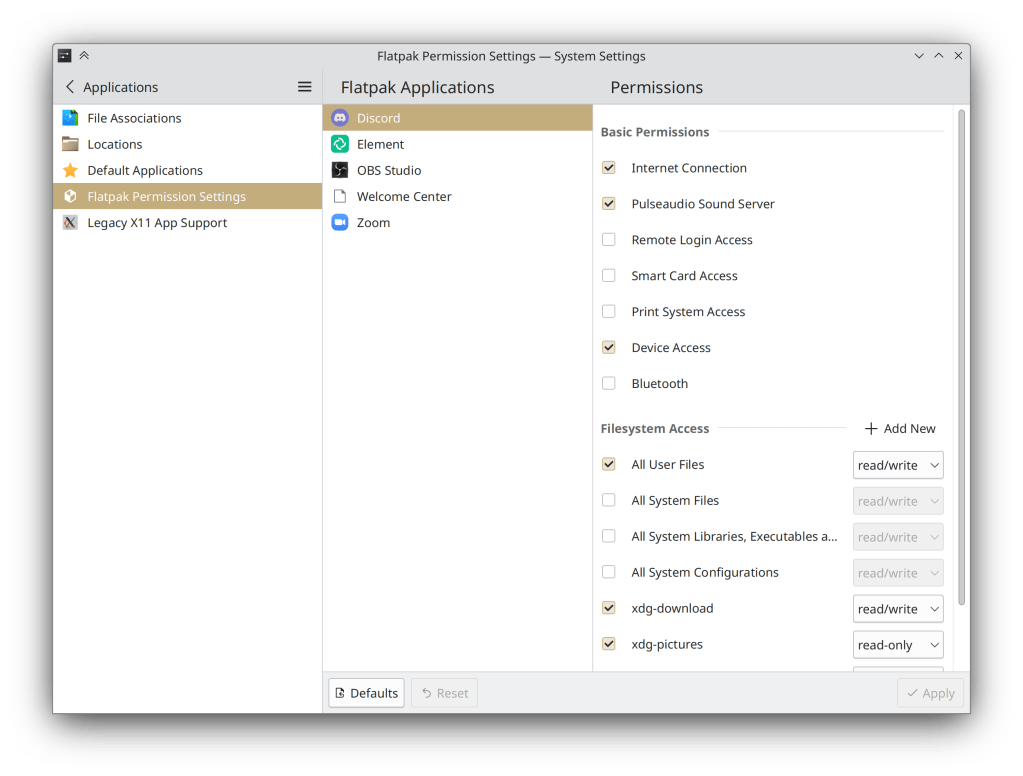
System Settings’ Shortcuts and Flatpak Permissions pages now use our more modern frameless style (me: Nate Graham, Plasma 5.27. Link 1 and link 2):

  • System Settings "Shortcuts" page showing frameless style
  • System Settings "Flatpak Permissions" page showing frameless style

The Window List widget now displays appropriate fallback icons when the active app’s own icon is invalid, or when the Plasma Desktop is active (Guilherme Marçal Silva, Plasma 5.27. Link)

In the System Tray configuration window, some items no longer have “(Automatic load)” added after their names, which we realized was an implementation detail that didn’t communicate anything important to the user (Nicolas Fella, Plasma 5.27. Link)

Throughout QtWidgets-based KDE apps, tooltips can no longer display the same text twice (once for the normal tooltip text, and again for the “What’s this” expanded text prompt) (Joshua Goins, Frameworks 5.103. Link)

Significant Bugfixes

(This is a curated list of e.g. HI and VHI priority bugs, Wayland showstoppers, major regressions, etc.)

Fixed a way that KWin could crash when closing one instance of a multi-instance app while the “Dim Inactive” effect is enabled (Vlad Zahorodnii, Plasma 5.27. Link)

Implemented an older version of the Wayland text-input protocol in KWin, which makes input methods work in Chromium and Electron apps (Xuetian Weng, Plasma 5.27. Link)

Basic sticky keys support is now implemented in the Plasma Wayland session! More will follow soon (Nicolas Fella, Plasma 5.27 Link)

Fixed various recently-introduced visual glitches affecting Panel and System Tray icons, including some tray icons of Qt6 apps constantly flickering. Also fixed the autotest covering this to actually work so it won’t regress again! (Arjen Hiemstra, Frameworks 5.103. Link 1 and link 2)

Other bug-related information of interest:

Automation & Systematization

Add a user interface test for the Digital Clock’s calendar popup, to make sure all of its buttons work as expected (Marco Martin, Plasma 5.27. Link)

…And everything else

This blog only covers the tip of the iceberg! If you’re hungry for more, check out https://planet.kde.org, where you can find more news from other KDE contributors.

How You Can Help

If you’re a developer, check out our 15-Minute Bug Initiative. Working on these issues makes a big difference quickly!

Otherwise, visit https://community.kde.org/Get_Involved to discover ways to be part of a project that really matters. Each contributor makes a huge difference in KDE; you are not a number or a cog in a machine! You don’t have to already be a programmer, either. I wasn’t when I got started. Try it, you’ll like it! We don’t bite!

And finally, KDE can’t work without financial support, so consider making a donation today!

This week in KDE: Well just look at all these pictures!

This one is pretty juicy in the eye candy department as we ramp up in the new year! Check out all this goodness:

New Features

You can now show the Hebrew Calendar in your Digital Clock popup’s calendar if you want (Fushan Wen, Plasma 5.27. Link):

Plasma Digital Clock widget's popup showing time zones and Hebrew calendar

KRunner (and other Search interfaces that use KRunner under the hood, like Kickoff and Overview) can now convert between different units of measurement for fabric weights (me: Nate Graham, Frameworks 6.0. Link):

KRunner showing conversion from 170 grams per square meter to 5.013 ounces per square yard

User Interface Improvements

After considering user feedback, Spectacle now only remembers the last-used rectangular region box until it’s quit, rather than always (Bharadwaj Raju, Spectacle 22.12.2. Link)

Elisa’s header area can now be manually resized so it takes up less space, or even collapsed completely to create a very clean and compact appearance (Arkadiusz Guzinski, Elisa 23.04. Link):

Elisa main window with collapsed header bar

Elisa’s “Frequently Played” view is now a simple list of songs arranges by play count, rather than using a complicated time-based heuristic that was not clear and made the contents look random. And its sort order buttons now work properly, too (Jack Hill, Elisa 23.04. Link 1 and link 2)

Discover now helps you out when you do a search in a category page for something not in that category (me: Nate Graham, Plasma 5.27. Link):

Discover main window showing a search for firefox on the games page, with a placeholder message saying 'firefox was not found in the games category' and a button to search everywhere

As requested by commenters last week, the “Add Command” entry dialog on the Shortcuts page now has a button you can use to find a script file on disk, so you don’t need to manually type its path (me: Nate Graham, Plasma 5.27. Link):

Add Command window showing "Choose" button beside text field

When using a “Picture of the Day” wallpaper, there’s now a little warning for providers that might use NSFW images as their pictures of the day (Fushan Wen, Plasma 5.27. Link):

Plasma wallpaper chooser window showing Wikimedia picture of the day provider with a warning tooltip that says, "This wallpaper provider does not filter out images that may be sensitive or objectionable. Use caution if these images will be displayed in public."

The System Tray’s configuration window now has a search field to make it easier for you to find the icon you want to configure (Ivan Tkachenko, Plasma 5.27. Link):

System Tray configuration window showing search field with "Discord" text in it and System Tray icon for Discord visible in the filtered view below

The Task Manager now defaults to showing a maximum of one row/column, so it will never randomly squash into a two-row/column layout when you don’t expect it. This is configurable and you can still set whatever maximum number of rows/columns you like, of course (Felipe Kinoshita, Plasma 5.27. Link)

On System Settings’ Window Switcher page, the “Highlight changed Settings” feature now shows changes to the keyboard shortcuts, and changing those shortcuts now comes into effect only after clicking the “Apply” button (Ismael Asensio, Plasma 5.27. Link 1 and link 2)

Un-sandboxed remote desktop apps now have access to the same screen choosing and permission system that sandboxed apps do, so they can show a better UI with the user more in control (Aleix Pol Gonzalez, Plasma 5.27. Link)

The Display Configuration widget now appears in the System Tray by default–inactive when you only have one screen or you have a multi-monitor desktop setup, and active when you have a laptop with one or more external screens connected. This makes it easier to quickly change those screens’ settings if needed (me: Nate Graham, Plasma 5.27. Link 1 and link 2):

Plasma System Tray full of icons with the "Display Configuration" icon highlighted

Significant Bugfixes

(This is a curated list of e.g. HI and VHI priority bugs, Wayland showstoppers, major regressions, etc.)

Type-ahead in Dolphin no longer inappropriately enters Selection Mode if one of the typed characters is a space (Felix Ernst, Dolphin 22.12.2. Link)

Gwenview once again shows always previews for RAW image files that it has support for (Mirco Miranda, Gwenview 22.12.2. Link)

Fixed one of the most common random-seeming crashes in KWin (Aleix Pol Gonzalez, Plasma 5.27. Link)

Made various improvements to the notification activation infrastructure in the Plasma Wayland session, with the net effect that windows from apps which properly implement the activation protocol (e.g. NeoChat and Telegram) will get raised when you click on one of the notifications they’ve sent (Aleix Pol Gonzalez, Plasma 5.27. Link)

Fixed a bug that could cause KWin to freeze when resizing certain windows in the Plasma Wayland session (Philipp Sieweck, Plasma 5.27. Link)

Setting the system language to European Portuguese once again makes the system display text in European Portuguese, rather than a mix of European Portuguese and Brazilian Portuguese (Han Young, Plasma 5.27. Link)

When you put more than one panel on a screen edge, UI elements that are displayed touching those panels now touch the thickest one, rather than being offset by the combined total of all panels’ thickness (Niccolò Venerandi, Plasma 5.27. Link)

Fixed a whole mess of issues in System Monitor that could cause NVIDIA GPUs to stop showing data after a recent driver update (David Redondo, Plasma 5.27. Link 1, link 2 and link 3)

When closing your laptop’s lid, if its backlit keyboard isn’t set up to turn itself off in the firmware, Plasma now does to ensure that power and battery life aren’t wasted (Kai Uwe Broulik, Plasma 5.27. Link)

Page titles in Kirigami-based apps should no longer sometimes randomly become elided way too early (Ivan Tkachenko, Frameworks 5.103. Link)

Other bug-related information of interest:

Automation & Systematization

Added autotests for window-related actions in the Task Manager widgets (Fushan Wen, Plasma 5.27. Link)

Fixed a bunch of autotests in Plasma that were, embarrassingly enough, perpetually broken, And also made it mandatory to for tests to pass so this doesn’t happen again for the plasma-desktop and kpipewire git repos (David Edmundson and Marco Martin, Plasma 5.27. Link 1, link 2, link 3, link 4, link 5, and link 6)

Changes not in KDE that affect KDE

Fixed a recent regression in the AMD GPU driver that could cause Plasma to freeze when a notification was received until the notification was hovered with the cursor (Xaver Hugl, The next Mesa version. Link)

…And everything else

This blog only covers the tip of the iceberg! If you’re hungry for more, check out https://planet.kde.org, where you can find more news from other KDE contributors.

How You Can Help

If you’re a developer, check out our 15-Minute Bug Initiative. Working on these issues makes a big difference quickly!

Otherwise, visit https://community.kde.org/Get_Involved to discover ways to be part of a project that really matters. Each contributor makes a huge difference in KDE; you are not a number or a cog in a machine! You don’t have to already be a programmer, either. I wasn’t when I got started. Try it, you’ll like it! We don’t bite!

And finally, KDE can’t work without financial support, so consider making a donation today!

This week in KDE: big UI improvements!

New Features

In KolourPaint, you can now choose the quality level when saving an image in the AVIF, HEIF, and HEIC file formats (me: nate Graham, KolourPaint 23.04. Link)

In the Media Player widget, you can now swipe up/down to change the volume, and left/right to change the playback position (Fushan Wen, Plasma 5.27. Link)

User Interface Improvements

Elisa now includes a few more popular radio stations by default (Someone going by the pseudonym “fanick1”, Elisa 23.04. Link)

System Settings’ Shortcuts page now features a significantly more obvious and useful UI for adding custom commands! (Bharadwaj Raju, Plasma 5.27. Link):

System Settings’ Launch Feedback page is no more, and everything on it has been moved into a popup accessible from the Cursors page, with an actual explanation of what the settings do (Fushan Wen and Janet Blackquill, Plasma 5.27. Link 1, link 2, and link 3):

The “Highlight Changed Settings” button that currently lives on a footer in the System Settings sidebar has been moved to the hamburger menu to streamline the UI (Alexander Wilms, Plasma 5.27. Link)

When pasting links into a Notes widget using the standard Paste action, they are now pasted as clickable links by default. And if you want to remove formatting, there’s a new context menu item for that too! (Martin Frueh, Plasma 5.27. Link 1 and link 2)

You can now move a single window to another activity using the titlebar context menu (Xaver Hugl, Plasma 5.27. Link)

While in Touch Mode, the global Edit Mode toolbar now lets you open the full desktop context menu too, so nothing in there is ever totally inaccessible when using a touch device (Fushan Wen, Plasma 5.27. Link 1 and link 2)

The standard set of Home/End/PageUp/PageDown navigation keys now work as expected in the Clipboard widget’s list view (Tom Warnke, Plasma 5.27. Link)

Kickoff now shows separators added in KMenuEdit (Sergey Katunin, Plasma 5.27. Link):

On a very small screen, Kickoff now switches to a more compact layout so it doesn’t gobble up all of the screen space while open (Fushan Wen, Plasma 5.27. Link)

When you paste a full file path into the directory chooser field of an Open dialog instead of the file path field, it now opens the file, as you probably were wanting it to do (Fushan Wen, Frameworks 5.102. Link)

Significant Bugfixes

(This is a curated list of e.g. HI and VHI priority bugs, Wayland showstoppers, major regressions, etc.)

It’s now possible to set a manual Night Color activation time later than 19:00 (Martin Frueh, Plasma 5.26.5. Link)

Windows activated by other apps that happen to be on a different virtual desktop don’t move between virtual desktops anymore, unless configured specifically to do so in System Settings (Nicolas Fella, Plasma 5.27. Link)

Other bug-related information of interest:

Automation & Systematization

There’s now a nice new page on develop.kde.org about packaging your KDE app using Flatpak (Thiago Sueto, link)

There’s also a major update to the KXmlGui tutorial (Thiago Sueto, link)

All links on develop.kde.org are now checked by a continuous integration runner for reachability, so that broken links will get noticed and fixed promptly (Alessio Mattiazi, link)

Added a bunch of autotests for KRunner’s date & time functionality (Natalie Clarius, Plasma 5.27. Link)

Other

NeoChat is now available on the Microsoft store! And this version has end-to-end encryption enabled by default, in case you were wondering. 🙂 (Ingo Klöcker and the NeoChat devs. Link)

…And everything else

This blog only covers the tip of the iceberg! If you’re hungry for more, check out https://planet.kde.org, where you can find more news from other KDE contributors.

How You Can Help

If you’re a developer, check out our 15-Minute Bug Initiative. Working on these issues makes a big difference quickly!

Otherwise, visit https://community.kde.org/Get_Involved to discover ways to be part of a project that really matters. Each contributor makes a huge difference in KDE; you are not a number or a cog in a machine! You don’t have to already be a programmer, either. I wasn’t when I got started. Try it, you’ll like it! We don’t bite!

And finally, KDE can’t work without financial support, so consider making a donation today!

Highlights from 2022

2022 is over, and it’s time to recap! Like in previous years, this isn’t in any way, shape, or form a list of everything that happened in KDE; it’s just an overview of the big things I noticed or was involved with. More is always available at https://planet.kde.org!

Roadmap items

Many but not all of the items I was hoping for from my 2022 roadmap are finished now.

While we didn’t get a new style for Breeze icons or inertial scrolling everywhere, we did get the merged “Formats and Languages” KCM and a major overhaul for multi-monitor support to make it all finally work properly. “The Wayland session can completely replace the X11 session” is a bit fuzzier, but I can tell you that it’s done so for me! I only ever use the X11 session for occasionally testing merge requests. This doesn’t mean it’s there for everyone, of course. But it got ever closer in 2022. And finally, the 15-minute bug initiative was a big success! We didn’t fix every one of the 142 bugs classified as “15-minute bugs” in 2022, but we did fix 95 of them! That’s a pretty good rate. We’ll keep up the focus on these quality-of-life issues in 2023, too.

Hardware Partnerships

Linux hardware vendor Tuxedo Computers started shipping Plasma by default on all of their machines, a huge win for everyone!

KFocus, makers of Kubuntu-based hardware, added some new machines to their line-up–all shipping KDE Plasma and apps by default, of course!

Slimbook released a new version of their KDE Slimbook laptop, the best yet!

Finally, the Steam Deck became a smash hit, selling over a million devices worldwide and introducing so many people to the world of KDE!

So overall it was a pretty good year for getting KDE software into more people’s hands through hardware. But there is still so much more to do. We need to get more big names here, like Dell, Lenovo, and HP!

Akademy

For the first time in a few years, we had a real, in-person Akademy. Hallelujah! It was so wonderful to reconnect with KDE folks in person. You can see videos of the sessions and talks here. And here’s my talk.

In addition, I ran for a seat on the KDE e.V. board of directors and was elected!

Professionalizing KDE

KDE has done incredibly well over its 26-year history as primarily a volunteer organization. But there was always a dirty little secret: some of the most prominent contributors along the way have been sponsored to work on KDE in a quiet way. In the same way that Red Hat quietly funds the work of a lot of GNOME people, a lot of KDE people over the years have been sponsored by Nokia, KDAB, the city of Munich, Blue Systems, Valve, and other institutions in KDE’s orbit.

And this is great! It’s a very good sign when outside companies that derive value from KDE software pay to make it even better. But it also means they’ve been paying to make it better for their use cases, their pet projects, their areas of interest.

What’s always been missing was a cadre of paid professionals to work on KDE from a big picture perspective–people who are from the KDE community, and paid by the KDE community; people who can make a living as professionals working on KDE software from a community perspective.

Well, no longer! KDE e.V. has started hiring engineers for technical positions this year, beginning with a packaging engineer. We’re working through the process of hiring a software engineer at the moment, and we have an open position for an integration engineer too.

This is big stuff! Paid professionals in the employ of KDE e.V. can counterbalance and augment the work paid for by 3rd-parties, ensuring a healthy mix, so that KDE’s future and direction can remain in the hands of KDE. It can help to ensure a certain amount of continuity of technical knowledge, so that more people get to stay in KDE once their life circumstances change to reflect a different balance of free time and monetary needs. And of course, none of this in any way diminishes the volunteer efforts the remain the backbone of KDE! On the contrary, volunteers–who by nature come and go as life circumstances and interests dictate–can really benefit from a stable core of paid professionals to interact with.

This isn’t cheap, though. If you want to help the initiative succeed and expand, please make a donation–preferably a recurring one! 🙂 If you already have, tell your buddies, your family members, your boss, anyone you know who uses and enjoys KDE software!

New Goals

This year, KDE did a third round of goal-picking, cementing this process as a key part of KDE’s culture. The three goals chosen were “KDE For All” (accessibility), “Sustainable Software”, and “Automate And Systematize Internal Processes”–three very important goals! You can see more here.

Infrastructure

This year, Bugzilla got a re-organization to make it easier for normal people to figure out where to submit a bug report:

KDE also got a better donation and fundraising platform, powered by Donorbox. This makes it much simpler for people to donate to KDE e.V.:

Finally–and this is quite new–there’s a new forum powered by Discourse in the works, currently being beta-tested and rolled out at https://discuss.kde.org. Exciting times!

Qt 6

This year KDE contributors spent an enormous amount of time porting KDE software to Qt 6, the latest version of the Qt toolkit. This is unsexy work, so I didn’t blog about it. But it’s critically important, so thanks to everyone involved! And the work is now more than half done, with most common software and nearly all of Plasma already done; you can see the progress here.

Wayland

The Wayland session made enormous progress. Slimbook started shipping their new KDE Slimbook laptops with Wayland by default, following Fedora KDE 34 doing the same in late 2021. Our list of showstoppers continues to shrink, and new issues added to it are or notably less bad then the ones they replace. There are discussions about defaulting to Wayland in Plasma 6 next year, either for the inaugural release or one of the ones soon after it. The future really is here! And if you’re tempted to grumble, “well, Wayland still doesn’t work for me for $REASON,” please do it in a bug report so developers can fix it!

Plasma

It was a big year for Plasma! Among many other changes, we got custom window tiling layouts; massive stability improvements for multi-monitor workflows; Wayland fractional scaling; non-blurry scaled XWayland apps; a UI overhaul for Discover; many KRunner UX improvements; mouse button re-binding; resizable Panel popups; finger-following touchpad gestures on Wayland; support for alternate calendars such as the Chinese lunar calendar and Islamic civil calendar; picking-and-choosing what you want to apply from Global Themes; accent color generated from wallpaper’s dominant color; and full-window tinting with the accent color.

Plus a lot more, of course! You can see everything in the Plasma release announcements, found at https://kde.org/announcements.

Apps

KDE has so many apps that I really can’t possibly do them justice here! Nevertheless, here’s an extremely small assortment:

Dolphin got a new Selection Mode, a new (optional) list view selection style, the ability to browse iOS devices using their native afc:// protocol, an eject button in the sidebar list items of ejectable/unmountable volumes.

Okular got a welcome screen, a new Breeze icon that better matches the original, a UI overhaul for its sidebar.

Gwenview gained features to annotate images and edit their brightness, contrast, and gamma.

Kate and KWrite got welcome screens, KHamburgerMenu support, searchable settings windows, keyboard macro support, and even more massive UX and feature improvements of all kinds due to an influx of new contributors and a higher tempo of regular development work.

Konsole got Sixel support, adopted KHamburgerMenu, added a plugin to save and restore text snippets, and moved its tab bar to the top of the view by default.

Spectacle was ported to Kirigami and now lets you annotate in Rectangular Region mode.

Filelight was ported to Kirigami and gained a sidebar.

Ark got a welcome screen, KHamburgerMenu support, and overhauled toolbar contents.

Elisa gained support for displaying auto-scrolling lyrics from songs using embedded LRC lyrics, .pls playlists, a real Full Screen mode, and improved presentation in Artists view, touchscreen UX improvements and overhauled playlist styling

NeoChat got encrypted chat support and a boatload of features and UI improvements!

Many QtWidgets apps adopted KHamburgerMenu for a streamlined presentation


Well that’s all for now, folks. Happy new year and let’s do awesome things in 2023!

This week in KDE: end-of-year goodies

Welp, 2022 draws to a close, but KDE never sleeps, and its developers have managed to whip up some new years’ treats for everyone!

New Features

Info Center can now show you OpenCL info on its own new dedicated page, if you have the clinfo utility installed (Linus Dierheimer, Plasma 5.27. Link)

In the Plasma Wayland session, KWin now sends along pen tilt and rotation events to apps (Joshua Goins, Plasma 5.27. Link)

User Interface Improvements

The way KRunner displays information about time zones has been substantially improved, making it easier to parse the output, and fixing a couple of bugs (Natalie Clarius, Plasma 5.27. Link):

When Night Color hasn’t been turned on yet, clicking on its System Tray icon now takes you directly to its System Settings page where you can turn it on and set it up to your liking (Guilherme Marçal Silva, Plasma 5.27. Link)

A few pages in System Settings are starting to use a new way of organizing logical sections, which hopefully should make things easier to find (me: Nate Graham, Plasma 5.27. Link 1 and link 2):

When using the default Sidebar view, System Settings sidebar items no longer show tooltips on hover, since this information is not very useful and gets in the way a lot (me: Nate Graham, Plasma 5.27. Link)

Discover now presents details for system updates when using the “Offline Updates” feature in a better way (me: Nate Graham, Plasma 5.27. Link):

Typing a space while searching in the Overview effect now always actually enters a space character, instead of activating the highlighted window when a window that matches the search term (Niklas Stephanblome, Plasma 5.27. Link)

Critical notifications no longer appear in the Overview, Present Windows, and Desktop Grid effects (Nicolas Fella, Plasma 5.26.5. Link)

You can now configure the Task Manager to show window previews when you click on a grouped task even if you’ve disabled the feature to always show window previews when hovering over tasks (me: Nate Graham, Plasma 5.27. Link)

Significant Bugfixes

(This is a curated list of e.g. HI and VHI priority bugs, Wayland showstoppers, major regressions, etc.)

Using KDE Connect to transfer files over 2 GB in size is now possible (Adrian Thiele, Frameworks 5.102. Link)

The “Always use Touch Mode” setting now persists after a reboot (Fushan Wen, Frameworks 5.102. Link)

Fixed a case where KWin could crash in the Plasma Wayland session when connecting a laptop to a docking station (Xaver Hugl, Plasma 5.26.5. Link)

Other bug-related information of interest:

Automation & Systematization

Added an autotest to test for weird character handling in wallpaper file paths, after it broke again and we fixed it (Fushan Wen, Plasma 5.27. Link)

There’s now a bot that announces relevant data about Plasma bugs in the Plasma chatroom every day (Justin Zobel):

…And everything else

This blog only covers the tip of the iceberg! If you’re hungry for more, check out https://planet.kde.org, where you can find more news from other KDE contributors.

How You Can Help

Thanks so much for helping KDE reach its goal during the end-of-year fundraiser! In fact, we’ve smashed through it, currently raising over 23,000€ of the 20k we were shooting for. Every little bit helps, especially given KDE e.V’s ambitious hiring goals. We can’t reach and sustain them without you, so thanks a ton, everyone!

If you’re a developer, check out our 15-Minute Bug Initiative. Working on these issues makes a big difference quickly!

Otherwise, visit https://community.kde.org/Get_Involved to discover ways to be part of a project that really matters. Each contributor makes a huge difference in KDE; you are not a number or a cog in a machine! You don’t have to already be a programmer, either. I wasn’t when I got started. Try it, you’ll like it! We don’t bite!