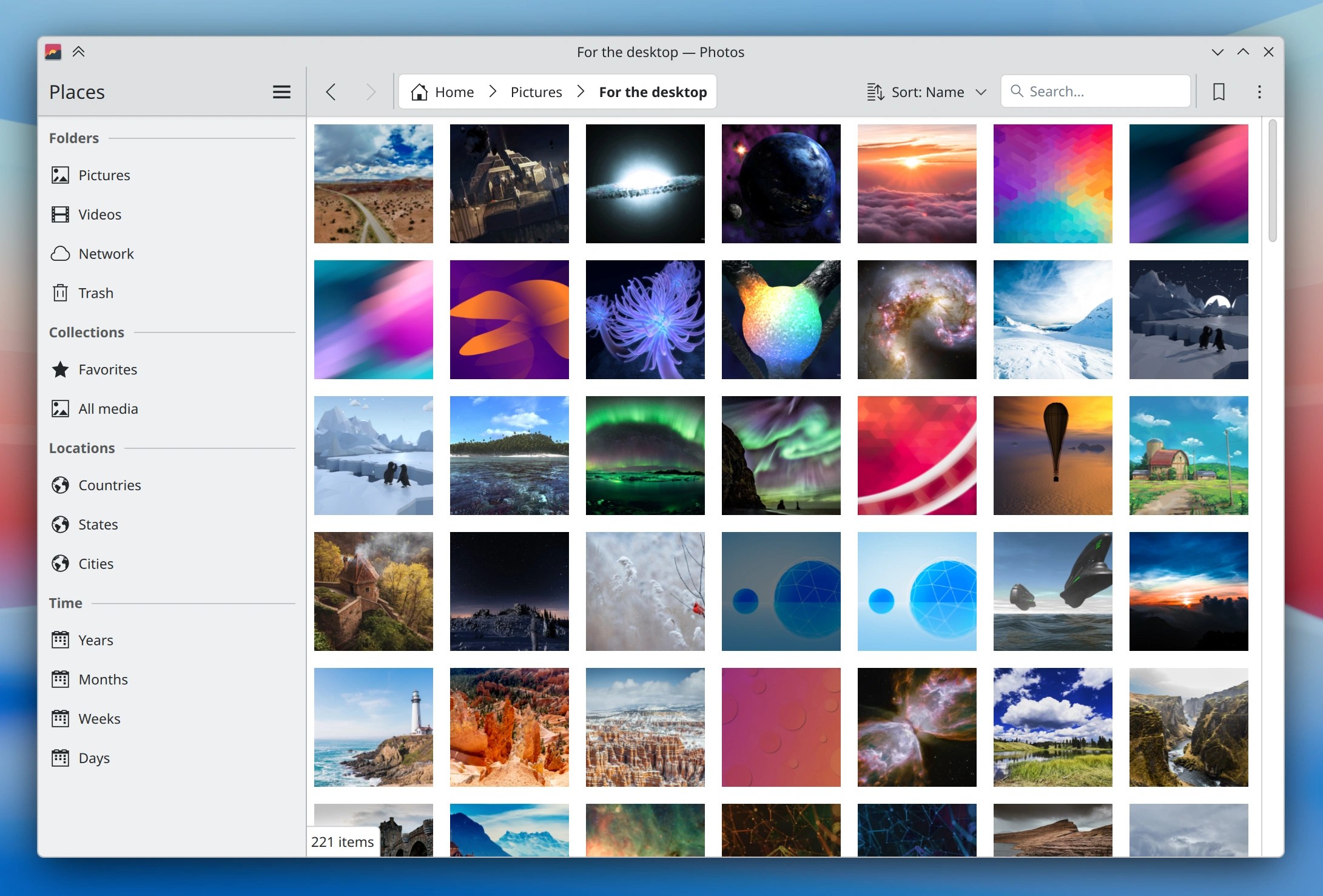
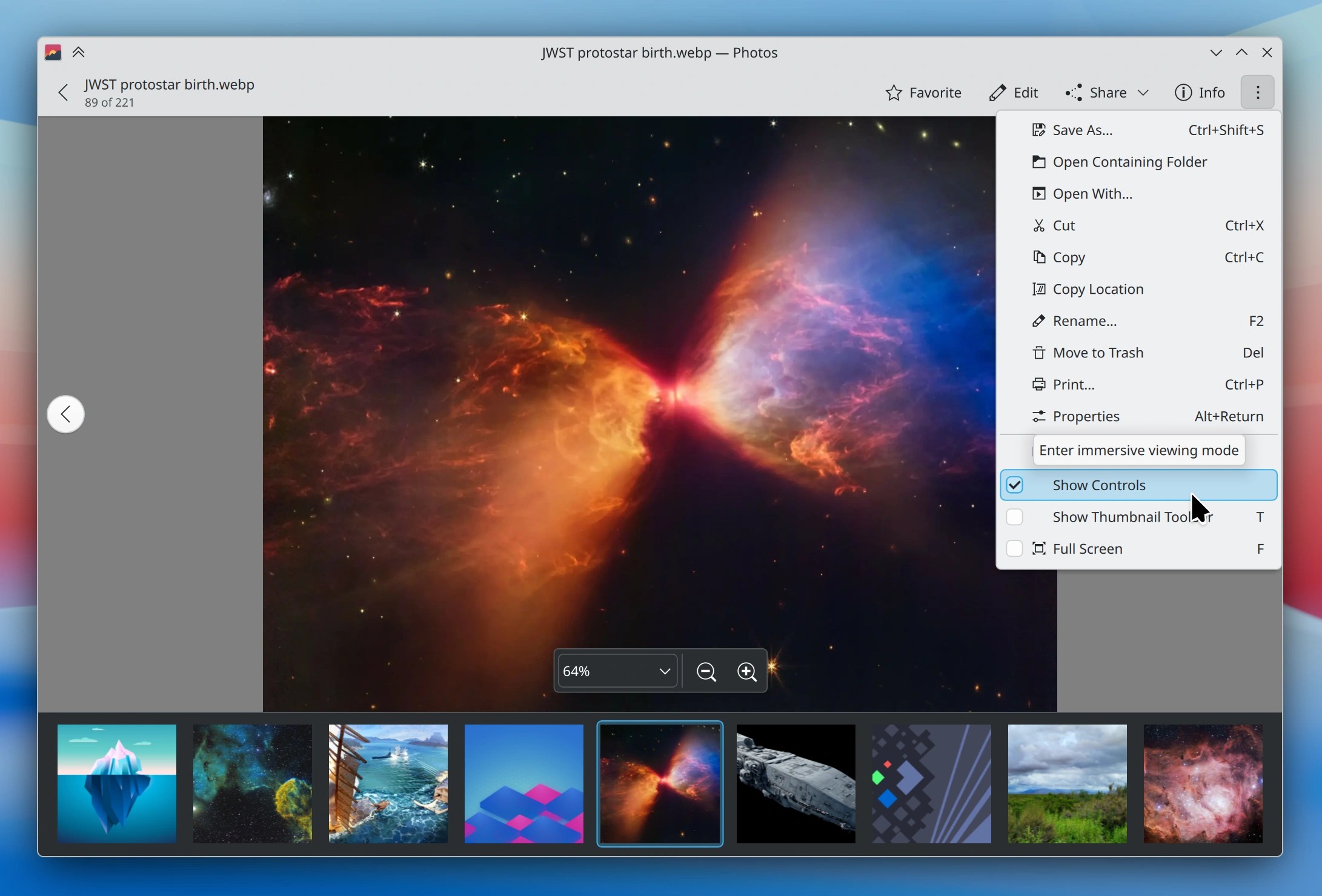
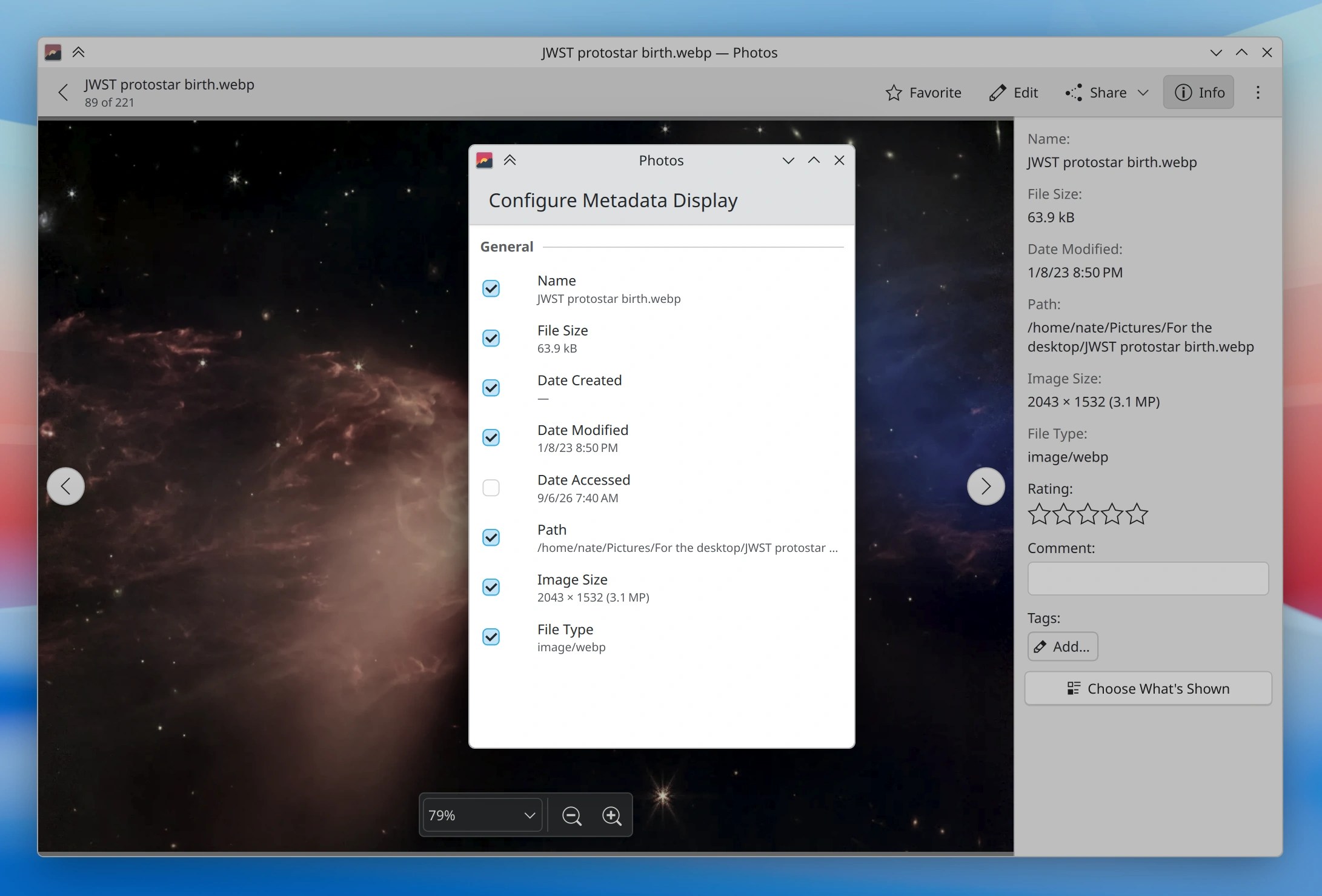
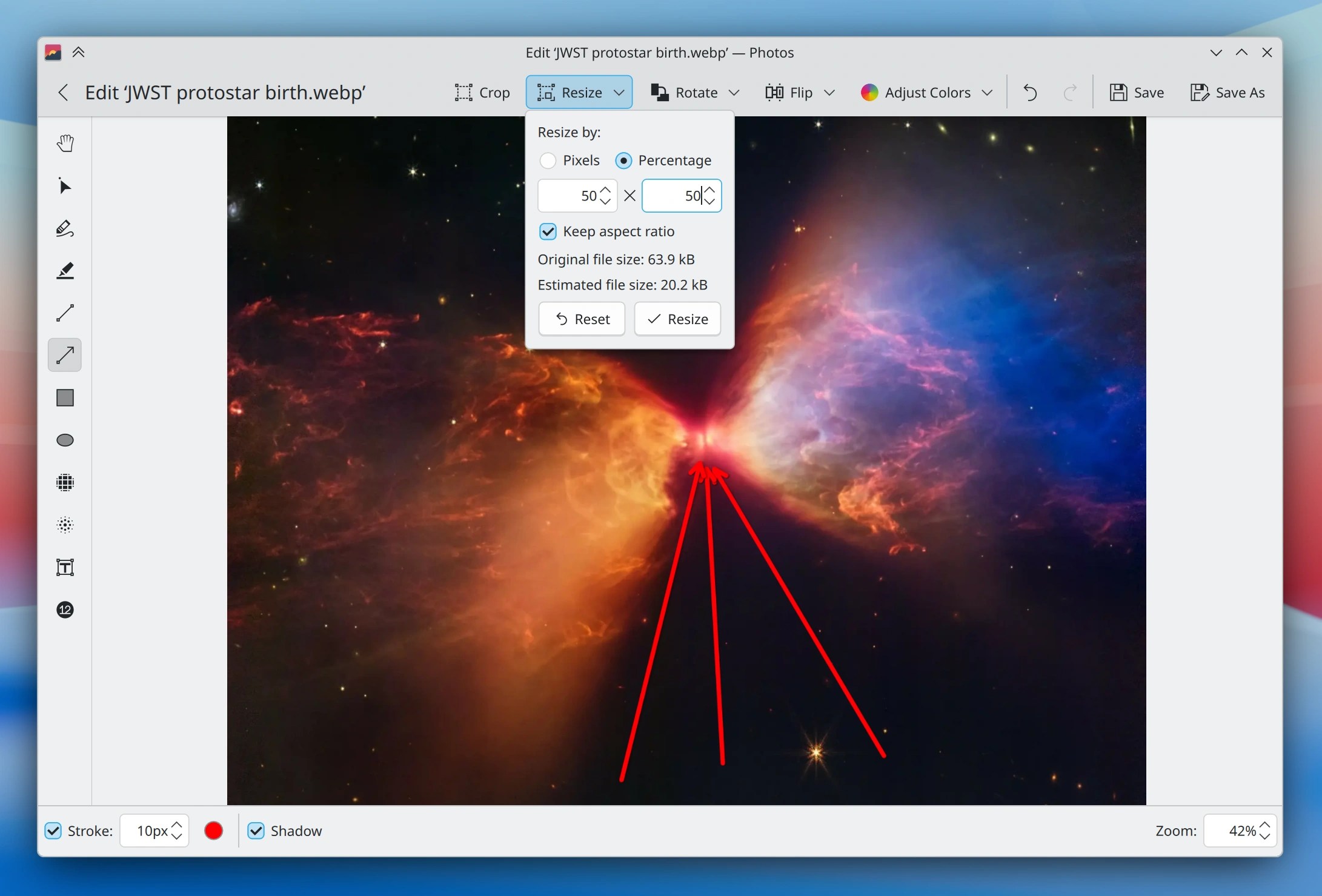
Gwenview has been KDE’s flagship image viewer for over 25 years. It works, it’s feature-packed, and it’s been modernized repeatedly. Gwenview has served generations of KDE users faithfully and well.
So… why build a replacement?
Well, over the years Gwenview has fallen behind in some areas that can’t easily be retrofitted without rewriting half of it anyway — like better performance with large image libraries, GPU acceleration, mobile-friendliness, and the kind of enjoyably hackable QtQuick UI that would make it easier to modernize and engage a new generation of contributors.
Either by way of illustration or as a result of the above, community contributions of features, bug fixes, and UI improvements to Gwenview have dried up in recent years. It would appear that Gwenview’s technical architecture has reached the limit of what people are willing to do with it.
Actually I lied: Photos is not a new app. Its first release was five years ago, after extended development dating at least back to 2017. But it was always somewhat niche, because it began as a mobile app and couldn’t match Gwenview in raw functionality and desktop-friendliness.
So over the past year, Techpaladin Software (full disclosure: I’m the CEO) has sponsored a bunch of development with the explicit goal of bringing Photos to parity with Gwenview as a first-class desktop app. Oliver’s recent blog post contains lots of interesting details about the process.
Techpaladin folks will continue to contribute maintenance for a while, but our hope is that we’ve managed to bootstrap the app to the point where the KDE community can generally take over for further feature and UI development on the desktop side. Therefore…
Give it a try!
I’d like to invite users to try using Photos, and invite distros to consider replacing Gwenview with it — either soon, or in the future.
I’m sure it won’t be perfect. Gwenview has had an extra 15 or so years in the metaphorical oven. But at this point Photos has pretty much all of the relevant features, plus some added goodies:
Much better performance, especially with large photo libraries and high DPI screens
Mobile-friendly UI that’s also capable of being used as a very small window
Timeline, location, and “just show me all my images” views
So give it a try! The current 26.08 release is pretty good, and the upcoming 26.12 release will add a few more improvements.
If you find any bugs, sources of UI awkwardness, or missing features compared to Gwenview that you actually need and care about, feel free to report them on the Bugzilla page. And changes can be contributed via merge request on Photos’ invent.kde.org page.
Let us know what you think! And if you like it, consider helping out with development or bug triaging. It takes a village to raise a child maintain an app. 🙂
For many years now, I and others have been working on getting plasmashell’s open bug reports as accurate and actionable as possible.
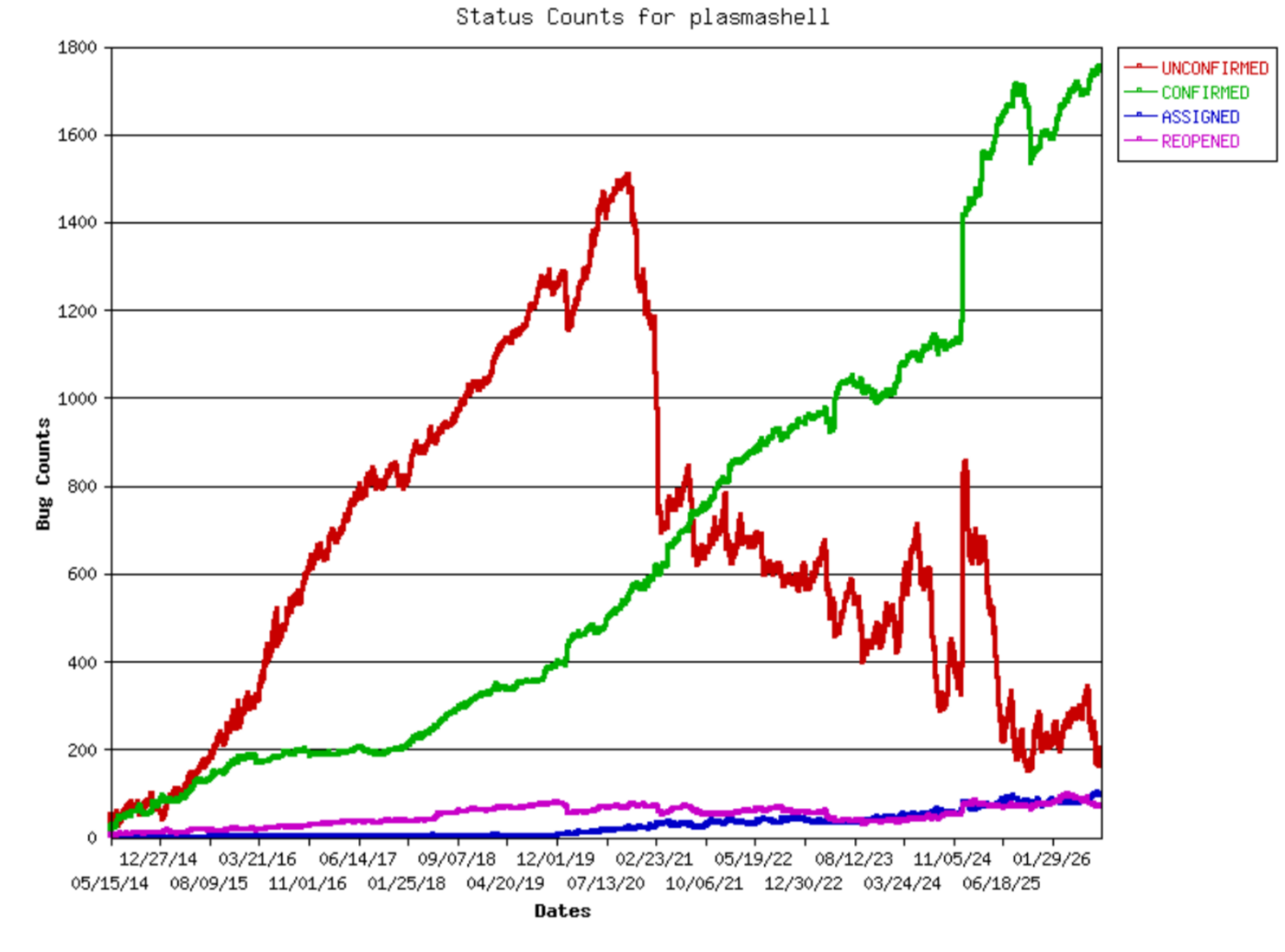
We’ve made tremendous progress, driving down the number of unconfirmed bug reports to its lowest levels in over a decade, and mostly keeping it there:
In case you’re worried about the “confirmed” count rising, it includes almost 800 feature requests. The actual number of known and confirmed bugs is about 1,100, and is not consistently rising. Also, the big spike was from a mass move of bug reports into plasmashell to make it easier to centrally track shell bugs over time.
Right now we’re at a point where we’re down to about 160 unconfirmed reports, and we need your help to get that down as close to 0 as possible.
Why do we need your help?
Because most of the remaining unconfirmed bugs are really hard to reproduce and confirm. They can only be understood or reproduced by someone with specialized hardware, uncommon software, specialized configurations, specific VPN setups, domain-specific knowledge, and so on. Others were reported in a state where the author doesn’t know how to reproduce the issue and none of us has been able to, either.
The addition of your valuable eyeballs and brains can help figure out what the heck is going on in these reports!
Figure out the pattern for issues that are reported to happen “randomly” or “sometimes”.
If you have the hardware, configuration, or specialized software necessary to try to reproduce an issue described as specific to it, try.
If you’re familiar with upstream software like the Qt, PipeWire, Bluez, graphics drivers or the Linux kernel, help identify bug reports whose issue is upstream of KDE.
What it takes
Use the latest released version of Plasma. that’s 6.7.4 as of the time of writing. A distro that uses git master versions of things is even better.
Use a distro that ships KDE software as “vanilla” as possible, with a minimum of distro-specific customizations. Either as your daily driver, or in a VM. Arch Linux and KDE Linux are good options here, and Fedora KDE is okay too. Highly opinionated distros can still work, but are not as ideal for bug triage.
And that’s it! Bug triaging help is really appreciated here.
I would absolutely love it if we could get the number of UNCONFIRMED plasmashell bugs down to 0, and then keep them that way by pouncing on every single new one as it comes in.
You can help make that possible! Thanks, everyone.
I’ve been beating the bug triage drum for a number of years, from the perspective of asking for more dedicated bug triagers. And at this point we have some! Which is amazing, and I’d like to thank them. So this time let’s talk about something different: developers triaging their own projects’ new Bugzilla tickets.
When you’re the developer, you know the internals of your software, but Bugzilla tickets are your connection to its users. If you’re not paying attention to them, you’re flying blind. It’s important to know how people use your software and what they’re having trouble with. Bug triage is a part of being a maintainer.
Fortunately, developers are often the fastest bug triagers of all. With your understanding of how the software works, you’ll know instantly which tickets are upstream or downstream issues, duplicates of existing tickets, already fixed in unreleased code or a released version the reporter doesn’t have, and — for valid reports — where the problem might be. For most, you should be able to handle them really quickly.
Even super popular projects like Plasma, Krita, and Dolphin only get a handful of Bugzilla tickets per day, so looking over all of them doesn’t take much time. Even one developer spending 5 minutes a day triaging their project’s new Bugzilla tickets makes a huge difference. Two are even better!
How do I know? With the power of graphs!
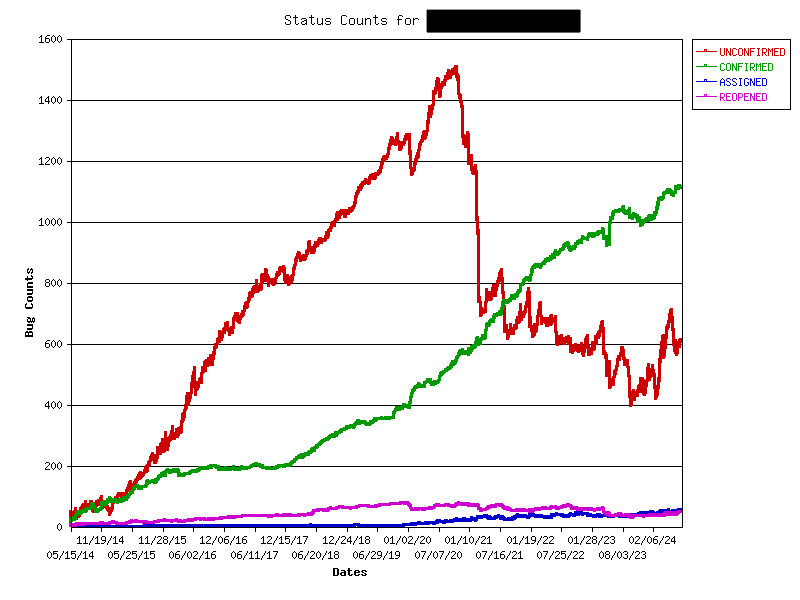
Here’s a graph of the number of Bugzilla tickets over time for an unnamed KDE project that’s had developers actively triaging tickets for the past few years. I bet you can guess when they started!
Note that the numbers include feature requests, which are also Bugzilla tickets. They need triaging too!
See how the number of CONFIRMED reports rises gradually over time, and the number of UNCONFIRMED reports falls in a choppy fashion — indicating new reports being opened and then closed within a few days. But sometimes the number of UNCONFIRMED reports go up for a few weeks, corresponding to times when the developers who do bug triage were too busy or on vacation — highlighting the impact just one or two people can have.
And now for comparison, here’s the graph for a different unnamed KDE project without developers actively triaging Bugzilla tickets:
Eek. How demoralizing.
So now let’s address some anticipated reactions!
If I did this, I’d spend all my time resolving Bugzilla tickets instead of adding new features!
I suspect otherwise, but let’s say you’re right: it would be a sign that the project is actually really buggy and could benefit from you spending more time to fix those bugs! It’s not sustainable to build features on top of a buggy foundation. It’ll catch up with you eventually: the software will become even buggier, the flood of valid yet un-reproducible bug reports will accelerate over time, and you’ll get discouraged by the situation and burn out.
No that’s not what I meant; it’s that all the Bugzilla tickets are really low quality and handling them takes forever!
Ah, this is a better problem to have. It means the software’s foundations are mostly good, but users are getting confused while using it. If you put some time into improving the project’s UI, this type of bug report will fall over time. Clarify complex or confusing features, blame-shift failures caused by 3rd-party services and plugins, improve bad error messages, etc. The KDE Human Interface Guidelines can help!
This could also mean that the tools available for collecting debugging information or reporting bugs are too crude, difficult to use, or hard to find. Spend some time improving these, and the quality of the bug reports will increase.
Finally, it could just mean that your project is just super popular and attracts a lot of attention from normal people not familiar with bug reporting. In this case, in addition to the above, enlist the help of KDE’s bug triagers! Ask us in the kde-bugs:kde.org Matrix room to focus on your project. We can filter out a lot of the obvious junk so you can focus on the real issues.
No no, still not right; it’s that I’m responsible for like 20 projects so I can’t pay attention to such a large number of new Bugzilla tickets every day!
Maybe… but have you verified whether that assumption is accurate? You might be surprised. For example, here’s a list of the Bugzilla tickets opened over the past 24 hours for all KDE Frameworks plus Dolphin, Gwenview, Okular, Filelight, and Elisa. As of the time of writing, there is exactly one Bugzilla ticket. Even broadening it to the past week shows only 16 as of the time of writing! That’s like two per day. How about all of Plasma? As of the time of writing, 6 new tickets in the last 24 hours. Most individual apps get between zero and 2 new tickets per day. These are not overwhelming numbers of Bugzilla tickets to triage. Doing it every day should take only a few minutes.
Ugh, Bugzilla sucks! It’s so clunky and you can’t edit comments or paste images inline! I hate interacting with it!
I definitely won’t deny that Bugzilla is kind of old and clunky-feeling. And not being able to edit comments or paste images inline are indeed pain points. But the grass isn’t greener on the Gitlab side, which would be our alternative. Over the years I’ve compiled a list of showstopper bugs for using Gitlab Issues, including:
Moving issues clones them with new comments and history; they can get out of sync and it’s impossible to track issues with persistent URLs!
No sub-components, making organization messy unless you apply a soup of tags to every issue. Even then, tags can’t fully replace actual categorization. Finding anything becomes extremely difficult!
Only people with developer accounts can add tags, increasing the burden on developers to triage their own issues.
Very poor/no support for issue organization with large projects that span multiple git repos.
No way to track number of duplicates, making important issues harder to notice and prioritize.
Bulk update feature is so limited as to be useless.
No fancy graphs like the ones I showed earlier.
It’s not a better product, in my opinion. So yeah, maybe Bugzilla sucks, but so does our available alternative — as well as most of the rest of the competition out there, frankly. Bug trackers are just not sexy projects that attract a lot of money and developer attention. The upstream Bugzilla project itself is struggling hit $200 a month in donations.
Bug triage just isn’t fun. I’m a volunteer, and I want this to be a fun hobby, not work. I don’t wanna do it, sorry.
I totally get it! But let’s take a step back: if you’re volunteering for KDE, you’ve already got a hobby that looks like work to normal people. Don’t deny it, you know it’s true. 🙂 You perform professional-quality software development for free that the average bear demands six figures with benefits for.
And if the volunteer activities you engage in consist of anything other than writing cool new features, then it really starts to look like work! Porting to new APIs? Refactoring old code? Fixing bugs that you don’t personally experience for the good of the project? If you do these tasks out of a sense of responsibility, obligation, or personal pride regarding the state of the project, then bug triage is no different: an under-appreciated task that’s important for project’s long-term health.
OK Mr. Fancypants, how do I do it?
We have extensive documentation on how to do bug triage. But honestly, you’ve been around the block, you probably already know what to do. 🙂
The other topic is how to see daily Bugzilla tickets. If you’ve got good email hygiene, having them emailed right to you is best. Let ’em go to your inbox (don’t filter them into a folder!) and handle them immediately! You can subscribe yourself to the mailing list that new Bugzilla tickets for the project get sent to, or else ask me or a sysadmin to add you personally to the CC list for new tickets (this way is less overwhelming).
The other method is to set aside some time at the beginning of the day for bug triage. Click here and modify the Bugzilla search to include the products and components you care about. Hit “Search”, bookmark the final link, and just visit it once per day.
It’s that easy. And your project and its users will thank you! So go out there and triage your project’s bugs!
In today’s other blog post, I mentioned how we’ve been getting a huge number of bug reports since the Mega-Release. If you’re not in software engineering, this probably seems like a bad thing. “Oh no, why so many bugs? Didn’t you test your software properly!?”
Since most people are not involved in software engineering, this perspective is common and understandable. So I’d like to shed a light on the assumptions behind it, and talk about the challenges involved in improving software quality, which is a passion of mine.
Don’t kill the messenger
See, bug reports are a “don’t kill the messenger” type of thing. Bugs are there whether they get reported or not, and getting them reported is important so you have a more accurate picture of how your software is actually being used by real people in the real world.
In our KDE world, the alternative to “lots of bug reports” isn’t “few bug reports because there are few bugs” but rather “few bug reports because the software isn’t actually being used much so no one is finding the bugs.” What matters more is the severity of the actionable bug reports.
What bug-free software looks like
That sounds so defeatist! Surely it must actually be possible to have bug-free software, right?
Yes. But to achieve it, you have to test literally every possible thing the software can do to make sure it performs correctly in the environment in which it’s doing it. If the software can do infinite things in infinite environments, then testing also becomes infinite and therefore impossible, so combinations get missed and bugs sneak through. Bug-free software must aggressively limit the scope and variety of those environments to just the ones that can be tested. What does that look like in practice?
Limit what the software can do in the first place. Remove as many features, options, and settings as possible without compromising the product’s necessary core functionality.
Limit how the user can modify and extend the software after release. No user-created themes, widgets, scripts–nothing! Every modification to what the software can do or how it looks must go through a the same QA team that QAd the software in its original state. 1st-party modifications only.
Limit the versions of upstream 3rd-party libraries, dependencies, and kernels that the software is allowed to use. Lock those versions and test everything the software can do on those specific versions.
Limit how downstream 3rd-party user-facing software (i.e. apps) can interface with the system. Lock it down in a sandbox as much as you can so any misbehavior can’t affect the rest of the system.
Limit the hardware that the software stack is allowed to run on. Test everything the software can do only on that hardware.
Does this sound very much like how KDE software is developed, distributed, and used? I’d say it’s more like how Apple builds products (and note that Apple products still have bugs, but I digress)! By contrast: KDE develops lots of features and options; we’re liberal with supported library, dependency, and kernel versions; and we don’t prevent you from installing our software on any random device you can get your hands on.
You can see the challenge right away! The foundation of quality is a set of restrictions that we don’t want to impose on ourselves and our users. You folks reading this probably don’t want us to impose them on you, either.
Quality from chaos
So is it just impossible to ensure quality in a permissive environment? No, but it’s harder. That’s right: we in the KDE free software world set for ourselves a fundamentally more difficult task than the big corporations with their billions of dollars of resources. Given this, I think we’ve done a pretty darn impressive job with the Mega-Release. And judging by initialimpressionsout there, it seems like many others agree too!
So how did we do it?
We lengthened our beta period to 3 months and relied on bug reports from people using the software in their own personal environments.
Yes you, loyal reader! We wanted to hear how our software was working on your 12-year-old Netbook. We wanted to hear how it worked when plugged into two TVs and a rotated monitor, all through a KVM switch. We wanted to hear how it coped with the most bizarre-looking 3rd-party themes. By using our flexible and non-limited software in your diverse ways on your diverse hardware, you’re testing it and finding all the bugs that we lack the resources to find ourselves.
Does this sort of QA work sound like something you don’t want to do? That’s 100% fine. But then you need for someone else to be the QA team for you. There are two options:
Buy a computer with KDE software pre-installed; there are a lot of them now! Then it’s the vendor’s responsibility to have done adequate QA on their own products. Is it buggy anyway? Complain to them or find a better vendor!
If you’re going to install it yourself, limit yourself to common hardware, default software settings, and operating systems that are relatively conservative in their update schedules. Then the QA has been provided by others who who already used your exact setup and reported all the bugs affecting it.
Become a superhero
But what if you do want to help out with making the software better for others, but you’re not a programmer? Congratulations, you’re a real-life superhero.
We’ve already talked about reporting bugs. It’s also important to do a good job with your bug reports so they’re actionable! I’ll encourage folks to read through our documentation about this. Low-quality bug reports don’t just waste our time, they waste yours as well!
But where do all those 150-200 bug reports per day that I mentioned actually go? There’s a flip side which is that someone needs to do something with every single one of them. The more bug reports we get (which, again, is good!) the more we need people to help triaging them.
Because the truth is, most bug reports don’t begin life being actionable for developers. They may be missing key information; they may be mistaking a feature for a bug; they may be describing an issue in someone else’s software; they may be about an issue that was already fixed in a version of the software that the reporter doesn’t have; they may be describing a real issue but in an unclear and confusing way; and so on.
The job of bug triagers is to make each of these bug reports actionable. Ask for missing information! Move them to the right products! Set the version and severity appropriately! Mark already reported bugs as duplicates of the existing report! Mark obvious upstream or downstream issues accordingly and direct people to the places where they can report the bugs to the responsible developers! Try to reproduce the issue yourself and mark it as confirmed if you can! And so on. It isn’t terribly glamorous work, so there aren’t very many people lining up to be volunteer bug triagers, unlike developers. But it’s very important. And so every person who helps out adds resources to what’s currently a very small team, making a massive difference in the process.
If you’ve been looking for a way to help out KDE in a way that doesn’t require programming or a consistent time commitment, this is it. Triage a few bugs here, a few bugs there. Chip in when you can. If 30 people each triaged three bugs a day (this would take under 10 minutes, on average), we’d be in an amazing position.
It’s come to our attention that some changes made for KWin in Plasma 6 aren’t compatible with the old and outdated software-rendering graphics drivers in VirtualBox. Thankfully there’s a solution: enable 3D acceleration in the machine settings. It not only resolves the issue, but also enables all the fancy graphical effects you would expect to see on a bare-metal installation. This is especially important if you’re using a VM for a review, screenshots, or videos of Plasma 6!
I’ve reached out to the VirtualBox devs regarding the possibility of making this happen automatically. But in case that doesn’t happen, it’s up to VirtualBox users to manually enable 3D acceleration in their machine settings.
Nothing! That’s the end of the blog post! Go back to what you were doing!
Well, sort of. 🙂 Some of you may be aware that a year or so ago, there was a lot of chatter about what to do with the Activities feature in Plasma 6: change how it works, remove the feature, or leave it be.
There’s broad consensus within the KDE developer community that the Activities feature doesn’t work the way we want it to. Its scope is conceptually unclear, it’s a frequent source of bugs, and it isn’t really maintained. As a result adoption in even our own apps has been low. It was for these reasons that over time we removed many of the entry points for Activities in the UI, and why I eventually proposed removing it entirely.
However the best way to to find out how many people are using something is to remove it! And the second best may be to propose removing it. 🙂 Many people showed up to offer their passionate pleas to keep the feature, explaining what they were using it for. Interestingly, many admitted that the feature didn’t really work very well out of the box and that they had done custom work to bend it to their use cases.
For this reason, several people stepped up to propose an overhaul of how Activities works, taking into account how the feature’s users actually use it. A lot of discussion ensued, and a few changes were merged. One was that Activities migrated from Frameworks to Plasma, which stripped it of its API guarantee and opens the door to us making major changes within the Plasma 6 lifecycle. Another change was to remove the per-Activity power management setting.
Unfortunately not much happened beyond that. As a result the status quo remains largely in effect for Plasma 6: the Activities feature has not been removed, overhauled, or even substantially bug-fixed. It remains a quirky and somewhat buggy DIY feature for adventurous users to build custom workflows around, and today it’s more hidden-away than ever if you don’t want to use it.
However, I don’t expect this to continue in the long term. Once Plasma 6 stabilizes and development resources are pulled off constant bug-fixing, attention will inevitably turn to Activities once again. So consider this blog post notice that the feature is at risk of being eventually removed if people don’t step up to contribute technical work to either fix existing bugs, or else overhauling the feature to work differently.
Personally, I’d like to see Activities morph into a feature whereby each activity has a separate set of settings and config data, but access to all the same user files. On top of that, you would be able to configure individual apps you use in multiple activities (like music players) to use shared settings and config data.This way it would basically be the “profiles” feature that many web browsers have now, but applied automatically to any and all apps you want.
But, like all desires and ideas, that personal idea of mine means nothing without work to transform it into an implementation! So if you use and enjoy Activities, or think you’d like to if they worked differently, please get involved. We’ll need your help if this feature is to remain!
In case you weren’t aware, KDE e.V. is doing a membership drive right now, fundraising to strengthen the organization’s financial sustainability. The money goes towards employment for KDE contributors, organizing development sprints and the Akademy conference, server hardware, and more. If you want to know more details, check out the 2022 annual report which lists the budget.
For this fundraiser, we set a super ambitious goal of 500 members. We started with around 50, and as of today the total sits at 202! Even if it’s not 500, it’s still quadruple what we had before! This is great!
But we would really like to get to 500 before the release of Plasma 6 next February. 🙂 If you haven’t donated recently or aren’t a member of the KDE e.V., this is the perfect time to become a supporting member and help ensure the financial sustainability of one of the oldest and greatest FOSS communities on the planet! It’s less than the cost of Netflix or Amazon Prime, and it’s a whole lot more important. So please consider becoming a member or donating today! Already a member? Pitch it to a friend, family member, or colleague who uses KDE software! Every member helps. 🙂
Consider this a formal heads-up for Plasma 5 widget authors: You will need to port your widgets to newer APIs to make them compatible with Plasma 6!
Many aspects of the Plasma widget API have changed, and existing 3rd-party widgets need adaptation for Plasma 6 or else they will not run. You can read our porting guide here: https://develop.kde.org/docs/plasma/widget/porting_kf6
Plasma-6-compatible widgets can be uploaded to store.kde.org and live in the new “Plasma 6 Extensions” category, visible at https://store.kde.org/browse?cat=705&ord=latest. There’s nothing in there right now, so I’m assuming no one knows about it yet. Therefore, I’m telling people: the time for 3rd-party widget authors to start porting their widgets is now!
Let me know in the comments here if you have any questions or concerns, and I’ll try to answer them and adjust the documentation as needed.
The topic of sponsored work comes up surprisingly often. Now, many KDE developers are already sponsored by businesses to work on KDE software, either on a full-time-work basis, or for specific areas of work. But what’s less common is for a specific person to sponsor another specific person to work on a specific bug or feature. I’m talking about short-term gigs paying most likely a few hundred euros or less. This can work well for getting persistent bugs in the yellow boxes fixed. It does happen, but it’s not as common as I think anyone would like! There’s a lot of untapped potential here, I think.
So today I’d like to announce the creation of a “Sponsored work” category in the KDE forum! This is a place for people to come together for the purpose of sponsoring work on individual bugs or features. If you’re willing to sponsor work for something, post about it here. If you’re open to these kinds of micro-sponsorship opportunities, look for them here!
Since we are a free software community, sometimes concerns about money and sponsored work arise. Therefore, let me bring up an additional option, originally thought up by Jakob Petsovits the last time someone offered to sponsor work: offer an option to donate the sponsorship money to KDE e.V.! This option can be more motivating for passionate KDE developers who don’t personally need the money, and might otherwise ignore such opportunities.
On the subject of donating to KDE e.V., we have a fancy new donation web page that makes it much easier to set up recurring donations! This being too hidden was been a very valid complaint in the recent past, so it’s wonderful to see a better UX here. This work was done by Carl Schwan, Paul Brown, and others at this weekend’s Promo Sprint–which is itself funded by KDE e.V.
And at this point, KDE e.V. is funding quite a lot of initiatives. Sprints have come roaring back, and we’re sponsoring people to represent KDE at more external events than ever before. We also have a whole bunch of employees and contractors doing meaningful technical work on core KDE software. It’s a lot!
Needless to say, this isn’t cheap. KDE e.V. has been funding this major expansion by deliberately spending down its reserves for a few years to avoid getting in trouble with the German tax authorities for having too much money (yes, really; this is actually a thing). But that can’t last forever! We’re going to need help to sustain this level of financial activity.
I often encourage people to submit bug reports when they complain about this or that on Reddit or comments here or wherever. This works as long as their problem is actually a bug.
But many problems are not bugs. They could be user error, a misunderstanding of the software’s scope or capabilities, a request for something impossible, a long rant about how the software sucks, or a request for help recovering the picture of their kawaii catgirl waifu that they just lost in Krita.
I’ve noticed that the more popular a product is, the worse the bug reports it tends to get. This makes sense, right? A niche product is used only by experts; a popular product gets used by 0-dots-in-computers users to whom bug trackers are weird and unfamiliar. It’s common for normal people to have difficulty describing a discrete technical problem in precise terms, or to bury the useful information in a description of their distant end goal or how the problem made them feel. Hard and jaded software developers who read such bug reports roll their eyes and cruelly wonder how their hapless users manage to plug in their coffee makers without electrocuting themselves.
But non-experts who are having problems with our software need help too! It’s just that the bug tracker isn’t the right place for it. What they need is user support.
This is where https://discuss.kde.org comes in. Discuss is full of magical people who are not only good at talking to other people, but also at understanding machines! These magicians can be the bridge between regular folks and software developers, providing technical support and filtering out problems that aren’t bugs so they never make it onto the bug tracker. They can also evaluate whether a problem is a bug and ought to be reported there.
So if you’re a happy KDE user, you can become a superhero by answering questions at https://discuss.kde.org/c/help/6! Help regular people recover their misplaced files. Explain to them that update errors in Discover are caused by their distro. If their issues seem to be real bugs, direct them to the bug tracker.
And if you’re having a problem with KDE software, and you don’t know whether it’s a bug or not, ask for help at https://discuss.kde.org/c/help/6. You’ll probably get a better response!