This week in KDE: porting, Dolphin, and KWin

I wrote about all the porting work done recently for Plasma in yesterday’s Plasma 6 update. That work consumed a lot of time due to a big push to get it all done, so this week there isn’t as much feature work and UI polishing to report. Nevertheless, some good fixes and improvements made it in, especially for KWin and Dolphin!

Plasma 6

General infoOpen issues: 82

Copying and pasting files to the desktop that won’t fit there because there’s not enough space now shows a notification explaining the problem (Thenujan Sandramohan, link)

In the Plasma Wayland session, cursors now look better when using fractional scale factors (Vlad Zahorodnii, link)

User Interface Improvements

Gwenview now transitions between images more smoothly, or, if it can’t do so because the system is under heavy load, it doesn’t animate the transition at all (Felix Ernst, Gwenview 23.08. Link)

Dolphin’s location bar can additionally now be focused using the Alt+D shortcut (Amol Godbole, Dolphin 23.12. Link)

Ctrl+Scrolling to zoom in Dolphin now goes in the expected direction on Wayland (Amol Godbole, Dolphin 23.12. Link)

In Dolphin, you can now press-and-hold with a touchscreen to enter selection mode for already-selected files or folders too (Steffen Hartlieb, Dolphin 23.12. Link)

Significant Bugfixes

(This is a curated list of e.g. HI and VHI priority bugs, Wayland showstoppers, major regressions, etc.)

When searching in the Kickoff Application Launcher, the initially selected item is now always the first one, not the one that happened to be under the mouse pointer (Fushan Wen, Plasma 5.27.7. Link)

Fixed another way that KWin could crash in the Plasma Wayland session when clicking on a window decoration tooltip (Xaver Hugl, Plasma 5.27.8. Link)

In the Plasma Wayland session, alt+tabbing through windows no longer goes in reverse when Caps Lock is on (Xaver Hugl, Plasma 5.27.8. Link)

Fixed a bug that could cause Night Color to not properly deactivate after waking the computer up from sleep at a time when it would otherwise have already turned off automatically (Xaver Hugl, Plasma 5.27.8. Link)

In the volume and brightness OSDs, the text “100%” no longer inappropriately wraps across two lines in some languages (Kai Uwe Broulik, Plasma 5.27.8. Link)

Fixed a bug that could cause some items to be silently skipped when copying a very large number of files (Harald Sitter, Frameworks 5.109. Link)

Other bug-related information of interest:

Automation & Systematization

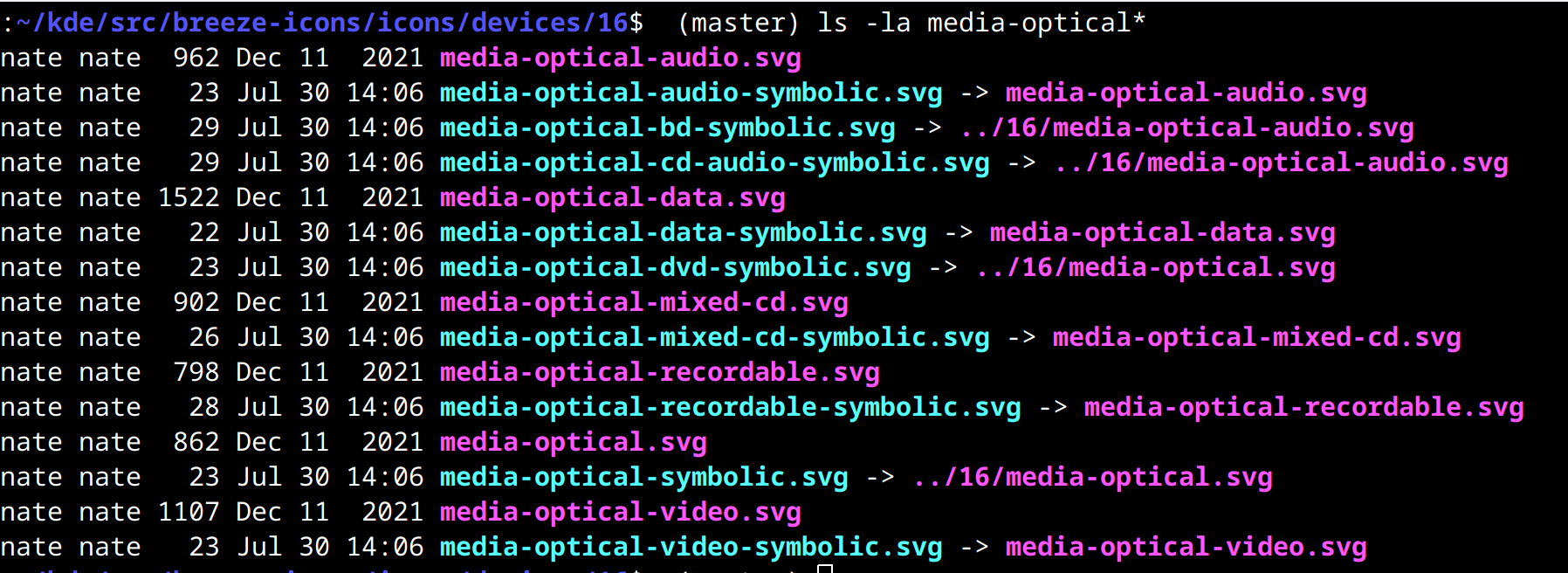
Monochrome icons for the Breeze Dark icon theme are now automatically generated at build-time from the light ones, saving a huge amount of manual work! (Noah Davis, Frameworks 6.0. Link 1 and link 2)

…And everything else

This blog only covers the tip of the iceberg! If you’re hungry for more, check out https://planet.kde.org, where you can find more news from other KDE contributors.

How You Can Help

If you’re a developer, work on Qt6/KF6/Plasma 6 issues! Plasma 6 is usable for daily driving now, but still in need of bugfixing and polishing to get it into a releaseable state by the end of the year.

Otherwise, visit https://community.kde.org/Get_Involved to discover other ways to be part of a project that really matters. Each contributor makes a huge difference in KDE; you are not a number or a cog in a machine! You don’t have to already be a programmer, either. I wasn’t when I got started. Try it, you’ll like it! We don’t bite!

And finally, KDE can’t work without financial support, so consider making a donation today! This stuff ain’t cheap and KDE e.V. has ambitious hiring goals. We can’t meet them without your generous donations!

August Plasma 6 progress update

About 6 weeks ago, I posted a tentative roadmap for Plasma 6. I wanted to give everyone an update on how things have gone since then!

So where are we? I previously explained that we were somewhere in between “clean up the code” and “Implement planned features and changes”–stages 3 and 4. I predicted that stage 3 code cleanup would mostly be done by early August.

What’s done

I’m happy to report that my prediction appears to have been pretty accurate! As of today, almost all of the planned Plasma 6 code porting tasks have been completed. Only one major one remains: porting everything away from DataEngines. But everything else is done, including the following projects:

  • Port all usages of Plasma SVG elements to KSvg (link)
  • Port everything to use Kirigami colors and Units (link)
  • Port PlasmaExtras.Heading to Kirigami.Heading (link)
  • Port away from direct KActionCollection usage (link)
  • Improve and modernize wallpaper API (link)
  • Improve and modernize Plasmoid component API (link)
  • Improve and modernize Plasmoid actions API (link)
  • Port PlasmaCore.IconItem to Kirigami.Icon (link)
  • Port to declarative header actions in KCMs (KCM is short for “KDE Control Module” and it’s internal jargon for a page in System Settings) (link)

These projects have involved many people, including: Marco Martin, me: Nate Graham, Laurent Montel, Carl Schwan, Mike Noe, Jorge Barroso Barea, Ivan Tkachenko, Joshua Goins, Kai Uwe Broulik, and Oliver Beard.

Now before we continue, let me mention that there’s much more porting work also going on in the background in Frameworks 6 which is technically independent of Plasma 6. This important work has been done by people like Volker Krause, Nicolas Fella, Friedrich Kossebau, and many others! Thanks for this work as well, guys!

Most of the Plasma porting projects should result in exactly zero user-facing changes, and I’ve done a lot of QA work over the past two months to make sure that’s the case. But the last two projects are exceptions; in addition to being porting and code cleanup projects, they do result in some intentional user-facing changes. Let’s go over them:

Using Kirigami.Icon everywhere is a part of the project to deprecate icons that live in the Plasma style, and always use icons from the (configurable) systemwide icon theme instead. That’s tracked at https://invent.kde.org/plasma/plasma-desktop/-/issues/82 and it’s now been completed! This makes it easy to achieve a consistent icon style across both Plasma and apps. Here’s how my system looks today with the style ze Plasma and the popular Papirus icon theme applied:

Fairly complete icon themes already look great! Others will need to add some new icons that are only displayed by Plasma, which was not necessary in Plasma 5. Icon theme creators take note! And I’ll write a separate post about this later.

Porting KCMs to use header actions also results in a user-facing changes. Now System Settings KCMs have largely dropped their double-height footers by moving some of the footer actions to their headers. The result looks great:

In the future we also plan to investigate moving the remaining bottom buttons elsewhere, so that KCMs can have no footers at all

Not too shabby, eh?

What’s next

As I mentioned, we still need to port all the widgets away from DataEngines. That’s ongoing. And there are some more lower-priority porting projects that we’ll be working on over time, such as removing custom CompactRepresentation code from widgets in favor of using the standard one and using the standard QML KCM components in Plasma widgets’ config windows. Those are lower priority though, and can be done at any time, including after Plasma 6 is released.

Beyond that, it’s time to move fully into stages 4 and 5: implementing planned features and polishing everything up in preparation for a release. In addition to the features relating to icons and KCMs that I mentioned earlier, a bunch more planned changes are mentioned on the Plasma 6 wiki page. Folks will be starting work on those soon. These planned changes are of course in addition to the random and awesome unplanned changes submitted by volunteers not working in close coordination with the Plasma team. For example the Autostart KCM is undergoing heavy changes right now as the result of some excellent volunteer contributions. So expect Plasma 6 to have a lot of amazing things in it!

How to help

If you’re a developer

Help port widgets away from DataEngines so we can close the lid on major porting work.

Also, start submitting merge requests for your major feature work. If you want it to ship with Plasma 6.0, the time to do so is now! We have probably a 2-3 month window of time remaining before we start branching for betas and any new features have to be deferred until Plasma 6.1.

And finally, since you’re already living on Plasma 6 git master (no doubt! 🙂 ), go fix some more of these bugs you encounter on a daily basis! You know, the ones that are annoying you but you already found a workaround? Delete your workaround, then fix it for everyone! Can’t find any bugs? Fix some of these!

If you’re an excited user

Test out Plasma 6 in a real environment! Use it. Test it. Break it. Find all the bugs. And then report them on https://bugs.kde.org! We want the number of open bug reports to go up for a while, as this represents people reporting issues that have been newly found, or weren’t previously tracked with Bugzilla tickets. We need that! Everything must be tracked!

If you’ve got money to spare

KDE is run by people volunteering their time to work on it or sponsored to do so by their employers, but now KDE e.V. is one such employer too! And [puts on board member hat] we want to make sure we have the financial leeway to remain one. The majority of KDE e.V.’s funding comes from small individual donations (here are the ones from PayPal, for example), and you can be a part of keeping it that way! Every little bit helps us to continue to pay our server bills, host free-to-attend conferences and sprints and even pay for people’s travel costs, employ folks to develop, package, and promote the software, and so on. If you can make a donation, we’d really appreciate it!

This week in KDE: Sounds like Plasma 6

Excellent progress was made this week towards the goal of full sound theme support in Plasma 6, among other topics–including some important performance work for KWin!

Plasma 6

General infoOpen issues: 70

Significantly reduced cursor latency under heavy load in the Plasma Wayland session! (Xaver Hugl, link)

System Settings gained a page to let you configure which sound theme you want to use! (Ismael Asensio, link):

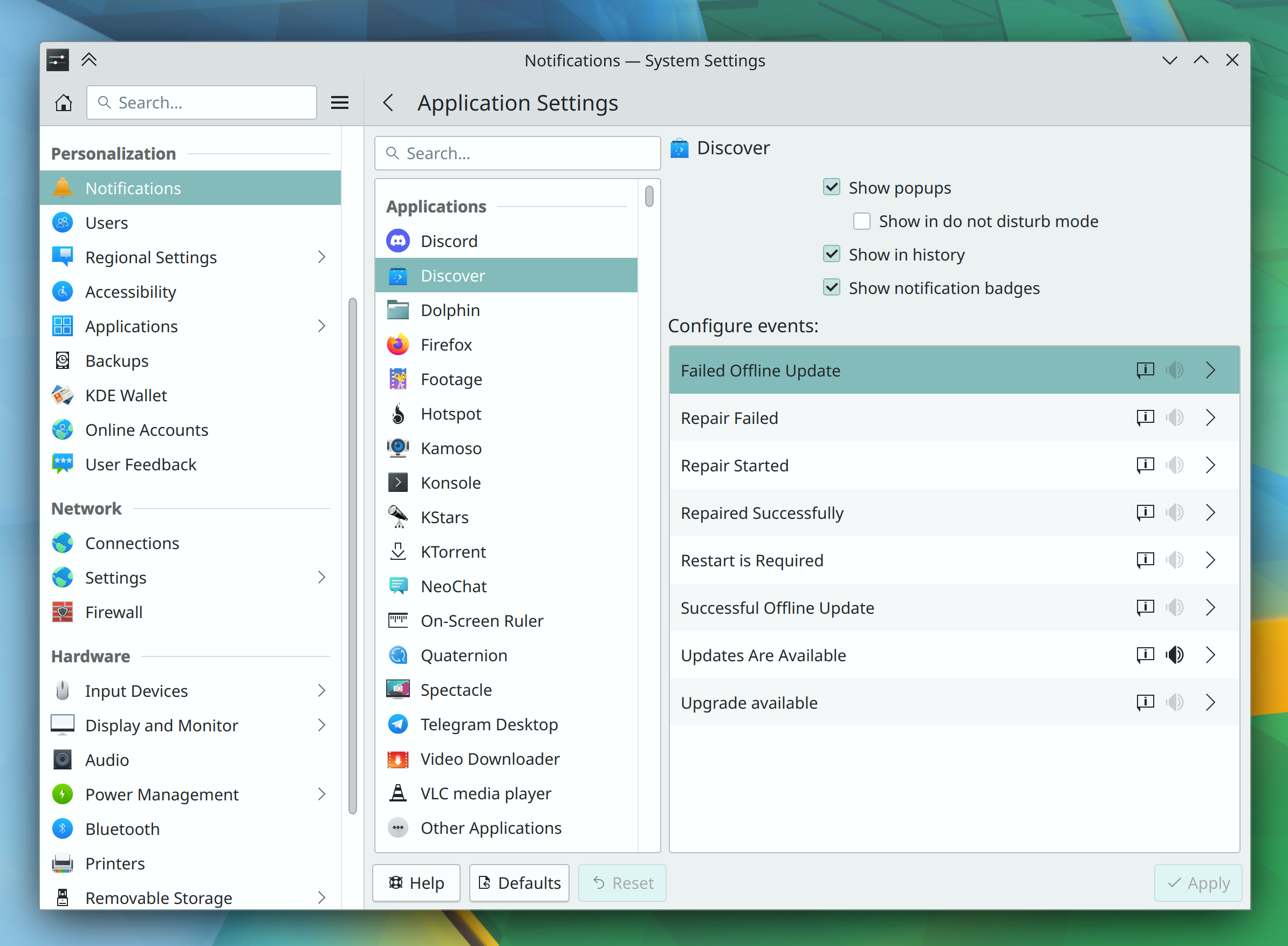
On System Settings’ Notifications for apps page, the per-event configuration window has been merged with the main page to provide a less fragmented cohesive UI (Ismael Asensio, link):

The Digital Clock’s time zones page now adopts a modern frameless style, in the process fixing its scrollview-within-a-scrollview problem (me: Nate Graham, link 1, link 2, and link 3):

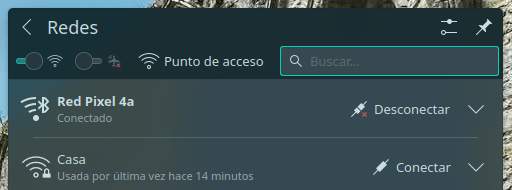
The Networks widget now remembers the last tab you visited when you close and re-open it or switch to a different network (Kai Uwe Broulik, link)

Other New Features

Kate gained a feature to synchronize the scrolling for split views (Someone going by the pseudonym “Ulterno Ω*”, Kate 23.12. Link)

Other Significant Bugfixes

(This is a curated list of e.g. HI and VHI priority bugs, Wayland showstoppers, major regressions, etc.)

Spectacle no longer gets into a quit loop when configured to auto-save as well as quit after manual save (Noah Davis, Spectacle 23.08. Link)

Fixed two ways that Plasma could crash when unpinning or rapidly re-arranging pinned Task Manager apps (Will Horne, Plasma 5.27.7. Link 1 and link 2)

Malformed or maliciously-crafted desktop files can no longer mess up icons for GTK apps all over the place (Fushan Wen, Plasma 5.27.7. Link 1 and link 2)

Fixed a recent regression that could cause Task Manager tasks to show the wrong window thumbnails in their tooltips (Fushan Wen, Plasma 5.27.7. Link)

System Settings’ “Login Screen (SDDM)” Page now internally remembers the last thing you set the login screen wallpaper to (Fabian Vogt, Plasma 5.27.7. Link)

Other bug-related information of interest:

…And everything else

This blog only covers the tip of the iceberg! If you’re hungry for more, check out https://planet.kde.org, where you can find more news from other KDE contributors.

How You Can Help

If you’re a developer, work on Qt6/KF6/Plasma 6 issues! Plasma 6 is usable for daily driving now, but still in need of bugfixing and polishing to get it into a releasable state by the end of the year.

Otherwise, visit https://community.kde.org/Get_Involved to discover other ways to be part of a project that really matters. Each contributor makes a huge difference in KDE; you are not a number or a cog in a machine! You don’t have to already be a programmer, either. I wasn’t when I got started. Try it, you’ll like it! We don’t bite!

And finally, KDE can’t work without financial support, so consider making a donation today! This stuff ain’t cheap and KDE e.V. has ambitious hiring goals. We can’t meet them without your generous donations!

What we plan to remove in Plasma 6

Icons on the desktop!

The minimize button!

Visible Panels and docks!

Just kidding, don’t have a heart attack. 🙂 Well actually there are some things… just not those! The full list can be found at https://community.kde.org/Plasma/Plasma_6#Removals, and it’s public; we’re not hiding anything! Today I wanted today provide a bit of context and explain the why, since it may not be obvious how it makes sense to remove things. So let’s go through the list:

KHotkeys

This was an earlier implementation of a global shortcut system that eventually grew niche though much-loved features such as mouse gestures. Unfortunately those features did not work on Wayland, many other features were critically buggy, the configuration and data storage formats were non-standard and fragile, and the code in general was in an advanced state of bit-rotting after having been abandoned for many years. We already have global shortcuts working using the newer KGlobalAccel system, and we’d already hidden the KHotkeys config UI from System Settings on Wayland in Plasma 5. So we made the decision to double down on KGlobalAccel and just finally delete KHotkeys once and for all for Plasma 6, rather than awkwardly ship two parallel global shortcut systems, which was always very odd and really not justifiable at all. Mouse gestures can eventually be added to KGlobalAccel if someone takes an interest in doing so. No one’s opposed to it!

The “Windowed Widgets” KRunner runner

In Plasma 5, various widgets appear in search results, and activating them will make the widget appear on the desktop in windowed form. This was one of those “Becuase we can!” features that showed off some cool technology, but feedback indicated that it was confusing some users into believing that widgets were actually small apps, and they were using widgets as apps instead of using KDE’s more powerful apps, or even finding an app that met their needs better. Widgets are deliberately very small and limited and we didn’t want people to get the wrong impression about KDE apps. So we decided to remove the feature in Plasma 6.

The Wayland Force Font DPI and global “Icon size” settings

It’s been my experience that in general, users are very confused about how to adapt the UI to a particular screen’s resolution, or change the size of user interface elements on their systems to suit their preferences. This makes sense because there are no fewer than seven ways to do it, each with its own subtle pitfalls and drawbacks:

  1. Per-screen resolution setting in System Settings > Display and Monitor
  2. Global or per-screen scaling slider in System Settings > Display and Monitor
  3. Force Font DPI spinbox in System Settings > Appearance > Fonts
  4. Adjustable font size in System Settings > Appearance > Fonts (because lots–but not all–UI controls resize themselves in proportion to the font size)
  5. Adjustable icon sizes for many icons in many KDE apps in System Settings > Appearance > Icons
  6. Adjustable icon sizes in many individual KDE apps (e.g. Dolphin and Gwenview main view, Places Panel sidebar, etc)
  7. Whole-app scaling systems in various apps (e.g. scaling slider in Telegram, whole UI responsive to Ctrl+plus and Ctrl+minus in electron apps)

This is a major problem because such a DIY experience ensures that users will find and use random scaling settings that don’t interact well, introduce weird visual issues into their systems that cause other issues, look for and implement workarounds that can have even more bad effects, and so on. It’s just a mess. Speaking as KDE’s most prolific bug triager, this is something I see over and over and over again; I even have a canned response for it. It’s a real problem.

So for Plasma 6, we’re removing methods #3 (On Wayland) and #5 (everywhere) to simplify this situation and help people use supported and better-functioning ways to scale their systems.

A bunch of low-quality Task Switchers

While working on the now-completed project to ship with a better default Alt+Tab Task Switcher, we found that the “Grid”, “Informative”, “Small Icons”, “Text Only”, and “Thumbnails” Task Switchers were largely worse versions of other Task Switchers. So for Plasma 6, we have removed them, to steer people towards better options. Anyone who really loved any of these can feel free to put them up on https://store.kde.org.

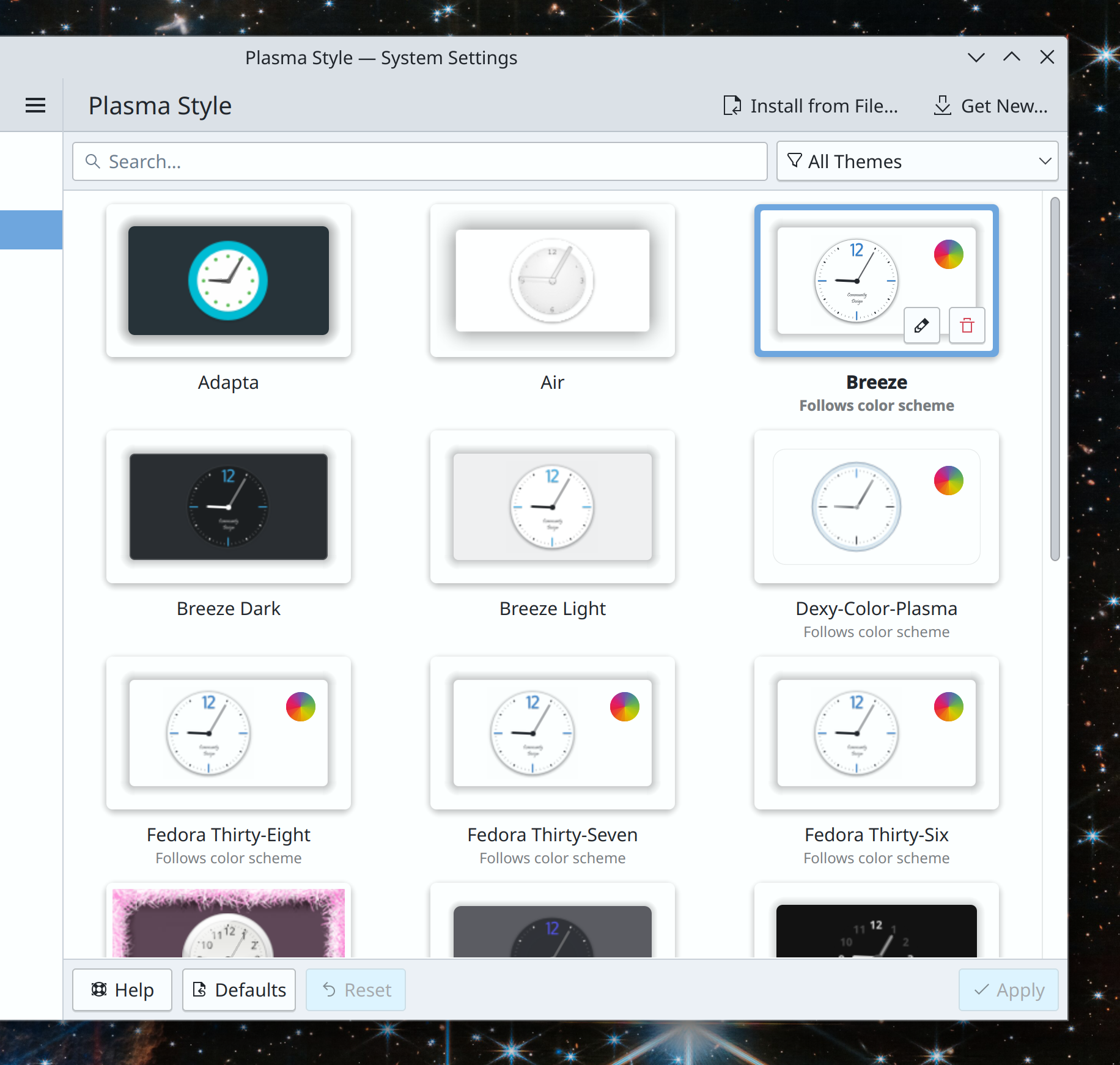
The Air Plasma style

This old Plasma style lived in the plasma-framework repo for a long time, but was abandoned and bit-rotting. It also didn’t really make sense to ship a non-default theme this way, when we already have the Get New [thing] system to let people find and download their own cool new stuff from https://store.kde.org. So we made the decision to remove it. As with the Task Switchers, anyone who loved it is encouraged to maintain it and stick it on https://store.kde.org.

Per-Activity power settings

These very niche and infrequently-used settings were mostly broken, but the infrastructure to support them increased the code complexity of a fragile part of the system. In the interest of improving Plasma 6’s stability and removing known-broken settings, we have removed them rather than putting in the substantial effort needed to fix them.

System Settings Icons view

This view has been superseded by the Sidebar view and abandoned code-wise for years. It’s missed important features such as the “Highlight changed settings” feature that the Sidebar view got years ago. Nevertheless, it was kept around because for a time it offered better keyboard navigability compared to Sidebar view. However following an accessibility push, this is no longer the case, so it doesn’t offer any real advantages anymore and we plan to delete it for Plasma 6. Offering multiple visualization options for something like a Settings app was always kind of weird anyway.

Icons in Plasma Styles

In Plasma 5, the icons shown in various parts of Plasma widgets (but not apps) can come from one of two places: the active icon theme, or the active Plasma style. How do you the user know which icons come from which place? You can’t, not easily. What can you do if you apply a Plasma style and it includes weird icons that make your Plasma widgets look visually inconsistent with the rest of your system–but only partially? Nothing!

Needless to say, this is not ideal.

The original purpose of the feature was to allow Plasma styles to ship monochrome System Tray icons even when the rest of the system is using a colorful icon theme, which even at the time was a questionable goal and amounted to the system visually fighting with itself and its users’ icon theme choices. Later it gradually increased in scope so that lots of other random icons were added to Plasma styles and overrode icon theme icons–but never all of them, only some of them. Some Plasma styles included very comprehensive sets of icons, others included none, and some included a random incomplete assortment of them. All in all it was very strange and very random-seeming.

For Plasma 6, we’re removing this questionable feature, and icons in Plasma widgets will always come from the systemwide icon theme. Much simpler, much more user-comprehensible, much better visual results 99% of the time.

If you’re a theme creator who’s worried about this change, just put the icons that are currently in your Plasma style into that style’s companion icon theme instead.

Unsplash Picture of the Day

This one is quite sad, as no one wanted to remove it. Alas, we had to because Unsplash changed their terms of service to preclude Plasma’s usage of it, as a way of fighting automated data scrapers for AI training models. With a heavy heart, we removed it. So the next time anyone asks you what AI can do for humanity, now you have a concrete answer: prevent Plasma 6 from shipping an Unsplash Picture of the Day wallpaper plugin. Thanks, AI!

The bottom line

You may have noticed some recurring themes: “doesn’t work well, not well integrated with anything else, unnecessarily duplicative, buggy, confusing, abandoned, obsolete.” And you wouldn’t be wrong! These removals have been carefully chosen because they don’t showcase the best of Plasma, and instead act as hidden minefields or make the system feel buggier. They represent common pain points for new users, sources of confusion and user support questions. Except for the Unsplash PotD thing; I’m still feeling salty about that. The robot apocalypse happened, and they took our pretty pictures!

“i don’t care, i still hate you for removing stuff”

I’m sorry you feel that way! But sometimes old things that don’t work very well have to be removed to make room and free up resources for new things that will work better. You’ll just have to trust us these are the right decisions—or at least, that they’ll be reverted if they turned out to be the wrong decisions. Or I guess you can go fork Plasma 5 and tell the internet how KDE is going down the tubes 🙂

…But hopefully not, because I think these removals really will improve the Plasma experience, and open up some space for making it even better in the future. Plasma has had a long, storied, and somewhat messy history, with ports to this toolkit and then that toolkit, with complexity and flexibility that didn’t end up used and caused bugs, with potentially cool features that didn’t pan out. By removing some of the old cruft from Plasma 6, we have an opportunity to build on the best of what we already had and make it even better, to finally converge the product from what has sometimes been a jumbled collection of tech-demo features into a cohesive whole. From DIY do DI-Whoa!

Akademy 2023

As you may have seen from other posts on https://planet.kde.org, KDE’s annual Akademy conference is over and people are starting to blog about their thoughts on it!

This is my fifth Akademy, and my third one attending in person. As always, it was great to meet up with colleagues and old friends in real life! A kind of magic happens when a bunch of technically adept people with strong social relationships gather together in a room. There was a lot of it on display this year, even despite the punishing heat and spotty Wi-Fi performance!

The talks this year were quite good (as always), and I hope that at least one of mine could be counted among them. I gave a talk about my KDE Goal, “Automation and Systematization“, and a short lighting talk about Welcome Center, in addition to helping to present the KDE e.V. Board report. I particularly enjoyed the lightning talk by Kai Uwe Broulik about his custom solar PV array monitoring system using System Monitor, which I would love to get running for my own system!

But my favorite part of Akademy is always what comes afterwards: the “Birds of a Feather” (or BoF) brainstorming sessions. My favorites were the ones on Tuesday organized by Joseph De Veaugh-Geiss on the subject of internal communication. These were very productive and resulted in multiple actionable tasks as well as an impromptu hacking session/sprint on Thursday to update old wiki pages, consolidate information, and use the default Wikimedia theme! Unfortunately I wasn’t able to attend, but this is a subject I’m really excited about as I think documentation and internal communications are critically important topics, so it was wonderful to see so many other people excited about it too. If you’d like to help, please update any stale information or whole pages you find at https://community.kde.org. If you find a stale page but don’t feel comfortable making any such changes yourself, just edit it and add the text {{Outdated}} to the top, and someone else will handle it.

Overall, it was a useful productive and great time! After so many trips to Europe over the past 6 months, I’m now looking forward to some nice, uninterrupted stretches of normalcy where I can sit down and do some much-needed hacking and KDE e.V. work that’s been piling up, and actually implement some of the ideas and changes that we’ve all been discussing!

This week in KDE: Plasma 6 features

We’re hot on the heels of Akademy 2023, which proved to be a fertile space for collaboration. As a result, in addition to the background work being done to stabilize Plasma 6, a bunch of new features landed too!

Plasma & Frameworks 6

General infoOpen issues: 59

Plasma now plays a sound from the active sound theme (more on that in a bit) when a USB device is plugged in or unplugged. And this is configurable, of course! (Kai Uwe Broulik, Plasma 6.0. Link)

You can now change your system’s active power profile (if its firmware and kernel version are modern enough to support the feature) by pressing Meta+B to show a profile chooser OSD similar to the one used to display screen-related options (Natalie Clarius, Plasma 6.0. Link):

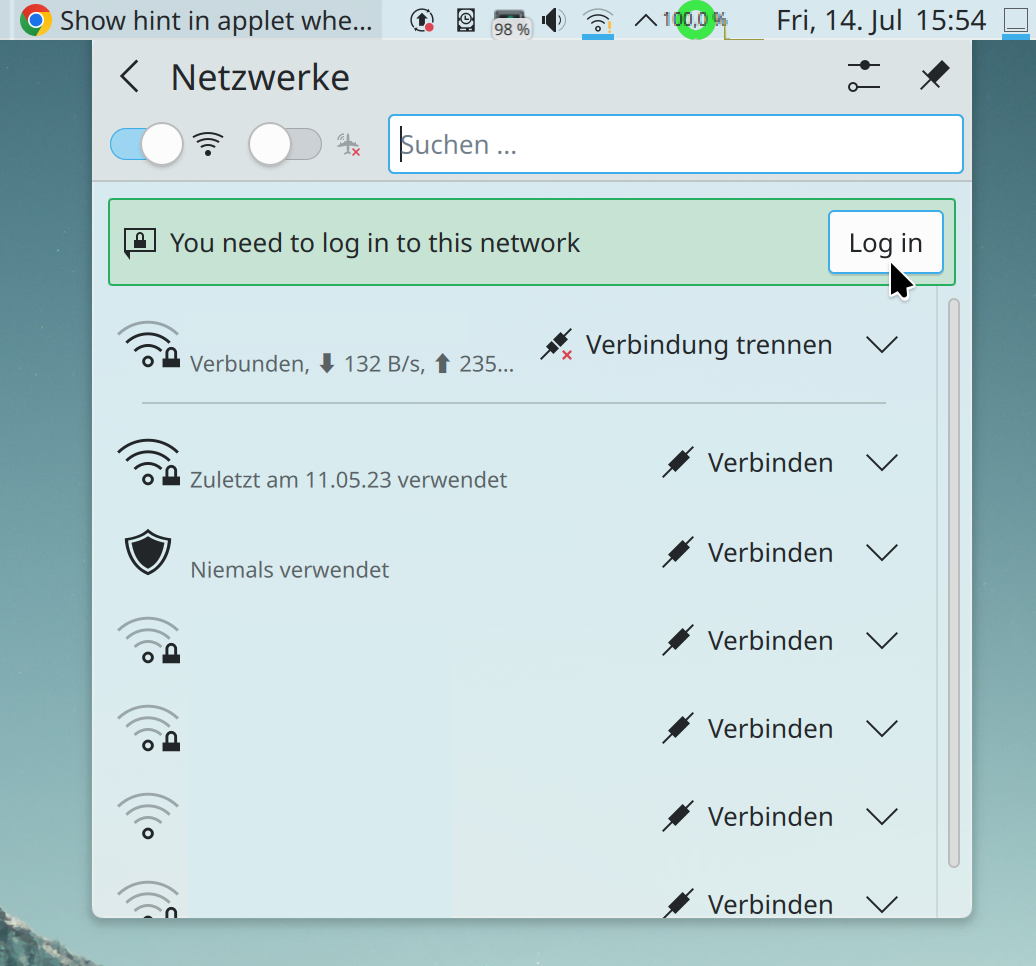
The Networks widget now shows an inline message prompting you to log into a network’s Captive Portal page, if it has one (Kai Uwe Broulik, Plasma 6.0. Link):

Dolphin, Filelight, and the Disks & Devices widget now respect the user’s choice of how to display binary units (e.g. MB or MiB) (Jack Hill, Frameworks 6.0. Link 1, link 2, and link 3)
…Wait, you didn’t know we had such a setting? Neither did most people! That’s because it’s currently hidden with no UI. Right now you have to manually add BinaryUnitDialect=2 to the [Locale] group in your kdeglobals file (keep in mind that it doesn’t work well in Plasma 5; only in 6). We will be adding a GUI for it for Plasma 6.

Frameworks 6 has gained support for playing sounds from FreeDesktop-compatible sound themes (Ismael Asensio, Frameworks 6.0. Link)
This work supports the Plasma 6 task to use a brand new sound theme, made by Guilherme Silva and nearly finished now! Bonus points: this sound theme is complies with the FreeDesktop sound theme spec, and we’ve made the current Oxygen sound theme FDO-compatible as well! You’ll be hearing more about this in the coming weeks and months as the work is finalized.

Significant Bugfixes

(This is a curated list of e.g. HI and VHI priority bugs, Wayland showstoppers, major regressions, etc.)

When zooming with a pinch gesture in Okular, the document no longer also scrolls wildly (Nicolas Fella, sponsored by TU Dresden, Okular 23.08. Link)

The feature to focus a specific Plasma panel via custom keyboard shortcut now works (Fushan Wen, Plasma 5.27.7. Link)

Various settings are now always properly displayed on the System Settings touchpad page, no matter how you access the page (Méven Car, Plasma 6.0. Link)

Many more dual-GPU systems should now have both GPUs detected properly, which unlocks the ability to tell the system to use the more powerful discrete GPU for specific apps (Dave Vasilevsky, Frameworks 5.109. Link)

Other bug-related information of interest:

…And everything else

This blog only covers the tip of the iceberg! If you’re hungry for more, check out https://planet.kde.org, where you can find more news from other KDE contributors.

How You Can Help

If you’re a developer, work on Qt6/KF6/Plasma 6 issues! Plasma 6 is usable for daily driving now, but still in need of bugfixing and polishing to get it into a releaseable state by the end of the year.

Otherwise, visit https://community.kde.org/Get_Involved to discover other ways to be part of a project that really matters. Each contributor makes a huge difference in KDE; you are not a number or a cog in a machine! You don’t have to already be a programmer, either. I wasn’t when I got started. Try it, you’ll like it! We don’t bite!

And finally, KDE can’t work without financial support, so consider making a donation today! This stuff ain’t cheap and KDE e.V. has ambitious hiring goals. We can’t meet them without your generous donations!

Where bugfixes and new features come from

A few conversations I’ve had recently at Akademy 2023 have inspired me to write about a topic I’ve been wanting to share for a long time. So today I’d like to shine a bit of light on how the process of getting bugs fixed and features implemented works in KDE. This article’s target audience is general users more so than experienced technical contributors who will already have an understanding of this. But feel free to read anyway if you consider yourself a member of that group!

To begin with, I sometimes encounter the impression that there’s this pool of developers who either roam around looking for bugs to fix and features to implement, or are told or motivated to do so by some higher authority. This isn’t necessarily a misconception, but it needs to be qualified a bit. Well, a lot!

First we have the volunteers who are so often talked about! In general, volunteers work on things that feel rewarding to work on. As a result, most will only work on things relevant to their personal use cases, that are easy or fun, or that they feel a sense of personal obligation to continue working on. There are exceptions, but they tend to be rare and temporary, as the people in question often get hired by someone and lose most of their KDE time.

On that subject, some developers are sponsored to work on KDE software by KDE e.V., by a contracting firm in KDE’s orbit, or by a direct institutional or individual user of KDE software. In general these folks are paid to work on specific features and bug fixes relevant to the use cases of their employers or clients–which can be quite exotic, involving things like hundreds of users with networked home directories, specialized stacks of cryptography software and hardware, multi-screen multi-GPU setups, expensive business printers, and so on. These are the kinds of use cases that an average user never encounters.

There’s often some overlap here. Some paid KDE contributors work for a company that pays them to work on specific projects but gives them some personal time to work on KDE projects of their choice for a few hours a week. Some are contractors who reserve a bit of their own time to volunteer for KDE. And some are fortunate enough to receive open-ended invitations to “Make it better for us” as applied to a broad slice of the system.


This leads to some obvious conclusions regarding the kinds of bugs and features that are likely to get fixed and implemented. Here’s a chart that summarizes it:

Everyone likes the green box. A surprising number of bugs and feature requests fall into it. Even hard bugs can get fixed quickly if their impact is significant and widespread (which means many eyeballs on them) and they are trivially reproduced (which means fixes are easy to test).

Next we have bugs or features in the red box. These are mostly irrelevant to an average user. If you’re a non-average person or institution with a specialized use case, the course of action is clear: pay someone to fix or implement it for you. KDE e.V. maintains a list of contractors who offer such services. Otherwise it probably won’t get done. Expect to pay Real Money™ for this kind of service; targeted contracted software development is rarely cheap. Pizza money donations and average bug bounties ain’t gonna cut it!

Finally, we have bugs or features in either of the yellow boxes. Sometimes these kinds of things get done by volunteers, but it’s hit-and-miss with an uncertain timeline because the work is just not that important–as evidenced by the fact that institutional or individual users rarely if ever pay for them to be fixed. But of course, people who are affected don’t like being told that their small pain points are unimportant, so in my experience, these issues represent a big source of frustration for users in general. Fixing them anyway is a big part of the 15 minute bug initiative. …Which you may notice has stalled at around 50-60 bugs. These remaining bugs are all quite solidly in those yellow boxes where it’s hard to find anyone willing to either do the work or pay for it to be done.

But all is not lost! If you’re annoyed by a yellow-box issue, and you’re unable or unwilling to pay to have it fixed, there is another way to help: try to move the bug or feature closer to the green box somehow! Here are some ideas:

  • If the issue is truly major, help call attention to it. Perhaps it simply got missed among the endless flood of other bug reports. For this to work, the issue really does need to be major; I mean more like “causes data loss” and not “System Tray icons for my autostarted 3rd-party apps sometimes don’t show up.”
  • Identify the easiest possible way to reproduce the bug with 100% success on common and generic hardware, then mention it in the bug report and set its status to CONFIRMED.
  • Identify any volunteer developers in the bug report who take an interest in the issue but mention they lack the hardware to reproduce it, and offer to buy or loan them such hardware.
  • Start fixing or implementing it yourself, even if you know you can’t do it. Your draft work may be enough to motivate someone else to finish it up, or provoke the kind of normally unhelpful nerd-rage nitpicking that drives someone to show you how it’s done by doing it themselves!
  • Wait for the use case to become more widespread, and hence more important. High DPI, multi-screen, multi-GPU, and high refresh rate hardware setups have all become more common over time, and accordingly, the number of people willing to put effort into making them better (or pay for this to happen) has increased.

None of these suggestions guarantee success. But pushing a yellow bug towards being a green one does make it more likely to be worked on and eventually fixed. And anyway, hopefully this helps to illuminate how development work in KDE happens, and why some bugs reports or feature requests linger for a long time.

This week in KDE: Akademy approaches

This week was a bit on the slow side as people are on vacation and preparing for Akademy 2023, which begins next week! Nevertheless progress on Plasma 6 continued, with a notable uptick in open bug reports as a result of more people testing it out, which is good! If you haven’t tried it yet, please do! Progress was also made on fixing existing known issues too.

Plasma 6

General infoOpen issues: 63

The Breeze cursor theme has received a visual overhaul to make it nicer looking and more consistent with how Breeze style evolved over the course of Plasma 5! (Manuel Jesús de la Fuente, link):

When not using the “Include Desktop” feature, Alt+Tab Task Switchers no longer appear when invoked but there are no windows open, or only one window is open (Daniel Lipovetsky, link)

The keyboard shortcut used to trigger the Mouse Mark effect can now be customized (Andrew Shark, link)

User Interface Improvements

Created a new Kirigami component to display banners at the top of app windows and views. We were previously using the Kirigami.InlineMessage component for this, but it was complicated to implement in a way that looked acceptable in that spot, and even then it never looked quite right. The new frameless banner component looks much better! Expect to see it show up in Kirigami-based apps over the coming months and years. (Carl Schwan, link):

Significant Bugfixes

(This is a curated list of e.g. HI and VHI priority bugs, Wayland showstoppers, major regressions, etc.)

Fixed a performance issue in Okular that could cause poor performance and memory pressure when zooming in (Max Müggler, Okular 23.08. Link)

Fixed an issue that could cause severe screen distortion in the Plasma Wayland session when using certain multi-GPU graphics setups (Xaver Hugl, Plasma 5.27.7. Link)

Fixed an issue that could cause all connected screens to be marked as “primary” under certain circumstances (Ivan Tkachenko, Plasma 5.27.7. Link)

Fixed a way that KWin could crash in the Plasma Wayland session after using the clipboard under certain circumstances (David Edmundson, Plasma 6.0. Link)

Fixed a major recent regression that had the effect of causing the target of a symlink to be moved or copied instead of the link itself (Harald Sitter, Frameworks 5.108. Link)

Editing files using kio-admin no longer unexpectedly changes their permissions (Harald Sitter, Frameworks 5.108. Link)

Fixed a way that Plasma could sometimes crash when closing all running apps by middle-clicking on their Task manager icons (Harald Sitter, Frameworks 5.108. Link)

Other bug-related information of interest:

Web Presence

Released another “KDE for” page, this time for frequent travelers (Carl Schwan and the KDE Promo team):

Automation & Systematization

Added a unit test for parsing NVIDIA GPU driver stats, so that we can catch regressions caused by the NVIDIA driver itself earlier (David Redondo, link)

…And everything else

This blog only covers the tip of the iceberg! If you’re hungry for more, check out https://planet.kde.org, where you can find more news from other KDE contributors.

How You Can Help

If you’re a developer, work on Qt6/KF6/Plasma 6 issues! Plasma 6 is usable for daily driving now, but still in need of bugfixing and polishing to get it into a releaseable state by the end of the year.

Otherwise, visit https://community.kde.org/Get_Involved to discover other ways to be part of a project that really matters. Each contributor makes a huge difference in KDE; you are not a number or a cog in a machine! You don’t have to already be a programmer, either. I wasn’t when I got started. Try it, you’ll like it! We don’t bite!

And finally, KDE can’t work without financial support, so consider making a donation today! This stuff ain’t cheap and KDE e.V. has ambitious hiring goals. We can’t meet them without your generous donations!

This week in KDE: Plasma 6 development continues

Gonna be honest here: I’m on vacation right now, so this week’s blog post is going to be a bit lazy. I probably missed some things, so if you were expecting to see your work here and didn’t, then I’m sorry, and I’ll add it next week if you shoot me an email. Still, I did manage to notice some things, and you’ll find them here!

Plasma 6

General infoOpen issues: 53

Our “Plasma 6” info page gained some useful information such as a “how to use/test it” section as well as some more narrowly-targeted lists of bugs that can be used to guide development. I’ve linked the “Plasma 6 bugs” list above, and will continue to do so in coming weeks.

KRunner’s auto-complete behavior has changed; now auto-completed text appears as a grayed-out placeholder and you have to hit the right arrow or tab key to accept it, as is common in other places where text can be auto-completed. For people who preferred the old autocomplete behavior, it’s kept as an option (Alexander Lohnau, link)

The Keyboard Indicator widget now visually shows the state of the Caps Lock and Num Lock keys both being pressed/active (Donald Menig, link)

When turning the volume level above 100% by using the “Raise maximum volume” setting, the volume icon now changes color to warn you of this (Fushan Wen, link 1 and link 2):

You can now find the “Updates” page in System Settings by searching for more keywords such as “offline” and “automatic” (Justin Zobel, link)

New Features

Kate now has an option to open new tabs immediately to the right of the current one (Waqar Ahmed, Kate 23.08. Link)

User Interface Improvements

Elisa now has a smarter algorithm for finding cover files (which turns out to be a surprisingly complex topic after you cover the simple and easy cases), ensuring that fewer of them get missed (Jack Hill, Elisa 23.08. Link)

Auto-hiding panels using a dark color scheme no longer sometimes exhibit a visual glitch when sliding in and out (Xaver Hugl, Plasma 5.27.7. Link)

When using a multi-channel audio setup that’s been configured to have different volume levels for the channels, adjusting the global volume level (e.g. using keyboard keys or a global shortcut) now adjusts the volume of each channel in a proportional rather than an absolute way (Quinten Kock, Plasma 5.27.7. Link)

Open/save dialogs now always show “Recent files” and “Recent folders” items in their sidebars (Méven Car, Frameworks 6.0. Link)

When merging the contents of two folders, the dialog that alerts you about this now makes it clear that the contents will be merged, rather than scaring you by talking about overwriting (Méven Car, Frameworks 6.0. Link)

Other Significant Bugfixes

(This is a curated list of e.g. HI and VHI priority bugs, Wayland showstoppers, major regressions, etc.)

Gwenview no longer crashes when opening .nef formatted RAW image files (Kevin Backhouse, Gwenview 23.04.3. Link)

Fixed a major performance issue in the Plasma Wayland session that affected Intel GPUs and caused bad performance when animating widgets with the Background Contrast effect turned on (Xaver Hugl and David Edmundson, Plasma 5.27.7. Link)

The System Monitor app and widgets once again show stats for NVIDIA devices using the 535 series of the proprietary drivers. And it also should now be more robust against future changes in the way the proprietary NVIDIA driver formats its data (David Redondo, Plasma 5.27.7. Link)

Other bug-related information of interest:

…And everything else

This blog only covers the tip of the iceberg! If you’re hungry for more, check out https://planet.kde.org, where you can find more news from other KDE contributors.

How You Can Help

If you’re a developer, work on Qt6/KF6/Plasma 6 issues! Plasma 6 is usable for daily driving now, but still in need of bugfixing and polishing to get it into a releaseable state by the end of the year.

Otherwise, visit https://community.kde.org/Get_Involved to discover other ways to be part of a project that really matters. Each contributor makes a huge difference in KDE; you are not a number or a cog in a machine! You don’t have to already be a programmer, either. I wasn’t when I got started. Try it, you’ll like it! We don’t bite!

And finally, KDE can’t work without financial support, so consider making a donation today! This stuff ain’t cheap and KDE e.V. has ambitious hiring goals. We can’t meet them without your generous donations!