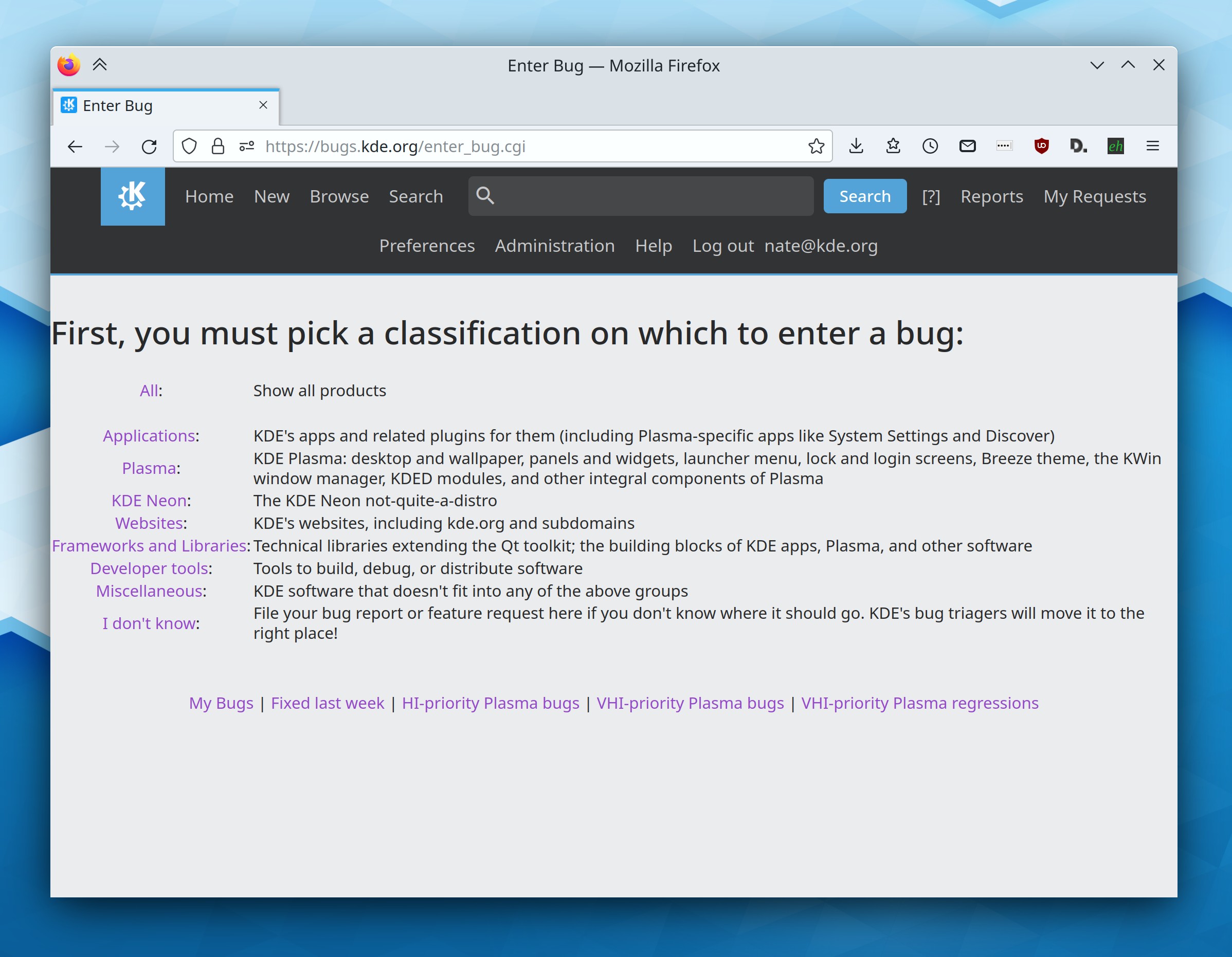
A persistent complaint KDE faces is that it’s too hard to submit bug reports. One obstacle was the giant scary list of products at https://bugs.kde.org/enter_bug.cgi. Well, no longer! This page is now organized into logical categories with user-friendly text, so it should be much easier to find the right place for your bug report if that’s your entry point. This has been rolled out already and is available immediately:
There are also other entry points; for example all KDE apps have a “Report a bug” menu item that will take you to the right place automatically. However two prominent ones did not: System Settings and Plasma. In System Settings, the menu item took you to the generic product, not the specific component for the page you’re on. And Plasma had no functionality like this at all.
That’s fixed now! As of Plasma 5.27, System Settings’ hamburger menu now has a “Report a Bug in Current Page” menu item that will take you to exactly the bug report URL for the page you’re on:
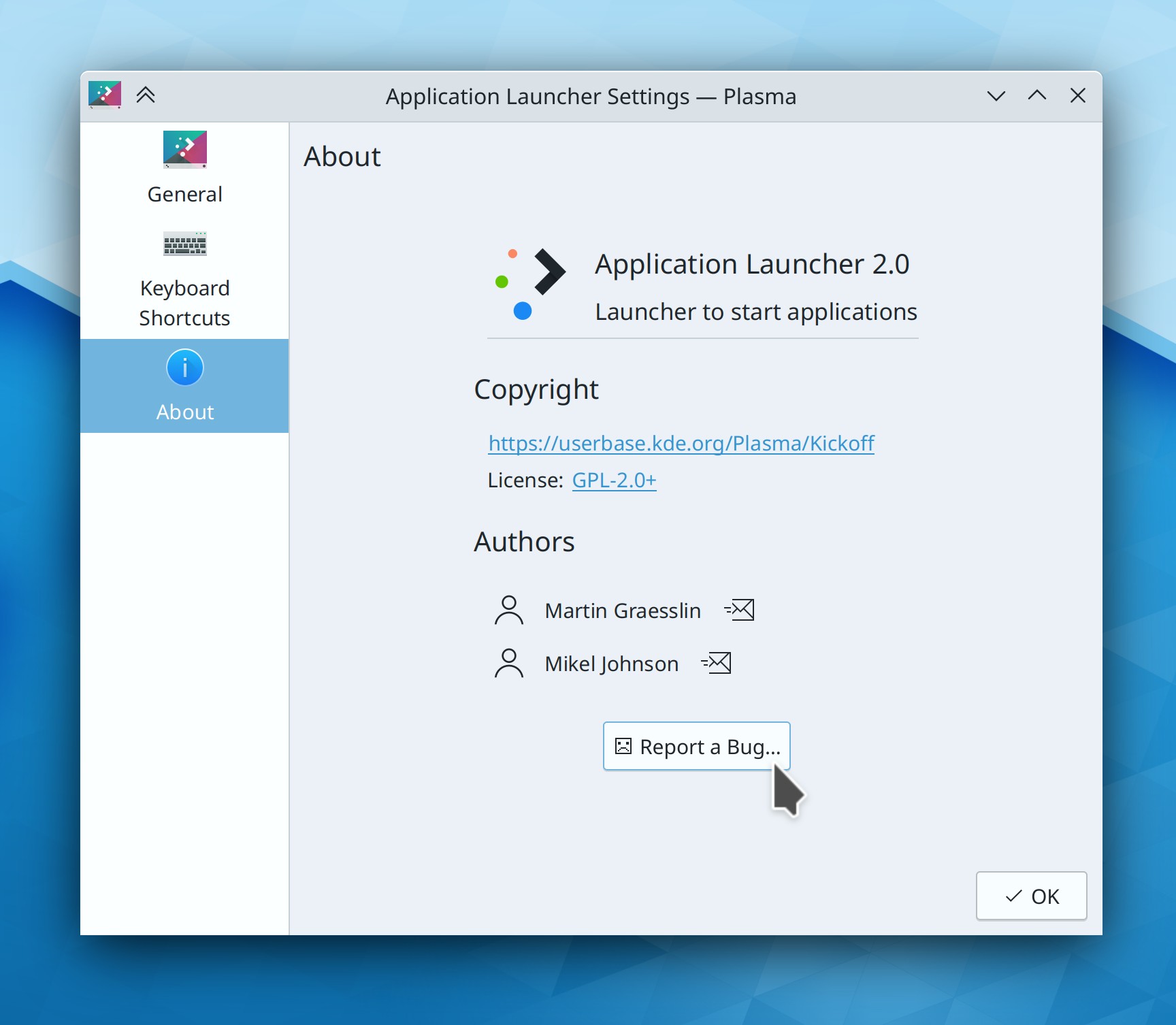
And in Plasma, plasmoids’ About pages now have a “Report a Bug” button that will likewise take you straight to the right place to report a bug on that specific plasmoid:
There’s more to do, of course:
Make the new “report a bug” category page in Bugzilla prettier with some better CSS
Also include along the user’s Plasma version and distro in the URL so that those fields on the web page can be pre-populated
Also implement this stuff for KWin effects and scripts, which an have their own Bugzilla components
Assistance with these follow-up tasks would be appreciated.
And regardless, now there is no excuse; go submit bug reports whenever you face a problem! 🙂
People are always saying that they want us to slow down on the features and focus on stability for a while. Well, we’ve heard you and we’re doing just that for Plasma 5.26 in general, and specifically are focusing almost entirely on bug work during the one-month beta period. The results so far have been tremendous! I suspect everyone reading this post should find something in the “Significant Bugfixes” section to be happy about! Possibly multiple things. This is the time to file your beta bugs! They’ll get fixed quickly. Let’s all help to make Plasma 5.26 the most stable release ever!
New Features
Kdenlive has now adopted KHamburgerMenu, so if you turn off its normal menu bar (which remains visible by default), you can still access its full menu structure (Julius Künzel, Kdenlive 22.12. Link)
If your keyboard has a “Calculator” button, pressing it will now open KCalc (Paul Worrall, KCalc 22.12. Link)
User Interface Improvements
The global Edit Mode toolbar now has a nicer and smoother enter/exit animation (Fushan Wen, Plasma 5.24.7. Link)
The Plasma Media Player and Notifications plasmoids are now grouped with system services rather than app status indicators, so your apps’ System Tray icons will always be together in a group, without these plasmoids appearing in random-seeming positions among them (me: Nate Graham, Plasma 5.26. Link)
You can once again switch tabs in Kickoff the Ctrl+Tab shortcut, and now also the standard ones too (Ctrl+PageUp / Ctrl+PageDown and Ctrl+[ / Ctrl+]) (Ivan Tkachenko, Plasma 5.26. Link)
The marks you make on the screen using the Mouse Mark effect now appear in screenshots and screen recordings (Vlad Zahorodnii, Plasma 5.26. Link)
On the lock screen, you can now zoom in and out, and clear the password field with the semi-common-ish Ctrl+Alt+U keyboard shortcut (Ezike Ebuka and Aleix Pol Gonzalez, Plasma 5.26 and Frameworks 5.99, Link 1 and link 2)
Tooltips throughout Plasma and QtQuick-based apps now smoothly fade in and out when they appear and disappear (Bharadwaj Raju, Frameworks 5.99. Link 1 and link 2)
Significant Bugfixes
(This is a curated list of e.g. HI and VHI priority bugs, Wayland showstoppers, major regressions, etc.)
In the Plasma Wayland session, Plasma no longer sometimes crashes when dragging items from Kickoff that aren’t on the Favorites page to somewhere else (Fushan Wen, Plasma 5.24.7. Link)
On System Settings’ Fonts page, the sub-pixel anti-aliasing and hinting settings now reflect the true state of reality on first boot as configured by your distro, rather than inaccurately always saying that the system is using RGB sub-pixel anti-aliasing and slight hinting (Harald Sitter, Plasma 5.24.7. Link)
Also fixed the most common Plasma crash, which could happen sometimes when searching using KRunner (Arjen Hiemstra, Plasma 5.26. Link)
Fixed the second-most-common Plasma crash, which could happen sometimes when dragging widgets out of the widget explorer (Fushan Wen, the latest release of the KDE Qt patch collection. Link)
Desktop widgets and icons no longer randomly move around and reset their positions sometimes when you log in! (Marco Martin, Plasma 5.26. Link 1 and link 2)
When using an NVIDIA GPU in the Plasma Wayland session, clicking on Kickoff’s panel button now always opens it as expected (David Edmundson, Plasma 5.26. Link)
On the subject of NVIDIA, we also fixed a major issue with NVIDIA GPUs that could cause various elements of Plasma to be visually corrupted after the system wakes from sleep (David Edmundson and Andrey Butirsky, Plasma 5.26. Link 1, link 2, and link 3)
Right after the system wakes up, the desktop is no longer displayed for a moment right before the lock screen appears (Xaver Hugl, Plasma 5.26. Link)
In the Plasma Wayland session, dragging files to Firefox now works properly again (Vlad Zahorodnii, Plasma 5.26. Link)
Un-maximizing a maximized window while using a floating panel no longer leaves a weird shadow floating in space (Vlad Zahorodnii, Plasma 5.26. Link)
The desktop context menu’s “Add Panel” sub-menu no longer shows non-functional items for “Empty Grouping Plasmoid” and “Empty System Tray” (Marco Martin, Plasma 5.26. Link)
In the Plasma Wayland session, those of you using the latest Frameworks plus Plasma 5.25.5 should now see your widgets and notifications positioned in the right place (Xaver Hugl, Frameworks 5.99 or else distro-patched 5.98. Link)
Floating panels and the corners of Plasma dialogs/popups no longer exhibit the customary dots and other visual glitches you’ve become accustomed to 🙂 (Niccolò Venerandi, Frameworks 5.99. Link)
Fixed yet another way that some Kirigami-based scrollviews using a recent version of the KDE Qt patch collection could display an unnecessary horizontal scrollbar (Marco Martin, Kirigami 5.99. Link)
Other bug-related information of interest:
11 Very high priority Plasma bugs (down from 17 last week). Current list of bugs
190 KDE bugs of all kinds fixed this week. That’s a lot! Full list of bugs
Something worth noting is that this week we made our Bugzilla bot start automatically promoting bugs to be 15-minute bugs or very high priority bugs to reduce the manual work for bug triagers. As a result, the total numbers kept going up this week as the bug bot did its work to re-classify old bugs. So the fact that we still managed to keep ahead of that and reduce the totals on net–and during a Plasma beta period too, when people are filing more bug reports than average–is very impressive to me!
…And everything else
This blog only covers the tip of the iceberg! If you’re hungry for more, check out https://planet.kde.org, where you can find more news from other KDE contributors.
How You Can Help
If you’re a developer, fix Plasma 5.26 beta bugs! Let’s make this bug list empty before the final release!
Beyond that, check out our 15-Minute Bug Initiative. Working on these issues makes a big difference quickly! Otherwise, have a look at https://community.kde.org/Get_Involved to discover ways to be part of a project that really matters. Each contributor makes a huge difference in KDE; you are not a number or a cog in a machine! You don’t have to already be a programmer, either. I wasn’t when I got started. Try it, you’ll like it! We don’t bite!
This week we have, like, a quadruple whammy. We released the Plasma 5.26 beta, annihilated a huge number of high profile bugs, added new features, and improved the UI throughout Plasma!
New Features
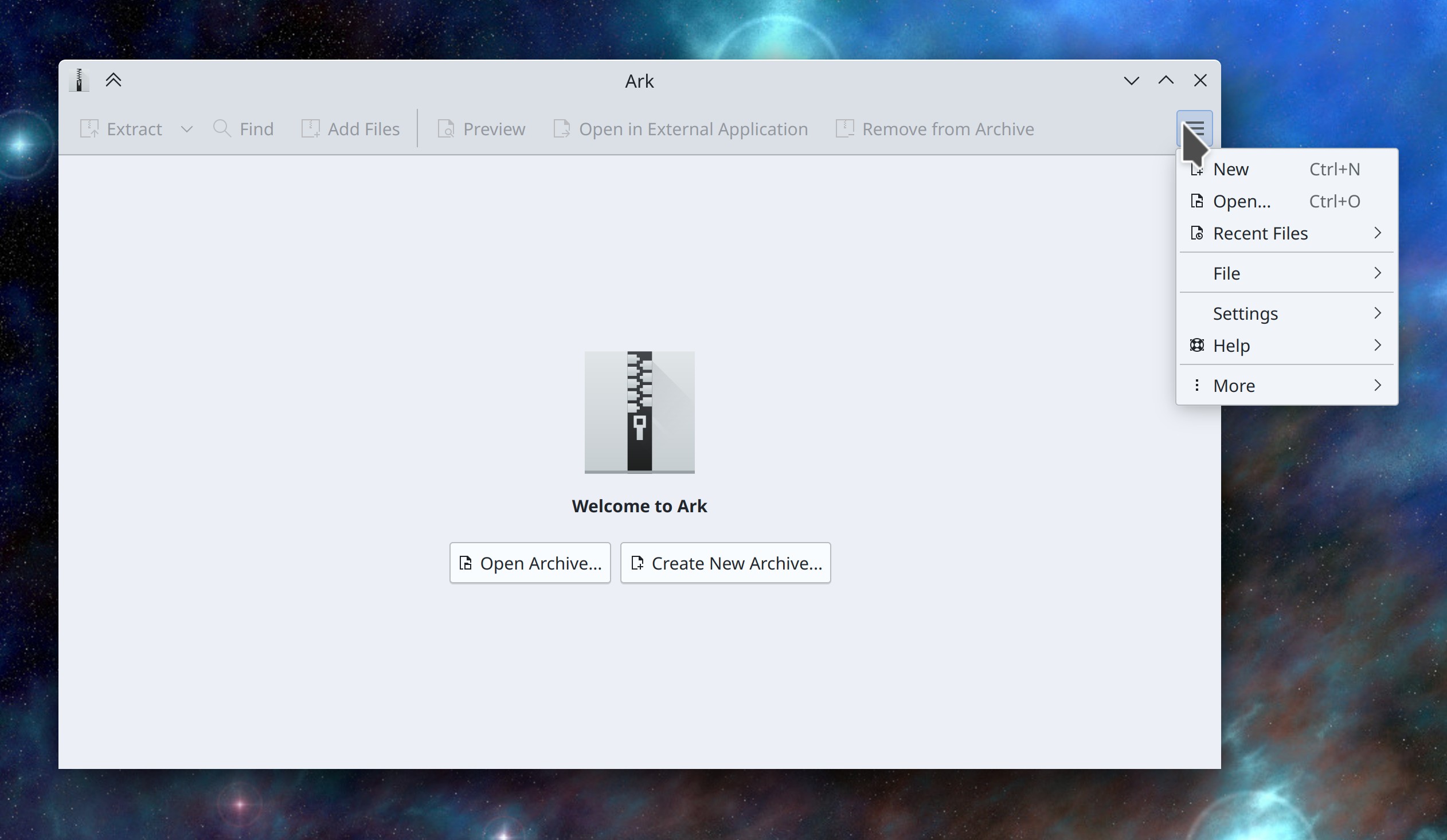
Ark has now been ported to use KHamburgerMenu for a cleaner default user interface (Andrey Butirsky, Ark 22.12. Link):
Not quite a new feature, more like a brought-back-from-the-dead feature, but anyway… You can once again use a flag+label style for the Keyboard Layout plasmoid (me: Nate Graham, Plasma 5.26. Link):
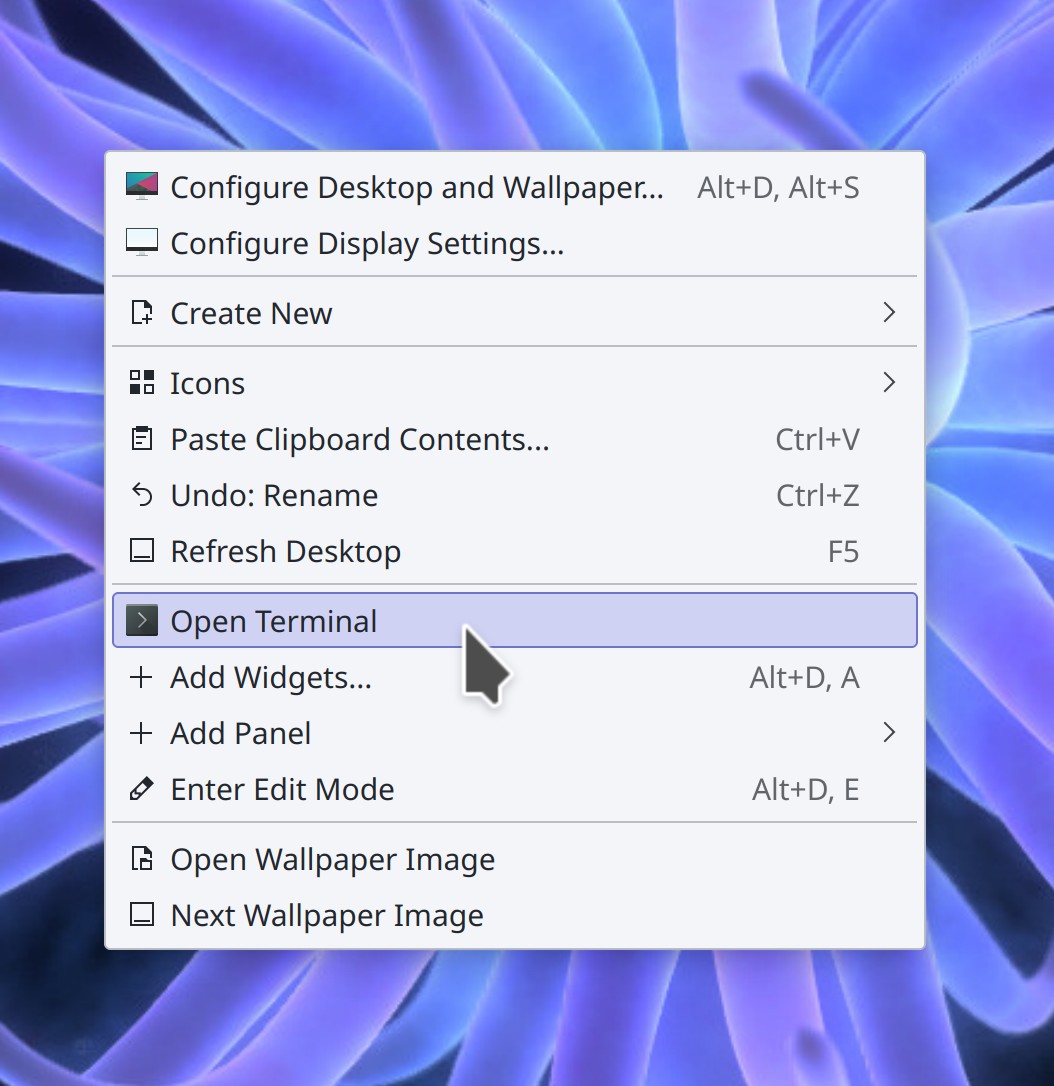
You can now add an “Open Terminal” menu item to the desktop context menu if you want (Neal Gompa, Daniel Vrátil, Jan Grulich, Marc Deop, and Rex Dieter, Plasma 5.26. Link):
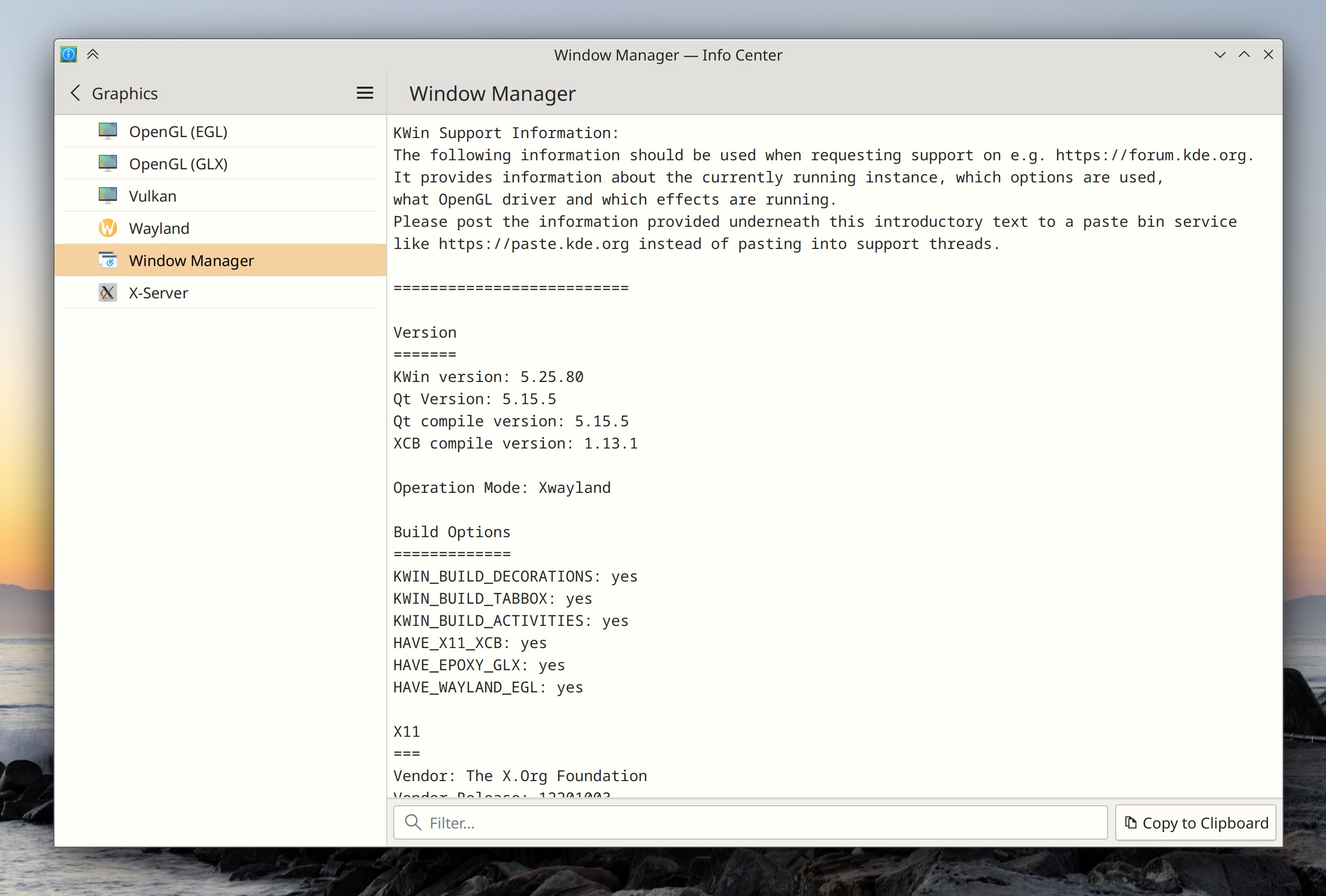
Info Center now has a page where you can see support info and technical details about the KWin window manager, which can be useful when filing bugs (me: Nate Graham, Plasma 5.26. Link):
User Interface Improvements
The opening/closing animation speed for the Overview, Desktop Grid, and Present Windows effects has been changed back to what it used to be: 300ms (Xaver Hugl, Plasma 5.26. Link)
When previewing the color temperature adjustment on System Settings’ Night Color page, the message that tells you what’s going on is now in an OSD, not inline on the page (Natalie Clarius, Plasma 5.26. Link)
When the virtual keyboard is visible, there’s now always a button in the System Tray to close it, even when you’re not in Touch Mode (me: Nate Graham, Plasma 5.26. Link)
You can now close notification pop-ups by middle-clicking on them (Kai Uwe Broulik, Plasma 5.26. Link)
The Plasma Widget Explorer, Alternatives pop-up, and all Plasma plasmoids that use expanding list items can now be navigated entirely using the arrow keys (Fushan Wen, Plasma 5.26. Link 1, link 2, and link 3)
You can now use the Ctrl+Alt+[arrow keys] keyboard shortcuts to re-arrange items in Kickoff, the Quick Launch plasmoid, and the Task Manager (Fushan Wen, Plasma 5.26. Link 1, link 2, and link 3)
Inactive Breeze-themed tab bar tabs are no longer quite so distractedly dark when using a dark color scheme (Waqar Ahmed, Plasma 5.26. Link)
Switching to the next month, year, or decade in the Digital Clock plasmoid now shows a nice animation (Tanbir Jishan, Plasma 5.26. Link)
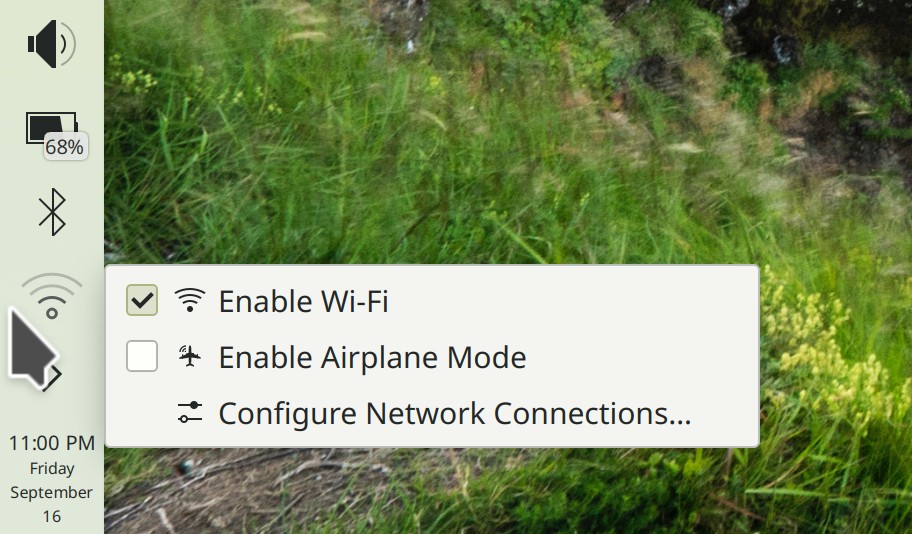
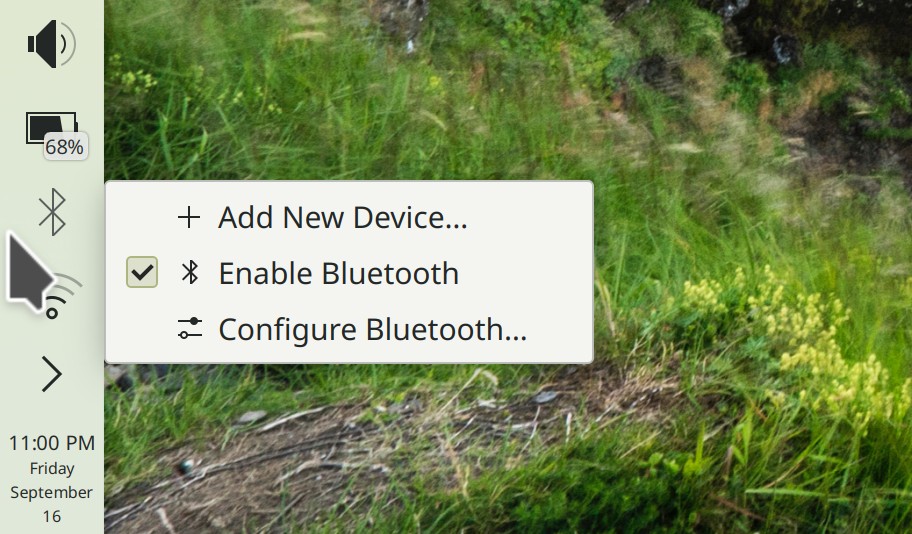
The Networks and Bluetooth plasmoids now display relevant actions in their context menus for faster access (Oliver Beard, Plasma 5.27. Link 1 and link 2):
When using the “Accent color from wallpaper” feature, the accent color generated by the system should now look significantly nicer, better reflecting the most eye-catching color in the image (Fushan Wen, Plasma 5.26 with Frameworks 5.99. Link)
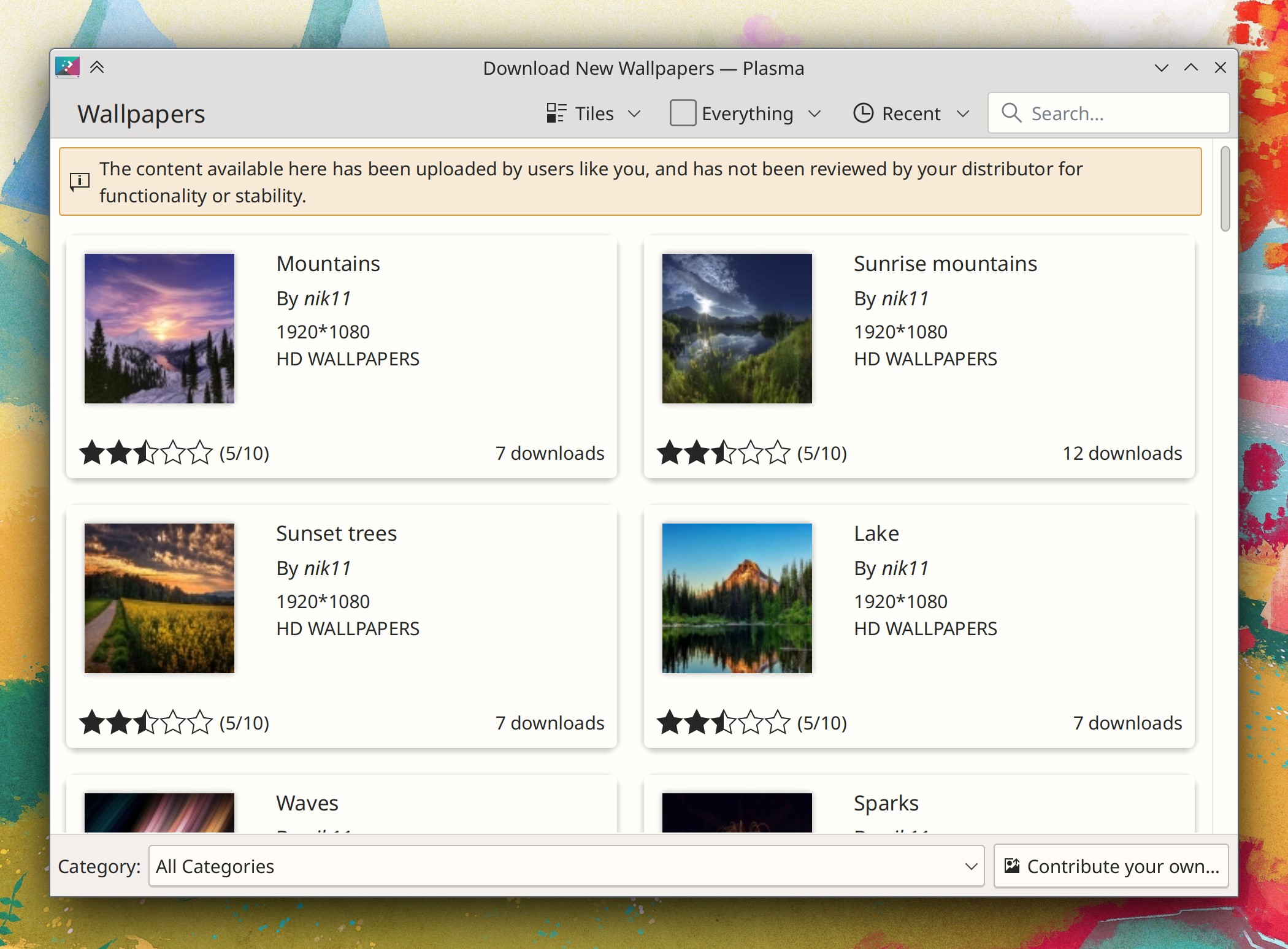
The “Download new Wallpapers” dialog’s footer now looks better and isn’t visually broken (me: Nate Graham, Frameworks 5.99. Link 1 and link 2):
Standalone links in Kirigami-based apps now always have an underline, so you can more easily tell they’re links (me: Nate Graham, Frameworks 5.99. Link)
Significant Bugfixes
(This is a curated list of e.g. HI and VHI priority bugs, Wayland showstoppers, major regressions, etc.)
When using an NVIDIA GPU in the Plasma Wayland session, the Application Launcher menu once again always appears when you click on its Panel icon (Vlad Zahorodnii, Plasma 5.26. Link)
Dragging windows in the Desktop Grid effect once no longer uses a visually broken animation (Ivan Tkachenko, Plasma 5.26. Link)
When the Overview, Present Windows, and Desktop Grid effects are activated with a screen corner, continuing to push the pointer into the corner when the effects are already open no longer closes them immediately (Marco Martin, Plasma 5.26. Link)
Scrolling on the desktop to switch virtual desktops now always works (Arjen Hiemstra, Plasma 5.26. Link)
Even though we haven’t fully finally for-realsies fixed the issue of Plasma desktops and panels being scrambled or lost, panels should now at least be less likely to get lost (Marco Martin, Plasma 5.26. Link)
It’s once again possible to tell identically-named screens apart in the System Settings Display & Monitor page’s screen view and “Identify” feature (Ivan Tkachenko, Plasma 5.26. Link 1 and link 2)
In the Plasma Wayland session, your keyboard delay and repeat rate settings are now respected (Vlad Zahorodnii, Plasma 5.26. Link)
A variety of fixes were made to make autostart apps more likely to autostart successfully when using the Systemd startup feature: Systemd itself is now more tolerant of minor issues in autostarted desktop files, and both KMenuEdit and the properties dialog make it harder for you to create or edit a desktop file in a way that’s invalid (David Edmundson, Plasma 5.26 with Frameworks 5.99 and systemd 252. Link 1, link 2, link 3, link 4, and link 5)
In the Plasma X11 session, KDE apps now correctly remember their window sizes and positions on multi-screen arrangements (Richard Bízik, Frameworks 5.99. Link)
Using a touchpad to scroll through scrollable lists in Kirigami-provided overlay sheets should just kinda be a lot less janky in general (Marco Martin, Frameworks 5.99. Link)
Other bug-related information of interest:
15 Very high priority Plasma bugs (down from 20 last week). Current list of bugs
46 15-minute Plasma bugs (same as last week, but this is because a few new ones were added to replace ones that were fixed). Current list of bugs
This blog only covers the tip of the iceberg! If you’re hungry for more, check out https://planet.kde.org, where you can find more news from other KDE contributors.
How You Can Help
If you’re a developer, check out our 15-Minute Bug Initiative. Working on these issues makes a big difference quickly! Otherwise, have a look at https://community.kde.org/Get_Involved to discover ways to be part of a project that really matters. Each contributor makes a huge difference in KDE; you are not a number or a cog in a machine! You don’t have to already be a programmer, either. I wasn’t when I got started. Try it, you’ll like it! We don’t bite!
This week we’re getting ready for the Plasma 5.26 beta and focused on bugfixing and UI polish. Expect more of this over the next few weeks!
New Features
While in Touch mode in the Plasma Wayland session, you can now force the Maliit Virtual Keyboard to appear even if it didn’t appear automatically (Aleix Pol Gonzalez, Plasma 5.26. Link)
In System Monitor and the Plasma widgets of the same name, you can now query sensors for your CPUs’ minimum, maximum, and average temperature and frequency (Alessio Bonfiglio, Plasma 5.26. Link)
User Interface Improvements
Gwenview can now open GIMP’s .xcf files (Nicolas Fella, Gwenview 22.08.1. Link)
Elisa now shows you a user-friendly message explaining what didn’t work when you drag-and-drop non-audio files onto it (Bharadwaj Raju, Elisa 22.12. Link)
In Kickoff, Flatpak apps now show the “Uninstall or Manage Add-ons” menu item in their context menus (me: Nate Graham, Plasma 5.24.7. Link)
Info Center pages now have a visually obvious “Copy to Clipboard” button you can use to copy their entire text to the clipboard (me: Nate Graham, Plasma 5.26. Link)
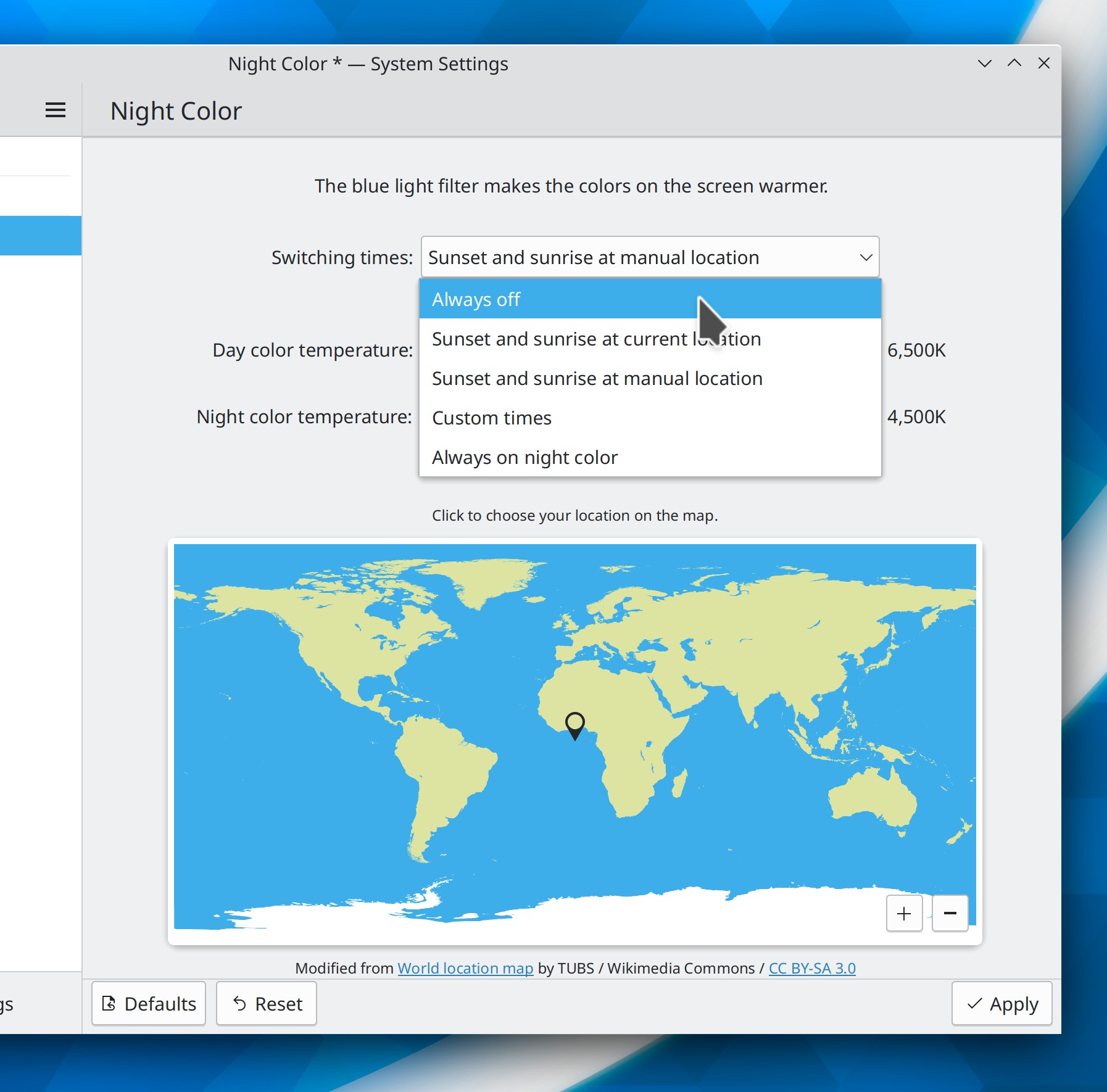
Night Color now has a simpler interface for turning it on and off: now the “off” status is a part of the combobox to choose the activation time, rather than being a second checkbox (Bharadwaj Raju, Plasma 5.26. Link):
The User Switcher widget no longer has a confusing “Leave” button that shuts down the computer; this has been replaced with a “Log out” button that, well, logs you out! (Aleix Pol Gonzalez, Plasma 5.26. Link)
Significant Bugfixes
(This is a curated list of e.g. HI and VHI priority bugs, Wayland showstoppers, major regressions, etc.)
Connecting to Windows Samba shares now works when using samba-libs 4.16 or higher, because they changed a behavior out from under everyone and we had to work around it! (Harald Sitter, kio-extras 22.08.2. Link)
Fixed another common source of KWin crashes in the Plasma Wayland session when plugging or unplugging screens (Vlad Zahorodnii, Plasma 5.25.5. Link)
KWin no longer crashes when waking up from sleep with the “KDE Snap Assist” script active (Vlad Zahorodnii, Plasma 5.26. Link)
KRunner’s code is no longer overridable by 3rd-party Plasma themes, making them no longer capable of breaking it such that it can’t be opened, which, yes, was totally a thing that sometimes happened (Alexander Lohnau, Plasma 5.26. Link)
The KWin crossfade effect is back, meaning that you will once again see a nice cross-fade when maximizing and de-maximizing windows, and when moving between panel tooltips (Marco Martin, Plasma 5.26. Link)
Apps and windows on the Task Manager are now much more resistant to being accidentally dragged when you mean to just click on them (me: Nate Graham, Plasma 5.26. Link)
In the Plasma Wayland session, panel tooltips once again morph using the KWin Morphing Popups effect (Marco Martin, Frameworks 5.99. Link)
This blog only covers the tip of the iceberg! If you’re hungry for more, check out https://planet.kde.org, where you can find more news from other KDE contributors.
How You Can Help
If you’re a developer, check out our 15-Minute Bug Initiative. Working on these issues makes a big difference quickly! Otherwise, have a look at https://community.kde.org/Get_Involved to discover ways to be part of a project that really matters. Each contributor makes a huge difference in KDE; you are not a number or a cog in a machine! You don’t have to already be a programmer, either. I wasn’t when I got started. Try it, you’ll like it! We don’t bite!
We’re getting close to the Plasma 5.26 beta and plenty of features have landed before the soft feature freeze–the point at which new features need discussion before being merge-able. Many are mentioned below! But now, the idea is to focus on bugfixing and UI polish for the next six weeks before the final release of Plasma 5.26, and assistance is greatly appreciated. If you’re a developer who’s excited about Plasma, the time to fix bugs is now! Which bugs? These bugs! Pick a bug and fix it!
New Features
On System Settings’ Night Color page, you can now set a day color in addition to a night color for maximum flexibility (Natalie Clarius, Plasma 5.26. Link):
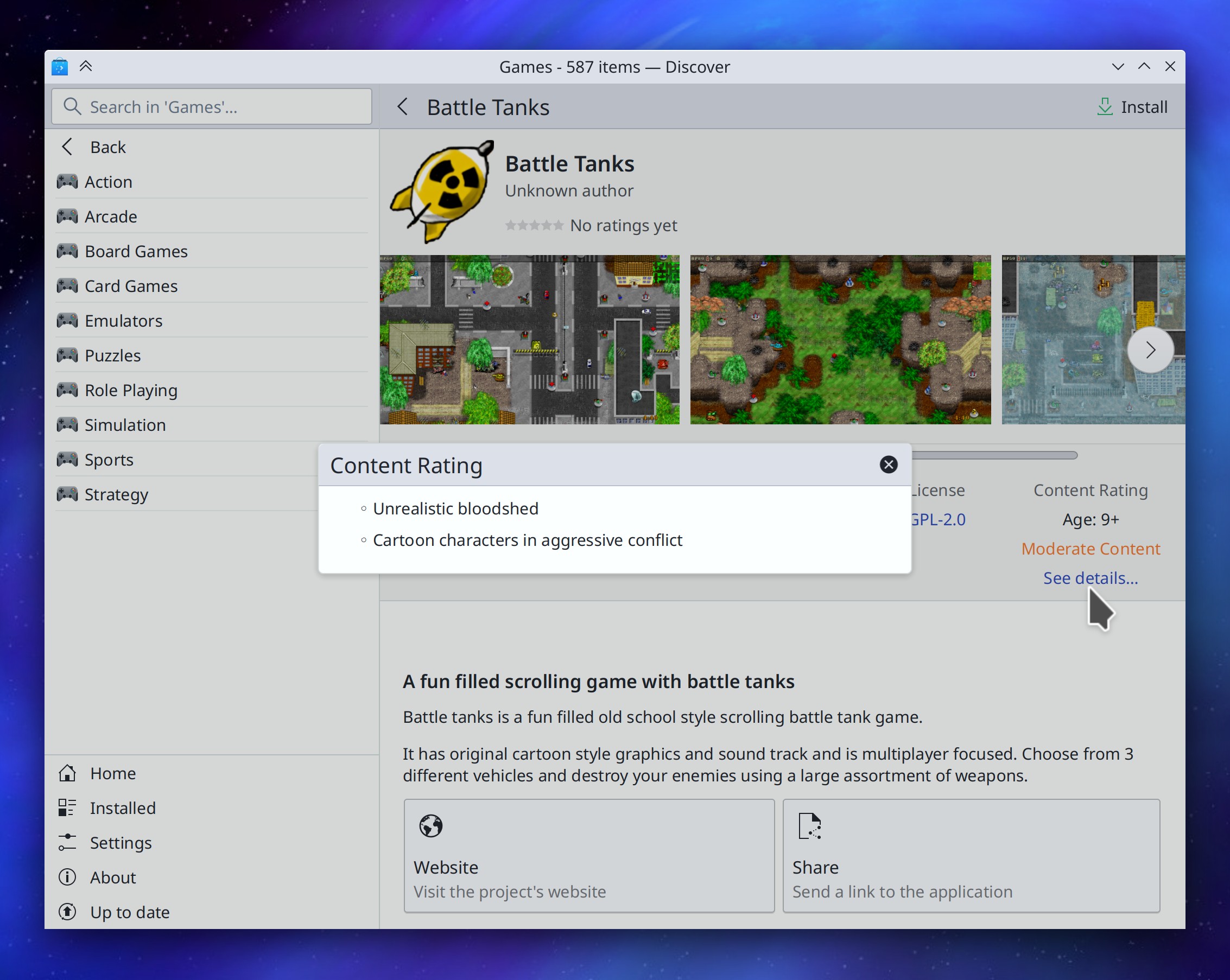
Discover now displays content ratings for apps that support them! (Aleix Pol Gonzalez, Plasma 5.26. Link):
Discover now lets you change the name used for submitting a review (Bernardo Gomes Negri, Plasma 5.26. Link)
Discover now has a “Share” button on each app’s details page that lets you send a link to the app to someone else (Aleix Pol Gonzalez, Plasma 5.26. Link)
Discover now checks to make sure there’s enough free space before updating, and warns you when there isn’t (Aleix Pol Gonzalez, Plasma 5.26. Link)
You can now configure what happens when you activate a window that’s currently living on another Virtual Desktop: you get switched to that window’s Virtual Desktop (the default setting) or the window jumps to your current Virtual Desktop (Natalie Clarius, Plasma 5.26. Link):
User Interface Improvements
When using a multi-monitor setup, window position is now remembered on a per-screen basis, so when screens are plugged in and unplugged, windows that have not been manually moved will be automatically moved to the last screen they were known to be on (Xaver Hugl, Plasma 5.26. Link)
Bluetooth device pairing/permission/etc notifications will now appear even when you’re in Do Not Disturb mode, so you don’t miss them (Nicolas Fella, Plasma 5.26. Link)
The Color Picker widget’s popup now features a placeholder message when there are no colors in it, and it lets you remove saved colors (Fushan Wen, Plasma 5.26. Link 1 and Link 2)
The compact representation of a standalone Media Controller widget (not the one that appears in the System Tray by default) now shows you the title, artist, and album art of the currently-playing track (Fushan Wen, Plasma 5.26. Link):
You can now also zoom in using the Meta+Plus keyboard shortcut, which should be easier for people with ISO keyboards than the old default of just Meta+Equals (me: Nate Graham, Plasma 5.26. Link)
Significant Bugfixes
(This is a curated list of e.g. HI and VHI priority bugs, Wayland showstoppers, major regressions, etc.)
When your battery reaches the “critically low” threshold, the screen will no longer be inappropriately brightened if it was already under the brightness level that it would be automatically set to (Louis Moureaux, Plasma 5.24.7. Link)
Applying a cursor theme that inherits itself no longer renders you unable to log into your user account (Vlad Zahorodnii, Plasma 5.25.5. Link)
In the Plasma Wayland session, KWin no longer sometimes crashes when dragging an attachment from Thunderbird (Vlad Zahorodnii, Plasma 5.25.5. Link)
In Discover, clicking the button to delete the user data for for a no-longer-installed app that came from a local Flatpak bundle (not a more common .flatpakref file or an app from a remote repo) no longer deletes all user data for all Flatpak apps (Aleix Pol Gonzalez, Plasma 5.26. Link)
This blog only covers the tip of the iceberg! If you’re hungry for more, check out https://planet.kde.org, where you can find more news from other KDE contributors.
How You Can Help
If you’re a developer, check out our 15-Minute Bug Initiative. Working on these issues makes a big difference quickly! Otherwise, have a look at https://community.kde.org/Get_Involved to discover ways to be part of a project that really matters. Each contributor makes a huge difference in KDE; you are not a number or a cog in a machine! You don’t have to already be a programmer, either. I wasn’t when I got started. Try it, you’ll like it! We don’t bite!





 Adventures in Linux and KDE