Highlights from 2025

It’s been a few years since I did an end-of-year “highlights in KDE” post, but hopefully better late than never! 2025 was a big year for KDE — bigger than me or any of us individually.

My focus these days tends to be on Plasma, so that’s mostly what I’ll be mentioning on the technical side. And as such, everything here is just what I personally noticed, got involved with, or got excited about. Much more was always happening! Additional KDE news is available at https://planet.kde.org.

The Wayland transition nears completion
Real picture-in-picture support!

For several years, Plasma has been transitioning to the newer Wayland display server protocol, and away from the older X11 one. 2025 is when it got real: we announced a formal end to Plasma’s X11 session in early 2027.

To make this transition as seamless as possible for as many people as possible, the people involved with the Plasma shell and especially KWin did a herculean amount of work on improving Wayland support on topics as varied as the following:

  • Accessibility
  • Drawing tablets
  • HDR
  • Color management
  • P010 video color
  • Overlay planes
  • XRandr emulation
  • Screen mirroring
  • Custom screen modes
  • Implemented support for a large number of protocols, including xdg-toplevel-tag, xdg_toplevel_icon, ext_idle_notifier, color_representation, fifo, xx_pip, pointer_warp, and single_pixel_buffer
  • Pre-authorization for portal-based permissions
  • Clipboard and USB portals

Thanks to this and earlier work, most FOSS operating systems (also known as “distributions” or “distros”) that ship Plasma are defaulting to the its Wayland session these days — including big ones like Arch Linux, Debian, and Fedora KDE. Kubuntu is planning to for the next LTS as well. As a result, our (opt-in) telemetry numbers show that 79% of Plasma 6 users are already on Wayland. I expect this number to increase once SteamOS and the next Kubuntu LTS version default to Wayland. So you see, it really is driven by distros!

Now, Plasma’s Wayland support isn’t perfect yet (any more than its X11 support was perfect). In particular, the two remaining major sources of complaints are window position restoring and headless RDP. We’re aware and working on solutions! I can’t make any promises about outcomes, but I can promise effort on these topics.

This admittedly somewhat messy and plodding transition has taken years, and consumed a lot of resources in the process. I’m looking forward to having it in the rearview mirror, and 2026 promises to be the year that enables this to happen! Expect a lot of Wayland work in 2026 to make us ready for the end of the Plasma X11 session in 2027.

Plasma continues to mature and improve
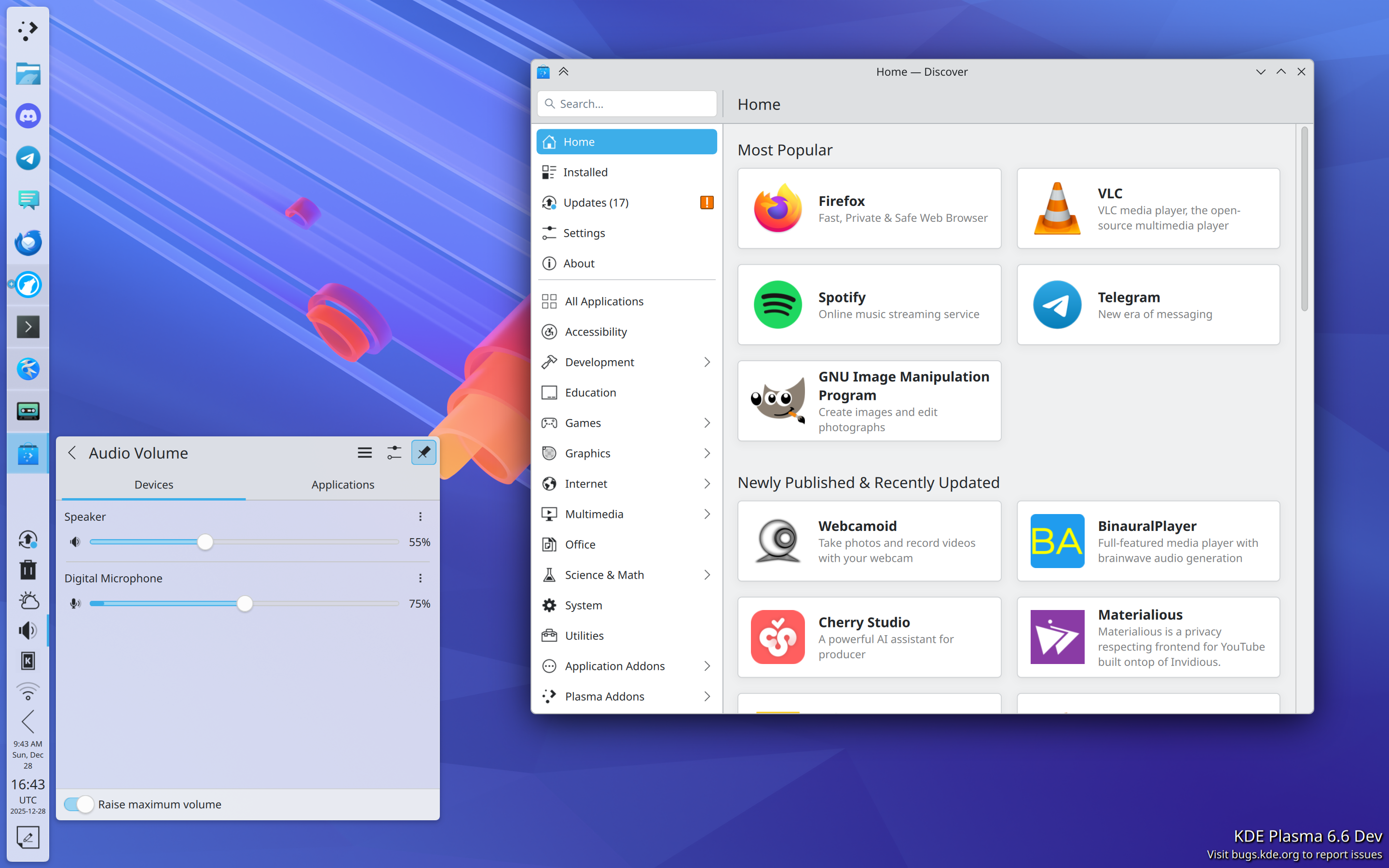
In addition to what I mentioned in the Wayland section, Plasma gained a whole ton of user-facing features and improvements! Among them are:

  • Rounded bottom window corners
  • Day/night global theme and wallpaper switching
  • Saved clipboard items
  • Speed graph in file transfer notifications
  • Panel cloning
  • Per-virtual-desktop custom tiling layouts
  • “You missed X notifications while in Do Not Disturb mode” feature, and auto DND mode enabling while in a fullscreen app or video
  • Install hardware drivers in Discover (on supported distros)
  • New app highlighting in Kickoff
  • UI overhaul for KMenuEdit and Info Center’s energy page
  • Playback rate selector in the Media Player widget
  • Three-finger pinch to zoom
  • UX and video quality and file size improvements in Spectacle
  • GPU usage monitoring in System Monitor
  • Use existing user accounts for RDP/remote desktop
  • Printer ink level monitoring
  • Inline print queue viewing in the Printers widget
  • Only show the screen locker and logout screen UI on one screen, not all of them
  • OCR in Spectacle (coming in Plasma 6.6)
  • Monochrome colorblindness filter (coming in Plasma 6.6)
  • Option for automatic screen brightness on supported hardware (coming in Plasma 6.6)
  • Option for virtual desktops to only be on the primary screen (coming in Plasma 6.6)

Phew, that’s a lot! And Plasma is getting rave reviews, too. Here are a few:

A decade ago or so, it used to be that Plasma wasn’t seen much as the default option for distros, but that’s changing.

Today Plasma is the default desktop environment in a bunch of the hottest new gaming-focused distros, including Bazzite, CachyOS, Garuda, Nobara, and of course SteamOS on Valve’s gaming devices. Fedora’s Plasma edition was also promoted to co-equal status with the GNOME edition, and Asahi Linux — the single practical option for Linux on newer Macs — only supports KDE Plasma. Parrot Linux recently switched to Plasma by default, too. And Plasma remains the default on old standbys like EndeavourOS, Manjaro, NixOS, OpenMandriva, Slackware and TuxedoOS — which ships on all devices sold by Tuxedo Computers! And looking at the DIY distro space, Plasma is by far Arch users’ preferred desktop environment:
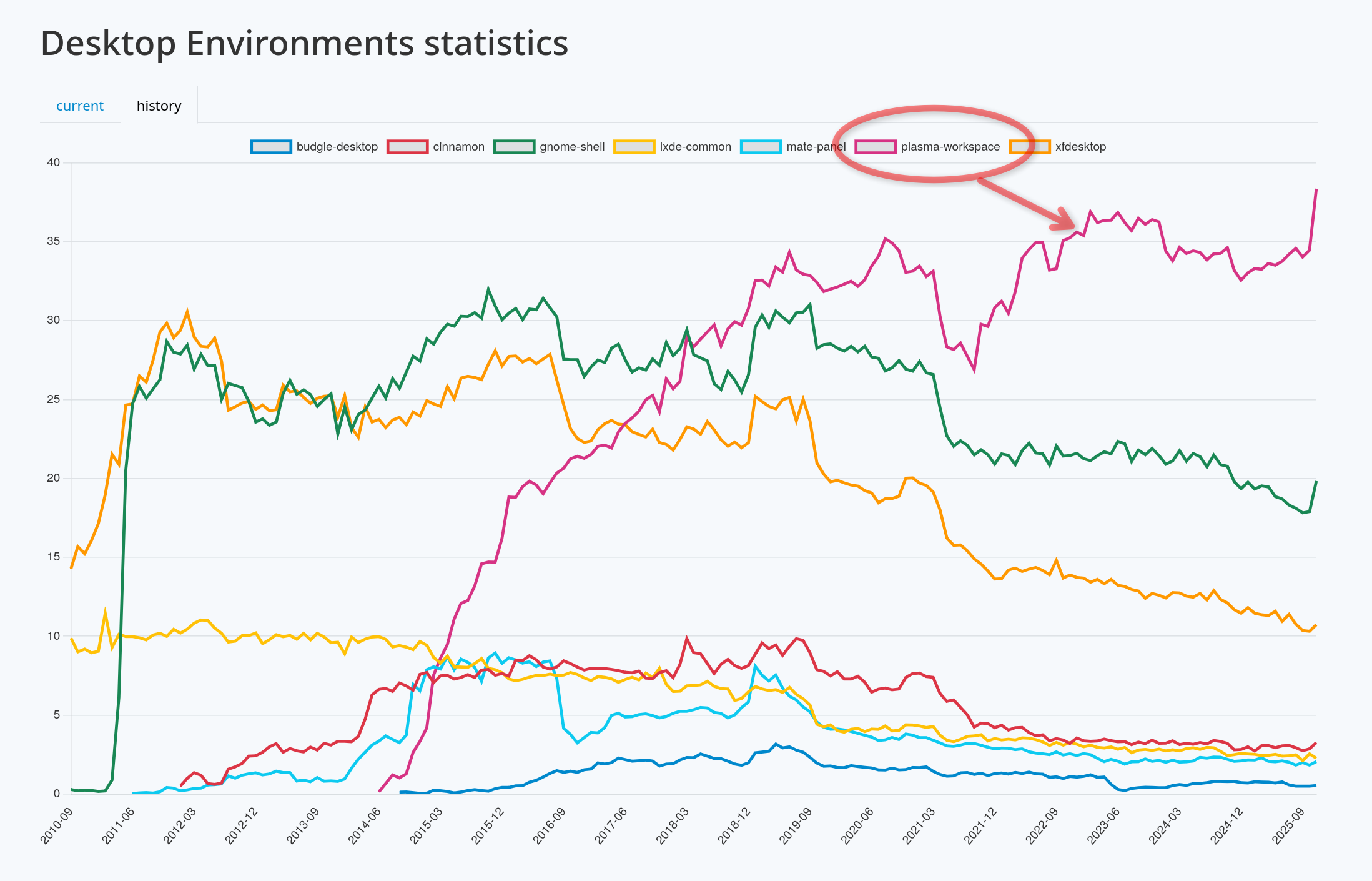
It’s a quiet revolution in how Linux users interact with their computers, and my sense is that it’s gone largely unnoticed. But it happened, so let’s feel good about it!

In fact, if we exclude the distros that showcase their developers’ custom DEs (e.g. COSMIC, ElementaryOS, and Linux Mint), at this point the only significant distros missing here are the enterprise-oriented ones: Debian, RHEL, SLE, Ubuntu, and the like. It’s something for us to work on in 2026, but clearly the current state is already great for a lot of people, including gamers, artists, developers, and general users.

KDE Linux grows
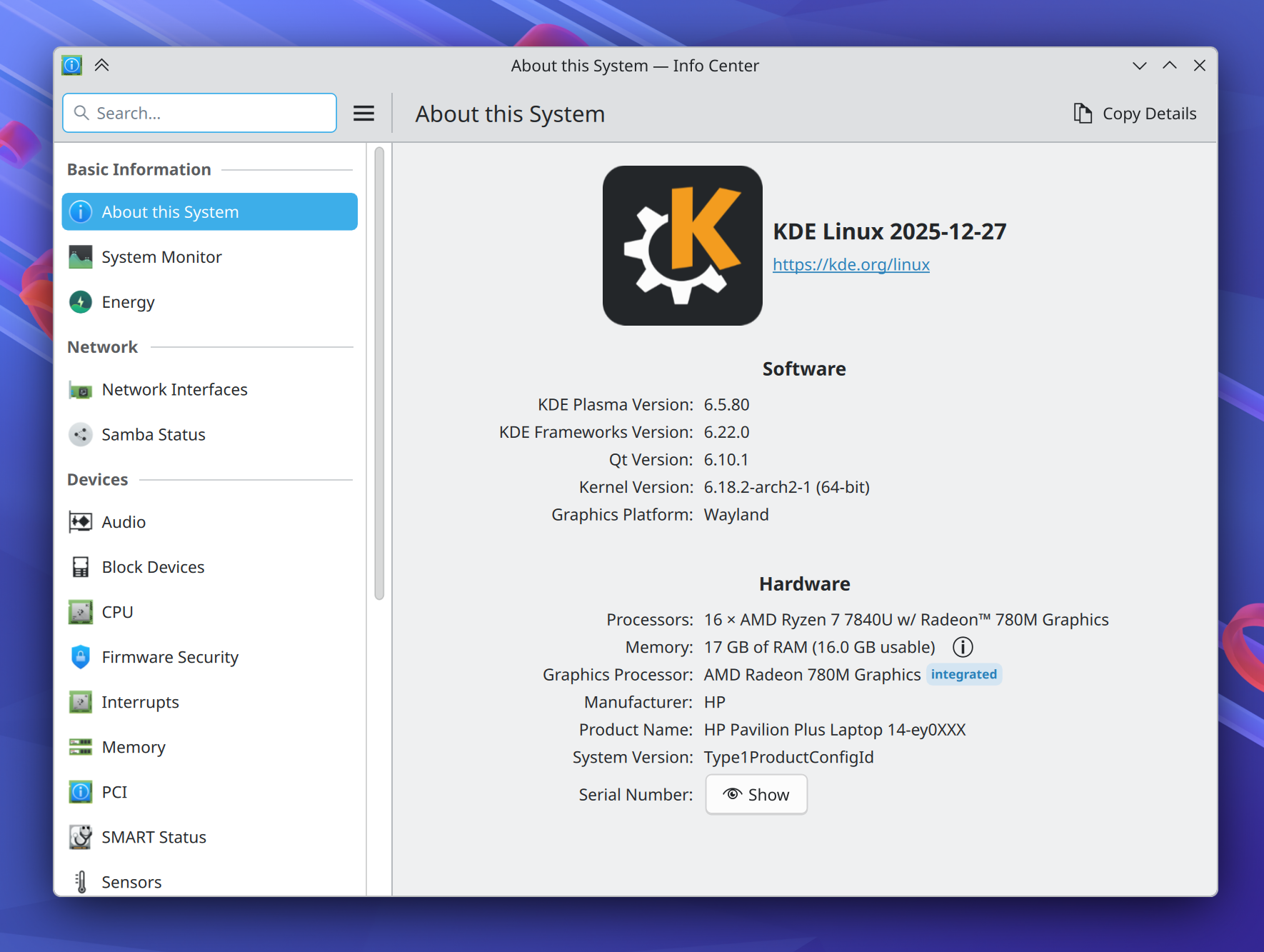
On the subject of operating systems, at Akademy 2024, Harald Sitter revealed the KDE Linux operating system project to the world. But in 2025, it spread its wings and began to soar.

Despite technically still being an Alpha release, I’m using this in-house KDE OS in production on multiple computers (including my daily driver laptop), and a growing number of KDE developers and users are as well. Thanks to its QA and bulletproof rollback functionality, you can update fearlessly and it doesn’t feel like an alpha-quality product. You don’t have to take my word for it; ask Hackaday and DistroWatch!

This project has been very special to me because I believe that KDE needs to take the reins of OS distribution in order to offer a cohesive product. The earlier KDE neon project already broke the ground necessary to make this kind of thing socially possible; now KDE Linux is poised to continue that legacy with a more stable and modern foundation.

To be very clear, none of this is an attempt to kill off other distros. Far from it! In fact, an explicit goal is to showcase what a well-integrated KDE-based OS looks like, so others can take notes and improve their offerings. And there’s still lots and lots of room for specialized distros with different foci, and DIY distros that let people build their own preferred experiences.

I’m really excited to see where this project goes in 2026. You can learn more on the project’s documentation wiki: https://community.kde.org/KDE_Linux

Fundraising performance is completely bonkers
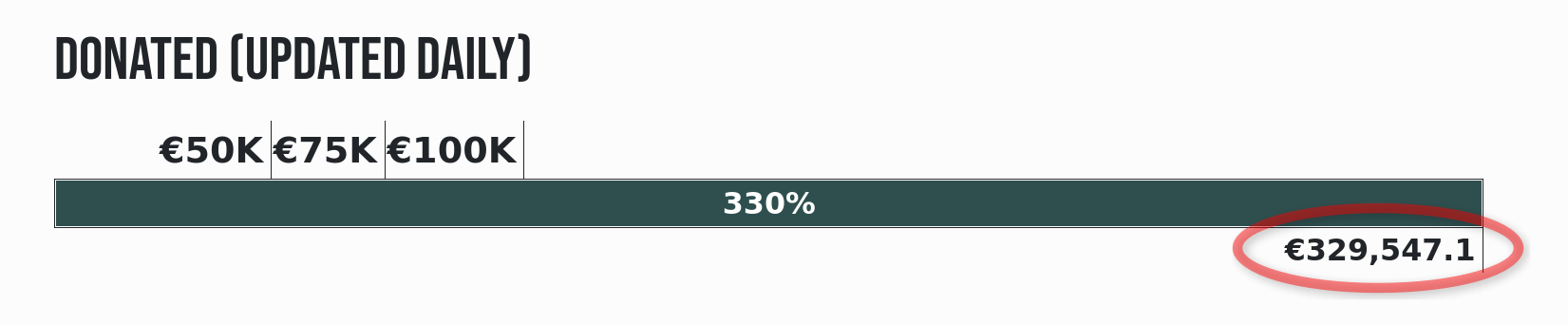
This is the second year that Plasma users have seen a donation request pop-up in December. And it marks the second year where this not only didn’t kill KDE, but resulted in an outpouring of positivity and a massive number of donations! Last year I wondered if it was repeatable. It’s repeatable.

That plus an even more ambitious and well-organized end-of-year fundraiser propelled KDE to its best ever Q4 fundraising sum: nearly €330,000 as of the time of writing! KDE e.V. (the non-profit organization behind KDE) is going to end up with a 2025 income that’s a significant fraction of a million Euros, and mostly crowdsourced, too.

I say this a lot, but sums like this truly help keep KDE independent over the long haul. But how, specifically?

First, by being mostly funded by small donors, KDE retains its independence from any powerful and opinionated companies or individuals that happen to be patrons or donors.

Second, with such a large income in absolute terms, KDE e.V. now has resources to rival the private companies in KDE’s orbit that contribute commercially-funded development to KDE (like mine), and that’s a good thing! It means a healthy diversity of funding sources and career opportunities for KDE developers. It’s systemic resilience.

And finally, with money like this, KDE e.V. is able to fund projects of strategic interest to KDE itself, and fund them well. Historically KDE’s software has been developed by volunteers working on what’s fun, companies funding what supports their income, and some public institutions funding their specific use cases. And that’s great! But it leaves out anything that’s not fun, doesn’t make money, and isn’t directly relevant for governments. These are the kinds of large projects or maintenance efforts that KDE e.V. is now able to fund if necessary.

It’s a big deal, folks! This kind of fundraising performance puts KDE on the map, permanently. And it’s mostly thanks to people like you, dear readers! The average donation is something like €26. KDE is truly powered by the people.

If you can make a donation please do so, because it matters, and goes far!

KDE’s overall trajectory

It’s positive. Really positive.

But when I joined KDE in 2017, the community was a bit dejected. After giving my very first public conference talk at Akademy 2018, multiple people came up to me and said some variant of “thank you for this optimistic vision; I didn’t think I could feel positive about KDE again.”

These reactions were really surprising to me; without the benefit of history, I had no idea what the mood was or how things had been in the recent past. But some statistics about contributor and commit numbers bear out the idea that 2013-2017 was a bit of a low period in KDE’s history, for various reasons.

But since then, KDE has come roaring back, and you see it in positive trends like adoption by hardware vendors and distros, great fundraising performance, good reviews, positive user feedback, and new contributors.

Everything isn’t perfect, of course; there are challenges ahead. Bugs to fix and stability problems to overcome. The Wayland transition and a new theming system to complete. Features to add that unlock Plasma for more users. More effort to put into getting Plasma-powered operating systems and devices into the mainstream.

But the KDE community is up for it. KDE is a mature institution that’s resisting enshittification, and making the world a better place in ways both big and small. My work on KDE represents by far the most meaningful part of my career, and I hope everyone else involved can feel the same way. What we do matters, so let’s go out there and do it even better in 2026!

Akademy 2025: something big is happening

I’m back from Akademy 2025 in Berlin, and what an experience it was.

At this point, I’ve gotten a reputation as a “big picture guy”, so that’s what I’ll focus on here, rather than the details of my experiences in specific events. Lots of other folks are starting to write blog posts you can find on https://planet.kde.org about their Akademy experiences that I’m sure will be full of juicy details!


But basically, to me this year’s Akademy felt like it had a theme: “KDE is on the cusp of something big.”

Here’s one example: at the very cool C-base hackerspace, I was talking with someone who mused that 15 years ago, Akademy was full of KDE hackers talking about the government one day using our software… and then fast-forward 15 years and our two keynote speakers are from the German government talking about using KDE’s software!

Then we had a talk from the “End of 10” crowd about KDE’s campaign encouraging people to upgrade to Linux rather than buying new hardware capable of running Windows 11. And then as if to reflect on the success of this initiative, Patrick Fitzgerald gave a talk about how to do massive migrations from Windows to Linux, with examples provided of cases where literally thousands of machines were migrated to KDE software at a small fraction of the cost of moving to Windows 11.

Till Adam gave a talk about how commercial work changes relationships with respect to his experience in KDAB, a software consultancy founded by KDE contributors. I found this talk highly relevant given that David Edmundson and I just started a KDE-focused company this year ourselves. Alexandra Betouni also gave a talk about rising to the top of a company. Hmm, lots of companies!

We heard about how Mercedes is rolling out a vehicle powered by KDE technology under the hood.

In the “hallway track”, I had a fascinating discussion about how KDE’s efforts to improve accessibility have the potential to be an industry-wide force multiplier.

And then I gave a talk myself about the big picture of all of these trends — that as the world falls apart around us, everything being on fire includes tremendous opportunities for change that KDE is well-positioned to benefit from.


Basically, at age 29, KDE is all grown up now. Our software solves real problems for real people, at scale. It works for governments and big businesses. It saves or earns money for a lot of people. Our competitors are beginning to falter and look weak. But through it all, KDE remains healthy and strong, and grows in stature.

So I found Akademy 2025 to be an unexpectedly serious conference, full of heavy topics and sharing of priceless wisdom from hard-earned experience. There was of course also a lot of fun hacking and group gatherings and renewing of social bonds, but throughout everything was that underpinning that KDE isn’t just a fun little online community anymore, but rather a player with a growing significance on the world stage.

Pretty cool stuff, I think! Personally, I get energized by working on things that matter, and boy did Akademy 2025 leave me with the impression that KDE matters.

Announcing the Alpha release of KDE Linux

Today I have something very exciting to share: the Alpha release of KDE Linux, KDE’s new operating system!

Many of you may be familiar with KDE Linux already through Harald Sitter‘s 2024 Akademy talk about it (slides; recording), or the Wiki page, or its web page on kde.org.

For everyone else, let me briefly explain: KDE Linux is a new operating system intended for daily driving that showcases Plasma and KDE software in the best light, and makes use of modern technologies.

KDE Linux uses Arch packages as a base, but it’s definitely not an “Arch-based distro!” There’s no package manager, and everything except for the base OS is either compiled from source using KDE’s kde-builder tool, or Flatpak. Sounds weird, huh?! We’ll get to that later.

Harald has been leading the charge to build KDE Linux, assisted by myself, Hadi Chokr, Lasath Fernando, Justin Zobel, and others. We’ve built it up to an Alpha release that’s officially ready for use by QA testers, KDE developers, and very enthusiastic KDE fans.

What’s in the Alpha release?

Today we’re releasing KDE Linux’s Testing Edition. This edition provides unreleased KDE software built from source code; a preview of what will become the next stable release.

In practice, we’re being quite conservative, and it’s already pretty darn stable for daily use. In fact, I’ve had KDE Linux on my home theater PC for about six months, and it’s been on my daily driver laptop for one month. Since then, I’ve done all my KDE development on it, as well as everything else I use a laptop for. It really does work. It’s not a toy or a science experiment.

KDE Linux running on an HTPC, a 2 year-old laptop, and a 10-year old laptop — all pretty much flawlessly

Since KDE Linux offers unreleased, in-progress software, you’ll probably notice some bugs if you use it. Good, that’s the point of the testing edition! Report those bugs so we can fix them before they end up shipping to people using released software.

But where to?

  • If the bug appears to be caused by KDE Linux’s design or integration, use invent.kde.org. Ignore the scary red banner at the top of the page.
  • If the bug appears to be in a piece of KDE software itself, like Plasma or Dolphin (such that it would eventually manifest on other operating systems as well), use bugs.kde.org.

So if this is an Alpha release, what’s known to be broken?

Great question. To start with, some things are intentionally unsupported right now; see also https://community.kde.org/KDE_Linux#Non-goals. For example:

  • Computers with only BIOS support (not UEFI)
  • Loading new kernel modules at runtime
  • proprietary drivers for pre-Turing NVIDIA GPUs

There are also quite a few things that need work. You can find specific notable examples at https://community.kde.org/KDE_Linux#Current_state. A few are:

  • No secure boot
  • Pre-Turing NVIDIA GPUs require manual setup
  • Immature QA and testing infrastructure
  • User experience papercuts in Flatpak KDE apps and updating the system using Discover

We’d love your help getting these and other topics straightened out!

Just what the world needs, another Linux distro…

A sentiment I have in the past expressed myself.

However, there’s a method to our madness. KDE is a huge producer of software. It’s awkward for us to not have our own method of distributing it. Yes, KDE produces source code that others distribute, but we self-distribute our apps on app stores like Flathub and the Snap and Microsoft stores, so I think it’s natural thing for us to have our own platform for doing that distribution too, and that’s an operating system. I think all the major producers of free software desktop environments should have their own OS, and many already do: Linux Mint and ElementaryOS spring to mind, and GNOME is working on one too.

Besides, this matter was settled 10 years ago with the creation of KDE neon, our first bite at the “in-house OS” apple. The sky did not fall; everything was beautiful and nothing hurt.

Speaking of KDE neon, what’s going on with it? Is it canceled? If not, doesn’t this amount to unnecessary duplication?

KDE neon is not canceled. However it has shed most of its developers over the years, which is problematic, and it’s currently being held together by a heroic volunteer. KDE e.V. has been reaching out to stakeholders to see if we can help put in place a continuity or transition plan. No decision has yet been made about its future.

While neon continues to exist, KDE Linux therefore does represent duplication. As for unnecessary? That I’m less sure about that. Harald, myself, and others feel that KDE neon has somewhat reached its limit in terms of what we can do with it. It was a great first product for KDE to distribute our own software and prepare the world for the idea of KDE in that role, and it served admirably for a decade. But technological and conceptual issues limit how far we can continue to develop it.

See also https://community.kde.org/KDE_Linux#Differences_from_KDE_neon/Prior_art

Time will tell how these two products relate to one another in the future. Nothing is settled.

What are the architecture choices? Why did you build KDE Linux the way you did?

For detailed information about this, see https://community.kde.org/KDE_Linux#Architecture.

We wanted KDE Linux to be super safe by default, providing guardrails and tools for rolling back when there are issues.

For example, KDE Linux preserves the last few OS images on disk, automatically. Get a bad build? Simply roll back to the prior one! It’s as easy as pie too; they show up right there on the boot menu:

It’s like being able to roll back to an older kernel, but for the whole OS.

To make this possible, KDE Linux has an “immutable base OS”, shipped as a single read-only image. Btrfs is the base file system, Wayland is the display server, PipeWire is the sound server, Flatpak gets you apps, and Systemd is the glue to hold everything together.

We also wanted to settle on a specific KDE software development story, with the OS built in the same way we compile our software locally — using kde-builder and flatpak-builder. This should minimize differences between dev setups and user packages that cause un-reproducible bugs (yes, this means we would love for you to use the Flatpak versions of KDE software!). There are genuine benefits for KDE developers here.

If these technologies aren’t your cup of tea, that’s fine. Feel free to ignore KDE Linux and continue using the operating system of your choice. There are plenty of them!

Why an immutable base OS? Isn’t that really limiting?

In some ways, yes. But in other ways, it’s quite freeing.

In my opinion, the traditional model of package management in the FOSS world has been one of our strongest features as well as our most bitter curse. A system made of mutable packages you can swap out at runtime is amazing for flexibility and customization, but terrible for long-term stability. I guarantee that every single person reading these words who’s used a terminal-based package manager has used it to blow up their system at least once. C’mon, admit it, you know it’s true! 😀 And in some distros, even using the GUI tools can get you into an unbootable state after an upgrade. If this has never happened to you on a traditional mutable Linux distro… I don’t believe you!

The pitfalls for non-experts are nearly infinite, their consequences can be showstopping, and the recovery procedures usually involve asking an expert for help. No expert around? Back to Windows.

Over the past 30 years, many package-based operating systems have made improvements to their own system-level package management tools to smooth out some of these sharp edges, but the essence of danger remains. It’s inherent in the system.

So in KDE Linux, we take on that risk and do the system-level package management for you, delivering a complete OS all in one piece. If it’s broken, it’s our fault, not yours. And then you’ll roll back to the previous build, yell at us, and we’ll fix it.

By delivering the OS in a complete image-based package, we can perform safe updates by simply swapping out the old OS image for the new one. There’s no risk of a “half-applied update” or “local package conflicts”, or anything like that. It’s also super-fast (once the new OS image is downloaded, that is), unlike the “offline update” system used by PackageKit, where you have to wait minutes on boot following an update. Those issues don’t exist on KDE Linux.

Wait… if the whole system is one piece and you can’t change it, how do you install new software?

Well, only the base OS in /usr is immutable; /etc is writable for making system-level config changes, and your entire home folder is of course yours to do what you want with, including installing software into it. So that’s what you do: use Discover to get software, mostly from Flathub at this point in time, but Snap is also technically supported and you can use snap in a terminal window (support in Discover may arrive later).

That’s fine for apps in Flathub and the Snap Store, but what about software not available there? What about CLI tools and development libraries?

Containers offer a modern approach: essentially you download a tiny tiny Linux-based OS into a container, and then you can install whatever that OS’s own package management system provides into the container. KDE Linux ships with support for Distrobox and Toolbx.

That’s right, after trashing package management, now I’m endorsing package management! The difference? This is user-level packaging and not system-level packaging. System-level packaging is what’s dangerous. Take away the danger by doing it in your home folder, and you regain almost all of the benefits, with almost none of the risks.

AppImage apps work too.

Homebrew also works; it’s an add-on system-level package manager that allows you to download tons of stuff you might want for power user and development purposes. Note that Homebrew packages are not segregated, so they can override system libraries and present problems. This should be considered an experts’ tool.

Compiling anything you want from source code is also possible — provided the dependencies are available, and Homebrew or containers can be used for this.

Finally, there’s nothing stopping folks from making command-line tools available via Flathub or another 3rd-party Flatpak repository. Some are already there. So this could be a potential avenue of improvement too.

But as you can see, the story here is fragmented, with a menu of imperfect options rather than a single unified approach. That’s a valid critique, and it’s something that needs more work if we want an obvious default choice here.

For more information about this topic, see https://community.kde.org/KDE_Linux#Installing_software_not_available_in_Discover

That’s not enough power! I want to change the base OS!

Actually I lied. There’s another option for developers and super power users, one that does allow intermingling stuff: you can use systemd-sysext to overlay files of your choice on top of the base OS.

It’s a really cool tool you might not be aware of. I’ve started using it in KDE Linux to overlay my built-from-source KDE software on top of the base system for development and testing purposes, and it’s just been a super great experience. Way better than compiling stuff to a prefix in $HOME. No more weird random DBus and Polkit failures or stale file conflicts.

Now, this is quite a bit riskier as you can destabilize the OS itself by overlaying broken parts on top of working parts. But undoing any such changes is super simple, since, again, it’s all self-contained. That’s gonna be a common theme here.

However, I think the better answer for “I want to change the base OS” is “please get involved with developing KDE Linux!” That way if your changes are amazing, the whole world can benefit from them, and the burden of maintaining them over time can be shared with others.

See also https://kde.org/linux/#this-is-so-cool-how-can-i-get-involved-with-development

Still not enough power! I need to be able to swap out kernel modules and base packages at runtime!

Wow, you really are sounding like an OS developer. Maybe you want to help us develop KDE Linux? The OS could benefit tremendously from your skills and experience!

That said, there’s some truth to the idea that an immutable OS like KDE Linux isn’t the best choice for doing this kind of really low-level development or system optimization. That’s fine; there are hundreds of other traditional Linux-based operating systems out there that can serve this purpose.

If your goal really is to build your own OS for your own personal or commercial purposes, it’s hard to go wrong with Arch Linux; it’s one of the tools we used to build KDE Linux, in fact. In a lot of ways it’s more of an OS building toolkit than it is an OS itself.

If it’s all Flatpak and containers and stuff, does it really showcase Plasma and KDE software in the best light? Really?

Well, we’re kind of cheating a bit here. A couple KDE apps are shipped as Flatpaks, and the rest you download using Discover will be Flatpack’d as well, but we do ship Dolphin, Konsole, Ark, Spectacle, Discover, Info Center, System Settings, and some other System-level apps on the base image, rather than as Flatpaks.

The truth is, Flatpak is currently a pretty poor technology for system-level apps that want deep integration with the base system. We tried Dolphin and Konsole as Flatpaks for a while, but the user experience was just terrible.

So for the Alpha release, these apps are on the base OS where they can properly integrate with the rest of the system. There’s no reason to torture people with issues that we know won’t be fixed anytime soon!

Other apps not needing as as deep a level of system integration are fine as Flatpaks right now, and we’re engaging with Flatpak folks to see how we can push the technology forward to work better for the deep integration use cases.

This is because one of KDE Linux’s other goals is to be a test-bed for bringing new technologies to KDE. Our software that behaves awkwardly when sandboxed or run on a filesystem other than Ext4 represents something for us to fix, because those technologies aren’t going away. We need to be embracing that future, not ignoring it. KDE Linux both helps and forces us to do it.

This should be exciting. New technology is fun! You get to help guide the future. Let’s not get caught up yelling at clouds here!

I’m a KDE developer. Why should I migrate to KDE Linux, and how does KDE development work?

Easy setup, speed, safety, DBus and Polkit finally work properly, space savings, consistent platform targets, and more. There’s a lot to like. See also https://kde.org/linux/#im-a-kde-developer-why-should-i-use-kde-linux-and-how-does-kde-development-work

Forget the haters, this project is cool! How can I help?

Great! For starters, install it on your computers. 🙂 We’re looking to get more feedback from daily drivers. The Matrix room is a great place to get in touch with us.

You can help out with some of the tasks and projects mentioned at https://community.kde.org/KDE_Linux#Current_state. Those are high priority. And lots more easier, lower-priority tasks can be found here. You can submit Issues or Merge Requests on invent.kde.org.

And finally, help spread the news! If you couldn’t tell, I’m really excited about this project, and I think a lot of other folks will be as well… once they hear about it!

Interview on FLOSS Weekly

I was recently interviewed by Jonathan Bennett of the FLOSS Weekly show! If you aren’t totally sick of my ugly mug yet, you can hear me talk about some of my favorite topics: KDE on hardware, onboarding people to Plasma, the importance of preserving readiness, and how difficult it is to actually install and uninstall software on a Mac. You can check it out at https://hackaday.com/2025/06/04/floss-weekly-episode-835-board-member-b/, or watch the video version here:

SteamOS destroys Windows

With the release of the Lenovo Legion Go S gaming handheld, we’ve now got a real apples-to-apples comparison of how Windows 11 fares against Linux (specifically, SteamOS with KDE Plasma) on the same 1st-party supported OEM hardware in a gaming context. And the results are pretty devastating for Windows in terms of performance and battery life — according to even windowscentral.com! Neither WindowsCentral nor the original video from Dave2d mention desktop mode, but the answer there is just as clear, as all of us in the FOSS space have known for ages.

We’re winning, folks. If I polish my crystal ball, I see us peeling away groups of users from competing platforms one at a time: developers, gamers, artists, scientists, enthusiasts, and on and on. It’s happening. The snowball is rolling down the hill, gaining momentum.

It can be hard to remember the big picture when we’re nose deep in code, bugs, and icons all day, but that big picture is on our side. Never forget that everything you do in KDE is impactful!

Personal and professional updates — announcing Techpaladin Software

Today I’m going to talk about something a bit different. Maybe very different!

After six years at Blue Systems GmbH, I’ve had the privilege of working daily with some of the finest and most ethical engineers I’ve ever known; lots of people whose names you probably recognize, because they’re some of the biggest contributors to Plasma and KWin, and regularly appear in This Week in Plasma.

Starting earlier this month, about a dozen of Blue Systems’ current people — myself included — have moved over to a new company named Techpaladin Software that’s co-owned by me and someone else you probably know: David Edmundson!

No, this isn’t some kind of hostile takeover or internal corporate backstabbing. 🙂 Rather, it’s the result of a mutual decision made between the owner of Blue Systems, myself and David Edmundson, and Blue Systems’ other personnel who are moving over.

Practically nothing changes for KDE: Techpaladin will sponsor almost all of the same people Blue Systems did, and they will continue to enjoy the same wide latitude to improve KDE software for a living with a high level of personal and professional freedom. Techpaladin will be a KDE e.V. Patron, too. Keeping this transition as smooth as possible was a major goal here!

I’m incredibly grateful to Blue Systems for the personal and professional opportunities I’ve had over the past six years. Working on KDE for a living has been one of the greatest privileges I’ve ever been blessed with — undoubtedly the most satisfying years of my career, and I have Blue Systems to thank for it.

Wait what

Yeah for real! To be honest, in the beginning of this process, I was as surprised to learn about the opportunity as you may be while reading about it right now.

Now, I’ve been a business owner before, but admittedly only at a smaller scale, running a two-person 3D printer company from 2011 through 2014. In fact, some of you who were around for the early days of 3D printing and the RepRap project might remember a company bearing the similar name of “Techpaladin Printing“. That’s right, this was my company! Back then, we helped fellow community members people build MendelMax 3D printers (you can find an archived build guide of mine linked to on that page) from our parts and kits, starting with a humble order of 250 plastic Igus bushings — which at the time could only be purchased in commercial quantities, not at retail. It was my first serious exposure to FOSS (and FOSH!) principles in action, and also where I first fell in love with the movement.

Techpaladin is a much bigger business, of course — with a headcount of over a dozen spread across 7 countries and 2 continents, more complicated accounting, and a co-owner. There are a lot of moving parts; the setup process has been challenging for sure. But I think we’re up to the task!

So this is you throwing off the mask and revealing yourself as some kind of evil techbro corporate oligarch, right? I knew it!!!

And you should buy my new cryptocoin, too! 🫨

But seriously, setting up this enterprise has refocused my conviction that while organizing a business is real work that can be done well or poorly and should not be discounted, the true value in a company is generated by the workers — and those workers should be the overwhelming beneficiaries of that value. I’m still me, and my primary goal remains to propel KDE to world domination! Techpaladin is simply a new and powerful arrow in that quiver, particularly on the topic of helping people make careers out of KDE — a topic near and dear to my heart.

On a personal level, I fully intend to continue working on KDE software in my technical and organizational capacities, in addition to my new tasks managing the business. For example, you can see I’m still publishing This Week in Plasma, still doing technical work, still reviewing other people’s merge requests, and still triaging bug reports.

I’m sure I’ll make some dumb mistakes as I find my way on this journey, and be deservedly criticized for them. When that happens, I’ll try my best to learn from them and do better in the future. So thanks in advance for bearing with me!

What’s your business model?

Like Blue Systems, Techpaladin is a software consultancy, and clients can pay for work on KDE software. And we’re inheriting Blue Systems’ contract with Valve Inc. as our first client! So Techpaladin will continue to maintain and develop large amounts of KDE software relevant to the Steam Deck.

In that case, can you fix this awful bug I’m experiencing?

Why yes, as a matter of fact! If you’d like to sponsor a bug fix — or a new feature, or custom development work of any kind — do get in touch. Techpaladin draws from the same deep well of top Plasma talent that Blue Systems did.

Are you hiring?

Not at the moment. We just got started, but if things go well, we will be open to hiring! If and when that time comes, I’ll announce it publicly.

Wow, what a weird thing to happen

Isn’t it!? The world is a weird place, and if there’s anything I feel like it’s been trying to teach me over the past five months, it’s that you can’t really predict anything. I think all you can do is be flexible in the face of events, and try to make a positive difference within the sphere of what you do have influence over, so that’s what I’m aiming for here.

Thanks as always for your time, everybody, and let’s continue to propel KDE to ever greater heights together. Today I’m feeling even more optimistic that the absurd goal of getting KDE software onto every device on the planet is actually doable!

I think the donation notification works

A few months ago, I blogged about a change for Plasma 6.2 to show a once-a-year system notification asking for a donation, starting on December 1st. Various reasons and justifications were given in that post, so I won’t repeat them here. Instead, since December 1st was yesterday in most of the world, it’s time to check in on the day 1 experience! So let’s get right into it:

Did it work?

Well, I woke up to an email inbox that looked like this:

And by the end of the day, the graph on https://kde.org/community/donations/previousdonations (which by the way only counts direct Paypal donations and still doesn’t include those made using Donorbox or direct bank transfer) wound up looking like this:

Yes that’s right, KDE e.V. received double the prior two months’ Paypal donations in a single day!!!

Do people hate us now?

So far, indications point to no! I scoured https://www.reddit.com/r/kde and https://discuss.kde.org all day yesterday and literally only found one non-positive comment about it, dwarfed by a large volume of mildly to highly positive ones. I wasn’t looking at Mastodon or other social media, but a colleague reported something similar.

In addition, a large number of the donations themselves were accompanied by positive messages from the donors. Here are some of my favorites:

KDE is more than just software, it’s a family. Least I can donate, but it’s coming from someone that pirates every other thing or uses the free alternative.

Thanks for all your incredible work over the years.

KDE Plasma is a big part of why I have grown to love Linux as my daily driver 💙

Thanks for all you have done for the linux desktop community

Thanks for Plasma! Couldn’t work without it! (Visually impaired user).

Thanks for your efforts to make the world a little more independent from Big Tech

Love the work, KDE is my daily driver and I’m glad I can help 🙂

Just got the Notification to donate in KDE and after thinking about it for a bit decided to donate for the first time, since I’ve been using Linux and specifically KDE for almost a year now. Thanks for your hard work!

Thanks for all of the work and effort put into making KDE the best DE ever!

So, yeah. On the contrary, it feels like our users really, really love us!

Is this repeatable?

It’s too early to say at this point, but I hope so. It will be interesting to see how fast the donations drop off. Will it be relatively fast because everyone who was going to donate after seeing to the notification already saw it yesterday? Or will the drop-off take a while because there are more notification-based potential donors who didn’t turn on their Plasma 6.2-using computer yet, or opened the donations page in a browser tab to action later? We don’t know; we’ll have to wait and see.

However it’s also worth mentioning that these donations are coming entirely from people using distros that include Plasma 6.2. Right now that’s pretty much limited to fast-paced distros like Arch, Fedora KDE, KDE Neon, OpenSUSE Tumbleweed, and their derivatives. Notably, it excludes traditional heavy hitters like Kubuntu and Debian. So there are reasons to expect the donation notification to reach even more eyeballs in 2025 than it has this year.

Now that you’re rich are you going to buy a bunch of leopard-print Porsche steering wheel covers and other KDE e.V. board junkets?

No board junkets. 🙂 It’s too early to make a projection based on the performance of single day, and especially if the donations drop off quickly, this isn’t “Thunderbird money” yet. But it does look quite possible that all these donations may push KDE e.V. into ending up with a balanced budget for the 2024 financial year. That would be pretty fantastic, as we weren’t predicting a balanced budget until 2025 or 2026, instead originally expecting a deficit of over €50k in 2024. And that was already an improvement over the 110k deficit in 2023.

Balancing the budget early is huge, and opens up opportunities. As you may know, German nonprofits like KDE e.V. are required to avoid stockpiling money (hence the intentional deficits), so moving into the realm of positive cashflow means we’ll need to increase our expenditures. Thankfully, KDE e.V. has become very good at spending money over the past few years, largely by expanding our hiring on personnel in technical roles: basically sponsoring community members to improve our products directly.

The easiest way to spend more money is to simply lean into that harder: hire another person, sponsor another project, stuff like that — pretty much what I mentioned in the original post. More money means more tech work financed by KDE itself, directly increasing our institutional ability to control our own destiny. It’s pretty great stuff if you ask me. But again, this is a collective board decision, not up to me alone. And if you disagree with me that this is the right use for KDE’s money, that’s fine too, and I’ll mention that I’m up for re-election on the board next year, so please do feel free to run or vote against me if you’re a KDE e.V. member! The organization works best with a board that reflects its membership’s preferences. I have zero desire to occupy that seat if I’m not representing people properly.


Anyway, it works. It appears to really work. My conclusion is that KDE has built up enough goodwill that our user community loves and trusts us, which made this outpouring of financial support possible. It’s humbling and kind of overwhelming. But it all strengthens my conviction that KDE is pointing in the right direction and amounts to a strong positive force for humanity!

Want to help out? In addition to donating your money which is what we’ve been talking about, an arguably more impactful approach is to donate your time directly, bypassing any institutional middleman that buys time with money! It’s not hard to get started, and there are loads of resources and mentorship opportunities. So help make the world a better place through KDE today!

Asking for donations in Plasma

Why do we ask for donations so often? Because it’s important! As KDE becomes more successful and an increasing number of people use our software, our costs grow as well:

  • Web and server hosting
  • Organizing and hosting larger Akademy events
  • Funding more and larger sprints
  • Paying people to work on stuff the volunteer community doesn’t focus on, and retaining them over time

And so on. If we don’t raise more money while our software becomes more popular, we risk “dying of success,” so to speak. Remember, we give all this stuff away for free, no strings attached! Nobody has to pay a cent if they don’t want to or can’t afford to.

Accordingly, if you’re plugged into KDE social media, you probably see a lot of requests for donations. I end every one of my “This Week in KDE” posts with one, and many others do for their own blog posts as well. KDE’s official social media channels blast it out constantly, and we also do yearly fundraisers that are widely promoted online. If you’re reading this, you may get the impression that we’re always begging for cash!

But if you’re not plugged into these communications channels, you might not have ever seen a donation request at all. We know that the fraction of people who subscribe to these channels is small, so there’s a huge number of people who may not even know they can donate to KDE, let alone that donations are critically important to its continued existence.

Starting in Plasma 6.2, that changes, and I’d like to introduce what it will look like! From 6.2 onwards, Plasma itself will show a system notification asking for a donation once per year, in December:

The idea here is to get the message that KDE really does need your financial help in front of more eyeballs — especially eyeballs not currently looking at KDE’s public-facing promotion efforts.


Now, I know that messages like this can be controversial! The change was carefully considered, and we tried our best to minimize the annoying-ness factor: It’s small and unobtrusive, and no matter what you do with it (click any button, close it, etc) it’ll go away until next year. It’s implemented as a KDE Daemon (KDED) module, which allows users and distributors to permanently disable it if they like. You can also disable just the popup on System Settings’ Notifications page, accessible from the configure button in the notification’s header.

Ultimately the decision to do this came down to the following factors:

  1. We looked at FOSS peers like Thunderbird and Wikipedia which have similar things (and in Wikipedia’s case, the message is vastly more intrusive and naggy). In both cases, it didn’t drive everyone away and instead instead resulted in a massive increase in donations that the projects have been able to use to employ lots of people.
  2. KDE really needs something like this to help our finances grow sustainably in line with our userbase and adoption by vendors and distributors.

So now let me address what I anticipate will be some common concerns:

I think you’re wrong; people hate pop-ups and this is going to turn them off!

Like I said, peer organizations didn’t see that happen, and some were even more in-your-face about it. I do suspect a small but vocal crowd of people will spread doom and gloom about it on social media anyway, of course. This also happened when we implemented off-by-default telemetry — which by the way, was implemented so conservatively that it barely collects any information of value at all. It’s a cautionary tale about the danger of being too timid and ending up with the worst of both worlds.

The worst-case scenario is that we don’t get more donations from this after a couple of years, and end up removing it. That’s always an option. But I think it’s worth venturing out there and being a bit bold! With risk comes opportunity.

KDE shouldn’t need to pay people directly; employment should come from vendors and distributors shipping our software!

To a certain extent this already does happen: by far the largest contributor of paid work is Blue Systems — mostly funded by Valve Corporation, which ships KDE software on the Steam Deck. There are also trickles and spurts of sponsored work from distros, KDAB, and enterprising folks who get funded via grants.

Ultimately a healthy economic ecosystem around KDE includes people employed by many parties, including KDE itself, in my opinion. This is how KDE can help control its own destiny. And that costs money! Money that needs to come from somewhere.

Why does it have to be a notification pop-up? Put this in Welcome Center or something!

We had a request for donations in Welcome center for several years, and it didn’t make a difference, because right after you’ve installed the system wasn’t the right time to ask. At that point, you don’t know if you like Plasma yet, so asking for money is premature.

If KDE is as successful as Thunderbird and Wikipedia have been, what are you going to do with all that money?

This is a question the KDE e.V. board of directors as a whole would need to answer, and any decision on it will be made collectively.

But as one of the five members on that board, I can tell you my personal answer and the one that as your representative, I’d advocate for. It’s basically the platform I ran on two years ago: extend an offer of full-time employment to our current people, and hire even more! I want us to end up with paid QA people and distro developers, and even more software engineers. I want us to fund the creation of a next-generation KDE OS we can offer directly to institutions looking to switch to Linux, and a hardware certification program to go along with it. I want us to to extend our promotional activities and outreach to other major distros and vendors and pitch our software to them directly. I want to see Ubuntu, Red Hat Enterprise Linux, and SUSE Linux Enterprise Desktop ship Plasma by default. I want us to use this money to take over the world — with freedom, empowerment, and kindness.

These have been dreams for a long time, and throughout KDE we’ve been slowly moving towards them over the years. With a lot more money, we can turbocharge the pace! If that stuff sounds good, you can start with a donation today. 🙂


I know talking about money can be awkward. But failure to plan is planning to fail; money is something we can’t ignore and just hope things work out — and we don’t. Raising more money is a part of that plan, and this new yearly donation notification is a part of raising money. It’s my expectation and hope that asking our users for donations will result in more donations, and that we can use these to accelerate KDE’s reach and the quality of our software!

Plasma Products

In the open-source world, we’re quite familiar with projects. Write some code to solve a problem, make sure it works for you, maybe put it in a Git repo, and voila! A project is mostly personal; you scratch an itch and improve your life a bit. It’s how everything starts.

Then you put your Git repo online to share your project with others, and it begins to transform into a product. A product is outward-focused; its purpose is to be of value to others. To succeed, it must grow organizational components such as defined scopes of features and support, documentation, promotion and advertising, methods of distribution and updating, formalized feedback channels, decision-making processes, and so on.

This transition is hard, and it can burn out FOSS maintainers of productized projects who suddenly find themselves corresponding with rude strangers without pay and lacking the time to focus on the parts of the project they found fun. It takes a very special and rare kind of volunteer to consistently do this work for free.

In the commercial world, product development and maintenance is sustained by the money people pay to buy the product. But in the FOSS world, we’re in this awkward valley where our products are frequently competitive in functionality and reach with the commercial ones, but we don’t generally charge money or benefit from a funding stream to keep them going sustainably.

FOSS funding

…But sometimes we do! For example, the Krita foundation pays several engineers to work on the product. KDE e.V. now also pays multiple people to do critical technical work for Plasma and its surrounding app and library ecosystem: porting and platform maintenance, writing and maintaining customer-focused features, documentation, and packaging. This isn’t cheap! And because we give our products away for free, the money to pay the people consistently doing this important work is very limited and comes from corporate patronship, individual donations, grants, and sometimes paid downloads on the proprietary app stores. Keeping this financial flow going is itself a lot of work! This is normally the part where I beg you to donate! 🙂 But not right now. Right now I want to explore alternatives.

Software is hard to sell. Always has been. These days the most successful funding models for software are not a great match for what we typically build, and some even seem sort of fundamentally icky or morally objectionable, like DRM-restricted subscription services, micro-transactions, or being ad-supported. Software sold with these models is exploitative, so that’s no good. And the older model of paying for download makes even less sense for us since the source code of our products is available for free and there’s already an enormous surrounding infrastructure for the packaging and distribution of open source software. Why would anyone pay to download something they can get for free legally and almost effortlessly?

To get people to pay for a product or service, you have to provide something they can’t already easily and legally get themselves for free.

Like hardware devices

This is why I think it’s so important that we have hardware vendor partners: hardware devices are inherently products that people pay for. When KDE’s hardware vendor partners use KDE’s software in their products, it pushes that software more in the direction of being product-friendly–which is to say, user-friendly. Some of our vendor partners even pay people to work on improving KDE software directly, which is amazing and it’s something I’d like to see even more of. There are also financial benefits for KDE e.V. in the form of patronship dues and getting a portion of sales, which can be re-invested to pay for work on the software in general; I think it’s important that a majority of technical decision-making remains in KDE.

But if the product is the laptop or phone or gaming console, what does that make Plasma?

A toolkit for building products

My KDE colleague Niccolò Venerandi published an interesting video about this the other day (and also here in text/blog form). Basically he echoes an Akademy 2022 talk given by KDE e.V. president Aleix Pol Gonzalez about how Plasma itself is a kind of toolkit for building the software UX for products. I’ve also written about this before.

In this way of looking at it, the Plasma Desktop we’re all familiar with is one such UX built by KDE itself, and companies like Valve, Slimbook, Kubuntu Focus, Tuxedo, and Pine64 ship Plasma-powered products using that desktop UX and others. We even learned at least year’s Akademy that Mercedes is driving their in-car UI with KWin, Plasma’s window manager!

Now, this doesn’t mean you should go all “well akshually…” on your friends when they say “Plasma” or “KDE” to mean “Plasma Desktop.” Who cares! It’s obvious. And the Plasma Desktop is probably going to be our biggest thing for a while. It’s got the longest history and the most passion behind it. But the point stands: beneath Plasma Desktop lies a whole flexible system for quickly building other UX paradigms better suited for different kinds of devices.

If you don’t use that capability in your daily life, that’s fine. If you do use it to transform your Plasma Desktop into something totally unique that’s perfectly adapted to your personal needs and desires, that’s fine too! And what’s even more fine is when companies use this functionality to sell products with a Plasma-powered UX and invest in KDE! Seen in this way, Plasma is a powerful tool for all kinds of embedded software-driven products. We’ve already done most of the R&D that you’ll get for free; it just makes sense.

Being product-friendly

If Plasma is a tool to reduce cost and risk when building a product that uses it, we need to treat it more like what it is: a B2B developer tool. This means things like focusing on distro and hardware vendor use cases; ensuring painless and bulletproof customizability; maintaining documentation for all features; providing a rich library of components; offering a friendly and adequate out-of-the-box UX; having our own distribution and updating tools you can use if you want; and pitching our work to potential customers. Do all of those things sound familiar? They should! It’s what many members of the KDE community have been focusing on over multiple years. Documentation in particular is sorely needed to improve adoption by product-focused companies, and that’s why KDE e.V. hired a documentation contractor early this year. And KDE e.V. has a marketing team too, to improve outreach! Hmm, almost sounds like there’s a plan in place!

How to help

If being part of a movement to help get a Plasma-powered UX on all sorts of devices sounds cool and exciting, there a lot of ways to help!

  • Keep using Plasma Desktop, submitting bug reports, and fixing stuff; keep being awesome! Focus in particular on hardware integration and developer UX.
  • Help write developer documentation, particularly around shell customization and theming.
  • Be aware of the larger context and understand how proposed changes will affect others who use Plasma and Plasma-powered products. We don’t exist in a vacuum! The project is larger than us.
  • If the company you work for is using Plasma on their devices, start a conversation internally about becoming a KDE Patron, or about devoting engineering efforts towards direct upstream contributions to Plasma.
  • If the company you work for isn’t using Plasma on their devices, pitch it to them!
  • Donate to KDE e.V. so we can hire more people to technical work and offer expanded hours and work opportunities to the people we already have (they are currently part-time or less).

Highlights from 2022

2022 is over, and it’s time to recap! Like in previous years, this isn’t in any way, shape, or form a list of everything that happened in KDE; it’s just an overview of the big things I noticed or was involved with. More is always available at https://planet.kde.org!

Roadmap items

Many but not all of the items I was hoping for from my 2022 roadmap are finished now.

While we didn’t get a new style for Breeze icons or inertial scrolling everywhere, we did get the merged “Formats and Languages” KCM and a major overhaul for multi-monitor support to make it all finally work properly. “The Wayland session can completely replace the X11 session” is a bit fuzzier, but I can tell you that it’s done so for me! I only ever use the X11 session for occasionally testing merge requests. This doesn’t mean it’s there for everyone, of course. But it got ever closer in 2022. And finally, the 15-minute bug initiative was a big success! We didn’t fix every one of the 142 bugs classified as “15-minute bugs” in 2022, but we did fix 95 of them! That’s a pretty good rate. We’ll keep up the focus on these quality-of-life issues in 2023, too.

Hardware Partnerships

Linux hardware vendor Tuxedo Computers started shipping Plasma by default on all of their machines, a huge win for everyone!

KFocus, makers of Kubuntu-based hardware, added some new machines to their line-up–all shipping KDE Plasma and apps by default, of course!

Slimbook released a new version of their KDE Slimbook laptop, the best yet!

Finally, the Steam Deck became a smash hit, selling over a million devices worldwide and introducing so many people to the world of KDE!

So overall it was a pretty good year for getting KDE software into more people’s hands through hardware. But there is still so much more to do. We need to get more big names here, like Dell, Lenovo, and HP!

Akademy

For the first time in a few years, we had a real, in-person Akademy. Hallelujah! It was so wonderful to reconnect with KDE folks in person. You can see videos of the sessions and talks here. And here’s my talk.

In addition, I ran for a seat on the KDE e.V. board of directors and was elected!

Professionalizing KDE

KDE has done incredibly well over its 26-year history as primarily a volunteer organization. But there was always a dirty little secret: some of the most prominent contributors along the way have been sponsored to work on KDE in a quiet way. In the same way that Red Hat quietly funds the work of a lot of GNOME people, a lot of KDE people over the years have been sponsored by Nokia, KDAB, the city of Munich, Blue Systems, Valve, and other institutions in KDE’s orbit.

And this is great! It’s a very good sign when outside companies that derive value from KDE software pay to make it even better. But it also means they’ve been paying to make it better for their use cases, their pet projects, their areas of interest.

What’s always been missing was a cadre of paid professionals to work on KDE from a big picture perspective–people who are from the KDE community, and paid by the KDE community; people who can make a living as professionals working on KDE software from a community perspective.

Well, no longer! KDE e.V. has started hiring engineers for technical positions this year, beginning with a packaging engineer. We’re working through the process of hiring a software engineer at the moment, and we have an open position for an integration engineer too.

This is big stuff! Paid professionals in the employ of KDE e.V. can counterbalance and augment the work paid for by 3rd-parties, ensuring a healthy mix, so that KDE’s future and direction can remain in the hands of KDE. It can help to ensure a certain amount of continuity of technical knowledge, so that more people get to stay in KDE once their life circumstances change to reflect a different balance of free time and monetary needs. And of course, none of this in any way diminishes the volunteer efforts the remain the backbone of KDE! On the contrary, volunteers–who by nature come and go as life circumstances and interests dictate–can really benefit from a stable core of paid professionals to interact with.

This isn’t cheap, though. If you want to help the initiative succeed and expand, please make a donation–preferably a recurring one! 🙂 If you already have, tell your buddies, your family members, your boss, anyone you know who uses and enjoys KDE software!

New Goals

This year, KDE did a third round of goal-picking, cementing this process as a key part of KDE’s culture. The three goals chosen were “KDE For All” (accessibility), “Sustainable Software”, and “Automate And Systematize Internal Processes”–three very important goals! You can see more here.

Infrastructure

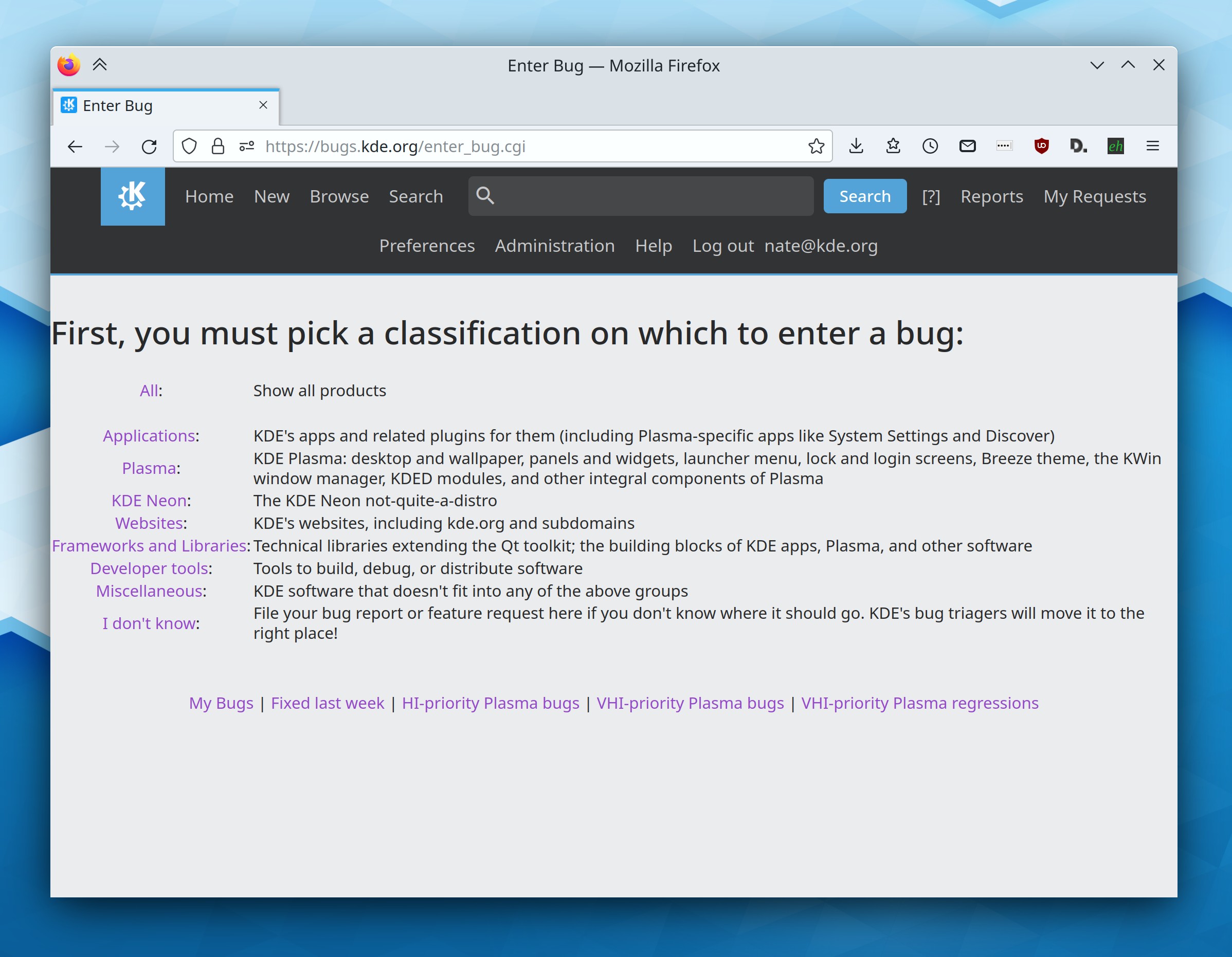
This year, Bugzilla got a re-organization to make it easier for normal people to figure out where to submit a bug report:

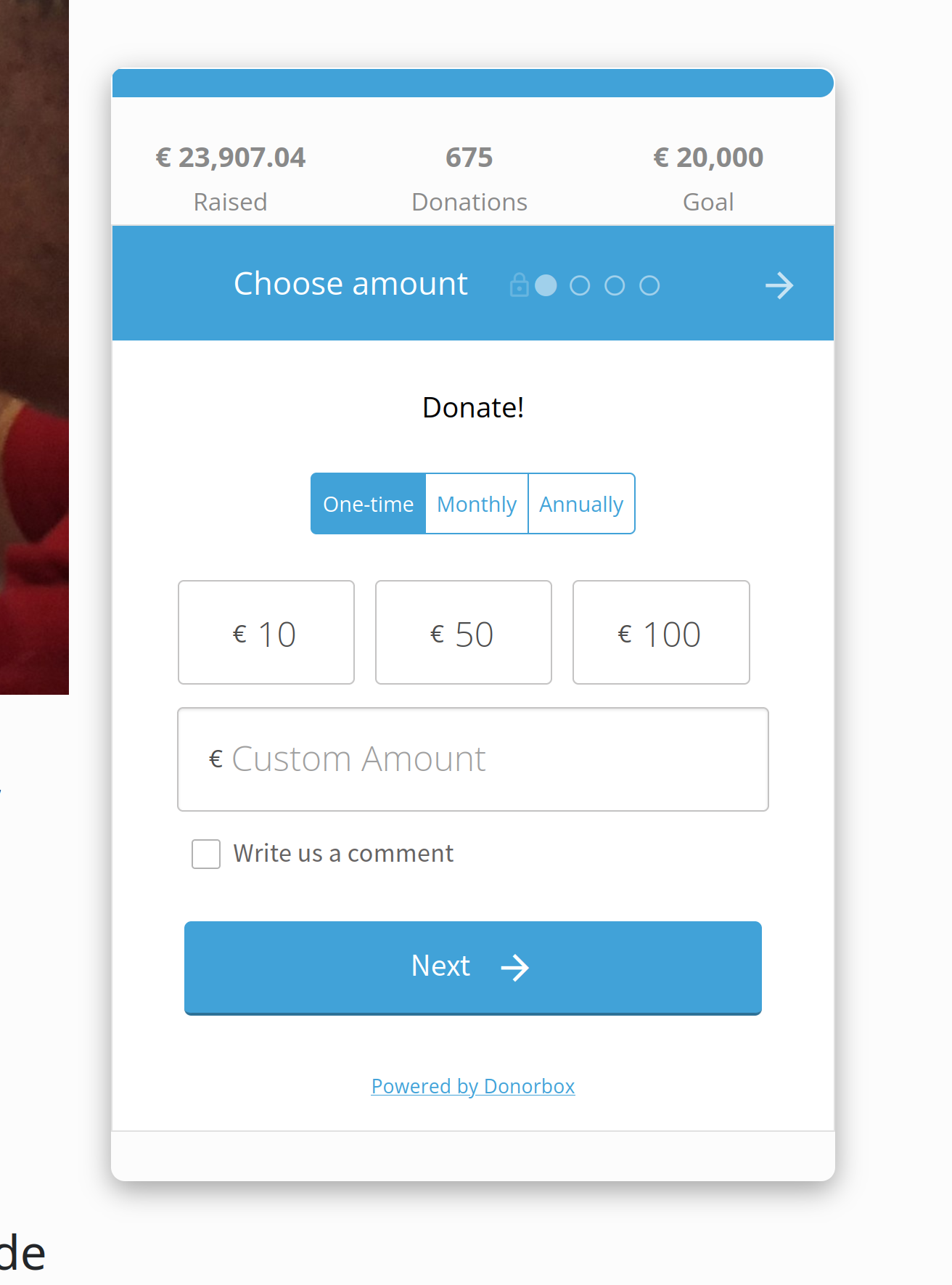
KDE also got a better donation and fundraising platform, powered by Donorbox. This makes it much simpler for people to donate to KDE e.V.:

Finally–and this is quite new–there’s a new forum powered by Discourse in the works, currently being beta-tested and rolled out at https://discuss.kde.org. Exciting times!

Qt 6

This year KDE contributors spent an enormous amount of time porting KDE software to Qt 6, the latest version of the Qt toolkit. This is unsexy work, so I didn’t blog about it. But it’s critically important, so thanks to everyone involved! And the work is now more than half done, with most common software and nearly all of Plasma already done; you can see the progress here.

Wayland

The Wayland session made enormous progress. Slimbook started shipping their new KDE Slimbook laptops with Wayland by default, following Fedora KDE 34 doing the same in late 2021. Our list of showstoppers continues to shrink, and new issues added to it are or notably less bad then the ones they replace. There are discussions about defaulting to Wayland in Plasma 6 next year, either for the inaugural release or one of the ones soon after it. The future really is here! And if you’re tempted to grumble, “well, Wayland still doesn’t work for me for $REASON,” please do it in a bug report so developers can fix it!

Plasma

It was a big year for Plasma! Among many other changes, we got custom window tiling layouts; massive stability improvements for multi-monitor workflows; Wayland fractional scaling; non-blurry scaled XWayland apps; a UI overhaul for Discover; many KRunner UX improvements; mouse button re-binding; resizable Panel popups; finger-following touchpad gestures on Wayland; support for alternate calendars such as the Chinese lunar calendar and Islamic civil calendar; picking-and-choosing what you want to apply from Global Themes; accent color generated from wallpaper’s dominant color; and full-window tinting with the accent color.

Plus a lot more, of course! You can see everything in the Plasma release announcements, found at https://kde.org/announcements.

Apps

KDE has so many apps that I really can’t possibly do them justice here! Nevertheless, here’s an extremely small assortment:

Dolphin got a new Selection Mode, a new (optional) list view selection style, the ability to browse iOS devices using their native afc:// protocol, an eject button in the sidebar list items of ejectable/unmountable volumes.

Okular got a welcome screen, a new Breeze icon that better matches the original, a UI overhaul for its sidebar.

Gwenview gained features to annotate images and edit their brightness, contrast, and gamma.

Kate and KWrite got welcome screens, KHamburgerMenu support, searchable settings windows, keyboard macro support, and even more massive UX and feature improvements of all kinds due to an influx of new contributors and a higher tempo of regular development work.

Konsole got Sixel support, adopted KHamburgerMenu, added a plugin to save and restore text snippets, and moved its tab bar to the top of the view by default.

Spectacle was ported to Kirigami and now lets you annotate in Rectangular Region mode.

Filelight was ported to Kirigami and gained a sidebar.

Ark got a welcome screen, KHamburgerMenu support, and overhauled toolbar contents.

Elisa gained support for displaying auto-scrolling lyrics from songs using embedded LRC lyrics, .pls playlists, a real Full Screen mode, and improved presentation in Artists view, touchscreen UX improvements and overhauled playlist styling

NeoChat got encrypted chat support and a boatload of features and UI improvements!

Many QtWidgets apps adopted KHamburgerMenu for a streamlined presentation


Well that’s all for now, folks. Happy new year and let’s do awesome things in 2023!