This week in KDE: Re-bindable mouse buttons

This week we merged support for re-binding the buttons of your multi-button mouse! You can assign buttons to keystrokes or keyboard shortcuts. Thanks to David Redondo, who implemented this for Plasma 5.26!

But that’s not all: we have much more, including a ton of work on Discover!

Other New Features

Elisa now defaults to saving playlist files with relative paths internally when the music files they reference live in the same folder–which is what most other music players do–but this can be changed if you prefer your playlist files to always contain absolute paths (Yerrey Dev, Elisa 22.12. Link)

Kate now has a keyboard macro feature! (Pablo Rauzy, Kate 22.12. Link)

Discover now lets you choose the frequency with which it notifies you about new updates! And within those frequencies, it’s now less aggressive about notifying you; no longer will you have the experience of updating, rebooting, and then immediately getting a notification about another update! Finally, this frequency UI also controls the frequency of automatic updates, if you’ve got those enabled. (Aleix Pol Gonzalez, Plasma 5.26. Link 1 Link 2 Link 3):

User Interface Improvements

Dolphin no longer pointlessly tells you “User canceled action” when you canceled an operation before confirming or completing it (Kai Uwe Broulik, Dolphin 22.08.1. Link)

When using Discover in mobile/narrow mode, clicking on a non-parent category in the drawer now automatically closes the drawer (me: Nate Graham, Plasma 5.25.5. Link)

System Settings’ Audio page now features a streamlined layout with smaller list items so that the whole view isn’t consumed by just a few audio devices (Oliver Beard, Plasma 5.26. Link):

The app selection dialog for sandboxed/portal-using apps now has significantly improved keyboard navigation (me: Nate Graham, Plasma 5.26. Link):

Discover’s Updates page now shows you the correct installed version for Firmware updates and no longer shows you both the version number and branch name for Flatpak apps and runtimes, which was confusing in the case when the app’s branch name looked like a version number so it seemed like the app had two version numbers (me: Nate Graham, Plasma 5.26. Link 1 Link 2):

Discover’s screenshots now also support animated images (Ellie Dent, Plasma 5.26. Link)

Your cursor position is now remembered across screen arrangements (Xaver Hugl, Plasma 5.26. Link)

The path bars in various KDE apps like Dolphin and Gwenview now accept relative paths (Ahmad Samir, Frameworks 5.98. Link)

Kate and other KTextEditor-based apps now support various mouse-based methods of adding more cursors using the multicursor feature (Waqar Ahmad, KDE Frameworks 5.98. Link)

Significant Bugfixes

(This is a curated list of e.g. HI and VHI priority bugs, Wayland showstoppers, major regressions, etc.)

Filelight once again uses correct text colors with a dark color scheme and looks fine when using a fractional scale factor (Harald Sitter, Filelight 22.08.1. Link 1 Link 2)

Discover now inhibits automatic sleep while it’s installing apps or updates (Aleix Pol Gonzalez, Plasma 5.24.7. Link)

Discover no longer freezes on launch if you launch it without a network connection (Aleix Pol Gonzalez, Plasma 5.25.5. Link)

System Settings’ Quick Settings page no longer sometimes shows duplicate items in the “Frequently Used” section (Alexander Lohnau, Plasma 5.25.5. Link)

On Discover’s Updates page, Flatpak apps or runtimes no longer sometimes show the wrong version number (Aleix Pol Gonzalez, Plasma 5.26. Link)

All KDE apps using KIO for file transfers now benefit from faster copy speeds, especially NFS which can be up to 3-4x faster! (Méven Car, Frameworks 5.98. Link)

Other bug-related information of interest:

Changes not in KDE that affect KDE

In the Plasma Wayland session, the standard Qt color picker dialog can now pick screen colors (Harald Sitter, Qt 6.5. Link)

Lowering the brightness to its lowest level when using an OLED with an Intel GPU screen no longer turns off the screen until restarting the machine (Jouni Högander, the next release of the Intel GPU drivers. Link)

…And everything else

This blog only covers the tip of the iceberg! If you’re hungry for more, check out https://planet.kde.org, where you can find more news from other KDE contributors.

How You Can Help

If you’re a developer, check out our 15-Minute Bug Initiative. Working on these issues makes a big difference quickly! Otherwise, have a look at https://community.kde.org/Get_Involved to discover ways to be part of a project that really matters. Each contributor makes a huge difference in KDE; you are not a number or a cog in a machine! You don’t have to already be a programmer, either. I wasn’t when I got started. Try it, you’ll like it! We don’t bite!

Finally, consider making a tax-deductible donation to the KDE e.V. foundation.
This week in KDE: Dolphin Selection Mode

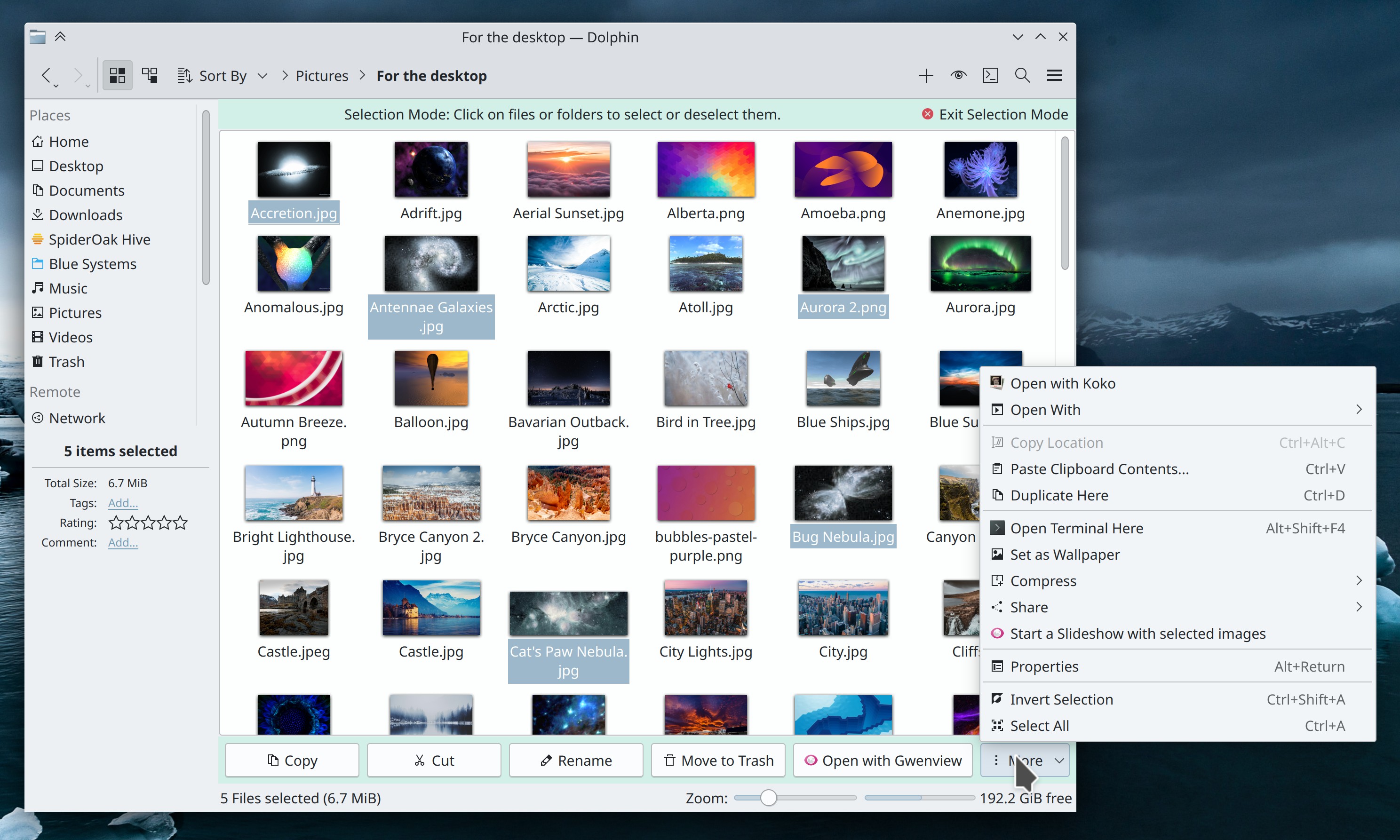
Today something very cool landed: Dolphin now has a dedicated “Selection Mode” you can optionally use to make the process of selecting items easier with a touchscreen or when using the default single-click setting! It even shows a toolbar of contextually-relevant actions you can perform on the selected items! When using a mouse and keyboard, you can quickly enter and exit it by pressing the spacebar, pressing-and-holding on an item in the view, or using an item in the menu. It’s completely optional, so if you like selecting files the old fashioned way, you don’t have to use it at all. Big thanks to Felix Ernst, who implemented this feature for Dolphin 22.12!

…But that’s not all! Read on for more goodies!

Other New Features

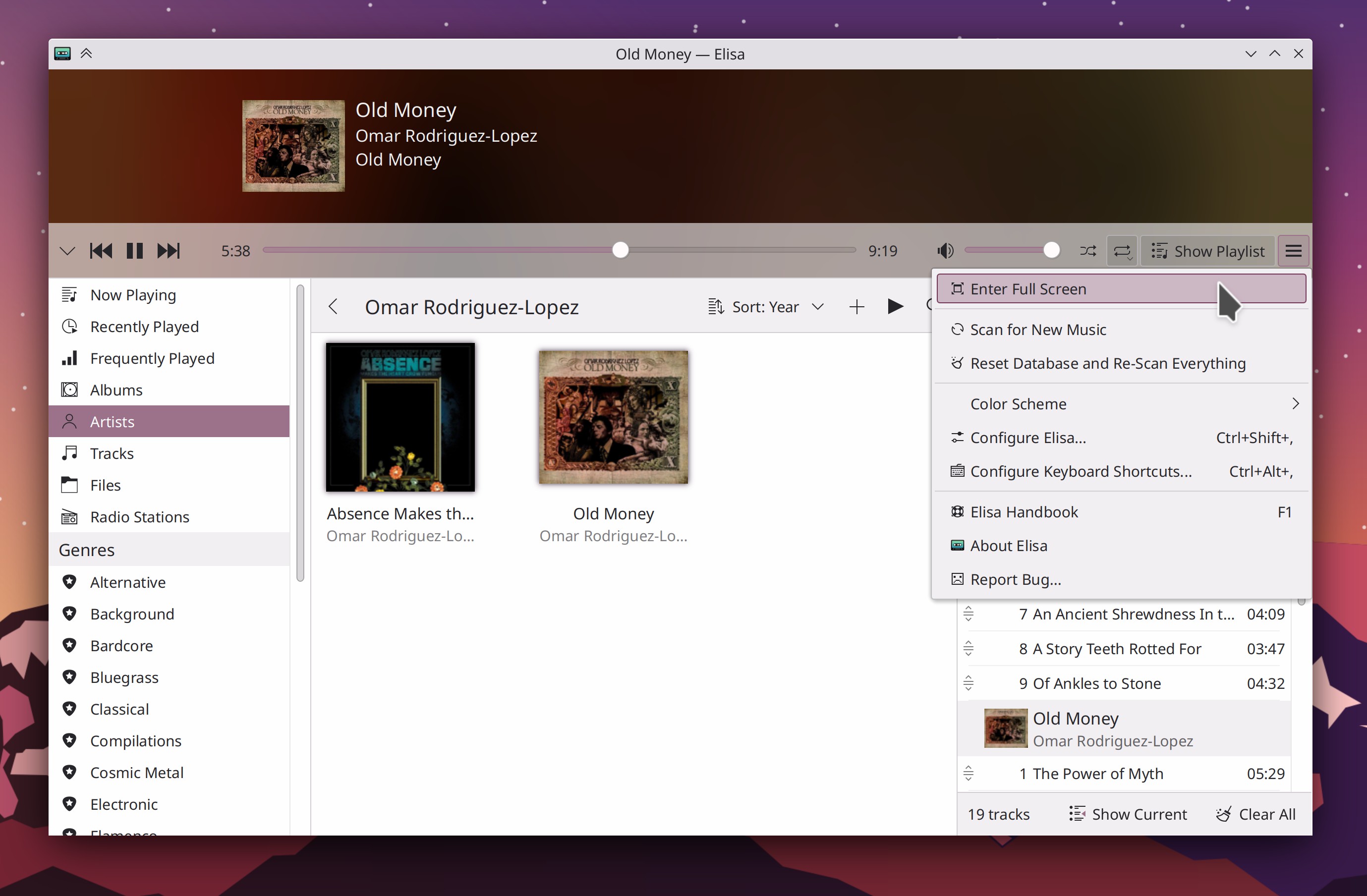
Elisa now has a Full Screen mode (me: Nate Graham, Elisa 22.12. Link):

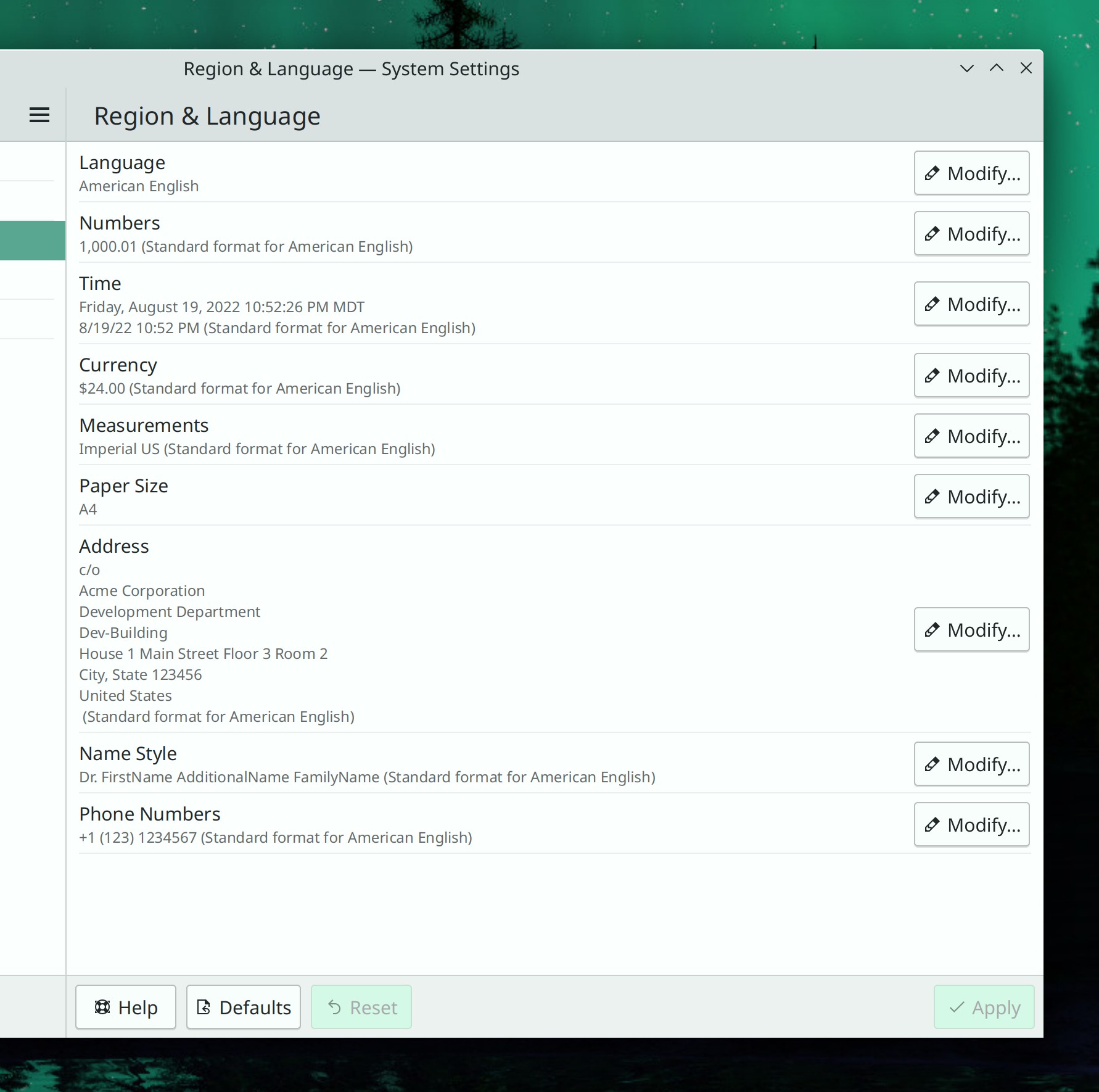
You can now change the way the system formats addresses, names, and phone numbers (Akseli, en, Plasma 5.26. Link):

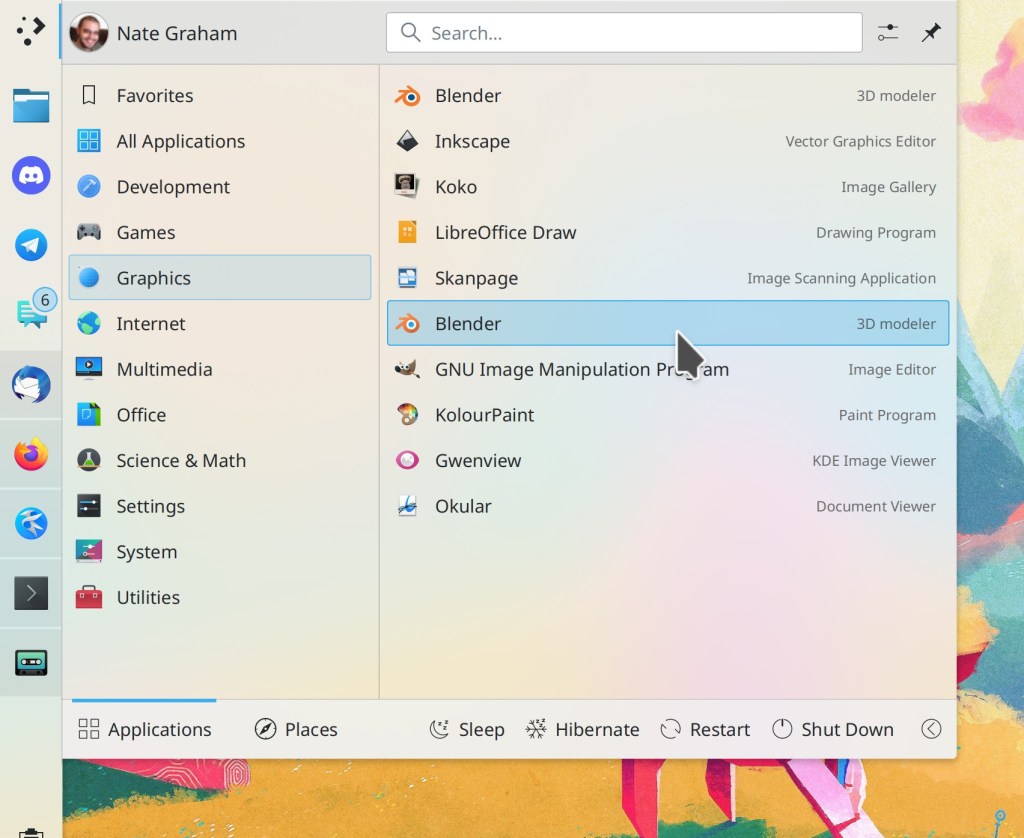
When using a horizontal panel, Kickoff can now be configured to display text and/or remove the icon (Denys Madureira, Plasma 5.26. Link)

Kate now lets you customize the font that the document will be printed in, right there in the Print dialog (Christoph Cullmann, Frameworks 5.98. Link)

File thumbnailers are now capable of generating preview images for .arw RAW image files (Mirco Miranda, Frameworks 5.98. Link)

User Interface Improvements

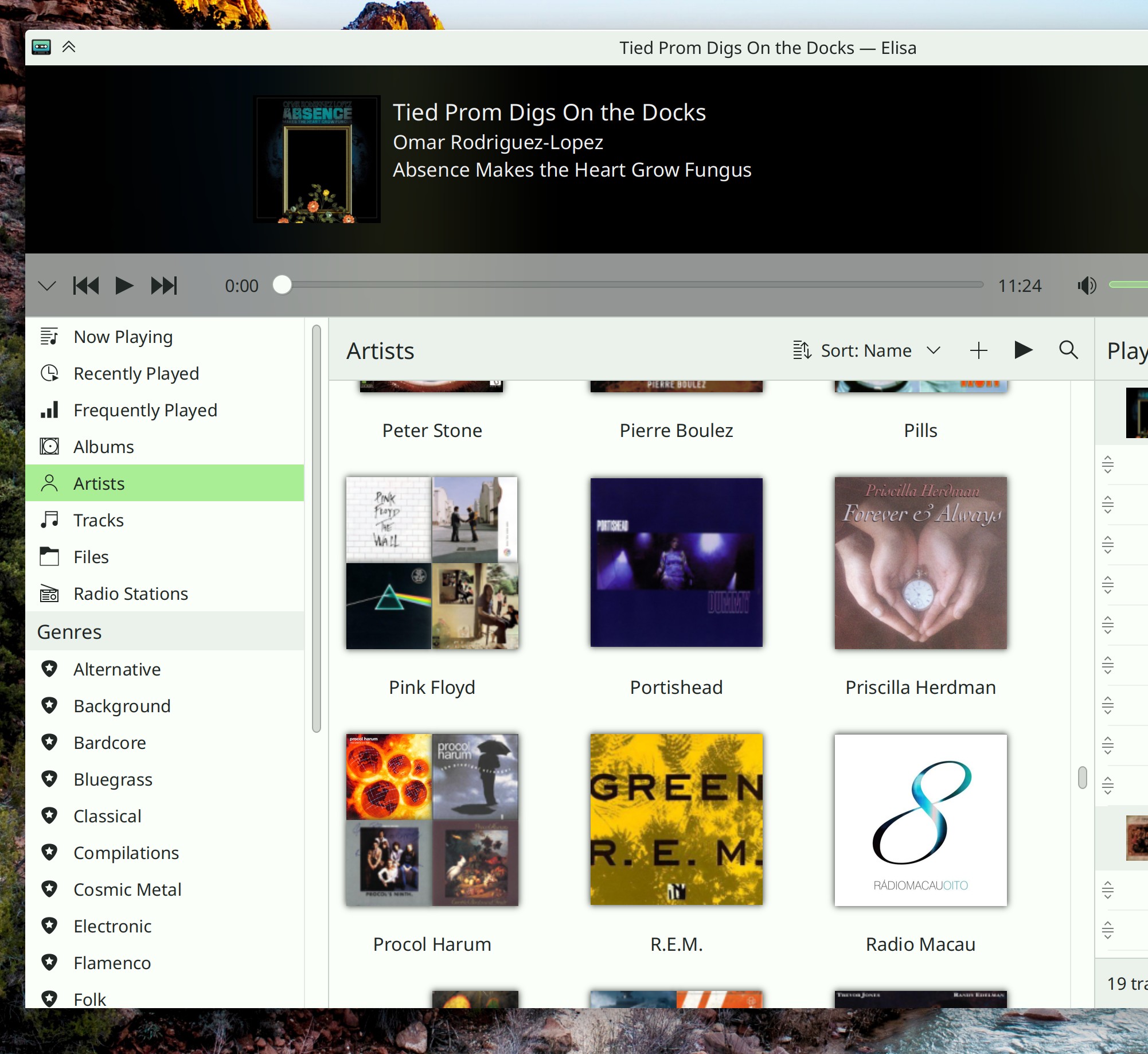
Elisa’s “Artist” view now displays a grid of the artist’s albums, rather than a sea of nondescript identical icons (Stefan Vukanović, Elisa 22.12. Link):

When you enter shuffle mode in Elisa, the currently-playing song is now always the first one in the shuffled set of songs (Dmitry Kolesnikov, Elisa 22.12. Link)

When setting properties for KWin rules, the sheet containing the list of properties now stays open until explicitly dismissed (Ismael Asensio, Plasma 5.26. Link)

You can now launch executable files from file searches in Kicker, Kickoff, Overview etc; you’ll now see the standard “Open or execute?” dialog as you would expect (me: Nate Graham, Plasma 5.26. Link)

The “Get New [thing]” windows now support animated GIFs used as images, so for example, you can now preview the effects of the fancy “Burn My Windows” KWin effects that were added recently (Alexander Lohnau, Frameworks 5.98. Link)

Significant Bugfixes

(This is a curated list of e.g. HI and VHI priority bugs, Wayland showstoppers, major regressions, longstanding issues etc.)

The circular timeout indicator for Plasma notifications is now fully visible no matter what your screen DPI and scale factor (Eugene Popov, Plasma 5.24.7. Link)

Launchers other than Kickoff are once again capable of searching for files (Alexander Lohnau, Plasma 5.25.5)

Touch scrolling once again works in Kickoff (Noah Davis, Plasma 5.25.5. Link)

Global shortcuts are now capable of launching apps that define command-line arguments in their .desktop files’ Exec= keys (Nicolas Fella, Frameworks 5.98. Link)

Kirigami-based apps and views that use the common FormLayout component will no longer sometimes randomly freeze with certain combinations of fonts, font sizes, window sizes, and content sizes (Connor Carney, Frameworks 5.98. Link)

Other bug-related information of interest:

Changes not in KDE that affect KDE

That Qt bug that causes vertical scrollbars to disappear in QtQuick-based apps has been fixed upstream, and we’ll soon be backporting it to our KDE Qt Patch Collection (Mitch Curtis, a Qt version coming to you soon. Link)

…And everything else

This blog only covers the tip of the iceberg! If you’re hungry for more, check out https://planet.kde.org, where you can find more news from other KDE contributors.

How You Can Help

If you’re a developer, check out our 15-Minute Bug Initiative. Working on these issues makes a big difference quickly! Otherwise, have a look at https://community.kde.org/Get_Involved to discover ways to be part of a project that really matters. Each contributor makes a huge difference in KDE; you are not a number or a cog in a machine! You don’t have to already be a programmer, either. I wasn’t when I got started. Try it, you’ll like it! We don’t bite!

Finally, consider making a tax-deductible donation to the KDE e.V. foundation.
This week in KDE: Major accessibility improvements

Though KDE’s goal-setting process is still ongoing, contributors have started working on Plasma accessibility in a major way! As of Plasma 5.26, all Plasma widgets will be fully compatible and usable with a screen reader, thanks to Fushan Wen with assistance from Harald Sitter! And there’s more to come too, plus lots of other great work:

New Features

It’s now possible to manage Samba shares’ permissions remotely! (Harald Sitter, kdenetwork-filesharing 22.12. Link)

The Plasma Network manager’s OpenConnect VPN plugin now supports the “F5,” “Fortinet,” and “Array” protocols (Enrique Melendez, Plasma 5.26. Link)

Kickoff now has a new non-default “Compact” mode that lets you see more items at the time. When using Touch Mode, compact mode is automatically disabled to ensure that Kickoff remains touch-friendly (me: Nate Graham, Plasma 5.26. Link)

Global Themes can now change the order and arrangements of titlebar buttons and turn on or off the “Borderless Maximized Windows” setting which disables the titlebar for maximized windows. And you can also turn these on or off while applying a theme so configured on System Settings’ Global Themes page (Dominic Hayes, Plasma 5.26. Link)

By default, Picture of the Day wallpaper plugins don’t refresh while the system is using a metered network connection–but this can be turned back on if you want (Fushan Wen, Plasma 5.26. Link):

It’s now possible to clear the Command Bar’s history (Eugene Popov, Frameworks 5.98. Link)

User Interface Improvements

Elisa can now open files from relative paths, not just absolute paths (Bharadwaj Raju, Elisa 22.08.1. Link)

When searching with KRunner, results from the “Software Center” category (which finds non-installed apps) are always lower than results from categories that show already-installed apps and settings pages (Alexander Lohnau, Plasma 5.24.7. Link)

You can now use the Ctrl+S keyboard shortcut in the Clipboard applet’s Edit Mode page to save and return to the main page (Fushan Wen, Plasma 5.24.7. Link)

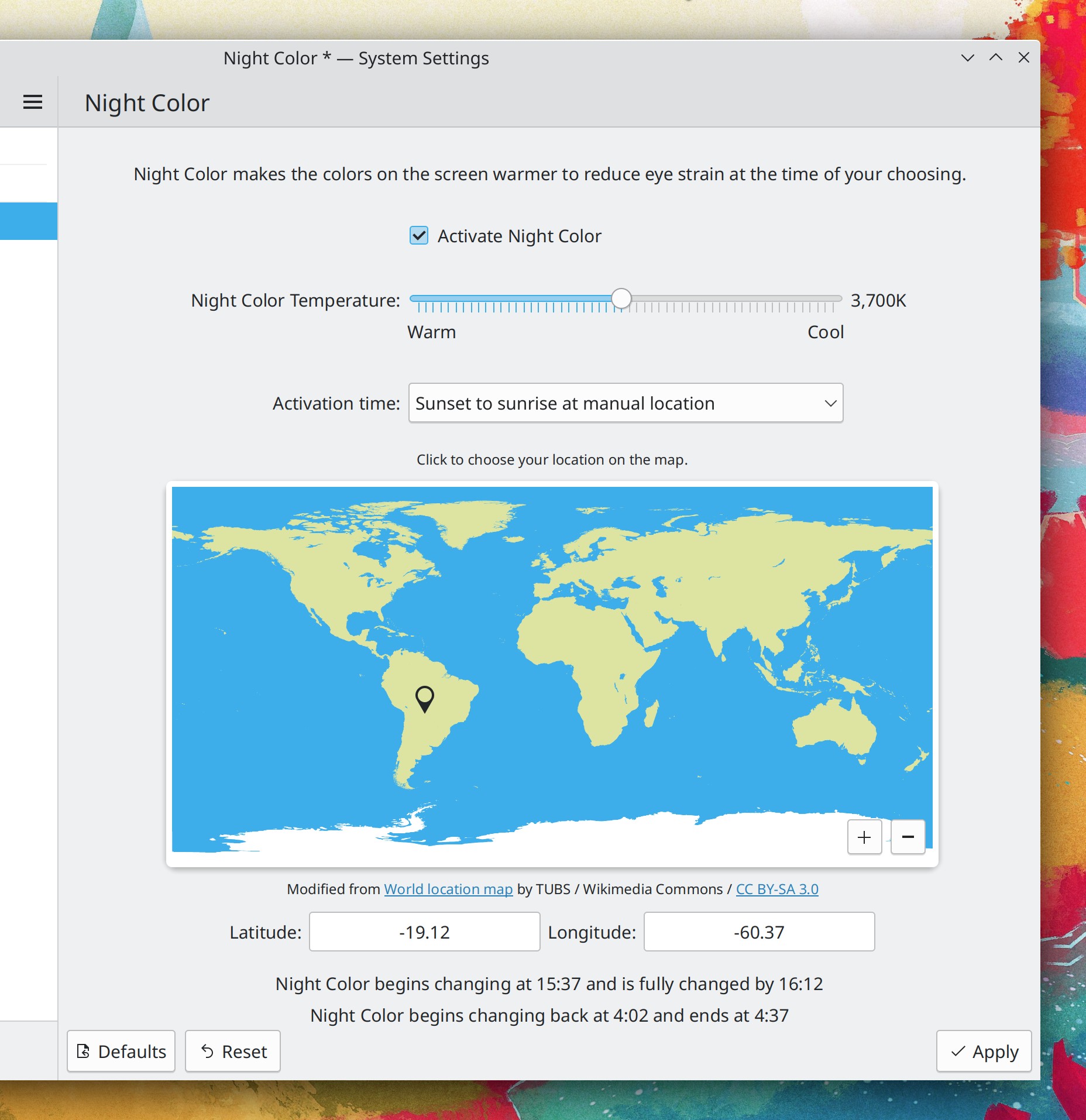
System Settings’ Night Color page now lets you use a map to choose a manual location, and shows a loading placeholder when using automatic location mode and the geolocation service is still working on geolocating you (Bharadwaj Raju, Plasma 5.26. Link 1 and Link 2):

The opening and closing animations for the Overview, Present Windows, and Desktop Grid effects now last longer and have a nicer easing curve, making them feel much smoother (Blake Sperling, Plasma 5.26. Link)

Significant Bugfixes

(This is a curated list of e.g. HI and VHI priority bugs, Wayland showstoppers, major regressions, etc.)

Switching your Global Theme to one that has its own color scheme now immediately changes the color in all running GTK apps that are being themed with the Breeze GTK theme (David Redondo, Plasma 5.24.7. Link)

Fixed a major regression in multi-monitor support for the Plasma Wayland session that could cause screens to display no output (Xaver Hugl, Plasma 5.25.5. Link)

In the Plasma Wayland session, certain apps like GIMP no longer sometimes fail to appear in the Task Manager while running (Vlad Zahorodnii, Plasma 5.25.5. Link)

Fixed a prominent Task Manager-related crash (Nicolas Fella, Plasma 5.25.5. Link)

Other bug-related information of interest:

…And everything else

This blog only covers the tip of the iceberg! If you’re hungry for more, check out https://planet.kde.org, where you can find more news from other KDE contributors.

How You Can Help

If you’re a developer, check out our 15-Minute Bug Initiative. Working on these issues makes a big difference quickly! Otherwise, have a look at https://community.kde.org/Get_Involved to discover ways to be part of a project that really matters. Each contributor makes a huge difference in KDE; you are not a number or a cog in a machine! You don’t have to already be a programmer, either. I wasn’t when I got started. Try it, you’ll like it! We don’t bite!

Finally, consider making a tax-deductible donation to the KDE e.V. foundation.
Next week in KDE: mentioning fewer microscopic bugfixes

I’ve started to worry that mentioning really small weird bugfixes week after week gives the impression that KDE software is buggier than it really is. The truth is that all responsibly maintained projects are constantly landing these kinds of maintenance bugfixes, so it’s probably a bit misleading to be talking about them all the time.

Instead, I’m going to try only mentioning the big, consequential bugfixes: the ones for bugs marked HI or VHI priority, that have with multiple duplicates, that are really significant in effect, etc. Hopefully this should improve the signal-to-noise ratio in the blog posts.

I’ll still mention new features and significant user interface improvements, of course.

Let me know what you think!

This week in KDE: Easier Samba sharing setup

We continue chewing through bugs this week, and now I’m mentioning the “very high priority” Plasma bugs in addition to the “15 minute bugs” which are slightly lower priority. Plasma developers reading along are encouraged to prioritize the very high priority bugs. 🙂

Very high priority Plasma Bugs Resolved

Current number of bugs: 26, down from 29. 3 resolved:

System Monitor widgets no longer reset various settings to their default values after the system is restarted (Alexander Lohnau, Plasma 5.25.5)

It’s once again possible to select windows on other screens using the Present Windows and Overview effects (Marco Martin, Plasma 5.26)

Application Launcher widgets that you activate by pressing the Meta key no longer require that the Alt+F1 shortcut to be set, which should dramatically reduce instances where you press the Meta key and nothing happens. Also, now when you have more than one launcher that wants to open with the Meta key, it will open on whatever screen is considered active by KWin (David Redondo, Plasma 5.26)

Current list of bugs

15-Minute Plasma Bugs Resolved

Current number of bugs: 50, down from 51. 1 added and 2 resolved:

Kickoff no longer strangely pre-selects search results list items that aren’t the first ones after previously having selected the item in that position using the cursor the last time you searched for something (me: Nate Graham, Plasma 5.25.5)

Hovering the cursor over an item in Kickoff no longer repeatedly re-selects it if you use the keyboard to select something else (me: Nate Graham, Plasma 5.25.5)

Current list of bugs

New Features

You can now configure a keyboard shortcut to activate Present Windows showing only the windows from the current app that are on the current desktop (Arjen Hiemstra, Plasma 5.26)

User Interface Improvements

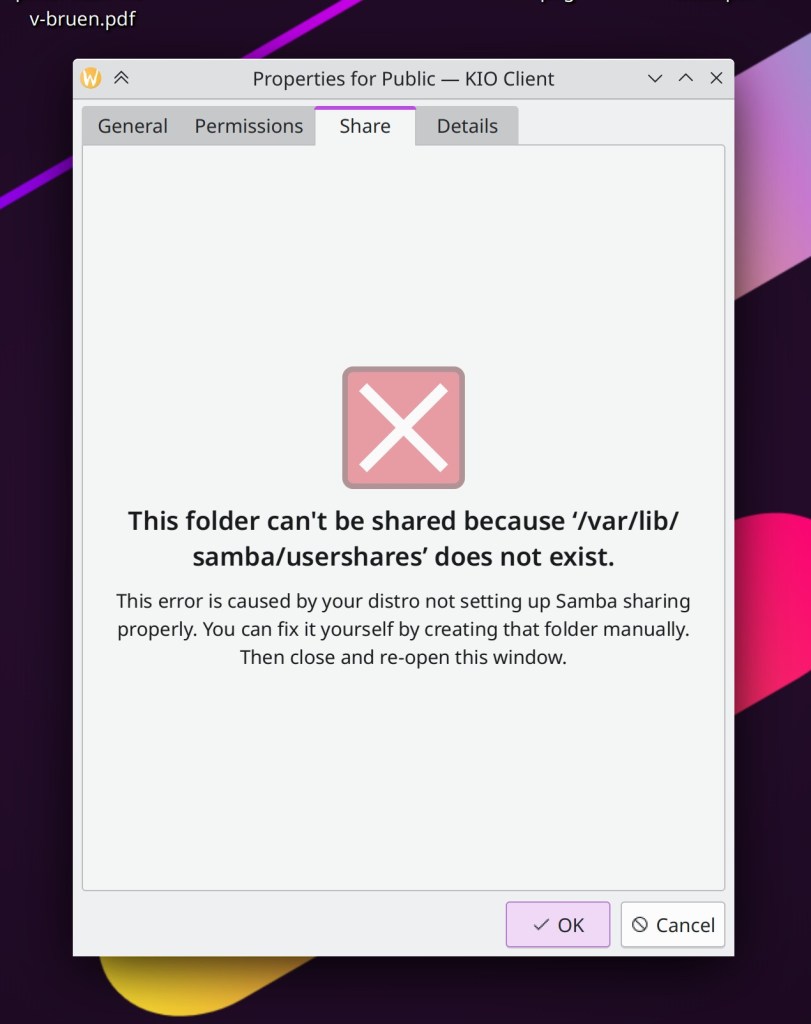
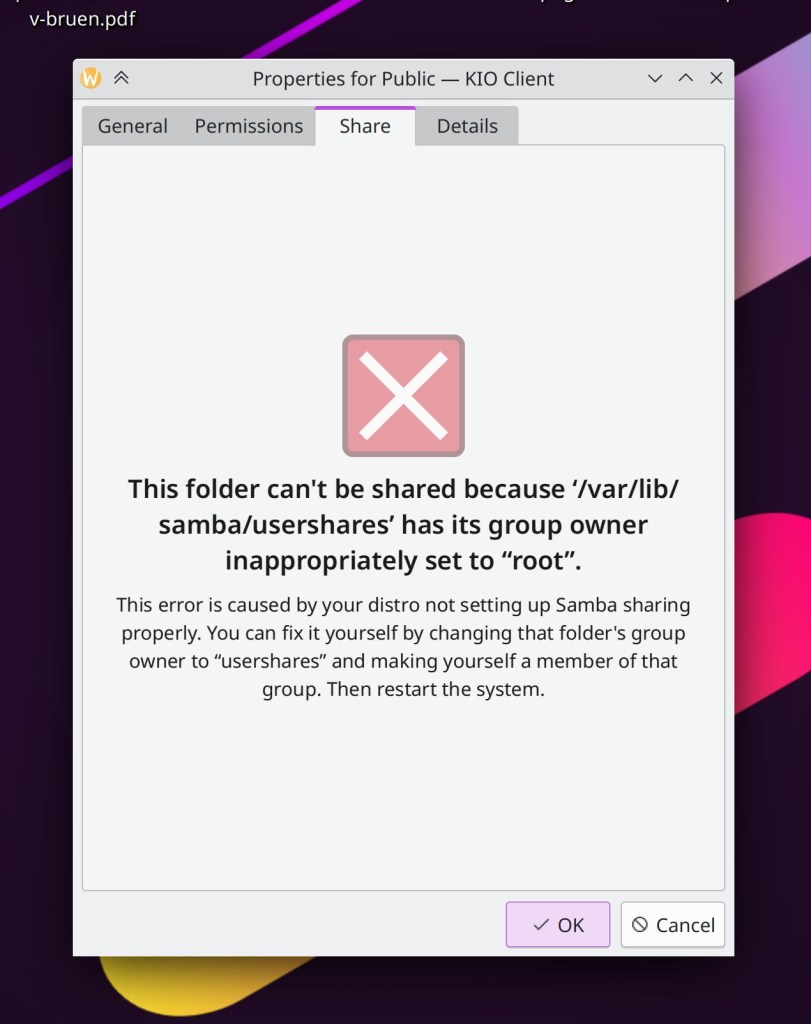
It’s now much easier to initially set up a folder for sharing with Samba, because the wizard now gives you detailed and actionable error messages (me: Nate Graham, kdenetwork-filesharing 22.12):

Wallpapers in the slideshow wallpaper grid are no longer selectable, since this isn’t a state that makes sense for them (Jin Liu, Plasma 5.25.4)

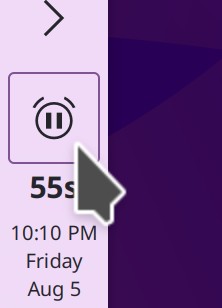
The Timer Plasma widget has received a big overhaul that fixes most of the open bugs and improves the UI to add a clickable start/stop button (Fushan Wen, Plasma 5.26):

Searching for widgets in the Widget Explorer now also matches their keywords, providing another way to find what you’re looking for (Alexander Lohnau, Plasma 5.26)

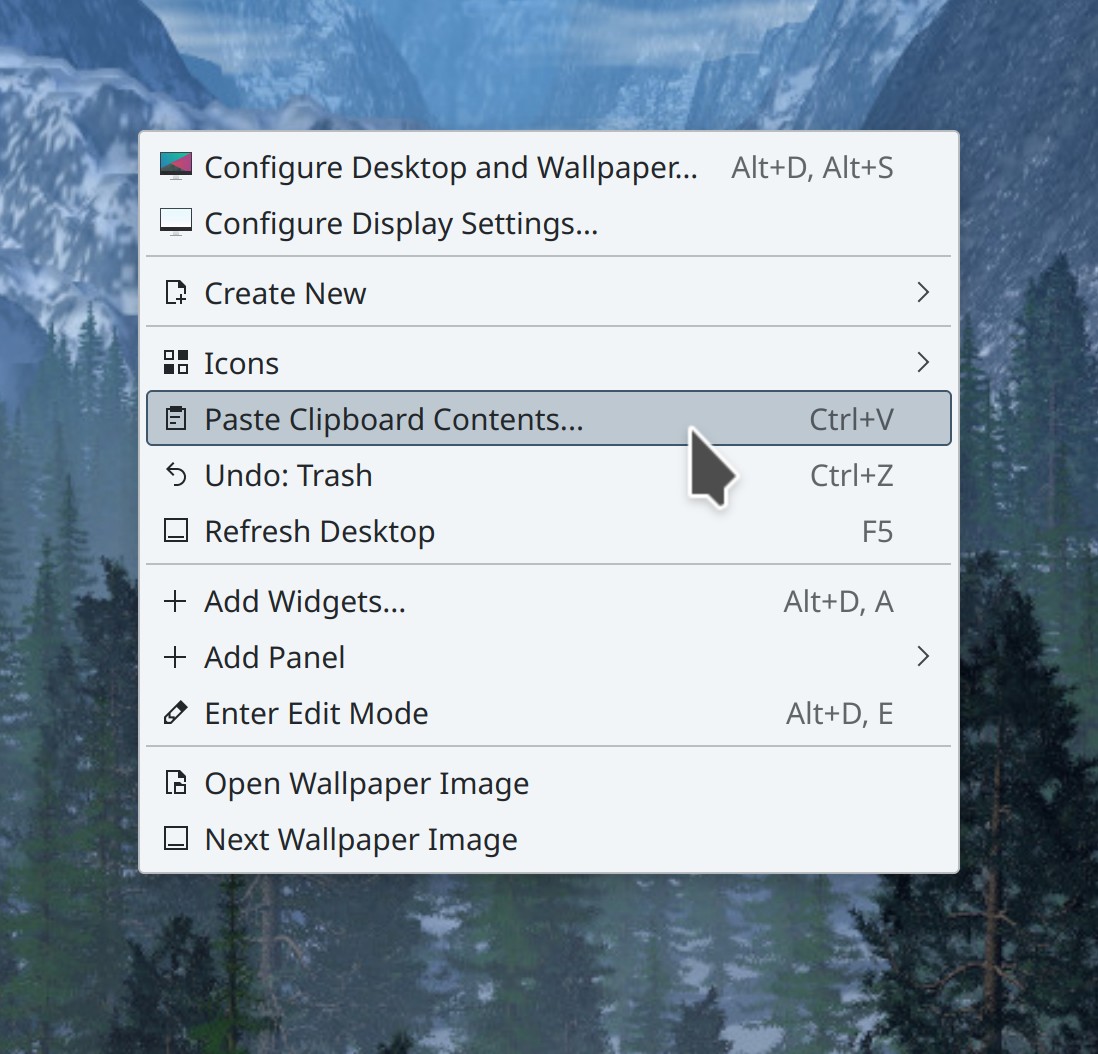
Menu shortcuts are now displayed in a subdued gray color, visually de-emphasizing them compared to the menu items’ text (Jan Blackquill, Plasma 5.26):

The Breeze icon theme now includes icons for Windows DLLs (Alexander Wilms, Frameworks 5.97)

Other Bugfixes & Performance Improvements

In Okular, it’s no longer possible to drag pop-up notes off the screen (Nikola Nikolic, Okular 22.12)

The first time KRunner is opened, it no longer oddly slides up from nowhere; now it always slides down from whatever’s above it as expected (Kai Uwe Broulik, Plasma 5.24.7)

In the Plasma Wayland session, monitors no longer sometimes lose their names and become unable to be set as the primary one (Xaver Hugl, Plasma 5.24.7)

The Breeze style once again respects the “Small Icons” size you can set in System Settings (Alexander Kernozhitsky, Plasma 5.25.5)

The KScreen screen handling service is now more lenient about detecting screens as unique, which should fix various weird screen-and-desktop-layout-related problems caused by hotplugging screens and docks where both the screen ID and connector ID change during the hotplug (Harald Sitter, Plasma 5.26)

Setting the language in System Settings now updates the standard FreeDesktop org.freedesktop.Accounts.User.Language value which is used by Flatpak apps and lots of 3rd-party apps in general, so they should now use your preferred language as well (Han Young, Plasma 5.26)

…And everything else

This blog only covers the tip of the iceberg! Tons of KDE apps whose development I don’t have time to follow aren’t represented here, and I also don’t mention backend refactoring, improved test coverage, and other changes that are generally not user-facing. If you’re hungry for more, check out https://planet.kde.org, where you can find more news from other KDE contributors.

How You Can Help

If you’re a developer, check out our 15-Minute Bug Initiative. Working on these issues makes a big difference quickly!

Otherwise, have a look at https://community.kde.org/Get_Involved to discover ways to be part of a project that really matters. Each contributor makes a huge difference in KDE; you are not a number or a cog in a machine! You don’t have to already be a programmer, either. I wasn’t when I got started. Try it, you’ll like it! We don’t bite!

Finally, consider making a tax-deductible donation to the KDE e.V. foundation.
This week in KDE: Lots of work on Discover

This week, Aleix Pol Gonzalez put a ton of work into Discover, which you’ll see throughout the post! Beyond that, it was a Plasma-heavy week, with developers adding several useful new features, polishing the UI, and fixing a large number of high-priority issues.

15-Minute Bugs Resolved

I’m going to start mentioning “very high priority” Plasma bugs here too, as I think it makes sense for them to inherently be considered 15-minute bugs as well. For now I’m going to put them in the “added and also fixed” bucket, but I could add them to the total count instead, if folks think it would be more accurate. This would bring the total up to 79. Or I could mention them separately. Let me know what you think.

Current number of bugs: 51, down from 52. 5 added and 6 resolved:

Hotplugged mice no longer lose their settings when the system is woken up or un-docked (Ivan Tkachenko, Plasma 5.25.4)

Fixed a recent regression in Activities support that caused weird issues when switching between Activities (David Edmundson, Plasma 5.25.4)

Discover no longer erroneously labels various apps and add-ons as having proprietary licenses when they don’t (Aleix Pol Gonzalez, Plasma 5.25.4)

The setting to disable file history no longer confusingly lives on System Settings’ Activities page, and instead has its own page in the Workspace Behavior group (Méven Car, Plasma 5.26):

Fixed one of the ways that Plasma could crash and potentially lose your panels and desktops when you plug in or unplug a screen or change the display scale (David Edmundson, Plasma 5.26)

When Plasma is restarted manually or automatically (e.g. after it crashes) while the Show Desktop effect was active, your windows are no longer invisible (yet still interactive) for 30 seconds (Arjen Hiemstra, Plasma 5.26)

Current list of bugs

New Features

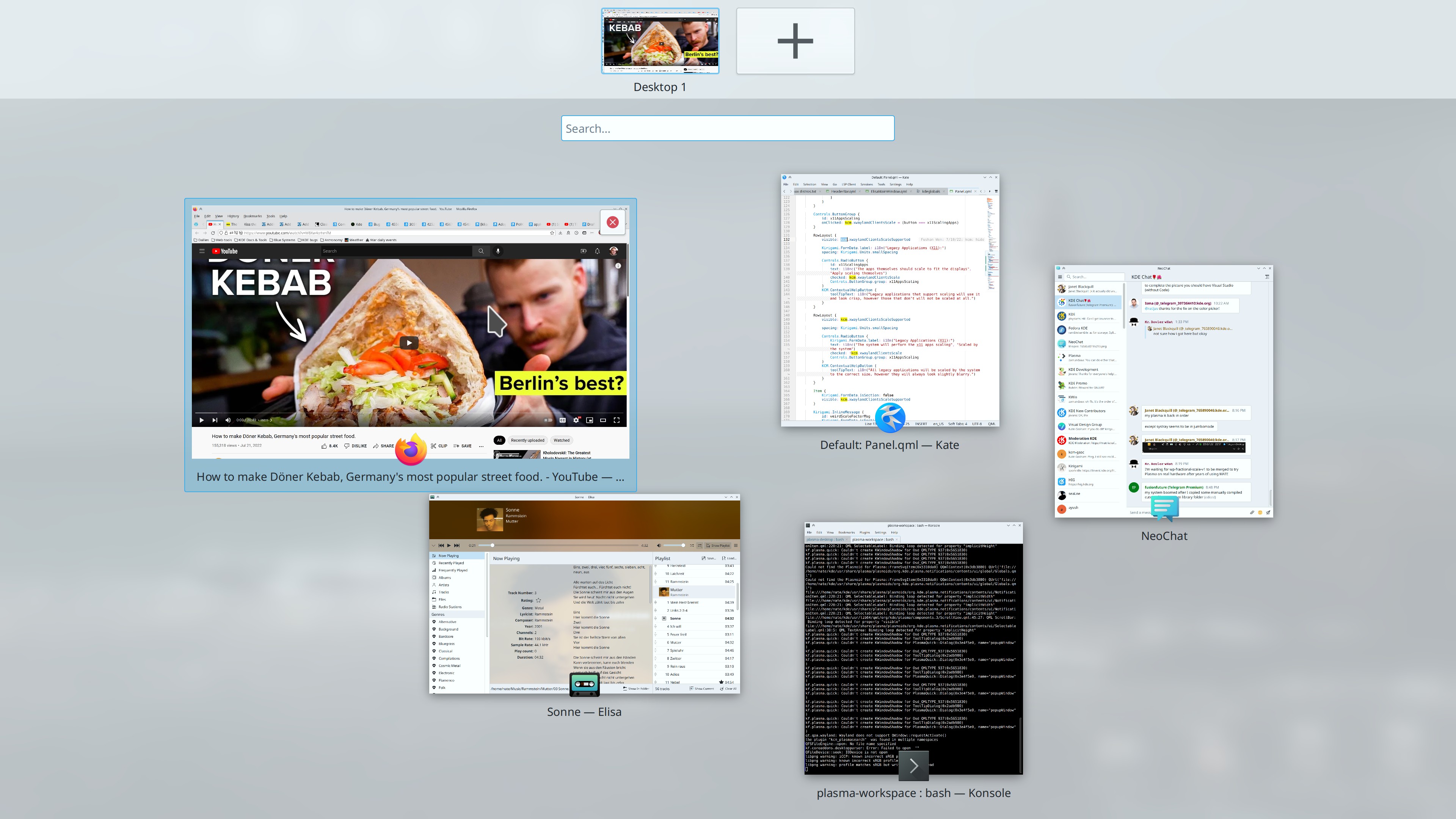
Typing in the Overview effect now filters windows when there are any matching the search text, in addition to doing a KRunner search when no open windows match the search text (Niklas Stephanblome, Plasma 5.26):

This basically makes Overview do almost everything Present Windows does, and I’m advocating for consolidating their features and merging them

The Digital Clock widget now lets you customize the font size as well as the typeface and styling. Happily, the changes required for this also fix a bug affecting the old font chooser UI and make the widget no longer change size when seconds are shown (Jin Liu, Plasma 5.26):

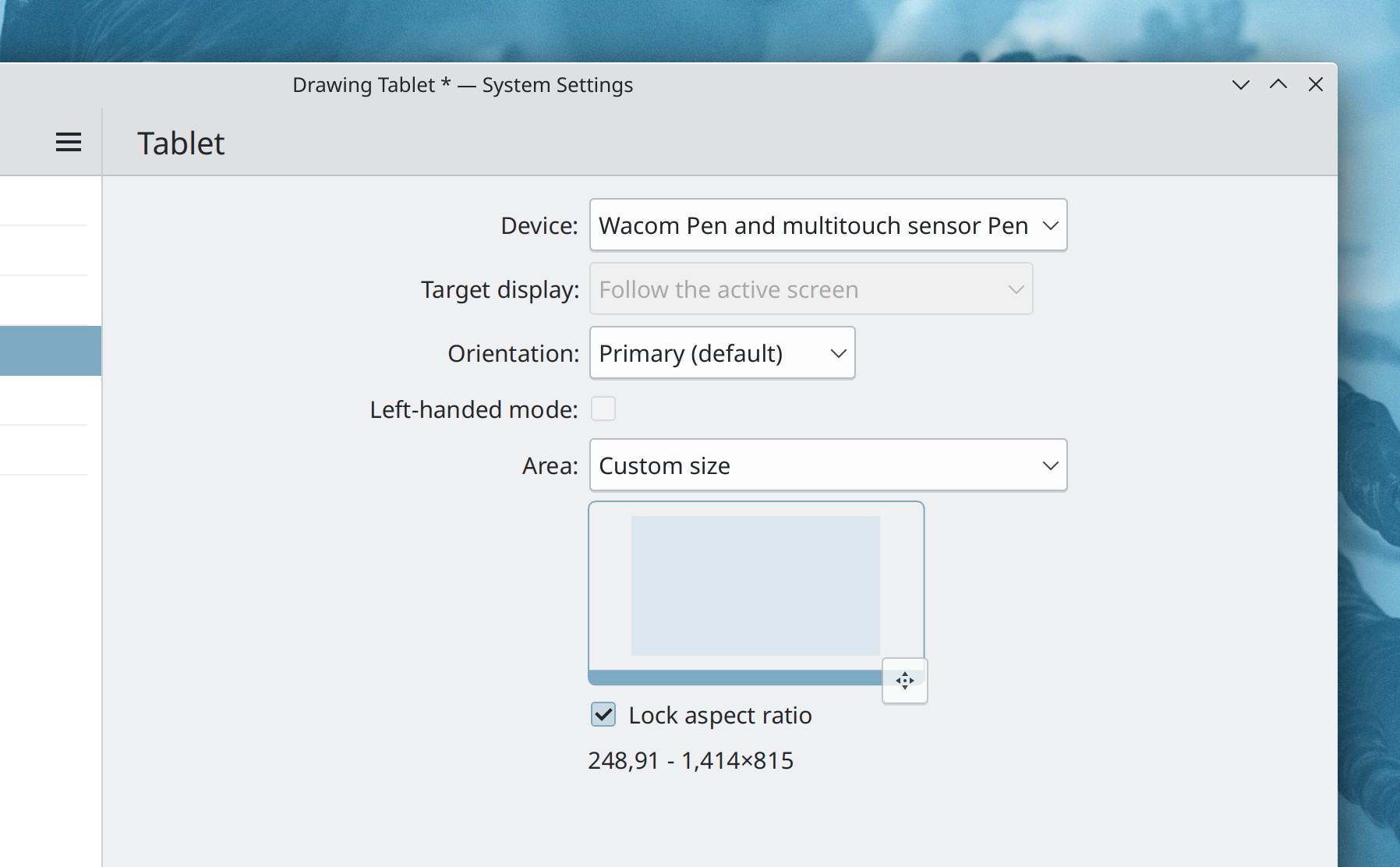
In the Plasma Wayland session, it’s now possible to adjust how a graphics tablet’s input area maps to your screen coordinates (Aleix Pol Gonzalez, Plasma 5.26):

User Interface Improvements

Pressing the Escape key in Spectacle while in Annotation mode now exits only from Annotation mode, rather than quitting the whole app (Antonio Prcela, Spectacle 22.08)

The comic book thumbnailer now supports comic book files with more image formats used inside of them (Pedro Liberatti, Dolphin 22.08)

Dragging a window over other windows in Overview or Present Windows no longer triggers their highlight effects and no longer causes the dragged window to bizarrely appear under them (Ivan Tkachenko, Plasma 5.25.4)

You can now drag apps from Kickoff’s search results to an empty area of the Task Manager to pin them there (Nicolas Fella, Plasma 5.25.4)

The Digital Clock popup is now fully keyboard navigable (Fushan Wen, Plasma 5.26)

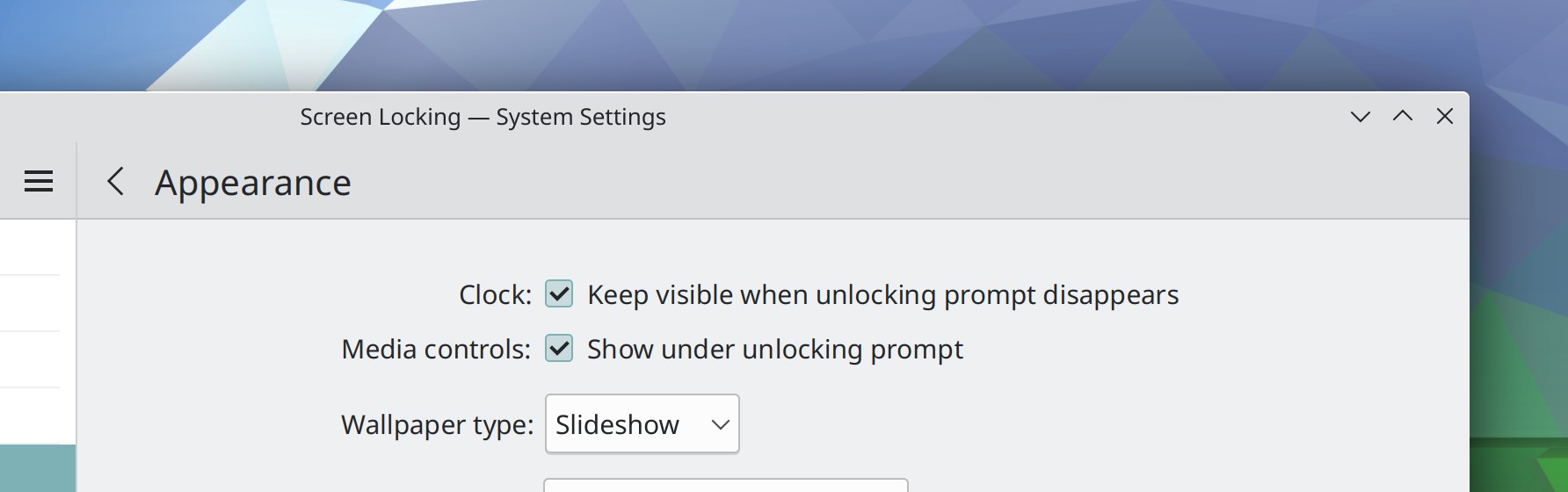
In the System Settings Screen Locking page, the configuration settings for the clock and media controls are now much clearer (me: Nate Graham, Plasma 5.26):

Changing your user avatar no longer requires admin permission (Jan Blackquill, Plasma 5.26)

You can now find the System Settings Touchpad page by searching for the word “Trackpad” (Nicolai Weitkemper, Plasma 5.26)

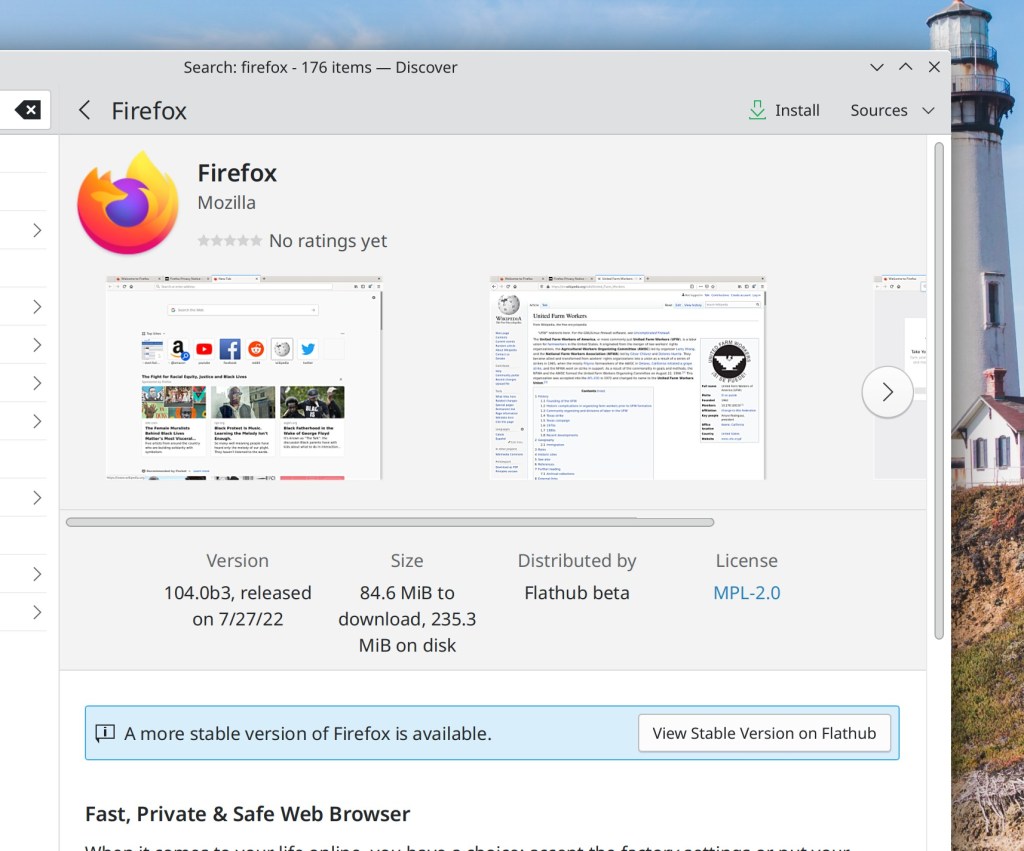
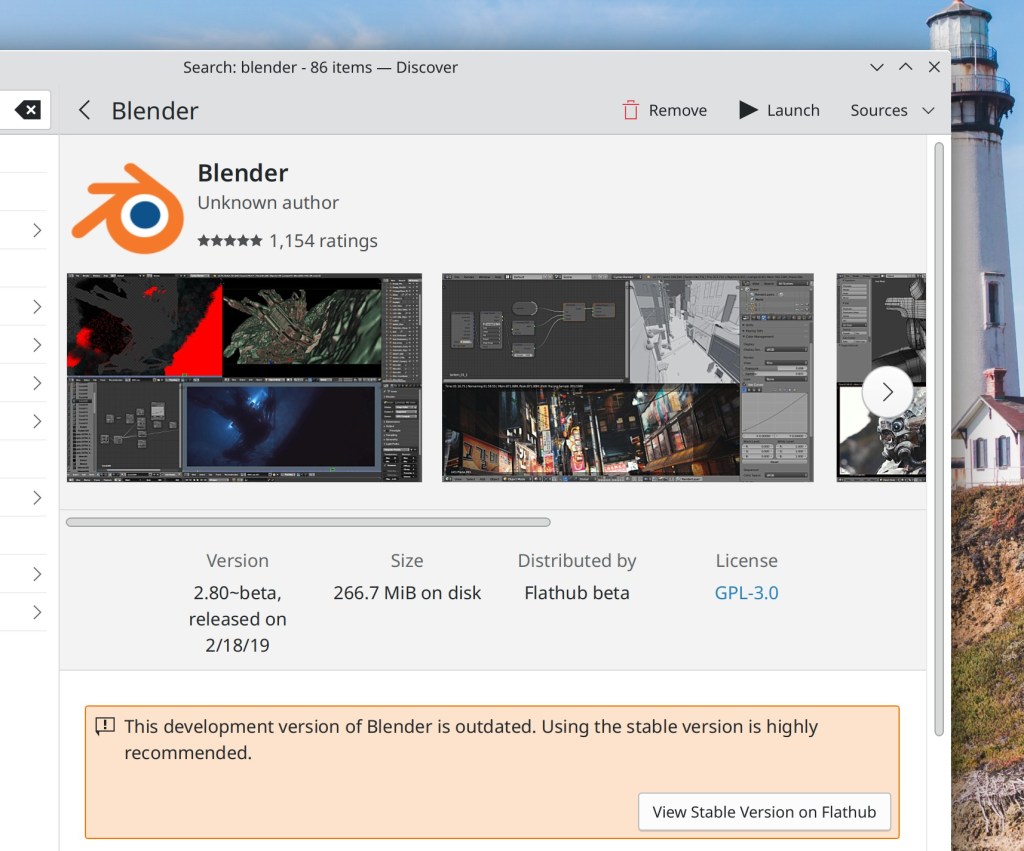
Discover now warns you when you’re looking at an app from a beta channel, and also makes it even more warningy when the version available on the beta channel is older than the one on the stable channel (Aleix Pol Gonzalez, Plasma 5.26):

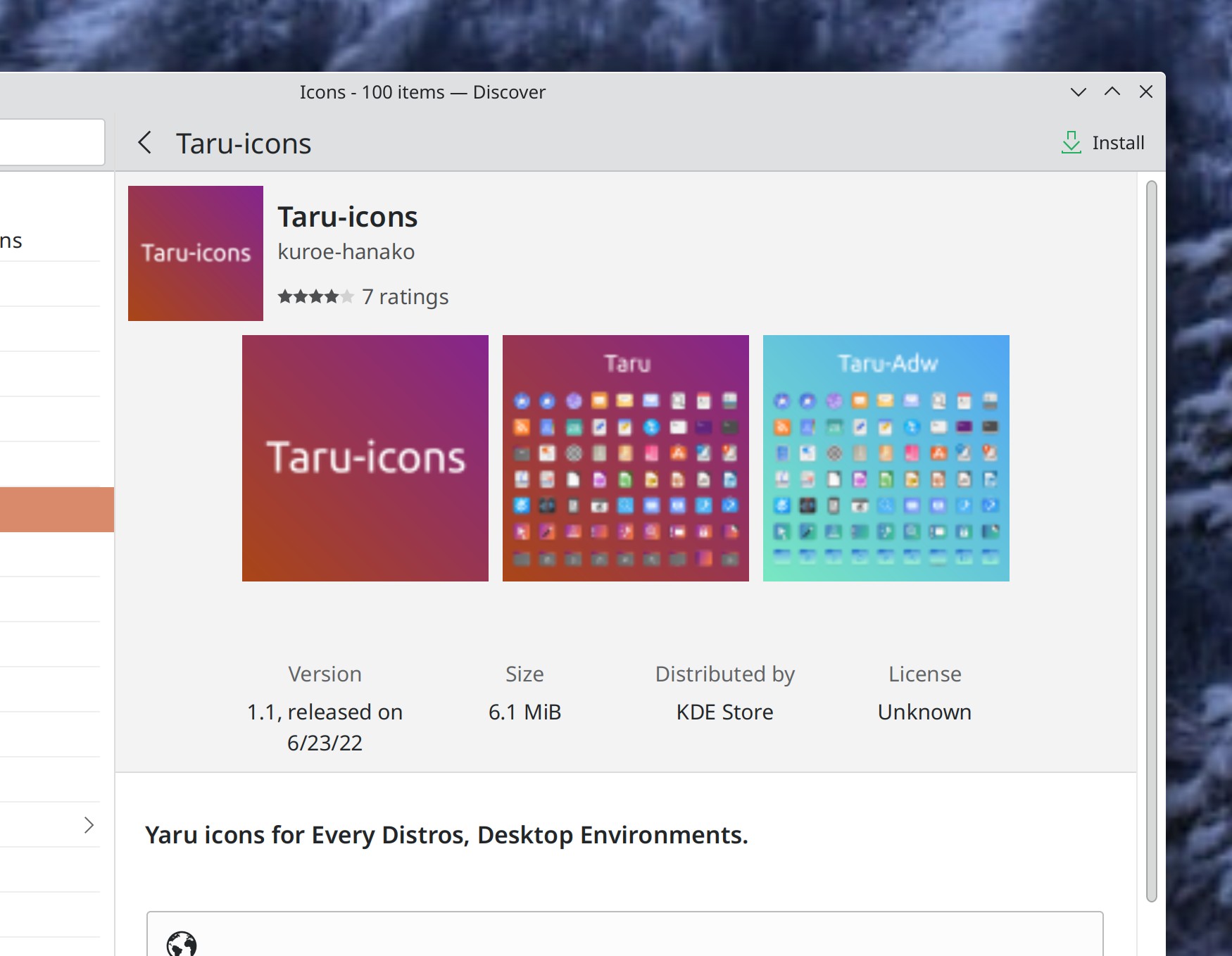
When you’re looking at the page for an add-on in Discover, its “Distributed by” field now shows “KDE store” instead of an unclickable elided URL (Aleix Pol Gonzalez, Plasma 5.26):

Discover now does a better job of indicating to you when a Flatpak repo is a user-specific repo, to disambiguate it from the same repo that applies for the whole system (Aleix Pol Gonzalez, Plasma 5.26)

When you close Discover’s main window during an update, you can now open it again by re-launching Discover, and also if you close it a second time, it won’t create a second notification but rather will re-use the original one (Aleix Pol Gonzalez, Plasma 5.26)

Undoing a bulk rename job in Dolphin no longer sends a notification that says “Moving” (Ahmad Samir, Frameworks 5.97)

Other Bugfixes & Performance Improvements

Discover no longer crashes when browsing certain add-ons that don’t have any reviews or when a firmware update fails with an error (Aleix Pol Gonzalez, Plasma 5.24.7)

The priority you set for your Flatpak repos in Discover is now always honored properly (Aleix Pol Gonzalez, Plasma 5.24.7)

Fixed a case where Discover could crash when quit after successfully performing updates (Aleix Pol Gonzalez, Plasma 5.25.4)

In the Plasma Wayland session, switching virtual desktops with a touchpad swipe gesture can no longer sometimes cause WINE or Steam Proton apps and games to crash (Xaver Hugl, Plasma 5.25.4)

When you close Discover’s main window while it’s in the middle of installing updates, the notification that appears in its place now shows an accurate count of the items left to update (Aleix Pol Gonzalez, Plasma 5.25.4)

In the Plasma Wayland session, you can now use touch taps to interact with certain pop-ups in GTK-based apps that were previously untouchable (Aleix Pol Gonzalez, Plasma 5.26)

Discover is now faster to start up its Flatpak backend (Aleix Pol Gonzalez, Plasma 5.26)

Fixed a couple of animation glitches in the Overview and Present Windows effects, and they also no longer stutter while opening when you have a multi-screen setup (Ivan Tkachenko and David Edmundson, Plasma 5.26)

KRunner no longer produces gibberish results when you give it text that begins with an equals sign that isn’t a math expression (Alexander Lohnau, Plasma 5.26)

…And everything else

This blog only covers the tip of the iceberg! Tons of KDE apps whose development I don’t have time to follow aren’t represented here, and I also don’t mention backend refactoring, improved test coverage, and other changes that are generally not user-facing. If you’re hungry for more, check out https://planet.kde.org, where you can find more news from other KDE contributors.

How You Can Help

If you’re a developer, check out our 15-Minute Bug Initiative. Working on these issues makes a big difference quickly!

Otherwise, have a look at https://community.kde.org/Get_Involved to discover ways to be part of a project that really matters. Each contributor makes a huge difference in KDE; you are not a number or a cog in a machine! You don’t have to already be a programmer, either. I wasn’t when I got started. Try it, you’ll like it! We don’t bite!

Finally, consider making a tax-deductible donation to the KDE e.V. foundation.

This week in KDE: Tons of UI improvements and bugfixes

This week we made great progress on a lot of UI issues and bugs, and I bet you’ll find at least one issue that was annoying you fixed among these!

15-Minute Bugs Resolved

Current number of bugs: 51, down from 52. 1 added and 2 resolved:

Discover no longer sometimes fails to fetch reviews for apps, especially right after being launched (Aleix Pol Gonzalez, Plasma 5.24.6)

The Overview effect’s keyboard shortcut should no longer sometimes randomly get broken (Marco Martin, Plasma 5.26)

Current list of bugs

New Features

Non-EXIF textual metadata stored inside PNG images is now extracted and displayed in the Properties dialog (Kai Uwe Broulik, Frameworks 5.97):

User Interface Improvements

Discover no longer misleadingly shows you error notifications about offline updates that succeeded but for some off reason resulted in the underlying PackageKit backend producing a weird “[thing] is already installed” message (Aleix Pol Gonzalez, Plasma 5.24.6)

The “Add Rule” sheet on System Settings’ Firewall page is now fully readable and looks better (me: Nate Graham, Plasma 5.25.4)

The highlight effect for hovered windows in the new Present Windows and Desktop Grid effects is now larger, making it easier to see (me: Nate Graham, Plasma 5.26):

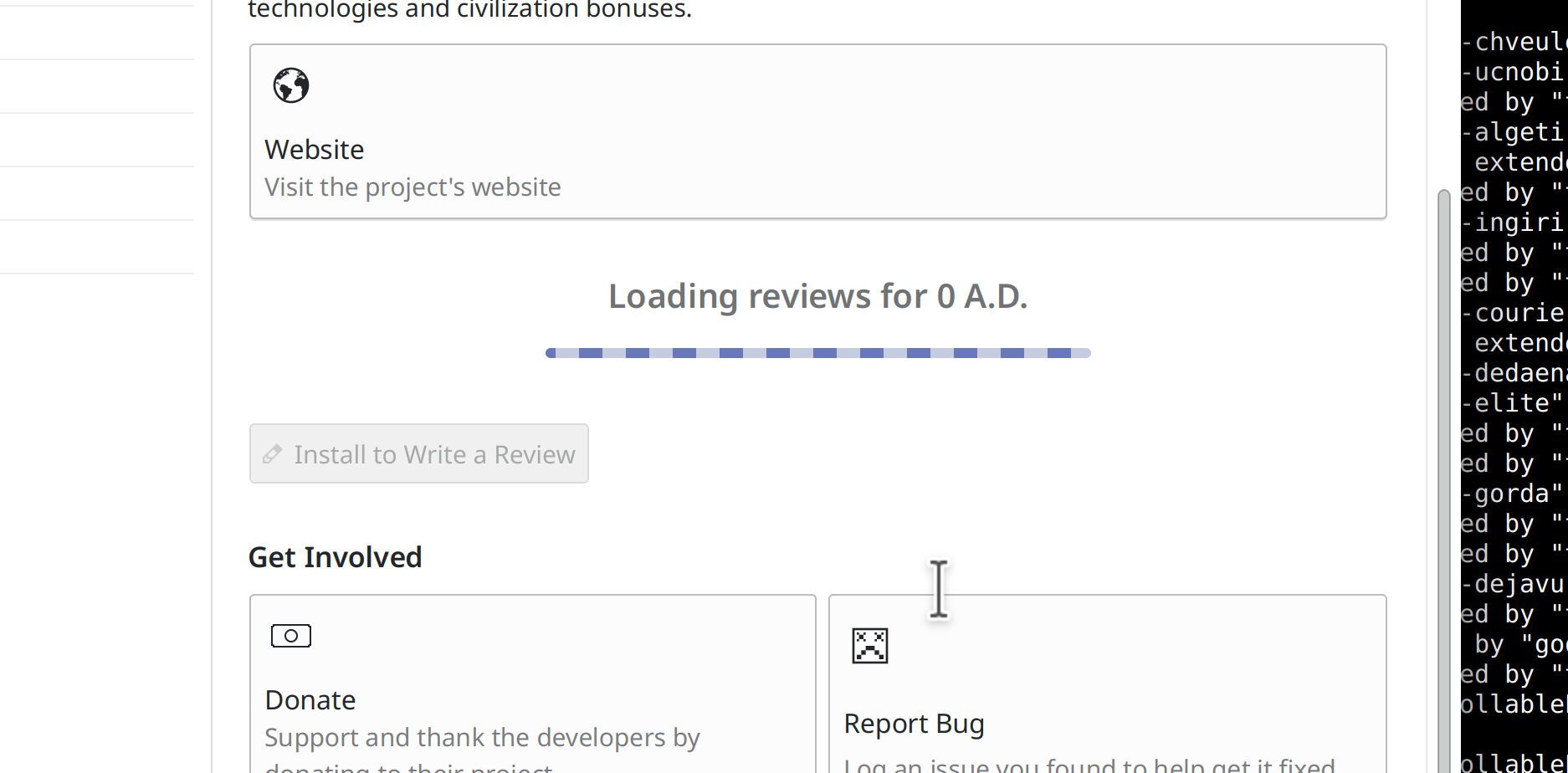
Discover now shows you a “Loading…” placeholder while it’s still loading the reviews for an app (Aleix Pol Gonzalez and me: Nate Graham, Plasma 5.26):

On the Panel Edit Mode toolbar, those little draggable handles now display tooltips when hovered so that you can figure out what they do, and you can also double-click on them to reset them to their original states (Ivan Tkachenko, Plasma 5.26):

In the screen chooser dialog for sandboxed apps that want to record the screen (such as OBS when run from Snap or Flatpak), the list items in the view now behave more rationally if you double-click on them (Aleix Pol Gonzalez, Plasma 5.26)

When a sandboxed app is recording the screen and the System Tray shows an icon to forcibly stop the recording, clicking on it now displays a context menu with “Stop Recording” in it rather than just stopping the recording immediately before you’ve had a chance to figure out what it does (Harald Sitter, Plasma 5.26)

In the Comic Strip widget, the context menu item that previously said “Run associated application” now says “Open in [default web browser]” (Nicolas Fella, Plasma 5.26)

Visual transitions in the Pager widget (e.g. when you move, maximize, or tile a window) are now animated (Ivan Tkachenko, Plasma 5.26):

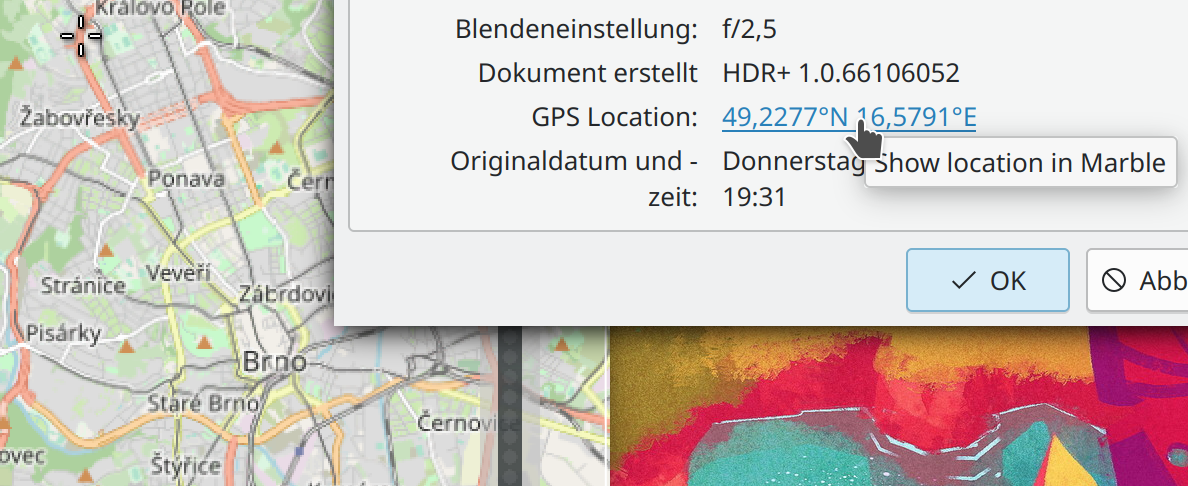
In the properties dialog, when a file has GPS coordinates in the metadata, this information is now displayed as a clickable link (Kai Uwe Broulik, Frameworks 5.97):

The “Help Center” app’s icon is now always colorful when using the Breeze icon theme, just like other app icons are (me: Nate Graham, Frameworks 5.97)

Bugfixes & Performance Improvements

Context menu items of the Comic Strip widget that don’t work when then you’re offline or before the current strip has loaded now disable themselves rather than letting you click on them and then making Plasma crash (Nicolas Fella, Plasma 5.24.7)

In the Plasma X11 session, the Color Picker widget is once again able to pick screen colors (Ivan Tkachenko, Plasma 5.24.7)

Submitting usefulness for reviews in Discover once again works (Aleix Pol Gonzalez, Plasma 5.24.7)

In the Plasma Wayland session, fixed a way that KWin could crash when you press physical buttons on a connected drawing tablet (Aleix Pol Gonzalez, Plasma 5.25.4)

You can once again navigate between windows and desktops using the keyboard in the Desktop Grid effect (Vlad Zahorodnii, Plasma 5.25.4)

In the Plasma X11 session, the “Window shade” feature once again works (Vlad Zahorodnii, Plasma 5.25.4)

In the Plasma Wayland session, the cursor launch feedback animation played when launching an XWayland app now stops playing once the app has launched (Aleix Pol Gonzalez, Plasma 5.25.4)

Fixed the final way that menu titles could get cut off when a long menu title is paired with short menu items (Kai Uwe Broulik, Plasma 5.25.4)

On System Settings’ Colors page, the color scheme previews are now 100% accurate and actually reflect their colors (Jan Blackquill, Plasma 5.25.4)

In the Plasma Wayland session, sub-menus in the Kicker Application Menu can now be fully navigated with the keyboard (Someone awesome, Plasma 5.26)

Plasma is now faster to load (Xuetian Weng, Plasma 5.26)

When saving files in a sandboxed app in a folder that has a lot of stuff in it already, you will no longer sometimes randomly see pointless notifications that say “Examining: failed” (Harald Sitter, Plasma 5.26)

In-window menubars in QtQuick apps now display the correct background color when using a color scheme with Header colors, such as Breeze Light and Breeze Dark (Kartikey Subramanium, Frameworks 5.97)

Spectacle and other apps now correctly detect the installation status for OBS Studio, Vokoscreen, and other 3rd-party apps in their “install other apps” menu (Nicolas Fella, Frameworks 5.97)

…And everything else

This blog only covers the tip of the iceberg! Tons of KDE apps whose development I don’t have time to follow aren’t represented here, and I also don’t mention backend refactoring, improved test coverage, and other changes that are generally not user-facing. If you’re hungry for more, check out https://planet.kde.org, where you can find more news from other KDE contributors.

How You Can Help

If you’re a developer, check out our 15-Minute Bug Initiative. Working on these issues makes a big difference quickly!

Otherwise, have a look at https://community.kde.org/Get_Involved to discover ways to be part of a project that really matters. Each contributor makes a huge difference in KDE; you are not a number or a cog in a machine! You don’t have to already be a programmer, either. I wasn’t when I got started. Try it, you’ll like it! We don’t bite!

Finally, consider making a tax-deductible donation to the KDE e.V. foundation.
This week in KDE: some nice improvements!

15-Minute Bugs Resolved

Current number of bugs: 52, down from 53. 0 added and 1 resolved:

Plasma no longer very commonly always randomly crashes on login or logout (David Edmundson, Frameworks 5.97)

Current list of bugs

New Features

Dolphin, Gwenview, and Spectacle now use the XDG Portals interface for dragged-and-dropped files, which allows them to successfully drop files into sandboxed apps without punching a hole in the sandbox by giving it access to your entire home folder or the system’s temp folder (Harald Sitter, version 22.08 of these apps)

It’s now possible to set the default paper size when printing (Akseli Lahtinen, Plasma 5.26):

The “About This System” page now supports showing data from a wider range of hardware and firmware, including Apple M1 silicon (James Calligeros, Plasma 5.26):

User Interface Improvements

Dolphin’s “Show Statusbar” action now additionally lives in the Settings menu, where these kinds of view-specific preferences can typically be found in QtWidgets-based KDE apps (Kai Uwe Broulik, Dolphin 22.08):

Quite a lot of Plasma widgets have gained improved accessibility characteristics, after using them with a screen reader (Fushan Wen, Plasma 5.25.4 and 5.26)

You can now find System Monitor when searching for various related search terms like “task,” “manager,” “cpu,” and “memory” (Tom Knuf, Plasma 5.26)

The wallpaper chooser view now tries to extract and display metadata from the images, when it’s available (Fushan Wen, Plasma 5.26):

Navigating between virtual desktops no longer wraps around when reaching the end by default–though of course you can change this if you’d like (Someone going by the pseudonym “Awed Potato”, Plasma 5.26)

The “Show Desktop” widget and shortcut have been renamed “Peek at Desktop” to make clearer what they’ll actually do, and to provide more contrast with the alternative “Minimize all Windows” action (me: Nate Graham, Plasma 5.26):

System Settings’ Bluetooth page now uses a more standard and less visually glitchy popup to ask you to confirm removing a paired device (me: Nate Graham, Plasma 5.26):

If you’re about to comment “I hate this style, it looks terrible!” then at least you might be happy to learn that we can change it in a central place, since this UI is data-driven with the presentation being separate.

Bugfixes & Performance Improvements

The Dictionary widget no longer has a visually broken icon (Ivan Tkachenko, Plasma 5.24.6)

Switching between launcher widgets (e.g. Kickoff and Kicker) no longer causes your list of favorite apps to become re-populated with the set of default favorites, if you had removed any of them (Fushan Wen, Plasma 5.24.6)

The Pager widget now always switches to the actual desktop you’re hovering over when you drag an app icon to it, its visualization of windows is now smoother, and its config window no longer displays groups of radio buttons with none of the buttons selected (Ivan Tkachenko, Plasma 5.24.6)

In the Plasma Wayland session, fixed an issue that could cause an external USB-C monitor that had been turned off and back on again to stop displaying an image until the computer was rebooted. And this also fixes a total session freeze when turning on a TV screen plugged into your computer when there is a VR headset plugged in too (Xaver Hugl, Plasma 5.25.3)

In the Plasma Wayland session, fixed an issue that could cause the system to not wake up for users of NVIDIA GPUs (Xaver Hugl, Plasma 5.25.3)

Plasma no longer crashes when you delete a panel that has any Panel Spacer widgets on it (Aleix Pol Gonzalez, Plasma 5.25.3)

System Settings no longer sometimes crashes when switching between cursor themes (David Edmundson, Plasma 5.25.3)

Middle-clicking on System Tray icons for apps once again works (Chris Holland, Plasma 5.25.3)

In the Plasma Wayland session, the cursor no longer sometimes turns invisible when using certain very broken legacy graphics drivers (Xaver Hugl, Plasma 5.25.4)

In the Plasma Wayland session, window decorations with visible borders no longer get cut off on the right side when using a systemwide scale factor greater than 100% (David Edmundson, Plasma 5.26)

In the Plasma Wayland session, turning on an external monitor no longer immediately crashes apps that are currently display a notification with job progress (Michael Pyne, Frameworks 5.97)

Plasma no longer sometimes crashes when dragging something from Firefox to the Desktop (David Edmundson, Frameworks 5.97)

Fixed a common cause of freezes in Kirigami-using apps with scrollable pages (Marco Martin, Frameworks 5.97)

.rw2 RAW image files once again display preview thumbnails (Alexander Lohnau, Frameworks 5.97)

…And everything else

This blog only covers the tip of the iceberg! Tons of KDE apps whose development I don’t have time to follow aren’t represented here, and I also don’t mention backend refactoring, improved test coverage, and other changes that are generally not user-facing. If you’re hungry for more, check out https://planet.kde.org, where you can find more news from other KDE contributors.

How You Can Help

If you’re a developer, check out our 15-Minute Bug Initiative. Working on these issues makes a big difference quickly!

Otherwise, have a look at https://community.kde.org/Get_Involved to discover ways to be part of a project that really matters. Each contributor makes a huge difference in KDE; you are not a number or a cog in a machine! You don’t have to already be a programmer, either. I wasn’t when I got started. Try it, you’ll like it! We don’t bite!

Finally, consider making a tax-deductible donation to the KDE e.V. foundation.

This week in KDE: big things

Several big things happened this week, so let’s just jump in:

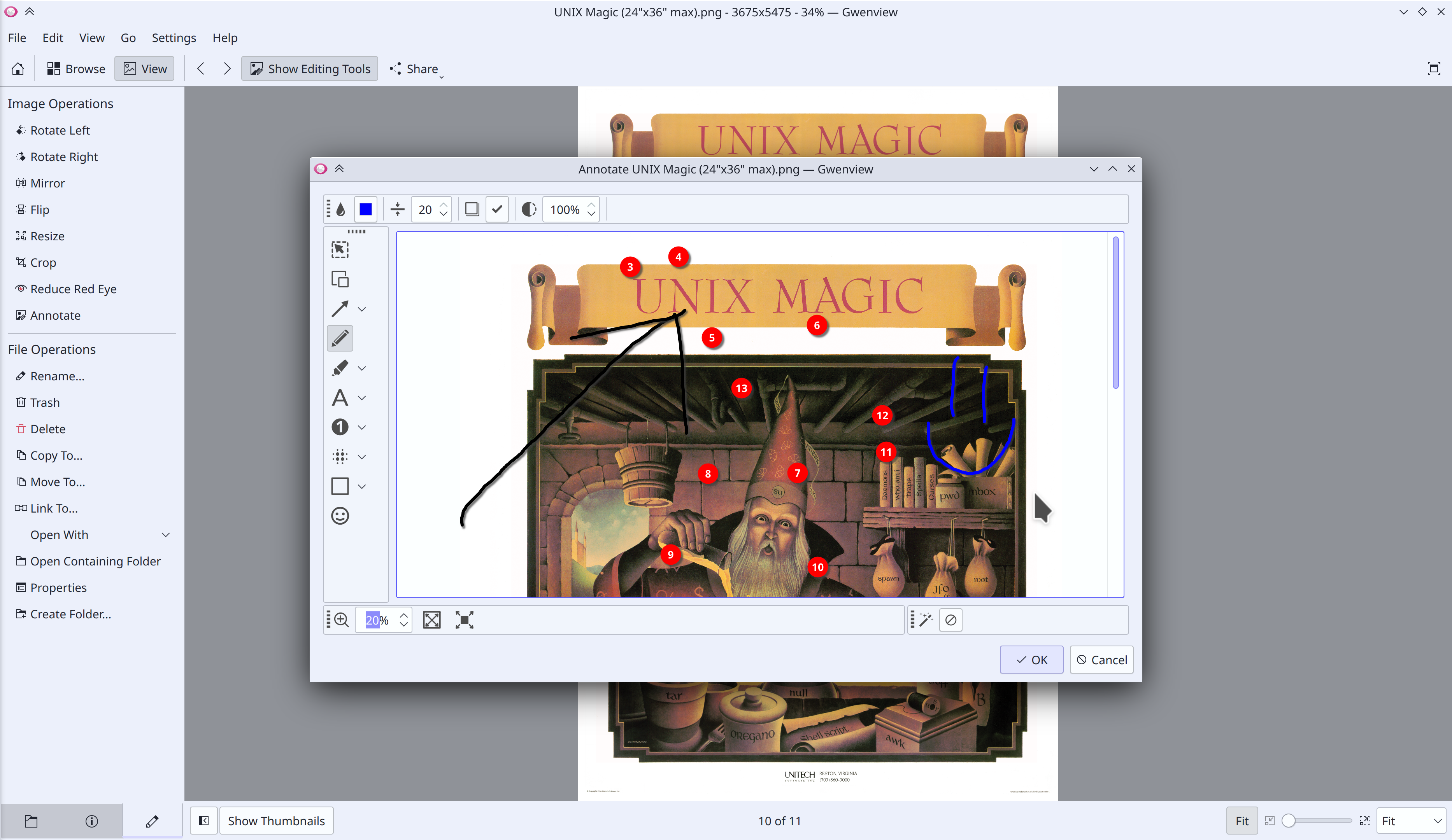
Ilya Pominov has added a feature to Gwenview 22.08 that lets you mark up and annotate images using the same annotation UI that’s in Spectacle!

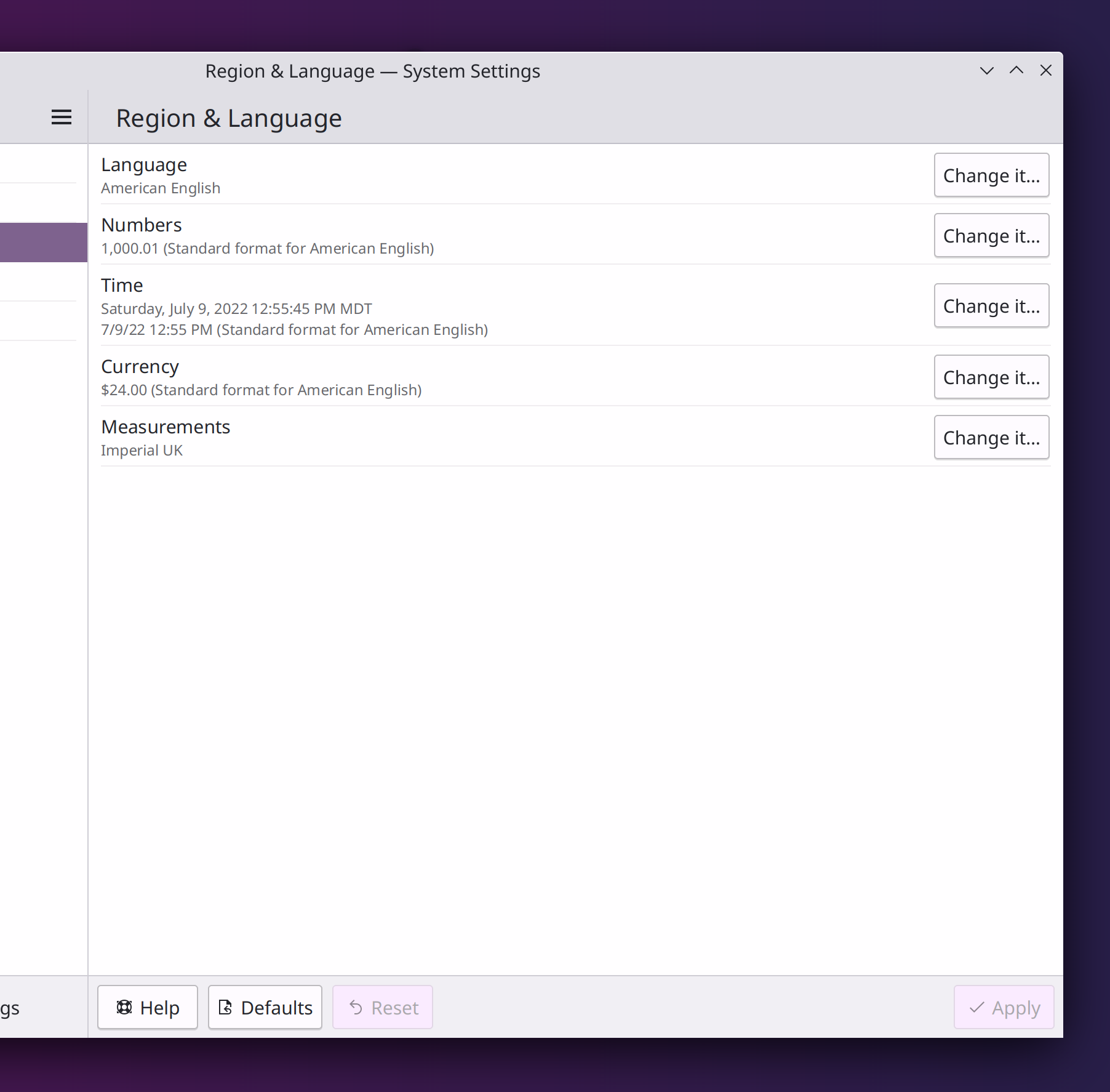
For Plasma 5.26, Han Young has merged System Settings’ “Formats” and “Languages” pages together, which clarifies the relationship between the systemwide language and its default formats and fixes most of the bugs affecting both of the two old pages!

For Frameworks 5.97, Slava Aseev has implemented support in KWallet for the org.freedesktop.secrets standard, which allows KDE apps to be more compatible with 3rd-party credential storage methods. In terms of real-world impacts, the Minecraft launcher should no longer ask you to log in every single time you open it!

Finally on our list of big changes, for Plasma 5.26 Harald Sitter has added support in KDE’s crash reporter for sending crash information to a self-hosted instance of Sentry a server-side crash tracing service that will eventually be capable of injecting debug symbols automatically. It may sound technical and boring, but over time it should lead to crash reports becoming more actionable, wasting less of everyone’s time.

Beyond those, we have a pretty good assortment of other changes to present as well!

15-Minute Bugs Resolved

Current number of bugs: 53, down from 57. 0 added, 2 found to already be fixed by something else, and 2 fixed as a part of the merged Region & Language page! Thanks, awesome people.

Current list of bugs

Other User Interface Improvements

When you cancel loading a slow folder in Dolphin, the placeholder message in the middle of the window now says “Loading canceled” rather than “Folder is empty” (Kai Uwe Broulik, Dolphin 22.08)

Clicking on a Konsole notification about a particular session now takes you to that session in Konsole (Kasper Laudrup, Martin Tobias Holmedahl Sandsmark, and Luis Javier Merino, Konsole 22.08)

Dragging a file to a notification now activates and raises the relevant window from the sending application so you can drag the file into it (Kai Uwe Broulik, Plasma 5.26)

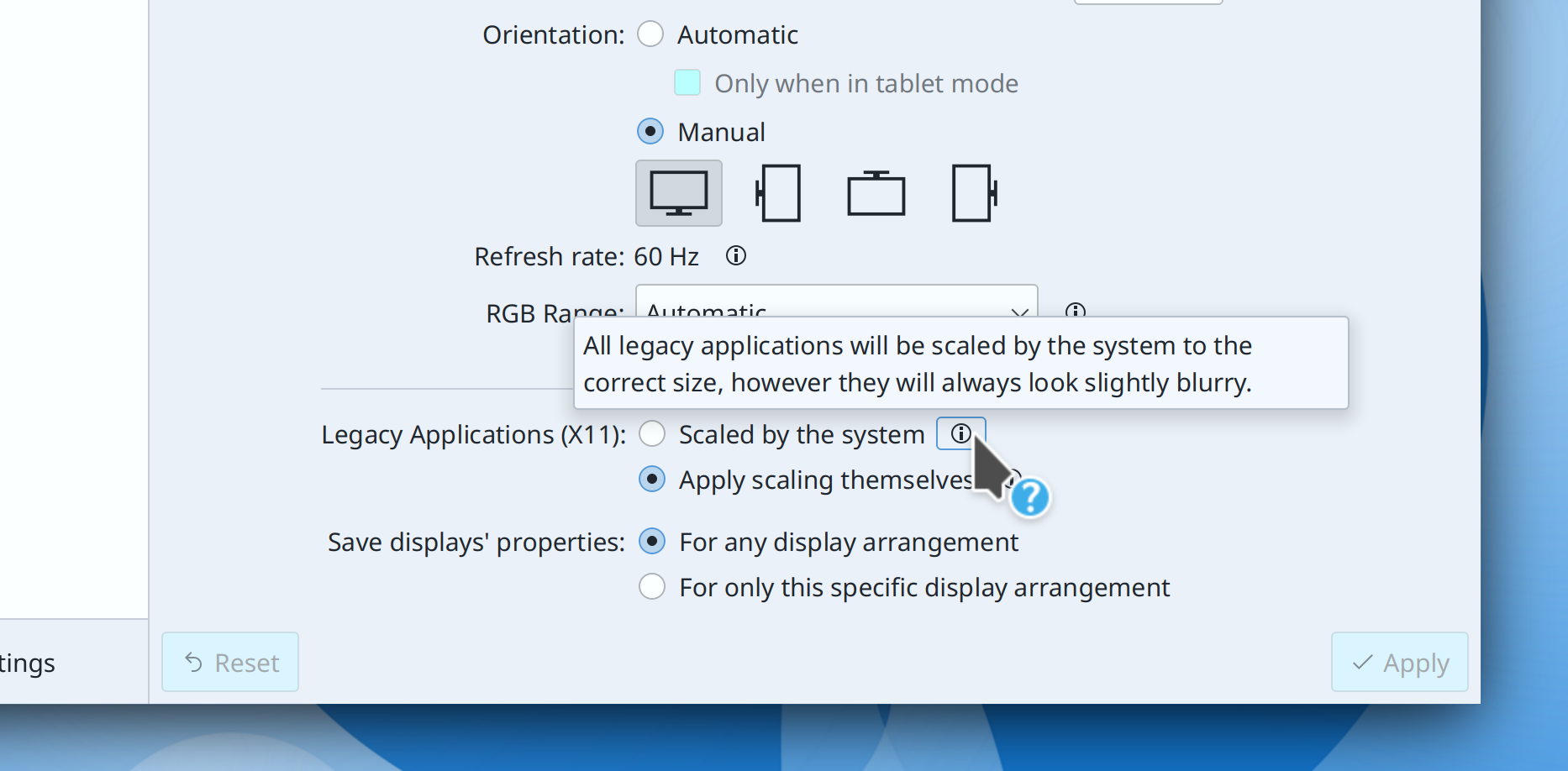
System Settings’ Display & Monitor page now displays the explanatory help text for the two Wayland-specific systemwide scaling methods in a tooltip, rather than inline (me: Nate Graham, Plasma 5.26):

The common “Get new [thing]” dialog no longer has a redundant close button in its footer and now tells you to try again later for transient network and server errors (Felipe Kinoshita and me: Nate Graham, Frameworks 5.97)

Text changes made in the “Name” field of file open/save dialogs is now undoable and redoable (Ahmad Samir, Frameworks 5.97)

Message dialogs with “Yes” and “No” buttons are changing their text to be more descriptive in multiple pieces of KDE software (Friedrich W. H. Kossebau, the next versions of a bunch of things)

Bugfixes & Performance Improvements

Fixed one way that a file in Okular could be corrupted and rendered un-save-able when saved (Albert Astals Cid, Okular 22.04.3)

Sidebar entries in Elisa no longer become mis-sorted after changing what’s embedded in the sidebar (Yerrey Dev, Elisa 22.08)

The new “accent color from wallpaper” feature now updates the titlebar’s color as expected when the wallpaper changes automatically (for example when using a slideshow for the wallpaper) and also correctly applies manually-chosen accent colors to window titlebars when using a color scheme that doesn’t use header colors, such as Breeze Classic (Eugene Popov, Plasma 5.25.3)

The Slide effect no longer flickers disturbingly when using a multi-screen setup (David Edmundson, Plasma 5.25.3)

The Cover Flip and Flip Switch effect are now smoother with fewer frame drops when using the default “Show selected window” option in the System Settings Task Switcher page (Ismael Asensio, Plasma 5.25.3)

In the Plasma Wayland session, using a global keyboard shortcut to launch an application with startup animation turned off now inhibits the startup animation as expected (Aleix Pol Gonzalez, Plasma 5.25.3)

Right-clicking on an item in the Kickoff application launcher’s right panel no longer causes its highlight effect to disappear while the context menu is open (me: Nate Graham, Plasma 5.25.3)

In Discover, the tooltips shown when hovering the cursor over the big new buttons on the Application page no longer sometimes disappear immediately after appearing (me: Nate Graham, Plasma 5.25.3)

Removing the leftmost screen of a multi-screen arrangement no longer sometimes causes windows on the remaining screens to no longer be movable (Vlad Zahorodnii, Plasma 5.26)

Using a global keyboard shortcut to launch an application with the “Launch in terminal” option enabled now actually launches it in a terminal window as expected (Jin Liu, Frameworks 5.96)

…And everything else

This blog only covers the tip of the iceberg! Tons of KDE apps whose development I don’t have time to follow aren’t represented here, and I also don’t mention backend refactoring, improved test coverage, and other changes that are generally not user-facing. If you’re hungry for more, check out https://planet.kde.org, where you can find more news from other KDE contributors.

How You Can Help

If you’re a developer, check out our 15-Minute Bug Initiative. Working on these issues makes a big difference quickly!

Otherwise, have a look at https://community.kde.org/Get_Involved to discover ways to be part of a project that really matters. Each contributor makes a huge difference in KDE; you are not a number or a cog in a machine! You don’t have to already be a programmer, either. I wasn’t when I got started. Try it, you’ll like it! We don’t bite!

Finally, consider making a tax-deductible donation to the KDE e.V. foundation.
This week in KDE: And now time for some UI polishing

This week we’ve mixed in a lot of user interface polishing with our usual assortment of bugfixes!

15-Minute Bugs Resolved

Current number of bugs: 57, down from 59. 0 added, 1 found to already be fixed, and 1 resolved:

When using screen scaling with the on-by-default Systemd startup in Plasma, the wrong scale factor is no longer sometimes used immediately upon login, which would cause Plasma to be blurry (on Wayland) or everything to be displayed at the wrong size (on X11) (David Edmundson, Plasma 5.25.2)

Current list of bugs

User Interface Improvements

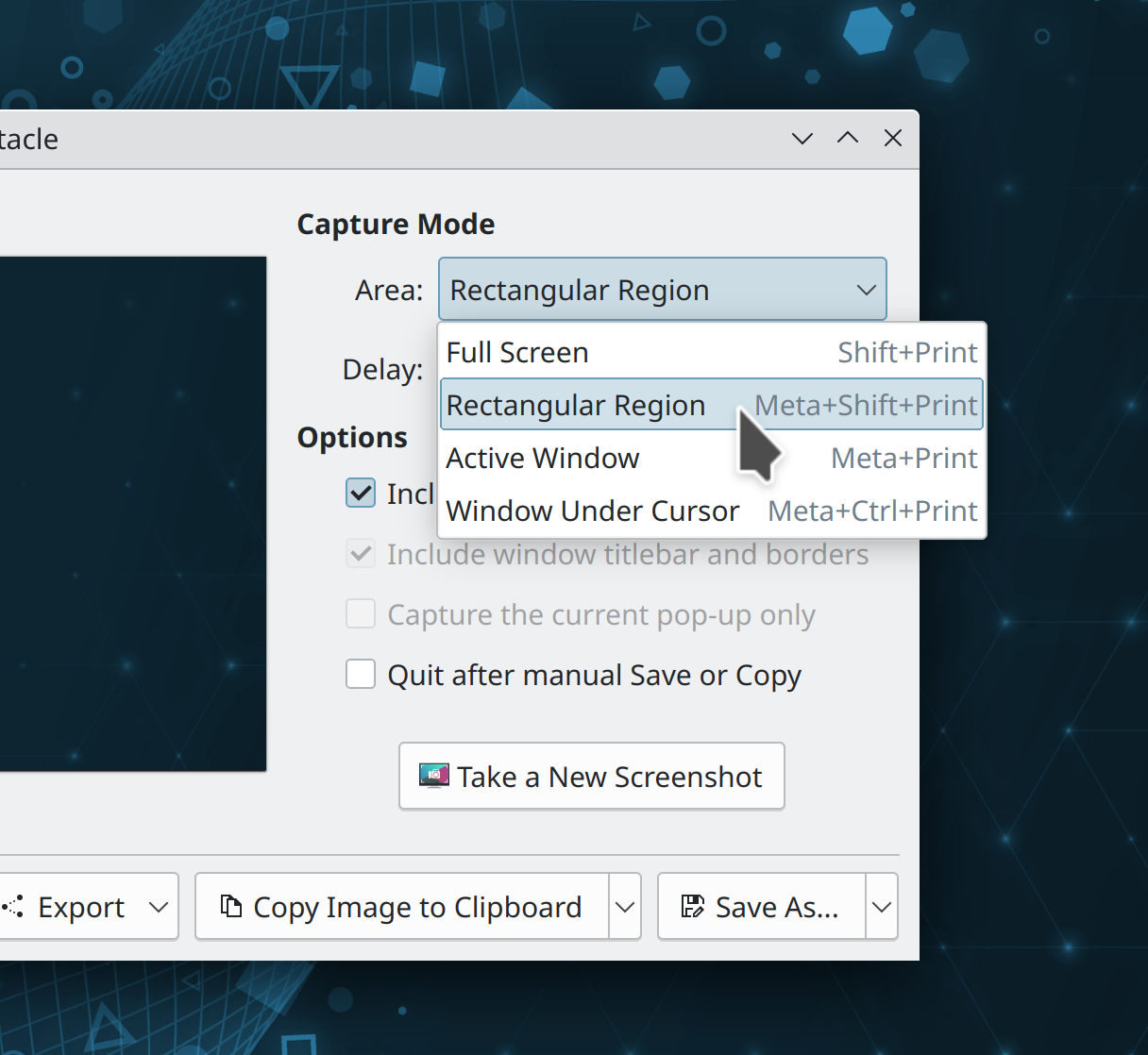
Spectacle now displays the global shortcuts used to open it with various capture modes right there in the combobox used to select a capture mode! (Felix Ernst, Spectacle 22.08):

While annotating a screenshot in Spectacle, the window now resizes itself to accommodate the screenshot at its full size, so you don’t have to pan and zoom to see the whole thing (Antonio Prcela, Spectacle 22.08)

Webcams no longer inappropriately appear in Skanpage’s list of scanners (Alexander Stippich, Skanpage 22.08)

In System Settings’ Colors page, the last custom accent color you chose is now remembered after you switch to a wallpaper- or color-scheme-based accent color and then back to a custom one (Tanbir Jishan, Plasma 5.26)

Middle-click now closes windows in the Desktop Grid effect, just like in the Overview and Present Windows effects; now they are all consistent (Felipe Kinoshita, Plasma 5.26)

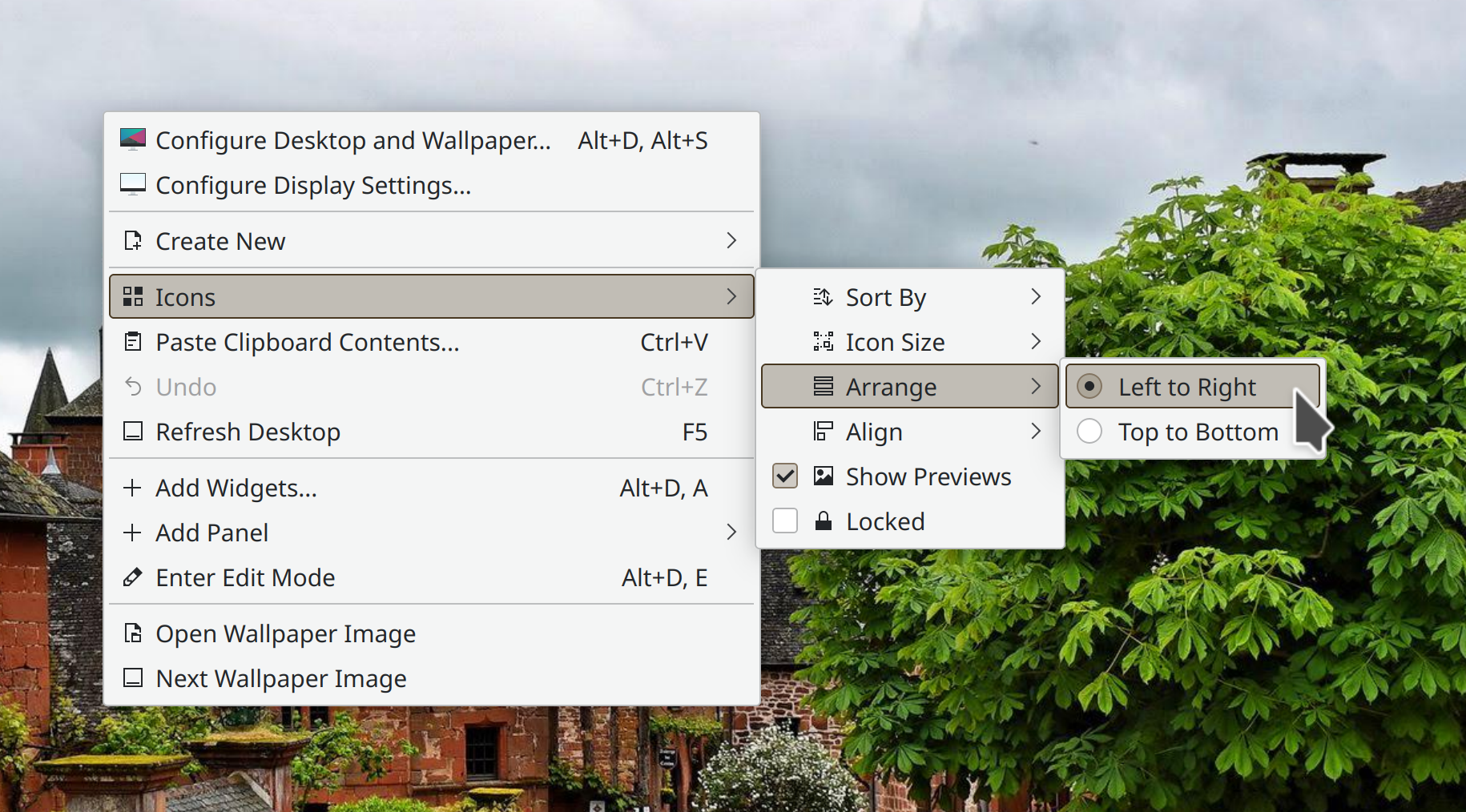
The wording for the desktop icon arrangement setting has been tweaked to be clearer and more comprehensible (Jan Blackquill, Plasma 5.26):

Improved the ordering of KRunner search results by giving lower weight to exact matches for extremely short search terms (Alexander Lohnau, Plasma 5.26)

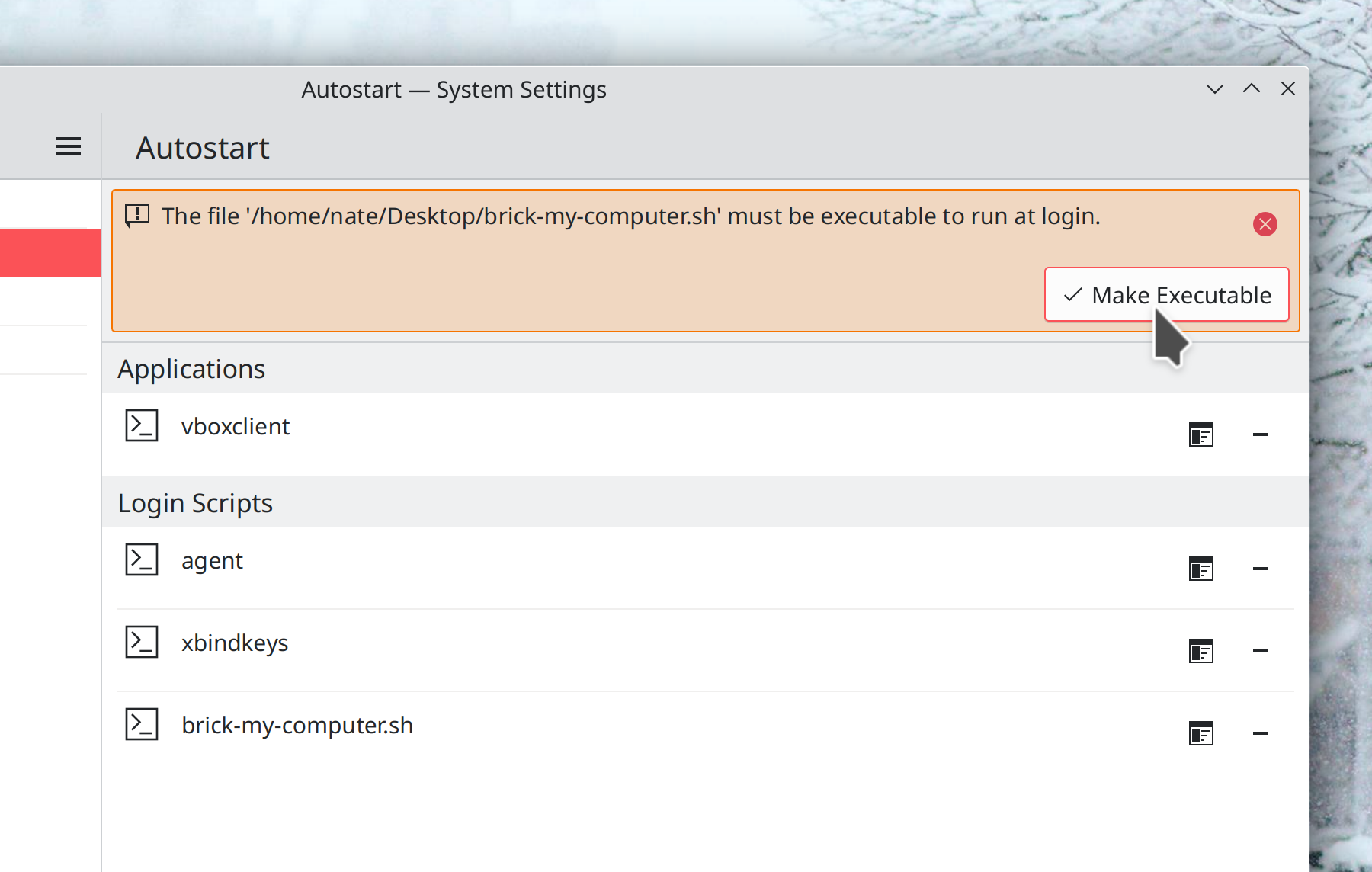
System Settings’ Autostart page now warns you if you try to add a login or logout script that is not executable, and it even gives you a big friendly button you can click on to fix it (Nicolas Fella, Plasma 5.26):

When you add a new network connection, it is now connected automatically after you close the dialog to enter its details (Arjen Hiemstra, Plasma 5.26)

The full-screen QR code view that the Networks widget can show can now be closed using the keyboard, and also has a visible close button in the corner (Fushan Wen and me: Nate Graham, Plasma 5.26)

The search field in Kicker is no longer slightly and irritatingly misaligned (me: Nate Graham, Plasma 5.26)

The current cursor and scroll positions in the Notes widget are now remembered after you restart the computer (or just Plasma) (Ivan Tkachenko, Plasma 5.26)

You can now configure Task Manager widgets to not automatically consume all available space on their panel, which lets them be placed immediately to the left of something else, like a Global Menu widget (Yaroslav Bolyukin, Plasma 5.26)

The Window List widget’s text display is now optional (but remains on by default) on a horizontal panel, allowing people to go back to the old style from Plasma 5.24 and earlier if they preferred it (me: Nate Graham, Plasma 5.26)

Bugfixes & Performance Improvements

Elisa’s sidebar should no longer sometimes take you to the wrong page when you click on various items in it under certain circumstances (Yerrey Dev, Elisa 22.04.3)

In the Plasma Wayland session, System Settings’ Tablet Mode page no longer crashes the second time you open it (Nicolas Fella, Plasma 5.24.6)

Fixed one of the apparently many ways that a panel on an external screen could disappear when that external screen is disconnected and reconnected (Fushan Wen, Plasma 5.24.6)

Grid items in the Kickoff Application Launcher now show relevant tooltips on hover, as originally intended (Noah Davis, Plasma 5.24.6)

Fixed one of the ways Plasma could crash right after login on a laptop with an external HDMI screen connected (David Edmundson, Plasma 5.25.2)

In the Networks widget, the “Show QR Code” button no longer inappropriately appears for networks that don’t support QR code discovery, like wired networks and VPNs (Nicolas Fella, Plasma 5.25.2)

In the Plasma Wayland session, changing the screen resolution to something not officially supported by the screen no longer sometimes causes System Settings to crash (Xaver Hugl, Plasma 5.25.3)

In the Plasma Wayland session, activating windows using a touchscreen in the Overview, Present Windows, and Desktop Grid effects once again works (Marco Martin, Plasma 5.25.3)

The password field in the lock and login screens is once again cleared and focused when you enter the wrong password (Derek Christ, Plasma 5.25.3)

When using Plasma, KWin effects no longer play at the wrong animation speed if in the past you ever adjusted the speed of animations in the System Settings Compositing page outside of Plasma (David Edmundson, Plasma 5.23.3)

It’s once again possible to manually open more than one instance of kcmshell (Alexander Lohnau, Plasma 5.25.3)

Fixed a variety of UI glitches in various non-default Task Switcher visualizations (Ismael Asensio, Plasma 5.25.3)

Okular now appears as expected in the “Open With…” dialog shown by sandboxed apps (Harald Sitter, Plasma 5.26 with Okular 22.08)

The list of recent documents in the GTK file dialog is no longer inappropriately cleared after using certain KDE apps (Méven Car, Frameworks 5.96)

When creating a new file using the common “create new file” menu items, any custom file extension you use in the filename is no longer replaced with the default one (Nicolas Fella, Frameworks 5.96)

Changes not in KDE that affect KDE

When you enable or disable one screen in a multi-screen arrangement, the desktops for the new arrangement now have the correct wallpaper (Fushan Wen, Qt 6.3.2, but it has been backported in the KDE Qt patch collection)

…And everything else

This blog only covers the tip of the iceberg! Tons of KDE apps whose development I don’t have time to follow aren’t represented here, and I also don’t mention backend refactoring, improved test coverage, and other changes that are generally not user-facing. If you’re hungry for more, check out https://planet.kde.org, where you can find more news from other KDE contributors.

How You Can Help

If you’re a developer, check out our 15-Minute Bug Initiative. Working on these issues makes a big difference quickly!

Otherwise, have a look at https://community.kde.org/Get_Involved to discover ways to be part of a project that really matters. Each contributor makes a huge difference in KDE; you are not a number or a cog in a machine! You don’t have to already be a programmer, either. I wasn’t when I got started. Try it, you’ll like it! We don’t bite!

Finally, consider making a tax-deductible donation to the KDE e.V. foundation.