First, what you’ve all been waiting for: a release date! We’ve decided that Plasma 6 will be released in early February of 2024. We don’t have a specific day targeted yet, but it’ll be in that timeframe. I’m feeling quite confident that the release will be in excellent shape by then! It’s already in good shape right now. 5 months should provide enough of a runway for a solid final release.
What’s done
Over the last month, a few remaining porting tasks were completed:
Replace PlasmaCore.SortFilterModel with KItemModels.KSortFilterProxyModel. Less code duplication, yay!
Replace Kirigami.Avatar with KirigamiAddons.Avatar and KirigamiAddons.AvatarButton, which are easier to use and better-behaved.
Introduce an opt-in dedicated sidebar column UX for System Settings KCMs, and port various bespoke stuff to use it.
DataEngines have been made into thin wrappers around other functionality and moved into a new package called Plasma5Support, so porting away from them isn’t so urgent anymore and won’t block the release.
This work was done by Marco Martin, Arjen Hiemstra, Carl Schwan, Nicolas Fella, and me: Nate Graham. All this porting work is leveling off as the major work has now been completed, making room for features and bugfixes. This means we are solidly in stage 4 of the roadmap (features and planned changes) and nibbling on stage 5 (QA and convergence).
In the feature department, major work included:
Custom ordering for KRunner search results
Printers KCM rewritten in QML
Double-click by default
Tap-to-click by default
Icons throughout Plasma itself now exclusively come from the systemwide icon theme
Support for automatic bug reporting in DrKonqi and improved reporting flow in general
Autostart KCM shows details about entries
Distros can now customize the first page in Welcome Center
This work was done by Alexander Lohnau, Mike Noe, Harald Sitter, Nicolas Fella, Thenujan Sandramohan, Xaver Hugl, and me, Nate Graham.
In terms of bugs, it’s been an all-hands-on-deck affair, with everyone helping out. As a result our list of open Plasma 6 issues is down to 75 today, after having risen three weeks ago to an all-time high of 87. The number has been falling since then, which is a great sign–bugginess has peaked and we’re starting to converge! And not all of these are major, high profile issues, either; as of this writing, there are only 15 of those. These are the true showstoppers that must be fixed before we can release Plasma 6. As for the rest, we’ll be trying our best to get as many of those done too to ensure that quality on release day is as high as possible!
What’s next
There are a lot of items remaining in the “Work that’s been decided on but not implemented yet” section on the Plasma 6 wiki page–both started but not yet finished, and also not yet started. It’s time to get cracking on that stuff! If you want your features to be included in Plasma 6.0, we have about 2 months to do it before the soft feature freeze.
Beyond that, it will be a matter of bugfixing, bugfixing, and more bugfixing!
How to Help
Basically the same as last time: if you’re a developer, live on Plasma 6, work on your features, and fix bugs! If you’re a user, test out Plasma 6 and report issues! And if this makes you feel excited in your nether regions, reach for your wallet instead and make a donation to KDE e.V. so we can continue to fund that which needs to be funded!
Today I want to discuss in detail our plans for icon theming in Plasma 6. It will be rather technical, but may be of interest if you’re a user, developer, or theme author who wants to know what (if anything) you’ll have to do differently for Plasma 6.
Let’s start by briefly reviewing the way FreeDesktop-compatible icon themes work. Icons in icon themes are named with standardized names, like edit-copy. A list of standard names can be found here. When an app wants the icon for a “Copy” action, it uses the API of its toolkit to ask for a themed icon named edit-copy. In Qt, you use QIcon::fromTheme(). If an icon isn’t found by its name, the implementation is required to chop off the last word and try again. So if an app asks for edit-copy-path and an icon with that name isn’t found in the icon theme, it will look for edit-copy and return that instead. Icons can also come in multiple sizes, so that each icon can be optimized for being displayed at different sizes. There’s more to it than that, but it’s enough for now.
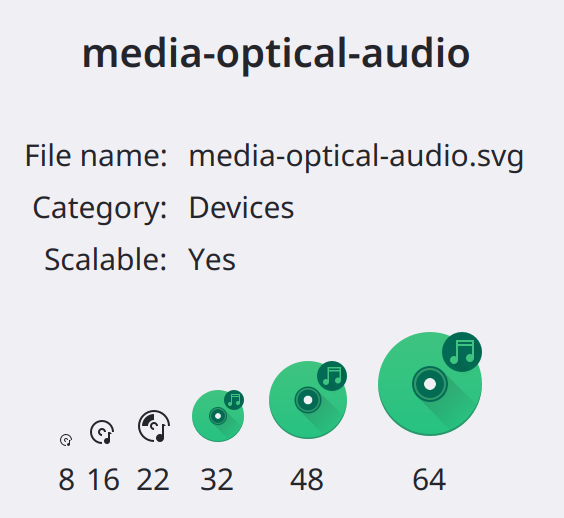
Over time, icon themes started doing something interesting: they changed the visual styling between sizes! For example in many icon themes, the symbolic monochrome style is used for icons’ 16px and 22/24px versions, and a full-color style is used for the 32px and larger versions. Breeze is one such icon theme. For example:
Now we have a problem. What if an app developer wants to display an icon at 32px size, and they want it to be symbolic even if if the theme has both symbolic and full-color versions of the same icon? There is actually no way of expressing this preference.
This was a common issue with icons in a Plasma Panel, which has a variable thickness. So when you were using the Breeze icon theme, any Panel widgets that asked for an icon present in the icon theme might become colorful if the panel was thicker than 32px (excluding padding). Some icons also only had full-color versions, and others only had symbolic versions, so the result was a jumble of visual styles on your Plasma Panel.
The old solution
Because this was primarily a problem in Plasma, in the past we solved it by shipping icons inside the Plasma style that overrode the icons in the system-wide icon theme. The Plasma-specific icons could be always symbolic at all sizes. Unfortunately there were many drawbacks:
The style of icons in the Plasma style might be different from the style of icons you chose for your System-wide icon theme, making unified theming impossible unless you also applied a matching icon theme made by the author of the Plasma theme.
Plasma themes often had only a few icons in them, meaning that most icons in Plasma respected your system icon theme, but some didn’t, and which ones didn’t was dependent on what Plasma theme you were using and how many icons it included. In practice it felt totally random.
Even when developers offered matching icon and Plasma themes, it was an easily-forgotten chore to remember to update the same icons in both places, causing them to get out of sync.
This solution required the use of different icon loading code between apps and Plasma, with subtly different behaviors, features, bugs, and performance characteristics–not to mention twice the maintenance.
Apps encounter the same issue, and this Plasma-specific solution doesn’t work for them.
For these reasons, we wanted to move away from this system in Plasma 6.
The new solution
For Plasma 6, icons in the Plasma theme will no longer be used even if they’re present. All icons in Plasma now come from the system-wide icon theme.
So how do we solve the above issue? Well, remember how the system falls back to an icon with a simpler name when it’s asked for an icon with a more complex name that isn’t found? The GNOME folks have used this feature to do something clever: they appended the -symbolic suffix to the end of their symbolic icons. Then when an app asks for, say, media-optical-audio-symbolic, it gets the symbolic version of the icon even if it’s being displayed at a large size such that otherwise it would get the full-color one.
For Plasma 6 we have adopted this convention as well for our Breeze icon theme. This isn’t an official part of the icon theme spec, but now that both GNOME and KDE do it, hopefully it shouldn’t be that hard to amend the spec to include it.
What it means for users
In Plasma 6, all icons in both your apps and Plasma will come from your icon theme. If you want your icons to look different, use a different icon theme.
What it means for app and Plasma developers
Anywhere in your app where you want the user to see a symbolic icon if the icon theme has one, append -symbolic to the end of the name of the icon that your app asks for. So yes, you’ll end up with a lot of git diffs like this:
Due to the name fallback behavior, this is a fully backwards-compatible and harmless change. So it’s not urgent to do this. But if you don’t, sometimes your users will see a full-color icon even though a symbolic one that you might prefer they see is available. So I encourage it!
What it means for icon theme authors
If your icon theme only has symbolic icons, or only has full-color icons, you don’t need to do anything.
If your theme has both symbolic icons and full-color icons, but there aren’t any icons that use different styles at different sizes, you don’t need to do anything. However do consider adding symbolic versions of your full-color icons that might get used on buttons, menu items, system tray items, and other places where people commonly expect to see symbolic icons. The filenames of the symbolic versions should end with the -symbolic suffix.
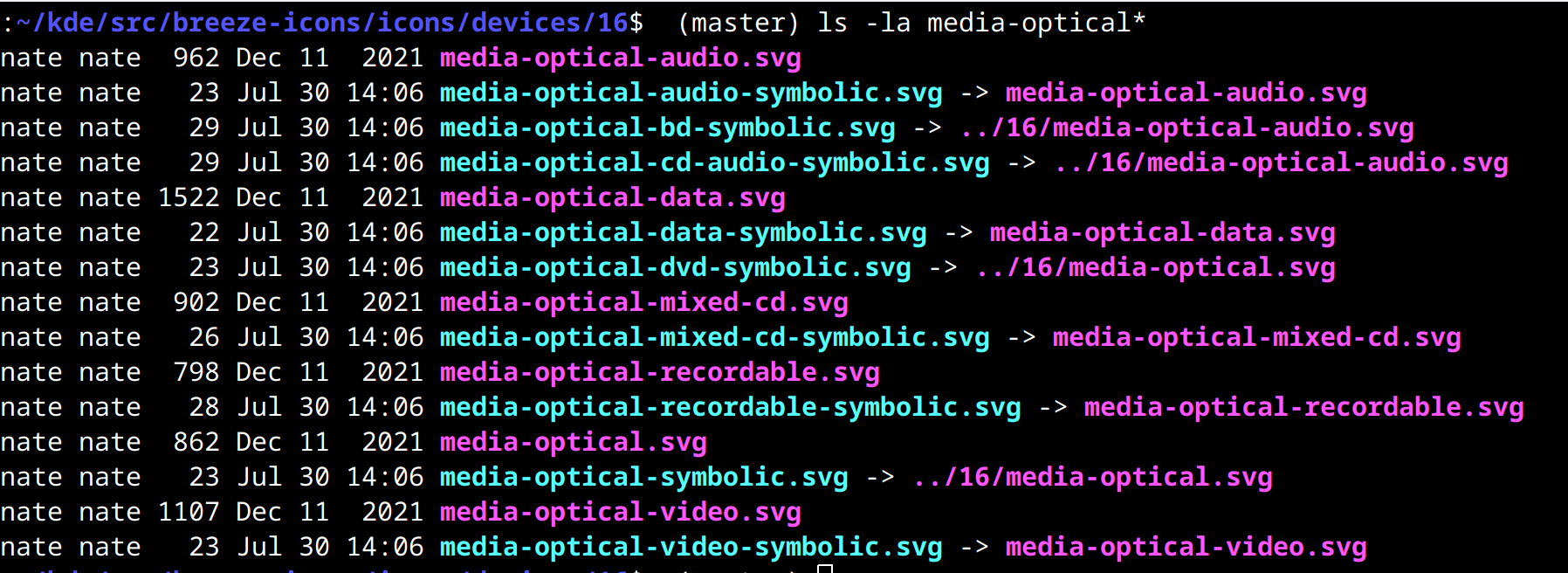
If your icon theme has any icons with symbolic versions at some sizes, and full-color versions at other sizes, you should create symlinks that end with the -symbolic suffix and point to the symbolic versions. Here’s an example of what we do in Breeze icons:
What it means for Plasma style authors
Don’t include icons in your Plasma 6 styles; they won’t be used. If you want your Plasma style to be accompanied by a distinctive matching icon style, bundle it in a Global Theme that also specifies the icon theme matching its style.
In conclusion
Nah, no conclusion needed. That’s all for today, folks!
About 6 weeks ago, I posted a tentative roadmap for Plasma 6. I wanted to give everyone an update on how things have gone since then!
So where are we? I previously explained that we were somewhere in between “clean up the code” and “Implement planned features and changes”–stages 3 and 4. I predicted that stage 3 code cleanup would mostly be done by early August.
What’s done
I’m happy to report that my prediction appears to have been pretty accurate! As of today, almost all of the planned Plasma 6 code porting tasks have been completed. Only one major one remains: porting everything away from DataEngines. But everything else is done, including the following projects:
Port all usages of Plasma SVG elements to KSvg (link)
Port everything to use Kirigami colors and Units (link)
Port PlasmaExtras.Heading to Kirigami.Heading (link)
Port away from direct KActionCollection usage (link)
Port to declarative header actions in KCMs (KCM is short for “KDE Control Module” and it’s internal jargon for a page in System Settings) (link)
These projects have involved many people, including: Marco Martin, me: Nate Graham, Laurent Montel, Carl Schwan, Mike Noe, Jorge Barroso Barea, Ivan Tkachenko, Joshua Goins, Kai Uwe Broulik, and Oliver Beard.
Now before we continue, let me mention that there’s much more porting work also going on in the background in Frameworks 6 which is technically independent of Plasma 6. This important work has been done by people like Volker Krause, Nicolas Fella, Friedrich Kossebau, and many others! Thanks for this work as well, guys!
Most of the Plasma porting projects should result in exactly zero user-facing changes, and I’ve done a lot of QA work over the past two months to make sure that’s the case. But the last two projects are exceptions; in addition to being porting and code cleanup projects, they do result in some intentional user-facing changes. Let’s go over them:
Using Kirigami.Icon everywhere is a part of the project to deprecate icons that live in the Plasma style, and always use icons from the (configurable) systemwide icon theme instead. That’s tracked at https://invent.kde.org/plasma/plasma-desktop/-/issues/82 and it’s now been completed! This makes it easy to achieve a consistent icon style across both Plasma and apps. Here’s how my system looks today with the style ze Plasma and the popular Papirus icon theme applied:
Fairly complete icon themes already look great! Others will need to add some new icons that are only displayed by Plasma, which was not necessary in Plasma 5. Icon theme creators take note! And I’ll write a separate post about this later.
Porting KCMs to use header actions also results in a user-facing changes. Now System Settings KCMs have largely dropped their double-height footers by moving some of the footer actions to their headers. The result looks great:
In the future we also plan to investigate moving the remaining bottom buttons elsewhere, so that KCMs can have no footers at all
Not too shabby, eh?
What’s next
As I mentioned, we still need to port all the widgets away from DataEngines. That’s ongoing. And there are some more lower-priority porting projects that we’ll be working on over time, such as removing custom CompactRepresentation code from widgets in favor of using the standard one and using the standard QML KCM components in Plasma widgets’ config windows. Those are lower priority though, and can be done at any time, including after Plasma 6 is released.
Beyond that, it’s time to move fully into stages 4 and 5: implementing planned features and polishing everything up in preparation for a release. In addition to the features relating to icons and KCMs that I mentioned earlier, a bunch more planned changes are mentioned on the Plasma 6 wiki page. Folks will be starting work on those soon. These planned changes are of course in addition to the random and awesome unplanned changes submitted by volunteers not working in close coordination with the Plasma team. For example the Autostart KCM is undergoing heavy changes right now as the result of some excellent volunteer contributions. So expect Plasma 6 to have a lot of amazing things in it!
How to help
If you’re a developer
Help port widgets away from DataEngines so we can close the lid on major porting work.
Also, start submitting merge requests for your major feature work. If you want it to ship with Plasma 6.0, the time to do so is now! We have probably a 2-3 month window of time remaining before we start branching for betas and any new features have to be deferred until Plasma 6.1.
And finally, since you’re already living on Plasma 6 git master (no doubt! 🙂 ), go fix some more of these bugs you encounter on a daily basis! You know, the ones that are annoying you but you already found a workaround? Delete your workaround, then fix it for everyone! Can’t find any bugs? Fix some of these!
If you’re an excited user
Test out Plasma 6 in a real environment! Use it. Test it. Break it. Find all the bugs. And then report them on https://bugs.kde.org! We want the number of open bug reports to go up for a while, as this represents people reporting issues that have been newly found, or weren’t previously tracked with Bugzilla tickets. We need that! Everything must be tracked!
If you’ve got money to spare
KDE is run by people volunteering their time to work on it or sponsored to do so by their employers, but now KDE e.V. is one such employer too! And [puts on board member hat] we want to make sure we have the financial leeway to remain one. The majority of KDE e.V.’s funding comes from small individual donations (here are the ones from PayPal, for example), and you can be a part of keeping it that way! Every little bit helps us to continue to pay our server bills, host free-to-attend conferences and sprints and even pay for people’s travel costs, employ folks to develop, package, and promote the software, and so on. If you can make a donation, we’d really appreciate it!
Just kidding, don’t have a heart attack. 🙂 Well actually there are some things… just not those! The full list can be found at https://community.kde.org/Plasma/Plasma_6#Removals, and it’s public; we’re not hiding anything! Today I wanted today provide a bit of context and explain the why, since it may not be obvious how it makes sense to remove things. So let’s go through the list:
KHotkeys
This was an earlier implementation of a global shortcut system that eventually grew niche though much-loved features such as mouse gestures. Unfortunately those features did not work on Wayland, many other features were critically buggy, the configuration and data storage formats were non-standard and fragile, and the code in general was in an advanced state of bit-rotting after having been abandoned for many years. We already have global shortcuts working using the newer KGlobalAccel system, and we’d already hidden the KHotkeys config UI from System Settings on Wayland in Plasma 5. So we made the decision to double down on KGlobalAccel and just finally delete KHotkeys once and for all for Plasma 6, rather than awkwardly ship two parallel global shortcut systems, which was always very odd and really not justifiable at all. Mouse gestures can eventually be added to KGlobalAccel if someone takes an interest in doing so. No one’s opposed to it!
The “Windowed Widgets” KRunner runner
In Plasma 5, various widgets appear in search results, and activating them will make the widget appear on the desktop in windowed form. This was one of those “Becuase we can!” features that showed off some cool technology, but feedback indicated that it was confusing some users into believing that widgets were actually small apps, and they were using widgets as apps instead of using KDE’s more powerful apps, or even finding an app that met their needs better. Widgets are deliberately very small and limited and we didn’t want people to get the wrong impression about KDE apps. So we decided to remove the feature in Plasma 6.
The Wayland Force Font DPI and global “Icon size” settings
It’s been my experience that in general, users are very confused about how to adapt the UI to a particular screen’s resolution, or change the size of user interface elements on their systems to suit their preferences. This makes sense because there are no fewer than seven ways to do it, each with its own subtle pitfalls and drawbacks:
Per-screen resolution setting in System Settings > Display and Monitor
Global or per-screen scaling slider in System Settings > Display and Monitor
Force Font DPI spinbox in System Settings > Appearance > Fonts
Adjustable font size in System Settings > Appearance > Fonts (because lots–but not all–UI controls resize themselves in proportion to the font size)
Adjustable icon sizes for many icons in many KDE apps in System Settings > Appearance > Icons
Adjustable icon sizes in many individual KDE apps (e.g. Dolphin and Gwenview main view, Places Panel sidebar, etc)
Whole-app scaling systems in various apps (e.g. scaling slider in Telegram, whole UI responsive to Ctrl+plus and Ctrl+minus in electron apps)
This is a major problem because such a DIY experience ensures that users will find and use random scaling settings that don’t interact well, introduce weird visual issues into their systems that cause other issues, look for and implement workarounds that can have even more bad effects, and so on. It’s just a mess. Speaking as KDE’s most prolific bug triager, this is something I see over and over and over again; I even have a canned response for it. It’s a real problem.
So for Plasma 6, we’re removing methods #3 (On Wayland) and #5 (everywhere) to simplify this situation and help people use supported and better-functioning ways to scale their systems.
A bunch of low-quality Task Switchers
While working on the now-completed project to ship with a better default Alt+Tab Task Switcher, we found that the “Grid”, “Informative”, “Small Icons”, “Text Only”, and “Thumbnails” Task Switchers were largely worse versions of other Task Switchers. So for Plasma 6, we have removed them, to steer people towards better options. Anyone who really loved any of these can feel free to put them up on https://store.kde.org.
The Air Plasma style
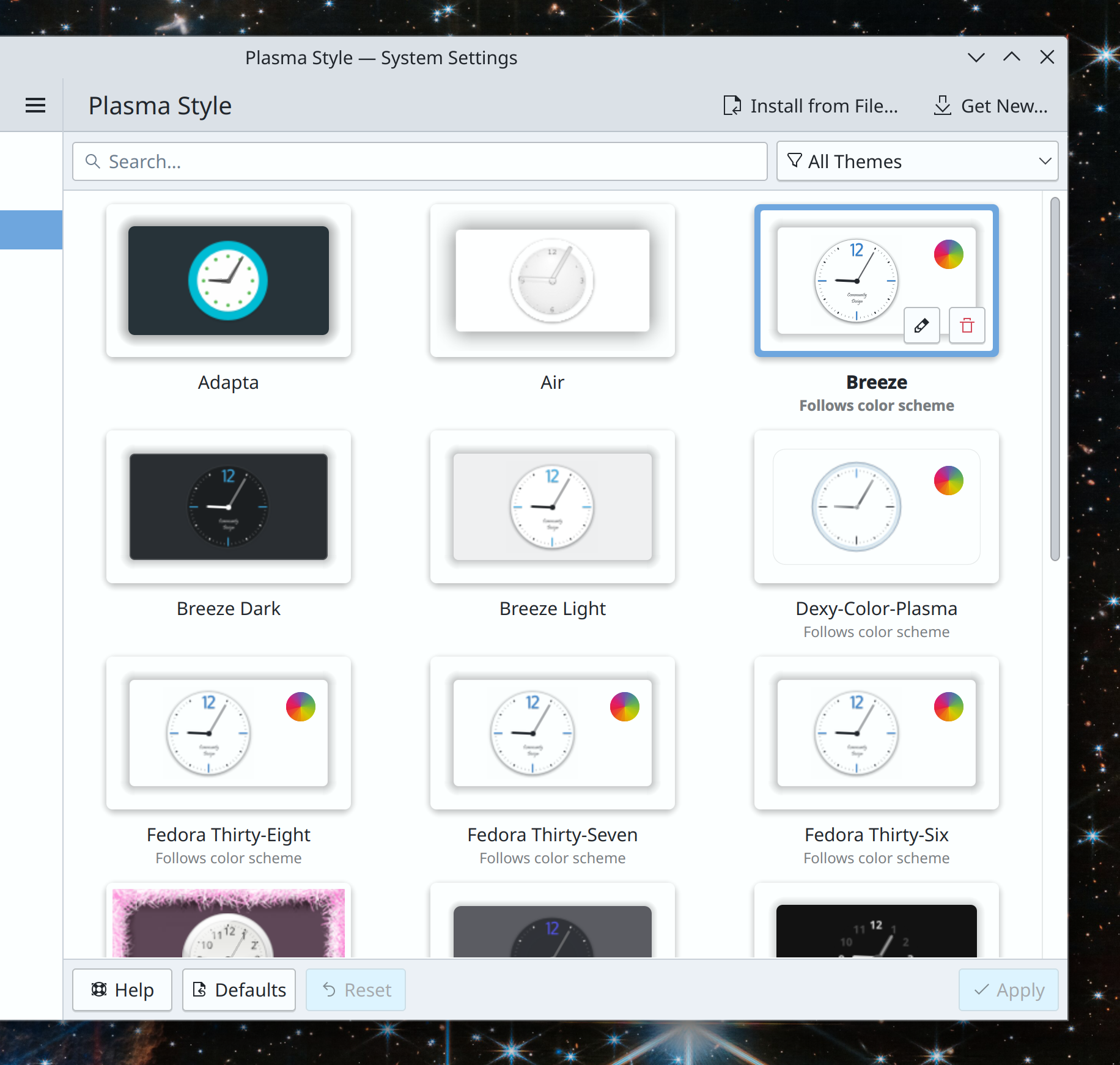
This old Plasma style lived in the plasma-framework repo for a long time, but was abandoned and bit-rotting. It also didn’t really make sense to ship a non-default theme this way, when we already have the Get New [thing] system to let people find and download their own cool new stuff from https://store.kde.org. So we made the decision to remove it. As with the Task Switchers, anyone who loved it is encouraged to maintain it and stick it on https://store.kde.org.
Per-Activity power settings
These very niche and infrequently-used settings were mostly broken, but the infrastructure to support them increased the code complexity of a fragile part of the system. In the interest of improving Plasma 6’s stability and removing known-broken settings, we have removed them rather than putting in the substantial effort needed to fix them.
System Settings Icons view
This view has been superseded by the Sidebar view and abandoned code-wise for years. It’s missed important features such as the “Highlight changed settings” feature that the Sidebar view got years ago. Nevertheless, it was kept around because for a time it offered better keyboard navigability compared to Sidebar view. However following an accessibility push, this is no longer the case, so it doesn’t offer any real advantages anymore and we plan to delete it for Plasma 6. Offering multiple visualization options for something like a Settings app was always kind of weird anyway.
Icons in Plasma Styles
In Plasma 5, the icons shown in various parts of Plasma widgets (but not apps) can come from one of two places: the active icon theme, or the active Plasma style. How do you the user know which icons come from which place? You can’t, not easily. What can you do if you apply a Plasma style and it includes weird icons that make your Plasma widgets look visually inconsistent with the rest of your system–but only partially? Nothing!
Needless to say, this is not ideal.
The original purpose of the feature was to allow Plasma styles to ship monochrome System Tray icons even when the rest of the system is using a colorful icon theme, which even at the time was a questionable goal and amounted to the system visually fighting with itself and its users’ icon theme choices. Later it gradually increased in scope so that lots of other random icons were added to Plasma styles and overrode icon theme icons–but never all of them, only some of them. Some Plasma styles included very comprehensive sets of icons, others included none, and some included a random incomplete assortment of them. All in all it was very strange and very random-seeming.
For Plasma 6, we’re removing this questionable feature, and icons in Plasma widgets will always come from the systemwide icon theme. Much simpler, much more user-comprehensible, much better visual results 99% of the time.
If you’re a theme creator who’s worried about this change, just put the icons that are currently in your Plasma style into that style’s companion icon theme instead.
Unsplash Picture of the Day
This one is quite sad, as no one wanted to remove it. Alas, we had to because Unsplash changed their terms of service to preclude Plasma’s usage of it, as a way of fighting automated data scrapers for AI training models. With a heavy heart, we removed it. So the next time anyone asks you what AI can do for humanity, now you have a concrete answer: prevent Plasma 6 from shipping an Unsplash Picture of the Day wallpaper plugin. Thanks, AI!
The bottom line
You may have noticed some recurring themes: “doesn’t work well, not well integrated with anything else, unnecessarily duplicative, buggy, confusing, abandoned, obsolete.” And you wouldn’t be wrong! These removals have been carefully chosen because they don’t showcase the best of Plasma, and instead act as hidden minefields or make the system feel buggier. They represent common pain points for new users, sources of confusion and user support questions. Except for the Unsplash PotD thing; I’m still feeling salty about that. The robot apocalypse happened, and they took our pretty pictures!
“i don’t care, i still hate you for removing stuff”
I’m sorry you feel that way! But sometimes old things that don’t work very well have to be removed to make room and free up resources for new things that will work better. You’ll just have to trust us these are the right decisions—or at least, that they’ll be reverted if they turned out to be the wrong decisions. Or I guess you can go fork Plasma 5 and tell the internet how KDE is going down the tubes 🙂
…But hopefully not, because I think these removals really will improve the Plasma experience, and open up some space for making it even better in the future. Plasma has had a long, storied, and somewhat messy history, with ports to this toolkit and then that toolkit, with complexity and flexibility that didn’t end up used and caused bugs, with potentially cool features that didn’t pan out. By removing some of the old cruft from Plasma 6, we have an opportunity to build on the best of what we already had and make it even better, to finally converge the product from what has sometimes been a jumbled collection of tech-demo features into a cohesive whole. From DIY do DI-Whoa!
At this point you’ve heard a lot about Plasma 6, and each of my weekly “This week in KDE” brings news of a few new features, UI changes, or bugfixes that are only in Plasma 6. But how do we get there, and how long will it take? So today I’d like to talk about the process and schedule a bit. Let’s start with an outline of the required steps to get there, in sequential order:
Make it compile
Make it livable
Clean up the code
Implement planned features and changes
QA it and fix the bugs
Are we there yet?
My sense right now is that we’re in the middle of steps 3 and 4. Basically everything in Plasma compiles with Qt 6, and at this point Plasma 6 is fairly livable. To give you a sense of how livable, it’s good enough that over the past 2 months, I’ve gone on three KDE-related trips from the USA to Europe, with my only computer running Plasma 6 in “current git master” state, with work-in-progress merge requests applied! Its stability has been good enough that this has caused me no apprehension, and indeed, it’s been totally fine on each trip.
So seriously, if you’re a KDE developer or an adventurous user, start living on Plasma 6! Jump right in, the water’s fine. 🙂
If we’re not there yet, where are we?
Right now the most active work is in step 3 code maintenance. Tasks already completed include an overhaul of the API for Plasma widgets, which affects basically everything. This project makes it easier to write Plasma 6 widgets that function properly using standard components, and allow us to add future capabilities to the basic widget structure in a way that all widgets will get for free.
Less code duplication
Next up, we’re porting most of the PlasmaCore and PlasmaExtras units, color theme components, and user interface elements to their Kirigami counterparts. This is important since it lets us remove a ton of code that’s currently duplicated across Plasma and Kirigami with only minimal differences. We’ll be able to use the Kirigami things everywhere and work towards the goal of having only one set of QtQuick-based UI components. This is a big deal! More code re-use means more eyes on less code, resulting in better quality and faster development.
Right now the only Kirigami UI component that’s a drop-in replacement is Kirigami.Heading, which can replace PlasmaExtras.Heading on a one-for-one-basis. Then we can delete PlasmaExtras.Heading entirely!
After that, we’ll start on the second part, which consists of making it possible for Plasma to use more complex Kirigami components that internally draw desktop-themed UI elements like buttons and text fields. We’ll basically make them smart enough to substitute the relevant Plasma-themed versions under the hood when they detect they’re running in Plasma. This will let us port PlaceholderMessage, ActionTextField, SearchField, and PasswordField to their Kirigami equivalents, and delete the PlasmaExtras versions.
KSvg
Simultaneously, we’re also porting away from PlasmaCore’s SVG-handling capabilities and instead using a new SVG-handling library that’s named–get this–“KSvg.” It’s basically the PlasmaCore stuff, but extracted into its own library. This was done to make Plasma 5’s powerful SVG handling capabilities available to software outside of Plasma, such as KDE and 3rd-party apps.
Actions in headers
UX changes are landing as well. One effort I haven’t blogged about yet is a change to how we expose page-specific actions on System Settings pages–known internally KCMs, or “KDE Control Modules”. Previously, it was up to each KCM to write its own custom UI for everything. If it wanted some buttons, the convention was to create some and put them at the bottom of the page. But KCMs are embedded within System Settings, which draws its own button bar below the page. The result was a double stack of button rows in many KCMs, with a very heavyweight appearance.
In Plasma 6, we’ve written the capability for KCMs to declare their actions in a more, well, declarative way. Instead of drawing the buttons themselves, they broadcast their actions and those actions turn into UI elements automatically in the right place. Kirigami apps have had this feature for years, and now through more internal use of Kirigami, the capability is coming to KCMs as well! We’re currently using the feature to move footer actions to into headers, which saves space and results in a more lightweight look. Here’s a preview:
Because we’re KDE, all of this work is happening in a fairly anarchic, nonlinear fashion. We don’t have change control meetings or prevent people from working on later-stage tasks. This takes skill in communication and git rebase to avoid stepping on people’s toes. 🙂 But it is happening, in its own messy and beautiful way.
Why does it take so long to do all this code maintenance stuff?
Porting is easy and fast if you don’t do any QA. But if you do, you’ll discover a million tiny papercuts caused by subtle differences in the new thing you’re porting to. Testing changes, iterating on code, and adapting to other changes made to the repos all take time. We’re doing it slowly because we want to do it right. QA is critical to shipping a good product, especially when there are many far-reaching changes.
C’mon, where’s the schedule?
I’m afraid there is still no formal schedule with dates on it. But you can use the above step-by-step process as a rough barometer of completeness.
I expect most of the large-scale code maintenance work to be done by the beginning of August, at which point the focus will shift to new features and UX changes. It’s impossible to give an accurate estimate for how long that part will take, but as an extremely rough guess, I’d say 2 months at a minimum.
The QA and bugfixing work will be happening simultaneously, since that latter work is what gates the release; ultimately having a polished release with few new features is more important than the reverse (though both is even more desirable, of course). I want at least 2 months of QA and bugfixing time for Plasma 6, with multiple beta releases.
This would take us into the middle of November. This is most likely the earliest timeframe for a Plasma release, and it would require everything to go right, including a huge burst of contributor activity around QA and bugfixing. The likelier scenario is a release sometime between this December and March of next year.
Please note that this is a wild guesstimate! It is not an official schedule. Do not interpret or represent it as such. Do not say “hey everyone Nate told us Plasma 6 will be out around the end of the year.” These are my personal rough guesses!
How to help
If you’d like to help make these guesses become more concrete, the time to help is now. We need it! Test Plasma 6 and submit bug reports for things that worked in Plasma 5 but broke in 6. Test open Plasma 6 merge requests and find any regressions in them before they merge. Help port older Plasma stuff to Kirigami and KSvg. Work on approved Plasma 6 changes. Fix open bugs. Help make it happen! And if you find yourself with more money than you have time and skill, consider donating to KDE e.V. so we can expand our sponsorship of impactful development work. It really helps!
The folks at Tuxedo Computers have published a video of short interviews with some of the participants of the Plasma sprint from earlier this month, so you can see that we were actually there. 🙂 Check it out!
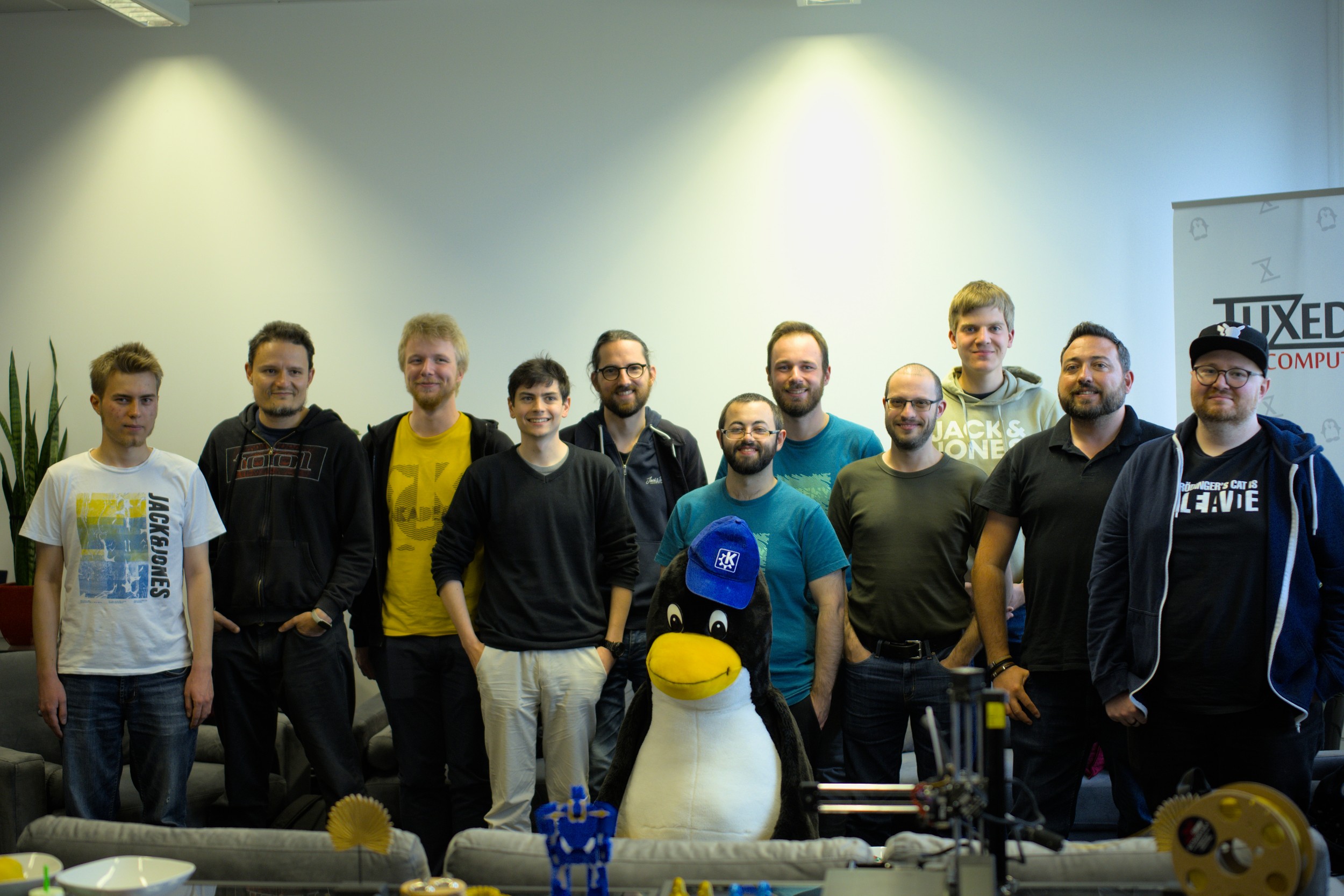
The 2023 Plasma sprint is now finished! KDE Patron Tuxedo Computers were kind enough to open their offices to us for a full week to do the sprint. We had some great conversations with Tuxedo employees, who were very friendly and excited to work with us, and made us thoroughly aware of just how much more complicated modern keyboard backlighting is than we had imagined! I’d like to thank KDE’s Software Platform Engineer Nicolas Fella for organizing this sprint, and Tuxedo Computers for providing the space and free pizza for lunch yesterday. 🙂
This actually isn’t all of us, because we foolishly forgot to take a picture earlier when everyone was present!
This won’t be a retrospective of the entire sprint, because I don’t want to steal anyone else’s thunder! People will be blogging and making videos about their own personal work and experience, so this one will be about mine.
The first thing was to get a Plasma 6 session working for daily driving. My colleagues have been working unbelievably hard on this, and I’m happy to report that I was able to live on Plasma 6 for the entire sprint without major showstoppers (from the perspective of a technical developer, of course). Almost everyone else there was as well, and I expect this to lead to extremely rapid stabilization despite the heavy code refactoring underway. I plan to continue living on Plasma 6 until its eventual release, and I encourage any adventurous developers to do so as well. If you try it out and submit any bug reports, make sure to add the “qt6” keyword to it.
I also did a bunch of technical work of my own, but I largely found myself in the role of facilitator, hosting discussions and meetings with different groups of people to bridge gaps.
New Default settings
As a result, we advanced a number of topics that had been stuck for a while. A major area of my focus in this respect became “Better default settings”. The 5 -> 6 transition is the perfect time to make significant changes to the default settings in a way that improve the UX out of the box. Among these are:
Wait, did I just bury the lede!? I did indeed. This is because the work hasn’t actually been done yet… but it has in fact been approved! That’s right, Plasma 6 will default to opening files and folders with a double-click, not a single-click. Even though almost everyone in the room for the discussion actually uses and prefers opening with single-click, we had to admit that it’s probably not the ideal default setting for people who are migrating from other platforms, which is most of them. They can still learn the benefits of single-click later. 🙂
We’re going to make a very strong push for Wayland to be the default session type for Plasma 6. The X11 session will still be there of course, and distros will be free to override this and continue defaulting to X11 if they feel like it suits them better. But we want Wayland to be our official recommendation.
To get there, we went over our “Wayland showstoppers” wiki page with a fine-toothed comb to refine what we really consider a showstopper. We decided that a lot of them are really more like annoyances rather than showstoppers, because X11 has plenty of annoyances of a similar severity too! The true showstoppers are down to five, plus a couple of NVIDIA issues that need further investigation. Many of these issues are in progress with a clear path towards resolution, so I do expect us to be able to achieve the goal!
This feature has been optional since its introduction a year ago. In that time it’s become quite popular, but its visual fanciness alone wasn’t enough to tip this proposal over the finish line. Rather, it’s the fact that Microsoft has blatantly copied us in Windows 11, and as a result, people are starting to see Plasma as a cheap clone of Windows again. We see this all the time in the VDG room when some rando comes by and starts telling us why our design isn’t as good as what Windows 11 has; they’ve implicitly made the comparison and found us wanting. It’s the wrong mindset!
Making the panel float by default provides an immediate visual differentiation from Windows 11 and we hope this will help jolt users’ brains out of “ew, it’s slightly different from Windows 11” mode and into “wow, this is new and cool and I wonder what’s in it” mode. There’s probably more that needs to be done for that, but I think this is a good start.
In the middle of the Plasma 5 lifecycle, we switched to the Breeze Light color scheme by default, and we changed its appearance to use a medium gray header area, sort of mimicking the visually pleasing CSD headerbar look without actually using CSD headerbars. This appearance change has generally been well-received by users, but it faced a persistent criticism: diminished ability to distinguish the active window at a glance.
It’s a legitimate problem, and we decided to fix it by lightly tinting the header area with your current accent color (or the current color scheme’s selection color, if you’re not using Accent colors). This will distinguish the active window with a small amount of color, making it pop more without being visually overwhelming. Something like this:
Note: this is a mockup and the appearance is not final! So don’t go posting this all over social media declaring that it’s going to be the way everything looks forever 🙂
For a while, we’ve had a goal of switching our current default “Breeze” Task Switcher to something that doesn’t vertically scroll with even a relatively small number of windows, which feedback had indicated was bad for usability. We also wanted to make our default task switcher better for people who navigate primarily by looking at app icons rather than thumbnails or text. With those design goals in mind, we decided to use the “Thumbnail Grid” Task Switcher by default and make some UI changes. Here’s what it looks like at this point in time:
As a part of this work, we also deleted a bunch of infrequently-used Task Switchers in the kdeplasma-addons Git repo that were simply worse versions of other ones. And finally, we made our Breeze Global Themes no longer have an opinion about what they want the Task Switcher to be, so if you use a non-default one, you can safely switch Global Themes without having it reset your Task Switcher all the time! That makes it less annoying to use the Dark and Light buttons on System Settings’ Quick Settings page to switch the system’s appearance between those two states.
This work is already merged and was done by me.
No more scrolling on desktop to switch virtual desktops by default
We got feedback over the years that scrolling on the desktop to switch virtual desktops was disorienting, especially because you could switch to a desktop that you couldn’t switch out of in the same way because the desktop was covered up. So we decided to turn this feature off by default. If you really like it, you’re still welcome to turn it back on, of course!
This work is already merged and was done by me.
Clicking in scrollbar track jumps scrollbar to that location
This change makes it easy to scroll straight to a specific location without having to drag the scrollbar, which is worse from the perspective of avoiding repetitive motion injuries. The old style is still available as an option to can switch back to.
This work is already merged and was done by me.
Other discussions and decisions
Many other discussions were also had besides just default settings. Here are a few:
City of Treuchtlingen’s use of KDE software
We found out that the nearby German city of Treuchtlingen has been using KDE software for over 20 years for their government IT purposes. Two representatives came out to the Tuxedo HQ to give us a presentation and we all talked about how to continue this going forward not only for us, but potentially for a lot of other German governments. The possibilities here are quite exciting.
In the beginning of Plasma 5, the release schedule was very fast–four releases a year. As it stabilized, we went down to three, which we kept for the whole lifecycle of Plasma 5.
Over time we’ve gotten a lot of feedback from distros in particular who have told us that this represents a hardship. It’s also been my personal observation that we often don’t have enough time to polish a new Plasma version before it’s released.
Now, a fast release cycle makes sense for a product under heavy development that breaks a lot of things and needs to fix them quickly. However, at this point Plasma is mature and feature complete after 8 years of hard work. It can always be improved, of course, but it pretty much does everything a general user needs at this point in time. So a fast release schedule isn’t as useful as it once was.
For Plasma 6, we’re going to try a slower release schedule of two per year once we feel like it’s stabilized enough after its initial release. And we’re going to be reaching out to distros with twice-yearly release schedules themselves to see if we can find release dates that will allow all of them to ship the latest version of Plasma soon after it’s released rather than skipping it in favor of something older. Making use of these lengthened release periods, we’re also going to lengthen our Beta releases and update them on a weekly basis, so there’s more time to find and fix bugs. We’re hoping this should result in Plasma 6 having a high level of stability and reliability throughout its lifecycle.
We agreed that the status quo isn’t ideal because people expect to find wallpaper settings in System Settings. So we started sketching out a wallpaper KCM that will let people change their wallpapers in a central location, including the ability to apply them to the lock and login screens. You’ll still be able to access the wallpaper changing UI from the current method in addition to the new KCM.
Currently we have two default desktop plugin types: “Folder” (the default) and “Desktop”. “Desktop” is just “Folder” without support for desktop icons. This is a bit silly, and internally they’re 99% the same because its prior developer also thought it was a bit silly and implemented them with the same backend code. So for Plasma 6, we’re going to collapse the distinction in the UI and instead expose a “Show desktop icons” checkbox somewhere. This will make it even easier for people who don’t like desktop icons to hide them, avoid putting implementation details in front of the user, and de-clutter the wallpaper choosing view.
Keyboard backlighting is hard
Taking advantage of the fact that we were in Tuxedo’s offices, we took the opportunity to ask many Tuxedo employees about their and their customers’ biggest pain points with KDE software. Happily, there were actually few complaints. But something that came up a few times was how we handle keyboard backlighting. Currently our code assumes there will be one keyboard backlight that affects all keys, so it only affects the first one it finds. But many modern laptops have more than one backlight, with some even giving each key its own! Needless to say, the result of adjusting a single backlight on such a keyboard looks somewhat hilarious. So we plan to put some effort into improving this.
That’s not all
This blog post contains only a small sampling of what was done and talked about during the sprint. There are many, many other plans and in-progress projects for Plasma 6, but I’ll let others talk about their own projects elsewhere, so look for them on https://planet.kde.org! I’d say that Plasma 6 promises to be a very large and exciting release.
Help make it possible again
Thanks again to Tuxedo Computers for graciously opening their offices to us, and for Nicolas Fella for organizing the sprint!
In addition, funding for the sprint was covered by KDE e.V., the nonprofit backing KDE. As you can probably imagine, transporting and lodging 20 people for a week is expensive, and most e.V. funding comes from individual donations. So if you’d like to see more of this kind of thing, please consider making a donation today! Every little bit helps!
This week my fellow developers and I are in Germany for an in-person Plasma sprint–our first since 2019! For this reason, there will be no normal weekly blog post today, and instead next week there will be a combined “what happened over the last two weeks” and “what happened during the sprint” blog post, since otherwise there would be significant of overlap. There’s a lot to do, and here are some of the topics we’re covering:
Stabilizing Plasma 6 so we can all start living on it full-time
Discussing significant UX changes we want to make in Plasma 6
API changes for Frameworks 6 that are relevant for Plasma
Design vision for Kirigami and various Kirigami-related topics
Improving our test infrastructure
…And a lot more! I’ll be able to share additional details next week. Wish us luck!
In my 2022 roadmap, I mentioned something called the “15-Minute Bug Initiative.” Today I’d like to flesh it out and request participation! This blog post is not only informational, but I really hope any developers reading along will get excited and decide to participate. 🙂
KDE software has historically been accused of being resource-intensive, ugly, and buggy. Over the years we’ve largely resolved the first two, but the issue of bugginess persists.
Have you ever had that experience where you’re introducing someone to a KDE Plasma system and to your horror, they run into multiple bugs within moments? These are the issues we need to fix first: those that can be easily encountered within 15 minutes of basic usage. They leave a bad taste in people’s mouths and provide the impression that the system is a house of cards. It’s time to remedy this final strategic weakness of KDE, starting with Plasma itself. So I’d like to present our initial list of bugs:
If you have any software development skills, working on these bugs is a super impactful way to make a difference with code!! Every fixed bug is a huge deal, and brings Plasma meaningfully closer to a position of true stability.
Likely-to-be-frequently-asked questions
1. What are the criteria for being a 15-minute bug?
It’s an inherently squishy thing, but I look for the following:
Affects the default setup
100% reproducible
Something basic doesn’t work (e.g. a button doesn’t do anything when clicked)
Something basic looks visually broken
Causes Plasma or the full session to crash
Requires a reboot or terminal commands to fix
The bug report has more than 5 duplicates
The more of those conditions apply, the more likely that any Plasma user will run into it quickly during normal usage, and the more I feel like it qualifies.
2. Who determines what gets to be a 15-minute bug?
KDE developers and bug triagers make the call.
3. I’m a developer or bug triager; how do I add a bug to this list?
4. I’m not a developer or a bug triager; how can I help?
You can go through the list and try to reproduce or confim the bugs, and do investigation into root causes and triggering factors for the ones where this isn’t already known. Those are important because a skilled developer can usually quickly fix a bug they can reproduce. But if they can’t, then they may never be able to. So if you can help developers reproduce bugs, that’s extremely valuable.
5. I’m experiencing this annoying issue that’s not on the list! Can you add it?
Maybe. Mention the 15-minute bug initiative in the bug report for it, and KDE’s bug triagers will see if it makes the cut.
6. Why are you only doing Plasma bugs right now?
Lack of resources. The list currently has almost 100 bugs, and I don’t anticipate that we’ll get it down to zero in a year. A lot of the issues there are quite challenging to fix. But if I’m wrong and we blaze through everything, then I’ll absolutely broaden the initiative to include first frameworks, and then apps! Stabilize all the things!
So that’s the 15-Minute Bug Initiative. Let’s get cracking and make Plasma rock solid in 2022!
Another year, another roadmap! Last year’s was a smashing success, as we delivered on everything. So here’s what I think we can expect in 2022. As always, this is not an official planning document or a promise; it’s just me giving you a sneak peak of some things that are in progress or about to start, and that I think will be feasible to complete before the year’s end!
Merged “Formats and Languages” KCM
The Languages and Formats pages in System Settings have long been problematic because their scopes overlapped. Not for long! Han Young is working on merging them together into one new page that handles both, making it clear what applies when and making it harder or impossible to mess up your system by choosing incompatible settings. This is in progress and I expect it to be completed sometime in the first half of 2022.
Overhauled Breeze icons
KDE designer Ken Vermette is working on improving and modernizing Breeze icons! Colorful icons will be softened and rounded a bit, and visually updated to remove old ugly elements like the long shadows. Monochrome icons will eventually get attention too. All of them are expected to become more responsive to your system color scheme, and look better when doing so. Initial work for Places icons has already been submitted and is being reviewed. This work will soon start landing piece by piece, and you can read more about it on Ken’sblog.
Multi-monitor stuff finally works properly
We plan to focus quite a bit on resolving multimonitor issues this year, and some of that effort has already borne a bit of fruit so far. But there will be a much heavier focus in 2022!
Inertial touchpad scrolling in QtQuick software
A big improvement went in recently that will make this possible to do soon! It seems quite likely that we’ll finally have this sometime in 2022.
The Wayland session can completely replace the X11 session
This is a bit of a moonshot but I think it’s possible. The list of issues on our “Wayland Showstoppers” wiki page is quite low, and when new ones are added, they’re notably lower in severity than the ones that have already been fixed. And now that NVIDIA has added GBM support to their driver and KWin already supports it, I think life should really start to get better for NVIDIA users, who represent a large chunk of dissatisfied Plasma users and those still unable to use the Wayland session at all. Let’s call this a stretch goal, but I think it’s not impossible!
“15 minute bug” initiative
This year I’d like to start something I call the “15 minute bug” initiative–an effort to fix as many of the bugs as possible that are trivially encountered within a quarter hour of basic usage. These are the kinds of issues that form permanent negative opinions in people’s minds, and reinforce the perception that KDE software is buggy and unreliable.
So far I’m limiting it to Plasma and Plasma-aligned software (e.g. KWin, System Settings, Discover) to avoid getting overwhelmed by scope creep. But if it’s wildly popular and successful, I’d love to extend it to apps and frameworks as well! Check out the current list here. I’ll be writing about this in more detail soon!
So that’s the list! What do you think? Is there anything else you think we should focus on in 2022?






 Adventures in Linux and KDE