Where bugfixes and new features come from

A few conversations I’ve had recently at Akademy 2023 have inspired me to write about a topic I’ve been wanting to share for a long time. So today I’d like to shine a bit of light on how the process of getting bugs fixed and features implemented works in KDE. This article’s target audience is general users more so than experienced technical contributors who will already have an understanding of this. But feel free to read anyway if you consider yourself a member of that group!

To begin with, I sometimes encounter the impression that there’s this pool of developers who either roam around looking for bugs to fix and features to implement, or are told or motivated to do so by some higher authority. This isn’t necessarily a misconception, but it needs to be qualified a bit. Well, a lot!

First we have the volunteers who are so often talked about! In general, volunteers work on things that feel rewarding to work on. As a result, most will only work on things relevant to their personal use cases, that are easy or fun, or that they feel a sense of personal obligation to continue working on. There are exceptions, but they tend to be rare and temporary, as the people in question often get hired by someone and lose most of their KDE time.

On that subject, some developers are sponsored to work on KDE software by KDE e.V., by a contracting firm in KDE’s orbit, or by a direct institutional or individual user of KDE software. In general these folks are paid to work on specific features and bug fixes relevant to the use cases of their employers or clients–which can be quite exotic, involving things like hundreds of users with networked home directories, specialized stacks of cryptography software and hardware, multi-screen multi-GPU setups, expensive business printers, and so on. These are the kinds of use cases that an average user never encounters.

There’s often some overlap here. Some paid KDE contributors work for a company that pays them to work on specific projects but gives them some personal time to work on KDE projects of their choice for a few hours a week. Some are contractors who reserve a bit of their own time to volunteer for KDE. And some are fortunate enough to receive open-ended invitations to “Make it better for us” as applied to a broad slice of the system.


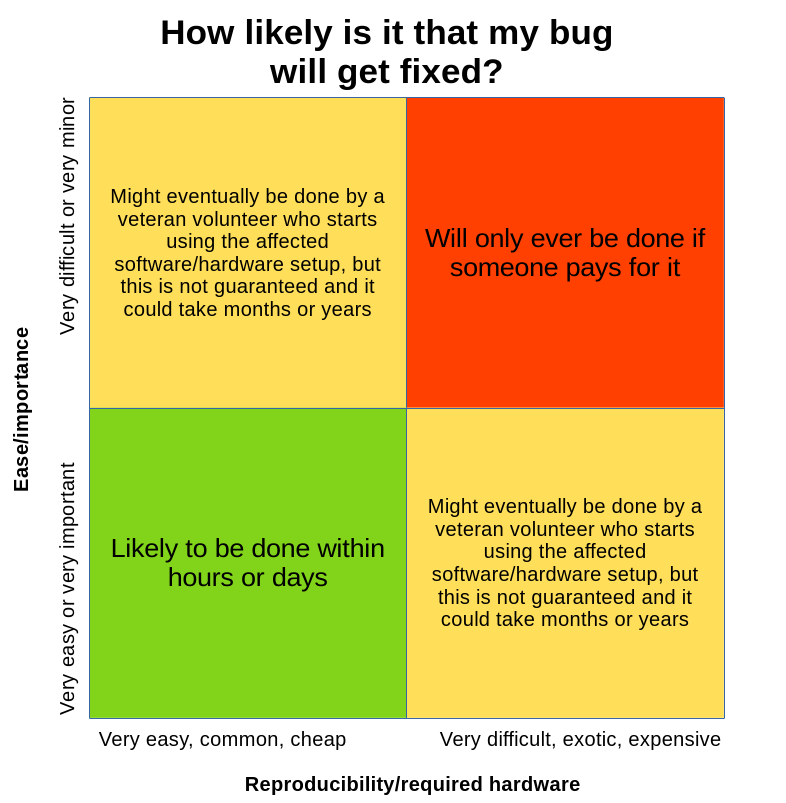
This leads to some obvious conclusions regarding the kinds of bugs and features that are likely to get fixed and implemented. Here’s a chart that summarizes it:

Everyone likes the green box. A surprising number of bugs and feature requests fall into it. Even hard bugs can get fixed quickly if their impact is significant and widespread (which means many eyeballs on them) and they are trivially reproduced (which means fixes are easy to test).

Next we have bugs or features in the red box. These are mostly irrelevant to an average user. If you’re a non-average person or institution with a specialized use case, the course of action is clear: pay someone to fix or implement it for you. KDE e.V. maintains a list of contractors who offer such services. Otherwise it probably won’t get done. Expect to pay Real Money™ for this kind of service; targeted contracted software development is rarely cheap. Pizza money donations and average bug bounties ain’t gonna cut it!

Finally, we have bugs or features in either of the yellow boxes. Sometimes these kinds of things get done by volunteers, but it’s hit-and-miss with an uncertain timeline because the work is just not that important–as evidenced by the fact that institutional or individual users rarely if ever pay for them to be fixed. But of course, people who are affected don’t like being told that their small pain points are unimportant, so in my experience, these issues represent a big source of frustration for users in general. Fixing them anyway is a big part of the 15 minute bug initiative. …Which you may notice has stalled at around 50-60 bugs. These remaining bugs are all quite solidly in those yellow boxes where it’s hard to find anyone willing to either do the work or pay for it to be done.

But all is not lost! If you’re annoyed by a yellow-box issue, and you’re unable or unwilling to pay to have it fixed, there is another way to help: try to move the bug or feature closer to the green box somehow! Here are some ideas:

  • If the issue is truly major, help call attention to it. Perhaps it simply got missed among the endless flood of other bug reports. For this to work, the issue really does need to be major; I mean more like “causes data loss” and not “System Tray icons for my autostarted 3rd-party apps sometimes don’t show up.”
  • Identify the easiest possible way to reproduce the bug with 100% success on common and generic hardware, then mention it in the bug report and set its status to CONFIRMED.
  • Identify any volunteer developers in the bug report who take an interest in the issue but mention they lack the hardware to reproduce it, and offer to buy or loan them such hardware.
  • Start fixing or implementing it yourself, even if you know you can’t do it. Your draft work may be enough to motivate someone else to finish it up, or provoke the kind of normally unhelpful nerd-rage nitpicking that drives someone to show you how it’s done by doing it themselves!
  • Wait for the use case to become more widespread, and hence more important. High DPI, multi-screen, multi-GPU, and high refresh rate hardware setups have all become more common over time, and accordingly, the number of people willing to put effort into making them better (or pay for this to happen) has increased.

None of these suggestions guarantee success. But pushing a yellow bug towards being a green one does make it more likely to be worked on and eventually fixed. And anyway, hopefully this helps to illuminate how development work in KDE happens, and why some bugs reports or feature requests linger for a long time.

This week in KDE: Akademy approaches

This week was a bit on the slow side as people are on vacation and preparing for Akademy 2023, which begins next week! Nevertheless progress on Plasma 6 continued, with a notable uptick in open bug reports as a result of more people testing it out, which is good! If you haven’t tried it yet, please do! Progress was also made on fixing existing known issues too.

Plasma 6

General infoOpen issues: 63

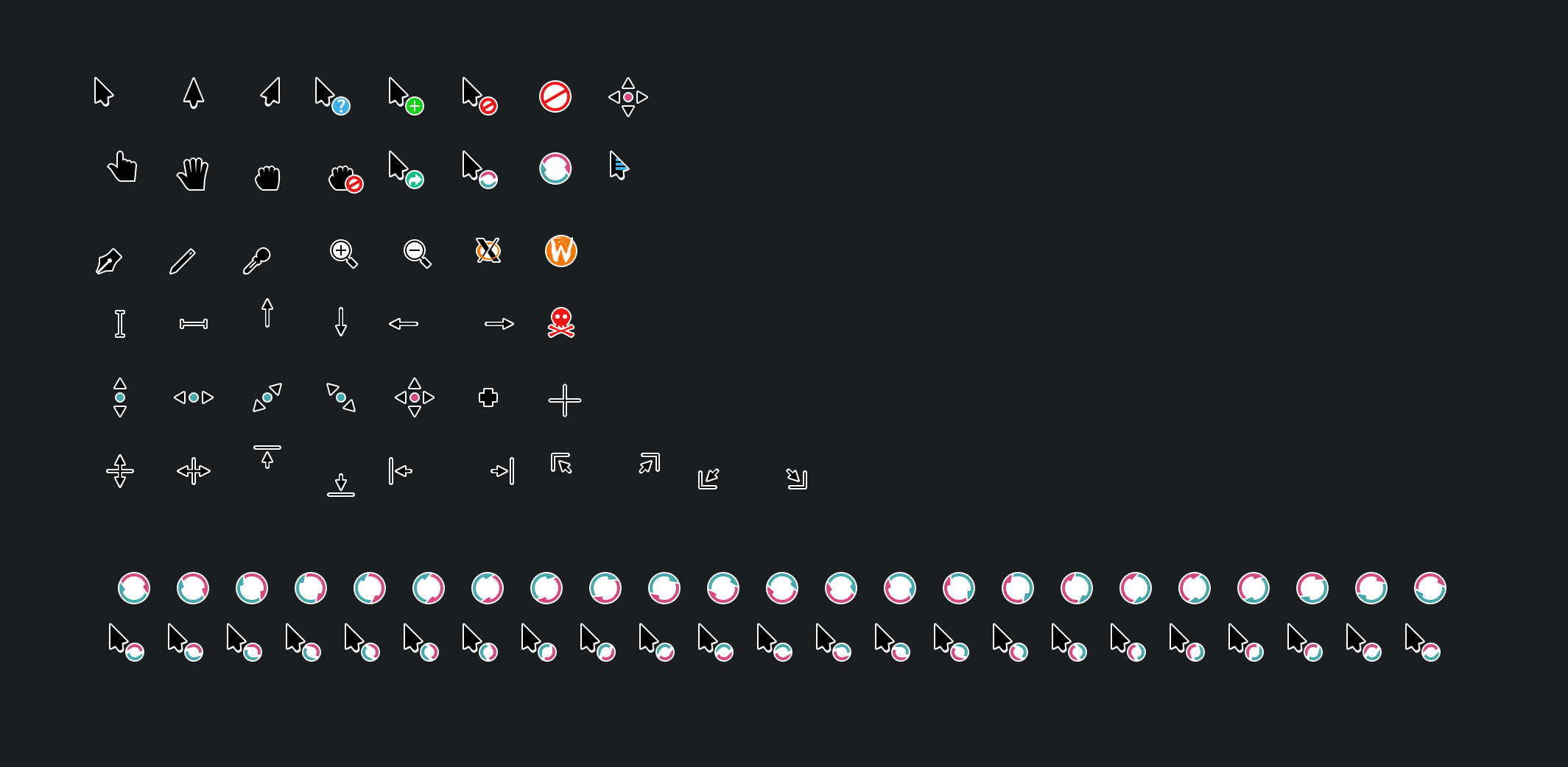
The Breeze cursor theme has received a visual overhaul to make it nicer looking and more consistent with how Breeze style evolved over the course of Plasma 5! (Manuel Jesús de la Fuente, link):

When not using the “Include Desktop” feature, Alt+Tab Task Switchers no longer appear when invoked but there are no windows open, or only one window is open (Daniel Lipovetsky, link)

The keyboard shortcut used to trigger the Mouse Mark effect can now be customized (Andrew Shark, link)

User Interface Improvements

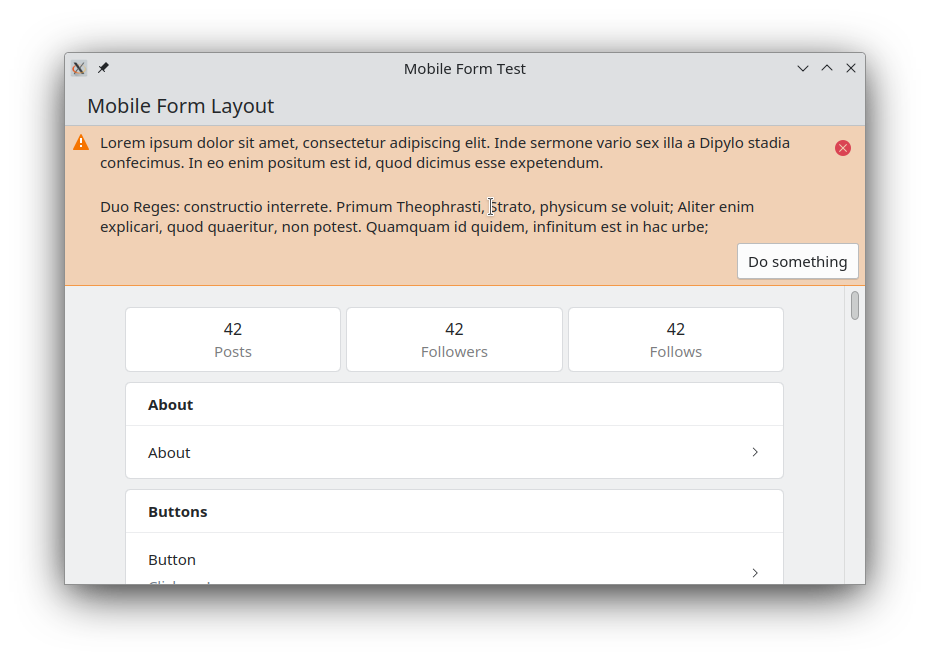
Created a new Kirigami component to display banners at the top of app windows and views. We were previously using the Kirigami.InlineMessage component for this, but it was complicated to implement in a way that looked acceptable in that spot, and even then it never looked quite right. The new frameless banner component looks much better! Expect to see it show up in Kirigami-based apps over the coming months and years. (Carl Schwan, link):

Significant Bugfixes

(This is a curated list of e.g. HI and VHI priority bugs, Wayland showstoppers, major regressions, etc.)

Fixed a performance issue in Okular that could cause poor performance and memory pressure when zooming in (Max Müggler, Okular 23.08. Link)

Fixed an issue that could cause severe screen distortion in the Plasma Wayland session when using certain multi-GPU graphics setups (Xaver Hugl, Plasma 5.27.7. Link)

Fixed an issue that could cause all connected screens to be marked as “primary” under certain circumstances (Ivan Tkachenko, Plasma 5.27.7. Link)

Fixed a way that KWin could crash in the Plasma Wayland session after using the clipboard under certain circumstances (David Edmundson, Plasma 6.0. Link)

Fixed a major recent regression that had the effect of causing the target of a symlink to be moved or copied instead of the link itself (Harald Sitter, Frameworks 5.108. Link)

Editing files using kio-admin no longer unexpectedly changes their permissions (Harald Sitter, Frameworks 5.108. Link)

Fixed a way that Plasma could sometimes crash when closing all running apps by middle-clicking on their Task manager icons (Harald Sitter, Frameworks 5.108. Link)

Other bug-related information of interest:

Web Presence

Released another “KDE for” page, this time for frequent travelers (Carl Schwan and the KDE Promo team):

Automation & Systematization

Added a unit test for parsing NVIDIA GPU driver stats, so that we can catch regressions caused by the NVIDIA driver itself earlier (David Redondo, link)

…And everything else

This blog only covers the tip of the iceberg! If you’re hungry for more, check out https://planet.kde.org, where you can find more news from other KDE contributors.

How You Can Help

If you’re a developer, work on Qt6/KF6/Plasma 6 issues! Plasma 6 is usable for daily driving now, but still in need of bugfixing and polishing to get it into a releaseable state by the end of the year.

Otherwise, visit https://community.kde.org/Get_Involved to discover other ways to be part of a project that really matters. Each contributor makes a huge difference in KDE; you are not a number or a cog in a machine! You don’t have to already be a programmer, either. I wasn’t when I got started. Try it, you’ll like it! We don’t bite!

And finally, KDE can’t work without financial support, so consider making a donation today! This stuff ain’t cheap and KDE e.V. has ambitious hiring goals. We can’t meet them without your generous donations!

This week in KDE: Plasma 6 development continues

Gonna be honest here: I’m on vacation right now, so this week’s blog post is going to be a bit lazy. I probably missed some things, so if you were expecting to see your work here and didn’t, then I’m sorry, and I’ll add it next week if you shoot me an email. Still, I did manage to notice some things, and you’ll find them here!

Plasma 6

General infoOpen issues: 53

Our “Plasma 6” info page gained some useful information such as a “how to use/test it” section as well as some more narrowly-targeted lists of bugs that can be used to guide development. I’ve linked the “Plasma 6 bugs” list above, and will continue to do so in coming weeks.

KRunner’s auto-complete behavior has changed; now auto-completed text appears as a grayed-out placeholder and you have to hit the right arrow or tab key to accept it, as is common in other places where text can be auto-completed. For people who preferred the old autocomplete behavior, it’s kept as an option (Alexander Lohnau, link)

The Keyboard Indicator widget now visually shows the state of the Caps Lock and Num Lock keys both being pressed/active (Donald Menig, link)

When turning the volume level above 100% by using the “Raise maximum volume” setting, the volume icon now changes color to warn you of this (Fushan Wen, link 1 and link 2):

You can now find the “Updates” page in System Settings by searching for more keywords such as “offline” and “automatic” (Justin Zobel, link)

New Features

Kate now has an option to open new tabs immediately to the right of the current one (Waqar Ahmed, Kate 23.08. Link)

User Interface Improvements

Elisa now has a smarter algorithm for finding cover files (which turns out to be a surprisingly complex topic after you cover the simple and easy cases), ensuring that fewer of them get missed (Jack Hill, Elisa 23.08. Link)

Auto-hiding panels using a dark color scheme no longer sometimes exhibit a visual glitch when sliding in and out (Xaver Hugl, Plasma 5.27.7. Link)

When using a multi-channel audio setup that’s been configured to have different volume levels for the channels, adjusting the global volume level (e.g. using keyboard keys or a global shortcut) now adjusts the volume of each channel in a proportional rather than an absolute way (Quinten Kock, Plasma 5.27.7. Link)

Open/save dialogs now always show “Recent files” and “Recent folders” items in their sidebars (Méven Car, Frameworks 6.0. Link)

When merging the contents of two folders, the dialog that alerts you about this now makes it clear that the contents will be merged, rather than scaring you by talking about overwriting (Méven Car, Frameworks 6.0. Link)

Other Significant Bugfixes

(This is a curated list of e.g. HI and VHI priority bugs, Wayland showstoppers, major regressions, etc.)

Gwenview no longer crashes when opening .nef formatted RAW image files (Kevin Backhouse, Gwenview 23.04.3. Link)

Fixed a major performance issue in the Plasma Wayland session that affected Intel GPUs and caused bad performance when animating widgets with the Background Contrast effect turned on (Xaver Hugl and David Edmundson, Plasma 5.27.7. Link)

The System Monitor app and widgets once again show stats for NVIDIA devices using the 535 series of the proprietary drivers. And it also should now be more robust against future changes in the way the proprietary NVIDIA driver formats its data (David Redondo, Plasma 5.27.7. Link)

Other bug-related information of interest:

…And everything else

This blog only covers the tip of the iceberg! If you’re hungry for more, check out https://planet.kde.org, where you can find more news from other KDE contributors.

How You Can Help

If you’re a developer, work on Qt6/KF6/Plasma 6 issues! Plasma 6 is usable for daily driving now, but still in need of bugfixing and polishing to get it into a releaseable state by the end of the year.

Otherwise, visit https://community.kde.org/Get_Involved to discover other ways to be part of a project that really matters. Each contributor makes a huge difference in KDE; you are not a number or a cog in a machine! You don’t have to already be a programmer, either. I wasn’t when I got started. Try it, you’ll like it! We don’t bite!

And finally, KDE can’t work without financial support, so consider making a donation today! This stuff ain’t cheap and KDE e.V. has ambitious hiring goals. We can’t meet them without your generous donations!

This week in KDE: SDDM

This week SDDM–the venerable login manager used by KDE and some other DEs–finally got a new release after two and a half years! This work was pushed through by a variety of KDE contributors, notably Aleix Pol Gonzalez, Fabian Vogt, David Edmundson, and Harald Sitter. At this point they contribute the overwhelming majority of changes and have effectively taken over the SDDM project. Because of this, we’re going to bring SDDM closer and incubate it in KDE for Plasma 6! Once completed, this project will see SDDM release at the same time as Plasma and use Plasma technologies to add many new features, such as management of network and Bluetooth devices on the login screen, and tighter integration with user settings.

Plasma 6

In other Plasma 6 news, everything has been fully ported to use KSvg, the new SVG-handling library that can be used outside of Plasma as well. The technical work was almost entirely done by Marco Martin, with me helping out and performing QA.

Additionally, Xaver Hugl significantly improved graphics performance with multi-GPU systems that are using an NVIDIA GPU in the secondary position. Work is also in progress on a massive performance improvement for some Intel GPU users; more on that next week.

Finally, Qt scaling will be used on X11 in Plasma 6, improving the high DPI scaling experience for people not using mixed-DPI multi-monitor setups. That use case is already not supported on X11, so our story remains the same: if you have a mixed-DPI multi-monitor setup, use Wayland! Marco did this too.

There were many other random bugfixes as usual, with David Edmundson and Xaver Hugl fixing all of the significant bugs I was experiencing in my Plasma 6 Wayland session. As a result, I’m now using it as my daily driver, rather than that janky old X11 thing. 🙂 It’s amazing!

New Features

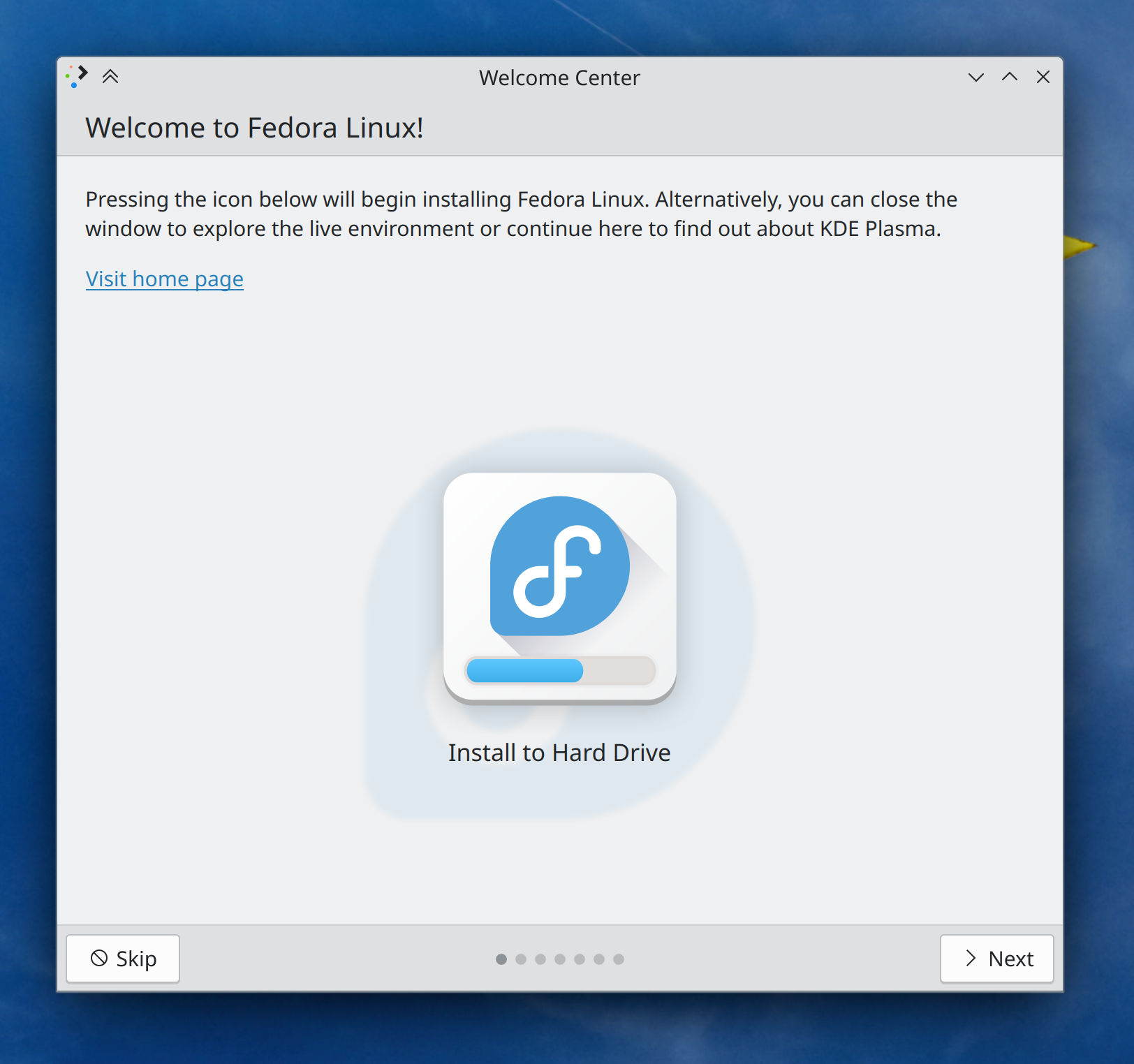
Welcome Center now has a “Live environment” mode that can be used by distros to show a special page in their live environments, including a nice friendly button to launch the installer (if the distro configures it appropriately; see the documentation here) (Oliver Beard, Plasma 6.0. Link):

Welcome Center showing "Welcome to Fedora Linux!" live installer mode, including a button in the center of the screen with the caption "Install to hard Drive" overlaid on top of the Fedora Linux logo

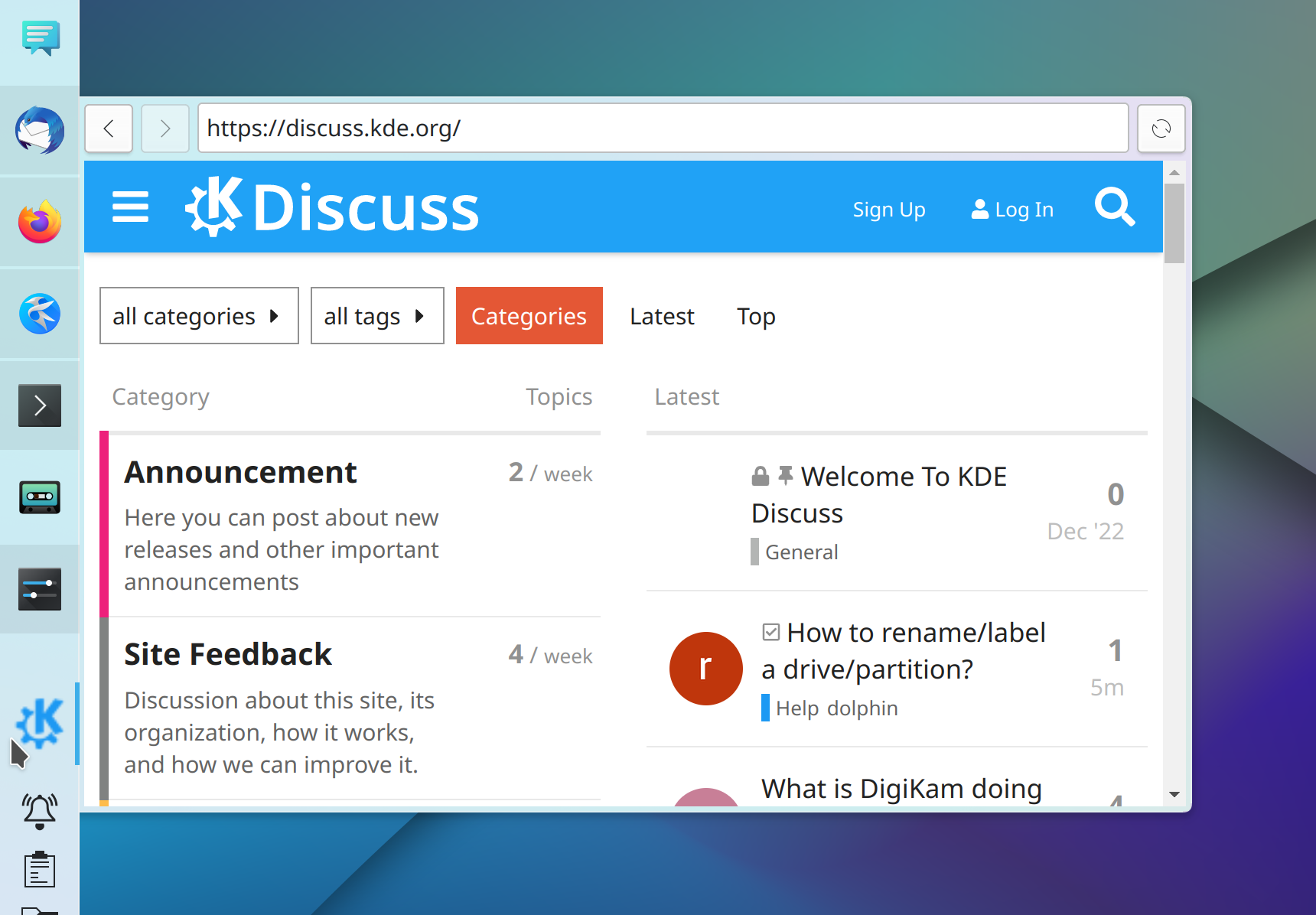
The Web Browser widget now shows its site’s favicon as its Panel icon by default, and you can also override this to set a custom icon if you prefer (Fushan Wen, Plasma 6.0. Link):

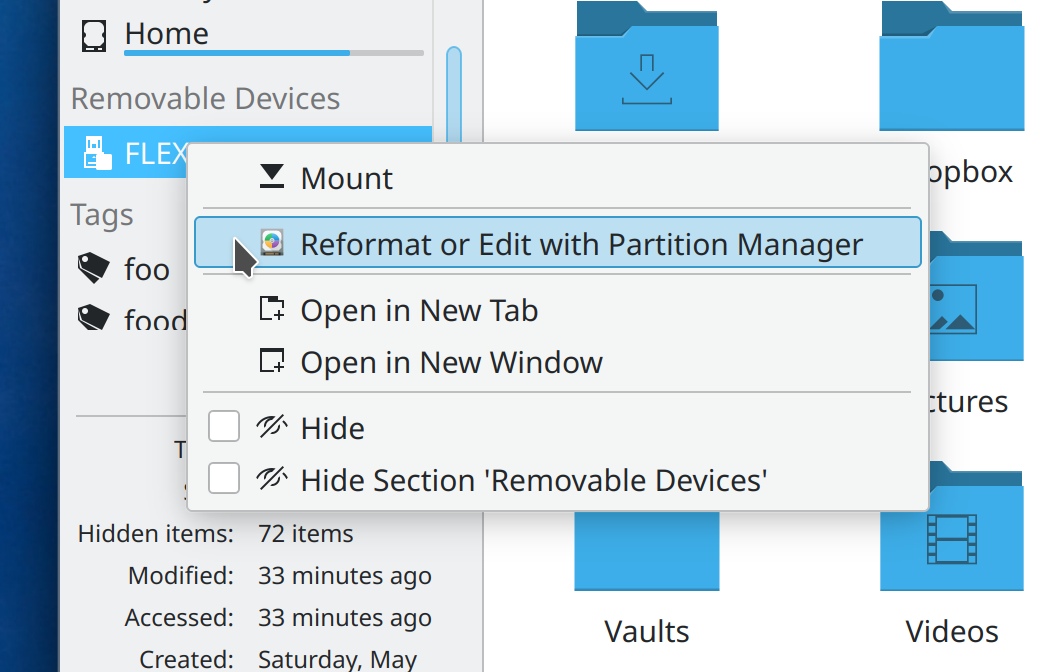
You can now open Partition Manager from the context menu of removable Devices in Dolphin and other apps using the standard Places Panel, so from there you can reformat it if you want (Harald Sitter, Frameworks 6.0. Link):

User Interface Improvements

Dolphin now hides apps’ temp files and backup files (i.e. the kind of useless files that end in ~ or #) unless actively showing hidden files (Méven Car, Dolphin 23.08. Link). This is a 23 year old feature request!

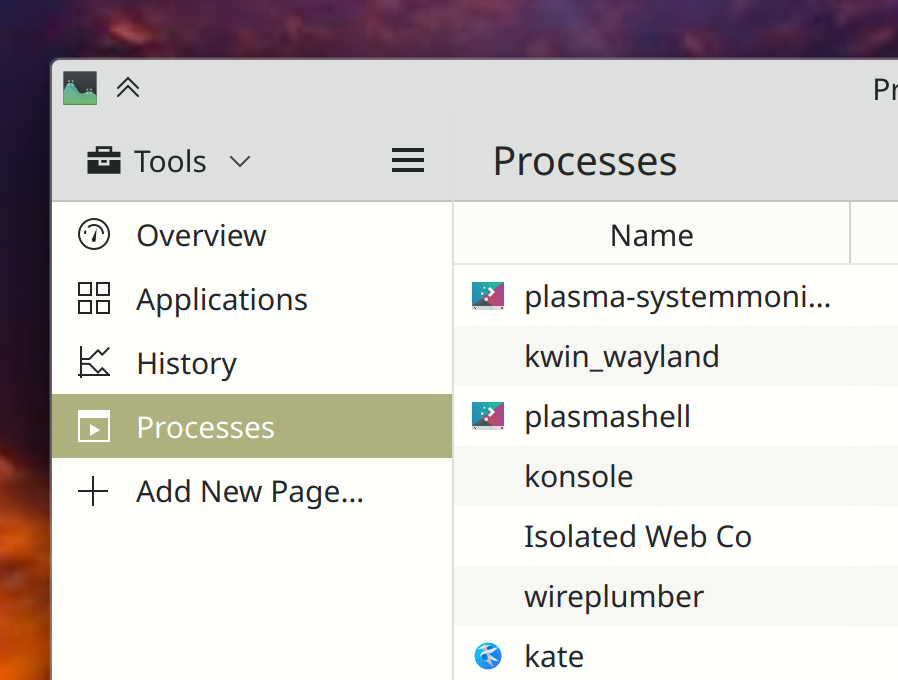
In System Monitor, text for list items without icons now visually aligns with the text for list items that do have icons (Oliver Beard, Plasma 6.0. Link):

Other Significant Bugfixes

(This is a curated list of e.g. HI and VHI priority bugs, Wayland showstoppers, major regressions, etc.)

Distros using rpm-ostree for packaging (such as Fedora Kinoite) once again receive updates using Discover (Aleix Pol Gonzalez, Plasma 5.27.6. Link)

System Settings’ Thunderbolt page no longer suffers from a layout glitch that hid text with large window sizes (me: Nate Graham, Plasma 5.27.6. Link)

KWin no longer sometimes crashes when you accidentally click on the tooltip for a window titlebar button, instead of the button itself that you were aiming for (Xaver Hugl, Plasma 5.27.6. Link)

When using a fractional scale factor, checkboxes on Discover’s Settings page no longer become glitchy and blurry when the page is scrolled with a touchpad (Akseli Lahtinen, Plasma 5.27.6. Link)

Fixed a few ways that KWin could crash immediately after logging in under certain circumstances (David Edmundson, Plasma 5.27.7. Link 1 and link 2)

Notifications from Snap apps now show up more reliably, notably including Slack (Kai Uwe Broulik, Plasma 5.27.7. Link)

Other bug-related information of interest:

…And everything else

This blog only covers the tip of the iceberg! If you’re hungry for more, check out https://planet.kde.org, where you can find more news from other KDE contributors.

How You Can Help

If you’re a developer, please please please start living on Plasma 6 and fixing the bugs that you encounter. It’s very much usable for daily driving (I’m doing so) but still in need of work to get it into a releaseable state by the end of the year. Your help… really does help!

Otherwise, visit https://community.kde.org/Get_Involved to discover other ways to be part of a project that really matters. Each contributor makes a huge difference in KDE; you are not a number or a cog in a machine! You don’t have to already be a programmer, either. I wasn’t when I got started. Try it, you’ll like it! We don’t bite!

And finally, KDE can’t work without financial support, so consider making a donation today! This stuff ain’t cheap and KDE e.V. has ambitious hiring goals. We can’t meet them without your generous donations!

On the road to Plasma 6

At this point you’ve heard a lot about Plasma 6, and each of my weekly “This week in KDE” brings news of a few new features, UI changes, or bugfixes that are only in Plasma 6. But how do we get there, and how long will it take? So today I’d like to talk about the process and schedule a bit. Let’s start with an outline of the required steps to get there, in sequential order:

  1. Make it compile
  2. Make it livable
  3. Clean up the code
  4. Implement planned features and changes
  5. QA it and fix the bugs

Are we there yet?

My sense right now is that we’re in the middle of steps 3 and 4. Basically everything in Plasma compiles with Qt 6, and at this point Plasma 6 is fairly livable. To give you a sense of how livable, it’s good enough that over the past 2 months, I’ve gone on three KDE-related trips from the USA to Europe, with my only computer running Plasma 6 in “current git master” state, with work-in-progress merge requests applied! Its stability has been good enough that this has caused me no apprehension, and indeed, it’s been totally fine on each trip.

So seriously, if you’re a KDE developer or an adventurous user, start living on Plasma 6! Jump right in, the water’s fine. 🙂

If we’re not there yet, where are we?

Right now the most active work is in step 3 code maintenance. Tasks already completed include an overhaul of the API for Plasma widgets, which affects basically everything. This project makes it easier to write Plasma 6 widgets that function properly using standard components, and allow us to add future capabilities to the basic widget structure in a way that all widgets will get for free.

Less code duplication

Next up, we’re porting most of the PlasmaCore and PlasmaExtras units, color theme components, and user interface elements to their Kirigami counterparts. This is important since it lets us remove a ton of code that’s currently duplicated across Plasma and Kirigami with only minimal differences. We’ll be able to use the Kirigami things everywhere and work towards the goal of having only one set of QtQuick-based UI components. This is a big deal! More code re-use means more eyes on less code, resulting in better quality and faster development.

Right now the only Kirigami UI component that’s a drop-in replacement is Kirigami.Heading, which can replace PlasmaExtras.Heading on a one-for-one-basis. Then we can delete PlasmaExtras.Heading entirely!

After that, we’ll start on the second part, which consists of making it possible for Plasma to use more complex Kirigami components that internally draw desktop-themed UI elements like buttons and text fields. We’ll basically make them smart enough to substitute the relevant Plasma-themed versions under the hood when they detect they’re running in Plasma. This will let us port PlaceholderMessage, ActionTextField, SearchField, and PasswordField to their Kirigami equivalents, and delete the PlasmaExtras versions.

KSvg

Simultaneously, we’re also porting away from PlasmaCore’s SVG-handling capabilities and instead using a new SVG-handling library that’s named–get this–“KSvg.” It’s basically the PlasmaCore stuff, but extracted into its own library. This was done to make Plasma 5’s powerful SVG handling capabilities available to software outside of Plasma, such as KDE and 3rd-party apps.

Actions in headers

UX changes are landing as well. One effort I haven’t blogged about yet is a change to how we expose page-specific actions on System Settings pages–known internally KCMs, or “KDE Control Modules”. Previously, it was up to each KCM to write its own custom UI for everything. If it wanted some buttons, the convention was to create some and put them at the bottom of the page. But KCMs are embedded within System Settings, which draws its own button bar below the page. The result was a double stack of button rows in many KCMs, with a very heavyweight appearance.

In Plasma 6, we’ve written the capability for KCMs to declare their actions in a more, well, declarative way. Instead of drawing the buttons themselves, they broadcast their actions and those actions turn into UI elements automatically in the right place. Kirigami apps have had this feature for years, and now through more internal use of Kirigami, the capability is coming to KCMs as well! We’re currently using the feature to move footer actions to into headers, which saves space and results in a more lightweight look. Here’s a preview:


Because we’re KDE, all of this work is happening in a fairly anarchic, nonlinear fashion. We don’t have change control meetings or prevent people from working on later-stage tasks. This takes skill in communication and git rebase to avoid stepping on people’s toes. 🙂 But it is happening, in its own messy and beautiful way.

Why does it take so long to do all this code maintenance stuff?

Porting is easy and fast if you don’t do any QA. But if you do, you’ll discover a million tiny papercuts caused by subtle differences in the new thing you’re porting to. Testing changes, iterating on code, and adapting to other changes made to the repos all take time. We’re doing it slowly because we want to do it right. QA is critical to shipping a good product, especially when there are many far-reaching changes.

C’mon, where’s the schedule?

I’m afraid there is still no formal schedule with dates on it. But you can use the above step-by-step process as a rough barometer of completeness.

I expect most of the large-scale code maintenance work to be done by the beginning of August, at which point the focus will shift to new features and UX changes. It’s impossible to give an accurate estimate for how long that part will take, but as an extremely rough guess, I’d say 2 months at a minimum.

The QA and bugfixing work will be happening simultaneously, since that latter work is what gates the release; ultimately having a polished release with few new features is more important than the reverse (though both is even more desirable, of course). I want at least 2 months of QA and bugfixing time for Plasma 6, with multiple beta releases.

This would take us into the middle of November. This is most likely the earliest timeframe for a Plasma release, and it would require everything to go right, including a huge burst of contributor activity around QA and bugfixing. The likelier scenario is a release sometime between this December and March of next year.

Please note that this is a wild guesstimate! It is not an official schedule. Do not interpret or represent it as such. Do not say “hey everyone Nate told us Plasma 6 will be out around the end of the year.” These are my personal rough guesses!

How to help

If you’d like to help make these guesses become more concrete, the time to help is now. We need it! Test Plasma 6 and submit bug reports for things that worked in Plasma 5 but broke in 6. Test open Plasma 6 merge requests and find any regressions in them before they merge. Help port older Plasma stuff to Kirigami and KSvg. Work on approved Plasma 6 changes. Fix open bugs. Help make it happen! And if you find yourself with more money than you have time and skill, consider donating to KDE e.V. so we can expand our sponsorship of impactful development work. It really helps!

This week in KDE: nicer digital signing in Okular

There’s some of interesting Plasma 6 news, but I’m saving it for another post in a day or two, so it doesn’t distract from all the great work that KDE contributors landed on other things this week! So let’s dig into that:

New Features

Okular’s digital signature workflow has been improved, and now offers you the opportunity to add various pieces of metadata such as “reason” and “location” to the signature, and also to optionally add a background image behind it (Sune Vuorela, Okular 23.08. Link):

User Interface Improvements

You can now double-click on a tab in Dolphin to create a duplicate of it (Méven Car, Dolphin 23.08. Link)

When Elisa switches album art between one image and another one, it’s now smoother and nicer-looking, with no visual flash or flicker (Fushan Wen, Elisa 23.08. Link)

Okular now shows the “Digitally Sign” action at the top level of its hamburger menu, for faster access (me: Nate Graham, Okular 23.08. Link):

All the dialogs in System Monitor have been ported to use a newer Kirigami dialog component, which looks better and fixes a few layout issues (me: Nate Graham, Plasma 6.0. Link 1 and link 2):

Improved the responsiveness when hovering over items in Kickoff’s category list (Derek Christ, Plasma 6.0. Link)

Folder entries in System Settings’ File Search page now show their actual icons (Oliver Beard, Plasma 6.0. Link)

After being notified of a filename conflict in the save dialog, keyboard focus now immediately returns to the filename field so you can change the name to something else (Oliver Beard, Frameworks 5.107. Link)

Other Significant Bugfixes

(This is a curated list of e.g. HI and VHI priority bugs, Wayland showstoppers, major regressions, etc.)

In the Plasma Wayland session, fixed a source of Powerdevil crashes when screens are sleeping (Aleix Pol Gonzalez, Plasma 5.27.6. Link)

Fixed a source of excessively high CPU usage in Plasma caused by moving windows around (Fushan Wen, Plasma 5.27.6. Link)

In the Plasma wayland session, fixed some cursor handling bugs that could cause cursors to look wrong in XWayland apps (Severin von Wnuck, Plasma 5.27.6. Link 1 and link 2)

System Settings’ “Login Screen (SDDM)” page now shows errors in the UI again (me: Nate Graham, Plasma 5.27.6. Link)

Checking for updates in the PyCharm app no longer causes KWin to crash (Vlad Zahorodnii, Plasma 6.0. Link)

Other bug-related information of interest:

…And everything else

This blog only covers the tip of the iceberg! If you’re hungry for more, check out https://planet.kde.org, where you can find more news from other KDE contributors.

How You Can Help

If you’re a developer, please please please start living on Plasma 6 and fixing the bugs that you encounter. It’s long past the point where we should still be on Plasma 5! 6 is quite usable for daily driving (I’m doing so) and has lots of papercuts that need sorting out. A list of known issues that need fixing can be found at https://community.kde.org/Plasma/Plasma_6.

Otherwise, visit https://community.kde.org/Get_Involved to discover other ways to be part of a project that really matters. Each contributor makes a huge difference in KDE; you are not a number or a cog in a machine! You don’t have to already be a programmer, either. I wasn’t when I got started. Try it, you’ll like it! We don’t bite!

And finally, KDE can’t work without financial support, so consider making a donation today! This stuff ain’t cheap and KDE e.V. has ambitious hiring goals. We can’t meet them without your generous donations!

Call to Action: Easy porting opportunity in Plasma

This post is a Call To Action™ for those with the ability to set up a Plasma development environment and an interest in code hygiene. Plasma 6 development is in full swing, and we have an opportunity to make a difference by doing some relatively easy code porting. Read on if this intrigues you!


History

First, some background: For many years, Plasma has maintained forks of various Kirigami bits whose only purpose in life was to get colors from the active Plasma theme, rather than the systemwide color scheme. For example, Heading exists in both Kirigami, and also PlasmaExtras; they both do the same thing and are implemented the same way under the hood, but the PlasmaExtras version gets its colors from the active Plasma theme. If it didn’t, then when you used the Breeze Twilight theme, the text colors on your dark Plasma widgets would come from the systemwide light color scheme, be inappropriately dark, and you wouldn’t be able to see them.

Maintaining forks with minimal differences worked but wasn’t ideal, as they could–and sometimes did–drift subtly out of sync and cause maintenance headaches. It would be better if we could use the Kirigami versions in Plasma and have them substitute Plasma colors automatically. As of today, core Plasma developer Marco Martin has done just that for Plasma 6 with two patches!

Ultimately this will let us get rid of the forks, at least for components that don’t do any SVG styling (that’s planned too, but not ready yet).


How you can help

So with that out of the way, here’s how you can help: throughout Plasma (i.e., all repos in the Plasma group), submit merge requests with the following changes:

Replace this……with this:
PlasmaExtras.HeadingKirigami.Heading (Example merge request)
PlasmaCore.Theme.smallestFontKirigami.Theme.smallFont
PlasmaCore.Theme.NormalColorGroupKirigami.Theme.Window
PlasmaCore.Theme.mSize([default font]).heightKirigami.Units.gridUnit
PlasmaCore.Theme.[anything else]Kirigami.Theme.[the same thing]
PlasmaCore.ColorScope.colorGroupKirigami.Theme.colorSet
PlasmaCore.ColorScope.inheritKirigami.Theme.inherit
PlasmaCore.Units.largeSpacingKirigami.Units.gridUnit (due to a bug where PlasmaCore largeSpacing was too big; we need to change it to a Kirigami gridUnit to keep the expected sizing)
PlasmaCore.Units.devicePixelRatio1
PlasmaCore.Units.roundtoIconSize([height of the default font])Kirigami.Units.iconSizes.sizeForLabels
PlasmaCore.Units.roundtoIconSize([some integer value])Kirigami.Units.iconSizes.roundedIconSize([the same thing])
PlasmaCore.Units.[anything else]Kirigami.Units.[the same thing]

Quirks to be aware of

Make sure your master branch is up to date before you start looking at code, and also check to see if anyone else has already submitted a merge request. You don’t want to do work for nothing!

If any file with such changes made to it doesn’t already have a line near the top that says import org.kde.kirigami 2.20 as Kirigami, add it We can’t use Kirigami stuff without importing Kirigami!

If as a result of these changes to any particular file, nothing in it is still using PlasmaExtras or PlasmaCore anymore, you can also remove those import lines at the top.

Testing

Make sure to test your changes! Apply the changes to your Plasma 6 development build and restart. Then use the Breeze Light color scheme and the Breeze Dark Plasma theme and make sure all changed text is still readable, that anything using a small font size is still doing it correctly, that colors in general look correct, and that spacings and units look correct. You want to see no visual changes at all.

In the future

Later, we’ll also be able to port forked components that internally use Plasma-specific SVG theming. For example, PlasmaExtras.PlaceholderMessage is identical to Kirigami.PlaceholderMessage but it internally contains Plasma-specific labels and buttons that use Plasma SVG theming, rather than theming from the app style. We’re planning some more code wizardry so that the Kirigami versions of these components can dynamically substitute the internal Plasma SVG themed variants when run in Plasma. This isn’t ready yet, but when it is, I’ll announce another porting opportunity for folks who enjoyed (or missed out on) this one!

Tips & tricks: handwritten signatures in Okular

Today I’d like to share a tip about Okular, KDE’s flagship document reader app that’s eco-certified in Germany and used professionally around the world to secure documents.

Okular has robust support for digitally signing documents using a cryptographic signature, and it’s going to become even better soon. But what about signing documents using handwritten signatures, for those who live in places where digital signing hasn’t caught on yet?

Now, this is typically the point at which everyone who lives in a place where cryptographic signatures are common will chime in about how handwritten signatures are pointless and insecure. And they may be right, but it doesn’t matter because handwritten signatures are still used and considered valid in most of the world. And thankfully for people who live in any such part of the world, Okular turns out to support them pretty well.

The process involves some setup that you do once, and then after that’s done, the process of signing documents is suuuuuuuper simple. The time invested is worth it, trust me! So here’s how:

One-time setup process

First, you’ll need a piece of paper. Write your handwritten signature on it:

But, you know, for real

Next, scan it with SkanPage or take a picture of it with your phone and then transfer it to your computer using KDE Connect. You’ll end up with an image on your computer like this:

Open it up in Gwenview. Click the “Show Editing Tools” button in the toolbar to show the “Image Operations” sidebar. On this sidebar, click the “Crop” button and crop the image so that only the signature part is visible.

Then Click the “Adjust Colors” button:

Boost the contrast and brightness and reduce the gamma to make the background become completely white, and make the text look darker. But don’t make the text look completely 100% black; you want to preserve the appearance of real pen-strokes. It may take a bit of tweaking but keep at it! The end result will be something like this:

Now save this image somewhere on your computer using the PNG format–maybe in your Pictures or Documents folder. Don’t delete or move this image in the future!

Time to open up Okular. Go to the “Settings” menu and click “Configure Okular”. Then go to the “Annotations” page and click on the “Add” button:

A dialog window will appear. In this dialog window, give it the name “Insert Signature”, change the type to “Stamp”. Click on the little folder button next to the “Stamp Symbol” text field and navigate to the signature image file you just created:

If your file doesn’t appear in the “Open” dialog, that’s because you didn’t save it as a PNG. Re-save it as a PNG in Gwenview.

Click OK and you’re done!

Use it to sign a document

Now, the next time you have a document that needs signing, Open the annotations menu by clicking on the downward-pointing arrow next to the “Yellow Highlighter” toolbar button. Don’t click on the “Yellow Highlighter” text itself; click on the arrow next to it:

Now draw a box where you want the signature to be! There’s usually a “Date” field, so you can use the “Insert Text” annotation accessed from the same menu, and draw a similar box where you want the date to be. Enter the date when prompted.

Voila:

Easy as pie! Now you can do this almost instantly every time you have to sign a document.

This week in KDE: major plumbing work in Plasma 6

This week Plasma 6 underwent some major refactoring to the fundamental Plasma widget APIs to modernize them and make it harder to introduce errors when developing new widgets. Since almost everything in Plasma is a widget, this necessitated a lot of changes and QA. After a month of work, it’s now done! The user-facing side is nil (ideally nobody will notice anything), but there are some changes that developers will need to be aware of to port their widgets. Most widgets already needed to be ported anyway due to Qt changes, but hopefully this won’t add much else. A porting guide has already been written and can be found here. This work was done by Marco Martin, with me providing QA support.

On that subject, we got a lot more organized about Plasma 6 this week. We now centrally track status on a new wiki page that shows the outstanding issues and notable changes. I’m starting to feel like I see a light at the end of the tunnel! While I’ve had to use the X11 Plasma 6 session because the Wayland one is still a bit too unstable for me to feel productive, the X11 session now feels barely buggier than the Plasma 5 X11 session. It’s really quite nice at this point.

This came up in the comment threads of last week’s post, but the more people test and contribute to Plasma 6, the better the final release will be. Neon Unstable now offers Plasma 6 by default, making it a good testing platform for the adventurous. Especially if you have a heavily customized setup or use exotic hardware, please try it out and submit bug reports! Make sure to apply the “qt6” keyword to them.

User Interface Improvements

Many significant UI improvements to Skanpage, including drag-and-drop page re-ordering, better keyboard shortcuts, and better error reporting (Someone going by the pseudonym “John Doe”, Skanpage 23.08. Link)

Okular no longer bugs you when you save a document that was deleted on disk; it simply re-saves it as instructed (me: Nate Graham, Okular 23.08. Link)

The context menu actions of the Dictionary Widget are now more relevant and have icons (Laurent Montel, Plasma 6.0. Link):

Significant Bugfixes

(This is a curated list of e.g. HI and VHI priority bugs, Wayland showstoppers, major regressions, etc.)

KRunner no longer sometime crashes when trying to calculate certain math expressions, or simply when typing numbers in general (Max Ramanouski, Plasma 5.27.6. Link)

The final change just went in for making sure that Discover always gets the version numbers right for updatable Flatpak apps (Ismael Asensio, Plasma 5.27.6. Link)

When using a fractional scale factor in the Plasma Wayland session, you should no longer see line glitches all over the place (Matthias Dahl, Plasma 5.27.6. Link)

Fixed the “Add New Page” dialog in System Monitor to not be visually broken when using a language with longer translated strings than English (me: Nate Graham, Plasma 5.27.6. Link)

In the Plasma Wayland session, when adding a second keyboard layout, the Keyboard layout System Tray icon now appears immediately (Marco Martin, Plasma 6.0. Link)

Other bug-related information of interest:

Automation & Systematization

Overhauled the documentation about Plasma styles to be more up-to-date and accurate (Thiago Sueto, link)

Web presence

KDE’s growing assortment of “KDE for” pages has gotten a snazzy new landing page, and now it’s a top-level link over at kde.org (Carl Schwan):

On top of that, there’s a new page: “KDE for Activists“, showcasing how KDE’s privacy-conscious communication can help you organize for what you believe in (Carl Schwan):

Note that this is a value-neutral statement; you can use KDE software to organize for whatever cause you believe in, no matter where on the political spectrum you consider yourself. Our software is neutral; it’s people who choose to use it for their purposes, and how. KDE software is used in homes, schools, businesses, news organizations, local governments, and, believe it or not, on both sides of the Russian invasion of Ukraine. People can take sides, but our software does not, so let’s try to keep the political battles out of the comments section of this post. Thanks everyone.

…And everything else

This blog only covers the tip of the iceberg! If you’re hungry for more, check out https://planet.kde.org, where you can find more news from other KDE contributors.

How You Can Help

If you’re a developer, please please please start living on a Plasma 6 session (not just building Plasma 6 stuff on top of Plasma 5) and fixing the bugs that you encounter. Plasma 6 is usable for daily driving, and I’m doing so, but it’s still very much in an alpha state and in need of work to make it releaseable.

If you’re an adventurous user, you can also use Plasma 6 with Neon Unstable. If you do so, make sure to submit bug reports for any problems you encounter, and apply the “qt6” keyword to them.

Otherwise, visit https://community.kde.org/Get_Involved to discover other ways to be part of a project that really matters. Each contributor makes a huge difference in KDE; you are not a number or a cog in a machine! You don’t have to already be a programmer, either. I wasn’t when I got started. Try it, you’ll like it! We don’t bite!

And finally, KDE can’t work without financial support, so consider making a donation today! This stuff ain’t cheap and KDE e.V. has ambitious hiring goals. We can’t meet them without your generous donations!