
A few months ago, I blogged about Photos, a potential replacement for Gwenview.
The initial feedback (collected here) was a bit rough. But that’s okay; collecting areas for improvement is what feedback is for!
Accordingly, the upcoming 26.12.0 release next month focuses on addressing feedback and adding missing features. There’s more to do, of course, but a number of contributors made a lot of requested changes.
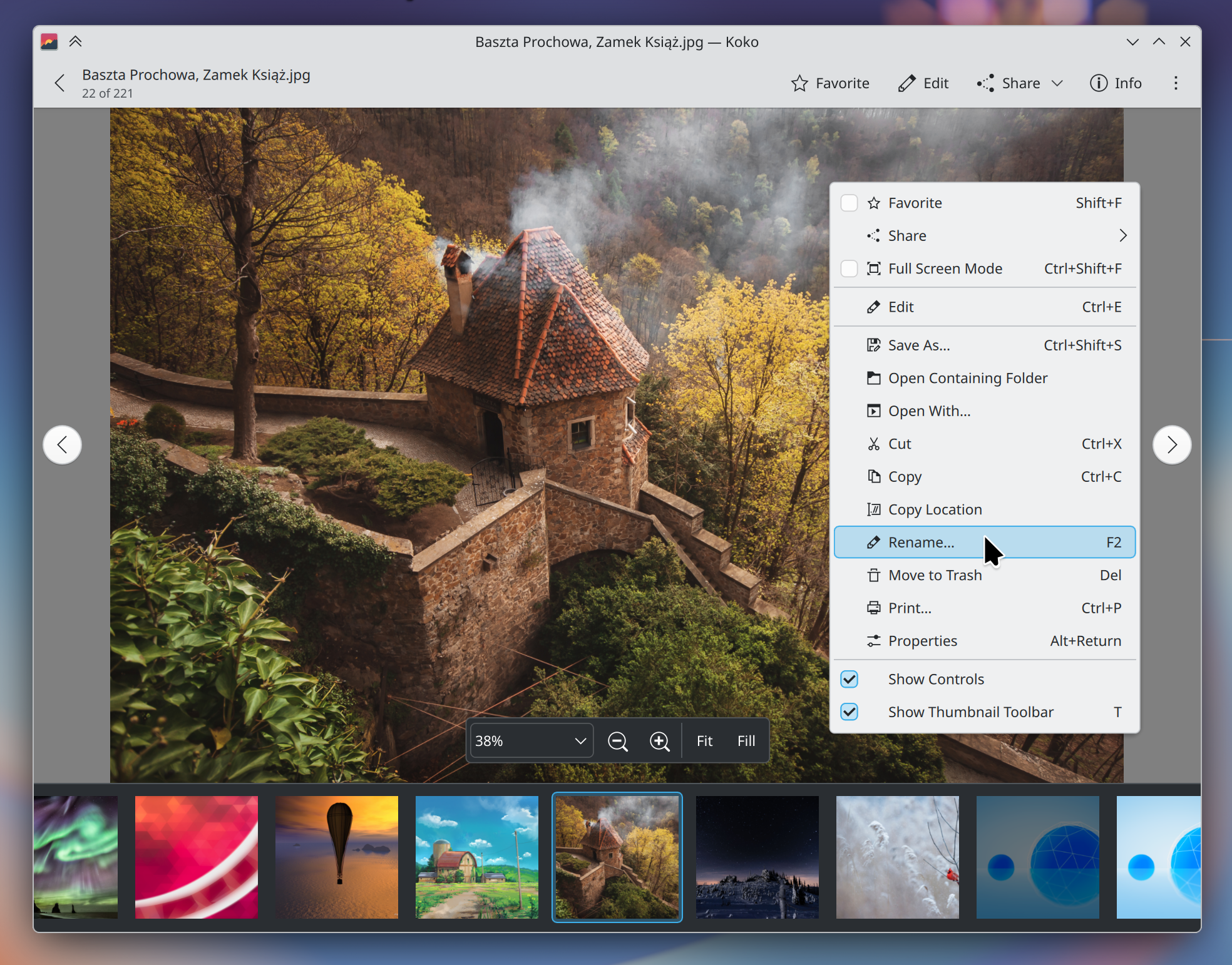
First of all, we’ve changed the name back to “Koko”. We heard y’all loud and clear that the generic name didn’t work!
But there’s more:
New features
- “All Photos” view (Jan Miksa)
- Rename items (Oliver Beard)
- Show standard “properties” window (Oliver Beard)
- Cut & paste (Oliver Beard)
- Drag & drop (Oliver Beard)
- “Fit” and “Fill” zoom modes (Ramil Nurmanov)
- Adjustable brightness, contrast, and gamma for images (Noah Davis)
- Option for a neutral gray background (Jan Rathmann)
- Option for an app-specific color scheme (Jan Rathmann)
- Open more than one instance of the app (Oliver Beard)
Significant UI improvements
- Pressing
spaceplays and pauses videos (Jan Miksa) - Pressing
Escexits from the editing view (Gustavo Mitamura) - Pressing
F11andCtrl+Shift+Falso enter and exit full screen mode, in addition to the existingFkey binding. (Gustavo Mitamura) - Pressing the
Deletekey trashes an image, with a visible option to undo it (Oliver Beard and Jan Miksa) - Shortcuts for all actions in the editing view (Jan Miksa)
- You can get to the settings from the menu on the viewer page (Gustavo Mitamura)
- Images smaller than the viewport are scaled up fit within it by default (Nate Graham)
- You can independently scroll the thumbnail strip (Ramil Nurmanov)
- The previous visibility state of the controls is now remembered when entering and exiting full screen (Anders Lund)
- More natural text in the sharing notification (Nate Graham)
- Fewer separator lines in toolbars (Nate Graham)
Significant bug fixes
- Can no longer open multiple overlapping image editing views by pressing
Ctrl+Erepeatedly (Gustavo Mitamura) - Thumbnails refresh when the source image is updated elsewhere (Ramil Nurmanov)
- Editing images with square brackets in their names now works (Noah Davis)
- Cropping is now accessible on mobile and with small window sizes (Gustavo Mitamura)
All of these changes should also be listed in the app’s release notes that appear in Discover, too — if the source you get Koko from supports it! Flathub, Fedora, openSUSE Tumbleweed, Kbuntu, and some other distros pass these release notes to Discover; Arch and Arch-based distros do not.
More is also on the way for the 27.04 release next year, with a number of promising changes that weren’t quite finished in time for the 26.12 release. The codebase is easy to work on, so contributions are eagerly welcomed. 🙂


It has no menu bar, No ability to map things for accessibility in a way that they can understand. I get you guys want to do change, but everything has been a step back for Users with very particular use cases. Yes, I know there are only a few of them and it’s easier to make for the majority, but at the same time, it’s just a really bad trend in software development and UX’s. It’s basically developers, or at least UI designers, saying people with disabilities do not matter. But at the same time, the world is saying you have to use a computer for every facet of your life even if you are not able to use it yourself.
Even though I personally have stopped using KDE this year because of transitions like this, I still like to fund the development when it’s actually something worth funding. But it’s been increasingly more difficult to find anything worth funding in the project.
LikeLike
That’s a bit dramatic. Gwenview is still the default and nothing is forcing you to use Koko. As for KDE caring about accessibility, there have been tons of improvements and features added this year alone. There will be tons more to come at a faster rate now that x11 is finally removed. Koko started out being primarily developed for Plasma Mobile, which is why it’s lacking feature parity with Gwenview. I’m sure those issues will be addressed long before Koko is considered as a viable replacement. Even then, don’t use it. I personally dislike Elisa and prefer Amarok, or any other qt media player like Fooyin. It’s pretty ridiculous to say KDE is taking steps backward when there’s literally been nothing but improvements and projects like Union that aim to address long standing pain points.
LikeLike
You may be a little premature in judgement – as the ultimate aim is to make it a worthy competitor with the hope that it can replace Gwenview… this means that development must continue until it is suitable, which it currently is not.
I’m curious as to why – perhaps it is a better platform to work with than Gwenview to deliver the ultimate replacement…
However, it is also a replacement in the sense that it could take over as the default – which should serve the majority of users and be better. There are still other options to suit your needs – nobody said Gwenview will be deleted.
LikeLike
No menu bar is indeed an accessability problem. I work with lots of people with aphasia, and removing clear text instructions from software is pretty much to remove the functions completely for many of these users. When you have a hard time remembering actions from time to time, nothing beats clear text and well structured menus. But hopefully this is being worked on as well. That together with the ability to customize the toolbar (and have text there as well) are the most important functions for the group of people I work with.
LikeLike
I’m only able to test the 26.08 version currently, but could there be an option to hide *just* the zoom/navigation controls? Toggling “Show Controls” hides both those and the toolbar, but I want the latter to still be visible. It would nice too if I could still see the zoom percentage being changed when the zoom control is hidden, and the navigation controls re-appearing when hovering the left/right borders. Also, the “bird’s eye” in the bottom-right corner could fade-out after a few seconds, like in Gwenview.
LikeLike
I like the new Photos App, I also like Gwenview, but Koko seems to be a bit more lighter and snappier, also it looks more modern. I would have liked to have “Photos” as the official name, because my parents use KDE as well, and a clear name helps finding the correct app faster. I rename the apps in the app starter, but it would be easier, when apps in KDE would be named after its usecase. Maybe a mix, like with “Merkuro Calendar” would be a good compromise: e.g. “Koko Photos”
LikeLike
The one thing that drives me nuts in Gwenview is that it doesn’t wrap. If I want to start at the beginning I have to actually go find the beginning, I can’t just keep viewing. (This is a problem in the “new” Windows photo viewer too!) If there’s a setting for this, I’ve missed it.
Add me to wants a menu bar for usability — half the time I can’t remember what icons mean, and they rarely trigger the association apparently intended, so if there’s no label they’re useless, or perform a surprise.
LikeLike
Thanks!
LikeLike
Thanks! Nice new app! Responsive, functional, predictible. You might want to consider:
– in image view, use single key shortcuts for most actions (e.g. E for edit instead of Ctrl+E; add A for favorite, + and — for zoom, S for slideshow, C for controls, ? for Find action (or menu) instead of Space);
– in image view mode, the mode accessible by left mouse click is not accessible from keyboard, maybe use Space (not for menu! Use M for menu);
– in edit view, add keys + and — for zoom, 0 for screen fit, = for 100%, R with repetition for rotations, F with repetition for flips, Esc for exiting edit mode; add buttons in the foot bar for screen fit and 100% zooms.
– in directory view, add shortcuts D and S for sorting by (modified) date and size, with repetition changing ascendance; ? for Find action
– in directory view, allow keyboard selection with Shift+movements (arrow, page, home, end)
– when started with a directory (from command line etc.) other than $HOME, add that directory temporarily to Places)
– let the start place be selectable (other than $HOME) in the settings
Also: pressing Ctrl+E repeatedly appears to open multiple edit modes.
LikeLike
Not bad ideas! Feel free to submit them individually using https://bugs.kde.org/enter_bug.cgi?product=Koko.
Note that the Ctrl+E issue is already fixed in the upcoming 26.12 release.
LikeLike
Package size is much bigger. RAM usage is still higher than on Gwenview. This is unacceptable in 2026, with RAM prices climbing higher and higher.
Even Microsoft recognized that RAM consumption should be optimized, yet some people in KDE still push towards QML everywhere, which makes higher RAM usage unavoidable. Seriously, what is wrong with traditional desktop apps?
LikeLike