This week in KDE: a deluge of new features

The floodgates are fully open and developers have started landing juicy features for Plasma 6.1!

But not just that… we asked for bug reports and you folks gave us bug reports! Usually we get 30-50 per day, but now we’re up to 150-200. It’s kind of crazy.

Now, this doesn’t mean the software is actually really buggy. It means that people are using the software! Most of the bug reports actually not about KDE issues at all: graphics driver issues, bugs in themes, and bugs in 3rd-party apps. And many are duplicates of existing known issues, or really weird exotic issues only reproducible with specific combinations of off-by-default settings.

Of course some are more significant, but at this point I think we’ve got most of them fixed. There are still a couple open–such as slow login and black lock screens with certain setups–but both have open merge requests to fix them, so I expect those to be fixed pretty soon too.

New Features

You can now split embedded terminal views in Kate horizontally or vertically (Akseli Lahtinen, Kate 24.05. Link)

You can now configure whether the magnifier in Spectacle’s Rectangular Region mode is always on, always off, or only on while holding down the Shift key (Noah Davis, Spectacle 24.05. Link)

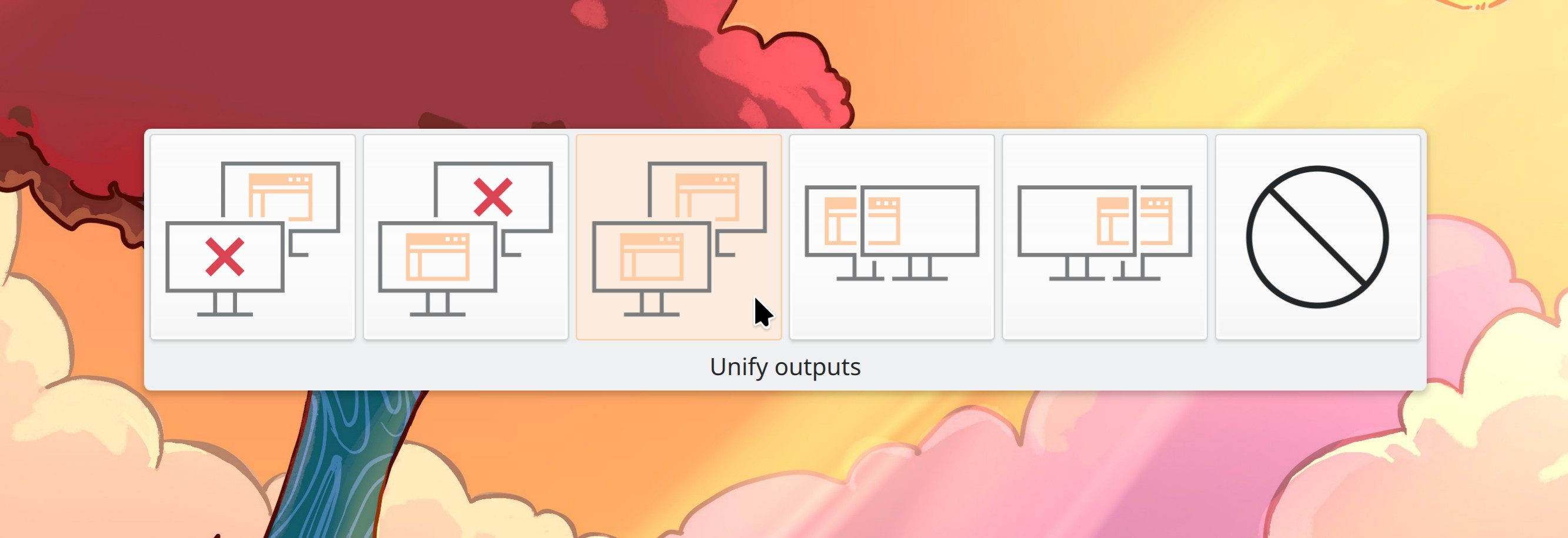
There are now “edge barrier” and “corner barrier” features when you’ve using a multi-screen setup. These barriers add virtual spacing between screens, so that it’s easier for you to click on the pixels touching shared screen edges. Why would you want to do this? For example to make auto-hide panels between screens possible, and to make it easy to click the close button of a maximized window with another screen next to it. Note that these features are Wayland-only. And yes, you can turn these features off if you don’t like them, and also adjust the size of the barrier’s virtual space (Yifan Zhu, Plasma 6.1):

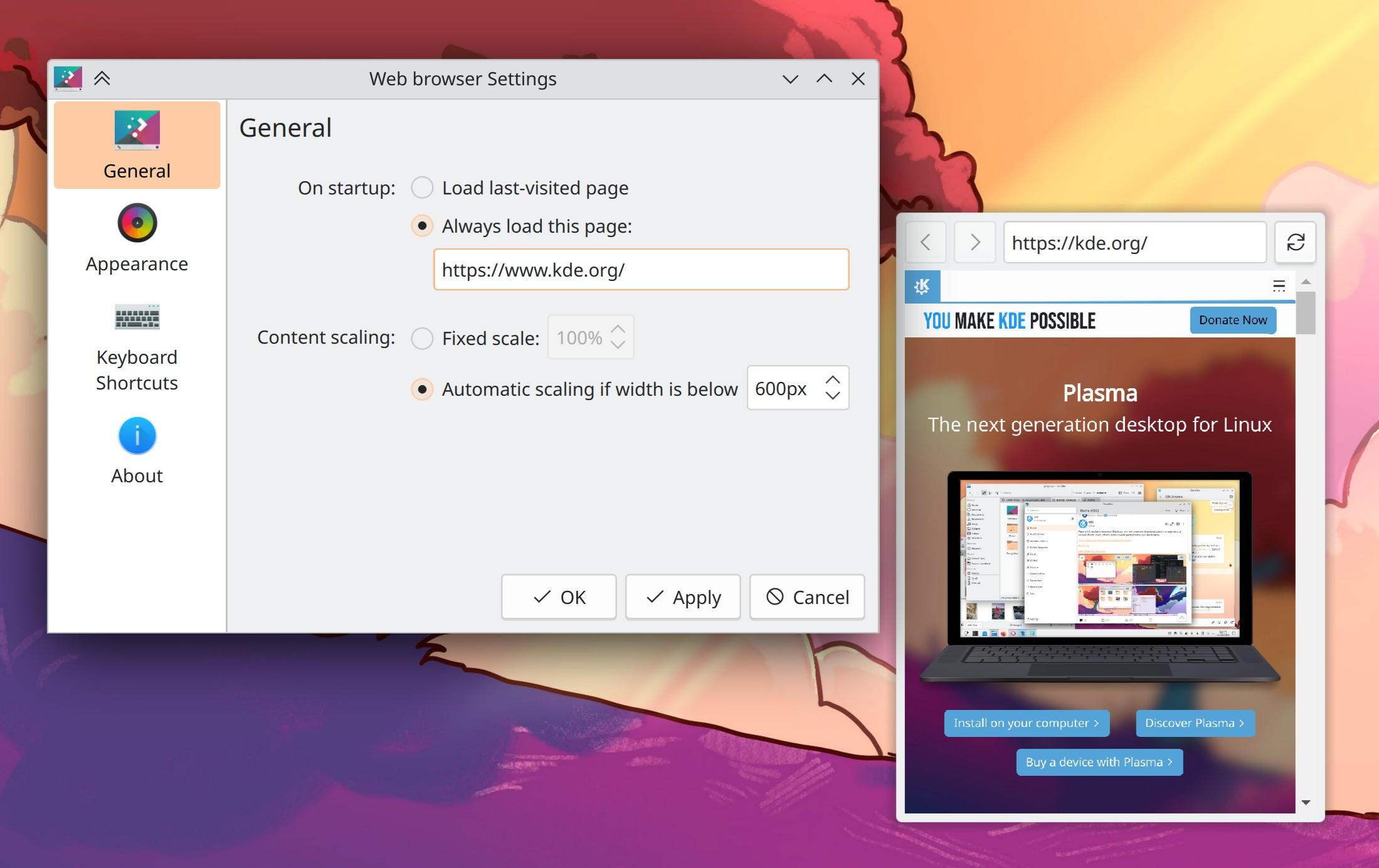
You can now hide the Web Browser widget’s navigation bar, making it suitable for cases where it’s simply monitoring the same web page you never navigate away from (Shubham Arora, Plasma 6.1. Link)

Manual session saving now works on Wayland. Note that until real session restore is added, this will be hooking into the “real fake session restore” feature I blogged about a few weeks ago (David Edmundson, Plasma 6.1. Link)

UI Improvements

When you have Spectacle configured to not take a screenshot when launched, the window that appears on launch now gives you the opportunity to take a screen recording too (Noah Davis, 24.05. Link)

Search results for pages in System Settings now better prioritize exact name matches (Alexander Lohnau, Plasma 6.0.1. Link)

Using a keyboard shortcut to activate the Calculator widget on a Panel now passes focus to it correctly so you can start typing to calculate things immediately (Marco Martin, Plasma 6.0.2. Link)

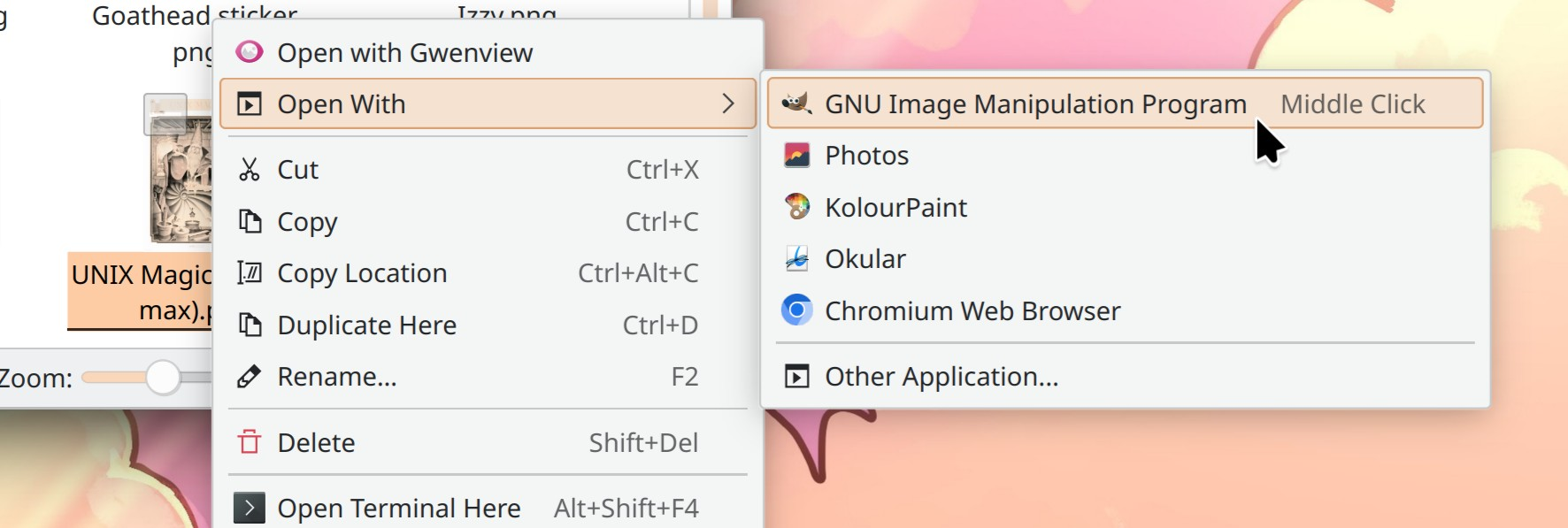
When using the Kicker Application Menu launcher, you can now do calculation and unit conversion, and find the power and session actions by searching for them (me: Nate Graham, Plasma 6.1. Link)

The new “Shake cursor to find it” effect is now enabled by default (Vlad Zahorodnii, Plasma 6.1. Link)

The new Printers page in System Settings now does a better job of helping you figure out what to do next when it finds a driverless network printer that doesn’t have the right drivers installed (yes, that sounds like a contradiction, but such is life) (Mike Noe, Plasma 6.1. Link)

Panel widgets’ popups now close when you click on an empty area of the Task Manager (David Edmundson, Plasma 6.1. Link)

By default, XWayland apps are now allowed to listen for non-alphanumeric keypresses, and shortcuts using modifier keys. This lets any global shortcut features they may have work with no user intervention required, while still not allowing arbitrary listening for alphanumeric keypresses which could potentially be used maliciously (me: Nate Graham, Plasma 6.1. Link)

Bluetooth connection failures are now additionally mentioned in the widget pop-up itself, right next to the thing you clicked on to try the connection which is where your eyeballs were probably still looking (Patrik Fábián, Plasma 6.1. Link)

The width of the clipboard history popup that appears when you press Meta+V now has a width that’s capped at a lower, more sane level when you’re using an ultrawide screen (Dominique Hummel, Plasma 6.1. Link)

Bug Fixes

Gwenview no longer crashes when opening certain FITS image files (Albert Astals Cid, Gwenview 24.02.1. Link)

Minimizing a Dolphin window no longer causes all of its panels to get hidden (Nicolas Fella, Dolphin 24.02.1. Link)

Fixed a glitch with multi-line text selection in Okular (Okular 24.02.1. Link)

While dragging a file in Dolphin, if it happens to pass over other files and linger there for a bit, the other files no longer get immediately opened (Akseli Lahtinen, Dolphin 24.05. Link)

Plasma no longer crashes when you open Kickoff or Kicker while uninstalling an app that’s in the Favorites list (Marco Martin, Plasma 6.0.1. Link)

Launching/activating items with the Enter key in the Kicker Application Menu once again works (Marco Martin, Plasma 6.0.1. Link)

“Get [app name]” search results from KRunner once again work (Nicolas Fella, Plasma 6.0.1. Link)

Fixed a regression with System Tray icon support that caused some apps’ tray icons to show the wrong icon (Nicolas Fella, Plasma 6.0.1. Link)

When you drag multiple files from Dolphin onto the desktop, they no longer stack on top of one another until Plasma is restarted (Marco Martin, Plasma 6.0.1. Link)

Discover no longer crashes when you search for various fairly common terms, including “libreoffice” (Aleix Pol Gonzalez, Plasma 6.0.2. Link)

Fixed the “Move to Desktop > All Desktops” titlebar menu item on X11 (Nicolas Fella, Plasma 6.0.2. Link)

Fixed a case where Plasma could exit (not crash) with a Wayland protocol error after turning screens off and back on again (Vlad Zahorodnii, Plasma 6.0.2. Link)

Fixed a case where KWin could crash when a window was opened on a secondary screen plugged into a secondary GPU (Xaver Hugl, Plasma 6.0.2. Link)

Our previous fix for VLC and MPV not being able to go full screen turned out not to be enough, so we beefed it up, and now it should actually always work (Łukasz Patron, Plasma 6.0.2. Link 1 and link 2)

Fixed a bug that could cause Night Color to not work on systems with certain graphics hardware (Xaver Hugl, Plasma 6.0.2. Link)

The first search result in the Kicker Application Menu is no longer sometimes covered up by the search field (Marco Martin, Plasma 6.0.2. Link)

When you drag a window off the left side of the screen on X11, the cursor no longer moves unexpectedly (Yifan Zhu, Plasma 6.0.2. Link)

Setting your system language to “C” on System Settings’ Region & Language page no longer mangles the text of the previews for individual formats (Han Young, Plasma 6.0.2. Link)

Fixed a case where Discover could crash on launch when its Flatpak backend is active (David Redondo, Plasma 6.1. Link)

When you have a Panel at the top of the screen, showing its config dialog no longer overlaps the global Edit Mode Toolbar; instead, the toolbar jumps down to the bottom of the screen where there’s plenty of space for it (Niccolò Venerandi, Plasma 6.1. Link)

Downloading items in the “Get New [thing]” dialogs that only have a single file available once again works (Akseli Lahtinen, Frameworks 6.1. Link)

Various actions throughout KDE apps that open the default terminal app–such as Dolphin’s “Open Terminal Here” menu item–once again work (Nicolas Fella, Frameworks 6.1. Link)

“Horizontal bars” graphs in various System Monitor widgets now use the right colors (Arjen Hiemstra, Frameworks 6.1. Link)

Menu items in context menus for text fields in QtQuick-based apps are now translated (Evgeny Chesnokov, Frameworks 6.1. Link)

Made a bunch of places icons in the Breeze icon theme respect the accent color, just like their compatriots (Someone going by the pseudonym “leia uwu”, Frameworks 6.1. Link)

Other bug information of note:

Performance & Technical

Fixed a source of lag and frame drops on some systems with certain graphics hardware (Xaver Hugl, Plasma 6.0.1. Link)

Automation & Systematization

Wrote a tutorial for how to set up automatic publishing of your KDE app to KDE’s F-Droid repository (Ingo Klöcker, Link)

Updated the tutorial for how to write a System Settings page (KCM) to reflect modernity (Akseli Lahtinen, Link)

Added an autotest ensuring that a special feature of KConfig and desktops files works (David Faure, Link)

…And Everything Else

This blog only covers the tip of the iceberg! If you’re hungry for more, check out https://planet.kde.org, where you can find more news from other KDE contributors.

How You Can Help

Please help with bug triage! The Bugzilla volumes are extraordinary right now and we are overwhelmed. I’ll be doing another blog post on this tomorrow; for now, if you’re interested, read this.

Otherwise, visit https://community.kde.org/Get_Involved to discover other ways to be part of a project that really matters. Each contributor makes a huge difference in KDE; you are not a number or a cog in a machine! You don’t have to already be a programmer, either. I wasn’t when I got started. Try it, you’ll like it! We don’t bite!

As a final reminder, 99.9% of KDE runs on labor that KDE e.V. didn’t pay for. If you’d like to help change that, consider donating today!

PSA: enable 3D acceleration in your VirtualBox VMs

It’s come to our attention that some changes made for KWin in Plasma 6 aren’t compatible with the old and outdated software-rendering graphics drivers in VirtualBox. Thankfully there’s a solution: enable 3D acceleration in the machine settings. It not only resolves the issue, but also enables all the fancy graphical effects you would expect to see on a bare-metal installation. This is especially important if you’re using a VM for a review, screenshots, or videos of Plasma 6!

I’ve reached out to the VirtualBox devs regarding the possibility of making this happen automatically. But in case that doesn’t happen, it’s up to VirtualBox users to manually enable 3D acceleration in their machine settings.

This week in KDE: a smooth release

The KDE Mega-Release came out a few days ago and I’m happy to report that it went well. Initial impressions seem to be overwhelmingly positive! I’ve been doing extra bug triage and social media monitoring since then to see if there were any major issues, and so far things look really good on the bug front too. I think our 3 months of QA paid off! So congratulations everyone for a job well done! Hopefully this should help banish those now 16-year-old painful memories of KDE 4. 🙂 It’s a new KDE now. Harder, better, faster, stronger!

The roll-out in Neon has been a bit rockier, unfortunately. At this point, most of the packaging issues have been fixed, and folks who encountered them are strongly encouraged to update again. We’re doing an investigation into how this happened, so we can prevent it in the future. So thanks for your patience there, Neon users!

Needless to say, the week was full of other bug-fixing activity as well. There were still a few regressions, many of which have already been fixed, amazingly. I am just so impressed with KDE’s contributors this week! ❤️

New Features

There’s a new KWin effect called “Hide Cursor” (off by default for now, but try it!) that will automatically hide the pointer after a period of inactivity (Jin Liu, Plasma 6.1. Link)

On System Settings’ Legacy App Permissions page, there’s now an option to allow XWayland apps to eavesdrop on mouse buttons as well (Oliver Beard, Plasma 6.1. Link)

UI Improvements

The message shown on widgets not compatible with Plasma 6 is now clearer (Niccolò Venerandi, Plasma 6.1, though it might end up backported to 6.0.1 or 6.0.2. Link 1 and link 2):

A widget on the desktop that's incompatible with Plasma 6 showing the text "Night Color Control is not compatible with Plasma 6" and two buttons below it, one with the text "Copy to Clipboard" and the other with the text "View Error Details…"

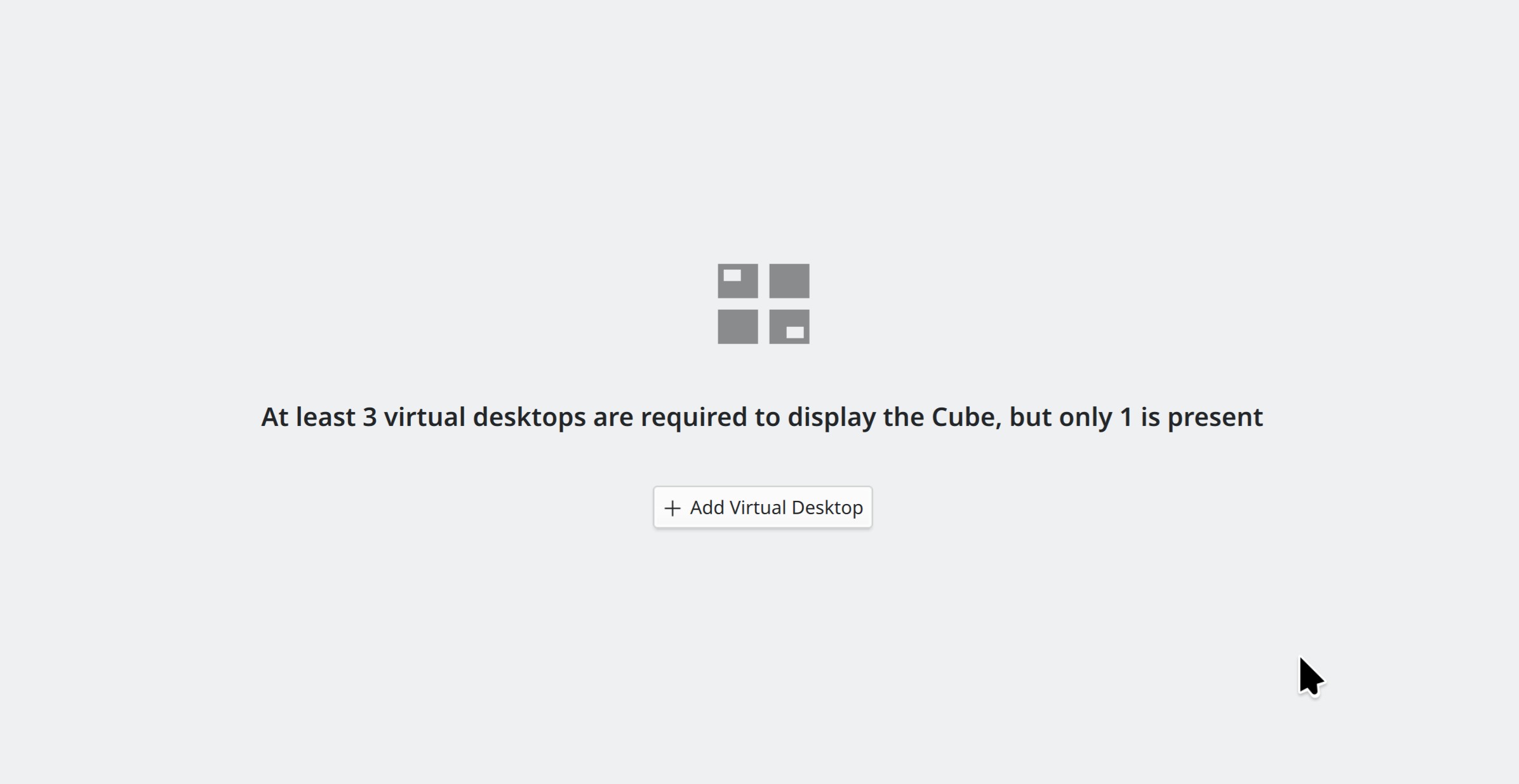
When you try to activate the Cube effect with fewer than 3 virtual desktops, it will now tell you why it’s not working and prompt you to add some more virtual desktops so it will work (Vlad Zahorodnii, Plasma 6.1. Link):

The default top-left hotcorner that triggers Overview once again closes the effect if you trigger it a second time, while Overview is still open (Vlad Zahorodnii, Plasma 6.0.1)

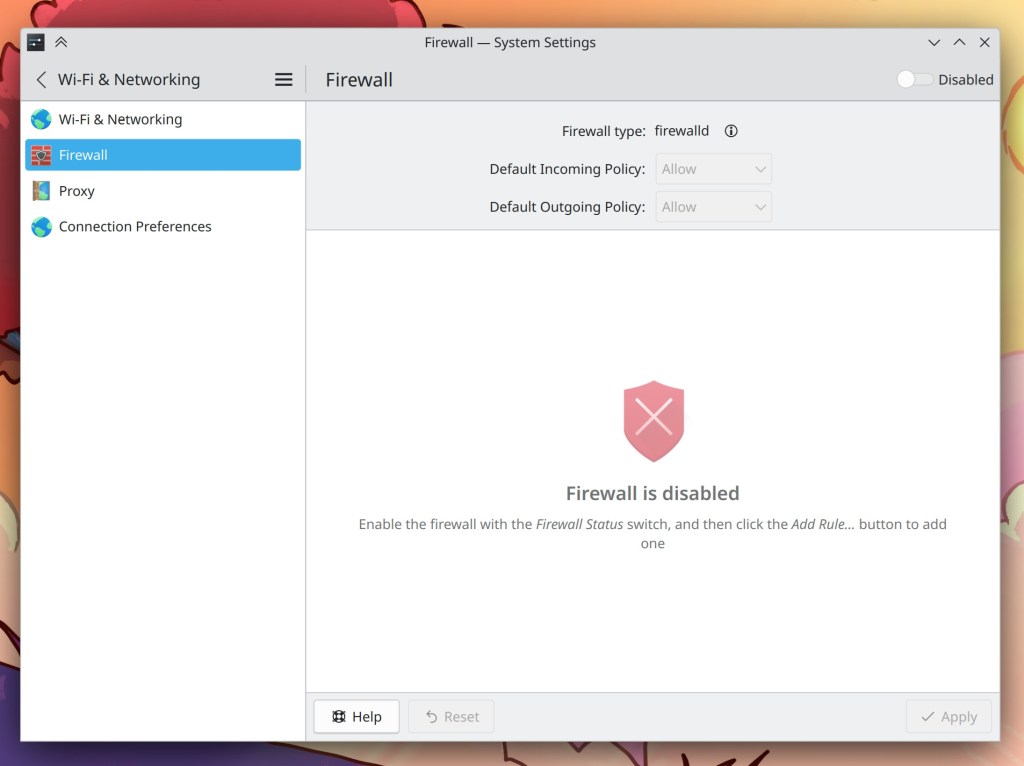
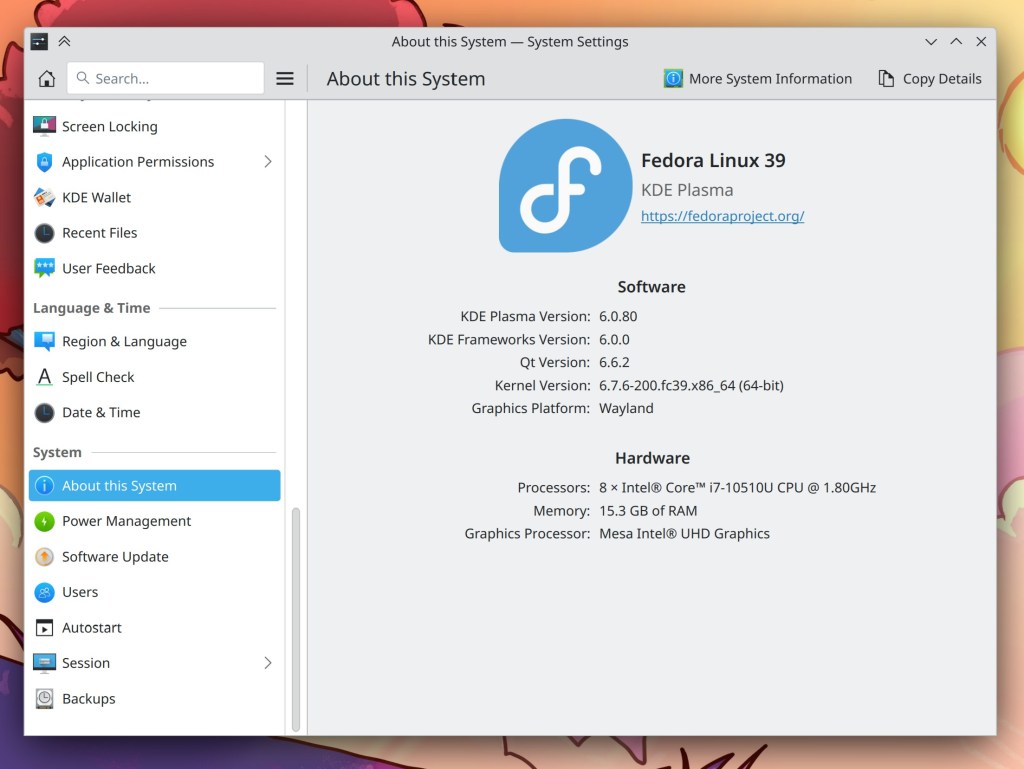
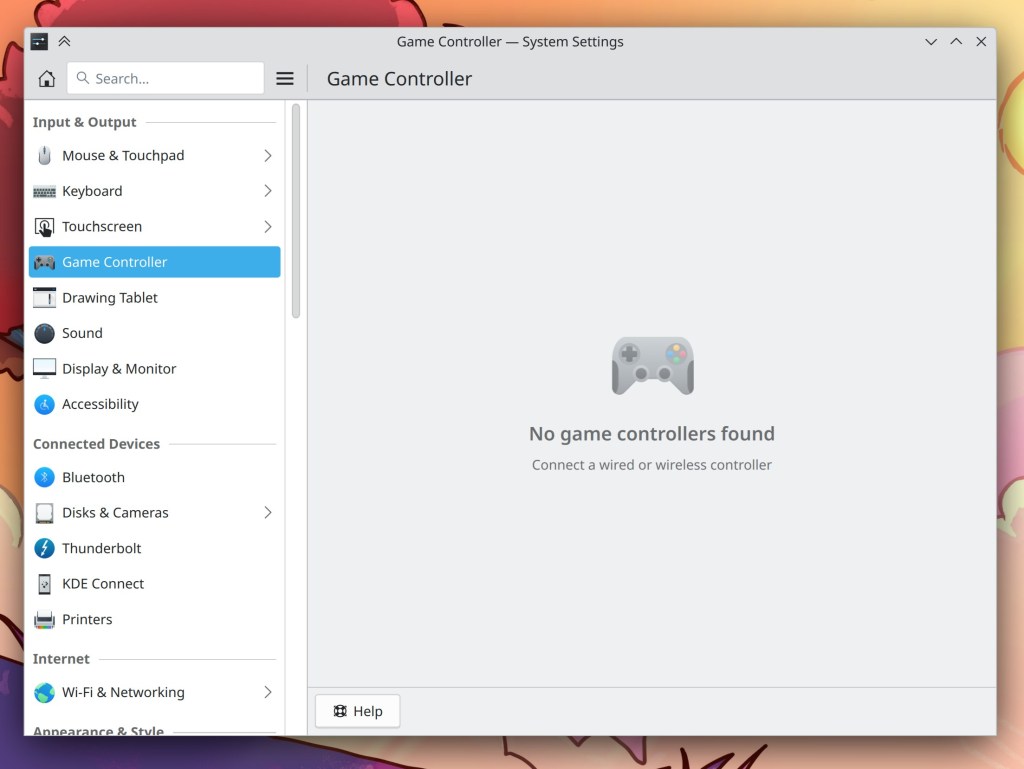
A number of pages in System Settings have been modernized to move buttons that were on the bottom up to the top, and make their placeholder messages more consistent (Shubham Arora, me: Nate Graham, Fushan Wen, and Jakob Petsovits, Plasma 6.1. Link 1, link 2, link 3, link 4, link 5, link 6, link 7, link 8, link 9, link 10, link 11, and link 12):

  • System Settings showing Window Rules page, with placeholder menu in the center and buttons in the header
  • System Settings showing Firewall page, with a switch in the top-right corner in the disabled position and a placeholder message in the center
  • System Settings showing About this System page, showing multiple buttons in the top bar
  • System Settings showing Game Controller page, showing a placeholder message instead of any game controllers

In Kirigami-based apps, the animation used when moving from one page to another is now a lot nicer and smoother (Devin Lin, Frameworks 6.1. Link)

You know that awkward little line in the toolbars of Kirigami-based apps that separates the sidebar from the content area? Now it has the appearance of a normal toolbar separator line (Carl Schwan, Frameworks 6.1. Link):

Bug Fixes

Taking a screenshot in Spectacle immediately after a screen recording now works (Noah Davis, Spectacle 24.02.1. Link)

VLC’s fullscreen mode once again works (David Edmundson, Plasma 6.0.1. Link)

Fixed a source of brief screen freezes in the X11 session (Vlad Zahorodnii, Plasma 6.0.1. Link)

Fixed a random-seeming crash in Plasma (Fushan Wen, Plasma 6.0.1. Link)

Dragging desktop files or folders onto another screen no longer causes them to temporarily disappear, and the fix for this issue also fixes a crash in Plasma that could be caused by dragging files or folders from the desktop into a folder visible in Dolphin (Marco Martin, Plasma 6.0.1. Link 1 and link 2)

Clicking on the “Defaults” button on System Settings’ Task Switcher page no longer breaks your task switcher until you manually choose it again (Marco Martin, Plasma 6.0.1. Link)

When a panel popup is open, clicking on something else on the panel once again activates that thing instead of just closing the open popup (David Edmundson, Plasma 6.0.1. Link)

There’s once again a blue outline around the active (and now also hovered) virtual desktop in the Desktop Grid view of the Overview effect (Akseli Lahtinen, Plasma 6.0.1. Link)

When you right-click on a panel in Auto-Hide mode and select “Add Widgets…”, the panel no longer frustratingly closes again right after the Widget Explorer opens, which previously prevented you from actually adding a widget to the panel that way, and made you want to throw your computer out the window (Niccolò Venerandi, Plasma 6.0.1. Link)

In the Tile Editor screen, you can no longer break your tile layout by dragging splits on top of other splits (Akseli Lahtinen, Plasma 6.0.1. Link)

Clicking on the search field in the Overview effect no longer closes it (Patrik Fábián, Plasma 6.0.1. Link)

Saving changes made to commands assigned to global shortcuts now works (me: Nate Graham, Plasma 6.0.1. Link)

Fixed some glitches with the new Cube effect: zooming with a scroll (did you even know that was a thing?! I didn’t!) now goes in the direction you would expect, and zooming goes in out too far no longer clips away the cube (Vlad Zahorodnii, Plasma 6.0.1. Link 1 and link 2)

When sending a file to a Bluetooth device, the notification that indicates the progress of the transfer no longer shows a broken link after the transfer finishes (Kai Uwe Broulik, Plasma 6.0.1. Link)

MPV windows with the “Keep Aspect Ratio” setting turned on are now full-screenable (Łukasz Patron, Plasma 6.1. Link)

The layout of the “Overwrite this file?” dialog in “Get New [Thing]” windows is no longer visually broken (Akseli Lahtinen, Frameworks 6.1. Link)

Fixed an issue that could cause glitchy horizontal lines to appear on graphs and charts in System Monitor when using a fractional scale factor with certain integrated Intel GPUs (Arjen Hiemstra, Frameworks 6.1. Link)

Other bug information of note:

Automation & Systematization

Created documentation about how to write Appium-based GUI tests for KDE software (Fushan Wen and Thiago Sueto, link)

Created documentation about how to expose C++ models to the QML GUI side in KDE software (Someone going by the pseudonym “Kuneho Cottonears”, link)

Added a test to ensure the functioning of the SystemDialog component, which powers a number of portal-based permission dialogs (Fushan Wen, link)

…And Everything Else

This blog only covers the tip of the iceberg! If you’re hungry for more, check out https://planet.kde.org, where you can find more news from other KDE contributors.

How You Can Help

Thanks to you, our Plasma 6 fundraiser was been a crazy success! The final number of members is an amazing 885. Not quite 1000, but given that the original goal was 500 (which I even viewed as wildly optimistic at the beginning), I’m just bowled over by the level of support here. Thank you everyone for the confidence you’ve shown in us; we’ll try not to screw it up! For those who haven’t donated yet, it’s not too late!

If you’re a developer, let’s continue to try to focus on bug reports for the next week or two in the software we’re involved with, to make sure that any issues people find get noticed and fixed. I want that perception of quality to continue! We’re building up a good reputation here, so let’s keep pushing for just a bit longer before we pivot to feature work for Plasma 6.1.

Otherwise, visit https://community.kde.org/Get_Involved to discover other ways to be part of a project that really matters. Each contributor makes a huge difference in KDE; you are not a number or a cog in a machine! You don’t have to already be a programmer, either. I wasn’t when I got started. Try it, you’ll like it! We don’t bite!

This week in KDE: real fake session restore

Welp, the mega-release is pretty much carved in stone now, and set for a release in four days! Lots of people have worked really hard on it for over a year, and we hope you love it! Nevertheless, I’m sure our diligent QA-obsessed users will waste no time in finding all the issues we missed, and we’ll work as hard as we can to fix them.

But once those are fixed too, the focus will eventually begin to shift once more towards features. And we have big ideas for new features to ship in Plasma 6.1 and beyond! With the architectural work done over the past year, a lot of very exciting possibilities have been unlocked. I think we’re going to see Plasma 6 as a pretty amazing springboard for next-gen stuff very quickly.

And to start things off, we have two nice new features that are landing in Plasma 6.1 already:

New Features

Even though we don’t have real session restore on Wayland yet (it’s still waiting for the protocol to be finalized), now we have the next best thing: fake session restore that simply re-opens apps you had open at the last logout and relies on them to have internally saved their own state appropriately. This works on X11 too (where apps that remember their window positions can do that as well), and it applies to all windows not covered by real session restore. As a result, now all your apps should always re-launch properly on login, rather than only the random-seeing assortment of session-restore-supporting apps re-launching on login. This feature is controlled by the existing setting that turns on or off session restore (David Edmundson, Plasma 6.1. Link)

In the Overview and Present windows effect, the way that windows are arranged is no longer configurable between two imperfect options: now there is only one layout algorithm and it’s waaaaaaay better than the old one! Windows are now arranged much more regularly and it ditches the very haphazard feeling of the old default algorithm, fixing multiple bugs causing weird window layouts including the infamous “stairway to heaven” arrangement (Yifan Zhu, Plasma 6.1. Link 1, link 2, link 3, link 4, link 5):

UI Improvements

When dragging a file or folder over another folder in Dolphin with the option turned on that opens the folder if you hold the dragged file there for a moment, the hovered folder now displays a little animation showing it open a bit (Felix Ernst, Dolphin 24.05. Link):

Headsets that report their battery status properly now benefit from a nice icon in all the places in Plasma that can show battery status (Severin Von Wnuck-Lipinski Plasma 6.1. Link)

The desktop context menu has lost its “Refresh” action which was infrequently used and did not actually fix most problems of missing icons that people might want to use it for. This makes the context menu lean and mean, and now nobody will have reason to say it’s “bloated” ever again! You can still manually refresh with F5 if needed (me: Nate Graham, Plasma 6.1. Link):

Bug Fixes

When connecting an iPhone or other Apple mobile device to your machine using a cable, and that phone has a name with an apostrophe in it (e.g. “Konqi’s iPhone”), now it works (Kai Uwe Broulik, kio-extras 24.02. Link)

Fixed the most common KWin crash on X11, which was commonly seen when the screen arrangement changed (Xaver Hugl, Plasma 5.27.11. Link)

Changing the Address, Name Style, Paper Size, or Phone Numbers settings on System Settings’ Region & Language page now actually takes effect (Timo Velten, Plasma 5.27.11. Link)

Fixed an issue that could cause the screen to turn black with only a movable cursor after switching from one virtual terminal to another one with certain graphics hardware (Jakob Petsovits, Plasma 5.27.11. Link)

Wind speed is now properly refreshed over time in forecasts provided by EnvCan in the Weather widget (Ismael Asensio, Plasma 5.27.11. Link)

Fixed a bug that could causing dragging-and-dropping Task manager icons to sometimes stop working (Fushan Wen, Plasma 6.0. Link)

KWin’s Zoom effect can now fully zoom into all areas of complex multi-screen setups (Michael VanOverbeek, KWin 6.0. Link)

A process named “ksmserver-logout-greeter” no longer shows up in your Task Manager while the logout screen is visible (Akseli Lahtinen, Plasma 6.0. Link)

Fixed a visual glitch that could cause window outlines to become slightly disconnected from their windows at certain window sizes when using certain fractional scale factors (Akseli Lahtinen, Plasma 6.0.1 Link)

Fixed a visual glitch that could cause windows on rotated displays to be briefly rotated incorrectly after becoming visible when using the “Glide” effect (Vlad Zahorodnii, Plasma 6.0.1. Link)

Fixed a case where KWin could crash when using the relatively old 340-series of NVIDIA drivers (Vlad Zahorodnii, Plasma 6.0.1. Link)

Fixed a way that Plasma could crash when manually restarted using systemd (Harald Sitter, Plasma 6.1. Link)

The shortcut chooser in the panel configuration dialog now respects your Plasma style’s color scheme as expected (Marco Martin, Frameworks 6.0. Link)

Toast-style notifications sent by Kirigami-based apps no longer visually overflow when they have a large amount of text in them (Jack Hill, Frameworks 6.0. Link)

Other bug information of note:

Performance & Technical

Improved Dolphin’s startup time by between 2% and 17% (Felix Ernst, Dolphin 24.05. Link)

Automation & Systematization

Added an autotest to ensure the proper functionality of text field context menus in QtQuick-based software (Fushan Wen, link)

…And Everything Else

This blog only covers the tip of the iceberg! If you’re hungry for more, check out https://planet.kde.org, where you can find more news from other KDE contributors.

How You Can Help

Thanks to you, our Plasma 6 fundraiser has been a crazy success! I originally thought the goal of 500 new KDE e.V. supporting members was over-optimistic, but you’ve all proven me happily wrong. We’re now up to an amazing 850 members. Thank you everyone for the confidence you’ve shown in us; we’ll try not to screw it up! 🙂 For those who haven’t donated to become members yet, spreading the wealth via this fundraiser is a great way to share the love. 🙂

If you’re a developer… sheesh, take a break for a few days. You’ve earned it!

Otherwise, visit https://community.kde.org/Get_Involved to discover other ways to be part of a project that really matters. Each contributor makes a huge difference in KDE; you are not a number or a cog in a machine! You don’t have to already be a programmer, either. I wasn’t when I got started. Try it, you’ll like it! We don’t bite!

This week in KDE: longstanding issues crushed

This week the focus was on annoying longstanding issues, and a whole bunch of them are now history! If you’ve used KDE software for any significant amount of time, I bet you noticed and were annoyed by at least one of the issues mentioned below, and can now rejoice at their annihilation! This effort has dropped the number of 15-minute Plasma bugs to its lowest level ever–just 30. The Mega-Release will be shipped in under two weeks, and we want it to be as fabulous as possible!

Pre-Mega-Release

…But first, some bugfixes backported to Plasma 5.27!

Fixed a way that KWin could crash in the Plasma Wayland session (Xaver Hugl, Plasma 5.27.11. Link)

Files copied to the clipboard are now made available to sandboxed apps using the portal system, so you can paste them into those apps (Karol Kosek, Plasma 5.27.11. Link)

After opening your laptop’s lid, the brightness of its backlit keyboard is now correctly restored to the same value it had before the lid was closed (Werner Sembach, Plasma 5.27.11. Link)

KDE 6 Mega-Release

(Includes all software to be released on the February 28th mega-release: Plasma 6, Frameworks 6, and apps from Gear 24.02)

UI improvements

When a panel popup is open, clicking on an empty area of the panel will now close it (David Edmundson, link)

When you try out a Global Menu and all your apps’ in-window menubars get hidden, if you later change your mind and remove the Global Menu, all of those apps’ in-window menubars now re-appear automatically instead of remaining hidden until manually shown again (David Edmundson, link)

When any of your physically connected screens are marked as disabled, opening System Settings’ Display & Monitor page now always shows an enabled screen when it opens, rather than sometime showing one of the disabled screens (David Edmundson, link)

Added Breeze icons for OpenVPN and Cisco VPN configuration files (Kai Uwe Broulik, link):

Bug fixes

Important note: I don’t mention fixes for bugs that were never released to users; it’s just too much for me (it would probably be too much for you to read as well), and most people never encountered them in the first place. Because we’re in the middle of a big Plasma dev cycle, there are a lot of these bugs! So big thanks to everyone who’s made it a priority to fix them!

Fixed several common random-seeming crashes in Plasma’s Activities backend code (Harald Sitter, link)

Fixed a significant annoyance that would, in most distros, cause several types of files to be opened in the wrong apps by default (e.g. images opened in Okular rather than Gwenview) until the first time the user changed any of the file associations (Harald Sitter, link)

Fixed a visual glitch in Gwenview that could cause image thumbnails to overlap when using a fractional scale factor (David Edmundson, link)

in Spectacle, drawing annotations with a touchscreen or a stylus no longer draws additional random-seeming straight lines in weird places (Marco Martin, link)

Shift+dragging windows to custom-tile them now works even if you’ve set your keyboard to do something exotic like emulate the Caps Lock key when pressing both Shift keys together (Xaver Hugl, link)

Fixed a case where the cursor failed to disappear as expected in certain WINE games (Vlad Zahorodnii, link)

Fixed a memory leak seen in Spectacle when recording the screen (Aleix Pol Gonzalez, link)

Other bug information of note:

Post-Mega-Release

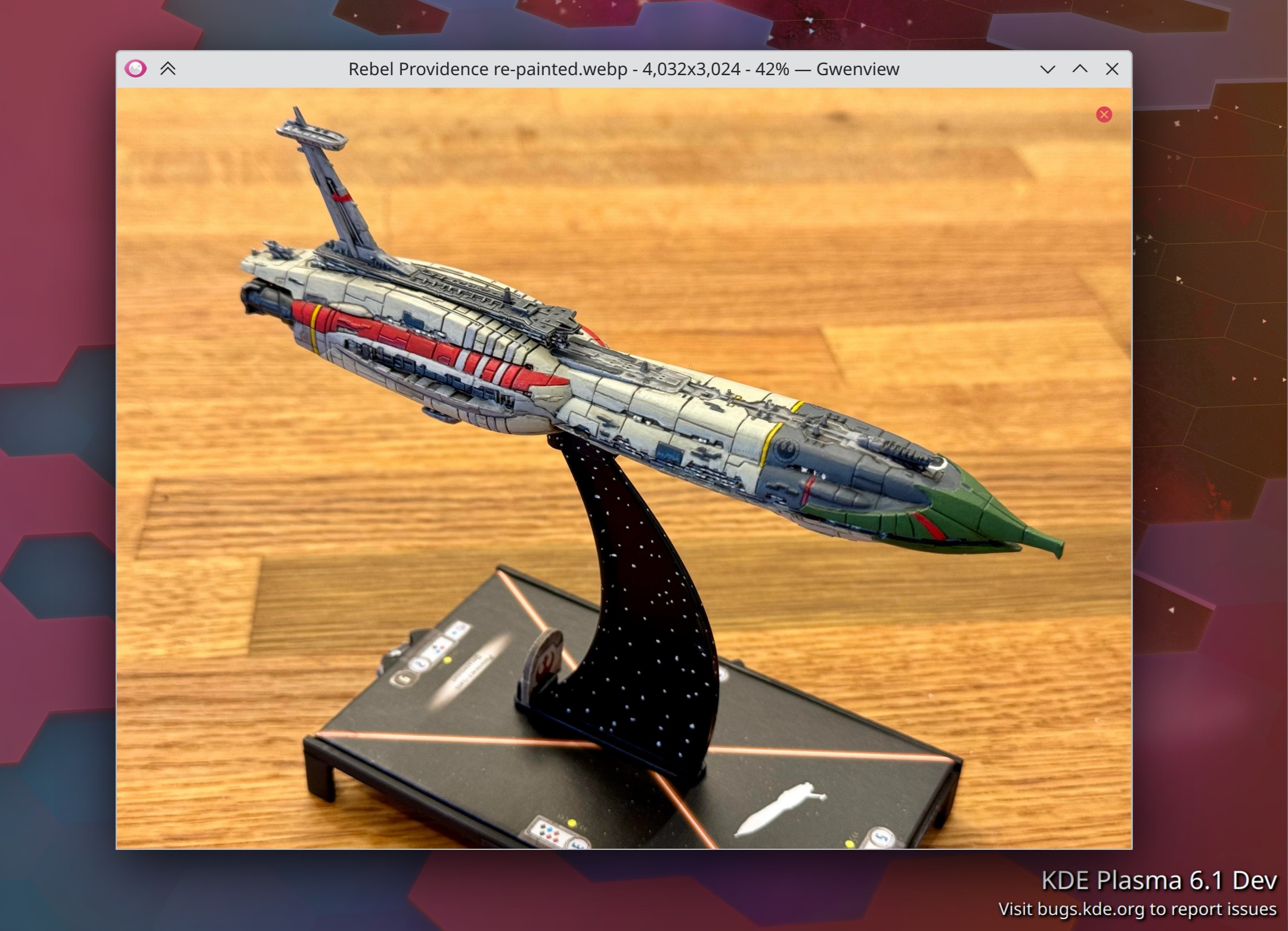
Gwenview now has a minimal “Spotlight View” mode in which all the normal UI is hidden, and all you see is the image and the window titlebar (Ravi Saifullin, Gwenview 24.05. Link):

Before you ask, no this is not my paintjob! But I do plan to use it as inspiration 🙂

The warning on System Settings’ Proxy page no longer inaccurately warns you that Chromium-based browsers don’t respect it, which isn’t true anymore (Someone going by the pseudonym “Chaotic Abide”, kio-extras 25.04. Link)

Fixed the most common crash in Discover for Plasma 6.1, and we’re scoping out options for fixing it for 6.0 as well (Ivan Tkachenko, Plasma 6.1. Link)

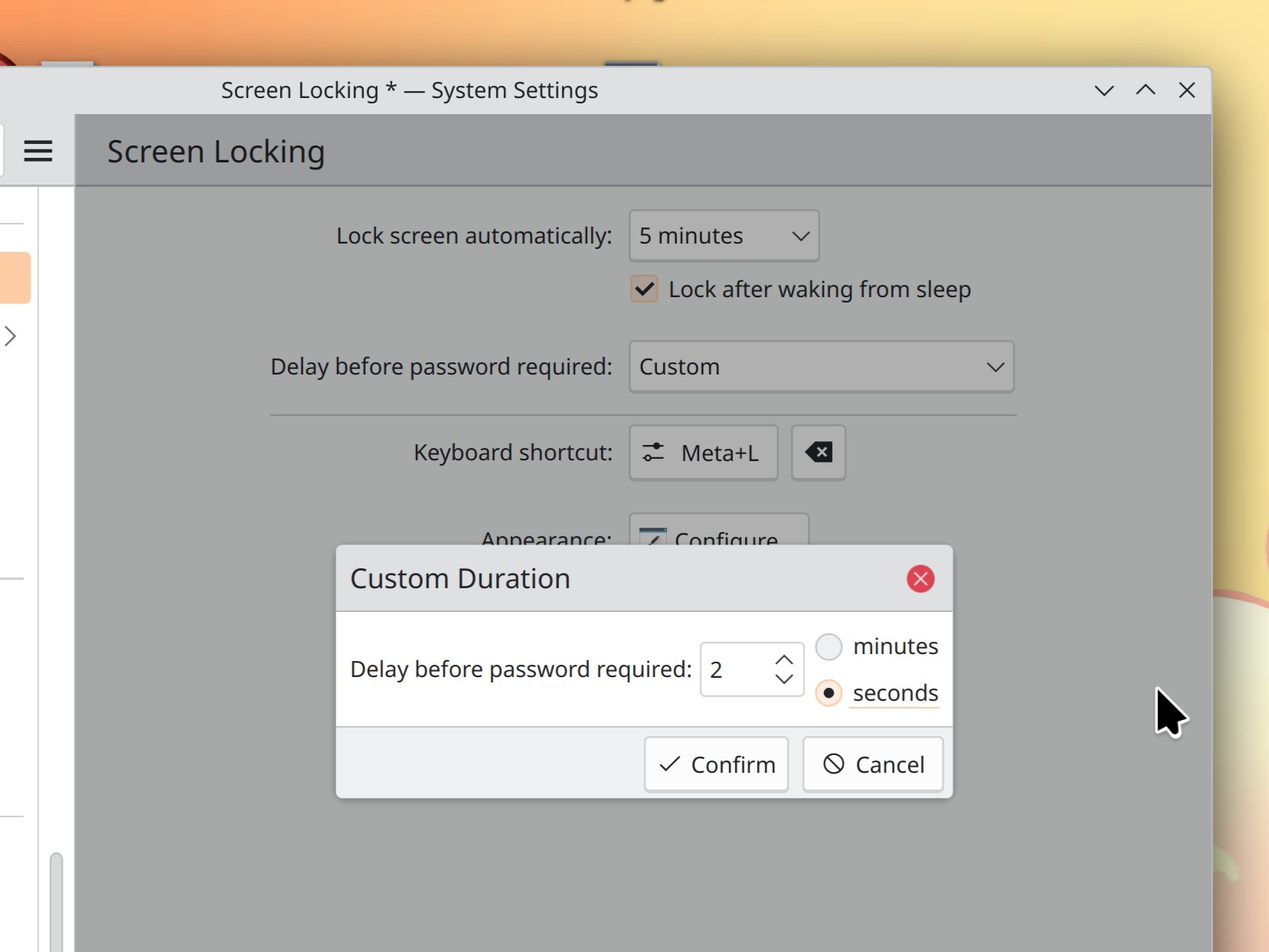
System Settings’ Screen Locking page now has a clearer UI for selecting times (Kristen McWilliam, Plasma 6.1. Link):

There’s now a KWin window rule you can use for controlling the status of Adaptive Sync for individual windows (Ravil Saifullin, Plasma 6.1. Link)

Performance & Technical

KWin now supports direct scan-out when run in a nested manner inside another compositor (Xaver Hugl, Plasma 6.1. Link)

Landed some major performance improvements for thumbnail generation in Gwenview and file listing in general (Arjen Hiemstra, Mega-Release 6. Link 1 and link 2)

Landed some major performance improvements for Spectacle’s Rectangular Region mode (Noah Davis, Spectacle 24.05. Link)

The spacings used throughout Plasma and Kirigami-based apps are no longer based on font sizes, and are now simply hardcoded to various static values, as they are in QtWidgets-based apps. This should slightly increase visual consistency everywhere, and make it possible over time to build UIs with more predictability in their spacings. This is more of a long-term thing, but it’s an exciting first step! (Noah Davis, Kirigami 6.0. Link)

…And Everything Else

This blog only covers the tip of the iceberg! If you’re hungry for more, check out https://planet.kde.org, where you can find more news from other KDE contributors.

How You Can Help

Thanks to you, our Plasma 6 fundraiser has been a crazy success! I originally thought the goal of 500 new KDE e.V. supporting members was over-optimistic, but you’ve all proven me happily wrong. We’re now up to an amazing 825 members, blown past our stretch goals, and 1000 members by launch time seems like it might even be feasible. Thank you everyone for the confidence you’ve shown in us; we’ll try not to screw it up! 🙂 For those who haven’t donated to become members yet, spreading the wealth via this fundraiser is a great way to share the love. 🙂

If you’re a developer, work on final Qt6/KF6/Plasma 6 issues! Which issues? These issues. Plasma 6 is very close to a release and in a good state, but could still benefit from some final bug-fixing and polishing. And as I mentioned before, if you haven’t tried it out yet, please do!

Otherwise, visit https://community.kde.org/Get_Involved to discover other ways to be part of a project that really matters. Each contributor makes a huge difference in KDE; you are not a number or a cog in a machine! You don’t have to already be a programmer, either. I wasn’t when I got started. Try it, you’ll like it! We don’t bite!

This week in KDE: Inching closer

The KDE 6 mega-release is due in a little under three weeks! And folks have remained in diligent bugfixing-and-polishing mode, because we want this release to be as smooth and drama-free as possible! If you haven’t already tried it out, this is a good time to. Find all the bugs that are bugging you so we can hopefully fix them before the final release!

KDE 6 Mega-Release

(Includes all software to be released on the February 28th mega-release: Plasma 6, Frameworks 6, and apps from Gear 24.02)

UI improvements

KWin’s “Active screen follows mouse” setting is now gone; now the active screen is always the one with the cursor on it, or the last one that was tapped with a touchscreen. This turns out to be much simpler and it’s what we think most people wanted anyway, hopefully alleviating complaints about OSDs and new windows opening on unexpected screens (Vlad Zahorodnii, link)

You can now set the data range manually for “horizontal bars” charts in System Monitor and its widgets (Arjen Hiemstra, link)

When you use the System Tray’s “Always show all entries” option, now it actually does always show all entries, instead of sneakily keeping some of them hidden anyway according to some internal logic which was not obvious (Jin Liu, link)

Searching through clipboard entries is now case-insensitive (Yifan Zhu, link)

Bug fixes

Important note: I don’t mention fixes for bugs that were never released to users; it’s just too much for me (it would probably be too much for you to read as well), and most people never encountered them in the first place. Because we’re in the middle of a big Plasma dev cycle, there are a lot of these bugs! So big thanks to everyone who’s made it a priority to fix them!

Fixed an issue affecting the Plasma X11 session that could cause the screen to end up black with only a movable cursor when you wake your system from sleep while using an NVIDIA GPU with its proprietary drivers (David Redondo, link)

CPU temperature sensors now work for a variety of Intel and AMD motherboards where they didn’t previously work (Arjen Hiemstra, link 1 and link 2)

When System Monitor’s window opens in maximized state, de-maximizing it now returns it to its pre-maximized geometry as expected (Arjen Hiemstra, link)

In various Kirigami-based apps, double-clicking on a page to open it multiple times is no longer interpreted that way–because opening the same page multiple times makes no sense–which avoids accidentally breaking the app (Arjen Hiemstra, link)

KScreen is now smarter about choosing better-matching screen settings when told to make one screen mirror another (Yifan Zhu, link)

Buttons and scrollbars in the Sticky Notes widget are now always distinguishable no matter what color you choose for the background of the note and no matter what your system color scheme is (me: Nate Graham, link)

A couple of Plasma UI elements with text on them that weren’t previously translatable now are (Emil Sari, link)

When your Task Manager is set up to only show tasks from the current screen, now this still keeps working when you switch around your screen arrangement without restarting Plasma (Someone awesome, link)

Header text in System Tray applets now elides instead of overflowing with a small window size and very long applet text (me: Nate Graham, link)

Other bug information of note:

Post-Mega-Release

When you hit the Alt+Tab shortcut with no windows open, you’ll now see a nice “No open windows” message instead of a broken-looking task switcher or even nothing (Vlad Zahorodnii, Plasma 6.1. Link)

The ancient feature to add a spacer in your window titlebars returns! (Vlad Zahorodnii, Plasma 6.1, link)

Automation & Systematization

Added an autotest to make sure that loading Digital Clock plugins still works (Fushan Wen, link)

…And Everything Else

This blog only covers the tip of the iceberg! If you’re hungry for more, check out https://planet.kde.org, where you can find more news from other KDE contributors.

How You Can Help

Thanks to you, our Plasma 6 fundraiser has been a crazy success! I originally thought the goal of 500 new KDE e.V. supporting members was over-optimistic, but you’ve all proven me happily wrong. We’re now up to an amazing 800 members, blown past our stretch goals, and 1000 members by launch time seems like it might even be feasible. Thank you everyone for the confidence you’ve shown in us; we’ll try not to screw it up! 🙂 For those who haven’t donated to become members yet, spreading the wealth via this fundraiser is a great way to share the love. 🙂

If you’re a developer, work on Qt6/KF6/Plasma 6 issues! Which issues? These issues. Plasma 6 is very close to a release and in a good state, but could still benefit from some final bug-fixing and polishing. And as I mentioned before, if you haven’t tried it out yet, please do!

Otherwise, visit https://community.kde.org/Get_Involved to discover other ways to be part of a project that really matters. Each contributor makes a huge difference in KDE; you are not a number or a cog in a machine! You don’t have to already be a programmer, either. I wasn’t when I got started. Try it, you’ll like it! We don’t bite!

15-Minute Bug Initiative update

A tad over two years ago, I revealed the 15-Minute Bug Initiative–an attempt to improve the out-of-the box user experience for Plasma by focusing on fixing obvious papercut issues. The idea was to crush the meme of “KDE is buggy” the same way we systematically addressed similar complaints like “KDE is ugly” and “KDE is bloated” in years past.

Well, it’s been two years, so how did it go? Let’s talk about it! First some numbers, because we like numbers:

  • Starting number of bugs: 92
  • Current number of bugs: 32
  • Total number of bugs fixed (because more were added over time): 231
  • Percent of all total 15-minute bugs that have been fixed: 87.8%

(note if you’re from the future: if you visit those links, some numbers may be different–hopefully lower for the second one and higher for the third one!)

Wow! That’s quite a few. So this initiative looks like it’s been a real success so far! Nevertheless, 32 bug reports remain open, so we can’t declare victory yet. These are some of the stubbornest, hardest-to-fix bugs that require major re-architecting, working upstream, or similarly challenging efforts. Hopefully the pace of improvement seen over these years has managed to convince you that they’ll eventually be resolved as well.

“Wait a minute, Plasma is still buggy AF you n00b”

Keep in mind these aren’t all the bug reports in the world we can fix (there are over 5000 of them for Plasma and Plasma-aligned software alone), just the ones I and some others have deemed to be most obvious to the average user! If you’re not an average user because you have three monitors arranged in a weird shape, each plugged into a different GPU from a different vendor and its own different DPI, scale factors, and custom Plasma panels, plus 4 activities and 9 virtual desktops and 6 internal disks, only half of which automount, and 12 apps set to autostart, and each of them is installed onto different disks, 15 window rules, and finally a custom theming setup including Kvantum themes and Aurorae window decorations… then yeah, you’re probably going to experience some more bugs compared to a more typical user who doesn’t have such a complex setup!

That’s okay. We care about you too, and we do work on those kinds of more esoteric bugs because many of us also have complex setups! But progress here will be necessarily slower, because the complex setups are more varied, more unusual, and harder to debug. And let’s be honest here: those of us with setups like these are experts capable of working around most bugs we find, who really should be helping to investigate and fix them. Admit it, you know it’s true!

But in a way, this is good: it represents Plasma moving from “It’s generally buggy” to “it’s specifically buggy–buggy with only certain less common combinations of settings, rather than buggy in a way that anyone can find within 15 minutes of using a system with its default settings. Improving on that was the point of this initiative.

Next steps

Up until now we’ve been ignoring Wayland-only bugs here, because the Wayland session was not the default one. Well, with Plasma 6 that changes, so all of those Wayland-only issues that meet the loose criteria to be a 15-minute bug will be promoted. Similarly, current 15-minute bugs that are X11-only will be demoted. So sometime in the next few weeks, expect the list to shift around a bit.

Once the number gets down to 0, it will of course go up again periodically as new bugs are found or introduced. But this is great! It means we can whack them as they appear, rather than letting them pile up over time. In this way the list becomes a “rapid response needed” task list rather than a backlog we’re always behind on.

What happens with those development resources once the 15-minute Plasma bugs are under control? I have a plan, first articulated in the original announcement 2 years ago: extend the program to Frameworks bugs! There are quite a few candidates there too. And because frameworks bugs can affect Plasma and our vast app library, quality will go up overall.

Speaking of those apps, once the 15-minute Frameworks bugs are also down to zero or close to it, we can include app bugs. This will finally give us complete coverage! I have a dream that one day, we’ll have a stable and mostly bug-free UI layer and our limited development resources can be focused more on performance work, sustainably-crafted new features, usability, more standardized styling, etc. I think it’s doubtful we can get there while we’re still battling routine bugs all the time.

How you can help

As always, help work on the existing 15-minute bugs if you can! If not, it’s always useful to work on bug triaging, so that more of those issues that will eventually become 15-minute bugs can get discovered. Another impactful way is to donate to KDE e.V., the nonprofit that support KDE on a ridiculously small budget. We’re still running the Plasma 6 fundraiser which represents a great way to donate!

What’s going on with Activities in Plasma 6?

Nothing! That’s the end of the blog post! Go back to what you were doing!

Well, sort of. 🙂 Some of you may be aware that a year or so ago, there was a lot of chatter about what to do with the Activities feature in Plasma 6: change how it works, remove the feature, or leave it be.

There’s broad consensus within the KDE developer community that the Activities feature doesn’t work the way we want it to. Its scope is conceptually unclear, it’s a frequent source of bugs, and it isn’t really maintained. As a result adoption in even our own apps has been low. It was for these reasons that over time we removed many of the entry points for Activities in the UI, and why I eventually proposed removing it entirely.

However the best way to to find out how many people are using something is to remove it! And the second best may be to propose removing it. 🙂 Many people showed up to offer their passionate pleas to keep the feature, explaining what they were using it for. Interestingly, many admitted that the feature didn’t really work very well out of the box and that they had done custom work to bend it to their use cases.

For this reason, several people stepped up to propose an overhaul of how Activities works, taking into account how the feature’s users actually use it. A lot of discussion ensued, and a few changes were merged. One was that Activities migrated from Frameworks to Plasma, which stripped it of its API guarantee and opens the door to us making major changes within the Plasma 6 lifecycle. Another change was to remove the per-Activity power management setting.

Unfortunately not much happened beyond that. As a result the status quo remains largely in effect for Plasma 6: the Activities feature has not been removed, overhauled, or even substantially bug-fixed. It remains a quirky and somewhat buggy DIY feature for adventurous users to build custom workflows around, and today it’s more hidden-away than ever if you don’t want to use it.

However, I don’t expect this to continue in the long term. Once Plasma 6 stabilizes and development resources are pulled off constant bug-fixing, attention will inevitably turn to Activities once again. So consider this blog post notice that the feature is at risk of being eventually removed if people don’t step up to contribute technical work to either fix existing bugs, or else overhauling the feature to work differently.

Personally, I’d like to see Activities morph into a feature whereby each activity has a separate set of settings and config data, but access to all the same user files. On top of that, you would be able to configure individual apps you use in multiple activities (like music players) to use shared settings and config data.This way it would basically be the “profiles” feature that many web browsers have now, but applied automatically to any and all apps you want.

But, like all desires and ideas, that personal idea of mine means nothing without work to transform it into an implementation! So if you use and enjoy Activities, or think you’d like to if they worked differently, please get involved. We’ll need your help if this feature is to remain!

This week in KDE: converging on a release

Believe it or not, the mega-release is coming out in less than a month. So soon! For this reason, all hands are on deck fixing bugs and polishing everything up. Nonetheless, the next releases of Plasma and KDE apps are starting to accumulate some juicy improvements too! Read on to find out…

KDE 6 Mega-Release

(Includes all software to be released on the February 28th mega-release: Plasma 6, Frameworks 6, and apps from Gear 24.02)

UI improvements

When you drag a file in the Plasma Wayland session and it passes over another window during the journey to its final destination, the window it passes over only raises itself to the top when you stop moving the cursor for a full second–up from the previous value of one quarter of a second (Xaver Hugl, link)

Panels in “Auto-Hide” (or the new “Dodge Windows”) mode that are currently hidden no longer inappropriately show themselves when the system wakes from sleep or its screen configuration changes (Vlad Zahorodnii, link 1 and link 2)

Made some more improvements to the ranking of KRunner search results (Alexander Lohnau, link)

The gray groove in scrollbar tracks that shows up on hover has been removed, because it didn’t really add anything since the whole scrollbar area is already framed. In the future if and when we remove that frame, the groove may re-appear, though (Akseli Lahtinen, link 1 and link 2):

When using the Breeze Dark Plasma style or color scheme, Plasma widget popups no longer have a white-ish flash while opening (Niccolò Venerandi, link)

The Clipboard and Keyboard Indicator System Tray applets now hide themselves completely when they have nothing to show, instead of appearing in the expanded part of the system tray and just showing you some kind of generic “there’s nothing to see here, hurr hurr” message when clicked (Jin Liu, link 1 and link 2)

Made the colors and line weights of single-pixel separators and outlines throughout Breeze-themes KDE software consistent, as many were previously using subtly different colors and line weights (Akseli Lahtinen and Marco Martin, link 1, link 2, link 3, link 4, link 5)

Bug fixes

Important note: I don’t mention fixes for bugs that were never released to users; it’s just too much for me (it would probably be too much for you to read as well), and most people never encountered them in the first place. Because we’re in the middle of a big Plasma dev cycle, there are a lot of these bugs! So big thanks to everyone who’s made it a priority to fix them!

It’s no longer possible to crash Plasma by giving a virtual desktop an absurdly long name (Vlad Zahorodnii, link)

It’s now possible to use Alt+PrintScreen as a key combination for global shortcuts (Yifan Zhu, link)

System Monitor’s “Import Page” functionality once again works (Arjen Hiemstra, link)

Plasma tooltips now get their visual styling from the active Plasma style’s Tooltip SVG, instead of its Dialog SVG, which was kinda weird (David Edmundson, link)

Made a bunch of fixes and improvements for windows using fractional scale factors (Akseli Lahtinen and Kai Uwe Broulik, link 1, link 2, link 3, and link 4)

With the Breeze application style, those rare menu items with multiple lines of text are now displayed correctly (Ilya Bizyaev, link)

The kinfo command-line program now correctly reports your graphics platform (i.e. X11 or Wayland) (Harald Sitter, link)

Other bug information of note:

Performance & Technical

Fixed a bug affecting with certain GPU setups that could cause KWin to use 100% of a CPU core whenever anything was using PipeWire to record the screen–which is actually quite a lot of things, including window thumbnails in the Task Manager and Overview effect (Xaver Hugl, link)

the Kickoff Application Launcher is now hugely more performant and faster to switch categories when hovering the cursor over multiple list items quickly (David Edmundson and Nicolas Fella, link 1 and link 2)

Made multiple improvements to reduce the amount of blocking when browsing mounted network file systems (Sergey Katunin, link 1 and link 2)

The “Closeable” window rule now works in the Plasma Wayland session (Vlad Zahorodnii, link)

Post-Mega-Release

Spectacle’s text tool now lets you insert line breaks and wrap text (Noah Davis, Spectacle 23.05. Link)

KCalc now uses a more modern frameless style (Carl Schwan, KCalc 24.05. Link):

The Weather widget now displays the chance of precipitation for all data providers except for BBC, which doesn’t provide this information (I guess it’s easier to just assume the chance is 100% for any location in the UK) (Ismael Asensio, Plasma 6.1. Link 1 and link 2):

When you have more than one audio input or output device, the name of each one shown in the System Tray widget is now a lot more readable and comprehensible, and doesn’t include weird technical text that often made no sense (Harald Sitter, Plasma 6.1. Link):

Notifications showing file transfer or download jobs now have a clearer arrangement of buttons (Oliver Beard, Plasma 6.1. Link):

When you activate the logout screen by invoking a specific action (e.g. “Shut Down”), it will now act more like a confirmation screen and only show you that action plus a cancel button (me: Nate Graham, Plasma 6.1. Link):

Right-clicking on a panel now yields a menu item that says “Show Panel Configuration”, which is clearer than the old “Enter Edit Mode” (Marco Martin, link)

…And Everything Else

This blog only covers the tip of the iceberg! If you’re hungry for more, check out https://planet.kde.org, where you can find more news from other KDE contributors.

How You Can Help

Thanks to you, our Plasma 6 fundraiser has been a crazy success! I originally thought the goal of 500 new KDE e.V. supporting members was over-optimistic, but you’ve all proven me happily wrong. We’re now up to an incredible 738 members, unlocked both stretch goals, and 1000 members by launch time seems like it might even be feasible. Thank you everyone for the confidence you’ve shown in us; we’ll try not to screw it up! 🙂 For those who haven’t donated to become members yet, spreading the wealth via this fundraiser is a great way to share the love. 🙂

If you’re a developer, work on Qt6/KF6/Plasma 6 issues! Which issues? These issues. Plasma 6 is very usable for daily driving now, but still in need of some final bug-fixing and polishing to get it into a solid state by February.

Otherwise, visit https://community.kde.org/Get_Involved to discover other ways to be part of a project that really matters. Each contributor makes a huge difference in KDE; you are not a number or a cog in a machine! You don’t have to already be a programmer, either. I wasn’t when I got started. Try it, you’ll like it! We don’t bite!