This week in KDE: major plumbing work in Plasma 6

This week Plasma 6 underwent some major refactoring to the fundamental Plasma widget APIs to modernize them and make it harder to introduce errors when developing new widgets. Since almost everything in Plasma is a widget, this necessitated a lot of changes and QA. After a month of work, it’s now done! The user-facing side is nil (ideally nobody will notice anything), but there are some changes that developers will need to be aware of to port their widgets. Most widgets already needed to be ported anyway due to Qt changes, but hopefully this won’t add much else. A porting guide has already been written and can be found here. This work was done by Marco Martin, with me providing QA support.

On that subject, we got a lot more organized about Plasma 6 this week. We now centrally track status on a new wiki page that shows the outstanding issues and notable changes. I’m starting to feel like I see a light at the end of the tunnel! While I’ve had to use the X11 Plasma 6 session because the Wayland one is still a bit too unstable for me to feel productive, the X11 session now feels barely buggier than the Plasma 5 X11 session. It’s really quite nice at this point.

This came up in the comment threads of last week’s post, but the more people test and contribute to Plasma 6, the better the final release will be. Neon Unstable now offers Plasma 6 by default, making it a good testing platform for the adventurous. Especially if you have a heavily customized setup or use exotic hardware, please try it out and submit bug reports! Make sure to apply the “qt6” keyword to them.

User Interface Improvements

Many significant UI improvements to Skanpage, including drag-and-drop page re-ordering, better keyboard shortcuts, and better error reporting (Someone going by the pseudonym “John Doe”, Skanpage 23.08. Link)

Okular no longer bugs you when you save a document that was deleted on disk; it simply re-saves it as instructed (me: Nate Graham, Okular 23.08. Link)

The context menu actions of the Dictionary Widget are now more relevant and have icons (Laurent Montel, Plasma 6.0. Link):

Significant Bugfixes

(This is a curated list of e.g. HI and VHI priority bugs, Wayland showstoppers, major regressions, etc.)

KRunner no longer sometime crashes when trying to calculate certain math expressions, or simply when typing numbers in general (Max Ramanouski, Plasma 5.27.6. Link)

The final change just went in for making sure that Discover always gets the version numbers right for updatable Flatpak apps (Ismael Asensio, Plasma 5.27.6. Link)

When using a fractional scale factor in the Plasma Wayland session, you should no longer see line glitches all over the place (Matthias Dahl, Plasma 5.27.6. Link)

Fixed the “Add New Page” dialog in System Monitor to not be visually broken when using a language with longer translated strings than English (me: Nate Graham, Plasma 5.27.6. Link)

In the Plasma Wayland session, when adding a second keyboard layout, the Keyboard layout System Tray icon now appears immediately (Marco Martin, Plasma 6.0. Link)

Other bug-related information of interest:

Automation & Systematization

Overhauled the documentation about Plasma styles to be more up-to-date and accurate (Thiago Sueto, link)

Web presence

KDE’s growing assortment of “KDE for” pages has gotten a snazzy new landing page, and now it’s a top-level link over at kde.org (Carl Schwan):

On top of that, there’s a new page: “KDE for Activists“, showcasing how KDE’s privacy-conscious communication can help you organize for what you believe in (Carl Schwan):
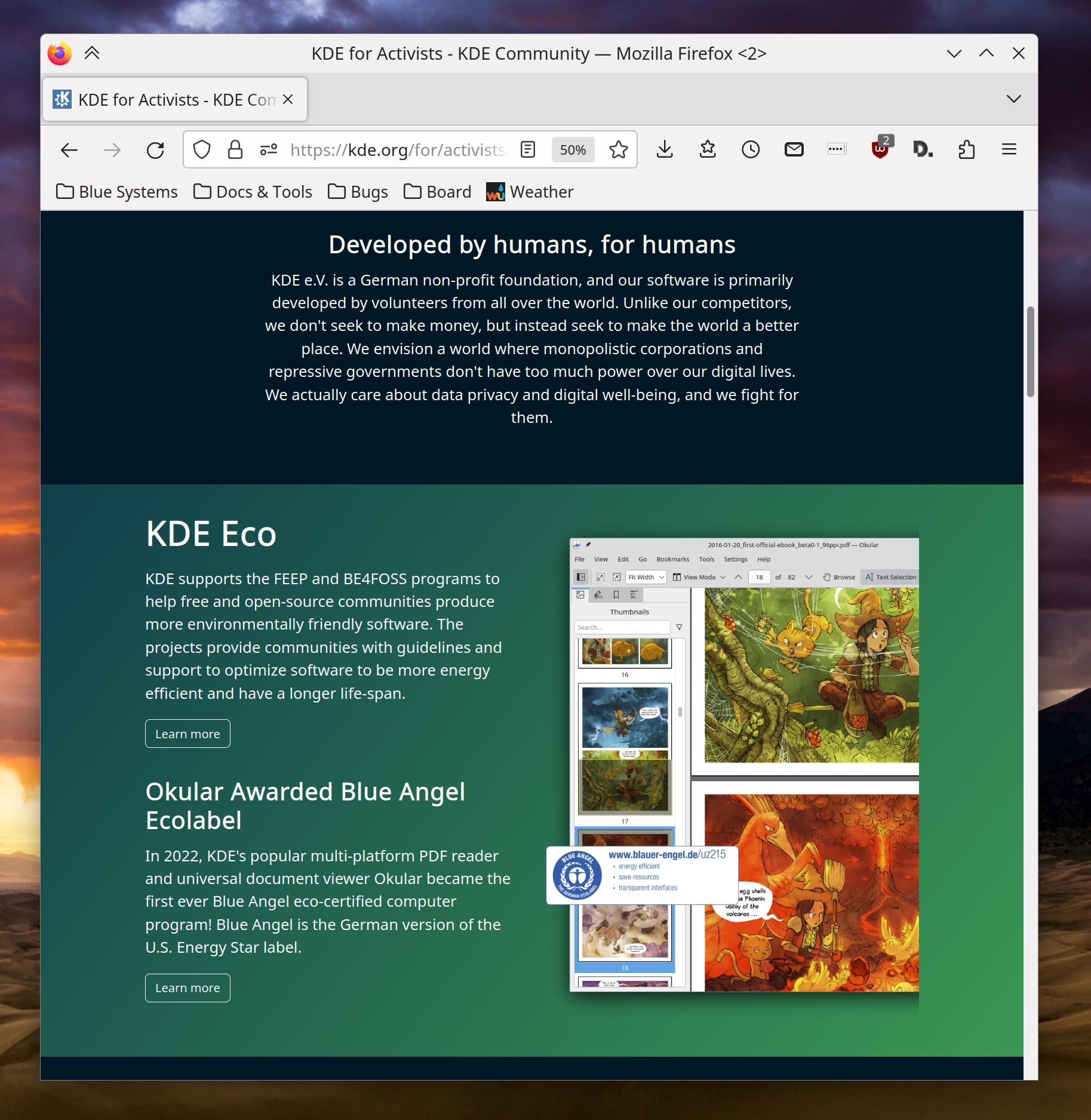
Note that this is a value-neutral statement; you can use KDE software to organize for whatever cause you believe in, no matter where on the political spectrum you consider yourself. Our software is neutral; it’s people who choose to use it for their purposes, and how. KDE software is used in homes, schools, businesses, news organizations, local governments, and, believe it or not, on both sides of the Russian invasion of Ukraine. People can take sides, but our software does not, so let’s try to keep the political battles out of the comments section of this post. Thanks everyone.

…And everything else

This blog only covers the tip of the iceberg! If you’re hungry for more, check out https://planet.kde.org, where you can find more news from other KDE contributors.

How You Can Help

If you’re a developer, please please please start living on a Plasma 6 session (not just building Plasma 6 stuff on top of Plasma 5) and fixing the bugs that you encounter. Plasma 6 is usable for daily driving, and I’m doing so, but it’s still very much in an alpha state and in need of work to make it releaseable.

If you’re an adventurous user, you can also use Plasma 6 with Neon Unstable. If you do so, make sure to submit bug reports for any problems you encounter, and apply the “qt6” keyword to them.

Otherwise, visit https://community.kde.org/Get_Involved to discover other ways to be part of a project that really matters. Each contributor makes a huge difference in KDE; you are not a number or a cog in a machine! You don’t have to already be a programmer, either. I wasn’t when I got started. Try it, you’ll like it! We don’t bite!

And finally, KDE can’t work without financial support, so consider making a donation today! This stuff ain’t cheap and KDE e.V. has ambitious hiring goals. We can’t meet them without your generous donations!

This week in KDE: for developers

Plasma 6 porting continues, with stability improving daily and new features and user interface improvements trickling in.

New Features

Okular now lets you choose the default scaling mode when printing PDFs (Martin Schnitkemper, Okular 23.08. Link)

Global Themes can now set the window decoration border size (me: Nate Graham, Plasma 6.0. Link)

User Interface Improvements

Gwenview’s color correction settings have been rephrased to be more comprehensible and correct (Adam Fontenot, Gwenview 23.08. Link)

Apps that have been marked as “Favorite” in Kickoff/Kicker/Application Dashboard/etc are now weighted more a bit more highly in KRunner-powered search results (Alexander Lohnau, Plasma 6.0. Link)

KRunner’s own search history no longer includes searches made in other KRunner-powered search tools such as Kickoff (Alexander Lohnau, Plasma 6.0. Link)

In the Clipboard widget, when you generate a QR code for some text, you can now drag it anywhere images can be dragged (Fushan Wen, Plasma 6.0. Link)

When a Flatpak app requests permission to run in the background, the way this is presented is now clearer and more user-friendly (Vlad Zahorodnii, Plasma 6.0. Link)

Metadata from Krita’s .kra files is now parsed, extracted, and displayed in “Details” views of the Properties Dialog, Dolphin’s Information Panel sidebar, etc (Joshua Goins, Frameworks 6.0. Link)

Other Significant Bugfixes

(This is a curated list of e.g. HI and VHI priority bugs, Wayland showstoppers, major regressions, etc.)

When using the optional ddcutil support in Powerdevil, changing the brightness via any of the current methods now prioritizes changing the brightness of a laptop’s built-in screen, rather than only adjusting the brightness of an external screen. Support for per-screen brightness control is being scoped out and may come in the future! (Quang Ngô, Plasma 5.27.6. Link)

Category names in Widget Explorer are once again translated (Alexander Lohnau, Plasma 5.27.6. Link)

Switching Global Themes or color schemes in System Settings no longer results in the “Appearance” category list item becoming temporarily invisible (Someone awesome, Plasma 6.0. Link)

Windows marked “Show on top” now remain where they are when the “Peek at Desktop” effect is invoked (Vlad Zahorodnii, Plasma 6.0. Link 1 and link 2)

Other bug-related information of interest:

Web presence

Another “KDE for” page has been created, this time showcasing what KDE can do for software developers! (Carl Schwan, right now! Link)

Changes not in KDE that affect KDE

In the Plasma Wayland session sidebars and docks provided by QDockWidget now work much better: it’s now re-dockable, and visually moved when dragged (David Redondo, Qt 6.6. Link)

…And everything else

This blog only covers the tip of the iceberg! If you’re hungry for more, check out https://planet.kde.org, where you can find more news from other KDE contributors.

How You Can Help

If you’re a developer, please please please start living on Plasma 6 and fixing the bugs that you encounter. It’s usable for daily driving (I’m doing so) but still very much pre-alpha and in need of work to get it into a releaseable state by the end of the year. We need your help!

Otherwise, visit https://community.kde.org/Get_Involved to discover other ways to be part of a project that really matters. Each contributor makes a huge difference in KDE; you are not a number or a cog in a machine! You don’t have to already be a programmer, either. I wasn’t when I got started. Try it, you’ll like it! We don’t bite!

And finally, KDE can’t work without financial support, so consider making a donation today! This stuff ain’t cheap and KDE e.V. has ambitious hiring goals. We can’t meet them without your generous donations!

This week in KDE: Night color on Wayland with NVIDIA

This week probably the biggest news is that in Plasma 6, the Night Color feature will work as expected on Wayland when you’re using an NVIDIA GPU! Because NVIDIA’s drivers don’t support the necessary Gamma LUT features to make it work in an optimal way as on Intel and AMD GPUs, we had to use a slightly different approach that isn’t quite as efficient. But hopefully that’s better than not having the feature work at all, and if you care about the increased resource usage, you’re welcome to not use the feature. This work was done by Xaver Hugl. Thanks, Xaver!

User Interface Improvements

KRunner search results for very short 2 and 3 character strings should be a bit better and more relevant now (Alexander Lohnau, Plasma 5.27.6. Link)

System Settings’ sidebar now has better keyboard navigation, and lets you use the arrow keys instead of the tab keys if you’d prefer or if you’re using a device with a d-pad and no obvious tab key (Ivan Tkachenko, Plasma 5.27.6. Link)

In the Plasma Wayland session, when you activate a KWin effect with a touchpad gesture in a certain direction, the opposite gesture now deactivates it (Aleix Pol Gonzalez, Plasma 6.0. Link)

System Settings’ File Search page has gotten a visual overhaul and now looks nicer (me: Nate Graham and Helden Hoierman, Plasma 6.0. Link):

The tooltips showing window previews in the Task Manager no longer time out on their own while the cursor remains hovering over a Task, just like the behavior of other tooltips elsewhere (me: Nate Graham, Plasma 6. Link)

Other Significant Bugfixes

(This is a curated list of e.g. HI and VHI priority bugs, Wayland showstoppers, major regressions, etc.)

Spectacle’s sidebar is no longer too narrow to accommodate long button text in some languages (Yoann Laissus, Spectacle 23.04.2. Link)

When using a horizontal bottom panel, Task Manager tooltip window thumbnails no longer sometimes appear in the wrong location (Bharadwaj Raju, Plasma 5.27.6. Link)

In the Plasma X11 session, dragging files to Task Manager Tasks in such a manner that you end up right-clicking while still dragging no longer sometimes causes drag-and-drop to just break (Fushan Wen, Plasma 5.27.6. Link)

In the Plasma Wayland session, some blurred and transparent Breeze-themes context menus no longer sometimes exhibit weird visual glitches (Mouse Zhang, Plasma 5.27.6. Link)

When KDE apps are run in dark mode on non-Plasma desktops where the plasma-integration package isn’t installed, Breeze icons will now correctly use light colors instead of staying dark and becoming unreadable (Jan Grulich, Frameworks 5.107. Link)

When your system is set up with an encrypted home directory, file and folder thumbnails will now be stored in their typical cache location in your homedir, preventing them from having to be re-generated every single time (Payton Quinn, Frameworks 5.107. Link)

Other bug-related information of interest:

Automation & Systematization

Now that tons and tons of KDE projects use JSON files to describe their metadata, there’s now a JSON file validator CI job that will prevent silly errors (Alexander Lohnau, right now. Link)

…And everything else

This blog only covers the tip of the iceberg! If you’re hungry for more, check out https://planet.kde.org, where you can find more news from other KDE contributors.

How You Can Help

If you’re a user, upgrade to Plasma 5.27! If your distro doesn’t offer it and won’t anytime soon, consider switching to a different one that ships software closer to its developer’s schedules.

If you’re a developer, please please please start living on Plasma 6 and fixing the bugs that you encounter. It’s usable for daily driving (I’m doing so) but still very much pre-alpha and in need of work to get it into a releaseable state by the end of the year.

Otherwise, visit https://community.kde.org/Get_Involved to discover other ways to be part of a project that really matters. Each contributor makes a huge difference in KDE; you are not a number or a cog in a machine! You don’t have to already be a programmer, either. I wasn’t when I got started. Try it, you’ll like it! We don’t bite!

And finally, KDE can’t work without financial support, so consider making a donation today! This stuff ain’t cheap and KDE e.V. has ambitious hiring goals. We can’t meet them without your generous donations!

This week in KDE: Preliminary HDR support

KWin developer Xaver Hugl put a lot of work into HDR support in KWin during the recent HDR hackfest and Plasma sprint, and as a result, the first parts have now been merged for the Plasma 6.0 Wayland session! This also lays the groundwork for color management on Wayland. It’s an interesting and complex subject, so if you’d like to know more, check out Xaver’s excellent blog post on the subject.

While you’re here, let me also do a bit of self-promotion. Fellow KDE contributor Neofytos Kolokotronis and I will be giving a virtual pre-Akademy talk at the University of Macedonia in a few days, on May 23rd. Learn more and register here!

New Features

Skanpage now exposes scanner-specific adjustment options like for brightness, contrast, gamma, and color balance (Someone still going by the pseudonym “John Doe”, Skanpage 23.08. Link)

Konsole now has a new “Monitor for prompt” feature that can be used to send a notification once a long-running task finishes (Matan Ziv-Av, Konsole 23.08. Link)

Kate’s LSP client support now supports the GLSL language (Marián Konček, Kate 23.08. Link)

Just like with volume adjustments (announced last week), you can now hold down the Shift key while adjusting the brightness to adjust it in 1% increments for finer control (Fushan Wen, Plasma 6.0. Link 1 and link 2)

You can now apply file associations’ app ordering priorities to other file types in bulk (Marco Rebhan, Plasma 6.0. Link)

"Apply to..." dialog to apply app orderings for one file type to other file types as well

User Interface Improvements

Kate’s Debugger plugin has received various enhancements: interactive GDB navigation buttons in its toolview, a configuration window, and a clearer name (Akseli Lahtinen, Kate 23.08. Link 1, link 2, and link 3)

For those of you who were using the fact that Gwenview appears in its own “Open With” menu to open the current image in a new window, there’s now a new “Open in New Window” feature that does the same thing in a fully supported way (Eugene Popov, Gwenview 23.08. Link)

The Magic Lamp window minimizing effect now works and looks better with floating panels, hidden panels, and multi-screen arrangements (Vlad Zahorodnii, Plasma 5.27.6. Link 1, link 2, and link 3)

When tiling windows, the gap value you choose now affects the gap between windows, not just between windows and screen edges (Ismael Asensio, Plasma 5.27.6. Link)

System Settings’ Activities page has been ported to QML and given a small visual overhaul in the process (Ismael Asensio, Plasma 6.0. Link):

System Settings window showing Activities page with clean modern design

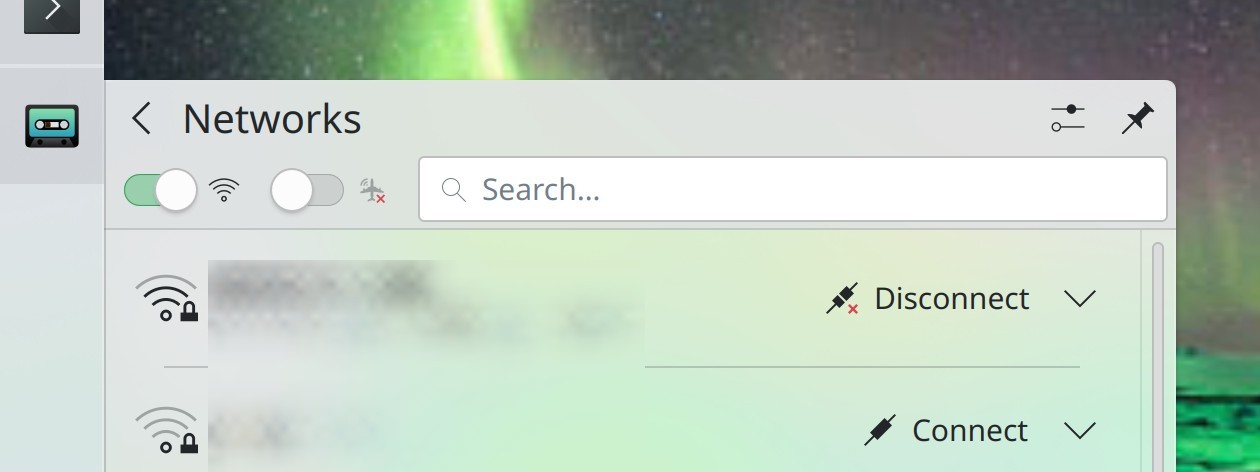
We now use Switches instead of checkboxes for “instant apply” and “on/off” style actions in Plasma widgets, such as the Networks and Bluetooth widgets (Niccolò Venerandi and me, Nate Graham, Plasma 6.0. Link 1, link 2, and link 3):

Networks widget showing switches rather than checkboxes in header area

Now that single-clicking on a desktop in the Overview Effect’s desktop bar only switches desktops with the effect, double-clicking it will now switch desktops and then exit the effect (me: Nate Graham, Plasma 6.0. Link)

Dolphin no longer shows a free space capacity bar for read-only volumes, because for those it isn’t very actionable (Kai Uwe Broulik, Frameworks 6.0 Link)

Significant Bugfixes

(This is a curated list of e.g. HI and VHI priority bugs, Wayland showstoppers, major regressions, etc.)

When Dolphin is configured to remember open tabs on launch, this now works again after it broke recently during the process of fixing a different bug (Méven Car, Dolphin 23.04.2. Link)

Gwenview’s “Open With” menu once again always opens the actual app you specified instead of a different one, after we broke this by removing Gwenview from its own menu, oops (Gwenview 23.04.2. Link)

The Properties dialog for files and folders on the desktop now shows its “Details” tab as expected (Méven Car, Dolphin 23.08. Link)

The “Software Sources” button on Discover’s Settings page now actually works (Aleix Pol Gonzalez, Plasma 5.27.6. Link)

Discover finally shows the versions of updated Flatpak apps in the correct order, for real this time (Aleix Pol Gonzalez, Plasma 5.27.6. Link)

Discover will no longer sometimes show a mysterious error message saying “No metadata URIs for vendor directory” (Aleix Pol Gonzalez, Plasma 5.27.6. Link)

When using a Global Menu, GTK apps now display their menus correctly right after being launched, with no re-focus required (Severin von Wnuck, Plasma 5.27.6. Link)

The global “Window to Next/Previous Screen” actions now send windows to the correct screens again (Natalie Clarius, Plasma 5.27.6. Link)

When using icons themes with non-monochrome action icons, various icons in various Kirigami-based apps are no longer sometimes inappropriately rendered in all black (Alexander Volkov, Frameworks 5.107. Link)

Other bug-related information of interest:

…And everything else

This blog only covers the tip of the iceberg! If you’re hungry for more, check out https://planet.kde.org, where you can find more news from other KDE contributors.

How You Can Help

If you’re a user, upgrade to Plasma 5.27! If your distro doesn’t offer it and won’t anytime soon, consider switching to a different one that ships software closer to its developer’s schedules.

If you’re a developer, please please please start living on Plasma 6 and fixing bugs. It’s usable for daily driving (I’m doing so) but still very much pre-alpha and in need of work to get it into a releaseable state by the end of the year.

Otherwise, visit https://community.kde.org/Get_Involved to discover other ways to be part of a project that really matters. Each contributor makes a huge difference in KDE; you are not a number or a cog in a machine! You don’t have to already be a programmer, either. I wasn’t when I got started. Try it, you’ll like it! We don’t bite!

And finally, KDE can’t work without financial support, so consider making a donation today! This stuff ain’t cheap and KDE e.V. has ambitious hiring goals. We can’t meet them without your generous donations!
These weeks in KDE: no more hidey-hidey authentication dialog games

In addition to the changes made and announced during the recent Plasma Sprint at Tuxedo Computers’ offices in Augsburg, lots of other things have been brewing as well!

New Features

Kate now supports Godot Engine’s Language Server Protocol (Michael Alexsander, Kate 23.08. Link)

In Okular, you can now copy an annotation’s text to the clipboard using the context menu for the annotation’s entry in the annotations sidebar list (Kai Uwe Broulik, Okular 23.04. Link)

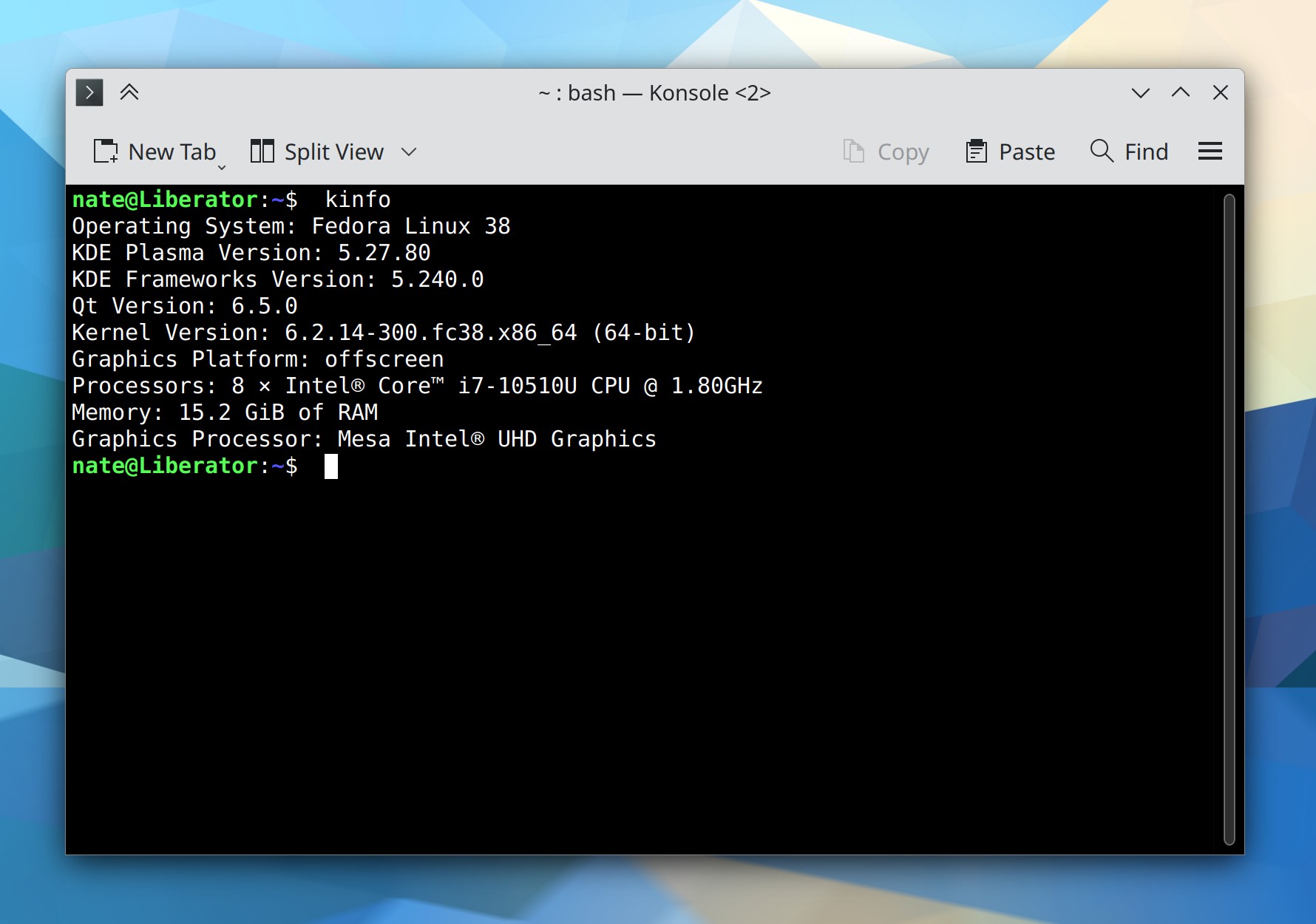
There is now a new kinfo command you can run to dump versions numbers of various software components on the command line, which can be useful for debugging and bug reporting purposes. It displays the same information that’s in Info Center’s “About This System” page (Harald Sitter, Plasma 5.27.5. Link):

KDE Konsole terminal window showing output of the `kinfo` command

To save energy, while the screen is locked, your monitors now turn off sooner than they do when unlocked. This is configurable and defaults to 60 seconds (Méven Car, Plasma 6.0. Link)

You can now middle-click on a color circle in the Plasma Color Picker widget to copy the color code text to the clipboard (Fushan Wen, Plasma 6.0. Link)

You can now hold down the Shift key while adjusting the volume by using a global shortcut or scrolling over the Audio Volume widget to adjust it in 1% increments for finer control (Fushan Wen, Plasma 6.0. Link)

User Interface Improvements

In Spectacle’s annotation UI, it’s now as easy as it was in the 22.12 release to draw a shape with an outline but no fill–for example to draw a perfect circle around something to call attention to it (Noah Davis, Spectacle 23.04.1. Link)

Significantly improved scrolling performance in Elisa when there are a lot of songs in the playlist (Nicolas Fella, Elisa 23.04.1. Link)

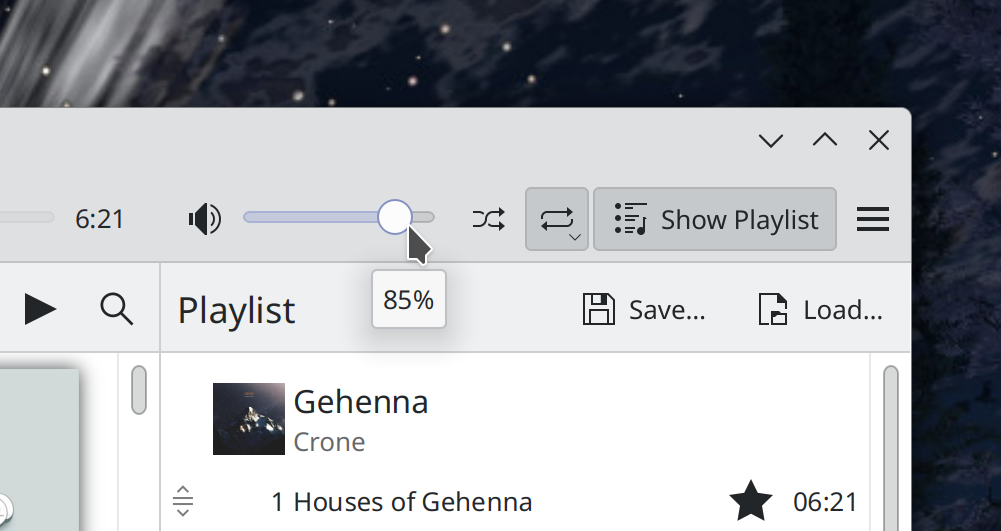
Dragging the volume slider in Elisa now shows a tooltip indicating its current level (Jack Hill, Elisa 23.08. Link):

Elisa main window showing volume level tooltip that says "85%" below volume slider

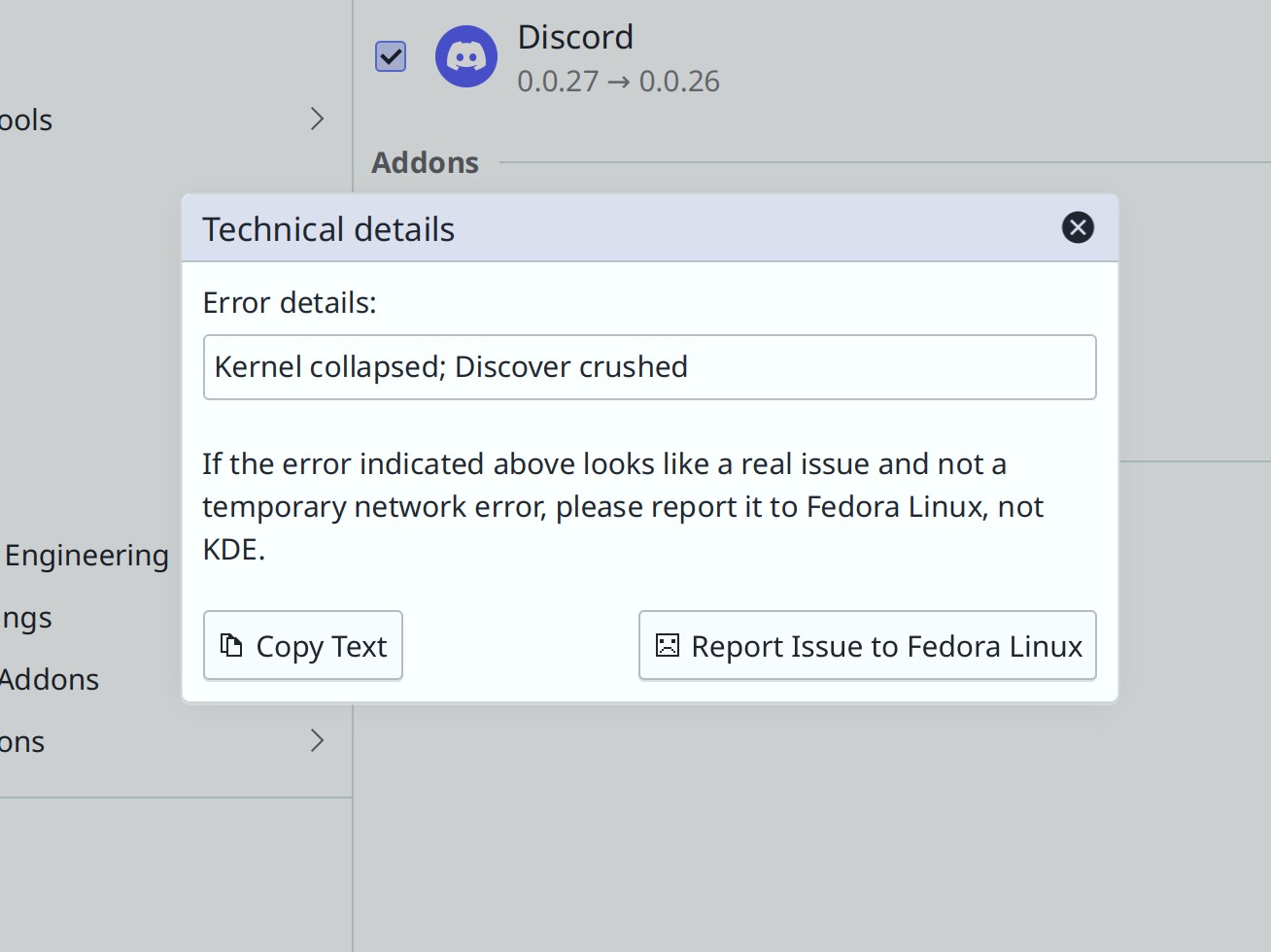
Discover now tries even harder to point you in the first direction (i.e. towards your distro) when there’s an update issue (me: Nate Graham. Plasma 6.0. Link):

Oh look, Discord’s version numbers are reversed again. But this time it wasn’t Discover’s fault and Flathub was actually the culprit!

The thick vertical lines in the Notifications widget no longer look weird with using various non-default Plasma themes, including Oxygen (me: Nate Graham, Plasma 5.27.5. Link)

When an app is forcing Do Not Disturb mode to be enabled, its explanatory text will no longer sometimes show end times in the past (Nicola Smaniotto, Plasma 5.27.5. Link)

In KRunner and other KRunner-powered searches, when the search term matches the starting text of both apps and files, apps are now prioritized (Alexander Lohnau, Plasma 5.27.5. Link)

When you switch Virtual Desktops in the Overview effect by clicking on one of them on the strip at the top, it will now switch to that desktop within the Overview effect itself, and not close immediately (Vlad Zahorodnii, Plasma 6.0. Link)

When you view the QR code for a connected network, it now appears inline in the widget, rather than in a giant full-screen overlay (Kai Uwe Broulik, Plasma 6.0. Link)

In the Breeze Icons theme, the small monochrome versions of the “MS DOS Executable” icons now respect your active color scheme as expected (Michael Alexander, Frameworks 5.106. Link)

The icons shown in the Display Configuration widget and OSD now have consistent stroke widths and levels of detail (me: Nate Graham and Noah Davis, Frameworks 5.106. Link)

Significant Bugfixes

(This is a curated list of e.g. HI and VHI priority bugs, Wayland showstoppers, major regressions, etc.)

In Okular, it’s now possible to “Save As…” when your document has been externally modified or deleted, so you can avoid losing any unsaved changes (me: Nate Graham, Okular 23.04.1. Link)

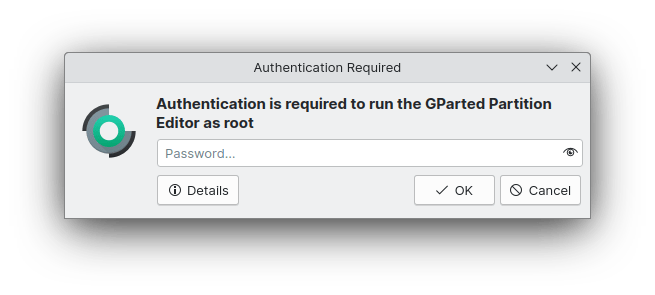
The authentication window will no longer sometimes appear behind the window that requested it, as would often happen when launching Partition Manager (Harald Sitter, Plasma 5.27.5. Link)

In the Plasma Wayland session, fixed a bug that could cause Plasma to repeatedly crash on login with certain combinations of settings (David Redondo, Plasma 5.27.5. Link)

In the Plasma Wayland session, text copied in an app while Klipper is running with sane regular settings is now still paste-able after quitting that app (Tobias Fella, Plasma 5.27.5. Link)

On System Settings’ Night Color page, the text telling you what will happen is no longer truncated when the page is scrollable (me: Nate Graham and Natalie Clarius, Plasma 5.27.5. Link)

In the Plasma Wayland session, basic sticky keys functionality now works! (Nicolas Fella, Plasma 6.0. Link 1, link 2, and link 3)

In the Plasma Wayland session, kinetic scrolling in GTK now works (Vlad Zahorodnii, Plasma 6.0. Link)

In the Plasma Wayland session, searching for the clipboard contents in KRunner with the Alt+Shift+F2 shortcut now works (Ismael Asensio, Plasma 6.0. Link)

Other bug-related information of interest:

Automation & Systematization

Added an autotest for doing modesets in KWin (Xaver Hugl, Plasma 6.0. Link)

Changes not in KDE that affect KDE

When using the Systemd-enabled Plasma boot sequence (which has been the default setting for a year or two), apps set up to autostart will no longer fail to autostart if their .desktop file happens to contain the X-GNOME-Autostart-Phase key (David Edmundson, Systemd 254. Link)

PDFs digitally signed in Okular no longer become locked in Adobe Acrobat such that no one else can sign them (Nicolas Fella, sponsored by TU Dresden, Poppler 23.05.0. Link)

…And everything else

This blog only covers the tip of the iceberg! If you’re hungry for more, check out https://planet.kde.org, where you can find more news from other KDE contributors.

How You Can Help

If you’re a user, upgrade to Plasma 5.27! If your distro doesn’t offer it and won’t anytime soon, consider switching to a different one that ships software closer to its developer’s schedules.

If you’re a developer, consider working on known Plasma 5.27 regressions, or compile Plasma 6 and start working on outstanding issues and porting tasks. You might also want to check out our 15-Minute Bug Initiative. Working on any of these topics makes a big difference quickly!

Otherwise, visit https://community.kde.org/Get_Involved to discover other ways to be part of a project that really matters. Each contributor makes a huge difference in KDE; you are not a number or a cog in a machine! You don’t have to already be a programmer, either. I wasn’t when I got started. Try it, you’ll like it! We don’t bite!

And finally, KDE can’t work without financial support, so consider making a donation today! This stuff ain’t cheap and KDE e.V. has ambitious hiring goals. We can’t meet them without your generous donations!
This week in KDE: The bug slaughterfest continues

Last week’s focus on bugs continues into this week, with the VHI-priority Plasma bugs slashed down to just three! In addition, Plasma 6 UI improvements are starting to land now that it’s stabilized a bit. In fact I’m typing this post from within a Plasma 6 session right now!

User Interface Improvements

In Elisa, double-clicking on a song or clicking its “Play now” button now puts its entire album in the playlist and begins playing from that song (Melissa Autumn and me: Nate Graham, Elisa 23.08. Link)

While annotating a screenshot in Spectacle, annotations now have a nice hover outline so it’s obvious how to select them (Noah Davis, Spectacle 23.08. Link)

In Plasma’s Disks & Devices widget, you’ll no longer see a useless “Mount” action for MTP-connected devices (me: Nate Graham, Plasma 5.27.5. Link)

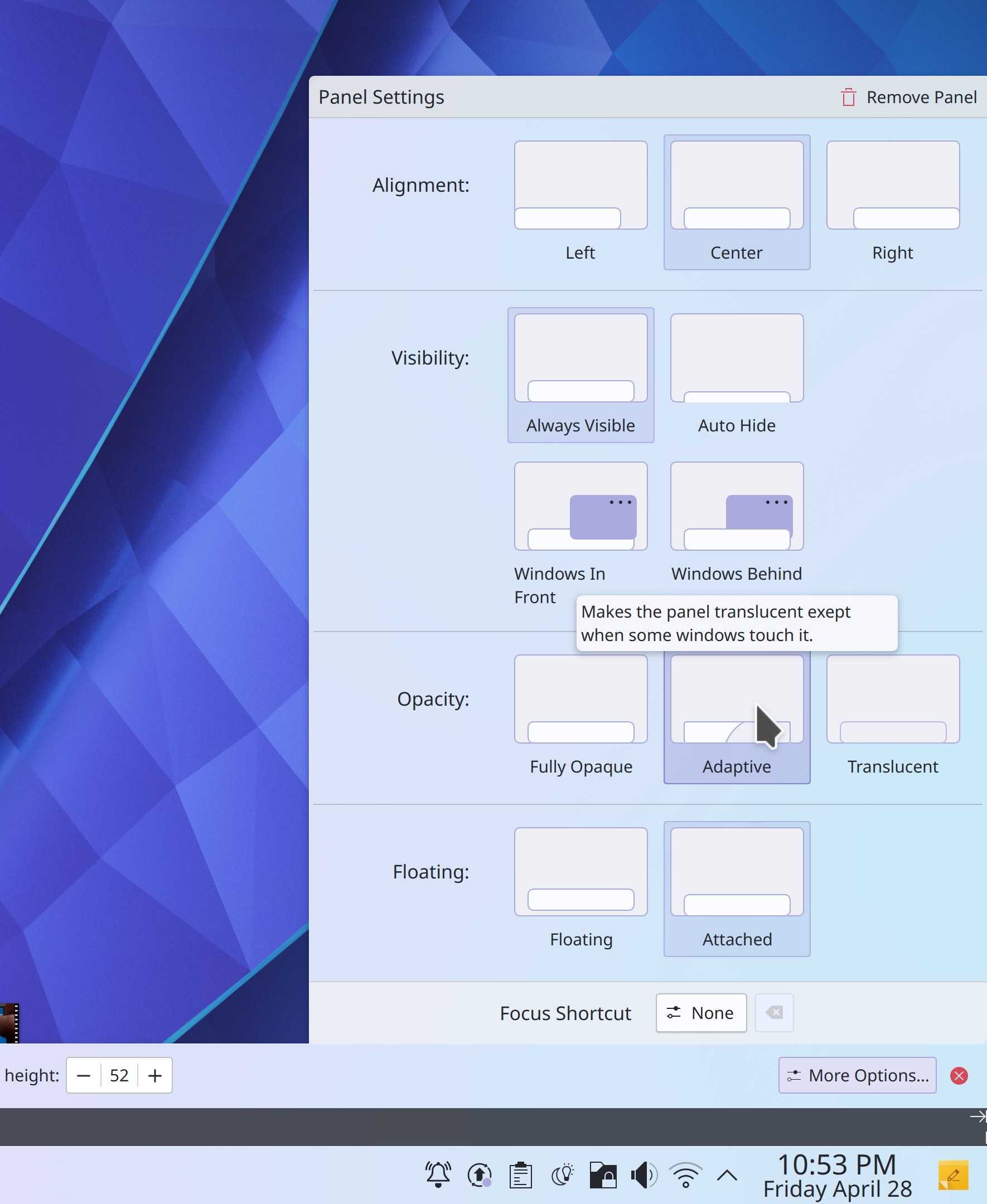
The way you configure your panels is now much more visual, with explanations too! (Tanbir Jishan and Niccolò Venerandi, Plasma 6.0. Link):

Panel Settings dialog with visual depictions of all the different states

Discover now has smarter search behavior, putting more weight on direct title matches and words that appear in the title, rather than the description (Aleix Pol Gonzalez, Plasma 6.0. Link)

Search results in Kickoff are now ordered the same way they are in KRunner and other KRunner-powered searches (Alexander Lohnau, Plasma 6.0. Link)

It’s now possible to do math function s like sqrt() in KRunner without having to prefix the operation with an equals sign (Alexander Lohnau, Plasma 6.0. Link)

When the current wallpaper’s image file is changed on disk, it will update the wallpaper in real-time (Oleg Solovyov, Plasma 6.0. Link)

You can now convert to and from kilometers per hour using the “kph” keyword (June Knauth, Frameworks 5.106. Link)

Significant Bugfixes

(This is a curated list of e.g. HI and VHI priority bugs, Wayland showstoppers, major regressions, etc.)

Dolphin’s selection mode is no longer inappropriately activated or deactivated by the Spacebar key when it’s pressed despite not being the assigned shortcut for that action, or when pressing it while an interactive UI control is focused (Eugene Popov, Dolphin 23.08. Link)

Fixed a recently-introduced source of KWin crashes in the Plasma Wayland session when hovering over Task Manager icons or closing windows (Aleix Pol Gonzalez, Plasma 5.27.5. Link)

System Settings no longer crashes on launch when your Activities database has become corrupted (Ivan Tkachenko, Plasma 5.27.5. Link)

Fixed another cause of screens overlapping by one pixel in multi-screen setups which would cause various other weird bugs (Harald Sitter, Plasma 5.27.5. Link)

When using a multi-screen arrangement, the lock screen’s unlock button now always works on the first click (Harald Sitter, Plasma 5.27.5. Link)

In the Notifications history, long notification title text can no longer sometimes push that notification’s close button partially out of view (Eugene Popov, Plasma 5.27.5. Link)

When connecting a Bluetooth device, the separator line between connected and disconnected devices no longer briefly overlaps the connected device (Harald Sitter, Plasma 5.27.5. Link)

Invisible Breeze-themed progress bars throughout Qt software no longer sometimes consume CPU resources by animating while out of sight (Ivan Tkachenko, Plasma 5.27.5. Link)

Entering paths with spaces in them now works properly in the Properties dialog, Shortcuts page, and Autostart page in System Settings (Bharadwaj Raju, Plasma 5.27.5 and Frameworks 5.106, Link 1, link 2, and link 3)

Fixed a variety of embarrassing layout glitches in KDE software when used with an RTL language (Ivan Tkachenko, Plasma 5.27.5 and Frameworks 5.106. Link 1, link 2, link 3, and link 4)

Fixed a major source of crashes when copying files in Dolphin and other apps (Fushan Wen, Frameworks 5.106. Link)

Other bug-related information of interest:

Automation & Systematization

Re-did the top-level Plasma documentation page for greater clarity (Thiago Sueto, link)

Massively overhauled the Kirigami API documentation for better clarity and style (Matej Starc, link)

…And everything else

This blog only covers the tip of the iceberg! If you’re hungry for more, check out https://planet.kde.org, where you can find more news from other KDE contributors.

How You Can Help

Check out KDE’s new forum at https://discuss.kde.org! This is a great place to ask for help if you’re experiencing an issue that might not necessarily be a bug, and to help others with their own issues.

If you’re a developer, consider working on known Plasma 5.27 regressions! You might also want to check out our 15-Minute Bug Initiative. Working on these issues makes a big difference quickly!

Otherwise, visit https://community.kde.org/Get_Involved to discover other ways to be part of a project that really matters. Each contributor makes a huge difference in KDE; you are not a number or a cog in a machine! You don’t have to already be a programmer, either. I wasn’t when I got started. Try it, you’ll like it! We don’t bite!

And finally, KDE can’t work without financial support, so consider making a donation today! This stuff ain’t cheap and KDE e.V. has ambitious hiring goals. We can’t meet them without your generous donations!
This week in KDE: Stomping all the bugs!

This week was a veritable fiesta of bugfixing, and we cut Plasma’s list of VHI priority bugs nearly in half! Lots of other apps got bug fixes, too. And finally, KDE’s volunteer contributors landed some great new features and UI improvements!

New Features

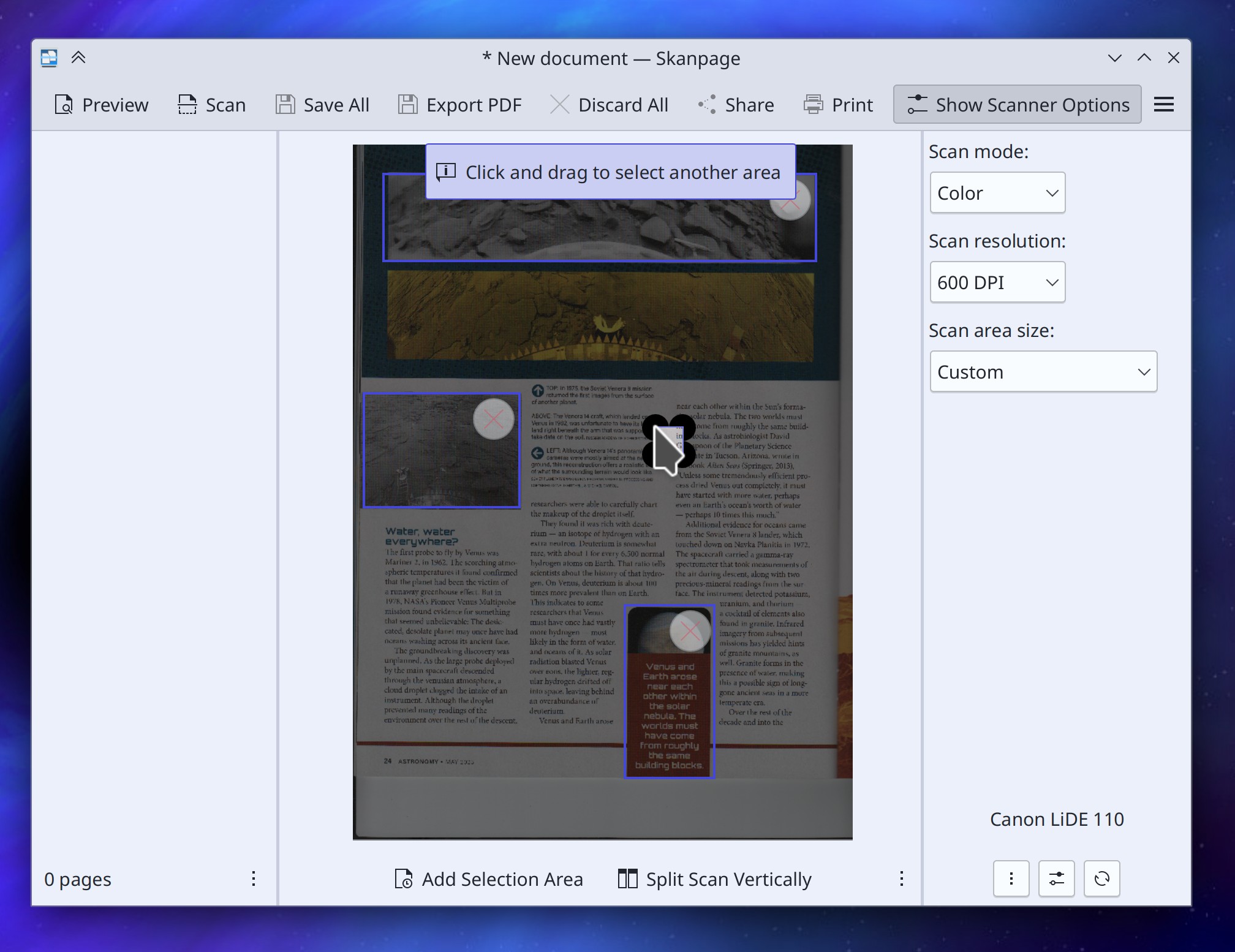
Skanpage now offers a “preview” feature in which you can select multiple specific parts of the image to scan, or automatically split the area into two pages, which can be useful when scanning books (someone going by the pseudonym “John Doe”, Skanpage 23.08. Link):

Skanpage window showing preview scan in center pane with three selected areas and message saying "Click and drag to select another area"

Elisa now supports controlling its Shuffle and Repeat settings via MPRIS, which means that you can now do so via the Media Player widget (Melissa Autumn, Elisa 23.08. Link)

User Interface Improvements

Removed a few less-important items from Gwenview’s Editing Tools sidebar (they’re still present in the menu structure) to make the window fit on a 1366×768 screen again (me: Nate Graham, Gwenview 23.08. Link)

Gwenview no longer appears in its own “Open the image in a different app” menu (Eugene Popov, Gwenview 23.08. Link)

Made various improvements to Gwenview’s Zoom UI: you can now click on any part of the zoom slider to jump to that zoom level, and the zoom combobox is now more keyboard-friendly (Eugene Popov, Gwenview 23.08. Link 1 and link 2)

Plasma Task Manager window previews now display the correct text for windows that don’t show the name of their app in the titlebar or have been customized by the user (me: Nate Graham and Fushan Wen, Plasma 5.27.5. Link)

Refined the way that estimated battery life is calculated to improve its accuracy (Stefan Brüns, Plasma 5.27.5. Link)

Significant Bugfixes

(This is a curated list of, e.g. HI and VHI priority bugs, Wayland showstoppers, major regressions, etc.)

Filelight no longer sometimes fails to launch when your disk is full, which was kind of bad since it’s a tool you can use to see what’s taking up all your space and clean it out (Harald Sitter, Filelight 23.04.1. Link)

In the Plasma X11 session, “Open containing folder” functionality in various apps is now Virtual Desktop- and Activity-aware, meaning you’ll no longer have the experience of an already-open instance of Dolphin in a different Virtual Desktop or Activity becoming focused and switched to. Wayland support will happen later as it requires deeper changes (Méven Car, Dolphin 23.04.1. Link)

Spectacle’s Rectangular Region selector now works properly when using a multi-monitor setup with at least one monitor having a scale factor below 100% (Noah Davis, Spectacle 23.04.1. Link)

Made various UI fixes to Skanpage, so now the “rotate image” buttons rotate the image in the expected directions, and the OCR language list view is scrollable if need be (me: Nate Graham, Skanpage 23.04.1. Link 1 and link 2)

You can no longer crash Dolphin by repeatedly entering and exiting Selection Mode quickly (Felix Ernst, Dolphin 23.08. Link)

In the Plasma Calendar’s “Months” views, months are no longer sometimes randomly and mysteriously missing their names (Harald Sitter, Plasma 5.27.5. Link)

Fixed several ways that Plasma could crash after getting into an inconsistent state when using certain types of multi-monitor setups (Harald Sitter, Plasma 5.27.5. Link 1 and link 2)

Fixed a subtle UI glitch that could cause imported VPN configurations to not be saved to disk unless another setting was also changed at the same time… no longer! (Nicolas Fella, Plasma 5.27.5. Link)

Mouse acceleration profiles now work properly when using Libinput 1.3 or later (Ilia Kats, Plasma 5.27.5. Link)

Fixed a variety of significant bugs found in System Settings’ Flatpak Permissions page: it no longer sometimes generates a broken overrides config; custom environment variable support has been fixed enough that we’ve re-enabled the feature; adding new filesystem paths no longer sometimes interferes with the state of other items in the list; and the “read-write” option of “All User Files” no longer sometimes disappears (Ivan Tkachenko, Plasma 5.27.5. Link 1, link 2, link 3, and link 4)

Fixed a way that your screen arrangement priorities could end up getting scrambled under certain circumstances (Harald Sitter, Plasma 5.27.5. Link)

Middle-clicking various things–including KWin-drawn titlebars–can no longer sometimes randomly crash the app that draws the thing you middle-clicked (David Redondo, Frameworks 5.106. Link)

Fixed an issue that could cause apps and Plasma to hang when using them to move a lot of files at once (Harald Sitter, Frameworks 5.106. Link)

Plasma no longer crashes when playing certain YouTube videos in a browser using Plasma Browser Integration, sometimes also when behind a proxy (Fushan Wen, Frameworks 5.106. Link)

Other bug-related information of interest:

…And everything else

This blog only covers the tip of the iceberg! If you’re hungry for more, check out https://planet.kde.org, where you can find more news from other KDE contributors.

How You Can Help

If you’re a user, upgrade to Plasma 5.27! If your distro doesn’t offer it and won’t anytime soon, consider switching to a different one that ships software closer to its developer’s schedules.

If you’re a developer, consider working on known Plasma 5.27 regressions! You might also want to check out our 15-Minute Bug Initiative. Working on these issues makes a big difference quickly!

Otherwise, visit https://community.kde.org/Get_Involved to discover other ways to be part of a project that really matters. Each contributor makes a huge difference in KDE; you are not a number or a cog in a machine! You don’t have to already be a programmer, either. I wasn’t when I got started. Try it, you’ll like it! We don’t bite!

And finally, KDE can’t work without financial support, so consider making a donation today! This stuff ain’t cheap and KDE e.V. has ambitious hiring goals. We can’t meet them without your generous donations!
This week in KDE: “Make multi GPU not suck”

This week a lot of bugs and other issues got fixed, including a major overhaul of KWin’s multi-GPU infrastructure for Intel and AMD GPUs in Plasma 6 to make it “not suck” anymore! Big thanks to Xaver Hugl for this impactful work.

And here’s a sampling of other cool work:

New features

When performing an action that would otherwise automatically activate a window on another virtual desktop, there’s now an option to not switch to it at all. This can be useful for workflows such as opening a lot of links from an email client in a web browser located on another desktop, because then you won’t have to re-focus the email client after every link you open (Nicolas Fella, Plasma 6.0. Link)

User Interface Improvements

The “Highlight Changed Settings” feature in System Settings now works on the Flatpak Permissions page (Ivan Tkachenko, Plasma 5.27.5. Link)

The Emoji Selector window is now significantly faster to appear when you launch it with Meta+. (Fushan Wen, Plasma 5.27.5. Link)

Authentication dialogs now have a streamlined style to better focus the parts that matter (Devin Lin, Plasma 6.0. Link):

When a Folder View widget is using its popup list form, its items are now always opened with a single click because this is a menu style UI and menu items are always activated with a single click (me: Nate Graham, Plasma 6.0. Link)

On the System Settings’ KWin Rules page, various properties’ settings are now explained much more clearly (me: Nate Graham and Ismael Asensio, Plasma 6.0. Link 1, link 2, and link 3)

The Breeze icon theme now includes icons for .abc Alembic files (Áron Kovács, Frameworks 5.106. Link)

Significant Bugfixes

(This is a curated list of e.g. HI and VHI priority bugs, Wayland showstoppers, major regressions, etc.)

In the Plasma Wayland session, Spectacle is now faster to take screenshots and never ever ever includes its main window in screenshots that it takes (Noah Davis, Spectacle 23.04 with Plasma 5.27.4.1 or newer. Link)

Setting screen refresh rates higher than 60Hz when using AMD GPUs is once again possible, working around an issue in the open-source AMD drivers (Xaver Hugl, Plasma 5.27.4.1. Link)

Fixed a major memory leak that could, under certain circumstances, quickly gobble up all memory when an external display was plugged in (Harald Sitter, Plasma 5.27.5. Link)

When an offline system update fails, you’ll no longer be endlessly notified about it on login even after you click the “Repair System” button in the notification that Discover shows you about it (Aleix Pol Gonzalez and me: Nate Graham. Link 1 and link 2)

Discover no longer sometimes mixes up the order of the “from” and “to” version numbers for Flatpak apps, or incorrectly states that an upgrade from one version to the next one is a refresh of the existing version–though sometimes it actually is a refresh of the existing version, so it isn’t always a bug when you see this (Ismael Asensio, Plasma 5.27.5. Link)

Fixed a cause of excessive memory usage that could even crash Plasma when using KRunner to search for unusual things (Fushan Wen, Plasma 5.27.5. Link)

Widgets can now be properly centered between two flexible Panel spacers places on vertical panels, not just horizontal panels (Niccolò Venerandi, Plasma 5.27.5. Link)

Discover now succeeds at applying several types of firmware updates that would trip it up before (Aleix Pol Gonzalez, Plasma 5.27.5. Link)

Other bug-related information of interest:

…And everything else

This blog only covers the tip of the iceberg! If you’re hungry for more, check out https://planet.kde.org, where you can find more news from other KDE contributors.

How You Can Help

If you’re a user, upgrade to Plasma 5.27! If your distro doesn’t offer it and won’t anytime soon, consider switching to a different one that ships software closer to its developer’s schedules.

If you’re a developer, consider working on known Plasma 5.27 regressions! You might also want to check out our 15-Minute Bug Initiative. Working on these issues makes a big difference quickly!

Otherwise, visit https://community.kde.org/Get_Involved to discover other ways to be part of a project that really matters. Each contributor makes a huge difference in KDE; you are not a number or a cog in a machine! You don’t have to already be a programmer, either. I wasn’t when I got started. Try it, you’ll like it! We don’t bite!

And finally, KDE can’t work without financial support, so consider making a donation today! This stuff ain’t cheap and KDE e.V. has ambitious hiring goals. We can’t meet them without your generous donations!
This week in KDE: All about the apps

This week some of your favorite KDE apps got lots of positive changes! Dolphin, Kate, Okular, Elisa, Partition Manager, and Filelight all received some nice improvements.

In the background, Plasma 6 porting work continues. I’ve now got a working Plasma 6 dev session on my machine. It’s still rough, but it’s usable. Now I can see why more experienced contributors predicted the need to skip a release and give the initial Plasma 6 release at least an 8 month dev cycle, not a 4-month one. But fear not; it’s happening!

New Features

When Dolphin is in split view mode, there are now context menu items and keyboard shortcuts to let you quickly move or copy items to the opposite view (Méven Car, Dolphin 23.08. Link)

Links in files open in Kate are now clickable! (Waqar Ahmed, Kate 23.08. Link)

Note that for now this requires you to manually enable to “Open link” plugin, which is shipped by default but left disabled

User Interface Improvements

Partition Manager now finally has its own icon, instead of re-using Filelight’s icon (Gerson Alvarado, Partition Manager 23.08 and Frameworks 5.106. Link):

Filelight’s default window size is no longer too large to fully fit on a 1366×768 screen (me: Nate Graham, Filelight 23.04. Link)

Dolphin once again tries to tell you what to do instead of running it with sudo (me: Nate Graham, Dolphin 23.04. Link):

Terminal window showing the message: Running Dolphin with sudo is not supported as it can cause bugs and expose you to security vulnerabilities. Instead, install the `kio-admin` package from your distro and use it to manage root-owned locations by right-clicking on them and selecting "Open as Administrator".

Improved the RTL layout and focus indicator lines in various types of Breeze-themed buttons, checkboxes, and radio buttons (Ivan Tkachenko, Plasma 5.27.4. Link 1, link 2, and link 3)

Scrolling on the Task Manager and Pager widgets now works more reliably when you sometimes scroll using a touchpad and sometimes using a mouse wheel (Prajna Sariputra, Plasma 5.27.5 Link 1 and link 2)

You can now press-and-hold with a touchscreen to open a context menu for System Tray icons (Fushan Wen, Plasma 5.27.5. Link)

Scrolling over the Audio Volume, Media Player, and Battery & Brightness widgets now always raises or lowers the volume and brightness based on the direction of the scroll rather than respecting the natural/inverted scroll direction setting (Vlad Zahorodnii and me: Nate Graham, Plasma 6.0. Link 1 and link 2)

Streamlined the appearance of the “cool Plasma features” pages in Welcome Center (Oliver Beard, Plasma 6.0. Link):

Plasma Welcome window showing "Open Settings…"button in header area

When showing the logout screen by pressing the power button or Ctrl+Alt+Del, it now defaults to pre-selecting the “Shut down” action by default, rather than “Log out” (me: Nate Graham, Plasma 6.0. Link)

Significant Bugfixes

(This is a curated list of e.g. HI and VHI priority bugs, Wayland showstoppers, major regressions, etc.)

Fixed a way that Okular could crash when you try to save changes made after filling out forms in a document (Albert Astals Cid, Okular 23.04. Link)

When using Elisa in a language other than English, cover overlay “Play” and “Add to Playlist” buttons now immediately work on startup (Matthieu Gallien, Elisa 23.04. Link)

Fixed a complex multi-monitor bug involving misbehavior with KVM/headless setups that can sometimes prompt people to work around the issue by purchasing and using a bi-directional EDID emulator gizmo (Kai Li, Plasma 5.27.5. Link)

Fixed a recent regression in the size and sharpness of GTK CSD windows’ minimize, maximize, and close buttons when not using any scaling (Fushan Wen, Plasma 5.27.5. Link)

System Monitor sensors that use the “watt-hour” unit now display the unit correctly (Kai Uwe Broulik, Plasma 5.27.5. Link 1 and link 2)

On Info Center’s Networks page, the Refresh button now actually works (Harald Sitter, Plasma 5.27.5. Link)

Dragging from empty areas of the toolbar in Discover and many other Kirigami-based apps now always works, rather than only working on some pages/views and not others (Marco Martin, Kirigami 5.106. Link)

And last but not least… fixed a major source of the infamous Dolphin bug where folders don’t update in real-time when contents are modified in another app (Méven Car, Frameworks 5.106. Link)

Other bug-related information of interest:

Automation & Systematization

Added an autotest to test the various different ways that items can be opened in Dolphin (Felix Ernst, Link)

When you try to change translated text in a KDE git repo, a git hookscript now stops you, because translations are handed elsewhere and merged into the git repos via an automated process (Ben Cooksley, Link)

Changes not in KDE that affect KDE

Logging out of a Wayland session (not shutting down or rebooting, just logging out) now works as expected (Fabian Vogt, SDDM 0.20. Link)

…And everything else

This blog only covers the tip of the iceberg! If you’re hungry for more, check out https://planet.kde.org, where you can find more news from other KDE contributors.

How You Can Help

If you’re a user, upgrade to Plasma 5.27! If your distro doesn’t offer it and won’t anytime soon, consider switching to a different one that ships software closer to its developer’s schedules.

If you’re a developer, consider working on known Plasma 5.27 regressions! You might also want to check out our 15-Minute Bug Initiative. Working on these issues makes a big difference quickly!

Otherwise, visit https://community.kde.org/Get_Involved to discover other ways to be part of a project that really matters. Each contributor makes a huge difference in KDE; you are not a number or a cog in a machine! You don’t have to already be a programmer, either. I wasn’t when I got started. Try it, you’ll like it! We don’t bite!

And finally, KDE can’t work without financial support, so consider making a donation today! This stuff ain’t cheap and KDE e.V. has ambitious hiring goals. We can’t meet them without your generous donations!
This week in KDE: it’s the little things that count

This week a lot of people made a lot of fixes and improvements to a lot of small-to-medium yet longstanding issues. I challenge any reader to read through the whole post and not find any instances of things that had been annoying them being fixed this week!

New Features

Skanpage now lets you customize its keyboard shortcuts (Someone going by the pseudonym “John Doe”, Skanpage 23.08. Link)

Kate now includes a QML language server option when using Qt 6 (Magnus Groß, Kate 23.08. Link)

User Interface Improvements

Gwenview now only inhibits sleep and screen locking during a slideshow while the app is in the foreground (Nikita Karpei, Gwenview 23.04. Link)

Star rating widgets in Elisa are now focusable and usable with the keyboard (Ivan Tkachenko, Elisa 23.08. Link)

KDialog dialogs no longer append ” – KDialog” to their window titles when showing a custom user-provided title (me: Nate Graham, KDialog 23.08. Link)

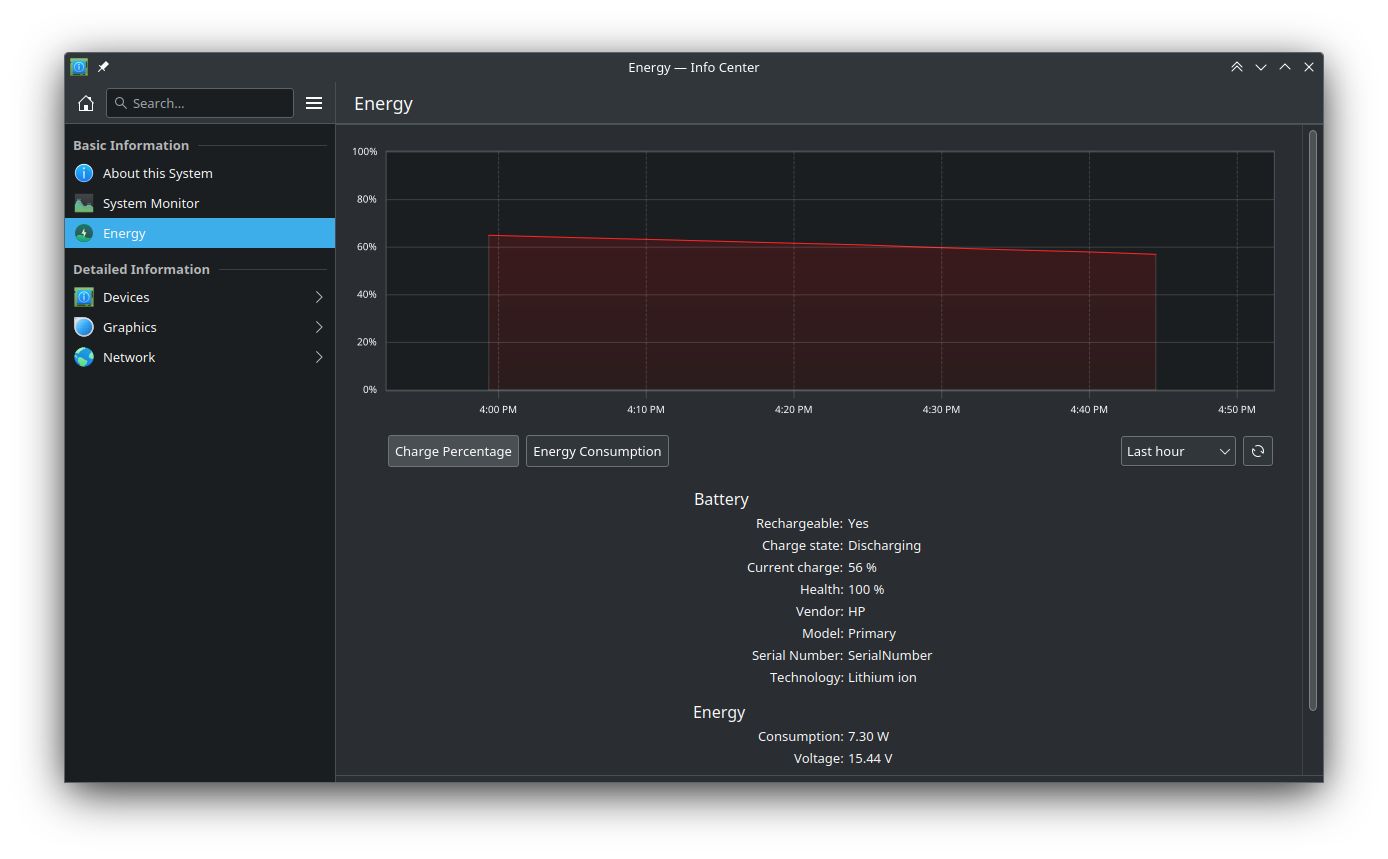
Energy usage graphs in Info Center are now a bit more readable when using a dark color scheme (Prajna Sariputra, Plasma 5.27.4. Link):

Info Center with dark color scheme showing energy graph with more readable light colored separator lines

Discover no longer sends notifications for available updates when it’s already running (Aleix Pol Gonzalez, Plasma 5.27.4. Link)

Discover now provides better feedback in the main window when asked to delete user data for no-longer-installed Flatpak apps (Aleix Pol Gonzalez, Plasma 6.0. Link)

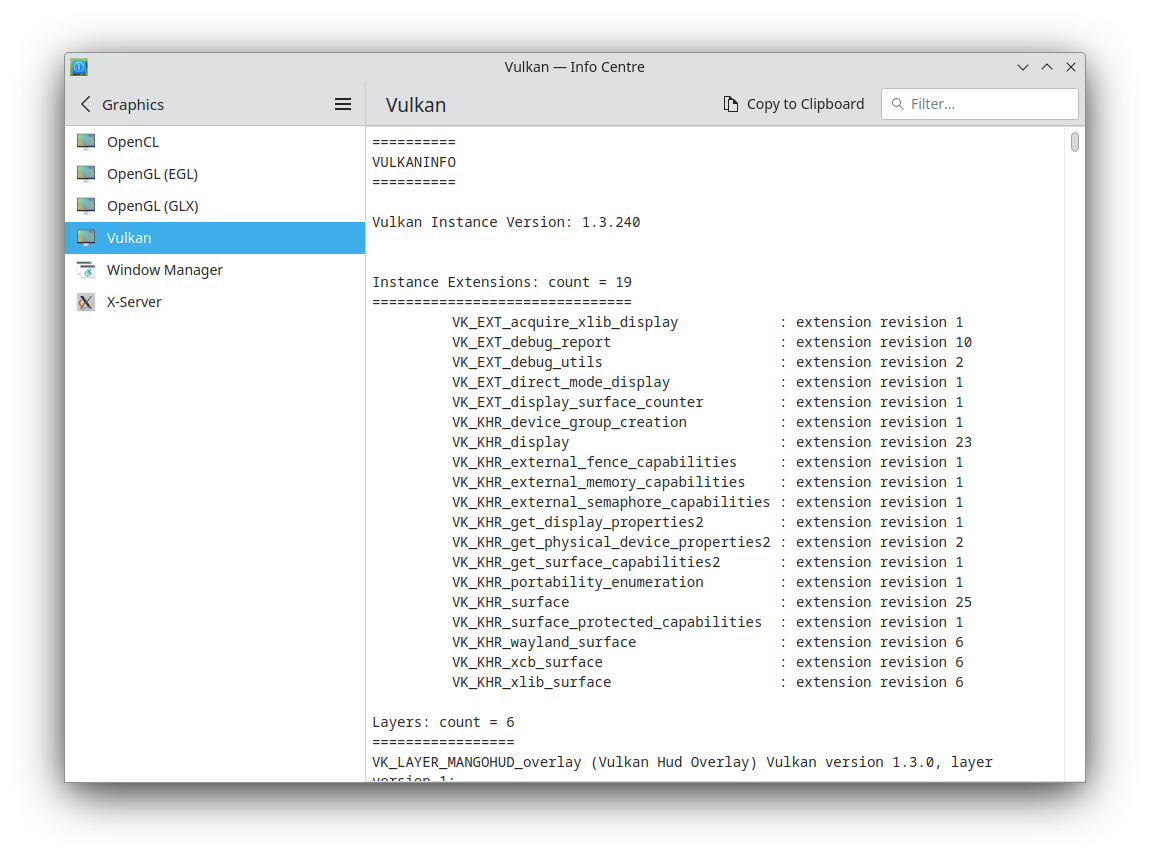
In Info Center, page footers have now been moved to the header area for a more streamlined appearance (Oliver Beard, Plasma 6.0. Link):

Info Center showing Filter field and "Copy to Clipboard" button in the header, rather than a footer

Notifications sent by Flatpak apps no longer play a sound by default (Nicolas Fella, Frameworks 5.105. Link)

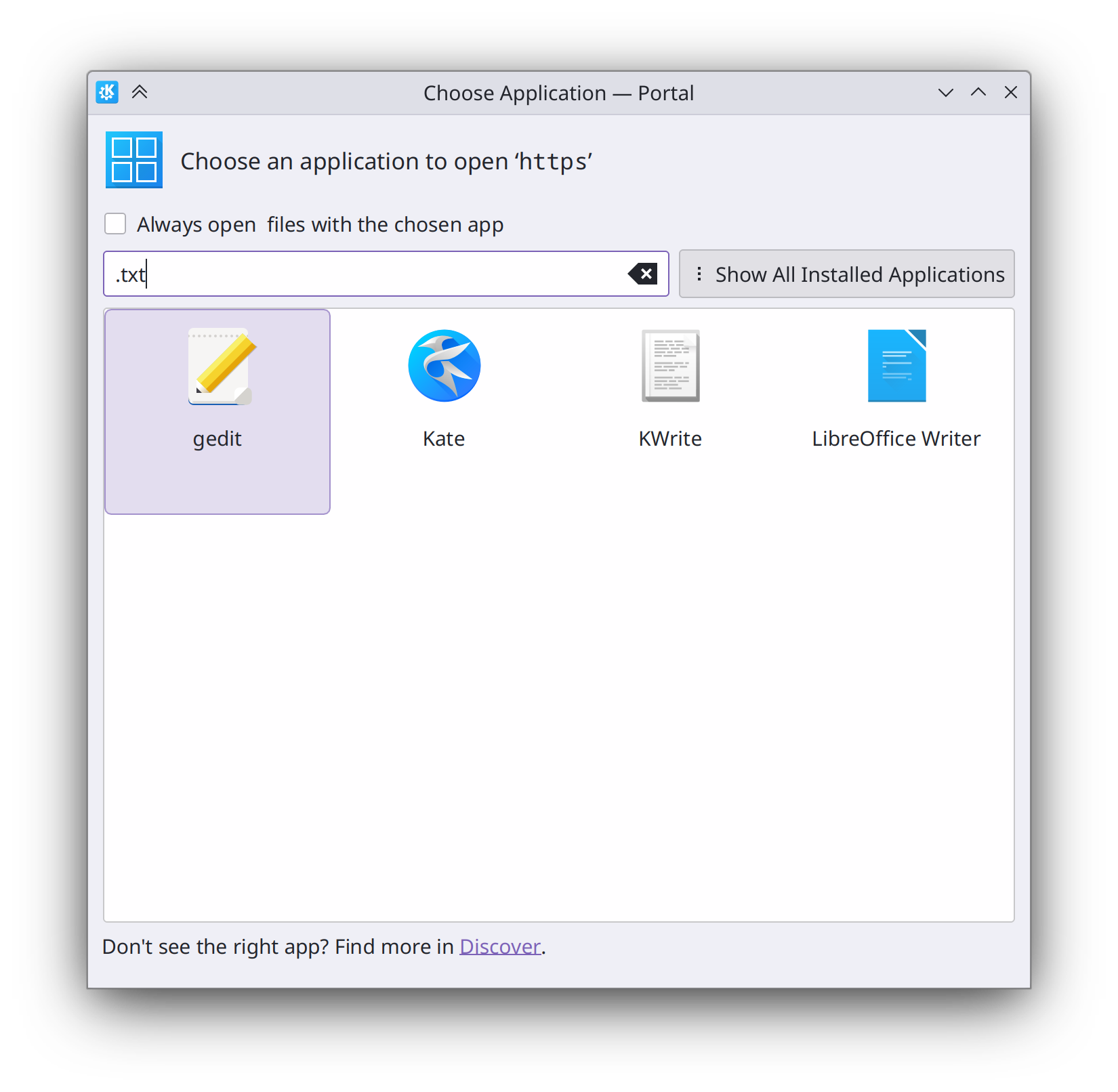
The portal-based app chooser window can now additionally match apps based on their generic names and the filename extensions and mimetypes they support (Fushan Wen, Plasma 6.0. Link):

Portal-based "Choose Application" dialog showing text editors in the view, filtered down by searching for ".txt" in the search field

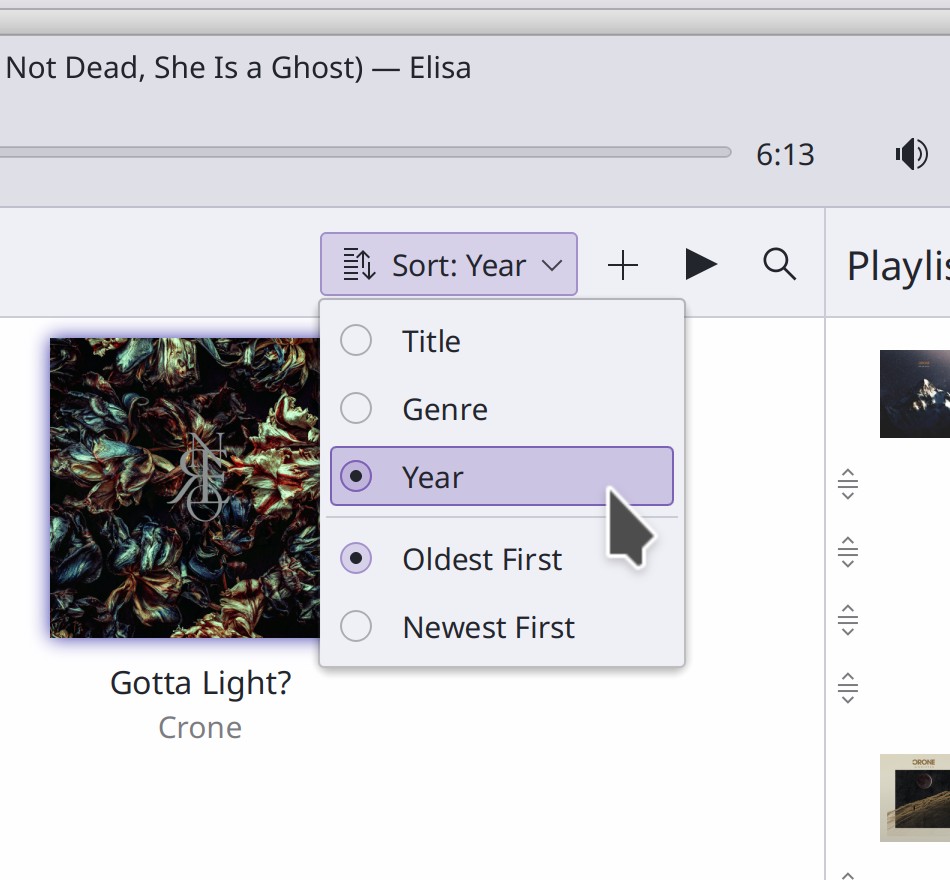
In various Kirigami-based apps, menus with mutually exclusive items now show the correct control–a radio button rather than a checkbox (Ivan Tkachenko, Elisa 23.04 and Frameworks 5.105. Link 1 and link 2):

Elisa sort menu showing two groups of mutually-exclusive items with radio buttons

Installed Flatpak apps from Flathub now respect the Breeze icon theme (Alois Wohlschlager, Frameworks 5.105. Link)

Significant Bugfixes

(This is a curated list of e.g. HI and VHI priority bugs, Wayland showstoppers, major regressions, etc.)

Fixed the common and infamous crash in Gwenview when quickly rotating an image multiple times in a row (Nikita Karpei, Gwenview 23.04. Link)

Pressing the PrintScreen key to take a new screenshot while Spectacle’s main window is already running now works again (Noah Davis, Spectacle 23.04. Link)

When browsing files on an Android devices using the mtp: protocol, it’s now possible to modify files on the device (Harald Sitter, kio-extras 23.08. Link)

Fixed a common source of KWin crashes in the Plasma Wayland session when certain external screens turn off on their own after being disabled and re-enabled by something (Aleix Pol Gonzalez, Plasma 5.27.4. Link)

Fixed a source of kded5 crashes when switching screens (Luca Bacci, Plasma 5.27.4. Link)

Discover is now massively faster and more responsive when a lot of system updates are available (Aleix Pol Gonzalez, Plasma 5.27.4. Link)

When a GTK headerbar app themed with the Breeze GTK theme is maximized, the top-right-most pixel in the screen now triggers its close button (Fushan Wen, Plasma 5.27.4. Link)

In the Plasma Wayland session, the scroll speed setting now works again (me: Nate Graham, Plasma 5.27.4. Link)

In the Plasma Wayland session, switching global themes now immediately updates the colors of running GTK apps, without the need to restart them (Fushan Wen, Plasma 5.27.4. Link)

The Baloo file indexing service will no longer pointlessly try to index files in Python virtualenv folders (Ayush Mishra, Frameworks 5.105. Link)

Other bug-related information of interest:

Changes not in KDE that affect KDE

Chromium now supports the fractional-scale-v1 Wayland protocol, which will allow native Wayland apps based on Chromium (e.g. Chrome and Electron apps) to eventually have proper fractional scale support in the Plasma Wayland session (Thomas Anderson, Chromium 113. Link)

Blender now also supports the fractional-scale-v1 Wayland protocol! (Campbell Barton, Link)

…And everything else

This blog only covers the tip of the iceberg! If you’re hungry for more, check out https://planet.kde.org, where you can find more news from other KDE contributors.

How You Can Help

If you’re a developer, consider working on known Plasma 5.27 regressions! You might also want to check out our 15-Minute Bug Initiative. Working on these issues makes a big difference quickly!

Otherwise, visit https://community.kde.org/Get_Involved to discover other ways to be part of a project that really matters. Each contributor makes a huge difference in KDE; you are not a number or a cog in a machine! You don’t have to already be a programmer, either. I wasn’t when I got started. Try it, you’ll like it! We don’t bite!

And finally, KDE can’t work without financial support, so consider making a donation today! This stuff ain’t cheap and KDE e.V. has ambitious hiring goals. We can’t meet them without your generous donations!