This week in KDE: Akademy approaches

This week was a bit on the slow side as people are on vacation and preparing for Akademy 2023, which begins next week! Nevertheless progress on Plasma 6 continued, with a notable uptick in open bug reports as a result of more people testing it out, which is good! If you haven’t tried it yet, please do! Progress was also made on fixing existing known issues too.

Plasma 6

General infoOpen issues: 63

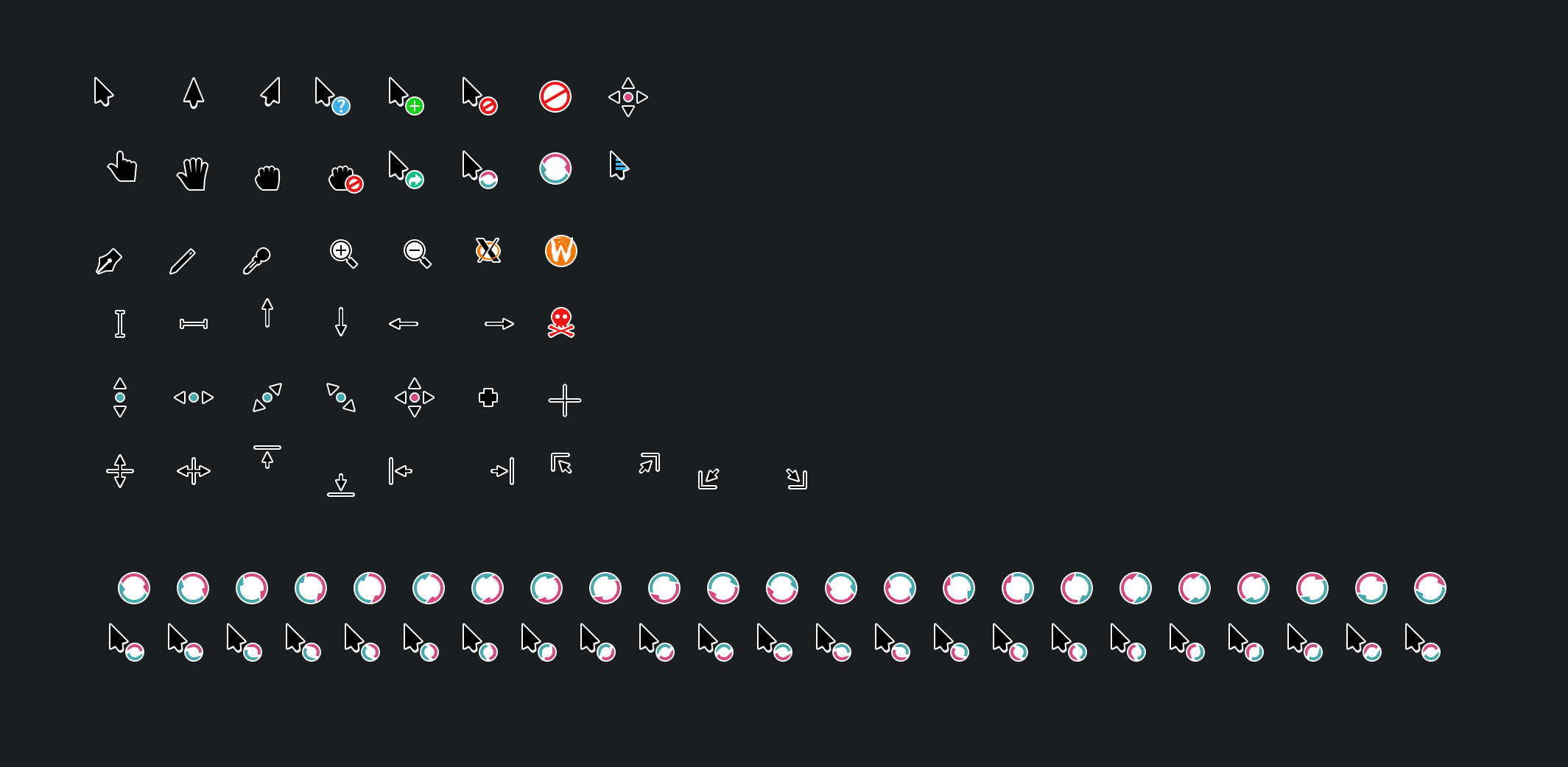
The Breeze cursor theme has received a visual overhaul to make it nicer looking and more consistent with how Breeze style evolved over the course of Plasma 5! (Manuel Jesús de la Fuente, link):
When not using the “Include Desktop” feature, Alt+Tab Task Switchers no longer appear when invoked but there are no windows open, or only one window is open (Daniel Lipovetsky, link)

The keyboard shortcut used to trigger the Mouse Mark effect can now be customized (Andrew Shark, link)

User Interface Improvements

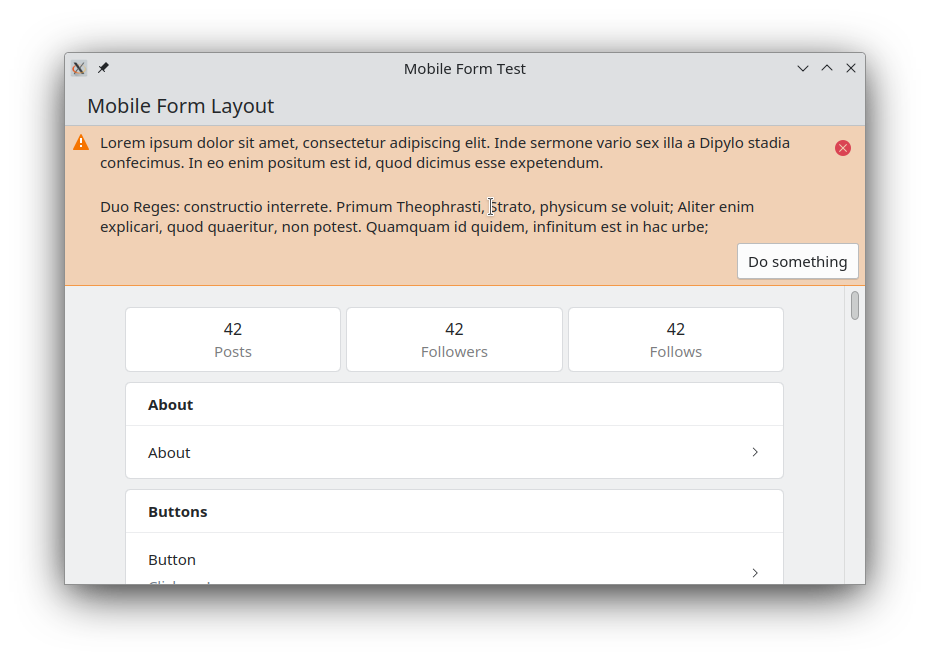
Created a new Kirigami component to display banners at the top of app windows and views. We were previously using the Kirigami.InlineMessage component for this, but it was complicated to implement in a way that looked acceptable in that spot, and even then it never looked quite right. The new frameless banner component looks much better! Expect to see it show up in Kirigami-based apps over the coming months and years. (Carl Schwan, link):
Significant Bugfixes

(This is a curated list of e.g. HI and VHI priority bugs, Wayland showstoppers, major regressions, etc.)

Fixed a performance issue in Okular that could cause poor performance and memory pressure when zooming in (Max Müggler, Okular 23.08. Link)

Fixed an issue that could cause severe screen distortion in the Plasma Wayland session when using certain multi-GPU graphics setups (Xaver Hugl, Plasma 5.27.7. Link)

Fixed an issue that could cause all connected screens to be marked as “primary” under certain circumstances (Ivan Tkachenko, Plasma 5.27.7. Link)

Fixed a way that KWin could crash in the Plasma Wayland session after using the clipboard under certain circumstances (David Edmundson, Plasma 6.0. Link)

Fixed a major recent regression that had the effect of causing the target of a symlink to be moved or copied instead of the link itself (Harald Sitter, Frameworks 5.108. Link)

Editing files using kio-admin no longer unexpectedly changes their permissions (Harald Sitter, Frameworks 5.108. Link)

Fixed a way that Plasma could sometimes crash when closing all running apps by middle-clicking on their Task manager icons (Harald Sitter, Frameworks 5.108. Link)

Other bug-related information of interest:

Web Presence

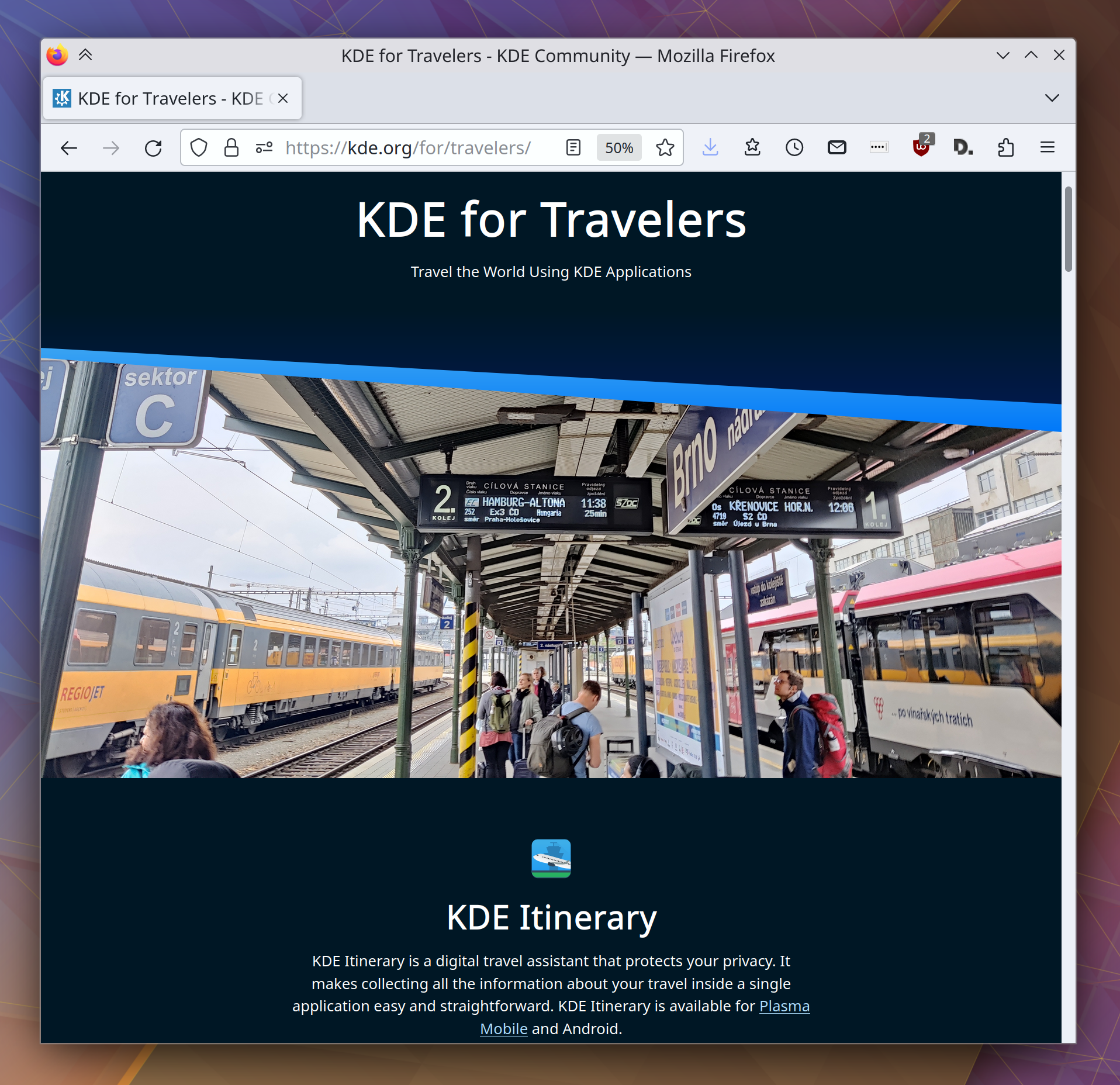
Released another “KDE for” page, this time for frequent travelers (Carl Schwan and the KDE Promo team):
Automation & Systematization

Added a unit test for parsing NVIDIA GPU driver stats, so that we can catch regressions caused by the NVIDIA driver itself earlier (David Redondo, link)

…And everything else

This blog only covers the tip of the iceberg! If you’re hungry for more, check out https://planet.kde.org, where you can find more news from other KDE contributors.

How You Can Help

If you’re a developer, work on Qt6/KF6/Plasma 6 issues! Plasma 6 is usable for daily driving now, but still in need of bugfixing and polishing to get it into a releaseable state by the end of the year.

Otherwise, visit https://community.kde.org/Get_Involved to discover other ways to be part of a project that really matters. Each contributor makes a huge difference in KDE; you are not a number or a cog in a machine! You don’t have to already be a programmer, either. I wasn’t when I got started. Try it, you’ll like it! We don’t bite!

And finally, KDE can’t work without financial support, so consider making a donation today! This stuff ain’t cheap and KDE e.V. has ambitious hiring goals. We can’t meet them without your generous donations!

This week in KDE: major plumbing work in Plasma 6

This week Plasma 6 underwent some major refactoring to the fundamental Plasma widget APIs to modernize them and make it harder to introduce errors when developing new widgets. Since almost everything in Plasma is a widget, this necessitated a lot of changes and QA. After a month of work, it’s now done! The user-facing side is nil (ideally nobody will notice anything), but there are some changes that developers will need to be aware of to port their widgets. Most widgets already needed to be ported anyway due to Qt changes, but hopefully this won’t add much else. A porting guide has already been written and can be found here. This work was done by Marco Martin, with me providing QA support.

On that subject, we got a lot more organized about Plasma 6 this week. We now centrally track status on a new wiki page that shows the outstanding issues and notable changes. I’m starting to feel like I see a light at the end of the tunnel! While I’ve had to use the X11 Plasma 6 session because the Wayland one is still a bit too unstable for me to feel productive, the X11 session now feels barely buggier than the Plasma 5 X11 session. It’s really quite nice at this point.

This came up in the comment threads of last week’s post, but the more people test and contribute to Plasma 6, the better the final release will be. Neon Unstable now offers Plasma 6 by default, making it a good testing platform for the adventurous. Especially if you have a heavily customized setup or use exotic hardware, please try it out and submit bug reports! Make sure to apply the “qt6” keyword to them.

User Interface Improvements

Many significant UI improvements to Skanpage, including drag-and-drop page re-ordering, better keyboard shortcuts, and better error reporting (Someone going by the pseudonym “John Doe”, Skanpage 23.08. Link)

Okular no longer bugs you when you save a document that was deleted on disk; it simply re-saves it as instructed (me: Nate Graham, Okular 23.08. Link)

The context menu actions of the Dictionary Widget are now more relevant and have icons (Laurent Montel, Plasma 6.0. Link):

Significant Bugfixes

(This is a curated list of e.g. HI and VHI priority bugs, Wayland showstoppers, major regressions, etc.)

KRunner no longer sometime crashes when trying to calculate certain math expressions, or simply when typing numbers in general (Max Ramanouski, Plasma 5.27.6. Link)

The final change just went in for making sure that Discover always gets the version numbers right for updatable Flatpak apps (Ismael Asensio, Plasma 5.27.6. Link)

When using a fractional scale factor in the Plasma Wayland session, you should no longer see line glitches all over the place (Matthias Dahl, Plasma 5.27.6. Link)

Fixed the “Add New Page” dialog in System Monitor to not be visually broken when using a language with longer translated strings than English (me: Nate Graham, Plasma 5.27.6. Link)

In the Plasma Wayland session, when adding a second keyboard layout, the Keyboard layout System Tray icon now appears immediately (Marco Martin, Plasma 6.0. Link)

Other bug-related information of interest:

Automation & Systematization

Overhauled the documentation about Plasma styles to be more up-to-date and accurate (Thiago Sueto, link)

Web presence

KDE’s growing assortment of “KDE for” pages has gotten a snazzy new landing page, and now it’s a top-level link over at kde.org (Carl Schwan):

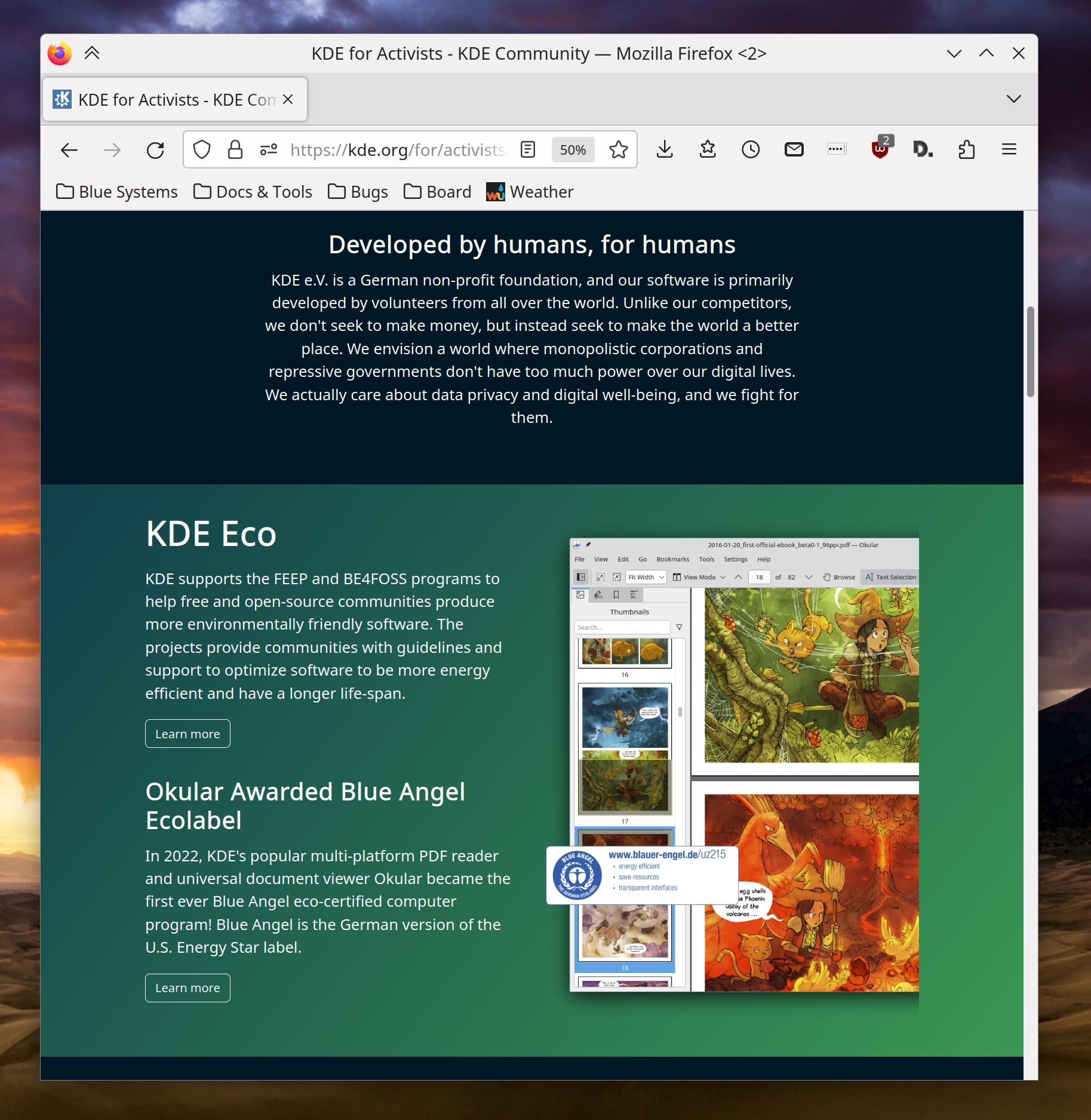
On top of that, there’s a new page: “KDE for Activists“, showcasing how KDE’s privacy-conscious communication can help you organize for what you believe in (Carl Schwan):

Note that this is a value-neutral statement; you can use KDE software to organize for whatever cause you believe in, no matter where on the political spectrum you consider yourself. Our software is neutral; it’s people who choose to use it for their purposes, and how. KDE software is used in homes, schools, businesses, news organizations, local governments, and, believe it or not, on both sides of the Russian invasion of Ukraine. People can take sides, but our software does not, so let’s try to keep the political battles out of the comments section of this post. Thanks everyone.

…And everything else

This blog only covers the tip of the iceberg! If you’re hungry for more, check out https://planet.kde.org, where you can find more news from other KDE contributors.

How You Can Help

If you’re a developer, please please please start living on a Plasma 6 session (not just building Plasma 6 stuff on top of Plasma 5) and fixing the bugs that you encounter. Plasma 6 is usable for daily driving, and I’m doing so, but it’s still very much in an alpha state and in need of work to make it releaseable.

If you’re an adventurous user, you can also use Plasma 6 with Neon Unstable. If you do so, make sure to submit bug reports for any problems you encounter, and apply the “qt6” keyword to them.

Otherwise, visit https://community.kde.org/Get_Involved to discover other ways to be part of a project that really matters. Each contributor makes a huge difference in KDE; you are not a number or a cog in a machine! You don’t have to already be a programmer, either. I wasn’t when I got started. Try it, you’ll like it! We don’t bite!

And finally, KDE can’t work without financial support, so consider making a donation today! This stuff ain’t cheap and KDE e.V. has ambitious hiring goals. We can’t meet them without your generous donations!
This week in KDE: for developers

Plasma 6 porting continues, with stability improving daily and new features and user interface improvements trickling in.

New Features

Okular now lets you choose the default scaling mode when printing PDFs (Martin Schnitkemper, Okular 23.08. Link)

Global Themes can now set the window decoration border size (me: Nate Graham, Plasma 6.0. Link)

User Interface Improvements

Gwenview’s color correction settings have been rephrased to be more comprehensible and correct (Adam Fontenot, Gwenview 23.08. Link)

Apps that have been marked as “Favorite” in Kickoff/Kicker/Application Dashboard/etc are now weighted more a bit more highly in KRunner-powered search results (Alexander Lohnau, Plasma 6.0. Link)

KRunner’s own search history no longer includes searches made in other KRunner-powered search tools such as Kickoff (Alexander Lohnau, Plasma 6.0. Link)

In the Clipboard widget, when you generate a QR code for some text, you can now drag it anywhere images can be dragged (Fushan Wen, Plasma 6.0. Link)

When a Flatpak app requests permission to run in the background, the way this is presented is now clearer and more user-friendly (Vlad Zahorodnii, Plasma 6.0. Link)

Metadata from Krita’s .kra files is now parsed, extracted, and displayed in “Details” views of the Properties Dialog, Dolphin’s Information Panel sidebar, etc (Joshua Goins, Frameworks 6.0. Link)

Other Significant Bugfixes

(This is a curated list of e.g. HI and VHI priority bugs, Wayland showstoppers, major regressions, etc.)

When using the optional ddcutil support in Powerdevil, changing the brightness via any of the current methods now prioritizes changing the brightness of a laptop’s built-in screen, rather than only adjusting the brightness of an external screen. Support for per-screen brightness control is being scoped out and may come in the future! (Quang Ngô, Plasma 5.27.6. Link)

Category names in Widget Explorer are once again translated (Alexander Lohnau, Plasma 5.27.6. Link)

Switching Global Themes or color schemes in System Settings no longer results in the “Appearance” category list item becoming temporarily invisible (Someone awesome, Plasma 6.0. Link)

Windows marked “Show on top” now remain where they are when the “Peek at Desktop” effect is invoked (Vlad Zahorodnii, Plasma 6.0. Link 1 and link 2)

Other bug-related information of interest:

Web presence

Another “KDE for” page has been created, this time showcasing what KDE can do for software developers! (Carl Schwan, right now! Link)

Changes not in KDE that affect KDE

In the Plasma Wayland session sidebars and docks provided by QDockWidget now work much better: it’s now re-dockable, and visually moved when dragged (David Redondo, Qt 6.6. Link)

…And everything else

This blog only covers the tip of the iceberg! If you’re hungry for more, check out https://planet.kde.org, where you can find more news from other KDE contributors.

How You Can Help

If you’re a developer, please please please start living on Plasma 6 and fixing the bugs that you encounter. It’s usable for daily driving (I’m doing so) but still very much pre-alpha and in need of work to get it into a releaseable state by the end of the year. We need your help!

Otherwise, visit https://community.kde.org/Get_Involved to discover other ways to be part of a project that really matters. Each contributor makes a huge difference in KDE; you are not a number or a cog in a machine! You don’t have to already be a programmer, either. I wasn’t when I got started. Try it, you’ll like it! We don’t bite!

And finally, KDE can’t work without financial support, so consider making a donation today! This stuff ain’t cheap and KDE e.V. has ambitious hiring goals. We can’t meet them without your generous donations!

This week in KDE: Night color on Wayland with NVIDIA

This week probably the biggest news is that in Plasma 6, the Night Color feature will work as expected on Wayland when you’re using an NVIDIA GPU! Because NVIDIA’s drivers don’t support the necessary Gamma LUT features to make it work in an optimal way as on Intel and AMD GPUs, we had to use a slightly different approach that isn’t quite as efficient. But hopefully that’s better than not having the feature work at all, and if you care about the increased resource usage, you’re welcome to not use the feature. This work was done by Xaver Hugl. Thanks, Xaver!

User Interface Improvements

KRunner search results for very short 2 and 3 character strings should be a bit better and more relevant now (Alexander Lohnau, Plasma 5.27.6. Link)

System Settings’ sidebar now has better keyboard navigation, and lets you use the arrow keys instead of the tab keys if you’d prefer or if you’re using a device with a d-pad and no obvious tab key (Ivan Tkachenko, Plasma 5.27.6. Link)

In the Plasma Wayland session, when you activate a KWin effect with a touchpad gesture in a certain direction, the opposite gesture now deactivates it (Aleix Pol Gonzalez, Plasma 6.0. Link)

System Settings’ File Search page has gotten a visual overhaul and now looks nicer (me: Nate Graham and Helden Hoierman, Plasma 6.0. Link):

The tooltips showing window previews in the Task Manager no longer time out on their own while the cursor remains hovering over a Task, just like the behavior of other tooltips elsewhere (me: Nate Graham, Plasma 6. Link)

Other Significant Bugfixes

(This is a curated list of e.g. HI and VHI priority bugs, Wayland showstoppers, major regressions, etc.)

Spectacle’s sidebar is no longer too narrow to accommodate long button text in some languages (Yoann Laissus, Spectacle 23.04.2. Link)

When using a horizontal bottom panel, Task Manager tooltip window thumbnails no longer sometimes appear in the wrong location (Bharadwaj Raju, Plasma 5.27.6. Link)

In the Plasma X11 session, dragging files to Task Manager Tasks in such a manner that you end up right-clicking while still dragging no longer sometimes causes drag-and-drop to just break (Fushan Wen, Plasma 5.27.6. Link)

In the Plasma Wayland session, some blurred and transparent Breeze-themes context menus no longer sometimes exhibit weird visual glitches (Mouse Zhang, Plasma 5.27.6. Link)

When KDE apps are run in dark mode on non-Plasma desktops where the plasma-integration package isn’t installed, Breeze icons will now correctly use light colors instead of staying dark and becoming unreadable (Jan Grulich, Frameworks 5.107. Link)

When your system is set up with an encrypted home directory, file and folder thumbnails will now be stored in their typical cache location in your homedir, preventing them from having to be re-generated every single time (Payton Quinn, Frameworks 5.107. Link)

Other bug-related information of interest:

Automation & Systematization

Now that tons and tons of KDE projects use JSON files to describe their metadata, there’s now a JSON file validator CI job that will prevent silly errors (Alexander Lohnau, right now. Link)

…And everything else

This blog only covers the tip of the iceberg! If you’re hungry for more, check out https://planet.kde.org, where you can find more news from other KDE contributors.

How You Can Help

If you’re a user, upgrade to Plasma 5.27! If your distro doesn’t offer it and won’t anytime soon, consider switching to a different one that ships software closer to its developer’s schedules.

If you’re a developer, please please please start living on Plasma 6 and fixing the bugs that you encounter. It’s usable for daily driving (I’m doing so) but still very much pre-alpha and in need of work to get it into a releaseable state by the end of the year.

Otherwise, visit https://community.kde.org/Get_Involved to discover other ways to be part of a project that really matters. Each contributor makes a huge difference in KDE; you are not a number or a cog in a machine! You don’t have to already be a programmer, either. I wasn’t when I got started. Try it, you’ll like it! We don’t bite!

And finally, KDE can’t work without financial support, so consider making a donation today! This stuff ain’t cheap and KDE e.V. has ambitious hiring goals. We can’t meet them without your generous donations!

These weeks in KDE: no more hidey-hidey authentication dialog games

In addition to the changes made and announced during the recent Plasma Sprint at Tuxedo Computers’ offices in Augsburg, lots of other things have been brewing as well!

New Features

Kate now supports Godot Engine’s Language Server Protocol (Michael Alexsander, Kate 23.08. Link)

In Okular, you can now copy an annotation’s text to the clipboard using the context menu for the annotation’s entry in the annotations sidebar list (Kai Uwe Broulik, Okular 23.04. Link)

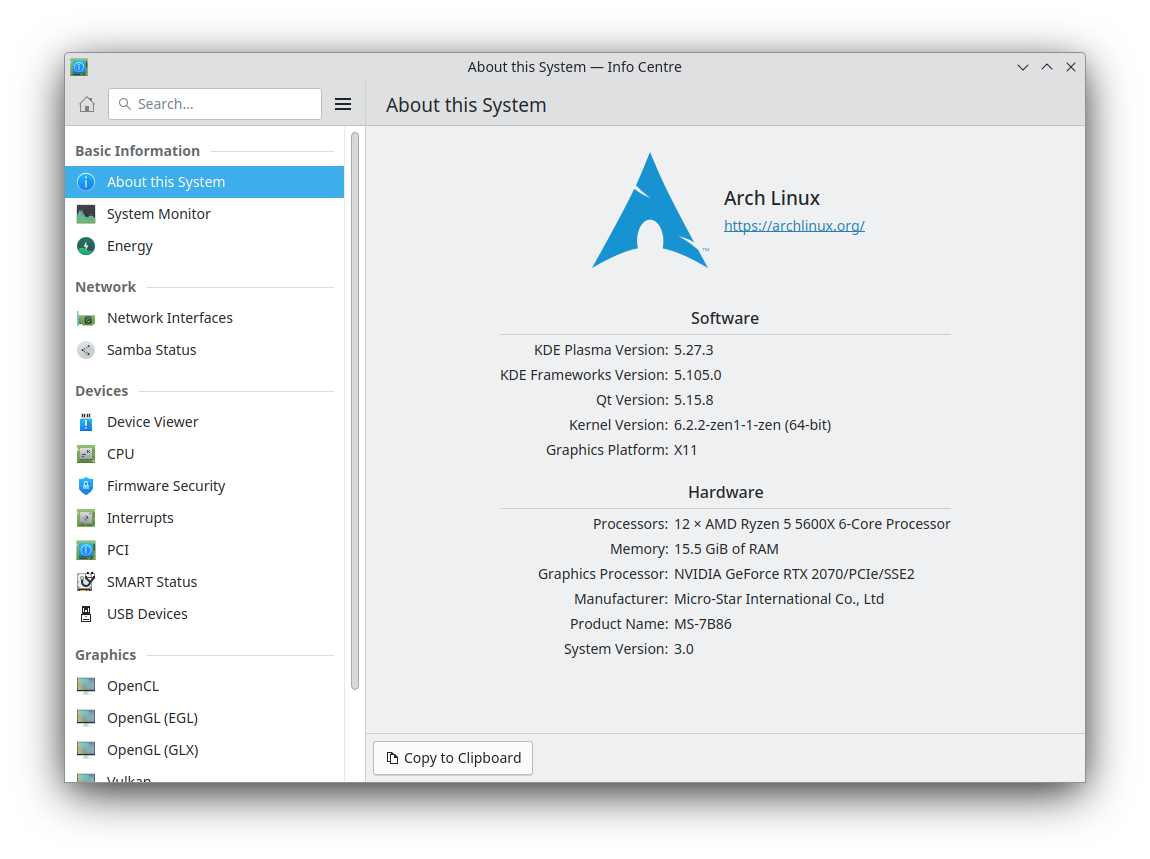
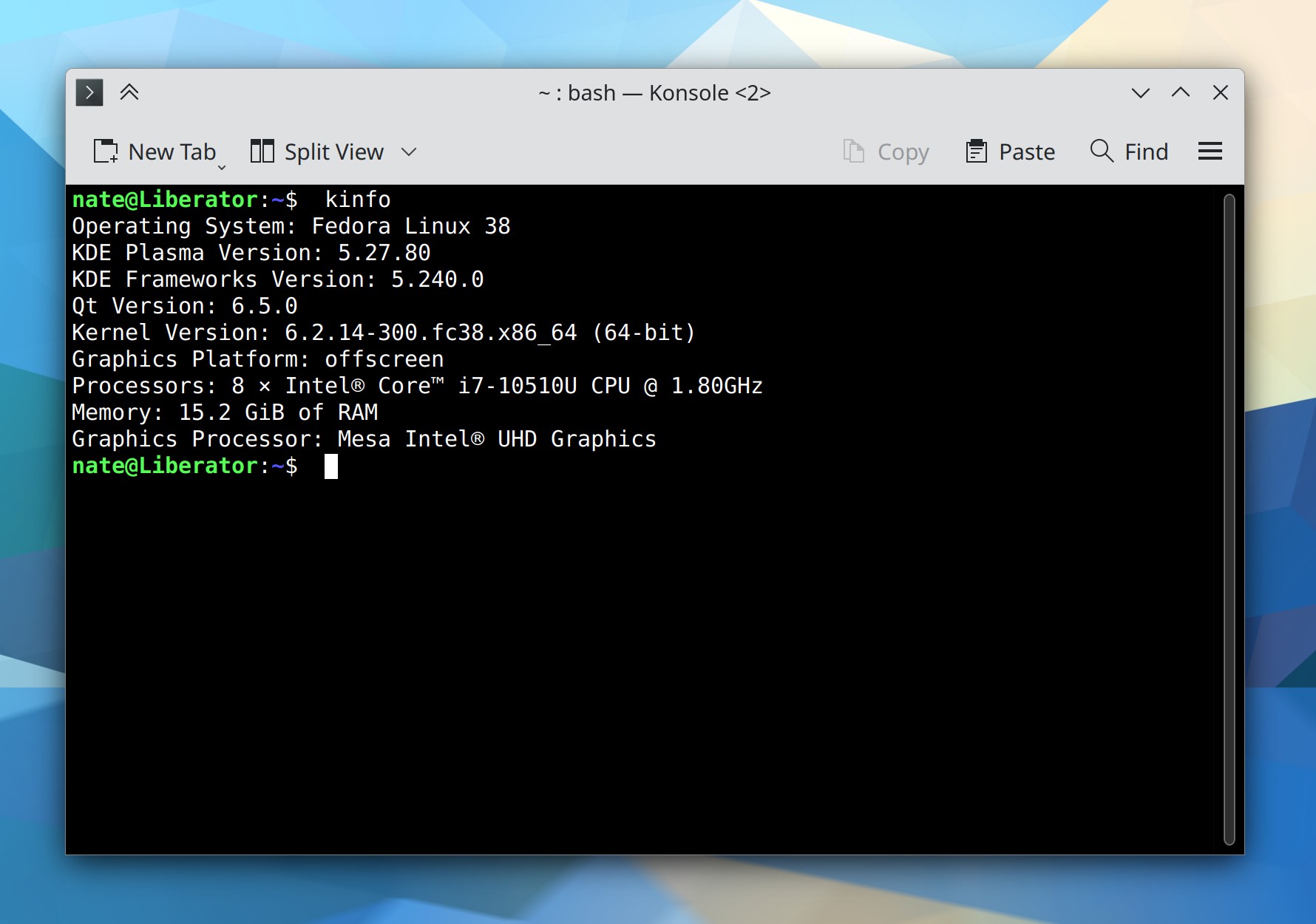
There is now a new kinfo command you can run to dump versions numbers of various software components on the command line, which can be useful for debugging and bug reporting purposes. It displays the same information that’s in Info Center’s “About This System” page (Harald Sitter, Plasma 5.27.5. Link):

KDE Konsole terminal window showing output of the `kinfo` command

To save energy, while the screen is locked, your monitors now turn off sooner than they do when unlocked. This is configurable and defaults to 60 seconds (Méven Car, Plasma 6.0. Link)

You can now middle-click on a color circle in the Plasma Color Picker widget to copy the color code text to the clipboard (Fushan Wen, Plasma 6.0. Link)

You can now hold down the Shift key while adjusting the volume by using a global shortcut or scrolling over the Audio Volume widget to adjust it in 1% increments for finer control (Fushan Wen, Plasma 6.0. Link)

User Interface Improvements

In Spectacle’s annotation UI, it’s now as easy as it was in the 22.12 release to draw a shape with an outline but no fill–for example to draw a perfect circle around something to call attention to it (Noah Davis, Spectacle 23.04.1. Link)

Significantly improved scrolling performance in Elisa when there are a lot of songs in the playlist (Nicolas Fella, Elisa 23.04.1. Link)

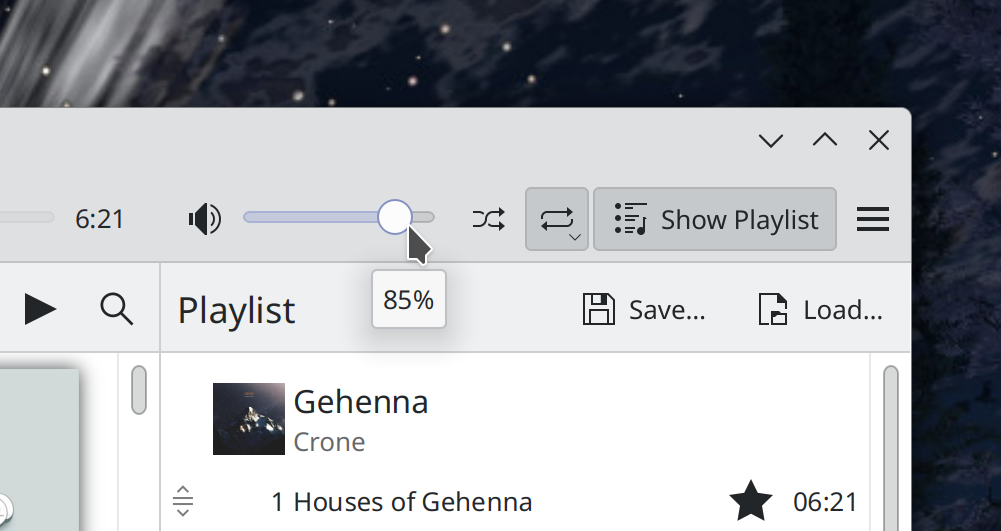
Dragging the volume slider in Elisa now shows a tooltip indicating its current level (Jack Hill, Elisa 23.08. Link):

Elisa main window showing volume level tooltip that says "85%" below volume slider

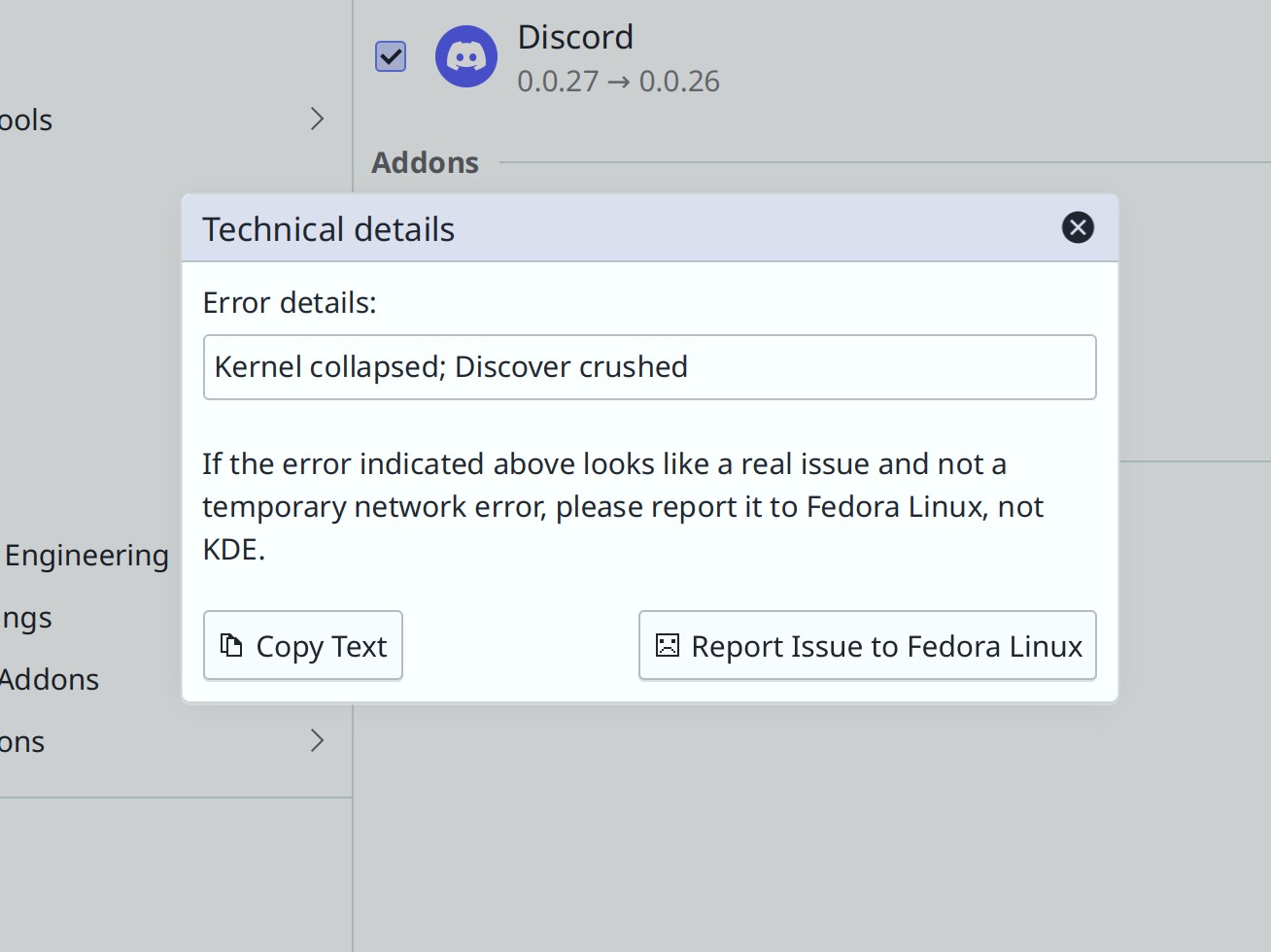
Discover now tries even harder to point you in the first direction (i.e. towards your distro) when there’s an update issue (me: Nate Graham. Plasma 6.0. Link):

Oh look, Discord’s version numbers are reversed again. But this time it wasn’t Discover’s fault and Flathub was actually the culprit!

The thick vertical lines in the Notifications widget no longer look weird with using various non-default Plasma themes, including Oxygen (me: Nate Graham, Plasma 5.27.5. Link)

When an app is forcing Do Not Disturb mode to be enabled, its explanatory text will no longer sometimes show end times in the past (Nicola Smaniotto, Plasma 5.27.5. Link)

In KRunner and other KRunner-powered searches, when the search term matches the starting text of both apps and files, apps are now prioritized (Alexander Lohnau, Plasma 5.27.5. Link)

When you switch Virtual Desktops in the Overview effect by clicking on one of them on the strip at the top, it will now switch to that desktop within the Overview effect itself, and not close immediately (Vlad Zahorodnii, Plasma 6.0. Link)

When you view the QR code for a connected network, it now appears inline in the widget, rather than in a giant full-screen overlay (Kai Uwe Broulik, Plasma 6.0. Link)

In the Breeze Icons theme, the small monochrome versions of the “MS DOS Executable” icons now respect your active color scheme as expected (Michael Alexander, Frameworks 5.106. Link)

The icons shown in the Display Configuration widget and OSD now have consistent stroke widths and levels of detail (me: Nate Graham and Noah Davis, Frameworks 5.106. Link)

Significant Bugfixes

(This is a curated list of e.g. HI and VHI priority bugs, Wayland showstoppers, major regressions, etc.)

In Okular, it’s now possible to “Save As…” when your document has been externally modified or deleted, so you can avoid losing any unsaved changes (me: Nate Graham, Okular 23.04.1. Link)

The authentication window will no longer sometimes appear behind the window that requested it, as would often happen when launching Partition Manager (Harald Sitter, Plasma 5.27.5. Link)

In the Plasma Wayland session, fixed a bug that could cause Plasma to repeatedly crash on login with certain combinations of settings (David Redondo, Plasma 5.27.5. Link)

In the Plasma Wayland session, text copied in an app while Klipper is running with sane regular settings is now still paste-able after quitting that app (Tobias Fella, Plasma 5.27.5. Link)

On System Settings’ Night Color page, the text telling you what will happen is no longer truncated when the page is scrollable (me: Nate Graham and Natalie Clarius, Plasma 5.27.5. Link)

In the Plasma Wayland session, basic sticky keys functionality now works! (Nicolas Fella, Plasma 6.0. Link 1, link 2, and link 3)

In the Plasma Wayland session, kinetic scrolling in GTK now works (Vlad Zahorodnii, Plasma 6.0. Link)

In the Plasma Wayland session, searching for the clipboard contents in KRunner with the Alt+Shift+F2 shortcut now works (Ismael Asensio, Plasma 6.0. Link)

Other bug-related information of interest:

Automation & Systematization

Added an autotest for doing modesets in KWin (Xaver Hugl, Plasma 6.0. Link)

Changes not in KDE that affect KDE

When using the Systemd-enabled Plasma boot sequence (which has been the default setting for a year or two), apps set up to autostart will no longer fail to autostart if their .desktop file happens to contain the X-GNOME-Autostart-Phase key (David Edmundson, Systemd 254. Link)

PDFs digitally signed in Okular no longer become locked in Adobe Acrobat such that no one else can sign them (Nicolas Fella, sponsored by TU Dresden, Poppler 23.05.0. Link)

…And everything else

This blog only covers the tip of the iceberg! If you’re hungry for more, check out https://planet.kde.org, where you can find more news from other KDE contributors.

How You Can Help

If you’re a user, upgrade to Plasma 5.27! If your distro doesn’t offer it and won’t anytime soon, consider switching to a different one that ships software closer to its developer’s schedules.

If you’re a developer, consider working on known Plasma 5.27 regressions, or compile Plasma 6 and start working on outstanding issues and porting tasks. You might also want to check out our 15-Minute Bug Initiative. Working on any of these topics makes a big difference quickly!

Otherwise, visit https://community.kde.org/Get_Involved to discover other ways to be part of a project that really matters. Each contributor makes a huge difference in KDE; you are not a number or a cog in a machine! You don’t have to already be a programmer, either. I wasn’t when I got started. Try it, you’ll like it! We don’t bite!

And finally, KDE can’t work without financial support, so consider making a donation today! This stuff ain’t cheap and KDE e.V. has ambitious hiring goals. We can’t meet them without your generous donations!
This week in KDE: The bug slaughterfest continues

Last week’s focus on bugs continues into this week, with the VHI-priority Plasma bugs slashed down to just three! In addition, Plasma 6 UI improvements are starting to land now that it’s stabilized a bit. In fact I’m typing this post from within a Plasma 6 session right now!

User Interface Improvements

In Elisa, double-clicking on a song or clicking its “Play now” button now puts its entire album in the playlist and begins playing from that song (Melissa Autumn and me: Nate Graham, Elisa 23.08. Link)

While annotating a screenshot in Spectacle, annotations now have a nice hover outline so it’s obvious how to select them (Noah Davis, Spectacle 23.08. Link)

In Plasma’s Disks & Devices widget, you’ll no longer see a useless “Mount” action for MTP-connected devices (me: Nate Graham, Plasma 5.27.5. Link)

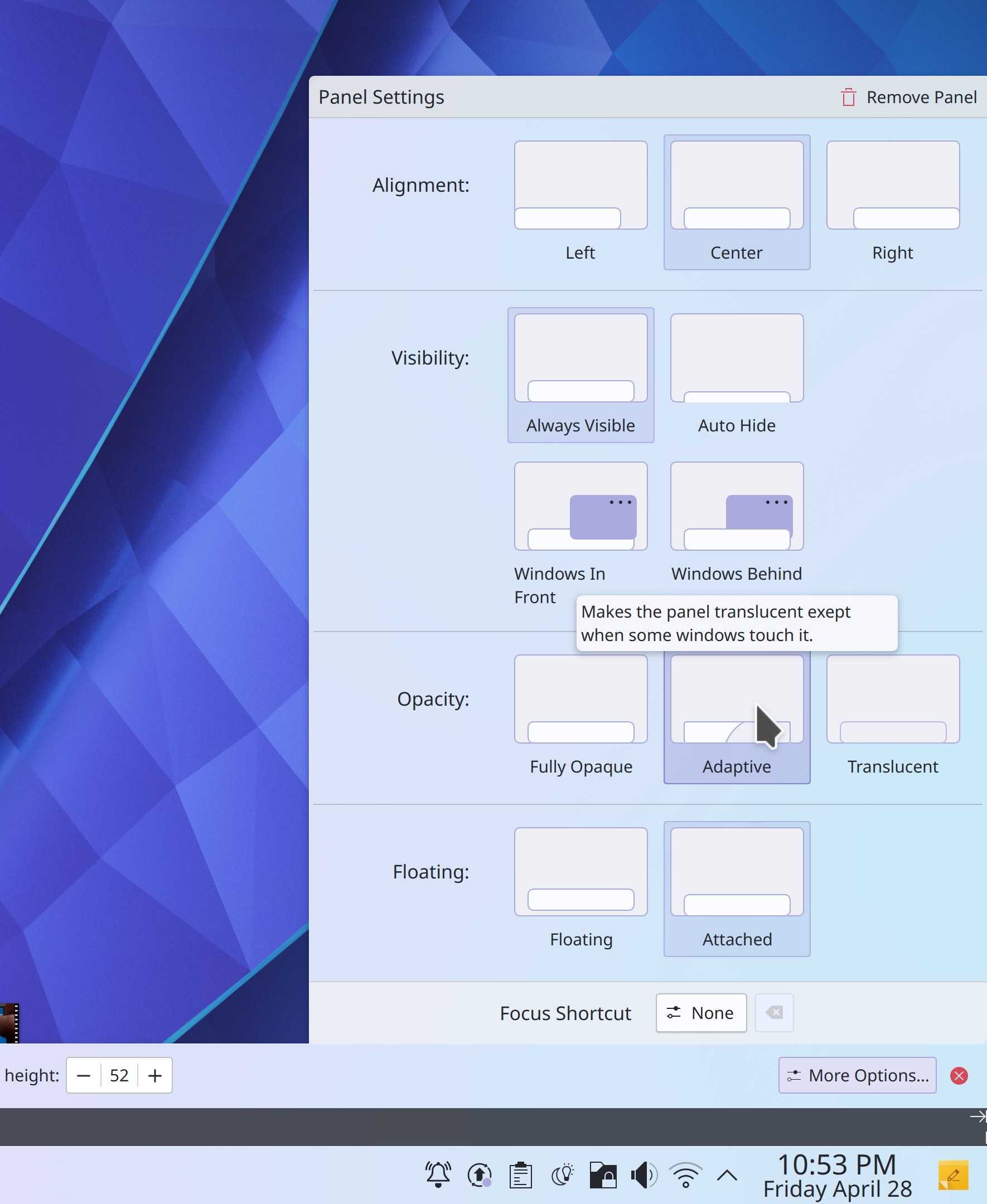
The way you configure your panels is now much more visual, with explanations too! (Tanbir Jishan and Niccolò Venerandi, Plasma 6.0. Link):

Panel Settings dialog with visual depictions of all the different states

Discover now has smarter search behavior, putting more weight on direct title matches and words that appear in the title, rather than the description (Aleix Pol Gonzalez, Plasma 6.0. Link)

Search results in Kickoff are now ordered the same way they are in KRunner and other KRunner-powered searches (Alexander Lohnau, Plasma 6.0. Link)

It’s now possible to do math function s like sqrt() in KRunner without having to prefix the operation with an equals sign (Alexander Lohnau, Plasma 6.0. Link)

When the current wallpaper’s image file is changed on disk, it will update the wallpaper in real-time (Oleg Solovyov, Plasma 6.0. Link)

You can now convert to and from kilometers per hour using the “kph” keyword (June Knauth, Frameworks 5.106. Link)

Significant Bugfixes

(This is a curated list of e.g. HI and VHI priority bugs, Wayland showstoppers, major regressions, etc.)

Dolphin’s selection mode is no longer inappropriately activated or deactivated by the Spacebar key when it’s pressed despite not being the assigned shortcut for that action, or when pressing it while an interactive UI control is focused (Eugene Popov, Dolphin 23.08. Link)

Fixed a recently-introduced source of KWin crashes in the Plasma Wayland session when hovering over Task Manager icons or closing windows (Aleix Pol Gonzalez, Plasma 5.27.5. Link)

System Settings no longer crashes on launch when your Activities database has become corrupted (Ivan Tkachenko, Plasma 5.27.5. Link)

Fixed another cause of screens overlapping by one pixel in multi-screen setups which would cause various other weird bugs (Harald Sitter, Plasma 5.27.5. Link)

When using a multi-screen arrangement, the lock screen’s unlock button now always works on the first click (Harald Sitter, Plasma 5.27.5. Link)

In the Notifications history, long notification title text can no longer sometimes push that notification’s close button partially out of view (Eugene Popov, Plasma 5.27.5. Link)

When connecting a Bluetooth device, the separator line between connected and disconnected devices no longer briefly overlaps the connected device (Harald Sitter, Plasma 5.27.5. Link)

Invisible Breeze-themed progress bars throughout Qt software no longer sometimes consume CPU resources by animating while out of sight (Ivan Tkachenko, Plasma 5.27.5. Link)

Entering paths with spaces in them now works properly in the Properties dialog, Shortcuts page, and Autostart page in System Settings (Bharadwaj Raju, Plasma 5.27.5 and Frameworks 5.106, Link 1, link 2, and link 3)

Fixed a variety of embarrassing layout glitches in KDE software when used with an RTL language (Ivan Tkachenko, Plasma 5.27.5 and Frameworks 5.106. Link 1, link 2, link 3, and link 4)

Fixed a major source of crashes when copying files in Dolphin and other apps (Fushan Wen, Frameworks 5.106. Link)

Other bug-related information of interest:

Automation & Systematization

Re-did the top-level Plasma documentation page for greater clarity (Thiago Sueto, link)

Massively overhauled the Kirigami API documentation for better clarity and style (Matej Starc, link)

…And everything else

This blog only covers the tip of the iceberg! If you’re hungry for more, check out https://planet.kde.org, where you can find more news from other KDE contributors.

How You Can Help

Check out KDE’s new forum at https://discuss.kde.org! This is a great place to ask for help if you’re experiencing an issue that might not necessarily be a bug, and to help others with their own issues.

If you’re a developer, consider working on known Plasma 5.27 regressions! You might also want to check out our 15-Minute Bug Initiative. Working on these issues makes a big difference quickly!

Otherwise, visit https://community.kde.org/Get_Involved to discover other ways to be part of a project that really matters. Each contributor makes a huge difference in KDE; you are not a number or a cog in a machine! You don’t have to already be a programmer, either. I wasn’t when I got started. Try it, you’ll like it! We don’t bite!

And finally, KDE can’t work without financial support, so consider making a donation today! This stuff ain’t cheap and KDE e.V. has ambitious hiring goals. We can’t meet them without your generous donations!
This week in KDE: All about the apps

This week some of your favorite KDE apps got lots of positive changes! Dolphin, Kate, Okular, Elisa, Partition Manager, and Filelight all received some nice improvements.

In the background, Plasma 6 porting work continues. I’ve now got a working Plasma 6 dev session on my machine. It’s still rough, but it’s usable. Now I can see why more experienced contributors predicted the need to skip a release and give the initial Plasma 6 release at least an 8 month dev cycle, not a 4-month one. But fear not; it’s happening!

New Features

When Dolphin is in split view mode, there are now context menu items and keyboard shortcuts to let you quickly move or copy items to the opposite view (Méven Car, Dolphin 23.08. Link)

Links in files open in Kate are now clickable! (Waqar Ahmed, Kate 23.08. Link)

Note that for now this requires you to manually enable to “Open link” plugin, which is shipped by default but left disabled

User Interface Improvements

Partition Manager now finally has its own icon, instead of re-using Filelight’s icon (Gerson Alvarado, Partition Manager 23.08 and Frameworks 5.106. Link):

Filelight’s default window size is no longer too large to fully fit on a 1366×768 screen (me: Nate Graham, Filelight 23.04. Link)

Dolphin once again tries to tell you what to do instead of running it with sudo (me: Nate Graham, Dolphin 23.04. Link):

Terminal window showing the message: Running Dolphin with sudo is not supported as it can cause bugs and expose you to security vulnerabilities. Instead, install the `kio-admin` package from your distro and use it to manage root-owned locations by right-clicking on them and selecting "Open as Administrator".

Improved the RTL layout and focus indicator lines in various types of Breeze-themed buttons, checkboxes, and radio buttons (Ivan Tkachenko, Plasma 5.27.4. Link 1, link 2, and link 3)

Scrolling on the Task Manager and Pager widgets now works more reliably when you sometimes scroll using a touchpad and sometimes using a mouse wheel (Prajna Sariputra, Plasma 5.27.5 Link 1 and link 2)

You can now press-and-hold with a touchscreen to open a context menu for System Tray icons (Fushan Wen, Plasma 5.27.5. Link)

Scrolling over the Audio Volume, Media Player, and Battery & Brightness widgets now always raises or lowers the volume and brightness based on the direction of the scroll rather than respecting the natural/inverted scroll direction setting (Vlad Zahorodnii and me: Nate Graham, Plasma 6.0. Link 1 and link 2)

Streamlined the appearance of the “cool Plasma features” pages in Welcome Center (Oliver Beard, Plasma 6.0. Link):

Plasma Welcome window showing "Open Settings…"button in header area

When showing the logout screen by pressing the power button or Ctrl+Alt+Del, it now defaults to pre-selecting the “Shut down” action by default, rather than “Log out” (me: Nate Graham, Plasma 6.0. Link)

Significant Bugfixes

(This is a curated list of e.g. HI and VHI priority bugs, Wayland showstoppers, major regressions, etc.)

Fixed a way that Okular could crash when you try to save changes made after filling out forms in a document (Albert Astals Cid, Okular 23.04. Link)

When using Elisa in a language other than English, cover overlay “Play” and “Add to Playlist” buttons now immediately work on startup (Matthieu Gallien, Elisa 23.04. Link)

Fixed a complex multi-monitor bug involving misbehavior with KVM/headless setups that can sometimes prompt people to work around the issue by purchasing and using a bi-directional EDID emulator gizmo (Kai Li, Plasma 5.27.5. Link)

Fixed a recent regression in the size and sharpness of GTK CSD windows’ minimize, maximize, and close buttons when not using any scaling (Fushan Wen, Plasma 5.27.5. Link)

System Monitor sensors that use the “watt-hour” unit now display the unit correctly (Kai Uwe Broulik, Plasma 5.27.5. Link 1 and link 2)

On Info Center’s Networks page, the Refresh button now actually works (Harald Sitter, Plasma 5.27.5. Link)

Dragging from empty areas of the toolbar in Discover and many other Kirigami-based apps now always works, rather than only working on some pages/views and not others (Marco Martin, Kirigami 5.106. Link)

And last but not least… fixed a major source of the infamous Dolphin bug where folders don’t update in real-time when contents are modified in another app (Méven Car, Frameworks 5.106. Link)

Other bug-related information of interest:

Automation & Systematization

Added an autotest to test the various different ways that items can be opened in Dolphin (Felix Ernst, Link)

When you try to change translated text in a KDE git repo, a git hookscript now stops you, because translations are handed elsewhere and merged into the git repos via an automated process (Ben Cooksley, Link)

Changes not in KDE that affect KDE

Logging out of a Wayland session (not shutting down or rebooting, just logging out) now works as expected (Fabian Vogt, SDDM 0.20. Link)

…And everything else

This blog only covers the tip of the iceberg! If you’re hungry for more, check out https://planet.kde.org, where you can find more news from other KDE contributors.

How You Can Help

If you’re a user, upgrade to Plasma 5.27! If your distro doesn’t offer it and won’t anytime soon, consider switching to a different one that ships software closer to its developer’s schedules.

If you’re a developer, consider working on known Plasma 5.27 regressions! You might also want to check out our 15-Minute Bug Initiative. Working on these issues makes a big difference quickly!

Otherwise, visit https://community.kde.org/Get_Involved to discover other ways to be part of a project that really matters. Each contributor makes a huge difference in KDE; you are not a number or a cog in a machine! You don’t have to already be a programmer, either. I wasn’t when I got started. Try it, you’ll like it! We don’t bite!

And finally, KDE can’t work without financial support, so consider making a donation today! This stuff ain’t cheap and KDE e.V. has ambitious hiring goals. We can’t meet them without your generous donations!
This week in KDE: Distro upgrades for Fedora KDE in Discover

New Features

With the new XwaylandVideoBridge utility, you can now screencast native Wayland windows from Xwayland apps like Discord (Aleix Pol Gonzalez and David Edmundson, Link)

Dolphin now has an option to not change the information and preview shown in the Information Panel when hovering over files, and to instead only do so when deliberately selecting files (Oliver Beard, Dolphin 23.08. Link):

Context menu for Dolphin's Information panel showing the new "Show item on hover" menu item highlighted

Discover can now upgrade from one major version of Fedora KDE to another! (Alessandro Astone, Plasma 6.0. Link)

User Interface Improvements

When using multiple monitors that all have the same name and serial number, they are now visually distinguished from one another in various places by showing their connector names (David Redondo, Plasma 5.27.4. Link)

Using Kicker’s “Sort applications alphabetically” setting now removes any manually-placed separator lines between applications, rather than positioning them nonsensically (Joshua Goins, Plasma 5.27.4. Link)

The text ” – Portal” is no longer confusingly appended to the window titles of open/save dialogs and authentication dialogs in portal-using apps (Nicolas Fella, Plasma 6.0. Link 1 and link 2)

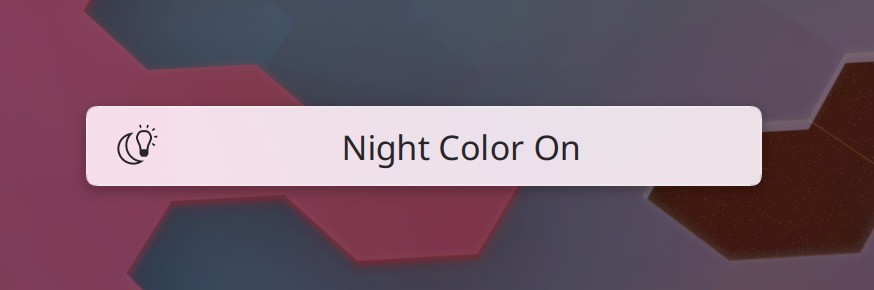
The Breeze icon theme now includes beautiful new icons for the Night Color feature (Philip Murray, Frameworks 5.105. Link):

Significant Bugfixes

(This is a curated list of e.g. HI and VHI priority bugs, Wayland showstoppers, major regressions, etc.)

Our prior fix for Aurorae window decorations getting visually corrupted did not handle all circumstances, so we pushed a new one that does, which should fully correct the problem for everyone (David Edmundson, Plasma 5.27.4. Link)

System Settings no longer crashes when discarding changed settings on the Quick Settings page (David Redondo, Plasma 5.27.4. Link)

Red and blue colors of the cursor are no longer swapped when screencasting in some apps (Aleix Pol Gonzalez, Plasma 5.27.4. Link)

You’re no longer offered the opportunity to set a screen resolution that, due to the particularities of the active graphics drivers, will cause graphical glitches or crashes (Xaver Hugl, Plasma 5.27.4. Link)

Non-floating panels no longer have an excessively high minimum thickness when using Plasma themes that feature rounded corners with a very large radius (Niccolò Venerandi, Plasma 5.27.4. Link)

Switching Plymouth boot splash themes now works properly for distros that use mkinitcpio rather than update-initramfs (Antonio Rojas, Plasma 5.27.4. Link)

Fixed a way that the SDDM login screen could freeze for while when using the Breeze SDDM theme (Ivan Tkachenko, Plasma 5.27.4. Link)

The Baloo file indexing service no longer adds index data for unprintable characters into the database, which could cause apps to crash (Igor Poboiko, Frameworks 5.105. Link)

Other bug-related information of interest:

Automation & Systematization

Added an autotest to make sure that Bug 465225 does not recur (Fushan Wen, Plasma 5.27.4. Link)

Changes not in KDE that affect KDE

When using a high refresh rate screen in the X11 session, QML animations no longer go too fast (Someone awesome in Qt, Qt 6.4. Link)

In the Plasma Wayland session, fast user switching now works (Fabian Vogt, SDDM 0.20. Link)

When using SDDM in native Wayland mode, it no longer inappropriately tries to launch xdg-desktop-portal-kde and causes it to crash in a loop (Aleix Pol Gonzalez, SDDM 0.20. Link)

…And everything else

This blog only covers the tip of the iceberg! If you’re hungry for more, check out https://planet.kde.org, where you can find more news from other KDE contributors.

How You Can Help

If you’re a developer, consider working on known Plasma 5.27 regressions! You might also want to check out our 15-Minute Bug Initiative. Working on these issues makes a big difference quickly! You might notice the numbers of VHI and HI bugs being fairly stagnant recently. This is because Plasma’s heavy-hitters are busy with Qt 6 porting right now, leaving them with less time for bugfixing and feature work. Volunteers can help fill in that gap! It really is that simple. 🙂

Otherwise, visit https://community.kde.org/Get_Involved to discover other ways to be part of a project that really matters. Each contributor makes a huge difference in KDE; you are not a number or a cog in a machine! You don’t have to already be a programmer, either. I wasn’t when I got started. Try it, you’ll like it! We don’t bite!

And finally, KDE can’t work without financial support, so consider making a donation today! This stuff ain’t cheap and KDE e.V. has ambitious hiring goals. We can’t meet them without your generous donations!
This week in KDE: “More Wayland fixes”

It’s become almost a running joke on Phoronix at this point, but this week we do indeed have more Wayland fixes! 🙂 …And other things as well, including some good UI improvements to various KDE apps in addition to the background work of Qt 6 porting that is continuing full steam ahead, and reaching a position of increasing stability. Come see!

User Interface Improvements

Ark’s welcome screen is now richer with features, to be more like the one in Kate (Eugene Popov, Ark 23.04. Link):

New Ark welcome screen showing "recently used" list and documentation links

Made a few UI improvements to Elisa, such as showing a “Quit” menu item in the hamburger menu when using the System Tray icon feature, correctly returning to the prior window state when exiting full screen mode, and resetting the playback position slider to the beginning when the playlist is manually cleared (Nikita Karpei and me: Nate Graham, Elisa 23.04. Link 1, link 2, and link 3)

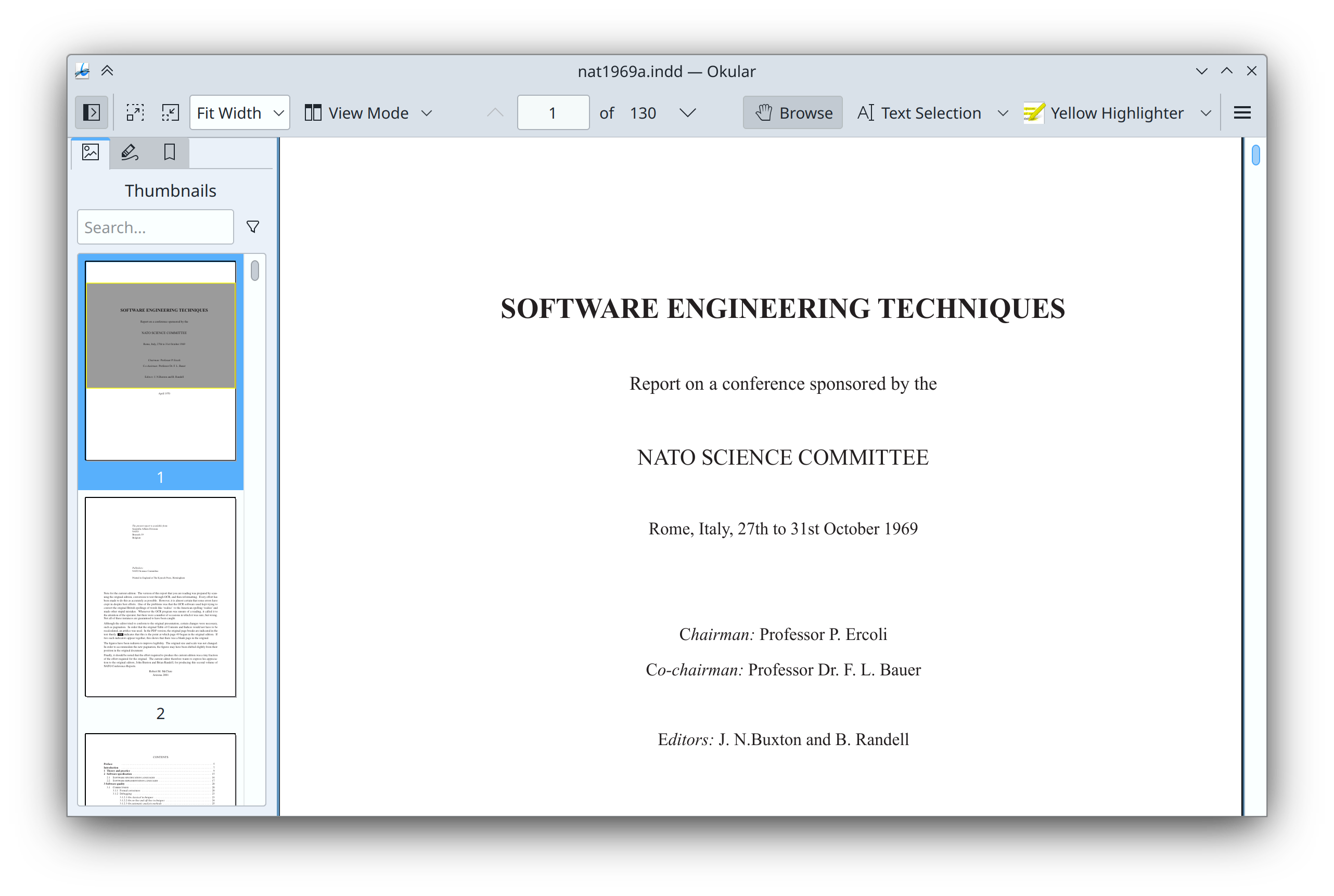
Okular’s default toolbar layout has now been tweaked a bit, and now includes the “View Mode” menu by default and also shows the zoom and view buttons on the left side, with the tools on the right side (me: Nate Graham, Okular 23.04. Link 1 and link 2):

Okular main window showing new toolbar layout with zoom and view controls on the left and various other tools on the right

When “Fix it for me!”-style actions in the Samba sharing wizard fail, you’re now shown an appropriate error message explaining what went wrong (me: Nate Graham, kdenetwork-filesharing 23.08. Link)

Plasma now exposes global actions for “Restart” and “Shut Down” so you can add keyboard shortcuts to trigger them. We already had the “without confirmation” versions of these actions, but these new ones will ask for confirmation first (me: Nate Graham, Plasma 6.0. Link)

When importing VPN configurations, any errors are now shown in the UI so you can figure out what went wrong and maybe fix it yourself (Nicolas Fella, Plasma 5.27.3. Link)

While downloading new Flatpak apps, Discover now reports the status as “Downloading” correctly (Aleix Pol Gonzalez, Plasma 5.27.4. Link)

If your keyboard has an Emoji key, pressing it now opens the Emoji Picker window (Konrad Borowski, Plasma 5.27.4. Link)

Info Center has adopted a flattened sidebar structure so pages no longer live in sub-categories. This should make it easier and faster to access everything (Oliver Beard, Plasma 6.0. Link):

Info Center window showing flattened sidebar navigation with no sub-category groups

When you synchronize your Plasma settings to SDDM, it now also syncs the cursor size (me: Nate Graham, Plasma 6.0. Link)

We no longer misleadingly use Filelight’s icon for the 3rd-party GParted app in the Breeze icon theme (me: Nate Graham, Frameworks 5.105. Link)

Significant Bugfixes

(This is a curated list of e.g. HI and VHI priority bugs, Wayland showstoppers, major regressions, etc.)

Fixed a source of crashes in System Settings when importing VPN configuration files (Nicolas Fella, Plasma 5.27.3. Link)

Fixed another source of clipboard-related crashes in Plasma (Fushan Wen, Plasma 5.27.4. Link)

Significantly improved robustness of screen arrangements when using a multi-monitor setup that includes monitors with identical EDID values (Xaver Hugl, Plasma 5.27.3. Link)

Significantly improved robustness of Plasma containments’ mapping to screens when using multi-monitor setups (David Edmundson, Plasma 5.27.3. Link)

Fixed the way GTK apps scale themselves in the Plasma Wayland session when using multiple screens with different physical DPI values (Luca Bacci, Plasma 5.27.4. Link)

In the Plasma Wayland session, Plasma no longer quits (not crashes!) when an app sends a window title that’s wayyyyy too long (David Edmundson, Plasma 5.27.4. Link)

In the Plasma Wayland session, screen recording and Task Manager thumbnails now work properly for users of NVIDIA GPUs with the proprietary drivers (Jan Grulich, Plasma 5.27.4. Link)

Other bug-related information of interest:

Automation & Systematization

Added a UI test for Discover to test installing and uninstalling apps from the PackageKit backend (Harald Sitter. Link)

Changes not in KDE that affect KDE

In its native Wayland mode, Firefox no longer has an invisible animation that forces the screen to constantly repaint, causing KWin to unnecessarily consume excessive CPU resources (Emilio Cobos Álvarez, Firefox 113, Link)

…And everything else

This blog only covers the tip of the iceberg! If you’re hungry for more, check out https://planet.kde.org, where you can find more news from other KDE contributors.

How You Can Help

If you’re a user, upgrade to Plasma 5.27! If your distro doesn’t offer it and won’t anytime soon, consider switching to a different one that ships software closer to its developer’s schedules.

If you’re a developer, consider working on known Plasma 5.27 regressions! You might also want to check out our 15-Minute Bug Initiative. Working on these issues makes a big difference quickly!

Otherwise, visit https://community.kde.org/Get_Involved to discover other ways to be part of a project that really matters. Each contributor makes a huge difference in KDE; you are not a number or a cog in a machine! You don’t have to already be a programmer, either. I wasn’t when I got started. Try it, you’ll like it! We don’t bite!

And finally, KDE can’t work without financial support, so consider making a donation today! This stuff ain’t cheap and KDE e.V. has ambitious hiring goals. We can’t meet them without your generous donations!

This week in KDE: Qt apps survive the Wayland compositor crashing

Thanks to the heroic work of David Edmundson, Qt apps (including all KDE software) in Plasma 6 will now survive when the Wayland compositor crashes! This is huge! And work is ongoing to add this functionality to other common app toolkits, such as GTK.

Beyond that, Plasma 6 porting work continues, with more and more people using it daily. Not me yet, because I’m a scaredy-cat about this kind of instability and am waiting for it to converge a bit more 🙂 But hopefully soon! Meanwhile, check out what else happened:

New Features

Konsole Now works on Windows! In addition to making the app possible to potentially distribute on Windows, this means that Windows-distributed KDE apps that have an embedded Konsole view like Kate can now actually embed Konsole itself, instead of an inferior terminal view (Waqar Ahmed and Christoph Cullmann, Konsole and Kate 23.04. Link 1 and Link 2)

User Interface Improvements

Spectacle now always shows a notification when taking a background-mode rectangular region screenshot (with Meta+Shift+PrintScreen by default) and also no longer quits if its main window happened to be open while any such notification disappears (Noah Davis, Spectacle 23.04. Link 1 and link 2)

For new users (not existing users), the system will now sleep after 15 minutes of inactivity by default, and will generate correct power profiles for convertible laptops (Plasma 5.27.3, me: Nate Graham, Link 1 and link 2)

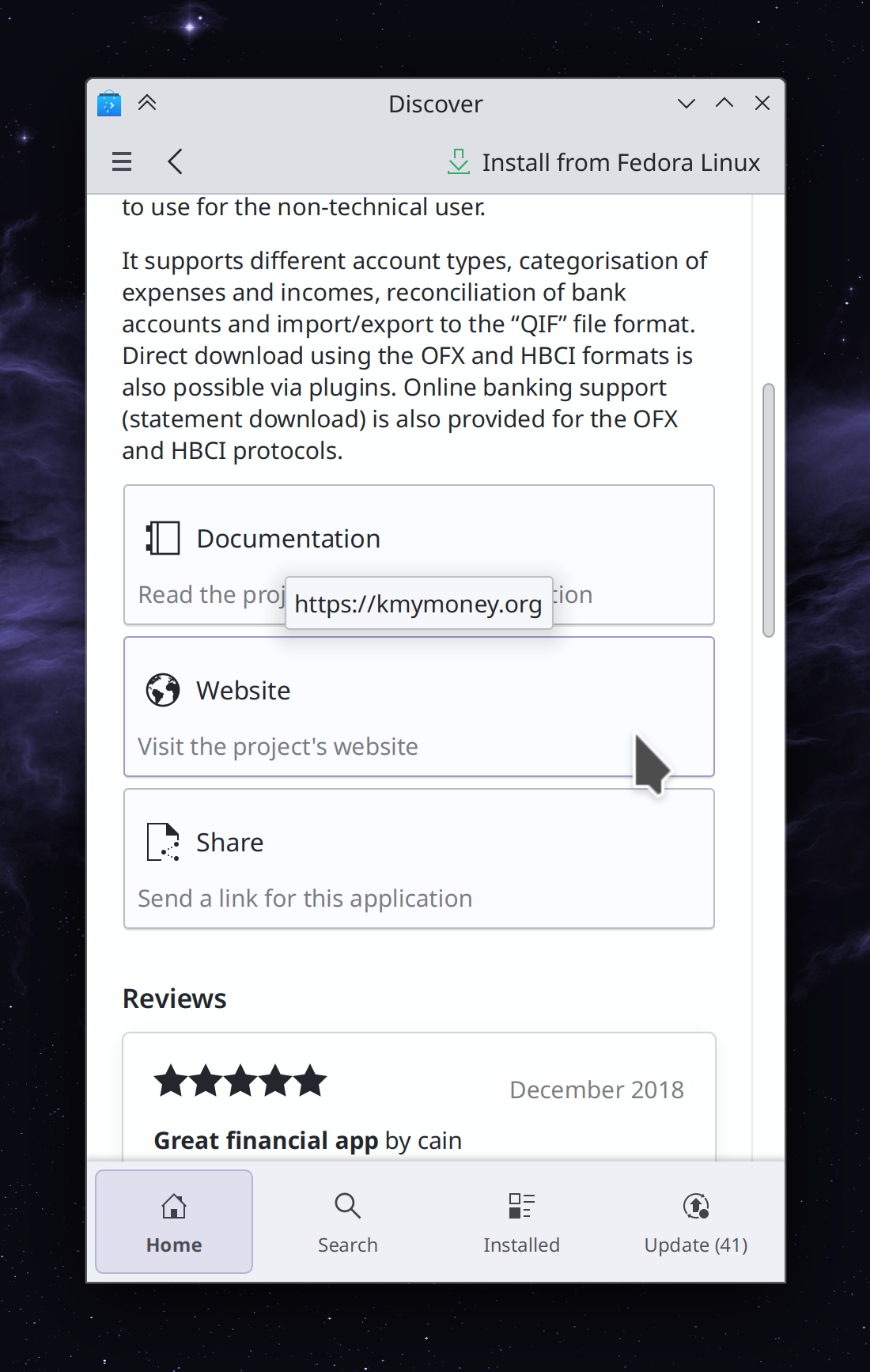
On Discover’s app pages, the rows of buttons now become columns for narrow windows or the mobile interface, and their layout is streamlined and improved as well (Emil Velikov, Plasma 5.27.3. Link):

Discover mobile view showing "Documentation," Website," and "Share" buttons in a column

Welcome Center now has a mobile-friendly layout. The content itself is still fairly desktop-focused, but this will soon change as well! (me: Nate Graham, Plasma 6.0. Link):

Welcome Center app showing "Manage Software" page in narrow mobile mode

In the Plasma Wayland Session, the Ctrl+Alt+Scroll up/down shortcut that switches virtual desktops has been changed to Meta+Alt+Scroll up/down to avoid blocking app-specific shortcuts and also generally comply with the standard that global actions use the Meta key (me: Nate Graham, Plasma 6.0. Link)

When using the Kickoff Application Launcher’s setting to use a grid view for non-favorites views, this now affects the All Applications view too (Tanbir Jishan, Plasma 6.0. Link)

Improved how the SDDM login screen works with a touchscreen in the Plasma Wayland session: touch input works at all, tapping the Virtual Keyboard button now opens it, and the keyboard layout list can now be scrolled with a swipe (Aleix Pol Gonzalez and me: Nate Graham, Plasma 5.27.3 and Frameworks 5.104. Link 1, link 2, and link 3)

Significant Bugfixes

(This is a curated list of e.g. HI and VHI priority bugs, Wayland showstoppers, major regressions, etc.)

KRuler now works properly on Wayland, and can now be moved or resized like on X11 (Shenleban Tongying, KRuler 23.04. Link)

Fixed another way the powerdevil power management subsystem could crash with certain multi-screen setups (Aleix Pol Gonzalez, Plasma 5.27.3. Link)

Fixes a way that apps could crash in the Plasma Wayland session when a display goes to sleep (Aleix Pol Gonzalez, Plasma 5.27.3. Link)

Night Color now works on ARM-powered devices that don’t support “Gamma LUTs” but do support “Color Transform Matrices”! It still doesn’t work on NVIDIA GPUs because they don’t support either of them (Vlad Zahorodnii, Plasma 5.27.3. Link)

Red and blue color channels are no longer sometimes swapped while screencasting in the Plasma Wayland session (Aleix Pol Gonzalez, Plasma 5.27.3. Link)

Image buttons in Breeze-themed GTK apps are now displayed correctly (Janet Blackquill, Plasma 5.27.3. Link)

Fixed two major crashes in Plasma related to actions that would show window thumbnails in the Task Manager (Fushan Wen, Frameworks 5.104. Link)

Other bug-related information of interest:

Automation & Systematization

Re-organized https://develop.kde.org/docs to have a more straightforward structure and make it easier to find stuff (Carl Schwan. Link)

Wrote some documentation about KRunner metadata (Alexander Lohnau, Link)

Web Presence

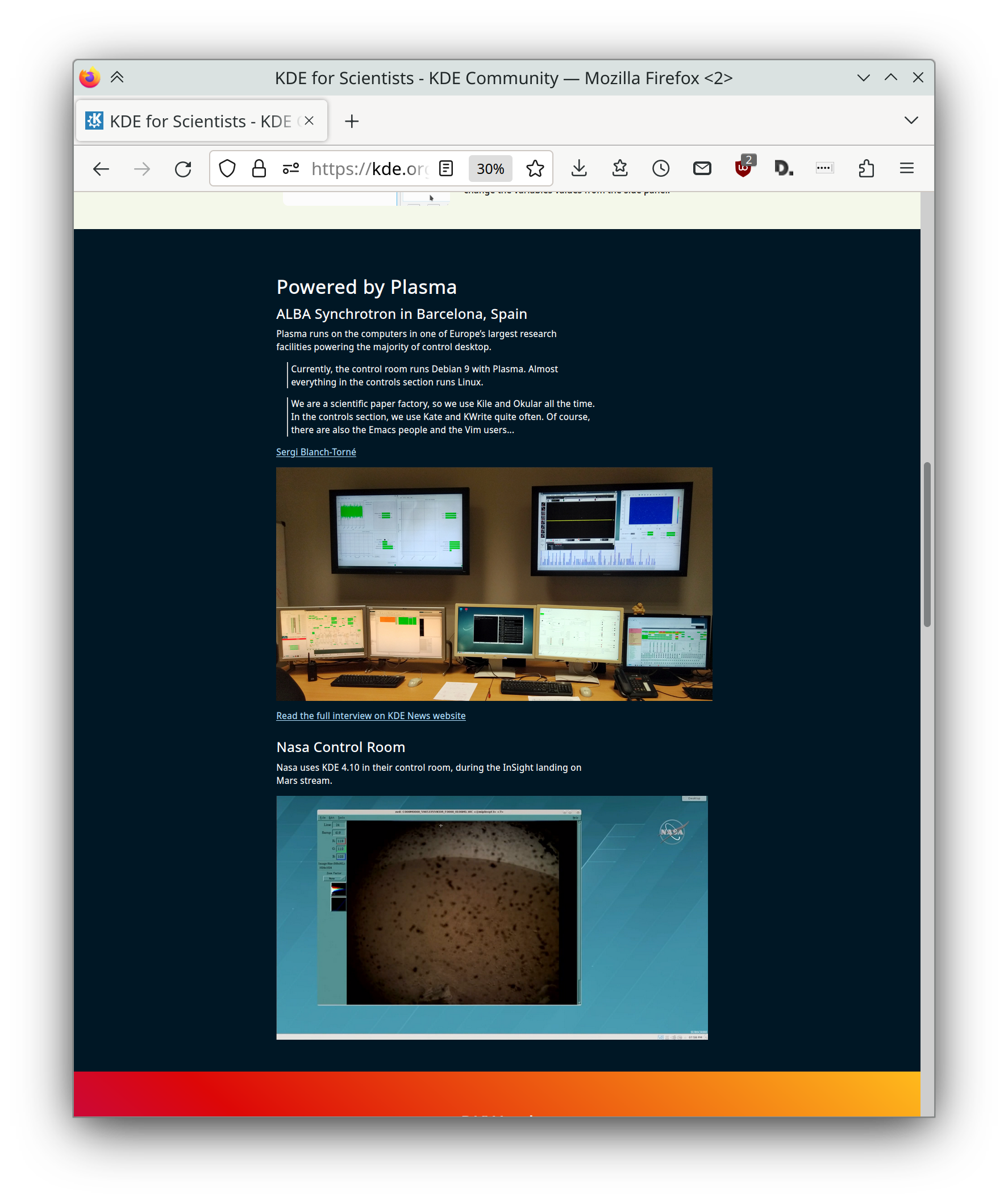
https://kde.org/for/scientists is now live! This web page showcases the best KDE software to use for professional, technical, scientific purposes, including by NASA and Barcalona’s ALBA Synchrotron.

https://develop.kde.org/frameworks/kirigami has been overhauled to showcase the latest state-of-the-art in KDE’s Kirigami app development framework:

Thanks to Carl Schwan, the KDE Promo team, and many others for making these impactful changes happen!

…And everything else

This blog only covers the tip of the iceberg! If you’re hungry for more, check out https://planet.kde.org, where you can find more news from other KDE contributors.

How You Can Help

If you’re a user, upgrade to Plasma 5.27! If your distro doesn’t offer it and won’t anytime soon, consider switching to a different one that ships software closer to its developer’s schedules.

If you’re a developer, consider working on known Plasma 5.27 regressions! You might also want to check out our 15-Minute Bug Initiative. Working on these issues makes a big difference quickly!

Otherwise, visit https://community.kde.org/Get_Involved to discover other ways to be part of a project that really matters. Each contributor makes a huge difference in KDE; you are not a number or a cog in a machine! You don’t have to already be a programmer, either. I wasn’t when I got started. Try it, you’ll like it! We don’t bite!

And finally, KDE can’t work without financial support, so consider making a donation today! This stuff ain’t cheap and KDE e.V. has ambitious hiring goals. We can’t meet them without your generous donations!