

It’s been few months since I last blogged about KDE Linux, KDE’s operating system of the future. So I thought it was time to fill people in on recent goings-on! It hasn’t been quiet, that’s for sure:
Project health is looking good
KDE Linux hit its alpha release milestone last September, encompassing basic usability for developers, internal QA people, and technical contributors. Our marketing-speak goal was “The best alpha release you’ve ever used”.
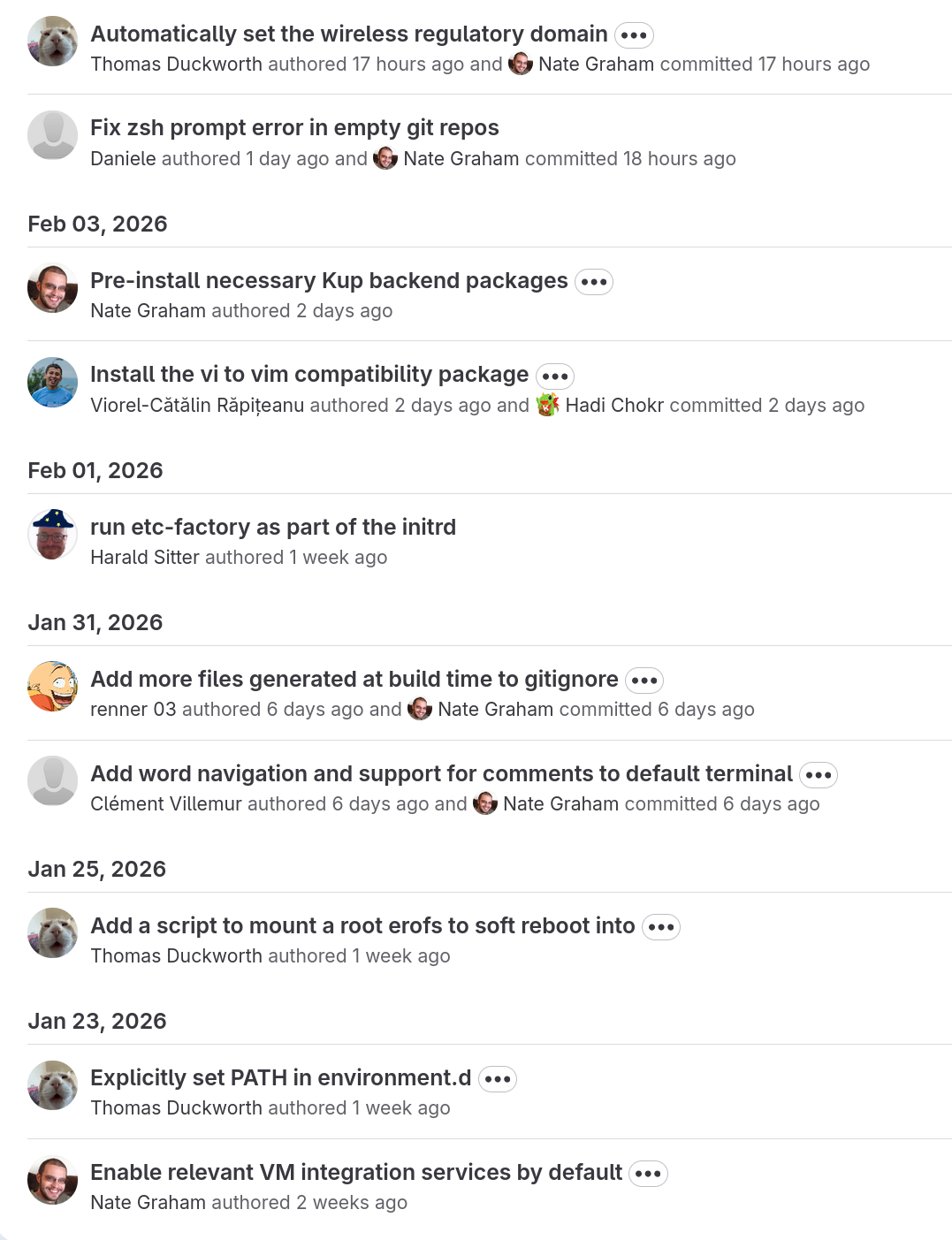
I’d say it’s been a success, with folks in the KDE ecosystem starting to use and contribute to the project. A few months ago, most commits in KDE Linux were made by just 2 or 3 of us; more recently, there’s a healthy diversity of contributors. Check out the last few days of commits:
The next step is working towards a beta release. This is something we can consider the equal of other traditional Linux OSs focused on traditional Linux users: the people who are slightly to fairly technical and computer-literate, but not necessarily developers. Solidly “two-dots-in-computers” users. We’re 62% of the way there as of the time of writing.
First public Q&A and development call
KDE Linux developers held their first public meeting today! The notes can be found here. This is the first of many, and these meetings will of course be open to all.
In this first meeting, devs fielded questions from technical users and discussed a number of open topics, coming to actionable conclusions on several of them. The vibe was really good.
If you want to know when the next meeting will be held, watch this space for a poll!
Delta updates enabled by default
After months of testing by many contributors, we turned on delta updates.
Delta updates increase update speed substantially by calculating the difference between the OS build you have and the one you’re updating to, only downloading that difference, and then applying it like a patch to build the new OS image.
As a result, each OS update should consume closer to 1-2 GB of network bandwidth, down from the 7 GB right now (this is if you’re updating daily; longer intervals between update will result in larger deltas). Still a lot, but now we have a mechanism for reducing the delta between builds even more.
This wonderful system was built by Harald Sitter. Thanks, Harald!
Integrating plasma-setup and plasma-login-manager
KDE Linux now delegates most first-user setup tasks to plasma-setup:
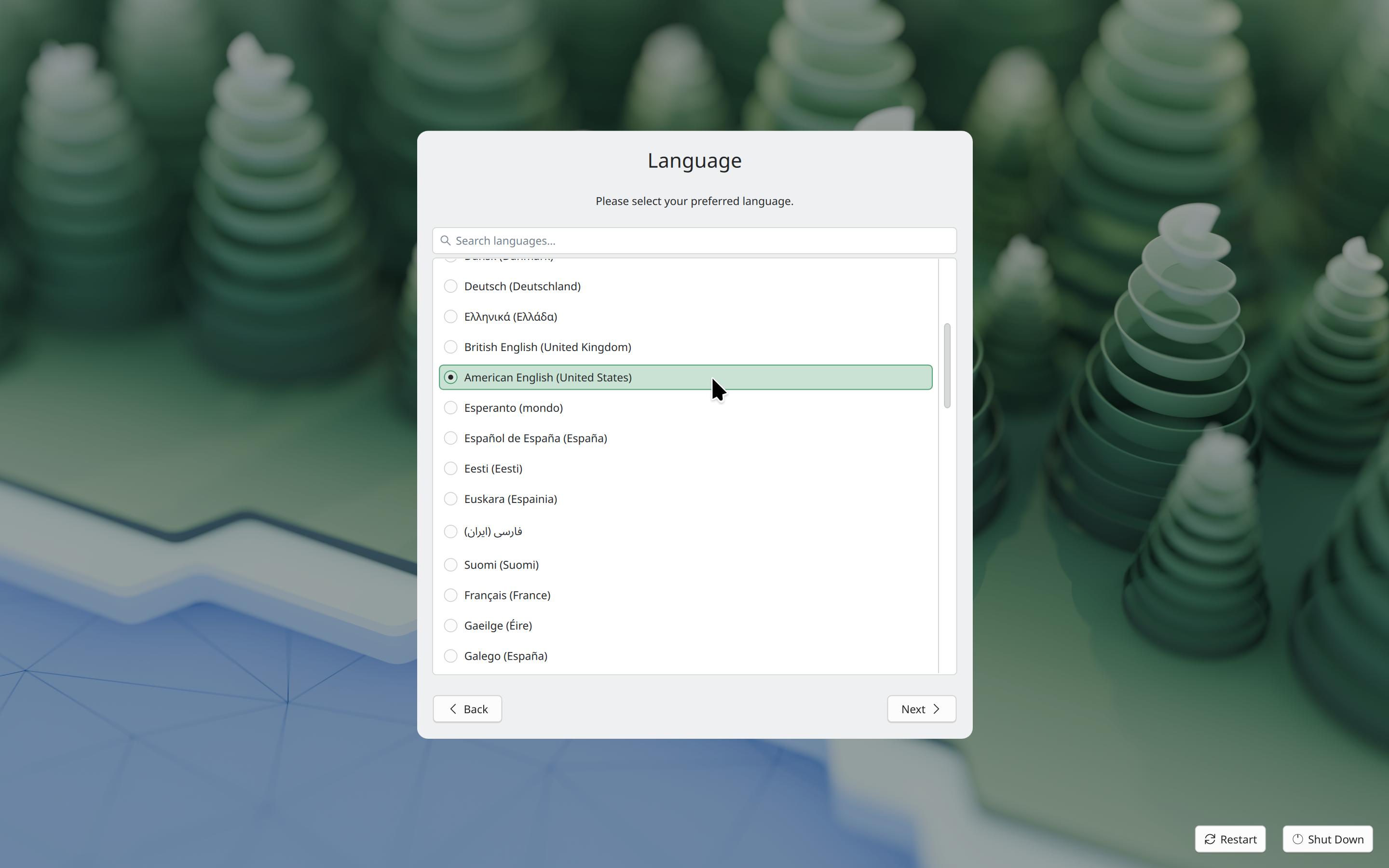
plasma-setup supports the use case of buying a device with KDE Plasma pre-installed where the user is expected to create a user account as part of the initial setup.
Thanks very much to Kristen McWilliam both for not only taking the lead to develop plasma-setup, but also integrating it into KDE Linux!
In addition, KDE Linux now uses plasma-login-manager instead of SDDM. This is a modern login manager intending to integrate more deeply with Plasma for operating systems that want that and use systemd (like KDE Linux does). Development was done primarily by David Edmundson and Oliver Beard, with assistance from Nicolas Fella, Harald Sitter, and Neal Gompa. KDE Linux integration work was done by Thomas Duckworth and Harald Sitter.
KDE Linux has been a superb test-bed for developing and integrating these new Plasma components, and now other operating systems get to benefit from them, too!
Better hardware support
As an operating system built for users bringing their own hardware, KDE Linux is fairly liberal about the drivers and hardware support packages that it includes.
Compared to the initial alpha release last September, the latest builds of KDE Linux include better support for scanners, fancy drawing tablets, Bluetooth file sharing, Android devices, Razer keyboards and mice, Logitech keyboards and mice, fancy many-button mice of all kinds, LVM-formatted disks, exFAT and XFS-formatted disks, audio CDs, Yubikeys, smart cards, virtual cameras (e.g. using your phone as one), USB Wi-Fi dongles with built-in flash storage, certain fancy professional audio devices, and Vulkan support on certain GPUs. Phew, that’s a lot!
Thanks to everyone who reported these issues, and to Hadi Chokr, Akseli Lahtinen, Thomas Duckworth, Fabio Bas, Federico Damián Schonborn, Giuseppe Calà, Andrew Gigena, and others who fixed them!
There’s still more to do. KDE Linux regularly receives bug reports from people saying their devices aren’t supported as well as they could be, or at all — especially older printers, and newer laptops from Apple and Microsoft. No huge surprises here, I guess! But still, it’s a big topic.
Better performance
Thomas Duckworth, Hadi Chokr, and I dug into performance and efficiency, improving the configuration of the kernel and various middleware layers like PulseAudio and PipeWire. Among them include using the Zen kernel, optimizing kernel performance, increasing various internal limits, and optimizing for low-latency audio.
Thanks very much to the CachyOS folks who blazed many of these trails, and whose config files we learned from.
Quieter boot process
Previously, the OS image chooser was shown on every boot. This is good for safety, but a waste of time and an unnecessary exposure of technical details in other cases.
Thomas Duckworth hid the boot menu by default, but made it show up if you mash the spacebar, or if the computer was force-restarted, or restarted normally very quickly after login. These are symptoms of instability; in those cases we show the OS image chooser on the next boot so you can roll back to an older OS version if needed.
Appropriately-set wireless regulatory domain
Different countries have different regulations regarding wireless hardware’s maximum transmit power. If you don’t tell the kernel what country your computer is located in, it will default to the lowest transmit power allowed anywhere in the world! This can reduce your Wi-Fi performance.
Thanks to Thomas Duckworth, KDE Linux now sets the wireless regulatory domain appropriately, looking it up from your time zone, and letting your hardware use all the power it legally can. It updates the value if you change the time zone, too! And also thanks to Neal Gompa for building the tool we integrated into KDE Linux for this.
The idea for this one came from reading CachyOS docs asking users do it manually. Maybe we have something worth copying now!
RAR support
Hadi Chokr added RAR support to our builds of Ark, KDE’s un-archiver. Now you can keep on modding your old games!
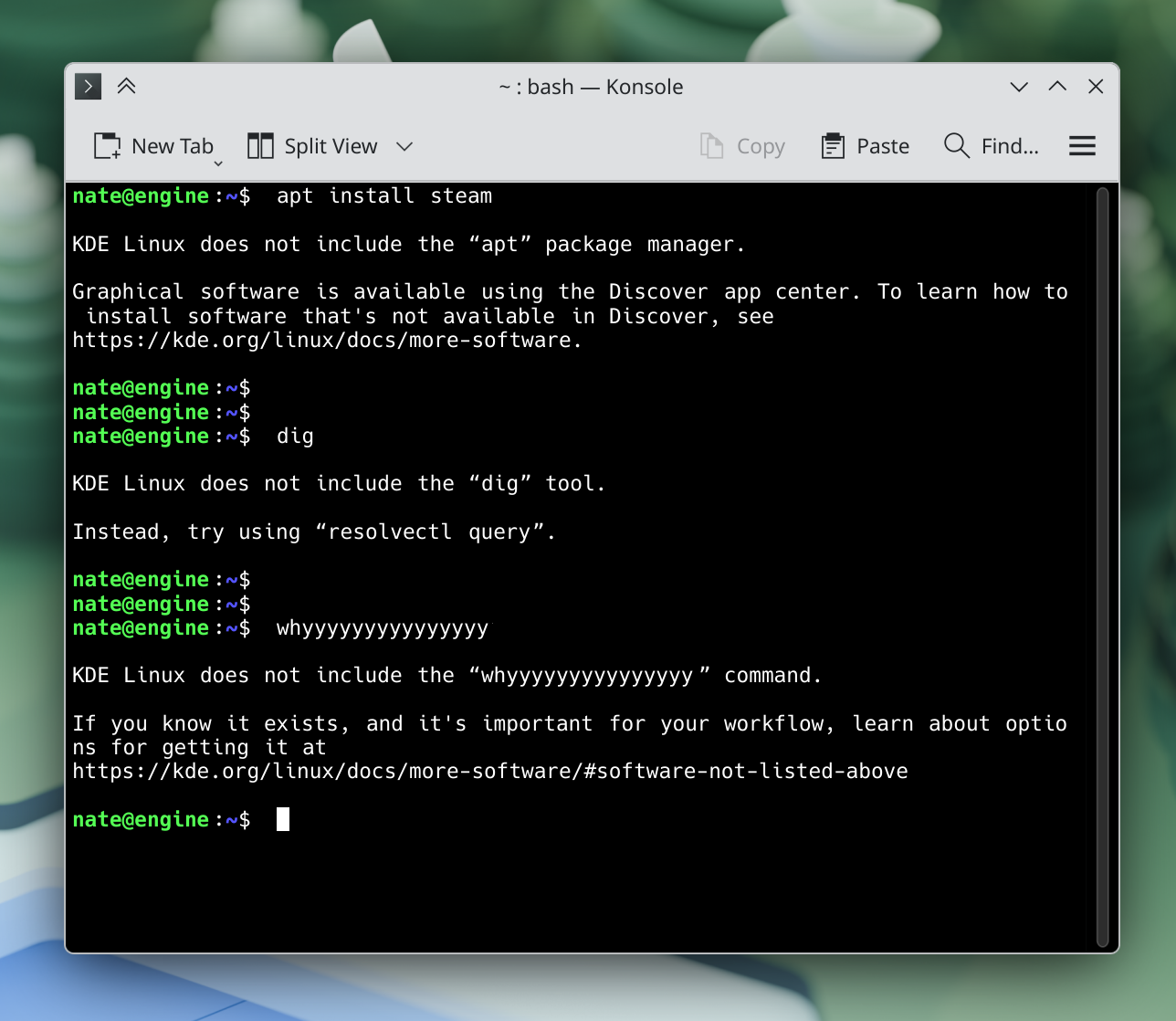
“Command not found” handler
I built a simple “command not found” handler that tries its best to steer people in the right direction when they run a command that isn’t available on KDE Linux:
Better Zsh config
KDE Linux now includes a default Zsh config, and it’s been refined over time by multiple people who clearly love their Zsh!
Thank you to Thomas Duckworth, Clément Villemur, and Daniele for this work.
Documentation moved to a more official location
KDE Linux documentation was wiki-based for the past year and a half, and benefited from the sort of organic growth easily possible there. However, it’s now found a more permanent and professional-looking home: https://kde.org/linux/docs.
This will be kept up to date and expanded over time just like the old wiki docs — which now point at the new locations. This work was done by me.
Easy setup for KDE development
KDE developers are a major target audience of KDE Linux. To that end, I wrote some setup tools that make it really easy for people to get started with KDE development. It’s all documented here; basically just run set-up-system-development in a terminal window and you’re ready! The tool will even tell you what to do next.
Saying hello to KCalc, Qrca, Kup, and new CLI tools
KDE Linux includes an intentionally minimal set of GUI apps, leaning on users to discover apps themselves — and if that sucks, we need to fix it. But we decided that a calculator app made sense to include by default. After much hemming and hawing between KCalc and Kalk (it was a tough call!), we eventually settled on KCalc, and now it’s pre-installed.
We’re also now including Qrca, a QR code scanner app. This supports the Network widget’s “scan QR code to connect to network” feature:
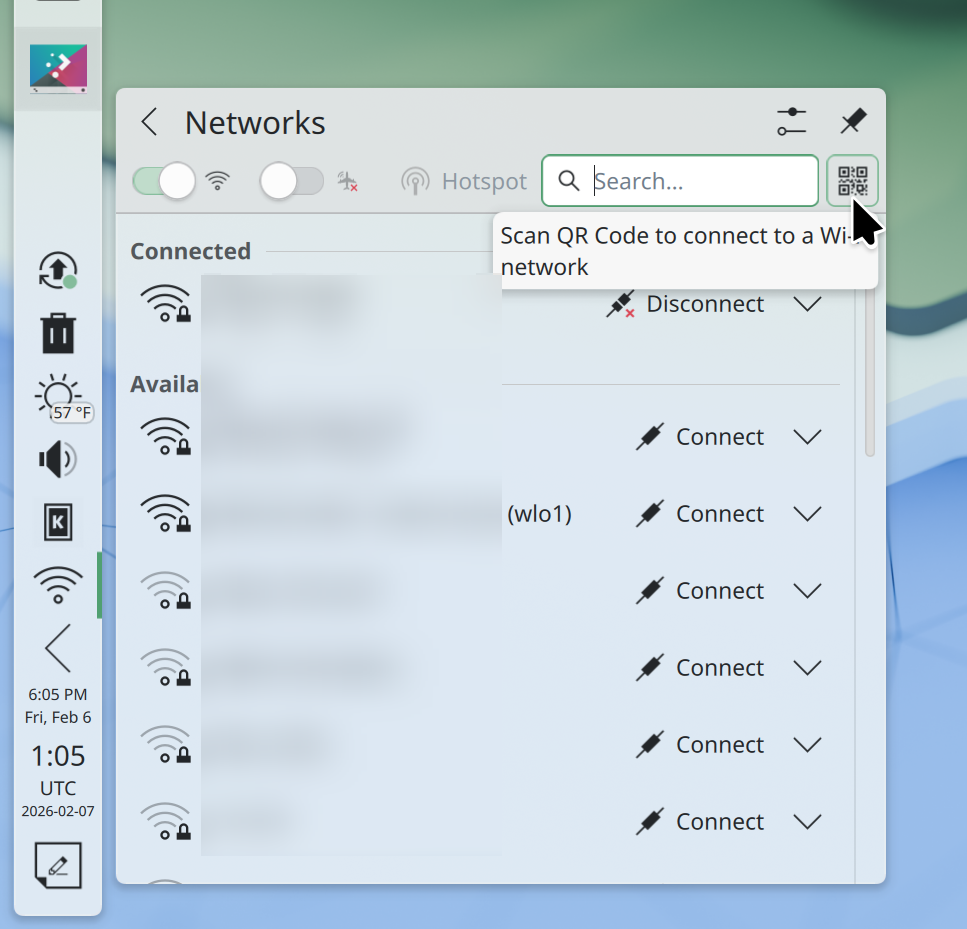
Next up is KDE’s Kup backup program for off-device backups! Kup is not nearly as popular as it should be, and I hope more exposure helps to get it additional development attention, too.
Finally, we pre-installed some useful command-line debugging and administration tools, including kdialog, lshw, drm_info, cpupower, turbostat, plocate, fzf, and various Btrfs maintenance tools.
This work was done by me, Ryan Brue, Kristen McWilliam, and Akseli Lahtinen.
Waving goodbye to Snap, Homebrew, Kate, Icon Explorer, Elisa, and iwd
Since the beginning, KDE Linux included Snap as part of an “all of the above” approach to getting software.
Snap works fine (in fact, better than Flatpak in some ways), but came with a big problem for us: It’s only available in the Arch User Repository (AUR). Getting software from AUR isn’t great, and we’ve been moving away from it, with an explicit goal of not using AUR at all by the time we complete our beta release.
Conversations with Arch folks revealed that there was no practical path to moving Snap out of AUR and into Arch Linux’s main repos, and we didn’t fancy building such a large and complex part of the system ourselves. So unfortunately that meant it had to go. We’re now all-in on Flatpak.
Homebrew was another solution for getting software not available in Discover, especially technical software libraries needed for software development. We never pre-installed Homebrew, but we did officially document and recommend it. However the problem of Homebrew-installed packages overriding system libraries was worse than we originally thought; there were reports of crashing and “doesn’t boot” issues not resolvable by rolling back the OS image, because Homebrew installs stuff in your home folder rather than a systemwide location. Accordingly, we’ve removed our recommendation, replacing it with a warning against using Homebrew in our documentation. Use Distrobox until we come up with something more suitable.
Another removal was Kate. Kate is amazing, but we already pre-install KWrite, and the two apps overlap significantly in functionality. Eventually we reasoned that it made sense to only pre-install KWrite as a general text editor and keep Kate as an optional thing for experts who need it.
We also removed Icon Explorer from the base image because developers who need it can now get a Flatpak build of it from Flathub.
Next up was Elisa. Local music library manager apps are not very popular these days, and the pre-installed Haruna app can already play audio files. So out it went, I’m afraid. Anyone who uses it (like I do!) can of course manually install it, no problem.
And finally, the iwd wireless daemon leaves KDE Linux. It was never enabled by default; it was just an option for those who needed it. And the one user who did need it eventually found a better solution to their wireless card issues. With news of Intel dis-investing in iwd, we decided it didn’t have a sunny future in KDE Linux anymore and removed it.
This work was done by me.
And lots more
These are just the larger user-facing changes. Tons of smaller and more technical changes were merged as well. It’s a fairly busy project.
You can use it!
It’s also not a theoretical project; KDE Linux is released and I typed this blog post on it! I’ve developed Plasma on it and run a business on it, too. It’s been my daily driver since last August.
You can probably install KDE Linux on your computer too, and become a part of the future. Even if you’re worried about using alpha software because you’re not a software developer or a mega nerd, it’s perfect for a secondary computer. KDE Linux is quite stable, and the OS rollback functionality reduces risk even more.
You can help build it!
If any of this is exciting, come help us build it! Working on KDE Linux is pretty easy, and there’s lots of support.
 Adventures in Linux and KDE
Sad to see Kate no longer included by default, but it is understandable. I am glad to see that BTRFS Assistant is planned!
Also, regarding OS image selector, in addition to spacebar, maybe Esc and Arrow Keys can be added as well to show them? I personally always hold the down arrow when I want to select boot options.
Regarding hardware, is something more vendor-specific like asusctl or even the GUI rog-control-center is in the cards? I’d be fine with something like “include asusctl but open dialogue with rog-control-center so they can interface from Flatpak or AppImage”. Oh, and I think input-remapper works well as a default generic way of handling input peripheral (Razer mouse, extra keyboard buttons, etc).
Is there any plans for a ujust style of quick setup tools? I don’t think most people mind about things not being included by default if there’s a simple way of setting them up without hunting for the answers manually from the internet.
Those are all my feedback based on this update. I don’t know if KDE Linux will be the right OS for me but I hope it matures and get even better! So far, it looks pretty good!
LikeLike
By BTRFS Assistant is planned, I meant someway of managing BTRFS Snapshots via a GUI and its very likely we will write our own GUI Tool instead. Also its a bit far into the future since currently I only intend of redesigning the RootFS Layout for BTRFS Snapshots of Home for now and once something better for managing Snapshots comes up like the planned BTRFS Support of snapm with First Class Fedora and KDE Linux Support in mind we decide on which way we want to go.
LikeLike
Personally I think KDE Linux without Kate is a very bad idea. Kate, Okular, these are the tools I put in any environment.
LikeLike
It comes across as not a vote of confidence in the flagship text editor, yeah. Kate isn’t particularly newbie-friendly (doesn’t bother me, might more people) but having some sort of “simple mode” for Kate rather than a different editor picked over it and Kate not being installed would be more… supportive of the project?
LikeLike
KWrite IS the simple mode for Kate. Same repo, same base, just fewer features. (no project-level stuff)
LikeLiked by 1 person
@jaxad0127 Amongst users who’d be intimidated by a text editor and wouldn’t be using a word processor to compose text, single user environments are more the norm than different users having their own logons. KWrite has lots of advanced features and if anything a ‘simple’ mode would want to hide most of those as well. If the intention was to offer something similar to the old Windows Notepad, KWrite is already fairly overwhelming, but a ‘simple’ mode would avoid the need to get hold of passwords, install stuff, etc. A more compelling argument is possibly that if KDE Linux is intended to showcase KDE, it should include well-known and popular KDE apps.
LikeLike
bweh, i think you should re-add kate and remove kwrite. aint kwrite forked out of Kate nowadays anyways?
LikeLike
Seems to be the same components and some of the same limitations, yeah.
LikeLike
It’s not a fork, it’s just a different build with a simpler UI. More targeted toward editing single text files as opposed to larger projects. Same codebase though, i.e. improvements to Kate will also benefit KWrite and vice versa.
LikeLiked by 2 people
Great developments. KDE Linux really excites me.
As @fenglengshun mentioned, adding arrow keys in addition to the space bar makes things even easier.
Removing Kate is a positive step; KWrite (in terms of simplicity) solves the problem. Not pre-installing Elisa is somewhat understandable, as most people now use Spotify, YouTube Music, etc. to listen to music.
Choosing Haruna as the multimedia player is, in my opinion, not a positive step. It’s visually very tiring on the eyes. (I’d like to point out that VLC is in the same situation.) [People want to focus on watching movies or listening to music, they don’t want to deal with a lot of eye-straining menus, settings, etc.] A simpler interface and simpler settings would be better, for example: https://apps.gnome.org/tr/Showtime/
I think developer applications shouldn’t be pre-installed for the end user. (GammRay, Plasma Global Theme Explorer, Plasma Operator Explorer, Plasma Theme Explorer, Qt development tools, etc.)
My expectation during the initial installation of an operating system is that the necessary applications and all multimedia components (codecs, etc.) are installed to meet basic needs.
What are these?
* A simple and eye-friendly multimedia application that doesn’t overwhelm you with too many settings.
* An application like Gwenview that can handle simple tasks for images (photos, etc.) (rotating left/right, cropping, resizing, etc.).
* A browser like Firefox for browsing the internet.
* A simple text editor like Kwrite.
* An application like Ark for compressing/decompressing files.
* An application like Spectacle for taking and saving screenshots.
* An application like Okular for opening PDFs and similar files.
* System Settings.
* File Manager.
* Terminal (console).
* An application like Plasma-SystemMonitor for system monitoring, terminating processes, etc.
* An application like Discover for installing applications.
* An application like PartitionManager for formatting disks/USB drives…
It’s that simple 🙂
Finally, I would like to extend my endless thanks to all the KDE, Plasma, and KDE Linux developers. You truly do excellent work!
Best regards…
LikeLike
Thank you!
Dragon Player recently got a super-easy-on-the-eyes QML UI, and replacing Haruna with it is an option. It’s very barebones in terms of features, though.
The intention is definitely to not pre-install all those developer tools. It’s an artifact of them not being available as Flatpaks yet. Icon Explorer’s move to not being pre-installed after it got a Flatpak version is the model here.
LikeLike
Kwrite is kind of painful to use, and I mean that literally. The find/replace bar apparently can’t be relocated and if you have back or neck injuries that can be an issue. Not that Kate is great in this respect either. If either is going to be a default choice for a distro, it’d be nice to see more of a focus on accessiblity.
Almost the opposite view on media players, VLC is widely known even with non-technical users (it’s been around for years, runs on everything and plays everything). Whilst its interface isn’t great it’s what people expect. It’s also skinnable, although I’ve never seen anyone bother to use them, which might be an option for a distro to make things a bit more user-friendly.
LikeLike
@Nate
It suddenly occurred to me that 15 years ago (https://www.reddit.com/r/kde/comments/jbjz6/dragon_player_3_announcement/) a project called Dragon Player 3 was introduced 🙂
@D
I know that focusing on accessibility is one of KDE’s core goals. I think you should report any bugs or make suggestions related to this.
I’m currently using VLC (because it’s the default in KDE neon). Yes, it has theme support, but I think it’s both non-functional and technologically outdated. VLC hasn’t been developed in years. When was the last version released?
LikeLike
@Hasan VLC 3.0.23 was released in January, 3.0.24 is due in May. It gets frequent and extensive feature releases (see the changelogs) — it’s just not a project that’s been particularly focused on UI. The version 4 beta gives an idea of where they’re going with the interface, although I think it’s still early days.
LikeLike
Oh boy, please make sure to remove all of these kernel parameters before shipping the 1.0 version to the public (but certainly keep the preempt=full setting).
Unfortunately, I don’t have the time right now to explain why this is a bad idea, so just trust me, bro… 😉
(In short, you are increasing the housekeeping burden on the Linux kernel this way, which will result in unpredictable lag spikes, especially during high system load / pressure.)
LikeLike
So in order to gain popularity, it must be as a smooth experience as possible for new users.
For an example: You want to scan, but the scanner software “Skanpage” is not installed. So you go to Discover and type “scan”. None of the top-options is “Skanpage”, and most are unmaintained broken apps. The first user experience is going to be poor! For something that would not have taken any noticeable disk space. This doesn’t make sense.
Therefore, small apps, must be installed per default since leaving them out only hurts. “Skanpage” must be installed per default. Just for the reason same as “Okular” is.
For video-player, I would consider MPV which is cleaner and much more efficient than VLC, so the first user experience when trying to open a film (e.g. downloaded from Whatsapp) just works.
In Discover, I would also make the top recommendations/editor page to include the major software alternatives for users that wants to switch from Windows, so it would be: LibreOffice, Krita, Blender, Rawtherapee. In short, make the transition from Windows / MacOS easy.
And thanks for your great work! Love it!
LikeLike
That’s a valid criticism; I’m surprised to confirm that Discover’s search results for “Scan” are pretty bad. This is definitely something to improve, it’s what I meant by “if app discovery sucks, we need to fix it”.
Part of the problem here is KDE’s scanning apps not being rated very highly. If these apps simply aren’t seen as very good, that’s another thing to fix! So we could give them an artificial boost in Discover, but this is the kind of thing Microsoft repeatedly got in trouble for, rightly so. Probably better to improve the quality of the search results in a neutral way, and improve the quality of the apps themselves.
LikeLike
Yeah, having something as a default’s better than nothing. And an option to filter to “official” or “endorsed” apps would be very welcome in Discover even if it’s not the default filter. Ratings systems don’t engender trust, they’re too easily gamed, and result in things like the top Graphics app currently being something called Mandelbulber v2 apparently just because 15 people gave it a five star rating. Most people aren’t looking for anything to do with fractals when they click into a Graphics software category, are they?
LikeLike
Would suggest not auto hiding tabs in Kwrite by default, if it’s like that as in other distros, it makes it seem like an old Notepad clone at first glance and would guess most people end up not investigating further. Shame it doesn’t seem possible to undock or move the find/replace panel, which is a problem for accessibility personally. Otherwise looks like a capable basic editor, although promoting it might be to the detriment of Kate.
LikeLike
I rarely use either KWrite or Kate, so I don’t really care personally, but I came across an argument a while ago that I found quite compelling, for why Kate might be the better option for being the default:
I couldn’t agree more: hardly anybody needs a basic text editor IMHO. What’s the use case for that? Far more people will use something like LibreOffice, won’t they?
[1] https://woltman.com/gnome-bad/#mcetoc_1j0nnl9fhkl
LikeLike
so is plasma login manager finally out of a pre release state? Should the warning on its repo be removed now?
LikeLike
Its first release is in Plasma 6.6 next week. So yeah, very soon it’ll be fine to remove the warning.
LikeLike
Ugh. All the people arguing for including Kate as the default have never had to sit down and train a Linux newbie on their first exposure to Linux with their new, non-corporate OS.
Kate stands for “KDE **Advanced** Text Editor”. It’s for **advanced** users. Just looking at it, it looks very intimidating to someone who just wants an alternative to Windows/Apple. KWrite is appropriate for a pack-in text editor that edits text. Not serves as an IDE.
An advanced user will know how to install all the development tools they need.
LikeLike
So what’s the use case for using a plain text editor (like KWrite) for a non-advanced user? Like, similarly, what’s the use case for using “Editor” (I think it’s called?) on Windows for a non-advanced user? I’m really scratching my head, because in my experience, non-advanced users will simply use LOWriter / MSWord / …. for even the smallest stuff (e.g. note taking), but of course I only know a very limited number of users so I might well be overlooking something.
My point is: non-advanced users will not need a plain text editor, anyway, so might as well not install it. I’m not necessarily advocating for Kate being installed by default, I’m happy with no plain-text editor being installed, at all, because I agree with you: advanced users will know how to install it.
LikeLike
I’m hoping for a hardware vendor to adopt KDE Linux at some point and rooting for the investment this might bring. Would a vendor distribution have some provision for including application software such as LibreOffice as part of an OEM install?
And perhaps less than 1Gb/day updates, but I imagine the system will be much more stable then.
LikeLike
Stay tuned. 🙂
Regarding update size, it’s mostly a concern right now for people who update daily. There won’t be daily updates for the user-focused editions; more like monthly.
LikeLike
Could we please add ‘Verified/Unverified’ labels to the search results in the Discover? Also, showing the release date of the version would be a great addition.
Thanks for your great work!
LikeLike
Discover currently uses a little checkmark by the app name for the “verified” state. It’s not great, but then IMO neither is the “verified/unverified” terminology in the first place. In the absence of context, it’s not clear how the app being packaged by its own developer is a useful fact for people to know.
Personally what I would like to do (and eventually plan to implement) is a more all-encompassing UI for rating the app’s safety: https://invent.kde.org/plasma/discover/-/issues/16. Whether or not the app is packaged by its own developer or development community (like KDE) would be taken into account.
LikeLike
Hoping Snap would still somehow be included by default or some very easy click and install way. Flatpak and Snap are so very different they shouldn’t even be compared, and permissions issues are prevalent still on flatpaks. Most users will not fathom the use of flatseal and whatnot to tinker around due the permissioms issues, and Steam as a flatpak is just plain unusable but snap is therefore great (including all the extra gamer goodies too)
LikeLike
What do you mean unusable? I have Steam in a Flatpak on my KDE Linux system and it plays games just fine.
Like many apps that were developed before Flatpak existed, are some bugs and papercuts with its Flatpak packaging. We’re tracking them at https://invent.kde.org/kde-linux/kde-linux/-/issues/71#steam. But at least for basic usage, I’d hardly call it unusable.
LikeLike
I understand the reasons not to include Snap but I wish it was included nevertheless.
I’m currently running Kinoite so most of my needs are covered by Flatpak + AppImage + Distrobox, but I also had to layer a few RPM packages for stuff that goes deeper into the system. Snaps could solve this where the others can’t.
LikeLike
Which RPM packages; what did you find you were missing?
LikeLike
For example the IVPN app. It’s available as a Snap as well but not Flatpak. I know you can just create a manual Wireguard config file and import it to KDE but you’re missing out some features and convenience.
In terms of RPMs that are not available as a Snap:
I also layered some packages like podman-compose (podman was already preinstalled). I think it can also be installed with pip but I don’t have any experience with that.
In the past I also layered Virt-Manager, but not any more as Virt-Manager is now available as a Flatpak. But the Flatpak has some caveats like no shared folder via WinFSP with a Windows VM as this only works with a system qemu session, and no USB passthrough which might be a Flatpak problem as I think Gnome Boxes has the same issue.
LikeLike
Yeah, fancy non-default VPNs are currently a no-go until we figure out a better approach for extending the system.
Being Python-based, I imagine podman-compose can be gotten using pip and a virtual environment.
For the virt-manager issue, any chance I could deputize you into investigating it a bit?
LikeLike
What about work on security boot?
I use business laptop to start Linux distribution, and it (laptop) must have enabled security boot due to installed system is Windows. Currently I use Neon Testing Edition.
LikeLike
It’s on the roadmap! But not done yet as the task is annoyingly complicated and bureaucratic.
LikeLike
I was looking forward for this distro with vast software availability with both snap and flatpak installed by default. Zorin OS does it that way. They ship both and there is no problem after the install whether some software package is available in flatpak or snap. New users dont carfe about packaging methods but software availability and working easy install from app center or whatever.
Installing a snap package is the same everywhere: snap install [package name] and thats it. I think returning snap support should be reconsidered. Now its just thrown away in face of first issue to ship it IDK
LikeLike
Please, could we get a bootable ISO to test drive KDE Linux instead of the current raw file that needs to be ‘etched’ to USB? Tools like Ventoy allow regular Arch or KDE Neon ISOs to copied as-is to USB and instantly boot without dedicating an entire pendrive just for testing or preview. Thanks, mate.
LikeLike
See https://invent.kde.org/kde-linux/kde-linux/-/issues/287#note_1411463
LikeLike
hi. i also would like to know if rremoving the snap is final? because i need very many snaps in numbers for one reason or another and many apps are not deb or flatpak so. been following the build up of this new distro and this news was a bit of a bummer.
also if snap is permanently ditched, how easy would it be to install on kde linux when the stable release arrives?
LikeLike
Aslong as we are based on ArchLinux, the decision is final. ArchLinux is against Snap Support alltogether and just does the bare minimum to get it working. And maintaining such a complex package is also not in our intrest.
LikeLike
What’s the default browser situation like? I think including Falkon by default would be great! It’s got webextension support on the way, is a KDE project (unlike firefox, the usual default) and follows the KDE hig pretty well. Plus, Falkon needs the visibility imo. It’s a great browser, but the only people who know that are the people on Haiku since it’s one of the few browsers that works there
LikeLike
We discussed this in last week’s first dev call. See https://community.kde.org/KDE_Linux/Calls#Does_it_matter_that_our_default_web_browser_defaults_to_Google_as_the_search_engine?
LikeLike