
I was interviewed by Brodie Robertson of the “Tech Over Tea” podcast, and we talked about pointy sticks, the theoretical benefits of Wayland, and the nuts and bolts of money in the open-source world. Check it out!
Year: 2023
Plasma 6 fundraiser update
In case you weren’t aware, KDE e.V. is doing a membership drive right now, fundraising to strengthen the organization’s financial sustainability. The money goes towards employment for KDE contributors, organizing development sprints and the Akademy conference, server hardware, and more. If you want to know more details, check out the 2022 annual report which lists the budget.
For this fundraiser, we set a super ambitious goal of 500 members. We started with around 50, and as of today the total sits at 202! Even if it’s not 500, it’s still quadruple what we had before! This is great!
But we would really like to get to 500 before the release of Plasma 6 next February. 🙂 If you haven’t donated recently or aren’t a member of the KDE e.V., this is the perfect time to become a supporting member and help ensure the financial sustainability of one of the oldest and greatest FOSS communities on the planet! It’s less than the cost of Netflix or Amazon Prime, and it’s a whole lot more important. So please consider becoming a member or donating today! Already a member? Pitch it to a friend, family member, or colleague who uses KDE software! Every member helps. 🙂
These past 2 weeks in KDE: Wayland color management, the desktop cube returns, and optional shadows in Spectacle
Aaaaaand it’s a big one! I challenge anyone to read this week’s (well, these past two weeks’) report and not find something they’ve been wanting for a long time. 🙂
Plasma 6
(Includes all software to be released on the February 28th mega-release: Plasma, Gear-aligned apps, and Frameworks)
General info – Open issues: 109
Per-screen color management is now supported in the Plasma Wayland session for up to sRGB screens! You can assign ICC color profiles to each screen and apps will do the right thing. And colors picked using the Color Picker applet are now color-managed appropriately as well (Xaver Hugl, link 1, link 2, link 3, link 4, link 5, and link 6)
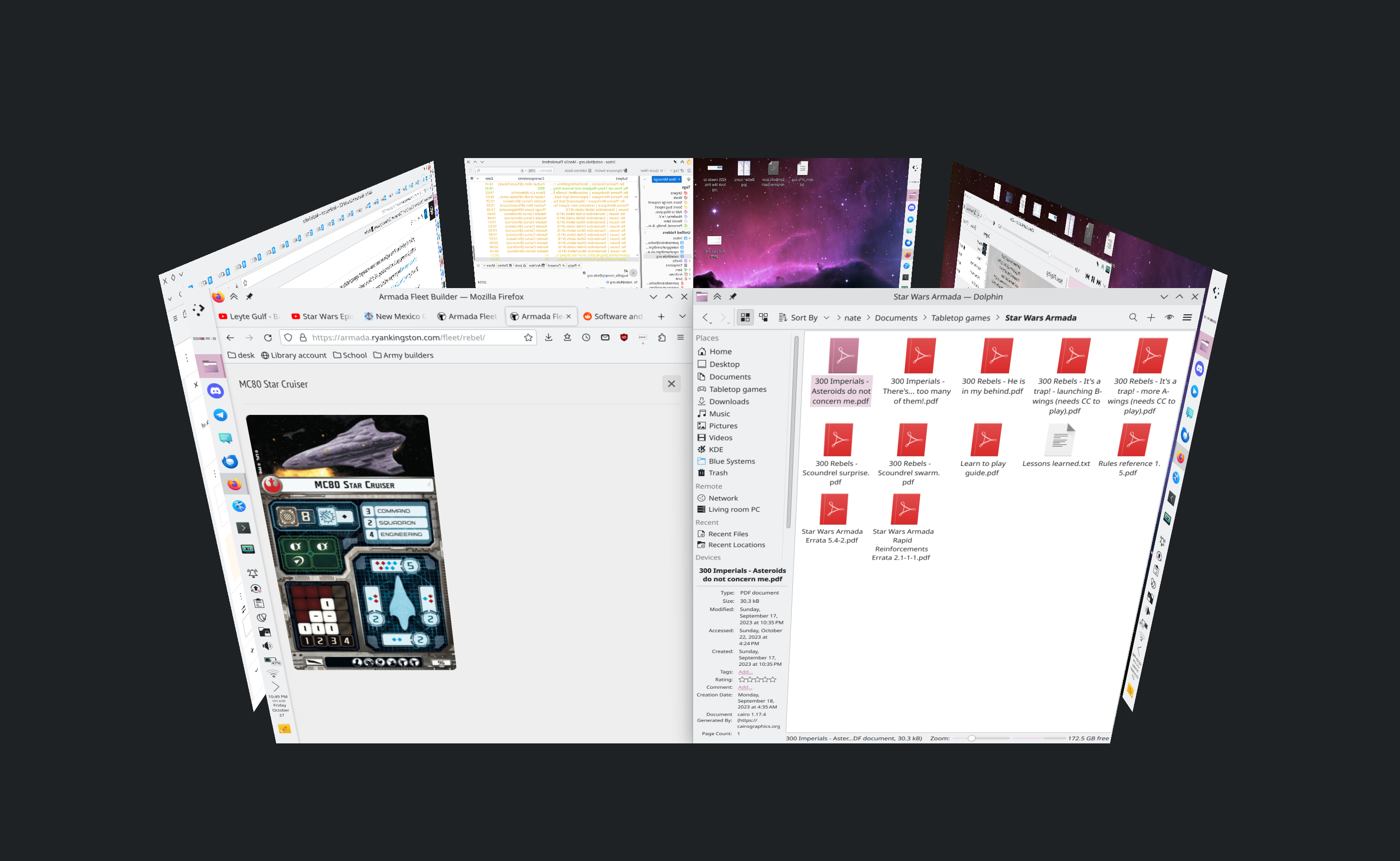
The Desktop Cube effect returns! It now lives in the kdeplasma-addons repo and you can trigger it with the Meta+C shortcut (Vlad Zahorodnii, link):
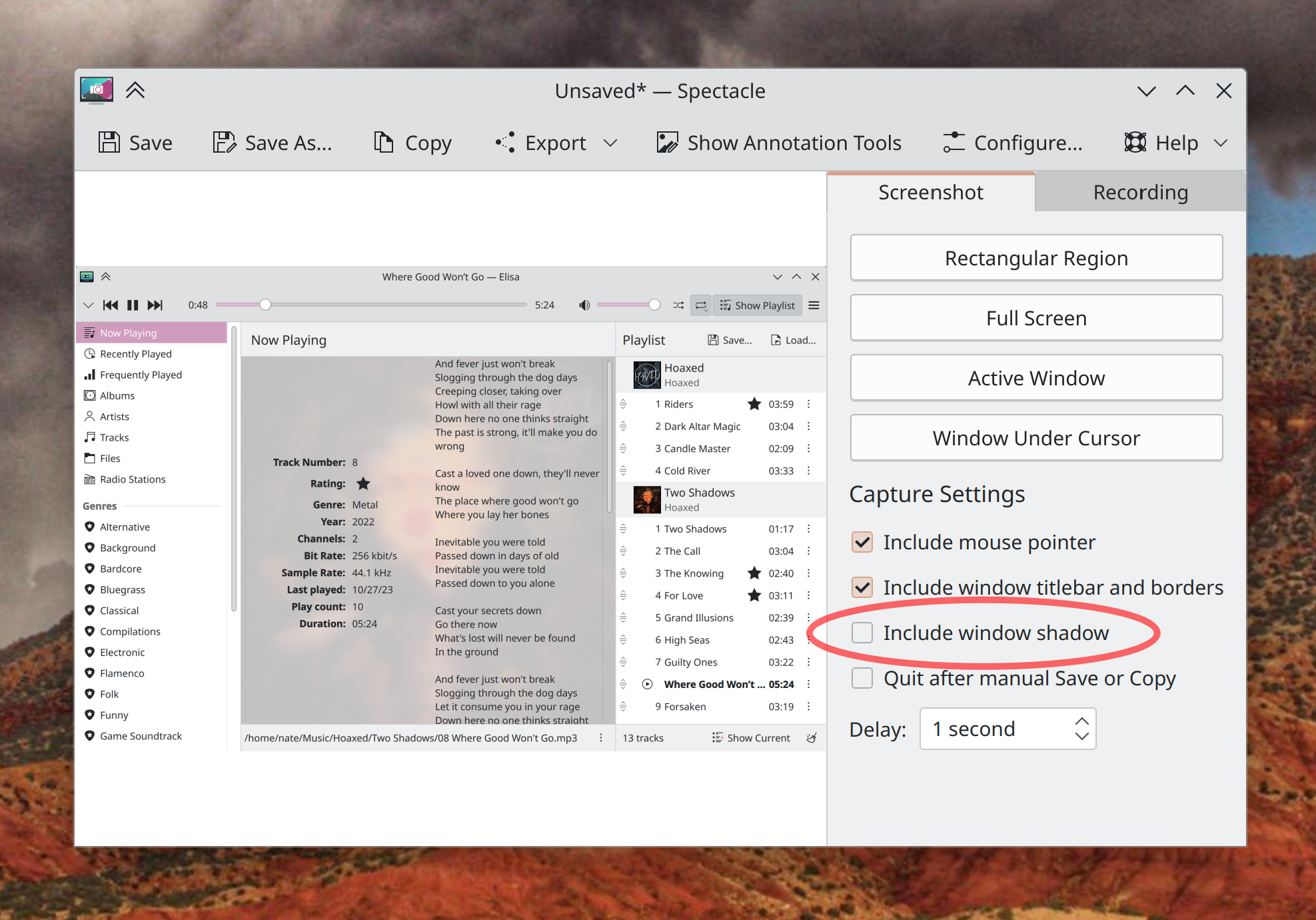
When Spectacle is run on Plasma 6, you can now take “Active Window” and “Window Under Cursor” screenshots that optionally omit window shadows! (Kristen McWilliam, link):
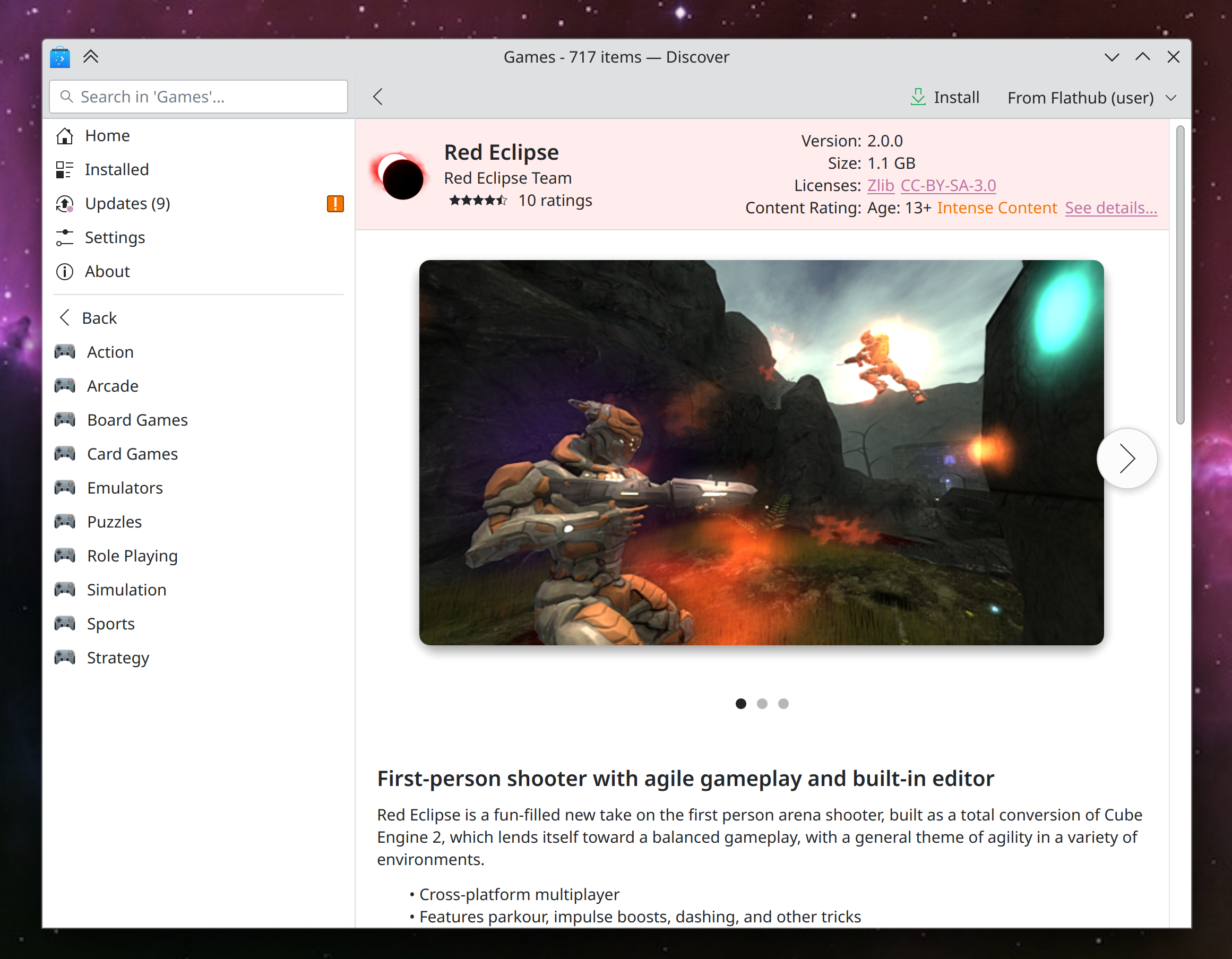
Discover has started to undergo many small UI improvements: a nicer background color for cards views; better visual alignment for cards on search and browse pages; smarter behavior in the sidebar while searching; more robust display of screenshots for apps and backends without thumbnails correctly specified; Flatpak apps with low-level PipeWire access are now correctly marked as having access to the audio system; and app sizes for Flatpak apps are now more concise and readable (Marco Martin, Arjen Hiemstra, Jonah Brüchert, and me: Nate Graham, link 1, link 2, link 3, link 4, link 5, and link 6)
On the subject of Discover, its Application Details page has gotten a new rewritten screenshot viewer, which is vastly better than the old one in every way and fixes multiple bugs (Ivan Tkachenko, link):
The Overview effect now has an option to only perform a KRunner-powered search when searching, rather than also filtering windows based on the search text (Dashon Wells, link)
When you have fingerprint or smartcard authentication set up, you can now use that method on the lock screen, OR your password, rather than only being able to use your password after failing at the other auth method several times. This is only for the lock screen right now and not also the Polkit authentication dialog, but that’s being explored as well (Janet Blackquill, link 1 and link 2)
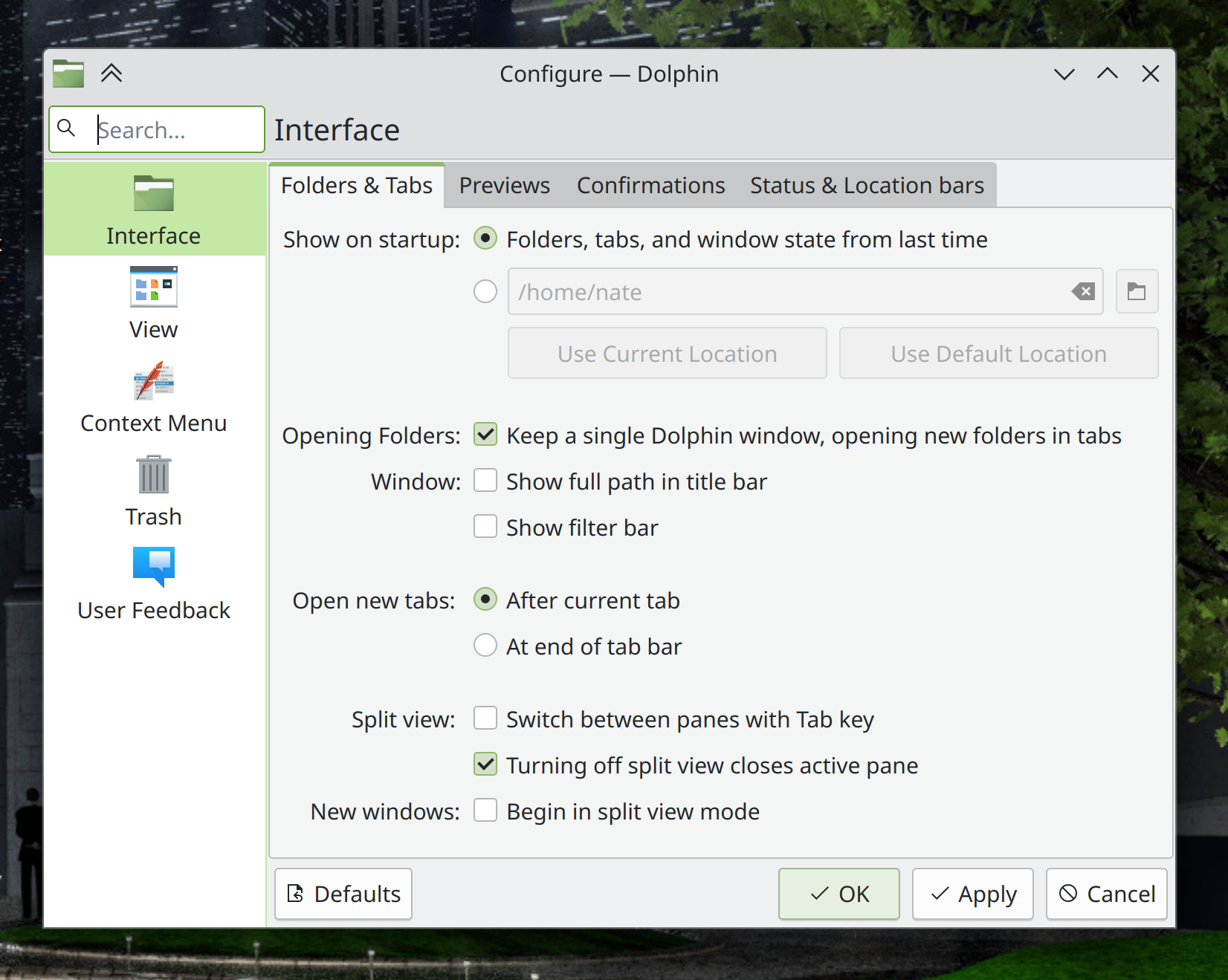
The headers of settings dialogs in QtWidgets-based apps are now styled to look the same as System Settings and other Kirigami-based apps (Waqar Ahmed, link):
KFontView now works as expected on Wayland (Kai Use Broulik, link)
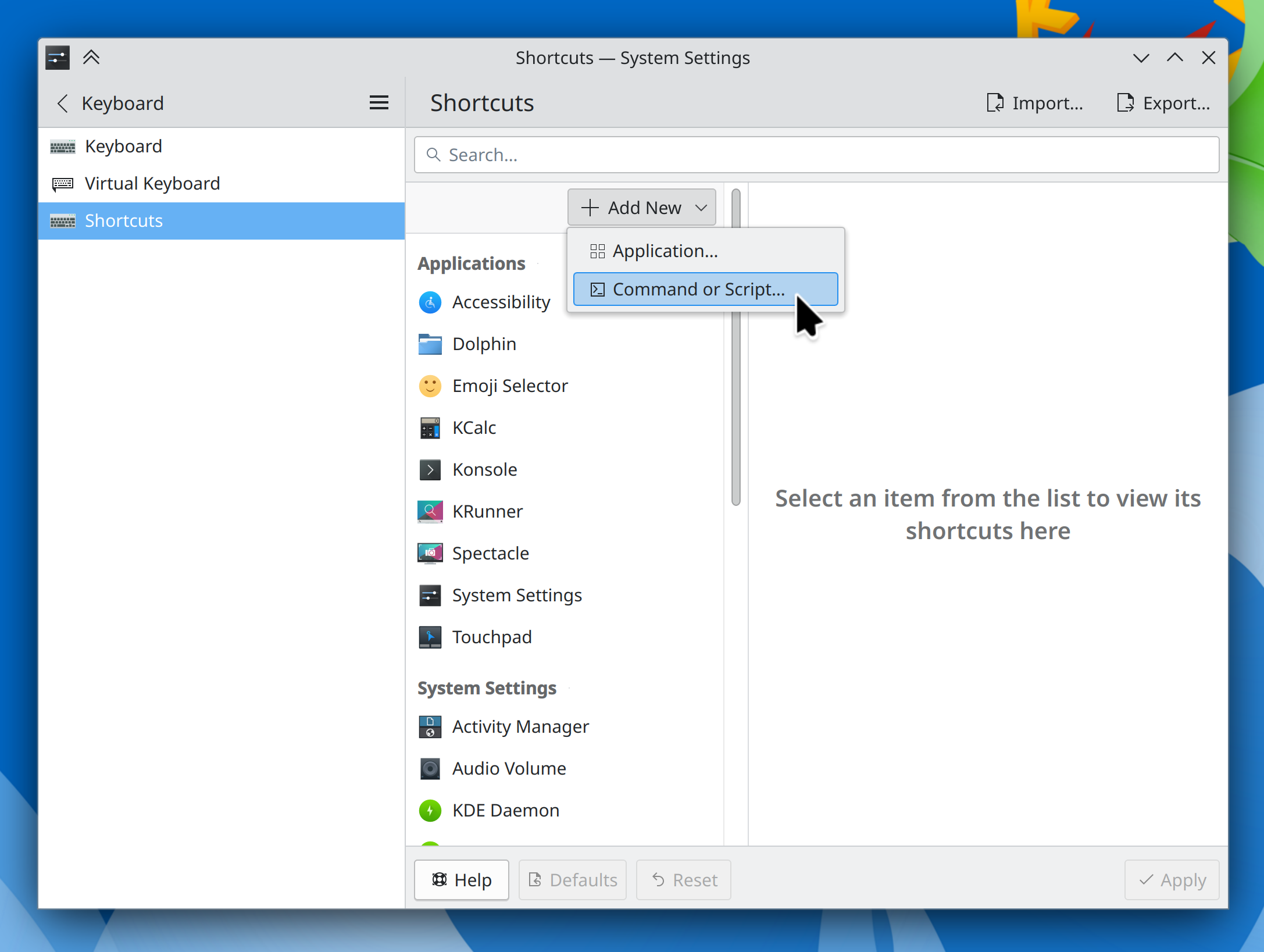
System Settings’ Shortcuts page has been modernized a bit to avoid the “chunky footer” style used in Plasma 5 (Mike Noe, link):
More than doubled the speed of KRunner’s Recent Documents runner, among other various improvements (Alexander Lohnau, link)
The infinite scrollable calendar in the Digital Clock widget is now vastly more responsive (Fushan Wen, link)
Type-ahead find in Dolphin now causes the matching file to be centered in the window when using Details view (Amol Godbole, link)
In Elisa, playlist items now play on a single-click rather than a double-click, and when you try to play a song that has since been deleted or renamed, you’re warned of this appropriately (me: Nate Graham, link 1 and link 2)
The “Get New [thing]” dialog now has an appropriate minimum size (Oliver Beard, link)
Other Significant Bugfixes
(This is a curated list of e.g. HI and VHI priority bugs, Wayland showstoppers, major regressions, etc.)
Fixed a case in the Plasma Wayland session where logging in would cause KWin to immediately crash and throw you back to the login screen (Xaver Hugl, Plasma 5.27.9. Link)
Fixed the most common crash in Plasma that could manifest when closing notifications, by backporting a Qt patch that fixes it, since it’s already fixed in Plasma 6 (Marco Martin and David Edmundson, the latest release of the KDE Qt 5 Patch Collection, link)
Fixed a semi-common crash in Discover when installing Flatpak apps (David Edmundson, Plasma 5.27.9. Link)
Various KWin-provided global shortcuts that were always intended to be on by default–such as for switching virtual desktops–now are (Joshua Goins, Plasma 5.27.9. Link)
Fixed a race condition that caused the “Show in Activities” menu item in the window menu to only sometimes be visible (David Edmundson, Plasma 5.27.9. Link)
Fixed an irritating screen flicker that would show up when using touchpad gestures to switch virtual desktops with animations globally disabled (Quinten Kock, Plasma 5.27.9. Link)
Fixed the most common crash in System Monitor that could sometimes cause it to blow up when quitting or switching pages (Arjen Hiemstra, Plasma 6.0. Link)
Fixed a case where file associations could be inherited in the wrong order, causing certain document types to open in the wrong apps under certain circumstances (David Redondo, Plasma 6.0. Link)
Fixed an issue that could cause complex display arrangements involving daisy-chained DisplayPort screens to be arranged randomly after wakeup, reboot, or hotplug (Xaver Hugl, Plasma 6.0. Link)
In the Plasma Wayland session, using a stylus to interact with System Settings’ Tablet page no longer makes the rest of System Settings unresponsive to stylus input (Aki Sakurai, Plasma 6.0. Link)
Other bug-related information of interest:
- 2 Very high priority Plasma bugs (down from 4 two weeks ago). Current list of bugs
- 55 15-minute Plasma bugs (same as two weeks ago). Current list of bugs
- 220 KDE bugs of all kinds fixed over the past two weeks. Full list of bugs
For Developers
You can now easily build a whole Plasma desktop session plus associated apps like System Settings and Discover by running kdesrc-build workspace (Nicolas Fella, link)
When setting up kdesrc-build, it now defaults to building everything against Qt6 (Thiago Sueto and Mariua Pa, link 1 and link 2)
Automation & Systematization
Added some autotests for the Kirigami NavigationTabBar and NavigationTabButton components (Ivan Tkachenko, link)
…And Everything Else
This blog only covers the tip of the iceberg! If you’re hungry for more, check out https://planet.kde.org, where you can find more news from other KDE contributors.
How You Can Help
We’re hosting our Plasma 6 fundraiser right now and need your help! If you like the work we’re doing, spreading the wealth is a great way to share the love. 🙂
If you’re a developer, work on Qt6/KF6/Plasma 6 issues! Plasma 6 is usable for daily driving now, but still in need of bug-fixing and polishing to get it into a releasable state by February.
Otherwise, visit https://community.kde.org/Get_Involved to discover other ways to be part of a project that really matters. Each contributor makes a huge difference in KDE; you are not a number or a cog in a machine! You don’t have to already be a programmer, either. I wasn’t when I got started. Try it, you’ll like it! We don’t bite!
It’s time to port your widgets to Plasma 6
Consider this a formal heads-up for Plasma 5 widget authors: You will need to port your widgets to newer APIs to make them compatible with Plasma 6!
Many aspects of the Plasma widget API have changed, and existing 3rd-party widgets need adaptation for Plasma 6 or else they will not run. You can read our porting guide here: https://develop.kde.org/docs/plasma/widget/porting_kf6
Plasma-6-compatible widgets can be uploaded to store.kde.org and live in the new “Plasma 6 Extensions” category, visible at https://store.kde.org/browse?cat=705&ord=latest. There’s nothing in there right now, so I’m assuming no one knows about it yet. Therefore, I’m telling people: the time for 3rd-party widget authors to start porting their widgets is now!
Let me know in the comments here if you have any questions or concerns, and I’ll try to answer them and adjust the documentation as needed.
David Edmundson on Wayland and Quake for blind people
My colleague and friend David Edmundson was interviewed recently on Brodie Robertson’s “Tech Over Tea” channel, and I seriously encourage everyone to watch it! David has a blog (which you should also read) but is far too modest to post about the interview there, so I’m doing it here. 🙂 The interview is long, but worth it. Check it out!
No TWiK this week
See you next week, folks!
This week in KDE: colorblindness correction filters
This week there’s a lot of news on the accessibility front in particular! Beyond that, we have a fairly juicy assortment of other new features and user interface improvements, so have a look:
Plasma 6
General info – Open issues: 103
KWin now includes an effect that can change the colors on the whole screen to better support people with various forms of color-blindness! (Fushan Wen, link):

The F10 key is now used in most KDE apps (with more being ported soon) to open the main menu or hamburger menu. This means that the keyboard shortcut to create a new file had to be changed to Ctrl+Shift+N, which also makes it more consistent with what’s used in other environments (Felix Ernst, link)
Kate, KWrite, and other KTextEditor-based apps gained support for speaking text from the document! (Christoph Cullmann, link)
Throughout QtQuick-based KDE software, scrolling using a mouse wheel now smoothly animates the view! Smooth scrolling, baby! Note that this is different from inertial scrolling for touchpads, which is not implemented yet. For more information, see this wiki page. (HeCheng Yu and Fushan Wen, link)
When your Panel has a Task Manager widget on it, the feature to add panel launchers (as opposed to pinned Task Manager apps) has been hidden to avoid confusing people. You can still add them manually if you want, but the way to do it is no longer so in-your-face. As a part of this, the Traditional Task Manager has been changed so that its pinned launchers no longer disappear by default when used to launch an app; they now stay where they are and can be used to open new instances, so they feel more like panel launchers now. This is configurable if you liked the old approach better, of course! (Niccolò Venerandi, link 1 and link 2)
LibreOffice documents now appear in Plasma’s “Recent Documents” list (Méven Car, link)
Cursor theme previews are no longer drawn too small when using scaling on Wayland, and are no longer pixelated when using a fractional scale factor (Fushan Wen, link 1 and link 2)
Locally-downloaded and manually installed packages installed using Discover can now be upgraded and uninstalled (Alessandro Astone, link)
Offline Updates in Discover now report their progress more accurately (Alessandro Astone, link)
In the Plasma Wayland session, it’s now possible to mirror (as in, visually flip) a display if needed (Xaver Hugl, link)
Other User Interface Improvements
The default location where Spectacle saves screenshots and screen recordings has been changed; now they are saved to ~/Pictures/Screenshots and ~/Videos/Screencasts, respectively. And of course these default settings can be changed if you’d prefer them to be saved elsewhere! (Noah Davis, Spectacle 24.02. Link)
Elisa’s color scheme chooser menu now looks native, not kinda weird (Jack Hill, Elisa 24.02. Link)
Other Significant Bugfixes
(This is a curated list of e.g. HI and VHI priority bugs, Wayland showstoppers, major regressions, etc.)
Fast user switching from a passwordless user account now works (Harald Sitter, Plasma 5.27.9. Link)
In Dolphin, the “Create New” menu now correctly enables and disables itself as needed when you switch tabs (Amol Godbole, Dolphin 24.02. Link)
Other bug-related information of interest:
- 4 Very high priority Plasma bugs (up from 3 last week). Current list of bugs
- 55 15-minute Plasma bugs (down from 56 last week). Current list of bugs
- 89 KDE bugs of all kinds fixed this week. Full list of bugs
Automation & Systematization
Added an autotest to make sure the Panel’s Edit Mode toolbox works (Fushan Wen, link)
Added some autotests to make sure the new Kirigami list delegates work properly; more on that soon! (Ivan Tkachenko, link)
…And Everything Else
This blog only covers the tip of the iceberg! If you’re hungry for more, check out https://planet.kde.org, where you can find more news from other KDE contributors.
How You Can Help
We’re hosting our Plasma 6 fundraiser right now and need your help! If you like the work we’re doing, spreading the wealth is a great way to share the love. 🙂
If you’re a developer, work on Qt6/KF6/Plasma 6 issues! Plasma 6 is usable for daily driving now, but still in need of bug-fixing and polishing to get it into a releasable state by February.
Otherwise, visit https://community.kde.org/Get_Involved to discover other ways to be part of a project that really matters. Each contributor makes a huge difference in KDE; you are not a number or a cog in a machine! You don’t have to already be a programmer, either. I wasn’t when I got started. Try it, you’ll like it! We don’t bite!
This week in KDE: re-organized System Settings
Plasma 6
General info – Open issues: 91
System Settings’ sidebar has gotten a much-needed re-organization! This is still under development and may change a bit before the final release, so don’t consider the following screenshots 100% final. Probably 90% final. But anyway, but here’s what we’ve got right now (me: Nate Graham, link):


Changed who handles screen arrangements in the Plasma Wayland session: until now, it was KScreen, whereas now for Plasma 6, KWin has absorbed that functionality. This will make it much easier to ensure a good UX here because state will be centralized in one location, rather than having it be synchronized across two components that need to be in communication with one another. This proved fragile throughout Plasma 5. The work has already fixed three bugs, with more to come. Ultimately this means that KScreen is now feature-frozen, and no further changes to multi-screen handling on X11 should be expected in Plasma 6 (Xaver Hugl, link)
While Discover is fetching updates, its progress bar now corresponds much closer to actual reality, instead of being more like a random number generator (Alessandro Astone, link 1 and link 2)
Discover now lets distros opt into turning on dependency auto-remove for apps that are removed with Discover (Alessandro Astone, link)
When the screen resolution or scale changes–which can happen when additional screens are plugged in–the wallpaper now instantly resizes to the new desktop geometry rather than doing an animated fade, which in this context just looked weird and glitchy and broken (Marco Martin, link 1 and link 2)
Improved the Breeze Night Color icon (Philip Murray, link):

Other New Features
Spectacle’s screen recording feature gained support for recording using the VP9 codec (CPU rendering only for now, but GPU acceleration is coming soon). In the process, the default location where screen recordings get saved to has been made customizable (Noah Davis, link 1, link 2, and link 3)
Other Significant Bugfixes
(This is a curated list of e.g. HI and VHI priority bugs, Wayland showstoppers, major regressions, etc.)
Fixed a bug in Discover that could cause it to crash for some people after searching, or even when just launching the app (Harald Sitter, link 1 and link 2)
In the Plasma X11 session, various QtQuick-based dialog windows will no longer be missing their close buttons (Vlad Zahorodnii, Plasma 5.27.9. Link)
Apps and Plasma can no longer crash when told to use DBus to launch an app with a malformed .desktop file name that’s out of compliance with the spec (David Redondo, Frameworks 5.111. Link)
Other bug-related information of interest:
- 3 Very high priority Plasma bugs (down from 4 last week). Current list of bugs
- 56 15-minute Plasma bugs (down from 58 last week). Current list of bugs
- 91 KDE bugs of all kinds fixed this week. Full list of bugs
Automation & Systematization
Added more GUI tests for the Battery & Brightness widget, the Clipboard widget’s barcode page, and the System Settings Users page’s avatar chooser sheet (Fushan Wen, link 1, link 2, and link 3)
…And Everything Else
This blog only covers the tip of the iceberg! If you’re hungry for more, check out https://planet.kde.org, where you can find more news from other KDE contributors.
How You Can Help
We’re hosting our Plasma 6 fundraiser right now and need your help! If you like the work we’re doing, spreading the wealth is a great way to share the love. 🙂
If you’re a developer, work on Qt6/KF6/Plasma 6 issues! Plasma 6 is usable for daily driving now, but still in need of bug-fixing and polishing to get it into a releasable state by February.
Otherwise, visit https://community.kde.org/Get_Involved to discover other ways to be part of a project that really matters. Each contributor makes a huge difference in KDE; you are not a number or a cog in a machine! You don’t have to already be a programmer, either. I wasn’t when I got started. Try it, you’ll like it! We don’t bite!
This week in KDE: time for the new features
The floodgates opened this week, and a lot of consequential in-progress work was merged: juicy new Plasma 6 features, long-awaited bugfixes, spicy automated testing, and more!!!
Plasma 6
General info – Open issues: 94
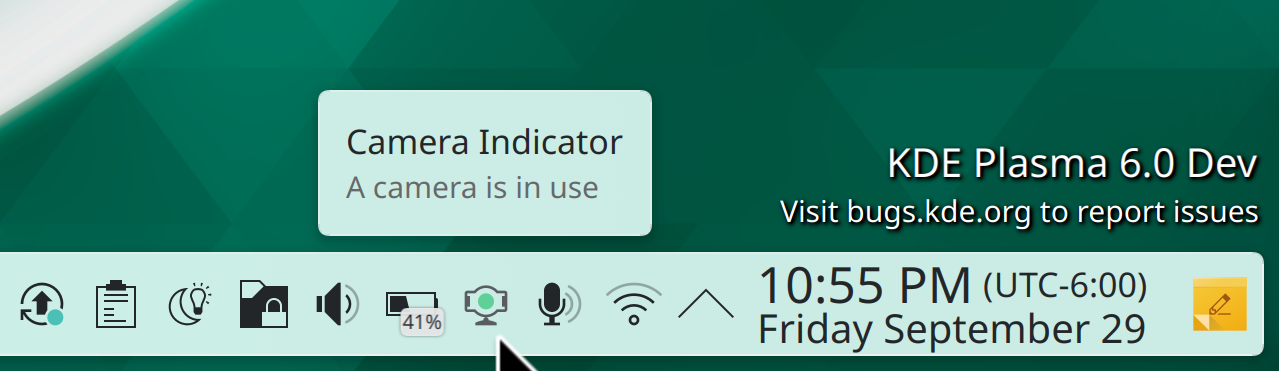
The Overview and Desktop Grid effects have been merged together into one, with fluid and natural-feeling touchpad gestures to transition between all states. It’s really awesome work, and also fixed a ton of open bug reports! (Niccolò Venerandi, link):

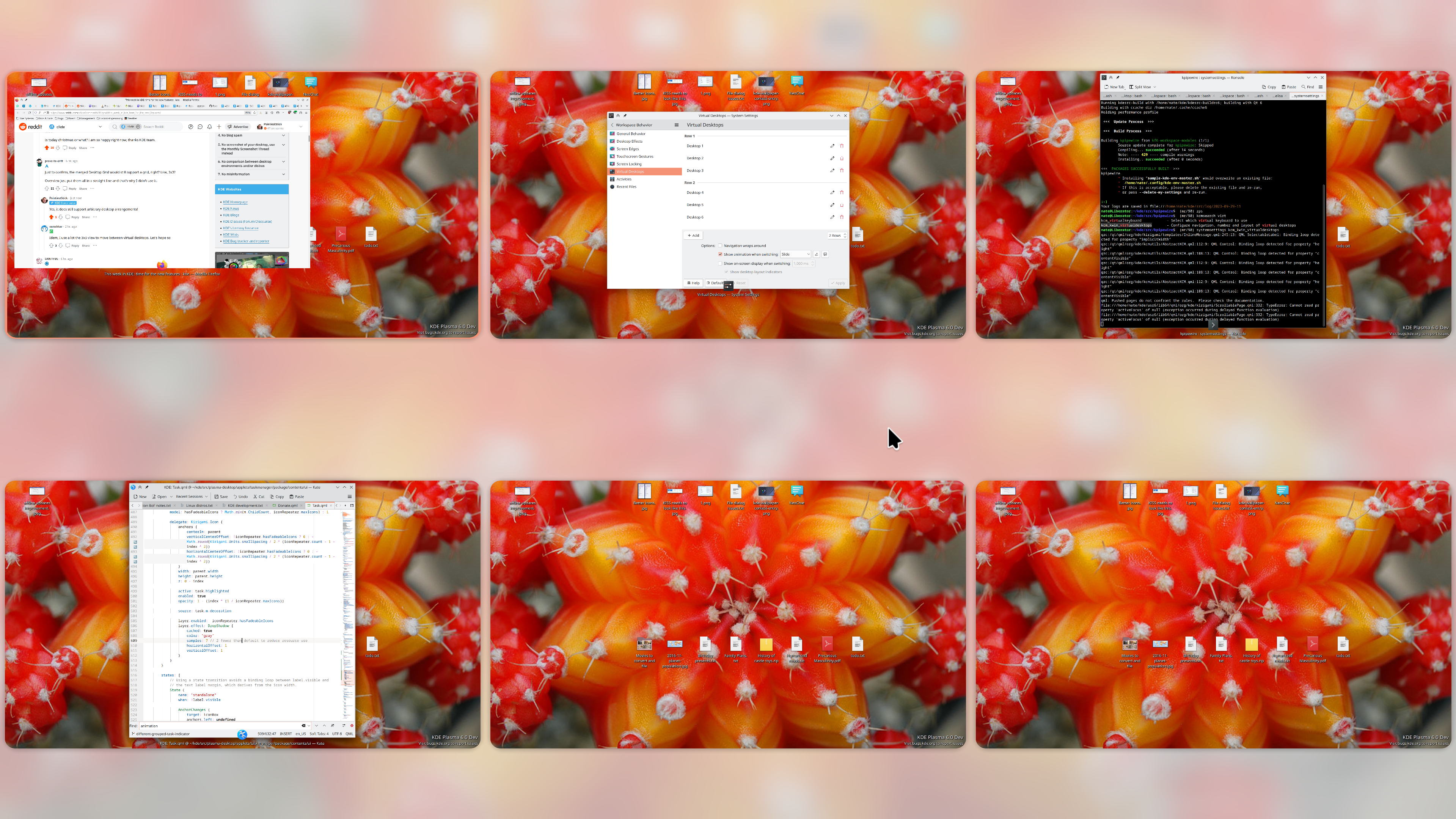
In the Plasma Wayland session, there’s now a System Tray monitor that shows you when something is using the camera, just like we already have for screen recording and microphone usage (Fushan Wen, link 1 and link 2):
Floating panels now have nice shadows, and when they de-float, they no longer have ugly chunky margins! Additionally, when the panel is floating, any popups opened from it are floating too, with nice rounded corners on all sides. Oh, and with this blocking work done, we’ve made floating panels on by default! (Niccolò Venerandi, link 1, link 2, link 3, and link 4):
There’s now a new global shortcut (Meta+Alt+L by default) to switch between the current and last-used keyboard layout, which can be useful for people who have more than two layouts but commonly switch between two of them on a regular basis (Mihail Milev, link 1 and link 2)
Icons drawn by Kirigami.Icon–which in Plasma 6 is nearly all of them in KDE’s QML software–now look better and sharper when using a fractional scale factor (Marco Martin, link)
Fixed multiple focus issues in System Settings: it’s now possible to focus the sidebar again after focusing the main page, and also pressing the down arrow key in System Settings’ search field now moves focus to the list view, which is especially helpful after searching for something (Fushan Wen, link 1 and link 2)
Started improving the presentation of the permissions of Flatpak apps in Discover, including using better icons, more user-friendly text, and showing the “sound system access” permission, which we had previously been ignoring (me: Nate Graham, link 1, link 2, and link 3)
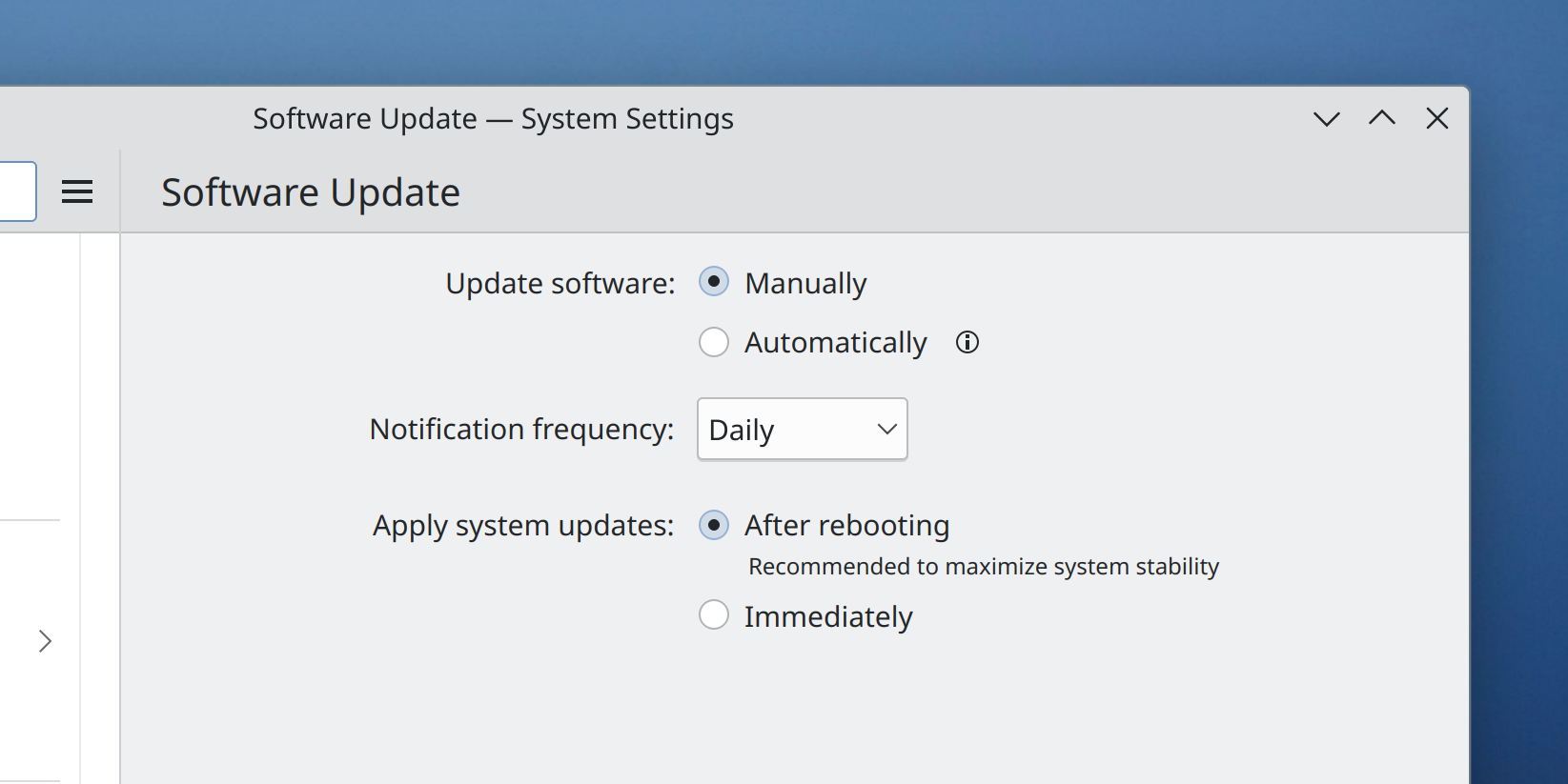
The setting to toggle “offline updates” no longer uses that confusing terminology anymore (me: Nate Graham, link):
The “About” pages in System Monitor and Filelight were both ported to the new Form Card style (Carl Schwan, link 1 and link 2)
For a cleaner and less confusing presentation, common shortcut-choosing views now hide the local-only columns when all shortcuts are global, just like we already hide the global-only columns when all shortcuts are local (me: Nate Graham, link)
Made some fixes to monitor handling that should decrease the likelihood of the monitor instantly waking up right after being put to sleep (Xaver Hugl, Plasma 6.0. Link)
When using the Plasma systemd integration (which is on by default when you have systemd), Plasma is now more comprehensive about killing processes when logging out, which should prevent crashes at logout and dangling zombie processes that can prevent logging in again. This might end up being backported, too! (David Edmundson, link)
When using a Panel on the bottom screen edge, Task Manager tooltips that include media controls are no longer sometimes positioned in the wrong place (David Edmundson, link)
Breeze-themed GTK2 apps no longer look wrong (well, not as wrong, at least) when using a dark theme (Someone going by the pseudonym “Mors Mortium”, link)
It’s now possible to remove a favorite from Kickoff and other launcher menus whose underlying app or file has since been deleted (Méven Car, link)
Page headers throughout Kirigami-based software will no longer sometimes elide titles when there’s plenty of room for them when using certain combinations of fonts and font sizes (Ivan Tkachenko, link)
Other Significant Bugfixes
(This is a curated list of e.g. HI and VHI priority bugs, Wayland showstoppers, major regressions, etc.)
It’s no longer possible for the lock screen to break and show the dreaded “the screen locker is broken” screen due to QML cache corruption as a result of running out of space on the system. To be clear, it can still break for other reasons too, but we are working on tracking those down as well! (Harald Sitter, Plasma 5.27.9. Link)
Fixed the actual root cause in KDE software for the “ever-growing ScreenMapping config file key causes Plasma to crash or fail to launch new apps” issue. And that fix also allowed us revert the stopgap fix to cap the number of mappings and fix icons being always unsorted when there was a huge amount of stuff on the desktop (Marco Martin, Plasma 5.27.9. Link)
Fixed multiple issues with Discover’s reviews popup, including being too slow and sometimes failing to load or submit reviews (Marco Martin, Plasma 5.27.9. Link 1, link 2, and link 3)
KMenuEdit once again correctly creates .desktop files with exec= keys that point to executable files that have spaces or other special characters in their file paths (Méven Car, Plasma 5.27.9. Link)
In KRunner and KRunner-powered searches, searching for recent files is once again correctly completely case-insensitive as expected (Alexander Lohnau, Plasma 5.27.9. Link)
Fixed a fairly complex issue that was causing Flatpak-based GNOME apps to display text without any anti-aliasing when run in Plasma (Timothée Ravier, Plasma 5.27.9. Link )
If a touchscreen calibration matrix has been configured, KWin now respects it (someone doing by the pseudonym “The Official GMan”, Plasma 5.27.9. Link)
It’s now possible to use the keyboard to focus buttons in the toolbars of KDE apps using the KXMLGui framework (Felix Ernst, Frameworks 5.111. Link)
Other bug-related information of interest:
- 4 Very high priority Plasma bugs (same as last week). Current list of bugs
- 58 15-minute Plasma bugs (down from 59 last week). Current list of bugs
- 127 KDE bugs of all kinds fixed this week. Full list of bugs
Automation & Systematization
Added basic UI tests for the applets and System Settings pages that live in plasma-workspace! (Fushan Wen, link 1 and link 2)
Fixed various problematic autotests in the Kirigami and KSvg frameworks, and made it mandatory for them to pass before merge requests can be merged (Marco Martin, link 1 and link 2)
…And everything else
This blog only covers the tip of the iceberg! If you’re hungry for more, check out https://planet.kde.org, where you can find more news from other KDE contributors.
How You Can Help
If you’re a developer, work on Qt6/KF6/Plasma 6 issues! Plasma 6 is usable for daily driving now, but still in need of bugfixing and polishing to get it into a releaseable state by the end of the year.
Otherwise, visit https://community.kde.org/Get_Involved to discover other ways to be part of a project that really matters. Each contributor makes a huge difference in KDE; you are not a number or a cog in a machine! You don’t have to already be a programmer, either. I wasn’t when I got started. Try it, you’ll like it! We don’t bite!
And finally, KDE can’t work without financial support, so consider making a donation today! This stuff ain’t cheap and KDE e.V. has ambitious hiring goals. We can’t meet them without your generous donations!
A bit on sponsorship and money
The topic of sponsored work comes up surprisingly often. Now, many KDE developers are already sponsored by businesses to work on KDE software, either on a full-time-work basis, or for specific areas of work. But what’s less common is for a specific person to sponsor another specific person to work on a specific bug or feature. I’m talking about short-term gigs paying most likely a few hundred euros or less. This can work well for getting persistent bugs in the yellow boxes fixed. It does happen, but it’s not as common as I think anyone would like! There’s a lot of untapped potential here, I think.
So today I’d like to announce the creation of a “Sponsored work” category in the KDE forum! This is a place for people to come together for the purpose of sponsoring work on individual bugs or features. If you’re willing to sponsor work for something, post about it here. If you’re open to these kinds of micro-sponsorship opportunities, look for them here!
Since we are a free software community, sometimes concerns about money and sponsored work arise. Therefore, let me bring up an additional option, originally thought up by Jakob Petsovits the last time someone offered to sponsor work: offer an option to donate the sponsorship money to KDE e.V.! This option can be more motivating for passionate KDE developers who don’t personally need the money, and might otherwise ignore such opportunities.
On the subject of donating to KDE e.V., we have a fancy new donation web page that makes it much easier to set up recurring donations! This being too hidden was been a very valid complaint in the recent past, so it’s wonderful to see a better UX here. This work was done by Carl Schwan, Paul Brown, and others at this weekend’s Promo Sprint–which is itself funded by KDE e.V.
And at this point, KDE e.V. is funding quite a lot of initiatives. Sprints have come roaring back, and we’re sponsoring people to represent KDE at more external events than ever before. We also have a whole bunch of employees and contractors doing meaningful technical work on core KDE software. It’s a lot!
Needless to say, this isn’t cheap. KDE e.V. has been funding this major expansion by deliberately spending down its reserves for a few years to avoid getting in trouble with the German tax authorities for having too much money (yes, really; this is actually a thing). But that can’t last forever! We’re going to need help to sustain this level of financial activity.
If you can, consider setting up a recurring donation today! It really does make a difference. Anything helps!
 Adventures in Linux and KDE