This week in KDE: Getting Plasma 5.24 ready for release

Plasma 5.24 is almost ready!

I mentioned last week that I haven’t been posting about fixes for regressions in 5.24 that never got released, because there would be too many. Nonetheless people have been working very hard on this, and we’re down to only 7, with two of them having open merge requests! Working on those is appreciated, as it helps improve the stability of the final release in a week and a half.

15-Minute Bugs Resolved

Current number of bugs: 83, down from 87. Current list of bugs

After waking up the system, the desktop is no longer sometimes shown for a moment before the lock screen appears (David Edmundson, Plasma 5.25)

New Features

Konsole now lets you automatically switch to a different profile when you connect to a specific remote server using SSH (Tomaz Canabrava, Konsole 22.04):

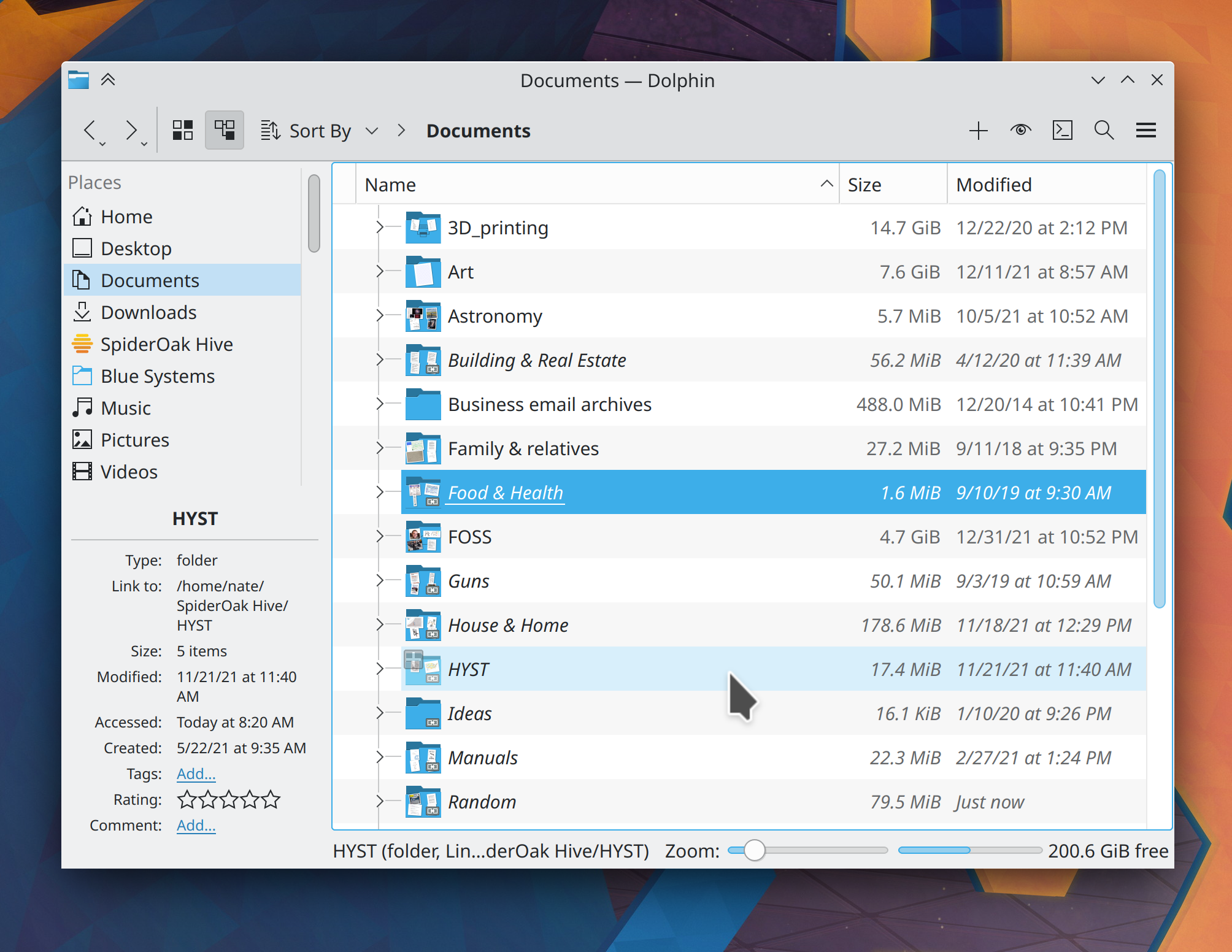
Dolphin now optionally lets you see image’s dimensions below their icons in icon view (Kai Uwe Broulik, Dolphin 22.04):
Bugfixes & Performance Improvements

Fixed a wide variety of issues with the metadata and lyrics in Elisa’s Now Playing view failing to appear or update properly (Yerrey Dev, Elisa 22.04)

Gwenview now launches a bit faster, particularly when there are a lot of remote mounts (Nicolas Fella, Gwenview 22.04)

Plasma no longer sometimes crashes on login when certain apps that display System Tray items launch automatically (Konrad Materka, Plasma 5.24)

In the Plasma Wayland session, KWin no longer sometimes crashes when dragging screenshots from Spectacle to XWayland apps (David Edmundson, Plasma 5.24)

In the Plasma Wayland session, KWin no longer crashes when you unplug an external monitor that was in “only use external monitor” mode (Xaver Hugl, Plasma 5.24)

In the Plasma Wayland session, when an app is started in fullscreen mode and then made windowed, it will now be placed in a location that respects the current window placement mode, rather than always appearing in the top-left corner of the screen (Vlad Zahorodnii, Plasma 5.24)

In the Plasma Wayland session, screencasting no longer causes the cursor to be visually clipped (Vlad Zahorodnii, Plasma 5.24)

In the Plasma Wayland session, when you unplug and re-plug an external screen, XWayland apps that want to launch on the primary screen (such as many games) no longer to get confused and open on the wrong screen (Aleix Pol Gonzalez, Plasma 5.24)

In the Plasma Wayland session, cursor app launch feedback effects now respect the global timeout value for it that you can set in the System Settings Launch Feedback page (David Redondo, Plasma 5.24)

Keyboard navigation between widgets in the Widget Explorer sidebar now works that way you would expect it to (Noah Davis, Plasma 5.24)

Disk read/write sensors in System Monitor widgets and the app of the same name no longer report bogus values the first time they update (Arjen Hiemstra, Plasma 5.24)

Shrinking System Monitor’s window to a very small size now causes text to properly elide instead of overflow (Arjen Hiemstra, Plasma 5.24)

System Monitor widgets can now be dragged using touch while in Edit Mode (Marco Martin, Plasma 5.24)

Custom icons that use SVG images referred to by their path rather than their name once again appear correctly on folders and apps on the desktop (Fushan Wen, Frameworks 5.91)

Changing any of the standard shortcuts (e.g. for Copy or Paste) on System Settings’ Shortcuts page now takes effect instantly, rather than making you restart first (David Redondo, Frameworks 5.91)

KDE apps like Dolphin that scan for network mounts and disks when launched now launch more quickly when you have a lot of Snap apps installed or ISO images mounted (Kai Uwe Broulik, Frameworks 5.91)

This isn’t KDE software, but it affected a lot of our users, so I’m listing it here anyway: Firefox no longer constantly asks to be made the default browser on launch when it’s being run with the GTK_USE_PORTAL=1 environment variable (as some distros do by default) to make it use KDE file dialogs instead of GNOME file dialogs (Emilio Cobos Álvarez and Robert Mader, Firefox 98)

User Interface Improvements

The Properties dialog no longer shows the Details tab when everything it contains is already visible on the General tab (Kai Uwe Broulik, Dolphin 22.04)

Dolphin’s shortcuts configuration window now includes shortcuts from Konsole that will be used in the embedded terminal view, so you can re-assign them if you’d like (Stephan Sahm, Dolphin 22.04)

Filelight can now be found by searching for a variety of common keywords like “usage” and “disk space” (Nicolai Weitkemper, Filelight 22.04)

KRunner now returns better search results for very short search strings of only one or two letters (Alexander Lohnau, Plasma 5.24)

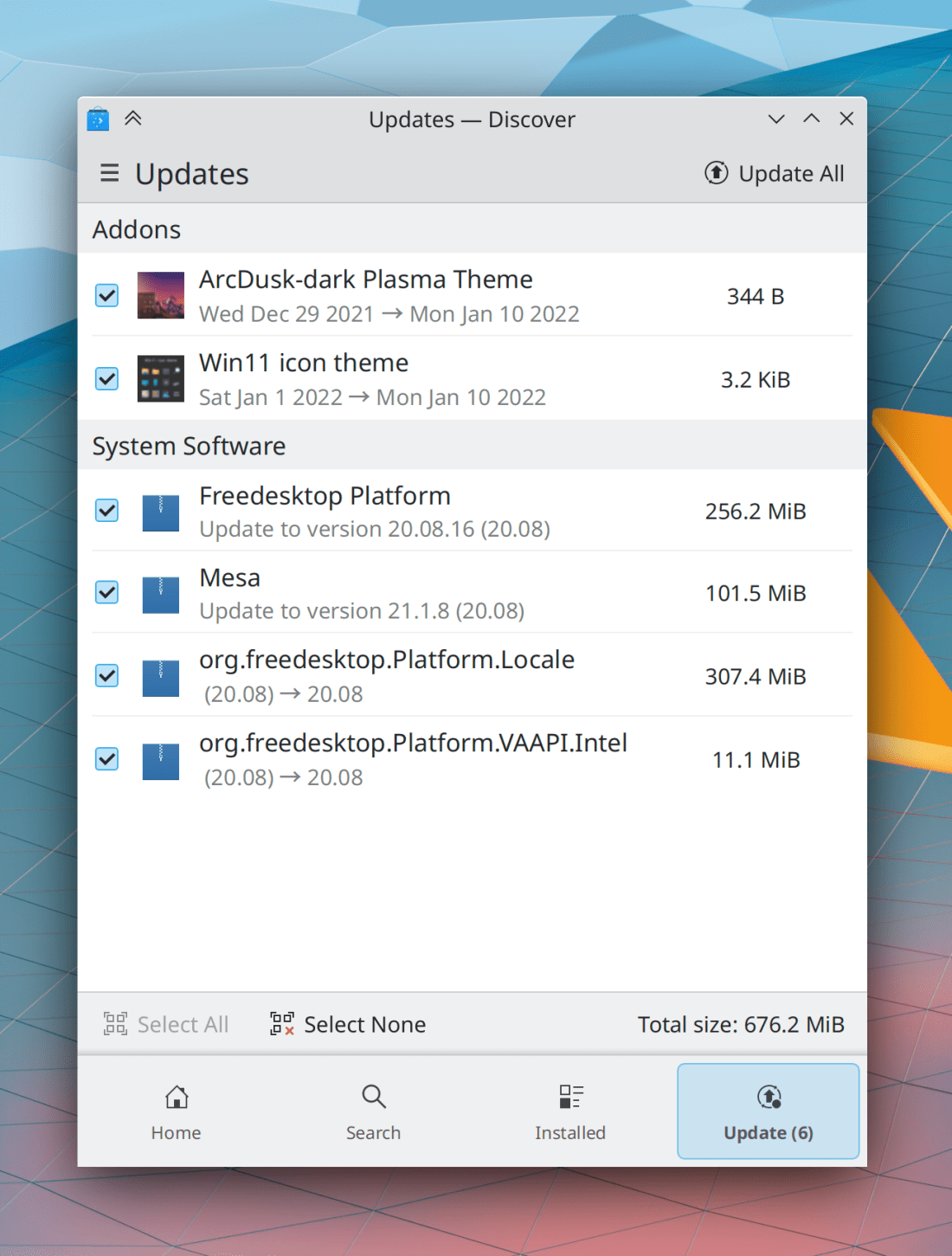
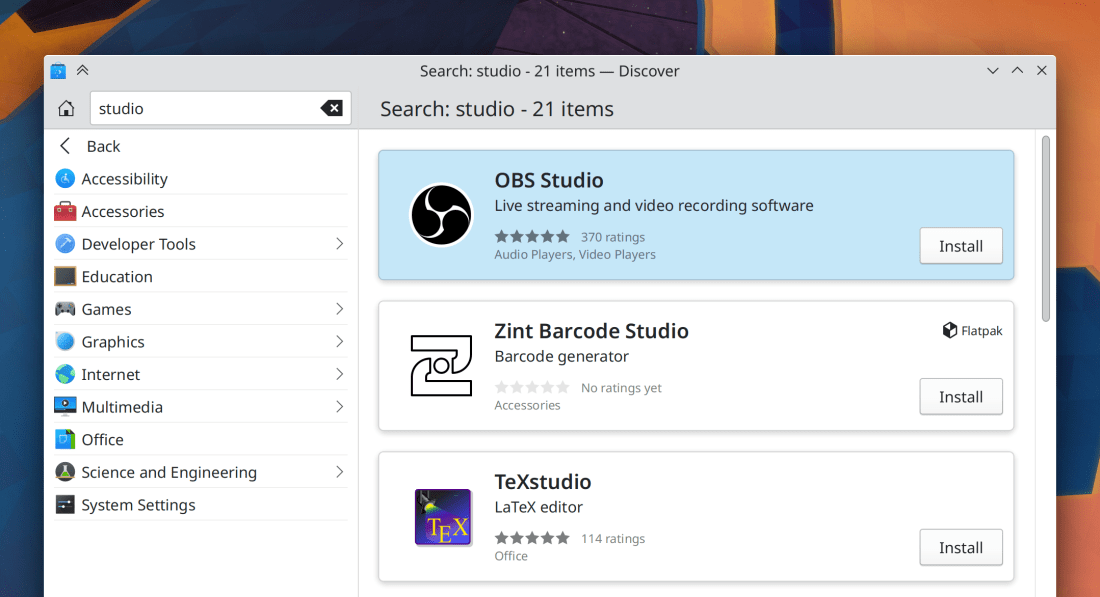
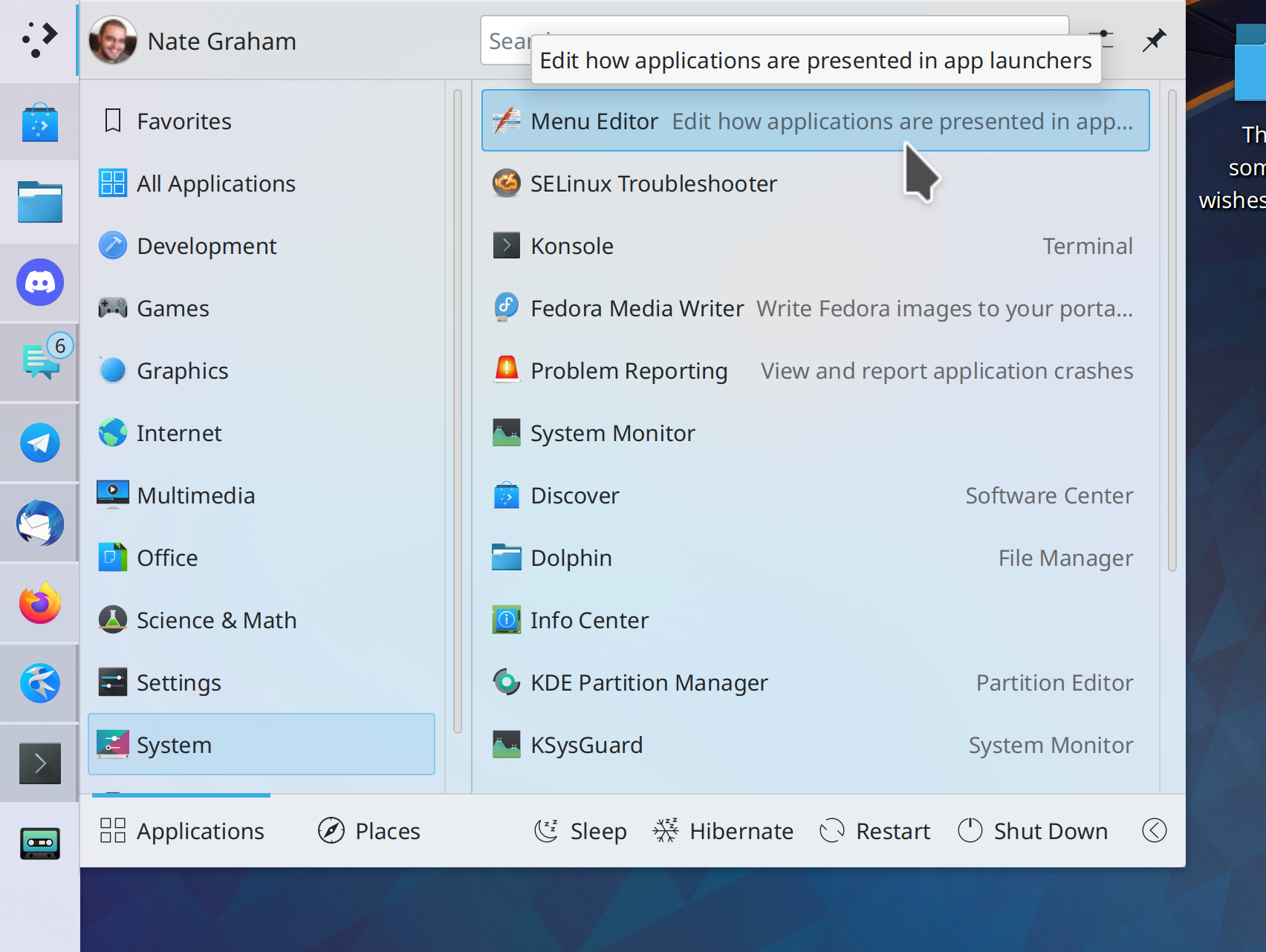
You can now find KMenuEdit in app launchers, KRunner, and Discover (me: Nate Graham, Plasma 5.25):
Menu items in QtWidgets-based apps now also become taller when in Tablet Mode, just like menu items in QtQuick apps! However Unlike those, QtWidgets apps will have to be restarted first due to technical limitations (Jan Blackquill, Plasma 5.25)

Task Manager tooltip window thumbnails now smoothly fade in instead of appearing abruptly (Fushan Wen, Plasma 5.25)

Discover now provides an indication of the number of search results and the number of items in the currently viewed category (Aleix Pol Gonzalez, Plasma 5.25):

Spacing between System Tray icons is now configurable, and automatically switches to its widest setting when in Tablet Mode (me: Nate Graham, Plasma 5.25)

System Settings’ Display Configuration page now calls your device’s built-in screen a “Built-in Screen”, rather than assuming it is a laptop and calling it a “Laptop Screen” (David Edmundson, Plasma 5.25)

…And everything else

Keep in mind that this blog only covers the tip of the iceberg! Tons of KDE apps whose development I don’t have time to follow aren’t represented here, and I also don’t mention backend refactoring, improved test coverage, and other changes that are generally not user-facing. If you’re hungry for more, check out https://planet.kde.org/, where you can find blog posts by other KDE contributors detailing the work they’re doing.

How You Can Help

If you’re a developer, check out the list of remaining Plasma 5.24 regressions, or our 15-Minute Bug Initiative. Working on these issues makes a big difference quickly!

Otherwise, have a look at https://community.kde.org/Get_Involved to discover ways to be part of a project that really matters. Each contributor makes a huge difference in KDE; you are not a number or a cog in a machine! You don’t have to already be a programmer, either. I wasn’t when I got started. Try it, you’ll like it! We don’t bite!

Finally, consider making a tax-deductible donation to the KDE e.V. foundation.
This week in KDE: You wanted stability? Here’s some stability!

We’ve been super busy fixing all kinds of bugs this week:

  • Bugs for the 15-Minute Bug Initiative
  • Regressions in the Plasma 5.24 beta (which I have not mentioned here because they never got released, and there would be so many of them that it would make your head spin and your eyes would gloss over!)
  • General bugs not related to those

I think everyone should find something to like here! So let’s take a look:

15-Minute Bugs Resolved

Current number of bugs: 87, down from 99. Current list of bugs

A few were found to be already fixed recently and will be available in the next release, or caused by upstream or downstream issues (many of which are also already fixed in the next release). The following were fixed in KDE code this week:

In the Plasma X11 session, the System Settings Touchpad page now shows its two-finger click options properly (Arjen Hiemstra, Plasma 5.24)

In a Plasma Wayland session, KWallet now automatically unlocks as expected when this is configured properly (David Edmundson, Plasma 5.24)

When using pam_deny PAM module which causes you to get temporarily locked out after a certain number of wrong password attempts, the screen locker now communicates this to you instead of leaving you to wonder why your password isn’t being accepted (David Edmundson, Plasma 5.24)

Plasma Checkboxes and the tab bars once again react when tapped using a touchscreen (Arjen Hiemstra, Frameworks 5.91)

New Features

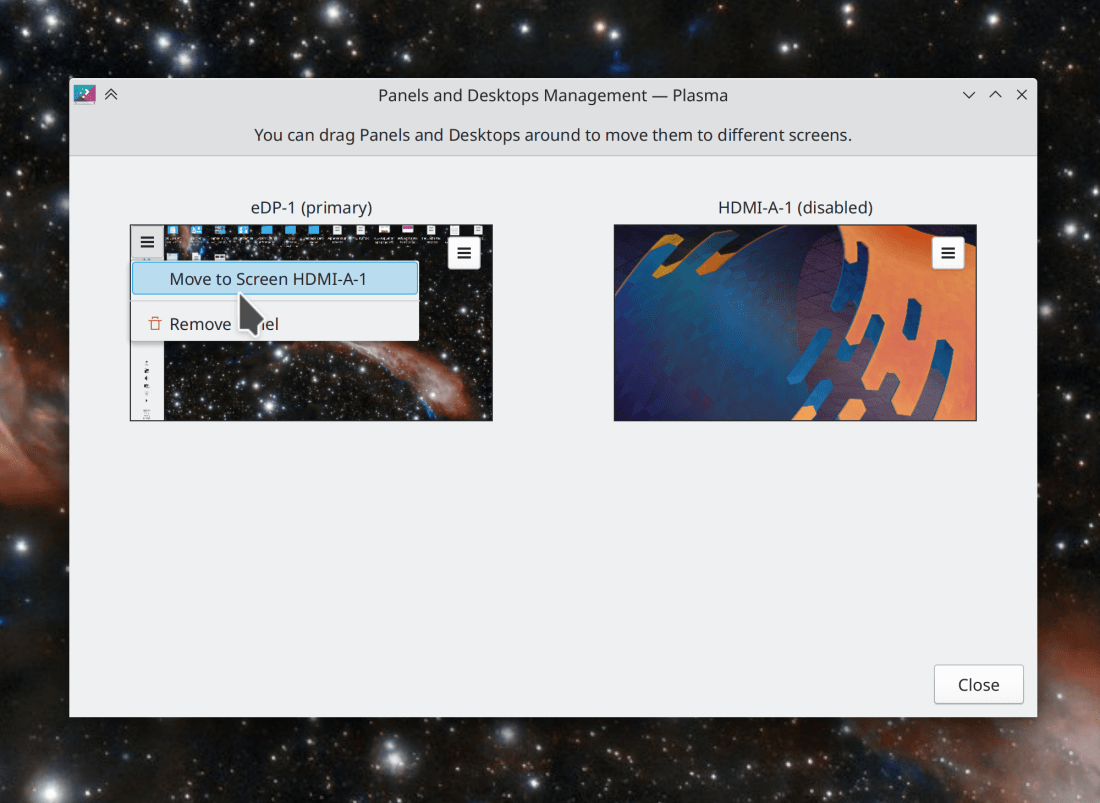
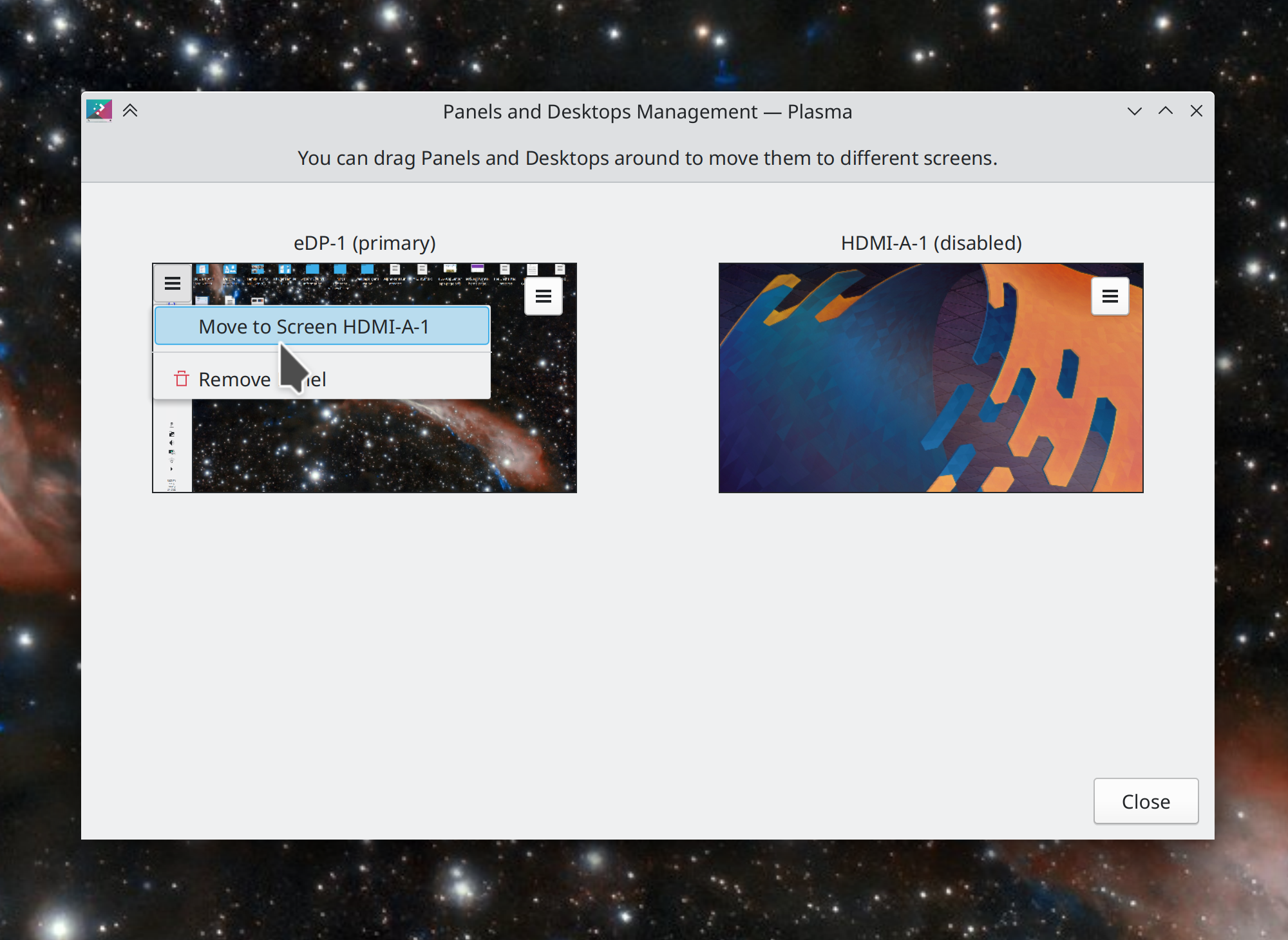
You can now access and manipulate the Plasma layouts assigned to other screens from a central location! This lets you move move desktops or panels between screens, or recover desktops or panels that are only visible on a screen that’s currently turned off. You can access it from the global Edit Mode toolbar. (Cyril Rossi and Marco Martin, Plasma 5.25):

Other Bugfixes & Performance Improvements

Flatpak KDE apps now respond instantly to systemwide changes for things like color schemes, icon themes, font sizes, and so on (Aleix Pol Gonzales, whenever version 21.08 of KDE’s Flatpak runtime that includes the change gets re-released)

In the Plasma Wayland session, fixed a variety of ways that KWin could crash when you hot-plug external screens (Xaver Hugl, Plasma 5.24)

In the Plasma Wayland session, KWin no longer crashes when you unplug an external screen specifically while using “switch to external monitor” mode (Xaver Hugl, Plasma 5.24)

In the Plasma Wayland session, fixed a semi-common way that Plasma could randomly crash (David Redondo, Plasma 5.24)

Discover no longer sometimes crashes while visiting the Installed page when certain Flatpak apps from certain Flatpak repos are installed (Aleix Pol Gonzalez, Plasma 5.24)

Fixed one of the ways that Discover could just randomly crash while using it (Aleix Pol Gonzalez, Plasma 5.24)

In the Plasma Wayland session, fixed a major performance regression that caused input lag and extreme CPU usage for some people (Vlad Zahorodnii, Plasma 5.24)

Editing clipboard items once again lets you edit the full text, not a clipped excerpt of it (Fushan Wen, Plasma 5.24)

The Notifications applet’s popup is no longer unusably small when located on a Panel, rather than in the System Tray (me: Nate Graham, Plasma 5.24)

The System Tray popup on a bottom panel no longer suffers from a visual glitch in its header area when you click the Back button in an applet that has its own header (me: Nate Graham, Plasma 5.24)

Discover’s feature to show the package dependencies for distro-packaged apps once again works (Aleix Pol Gonzalez, Plasma 5.24)

Discover now shows accurate installed sizes for app and Plasma add-ons (Aleix Pol Gonzalez, Plasma 5.24)

Launching System Settings and/or visiting its User Feedback page no longer briefly makes Discover appear in the Task Manager and then disappear (Aleix Pol Gonzalez, Plasma 5.24)

Discover no longer shows you a spurious error message when you cancel an update by declining to provide authentication (Ismael Asensio, Plasma 5.24)

Search results in KRunner and Kickoff and other places that have KRunner-powered search no longer visibly blink or flicker when you type more characters to refine the search results (Eduardo Cruz, Plasma 5.25

In the Plasma Wayland session, the Mouse Mark and Mouse Click effects now work with a stylus (Aleix Pol Gonzalez, Plasma 5.25)

Slightly reduced the CPU and memory usage of all KDE software when fetching icons (Nicolas Fella, Frameworks 5.91)

A super important Qt patch has been backported to the Qt patch collection which makes the Plasma Wayland session massively more usable for people using NVIDIA graphics cards with the 495+ driver series (Elvis Lee and Adrien Faveraux, as soon as your distro updates their KDE patch collection)

Another important Qt patch has been backported to the Qt patch collection which makes Plasma not crash in the Wayland session when an external screen is turned off and on again (David Edmundson and Fabian Vogt, as soon as your distro updates their KDE patch collection)

User Interface Improvements

You can now scroll over Plasma tab bars to change tabs (Noah Davis, Qt 6.3, but it’s being backported to the KDE patch collection)

Dolphin’s list view highlights now take up the full row (Tom Lin, Dolphin 22.04):

Elisa’s search now normalizes non-Latin characters, so for example you can find “Björk” by searching for “Bjork” (Yerrey Dev, Elisa 21.12.2)

Dolphin’s icon view now reverses itself properly when the app is being using used in right-to-left mode (Jan Blackquill, Dolphin 22.04)

Discover no longer shows you a “Launch” button on pages for things that can’t be launched, like plugins and wallpapers (Aleix Pol Gonzalez, Plasma 5.24)

The folder selection dialog that you see when a Flatpak app asks you to choose a folder now looks and works exactly the same as the dialog you get when a distro-packaged app does the same (Fabian Voft, Plasma 5.24)

Permission request dialogs for Flatpak apps now look a bit prettier and more KDE-like, and pre-select the only item in the list in cases where there is only one thing to choose (me: Nate Graham, Plasma 5.24):

The Clipboard applet got some keyboard fixes for when the search field is focused: the up and down arrow keys now navigate the list; pressing the delete key when search text is selected now deletes it, and when there is no search text selected, the delete key now does nothing rather then deleting the highlighted history item (Fushan Wen, Plasma 5.24 and 5.25)

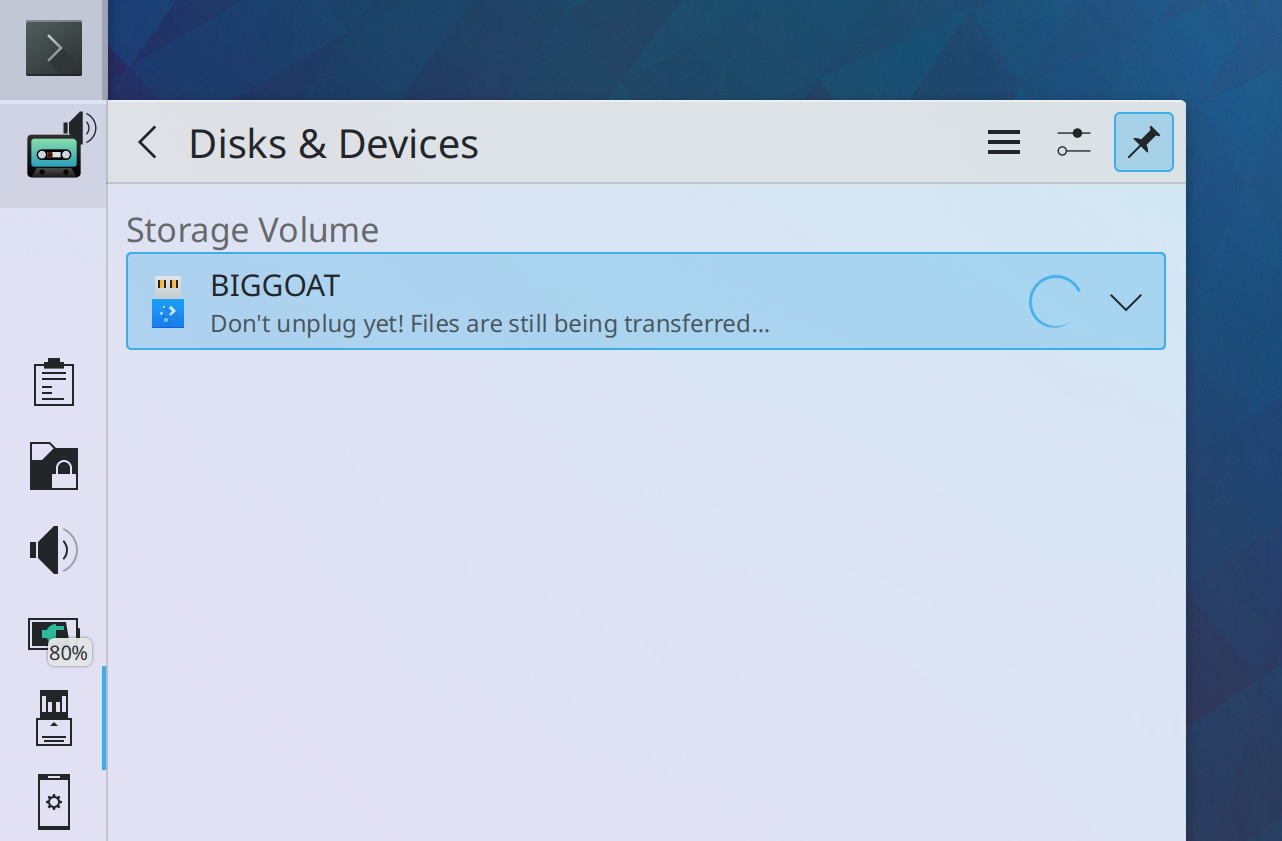
When you unmount a disk that still has pending file transfer operations going on (due to the Linux kernel’s use of asynchronous file I/O), the Disks & Devices applet now shows you a more appropriate message (me: Nate Graham, Plasma 5.25):

Various apps and Plasma applets that have search fields which are focused by default no longer become focused by default when you’re in tablet mode, to prevent the virtual keyboard from immediately appearing and covering up the app the moment it launches (Arjen Hiemstra, Frameworks 5.91 and Plasma 5.25)

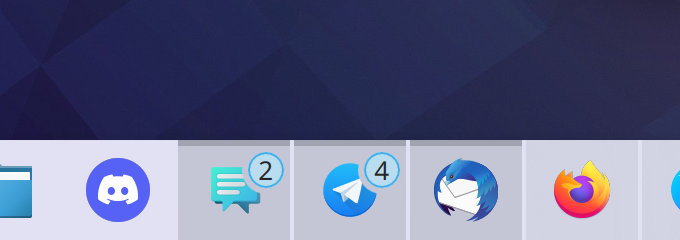
Task Manager badges now use the new highlight style (Jan Blackquill and me: Nate Graham, Plasma 5.25):

Breeze-themed menu items in QtQuick-based apps now become bigger and more tappable when you’re in Tablet Mode (Me: Nate Graham, Frameworks 5.91):


NOTE FOR PEOPLE WHO HATE WHITESPACE: This is only in Tablet Mode! Only in Tablet Mode! Not in regular mode! You won’t ever have to see this density reduction! So don’t complain about it! 🙂

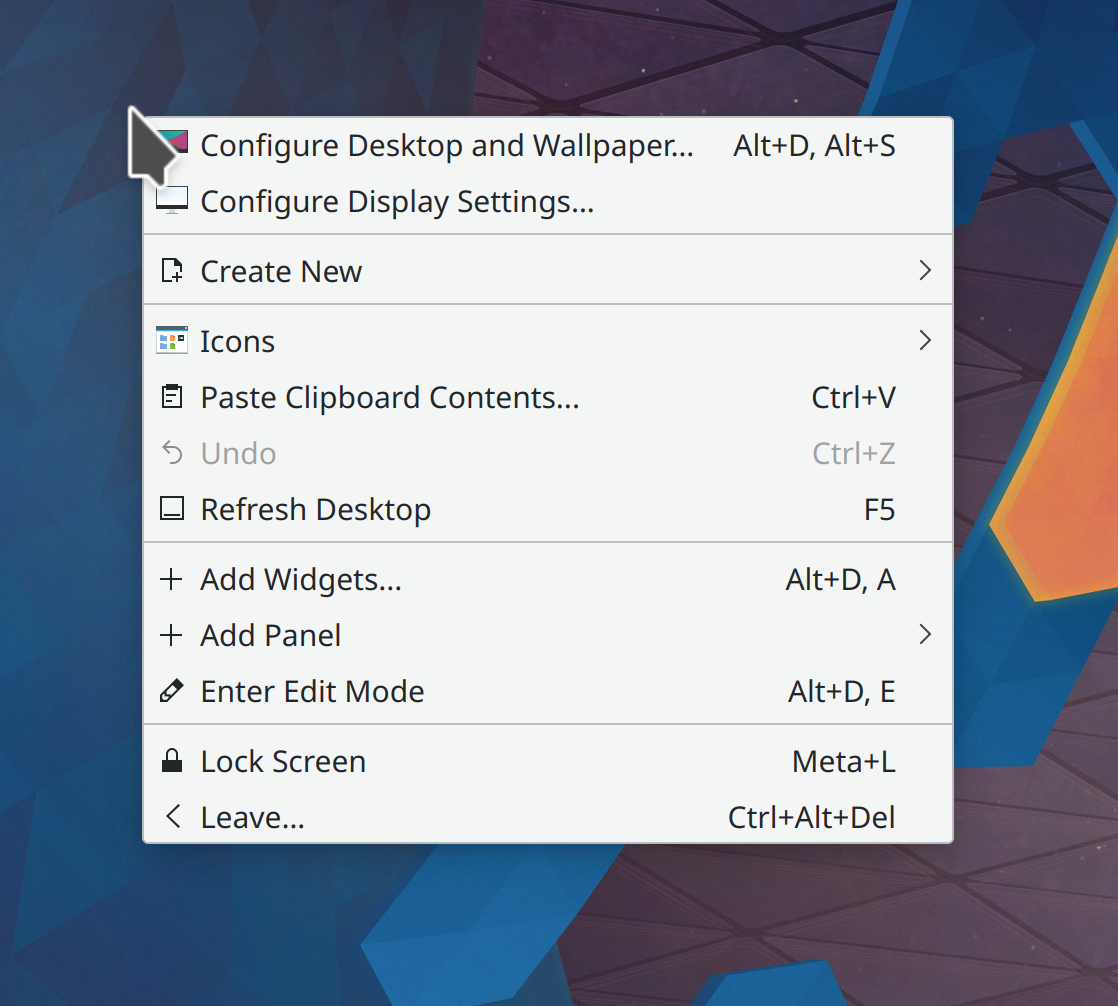
The desktop context menu now only shows the “Show Activity Switcher” item if you actually have more than one activity that could be switched to, making the menu a bit shorter by default and more relevant (me: Nate Graham, Plasma 5.25):

And yes, there is indeed a bit more fat we can trim here, which will be happening shortly

Kate, KDevelop, and other KTextEditor-based apps now automatically detect the whitespace style of files you open, so you’ll never again have the experience of opening a file that uses tabs instead of spaces and you hit the tab key and it inserts spaces and you only notice this later when you run git diff on your changes and see that you’ve ruined the whitespace (Waqar Ahmed, Frameworks 5.91)

The Toggle Comment feature in Kate and other KTextEditor-based apps now works properly when the line you’re trying to comment or uncomment also has any inline comments on it (Waqar Ahmed, Frameworks 5.91)

Comboboxes throughout QtQuick-based KDE apps (and their popups) are no longer often too short to fully fit the text of long items (Alexander Stippich, Frameworks 5.91)

…And everything else

Keep in mind that this blog only covers the tip of the iceberg! Tons of KDE apps whose development I don’t have time to follow aren’t represented here, and I also don’t mention backend refactoring, improved test coverage, and other changes that are generally not user-facing. If you’re hungry for more, check out https://planet.kde.org/, where you can find blog posts by other KDE contributors detailing the work they’re doing.

How You Can Help

If you’re a developer, check out our 15-Minute Bug Initiative. Working on these issues makes a big difference quickly!

Otherwise, have a look at https://community.kde.org/Get_Involved to discover ways to be part of a project that really matters. Each contributor makes a huge difference in KDE; you are not a number or a cog in a machine! You don’t have to already be a programmer, either. I wasn’t when I got started. Try it, you’ll like it! We don’t bite!

Finally, consider making a tax-deductible donation to the KDE e.V. foundation.
The 15-Minute Bug Initiative

In my 2022 roadmap, I mentioned something called the “15-Minute Bug Initiative.” Today I’d like to flesh it out and request participation! This blog post is not only informational, but I really hope any developers reading along will get excited and decide to participate. 🙂


KDE software has historically been accused of being resource-intensive, ugly, and buggy. Over the years we’ve largely resolved the first two, but the issue of bugginess persists.

Have you ever had that experience where you’re introducing someone to a KDE Plasma system and to your horror, they run into multiple bugs within moments? These are the issues we need to fix first: those that can be easily encountered within 15 minutes of basic usage. They leave a bad taste in people’s mouths and provide the impression that the system is a house of cards. It’s time to remedy this final strategic weakness of KDE, starting with Plasma itself. So I’d like to present our initial list of bugs:

https://tinyurl.com/plasma-15-minute-bugs

If you have any software development skills, working on these bugs is a super impactful way to make a difference with code!! Every fixed bug is a huge deal, and brings Plasma meaningfully closer to a position of true stability.


Likely-to-be-frequently-asked questions

1. What are the criteria for being a 15-minute bug?

It’s an inherently squishy thing, but I look for the following:

  1. Affects the default setup
  2. 100% reproducible
  3. Something basic doesn’t work (e.g. a button doesn’t do anything when clicked)
  4. Something basic looks visually broken
  5. Causes Plasma or the full session to crash
  6. Requires a reboot or terminal commands to fix
  7. The bug report has more than 5 duplicates

The more of those conditions apply, the more likely that any Plasma user will run into it quickly during normal usage, and the more I feel like it qualifies.

2. Who determines what gets to be a 15-minute bug?

KDE developers and bug triagers make the call.

3. I’m a developer or bug triager; how do I add a bug to this list?

Change its Priority to HI. If you don’t have permission to do this, ask sysadmins for “editbugs” permission over here: https://phabricator.kde.org/maniphest/task/edit/form/2/

4. I’m not a developer or a bug triager; how can I help?

You can go through the list and try to reproduce or confim the bugs, and do investigation into root causes and triggering factors for the ones where this isn’t already known. Those are important because a skilled developer can usually quickly fix a bug they can reproduce. But if they can’t, then they may never be able to. So if you can help developers reproduce bugs, that’s extremely valuable.

5. I’m experiencing this annoying issue that’s not on the list! Can you add it?

Maybe. Mention the 15-minute bug initiative in the bug report for it, and KDE’s bug triagers will see if it makes the cut.

6. Why are you only doing Plasma bugs right now?

Lack of resources. The list currently has almost 100 bugs, and I don’t anticipate that we’ll get it down to zero in a year. A lot of the issues there are quite challenging to fix. But if I’m wrong and we blaze through everything, then I’ll absolutely broaden the initiative to include first frameworks, and then apps! Stabilize all the things!


So that’s the 15-Minute Bug Initiative. Let’s get cracking and make Plasma rock solid in 2022!

https://tinyurl.com/plasma-15-minute-bugs

This week in KDE: the Plasma 5.24 beta

This week we released the Plasma 5.24 beta, so go check it out and file bug reports! We spent most of the week preparing for it and fixing bugs, which we’ll continue to do for the next month in preparation for the final release.

New Features

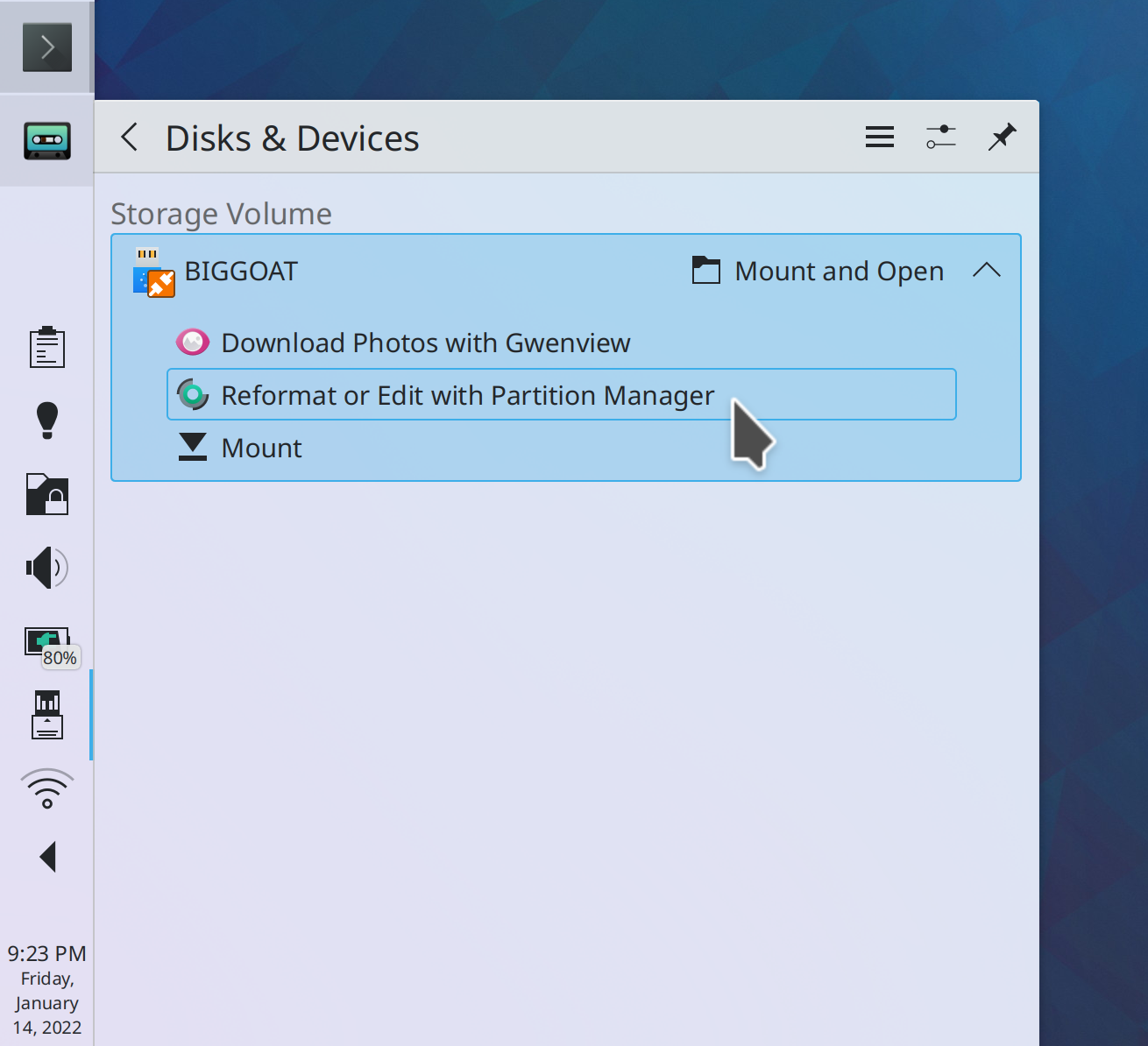
The Disks & Devices applet now offers you the option to open Partition Manager with the specified partition (me: Nate Graham, Partition Manager 22.04):

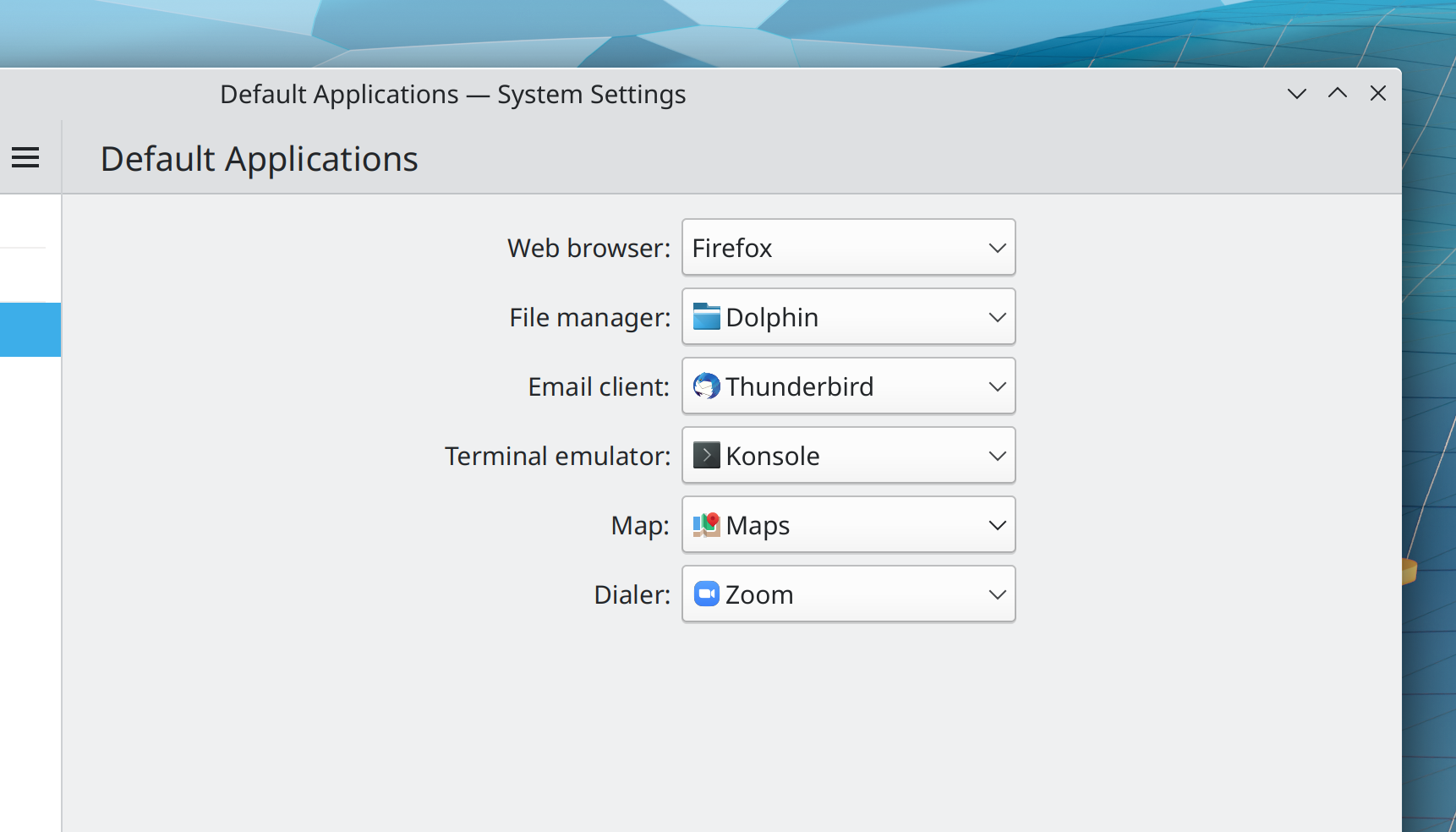
You can now configure which apps handle geo:// and tel:// links (Volker Krause and Kai Uwe Broulik, Plasma 5.24):

Bugfixes & Performance Improvements

Gwenview no longer sometimes crashes when you zoom out on an image while in full screen mode (Nicolas Fella, Gwenview 21.12.2)

Elisa no longer sometimes crashes when trying to enqueue files (Yerrey Dev, Elisa 21.12.2)

The overwrite dialog shown when extracting files using Ark that have the same name as other files already there no longer always misleadingly says, “The files are identical” (Albert Astals Cid, Ark 22.04)

Taking a screenshot with Spectacle using the terminal flags (e.g. spectacle -bc) no longer causes two notifications to be shown (Antonio Prcela, Spectacle 22.04)

The System Settings Printers page no longer displays long printer names in an ugly pixelated way when using a high DPI scale factor (Kai Uwe Broulik, print-manager 22.04)

In the Plasma Wayland session, fixed a case where KWin could randomly crash (Vlad Zahorodnii, Plasma 5.24)

In the Plasma Wayland session, the System Settings Font Management is now available (David Edmundson, Plasma 5.24)

Turning off a monitor no longer sometimes causes your panels to disappear (Marco Martin, Plasma 5.24)

Fixed various graphical glitches with multi-monitor setups (Xaver Hugl, Plasma 524)

Close buttons on tabs no longer inappropriately always have circles around their “X” symbol (Luke Horwell, Plasma 5.24)

Initials text in the System Settings Users page no longer sometimes overflow (me: Nate Graham, Plasma 5.24)

Downloading “Get New <stuff>” items with dependencies once again works (Alexander Lohnau, Frameworks 5.91, though distros should be backporting the fix ASAP for 5.90)

In the Plasma Wayland session, Help Center should no longer sometimes randomly crash when moving the cursor or hovering over links (Christoph Cullmann, Frameworks 5.91)

In the Plasma Wayland session, opening and closing the Widget Explorer sidebar no longer rearranges your windows (David Edmundson, Frameworks 5.91)

System Settings pages with “Get new <stuff>” buttons now use less memory (Alexander Lohnau, Frameworks 5.91)

User Interface Improvements

You can now find System Settings and Info Center pages by searching for their keywords in KRunner-powered searches in KRunner, Kickoff, the Overview effect, etc. (Alexander Lohnau, Plasma 5.24)

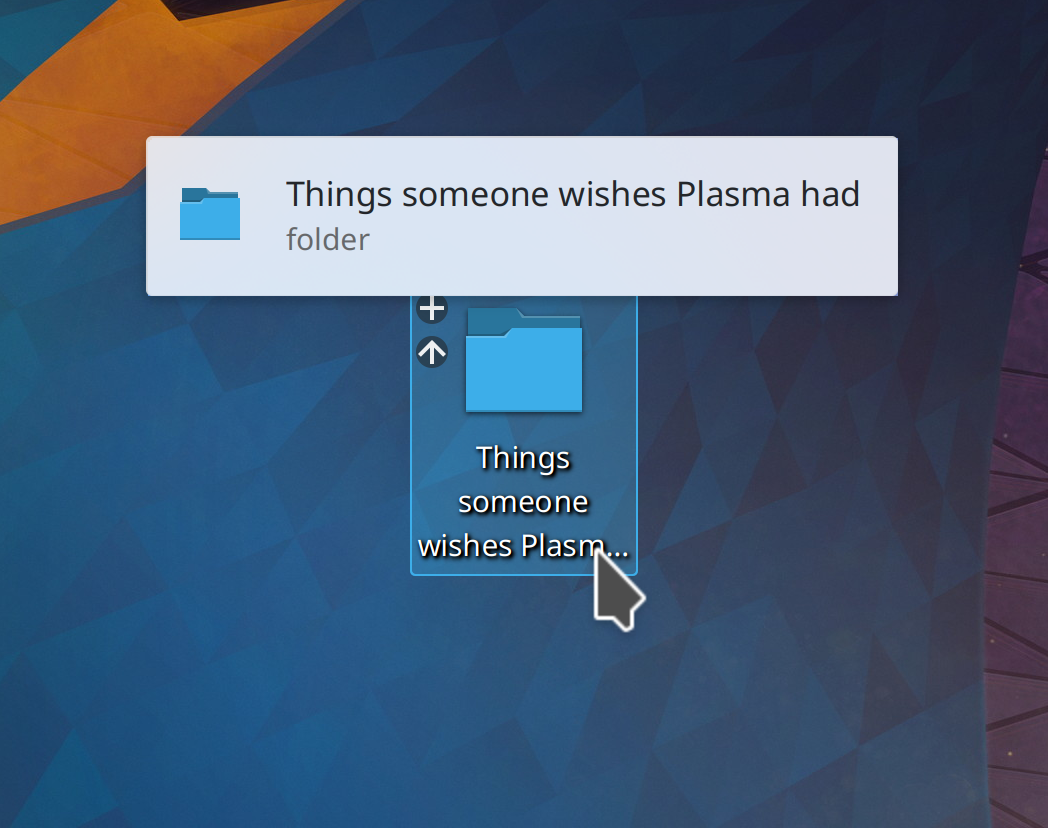
Plasma Folder View now always shows tooltips for items whose titles are elided, just like Dolphin does (me: Nate Graham, Plasma 5.24):

You can now middle-click on the Bluetooth applet to turn Bluetooth on or off (me: Nate Graham, Plasma 5.25)

Search fields in Kirigami-using apps now have a little magnifying glass in them, and it even has an animated disappearance effect when you focus the search field (Carl Schwan, Frameworks 5.91):

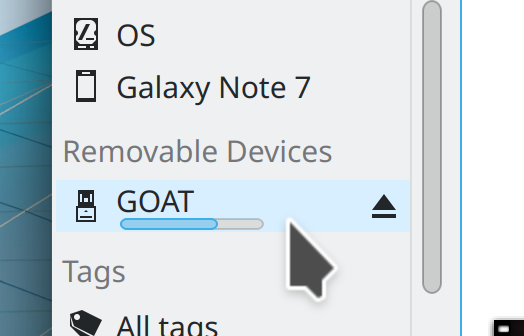
The Places Panel (including in Dolphin!) now has a little Eject button in it next to ejectable/unmountable disks (Kai Uwe Broulik, Frameworks 5.91):

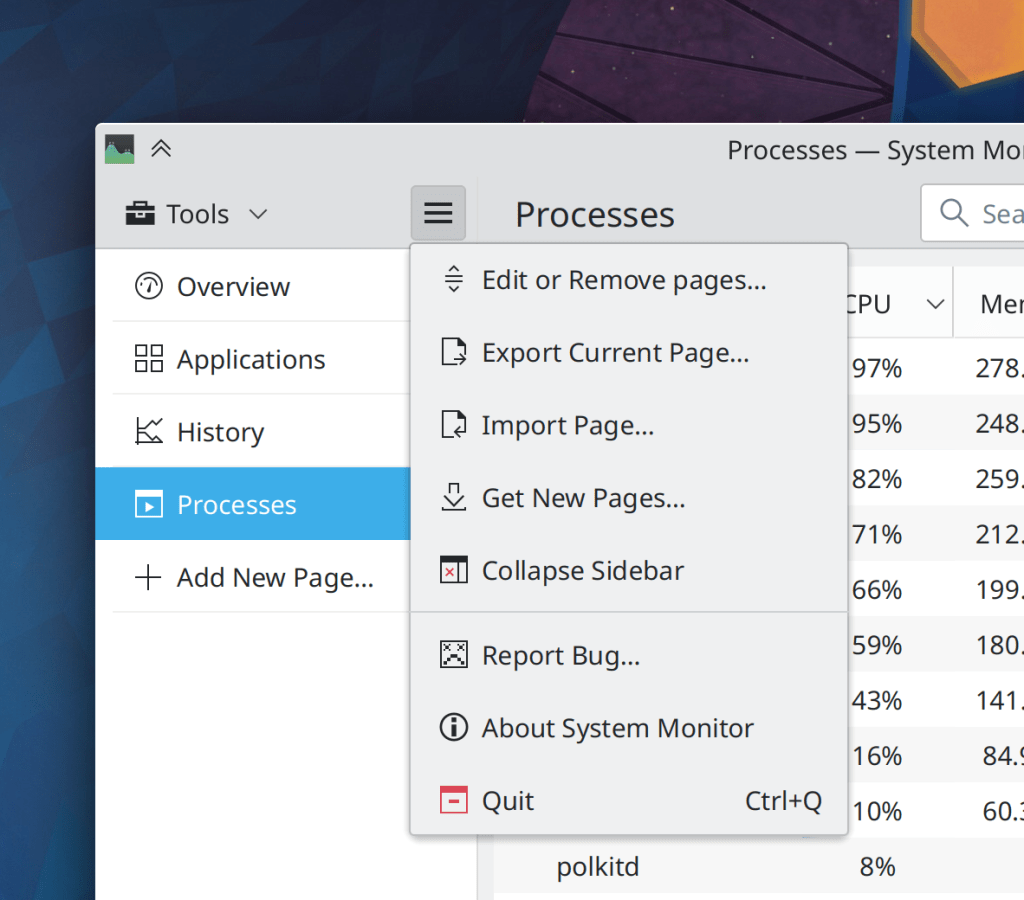
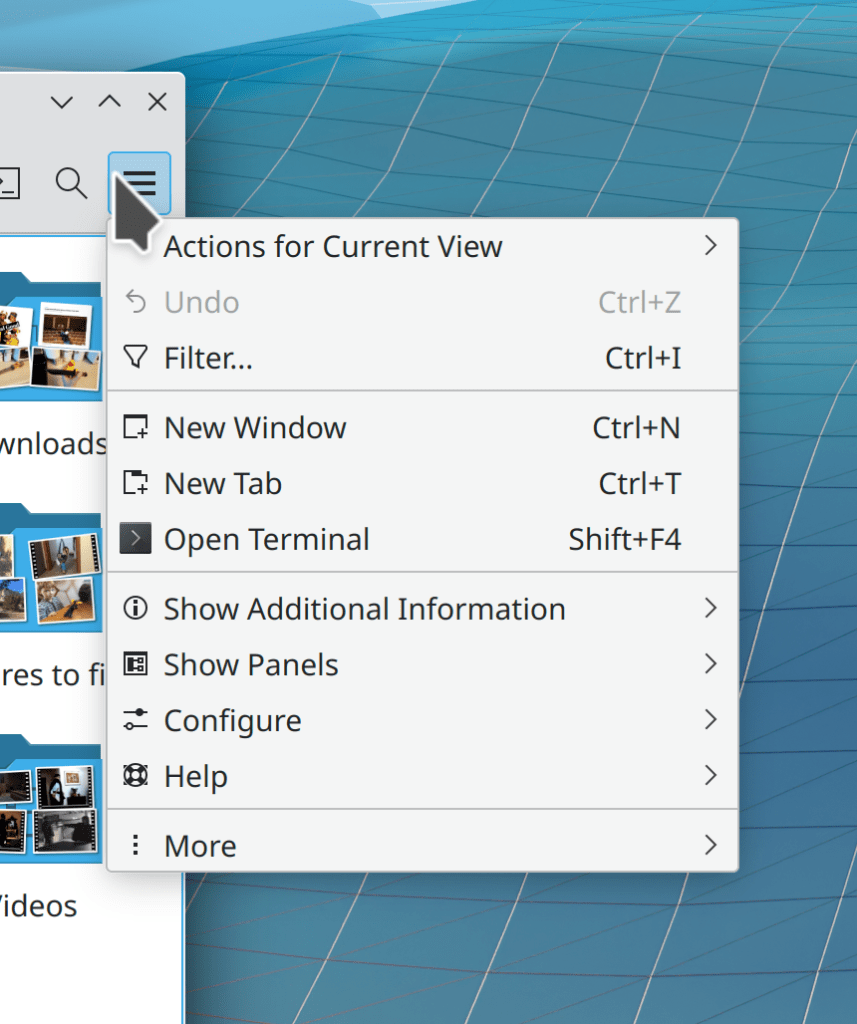
KHamburgerMenu menus now have a simpler design for the bottom items: there is now a “More” item at the very end that shows you all the rest of the menu items, and the “Help” item is right above it, and both have proper icons (Mufeed Ali, Frameworks 5.91):

Bottom navigation bars now use the new selection style (Felipe Kinoshita, Frameworks 5.91):

…And everything else

Keep in mind that this blog only covers the tip of the iceberg! Tons of KDE apps whose development I don’t have time to follow aren’t represented here, and I also don’t mention backend refactoring, improved test coverage, and other changes that are generally not user-facing. If you’re hungry for more, check out https://planet.kde.org/, where you can find blog posts by other KDE contributors detailing the work they’re doing.

How You Can Help

Have a look at https://community.kde.org/Get_Involved to discover ways to be part of a project that really matters. Each contributor makes a huge difference in KDE; you are not a number or a cog in a machine! You don’t have to already be a programmer, either. I wasn’t when I got started. Try it, you’ll like it! We don’t bite!

Finally, consider making a tax-deductible donation to the KDE e.V. foundation.
This week in KDE: better MTP support

Many of us are still getting over our new years’ food comas, but we managed to get some cool things done anyway!

New Features

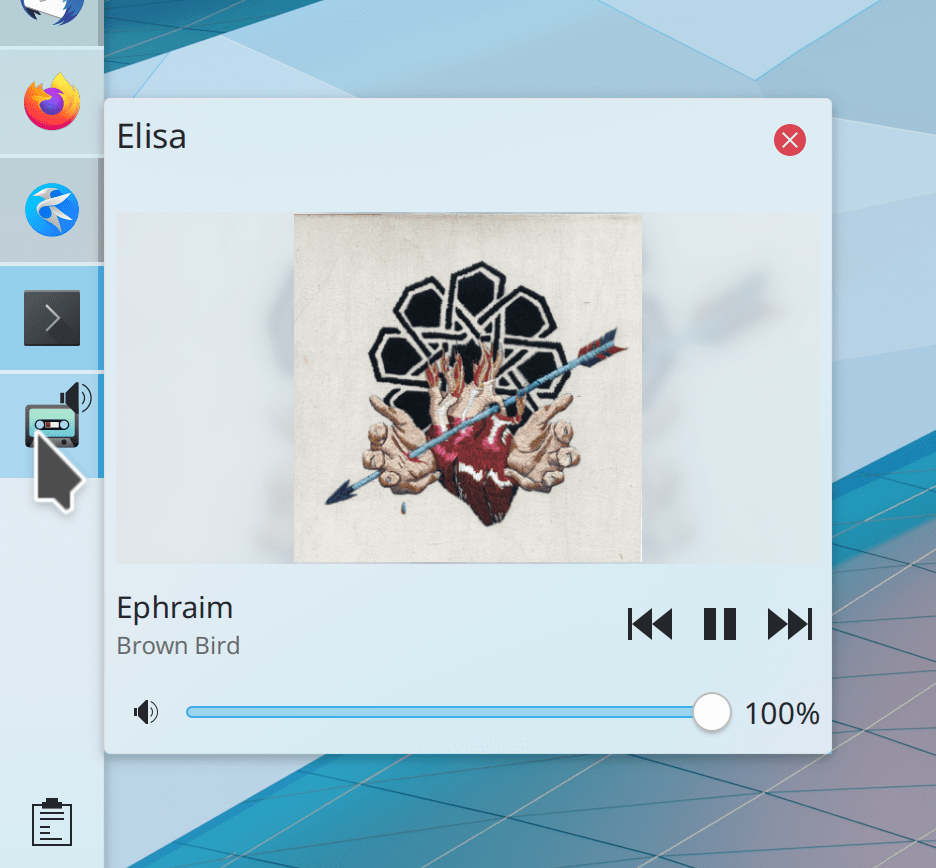
Task Manager tooltips for windows that are playing audio now show a volume slider under the playback controls (Noah Davis, Plasma 5.24):

Bugfixes & Performance Improvements

Okular is now more reliable about opening and signing different kinds of password-protected documents (Albert Astals Cid, Okular 21.12.1)

Okular no longer renders fictionbook documents with incorrect whitespace in certain places, and now shows their keywords in the properties dialog (Yuri Chornoivan and Lenny Soshinskiy, Okular 22.04)

Okular no longer leaks memory when viewing documents with Optional Content links (Albert Astals Cid, Okular 22.04)

Connectivity with MTP devices now works much better overall: they now display correctly in the Disks & Devices applet, opening one in Dolphin now refreshes the view automatically when you follow the provided instructions by unlocking your device and allowing access, and the instructions are now clearer and more actionable (Harald Sitter, James John, and me: Nate Graham–but really mostly the first two guys, Plasma 5.24 and Dolphin 22.04)

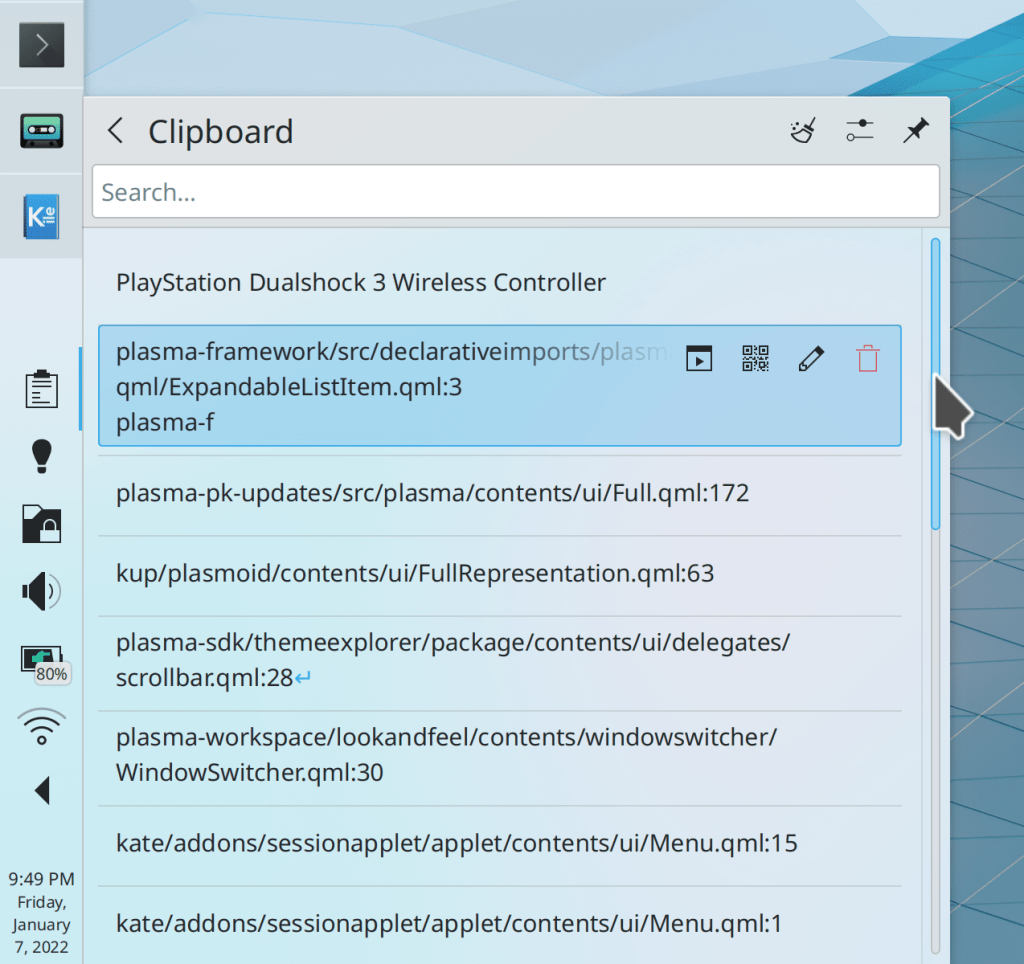
Bluetooth devices that connect in a nonstandard way like PlayStation Dualshock 3 Wireless Controllers now appear in the Bluetooth applet after being connected (Bart Ribbers, Plasma 5.23.5)

Turning a monitor off and back on no longer sometimes causes certain windows to be resized (Xaver Hugl, Plasma 5.24)

Clicking the Pause button on System Settings’ File Search page now actually pauses indexing (Yerrey Dev, Plasma 5.24)

In the Plasma Wayland session, fixed a case where window thumbnails could fail to appear on Task Manager tooltips with certain configurations (David Edmundson, Plasma 5.24)

The kimpanel popup no longer flickers while entering CJK text (Rocket Aaron, Plasma 5.24)

You can now change the user or group of a file or folder on the desktop (Ahmad Samir, Frameworks 5.91)

Snap apps no longer inappropriately appear as mounted volumes in Places panels (Kai Uwe Broulik, Frameworks 5.91)

Re-mapping keys with the System Settings Advanced Keyboard page now causes any swapped modifier keys to be correctly handled by global keyboard shortcuts (Fabian Vogt, Frameworks 5.90)

User Interface Improvements

The Battery and Brightness applet now turns into just a Brightness applet on computers with no batteries but any brightness controls (Aleix Pol Gonzalez, Plasma 5.24):

Plasma applets with scrollable views now use a more consistent style (Carl Schwan, Plasma 5.24):

The Scale effect is now used by default for window opening and closing, instead of the old Fade effect (Vlad Zahorodnii, Plasma 5.24)

Items are now selected after being moved or created on the desktop (Derek Christ, Plasma 5.24)

You can now see network speeds in bits per second in System Monitor applets and the app (Vishal Rao, Plasma 5.24)

In the Plasma Wayland session, the System Tray item for showing and hiding the virtual keyboard now becomes active only in tablet mode (me: Nate Graham, Plasma 5.24)

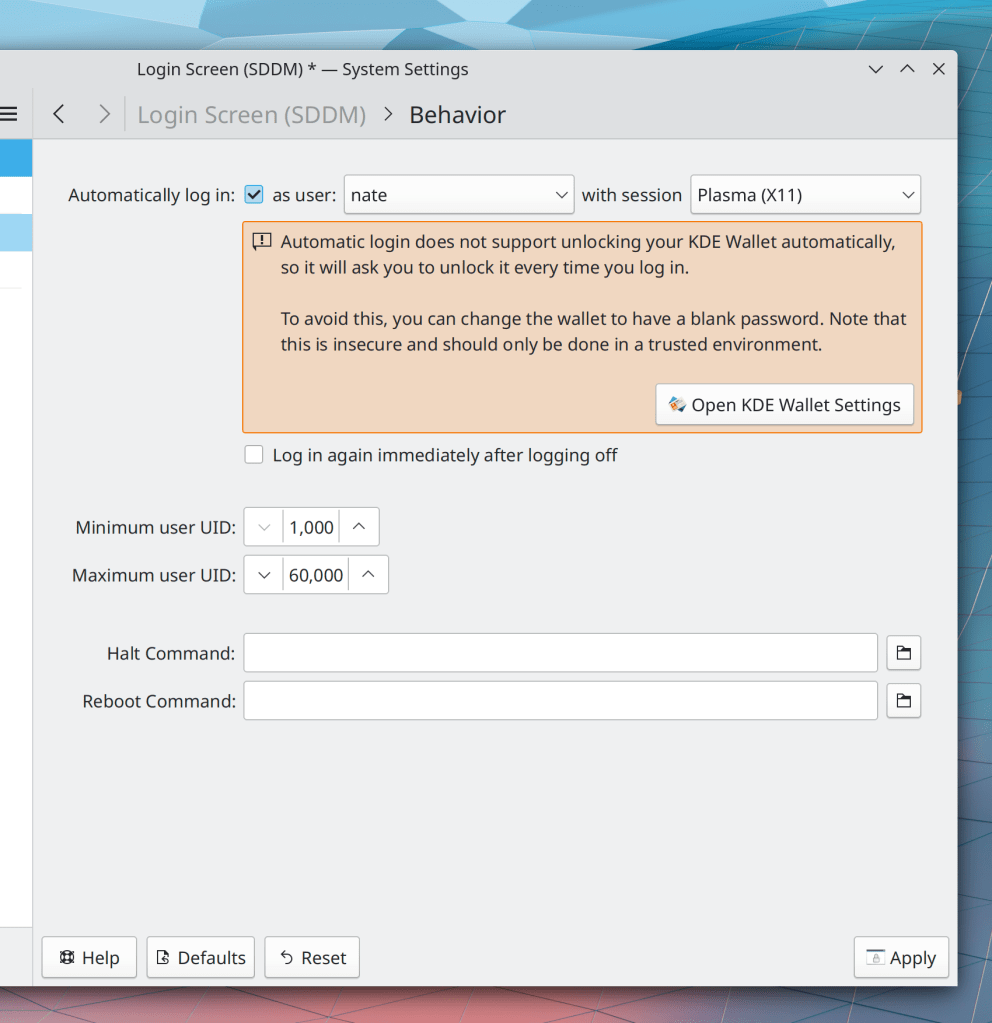
When you enable auto-login, you are now warned about some changes you might want to make to your KWallet setup (me: Nate Graham, Plasma 5.24):

Scrollable controls in Plasma and other QtQuick-based apps now only change their contents when you scroll on them if the cursor began over them, not when the cursor happened to pass over them because the view they live on moved while scrolling (Noah Davis, Frameworks 5.90 with Plasma 5.24)

KDE apps that display relative dates now present them with much more precision (Méven Car, Frameworks 5.91):

Yakuake’s System Tray icon is now monochrome (Artem Grinev and Bogdan Covaciu, Frameworks 5.91:

Menus in QtQuick apps now have the same size and appearance as menus in QtWidgets apps (me: Nate Graham, Frameworks 5.91)

Sliders in QtQuick apps can now be manipulated by scrolling over them, just like sliders elsewhere (me: Nate Graham, Frameworks 5.91)

…And everything else

Keep in mind that this blog only covers the tip of the iceberg! Tons of KDE apps whose development I don’t have time to follow aren’t represented here, and I also don’t mention backend refactoring, improved test coverage, and other changes that are generally not user-facing. If you’re hungry for more, check out https://planet.kde.org/, where you can find blog posts by other KDE contributors detailing the work they’re doing.

How You Can Help

Have a look at https://community.kde.org/Get_Involved to discover ways to be part of a project that really matters. Each contributor makes a huge difference in KDE; you are not a number or a cog in a machine! You don’t have to already be a programmer, either. I wasn’t when I got started. Try it, you’ll like it! We don’t bite!

Finally, consider making a tax-deductible donation to the KDE e.V. foundation.
KDE roadmap for 2022

Another year, another roadmap! Last year’s was a smashing success, as we delivered on everything. So here’s what I think we can expect in 2022. As always, this is not an official planning document or a promise; it’s just me giving you a sneak peak of some things that are in progress or about to start, and that I think will be feasible to complete before the year’s end!

Merged “Formats and Languages” KCM

The Languages and Formats pages in System Settings have long been problematic because their scopes overlapped. Not for long! Han Young is working on merging them together into one new page that handles both, making it clear what applies when and making it harder or impossible to mess up your system by choosing incompatible settings. This is in progress and I expect it to be completed sometime in the first half of 2022.

Overhauled Breeze icons

KDE designer Ken Vermette is working on improving and modernizing Breeze icons! Colorful icons will be softened and rounded a bit, and visually updated to remove old ugly elements like the long shadows. Monochrome icons will eventually get attention too. All of them are expected to become more responsive to your system color scheme, and look better when doing so. Initial work for Places icons has already been submitted and is being reviewed. This work will soon start landing piece by piece, and you can read more about it on Ken’s blog.

Multi-monitor stuff finally works properly

We plan to focus quite a bit on resolving multimonitor issues this year, and some of that effort has already borne a bit of fruit so far. But there will be a much heavier focus in 2022!

Inertial touchpad scrolling in QtQuick software

A big improvement went in recently that will make this possible to do soon! It seems quite likely that we’ll finally have this sometime in 2022.

The Wayland session can completely replace the X11 session

This is a bit of a moonshot but I think it’s possible. The list of issues on our “Wayland Showstoppers” wiki page is quite low, and when new ones are added, they’re notably lower in severity than the ones that have already been fixed. And now that NVIDIA has added GBM support to their driver and KWin already supports it, I think life should really start to get better for NVIDIA users, who represent a large chunk of dissatisfied Plasma users and those still unable to use the Wayland session at all. Let’s call this a stretch goal, but I think it’s not impossible!

“15 minute bug” initiative

This year I’d like to start something I call the “15 minute bug” initiative–an effort to fix as many of the bugs as possible that are trivially encountered within a quarter hour of basic usage. These are the kinds of issues that form permanent negative opinions in people’s minds, and reinforce the perception that KDE software is buggy and unreliable.

So far I’m limiting it to Plasma and Plasma-aligned software (e.g. KWin, System Settings, Discover) to avoid getting overwhelmed by scope creep. But if it’s wildly popular and successful, I’d love to extend it to apps and frameworks as well! Check out the current list here. I’ll be writing about this in more detail soon!


So that’s the list! What do you think? Is there anything else you think we should focus on in 2022?