This week in KDE: tap-to-click by default

This week we weren’t done improving input device defaults; for Plasma 6, touchpad tap-to-click is now enabled by default! If you’re curious about the reasons, click that link.

In addition, convergence is starting to happen. You might notice that the number of open Plasma 6 issues is lower this week than it was last week! A good sign for sure.

Plasma 6

General infoOpen issues: 85

In the Plasma Wayland session, text copied from an XWayland-using app now remains on the clipboard after it quits (David Edmundson, link)

In the Plasma Wayland session, dialog windows with parent windows set to live on multiple virtual desktop now always appear on the current virtual desktop (Vlad Zahorodnii, link)

System Settings’ minimum window size is now smaller, fitting better into low-resolution 1366×768 screens with thick panels (me: Nate Graham, link)

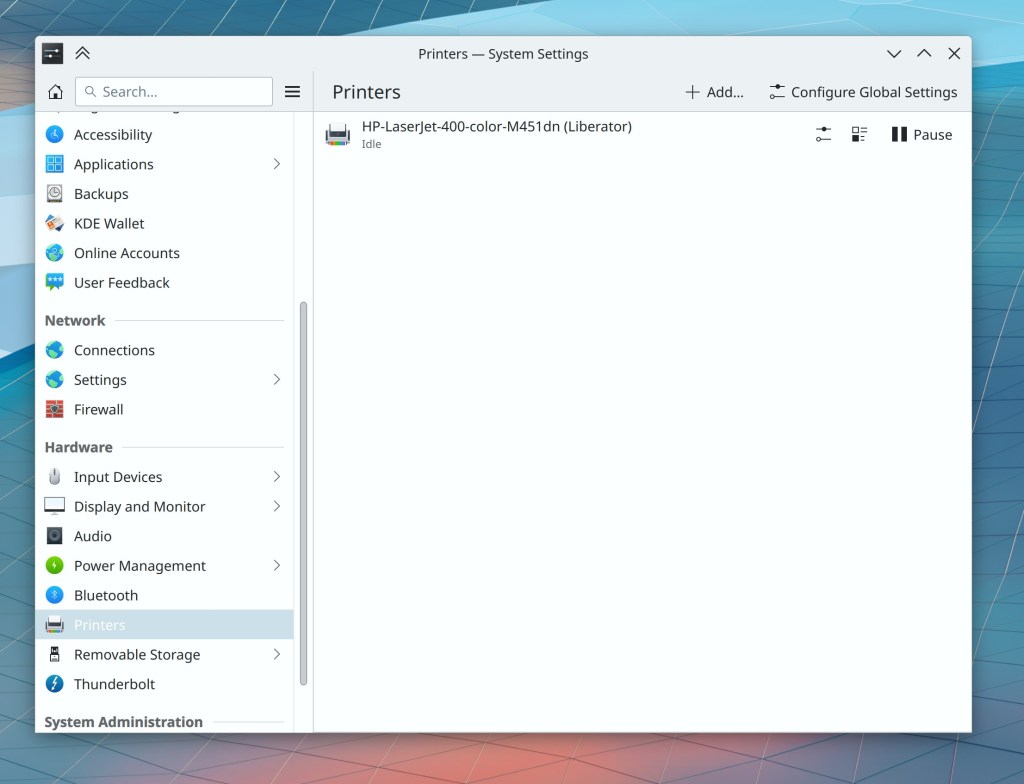
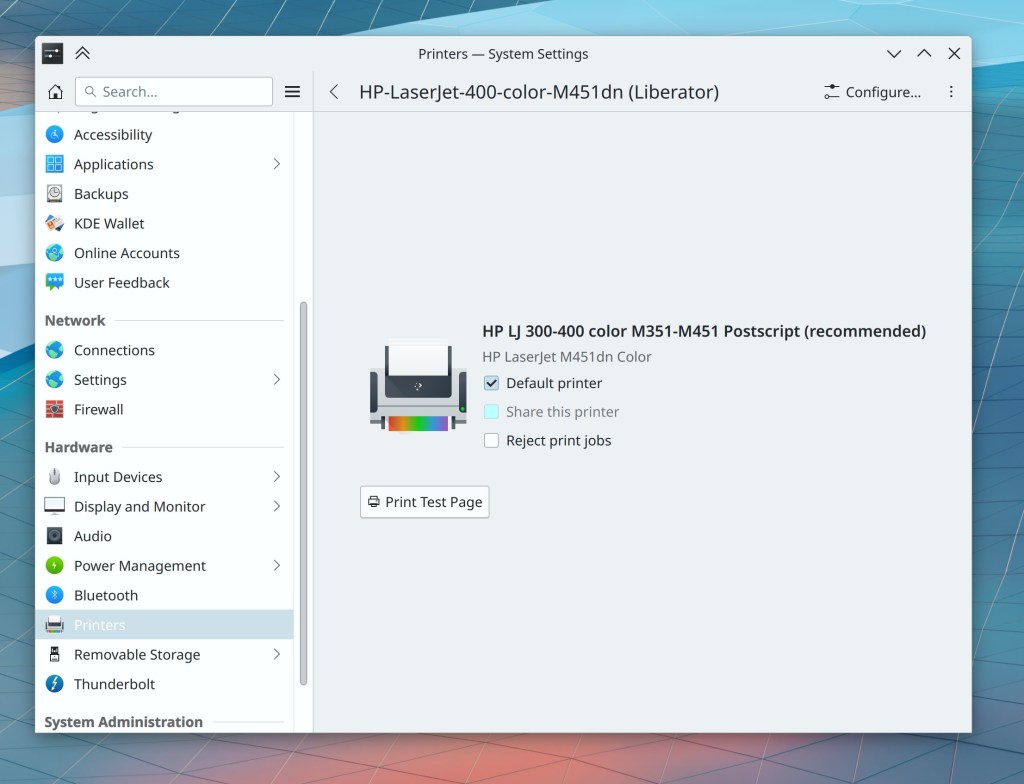
System Settings’ Printers page has been rewritten in QML for better future maintainability and a more modern and consistent style (Mike Noe, Print Manager 23.12 with Plasma 6. Link):
Icons in Dolphin’s item view now look better and smoother when using a fractional scale factor (Kai Uwe Broulik, Dolphin 23.12 with Plasma 6. Link)

Other User Interface Improvements

In Dolphin, you can now middle-click a file to open it in the first app in the expanded “Open with” list, rather than the default app for its file type (Méven Car, Dolphin 23.12. Link)

.3mf files now display thumbnails showing their 3D model contents (Bernhard Sulzer, Dolphin 23.12. Link)

Other Significant Bugfixes

(This is a curated list of e.g. HI and VHI priority bugs, Wayland showstoppers, major regressions, etc.)

Yet again fixed the ability to monitor NVIDIA GPUs using System Monitor, this time improving compatibility with multi-GPU setups (Oliver Beard, Plasma 5.27.8. Link)

The time that you configure your system to dim the screen after is now respected, instead of the screen dimming in half that time (Konstantin Kharlamov, Plasma 6.0. Link)

Starting a Plasma Wayland session in VirtualBox is now more reliable (Xaver Hugl, Plasma 6.0. Link)

Improved reliability with symlinked or hardlinked files on Samba shares opened with KIO-using KDE apps (Kevin Ottens, Frameworks 5.110. Link)

Other bug-related information of interest:

Automation & Systematization

Koko now produces Flatpak bundles with every commit and Merge Request change via its CI system (Tobias Fella, link)

…And everything else

This blog only covers the tip of the iceberg! If you’re hungry for more, check out https://planet.kde.org, where you can find more news from other KDE contributors.

How You Can Help

If you’re a developer, work on Qt6/KF6/Plasma 6 issues! Plasma 6 is usable for daily driving now, but still in need of bugfixing and polishing to get it into a releaseable state by the end of the year.

Otherwise, visit https://community.kde.org/Get_Involved to discover other ways to be part of a project that really matters. Each contributor makes a huge difference in KDE; you are not a number or a cog in a machine! You don’t have to already be a programmer, either. I wasn’t when I got started. Try it, you’ll like it! We don’t bite!

And finally, KDE can’t work without financial support, so consider making a donation today! This stuff ain’t cheap and KDE e.V. has ambitious hiring goals. We can’t meet them without your generous donations!

This week in KDE: Double-click by default

This was a week of huge changes and improvements, starting with our headliner! Yes it’s true, by default in Plasma 6, you’ll single-click to select files and folders, and double-click to open them. The patches have now landed, done by me. This remains user-configurable, of course.

But there’s a whole lot more to talk about as well! This is gonna be a big one…

More Plasma 6 awesomeness

General infoOpen issues: 87

KWin’s blur effect has been totally rewritten for better reliability. Among other things, this fixes the infamous glitches that have been appearing for people using fractional scale factors as well as the blocky cursor trails for users of NVIDIA and some AMD GPUs (Vlad Zahorodnii, link)

When a KDE app crashes and you click on the “Report bug” button in the notification, the DrKonqi crash reporting wizard you’ll see has now been hugely simplified and includes an option to report the crash automatically to our new Sentry-based crash tracker, no need for a Bugzilla account! (Harald Sitter, link):

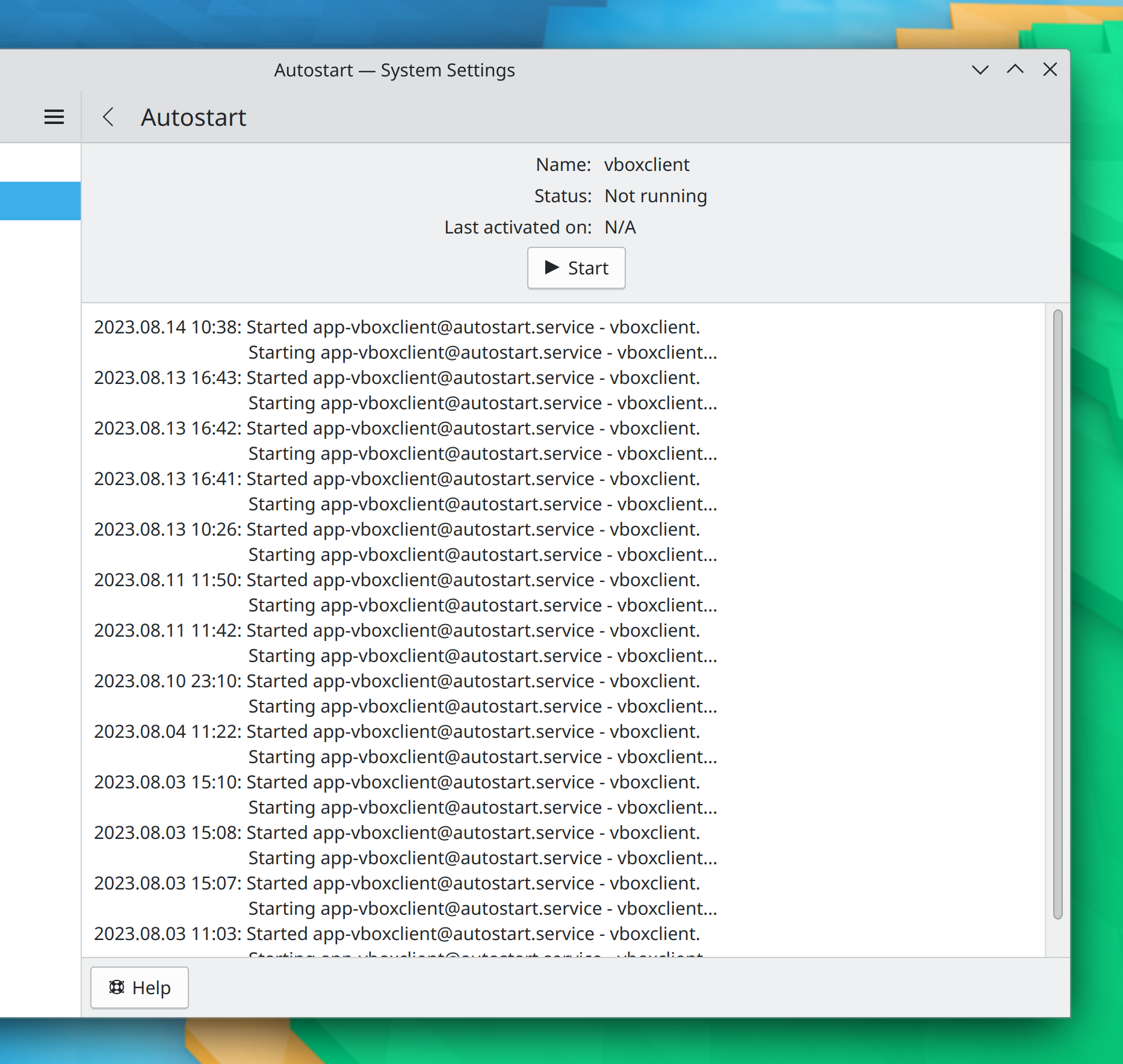
System Settings’ Autostart page now lets you see the technical details about entries’ startup sequences which lets you debug why they might not be behaving as expected (Thenujan Sandramohan, link):

Cycling through keyboard brightness level keys (e.g. with Fn+Space on many laptops) now shows an OSD for the change (Natalie Clarius, link)

When toggling the keyboard backlight off and back on, it now remembers its previous brightness level (Natalie Clarius, link)

The minimum screen brightness is now always 1, and the minimum keyboard brightness is now always 0, ensuring that the screen backlight never turns off completely at minimum brightness, while the keyboard backlight always does (me: Nate Graham and Natalie Clarius, link 1 and link 2)

The “Alternative widgets” popup has been modernized and now has the typical hover highlight effect (Lukas Spies, link)

It’s now possible to change the wallpaper immediately after changing the desktop containment type (e.g. switching from Folder View to Desktop or back) (Fushan Wen, link)

In the System Tray configuration window, the icons shown to represent the widgets now match the actual icons shown in the System Tray itself (me: Nate Graham, link):

The project to fully remove the concept of icons in the Plasma style has been completed, so now all icons come from the systemwide icon theme. In addition, we have also completed the project to remove the ability to globally change the size of toolbar, dialog, and small icons in some KDE apps that respected these global settings (not all did), in order to reduce the number of ways to scale things on the system so that people will be more likely to use one of the supported methods. For more information about these planned and previously announced changes, see https://pointieststick.com/2023/07/26/what-we-plan-to-remove-in-plasma-6/.

Other User Interface Improvements

Dolphin’s settings window has gotten an overhaul to re-arrange things to be more logical (Dimosthenis Krallis, Dolphin 23.12. Link)

The initial location for Elisa’s “Files” view is now user-configurable but defaults to the system’s “Music folder” location (Me: Nate Graham, Joshua Goins, and Eduardo Bray, Elisa 23.12. Link 1 and Link 2)

KCalc now remembers its window size, and position too on X11 (Gabriel Barrantes, KCalc 23.12. Link)

Apps using the KHolidays framework now have support for holidays in Tanzania (Lukas Sommer, Frameworks 5.110. Link)

Settings dialogs for QtWidgets-based apps now have a search field in the header area that can be used to find settings on individual pages!!! (Waqar Ahmed, Frameworks 6.0. Link):

Improved the Breeze icon for .bak and other backup files (Alexander Wilms, Frameworks 6.0. Link)

Other Significant Bugfixes

(This is a curated list of e.g. HI and VHI priority bugs, Wayland showstoppers, major regressions, etc.)

Fixed a way that Plasma could crash when launching an app using the Task Manager while its tooltip was open (Fushan Wen, Plasma 5.27.8. Link)

Implemented a workaround for a weird issue that could cause Plasma to eventually slow down and crash on systems that frequently change monitor arrangements. A better fix will be coming for Plasma 6 (Harald Sitter, Plasma 5.27.8. Link)

Fixed a way that taking screenshots using Spectacle could fail in the Plasma X11 session (Noah Davis, Plasma 5.27.8. Link)

Sensors in System Monior and the widgets of the same name now work properly when your system is using the C locale (Maciej Stanczew, Plasma 5.27.8. Link)

Other bug-related information of interest:

Automation & Systematization

A long-failing test in the plasma-workspace has been fixed, in the process requiring fixes to various things that were actually broken that the text had caught–imagine that! (Marco Martin, link)

Wrote extensive autotests for the Powerdevil profile generator code (Jakob Petsovits, link)

Tests are now required to pass before a merge request can be merged in the plasma-framework, plasma-workspace, plasma-desktop and print-manager repos (Harald Sitter and me: Nate Graham, link 1, link 2, link 3, and link 4)

Changes not in KDE that affect KDE

Firefox now supports the Wayland fractional scaling protocol, so it will be smoother and better looking when using a fractional scale factor (Emilio Cobos Álvarez and Robert Mader, Firefox 118. Link)

Fixed a common way that Qt-based apps could crash when disabling a screen (Axel Spörl, Qt 5.15.12, or the latest snapshot of the KDE Qt patch collection. Link)

Fixed a major graphical glitch affecting people using certain AMD GPUs (Melissa Wen, Linux kernel 6.5. Link)

Sped up the glCopyTexSubImage2D graphical operation on integrated Intel GPUs, which helps various KWin effects (Sviatoslav Peleshko, Mesa 23.3, Link)

…And everything else

This blog only covers the tip of the iceberg! If you’re hungry for more, check out https://planet.kde.org, where you can find more news from other KDE contributors.

How You Can Help

If you’re a developer, work on Qt6/KF6/Plasma 6 issues! Plasma 6 is usable for daily driving now, but still in need of bugfixing and polishing to get it into a releaseable state by the end of the year.

Otherwise, visit https://community.kde.org/Get_Involved to discover other ways to be part of a project that really matters. Each contributor makes a huge difference in KDE; you are not a number or a cog in a machine! You don’t have to already be a programmer, either. I wasn’t when I got started. Try it, you’ll like it! We don’t bite!

And finally, KDE can’t work without financial support, so consider making a donation today! This stuff ain’t cheap and KDE e.V. has ambitious hiring goals. We can’t meet them without your generous donations!

This week in KDE: Plasma 6 development continues

Much bugfixing happened this week, and as a result, the number of open issues only rose by 2 compared to last week. In addition, feature work and planned UI changes are in development and getting merged!

Plasma 6

General infoOpen issues: 84

More 1st-party widgets and System Tray icons are now always monochrome and symbolic no matter the thickness of the Panel they live on, even if there are colorful icons at large sizes. This includes the Trash, Folder, and Minimize All widgets and KTeaTime’s System Tray icon (me: Nate Graham, link 1, link 2, link 3, and link 4)

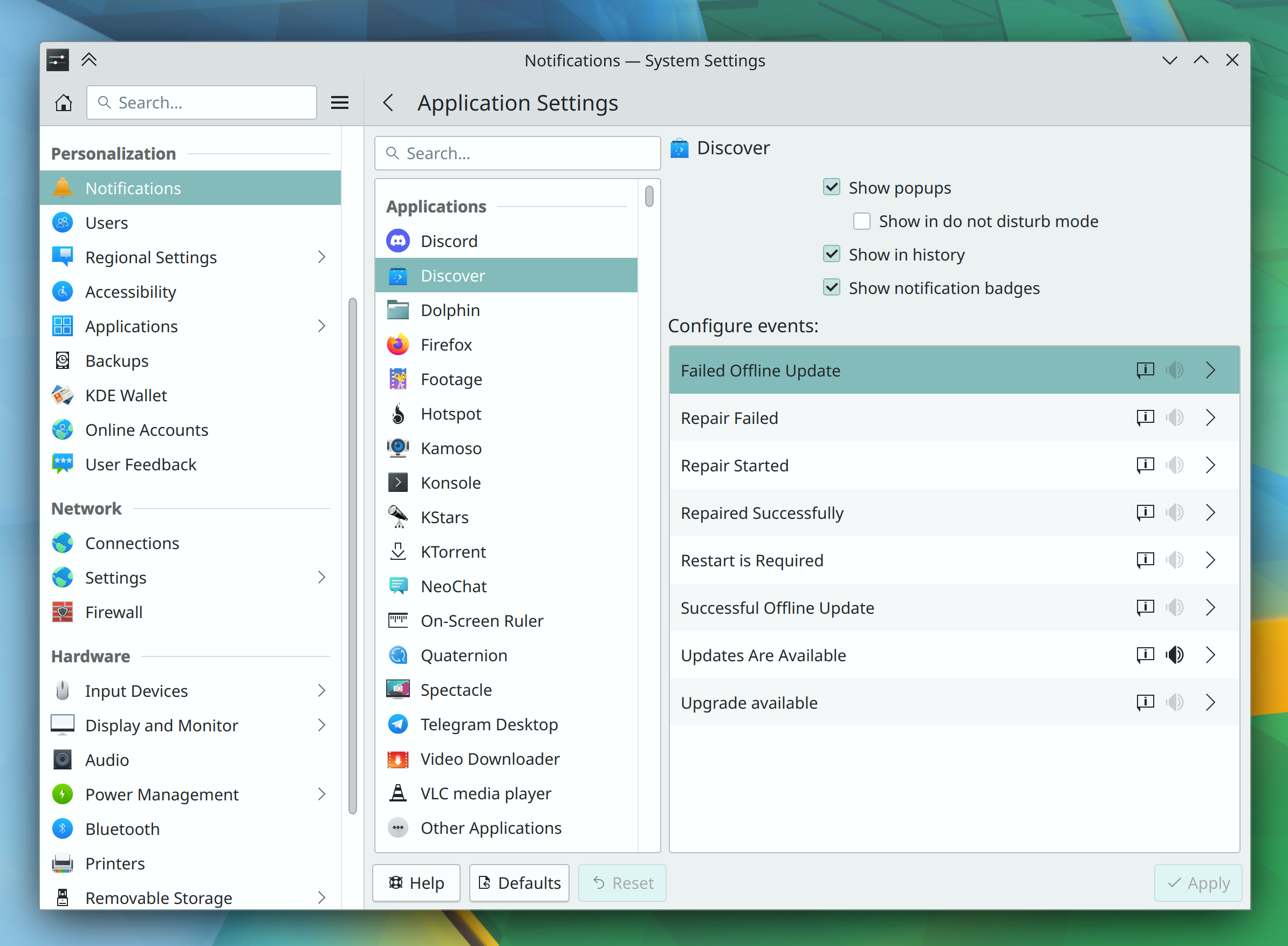
Updated the layout and visuals of the per-app notification configuration page in System Settings (me: Nate Graham, link):

When falling back to software rendering, the Icon widget’s text label now gets a rounded black rectangular background, just like the ones for desktop icons (Mike Noe, link)

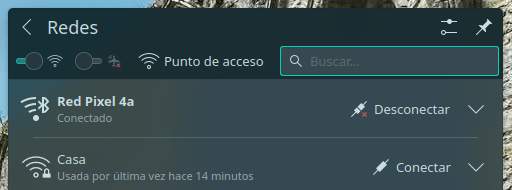
Bluetooth-based internet connections are now distinguished with a new icon (Manuel Jesús de la Fuente and Ismael Asensio, link 1 and link 2):

The “Open” toolbar buttons on many QtWidgets-based KDE apps have now grown a little arrow button off to the side that provides quick access to recent documents (Kai Uwe Broulik, link):

Throughout QtQuick-based KDE software, small icons rendered with Kirigami.Icon will no longer sometimes be automatically and inappropriately masked in black with all of their color being lost; this is now purely an opt-in thing, which fixes a ton of bugs (me: Nate Graham, link)

Other New features

All KDE apps now support the QOI image format (Ernest Gupik, Frameworks 5.110. Link)

Other user Interface Improvements

Two-finger pinch zoom gestures in Okular now zoom in on the midpoint between your fingers, as you would expect (Nicolas Fella, Okular 23.12. Link)

In Elisa, clicking on an item in the sidebar now takes you right to that thing even if you were already in a child page of the clicked thing (Jack Hill, Elisa 23.12. Link)

Kolourpaint now lets you zoom in much more (Moritz Zwerger, Kolourpaint 23.12. Link)

Other Significant Bugfixes

(This is a curated list of e.g. HI and VHI priority bugs, Wayland showstoppers, major regressions, etc.)

Spectacle no longer crashes when the screen configuration changes while it’s running (Albert Astals Cid, Spectacle 23.08. Link)

Fixed a strange bug that could cause Plasma to crash when some widgets updated their contents while their popups were open (Fushan Wen, Plasma 5.27.8. Link)

Pressing the Meta key to open and close the Kickoff Application Launcher no longer steals focus from whatever window had focus before (Fushan Wen, Plasma 5.27.7.1. Link)

KDESU works again on Kubuntu (Fabian Vogt, Frameworks 5.10. Link)

Other bug-related information of interest:

Things not in KDE that affect KDE

The InputCapture portal has been merged upstream into xdg-desktop-portal, offering support on Wayland for apps like Barrier and Input Leap that need to be able to remotely control key and pointer input! Note that support in KDE’s portal extension has not yet been implemented, but that’ll be coming too (Peter Hutterer, xdg-desktop-portal 1.18. Link)

…And everything else

This blog only covers the tip of the iceberg! If you’re hungry for more, check out https://planet.kde.org, where you can find more news from other KDE contributors.

How You Can Help

If you’re a developer, work on Qt6/KF6/Plasma 6 issues! Plasma 6 is usable for daily driving now, but still in need of bugfixing and polishing to get it into a releaseable state by the end of the year.

Otherwise, visit https://community.kde.org/Get_Involved to discover other ways to be part of a project that really matters. Each contributor makes a huge difference in KDE; you are not a number or a cog in a machine! You don’t have to already be a programmer, either. I wasn’t when I got started. Try it, you’ll like it! We don’t bite!

And finally, KDE can’t work without financial support, so consider making a donation today! This stuff ain’t cheap and KDE e.V. has ambitious hiring goals. We can’t meet them without your generous donations!

This week in KDE: porting, Dolphin, and KWin

I wrote about all the porting work done recently for Plasma in yesterday’s Plasma 6 update. That work consumed a lot of time due to a big push to get it all done, so this week there isn’t as much feature work and UI polishing to report. Nevertheless, some good fixes and improvements made it in, especially for KWin and Dolphin!

Plasma 6

General infoOpen issues: 82

Copying and pasting files to the desktop that won’t fit there because there’s not enough space now shows a notification explaining the problem (Thenujan Sandramohan, link)

In the Plasma Wayland session, cursors now look better when using fractional scale factors (Vlad Zahorodnii, link)

User Interface Improvements

Gwenview now transitions between images more smoothly, or, if it can’t do so because the system is under heavy load, it doesn’t animate the transition at all (Felix Ernst, Gwenview 23.08. Link)

Dolphin’s location bar can additionally now be focused using the Alt+D shortcut (Amol Godbole, Dolphin 23.12. Link)

Ctrl+Scrolling to zoom in Dolphin now goes in the expected direction on Wayland (Amol Godbole, Dolphin 23.12. Link)

In Dolphin, you can now press-and-hold with a touchscreen to enter selection mode for already-selected files or folders too (Steffen Hartlieb, Dolphin 23.12. Link)

Significant Bugfixes

(This is a curated list of e.g. HI and VHI priority bugs, Wayland showstoppers, major regressions, etc.)

When searching in the Kickoff Application Launcher, the initially selected item is now always the first one, not the one that happened to be under the mouse pointer (Fushan Wen, Plasma 5.27.7. Link)

Fixed another way that KWin could crash in the Plasma Wayland session when clicking on a window decoration tooltip (Xaver Hugl, Plasma 5.27.8. Link)

In the Plasma Wayland session, alt+tabbing through windows no longer goes in reverse when Caps Lock is on (Xaver Hugl, Plasma 5.27.8. Link)

Fixed a bug that could cause Night Color to not properly deactivate after waking the computer up from sleep at a time when it would otherwise have already turned off automatically (Xaver Hugl, Plasma 5.27.8. Link)

In the volume and brightness OSDs, the text “100%” no longer inappropriately wraps across two lines in some languages (Kai Uwe Broulik, Plasma 5.27.8. Link)

Fixed a bug that could cause some items to be silently skipped when copying a very large number of files (Harald Sitter, Frameworks 5.109. Link)

Other bug-related information of interest:

Automation & Systematization

Monochrome icons for the Breeze Dark icon theme are now automatically generated at build-time from the light ones, saving a huge amount of manual work! (Noah Davis, Frameworks 6.0. Link 1 and link 2)

…And everything else

This blog only covers the tip of the iceberg! If you’re hungry for more, check out https://planet.kde.org, where you can find more news from other KDE contributors.

How You Can Help

If you’re a developer, work on Qt6/KF6/Plasma 6 issues! Plasma 6 is usable for daily driving now, but still in need of bugfixing and polishing to get it into a releaseable state by the end of the year.

Otherwise, visit https://community.kde.org/Get_Involved to discover other ways to be part of a project that really matters. Each contributor makes a huge difference in KDE; you are not a number or a cog in a machine! You don’t have to already be a programmer, either. I wasn’t when I got started. Try it, you’ll like it! We don’t bite!

And finally, KDE can’t work without financial support, so consider making a donation today! This stuff ain’t cheap and KDE e.V. has ambitious hiring goals. We can’t meet them without your generous donations!

This week in KDE: Sounds like Plasma 6

Excellent progress was made this week towards the goal of full sound theme support in Plasma 6, among other topics–including some important performance work for KWin!

Plasma 6

General infoOpen issues: 70

Significantly reduced cursor latency under heavy load in the Plasma Wayland session! (Xaver Hugl, link)

System Settings gained a page to let you configure which sound theme you want to use! (Ismael Asensio, link):

On System Settings’ Notifications for apps page, the per-event configuration window has been merged with the main page to provide a less fragmented cohesive UI (Ismael Asensio, link):

The Digital Clock’s time zones page now adopts a modern frameless style, in the process fixing its scrollview-within-a-scrollview problem (me: Nate Graham, link 1, link 2, and link 3):

The Networks widget now remembers the last tab you visited when you close and re-open it or switch to a different network (Kai Uwe Broulik, link)

Other New Features

Kate gained a feature to synchronize the scrolling for split views (Someone going by the pseudonym “Ulterno Ω*”, Kate 23.12. Link)

Other Significant Bugfixes

(This is a curated list of e.g. HI and VHI priority bugs, Wayland showstoppers, major regressions, etc.)

Spectacle no longer gets into a quit loop when configured to auto-save as well as quit after manual save (Noah Davis, Spectacle 23.08. Link)

Fixed two ways that Plasma could crash when unpinning or rapidly re-arranging pinned Task Manager apps (Will Horne, Plasma 5.27.7. Link 1 and link 2)

Malformed or maliciously-crafted desktop files can no longer mess up icons for GTK apps all over the place (Fushan Wen, Plasma 5.27.7. Link 1 and link 2)

Fixed a recent regression that could cause Task Manager tasks to show the wrong window thumbnails in their tooltips (Fushan Wen, Plasma 5.27.7. Link)

System Settings’ “Login Screen (SDDM)” Page now internally remembers the last thing you set the login screen wallpaper to (Fabian Vogt, Plasma 5.27.7. Link)

Other bug-related information of interest:

…And everything else

This blog only covers the tip of the iceberg! If you’re hungry for more, check out https://planet.kde.org, where you can find more news from other KDE contributors.

How You Can Help

If you’re a developer, work on Qt6/KF6/Plasma 6 issues! Plasma 6 is usable for daily driving now, but still in need of bugfixing and polishing to get it into a releasable state by the end of the year.

Otherwise, visit https://community.kde.org/Get_Involved to discover other ways to be part of a project that really matters. Each contributor makes a huge difference in KDE; you are not a number or a cog in a machine! You don’t have to already be a programmer, either. I wasn’t when I got started. Try it, you’ll like it! We don’t bite!

And finally, KDE can’t work without financial support, so consider making a donation today! This stuff ain’t cheap and KDE e.V. has ambitious hiring goals. We can’t meet them without your generous donations!
This week in KDE: Plasma 6 features

We’re hot on the heels of Akademy 2023, which proved to be a fertile space for collaboration. As a result, in addition to the background work being done to stabilize Plasma 6, a bunch of new features landed too!

Plasma & Frameworks 6

General infoOpen issues: 59

Plasma now plays a sound from the active sound theme (more on that in a bit) when a USB device is plugged in or unplugged. And this is configurable, of course! (Kai Uwe Broulik, Plasma 6.0. Link)

You can now change your system’s active power profile (if its firmware and kernel version are modern enough to support the feature) by pressing Meta+B to show a profile chooser OSD similar to the one used to display screen-related options (Natalie Clarius, Plasma 6.0. Link):

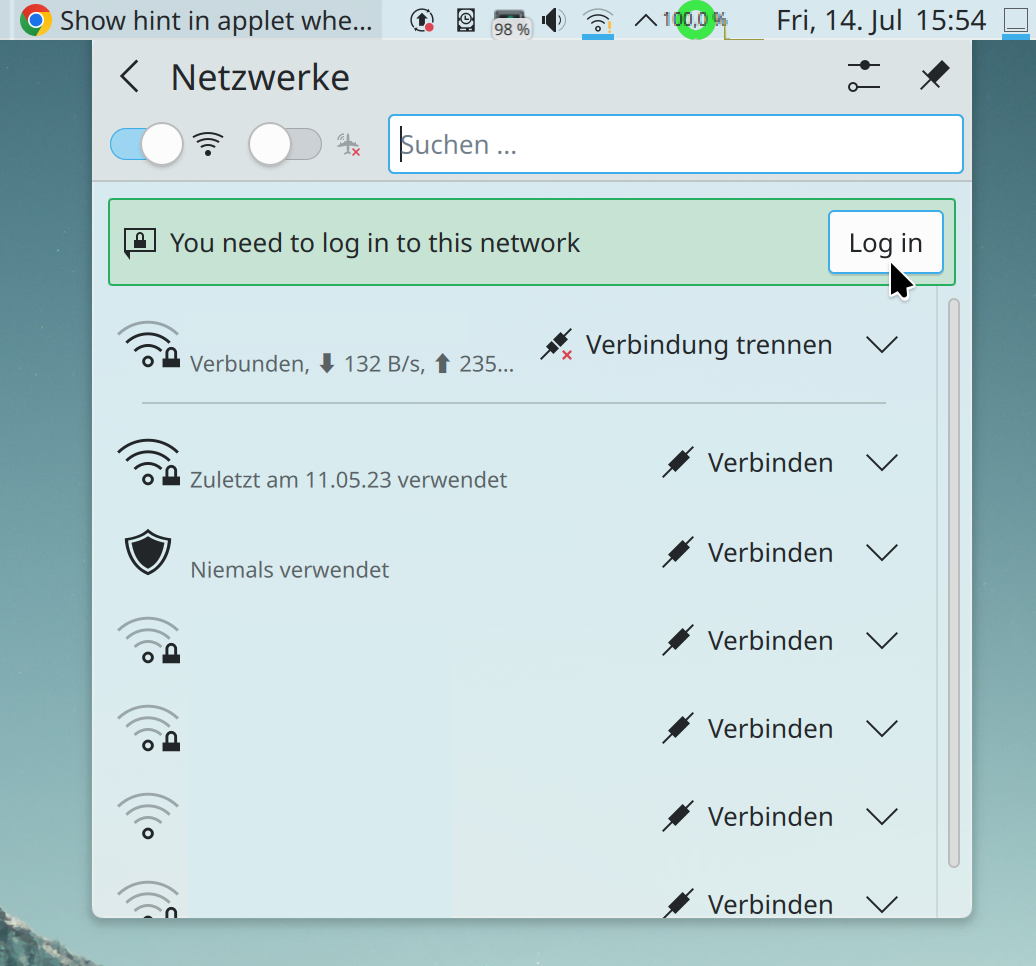
The Networks widget now shows an inline message prompting you to log into a network’s Captive Portal page, if it has one (Kai Uwe Broulik, Plasma 6.0. Link):

Dolphin, Filelight, and the Disks & Devices widget now respect the user’s choice of how to display binary units (e.g. MB or MiB) (Jack Hill, Frameworks 6.0. Link 1, link 2, and link 3)
…Wait, you didn’t know we had such a setting? Neither did most people! That’s because it’s currently hidden with no UI. Right now you have to manually add BinaryUnitDialect=2 to the [Locale] group in your kdeglobals file (keep in mind that it doesn’t work well in Plasma 5; only in 6). We will be adding a GUI for it for Plasma 6.

Frameworks 6 has gained support for playing sounds from FreeDesktop-compatible sound themes (Ismael Asensio, Frameworks 6.0. Link)
This work supports the Plasma 6 task to use a brand new sound theme, made by Guilherme Silva and nearly finished now! Bonus points: this sound theme is complies with the FreeDesktop sound theme spec, and we’ve made the current Oxygen sound theme FDO-compatible as well! You’ll be hearing more about this in the coming weeks and months as the work is finalized.

Significant Bugfixes

(This is a curated list of e.g. HI and VHI priority bugs, Wayland showstoppers, major regressions, etc.)

When zooming with a pinch gesture in Okular, the document no longer also scrolls wildly (Nicolas Fella, sponsored by TU Dresden, Okular 23.08. Link)

The feature to focus a specific Plasma panel via custom keyboard shortcut now works (Fushan Wen, Plasma 5.27.7. Link)

Various settings are now always properly displayed on the System Settings touchpad page, no matter how you access the page (Méven Car, Plasma 6.0. Link)

Many more dual-GPU systems should now have both GPUs detected properly, which unlocks the ability to tell the system to use the more powerful discrete GPU for specific apps (Dave Vasilevsky, Frameworks 5.109. Link)

Other bug-related information of interest:

…And everything else

This blog only covers the tip of the iceberg! If you’re hungry for more, check out https://planet.kde.org, where you can find more news from other KDE contributors.

How You Can Help

If you’re a developer, work on Qt6/KF6/Plasma 6 issues! Plasma 6 is usable for daily driving now, but still in need of bugfixing and polishing to get it into a releaseable state by the end of the year.

Otherwise, visit https://community.kde.org/Get_Involved to discover other ways to be part of a project that really matters. Each contributor makes a huge difference in KDE; you are not a number or a cog in a machine! You don’t have to already be a programmer, either. I wasn’t when I got started. Try it, you’ll like it! We don’t bite!

And finally, KDE can’t work without financial support, so consider making a donation today! This stuff ain’t cheap and KDE e.V. has ambitious hiring goals. We can’t meet them without your generous donations!

This week in KDE: Akademy approaches

This week was a bit on the slow side as people are on vacation and preparing for Akademy 2023, which begins next week! Nevertheless progress on Plasma 6 continued, with a notable uptick in open bug reports as a result of more people testing it out, which is good! If you haven’t tried it yet, please do! Progress was also made on fixing existing known issues too.

Plasma 6

General infoOpen issues: 63

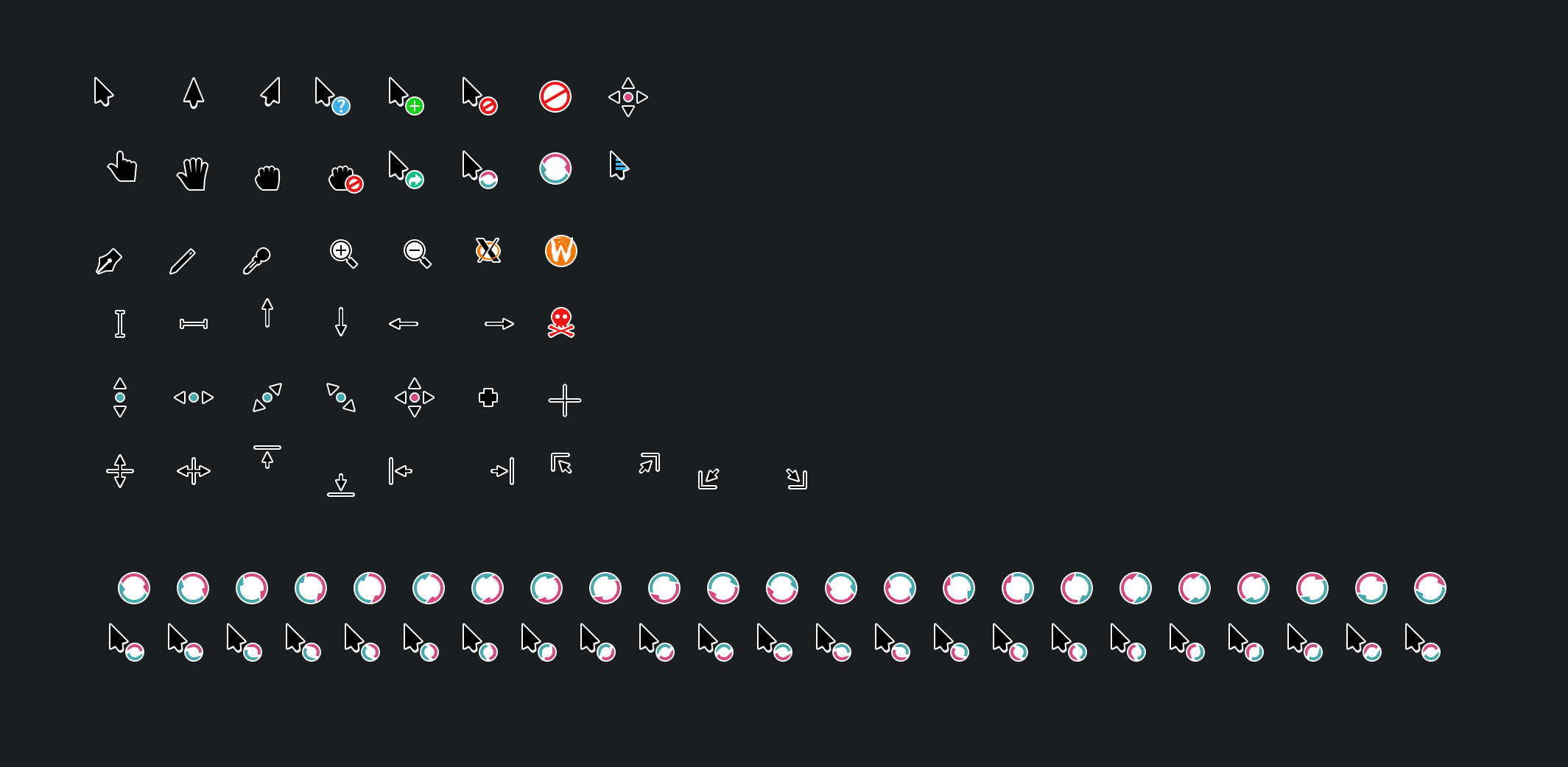
The Breeze cursor theme has received a visual overhaul to make it nicer looking and more consistent with how Breeze style evolved over the course of Plasma 5! (Manuel Jesús de la Fuente, link):

When not using the “Include Desktop” feature, Alt+Tab Task Switchers no longer appear when invoked but there are no windows open, or only one window is open (Daniel Lipovetsky, link)

The keyboard shortcut used to trigger the Mouse Mark effect can now be customized (Andrew Shark, link)

User Interface Improvements

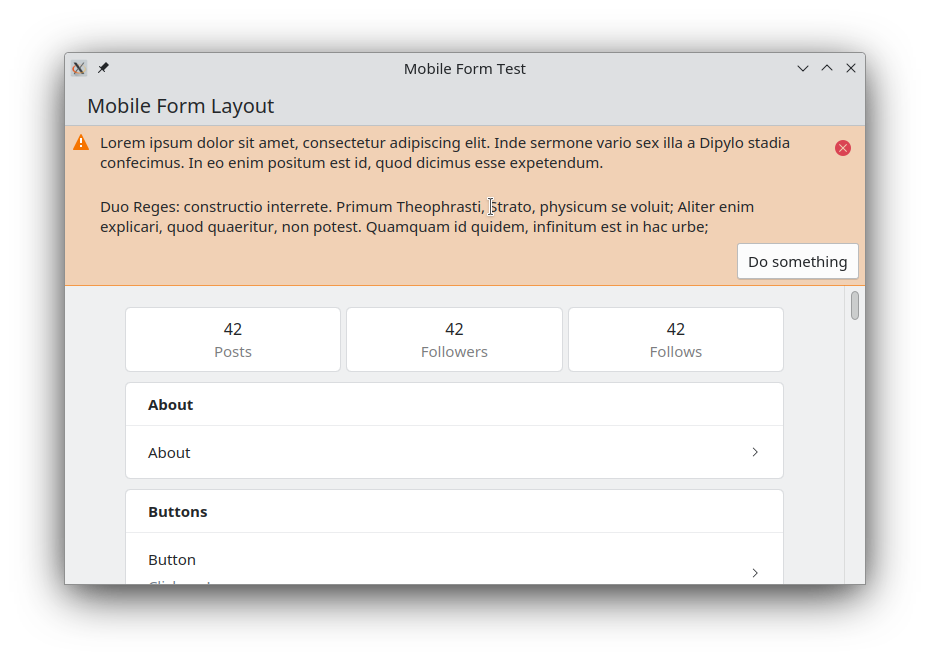
Created a new Kirigami component to display banners at the top of app windows and views. We were previously using the Kirigami.InlineMessage component for this, but it was complicated to implement in a way that looked acceptable in that spot, and even then it never looked quite right. The new frameless banner component looks much better! Expect to see it show up in Kirigami-based apps over the coming months and years. (Carl Schwan, link):

Significant Bugfixes

(This is a curated list of e.g. HI and VHI priority bugs, Wayland showstoppers, major regressions, etc.)

Fixed a performance issue in Okular that could cause poor performance and memory pressure when zooming in (Max Müggler, Okular 23.08. Link)

Fixed an issue that could cause severe screen distortion in the Plasma Wayland session when using certain multi-GPU graphics setups (Xaver Hugl, Plasma 5.27.7. Link)

Fixed an issue that could cause all connected screens to be marked as “primary” under certain circumstances (Ivan Tkachenko, Plasma 5.27.7. Link)

Fixed a way that KWin could crash in the Plasma Wayland session after using the clipboard under certain circumstances (David Edmundson, Plasma 6.0. Link)

Fixed a major recent regression that had the effect of causing the target of a symlink to be moved or copied instead of the link itself (Harald Sitter, Frameworks 5.108. Link)

Editing files using kio-admin no longer unexpectedly changes their permissions (Harald Sitter, Frameworks 5.108. Link)

Fixed a way that Plasma could sometimes crash when closing all running apps by middle-clicking on their Task manager icons (Harald Sitter, Frameworks 5.108. Link)

Other bug-related information of interest:

Web Presence

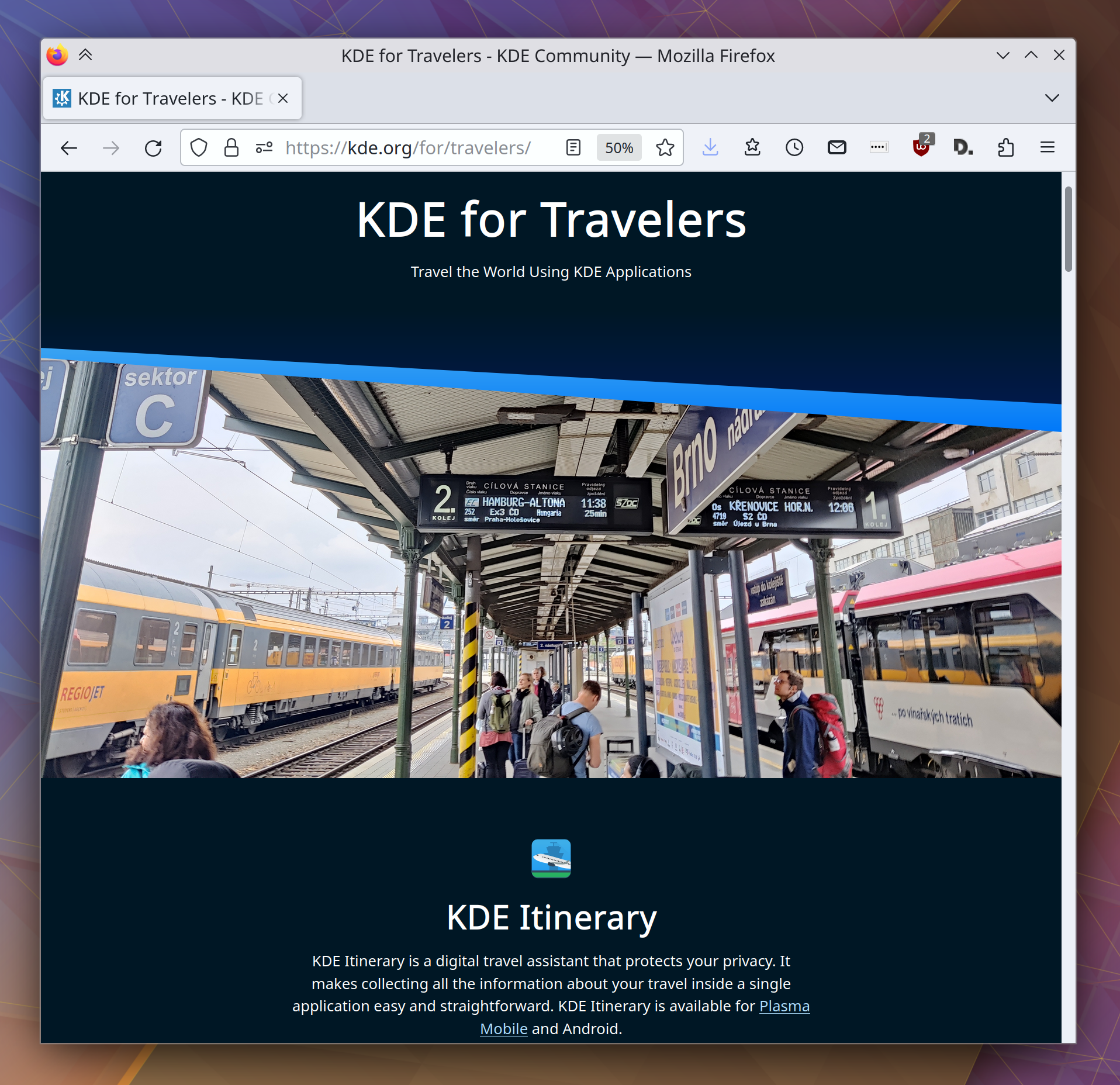
Released another “KDE for” page, this time for frequent travelers (Carl Schwan and the KDE Promo team):

Automation & Systematization

Added a unit test for parsing NVIDIA GPU driver stats, so that we can catch regressions caused by the NVIDIA driver itself earlier (David Redondo, link)

…And everything else

This blog only covers the tip of the iceberg! If you’re hungry for more, check out https://planet.kde.org, where you can find more news from other KDE contributors.

How You Can Help

If you’re a developer, work on Qt6/KF6/Plasma 6 issues! Plasma 6 is usable for daily driving now, but still in need of bugfixing and polishing to get it into a releaseable state by the end of the year.

Otherwise, visit https://community.kde.org/Get_Involved to discover other ways to be part of a project that really matters. Each contributor makes a huge difference in KDE; you are not a number or a cog in a machine! You don’t have to already be a programmer, either. I wasn’t when I got started. Try it, you’ll like it! We don’t bite!

And finally, KDE can’t work without financial support, so consider making a donation today! This stuff ain’t cheap and KDE e.V. has ambitious hiring goals. We can’t meet them without your generous donations!

This week in KDE: Plasma 6 development continues

Gonna be honest here: I’m on vacation right now, so this week’s blog post is going to be a bit lazy. I probably missed some things, so if you were expecting to see your work here and didn’t, then I’m sorry, and I’ll add it next week if you shoot me an email. Still, I did manage to notice some things, and you’ll find them here!

Plasma 6

General infoOpen issues: 53

Our “Plasma 6” info page gained some useful information such as a “how to use/test it” section as well as some more narrowly-targeted lists of bugs that can be used to guide development. I’ve linked the “Plasma 6 bugs” list above, and will continue to do so in coming weeks.

KRunner’s auto-complete behavior has changed; now auto-completed text appears as a grayed-out placeholder and you have to hit the right arrow or tab key to accept it, as is common in other places where text can be auto-completed. For people who preferred the old autocomplete behavior, it’s kept as an option (Alexander Lohnau, link)

The Keyboard Indicator widget now visually shows the state of the Caps Lock and Num Lock keys both being pressed/active (Donald Menig, link)

When turning the volume level above 100% by using the “Raise maximum volume” setting, the volume icon now changes color to warn you of this (Fushan Wen, link 1 and link 2):

You can now find the “Updates” page in System Settings by searching for more keywords such as “offline” and “automatic” (Justin Zobel, link)

New Features

Kate now has an option to open new tabs immediately to the right of the current one (Waqar Ahmed, Kate 23.08. Link)

User Interface Improvements

Elisa now has a smarter algorithm for finding cover files (which turns out to be a surprisingly complex topic after you cover the simple and easy cases), ensuring that fewer of them get missed (Jack Hill, Elisa 23.08. Link)

Auto-hiding panels using a dark color scheme no longer sometimes exhibit a visual glitch when sliding in and out (Xaver Hugl, Plasma 5.27.7. Link)

When using a multi-channel audio setup that’s been configured to have different volume levels for the channels, adjusting the global volume level (e.g. using keyboard keys or a global shortcut) now adjusts the volume of each channel in a proportional rather than an absolute way (Quinten Kock, Plasma 5.27.7. Link)

Open/save dialogs now always show “Recent files” and “Recent folders” items in their sidebars (Méven Car, Frameworks 6.0. Link)

When merging the contents of two folders, the dialog that alerts you about this now makes it clear that the contents will be merged, rather than scaring you by talking about overwriting (Méven Car, Frameworks 6.0. Link)

Other Significant Bugfixes

(This is a curated list of e.g. HI and VHI priority bugs, Wayland showstoppers, major regressions, etc.)

Gwenview no longer crashes when opening .nef formatted RAW image files (Kevin Backhouse, Gwenview 23.04.3. Link)

Fixed a major performance issue in the Plasma Wayland session that affected Intel GPUs and caused bad performance when animating widgets with the Background Contrast effect turned on (Xaver Hugl and David Edmundson, Plasma 5.27.7. Link)

The System Monitor app and widgets once again show stats for NVIDIA devices using the 535 series of the proprietary drivers. And it also should now be more robust against future changes in the way the proprietary NVIDIA driver formats its data (David Redondo, Plasma 5.27.7. Link)

Other bug-related information of interest:

…And everything else

This blog only covers the tip of the iceberg! If you’re hungry for more, check out https://planet.kde.org, where you can find more news from other KDE contributors.

How You Can Help

If you’re a developer, work on Qt6/KF6/Plasma 6 issues! Plasma 6 is usable for daily driving now, but still in need of bugfixing and polishing to get it into a releaseable state by the end of the year.

Otherwise, visit https://community.kde.org/Get_Involved to discover other ways to be part of a project that really matters. Each contributor makes a huge difference in KDE; you are not a number or a cog in a machine! You don’t have to already be a programmer, either. I wasn’t when I got started. Try it, you’ll like it! We don’t bite!

And finally, KDE can’t work without financial support, so consider making a donation today! This stuff ain’t cheap and KDE e.V. has ambitious hiring goals. We can’t meet them without your generous donations!
This week in KDE: SDDM

This week SDDM–the venerable login manager used by KDE and some other DEs–finally got a new release after two and a half years! This work was pushed through by a variety of KDE contributors, notably Aleix Pol Gonzalez, Fabian Vogt, David Edmundson, and Harald Sitter. At this point they contribute the overwhelming majority of changes and have effectively taken over the SDDM project. Because of this, we’re going to bring SDDM closer and incubate it in KDE for Plasma 6! Once completed, this project will see SDDM release at the same time as Plasma and use Plasma technologies to add many new features, such as management of network and Bluetooth devices on the login screen, and tighter integration with user settings.

Plasma 6

In other Plasma 6 news, everything has been fully ported to use KSvg, the new SVG-handling library that can be used outside of Plasma as well. The technical work was almost entirely done by Marco Martin, with me helping out and performing QA.

Additionally, Xaver Hugl significantly improved graphics performance with multi-GPU systems that are using an NVIDIA GPU in the secondary position. Work is also in progress on a massive performance improvement for some Intel GPU users; more on that next week.

Finally, Qt scaling will be used on X11 in Plasma 6, improving the high DPI scaling experience for people not using mixed-DPI multi-monitor setups. That use case is already not supported on X11, so our story remains the same: if you have a mixed-DPI multi-monitor setup, use Wayland! Marco did this too.

There were many other random bugfixes as usual, with David Edmundson and Xaver Hugl fixing all of the significant bugs I was experiencing in my Plasma 6 Wayland session. As a result, I’m now using it as my daily driver, rather than that janky old X11 thing. 🙂 It’s amazing!

New Features

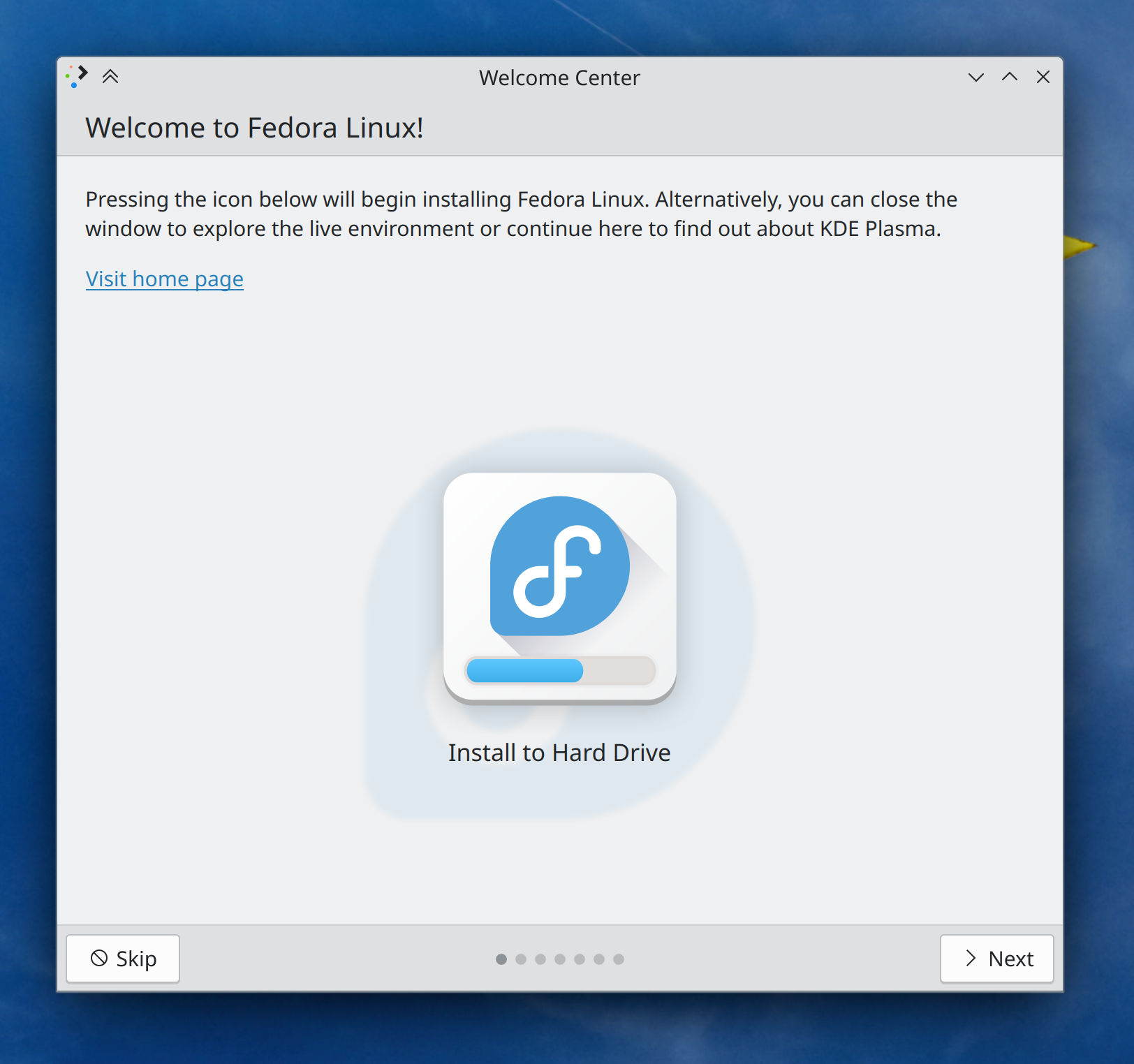
Welcome Center now has a “Live environment” mode that can be used by distros to show a special page in their live environments, including a nice friendly button to launch the installer (if the distro configures it appropriately; see the documentation here) (Oliver Beard, Plasma 6.0. Link):

Welcome Center showing "Welcome to Fedora Linux!" live installer mode, including a button in the center of the screen with the caption "Install to hard Drive" overlaid on top of the Fedora Linux logo

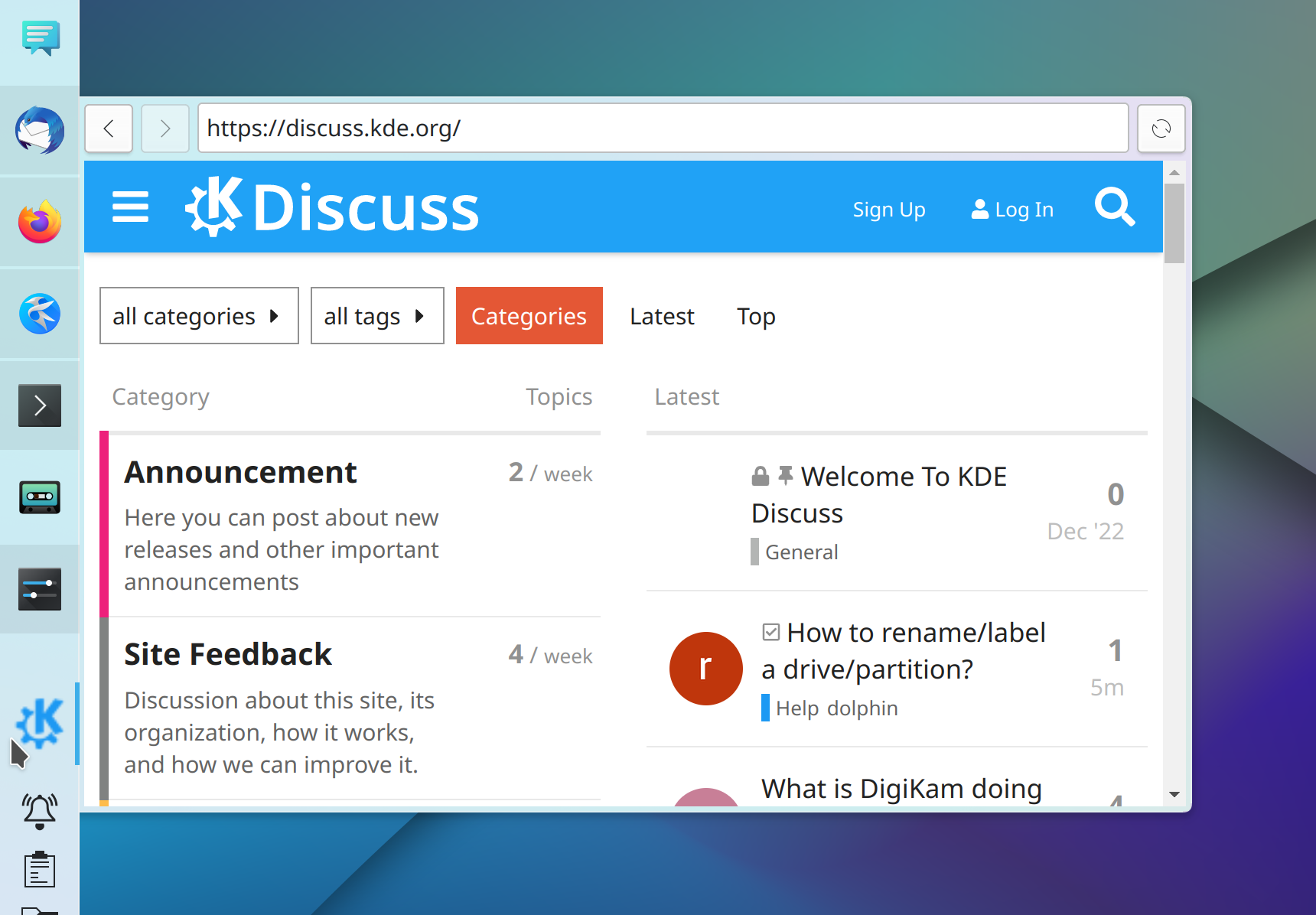
The Web Browser widget now shows its site’s favicon as its Panel icon by default, and you can also override this to set a custom icon if you prefer (Fushan Wen, Plasma 6.0. Link):

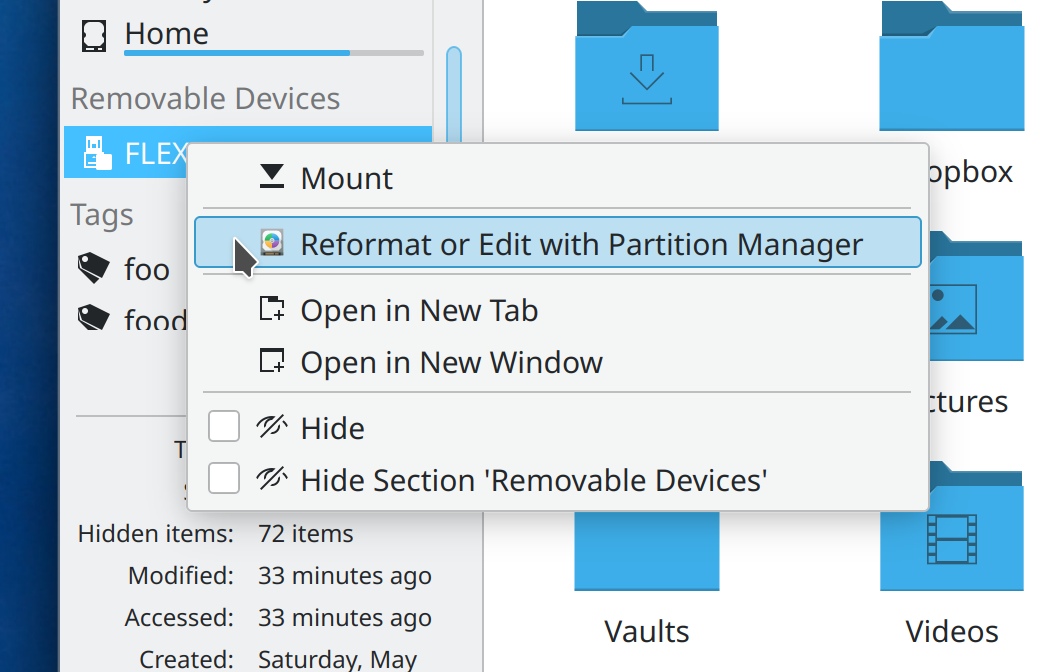
You can now open Partition Manager from the context menu of removable Devices in Dolphin and other apps using the standard Places Panel, so from there you can reformat it if you want (Harald Sitter, Frameworks 6.0. Link):

User Interface Improvements

Dolphin now hides apps’ temp files and backup files (i.e. the kind of useless files that end in ~ or #) unless actively showing hidden files (Méven Car, Dolphin 23.08. Link). This is a 23 year old feature request!

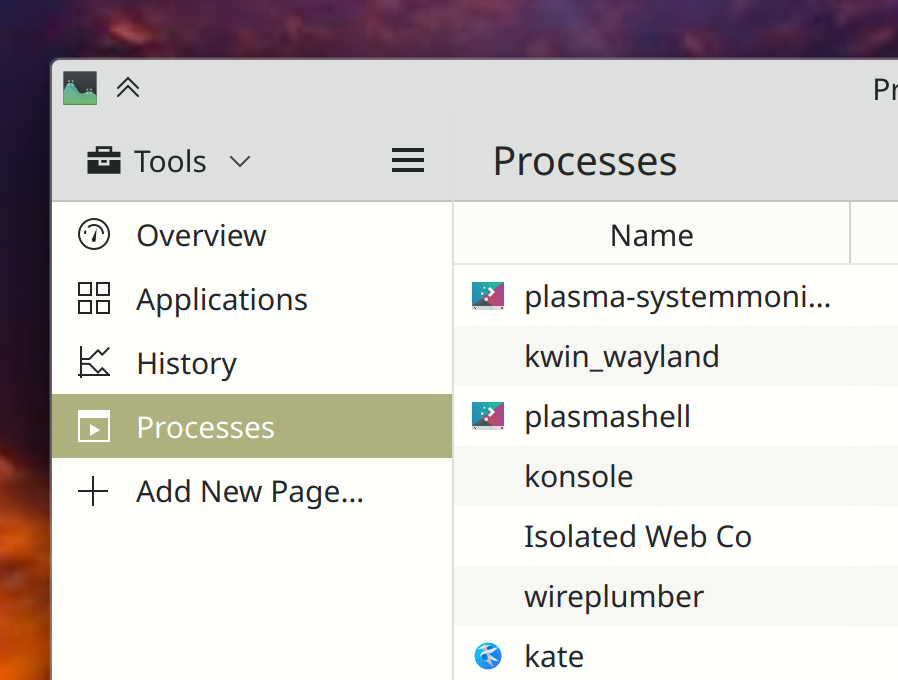
In System Monitor, text for list items without icons now visually aligns with the text for list items that do have icons (Oliver Beard, Plasma 6.0. Link):

Other Significant Bugfixes

(This is a curated list of e.g. HI and VHI priority bugs, Wayland showstoppers, major regressions, etc.)

Distros using rpm-ostree for packaging (such as Fedora Kinoite) once again receive updates using Discover (Aleix Pol Gonzalez, Plasma 5.27.6. Link)

System Settings’ Thunderbolt page no longer suffers from a layout glitch that hid text with large window sizes (me: Nate Graham, Plasma 5.27.6. Link)

KWin no longer sometimes crashes when you accidentally click on the tooltip for a window titlebar button, instead of the button itself that you were aiming for (Xaver Hugl, Plasma 5.27.6. Link)

When using a fractional scale factor, checkboxes on Discover’s Settings page no longer become glitchy and blurry when the page is scrolled with a touchpad (Akseli Lahtinen, Plasma 5.27.6. Link)

Fixed a few ways that KWin could crash immediately after logging in under certain circumstances (David Edmundson, Plasma 5.27.7. Link 1 and link 2)

Notifications from Snap apps now show up more reliably, notably including Slack (Kai Uwe Broulik, Plasma 5.27.7. Link)

Other bug-related information of interest:

…And everything else

This blog only covers the tip of the iceberg! If you’re hungry for more, check out https://planet.kde.org, where you can find more news from other KDE contributors.

How You Can Help

If you’re a developer, please please please start living on Plasma 6 and fixing the bugs that you encounter. It’s very much usable for daily driving (I’m doing so) but still in need of work to get it into a releaseable state by the end of the year. Your help… really does help!

Otherwise, visit https://community.kde.org/Get_Involved to discover other ways to be part of a project that really matters. Each contributor makes a huge difference in KDE; you are not a number or a cog in a machine! You don’t have to already be a programmer, either. I wasn’t when I got started. Try it, you’ll like it! We don’t bite!

And finally, KDE can’t work without financial support, so consider making a donation today! This stuff ain’t cheap and KDE e.V. has ambitious hiring goals. We can’t meet them without your generous donations!

This week in KDE: nicer digital signing in Okular

There’s some of interesting Plasma 6 news, but I’m saving it for another post in a day or two, so it doesn’t distract from all the great work that KDE contributors landed on other things this week! So let’s dig into that:

New Features

Okular’s digital signature workflow has been improved, and now offers you the opportunity to add various pieces of metadata such as “reason” and “location” to the signature, and also to optionally add a background image behind it (Sune Vuorela, Okular 23.08. Link):

User Interface Improvements

You can now double-click on a tab in Dolphin to create a duplicate of it (Méven Car, Dolphin 23.08. Link)

When Elisa switches album art between one image and another one, it’s now smoother and nicer-looking, with no visual flash or flicker (Fushan Wen, Elisa 23.08. Link)

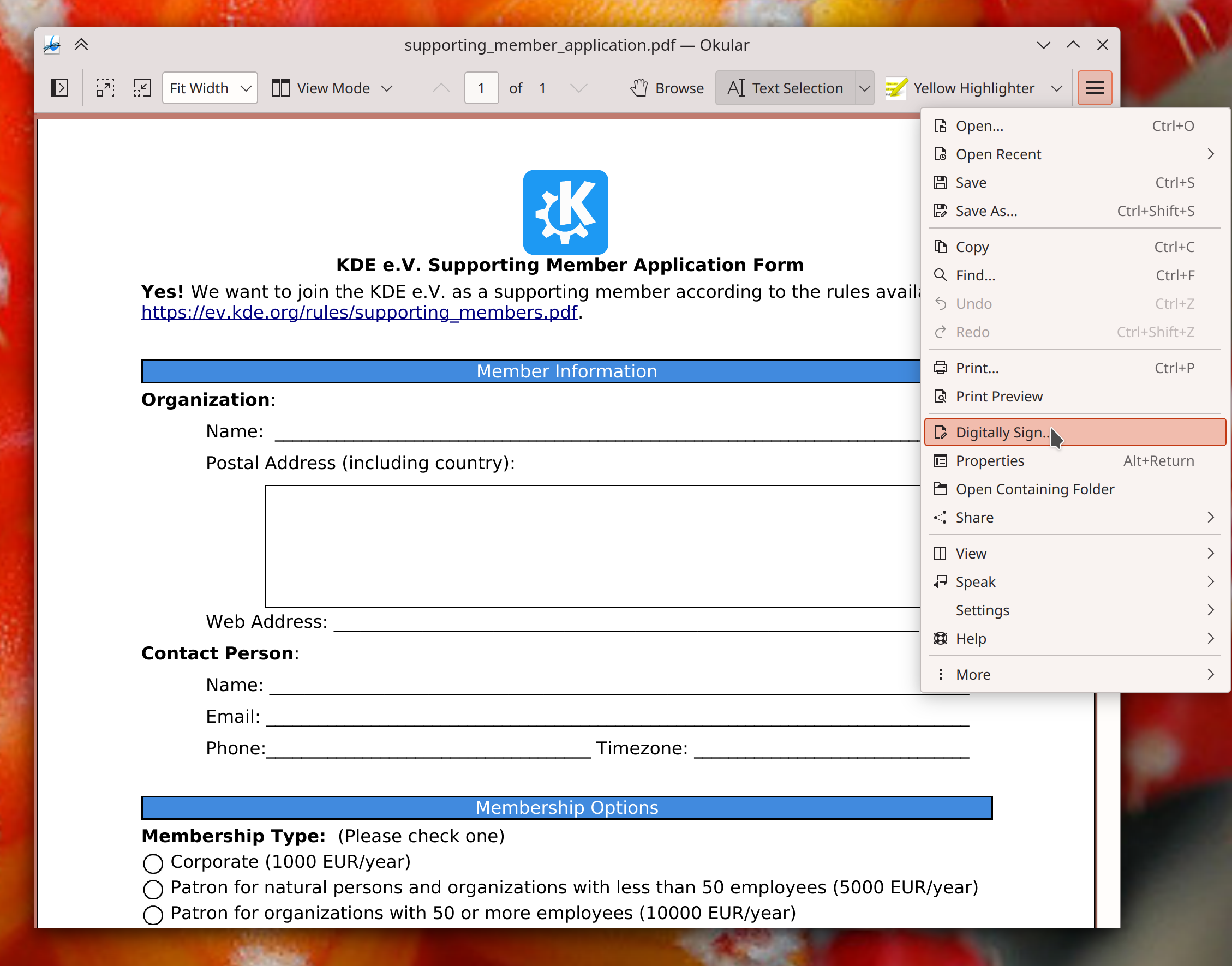
Okular now shows the “Digitally Sign” action at the top level of its hamburger menu, for faster access (me: Nate Graham, Okular 23.08. Link):

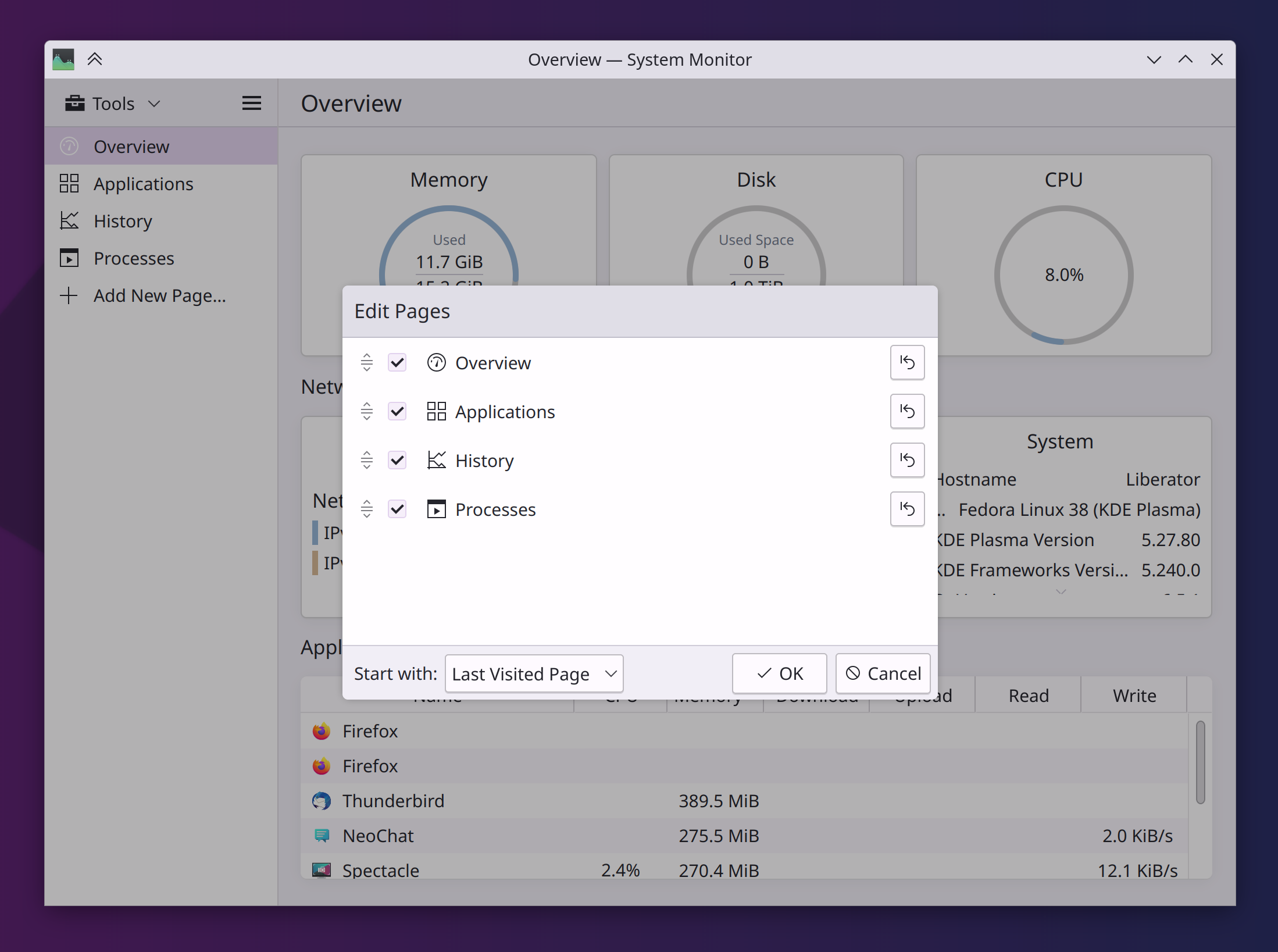
All the dialogs in System Monitor have been ported to use a newer Kirigami dialog component, which looks better and fixes a few layout issues (me: Nate Graham, Plasma 6.0. Link 1 and link 2):

Improved the responsiveness when hovering over items in Kickoff’s category list (Derek Christ, Plasma 6.0. Link)

Folder entries in System Settings’ File Search page now show their actual icons (Oliver Beard, Plasma 6.0. Link)

After being notified of a filename conflict in the save dialog, keyboard focus now immediately returns to the filename field so you can change the name to something else (Oliver Beard, Frameworks 5.107. Link)

Other Significant Bugfixes

(This is a curated list of e.g. HI and VHI priority bugs, Wayland showstoppers, major regressions, etc.)

In the Plasma Wayland session, fixed a source of Powerdevil crashes when screens are sleeping (Aleix Pol Gonzalez, Plasma 5.27.6. Link)

Fixed a source of excessively high CPU usage in Plasma caused by moving windows around (Fushan Wen, Plasma 5.27.6. Link)

In the Plasma wayland session, fixed some cursor handling bugs that could cause cursors to look wrong in XWayland apps (Severin von Wnuck, Plasma 5.27.6. Link 1 and link 2)

System Settings’ “Login Screen (SDDM)” page now shows errors in the UI again (me: Nate Graham, Plasma 5.27.6. Link)

Checking for updates in the PyCharm app no longer causes KWin to crash (Vlad Zahorodnii, Plasma 6.0. Link)

Other bug-related information of interest:

…And everything else

This blog only covers the tip of the iceberg! If you’re hungry for more, check out https://planet.kde.org, where you can find more news from other KDE contributors.

How You Can Help

If you’re a developer, please please please start living on Plasma 6 and fixing the bugs that you encounter. It’s long past the point where we should still be on Plasma 5! 6 is quite usable for daily driving (I’m doing so) and has lots of papercuts that need sorting out. A list of known issues that need fixing can be found at https://community.kde.org/Plasma/Plasma_6.

Otherwise, visit https://community.kde.org/Get_Involved to discover other ways to be part of a project that really matters. Each contributor makes a huge difference in KDE; you are not a number or a cog in a machine! You don’t have to already be a programmer, either. I wasn’t when I got started. Try it, you’ll like it! We don’t bite!

And finally, KDE can’t work without financial support, so consider making a donation today! This stuff ain’t cheap and KDE e.V. has ambitious hiring goals. We can’t meet them without your generous donations!