Highlights from 2025

It’s been a few years since I did an end-of-year “highlights in KDE” post, but hopefully better late than never! 2025 was a big year for KDE — bigger than me or any of us individually.

My focus these days tends to be on Plasma, so that’s mostly what I’ll be mentioning on the technical side. And as such, everything here is just what I personally noticed, got involved with, or got excited about. Much more was always happening! Additional KDE news is available at https://planet.kde.org.

The Wayland transition nears completion
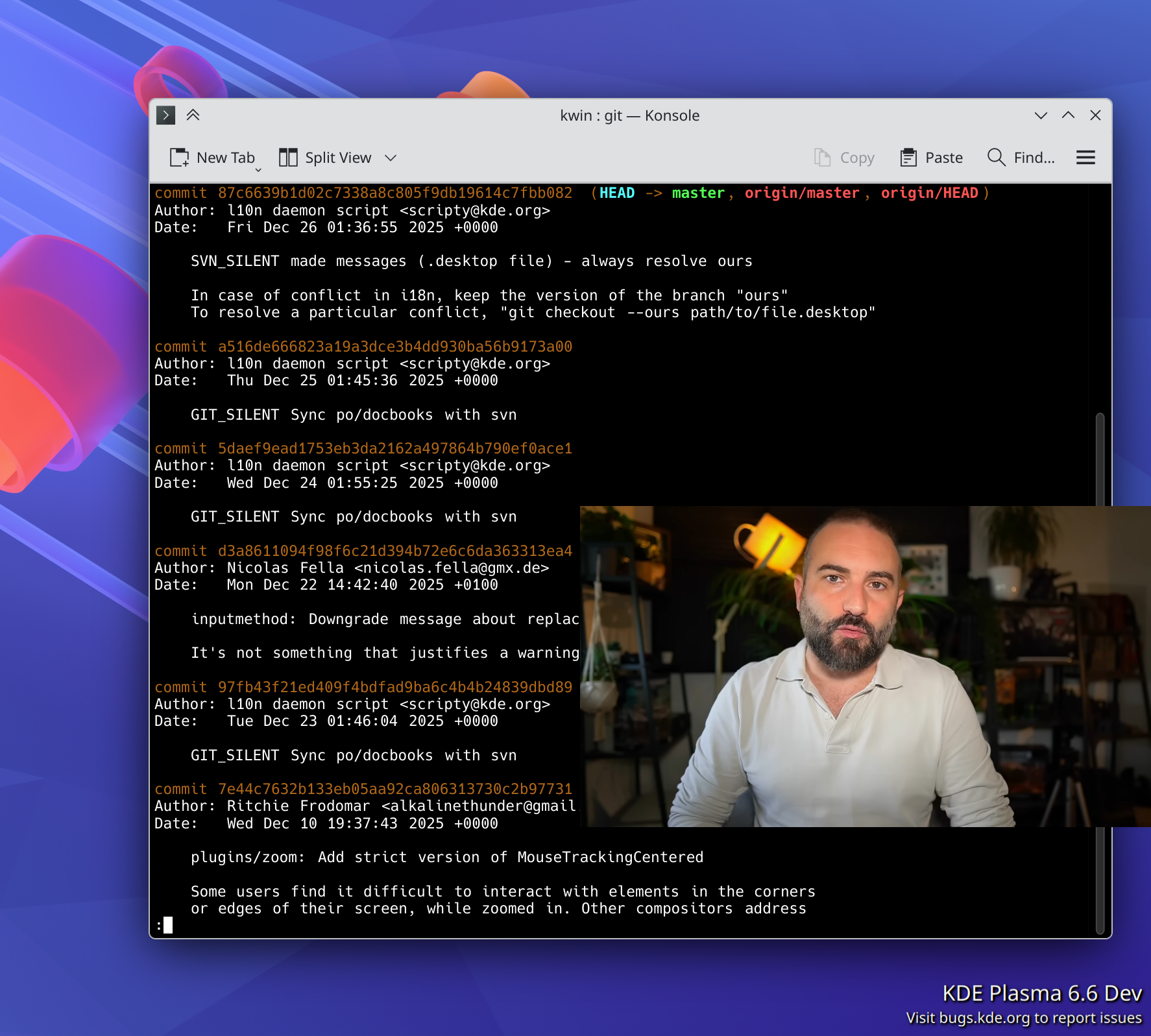
Real picture-in-picture support!

For several years, Plasma has been transitioning to the newer Wayland display server protocol, and away from the older X11 one. 2025 is when it got real: we announced a formal end to Plasma’s X11 session in early 2027.

To make this transition as seamless as possible for as many people as possible, the people involved with the Plasma shell and especially KWin did a herculean amount of work on improving Wayland support on topics as varied as the following:

  • Accessibility
  • Drawing tablets
  • HDR
  • Color management
  • P010 video color
  • Overlay planes
  • XRandr emulation
  • Screen mirroring
  • Custom screen modes
  • Implemented support for a large number of protocols, including xdg-toplevel-tag, xdg_toplevel_icon, ext_idle_notifier, color_representation, fifo, xx_pip, pointer_warp, and single_pixel_buffer
  • Pre-authorization for portal-based permissions
  • Clipboard and USB portals

Thanks to this and earlier work, most FOSS operating systems (also known as “distributions” or “distros”) that ship Plasma are defaulting to the its Wayland session these days — including big ones like Arch Linux, Debian, and Fedora KDE. Kubuntu is planning to for the next LTS as well. As a result, our (opt-in) telemetry numbers show that 79% of Plasma 6 users are already on Wayland. I expect this number to increase once SteamOS and the next Kubuntu LTS version default to Wayland. So you see, it really is driven by distros!

Now, Plasma’s Wayland support isn’t perfect yet (any more than its X11 support was perfect). In particular, the two remaining major sources of complaints are window position restoring and headless RDP. We’re aware and working on solutions! I can’t make any promises about outcomes, but I can promise effort on these topics.

This admittedly somewhat messy and plodding transition has taken years, and consumed a lot of resources in the process. I’m looking forward to having it in the rearview mirror, and 2026 promises to be the year that enables this to happen! Expect a lot of Wayland work in 2026 to make us ready for the end of the Plasma X11 session in 2027.

Plasma continues to mature and improve
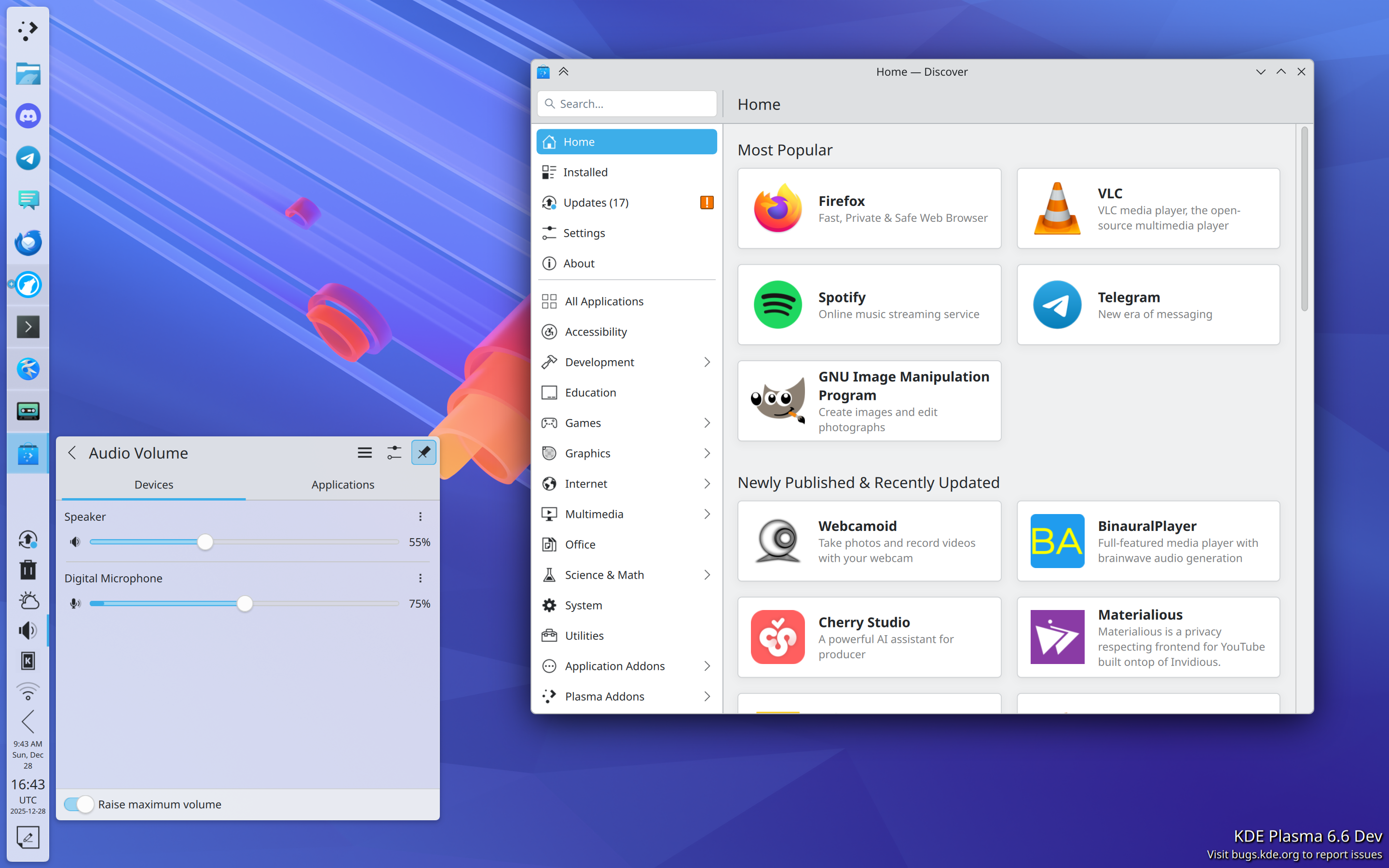
In addition to what I mentioned in the Wayland section, Plasma gained a whole ton of user-facing features and improvements! Among them are:

  • Rounded bottom window corners
  • Day/night global theme and wallpaper switching
  • Saved clipboard items
  • Speed graph in file transfer notifications
  • Panel cloning
  • Per-virtual-desktop custom tiling layouts
  • “You missed X notifications while in Do Not Disturb mode” feature, and auto DND mode enabling while in a fullscreen app or video
  • Install hardware drivers in Discover (on supported distros)
  • New app highlighting in Kickoff
  • UI overhaul for KMenuEdit and Info Center’s energy page
  • Playback rate selector in the Media Player widget
  • Three-finger pinch to zoom
  • UX and video quality and file size improvements in Spectacle
  • GPU usage monitoring in System Monitor
  • Use existing user accounts for RDP/remote desktop
  • Printer ink level monitoring
  • Inline print queue viewing in the Printers widget
  • Only show the screen locker and logout screen UI on one screen, not all of them
  • OCR in Spectacle (coming in Plasma 6.6)
  • Monochrome colorblindness filter (coming in Plasma 6.6)
  • Option for automatic screen brightness on supported hardware (coming in Plasma 6.6)
  • Option for virtual desktops to only be on the primary screen (coming in Plasma 6.6)

Phew, that’s a lot! And Plasma is getting rave reviews, too. Here are a few:

A decade ago or so, it used to be that Plasma wasn’t seen much as the default option for distros, but that’s changing.

Today Plasma is the default desktop environment in a bunch of the hottest new gaming-focused distros, including Bazzite, CachyOS, Garuda, Nobara, and of course SteamOS on Valve’s gaming devices. Fedora’s Plasma edition was also promoted to co-equal status with the GNOME edition, and Asahi Linux — the single practical option for Linux on newer Macs — only supports KDE Plasma. Parrot Linux recently switched to Plasma by default, too. And Plasma remains the default on old standbys like EndeavourOS, Manjaro, NixOS, OpenMandriva, Slackware and TuxedoOS — which ships on all devices sold by Tuxedo Computers! And looking at the DIY distro space, Plasma is by far Arch users’ preferred desktop environment:
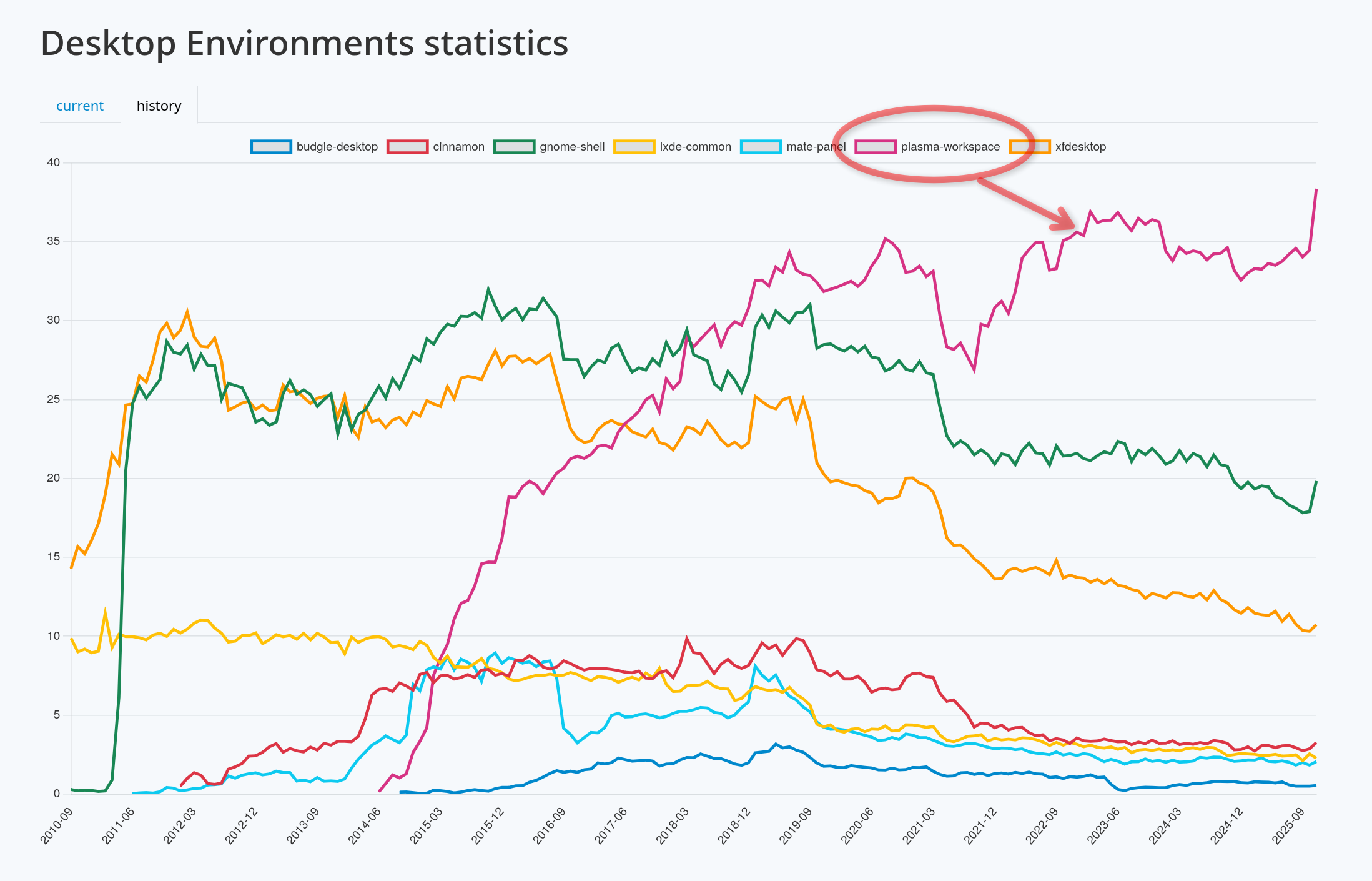
It’s a quiet revolution in how Linux users interact with their computers, and my sense is that it’s gone largely unnoticed. But it happened, so let’s feel good about it!

In fact, if we exclude the distros that showcase their developers’ custom DEs (e.g. COSMIC, ElementaryOS, and Linux Mint), at this point the only significant distros missing here are the enterprise-oriented ones: Debian, RHEL, SLE, Ubuntu, and the like. It’s something for us to work on in 2026, but clearly the current state is already great for a lot of people, including gamers, artists, developers, and general users.

KDE Linux grows
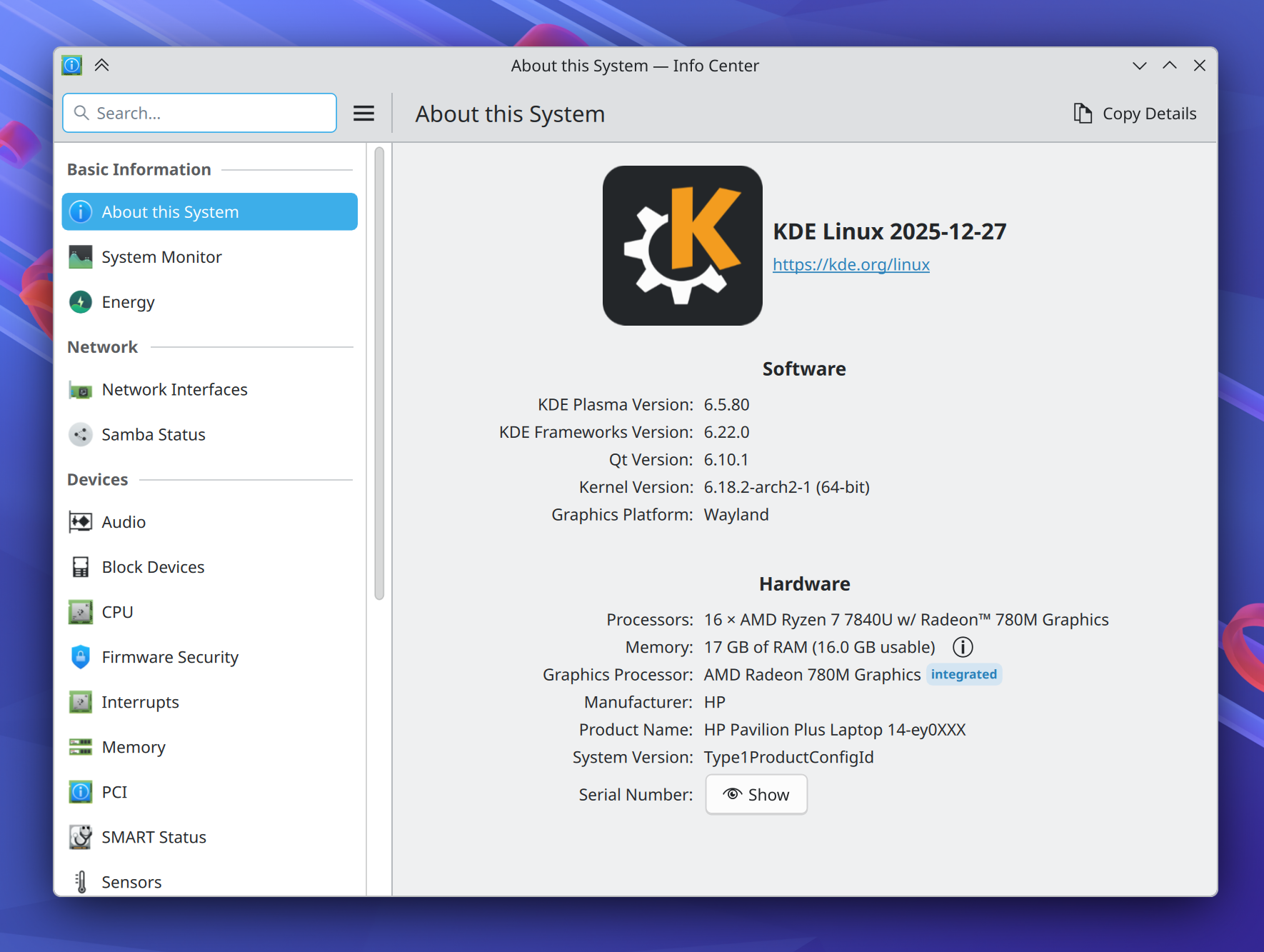
On the subject of operating systems, at Akademy 2024, Harald Sitter revealed the KDE Linux operating system project to the world. But in 2025, it spread its wings and began to soar.

Despite technically still being an Alpha release, I’m using this in-house KDE OS in production on multiple computers (including my daily driver laptop), and a growing number of KDE developers and users are as well. Thanks to its QA and bulletproof rollback functionality, you can update fearlessly and it doesn’t feel like an alpha-quality product. You don’t have to take my word for it; ask Hackaday and DistroWatch!

This project has been very special to me because I believe that KDE needs to take the reins of OS distribution in order to offer a cohesive product. The earlier KDE neon project already broke the ground necessary to make this kind of thing socially possible; now KDE Linux is poised to continue that legacy with a more stable and modern foundation.

To be very clear, none of this is an attempt to kill off other distros. Far from it! In fact, an explicit goal is to showcase what a well-integrated KDE-based OS looks like, so others can take notes and improve their offerings. And there’s still lots and lots of room for specialized distros with different foci, and DIY distros that let people build their own preferred experiences.

I’m really excited to see where this project goes in 2026. You can learn more on the project’s documentation wiki: https://community.kde.org/KDE_Linux

Fundraising performance is completely bonkers
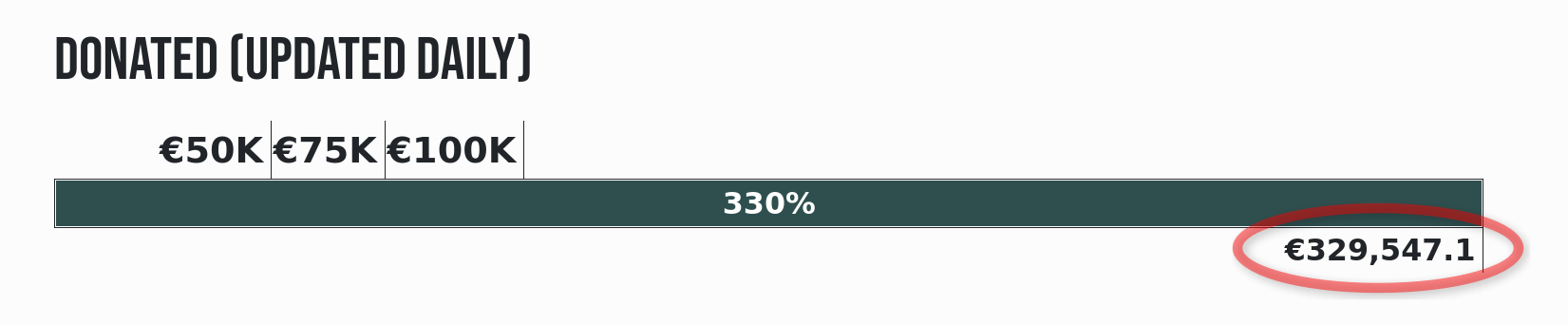
This is the second year that Plasma users have seen a donation request pop-up in December. And it marks the second year where this not only didn’t kill KDE, but resulted in an outpouring of positivity and a massive number of donations! Last year I wondered if it was repeatable. It’s repeatable.

That plus an even more ambitious and well-organized end-of-year fundraiser propelled KDE to its best ever Q4 fundraising sum: nearly €330,000 as of the time of writing! KDE e.V. (the non-profit organization behind KDE) is going to end up with a 2025 income that’s a significant fraction of a million Euros, and mostly crowdsourced, too.

I say this a lot, but sums like this truly help keep KDE independent over the long haul. But how, specifically?

First, by being mostly funded by small donors, KDE retains its independence from any powerful and opinionated companies or individuals that happen to be patrons or donors.

Second, with such a large income in absolute terms, KDE e.V. now has resources to rival the private companies in KDE’s orbit that contribute commercially-funded development to KDE (like mine), and that’s a good thing! It means a healthy diversity of funding sources and career opportunities for KDE developers. It’s systemic resilience.

And finally, with money like this, KDE e.V. is able to fund projects of strategic interest to KDE itself, and fund them well. Historically KDE’s software has been developed by volunteers working on what’s fun, companies funding what supports their income, and some public institutions funding their specific use cases. And that’s great! But it leaves out anything that’s not fun, doesn’t make money, and isn’t directly relevant for governments. These are the kinds of large projects or maintenance efforts that KDE e.V. is now able to fund if necessary.

It’s a big deal, folks! This kind of fundraising performance puts KDE on the map, permanently. And it’s mostly thanks to people like you, dear readers! The average donation is something like €26. KDE is truly powered by the people.

If you can make a donation please do so, because it matters, and goes far!

KDE’s overall trajectory

It’s positive. Really positive.

But when I joined KDE in 2017, the community was a bit dejected. After giving my very first public conference talk at Akademy 2018, multiple people came up to me and said some variant of “thank you for this optimistic vision; I didn’t think I could feel positive about KDE again.”

These reactions were really surprising to me; without the benefit of history, I had no idea what the mood was or how things had been in the recent past. But some statistics about contributor and commit numbers bear out the idea that 2013-2017 was a bit of a low period in KDE’s history, for various reasons.

But since then, KDE has come roaring back, and you see it in positive trends like adoption by hardware vendors and distros, great fundraising performance, good reviews, positive user feedback, and new contributors.

Everything isn’t perfect, of course; there are challenges ahead. Bugs to fix and stability problems to overcome. The Wayland transition and a new theming system to complete. Features to add that unlock Plasma for more users. More effort to put into getting Plasma-powered operating systems and devices into the mainstream.

But the KDE community is up for it. KDE is a mature institution that’s resisting enshittification, and making the world a better place in ways both big and small. My work on KDE represents by far the most meaningful part of my career, and I hope everyone else involved can feel the same way. What we do matters, so let’s go out there and do it even better in 2026!

Techpaladin is looking for a passionate Plasma hacker

Today I’m putting on a different hat and announcing that Techpaladin Software is hiring! Right now we’re looking for a software developer who loves KDE Plasma and wants to see it thrive and shine, with the passion and self-motivation to make that happen.


In this role, you would be working on topics related to KDE Plasma that Techpaladin’s clients want improved, such as general polish and QA, implementing new features, fixing specific bugs, working on private hardware-specific software that supports Plasma, backporting fixes, release management, and so on. It’s always KDE-related!

This is a fully remote contract position open to anyone in the world not living in a country sanctioned by the U.S. government (sorry, it’s just gotta be that way for legal reasons). The start date is flexible and can be whenever you’re ready.

We have no lists of explicit qualifications, minimum years of experience, or formal education requirements. But working for Techpaladin might be a good fit the more this sounds like you:

  • You’re a KDE contributor. Your profile page on https://invent.kde.org is more blue or purple than it is white, or at least it has been in the past. You’ve used and developed KDE Plasma, or related technologies (Qt, KDE apps and frameworks, C++, QML, etc).
  • You’re a good communicator. Your “online voice” is gentle, not harsh. You’ve generally got a positive attitude. You keep on top of your email. You can handle working remotely in written and spoken English with a geographically distributed team split across 6 time zones.
  • You’re a team player. You review other people’s merge requests and triage bug reports. You’re willing to work on what the clients want done. You accept decisions made in public with your input that nonetheless didn’t go your way.

Does this sound a bit like you? We’d love to hear from you at jobs@techpaladinsoftware.com (please don’t send anything clearly written by AI; it will be discarded immediately) with your resumé, KDE Invent profile, links to KDE-related projects you’re proud of, or anything else that seems relevant.

Looking forward to hearing from folks!

A few corrections about the transition from Blue Systems to Techpaladin

By now, many have probably read Jonathan Riddell’s blog post yesterday about his departure from KDE and the events that led up to it. And today, an article has been published in ItsFoss about the topic that unfortunately seems to have misunderstood some of the details of Jonathan’s post. I didn’t want to have to write this post, but since I’m named personally in both places, and there are inaccuracies spreading out there, I thought it would make sense to correct the record before this becomes too much of a game of telephone.


Overall it’s a very sad situation, and I want to make it clear that I bear no malice or ill will towards Jonathan. As for the internal details of the transition of many of Blue Systems’ personnel to Techpaladin Software, Jonathan is entitled to his interpretation of events, and that’s fair. But it was a delicate transition, and people also have a right to personal and professional privacy. As such, it wouldn’t be appropriate for me to get into anything non-public about individual people’s personal and work situations, motivations, or decisions.

So there are some parts of the story that are going to have to go un-told in public, at least by me. But I can correct the record about misunderstandings and errors, and offer my own perspective!


I’ll start with the ItsFoss article:

First of all, Jonathan never wrote in his post that he saw KDE itself “moving away from the cooperative and transparent model he valued”, or that decision-making was increasingly concentrated under me. Jonathan’s blog post wrote about his relationship with me in the context of the Blue Systems to Techpaladin transition, not about KDE itself. KDE itself is fine — better than fine, really. KDE is thriving, with competitive board elections this year and an increased base of donations it can use to assert a measure of independence from commercial entities.

It’s also not true that Techpaladin was “meant to continue supporting KDE neon after Blue Systems scaled back.” Jonathan didn’t write this, and it was never the case. Techpaladin was and is a vehicle to take over the contract work that Blue Systems had been engaging in, after its manager made the decision to discontinue that work. KDE neon was never a part of this.


There are also a few topics from Jonathan’s original post that need addressing. First of all, Blue Systems is not shutting down. I was just talking to a happy Blue Systems person at Akademy last week. As I mentioned, what actually happened is that Blue Systems divested itself of the consultancy element that it had picked up a few years prior. Blue Systems is still around as a company, and is still employing people who want to work there. Several people opted to stay there rather than moving over to Techpaladin. And at no point was I or Techpaladin ever Jonathan’s employer.

I also want to make it 100% clear that I never made any effort to shut Jonathan out of anything in KDE, never encouraged anyone else to cut off contact with Jonathan or shut him out of anything in KDE, and never pulled strings behind the scenes to make it happen without looking like it was happening. Nothing of the sort! If Jonathan came back to KDE, I would be happy to rebuild a collegial relationship over topics of shared interest.

Finally, regarding company structure and employment details, I went into this a few months ago in https://pointieststick.com/2025/03/10/personal-and-professional-updates-announcing-techpaladin-software/#comment-40233. Techpaladin’s current company structure actually allows people interested in making it more “co-op-like” to buy their way into partnership, which is how Igalia — the “cooperative socialist paradise” that Jonathan mentioned — does this as well. I’m confident that no laws are being broken here; I exhaustively researched the employment laws of 7 countries and then confirmed my conclusions with a lawyer before moving forward with anything. In addition, we practice financial transparency and cooperative decision-making on the topics of hiring, new contracts, etc. So internally it’s quite “co-op like” already.

But this is my first time co-running a company of this size and complexity, so I’m sure I’m making mistakes and can do better. Now that the company has survived the initial setup and been around for 7 months, there’s some breathing room to explore that. But from the start, the whole point has been to put money into the hands of people doing extraordinary KDE work that makes the world a better place, and to provide all of us with more agency over our KDE careers.


Hopefully all of this makes sense. If anyone has any further questions, I’d encourage them to ask publicly or privately, and I’ll do my best to answer what I can that doesn’t compromise anyone’s personal or professional privacy.

This week in Plasma: moved to KDE infrastructure!

Surprise! This blog post series has now been moved to blogs.kde.org so it’s now open for others to participate and contribute! This week’s post can be found at https://blogs.kde.org/2024/11/02/this-week-in-plasma-spoooooky-ooooooooom-notifications

That’s probably where it should have been all along, as this work is much bigger than me. I’ll remain the editor-in-chief for now, but do welcome contributions to help lighten the load. 🙂

Unfortunately, due to GDPR restrictions, I’m unable to migrate existing email subscribers to the new email digest over there. So if you’d like to re-subscribe to “This week in Plasma.” head to https://newsletter.kde.org/subscription/form and re-subscribe.

I’ll still be blogging here about KDE topics of interest to me and hopefully you as well, just not the weekly Plasma news. So I do hope you’ll stick around. 🙂

This week in Plasma: all screens, all the time

We continued fixing bugs and making UI improvements this week. You’ll notice a good many of them are about screens somehow! Ah, screens, the magical windows to our computers. They are amazing… and they suck. So many graphics driver bugs and hardware quirks to work around, so many edge cases to handle… and so that was a large part of what we spent doing for you, dear reader! Because getting all this screen stuff right has a massive impact on quality.

And of course there was a lot of other work too!

Notable UI Improvements

There’s a new behavior when dragging things out of a window that’s not the top one in the stacking order: the window with the dragged content remains where it is during the drag, instead of immediately jumping to the front (Xaver Hugl, Plasma 6.3.0. Link)

Kickoff, Kicker, and other launcher menus now have a “Help” category, and the Help Center app appears there instead of among other top-level categories (me: Nate Graham, Plasma 6.3 and KHelpCenter 24.12. Link 1, link 2, and link 3):

Added a touch-friendly UI for the clipboard widget that appears only when in touch mode (Fushan Wen, Plasma 6.3.0. Link)

Fixed a case where some system components’ default shortcuts all wanted to use Meta+0 and interfered with one another. Now they all use different shortcuts:

  • “Zoom to Actual Size” remains Meta+0
  • “Manually Invoke Action on Current Clipboard” and “Activate Task Manager Entry 10” no longer have a default shortcut set

(Zhangzhi Hu, Plasma 6.3.0. Link)

WireGuard VPNs are now considered VPNs by the Networks widget, and labeled and grouped accordingly (Ivan Tkachenko, Plasma 6.3.0. Link)

Multi-instance or multi-process Flatpak apps are now grouped together and shown as only one app on System Monitor’s Applications page (Arjen Hiemstra, Plasma 6.3.0. Link):

SDDM themes that are actually just symlinks to other themes are now filtered out of the relevant page in System Settings (Bruno Ivan, Plasma 6.3.0. Link)

Capped the maximum width of the Bluetooth file transfer error dialog so it can’t be ridiculously wide (Zhangzhi Hu, Plasma 6.3.0. Link)

Added Breeze icons for Typst files (MV Puccino, Frameworks 6.8. Link)

A bunch of symbolic Breeze icons that were inappropriately symbolic-but-colorful are now monochrome to better match all the other monochrome symbolic icons (me: Nate Graham, Frameworks 6.8. Link)

Notable Bug Fixes

Fixed a bug that could cause KWin to freeze when plugging in a Valve Index VR headset when there are no other screens enabled (Xaver Hugl, Plasma 6.2.2. Link)

Fixed a case where Plasma could crash when interacting with connected storage devices in certain ways (Fushan Wen, Plasma 6.2.2. Link)

Fixed a bug that would cause the positions of recently-renamed desktop files to not be saved to the config file correctly (Akseli Lahtinen, Plasma 6.2.2. Link). And on this subject, we’re currently deep into the process of fixing a related bug that causes icons to get scrambled when some (but not all) screens are turned off. Not for this week, but maybe next week!

Fixed a set of regressions that caused System Settings’ main window to not remember its size correctly (Akseli Lahtinen, Plasma 6.2.2 with Frameworks 6.8. Link)

Fixed a recent regression that made certain styles of user avatar image not get applied properly on System Settings’ Users page (Harald Sitter, Plasma 6.2.3. Link)

Spectacle no longer fails to save MP4-formatted screen recordings some of the time (Arjen Hiemstra, Plasma 6.2.3. Link)

You can now do a rectangular region screencast on any screen in a multi-screen setup, not just the left-most one (David Redondo, Plasma 6.2.3. Link)

The “Maximum time before updates” setting for grid-style System Monitor widgets now works (Arjen Hiemstra, Plasma 6.2.3. Link)

Worked around a quirk of certain HDR-capable screens screens that caused them to leave HDR move whenever any other display settings were changes (Xaver Hugl, Plasma 6.2.3. Link)

The “Forget all” menu item of Task Manager Task context menus now succeeds at forgetting abstract resources like URLs (Jin Liu, Plasma 6.2.3. Link)

Made it more reliable to save custom names given to audio devices (Harald Sitter, Plasma 6.2.3. Link)

Fixed a case where the ksystemstats background service that provides information to System Monitor and its widgets’ could crash due to a recent change in Qt (Arjen Hiemstra, Plasma 6.3.0. Link)

Fixed a case where Plasma and other KDE apps could crash when ejecting a CD (Nicolas Fella, Frameworks 6.8. Link)

When your user account is slightly misconfigured and does not define a templates directory, the “Create New” menu does no longer weirdly populates itself with the entire contents of your home folder (Benjamin Gonzalez, Frameworks 6.8. Link)

Fixed an issue that could cause the setting to govern notification sound level to not appear as expected (Harald Sitter, Pulseaudio-Qt 1.6.1. Link)

Fixed a bug that could cause the pointer’s target to get sort of stuck after dragging things until after the first click following the completion of the drag. This was commonly seen when re-arranging Task Manager entries: if you failed to click once after dragging an app, the next drag would target the preciously-dragged app instead of the one you wanted (David Edmundson, Qt 6.8.1. Link)

Other bug information of note:

Performance & Technical

Improved the reliability of the “remember for next time” feature in the screen recording source chooser window (David Redondo, Plasma 6.3. Link)

Reduces a source of slowness in the Task Manager widget when faced with windows that have hundreds or thousands of characters in their titles (Jin Liu, Plasma 6.2.3. Link)

The Night Light feature now tints the screen in a colorimetrically correct way when not using ICC profiles (Xaver Hugl, Plasma 6.3.0. Link)

It’s now possible to use Plasma scripting to change panels’ opacity levels or what screen they appear on (Heitor Augusto Lopes Nunes and Devin Lin, Plasma 6.3.0. Link 1 and link 2)

How You Can Help

If you’re a developer, keep on working to fix Plasma 6.2 regressions! We’ve got ’em on the run, and this is our chance to finish them off!

Otherwise, visit https://community.kde.org/Get_Involved to discover additional ways to be part of a project that really matters. Each contributor makes a huge difference in KDE; you are not a number or a cog in a machine! You don’t have to already be a programmer, either. I wasn’t when I got started. Try it, you’ll like it! We don’t bite! Or consider donating instead! That helps too.

This week in Plasma: hardware is hard

At this point we’ve addressed most of the nasty regressions people found in Plasma 6.2. Thankfully most were not widespread, and were instead related to people’s diverse hardware setups. Most seem to have had smooth upgrades, but those whose hardware setups misbehaved with changes made in 6.2 were a focus for rapid response. These kinds of hardware-specific issues are really difficult to test for ahead of time, which is why we’re always asking for more beta testers! For folks whose hardware encountered problems, I expect things to be pretty good with Plasma 6.2.2, which’ll be released in a few days.

In the meantime, the floodgates have been opened for those not working on bug fixes to start landing their feature work for Plasma 6.3! Check it all out below:

Notable New Features

It’s now possible to customize the pressure curve for drawing tablet pens! (Joshua Goins, Plasma 6.3.0. Link):

Added a new page to Info Center that shows technical data extracted from your screens’ EDID blocks (Harald Sitter, Plasma 6.3.0. Link)

In Plasma’s Weather Report widget, added support for nighttime forecasts when using a weather station from the Deutscher Wetterdienst source (Wolfgang Müller, Plasma 6.3.0. Link)

Notable UI Improvements

If you manage to mess up your tablet calibration badly enough that it becomes impossible to use it to re-calibrate, System Settings’ drawing Tablet page will now reset the calibration when you click the “Default” button (Joshua Goins, Plasma 6.2.1. Link)

Plasma’s digital Clock widget now displays all events on days with more than five events, making it actually useful for that use case (Tino Lorenz, Plasma 6.3.0. Link)

Improved the way pop-ups using the “Sliding Popups” effect slide out of floating Plasma panels (Niccolò Venerandi, Plasma 6.3.0. Link):

Plasma’s Power and Battery widget now shows better placeholder text when you’re managing power using tlp instead of power-profiles-daemon, or when power-profiles-daemon is installed but not supported by the device’s firmware (Natalie Clarius, Plasma 6.3.0. Link)

It’s no longer possible to accidentally resize a Plasma widget’s pop-up from one of its edges that touches the edge of a screen or Plasma panel (Niccolò Venerandi, Plasma 6.3.0. Link)

The upload and download arrows in Plasma’s Networks widget now uses a different character that’s substantially more readable with many fonts (Tem PQD, Plasma 6.3.0. Link)

Notable Bug Fixes

Fixed a regression that could sometimes cause graphical corruption on external screens attached to certain NVIDIA GPUs (Xaver Hugl, Plasma 6.2.1. Link 1 and link 2)

Fixed a regression that caused Kickoff to unexpectedly open after you hold down the Shift key and press Alt, which may seem like it’s an unusual thing to do, but it can be common in certain video games and it’s quite disruptive in that context (Yifan Zhu, Plasma 6.2.1. Link)

Fixed a case where System Settings’ Wallpaper page could crash when previously configured in a way that’s now invalid (Fushan Wen, Plasma 6.2.1. Link)

Fixed a case where the tablet calibration overlay could appear on a monitor where it doesn’t make any sense (Joshua Goins, Plasma 6.2.1. Link)

Fixed three regressions accidentally introduced in Plasma 6.2.1 while fixing other bugs: one causing crashes on multi-GPU systems, the second making the splash screen take too long, and the final one making the cursor not change shape properly when hovering over links in certain apps (Xaver Hugl and David Edmundson, Plasma 6.2.1.1. Link 1, link 2, and link 2)

Fixed a performance regression affecting people using NVIDIA GPUs and the Night Light feature (Xaver Hugl, Plasma 6.2.1.1. Link)

Fixed a regression that caused HDR to stop working properly in games that request absurd brightness levels, like a billion nits of brightness (Xaver Hugl, Plasma 6.2.2. Link)

Fixed a regression that could cause the cursor to misbehave in certain video games (Xaver Hugl, Plasma 6.2.2. Link)

Fixed an issue that caused visual distortion in the clipboard widget’s config window when interacting with it in a very specific way (David Edmundson, Plasma 6.2.2. Link)

Fixed two visual issues in Breeze’s GTK 4 theming (Łukasz Patron, Plasma 6.3.0. Link 1 and link 2)

Fixed a minor issue with widgets on the Plasma desktop that would cause the cursor to inappropriately use the hand shape after dragging them and then later hovering over an edge (Niccolò Venerandi, Plasma 6.3.0. Link)

Some third-party apps handle files in a buggy way, and overwrite your file associations such that certain file types get configured to always open with the kde-open or xdg-open command-line tools. When they do this, the system no longer consumes all CPU and memory resources and crashes; instead opening the file simply doesn’t work (Akseli Lahtinen, Frameworks 6.8. Link)

Opening a “Get New [stuff]” dialog on any System Settings pages no longer sometimes causes the app to secretly stay open after you close it, which would prevent it from being re-opened again and make you want to throw the computer out the window (Harald Sitter, Frameworks 6.8. Link)

Category icons in Kickoff are now symbolic as intended when using the Breeze Dark icon theme. Also put in place some other changes to prevent this happening again in the future (David Redondo, Frameworks 6.8. Link 1 and link 2)

Other bug information of note:

Performance & Technical

Refined the tablet calibration feature so that it produces more accurate calibrations (Joshua Goins, Plasma 6.2.1. Link)

How You Can Help

If you’re a developer, keep on working to fix Plasma 6.2 regressions! We’ve got ’em on the run, and this is our chance to finish them off!

Otherwise, visit https://community.kde.org/Get_Involved to discover additional ways to be part of a project that really matters. Each contributor makes a huge difference in KDE; you are not a number or a cog in a machine! You don’t have to already be a programmer, either. I wasn’t when I got started. Try it, you’ll like it! We don’t bite! Or consider donating instead! That helps too.

This week in Plasma: 6.2 has been released!

And I’d say it’s a pretty good release! As with all large sets of changes, there are a couple of regressions we’re tracking, particularly around the areas of external monitor brightness and multi-screen performance. They are being actively investigated. Other than those, so far all the issues have been fairly minor, requiring people to jump through various hoops to experience them. We’re still working on fixing them, of course! I’ll be writing up another post soon on these issues, discussing how they snuck into the final release, and what we can learn from the experience.

But in the meantime, here’s the Plasma team’s work from this week:

Notable UI Improvements

Removed some unintentional extra padding around everything on System Settings’ Touchpad page (me: Nate Graham, Plasma 6.2.1. Link):

Notable Bug Fixes

Fixed a regression in Plasma that caused pop-ups of widgets on a Plasma panel to get positioned partially off screen, but only if their parent panel was very small and positioned against on the left or top screen edge (Niccolò Venerandi, Plasma 6.2.1. Link)

Fixed a regression in the new “control all screens’ brightness” feature that caused the brightness slider for external screens to get duplicated with certain screens (Jakob Petsovits, Plasma 6.2.1. Link)

Fixed two minor window focus regressions caused by an intentional change in KWin’s multi-monitor focus behavior (Vlad Zahorodnii, Plasma 6.2.1. Link 1 and link 2)

Fixed a porting regression that caused the virtual desktop switcher OSD to not appear when it should have (Vlad Zahorodnii, Plasma 6.2.1. Link)

Fixed a porting regression that caused the first entry in the clipboard to temporarily not be removable after editing it (Fushan Wen, Plasma 6.2.1. Link)

Fixed a porting regression that caused auto-mounted encrypted disks to mount normally as expected, but not show up correctly in Plasma’s Disks & Devices widget (Bohdan Onofriichuk, Plasma 6.2.1. Link)

Fixed three Plasma crashes affecting the System Tray and Disks & Devices widget under various circumstances (Fushan Wen, Plasma 6.2.1. Link 1, link 2, and link 3)

Fixed a case where Plasma could crash in brightness-related code (Jakob Petsovits, Plasma 6.2.1. Link)

Fixed a bug in our KPipeWire library (which lives in Plasma) that caused screen recordings in Spectacle using the default VP9 video codec to be cut off at the end on slower systems (Arjen Hiemstra, Plasma 6.2.1. Link)

Fixed a bug that caused configuration pages of System Monitor widgets to not be scrollable when needed (Arjen Hiemstra, Plasma 6.2.1. Link)

Fixed an unusual bug that caused the system to fail to log out within the first 50 seconds after logging in, but only when the splash screen was disabled (David Edmundson, Plasma 6.2.1. Link 1 and link 2)

System Settings’ Wallpapers page now has a visible title as expected (Méven Car, Plasma 6.2.1. Link)

The Baloo file indexer service no longer tries to pointlessly index the content of .obj 3D model files (Someone going by the pseudonym “Archaeopteryx Lithographica”, Frameworks 6.8. Link)

Other bug information of note:

Performance & Technical

Further optimized Discover’s launch speed (Aleix Pol Gonzalez, Plasma 6.3.0 Link)

How You Can Help

If you’re a developer, work on fixing Plasma 6.2 regressions!

If you’re an enthusiastic user, don’t sweat them and upgrade anyway. It’s a fantastic release.

Otherwise, visit https://community.kde.org/Get_Involved to discover additional ways to be part of a project that really matters. Each contributor makes a huge difference in KDE; you are not a number or a cog in a machine! You don’t have to already be a programmer, either. I wasn’t when I got started. Try it, you’ll like it! We don’t bite! Or consider donating instead! That helps too.

This week in Plasma: 6.2 is nigh

Plasma 6.2 will be released in just three days! In the end we did revert the notification changes I mentioned last week, so users of Plasma 6.2 won’t experience any new issues with notifications. The list of verified 6.2 regressions is extremely small, with most being low importance. We will of course eventually get them fixed anyway! But they aren’t release blockers.

Notable New Features

Distros can now customize the set of apps shown on Discover’s homepage in the “Editor’s Choice” section (Jarred Wilson, Plasma 6.3.0. Link)

Notable UI Improvements

We’ve returned to the older style of default audio device naming from Plasma 6.1, plus a few extra heuristics to hopefully make it even better when using PipeWire. And don’t worry, the new feature to rename devices remains present (Plasma 6.2.0. Link)

Discover now only shows the total size of available updates once it’s finished checking for them, so the number is always accurate and doesn’t bounce around (Soumyadeep Ghosh, Plasma 6.3.0. Link)

Notable Bug Fixes

Fixed the most common Plasma crash on X11, which was often encountered when waking up a sleeping monitor (Marco Martin, Plasma 6.2.0. Link)

Fixed a common case where KWin could crash when using Overview to search for stuff (Vlad Zahorodnii, Plasma 6.2.0. Link)

Fixed two a somewhat common seemingly random Plasma crashes (Fushan Wen, Plasma 6.2.0. Link 1 and link 2)

Fixed an issue that could, under certain circumstances, cause KWin to freeze when connecting or disconnecting an external monitor to a laptop (Xaver Hugl, Plasma 6.2.0. Link)

Fixed a bug that could cause System Monitor sensors configured with certain combinations of faces and sensors to become permanently invisible! (Arjen Hiemstra, Plasma 6.2.0. Link)

Improved the robustness of Plasma’s startup code, so that it doesn’t fail to launch when the kactivitymanagerd daemon is slow (David Edmundson, Plasma 6.2.0. Link)

Fixed an issue that could cause animations to get stuck on certain screens with the Adaptive Sync feature turned on (Xaver Hugl, Plasma 6.2.0. Link)

Removed the animations from Plasma’s Pager widget because they were too subtle to notice most of the time, and triggered a Qt bug that wrecks laptop battery life with auto-hidden panels. The Qt bug is under investigation, but at least now you should hit it less often (Vlad Zahorodnii, Plasma 6.2.0. Link)

Fixed one of the bugs that could cause icon positions on the desktop to get reset after monitors turned off and back on again. This may also fix a very common similar bug where positions get reset when the resolution changes; that’s still being verified. And of course there may be other bugs with positioning as well, but this was one of them and it’s fixed now! Others are under Investigation (Akseli Lahtinen, Plasma 6.2.0. Link)

Fixed KWin’s “Toggle Raise and Lower” functionality so that it does in fact lower the window again (Jarek Janik, Plasma 6.2.0. Link)

Fixed a regression that caused the title of any components using Kirigami.OverlaySheet to be vertically mis-positioned (Fushan Wen, Frameworks 6.7. Link)

Changing regional settings for your user is now more reliable in the case where your distro or its installer set the value of all of the LC_* properties at a systemwide level — as apparently happens on Ubuntu (Han Young, Plasma 6.2.0. Link)

Made sure that pointer acceleration in XWayland games with screen scaling is the same as in native Wayland apps (Xaver Hugl, Plasma 6.2.1. Link)

Other bug information of note:

How You Can Help

You know what? Have a rest. It’s not feasible to work all the time; breaks are important too. Everyone’s been working so hard on Plasma 6.2, and I think the results are going to be great. Make sure not to neglect your mental health! Rest when you need it. Were all humans with physical bodies.

Otherwise, visit https://community.kde.org/Get_Involved to discover additional ways to be part of a project that really matters. Each contributor makes a huge difference in KDE; you are not a number or a cog in a machine! You don’t have to already be a programmer, either. I wasn’t when I got started. Try it, you’ll like it! We don’t bite! Or consider donating instead! That helps too.

This week in Plasma: converging 6.2

The core Plasma team remains deep in bug-fixing mode until Plasma 6.2.1, with lots of bugs fixed this week! This is the second-to-last week of development before the repos are frozen, and we’re cranking away like mad to get 6.2 in great shape. And it is indeed in very good shape so far. The worst issues we’re still seeing are related to notifications freezing and being mis-rendered, caused by recent changes made to fix another significantly less severe issue. So in the worst-case scenario, we can simply revert the changes before the final 6.2 release if we don’t manage to fix the regressions in time.

Something I hope we can prove to the world is that we’re capable of keeping Plasma stable over the long haul at the same time that we add features and refine the UI. Plasma 6.2 offers us a good opportunity for it!

Notable UI Improvements

Kickoff’s category icons have been made symbolic and monochrome (where the active icon theme supports it), which conforms better to the HIG and other apps, and mirrors a similar change done for Discover recently (me: Nate Graham, Plasma 6.2.0. Link):

On System Settings’ Region and Language page, the list of languages you can add to your system is now alphabetized by first letter (rather than by the hidden language code), and all the languages are properly capitalized (David Edmundson, Plasma 6.2.0. Link 1 and link 2)

In Plasma’s Digital Clock popup, calendar dates are now perfectly horizontally aligned even when some of them have text for events under them, and content can no longer sometimes overflow the header when using the combination of an alternate calendar plugin, certain third-party Plasma themes, and a large font size (Tusooa Windy, Plasma 6.2.0. Link 1 and link 2)

It’s now possible to get a standard context menu for the text field that appears when renaming files or folders on the desktop (Akseli Lahtinen, Plasma 6.2.0. Link)

System Settings’ Legacy X11 App Support page now supports the non-default settings highlighting feature (David Edmundson, Plasma 6.2.0. Link)

With the “Switch virtual desktops on screen edge” setting turned on, screen edges with no virtual desktop on the other side of them will no longer inappropriately show a glow anyway (Xaver Hugl, Plasma 6.2.0. Link)

Plasma notifications that show job progress no longer include a “Details” button if there are no extra details to show (Kai Uwe Broulik, Plasma 6.2.0. Link)

Windows no longer snap to the invisible edge where an auto-hidden panel would be when it’s visible (Vlad Zahorodnii, Plasma 6.2.0. Link)

Improved the margins and paddings for the “Add Widgets” sidebar (me: Nate Graham, Plasma 6.2.0. Link 1 and link 2):

When dragging an abstract representation of an app (from e.g. Kickoff, KRunner, or Task Manager) to the desktop, you’ll no longer be prompted to create an Icon widget out of it; you’ll now only have the “Copy” and “Link” options that create an actual file. The Icon Widget option was found to be confusing on the desktop because it doesn’t follow the normal semantics for desktop icons. This is part of a larger project to improve the usability of dragging apps to the desktop; expect more similar patches in coming weeks (me: Nate Graham, Plasma 6.3.0. Link)

Improved how System Settings’ Default Applications page communicates the situation where you’ve forced it to use an app that doesn’t actually advertise support for the file formats you want it to open (Marco Martin, Plasma 6.3.0. Link):

Don’t do this, it’s silly!

Every KWin effect listed on System Settings’ Desktop effects page that needs to be activated using a keyboard shortcut now mentions this in its caption (me: Nate Graham, Plasma 6.3.0. Link)

Plasma’s Sticky Note widget now has a symbolic monochrome widget when placed on a panel while using the Breeze icon theme. This completes the project to support symbolic panel icons for all of the widgets we ship by default! (Martin Frueh, Frameworks 6.7. Link 1 and link 2):

The “sleep and screen locking are inhibited” icon has gotten a redesign to hopefully make its meaning clearer (Andy Betts and Natalie Clarius, Frameworks 6.7. Link)

Notable Bug Fixes

Fixed a case where KWin would crash while you’re using the Khronkite tiling script (Vlad Zahorodnii, Plasma 6.2.0. Link)

Fixed a case where KWin could crash under certain circumstances while the Sheet effect is active (Vlad Zahorodnii, Plasma 6.2.0. Link)

Fixed a case where Plasma could crash and KWin could hang when you drag a layer from GIMP onto the desktop for some reason (David Edmundson, Plasma 6.2.0. Link)

Fixed a case where Plasma could crash when you chicken out of applying a Global Theme and its associated desktop layout after starting the process (Marco Martin, Plasma 6.2.0. Link)

Fixed a case where Powerdevil could crash on login (Alessandro Astone, Plasma 6.2.0. Link)

Fixed a way that System Settings’ KWin Rules and Device Automount pages could crash on close due to the use of nested event loops. Nested event loops are evil; get rid of them all! (Nicolas Fella, Plasma 6.2.0. Link 1 and link 2)

XWayland-using apps now have their accessibility properties exposed to screen readers as expected (David Edmundson, Plasma 6.2.0. Link)

When Flatpak has an oopsie and throws the dreaded “Aborted due to failure” message while you’re updating Flatpaks, Discover now wraps it in a nicer message telling you to try again later, which is usually enough to make it work the next time. This also fixes a related issue with Discover’s error dialogs that could cause them to not be large enough to show their content in some cases. Unfortunately we have not been able to actually fix the error itself or improve its wording yet, since it’s a bug in Flatpak itself (Akseli Lahtinen, Plasma 6.2.0. Link 1 and link 2)

Fixed an annoying bug that could cause some (not all) tiled CSD-using apps to become un-tiled when their headers are clicked. This affected VSCode specifically, but for other affected apps (e.g. Firefox) it can also be an app-specific issue (Vlad Zahorodnii, Plasma 6.2.0. Link)

On System Settings’ Shortcuts page, extremely long labels for shortcuts no longer sometimes overflow the layout (Akseli Lahtinen, Plasma 6.2.0. Link)

Fixed a bug that could cause maximized windows in multi-screen setups to be restored to the wrong screen after un-maximizing them with certain methods (Xaver Hugl, Plasma 6.2.0. Link)

Setting up the Meta key to toggle KWin’s Overview effect now works consistently after a reboot (Xaver Hugl, Plasma 6.2.0. Link)

Fixed an issue that prevented newly installed or deleted third-party splash screens from being shown or removed (respectively) from the relevant System Settings page at the right times (Marco Martin, Plasma 6.2.0. Link)

Fixed an issue that made it hard to trigger edges and hotcorners on screen edges that also have a Plasma panel in auto-hide mode (Xaver Hugl, Plasma 6.2.0. Link)

Fixed a graphical glitch affecting people using AMD and NVIDIA GPUs who maximize windows on a screen with a floating panel (Vlad Zahorodnii, Plasma 6.2.0. Link)

Fixed a color bug in Kirigami that caused the text of disabled buttons in various Kirigami-based apps to not look visually disabled, and also caused caused some pieces of text to inappropriately have a disabled appearance on System Settings’ Screen Locking page (Marco Martin and Arjen Hiemstra, Frameworks 6.7. Link 1 and link 2)

Fixed a series of sizing bugs affecting Kirigami.Dialog and its subclasses that could cause it to not be wide enough when assigned very long footer buttons (Akseli Lahtinen, Frameworks 6.7. Link 1 and link 2)

Fixed the ugly new Qt font selector dialog to at least not be completely visually broken when using a dark color scheme (Kai Uwe Broulik, Qt 6.8.0. Link)

Setting the GTK_USE_PORTAL=1 environment variable on your system to make GTK apps use the portal system (and hence use the superior KDE file dialog) no longer breaks font rendering in GTK apps quite horribly unless the GTK portal is also installed (Ilya Fedin, GTK 3.24.44, Link)

Other bug information of note:

Notable in Performance & Technical

Improved the speed with which the Plasma Task Manager widget’s context menu appears when recent document tracking is globally disabled, especially when using a networked home directory (Kai Uwe Broulik, Plasma 5.27.12. Link)

Fixed the binding loops affecting Kirigami.Dialog and its subclasses. These components are widely used, so this should make a difference (Akseli Lahtinen, Frameworks 6.7. Link)

How You Can Help

Please continue to test the Plasma 6.2 beta release! We’ve focused a lot on stability for this release and want to make sure we haven’t missed anything big before the final release in two weeks. Your bug reports do not go into a black hole; we triage every one! So enthusiastic testing and bug reporting is encouraged. 🙂

Otherwise, visit https://community.kde.org/Get_Involved to discover additional ways to be part of a project that really matters. Each contributor makes a huge difference in KDE; you are not a number or a cog in a machine! You don’t have to already be a programmer, either. I wasn’t when I got started. Try it, you’ll like it! We don’t bite! Or consider donating instead! That helps too.

This week in Plasma: polishing like mad

The core Plasma team has entered full-on bug-fixing mode until Plasma 6.2.1, and what a week of bug-fixes it was! We’re nailing regressions reported in the beta release as they appear, as well as older bugs we didn’t manage to get to yet. I’m incredibly impressed with the team and their tremendous work this week!

In addition, a few features and UI changes postponed from Plasma 6.2 have started to land in 6.3.

Notable New Features

Plasma’s Widget Explorer sidebar now gives you the opportunity to remove all instances of a widget, which can help when you have a stuck widget hidden somewhere (Niccolò Venerandi, Plasma 6.3.0. Link):

Notable UI Improvements

With multiple screens showing wallpaper slideshows, the transition times for each screen’s slideshow are now synced so they happen at the same moment (Sebastian Meyer, Plasma 6.3.0. Link)

Loosened the criteria for mouse button re-binding, so for example you can now swap the “Back” and “Middle Click” buttons (Paul Dann, Plasma 6.3.0. Link)

The Emoji Selector window now remembers its window position (on X11) and size (me: Nate Graham, Plasma 6.3.0. Link)

For notifications that you can pause, the “Pause” button now becomes a “Resume” button after you press it, instead of being checkable (me: Nate Graham, Plasma 6.3.0. Link)

In Plasma’s Networks widget, networks you’re not connected to no longer have Configure buttons, because clicking on them didn’t actually do anything useful anyway (me: Nate Graham, Plasma 6.3.0. Link)

The checkboxes on System Settings’ Bluetooth page have been replaced with switches, because they’re for instant-apply settings (Christoph Wolk, Plasma 6.3.0. Link)

Notable Bug Fixes

Fixed a bug that could cause System Settings to crash when leaving its Wallpaper page (Méven Car, Plasma 6.2.0. Link)

Fixed a bug that could cause Plasma to crash under certain circumstances when applying certain global themes (Nicolas Fella, Plasma 6.2.0. Link)

Fixed a case where plasma-browser-integration-host (the process that communicates with web browsers that have Plasma Browser Integration installed) could crash when windows were closed (Méven Car, Plasma 6.2.0. Link)

Closing a Plasma widget while a tooltip for one of its UI elements is open no longer causes the tooltip to remain visible and awkwardly jump to the panel itself; now the tooltip also disappears as you would expect. This also fixes a related crash (Niccolò Venerandi, Plasma 6.2.0. Link 1 and link 2)

Fixed a bug that could cause the logout process to get stuck on a black screen on X11 (David Edmundson, Plasma 6.2.0. Link)

Moving a window to another virtual desktop using a method that does not switch to that desktop no longer leaves no window focused on the current desktop (David Edmundson, Plasma 6.2.0. Link)

Fixed a bug that caused real-fake-session-restore to not work properly on Wayland (David Edmundson, Plasma 6.2.0. Link)

The footer on Discover’s updates page no longer sometimes gets visually broken (Harald Sitter, Plasma 6.2.0. Link)

When configuring Plasma’s Digital Clock widget to show seconds and using 24-hour time, the time display no longer gets cut off on narrow vertical panels (Akseli Lahtinen, Plasma 6.2.0. Link)

Fixed an issue that could cause Plasma’s edit mode to misbehave in strange ways when there are widgets on the desktop and auto-hide panels (Marco Martin, Plasma 6.2.0. Link)

Plasma’s “Minimize All Windows” widget no longer sometimes fails to restore them on Wayland; now this always works (Christoph Wolk, Plasma 6.2.0. Link)

System Settings once again remembers its window size, position (on X11), and maximization state as expected (Akseli Lahtinen, Plasma 6.2.0. Link)

On X11, you can now open the color scheme editor on System Settings’ Colors page more than once (Albert Astals Cid, Plasma 6.2.0. Link)

Fixed the “two clicks to rename” feature on the Plasma desktop when using systemwide double-click mode so that it works properly (Christoph Wolk, Plasma 6.2.0. Link)

Fixed a bug that caused it to be impossible to change power profiles in the Plasma widget under certain circumstances. There may be other such bugs too BTW; this only fixed one of them (Jakob Petsovits, Plasma 6.2.0. Link)

KWin’s global “Move Mouse to Focus” shortcut now does something more sensible on Wayland by moving the pointer to the focused window instead of the top-left corner of the screen (Xaver Hugl, Plasma 6.2.0. Link)

The Audio Volume widget can once again display its complex view (rather than a dumb giant icon) when placed in an extremely thick panel (Christoph Wolk, Plasma 6.2.0. Link)

Made it possible to translate four labels on System Settings’ Touchpad page which were previously untranslatable and hence always shown in English (Victor Ryzhykh, Plasma 6.2.0. Link)

Plasma’s feature to sync your keyboard’s LED color with the system’s accent color (where supported) can now be permanently disabled if you don’t use it or like it (Natalie Clarius, Plasma 6.2.0. Link)

When using an auto-hide Plasma panel, it can no longer be accidentally opened invisibly while in KWin’s Overview effect, which would also cause it to briefly get stuck open after leaving Overview (Xaver Hugl, Plasma 6.2.0. Link)

Plasma’s Power and Battery widget no longer sometimes mis-labels batteries on systems with removable batteries or multiple batteries (Oliver Beard, Plasma 6.2.0. Link)

Fixed a bug that caused some Plasma widgets’ pop-ups to not have their top corners rounded as intended (Niccolò Venerandi, Plasma 6.2.0. Link)

Throughout QtQuick-based KDE software, pressing a keyboard’s “Show Menu” key now opens the menu under the focused item if there is one, rather than always opening it under the cursor (Evgeny Chesnokov, Frameworks 6.7. Link)

Throughout KDE software, the “Upload to Imgur” sharing plugin now only lets you try to upload file types that Imgur actually supports (Nicolas Fella, Frameworks 6.7. Link)

The informational tooltips seen all over the place in System Settings that you can access by clicking on a little button with the info symbol on it no longer flickers between visible and invisible if it opens right under the cursor (Ismael Asensio, Frameworks 6.7. Link)

Global shortcuts for activating Kickoff no longer break if you restart Plasma with plasmashell --replace (David Edmundson, Frameworks 6.7. Link). Also, friendly reminder that if you’re using Plasma’s systemd startup integration — which you probably are since it’s on by default for distros that ship systemd — the correct way to restart Plasma is systemctl restart --user plasma-plasmashell.service.

Other bug information of note:

Notable in Performance & Technical

In Discover, moved the processing of app ratings to another thread so it can’t block the UI thread and make the app feel slow and laggy when the network is slow (Aleix Pol Gonzalez, Plasma 6.2.0. Link)

Launching an app that lacks a .desktop file (e.g. an app packaged as an AppImage) no longer causes a brief screen freeze whose length is proportional to the size of the app’s executable (Vlad Zahorodnii, Plasma 6.2.0. Link)

Optimized how KDE software in general finds mountpoints, which can result in a significant speed-up for various apps’ file-based use cases — up to 80% for one of them! (Kai Uwe Broulik, Frameworks 6.7. Link)

How You Can Help

Please test the Plasma 6.2 beta release! We’ve focused a lot on stability for this release and want to make sure we haven’t missed anything big before the final release in about a month. Your bug reports do not go into a black hole; we triage every one! So enthusiastic testing and bug reporting is encouraged. 🙂 I’ve noticed fewer bug reports for this beta than previous ones, and I don’t believe for an instant that it’s because the release is already perfect! Go out there and file those bug reports!

Otherwise, visit https://community.kde.org/Get_Involved to discover additional ways to be part of a project that really matters. Each contributor makes a huge difference in KDE; you are not a number or a cog in a machine! You don’t have to already be a programmer, either. I wasn’t when I got started. Try it, you’ll like it! We don’t bite! Or consider donating instead! That helps too.