Another month has gone by since the last time I wrote about KDE Linux, KDE’s upcoming new operating system. The project hasn’t stood still! Here’s an assortment of what’s gone on recently:
Real sizes for system updates
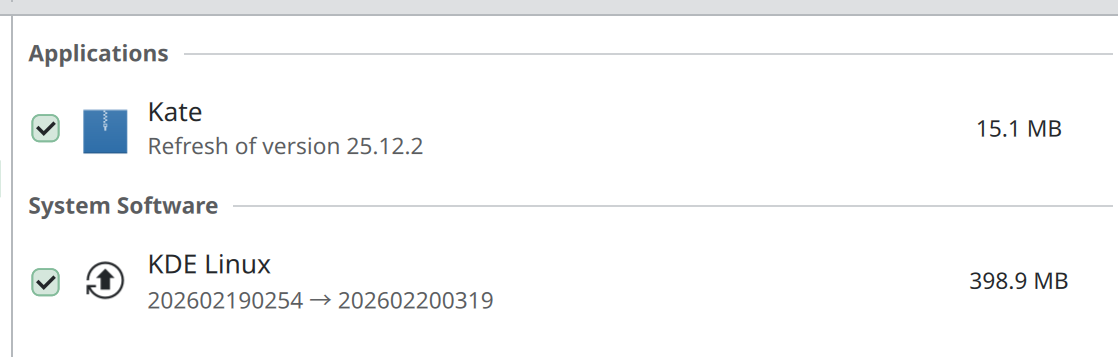
Aleix Pol Gonzalez and Harald Sitter built the machinery to allow update sizes to be calculated for delta updates. This means the sizes listed in Discover are no longer “Unknown”. Instead, you’ll see a real number:
Better tools for extending the OS
Lasath Fernando started building out the new Kapsule system, which is a tool for installing software in long-lived containers with great integration with Konsole and the rest of the OS. Before this, we experimented multiple options for experts to extend the system — including Homebrew, Distrobox, and Nix — but none really hit the sweet spot. They were too limited, too dangerous, too complex, too ephemeral, or too something else.
Kapsule deeply integrates with Konsole, which makes sense because a terminal window is a major interface for touching or extending the system in this way. Integrations with Kate and Discover are planned, too. In other words, we want to go all in on this promising new technology for the “extending the system” story for experts and software developers.
Harald did a lot of work to upload KDE Linux images to a better location, in preparation for far higher server loads in the future as the OS gains users and rolls out a user-focused edition.
Hadi Chokr turned on support for reading from and writing to disks formatted with Apple’s APFS filesystem.
Safer Homebrew, ydotool, and AMD GPUs
renner03 put in place a safety mechanism that prevents Homebrew packages from breaking the system in case you install Homeberew and any of its packages would otherwise conflict with system files. Now, the Homebrew packages break instead.
Note that we still don’t recommend Homebrew. But now you can use it without endangering the rest of the system.
KDE Linux is still an alpha product with lots of bugs and rough edges. We had our second dev call yesterday and discussed the road to a beta release, which will include user builds. We’re going to be focusing on a number of high priority issues and will consider the other beta-milestoned issues to be done on an “if we can” basis.
Get Involved!
Progress on KDE Linux is steady but nonetheless rather slow. Help is greatly appreciated. In addition to installing it and reporting issues, there are lots of development task that need doing:
KDE Linux hit its alpha release milestone last September, encompassing basic usability for developers, internal QA people, and technical contributors. Our marketing-speak goal was “The best alpha release you’ve ever used”.
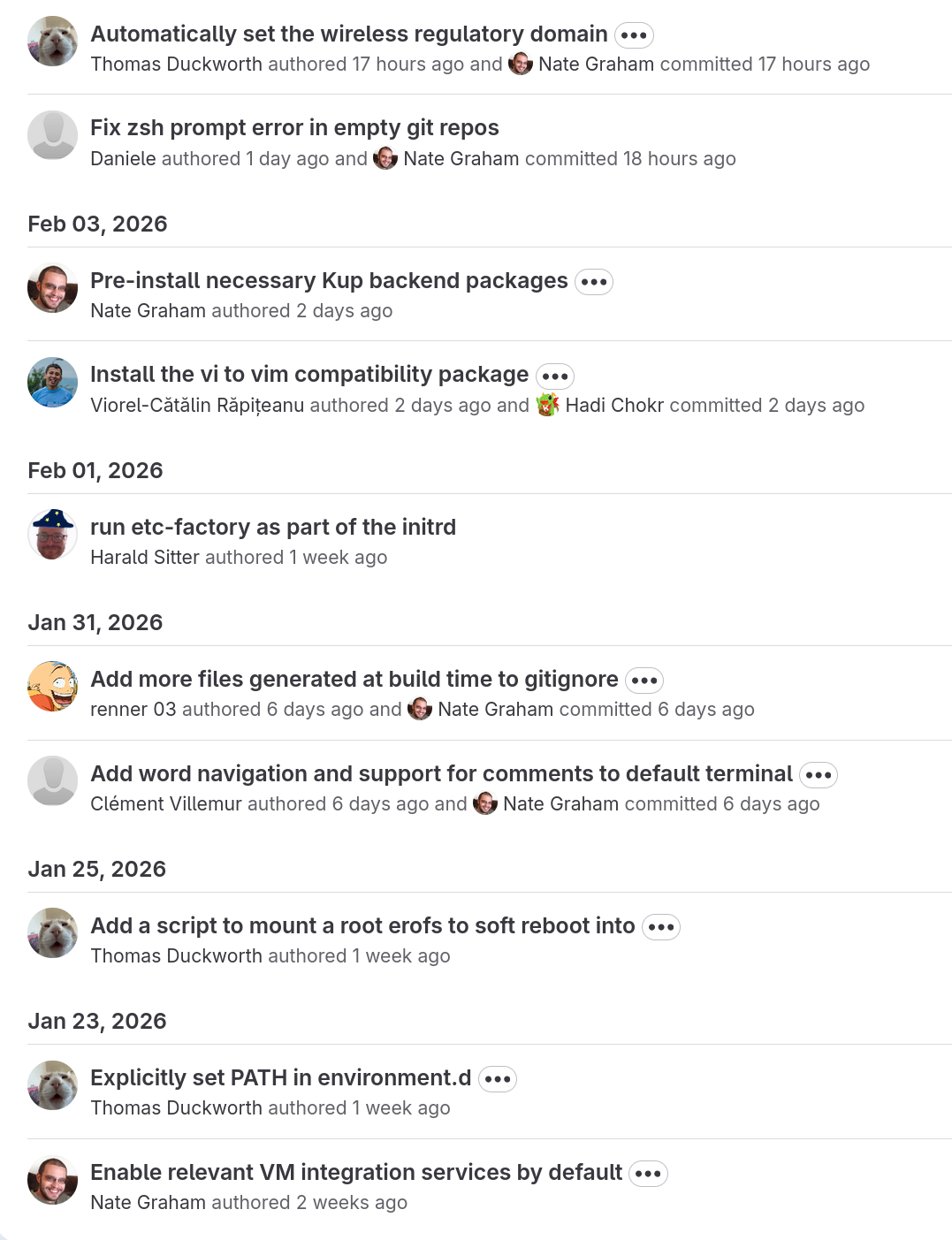
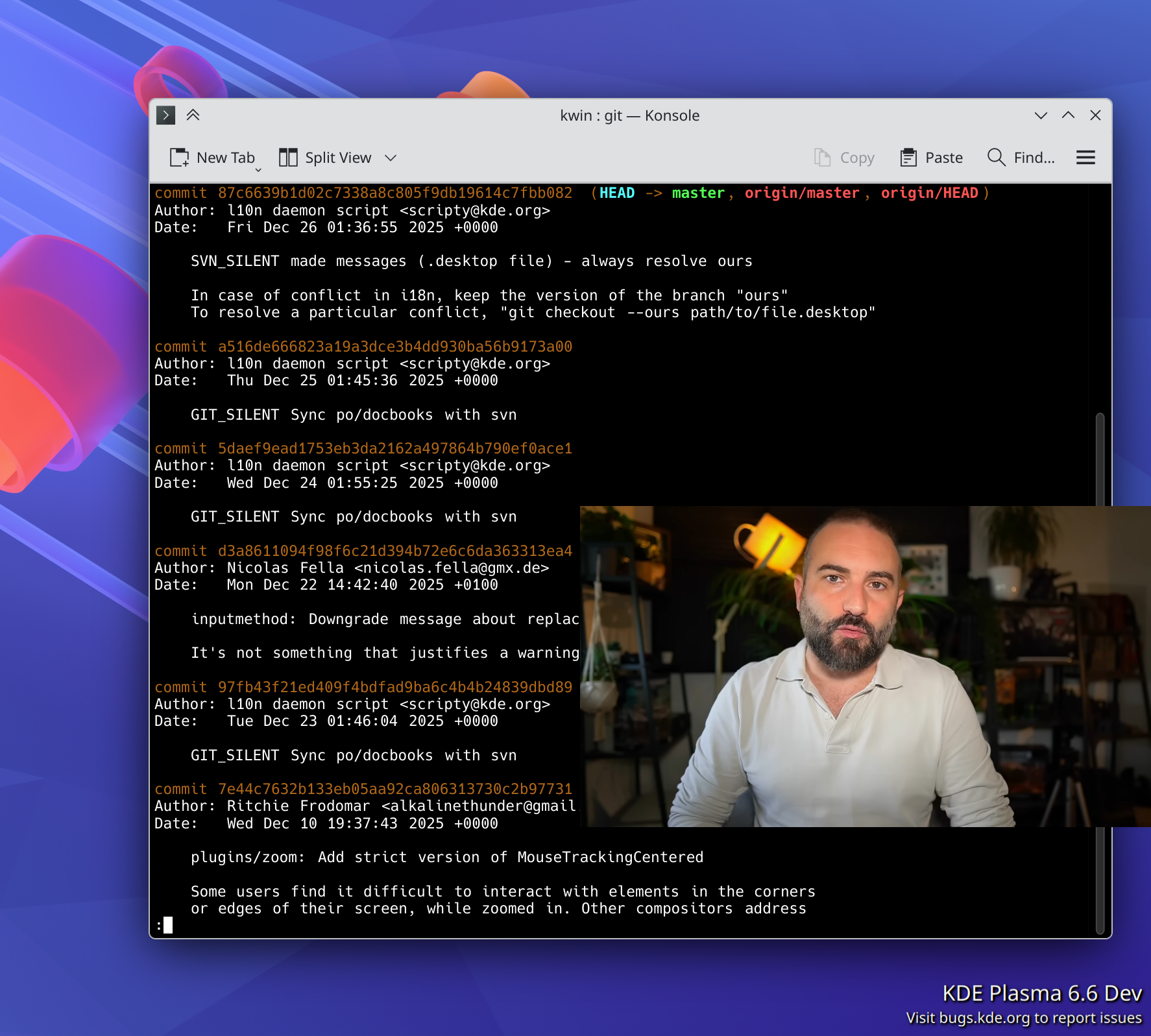
I’d say it’s been a success, with folks in the KDE ecosystem starting to use and contribute to the project. A few months ago, most commits in KDE Linux were made by just 2 or 3 of us; more recently, there’s a healthy diversity of contributors. Check out the last few days of commits:
The next step is working towards a beta release. This is something we can consider the equal of other traditional Linux OSs focused on traditional Linux users: the people who are slightly to fairly technical and computer-literate, but not necessarily developers. Solidly “two-dots-in-computers” users. We’re 62% of the way there as of the time of writing.
First public Q&A and development call
KDE Linux developers held their first public meeting today! The notes can be found here. This is the first of many, and these meetings will of course be open to all.
In this first meeting, devs fielded questions from technical users and discussed a number of open topics, coming to actionable conclusions on several of them. The vibe was really good.
If you want to know when the next meeting will be held, watch this space for a poll!
Delta updates enabled by default
After months of testing by many contributors, we turned on delta updates.
Delta updates increase update speed substantially by calculating the difference between the OS build you have and the one you’re updating to, only downloading that difference, and then applying it like a patch to build the new OS image.
As a result, each OS update should consume closer to 1-2 GB of network bandwidth, down from the 7 GB right now (this is if you’re updating daily; longer intervals between update will result in larger deltas). Still a lot, but now we have a mechanism for reducing the delta between builds even more.
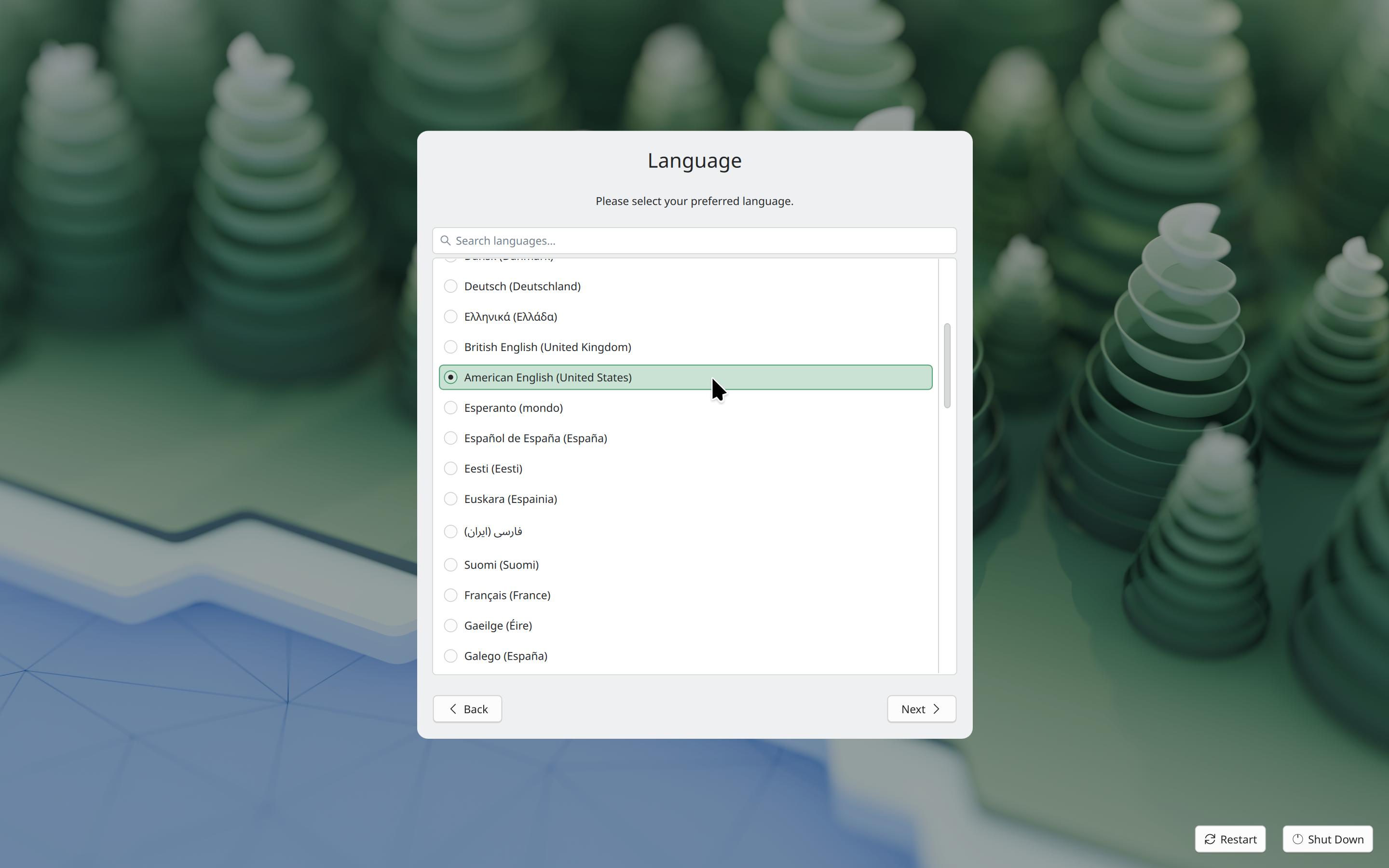
KDE Linux now delegates most first-user setup tasks to plasma-setup:
plasma-setup supports the use case of buying a device with KDE Plasma pre-installed where the user is expected to create a user account as part of the initial setup.
Thanks very much to Kristen McWilliam both for not only taking the lead to develop plasma-setup, but also integrating it into KDE Linux!
In addition, KDE Linux now uses plasma-login-manager instead of SDDM. This is a modern login manager intending to integrate more deeply with Plasma for operating systems that want that and use systemd (like KDE Linux does). Development was done primarily by David Edmundson and Oliver Beard, with assistance from Nicolas Fella, Harald Sitter, and Neal Gompa. KDE Linux integration work was done by Thomas Duckworth and Harald Sitter.
KDE Linux has been a superb test-bed for developing and integrating these new Plasma components, and now other operating systems get to benefit from them, too!
Better hardware support
As an operating system built for users bringing their own hardware, KDE Linux is fairly liberal about the drivers and hardware support packages that it includes.
Thanks to everyone who reported these issues, and to Hadi Chokr, Akseli Lahtinen, Thomas Duckworth, Fabio Bas, Federico Damián Schonborn, Giuseppe Calà, Andrew Gigena, and others who fixed them!
There’s still more to do. KDE Linux regularly receives bug reports from people saying their devices aren’t supported as well as they could be, or at all — especially older printers, and newer laptops from Apple and Microsoft. No huge surprises here, I guess! But still, it’s a big topic.
Thanks very much to the CachyOS folks who blazed many of these trails, and whose config files we learned from.
Quieter boot process
Previously, the OS image chooser was shown on every boot. This is good for safety, but a waste of time and an unnecessary exposure of technical details in other cases.
Thomas Duckworth hid the boot menu by default, but made it show up if you mash the spacebar, or if the computer was force-restarted, or restarted normally very quickly after login. These are symptoms of instability; in those cases we show the OS image chooser on the next boot so you can roll back to an older OS version if needed.
Appropriately-set wireless regulatory domain
Different countries have different regulations regarding wireless hardware’s maximum transmit power. If you don’t tell the kernel what country your computer is located in, it will default to the lowest transmit power allowed anywhere in the world! This can reduce your Wi-Fi performance.
Thanks to Thomas Duckworth, KDE Linux now sets the wireless regulatory domain appropriately, looking it up from your time zone, and letting your hardware use all the power it legally can. It updates the value if you change the time zone, too! And also thanks to Neal Gompa for building the tool we integrated into KDE Linux for this.
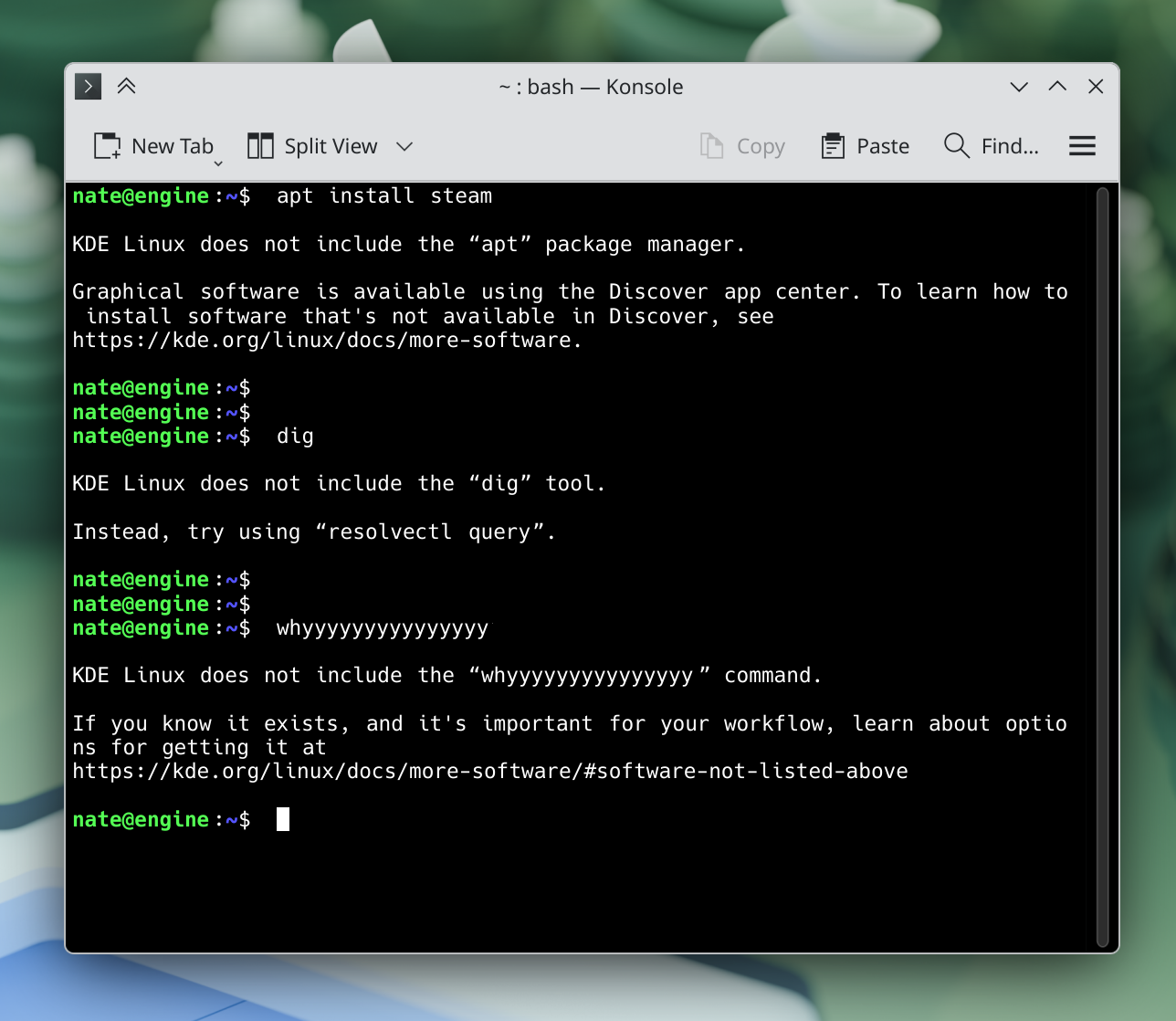
I built a simple “command not found” handler that tries its best to steer people in the right direction when they run a command that isn’t available on KDE Linux:
Thank you to Thomas Duckworth, Clément Villemur, and Daniele for this work.
Documentation moved to a more official location
KDE Linux documentation was wiki-based for the past year and a half, and benefited from the sort of organic growth easily possible there. However, it’s now found a more permanent and professional-looking home: https://kde.org/linux/docs.
This will be kept up to date and expanded over time just like the old wiki docs — which now point at the new locations. This work was done by me.
Easy setup for KDE development
KDE developers are a major target audience of KDE Linux. To that end, I wrote some setup tools that make it really easy for people to get started with KDE development. It’s all documented here; basically just run set-up-system-development in a terminal window and you’re ready! The tool will even tell you what to do next.
Saying hello to KCalc, Qrca, Kup, and new CLI tools
KDE Linux includes an intentionally minimal set of GUI apps, leaning on users to discover apps themselves — and if that sucks, we need to fix it. But we decided that a calculator app made sense to include by default. After much hemming and hawing between KCalc and Kalk (it was a tough call!), we eventually settled on KCalc, and now it’s pre-installed.
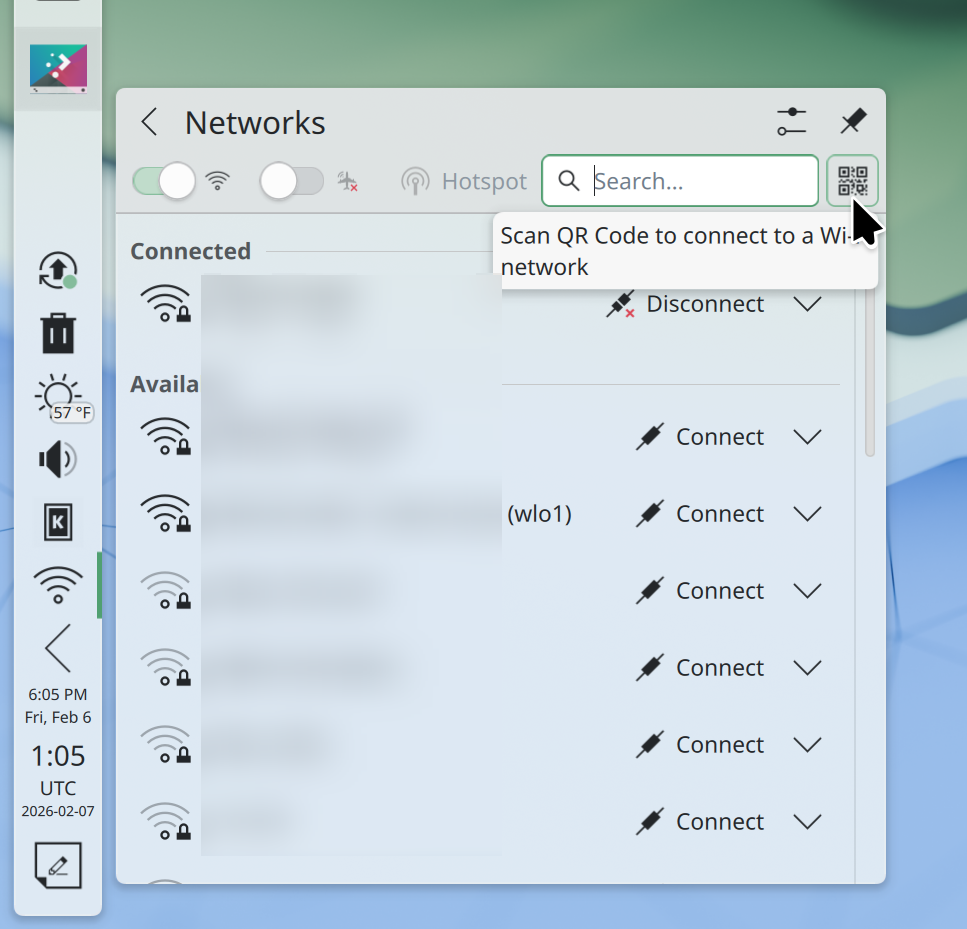
We’re also now including Qrca, a QR code scanner app. This supports the Network widget’s “scan QR code to connect to network” feature:
Next up is KDE’s Kup backup program for off-device backups! Kup is not nearly as popular as it should be, and I hope more exposure helps to get it additional development attention, too.
This work was done by me, Ryan Brue, Kristen McWilliam, and Akseli Lahtinen.
Waving goodbye to Snap, Homebrew, Kate, Icon Explorer, Elisa, and iwd
Since the beginning, KDE Linux included Snap as part of an “all of the above” approach to getting software.
Snap works fine (in fact, better than Flatpak in some ways), but came with a big problem for us: It’s only available in the Arch User Repository (AUR). Getting software from AUR isn’t great, and we’ve been moving away from it, with an explicit goal of not using AUR at all by the time we complete our beta release.
Conversations with Arch folks revealed that there was no practical path to moving Snap out of AUR and into Arch Linux’s main repos, and we didn’t fancy building such a large and complex part of the system ourselves. So unfortunately that meant it had to go. We’re now all-in on Flatpak.
Homebrew was another solution for getting software not available in Discover, especially technical software libraries needed for software development. We never pre-installed Homebrew, but we did officially document and recommend it. However the problem of Homebrew-installed packages overriding system libraries was worse than we originally thought; there were reports of crashing and “doesn’t boot” issues not resolvable by rolling back the OS image, because Homebrew installs stuff in your home folder rather than a systemwide location. Accordingly, we’ve removed our recommendation, replacing it with a warning against using Homebrew in our documentation. Use Distrobox until we come up with something more suitable.
Another removal was Kate. Kate is amazing, but we already pre-install KWrite, and the two apps overlap significantly in functionality. Eventually we reasoned that it made sense to only pre-install KWrite as a general text editor and keep Kate as an optional thing for experts who need it.
Next up was Elisa. Local music library manager apps are not very popular these days, and the pre-installed Haruna app can already play audio files. So out it went, I’m afraid. Anyone who uses it (like I do!) can of course manually install it, no problem.
And finally, the iwd wireless daemon leaves KDE Linux. It was never enabled by default; it was just an option for those who needed it. And the one user who did need it eventually found a better solution to their wireless card issues. With news of Intel dis-investing in iwd, we decided it didn’t have a sunny future in KDE Linux anymore and removed it.
It’s also not a theoretical project; KDE Linux is released and I typed this blog post on it! I’ve developed Plasma on it and run a business on it, too. It’s been my daily driver since last August.
You can probably install KDE Linux on your computer too, and become a part of the future. Even if you’re worried about using alpha software because you’re not a software developer or a mega nerd, it’s perfect for a secondary computer. KDE Linux is quite stable, and the OS rollback functionality reduces risk even more.
You can help build it!
If any of this is exciting, come help us build it! Working on KDE Linux is pretty easy, and there’s lots of support.
My focus these days tends to be on Plasma, so that’s mostly what I’ll be mentioning on the technical side. And as such, everything here is just what I personally noticed, got involved with, or got excited about. Much more was always happening! Additional KDE news is available at https://planet.kde.org.
The Wayland transition nears completion
Real picture-in-picture support!
For several years, Plasma has been transitioning to the newer Wayland display server protocol, and away from the older X11 one. 2025 is when it got real: we announced a formal end to Plasma’s X11 session in early 2027.
To make this transition as seamless as possible for as many people as possible, the people involved with the Plasma shell and especially KWin did a herculean amount of work on improving Wayland support on topics as varied as the following:
Accessibility
Drawing tablets
HDR
Color management
P010 video color
Overlay planes
XRandr emulation
Screen mirroring
Custom screen modes
Implemented support for a large number of protocols, including xdg-toplevel-tag, xdg_toplevel_icon, ext_idle_notifier, color_representation, fifo, xx_pip, pointer_warp, and single_pixel_buffer
Pre-authorization for portal-based permissions
Clipboard and USB portals
Thanks to this and earlier work, most FOSS operating systems (also known as “distributions” or “distros”) that ship Plasma are defaulting to the its Wayland session these days — including big ones like Arch Linux, Debian, and Fedora KDE. Kubuntu is planning to for the next LTS as well. As a result, our (opt-in) telemetry numbers show that 79% of Plasma 6 users are already on Wayland. I expect this number to increase once SteamOS and the next Kubuntu LTS version default to Wayland. So you see, it really is driven by distros!
Now, Plasma’s Wayland support isn’t perfect yet (any more than its X11 support was perfect). In particular, the two remaining major sources of complaints are window position restoring and headless RDP. We’re aware and working on solutions! I can’t make any promises about outcomes, but I can promise effort on these topics.
This admittedly somewhat messy and plodding transition has taken years, and consumed a lot of resources in the process. I’m looking forward to having it in the rearview mirror, and 2026 promises to be the year that enables this to happen! Expect a lot of Wayland work in 2026 to make us ready for the end of the Plasma X11 session in 2027.
Plasma continues to mature and improve
In addition to what I mentioned in the Wayland section, Plasma gained a whole ton of user-facing features and improvements! Among them are:
Rounded bottom window corners
Day/night global theme and wallpaper switching
Saved clipboard items
Speed graph in file transfer notifications
Panel cloning
Per-virtual-desktop custom tiling layouts
“You missed X notifications while in Do Not Disturb mode” feature, and auto DND mode enabling while in a fullscreen app or video
Install hardware drivers in Discover (on supported distros)
New app highlighting in Kickoff
UI overhaul for KMenuEdit and Info Center’s energy page
Playback rate selector in the Media Player widget
Three-finger pinch to zoom
UX and video quality and file size improvements in Spectacle
GPU usage monitoring in System Monitor
Use existing user accounts for RDP/remote desktop
Printer ink level monitoring
Inline print queue viewing in the Printers widget
Only show the screen locker and logout screen UI on one screen, not all of them
OCR in Spectacle (coming in Plasma 6.6)
Monochrome colorblindness filter (coming in Plasma 6.6)
Option for automatic screen brightness on supported hardware (coming in Plasma 6.6)
Option for virtual desktops to only be on the primary screen (coming in Plasma 6.6)
Phew, that’s a lot! And Plasma is getting rave reviews, too. Here are a few:
A decade ago or so, it used to be that Plasma wasn’t seen much as the default option for distros, but that’s changing.
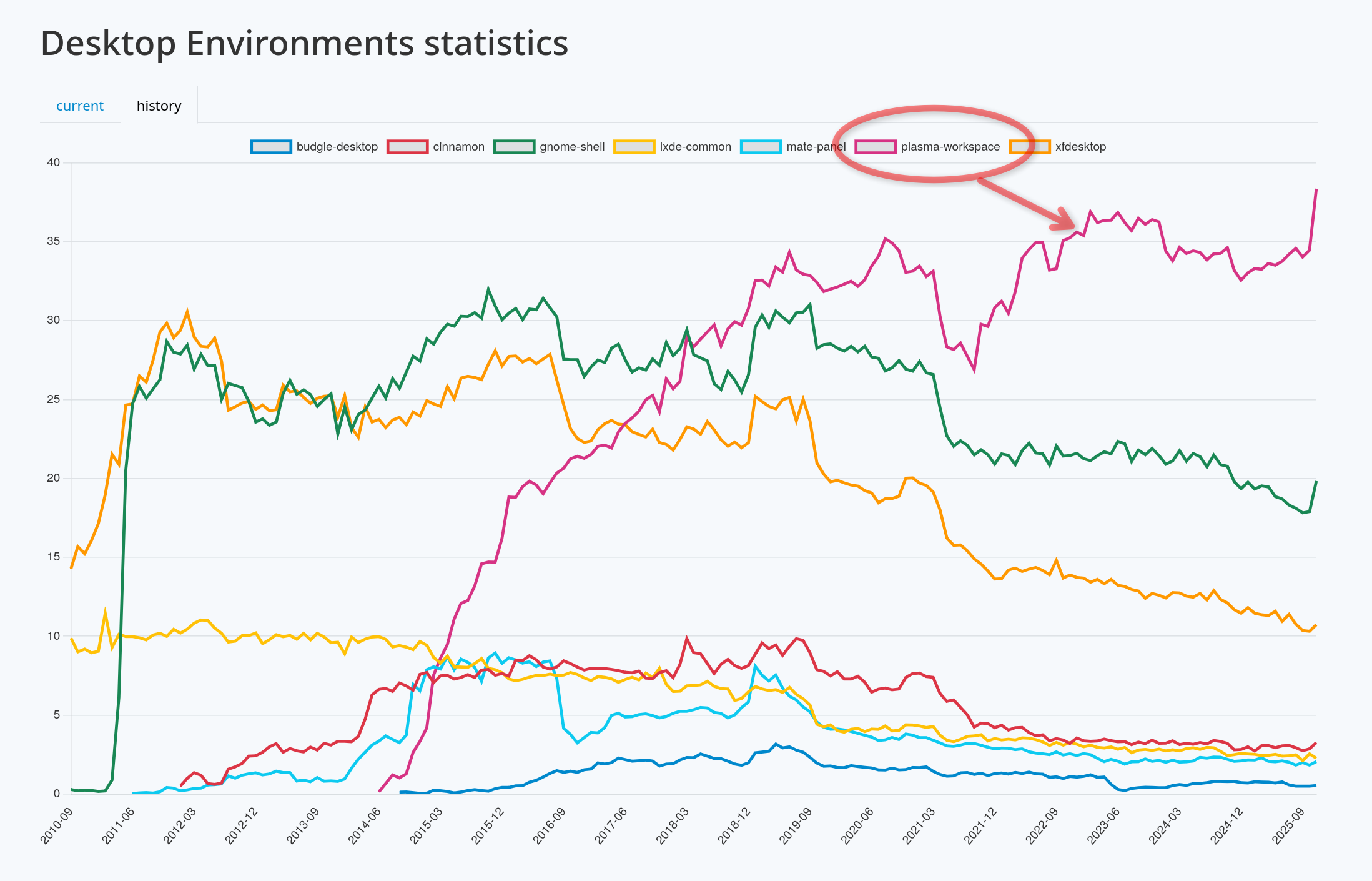
Today Plasma is the default desktop environment in a bunch of the hottest new gaming-focused distros, including Bazzite, CachyOS, Garuda, Nobara, and of course SteamOS on Valve’s gaming devices. Fedora’s Plasma edition was also promoted to co-equal status with the GNOME edition, and Asahi Linux — the single practical option for Linux on newer Macs — only supports KDE Plasma. Parrot Linux recently switched to Plasma by default, too. And Plasma remains the default on old standbys like EndeavourOS, Manjaro, NixOS, OpenMandriva, Slackware and TuxedoOS — which ships on all devices sold by Tuxedo Computers! And looking at the DIY distro space, Plasma is by far Arch users’ preferred desktop environment:
It’s a quiet revolution in how Linux users interact with their computers, and my sense is that it’s gone largely unnoticed. But it happened, so let’s feel good about it!
In fact, if we exclude the distros that showcase their developers’ custom DEs (e.g. COSMIC, ElementaryOS, and Linux Mint), at this point the only significant distros missing here are the enterprise-oriented ones: Debian, RHEL, SLE, Ubuntu, and the like. It’s something for us to work on in 2026, but clearly the current state is already great for a lot of people, including gamers, artists, developers, and general users.
KDE Linux grows
On the subject of operating systems, at Akademy 2024, Harald Sitter revealed the KDE Linux operating system project to the world. But in 2025, it spread its wings and began to soar.
Despite technically still being an Alpha release, I’m using this in-house KDE OS in production on multiple computers (including my daily driver laptop), and a growing number of KDE developers and users are as well. Thanks to its QA and bulletproof rollback functionality, you can update fearlessly and it doesn’t feel like an alpha-quality product. You don’t have to take my word for it; ask Hackaday and DistroWatch!
This project has been very special to me because I believe that KDE needs to take the reins of OS distribution in order to offer a cohesive product. The earlier KDE neon project already broke the ground necessary to make this kind of thing socially possible; now KDE Linux is poised to continue that legacy with a more stable and modern foundation.
To be very clear, none of this is an attempt to kill off other distros. Far from it! In fact, an explicit goal is to showcase what a well-integrated KDE-based OS looks like, so others can take notes and improve their offerings. And there’s still lots and lots of room for specialized distros with different foci, and DIY distros that let people build their own preferred experiences.
I’m really excited to see where this project goes in 2026. You can learn more on the project’s documentation wiki: https://community.kde.org/KDE_Linux
Fundraising performance is completely bonkers
This is the second year that Plasma users have seen a donation request pop-up in December. And it marks the second year where this not only didn’t kill KDE, but resulted in an outpouring of positivity and a massive number of donations! Last year I wondered if it was repeatable. It’s repeatable.
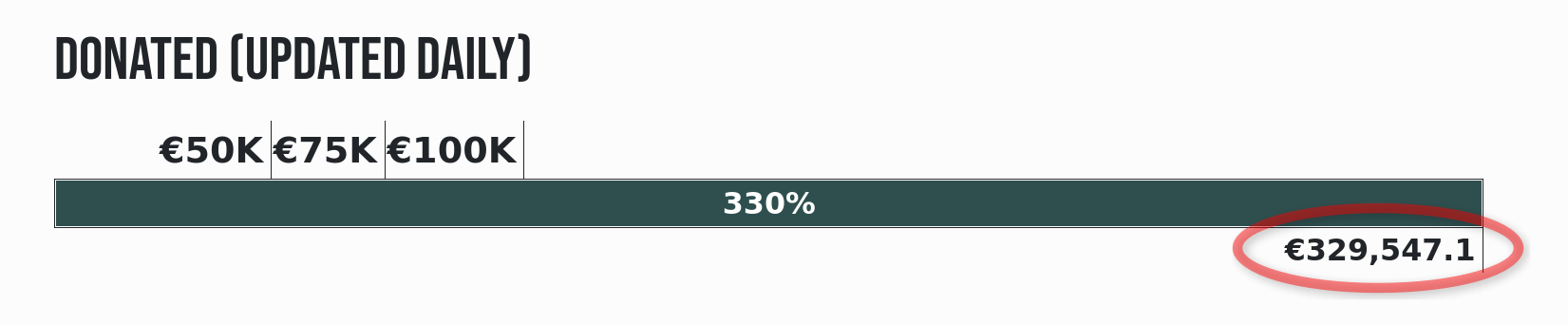
That plus an even more ambitious and well-organized end-of-year fundraiser propelled KDE to its best ever Q4 fundraising sum: nearly €330,000 as of the time of writing! KDE e.V. (the non-profit organization behind KDE) is going to end up with a 2025 income that’s a significant fraction of a million Euros, and mostly crowdsourced, too.
I say this a lot, but sums like this truly help keep KDE independent over the long haul. But how, specifically?
First, by being mostly funded by small donors, KDE retains its independence from any powerful and opinionated companies or individuals that happen to be patrons or donors.
Second, with such a large income in absolute terms, KDE e.V. now has resources to rival the private companies in KDE’s orbit that contribute commercially-funded development to KDE (like mine), and that’s a good thing! It means a healthy diversity of funding sources and career opportunities for KDE developers. It’s systemic resilience.
And finally, with money like this, KDE e.V. is able to fund projects of strategic interest to KDE itself, and fund them well. Historically KDE’s software has been developed by volunteers working on what’s fun, companies funding what supports their income, and some public institutions funding their specific use cases. And that’s great! But it leaves out anything that’s not fun, doesn’t make money, and isn’t directly relevant for governments. These are the kinds of large projects or maintenance efforts that KDE e.V. is now able to fund if necessary.
It’s a big deal, folks! This kind of fundraising performance puts KDE on the map, permanently. And it’s mostly thanks to people like you, dear readers! The average donation is something like €26. KDE is truly powered by the people.
If you can make a donation please do so, because it matters, and goes far!
KDE’s overall trajectory
It’s positive. Really positive.
But when I joined KDE in 2017, the community was a bit dejected. After giving my very first public conference talk at Akademy 2018, multiple people came up to me and said some variant of “thank you for this optimistic vision; I didn’t think I could feel positive about KDE again.”
These reactions were really surprising to me; without the benefit of history, I had no idea what the mood was or how things had been in the recent past. But somestatistics about contributor and commit numbers bear out the idea that 2013-2017 was a bit of a low period in KDE’s history, for various reasons.
But since then, KDE has come roaring back, and you see it in positive trends like adoption by hardware vendors and distros, great fundraising performance, good reviews, positive user feedback, and new contributors.
Everything isn’t perfect, of course; there are challenges ahead. Bugs to fix and stability problems to overcome. The Wayland transition and a new theming system to complete. Features to add that unlock Plasma for more users. More effort to put into getting Plasma-powered operating systems and devices into the mainstream.
But the KDE community is up for it. KDE is a mature institution that’s resisting enshittification, and making the world a better place in ways both big and small. My work on KDE represents by far the most meaningful part of my career, and I hope everyone else involved can feel the same way. What we do matters, so let’s go out there and do it even better in 2026!
Today I’d like to talk about package management a bit. The lack of a user-facing package manager is a big difference between KDE Linux and most other Linux distros (even immutable/atomic ones), so it bears some discussion!
Let me start by saying:
I absolutely love package management.
No, really!
Before Linux, I came from the Mac world which lacks real package management. To install apps back then, you would fail to successfully drag them to the /Applications folder. Software requiring more integration was installed using Windows-style wizards with no dependency management and no provision for uninstalling them later. (!!!!!)
Moving to Linux was a revelation.
You mean I can just do sudo apt install thingy to get my thingy instantly? And it gets upgraded with the rest of the system automatically? And I can easily remove it if I don’t want it anymore?
It’s just 1000% better. We all know this. It’s a crowning jewel of our ecosystem.
However! There’s package management to get add-on software… and then there’s package management for assembling the base OS on your own computer.
The former is incredibly convenient and amazing. The latter is a Tool Of Power™ best suited for use only by OS builders and true experts.
I feel it’s a problem that historically we’ve used this amazing tool for both of those use cases, because building the base system from packages on users’ computers suffers from a number of nearly unsolvable challenges:
It deteriorates and explodes
As you install, remove, and update packages on your system, you inevitably encounter problems over time:
Conflicts and incompatibilities with add-on repos
Heisenbugs from orphaned packages still present on the system
The ability to uninstall important functionality without realizing it, breaking the system
Updates that break bootability due to some untested condition present only on your system
True experts and OS engineers can usually resolve these issues as they crop up.
What about everyone else? There’s usually no recovery method exposed in a normal-person-friendly manner, or at all. You’re just screwed unless you have a second computer or a phone set up to be able to talk to the distro developers on Matrix or IRC, and one can walk you through fixing it live.
It’s not a targetable platform
No installation of a package-based operating system can be guaranteed to have the same set of system software and libraries as any other one.
This means if you’re a developer, your software can’t make safe assumptions, and it’s running in an untested environment pretty much all of the time. You can contend with this complexity via a forest of conditional “if this thing is present, enable that behavior” logic, but versions of dependent libraries you didn’t test with can still break your app, and users will report bugs that you can’t reproduce.
It’s a barrier to raising quality levels
Package-based OSs allow for and encourage self-service to fix problems. Install this package. Edit that config file. Replace the version of some package with the one from another repo.
This is great for current you in the short term. But it’s less great for future you, after you’ve forgotten about your local fixes and encounter the same bugs the next time you re-install on a new computer, or after the local fixes have become unnecessary and are now causing issues that nobody will be able to debug.
It’s also less great for the whole project, its ecosystem, and others who might encounter the same issues but lack your level of technical skill or available time for troubleshooting.
But what about the really good distros?
I do think these challenges are manageable, even if they can’t be fully eliminated. My best experiences with a package-based KDE-focused distro have been with Fedora KDE, where they do a great job of it:
They prevent removing critical packages that would break the system.
They have a huge main repo with almost everything you could want, and RPMFusion (the only add-on repo you really need), has a close relationship with the primary packagers so conflicts are rare.
They work hard on shipping a good product out of the box, rather than making you fix bugs yourself, and they regularly make bug-fixy tweaks to improve the out-of-the-box experience.
In 4 years of usage, I’ve never had a system update break bootability.
And the result is fantastic. I 100% recommend Fedora KDE to anyone who wants a good experience with a GUI-focused package-based operating system. It’s hard to go wrong with it.
And obviously those of us building KDE Linux also think Arch Linux is great, since we use their packages for building our base system! It’s is an amazing tool for OS builders and experts wanting to create the personal OS of their dreams.
Others that I have less experience with are excellent, too. But still, none of them can fundamentally solve the problems I outlined earlier. It’s not for lack of labor or expertise; these simply aren’t easily solvable problems with a mutable system-level package-based design.
So what’s the solution?
Well the world is messy and everything has drawbacks. So there’s no solution that’s better in every way, and worse in none. But the approach we’ve chosen in KDE Linux does solve the above problems:
Stability
In KDE Linux, we build the base system out of Arch packages, but freeze the contents and take responsibility for the result being functional; we don’t offload responsibility onto the user.
Updating the system swaps out the old OS image for the new one; it’s both fast and safe. And you can keep around the old OS image (three of them, in fact) and easily roll back if you have a problem. It doesn’t become “quirky” and degrade over time.
It isn’t 100% perfect, of course. Users can still mis-configure their software and manually install user-level libraries that conflict with system-provided libraries. But it’ll be more obvious that you’re about to shoot yourself in the foot.
Being a platform
Specifically, Flatpak is a platform.
With Flatpak, developers target a specific version of a discrete SDK and its corresponding runtime. This runtime will be the same on every user’s computer. Now developers can make safe assumptions and reproduce bugs — at least, bugs not caused by hardware problems or users’ configurations differing from their own.
And developers who target this platform make their apps available not only on KDE Linux, but also most other Linux-based operating systems, too.
There are problems with Flatpak, of course; I’m not gonna claim it’s perfect. It’s opinionated, restrictive, can’t be used for deeper parts of the OS the way Snap can, and multiple installed versions of each runtime can end up consuming a lot of space. But it solves the platform problem, and traditional system-level package management just can’t.
Quality
Every KDE Linux user is going to to have image and video thumbnails, all the KDE wallpapers, the Desktop Cube effect, KDE Connect, a working installation of Plasma Vault, well-tuned power management, and support for as much exotic hardware as we could stuff in. None of this comes in optional add-on packages you can find yourself missing. You’ll just automatically have it.
If you find that something significant is missing or broken, you’ll need to tell the developers, and then they can fix it for everyone. If you’re an expert who likes fixing problems, you can still make those fixes; you’ll just be doing it for everyone in the world and not just yourself! The project and its entire userbase will benefit.
But what about the glaring, obvious drawbacks?!
The most obvious drawback of not having a package manager, is, well, not having a package manager. I’m pretty sure I don’t need to explain the lost benefits to anyone reading this. 🙂 We all know how amazingly flexible and powerful real package management is.
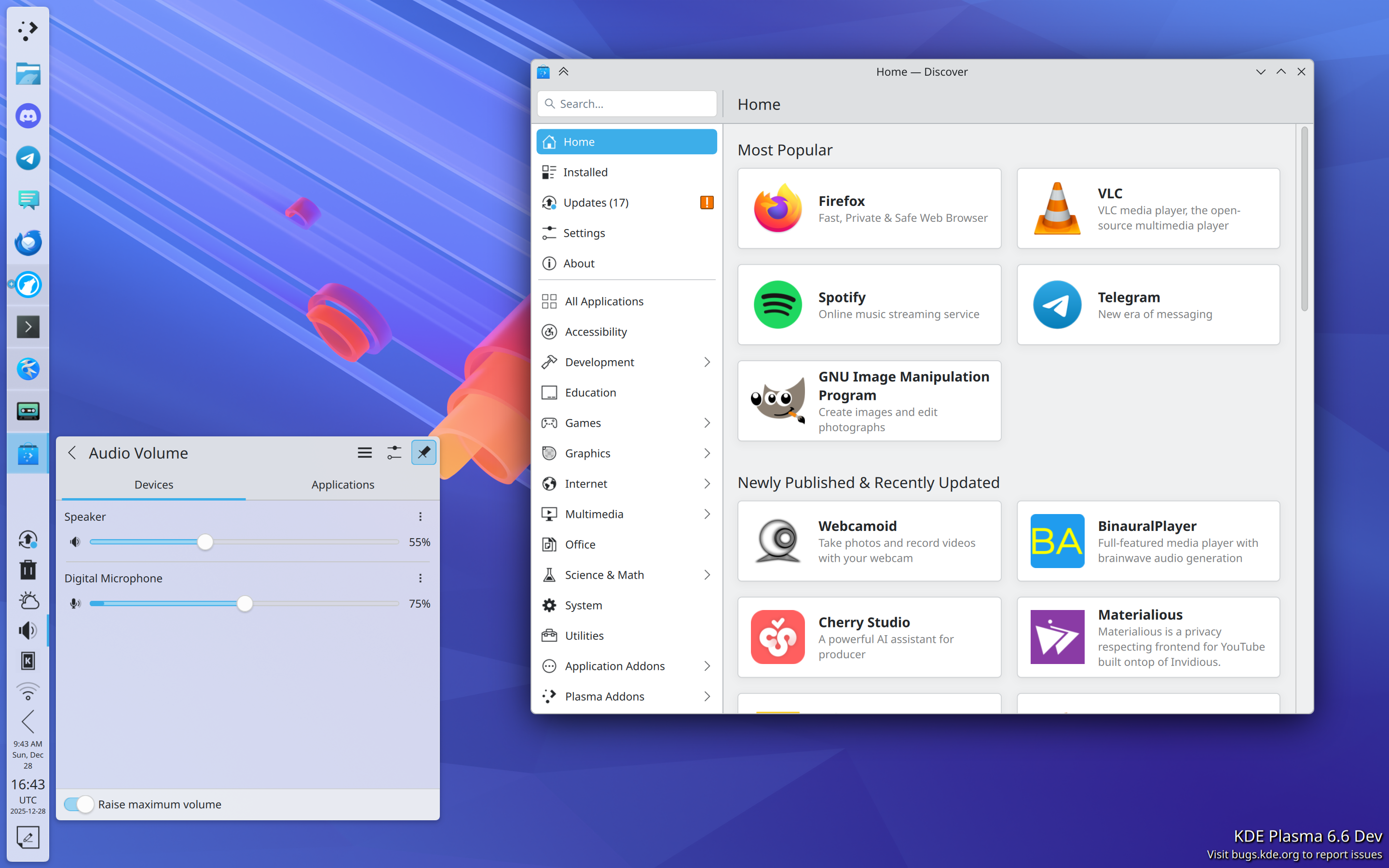
Thing is, its absence isn’t a problem for regular people because they weren’t using package managers to install gimp and rust and waydroid and whatever anyway. The Discover graphical app store is a waaaaaaay more user-friendly way to get GUI apps from Flathub or anywhere else. It isn’t actually a problem.
Pictured: a usable way for normal people to find and install apps
But the lack of a package manager does become a problem for power users and software developers. Let me group the usages into a few broad categories and explain how KDE Linux handles them:
GUI apps not on Flathub
This category shrinks all the time as Flathub cements its position as the de facto repository of GUI apps on Linux.
Still, for the remaining omissions, there are other options such as Snap, finding an AppImage of the app, or installing it using the package manager of another distro using a container. But these don’t offer the level of integration we’re aiming for in KDE Linux, so for that reason, we focus on boosting Flathub as its primary supported repository of GUI apps.
Command-line productivity and software development tools
In KDE Linux, we already pre-install most of the common and modern ones. This includes:
Performance monitoring/debugging:drm-info, htop, iotop, lsof, lspci, lsusb, nvtop, powertop, and loads more
Productivity/automation:kdialog, rg, tree, vim, wget, wl-clipboard, ydotool, and many more
Network management:hostnamectl, ip, iw, resolvectl, tracepath, and more
Version control:git and svn
Compilers etc:ccache, gammaray, gcc, gdb, llvm, and lots of ancillary tools
For anything you need that isn’t pre-installed, there are multiple options including containers and the add-on Homebrew or Nix package managers. We even include a custom “command not found” handler that can direct you to available options:
Drivers and support packages for hardware
This is a tricky one, as a lot of these include kernel drivers or need to be installed systemwide. So we pre-install as many as we possibly can: support for printers, game controllers, filesystems, fingerprint readers, drawing tablets, smart card readers, braille displays, Yubikeys, specialized audio/video processor boxes; lots of stuff. However there are cases where this isn’t possible, which is a legitimate problem with KDE Linux right now.
Input methods
KDE Linux aspires to pre-install state-of-the-art input methods so you don’t have to install and configure everything yourself. However we haven’t reached this goal yet. We’re building a virtual keyboard with built-in support for CJKV languages, but it’s still a work in progress.
Languages
KDE Linux pre-installs support for all available languages; any that are missing are the result of bugs we should fix!
Support packages for VM guest OS integration
KDE Linux pre-installs all the ones that are available on Arch Linux. Similarly, anything missing is something for us to fix.
Software development languages and toolkits
Qt is obviously included, and so is GTK. There’s also Python, JavaScript, and Rust.
But we can’t pre-install everything here, as software dev stuff tends to be huge. If a large high-level toolkit/language/build dependency/etc. that you need isn’t pre-installed, the best way to use it anyway is by installing it or its development environment a container. Distrobox and Toolbox are fully supported.
And that should about cover it, I think!
Basically, we’ve tried to eliminate the need for traditional package management as much as we can, while preserving your ability to use a package management tool if you’re an expert or a developer who benefits from one. It should just be a userspace package manager (via a container, Homebrew, or Nix — your choice) so it can’t impact the stability of the system so strongly, and so any problems can be easily undone.
And to be clear, if you prefer a traditional OS that’s 100% mutable using a system-level package manager, that’s completely fine. There’s no shortage of Linux-based operating systems using this model out there, and KDE Linux is an admittedly opinionated divergence from it.
On the other hand, if all of this seems really exciting, please feel free to install KDE Linux somewhere and help us build it! At the time of writing, we’re a little over 40% of the way through the Beta milestone, at which point we’ll declare it suitable for general use by current Linux users. Progress is steady but slow; with more help, it can become a polished product much faster!




 Adventures in Linux and KDE