Triaging your own project’s Bugzilla tickets

I’ve been beating the bug triage drum for a number of years, from the perspective of asking for more dedicated bug triagers. And at this point we have some! Which is amazing, and I’d like to thank them. So this time let’s talk about something different: developers triaging their own projects’ new Bugzilla tickets.

When you’re the developer, you know the internals of your software, but Bugzilla tickets are your connection to its users. If you’re not paying attention to them, you’re flying blind. It’s important to know how people use your software and what they’re having trouble with. Bug triage is a part of being a maintainer.

Fortunately, developers are often the fastest bug triagers of all. With your understanding of how the software works, you’ll know instantly which tickets are upstream or downstream issues, duplicates of existing tickets, already fixed in unreleased code or a released version the reporter doesn’t have, and — for valid reports — where the problem might be. For most, you should be able to handle them really quickly.

Even super popular projects like Plasma, Krita, and Dolphin only get a handful of Bugzilla tickets per day, so looking over all of them doesn’t take much time. Even one developer spending 5 minutes a day triaging their project’s new Bugzilla tickets makes a huge difference. Two are even better!

How do I know? With the power of graphs!

Here’s a graph of the number of Bugzilla tickets over time for an unnamed KDE project that’s had developers actively triaging tickets for the past few years. I bet you can guess when they started!
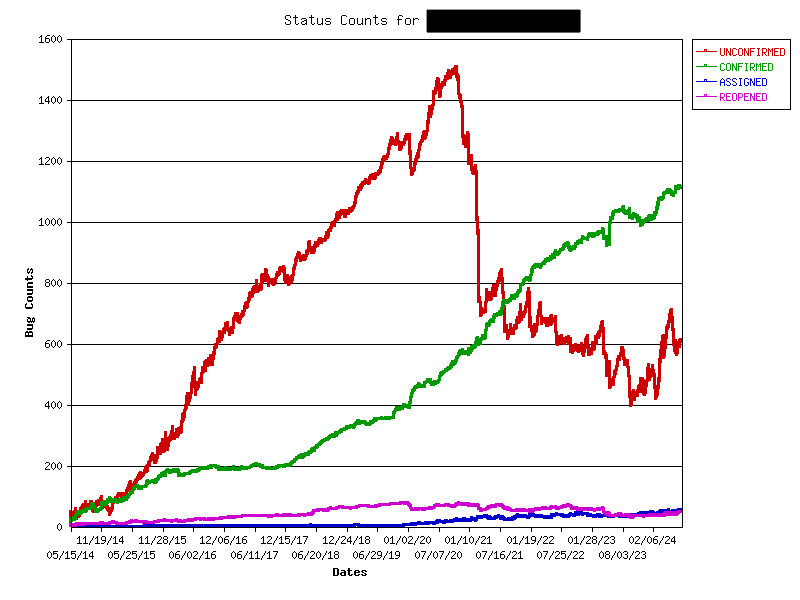
Note that the numbers include feature requests, which are also Bugzilla tickets. They need triaging too!

See how the number of CONFIRMED reports rises gradually over time, and the number of UNCONFIRMED reports falls in a choppy fashion — indicating new reports being opened and then closed within a few days. But sometimes the number of UNCONFIRMED reports go up for a few weeks, corresponding to times when the developers who do bug triage were too busy or on vacation — highlighting the impact just one or two people can have.

And now for comparison, here’s the graph for a different unnamed KDE project without developers actively triaging Bugzilla tickets:

Eek. How demoralizing.

So now let’s address some anticipated reactions!

If I did this, I’d spend all my time resolving Bugzilla tickets instead of adding new features!

I suspect otherwise, but let’s say you’re right: it would be a sign that the project is actually really buggy and could benefit from you spending more time to fix those bugs! It’s not sustainable to build features on top of a buggy foundation. It’ll catch up with you eventually: the software will become even buggier, the flood of valid yet un-reproducible bug reports will accelerate over time, and you’ll get discouraged by the situation and burn out.

No that’s not what I meant; it’s that all the Bugzilla tickets are really low quality and handling them takes forever!

Ah, this is a better problem to have. It means the software’s foundations are mostly good, but users are getting confused while using it. If you put some time into improving the project’s UI, this type of bug report will fall over time. Clarify complex or confusing features, blame-shift failures caused by 3rd-party services and plugins, improve bad error messages, etc. The KDE Human Interface Guidelines can help!

This could also mean that the tools available for collecting debugging information or reporting bugs are too crude, difficult to use, or hard to find. Spend some time improving these, and the quality of the bug reports will increase.

Finally, it could just mean that your project is just super popular and attracts a lot of attention from normal people not familiar with bug reporting. In this case, in addition to the above, enlist the help of KDE’s bug triagers! Ask us in the kde-bugs:kde.org Matrix room to focus on your project. We can filter out a lot of the obvious junk so you can focus on the real issues.

No no, still not right; it’s that I’m responsible for like 20 projects so I can’t pay attention to such a large number of new Bugzilla tickets every day!

Maybe… but have you verified whether that assumption is accurate? You might be surprised. For example, here’s a list of the Bugzilla tickets opened over the past 24 hours for all KDE Frameworks plus Dolphin, Gwenview, Okular, Filelight, and Elisa. As of the time of writing, there is exactly one Bugzilla ticket. Even broadening it to the past week shows only 16 as of the time of writing! That’s like two per day. How about all of Plasma? As of the time of writing, 6 new tickets in the last 24 hours. Most individual apps get between zero and 2 new tickets per day. These are not overwhelming numbers of Bugzilla tickets to triage. Doing it every day should take only a few minutes.

Ugh, Bugzilla sucks! It’s so clunky and you can’t edit comments or paste images inline! I hate interacting with it!

I definitely won’t deny that Bugzilla is kind of old and clunky-feeling. And not being able to edit comments or paste images inline are indeed pain points. But the grass isn’t greener on the Gitlab side, which would be our alternative. Over the years I’ve compiled a list of showstopper bugs for using Gitlab Issues, including:

  • Moving issues clones them with new comments and history; they can get out of sync and it’s impossible to track issues with persistent URLs!
  • No sub-components, making organization messy unless you apply a soup of tags to every issue. Even then, tags can’t fully replace actual categorization. Finding anything becomes extremely difficult!
  • Only people with developer accounts can add tags, increasing the burden on developers to triage their own issues.
  • Very poor/no support for issue organization with large projects that span multiple git repos.
  • No way to track number of duplicates, making important issues harder to notice and prioritize.
  • Bulk update feature is so limited as to be useless.
  • No fancy graphs like the ones I showed earlier.

It’s not a better product, in my opinion. So yeah, maybe Bugzilla sucks, but so does our available alternative — as well as most of the rest of the competition out there, frankly. Bug trackers are just not sexy projects that attract a lot of money and developer attention. The upstream Bugzilla project itself is struggling hit $200 a month in donations.

Bug triage just isn’t fun. I’m a volunteer, and I want this to be a fun hobby, not work. I don’t wanna do it, sorry.

I totally get it! But let’s take a step back: if you’re volunteering for KDE, you’ve already got a hobby that looks like work to normal people. Don’t deny it, you know it’s true. 🙂 You perform professional-quality software development for free that the average bear demands six figures with benefits for.

And if the volunteer activities you engage in consist of anything other than writing cool new features, then it really starts to look like work! Porting to new APIs? Refactoring old code? Fixing bugs that you don’t personally experience for the good of the project? If you do these tasks out of a sense of responsibility, obligation, or personal pride regarding the state of the project, then bug triage is no different: an under-appreciated task that’s important for project’s long-term health.

OK Mr. Fancypants, how do I do it?

We have extensive documentation on how to do bug triage. But honestly, you’ve been around the block, you probably already know what to do. 🙂

The other topic is how to see daily Bugzilla tickets. If you’ve got good email hygiene, having them emailed right to you is best. Let ’em go to your inbox (don’t filter them into a folder!) and handle them immediately! You can subscribe yourself to the mailing list that new Bugzilla tickets for the project get sent to, or else ask me or a sysadmin to add you personally to the CC list for new tickets (this way is less overwhelming).

The other method is to set aside some time at the beginning of the day for bug triage. Click here and modify the Bugzilla search to include the products and components you care about. Hit “Search”, bookmark the final link, and just visit it once per day.

It’s that easy. And your project and its users will thank you! So go out there and triage your project’s bugs!

How YOU Help With Quality

In today’s other blog post, I mentioned how we’ve been getting a huge number of bug reports since the Mega-Release. If you’re not in software engineering, this probably seems like a bad thing. “Oh no, why so many bugs? Didn’t you test your software properly!?”

Since most people are not involved in software engineering, this perspective is common and understandable. So I’d like to shed a light on the assumptions behind it, and talk about the challenges involved in improving software quality, which is a passion of mine.

Don’t kill the messenger

See, bug reports are a “don’t kill the messenger” type of thing. Bugs are there whether they get reported or not, and getting them reported is important so you have a more accurate picture of how your software is actually being used by real people in the real world.

In our KDE world, the alternative to “lots of bug reports” isn’t “few bug reports because there are few bugs” but rather “few bug reports because the software isn’t actually being used much so no one is finding the bugs.” What matters more is the severity of the actionable bug reports.

What bug-free software looks like

That sounds so defeatist! Surely it must actually be possible to have bug-free software, right?

Yes. But to achieve it, you have to test literally every possible thing the software can do to make sure it performs correctly in the environment in which it’s doing it. If the software can do infinite things in infinite environments, then testing also becomes infinite and therefore impossible, so combinations get missed and bugs sneak through. Bug-free software must aggressively limit the scope and variety of those environments to just the ones that can be tested. What does that look like in practice?

  • Limit what the software can do in the first place. Remove as many features, options, and settings as possible without compromising the product’s necessary core functionality.
  • Limit how the user can modify and extend the software after release. No user-created themes, widgets, scripts–nothing! Every modification to what the software can do or how it looks must go through a the same QA team that QAd the software in its original state. 1st-party modifications only.
  • Limit the versions of upstream 3rd-party libraries, dependencies, and kernels that the software is allowed to use. Lock those versions and test everything the software can do on those specific versions.
  • Limit how downstream 3rd-party user-facing software (i.e. apps) can interface with the system. Lock it down in a sandbox as much as you can so any misbehavior can’t affect the rest of the system.
  • Limit the hardware that the software stack is allowed to run on. Test everything the software can do only on that hardware.

Does this sound very much like how KDE software is developed, distributed, and used? I’d say it’s more like how Apple builds products (and note that Apple products still have bugs, but I digress)! By contrast: KDE develops lots of features and options; we’re liberal with supported library, dependency, and kernel versions; and we don’t prevent you from installing our software on any random device you can get your hands on.

You can see the challenge right away! The foundation of quality is a set of restrictions that we don’t want to impose on ourselves and our users. You folks reading this probably don’t want us to impose them on you, either.

Quality from chaos

So is it just impossible to ensure quality in a permissive environment? No, but it’s harder. That’s right: we in the KDE free software world set for ourselves a fundamentally more difficult task than the big corporations with their billions of dollars of resources. Given this, I think we’ve done a pretty darn impressive job with the Mega-Release. And judging by initial impressions out there, it seems like many others agree too!

So how did we do it?

We lengthened our beta period to 3 months and relied on bug reports from people using the software in their own personal environments.

Yes you, loyal reader! We wanted to hear how our software was working on your 12-year-old Netbook. We wanted to hear how it worked when plugged into two TVs and a rotated monitor, all through a KVM switch. We wanted to hear how it coped with the most bizarre-looking 3rd-party themes. By using our flexible and non-limited software in your diverse ways on your diverse hardware, you’re testing it and finding all the bugs that we lack the resources to find ourselves.

Does this sort of QA work sound like something you don’t want to do? That’s 100% fine. But then you need for someone else to be the QA team for you. There are two options:

  • Buy a computer with KDE software pre-installed; there are a lot of them now! Then it’s the vendor’s responsibility to have done adequate QA on their own products. Is it buggy anyway? Complain to them or find a better vendor!
  • If you’re going to install it yourself, limit yourself to common hardware, default software settings, and operating systems that are relatively conservative in their update schedules. Then the QA has been provided by others who who already used your exact setup and reported all the bugs affecting it.

Become a superhero

But what if you do want to help out with making the software better for others, but you’re not a programmer? Congratulations, you’re a real-life superhero.

We’ve already talked about reporting bugs. It’s also important to do a good job with your bug reports so they’re actionable! I’ll encourage folks to read through our documentation about this. Low-quality bug reports don’t just waste our time, they waste yours as well!

But where do all those 150-200 bug reports per day that I mentioned actually go? There’s a flip side which is that someone needs to do something with every single one of them. The more bug reports we get (which, again, is good!) the more we need people to help triaging them.

Because the truth is, most bug reports don’t begin life being actionable for developers. They may be missing key information; they may be mistaking a feature for a bug; they may be describing an issue in someone else’s software; they may be about an issue that was already fixed in a version of the software that the reporter doesn’t have; they may be describing a real issue but in an unclear and confusing way; and so on.

The job of bug triagers is to make each of these bug reports actionable. Ask for missing information! Move them to the right products! Set the version and severity appropriately! Mark already reported bugs as duplicates of the existing report! Mark obvious upstream or downstream issues accordingly and direct people to the places where they can report the bugs to the responsible developers! Try to reproduce the issue yourself and mark it as confirmed if you can! And so on. It isn’t terribly glamorous work, so there aren’t very many people lining up to be volunteer bug triagers, unlike developers. But it’s very important. And so every person who helps out adds resources to what’s currently a very small team, making a massive difference in the process.

If you’ve been looking for a way to help out KDE in a way that doesn’t require programming or a consistent time commitment, this is it. Triage a few bugs here, a few bugs there. Chip in when you can. If 30 people each triaged three bugs a day (this would take under 10 minutes, on average), we’d be in an amazing position.

So get started today! I’m available to help in the #kde-bugs Matrix room.

Still don’t wanna? Donate to KDE e.V. so we can eventually hire our own professional bug triage and QA team!

PSA: enable 3D acceleration in your VirtualBox VMs

It’s come to our attention that some changes made for KWin in Plasma 6 aren’t compatible with the old and outdated software-rendering graphics drivers in VirtualBox. Thankfully there’s a solution: enable 3D acceleration in the machine settings. It not only resolves the issue, but also enables all the fancy graphical effects you would expect to see on a bare-metal installation. This is especially important if you’re using a VM for a review, screenshots, or videos of Plasma 6!

I’ve reached out to the VirtualBox devs regarding the possibility of making this happen automatically. But in case that doesn’t happen, it’s up to VirtualBox users to manually enable 3D acceleration in their machine settings.

What’s going on with Activities in Plasma 6?

Nothing! That’s the end of the blog post! Go back to what you were doing!

Well, sort of. 🙂 Some of you may be aware that a year or so ago, there was a lot of chatter about what to do with the Activities feature in Plasma 6: change how it works, remove the feature, or leave it be.

There’s broad consensus within the KDE developer community that the Activities feature doesn’t work the way we want it to. Its scope is conceptually unclear, it’s a frequent source of bugs, and it isn’t really maintained. As a result adoption in even our own apps has been low. It was for these reasons that over time we removed many of the entry points for Activities in the UI, and why I eventually proposed removing it entirely.

However the best way to to find out how many people are using something is to remove it! And the second best may be to propose removing it. 🙂 Many people showed up to offer their passionate pleas to keep the feature, explaining what they were using it for. Interestingly, many admitted that the feature didn’t really work very well out of the box and that they had done custom work to bend it to their use cases.

For this reason, several people stepped up to propose an overhaul of how Activities works, taking into account how the feature’s users actually use it. A lot of discussion ensued, and a few changes were merged. One was that Activities migrated from Frameworks to Plasma, which stripped it of its API guarantee and opens the door to us making major changes within the Plasma 6 lifecycle. Another change was to remove the per-Activity power management setting.

Unfortunately not much happened beyond that. As a result the status quo remains largely in effect for Plasma 6: the Activities feature has not been removed, overhauled, or even substantially bug-fixed. It remains a quirky and somewhat buggy DIY feature for adventurous users to build custom workflows around, and today it’s more hidden-away than ever if you don’t want to use it.

However, I don’t expect this to continue in the long term. Once Plasma 6 stabilizes and development resources are pulled off constant bug-fixing, attention will inevitably turn to Activities once again. So consider this blog post notice that the feature is at risk of being eventually removed if people don’t step up to contribute technical work to either fix existing bugs, or else overhauling the feature to work differently.

Personally, I’d like to see Activities morph into a feature whereby each activity has a separate set of settings and config data, but access to all the same user files. On top of that, you would be able to configure individual apps you use in multiple activities (like music players) to use shared settings and config data.This way it would basically be the “profiles” feature that many web browsers have now, but applied automatically to any and all apps you want.

But, like all desires and ideas, that personal idea of mine means nothing without work to transform it into an implementation! So if you use and enjoy Activities, or think you’d like to if they worked differently, please get involved. We’ll need your help if this feature is to remain!

Plasma 6 fundraiser update

In case you weren’t aware, KDE e.V. is doing a membership drive right now, fundraising to strengthen the organization’s financial sustainability. The money goes towards employment for KDE contributors, organizing development sprints and the Akademy conference, server hardware, and more. If you want to know more details, check out the 2022 annual report which lists the budget.

For this fundraiser, we set a super ambitious goal of 500 members. We started with around 50, and as of today the total sits at 202! Even if it’s not 500, it’s still quadruple what we had before! This is great!

But we would really like to get to 500 before the release of Plasma 6 next February. 🙂 If you haven’t donated recently or aren’t a member of the KDE e.V., this is the perfect time to become a supporting member and help ensure the financial sustainability of one of the oldest and greatest FOSS communities on the planet! It’s less than the cost of Netflix or Amazon Prime, and it’s a whole lot more important. So please consider becoming a member or donating today! Already a member? Pitch it to a friend, family member, or colleague who uses KDE software! Every member helps. 🙂

It’s time to port your widgets to Plasma 6

Consider this a formal heads-up for Plasma 5 widget authors: You will need to port your widgets to newer APIs to make them compatible with Plasma 6!

Many aspects of the Plasma widget API have changed, and existing 3rd-party widgets need adaptation for Plasma 6 or else they will not run. You can read our porting guide here: https://develop.kde.org/docs/plasma/widget/porting_kf6

Plasma-6-compatible widgets can be uploaded to store.kde.org and live in the new “Plasma 6 Extensions” category, visible at https://store.kde.org/browse?cat=705&ord=latest. There’s nothing in there right now, so I’m assuming no one knows about it yet. Therefore, I’m telling people: the time for 3rd-party widget authors to start porting their widgets is now!

Let me know in the comments here if you have any questions or concerns, and I’ll try to answer them and adjust the documentation as needed.

A bit on sponsorship and money

The topic of sponsored work comes up surprisingly often. Now, many KDE developers are already sponsored by businesses to work on KDE software, either on a full-time-work basis, or for specific areas of work. But what’s less common is for a specific person to sponsor another specific person to work on a specific bug or feature. I’m talking about short-term gigs paying most likely a few hundred euros or less. This can work well for getting persistent bugs in the yellow boxes fixed. It does happen, but it’s not as common as I think anyone would like! There’s a lot of untapped potential here, I think.

So today I’d like to announce the creation of a Sponsored work” category in the KDE forum! This is a place for people to come together for the purpose of sponsoring work on individual bugs or features. If you’re willing to sponsor work for something, post about it here. If you’re open to these kinds of micro-sponsorship opportunities, look for them here!

Since we are a free software community, sometimes concerns about money and sponsored work arise. Therefore, let me bring up an additional option, originally thought up by Jakob Petsovits the last time someone offered to sponsor work: offer an option to donate the sponsorship money to KDE e.V.! This option can be more motivating for passionate KDE developers who don’t personally need the money, and might otherwise ignore such opportunities.


On the subject of donating to KDE e.V., we have a fancy new donation web page that makes it much easier to set up recurring donations! This being too hidden was been a very valid complaint in the recent past, so it’s wonderful to see a better UX here. This work was done by Carl Schwan, Paul Brown, and others at this weekend’s Promo Sprint–which is itself funded by KDE e.V.

And at this point, KDE e.V. is funding quite a lot of initiatives. Sprints have come roaring back, and we’re sponsoring people to represent KDE at more external events than ever before. We also have a whole bunch of employees and contractors doing meaningful technical work on core KDE software. It’s a lot!

Needless to say, this isn’t cheap. KDE e.V. has been funding this major expansion by deliberately spending down its reserves for a few years to avoid getting in trouble with the German tax authorities for having too much money (yes, really; this is actually a thing). But that can’t last forever! We’re going to need help to sustain this level of financial activity.

If you can, consider setting up a recurring donation today! It really does make a difference. Anything helps!

Bug tracking vs user support

I often encourage people to submit bug reports when they complain about this or that on Reddit or comments here or wherever. This works as long as their problem is actually a bug.

But many problems are not bugs. They could be user error, a misunderstanding of the software’s scope or capabilities, a request for something impossible, a long rant about how the software sucks, or a request for help recovering the picture of their kawaii catgirl waifu that they just lost in Krita.

I’ve noticed that the more popular a product is, the worse the bug reports it tends to get. This makes sense, right? A niche product is used only by experts; a popular product gets used by 0-dots-in-computers users to whom bug trackers are weird and unfamiliar. It’s common for normal people to have difficulty describing a discrete technical problem in precise terms, or to bury the useful information in a description of their distant end goal or how the problem made them feel. Hard and jaded software developers who read such bug reports roll their eyes and cruelly wonder how their hapless users manage to plug in their coffee makers without electrocuting themselves.

But non-experts who are having problems with our software need help too! It’s just that the bug tracker isn’t the right place for it. What they need is user support.

This is where https://discuss.kde.org comes in. Discuss is full of magical people who are not only good at talking to other people, but also at understanding machines! These magicians can be the bridge between regular folks and software developers, providing technical support and filtering out problems that aren’t bugs so they never make it onto the bug tracker. They can also evaluate whether a problem is a bug and ought to be reported there.


So if you’re a happy KDE user, you can become a superhero by answering questions at https://discuss.kde.org/c/help/6! Help regular people recover their misplaced files. Explain to them that update errors in Discover are caused by their distro. If their issues seem to be real bugs, direct them to the bug tracker.

And if you’re having a problem with KDE software, and you don’t know whether it’s a bug or not, ask for help at https://discuss.kde.org/c/help/6. You’ll probably get a better response!

Call to Action: Easy porting opportunity in Plasma

This post is a Call To Action™ for those with the ability to set up a Plasma development environment and an interest in code hygiene. Plasma 6 development is in full swing, and we have an opportunity to make a difference by doing some relatively easy code porting. Read on if this intrigues you!


History

First, some background: For many years, Plasma has maintained forks of various Kirigami bits whose only purpose in life was to get colors from the active Plasma theme, rather than the systemwide color scheme. For example, Heading exists in both Kirigami, and also PlasmaExtras; they both do the same thing and are implemented the same way under the hood, but the PlasmaExtras version gets its colors from the active Plasma theme. If it didn’t, then when you used the Breeze Twilight theme, the text colors on your dark Plasma widgets would come from the systemwide light color scheme, be inappropriately dark, and you wouldn’t be able to see them.

Maintaining forks with minimal differences worked but wasn’t ideal, as they could–and sometimes did–drift subtly out of sync and cause maintenance headaches. It would be better if we could use the Kirigami versions in Plasma and have them substitute Plasma colors automatically. As of today, core Plasma developer Marco Martin has done just that for Plasma 6 with two patches!

Ultimately this will let us get rid of the forks, at least for components that don’t do any SVG styling (that’s planned too, but not ready yet).


How you can help

So with that out of the way, here’s how you can help: throughout Plasma (i.e., all repos in the Plasma group), submit merge requests with the following changes:

Replace this……with this:
PlasmaExtras.HeadingKirigami.Heading (Example merge request)
PlasmaCore.Theme.smallestFontKirigami.Theme.smallFont
PlasmaCore.Theme.NormalColorGroupKirigami.Theme.Window
PlasmaCore.Theme.mSize([default font]).heightKirigami.Units.gridUnit
PlasmaCore.Theme.[anything else]Kirigami.Theme.[the same thing]
PlasmaCore.ColorScope.colorGroupKirigami.Theme.colorSet
PlasmaCore.ColorScope.inheritKirigami.Theme.inherit
PlasmaCore.Units.largeSpacingKirigami.Units.gridUnit (due to a bug where PlasmaCore largeSpacing was too big; we need to change it to a Kirigami gridUnit to keep the expected sizing)
PlasmaCore.Units.devicePixelRatio1
PlasmaCore.Units.roundtoIconSize([height of the default font])Kirigami.Units.iconSizes.sizeForLabels
PlasmaCore.Units.roundtoIconSize([some integer value])Kirigami.Units.iconSizes.roundedIconSize([the same thing])
PlasmaCore.Units.[anything else]Kirigami.Units.[the same thing]

Quirks to be aware of

Make sure your master branch is up to date before you start looking at code, and also check to see if anyone else has already submitted a merge request. You don’t want to do work for nothing!

If any file with such changes made to it doesn’t already have a line near the top that says import org.kde.kirigami 2.20 as Kirigami, add it We can’t use Kirigami stuff without importing Kirigami!

If as a result of these changes to any particular file, nothing in it is still using PlasmaExtras or PlasmaCore anymore, you can also remove those import lines at the top.

Testing

Make sure to test your changes! Apply the changes to your Plasma 6 development build and restart. Then use the Breeze Light color scheme and the Breeze Dark Plasma theme and make sure all changed text is still readable, that anything using a small font size is still doing it correctly, that colors in general look correct, and that spacings and units look correct. You want to see no visual changes at all.

In the future

Later, we’ll also be able to port forked components that internally use Plasma-specific SVG theming. For example, PlasmaExtras.PlaceholderMessage is identical to Kirigami.PlaceholderMessage but it internally contains Plasma-specific labels and buttons that use Plasma SVG theming, rather than theming from the app style. We’re planning some more code wizardry so that the Kirigami versions of these components can dynamically substitute the internal Plasma SVG themed variants when run in Plasma. This isn’t ready yet, but when it is, I’ll announce another porting opportunity for folks who enjoyed (or missed out on) this one!