This week in KDE: Plasma 6 begins

As has been reported in various other places already, this week the “master” branch of Plasma-aligned software repos have been ported to Qt 6. Work is ongoing, but the actual change-over is happening very quickly, and adventurous people are able to run Plasma 6 in a usable state already! This builds on years of work to port old code away from deprecated APIs and libraries that was just quietly happening in the background all along, pushed along by people like Nicolas Fella, Friedrich Kossebau, Volker Krause, and many others. It can be fairly thankless and boring-looking work, but it’s incredibly important, and the foundation of how quickly this technical transition has been able to happen. So I find myself feeling quite optimistic about our chances of shipping a solid and high quality Plasma 6 this year!

…And that’s the reason for this being a somewhat light week in terms of other things. But fear not! Plasma 5.27 continues to be maintained and bugfixed!

New Features

There’s now an option to change the visual intensity of the outline drawn around Breeze-decorated windows, or to disable them entirely. Currently this is slated to be released in Plasma 6.0, but we’re considering backporting it to 5.27 as well. Stay tuned! (Akseli Lahtinen, Plasma 6.0. Link):

System Settings window with Breeze Dark theme, showing new option to adjust shadow intensity in the Breeze theme settings window; the new "Outline intensity" combobox shows the options "Off," "Low," "Medium," "High," and "Maximum."

User Interface Improvements

The new portal-based “Open With” dialog is no longer used by non-portal-using apps; they now get the older dialog again. This is still the future design direction we want to go in, but we plan to roll the new dialog out again only once it has all the features of the old dialog, so that nothing is lost in the transition (me: Nate Graham, Plasma 5.27.3. Link)

Linked buttons in Breeze-themed GTK apps like Rhythmbox now look better (Ivan Tkachenko, Plasma 5.27.3. Link):
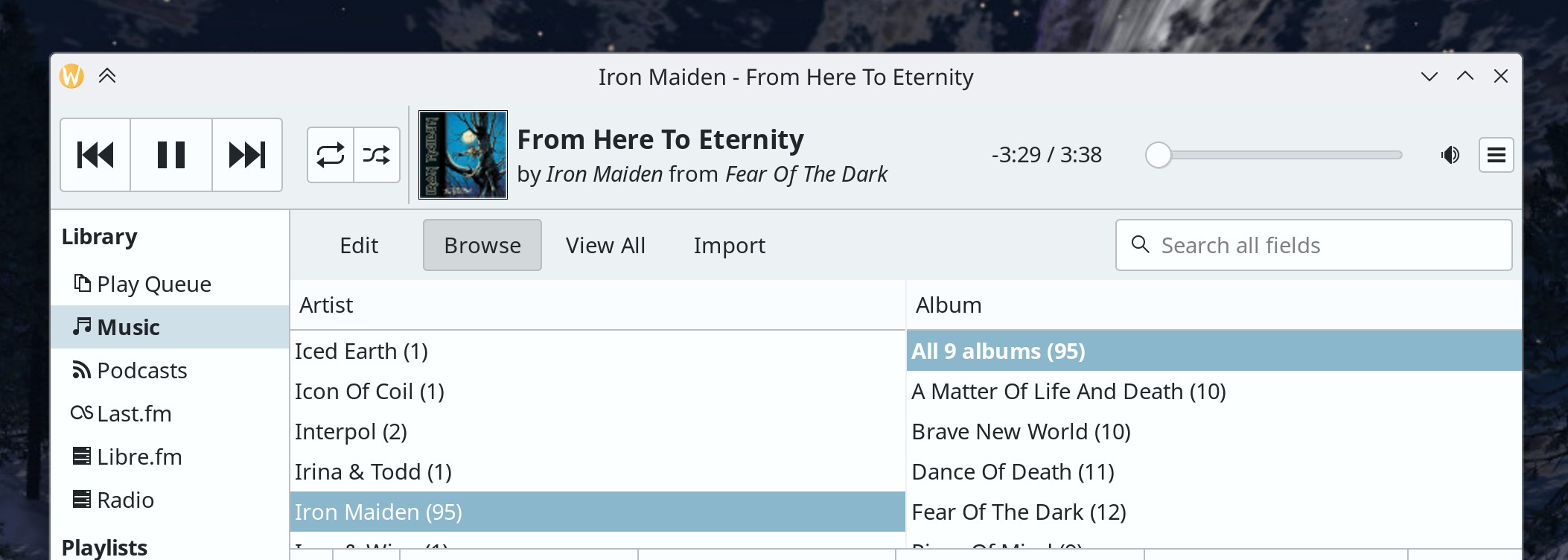
Breeze-themed Rhythmbox window showing header with conjoined buttons, playing "From Here To Eternity, by Iron Maiden from Fear Of The Dark album

Notifications in the history pop-up are now sorted chronologically, rather than by a somewhat difficult to understand combination of type and urgency (Joshua Goins, Plasma 6.0. Link)

The way sizes and positions of KDE app windows are remembered for multi-screen setups is now fundamentally more robust, so you should see fewer circumstances of windows having the wrong size and position when using multiple screens, especially when the specific screens change (me: Nate Graham, Frameworks 5.104. Link)

It’s now possibly to directly delete items that are already in the trash (Méven Car, Frameworks 5.104. Link)

Significant Bugfixes

(This is a curated list of e.g. HI and VHI priority bugs, Wayland showstoppers, major regressions, etc.)

When using an NVIDIA graphics card, after you reboot or wake the system from sleep, external screens are no longer usually inappropriately disabled, and also icons and text throughout Plasma are no longer sometimes missing (Ivan Tkachenko, Plasma 5.27.2. Link 1 and link 2)

Fixed a case where KWin could crash when switching window decoration themes (Vlad Zahorodnii, Plasma 5.27.2. Link)

In the Plasma Wayland session, when the clipboard history has been set to only one item, it’s now possible to copy text with a single copy action, not two (David Redondo, Plasma 5.27.3. Link)

Desktop icons on the active activity should no longer inappropriately re-arrange themselves when the set of connected screens changes. However during the process of investigation, we discovered that the code for storing desktop file position is inherently problematic and in need of a fundamental rewrite just like we did for multi-screen arrangement in Plasma 5.27. This will be done for Plasma 6.0, and hopefully make Plasma’s long history of being bad about remembering desktop icon positions just that–history (Marco Martin, Plasma 5.27.3. Link)

Gwenview now only registers its MPRIS interface when it’s doing something (i.e. playing a slideshow) that’s controllable over MPRIS, which should prevent it from sometimes hijacking your global media playback shortcuts while it’s running normally (Joshua Goins, Gwenview 23.04. Link)

Other bug-related information of interest:

Automation & Systematization

We now have a new tutorial on how to create cursor themes (Magno Lomardo, Link)

We now have a tutorial on uploading your KDE app to the Microsoft Store (Thiago Sueto, Link)

Added an autotest to make sure that “preferred” apps that are not actually installed are omitted from the Task Manager as expected (Fushan Wen, Link)

Added an autotest to ensure that we’re handling System Tray icons form apps correctly (Fushan Wen, Link)

Plasma now has a “codemap” file to help people learn what and where things are (Bharadwaj Raju, Link)

…And everything else

This blog only covers the tip of the iceberg! If you’re hungry for more, check out https://planet.kde.org, where you can find more news from other KDE contributors.

How You Can Help

If you’re a user, upgrade to Plasma 5.27! If your distro doesn’t offer it and won’t anytime soon, consider switching to a different one that ships software closer to its developer’s schedules.

If you’re a developer, consider working on known Plasma 5.27 regressions! You might also want to check out our 15-Minute Bug Initiative. Working on these issues makes a big difference quickly!

Otherwise, visit https://community.kde.org/Get_Involved to discover other ways to be part of a project that really matters. Each contributor makes a huge difference in KDE; you are not a number or a cog in a machine! You don’t have to already be a programmer, either. I wasn’t when I got started. Try it, you’ll like it! We don’t bite!

And finally, KDE can’t work without financial support, so consider making a donation today! This stuff ain’t cheap and KDE e.V. has ambitious hiring goals. We can’t meet them without your generous donations!
This week in KDE: even better multi-monitor

Something funny happens when you take something that was super broken and you make it work a lot better: people start to use it more! And then they submit bug reports for all their unusual use cases that you failed to anticipate or that hadn’t been getting exercised in a long time. So in the short term it looks like things are worse, but in fact they’re better because the bug reports are becoming about more and more exotic use cases over time.

I saw this happen starting 2 years ago with the Plasma Wayland session (which has since become very robust), and now it’s happening again with multi-monitor setups. We finally nailed the basics, so people are trying it out again, abandoning their xrandr hackaround scripts, and submitting bug reports about the issues with their wild and wacky screen arrangements. 🙂 And this is great! So we spent a ton of time this week working on fixing all those edge case bugs to make our new multi-monitor system even more robust. With a strong foundation, fixing the bugs isn’t that hard!

And while the core Plasma team worked on those things, a lot of great work also was done by everyone else to add features and polish the user interface! So there’s lots to see this week:

New Features

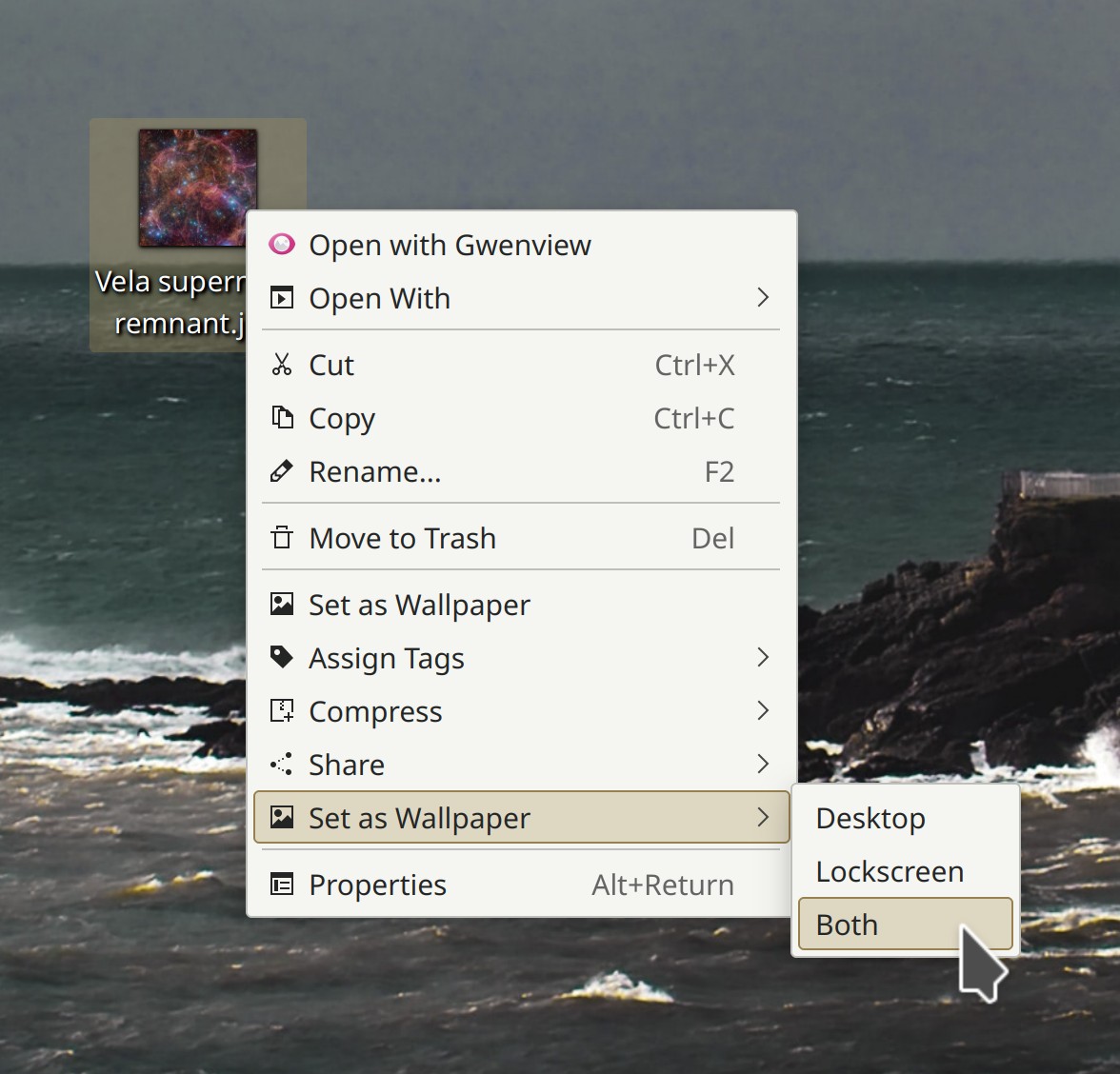
Using the context menu item present in Dolphin and the desktop, you can now set an image to be the wallpaper for the lock screen too, or for both the desktop and the lock screen at the same time! (Julius Zint, Plasma 6.0. Link):

Context menu for image on the desktop showing items for: "Set as wallpaper" > "Desktop," "Lockscreen," and "Both."
Ignore the fact that there are two “Set as Wallpaper” menu items; this is a bug that will be fixed soon

User Interface Improvements

Kate and KWrite now internally save their set of open documents shortly after they’re opened, so if either app crashes or gets killed due to memory pressure, you won’t lose your open documents when you re-open it anymore (Waqar Ahmed, Kate & KWrite 23.04. Link)

Okular now zooms smoothly rather than in steps when you Ctrl+scroll using a touchpad or a high-resolution scroll wheel (Friso Smit, Okular 23.04. Link)

When setting up a new Plasma system, apps that are pinned to the Task Manager by default in Plasma (Discover, System Settings, Dolphin, and a web browser) but not actually installed by default on the operating system you’re using will now simply be omitted, instead of remaining visible with a broken icon and doing nothing when clicked (Fushan Wen, Plasma 5.27.2. Link)

Welcome Center has received a visual overhaul to bring it more in line with other KDE apps, so now its interactive buttons appear in a footer and there are dots showing all pages and which page is active (Oliver Beard, Plasma 6.0. Link 1 and link 2):

Welcome Center app with footer containing Next and Previous buttons and dot-based page indicator

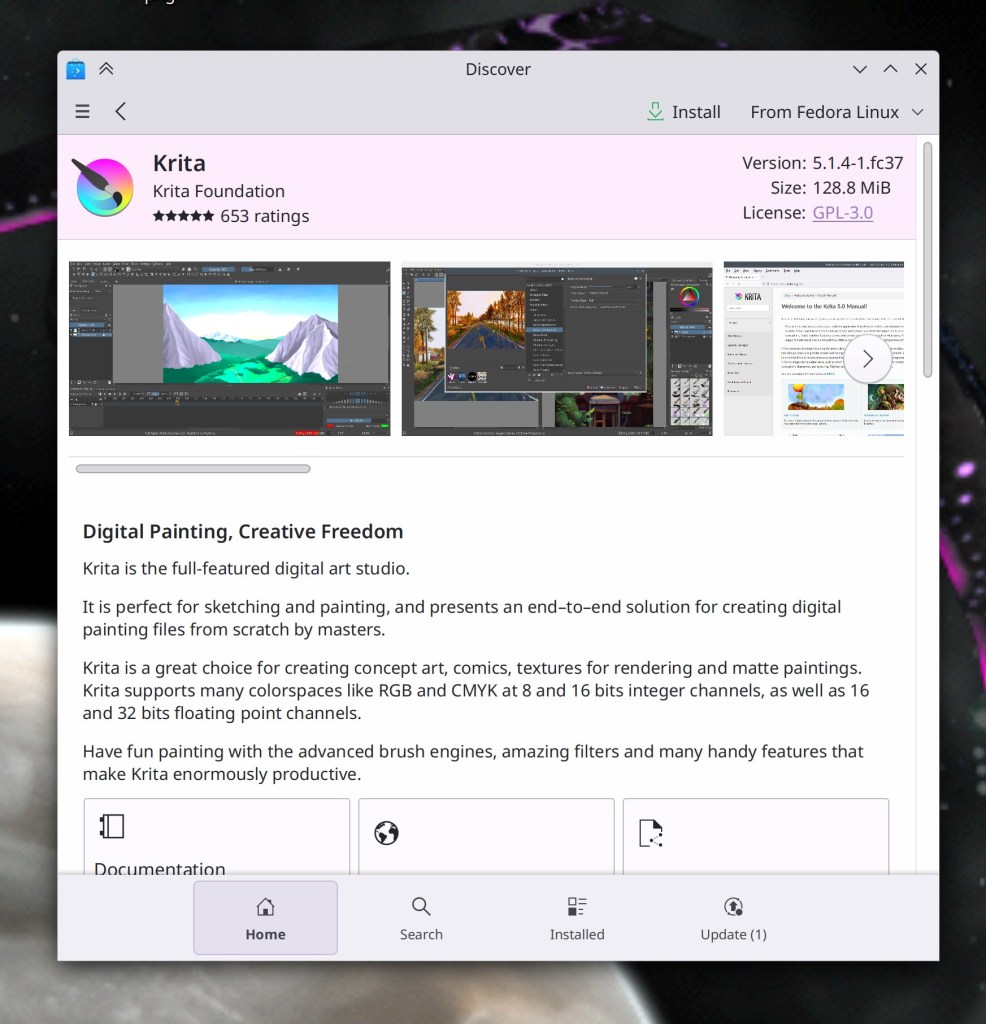
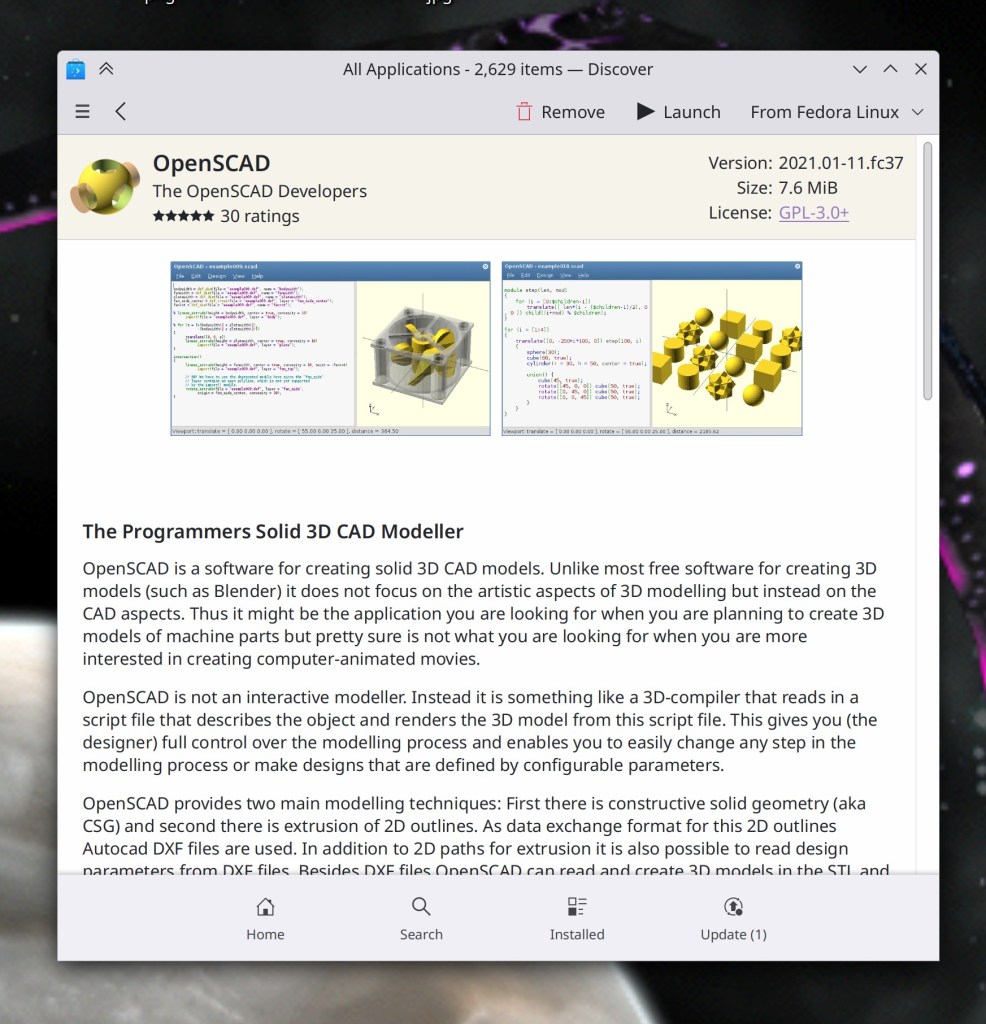
Discover’s application page has received yet another visual overhaul, making better use of space, reducing redundancy, and looking better overall (me: Nate Graham, Plasma 6.0. Link):

  • Discover window showing new header layout for Krita app
  • Discover window showing new header layout for OpenScad app

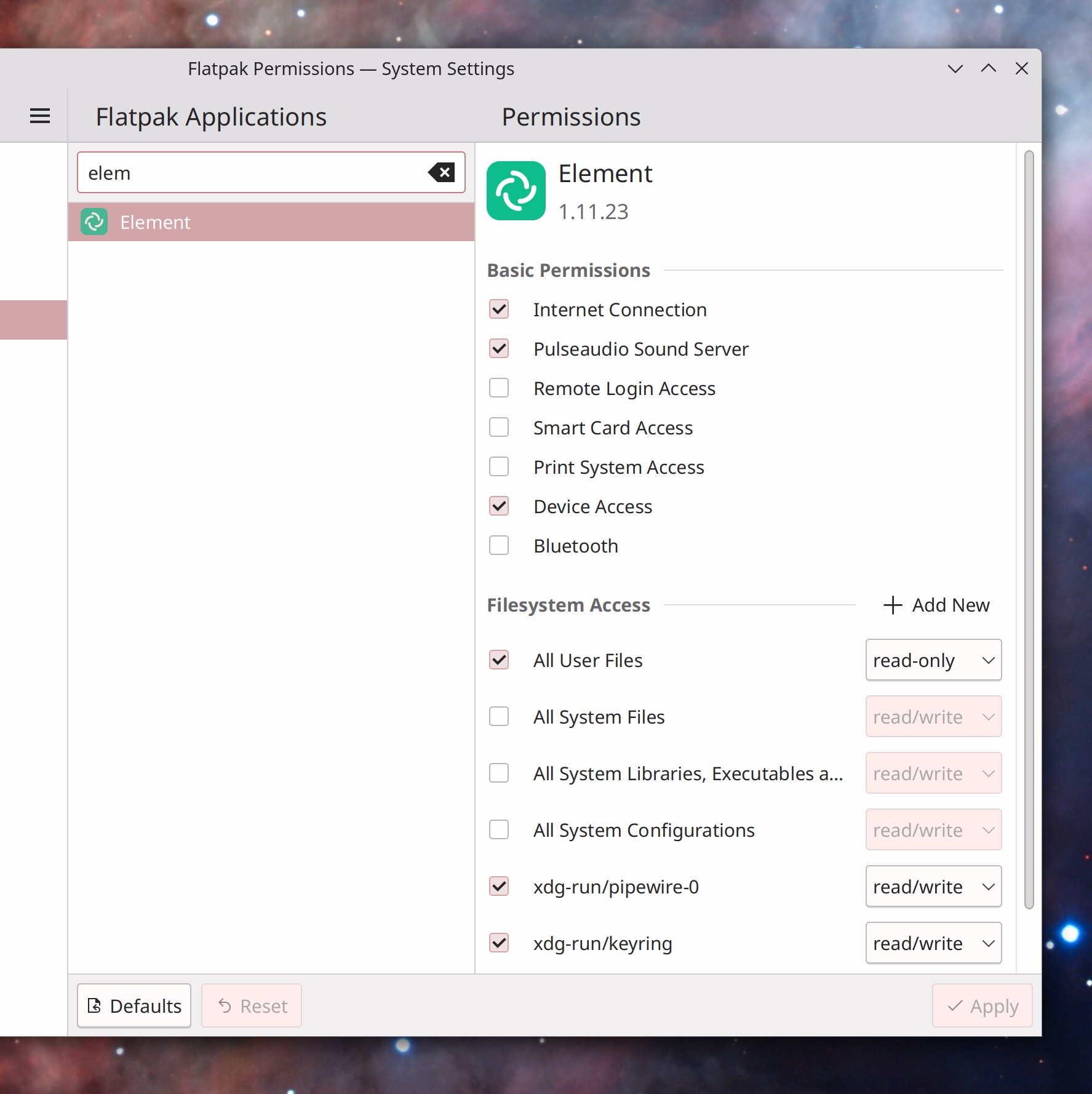
System Settings’ Flatpak Permissions page now includes a search field for the apps list and a pretty header for the apps details pane (Ivan Tkachenko, Plasma 6.0. Link):

System Settings FlatpK Permissions page showing search field avoce the app list pane and large header over app permissions page

Significant Bugfixes

(This is a curated list of e.g. HI and VHI priority bugs, Wayland showstoppers, major regressions, etc.)

Fixed a recent regression that could cause Plasma to crash when waking up the system while using a multi-screen arrangement (Aleix Pol Gonzalez, Plasma 5.27.1. Link)

Found a better way to fix incorrect scaling in the Plasma Wayland session for XWayland-using Electron apps that does not result in any regressions, and also fixes scaling in Steam, too! (Luca Bacci and Fushan Wen, Plasma 5.27.1. Link 1 and Link 2)

Fixed a recent regression that caused line artifacts to appear around panels when using a fractional scale factor in the Plasma Wayland session (Arjen Hiemstra, Plasma 5.27.2. Link)

Fixed a case where KWin could crash in the Plasma Wayland session while a video was playing in VLC (Vlad Zahorodnii, Plasma 5.27.2. Link)

Fixed a case where KWin could crash while logging out of a Plasma Wayland session and leave you hanging (Vlad Zahorodnii, Plasma 5.27.2. Link)

When using the recently-released version 1.8.11 or later of the fwupd library, Discover will now always launch properly (Adam Williamson, Plasma 5.27.2. Link)

Fixed a recent regression that could cause powerdevil to crash with certain multi-screen arrangements, breaking power management (Aleix Pol Gonzalez, Plasma 5.27.2. Link)

Fixed a case where System Settings could crash while applying or reverting screen arrangement changes (Arjen Hiemstra, Plasma 5.27.2. Link)

Fixed a major recent regression in how Aurorae window decoration themes were drawn in the Plasma Wayland session (David Edmundson, Plasma 5.27.2. Link 1 and link 2)

Fixed a semi-recent regression in the Plasma Wayland session that allowed the cursor to briefly go 1 pixel beyond the screen on the bottom and right screen edges, somewhat breaking Fitts’ Law and causing hover-enabled UI elements on screen edges to flicker (Xaver Hugl, Plasma 5.27.2. Link)

Fixed an issue in the Plasma Wayland session where desktop size would be computed subtly incorrectly when using a fractional scale factor and cause various off-by-one-pixel visual and functional glitches all over the place (David Edmundson, Plasma 5.27.2. Link)

Discover no longer shows complete nonsense for most distro-repo-provided apps in the “Distributed by:” field on app pages (me: Nate Graham, Plasma 5.27.2. Link)

The semi-new QML version of the Present Windows effect now works properly with the keyboard when invoked in its mode that only shows the windows of a specific app, no longer allowing you to invisibly focus windows of other apps too (Vlad Zahorodnii, Plasma 5.27.2. Link)

When using a fractional scale factor in the Plasma Wayland session, the cursor is now rendered correctly in XWayland-using apps (Xaver Hugl, Plasma 5.27.2. Link)

Multi-screen arrangements consisting of screens from the same vendor that differ by only the last character of their serial numbers (imagine a large company buying monitors in bulk) will no longer get scrambled on login (David Redondo, Plasma 5.27.2. Link)

Fixed a semi-recent regression in the Plasma Wayland session that could cause the Baloo file indexer service to crash frequently (David Redondo, Frameworks 5.104. Link)

When getting new add-ons using the “Get New [Thing]” dialog, the sheet to let you choose which thing you want to get in case there’s more than one is now correctly scrollable in case it does not fit in the view (Ivan Tkachenko, Frameworks 5.104. Link)

Other bug-related information of interest:

Automation & Systematization

The tutorial for writing Kirigami apps has been rewritten for massively improved usefulness and helpfulness! (Thiago Sueto, Link)

The continuous integration systems for Gwenview and Kamoso now build the apps as Flatpaks for every change! (Neelaksh Singh, Link 1 and link 2)

Changes not in KDE that affect KDE

In the Plasma Wayland session, power management when using DisplayPort screens now works again for users of the Neon and Fedora KDE distros, which it turns out had not been building the KIdleTime library with its proper Wayland support enabled (Jonathan Riddell and Marc Deop i Argemí, right now! Link).

…Okay so technically Neon is in KDE, but it seemed more awkward to mention Neon separately elsewhere and Fedora KDE here, since both distros suffered from the same underlying issue that was causing the same user-facing bug, and both needed the same change to fix it.

…And everything else

This blog only covers the tip of the iceberg! If you’re hungry for more, check out https://planet.kde.org, where you can find more news from other KDE contributors.

How You Can Help

If you’re a user, upgrade to Plasma 5.27! If your distro doesn’t offer it and won’t anytime soon, consider switching to a different one that ships software closer to its developer’s schedules.

If you’re a developer, consider working on known Plasma 5.27 regressions! You might also want to check out our 15-Minute Bug Initiative. Working on these issues makes a big difference quickly!

Otherwise, visit https://community.kde.org/Get_Involved to discover other ways to be part of a project that really matters. Each contributor makes a huge difference in KDE; you are not a number or a cog in a machine! You don’t have to already be a programmer, either. I wasn’t when I got started. Try it, you’ll like it! We don’t bite!

And finally, KDE can’t work without financial support, so consider making a donation today! This stuff ain’t cheap and KDE e.V. has ambitious hiring goals. We can’t meet them without your generous donations!
This week in KDE: a smooth release of Plasma 5.27

This week we finally released Plasma 5.27 and so far it’s been very smooth! The only significant regressions found so far are already fixed, ready for release in a few days. There have been some grumblings about the new window outlines feature, but you can’t please everyone, and there’s a chance we’ll end up making them optional.

New Features

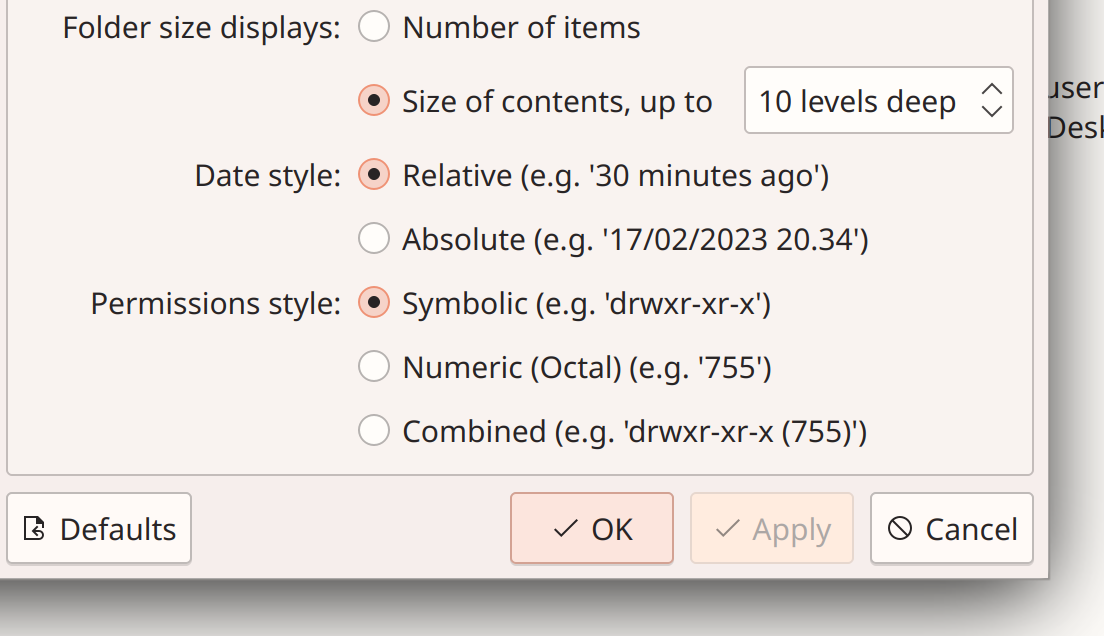
Dolphin now lets you configure how permissions are shown in Details view (Serg Podtynnyi, Dolphin 23.04. Link)

Dolphin settings window showing new setting to control "Permissions style", with the options "Symbolic (e.g. 'drwxr-xr-x')", "Numeric (Octal) (e.g. '755')", and "Combined (e.g. 'drwxr-xr-x' (755)')"

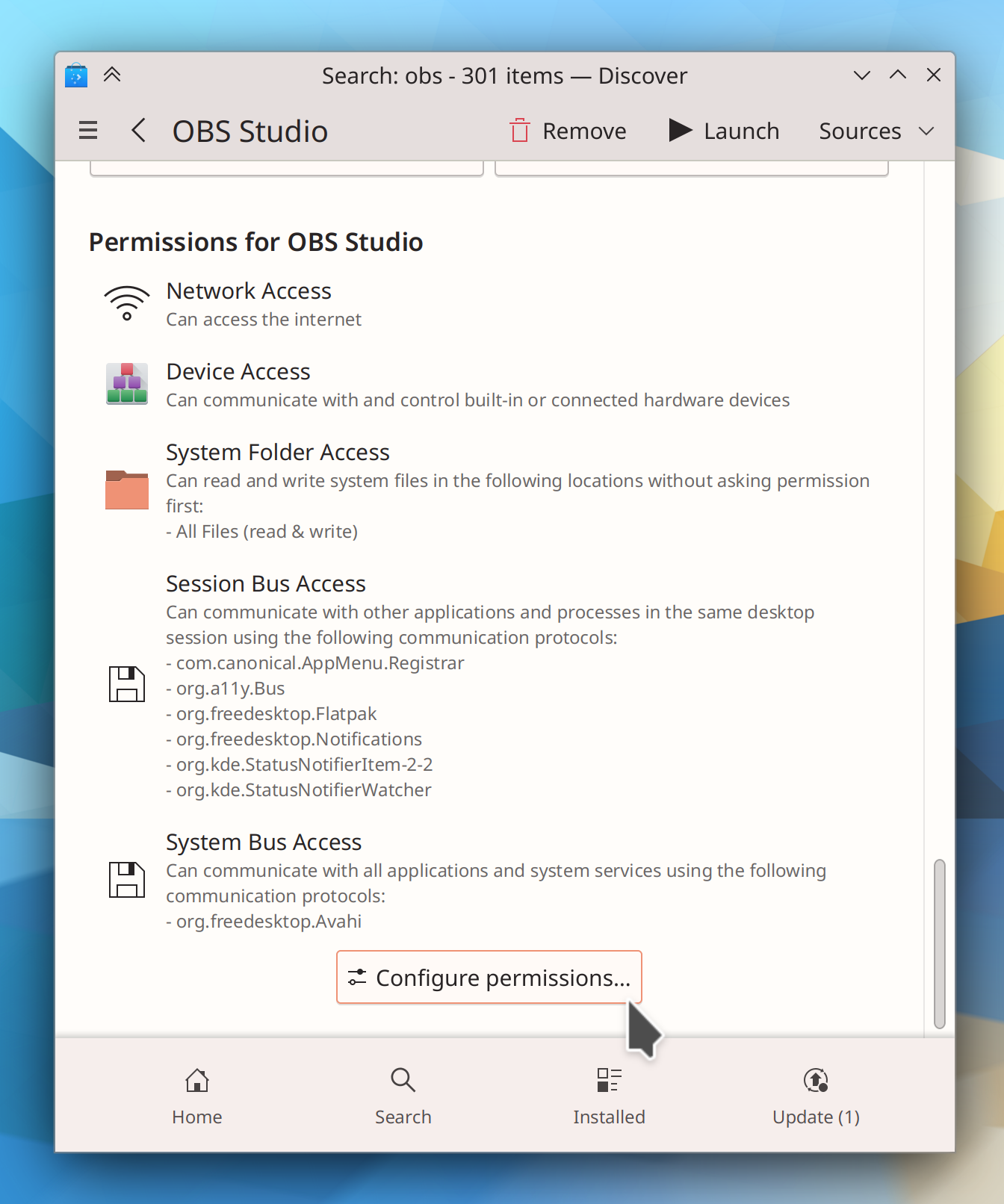
While you’re viewing the page for an installed Flatpak app in Discover, you can now jump straight to the System Settings page for configuring its permissions (Ivan Tkachenko, Plasma 6.0. Link 1 and link 2):

Discover window showing OBS packaged via Flatpak with list of permissions and "Configure Permissions…" button

User Interface Improvements

Dolphin’s code for counting directory sizes has been made faster, improving performance especially with manually-mounted network shares that for some reason aren’t detected as such (Méven Car, Dolphin 23.04. Link)

Gwenview now zooms smoothly rather than in steps when you Ctrl+scroll using a touchpad (Friso Smit, Gwenview 23.04. Link)

Holiday calendars no longer include astronomical events, so when you also have the Astronomical Events calendar plugin active, you won’t see the same astronomical events twice in the same day anymore (me: Nate Graham, Plasma 5.27.1. Link)

When you search for apps in the portal-based app chooser dialog, it now automatically searches through all of them rather than just the limited set of “recommended” apps that are shown by default (me: Nate Graham, Plasma 5.27.1. Link)

When apps using the portal-based system ask for you to allow screen sharing, you can now give them a specific screen region, not just the whole screen or a single window (Dominique Hummel, Plasma 6.0. Link)

The Task Manager’s “Close” context menu item now says “Close All” for clarity if you right-clicked on a grouped task (Fushan Wen, Plasma 6.0. Link)

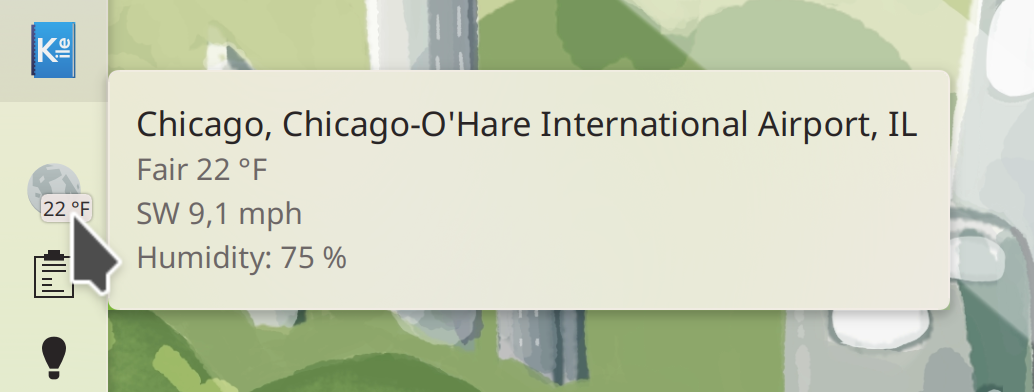
The Weather Report widget’s tooltip now shows wind speed and humidity by default (Guilherme Marçal Silva, Plasma 6.0. Link):

Weather Widget tooltip showing city name, temperature, wind speed, and humidity

All System Settings pages that were missing “file a bug on this specific page” support should now have it (Alexander Lohnau and me: Nate Graham, Frameworks 5.104 and the next versions of a couple other things on different release schedules. Link)

Significant Bugfixes

(This is a curated list of e.g. HI and VHI priority bugs, Wayland showstoppers, major regressions, etc.)

The Deutscher Wetterdienst (DWD) weather provider now works again after they changed their data format (Emily Ehlert, Plasma 5.24.8. Link)

Fixed a case where KWin could crash after waking from sleep while using multiple screens with windows tiled to a screen that wakes up very slowly after the system wakes from sleep (Dominique Hummel, Plasma 5.27.1. Link)

Fixed a recent regression in 5.27 that could, under certain circumstances, cause desktop icons to disappear after waking the system from sleep until Plasma was manually restarted (Marco Martin, Plasma 5.27.1. Link)

Fixed a recent regression in 5.27 that caused XWayland-using Electron apps (such as VSCode, Discord, and Element) to be displayed too small when using scaling (me: Nate Graham, Plasma 5.27.1. Link)

The new Flatpak Permissions page in System Settings will now create app-specific overrides properly when using the system in a language other than English (Harald Sitter, Plasma 5.27.1. Link)

Fixed a case where Plasma could crash after waking from sleep after the set of connected screens changed while it was asleep (Marco Martin, Plasma 5.27.1. Link)

Fixed showing information about NVIDIA GPUs in System Monitor, again. This time, for real! (David Redondo, Plasma 5.27.1. Link)

Fixed a recent regression in 5.27 that caused the Digital Clock’s tooltip to redundantly show the current time and timezone even when no additional timezones are configured (me: Nate Graham, Plasma 5.27.1. Link)

The Networks widget will no longer unnecessarily show the loopback interface when using NetworkManager 1.42 (David Redondo, Plasma 5.27.1. Link)

Setting charge limits for batteries that supports charge limits but not charge minimums now works (Fabian Vogt, Plasma 5.27.1. Link)

In the Plasma Wayland session, KDE app windows once again correctly remember their size when using more than one screen (me: Nate Graham, Frameworks 5.104. Link)

Removing content downloaded using the Get New <thing> system is now significantly more robust (Fushan Wen, Frameworks 5.104. Link)

Other bug-related information of interest:

Automation & Systematization

Added an autotest for the Media Player widget’s interactions with the MPRIS2 data interface (Fushan Wen, Plasma 5.27.1. Link)

Changes not in KDE that affect KDE

In the Plasma Wayland session, non-fullscreen Chromium web apps will no longer hijack all global keyboard shortcuts (Nick Diego Yamane, Chromium 111. Link)

…And everything else

This blog only covers the tip of the iceberg! If you’re hungry for more, check out https://planet.kde.org, where you can find more news from other KDE contributors.

How You Can Help

If you’re a user, upgrade to Plasma 5.27! If your distro doesn’t offer it and won’t anytime soon, consider switching to a different one that ships software closer to its developer’s schedules.

If you’re a developer, consider working on known Plasma 5.27 regressions! You might also want to check out our 15-Minute Bug Initiative. Working on these issues makes a big difference quickly!

Otherwise, visit https://community.kde.org/Get_Involved to discover other ways to be part of a project that really matters. Each contributor makes a huge difference in KDE; you are not a number or a cog in a machine! You don’t have to already be a programmer, either. I wasn’t when I got started. Try it, you’ll like it! We don’t bite!

And finally, KDE can’t work without financial support, so consider making a donation today! This stuff ain’t cheap and KDE e.V. has ambitious hiring goals. We can’t meet them without your generous donations!
This week in KDE: The best Plasma 5 version ever… again!

Plasma 5.27 LTS will be released in just a few days. And so far it’s on track to be the least-buggy version in memory! At the time of writing there are only three known regressions, down from the dozen or more we usually ship with. A focus on stability pays off!

As part of that effort, you might have heard we did a major push to fix multi-monitor issues for this release, and so far it looks to have worked: tons of people are reporting that their longstanding issues are fixed in the beta! But there are sure to be a few more. When you do encounter an issue, I’d encourage you to read this blog post by Marco Martin before submitting a bug report. In it, you’ll learn how best to submit a bug report for multi-monitor issues and what data to gather, so that it has the best chance of being actionable.

But that’s not all! We landed some great new features for Plasma 6 and made good progress on the 15-minute bugs, too!

New Features

Dolphin can now show you how many pages a document has in its additional metadata display (Serg Podtynnyi, Dolphin 23.04. Link)

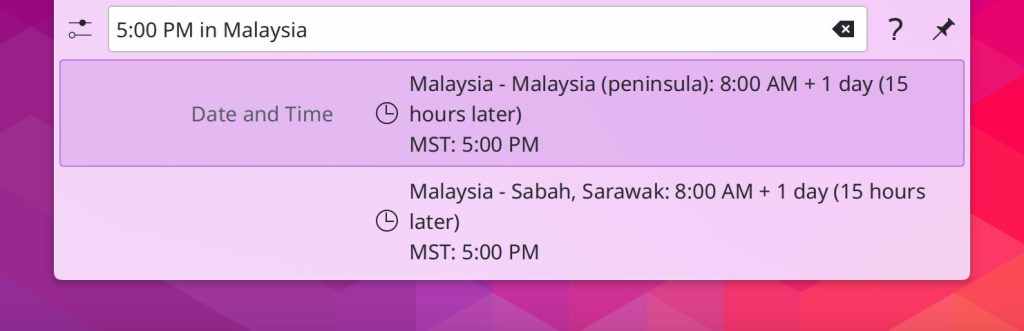
KRunner can now convert between time zones. Now it’s easy to find out what any time in your local time zone will be anywhere else in the world! (Natalie Clarius, Plasma 6.0. Link):

User Interface Improvements

When you delete a file in Dolphin, it now selects the next one automatically (Serg Podtynnyi, Dolphin 23.04. Link)

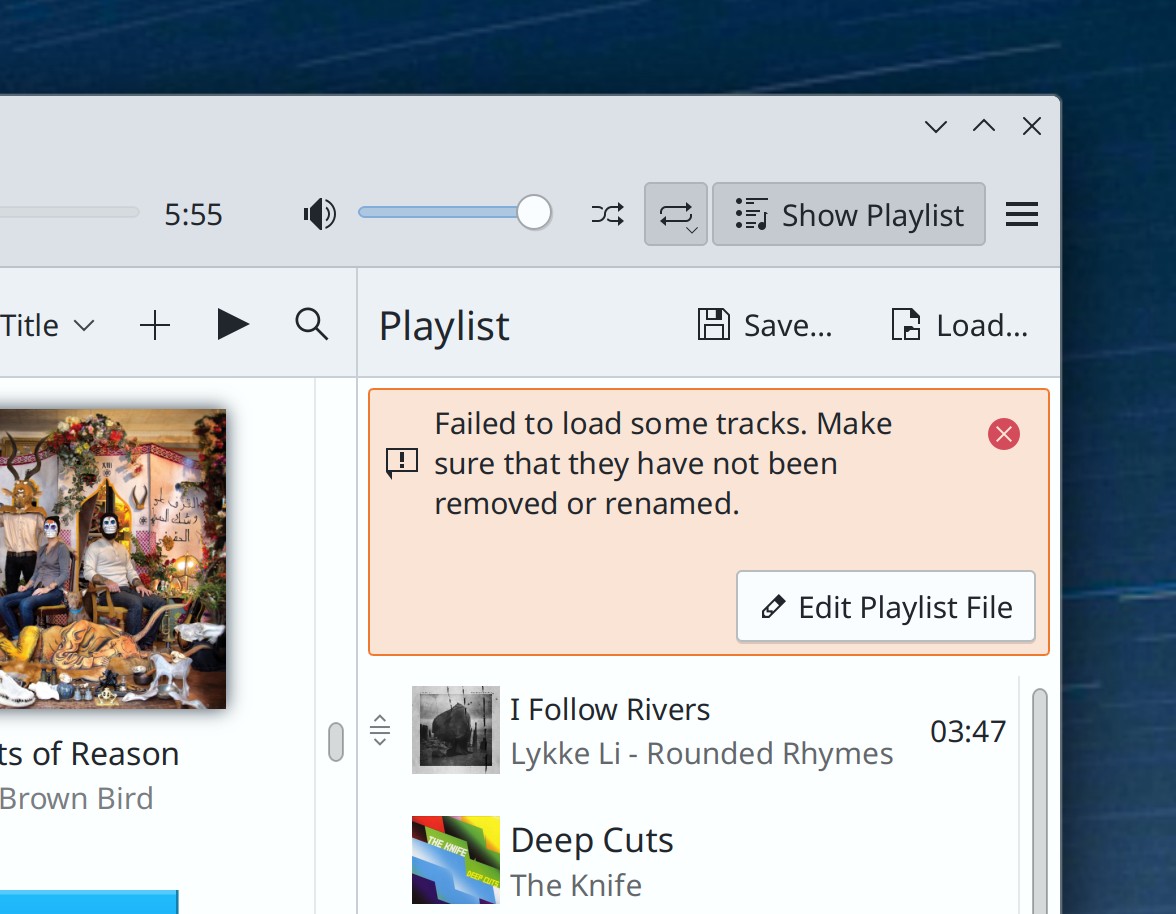
When you ask Elisa to open a Playlist file with invalid paths, it now skips them, shows you a message explaining what happened, and offers you the possibility to open the file you can edit it to fix the broken paths (Nikita Karpei, Elisa 23.04. Link):

Part of Elisa music player's main window showing inline error message that says, "Failed to load some tracks. Make sure they have not been removed or renamed" plus a button labeled "Edit Playlist File"

When Discover’s Flatpak backend is installed and in use, it should now be significantly faster when using version 0.16.0 of the AppStream library (Aleix Pol Gonzalez, Plasma 5.27.1. Link)

System Settings’ Window Decorations page now uses the more modern frameless style, rather than a tabbed view (Joshua Goins, Plasma 6.0. Link):

System Settings main window showing Window Decorations page in a modern frameless style

KRunner will now find files that it previously wouldn’t because they didn’t fall into a common category (Natalie Clarius, Plasma 6.0. Link)

In System Settings’ Region & Language page, the warning that appears when you configure languages in an invalid way by placing any languages below American English in the priority list now displays it as well when you do that for British English or Australian English, which will generally produce a weird mix of languages in your apps (me: Nate Graham, Plasma 6.0. Link)

When you set an opacity window rule, it now defaults to 100% opacity rather than 0% opacity, and if you manually lower it down to 25% or less, it will show a warning that this may make the window difficult to interact with (Ismael Asensio and Natalie Clarius, Plasma 6.0. Link 1 and link 2)

Throughout KDE software, when trying to run a command-line program that doesn’t exist or can’t be found, you’ll now see an appropriate error message telling you this (Thenujan Sandramohan, Frameworks 5.103. Link)

Significant Bugfixes

(This is a curated list of e.g. HI and VHI priority bugs, Wayland showstoppers, major regressions, etc.)

Dolphin should now be significantly less likely to lag or hang while browsing manually mounted network shares. There’s still more to do, and you should still try to access network locations from their network URLs, but this should still help! (Andrew Gunnerson, Dolphin 23.04. Link)

In the Plasma Wayland session, Okular’s main window will now raise as expected when it’s already open and a document is opened from another app (Nicolas Fella, Okular 23.04. Link)

The Digital Clock Widget’s Month View is no longer sometimes empty (Someone awesome, Plasma 5.27. Link)

Performing system updates on some distros no longer sometimes resets your touchpad settings (David Edmundson, Plasma 5.27. Link)

Fixed a source of hangs and lags in Plasma (Arjen Hiemstra, Plasma 5.27. Link)

Apps with System Tray icons are no longer sometimes missing from the Tray when autostarted (David Redondo, Plasma 5.27. Link)

When hovering over a Task Manager icon to show the preview for that window or group of windows, moving the cursor diagonally to the preview in such a manner that it passes over another icon in the process no longer causes the preview to disappear before the cursor gets there. This also fixes a related issue where it was impossible to reach the preview for a window located in the bottom row of a multi-row Task Manager! (Bharadwaj Raju, Plasma 5.27. Link 1 and link 2)

In the Plasma Wayland session, when using a GPU that doesn’t support atomic modesetting, the cursor will no longer disappear when it touches the bottom or right screen edge in WINE games (Xaver Hugl, Plasma 5.27.1. Link)

Dolphin can no longer hang while trying to display metadata and previews for .mobi files (Méven Car, Frameworks 5.104. Link)

Other bug-related information of interest:

Automation & Systematization

Added a new autotest for the Task manager to test the integrity of the data model (Fushan Wen, Plasma 6.0. Link)

Added a new UI test to make sure that the Plasma logout screen works properly (Marco Martin, Plasma 5.27.1. Link)

Added a tutorial for writing Kate plugins (Waqar Ahmed, Link)

Brought the documentation for System Settings’ Workspace Options page up to date (Natalie Clarius, Plasma 6.0. Link)

…And everything else

This blog only covers the tip of the iceberg! If you’re hungry for more, check out https://planet.kde.org, where you can find more news from other KDE contributors.

How You Can Help

Please test the Plasma 5.27 beta! Bug reports filed against the beta version (5.26.90) get looked at and prioritized. It really helps. And of course, if you’re a developer, fixing those bugs is massively impactful too. You might also want to check out our 15-Minute Bug Initiative. Working on these issues makes a big difference quickly!

Otherwise, visit https://community.kde.org/Get_Involved to discover ways to be part of a project that really matters. Each contributor makes a huge difference in KDE; you are not a number or a cog in a machine! You don’t have to already be a programmer, either. I wasn’t when I got started. Try it, you’ll like it! We don’t bite!

And finally, KDE can’t work without financial support, so consider making a donation today!

This week in KDE: Plasma 6 starts to take shape

While we hammer away at polishing up Plasma 5.27, features and user interface changes are starting to land for Plasma 6! We took a big bite out of the 15-minute bugs, too. Goodies for everyone!

New Features

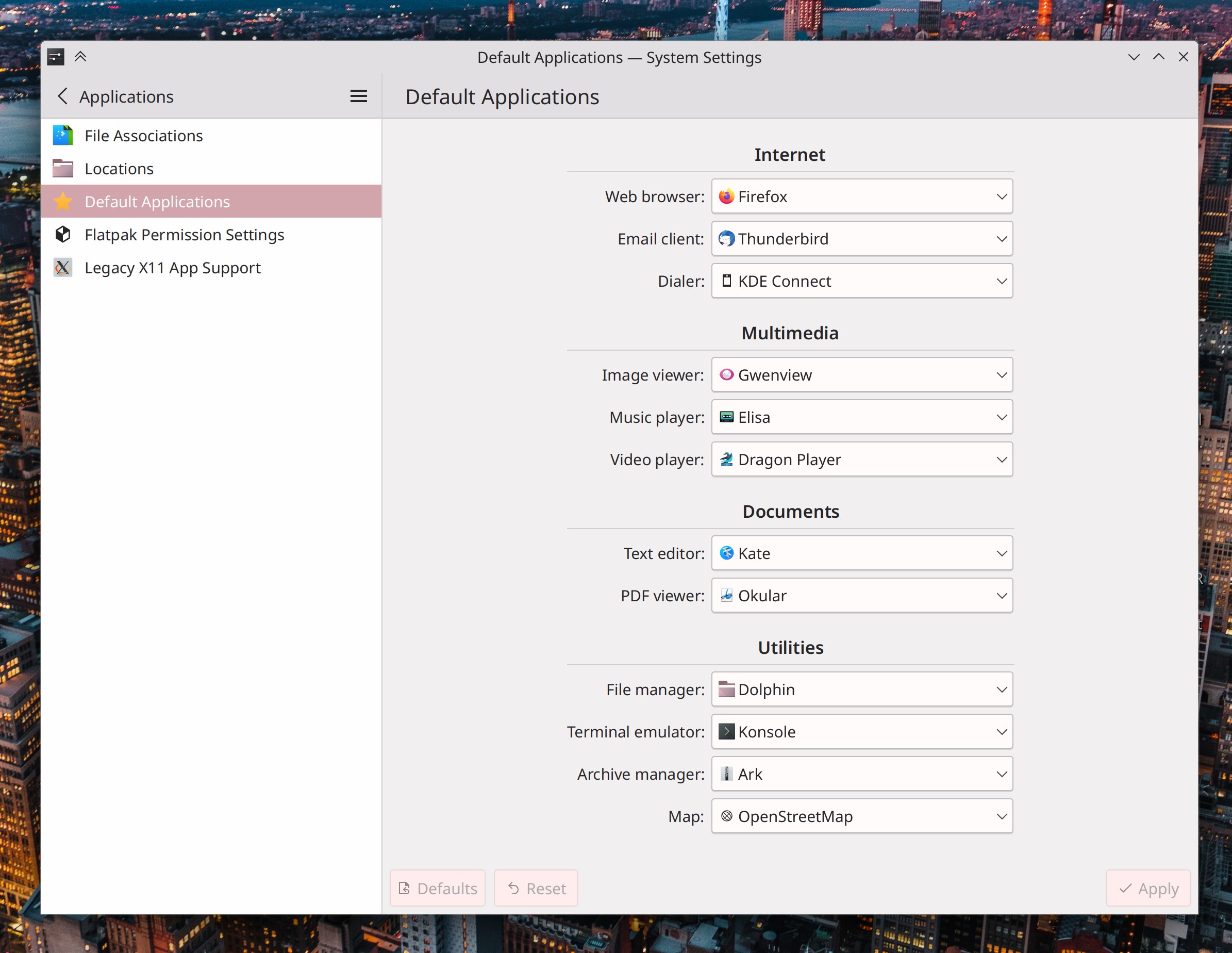
System Settings’ Default Applications page now lets you choose your preferred application for a much wider variety of file types! (Méven Car, Plasma 6.0. Link):

System Settings main window showing "Default Applications" page with large list of URL protocols and file formats that you can choose your preferred app for, including "Web browser," "Email client," "Dialer," "Image viewer," "Music player," "Video player," "Text editor," PDF viewer," File manager," Terminal emulator," "Archive manager," and "Map"
You can still override these broad mappings with per-file-type mappings in the File Associations page, of course. And when you do so, those overrides will be displayed here!

Throughout Kirigami-based apps, standard list items with elided text now display a tooltip on hover showing the full text (Ivan Tkachenko, Frameworks 5.103. Link)

User Interface Improvements

Elisa now increments a song’s play count when it finishes playing, not when it starts (Frisco Smit, Elisa 23.04. Link)

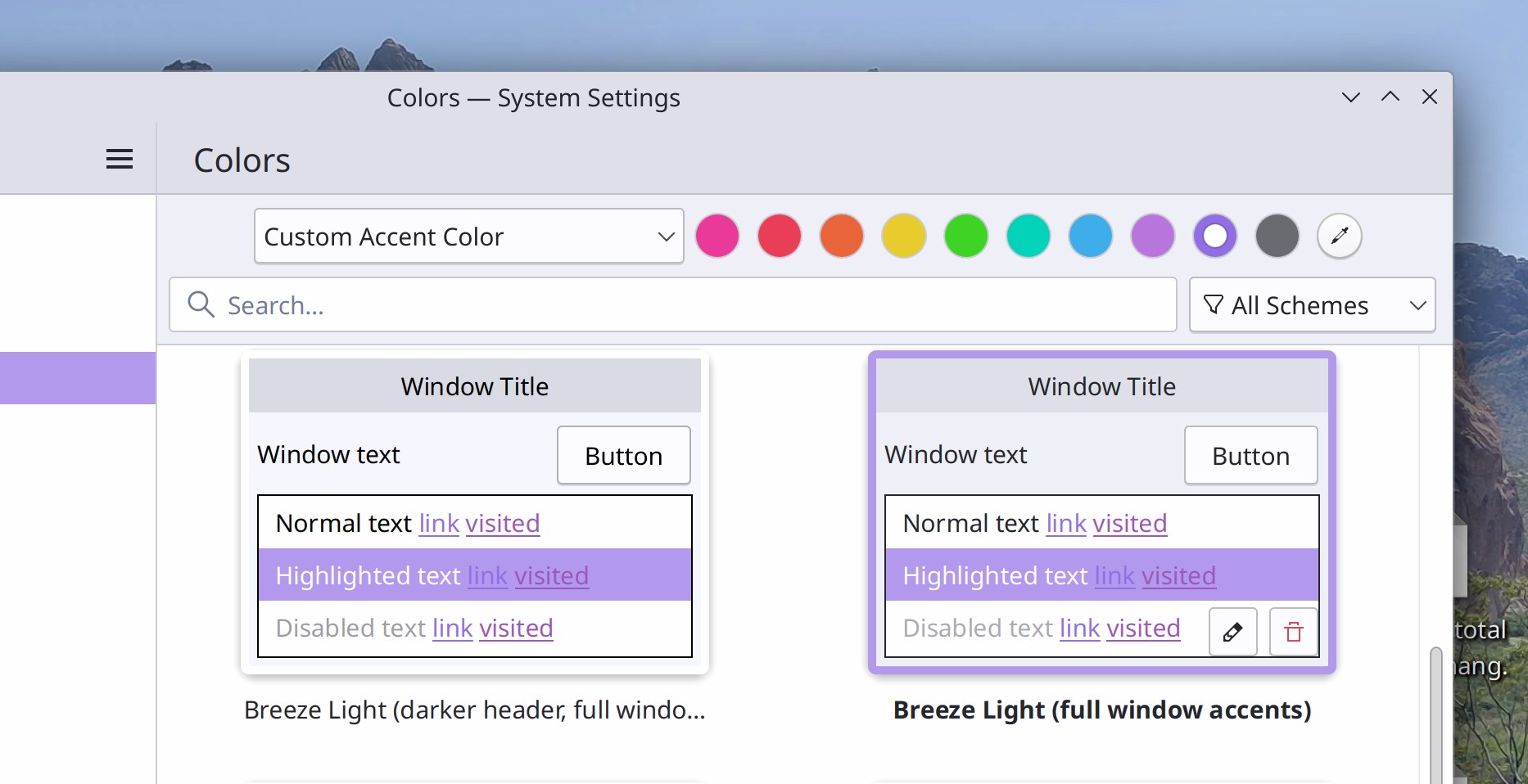
The accent color picking UI has been condensed to it takes up less space, which opens up room for us to add other settings there in the future, such as day/night color scheme switching, which is in progress! (Tanbir Jishan, Plasma 6.0. Link):

System Settings main window showing Colors page with accent color choosing user interface that fits entirely on one row, with a combobox on the left showing "Custom accent color" and a row of dots beside it, with a purple dot selected

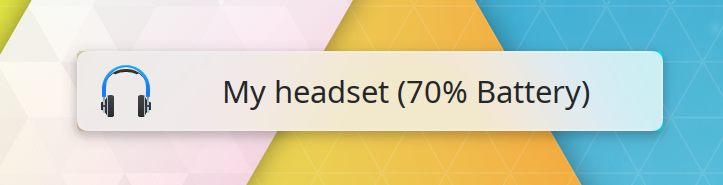
The OSD that appears when you switch audio devices now also shows the battery level of the new audio device you switched to (if that device has a battery and reports battery info, of course) (Kai Uwe Broulik, Plasma 6.0. Link):

OSD showing an image of a headset beside the text "My headset (70% battery)"

Framed views with rounded corners in QtQuick-based software no longer have tiny “korners”-style visual glitches in the corners (Ivan Tkachenko, Frameworks 5.103. Link):

Close-up view of a rounded corner in a framed scrollable view of a Qt-Quick-based user interface that shows perfect roundned both inside and outside the frame

Significant Bugfixes

(This is a curated list of e.g. HI and VHI priority bugs, Wayland showstoppers, major regressions, etc.)

Using a keyboard shortcut to close a window by dragging it around no longer causes it to leave a ghostly non-interactive shadow of itself hanging around (Marco Martin, Plasma 5.27. Link)

Upgrades of Flatpak runtimes with have a new version available are once again marked as such appropriately in Discover, rather than being listed as a “refresh” of the existing version (though that’s still possible too) (Aleix Pol Gonzalez, Plasma 5.27. Link)

Viewing System Settings’ Application Style page no longer sometimes causes the CPU usage to spike when certain 3rd-party application styles are installed (Fushan Wen, Plasma 6.0. Link)

Fixed two issues with Plasma panel widget pop-up placement that could cause popups to be inappropriately centered on their panels when using a multi-monitor setup or when the panel is not maximized to take up all available space on its screen edge (Niccolò Venerandi, Frameworks 5.103. Link)

Spectacle’s “Copy to clipboard right after taking a screenshot” feature once again works in the Plasma Wayland session (David Redondo, Frameworks 5.103. Link)

In QtQuick-based software, it’s no longer possible to drag things around in scrollable views that shouldn’t be draggable, like items in sidebars and lists (Marco Martin, Frameworks 5.103. Link)

Fixed a ton of little miscellaneous glitches with scrollbars in QtQuick-based software (Ivan Tkachenko, Frameworks 5.103. Link)

Other bug-related information of interest:

Automation & Systematization

Updated the included documentation for System Settings’ Global Themes, Colors, Cursors, Desktop Session, Plasma Search, Task Switcher, Screen Edges, General behavior pages! (Natalie Clarius, Plasma 5.27. Link 1, link 2, link 3, link 4, link 5, link 6, link 7, link 8, link 9)

Added documentation for Aurorae window decorations! (Natalie Clarius. Link)

…And everything else

This blog only covers the tip of the iceberg! If you’re hungry for more, check out https://planet.kde.org, where you can find more news from other KDE contributors.

How You Can Help

Please test the Plasma 5.27 beta! Bug reports filed against the beta version (5.26.90) get looked at and prioritized. It really helps. And of course, if you’re a developer, fixing those bugs is massively impactful too. You might also want to check out our 15-Minute Bug Initiative. Working on these issues makes a big difference quickly!

Otherwise, visit https://community.kde.org/Get_Involved to discover ways to be part of a project that really matters. Each contributor makes a huge difference in KDE; you are not a number or a cog in a machine! You don’t have to already be a programmer, either. I wasn’t when I got started. Try it, you’ll like it! We don’t bite!

And finally, KDE can’t work without financial support, so consider making a donation today!

This week in KDE: Major bugfixing and screen recording in Spectacle

The team is in full-on bugfixing mode and we’re knocking out issues left and right in preparation for the Plasma 5.27 final release! I bet everyone reading can find at least one fix for a bug that’s annoyed them at some point, because we have a few big ones here! We want this to be the best, most stable, most awesome Plasma 5 release ever, so folks are happy with it for 8 months or longer before Plasma 6 drops.

We did manage to sneak in some feature work too (you know us!) including screen recording for Spectacle! Check it out:

New Features

Spectacle now includes video recording on Wayland! (Aleix Pol Gonzalez, Spectacle 23.04. Link):

Spectacle main window showing a tab bar on the right with the tabs "Screenshot" and "Recording", demonstrating the new screen recording functionality

OpenConnect VPNs now support double-authentication mode using SAML authentication (Rahul Rameshbabu, Plasma 6.0, Link)

By default, the tooltips for all of our various clock widgets now show seconds, just in case you need to see them quickly, but don’t want the overhead of manually turning on the display of settings. This is also configurable, of course! (Alessio Bonfiglio, Plasma 6.0. Link 1 and link 2)

When you’re using the Unsplash Picture of the Day wallpaper plugin, you can now choose to only show results from the “Cyber” category (David Elliott, Plasma 6.0. Link):

Plasma desktop wit wallpaper depicting a  turquoise colored sci-fi subway station from Unsplash's "cyber-world", with Plasma's configuration window open in front of it demonstrating how to configure Plasma to show these kinds of wallpapers

User Interface Improvements

When you have the filter bar open in Dolphin and it’s filtering the view, clicking on a Places panel for the current view entry now resets the filter and shows you everything (Serg Podtynnyi, Dolphin 23.04. Link)

Spectacle’s “Capture the current pop-up only” checkbox is no longer present on Wayland, because it doesn’t do anything there (me: Nate Graham, Spectacle 23.04. Link)

System Settings’ Icons page now shows a “Help” button that takes you to the documentation for it (Natalie Clarius, Plasma 5.27. Link)

It’s now possible to delete Global Themes right from the grid view in System Settings, without having to go into the “Get New Global Themes…” window to do it, just like in most other System Settings pages for choosing visual theming options (Fushan Wen, Plasma 6.0 Link)

Scrolling over scrollbars (not dragging them; actually scrolling over them) now works consistently in QtQuick-based apps. And they also look better when using a right-to-left language, to! (Ivan Tkachenko, Frameworks 5.103. Link 1 and link 2)

Significant Bugfixes

(This is a curated list of e.g. HI and VHI priority bugs, Wayland showstoppers, major regressions, Plasma 5.27 beta bugs, etc.)

Spectacle FINALLY no longer includes itself in screenshots taken without a 1-second or longer delay using the main window (David Redondo, Spectacle 23.04. Link)

Under certain circumstances, Discover no longer always crashes on launch unless its cache folder (~/.cache/discover) is empty (Fabian Vogt, Plasma 5.24.8. Link)

KWin can no longer sometimes crash when you rapidly resize a quick-tiled window adjacent to another quick-tiled window (Vlad Zahorodnii, Plasma 5.27. Link)

Fixed a recent regression in the Plasma Wayland session that could cause GTK apps to succeed at sending clipboard data to Plasma only once and then fail on all subsequent times (David Redondo, Plasma 5.27. Link)

GTK4 apps are no longer double-scaled when using screen scaling (Luca Bacci, Plasma 5.27. Link)

When you’ve set up a window rule that wants to move a window to a screen location that doesn’t exist (e.g. because that location is on another screen that’s no longer connected), it will no longer be moved to an offscreen location where it’s open but inaccessible; instead the rule simply doesn’t execute at all until the location it wants to move the window to exists again (Xaver Hugl, Plasma 5.27. Link)

When an app requests that the system inhibit the system from going to sleep–and only from going to sleep–Plasma no longer inappropriately inhibits screen locking too (Kai Uwe Broulik, Plasma 5.27. Link)

In the Plasma Wayland session, fixed another bug that could cause you to be unable to choose a screen resolution other than your screen’s native resolution (Vlad Zahorodnii, Plasma 5.27. Link)

In the Plasma Wayland session, GTK2 apps minimized to their System Tray icon can now be restored (Fushan Wen, Plasma 5.27. Link)

Fixed a variety of subtle bugs in desktop widget positioning, so your widgets should FINALLY no longer move slightly every time you start the system (Marco Martin, Plasma 5.27. Link)

In the Notifications widget, the “show more” text FINALLY no longer ever overlaps other notifications in the history (Marco Martin, Plasma 5.27. Link)

If you’ve resized the Kickoff Application Launcher’s popup, searching in it no longer sometimes resets it to the default size (Fushan Wen, Plasma 5.27. Link)

After installing a new font, clicking on the “OK” button for the “job’s finished” message now makes it go away as expected (me: Nate Graham, Plasma 5.27. Link)

The entire system will no longer sometimes (but especially when using the Btrfs filesystem) hang while Flatpak apps are installed or updated (David Redondo, Frameworks 5.103. Link)

Fixed a whole buttload of weird, random-seeming clipboard issues in the Plasma Wayland session (David Redondo, Frameworks 5.103. Link 1, link 2, link 3, and link 4)

Other bug-related information of interest:

Automation & Systematization

Added UI tests to the Kirigami.Avatar component to make sure it always works as expected when clicked or tapped (Ivan Tkachenko, Frameworks 5.103. Link)

…And everything else

This blog only covers the tip of the iceberg! If you’re hungry for more, check out https://planet.kde.org, where you can find more news from other KDE contributors.

How You Can Help

Please test the Plasma 5.27 beta! Bug reports filed against the beta version (5.26.90) get looked at and prioritized. It really helps. And of course, if you’re a developer, fixing those bugs is massively impactful too. You might also want to check out our 15-Minute Bug Initiative. Working on these issues makes a big difference quickly!

Otherwise, visit https://community.kde.org/Get_Involved to discover ways to be part of a project that really matters. Each contributor makes a huge difference in KDE; you are not a number or a cog in a machine! You don’t have to already be a programmer, either. I wasn’t when I got started. Try it, you’ll like it! We don’t bite!

And finally, KDE can’t work without financial support, so consider making a donation today!

This week in KDE: The best Plasma 5 version ever

Plasma 5 has officially branched for the beta version of its 5.27 release. Go check out the announcement and test out the beta! You’ll probably have noticed the number of 15-minute and very high priority Plasma bugs creeping up, and during this 3-week beta period, we’re going to be focusing on those to ensure that 5.27’s release is as bug-free as possible. Beyond that, Plasma 5.27 will continue to get periodic bugfix releases until and a bit beyond the release of Plasma 6, which we are very much hoping to have ready by late this year! Exciting times.

New Features

The Digital Clock widget’s ever-growing list of alternate calendars now includes the Islamic Astronomical and Umm al-Qura calendars (Fushan Wen, Plasma 6. Link)

Wallpaper creators can now define a custom accent color for their wallpaper that will be automatically used when the user is using the “Wallpaper from accent color” feature, rather than letting the system calculate an accent color automatically (Fushan Wen, Plasma 5.27. Link)

You can now enter Do Not Disturb mode using the command line by running kde-inhibit --notifications (Jakub Nowak, Plasma 5.27. Link)

User Interface Improvements

High-resolution album art in Elisa is now sharper and better-looking when using scaling (me: Nate Graham, Elisa 22.12.2. Link)

KWin now tries its best to force the smoothest animations by default (the balance of smoothness vs latency is user-configurable) which improves performance on integrated Intel GPUs in the Plasma Wayland session (Vlad Zahorodnii, Plasma 5.27. Link)

In the Plasma Calculator widget, you can now copy the output or delete a digit with the backspace key (Martin Frueh, Plasma 5.27. Link 1 and link 2)

The Plasma Calculator widget no longer appears as a search result in KRunner, Kickoff, and Overview where activating it would open it in a standalone window, which made people believe that it was the default calculator app or confused them regarding why two calculators were installed (me: Nate Graham, Plasma 5.27. Link)

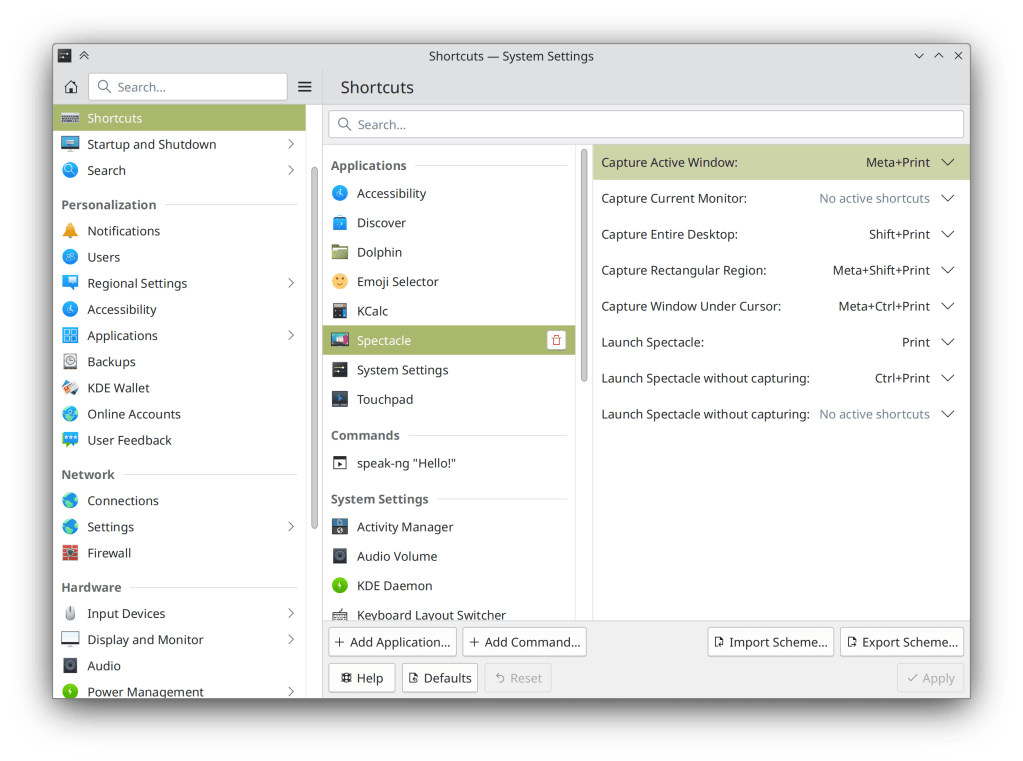
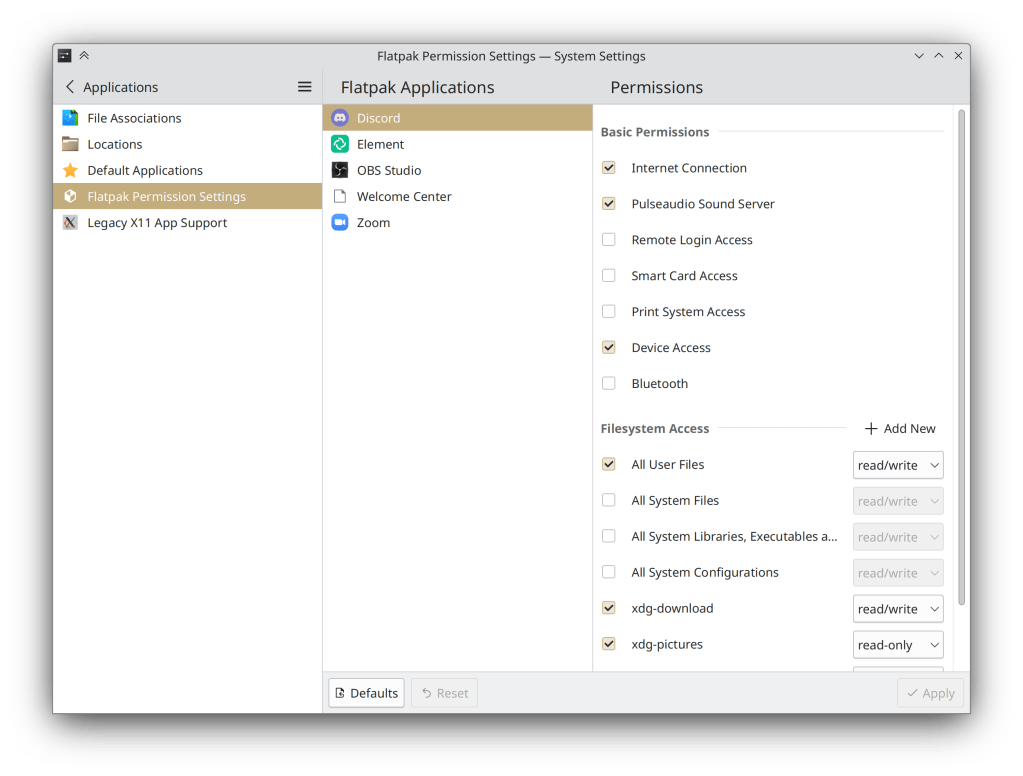
System Settings’ Shortcuts and Flatpak Permissions pages now use our more modern frameless style (me: Nate Graham, Plasma 5.27. Link 1 and link 2):

  • System Settings "Shortcuts" page showing frameless style
  • System Settings "Flatpak Permissions" page showing frameless style

The Window List widget now displays appropriate fallback icons when the active app’s own icon is invalid, or when the Plasma Desktop is active (Guilherme Marçal Silva, Plasma 5.27. Link)

In the System Tray configuration window, some items no longer have “(Automatic load)” added after their names, which we realized was an implementation detail that didn’t communicate anything important to the user (Nicolas Fella, Plasma 5.27. Link)

Throughout QtWidgets-based KDE apps, tooltips can no longer display the same text twice (once for the normal tooltip text, and again for the “What’s this” expanded text prompt) (Joshua Goins, Frameworks 5.103. Link)

Significant Bugfixes

(This is a curated list of e.g. HI and VHI priority bugs, Wayland showstoppers, major regressions, etc.)

Fixed a way that KWin could crash when closing one instance of a multi-instance app while the “Dim Inactive” effect is enabled (Vlad Zahorodnii, Plasma 5.27. Link)

Implemented an older version of the Wayland text-input protocol in KWin, which makes input methods work in Chromium and Electron apps (Xuetian Weng, Plasma 5.27. Link)

Basic sticky keys support is now implemented in the Plasma Wayland session! More will follow soon (Nicolas Fella, Plasma 5.27 Link)

Fixed various recently-introduced visual glitches affecting Panel and System Tray icons, including some tray icons of Qt6 apps constantly flickering. Also fixed the autotest covering this to actually work so it won’t regress again! (Arjen Hiemstra, Frameworks 5.103. Link 1 and link 2)

Other bug-related information of interest:

Automation & Systematization

Add a user interface test for the Digital Clock’s calendar popup, to make sure all of its buttons work as expected (Marco Martin, Plasma 5.27. Link)

…And everything else

This blog only covers the tip of the iceberg! If you’re hungry for more, check out https://planet.kde.org, where you can find more news from other KDE contributors.

How You Can Help

If you’re a developer, check out our 15-Minute Bug Initiative. Working on these issues makes a big difference quickly!

Otherwise, visit https://community.kde.org/Get_Involved to discover ways to be part of a project that really matters. Each contributor makes a huge difference in KDE; you are not a number or a cog in a machine! You don’t have to already be a programmer, either. I wasn’t when I got started. Try it, you’ll like it! We don’t bite!

And finally, KDE can’t work without financial support, so consider making a donation today!

This week in KDE: Wayland fractional scaling! Oh, and we also fixed multi-screen

This week is a twofer! We have the long-awaited Wayland fractional scaling support, and the equally long-awaited ultimate fix for Plasma’s multi-screen woes! Let’s take them one at a time:

Wayland Fractional Scaling

The Wayland protocol for fractional scaling was finally merged last week. Kenny Levinsen proposed the protocol itself, and this week, the KDE and Qt implementations for Plasma 5.27 which have been done by David Edmundson were merged. Thanks a lot, everyone!

“What does this do?” you might ask. It allows the Qt toolkit to turn on its pre-existing fractional scaling support on Wayland that it always had on X11. No more rendering to an integer size and then scaling down! This should result in Qt apps that are scaled to anything other than 100%, 200%, or 300% scale having better performance, less visual blurriness, and lower power usage.

What about GTK apps? They’ll reap the same benefit once GTK also gains fractional scaling support and implements the protocol. Until then, GTK apps will continue to use the less efficient upscale+downscale method for fractional scale factors.

When is it coming? Well, KWin already has support in Plasma 5.27. Support in Qt is only in Qt 6 right now, meaning we won’t reap the benefits until Plasma 6. There’s a chance it could be backported to KDE’s Qt 5.15 patch collection, though. Stay tuned!

Fixing Multi-Screen

Multi-screen is a complicated beast because it touches so many parts of the software stack. Ultimately most of our problems arose from the use of connector IDs to identify screens and map Plasma desktops and panels (“containments”) to screens. This worked poorly, because connector IDs can and do change under various circumstances. As a result, things often became a scrambled mess, with the behavior either being random, or consistently wrong.

That’s all changed. You can read the details here. In a nutshell, we now use an index-based system, with index numbers bound very tightly to Plasma containments, but index numbers themselves being able to move between screens based on how many screens there are. So for example, when screen 1 with your Plasma desktop and panel becomes unavailable, a new screen becomes screen 1, and the Plasma desktop and panel bound move over to it.

This new system should result in vastly greater stability, reliability, and predictability with respect to how screens are enabled and disabled, positioned, and what Plasma desktops and panels they show. It fixes notorious bugs like Plasma containments being randomly moved around or lost and desktops sometimes losing their wallpapers, widgets, and icon settings. It also makes arrangements of screen layouts and Plasma containments stable across the Plasma X11 and Wayland sessions. Big stuff.

Now, let’s set expectations a bit: this doesn’t mean that literally every multi-screen bug is now fixed. Rather, it brings us a new platform that isn’t broken by design, upon which we can fix bugs without introducing new ones in the process. So now multi-screen can truly become even more reliable over time, rather than juggling a rotating whack-a-mole assortment of bugs from one release to the next. The work was done by Marco Martin, Ivan Tkachenko, Xaver Hugl, and David Edmundson. It will land in Plasma 5.27. Thanks a lot, guys!

Other New Features

You can now reverse the ordering of tasks in the Plasma Task Manager widget on vertical panels, to complement existing support on horizontal panels (Tanbir Jishan, Plasma 5.27. Link)

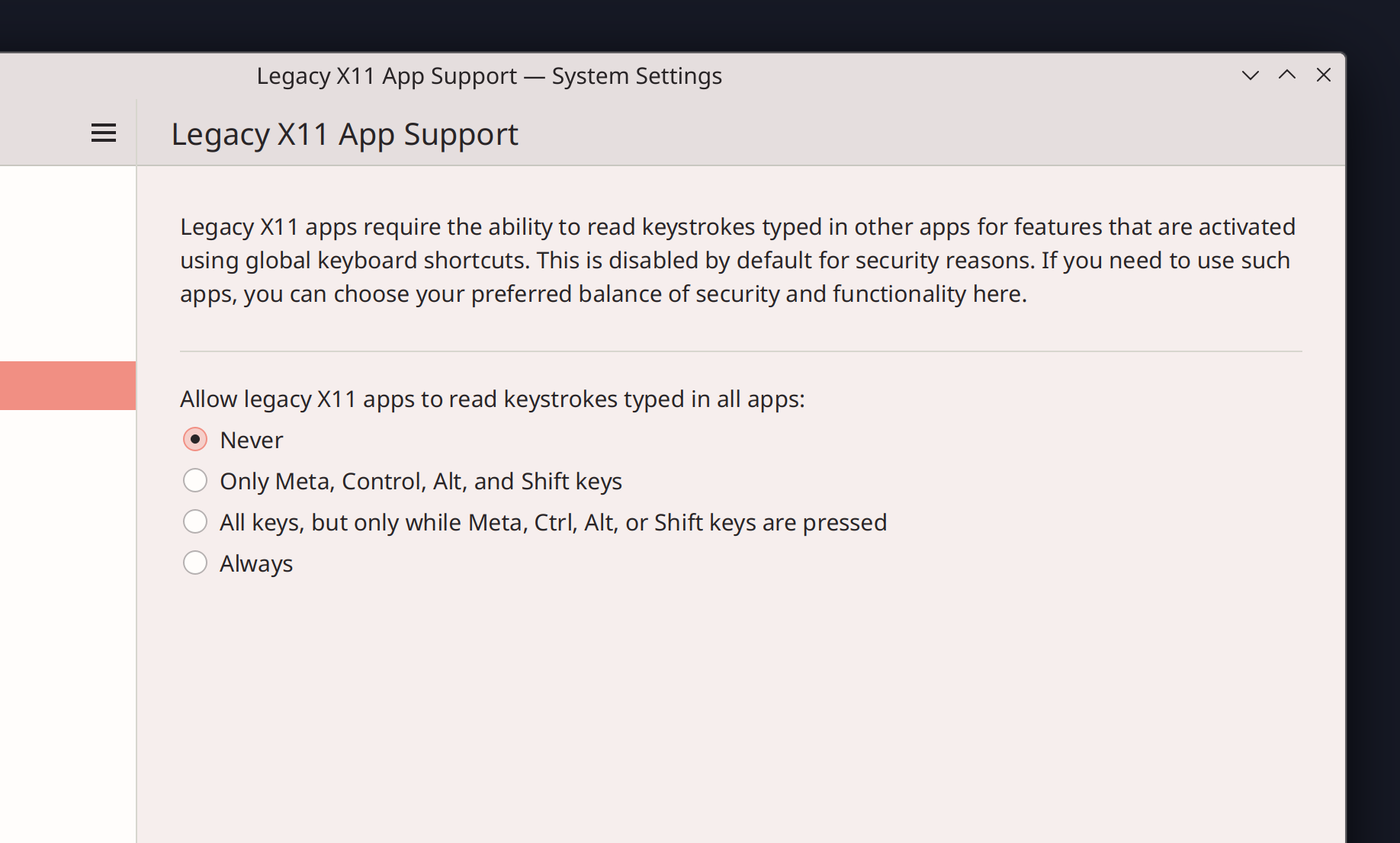
In the Plasma Wayland session, you can now allow XWayland using apps to snoop on the keypresses made in native Wayland apps, mimicking how things work on X11. This is required by some XWayland-using apps, such as Discord for its push-to-talk feature. Doing this reduces security, so it’s off by default and has various different on levels so you can choose for yourself the balance of security and support for legacy apps (Aleix Pol Gonzalez, Plasma 5.27. Link):

It’s now possible to use a modifier key (e.g. the Meta key) as the shortcut key when using the key input chooser to assign shortcuts to actions. This will allow us to replace the weird old modifier key handling in KWin and let you simply assign modifier keys to things like Kickoff and Overview directly. That’s not ready yet but will be coming soon! (Aleix Pol Gonzalez, Plasma 5.27 and Frameworks 5.102. Link 1, link 2, and link 3)

Discover now has a SteamOS backend, so it can perform system updates on Steam Deck devices from within desktop mode (Jeremy Whiting, Plasma 5.27, but possibly backported to SteamOS itself sooner. Link)

User Interface Improvements

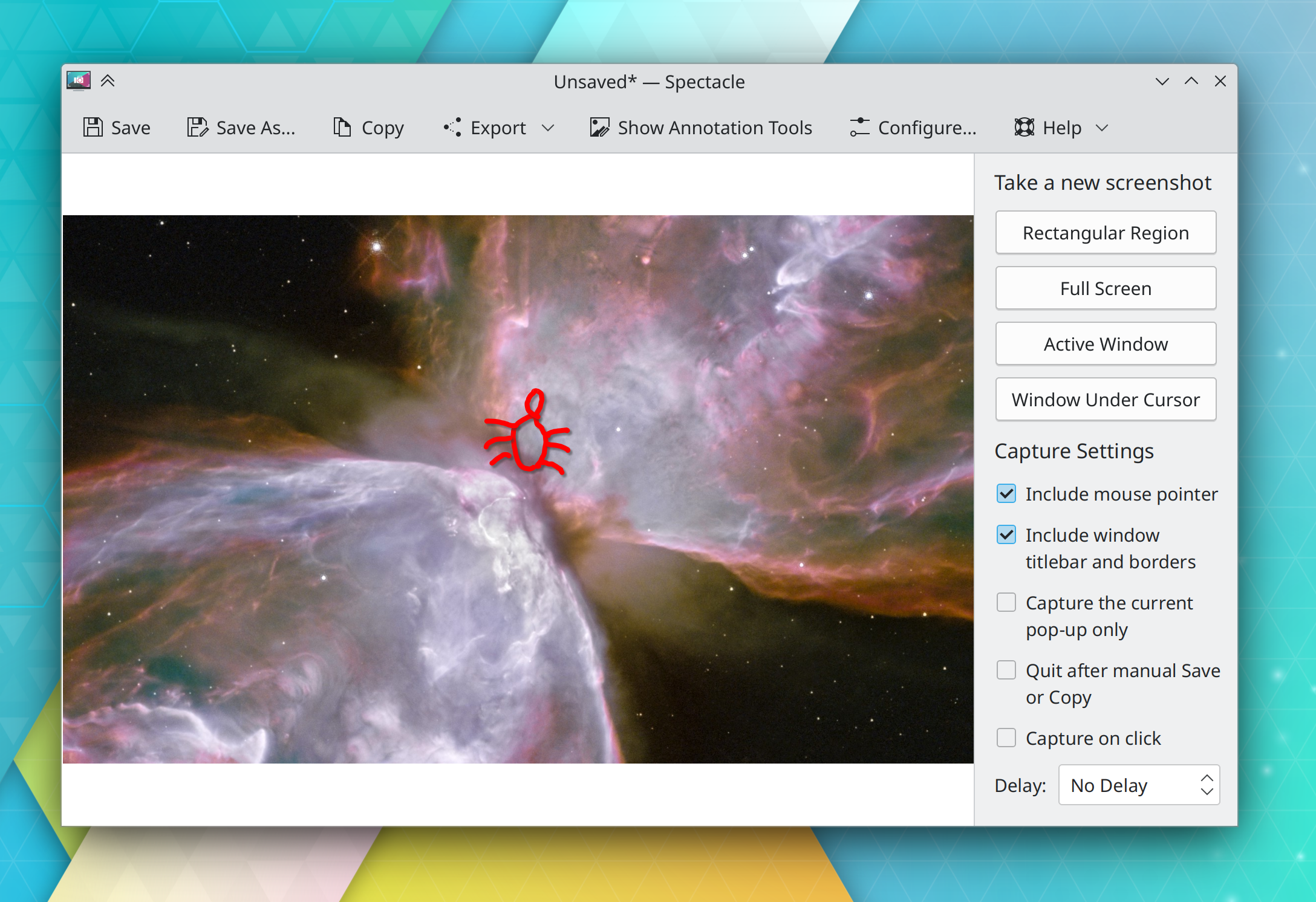
Spectacle’s sidebar now uses pushbuttons to let you take a new screenshot, replacing the old two-stage UI wherein you would first have to choose a capture mode and then click the “Take New Screenshot” button. The new workflow should be much faster! (Noah Davis, Spectacle 23.04. Link):

Spectacle’s new annotations system once again draws drop shadows behind your annotations by default, just like the old one did (Marco Martin, Spectacle 23.04. Link)

KRunner no longer matches apps’ executable names, as this caused too many false positives when searching for unrelated things (Alexander Lohnau, Plasma 5.27. Link)

The User Feedback slider on System Settings’ Quick Settings page has been removed, because as of Plasma 5.27, you’ll have the opportunity to choose to share telemetry data with KDE developers–or not–in the new welcome wizard app (me: Nate Graham, Plasma 5.27. Link)

On System Settings’ Desktop Session page, the “Offer Shutdown Options” option has been removed, because we found that it actually didn’t do anything anymore after all the changes of the past few years (me: Nate Graham, Plasma 5.27. Link)

Adding new virtual desktops now increases the number given to the new desktop, instead of naming all new desktops “New Desktop” (Thenujan Sandramohan, Plasma 5.27. Link)

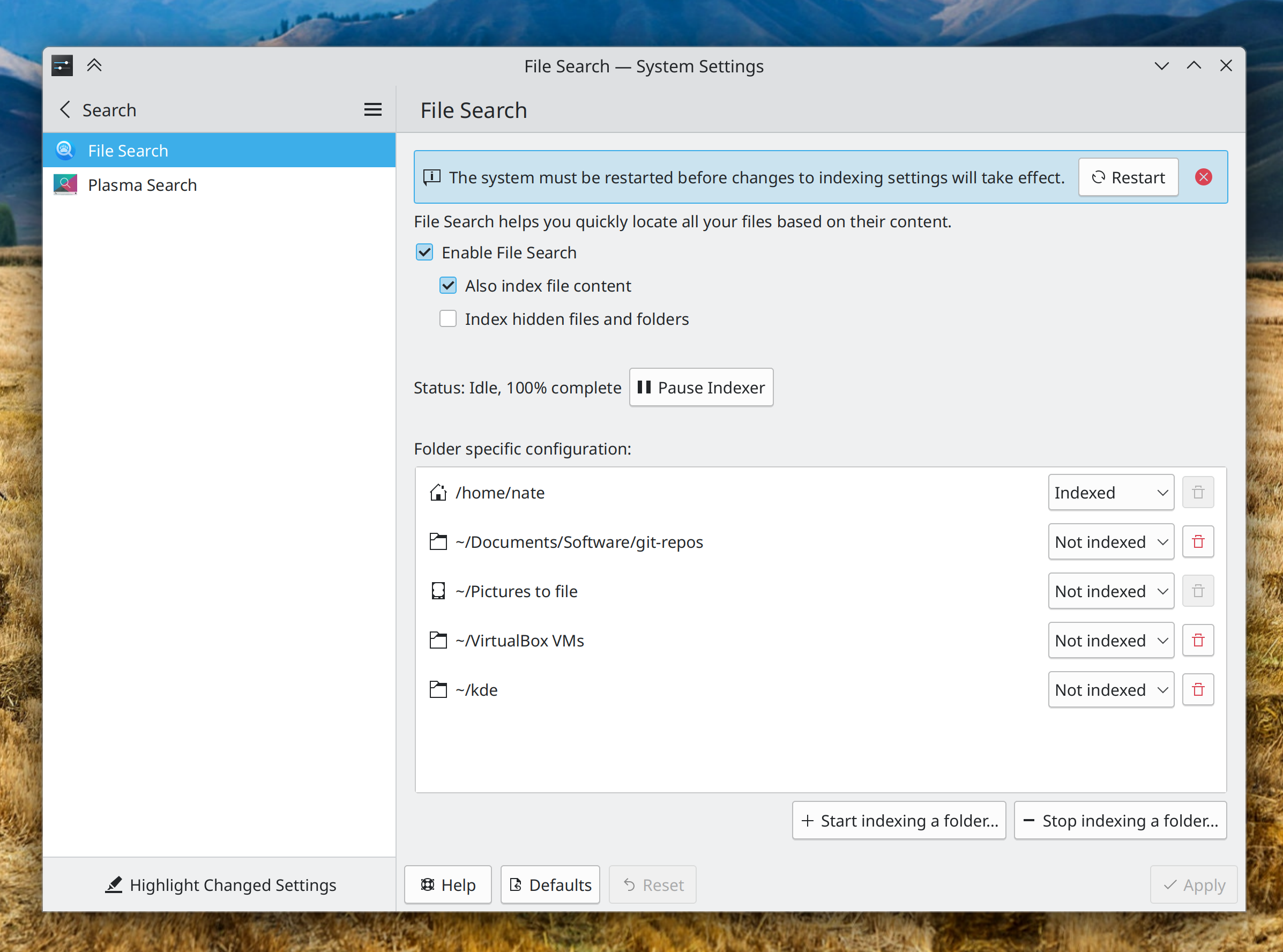
When changing indexing settings that require a reboot to take effect on System Settings’ File Search page, it will now present you with a message informing you of this, with a big friendly button you can click on to reboot immediately (me: Nate Graham, Plasma 5.27. Link):

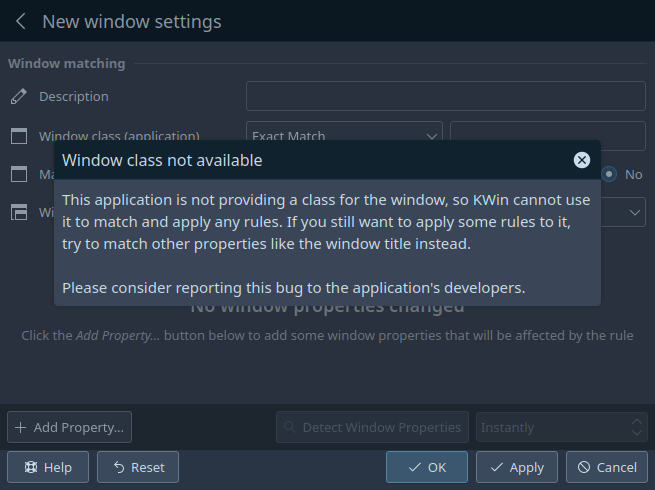
When creating window rules and trying to match windows by their window class, the page will now give you a comprehensible error message when you target a window that doesn’t have a window class (Ismael Asensio, Plasma 5.27. Link):

Significant Bugfixes

(This is a curated list of e.g. HI and VHI priority bugs, Wayland showstoppers, major regressions, etc.)

Disabling middle-click paste in the Plasma Wayland session no longer makes it impossible to select text in some GTK apps or causes them to crash (Vlad Zahorodnii, Plasma 5.26.5. Link)

In the Plasma Wayland session, external screens now work when using various ARM-powered devices (Xaver Hugl, Plasma 5.26.5. Link)

When Discover installs updates for an add-on from store.kde.org that needs to present an error message or question as part of the update process, or tries to do so because the update failed, Discover now shows this to you instead of silently eating it and leaving it wondering why things aren’t working (Aleix Pol Gonzalez, Plasma 5.27. Link)

The Blend Changes KWin effect no longer triggers while the foreground window is fullscreen, so when you’re using the “Accent color from wallpaper” setting and a slideshow wallpaper, you’ll no longer, for example, experience brief choppiness while watching a full-screen video when the wallpaper changes (Xaver Hugl, Plasma 5.26.5. Link)

Disabling and re-enabling the top-left-most screen no longer causes it to become mirrored to the screen to the right of it after being re-enabled (Ivan Tkachenko, Plasma 5.27. Link)

The “Add Rule” dialog in System Settings’ Firewall page now works properly for the ufw firewall (Paul Worall, Plasma 5.27. Link)

Other bug-related information of interest:

Automation & Systematization

We now have a whole framework for performing automated GUI tests using the accessibility API, which exercises both at once for double-whammy of a win! This has been rolled out for a start with the calculator widget (Harald Sitter, Plasma 5.27. Link) And don’t be shy, write your own! Here’s the documentation.

Added a basic autotest for Activities (Alexander Kuznetsov, Plasma 5.27. Link)

Dependency metadata for what kde code kdesrc-build needs to compile for any given thing you tell it to build is now auto-generated from each repo’s continuous integration system metadata! (Nicolas Fella, right now. Link)

develop.kde.org now has a tutorial on writing advanced Plasma widgets that use C++ backend code (Chris Holland, Link)

2022 Fundraiser

KDE’s year-end fundraiser is halfway done! We’re more than halfway to the goal, but progress has slowed quite a bit. If you haven’t donated yet, please consider doing so! With all the hiring KDE e.V. has been doing, we need to significantly ramp up fundraising to keep up the pace to avoid getting into the red. Every little bit helps!

…And everything else

This blog only covers the tip of the iceberg! If you’re hungry for more, check out https://planet.kde.org, where you can find more news from other KDE contributors.

How You Can Help

If you’re a developer, check out our 15-Minute Bug Initiative. Working on these issues makes a big difference quickly! Otherwise, have a look at https://community.kde.org/Get_Involved to discover ways to be part of a project that really matters. Each contributor makes a huge difference in KDE; you are not a number or a cog in a machine! You don’t have to already be a programmer, either. I wasn’t when I got started. Try it, you’ll like it! We don’t bite!

Finally, consider making a tax-deductible donation to the KDE e.V. foundation.

This week in KDE: QA pays off

This week we released Plasma 5.26 and so far our QA focus has paid off! It has been mostly a smooth release, with just a few regressions being reported, and most of them have been fixed already. Thanks to everyone who tested, reported bugs, and fixed bugs!

New Features

Kate and KWrite have now adopted KHamburgerMenu! Because these are large and complex apps, the main menubar is still shown by default. And for the time being, the hamburger menu shows the entire traditional menu structure within it, rather than trying to offer a curated set of actions. This can be done in the future! (Christoph Cullmann, Kate & KWrite 22.12. Link):

Kate’s welcome screen now has more features in it (Eugene Popov, Kate 22.12. Link):

The Plasma Wayland session now supports high resolution scroll wheels for smoother scrolling through long views (Vlad Zahorodnii, Plasma 5.27. Link)

The Network manager now supports WPA3-Enterprise 192-bit mode (Tomohiro Mayama, Plasma 5.26. Link)

User Interface Improvements

Dolphin no longer unnecessarily opens a new window after extracting or compressing an archive using the context menu (Andrey Butirsky, Dolphin 22.12. Link)

Discover no longer freezes for a few seconds when launched without an internet connection, and is now faster and more responsive in the face of transient network issues with remote resources in its backends (Aleix Pol Gonzalez, Plasma 5.26.1. Link 1 and link 2)

The Media Player plasmoid now does a better job of handling apps with very barebones MPRIS implementations, like Totem and Celluloid (Bharadwaj Raju, Plasma 5.26.1. Link)

Even though resizing them is now explicitly supported, Plasma widget pop-ups no longer inappropriately respond to the Maximize and Minimize keyboard shortcuts (Xaver Hugl, and me: Nate Graham, Plasma 5.26.1. Link)

You can now select and copy text from labels in Info Center (Bharadwaj Raju, Plasma 5.27. Link)

In the Color Picker plasmoid, left-clicking a color now copies it to the clipboard, and you’ll also see a small “Copied!” message to help you visually confirm what happened (Bharadwaj Raju, Plasma 5.27. Link)

You now get a nice full-screen blend effect when you manually change Plasma themes (me: Nate Graham, Plasma 5.27. Link)

The Disks & Devices plasmoid now always shows the “Remove All” item in its hamburger menu when any volumes are mounted, not just when more than two are (Jin Liu, Plasma 5.27. Link)

Discover now shows you more permissions for Flatpak apps, such as printer and Bluetooth device access (Jakob Rech, Plasma 5.27. Link)

Made various KDE app windows raise to the top when activated externally in the Plasma Wayland session: System Settings when activated from KRunner, Discover when activated from KMoreTools menus, and Dolphin when activated from other apps in general (Nicolas Fella, Plasma 5.26.1, Frameworks 5.100, and Dolphin 22.12. Link 1, link 2, link 3)

Significant Bugfixes

(This is a curated list of e.g. HI and VHI priority bugs, Wayland showstoppers, major regressions, etc.)

Plasma no longer sometimes crashes when connecting an external Bluetooth headset, or when waking up the system after it was suspended while audio was being streamed over the network (Harald Sitter, Plasma 5.24.7. Link 1, link 2)

Changing the display arrangement or configuration no longer sometimes causes System Settings to crash (Someone awesome, Plasma 5.26. Link)

The system no longer becomes unresponsive after using the “Turn off screen” shortcut (Vlad Zahorodnii, Plasma 5.26.1. Link)

Dragging screens to re-arrange them on System Settings Display and Monitor page no longer sometimes scrolls the view or drags the window instead of moving the screen (Marco Martin, Plasma 5.26.1. Link)

Chrome web apps no longer all show the same icon on an Icons-Only Task manager (Mladen Milinkovic, Plasma 5.26.1. Link)

In the Plasma Wayland session, when using a multi-screen arrangement with external screens not being mirrored, the system no longer sometimes sees them as mirrored anyway and inappropriately enables Do Not Disturb mode, and also no longer forgets the enabled/disabled status of those screens (Vlad Zahorodnii, Plasma 5.26.1. Link 1 and link 2)

Discover is now significantly better about reporting overall progress information when installing or updating Flatpak apps, so it won’t be jumpy and weird anymore (Aleix Pol Gonzalez, Plasma 5.26.1. Link)

Fixed a regression in 5.26 with some 3rd-party KWin effects (David Edmundson, Plasma 5.26.1. Link)

Symlinked images once again appear in wallpaper slideshows (Fushan Wen, Plasma 5.26.1. Link)

The infamous “Korners” bug is finally fully fixed! The last issue–light-colored dots on rounded corners of dark panels–is now fixed (Niccolò Venerandi, Plasma 5.26.1. Link)

When using right-aligned icons on the desktop, adding new icons no longer causes all of the icons on the right-most column to jump to the left-most column (Marco Martin, Plasma 5.27. Link)

Other bug-related information of interest:

  • 10 Very high priority Plasma bugs (up from 8 last week, but this is fairly normal for right after a new Plasma release, as we use the VHI priority to track the most important things to fix). Current list of bugs
  • 53 15-minute Plasma bugs (up from 49 last week, which is mostly due to our new bot automatically classifying existing issues as 15-minute bugs). Current list of bugs
  • 141 KDE bugs of all kinds fixed this week. Full list of bugs

Automation & Systematization

This is a new section that I’m adding to highlight some of the work for the new “Automation & Systematization” goal. Topics include automation, documentation, increased test coverage, and anything else that improves KDE’s institutional memory by moving information out of people’s heads and into public systems.

One big change was made by Harald Sitter to the Bugzilla Bot. Now it will display a “nudge message” if you file a bug report on a version of Plasma just before the last supported version. It won’t close your bug report automatically, but will tell you that you should upgrade if possible:

What is the Bugzilla Bot? It’s the thing that closes bugs that have been the NEEDSINFO WAITINGFORINFO state for a month, automatically sets the severity to “crash” for bugs with “crash or “segfault” in their titles, and automatically closes bugs (with a gentle message) filed against Plasma versions that are too old to be supported. Harald did all of that too; he’s awesome! It’s really cool and you should contribute, especially if you have Ruby skills!

Ideas for new features:

  • If a bug report with the crash severity doesn’t have a backtrace attached or pasted inline, nag for one
  • When a backtrace is attached as a file, automatically paste its crashing stack frame inline
  • If a backtrace is lacking debug symbols, automatically add a comment asking for a new one with debug symbols, plus a link to https://community.kde.org/Guidelines_and_HOWTOs/Debugging/How_to_create_useful_crash_reports
  • Nag people to re-test bugs in the UNCONFIRMED state that are more than a year old

…And everything else

This blog only covers the tip of the iceberg! If you’re hungry for more, check out https://planet.kde.org, where you can find more news from other KDE contributors.

How You Can Help

If you’re a developer, check out our 15-Minute Bug Initiative. Working on these issues makes a big difference quickly! Otherwise, have a look at https://community.kde.org/Get_Involved to discover ways to be part of a project that really matters. Each contributor makes a huge difference in KDE; you are not a number or a cog in a machine! You don’t have to already be a programmer, either. I wasn’t when I got started. Try it, you’ll like it! We don’t bite!

Finally, consider making a tax-deductible donation to the KDE e.V. foundation.

Automate and systematize all the things!

As announced at Akademy a few days ago, I’m honored that my goal – Automate and Systematize Internal Processes – has been chosen by the KDE community! Those are a bunch of fancy words, but the idea is pretty simple: get our expertise (knowledge, skill, and wisdom) out of our heads, and onto KDE’s infrastructure.

Why? to reduce the burden on us personally to provide so much of that expertise on demand as an ongoing service, and to reduce the impact of breaks, vacations, and departures. Ultimately this will preserve expertise publicly in KDE where it’s easier to learn from, and free us all up to do other things!

There are many ways to contribute which can be found on the goal page. I’ll condense a bit and list some examples here:

  • Create automated tests to check for things you currently know to check for manually when reviewing code
  • Broadly improve documentation of internal processes; when you make a change to one of them, document it!
  • Write code comments that explain why something is implemented the way it is (not what it is or what it’s doing)
  • Adopt the reuse-lint continuous integration pipeline and clang-format git hookscript so they can do the boring work of checking for licensing and code formatting
  • Extend the Bugzilla bot to check for and provide canned answers in response to more conditions in new bug reports (missing backtrace for a crash bug, backtrace missing symbols, backtrace attached rather than pasted inline, etc)
  • Document the responses to common questions in FAQ-type pages, and provide links to them publicly in response to those questions so others know about them and can add to them themselves (e.g. see the VDG’s “Lessons Learned” page)
  • Document undocumented public APIs
  • Look for synergies; Harald’s idea to do UI testing using the accessibility APIs is a fantastic example, as it would systematically drive improvements for two things at once and prevent them from silently regressing
  • Don’t ping individual people; ping teams/groups/mailing lists etc. If there is no applicable collective entity containing the people you want to ping, create one and encourage them to join it
  • If you’re leaving KDE or don’t have time to maintain some of your projects anymore, perform offboarding; find people to hand things off to and teach them how to be you

There are a lot more things, but hopefully you get the idea. So let’s get out there and automate and systematize everything!

I’ll be documenting our progress and successes like I did with the Usability & Productivity goal… and, updating that goals wiki page would be a good step too. A GitLab workboard will probably pop up too, and I’ll let folks know about it once it exists. If people think a Matrix room would be helpful, we can get that going as well.

And thanks again for choosing this goal, everyone! You’re the best.