This week in KDE: auto-save in Dolphin and better fractional scaling

We’re in the home stretch now!

Plasma and Gear apps have branched, which means anything committed to master and not backported is going into the next release after the mega-release next month. For Plasma, the next one is 6.1, and for Gear apps, it’s 24.05. Quite a few new features and UI improvements are starting to accumulate there! Here are a few:

Dolphin now periodically auto-saves its open windows and tabs, so you don’t lose state if the app crashes or the system is restarted unexpectedly (Amol Godbole, Dolphin 24.05. Link)

In Dolphin, you can now configure whether backup and trash files are shown when hidden files are made visible (Méven Car, Dolphin 24.05. Link)

In Dolphin, you can now pop out a split view pane into its own new window (Loren Burkholder, Dolphin 24.05. Link)

Fixed an issue in Dolphin that could cause it to freeze when you use it to duplicate the same file multiple times (Eugene Popov, Dolphin 24.05. Link)

Okular now supports displaying popup menus in certain kinds of PDF documents that include them (Alexis Murzeau, Okular 24.05. Link)

Spectacle now lets you use more placeholders for screenshot and screen recording filenames (Noah Davis, Spectacle 24.05. Link 1 and link 2)

The Networks system tray popup can now tell you a network’s channel in addition to its frequency (Kai Uwe Broulik, link)

KDE 6 Mega-Release

(Includes all software to be released on the February 28th mega-release: Plasma 6, Frameworks 6, and apps from Gear 24.02)

General infoOpen issues: 237

UI improvements

Plasma’s global Edit Mode toolbar now has an “Add Panel” button that lets you add panels. With this located there, the desktop context menu has now lost its “Add Widgets” and “Add Panels” menu items since the functionality is fully available in the global Edit Mode. This makes the menu smaller and less overwhelming by default. Of course, if you want those menu items back, you can just re-add them. 🙂 (Akseli Lahtinen and me: Nate Graham, link 1, link 2, and link 3):

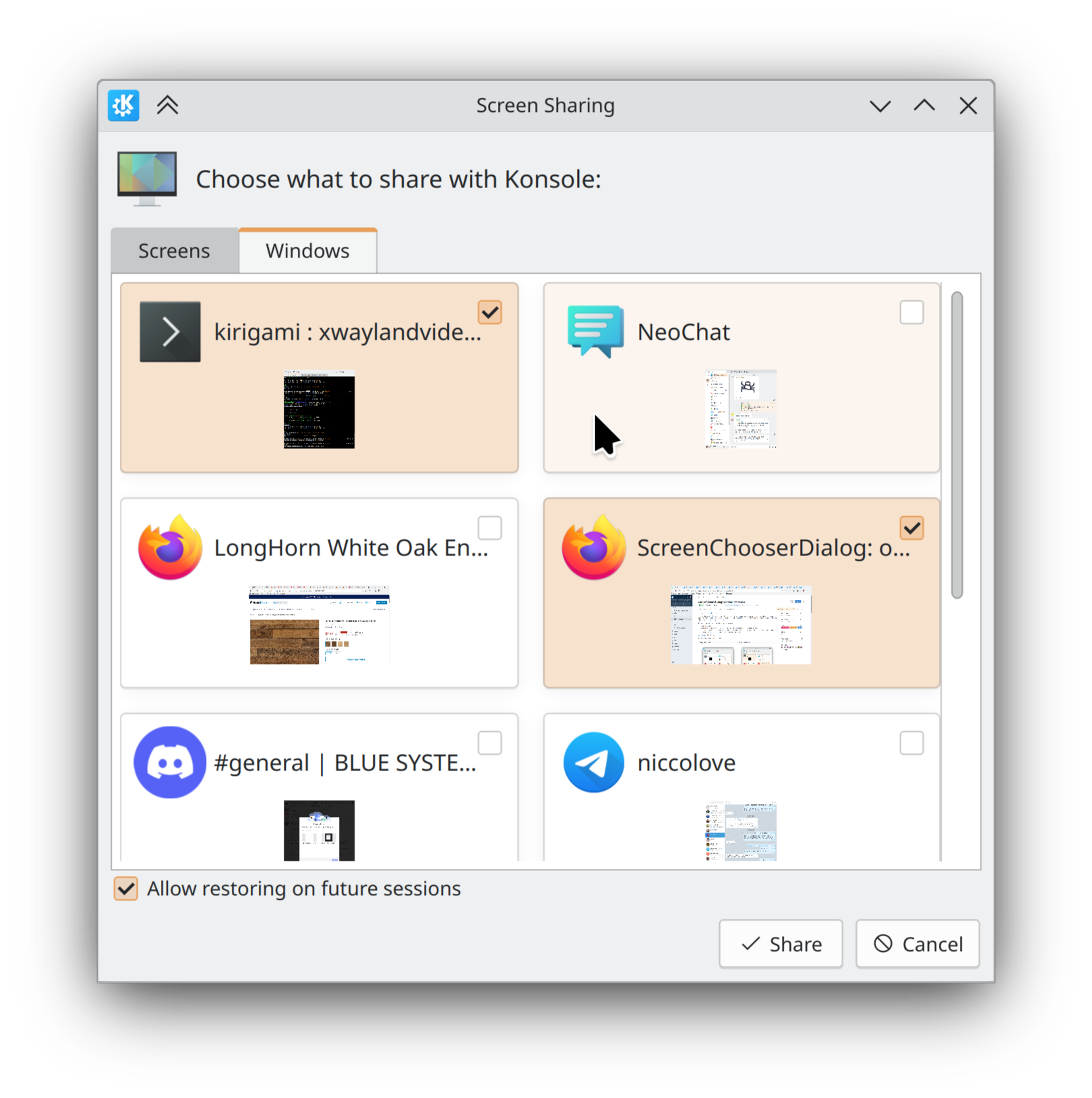
In the portal-based “Choose a screen/window to record” dialog, items are now chosen with a single-click, unless the dialog is in multi-select mode, in which case a double-click will choose one (because a single-click only selects it). Also, in multi-select mode, the items have little checkboxes in the corner so you know that you can select more than one (Yifan Zhu and me: Nate Graham, link 1, and link 2):

This dialog could still use more UI polish, which is being scoped out

Bug fixes

Important note: I don’t mention fixes for bugs that were never released to users; it’s just too much for me (it would probably be too much for you to read as well), and most people never encountered them in the first place. Because we’re in the middle of a big Plasma dev cycle, there are a lot of these bugs! So big thanks to everyone who’s made it a priority to fix them!

Powerdevil no longer fails to start at login when using the ddcutil-2.0.0 library and certain DDC-compatible monitors (David Edmundson, link). Note that we also have reports of new issues for people using ddcutil-2.1.0, but those are different and need separate investigation, which is ongoing.

Did some more work to ensure that visual glitches in QtQuick apps are minimized when using a fractional scale factor. There’s still more work to do for text and window outlines/shadows, but you should no longer see weird tearing-related glitches in buttons and icons (Arjen Hiemstra and Marco Martin, link)

Made KWin more robust when restoring settings for multi-screen arrangements when any of the screens are missing their EDIDs (Stefan Hoffmeister, link)

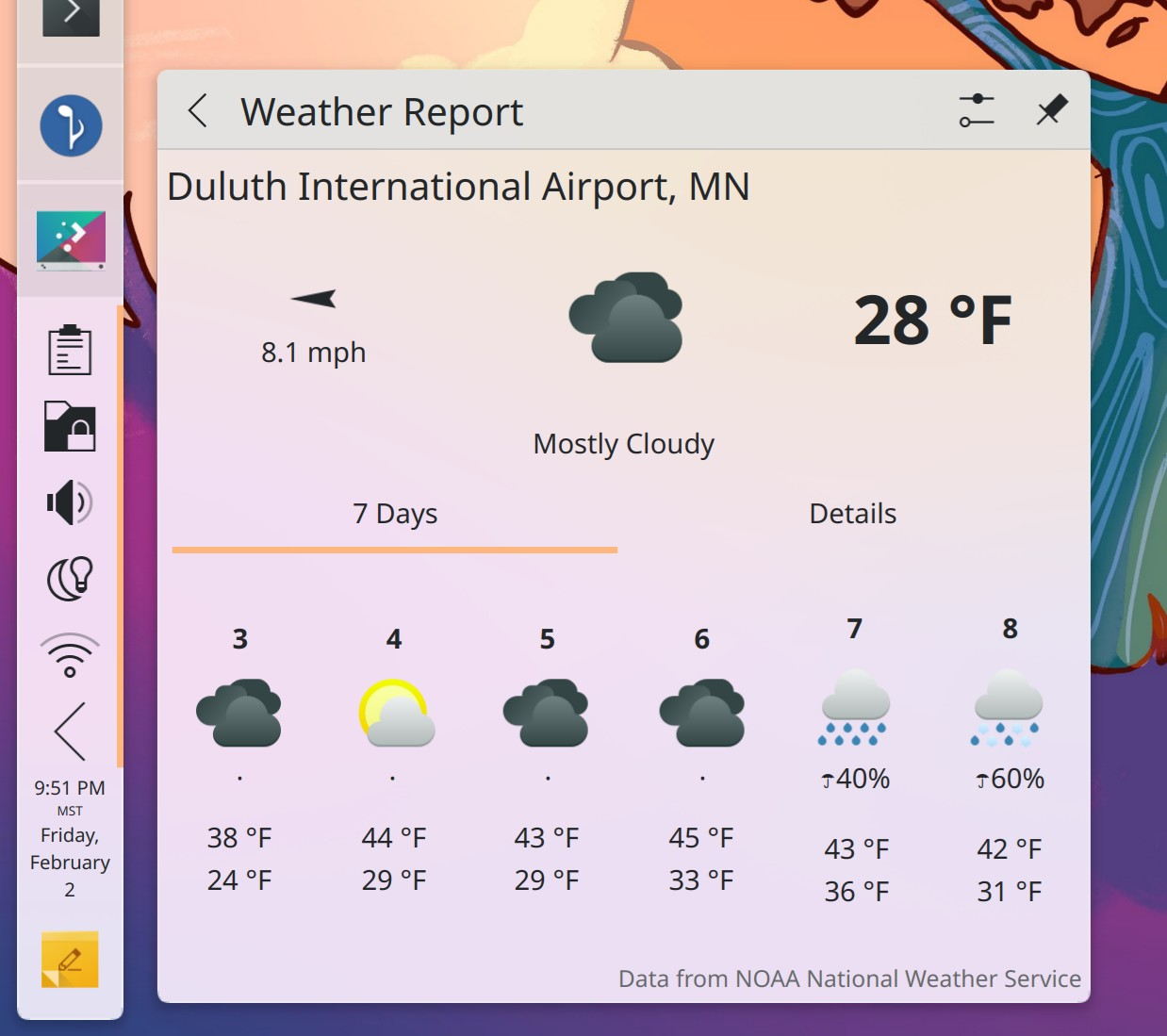
When using a weather provider that gives forecasts longer than 7 days (like EnvCan), the right edge of the Weather widget’s forecast never gets cut off when viewed in the System Tray (Ismael Asensio, link)

Your Plasma panels will no longer flicker oddly when certain full-screen games do something rather odd by repeatedly switching their windows between full-screen and maximized states (Xaver Hugl, link)

The “Window Type” window rule–which did not work on Wayland–has been replaced with a new “Window Layer” rule which works better for the purposes people typically use it for (Vlad Zahorodnii, link)

Other bug information of note:

Performance & Technical

Improved the speed of various config file lookups used very commonly throughout KDE software by 13-16% (Friedrich Kossebau, link)

Fixes for KF5

We’ve also got a few nice fixes for KF5 software this week!

Fixed an issue when moving or copying large number of files that could cause some of them to get skipped (and potentially lost) after skipping duplicated folders (Eugene Popov, Frameworks 5.115. Link)

Fixed an issue that caused folders inside network shares/mounts to be non-expandable in Details view (Alessandro Astone, Frameworks 5.115. Link)

…And Everything Else

This blog only covers the tip of the iceberg! If you’re hungry for more, check out https://planet.kde.org, where you can find more news from other KDE contributors.

How You Can Help

Thanks to you, our Plasma 6 fundraiser has been a crazy success! I originally thought the goal of 500 new KDE e.V. supporting members was over-optimistic, but you’ve all proven me happily wrong. We’re now up to an incredible 665 members and unlocked both stretch goals! It’s pretty humbling. Thank you everyone for the confidence you’ve shown in us; we’ll try not to screw it up! 🙂 For those who haven’t donated to become members yet, spreading the wealth via this fundraiser is a great way to share the love. 🙂

If you’re a developer, work on Qt6/KF6/Plasma 6 issues! Which issues? These issues. Plasma 6 is very usable for daily driving now, but still in need of some final bug-fixing and polishing to get it into a solid state by February.

Otherwise, visit https://community.kde.org/Get_Involved to discover other ways to be part of a project that really matters. Each contributor makes a huge difference in KDE; you are not a number or a cog in a machine! You don’t have to already be a programmer, either. I wasn’t when I got started. Try it, you’ll like it! We don’t bite!

The last few weeks in KDE: It’s coming… it’s coming… it’s coming

Wow, it feels like it’s been a while! And while many of KDE’s contributors have been enjoying some holiday and vacation time, quite a lot happened too! We’re getting pretty close to the projected February 28th release day for the KDE 6 megarelease, so all hands have been on the bug-fixing deck.

Overall we’re in good shape. Despite the large number of open bug reports, most are not serious, and I have confidence that we’ll get the remaining major ones done before the final release. Of course, the best way to make sure that happens is to help out!

KDE 6 Mega-Release

(Includes all software to be released on the February 28th mega-release: Plasma 6, Frameworks 6, and apps from Gear 24.02)

General infoOpen issues: 238

UI improvements

It’s now possible to quickly apply a wallpaper to all screens at once (Prajna Sariputra, link)

You can now set a custom mouse pointer speed, just like you can for the touchpad (Denis Zhdanov, link)

Discover Notifier no longer appears in your System Tray (even just the inactive area) unless it actually has something to notify you about–which means you can remove it permanently by simply telling Discover to never check for updates automatically on System Settings’ Updates page (Yifan Zhu, link)

Breeze-themed buttons and text field now always have the same height so they’ll never look slightly different when adjacent to one another (Akseli Lahtinen, link)

Throughout KDE software, the way symbolic icons (i.e. those whose names end with -symbolic) are found has been improved: when a symbolic icon is not found and the system has to fall back to a more generic icon, you’ll now get a symbolic version of that icon if it exists (Joshua Goins, link)

You can now configure Plasma to turn off the screen at the same moment when it locks (Jakob Petsovits, link 1 and link 2)

Bug fixes

Important note: I don’t mention fixes for bugs that were never released to users; it’s just too much for me (it would probably be too much for you to read as well), and most people never encountered them in the first place. Because we’re in the middle of a big Plasma dev cycle, there are a lot of these bugs! So big thanks to everyone who’s made it a priority to fix them!

Ark now preserves extended attributes of files in archives when editing and saving their contents (Kristen McWilliam, link)

Fixed a file descriptor leak in Plasma that could cause it to run out of file descriptors and crash under certain circumstances (Moody Liu, link)

Fixed an issue that could prevent the GlobalProtect SAML authentication method in OpenConnect VPNs from working (Rahul Rameshbabu, link)

Night color can now co-exist with color correction using ICC profiles–at least in the Wayland session (Xaver Hugl, link)

When using the weather widget’s DWD weather provider, you’ll no longer sometimes see nonsensically high temperature values shown in the forecast (Ismael Asensio, link)

Tabs in the weather widget no longer sometimes overlap in certain circumstances (Ismael Asensio, link)

Plasma’s “Alternatives” popup now follows the opacity level of its parent panel (Niccolò Venerandi, link)

When showing a preview of the selected Task Switcher style, clicking away from the preview now closes it as expected in the Plasma Wayland session (Ismael Asensio, link)

Other bug information of note:

Performance & Technical

The colord-kde repo has been ported to Qt6, so that color management on X11 works too (Nicolas Fella, link)

Reduced the background CPU usage when moving the pointer (Xaver Hugl, link)

A wide variety of pieces of transient state in QtWidgets-based apps are now stored in the state config file, not the settings file used for persistent user-set settings. This is a part of a very vocal crowd’s favorite bug! (Alexander Lohnau, link)

Automation & Systematization

Added GUI tests to make sure several Plasma bugs don’t recur (Fushan Wen, link 1, link 2, link 3, and link 4)

Added an autotest to make sure symbolic icon fallback works properly (Joshua Goins, link)

…And Everything Else

This blog only covers the tip of the iceberg! If you’re hungry for more, check out https://planet.kde.org, where you can find more news from other KDE contributors.

How You Can Help

Thanks to you, our Plasma 6 fundraiser has been a crazy success! I originally thought the goal of 500 new KDE e.V. supporting members was over-optimistic, but you’ve all proven me happily wrong. We’re now up to an incredible 627 members and unlocked multiple stretch goals! The first one has been met, but the second one is still on offer. So if you like the work we’re doing, spreading the wealth via this fundraiser is a great way to share the love. 🙂

If you’re a developer, work on Qt6/KF6/Plasma 6 issues! Which issues? These issues. Plasma 6 is very usable for daily driving now, but still in need of bug-fixing and polishing to get it into a releasable state by February.

Otherwise, visit https://community.kde.org/Get_Involved to discover other ways to be part of a project that really matters. Each contributor makes a huge difference in KDE; you are not a number or a cog in a machine! You don’t have to already be a programmer, either. I wasn’t when I got started. Try it, you’ll like it! We don’t bite!

Does Wayland really break everything?

I’ve written some other posts on Wayland recently, and it’s time for another one! Feel free to skip it it you aren’t interested in a discussion of Wayland and platforms.


Many may be familiar with the now semi-famous “Wayland breaks everything!” document written by Probonopd–one of the core AppImage developers–panning Wayland because it isn’t a drop-in replacement for X11. And he’s in the news again for a new Github repo with the aspiration of creating protocols for functionality not currently available to Wayland-native apps that are intentionally missing in Wayland’s standardized protocols–which won’t work because lacking standardization means they won’t become a part of the platform that app developers can reliably target.

There’s a bit of chuckling and jeering over this in developer circles, but to regular people, the whole “Wayland breaks everything” charge might ring true, or at least seem like it contains a kernel of truth. Because from a certain perspective, he’s right: Wayland really does break everything that directly uses X11 functionality!

It’s just that this is the wrong perspective.

Look, if I said, “Linux breaks Photoshop; you should keep using Windows!” I know how you’d respond, right? You’d say “Wait a minute, the problem is that Photoshop doesn’t support Linux!” And you’d be right. It’s a subtle but important difference that puts the responsibility in the right place. Because there’s nothing Linux can do to ‘un-break’ Photoshop; Adobe needs to port their software, and they simply haven’t done so yet.

And it’s much the same with X11 and Wayland. Wayland wasn’t designed to be a drop-in replacement for X11 any more than Linux was designed to replace Windows. Expectations need to be adjusted to reflect the fact that some changes might be required when transitioning from one to the other.

Now, even though Wayland wasn’t designed to be a drop-in replacement for X11, it was certainly intended to eventually replace it. But this implies that it was intended from the start to do less than X11, and and that would be correct.

X11 was a bad platform

In ye olden days, X11 was a whole development platform. Your app that targeted X11 could use X11 to draw its UI with a built-in widget toolkit; print documents with an included print server; record the screen; set global keyboard shortcuts; and so on. This is all way before my time, but I get the sense that X11 was either originally envisioned to be a development platform for app developers, or else quickly morphed into one during its early days.

It didn’t work out. The built-in UI toolkit looked horrendous, even for the standards of the time. Apps that requested the same resources could stomp on one another and break each others’ functionality in ways that were impossible to fix short of uninstalling one of the apps. Features like printing withered because a window manager was really the wrong place to put that functionality and its later maintainers lacked the needed expertise or interest to maintain it. And so on.

UI toolkits like Qt and GTK quickly rose up to take over most of this sort of app platform middleware in a way that worked much better for users and was easier to target for app developers. We’re talking about the mid 90s here; it was a long time ago.

(Of course this is slightly unfair; lacking a print server isn’t what people complain about being missing from Wayland. It’s more like things like apps able to set custom window icons and move their own windows. These are the really hard cases; they aren’t present on Wayland because they were commonly abused by apps on X11 to cause unsolvable problems. It’s not an easy thing and there are trade-offs involved in bringing them to Wayland.)

Linux isn’t a platform

Anyway, the rise of UI toolkits necessarily fragmented the app landscape. Instead of developing for one target (X11), a FOSS app developer now developed for Qt, or GTK, or whatever, so we ended up with a lot of “KDE apps” and “GNOME apps.” Yes, these apps still probably worked elsewhere, but it was obvious what platform and toolkit they been developed to work best in. They might look and feel weird when run elsewhere, or certain features might not work well or at all.

And that’s where we remain today. Absolutely nobody writes an “X11 app”; their app may use functionality in X11 for something that there’s no better way to do, but the app will use Qt, GTK, KDE Frameworks, or whatever for 99.9% of its functionality.

It brings us to a potentially thorny topic: Linux isn’t really a platform either, any more than X11 succeeded at being one. Almost nobody writes a “Linux app”; making raw Linux kernel system calls is generally unnecessary because whatever UI toolkit you’re using wraps this functionality and abstracts it to all the different platforms that the toolkit supports. The toolkit ensures that it just happens to work on Linux too.

The real platform

So is all hope lost for cross-desktop interoperability? No. In fact prospects are better than they have been in a long time! Because today there is in fact an emerging platform; something that abstracts away even the app toolkits if you want to roll that way. I’m talking about Portals, PipeWire, and Wayland protocols.

Probonopd pans these as bolt-ons that you shouldn’t have to have running on your system, but I think this isn’t realistic. The model of the monolithic window server that offers all functionality failed decades ago. In its place, we have libraries and APIs that every FOSS developers can reasonably expect a modern system to be running.

The portal system offers a standardized way to present platform-native open or save dialogs, send notifications, open documents in other apps, print documents, take screenshots, record the screen, handle drag-and-drop, see if the user’s active theme is light or dark, and much more. The portal system uses PipeWire under the hood for a lot of this stuff, so you can expect that to be installed as well. And you can also expect most Wayland compositors–most notably the two most important ones KWin and Mutter–to support pretty much all publicly standardized Wayland protocols.

I think this is the platform: Portals-and-Wayland-and-PipeWire. Clearly we need to come up with a better name. 🙂 Maybe PW2. But if your app targets these, it will run on pretty much every modern Linux system. And the big two FOSS toolkits of Qt and GTK both have cutting-edge support for all of it. So use whatever UI toolkit you like.

Why now?

We’re hearing more about this recently because the transition is picking up steam. X11’s maintainers have announced an end to its maintenance. Plasma is going Wayland by default, following GNOME. Fedora is dropping X11 support entirely. We’re in the part of the transition where people who haven’t thought about it at all are starting to do so and realizing that 100% of the pieces needed for their specific use cases aren’t in place yet. This is good! Them being heard is how stuff happens. I wish it had happened sooner, but we are where we are, and there are a lot of recent proposals and work around things like remote control, color management, drawing tablet support, and window positioning. There will probably be an awkward period before all of these pieces are in place for all of the people. And for the those who really do suffer from showstopping omissions, I say keep using X11 until it’s resolved. No one’s stopping you (well, except for Fedora, so if this is you, don’t use Fedora. 🙂 The cutting edge should be fun! If it isn’t, try something else).

Wrapping up

In this context, “breaking everything” is another perhaps less accurate way of saying “not everything is fully ported yet”. This porting is necessary because Wayland is designed to target a future that doesn’t include 100% drop-in compatibility with everything we did in the past, because it turns out that a lot of those things don’t make sense anymore. For the ones that do, a compatibility layer (XWayland) is already provided, and anything needing deeper system integration generally has a path forward (Portals and Wayland protocols and PipeWire) or is being actively worked on. It’s all happening!

This week in KDE: Holiday bug fixes

Like last week, the focus remained on getting the mega-release ready for, well, a mega release! Along the way folks have been starting their well-earned vacations, so the pace of work understandably decreased a bit. Accordingly, this will be the last regular weekly post of the year, with at least next week’s skipped, and possibly the next two. Happy holidays, everyone! Rest and recharge so we can hit the ground running in 2024. 🙂

KDE 6 Mega-Release

(Includes all software to be released on the February 28th mega-release: Plasma 6, Frameworks 6, and apps from Gear 24.02)

General infoOpen issues: 216

UI improvements

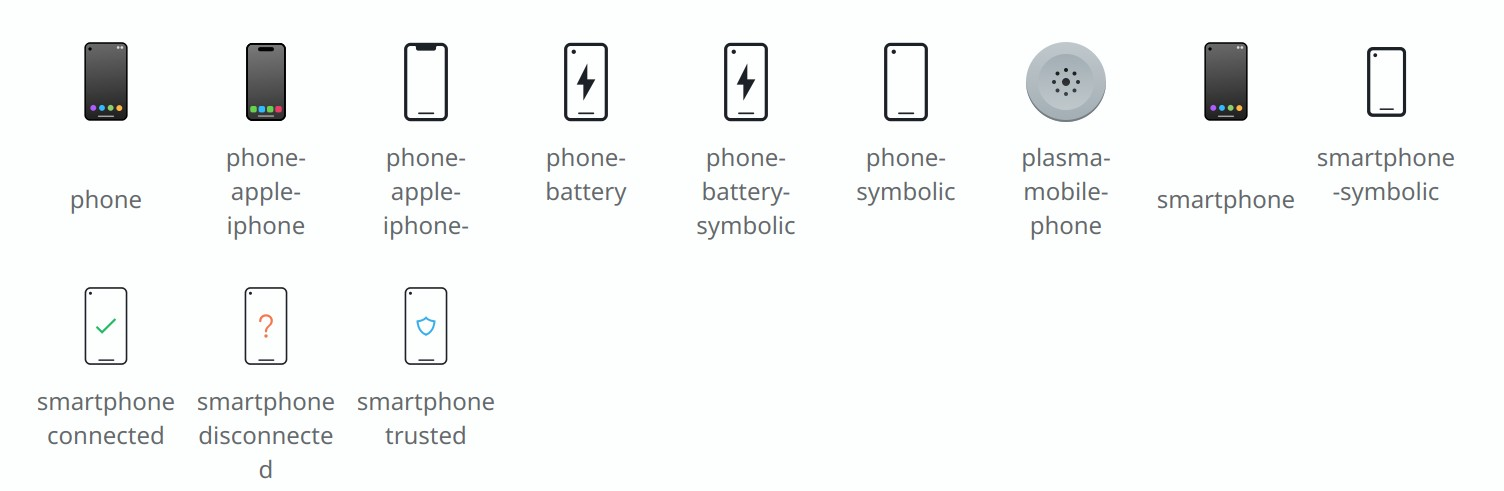
The Breeze icon theme’s smartphone icons have been overhauled and modernized to reflect what phones actually look like today (Áron Kovács, link):

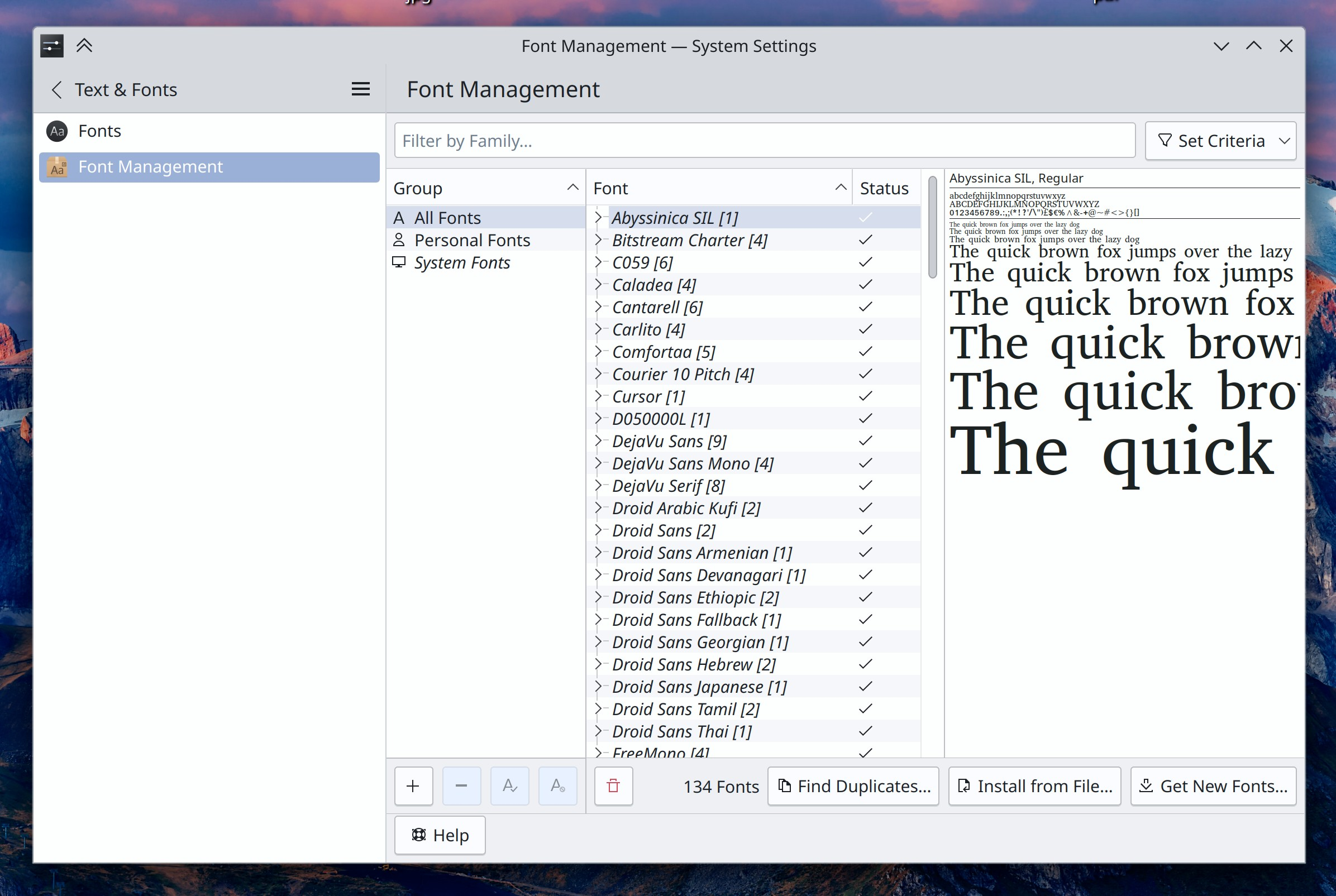
System Settings’ Font Management page has gotten a visual modernization to be more in line with the new frameless style in Plasma 6 (Carl Schwan, link):

Windows that don’t show up in the Task Manager or the Alt+Tab Task Switcher no longer appear semi-invisibly in the Overview effect (Akseli Lahtinen, link)

Breeze-themed non-editable frameless tabs (e.g. the tabs of a tabbed tool view or settings page) now expand to fill the available space by default, as there’s really no reason not to (Carl Schwan, link)

Improved the text contrast for certain accent colors (Akseli Lahtinen, link)

After pasting a file into a Dolphin window, if the file would end up at a location that’s currently out of view, the view scrolls to it so you can see it (Méven Car, link)

Okular’s “Show Signatures Panel” button now also opens the sidebar containing the signatures panel, if it happened to be closed at the time (Albert Astals Cid, link)

Elisa now supports cover images in the Webp format (Jack Hill, link)

Bug fixes

Important note: I don’t mention fixes for bugs that were never released to users; it’s just too much for me (it would probably be too much for you to read as well), and most people never encountered them in the first place. Because we’re in the middle of a big Plasma dev cycle, there are a lot of these bugs! So big thanks to everyone who’s made it a priority to fix them!

The screen locker has a fallback theme that appears when your active lock screen theme is broken. However when the fallback theme itself is broken for some reason, now the screen locker process breaks with the dreaded “your lock screen is broken” message rather than failing to lock the screen at all, which is worse (Joshua Goins, link)

File dialogs from a variety of Qt-yet-non-KDE apps will now have their name filters set correctly (Nicolas Fella, link)

When using a fractional scale factor, the Breeze window decoration theme’s window outlines no longer exhibit minor visual glitches (Vlad Zahorodnii, link)

Fixed an issue that could result in cursors leaving trails behind them when using a fractional scale factor and certain graphics cards that don’t support hardware cursors (Vlad Zahorodnii, link)

Widgets that have been assigned keyboard shortcuts should now be more reliable about remembering them. This probably alleviates or fixes a lot of the “Can’t activate Kickoff with the meta key” bugs! (Akseli Lahtinen, link)

Memory usage for NVIDIA GPUs is now represented with the correct unit in various System Monitor widgets and the app of the same name (Arjen Hiemstra, link)

When using a Bluetooth headset with integrated volume buttons, pushing them now always shows the volume change OSD (Bharadwaj Raju, link)

System Settings’ Task Switcher page no longer confusingly uses the word “backtab”, and the backwards-looking task switching invoked using Alt+Shift+Tab now works continuously if you hold it down (Yifan Zhu, link 1 and link 2)

The scrollbars of scrollable menus in QtQuick-based apps no longer inappropriately overlap the menu items (Tomislav Pap, link)

Other bug information of note:

Performance & Technical

Okular has now been ported to Qt 6 (Nicolas Fella, Sune Vuorela, and Carl Schwan. link)

The Wacom Tablet applet has now been ported to Qt 6 (Nicolas Fella, link)

Fixed one source of hangs in Dolphin when browsing a slow Samba share–this time having to do with bottlenecks generating thumbnails (Harald Sitter, link)

Reduced the memory usage of screen recording using KPipeWire. This won’t entirely fix the issue of screen recording taking up too much memory, but it makes a big difference already and should prevent outright resource exhaustion (Arjen Hiemstra, link 1 and link 2)

The DrKonqi crash reporter is now capable of recording and reporting crashes of the Powerdevil power management subsystem (Harald Sitter, link)

Automation & Systematization

Added an autotest to make sure the Emoji Selector window works (Fushan Wen, link)

…And Everything Else

This blog only covers the tip of the iceberg! If you’re hungry for more, check out https://planet.kde.org, where you can find more news from other KDE contributors.

How You Can Help

We’re hosting our Plasma 6 fundraiser right now and need your help! Thanks to you we’re now at 98% of our goal of 500 new KDE e.V. supporting members! That’s right, 98%!!! I bet we can get over the 500 mark before Christmas, and a little birdie might have told me that if we do, there could be stretch goals. 🙂 So if you like the work we’re doing, spreading the wealth via this fundraiser is a great way to share the love. 🙂

If you’re a developer, work on Qt6/KF6/Plasma 6 issues! Which issues? These issues. Plasma 6 is very usable for daily driving now, but still in need of bug-fixing and polishing to get it into a releasable state by February.

Otherwise, visit https://community.kde.org/Get_Involved to discover other ways to be part of a project that really matters. Each contributor makes a huge difference in KDE; you are not a number or a cog in a machine! You don’t have to already be a programmer, either. I wasn’t when I got started. Try it, you’ll like it! We don’t bite!

This week in KDE: un-flashy important stability work

Everyone kept hammering on the bugs this week. As a result, the number of open Plasma 6 issues decreased, and so did the number of older high and very high priority Plasma issues! I’m feeling really good about this release. Daily driving it is already a pleasure. I think it might be a winner. 🙂

KDE 6 Mega-Release

(Includes all software to be released on the February 28th mega-release: Plasma 6, Frameworks 6, and apps from Gear 24.02)

General infoOpen issues: 199

UI improvements

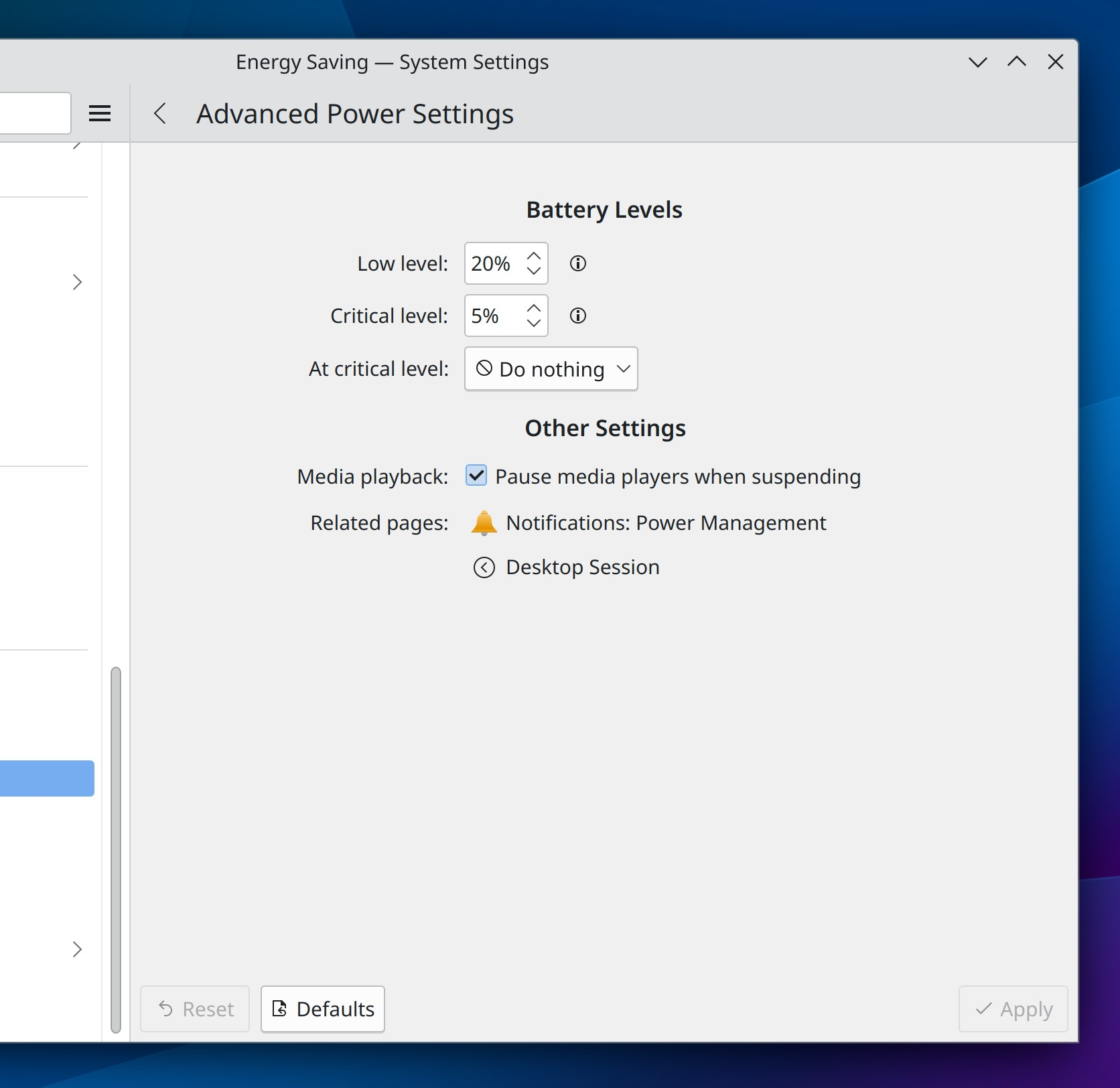
The “Advanced Power Settings” page in System settings has now been folded up into a sub-page of the “Energy Settings” page (Jakob Petsovits, link):

Made a variety of improvements to the way device batteries are shown on Info Center’s “Energy” page: more device types are now identified correctly, and their device models are now shown so you can more easily distinguish batteries from different devices of the same type (Shubham Arora, link 1, link 2, link 3, link 4)

When you try to connect to a Wi-Fi network but enter the wrong password, you’re now informed of this immediately instead of having to wait a while to learn why it didn’t connect successfully (David Redondo, link)

The Breeze-themed Telegram icon has been updated to better match Telegram’s own branding (Onur Ankut, link):

The Breeze cursor theme now includes more pre-generated sizes, making its cursors look better at various scale factors and in more apps and toolkits that don’t yet conform to the cursor-shape-v1 Wayland protocol (Jin Liu, link)

Ark’s integrated viewer window now remembers its window size the next time you open it (Ilya Pominov, link)

In Spectacle’s Rectangular Region mode, you can now hold down the Shift key to see the magnifier while moving the box using arrow keys (Noah Davis, link)

Bug fixes

Important note: I don’t mention fixes for bugs that were never released to users; it’s just too much for me (it would probably be too much for you to read as well), and most people never encountered them in the first place. Because we’re in the middle of a big Plasma dev cycle, there are a lot of these bugs! So big thanks to everyone who’s made it a priority to fix them!

KWin can no longer crash when told by an app to open window with an invalid size (Xaver Hugl, link)

Editing an app’s .desktop file in such a manner that the file’s Exec= value ends up containing an equals sign no longer causes the properties dialog to crash the next time you use it to edit the same file (Harald Sitter, link)

Fixed a common random Plasma crash (David Redondo, link)

You can no longer crash KMenuEdit by creating a new entry, immediately deleting it, and then clicking “Save” (Harald Sitter, link)

In the Plasma Wayland session, the power and session actions once again work after KWin has crashed (David Edmundson, link)

Fixed several visual glitches related to missing pixels when using multiple screens with any of them having a fractional scale factor (Yifan Zhu, link 1 and link 2)

When using Dolphin’s Details mode to view a folder tree, expanding a folder no longer orders the items incorrectly when the parent view was sorted by size (Akseli Lahtinen, link)

Changes to the cursor size now take effect in Plasma immediately, without needing to restart plasmashell (Vlad Zahorodnii and others, link)

Using the “Cut” command on files and folders in Dolphin once again causes them to become visually desaturated (Jin Liu, link)

GTK4 apps now use the current KWin-provided window closing animation, instead of just disappearing immediately (Vlad Zahorodnii, link)

When using Elisa in mobile mode, its playlist sidebar can once again be closed (Kevin Kofler, link)

The Plasma-themed spinbox UI element now works properly with a wider variety of 3rd-party styling–hopefully all of them! (Marco Martin, link)

Other bug information of note:

Performance & Technical

The Overview effect is now much faster to launch and has smoother animations; this work is now largely done and it represents a major improvement! (Vlad Zahorodnii, Marco Martin, and Arjen Hiemstra, link 1 and link 2)

…And Everything Else

This blog only covers the tip of the iceberg! If you’re hungry for more, check out https://planet.kde.org, where you can find more news from other KDE contributors.

How You Can Help

We’re hosting our Plasma 6 fundraiser right now and need your help! Thanks to you we’re now at 91% of our goal of 500 new KDE e.V. supporting members! That’s really close to 95%, which is close to 100%! So I think we might actually make it… if you like the work we’re doing, spreading the wealth is a great way to share the love. 🙂

If you’re a developer, work on Qt6/KF6/Plasma 6 issues! Which issues? These issues. Plasma 6 is very usable for daily driving now, but still in need of bug-fixing and polishing to get it into a releasable state by February.

Otherwise, visit https://community.kde.org/Get_Involved to discover other ways to be part of a project that really matters. Each contributor makes a huge difference in KDE; you are not a number or a cog in a machine! You don’t have to already be a programmer, either. I wasn’t when I got started. Try it, you’ll like it! We don’t bite!

This week in KDE: DMA fence deadlines and lots of bug-fixing

The bug-fixing marathon continued this week, alongside an avalanche of new bug reports! It appears people are indeed testing the Plasma 6 beta release, which is great! Fortunately most of the bugs being reported are minor. Keep it up, everyone! And don’t forget about the Plasma 6 fundraiser; we’re getting really close!

KDE 6 Mega-Release

(Includes all software to be released on the February 28th mega-release: Plasma 6, Frameworks 6, and apps from Gear 24.02)

General infoOpen issues: 205

New features

When using automatic bug reporting, the system notification telling you that a crash report has been automatically reported now also gives you the opportunity to send along a message to tell developers what you were doing or help them understand the context surrounding the crash (Harald Sitter, link)

Bug fixes

Important note: I don’t mention fixes for bugs that were never released to users; it’s just too much for me (it would probably be too much for you to read as well), and most people never saw those bugs in the first place. Because we’re in the middle of a big Plasma dev cycle, there are a lot of these bugs! So big thanks to everyone who’s made it a priority to fix them!

Fixed a case where Dolphin could crash when undoing a mass-rename job (Akseli Lahtinen, link)

Partition Manager no longer lets you set sector alignment to zero (Andrius Štikonas, link)

Switching your language to European Portuguese now works properly (Harald Sitter, link)

System Settings’ Recent Files page now supports non-default settings highlighting (Méven Car, link)

System Settings Energy Saving page now also supports non-default settings highlighting (Jakob Petsovits, link)

On System Settings’ Screen Edges page, the “Remain active when windows are fullscreen” checkbox now correctly highlights when in a non-default state (me: Nate Graham, link)

Scrolling on sliders throughout Plasma now scrolls in the expected direction when using inverted/”natural” scrolling (Ismael Asensio, link)

When taking a screenshot in Spectacle with the “automatically copy to clipboard” setting, the system notification that tells you about this can now be successfully be clicked to open the image in the default image viewer (Noah Davis, link)

The “Add More Timezones” Digital Clock widget popup is no longer sometimes too narrow to read the available timezones (me: Nate Graham, link)

Fixed several window positioning issues when using the “Minimize Overlapping” placement mode with a fractional scale factor in the Plasma Wayland Session (Yifan Zhu, link)

Other bug information of note:

Performance & Technical

Added support for “DMA-Fence deadlines”, which should improve performance and responsiveness on systems with Intel integrated GPUs in the Plasma Wayland session (Xaver Hugl, link)

Did a lot of performance work for the KWin Overview effect; it’s now much smoother, and work is ongoing to make it open faster, too (Vlad Zahorodnii and Marco Martin, link 1, link 2, link 3, link 4, link 5, link 6, link 7)

The Night Color transition no longer wrecks performance when using certain AMD GPUs (Xaver Hugl, link)

Ported the Accounts page in System Settings to work with Qt 6 (Nicolas Fella, link)

Automation & Systematization

Added a test to ensure that the animation speed setting works as expected (Fushan Wen, link)

Added a test to ensure that extracting the accent color from the wallpaper works as expected (Fushan Wen, link)

Added a test to ensure that the Media Controller widget’s time slider works as expected (Fushan Wen, link)

Added a GUI test to ensure that Info Center’s “About This System” page shows data properly (Alexander Wilms, link)

…And Everything Else

This blog only covers the tip of the iceberg! If you’re hungry for more, check out https://planet.kde.org, where you can find more news from other KDE contributors.

How You Can Help

We’re hosting our Plasma 6 fundraiser right now and need your help! Thanks to you we’re now at 88% of our goal of 500 new KDE e.V. supporting members! That’s really close to 90%, which is close to 95%, which is close to 100%! So I think we might actually make it… if you like the work we’re doing, spreading the wealth is a great way to share the love. 🙂

If you’re a developer, work on Qt6/KF6/Plasma 6 issues! Which issues? These issues. Plasma 6 is very usable for daily driving now, but still in need of bug-fixing and polishing to get it into a releasable state by February.

Otherwise, visit https://community.kde.org/Get_Involved to discover other ways to be part of a project that really matters. Each contributor makes a huge difference in KDE; you are not a number or a cog in a machine! You don’t have to already be a programmer, either. I wasn’t when I got started. Try it, you’ll like it! We don’t bite!

This week in KDE: changing the wallpaper from within System Settings

Plasma 6 beta 1 has been released! And so far the feedback has been very positive. A few final features snuck in before we started on the mega bugfixing marathon, which began this week! Please do continue to test the beta and report bugs. Other useful activities include fixing bugs and donating to the Plasma 6 fundraiser. 🙂

KDE 6 Mega-Release

(Includes all software to be released on the February 28th mega-release: Plasma 6, Frameworks 6, and apps from Gear 24.02)

General infoOpen issues: 164

New features

You can now set the wallpaper for any of your screens from a page in System Settings! (Méven Car, link):

Discover now features a “Newly Published & Recently Updated” section on the main page when using Flatpak or Snap as your default apps backend, which makes the Linux app ecosystem feel more alive! Work is pending to also show this section when using distro packages for your default source, provided the distro actually ships relatively frequent updates to apps and not ancient years-old software all on the same date, which would make the section useless (Ivan Tkachenko, link):

The Night Light page in System Settings now shows you a graphical representation of the active and inactive periods as well as the transition times (Ismael Asensio, link):

Implemented a “Shake to find your cursor” KWin effect, similar to the one in macOS. Note that it’s off by default for now, so you’ll need to manually turn it on in System Settings’ Desktop Effects page if you want to use it (Vlad Zahorodnii, link)

Ark now offers a new “Extract here and delete archive” option for its context menu plugin! As part of the process of making this possible, we decided to remove infrequently-used items in the menu in favor of keeping the “Extract here, autodetect subfolder” option, which was the most useful one and has now been renamed to “Extract here” for clarity (Severin von Wnuck, link):

User Interface improvements

Auto-Hide panels now respect the user-configurable delay setting that currently affects other screen edge effects, so you can configure whether they will un-hide immediately upon being touched, or wait an amount of time of your choosing (Bharadwaj Raju, link)

The glow effect that appears when your pointer gets close to a screen edge or corner that will do something when touched now respects the system’s accent color (Ivan Tkachenko, link)

The Morphing Popups effect now animates with the standard easing curve, which feels more consistent and nicer and also makes it feel faster (Timothy Bautista, link)

KRunner and other KRunner-based searches like the one in Overview now have proper visual click feedback when you click on a search result (Kai Uwe Broulik, link)

Tool views and sidebar tabs in Kate can now be dragged-and-dropped to other locations (Waqar Ahmed, link 1 and link 2)

Hitting the Escape key in Spectacle while in Rectangular Region mode now takes you back to the main window instead of quitting the app (Noah Davis, link)

Bug fixes

Fixed the most common crash in Dolphin which could happen when copying a large number of files to another location, closing Dolphin’s window, and then interacting with the overwrite/skip dialog (Akseli Lahtinen, link)

Fixed another common crash in Dolphin that could happen after entering edit mode and then changing the Application Style (Akseli Lahtinen, link)

In the Plasma Wayland session, sub-menus from Kicker no longer go underneath a bottom panel, and windows marked “Keep above other windows” no longer also go above panel popups (David Edmundson, link 1 and link 2)

Fixed various visual glitches with the bouncy app launch feedback effect on Wayland when using a scale factor higher than 100% (Vlad Zahorodnii, link 1, link 2, and link 3)

Window titles that contain a hyphen character no longer get mangled when displayed in Task Manager preview popups (Niccolò Venerandi, link)

Fixed OSDs on the lock screen looking pointlessly different from OSDs shown everywhere else (Bharadwaj Raju, link)

When you have multiple Battery widgets, the “Manually block sleep and screen locking” switch is now synced between all of them (Natalie Clarius, link)

Technical

Added support for hardware cursors on NVIDIA GPUs (Doğukan Korkmaztürk, link)

System Settings’ Firewall page has been fully ported to Qt6 (Guillaume Frognier and David Redondo, link)

KDE Connect’s Plasma widget has been fully ported to be compatible with Plasma 6 (Prajna Sariputra, link)

Automation & Systematization

Added an autotest to make sure that files and folders added to the desktop actually show up immediately (Fushan Wen, link)

Added an autotest to make sure that accent colors can be correctly extracted from wallpapers (Fushan Wen, link)

Added an autotest to make sure that Global Theme layouts can be correctly applied (Fushan Wen, link)

…And Everything Else

This blog only covers the tip of the iceberg! If you’re hungry for more, check out https://planet.kde.org, where you can find more news from other KDE contributors.

How You Can Help

We’re hosting our Plasma 6 fundraiser right now and need your help! Thanks to you we’re now at 83% of our goal of 500 new KDE e.V. supporting members now! I think we might actually make it! If you like the work we’re doing, spreading the wealth is a great way to share the love. 🙂

If you’re a developer, work on Qt6/KF6/Plasma 6 issues! Which issues? These issues. Plasma 6 is very usable for daily driving now, but still in need of bug-fixing and polishing to get it into a releasable state by February.

Otherwise, visit https://community.kde.org/Get_Involved to discover other ways to be part of a project that really matters. Each contributor makes a huge difference in KDE; you are not a number or a cog in a machine! You don’t have to already be a programmer, either. I wasn’t when I got started. Try it, you’ll like it! We don’t bite!

This week in KDE: the Plasma 6 feature freeze approaches

At this point nearly all the planned features for Plasma 6 are done, and everyone’s focus has begun to shift to bug-fixing and polishing. People are reporting plenty of bugs (most of them fairly minor) and we’re fixing them as fast as we can! In addition to that, some larger and more notable changes went in too:

KDE 6 Mega-Release

(Includes all software to be released on the February 28th mega-release: Plasma 6, Frameworks 6, and apps from Gear 24.02)

General infoOpen issues: 162

Shutting down or restarting the machine while in the Plasma Wayland session now causes apps with unsaved changes to prompt the user to save them, rather than just quitting immediately and losing the changes. No new Wayland protocol ended up being necessary after all! This was one of the last three Wayland Showstoppers (David Redondo, link)

“Bounce Keys” now fully work in the Plasma Wayland session. This was the second of the last three Wayland Showstoppers! Now we’re just down to one, and it too is being worked on! (Nicolas Fella, link)

Partition Manager no longer lets you write entries to your fstab file that could prevent mounting a partition in the future by closing the partition editing dialog without changing the mountpoint, when the mountpoint was previously undefined (Arjen Hiemstra, link 1 and link 2)

Files and folders created in ~/Desktop but outside of Plasma itself should now always appear there immediately (Harald Sitter, link)

Changing your user picture in System Settings now results in the picture in Kickoff changing immediately, rather than only after Plasma was restarted (Akseli Lahtinen, link)

Fixed a visual glitch in Kate and other KTextEditor-based apps involving the completion popup (Waqar Ahmed, link)

Since the API for Plasma Widgets has changed in Plasma 6, widgets that you migrate from a Plasma 5 installation but aren’t compatible with Plasma 6 are now shown in a relatively user-friendly way, so at least you know what to do and don’t think that Plasma 6 is just totally broken (Marco Martin, link 1, link 2)

When you’ve downloaded an offline update, there’s now an option to reboot without applying it on the next boot-up. We’re considering adding this as an option when shutting down, too (Kai Uwe Broulik, link)

The “Battery and Brightness” widget has been split into two new widgets: “Brightness and Color” and “Power and Battery.” The former one integrates controls for Night Color, so in the end the total number of widgets in your System Tray isn’t increasing; they’re just better organized and relevant now! (Natalie Clarius, link):

KMail now gains support for the beautiful new frameless styling in the Plasma 6 Breeze theme (Carl Schwan, link):

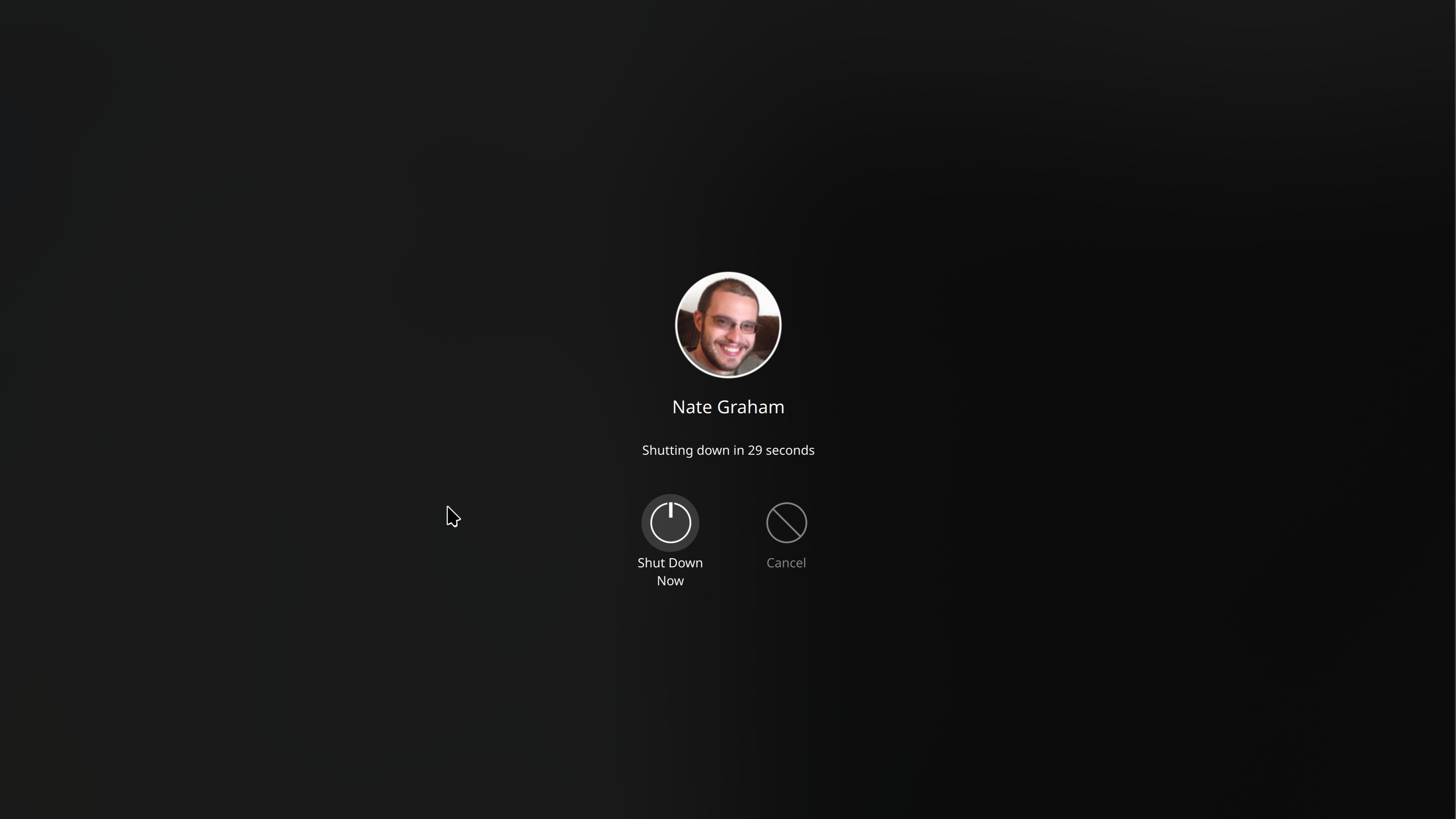
The “Kill unresponsive window?” dialog now exists in the Plasma Wayland session and has received a visual overhaul to brings its UI into the 21st century (Kai Uwe Broulik, link):

Spectacle now opens on Meta+Shift+S, for the benefit of those whose keyboards don’t have a PrintScreen key (Noah Davis, link)

Welcome Center gains a dedicated page shown to people who use the beta version of Plasma (Oliver Beard, link):

The Samba sharing configuration wizard has been fully ported to Qt6 (Harald Sitter, link)

Other Bug-Related Information of Interest:

This section is short because all notable bugfixes are included in the mega-release! Expect this to be more and more true as we get closer to the final release, which, as a reminder, is planned for February 28, 2024.

…And Everything Else

This blog only covers the tip of the iceberg! If you’re hungry for more, check out https://planet.kde.org, where you can find more news from other KDE contributors.

How You Can Help

We’re hosting our Plasma 6 fundraiser right now and need your help! Thanks to you we’re past the 75% mark, but we’re not there yet! So if you like the work we’re doing, spreading the wealth is a great way to share the love. 🙂

If you’re a developer, work on Qt6/KF6/Plasma 6 issues! Which issues? These issues. Plasma 6 is usable for daily driving now, but still in need of bug-fixing and polishing to get it into a releasable state by February.

Otherwise, visit https://community.kde.org/Get_Involved to discover other ways to be part of a project that really matters. Each contributor makes a huge difference in KDE; you are not a number or a cog in a machine! You don’t have to already be a programmer, either. I wasn’t when I got started. Try it, you’ll like it! We don’t bite!

This week in KDE: Panel Intellihide and Wayland Presentation Time

It’s great to see lots of people running the Plasma 6 Alpha release, which has resulted in a spike of bug reports, as we had hoped and expected. So keep at it! Focus is already shifting to bug fixing now that most planned features are merged, with only a few to go. So far I’ve been following a policy of only noting fixes for bugs that affect shipping software, but I might have to change that given the loooong bugfixing window for Plasma 6. Still chewing on it.

Anyway, lots to talk about this week!

Plasma 6

(Includes all software to be released on the February 28th mega-release: Plasma 6, Frameworks 6, and apps from Gear 24.02)

General infoOpen issues: 144

Plasma Panels have now gained a new visibility mode: “Dodge Windows” aka “intelligent auto-hide!” In essence, the Panel auto-hides when touched by a window, but is otherwise visible (Bharadwaj Raju and Niccolò Venerandi, link)

KWin now implements support for the Wayland “Presentation time” protocol! (Xaver Hugl, link)

Carl Schwan has been improving the look and feel of QtWidgets-based KDE apps left and right, and they just look gorgeous now! (Carl Schwan, link 1, link 2, link 3, link 4, link 5, link 6, link 7, link 8, and link 9):

List items throughout QML-based KDE software now use a nicer rounded highlight style (Arjen Hiemstra and Carl Schwan, link):

When you create a new blank panel, it now comes with an “Add Widgets…” button on it to save you some time, because let’s face it, the next thing you were about to do was add some widgets! (Niccolò Venerandi, link)

The Breeze icon theme has gained symbolic variants of the weather icons, which means that when you use a Weather Report widget on your panel, it’s no longer the only thing in or near the System tray with a colorful icon (Alois Spitzbart, link):

When you scroll down in one of the “Get new [thing]” dialogs to load new content, it now loads without throwing up a giant full-window loading indicator that blocks the view of what you were looking at (Rishi Kumar, link)

Ported all of Plasma’s widget configuration dialogs to use the same base components we use for system Settings pages, allowing for more unified code and also frameless, edge-to-edge scrollable views like in System Settings (Nicolas Fella, link)

the Task Manager widget’s rather confusing “Always arrange tasks in columns of as many rows” setting has been re-done in the UI to be comprehensible (Niccolò Venerandi, link):

Improved app launch time in the Plasma Wayland session (David Edmundson, link)

Elisa now always uses its internal music indexer rather than Baloo. This unifies the UX and indexing codepaths, as many users did not have Baloo available and were using the internal indexer anyway. The result is 10 open bug reports fixed! (Christoph Cullmann, link)

Konsole’s default “Breeze” terminal color scheme now uses the more attention-getting and attractive “Plasma Blue” color for intense text (Thiago Sueto, link):

In Dolphin, you can now toggle inline previews on and off with the F12 key, just like how you can in the open/save dialogs (Eric Armbruster, link)

Other Significant Bugfixes

(This is a curated list of e.g. HI and VHI priority bugs, Wayland showstoppers, major regressions, etc.)

Brightness control now works on FreeBSD systems (Gleb Popov, Plasma 5.27.10. Link)

Your preferred web browser is now looked up more reliably (Harald Sitter, Plasma 5.27.10. Link)

Moving the pointer over a partially-visible list item in various Plasma widgets no longer auto-scrolls the view to make that list item totally visible, which could be rather disruptive in certain circumstances (e.g. for very large list items, or when moving the pointer up from the bottom of the list to try to reach an item at the top) and annoyed a lot of people (Bharadwaj Raju, Plasma 6.0. Link)

Dolphin’s ISO integration tools now work again after briefly breaking (Eric Armbruster, Dolphin 23.08.3. Link)

Other bug-related information of interest:

…And Everything Else

This blog only covers the tip of the iceberg! If you’re hungry for more, check out https://planet.kde.org, where you can find more news from other KDE contributors.

How You Can Help

We’re hosting our Plasma 6 fundraiser right now and need your help! Thanks to you we’ve hit the 70% mark, which is amazing! To be honest, I had thought the goal of 500 new KDE e.V. supporting members was too ambitious, but you folks have proven me wrong so far. But nonetheless, while 70% is amazing, 70% is not 100%, so if you like the work we’re doing, spreading the wealth by becoming a member is a great way to share the love. 🙂

If you’re a developer, work on Qt6/KF6/Plasma 6 issues! Which issues? These issues. Plasma 6 is usable for daily driving now, but still in need of bug-fixing and polishing to get it into a releasable state by February.

Otherwise, visit https://community.kde.org/Get_Involved to discover other ways to be part of a project that really matters. Each contributor makes a huge difference in KDE; you are not a number or a cog in a machine! You don’t have to already be a programmer, either. I wasn’t when I got started. Try it, you’ll like it! We don’t bite!

This week in KDE: Wayland by default, de-framed Breeze, HDR games, rectangle screen recording

Yep you read that right, we’ve decided to throw the lever and go Wayland by default! The three remaining showstoppers are in the process of being fixed and we expect them to be done soon–certainly before the final release of Plasma 6. So we wanted to make the change early to gather as much feedback as possible.

But that’s not all, of course. This was another big week! Read on to see the rest:

Plasma 6

(Includes all software to be released on the February 28th mega-release: Plasma 6, Frameworks 6, and apps from Gear 24.02)

General infoOpen issues: 118

The Breeze app style has gotten the visual overhaul you’ve all dreamed of: no more frames within frames! Instead Breeze-themed apps adopt the clean design of modern Kirigami apps, with views separated from one another with single-pixel lines! (Carl Schwan, link 1, link 2, link 3, link 4, link 5, link 6, link 7, link 8, link 9, and link 10):

In the Plasma Wayland session, there’s now preliminary support for playing HDR-capable games when using an HDR-capable screen! (Xaver Hugl, link)

Spectacle has gained support for rectangular region screen recording! (Noah Davis, link)

System Settings’ Printers page has gotten a major overhaul and now includes the features internally that it used to direct you to external apps for. The result is much nicer and more integrated, without a cascading soup of dialog windows (Mike Noe, link):

The Plasma Panel settings have been redesigned again, and this time everything is in one dialog; no more nested sub-menus! This work fixed 14 open bug reports (Niccolò Venerandi and Marco Martin, link 1 and link 2):

Ark is now significantly faster to compress files using xz and zstd compression, as they are now multi-threaded (Zhangzhi Hu, link)

When you run Flatpak apps, they’ll no longer prompt you to approve or deny “background activity”; the whole concept of this has been removed as it was kinda sus and not useful at all (David Edmundson, link)

There’s now a simple setting to disable notification sounds systemwide, for those of you who don’t like them (Ismael Asensio, link 1, link 2, and link 3):

Improved Plasma’s start time rather significantly–up to a few whole seconds (Harald Sitter, link)

The double-click speed setting returns, and now lives on System Settings’ General Behavior page. Before you ask why it’s not on the mouse Page, it’s because it affects touchpads too and that has its own page, and duplicating the setting on both pages seemed messy and ugly (Nicolas Fella, link)

Syncing your Plasma settings to SDDM now also syncs your desired NumLock state on boot (Chandradeep Dey, link)

In QtWidgets-based apps, you can open the context menu for the selected thing with the Shift+F10 shortcut (Felix Ernst, link 1 and link 2)

You can now open System Monitor with the Meta+Escape shortcut (Arjen Hiemstra, link)

Significant Bugfixes

(This is a curated list of e.g. HI and VHI priority bugs, Wayland showstoppers, major regressions, etc.)

Fixed a wide variety of multi-screen issues related to screens sometimes not turning on at the right times or becoming visually frozen until going to another VT and back (Xaver Hugl, Plasma 6.0. Link)

Fixed a bug that could cause desktop icon positions to be mis-remembered, especially if the system has ever had multiple screens connected (Harald Sitter, Plasma 5.27.10. Link)

Fixed a bug that could cause Night Color to start transitioning to night mode at inappropriate times when using a certain combination of settings (Sanjay Swain, Plasma 5.27.10. Link)

Just in case you have a window that fails to set a minimum size, KWin no longer lets you resize it to a width of zero pixels, whereupon it would become invisible and impossible to find (Xaver Hugl, Plasma 6.0. Link)

In the “Get new [thing]” dialogs, items’ full descriptions are now visible, instead of getting cut off at some point (Ismael Asensio, Plasma 6.0. Link)

Other bug-related information of interest:

Automation & Systematization

Added a GUI test to make sure that Panel Edit Mode can be entered (Fushan Wen, link)

Added some GUI tests for functionality of the wallpaper chooser dialog (Fushan Wen, link)

Added some GUI tests for KRunner’s plugins and their presence in the relevant System Settings page (Fushan Wen, link)

…And Everything Else

This blog only covers the tip of the iceberg! If you’re hungry for more, check out https://planet.kde.org, where you can find more news from other KDE contributors.

How You Can Help

We’re hosting our Plasma 6 fundraiser right now and need your help! Thanks to you we’re past the 60% mark, but we’re not there yet! So if you like the work we’re doing, spreading the wealth is a great way to share the love. 🙂

If you’re a developer, work on Qt6/KF6/Plasma 6 issues! Which issues? These issues. Plasma 6 is usable for daily driving now, but still in need of bug-fixing and polishing to get it into a releasable state by February.

Otherwise, visit https://community.kde.org/Get_Involved to discover other ways to be part of a project that really matters. Each contributor makes a huge difference in KDE; you are not a number or a cog in a machine! You don’t have to already be a programmer, either. I wasn’t when I got started. Try it, you’ll like it! We don’t bite!