This week in KDE: Final Plasma 6.1 polishing and new features for 6.2

Plasma 6.1 is due to be released in three days, and lots of attention went into final release readiness activities: QA, bug-fixing, performance profiling, auto-testing, stuff like that. Boring but important! And happily, reviews of the 6.1 beta are, like, really good. So we want to make sure that the final release doesn’t disappoint!

In addition, we’re hard at work on Plasma 6.2, which is now beginning to accumulate features. Major areas of focus are some of the remaining Wayland pain points, including tablet and artist workflows. You can see some progress on that already:

New Features

Added an additional option for how to map the area of your drawing tablet to the area of your screen. It can be useful to have multiple options here, since drawing tablets are as diverse as screens, and their sizes and aspect ratios are unlikely to be identical (Joshua Goins, Plasma 6.2.0. Link):

Added a test mode feature for drawing tablets so you can test your settings (Joshua Goins, Plasma 6.2.0. Link):

Ported the Weather widget to the new API offered by the NOAA weather provider, which unlocked night forecasts in addition to the existing day forecasts (Ismael Asensio, Plasma 6.2.0. Link 1 and link 2)

This is new, so please excuse the UI glitches that are visible here. They’ll be cleaned up before the final release of Plasma 6.2 in four months.

UI Improvements

You can now wake up a sleeping screen using a stylus (David Redondo, Plasma 6.1.1. Link)

KWin’s Morphing Popups effect has been deleted. While it added a measure of fanciness, unfortunately the way it worked introduced unfixable visual glitches. After multiple attempts to fix them, with a heavy heart we had to admit defeat. Removing the effect fixed six open Bugzilla tickets, one of which had 20 (!) duplicates. Stability beats fanciness. (David Edmundson, Plasma 6.2.0. Link)

Bug Fixes

Scrolling in Elisa’s lyrics view once again works with a clicky scroll wheel mouse (Jack Hill, Elisa 24.05.1. 24.05.1)

Fixed that annoying bug that affected people not using Systemd (or Plasma’s Systemd integration) which would make some but not all Plasma settings fail to get saved properly (David Edmundson, Plasma 6.1.0. Link)

Fixed a bug that could cause Plasma’s “Unify Outputs” screen action to actually disable certain screens instead of making them mirror the existing one (Xaver Hugl, Plasma 6.1.0. Link)

Quickly adapted to the NOAA weather provider’s continued API changes by implementing a quick fix to keep it working for the Weather widget in Plasma 6.1. (Ismael Asensio, Plasma 6.1.0. Link)

Fixed multiple issues causing System Monitor widgets displaying certain types of days to be visually squished when displayed on Plasma panels (Arjen Hiemstra, Plasma 6.1.0. Link)

Fixed a visual glitch that caused flickering when canceling a quick-tile action initiated by dragging a window (Xaver Hugl, Plasma 6.1.0. Link)

When you change the system volume using the slider in Plasma’s Audio widget, the maximum volume in overdrive mode is once again 150%, not 153% (Ismael Asensio, Plasma 6.1.0. Link)

Fixed an issue that could cause XWayland-using apps to freeze for a short period of time after slowly resizing their windows, especially when using screen scaling (Vlad Zahorodnii, Plasma 6.1.1. Link)

In System Monitor pie charts (both in the app and the widgets), text in the center no longer sometimes overflows when it’s very long (Arjen Hiemstra, Plasma 6.1.1. Link)

Other bug information of note:

Performance & Technical

Improved the memory efficiency of Plasma notifications that display images (Fushan Wen, Plasma 6.2. Link)

Automation & Systematization

Added a test to ensure that Plasma panel focus works as expected (Niccolò Venerandi, link)

Added a test to ensure that images in Plasma notifications appear properly (Fushan Wen, link)

Added a test for some more combinations of settings in Plasma’s Clipboard widget, since there are rather a lot of them (Fushan Wen, link)

Added a test to ensure that the camera usage monitor is working (Fushan Wen, link)

Added a test to make sure the keyboard brightness is settable as expected (Fushan Wen, link)

…And Everything Else

This blog only covers the tip of the iceberg! If you’re hungry for more, check out https://planet.kde.org, where you can find more news from other KDE contributors.

How You Can Help

The KDE organization has become important in the world, and your time and labor have helped to bring it there! But as we grow, it’s going to be equally important that this stream of labor be made sustainable, which primarily means paying for it. Right now the vast majority of KDE runs on labor not paid for by KDE e.V. (the nonprofit foundation behind KDE, of which I am a board member), and that’s a problem. We’ve taken steps to change this with paid technical contractors — but those steps are small due to growing but still limited financial resources. If you’d like to help change that, consider donating today!

Otherwise, visit https://community.kde.org/Get_Involved to discover other ways to be part of a project that really matters. Each contributor makes a huge difference in KDE; you are not a number or a cog in a machine! You don’t have to already be a programmer, either. I wasn’t when I got started. Try it, you’ll like it! We don’t bite!

New Human Interface Guidelines

Today I’d like to share a new set of Human Interface Guidelines (HIG) for KDE’s software that I’ve written, replacing the old one. This work was done over the past several months in consultation with many KDE designers and developers; the merge request says 42 people were CCd, and almost 500 comments were posted during the 2+ month review process.

You can read the document at https://develop.kde.org/hig.

Wait, why does anyone need this at all?

Strictly speaking, we don’t need a HIG. Developers with an excellent eye for design can usually produce good results even without one. But for most of us, it’s useful to have guidelines to follow so you don’t have to think about the design side too much. Even for design-oriented developers, it’s useful to be able to have a quick reference for common patterns and rules.

And having a HIG is a good idea for any organization that wants for its software to share a similar look-and-feel and mode of operation, or any small individual developer who wants their software to match fit in well with a specific target platform (ours, in this case). When software fits into the visual and functional conventions of the platform with which it wants to integrate most closely, people already familiar with that platform learn to use it faster and like using it more. It feels at home to them. Comfortable, familiar, appealing.

Having and following a HIG makes all of this possible. And besides, we already had one anyway! But it needed major work.

Ok, so what was wrong with the old one?

To be honest, it wasn’t very good. I say this as a contributor to the old one! But it suffered from multiple problems that demanded a total rewrite:

  • It was hard to find anything because the basic structure was confused, with excessive segmentation.
  • Content was severely outdated and reflected design paradigms that KDE developers haven’t used in years, and that the industry in general has moved away from. It was also missing a lot of information relevant to how we write apps today.
  • Far too wordy; hard to find the actionable recommendations amid all the filler text!
  • Full of old mockups and screenshots that weren’t even needed to illustrate the point, and which would become out of date again quickly if we took the time to update them.
  • Many basic style errors: misspellings, incorrect English grammar, awkwardly phrased sentences, etc.

For these reasons, very few KDE developers or designers still paid any attention to the old HIG, besides of a small number of pages that did still have a reasonably high threshold of information density. And for the same reason, the HIG got very few contributions. I think when something is in a sufficiently poor state, it can even discourage people from contributing, because any small improvement seems like a raindrop in the ocean of urgent need. It’s demoralizing.

How is this new one any better?

The new one was informed by research into how KDE apps look and work today. Some inspiration for structure and organization was taken from the ElementaryOS, GNOME, Apple, and Google HIGs — but not content! The content is all KDE.

The new HIG had the following design goals:

  • Make 100% of the content actionable. No filler text, no rambling philosophy, no redundancy — just actionable recommendations for how to design your app. Short and sweet, and to the point!
  • Reflect how KDE designs software today. For example we’ve seen a huge growth in new Kirigami-based apps using QtQuick as their UI technology (including some older KDE apps getting their UIs ported to Kirigami), and Kirigami is the UI platform that’s improving most quickly in KDE. So I made the decision to focus the recommendations on Kirigami as a platform. There’s still some content about QtWidgets, but it’s a Kirigami-focused document.
  • Have flat navigation, so it’s easy to find everything. No deeply nested sub-pages and awkward categorization that makes you wonder why a page is in this category and not that one.
  • Get the new content into good enough shape that people feel comfortable contributing. Hopefully people will start to submit tweaks, improvements, bug-fixes, and maintenance!

Is it 100% finished?

No, absolutely not! The HIG is intended to be a living document that evolves over time to better describe KDE’s design goals and software development paradigms.

Like any rewrite, there are bound to be rough edges and omissions compared to the old version. Maybe I missed a piece of useful information in the old HIG that had been buried somewhere but retained some value. Maybe there’s low-hanging fruit for improvement. Help out by contributing! It’s just some text with markdown styling; contributing to the HIG is waaaaaaay easier then contributing code.

In particular, there are some known omissions and limitations that you can help with:

  • It needs more images. Multiple pages have embedded TODO comments where it would be nice to add a relevant image to illustrate a point.
  • There’s nothing at all about visual style in general, simply delegating those decisions to the system’s active theme. To a certain extent this is intentional because we support visual theming, but it would also be good to add content about KDE’s default Breeze theme. I deliberately omitted this for now because a bunch of KDE’s designers are working on a fancy new style, and developers are working on a whole new theming engine to apply it. So the world around the HIG is in a state of flux. But if anyone wanted to add more about the current Breeze style anyway, that would be nice. Just know that it may be replaced once the new style is released.
  • …With one exception: the entire section on Breeze icon design. This was kept from the old HIG content because it remains useful. Still, the presentation could use an overhaul to improve information density and collapse needless sub-pages into one parent page.
  • The recommendation to use Kirigami is awkward for powerful apps that use features not currently available in Kirigami-based apps, such as dockable sidebars/panes, customizable toolbars, customizable keyboard shortcuts, and more. If you’re a developer, help add these features!

Ok cool, how do I contribute?

That’s great, it’s super duper appreciated! See these two links to learn how to contribute changes:

If that’s too scary, we can help you get set up! Contact folks and we’ll see what we can do.

Still too scary? Then you can donate to KDE. Our budget is tiny, so your money genuinely does have an impact!

These past two weeks in KDE: massive stability work for Plasma 6.1

Sorry for the interruption last week; I was on vacation. While I was vacating, my colleagues were in full-on fix-everything mode in preparation for the upcoming Plasma 6.1 release in a little over a week. And what a release it promises to be! I think this is going to be a good one, folks. Lots of great features, improved performance and smoothness, and oodles of fixes for all kinds of strange bugs with your wild and wacky hardware devices!

New Features

Plasma’s Networks widget now supports WebAuth for SAML-based authentication. I don’t know what this means, but if you do, that probably means you’re happy about it! (Joel Holdsworth, Plasma 6.2.0 Link)

The network QR code that you can show in Plasma’s Networks widget is now draggable, so you can get an image file out of it wherever you want! (Fushan Wen, Plasma 6.2.0. Link)

System Monitor’s data backend now supports getting CPU/memory/IO/etc. pressure data from /proc/pressure/ (when supported by the Linux kernel) and displaying it in sensors. Hopefully this data will start to show up in user-facing features soon! (Adrian Edwards, Plasma 6.2.0 Link)

UI Improvements

Dolphin once again recommends installing Filelight if you try to get information about free space but it’s not installed (Felix Ernst, Dolphin 24.08.0. Link)

Passwords copied from KWalletManager no longer appear visible in the Clipboard widget (Weng Xuetian, KWalletManager 24.08.0. Link)

Plasma’s Panel Settings dialog no longer obscures the hover pop-ups for individual widgets while it’s open (David Edmundson, Plasma 6.1.0. Link)

In Plasma’s Sticky Notes widget, the colors of the inline buttons already change with the system color scheme. Now they also change appropriately based on the color scheme you select for the sticky note itself! (Evgeniy Harchenko, Plasma 6.1.0. Link)

Removed the “Hide utility windows for inactive applications” option, because it was broken and apparently nobody had noticed or reported this, and also it’s kind of a weird thing to exist in the first place. This also fixes a Plasma panel auto-hide bug caused by using it (Xaver Hugl, Plasma 6.1.0. Link 1 and link 2)

Searching in System Settings no longer sometimes returns nonsensical matches based on keywords that got implicitly joined together in ways that didn’t make sense (Harald Sitter, Plasma 6.1.0. Link)

A better cursor icon is now used when dragging windows (Vlad Zahorodnii, Plasma 6.1.0. Link)

On X11 with an NVIDIA GPU, a floating panel, and adaptive panel transparency, an unfortunate bug in the NVIDIA driver causes windows to lag when moved and resized. For now we’ve added a warning in the panel settings dialog about this (Ivan Tkachenko, Plasma 6.2.0. Link)

Improved the accessibility of the common Kirigami.PlaceholderMessage UI component (Aleix Pol Gonzalez, Frameworks 6.4. Link)

The custom accent color feature (including “accent color from wallpaper”) now does a better job of picking colors for links that will be readable, no matter what colors your base color scheme uses (Akseli Lahtinen, Plasma 6.1.0. Link)

Bug Fixes

Fixed an unusual issue in Elisa that could cause it to not launch when certain DBus setups on certain distros (Jack Hill, Elisa 24.05.1. Link)

Fixed Elisa not launching at all on Windows after a Windows integration library we were using was removed (Jack Hill, Elisa 24.05.1. Link)

Elisa no longer crashes when you try to enqueue the contents of filesystem folders that don’t actually have any music in them (Jack Hill, Elisa 24.05.1. Link)

Spectacle’s highlight annotation once again actually highlights (Noah Davis, Spectacle 24.05.1. Link)

Fixed a way that KWin could crash after the system wakes from sleep with weird screens that turn on strangely (Vlad Zahorodnii, Plasma 6.1.0. Link)

KWin should no longer crash when apps do weird things and for some reason two drag operations end up happening at once (Vlad Zahorodnii, Plasma 6.1.0. Link)

Fixed a way that KWin could crash on X11 when you change Global Themes (Xaver Hugl, Plasma 6.1.0. Link)

Fixed a weird crash in KWin that could happen when you’re pressing keys on the keyboard during the exact moment that XWayland disconnects (David Edmundson, Plasma 6.1.0. Link)

Fixed a cause of Plasma using too much memory and/or freezing due to system notifications containing certain sizes of images (Akseli Lahtinen, Plasma 6.1.0. Link)

Changing a System Monitor widget located on a thick panel to the “Application Table” or “Process Table” display style no longer causes Plasma to freeze (Akseli Lahtinen, Plasma 6.1.0. Link)

Fixed the most common crash in System Settings’ Firewall page which could be experienced by changing settings and then switching pages (Nicolas Fella, Plasma 6.1.0. Link)

Fixed an extremely esoteric Plasma crash that was caused by repeatedly wiggling the pointer over certain menu items of the context menu of the sub-folder popup of a folder located on the desktop (Akseli Lahtinen, Plasma 6.1.0. Link)

When you try to add a sensor to System Monitor or one of its so-named widgets that you’ve already added, you’re now warned and prevented from doing so, instead of being allowed to continue, which would silently break the display of all sensors (Arjen Hiemstra, Plasma 6.1.0. Link)

Connected devices that are nice enough to report battery information to Plasma no longer sometimes randomly get disconnected for no good reason (Ivan Tkachenko, Plasma 6.1.0. Link)

Some monitors that do unusual and exotic things under the hood no longer get their resolutions set to 640×480 after resuming from sleep (Xaver Hugl, Plasma 6.1.0. Link)

The “Allow restore on future sessions” checkbox on the screen sharing dialog once again works (Nicolas Fella, Plasma 6.1.0. Link)

Titlebar context menus of non-maximized Aurorae-decorated windows are no longer misplaced on Wayland (Vlad Zahorodnii, Plasma 6.1.0. Link)

Kicker’s panel button is no longer too large with a thin panel, which was a regression caused by me trying to keep it from getting too large with thick panels! (Niccolò Venerandi, Plasma 6.1.0. Link)

Connecting a new screen that’s larger than any of the current screens no longer causes it to get a small constrained version of the default wallpaper; now it gets the correct size (Marco Martin, Plasma 6.1.0. Link)

When you’ve got a floating Plasma panel on a screen edge that’s shared with another screen, it no longer pushes an odd blurry rectangle onto that adjacent screen when it de-floats (Niccolò Venerandi, Plasma 6.1.0. Link)

Using the “Application” or “Window” layout switching mode no longer causes Plasma’s System Tray popup to close immediately when you try to open it while the widget is located on a panel on the bottom or right screen edge (Marco Martin, Plasma 6.1.0. Link)

Shutting down, restarting, etc. from within KWin’s Overview effect no longer causes it to freeze for 45 seconds before completing the operation (David Edmundson, Plasma 6.2.0. Link)

Fixed a bug that caused items on the Plasma desktop to disappear until Plasma was restarted after their icons changed, either because you changed them manually, or they got automatically changed by something else automatically—for example by putting items into the trash (Akseli Lahtinen, Frameworks 6.4. Link)

Worked around a Qt regression that prevented toolbar buttons in QtQuick apps from showing that they have keyboard focus (Aleix Pol Gonzales, Frameworks 6.4. Link)

Other bug information of note:

Performance & Technical

Improved the performance of basically everything for cases where the ~/.cache folder is located on a slow disk, such as a hard drive (David Edmundson, Plasma 6.1.0. Link)

Plasma and KWin no longer rocket up in CPU usage for no good reason when using the using “Keep the selection and clipboard the same” and “Text selection: Always save in history” Clipboard widget settings (David Edmundson, Plasma 6.1.0. Link)

Re-enabled hardware-accelerated cursor support for Intel GPUs, since the bugs that were causing us to disable it have since been resolved. This should make cursors more responsive and not increase CPU usage when moving it (Vlad Zahorodnii, Plasma 6.2.0. Link)

Implemented Breeze styling for movable splitters in QML software, so we can now start porting things to use it. This will eventually result in, for example, resizable sidebars in places where you’d expect for sidebars to be resizable—imagine that! (Ivan Tkachenko, Frameworks 6.4. Link)

Automation & Systematization

Turned a manual test for the Plasma System Tray into an automatic one, so now it actually gets run regularly (Fushan Wen, link)

Added a few autotests for the Plasma Clipboard widget to verify recent fixes (Fushan Wen, link)

…And Everything Else

This blog only covers the tip of the iceberg! If you’re hungry for more, check out https://planet.kde.org, where you can find more news from other KDE contributors.

How You Can Help

The KDE organization has become important in the world, and your time and labor have helped to bring it there! But as we grow, it’s going to be equally important that this stream of labor be made sustainable, which primarily means paying for it. Right now the vast majority of KDE runs on labor not paid for by KDE e.V. (the nonprofit foundation behind KDE, of which I am a board member), and that’s a problem. We’ve taken steps to change this with paid technical contractors — but those steps are small due to growing but still limited financial resources. If you’d like to help change that, consider donating today!

Otherwise, visit https://community.kde.org/Get_Involved to discover other ways to be part of a project that really matters. Each contributor makes a huge difference in KDE; you are not a number or a cog in a machine! You don’t have to already be a programmer, either. I wasn’t when I got started. Try it, you’ll like it! We don’t bite!

This week in KDE: Triple buffering and other sources of amazingness

We just branched for Plasma 6.1 and released the beta, which means the window to add new features has now closed. But before it did, a ton of amazing stuff snuck in! Plasma 6.1 promises to be a large and impressive release.

Probably the most impactful thing is triple buffering support on Wayland! This should make animations and screen rendering smoother in general–ideally up to the level of the X11 session, which already did triple buffering. This work by Xaver Hugl has been in progress for a long time and lands in Plasma 6.1. Link

That’s not all though… oh no, not by a long shot:

New Features

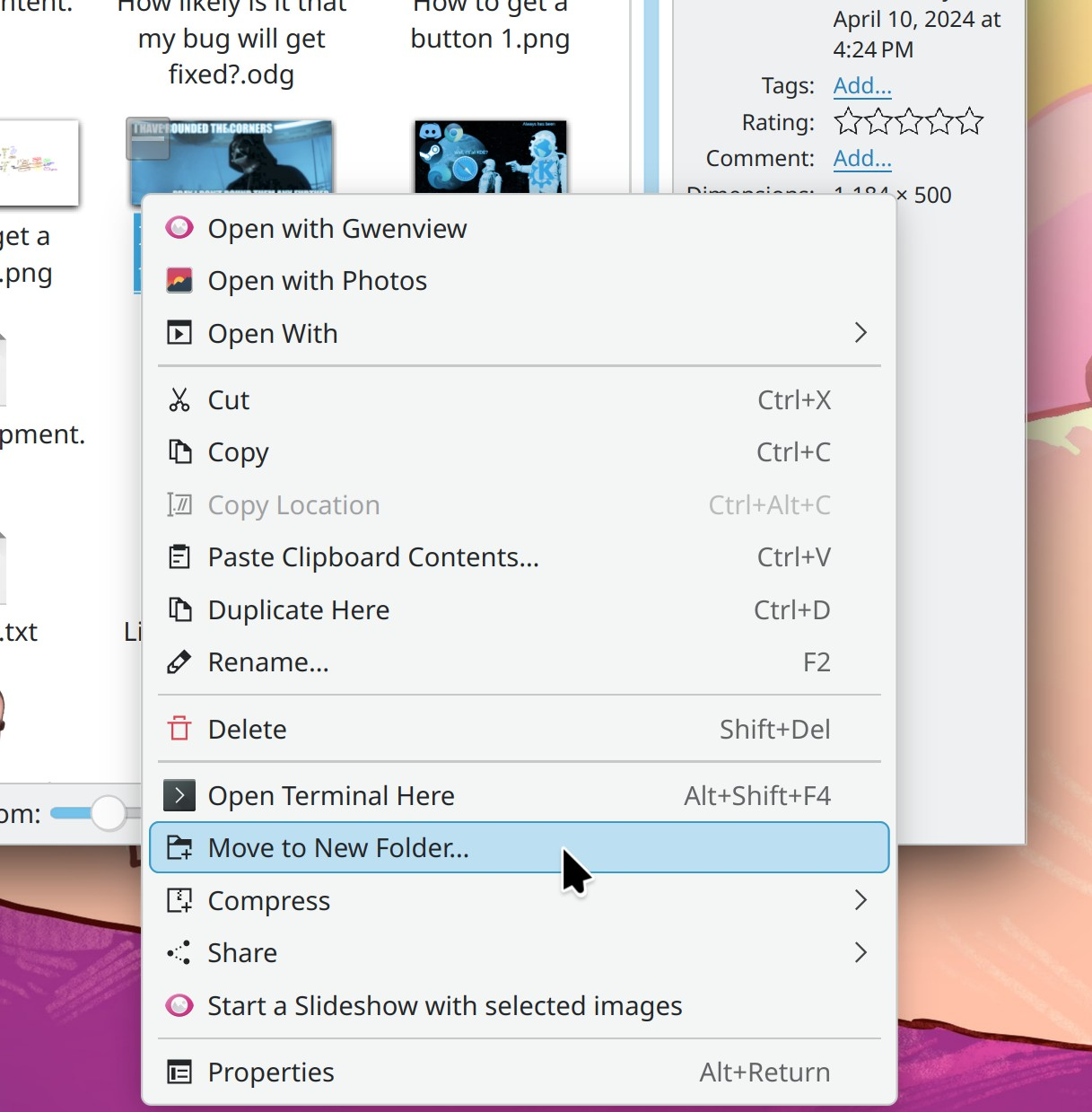
Dolphin now includes a feature to move the selected items into a new folder, all at once (Ahmet Hakan Çelik, Dolphin 24.08. Link)

KDE’s desktop portal implementation now includes support for the Input Capture portal (David Redondo, Plasma 6.1. Link 1, link 2, and link 3)

Plasma now supports enabling and disabling the feature of some Lenovo IdeaPad and Legion laptops whereby the battery can be configured to only charge up to a specific fixed level (sometimes 60%, sometimes 80%; it depends on the machine) to maximize battery health (Fabian Arndt, Plasma 6.1. Link)

Plasma’s Edit Mode has a beautiful new zoom-out effect to help you notice and understand you’re in a separate mode, and also make it easier to get out once you’re done (Marco Martin, Plasma 6.1. Link 1 and link 2):

You can now configure the screen locker to unlock without a password, letting it be used as a traditional screensaver if you enable a visually attractive wallpaper plugin and disable the clock (Kristen McWilliam, Plasma 6.1. Link)

UI Improvements

Our long national nightmare of jarring error beep sounds is now over!!!! Plasma now intercepts attempts to ring the system bell (which generally sounds so unpleasant that you feel the need to immediately commit an act of violence) and replaces them with a nice sound from the active sound theme (Nicolas Fella, Plasma 6.1. Link 1, link 2, and link 3)

KRunner search results already prioritized apps by default, but now they also prioritize System Settings pages too (Alexander Lohnau, Plasma 6.1, link 1, and link 2)

On System Settings’ Power Management page, a few UI controls that used spinboxes have been replaced with fancy comboboxes. This fixes some bugs and offers a faster interaction paradigm for the basic use case of choosing a common value — with an expert workflow of letting you select anything you want in a dialog box (Jakob Petsovits, Plasma 6.1. Link):

System Settings’ Printers page now guides you through the process of installing the system-config-printer package to improve printer detection, if it wasn’t pre-installed by your distro (Mike Noe, Plasma 6.1. Link)

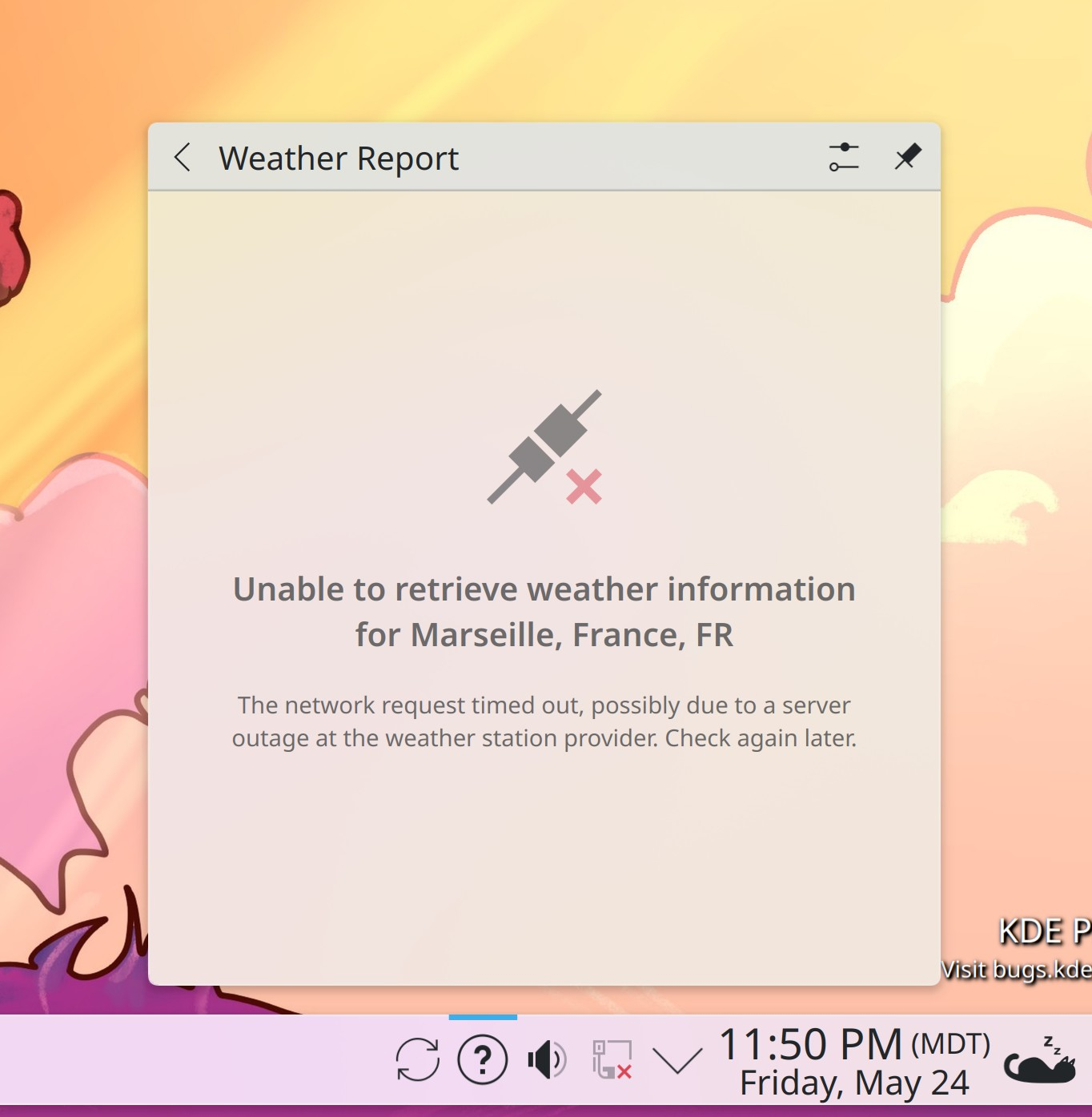
Getting information from weather providers can sometimes be a bit flaky, so Plasma’s Weather Report widget now informs you to just try again in a little bit when this happens (me: Nate Graham, Plasma 6.1. Link):

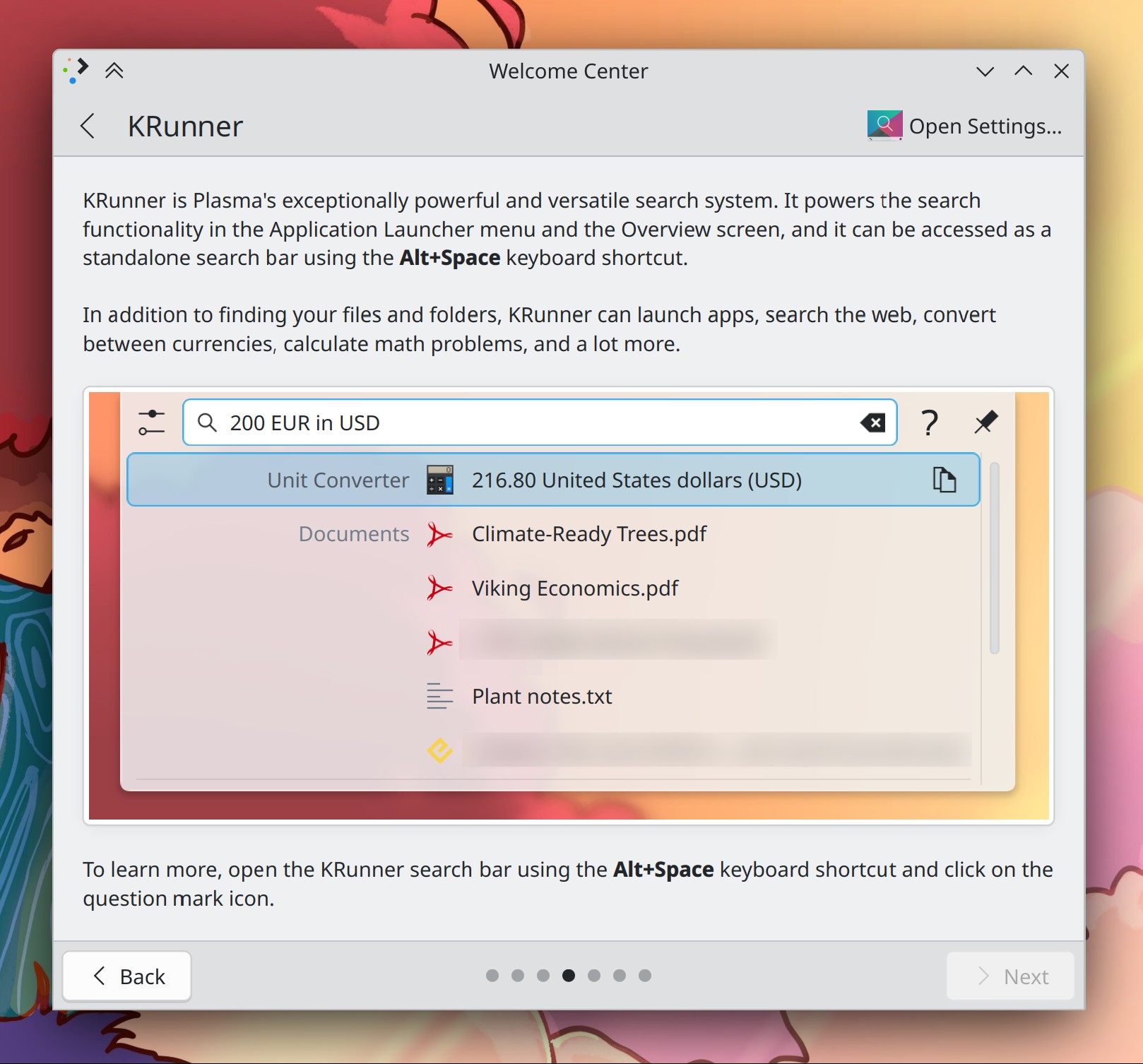
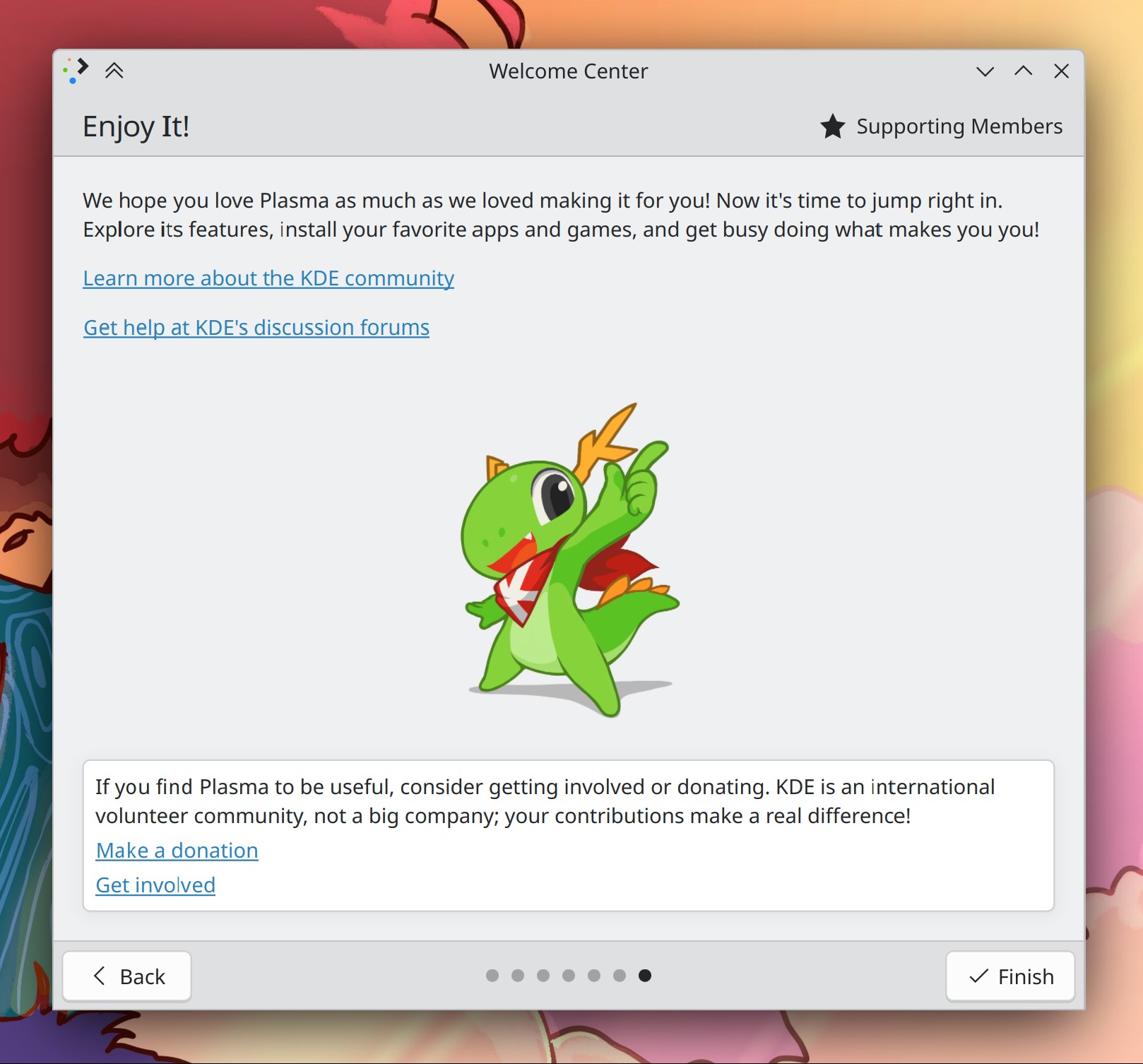
The way Welcome Center presents KRunner has gotten a major overhaul, and now shows a fancy animated depiction of actually using it! In addition, the final page is now more streamlined and less demanding of your time and money (Oliver Beard, Plasma 6.1. Link 1 and link 2):

Plasma’s Weather Widget no longer shows the “Appearance” page in its config window when used on the desktop, since nothing on that page is applicable to the desktop form factor (Ismael Asensio, Plasma 6.1. Link)

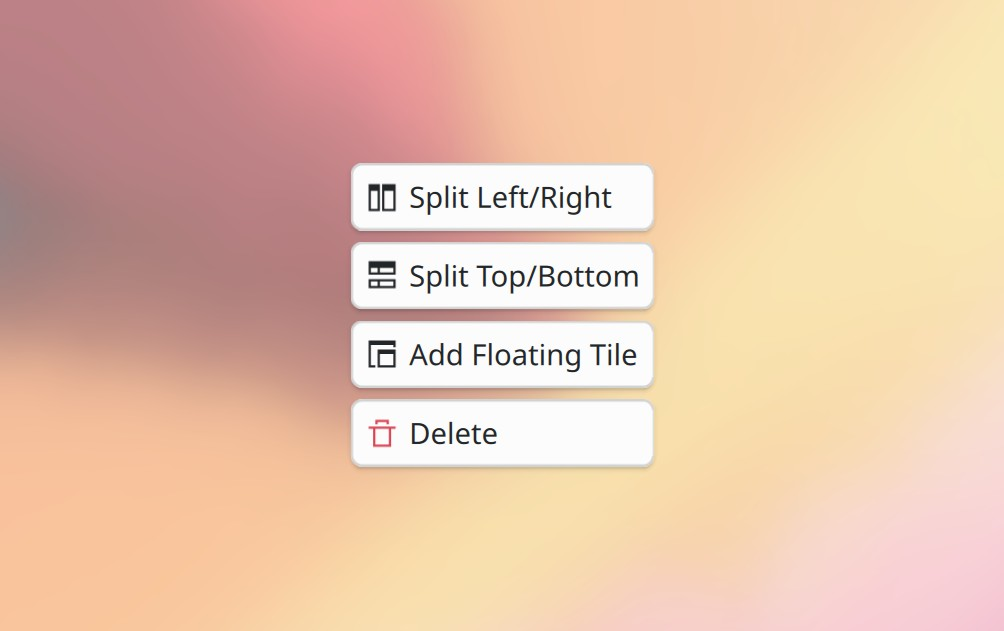
KWin’s custom tile editor now uses clearer terminology for creating split views (me: Nate Graham, Plasma 6.1. Link):

System Settings’ Background Services page is no longer actually visible in System Settings by default; everything here is an implementation detail, and monkeying with its settings is an easy way to break your system. If you’re an expert, you can still get to it by searching for it in KRunner, but it won’t be shown in System Settings anymore (Nicolas Fella, Plasma 6.1. Link)

The remainder of the header messages in System Settings pages have been ported to the new frameless style, making them all consistent now (me: Nate Graham, Plasma 6.2. Link):

Improved the way SVG images render on screen when using a fractional scale factor, reducing blurriness (Marco Martin, Frameworks 6.3. Link)

Bug Fixes

Filelight no longer counts files stored in OneDrive cloud as local files that occupy space (Harald Sitter, Filelight 24.05.1. Link)

In KColorChooser, the “Pick Screen Color” button is no longer missing on Wayland (Thomas Weißschuh, KColorChooser 24.05.1. Link)

Made Plasma more robust against crashing when any widgets have malformed size values, which can happen under certain circumstances (Marco Martin, Plasma 6.0.5. Link)

When KWin falls back to using a software cursor after the graphics driver rejected the use of a hardware cursor, this can no longer lock up the entire screen under certain circumstances — such as with XWayland-using apps on an Apple Silicon Mac (Xaver Hugl, Plasma 6.0.5. Link)

Spectacle no longer takes blurry screenshots on systems with multi-screen plus mixed-scale-factor setups (Volodymyr Zolotopupov, Plasma 6.0.5. Link)

Global shortcuts are now more robust and stable on NixOS and other distros that regenerate the sycoca cache repeatedly in an automated manner (Vlad Zahorodnii, Plasma 6.0.5. Link)

Fixed multiple longstanding issues in System Settings whereby switching pages, clearing the search field, or opening a new page from outside of System Settings would cause the sub-category column to show the wrong thing (Nicolas Fella, Plasma 6.0.5. Link 1, link 2, and link 3)

Fixed a case where turning off an external monitor plugged into a laptop with its lid closed could cause KWin to crash (Xaver Hugl, Plasma 6.1. Link)

On Wayland, Plasma no longer quits when you open an enormous number of windows (Xaver Hugl, Plasma 6.1. Link)

The “Activation Gestures” category of System Settings’ Accessibility page is back, after being accidentally removed when the page was ported to QML (Nicolas Fella, Plasma 6.1. Link)

On Wayland, when any apps that have System Tray icons are running, there’s no longer a little invisible square in the top-left corner of the screen that eats input, and also no elevated CPU usage with certain screen arrangements (David Edmundson, Plasma 6.1. Link 1 and link 2)

Pressing Meta+B repeatedly no longer opens multiple Power Profile chooser OSDs, and therefore no longer represents a way for you to exhaust your system’s memory by generating an infinite stack of them (Fabian Arndt, Plasma 6.1. Link)

Made KWin more reliable about detecting screens’ physical sizes (Jakub Piecuch, Plasma 6.1. Link)

When using a Plasma Panel in “Fit content” mode with only an Icons-Only Task Manager on it, there’s no longer unnecessary empty space on the right side of it on login (Akseli Lahtinen, Plasma 6.1. Link)

In the dialog that lets you choose windows and screens to share, clicking on the checkboxes to select items now works. Previously you had to click on the whole items themselves, but the checkboxes didn’t work; now both work (me: Nate Graham, Frameworks 6.3. Link)

Fixed several issues preventing certain Breeze icons from adjusting their colors properly when run with a dark color scheme, as well as issues with generation of static dark-theme-compatible icons (Corbin Schwimmbeck, Frameworks 6.3. Link 1 and link 2)

Re-spun the KWidgetsAddons framework to include a bugfix for an issue that caused OBS to crash when selecting files, and also one that caused KMessageWidgets to sometimes show incorrect background colors (Joshua Goins and Albert Astals Cid, KWidgetsAddons frameworks 6.2.2. Link 1 and link 2)

Re-spun the KWallet framework to include a bugfix for an issue that caused the Secrets portal to not work in Flatpak apps (Nicolas Fella, KWallet 6.2.1. Link)

Context menus should now be a lot less likely to appear as odd standalone windows with titlebars when activated on an inactive window (Vlad Zahorodnii, Qt 6.7.2. Link)

Other bug information of note:

Performance & Technical

Reduced frame drop on a variety of hardware (Xaver Hugl, Plasma 6.1. Link)

Improved the speed with which Discover launches and how responsive it is when scrolling through long app lists while the Flatpak backend is active (Aleix Pol Gonzalez, Plasma 6.1. Link)

Automation & Systematization

Added some new autotests for Plasma panels and containments to make sure they get sized and located correctly (Marco Martin and Akseli Lahtinen. Link 1, link 2, and link 3)

…And Everything Else

This blog only covers the tip of the iceberg! If you’re hungry for more, check out https://planet.kde.org, where you can find more news from other KDE contributors.

How You Can Help

The KDE organization has become important in the world, and your time and labor have helped to bring it there! But as we grow, it’s going to be equally important that this stream of labor be made sustainable, which primarily means paying for it. Right now the vast majority of KDE runs on labor not paid for by KDE e.V. (the nonprofit foundation behind KDE, of which I am a board member), and that’s a problem. We’ve taken steps to change this with paid technical contractors — but those steps are small due to growing but still limited financial resources. If you’d like to help change that, consider donating today!

Otherwise, visit https://community.kde.org/Get_Involved to discover other ways to be part of a project that really matters. Each contributor makes a huge difference in KDE; you are not a number or a cog in a machine! You don’t have to already be a programmer, either. I wasn’t when I got started. Try it, you’ll like it! We don’t bite!

This week in KDE: all about those apps

A few weeks ago, some of us discovered that KDE apps just looked terrible when run in GNOME. A lengthy discussion on icon theming ensued, with various improvements made on both sides. The KDE effort was spearheaded by Christoph Cullmann, as already described in his post on the subject. In a nutshell, KDE apps opting into the new system that are run outside of Plasma will always have the Breeze style and icons available, unless overridden by the system or the user. Apps opting in so far include Kate, Konsole, and Dolphin. Feel free to help opt more apps in by using those commits as inspiration!

Dolphin itself also received a lot of special attention this week, in addition to other cool stuff:

New Features

Dolphin now gives you the option to enable previews for folders on remote locations. Be aware that this can cause slowdowns, and the UI tells you that, too (Sergey Katunin, Dolphin 24.08. Link):

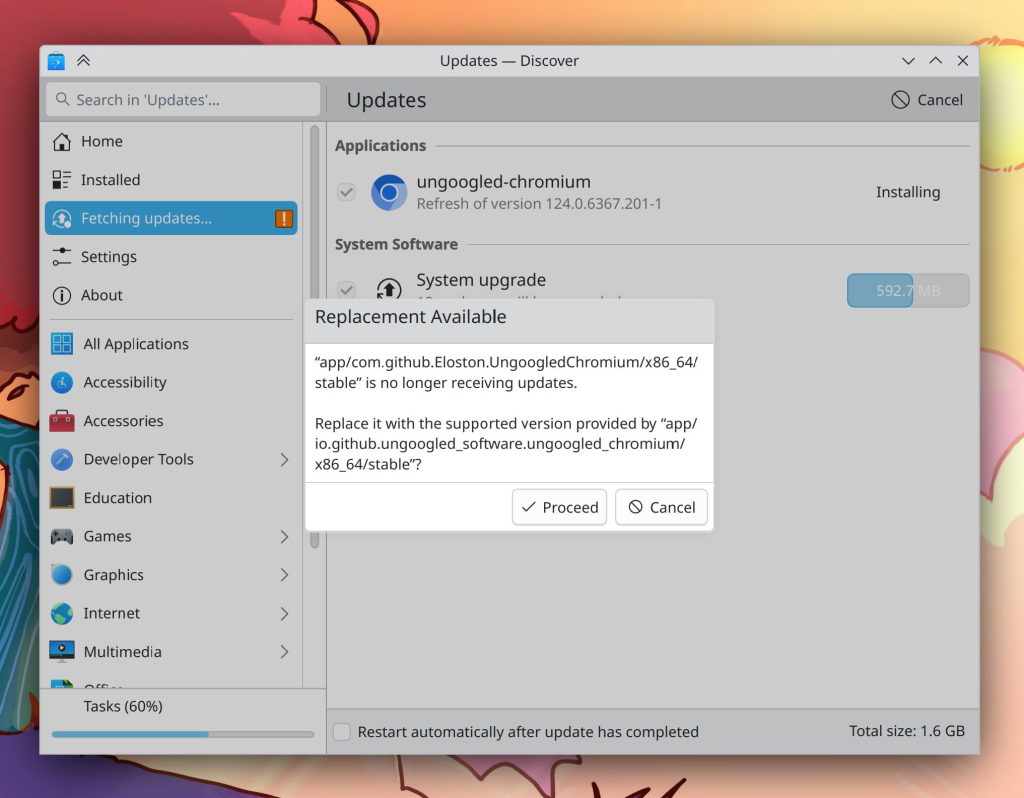
Discover now handles the case where one of your Flatpak apps has been marked as “end of life” and replaced with another one; it gives you the opportunity to switch to the new one, or cancel and keep using the old one anyway (Harald Sitter, Plasma 6.1. Link):

Eagle-eyed readers have noticed this isn’t using the new dialog style. It hasn’t been ported yet. There are a lot of instances like this where Kirigami.OverlaySheet is inappropriately used as a confirmation dialog that need porting.

UI Improvements

Dolphin’s ability to let you change things as root when kio-admin is installed has received a big upgrade: now it shows you a warning telling you what bad things you can do if you’re not careful, and also keeps a banner visible while you’re in root mode (Felix Ernst, Dolphin 24.08. Link):

Dolphin has received a number of UI improvements and better handling for viewing read-only folders (Jin Liu, Dolphin 24.08. Link)

Switched Spectacle over to using the common style for immutable toolview tabs in Kirigami apps (me: Nate Graham, Spectacle 24.08. Link):

KMenuEdit no longer annoyingly prompts you for confirmation when you delete a group (Kenny Hui, Plasma 6.1. Link)

The icons shown in our dialogs no longer themselves depict dialogs for mega dialog-ception; now they’re just normal colored icons (me: Nate Graham, Frameworks 6.3. Link):

Bug Fixes

Attempting to open multiple “New Folder” dialogs on a slow network location no longer causes Dolphin to crash (Akseli Lahtinen, Dolphin 24.08. Link)

Very small SVG images are now displayed properly in thumbnail previews (Méven Car, kio-extras 24.08. Link)

Fixed a case where our authentication system could crash and leave apps unable to request authentication (me: Nate Graham, Plasma 6.0.5. Link)

Turning on HDR mode no longer makes the screen colors wrong when using Night Color (Xaver Hugl, Plasma 6.0.5. Link)

Screens using fractional scale factors no longer get a weird row of pixels on the bottom edge that are held to the color of previously opened windows (Xaver Hugl, Plasma 6.0.5. Link)

Fixed several Plasma crashes that were introduced by porting some custom drag-and-drop code to the upstream Qt thing, but turns out to not be suitable for our purposes. Reverting to our custom code fixes the crashes (Kai Uwe Broulik, Plasma 6.1, Link 1 and link 2)

When Chromium-based browsers are running in native Wayland mode, dragging and dropping files into websites no longer makes them freeze and crash. This was a complicated bug largely caused by Chromium doing something unusual, but KWin now handles it properly (David Edmundson, Plasma 6.1. Link)

Visiting System Settings’ File Search page no longer sometimes causes a long hang when the file indexer is under heavy load (Janet Blackquill, Frameworks 6.3. Link)

If for some reason you want to use the Kickoff application launcher to search for a single character, close Kickoff, and then do the same thing again, the second search will now show results as expected (Alexander Lohnau, Frameworks 6.3. Link)

KSvg items and Kirigami.Icon used in Plasma now re-color re-colorable SVG images in the expected way when they’re displayed in Plasma irrespective of color scheme. This makes the CatWalk cat look correct while using a mixed light/dark global theme like Breeze Twilight (Marco Martin, Frameworks 6.3. Link):

Other bug information of note:

…And Everything Else

This blog only covers the tip of the iceberg! If you’re hungry for more, check out https://planet.kde.org, where you can find more news from other KDE contributors.

How You Can Help

The KDE organization has become important in the world, and your time and labor have helped to bring it there! But as we grow, it’s going to be equally important that this stream of labor be made sustainable, which primarily means paying for it. Right now the vast majority of KDE runs on labor not paid for by KDE e.V. (the nonprofit foundation behind KDE, of which I am a board member), and that’s a problem. We’ve taken steps to change this with paid technical contractors—but those steps are small due to growing but still limited financial resources. If you’d like to help change that, consider donating today!

Otherwise, visit https://community.kde.org/Get_Involved to discover other ways to be part of a project that really matters. Each contributor makes a huge difference in KDE; you are not a number or a cog in a machine! You don’t have to already be a programmer, either. I wasn’t when I got started. Try it, you’ll like it! We don’t bite!

This week in KDE: our cup overfloweth with cool stuff for you

This week a lot of work that has been in progress for weeks got merged! So check out the free goodies! And isn’t that amazing? Free stuff day after day, week after week. No price tag, no ads, no spying, no activation, no subscription, no nonsense. Just good work donated to the public. And not only from KDE, but the software stack we rely on, the distributions that make our software available, and on and on! We really live in an amazing time, folks.

New Features

By default, Dolphin now selects everything in a folder when you double-click on its view background, and also lets you configure it to do other things instead–up to and including running custom terminal commands! (George Florea Bănuș, Dolphin 24.08. Link)

Elisa now lets you shuffle the playlist contents by album, not just by track (Bart De Vries, Elisa 24.08. Link)

System Settings now features a page where you can turn on and configure remote login based on the Remote Desktop Protocol (Akseli Lahtinen and me: Nate Graham, Plasma 6.1. Link 1 and link 2)

Final UI is still a bit in flux; you’ll notice that the merge request at the second link isn’t merged yet, and there are some obvious misalignments

On Wayland, KWin can now be configured to pull color profile information from the monitor’s EDID metadata where present. Note that color profile information in EDID metadata is often wrong, so use this setting with caution. The feature includes inline help text to make you aware of this, too. (Xaver Hugl, Plasma 6.2. Link 1, link 2, link 3, and link 4)

UI Improvements

It’s now more obvious how you end a screen recording in Spectacle: the “currently recording” icon it shows in the System Tray now animates to get your attention a bit more, and Spectacle also sends a system notification to tell you about it (Noah Davis, Spectacle 24.08. Link)

When the clock disappears on Plasma’s lock screen, the cursor does too, which makes it possible to use the screen locker as a true screensaver if you give it a wallpaper plugin that has some kind of animated effect (Someone amazing, Plasma 6.0.4. Link)

It’s now obvious how you close Plasma 6’s fancy new panel configuration dialog: it has a “Done” button in the corner! (Taro Tanaka and Me: Nate Graham, Plasma 6.1. Link):

When you disconnect from a network while it’s showing the speed graph view, it now automatically switches over to the info view (Eugene Popov, Plasma 6.1. Link)

Smooth scrolling in KDE’s QML-based apps is now optional (though still on by default). It’s also possible that 3rd-party apps will eventually read and respect this setting, as I recently noticed Firefox does for our global animation speed setting (Nathan Misner, Plasma 6.2. Link 1 and link 2)

Small in-window dialogs in QtQuick-based software have gotten a visual overhaul to remove everything not visually necessary, which gives the text and buttons more focus (Carl Schwan, Frameworks 6.3. Link 1 and link 2)

Also not the final appearance, but this is the general design direction right now

Command bars in QtWidgets-based apps have also gotten a visual overhaul to match this more minimalistic style (Eugene Popov, Frameworks 6.3. Link):

Bug Fixes

Elisa no longer freezes when you open Party Mode while music is playing and the headerbar is collapsed or sized in certain ways (Pedro Nishiyama, Elisa 24.05. Link)

Fixed two longstanding issues that could cause Plasma to crash when it didn’t find all the screens it expected to find when waking up or booting the system (Marco Martin, Plasma 6.0.4 and 6.0.5. Link 1 and link 2)

Discover no longer misleadingly and incorrectly claims that apps with no licenses listed are proprietary (Harald Sitter, Plasma 6.0.5. Link)

Fixed a Plasma 6 regression that caused Discover to show annoying and ignorable error messages when viewing pages for content from store.kde.org (Harald Sitter, Plasma 6.0.5. Link)

The search/filter field in Plasma’s Printers widget now works (Mike Noe, Plasma 6.0.5. Link)

Fixed a Plasma 6 regression that caused panel widgets to overlap when you have an Activity Pager widget somewhere on a horizontal panel (Edo Friedman, Plasma 6.0.5. Link)

KWin is now more reliable about turning off screens in response to hardware and driver quirks that previously made this less than reliable with certain setups (Arsen Arsenović, Plasma 6.0.5. Link)

Config windows for Plasma’s System Monitor and System Tray widgets and the power profiles OSD no longer have mismatched colors for some UI controls and icons when using a mixed light/dark global theme such as Breeze Twilight (Akseli Lahtinen, Evgeniy Harchenko, and Nicolas Fella, Plasma 6.0.5. Link 1, link 2, and link 3)

Searching for something in Plasma’s Clipboard widget now returns a message with the correct text (“No matches”) when your search didn’t match anything (Thomas Duckworth, Plasma 6.0.5. Link)

Plasma’s Task Manager widget was internally refactored to simplify some old crusty code, which fixes two prominent layout glitches, including a Plasma 6 regression where tasks would overlap with adjacent widgets when in multi-row mode (Marco Martin, Plasma 6.1. Link 1 and link 2)

Other bug information of note:

Automation & Systematization

The plasma-workspace git repo has adopted a merge request template to guide people towards writing good commit messages, testing their changes, and including before-and-after screenshots. If this works out well, we’ll expend it elsewhere too (me: Nate Graham, link)

We now have a bug announcement bot that yells at us about the number of high and very high priority Plasma bugs, as well as the number of current known regressions (Ben Bonacci, link):

…And Everything Else

This blog only covers the tip of the iceberg! If you’re hungry for more, check out https://planet.kde.org, where you can find more news from other KDE contributors.

How You Can Help

The KDE organization has become important in the world, and your time and labor have helped to bring it there! But as we grow, it’s going to be equally important that this stream of labor be made sustainable, which primarily means paying for it. Right now the vast majority of KDE runs on labor not paid for by KDE e.V. (the nonprofit foundation behind KDE, of which I am a board member), and that’s a problem. We’ve taken steps to change this with paid technical contractors—but those steps are small due to growing but still limited financial resources. If you’d like to help change that, consider donating today!

Otherwise, visit https://community.kde.org/Get_Involved to discover other ways to be part of a project that really matters. Each contributor makes a huge difference in KDE; you are not a number or a cog in a machine! You don’t have to already be a programmer, either. I wasn’t when I got started. Try it, you’ll like it! We don’t bite!

This week in KDE: Looking towards Plasma 6.1

This week we put some of the final Plasma 6.0 bugs to rest, and continued working towards Plasma 6.1 with a variety of UI improvements. Nothing ground-breaking this week, just a slow grind of useful work towards a solid release!

UI Improvements

Kate now considers a file as recent when it’s saved or closed, not just when it’s opened. This means your recent files list will no longer omit files you kept open for a long time while working on them (Christoph Cullmann, Kate 24.05. Link)

The panel icons for Kickoff (Application Launcher) and Kicker (Application Menu) widgets are now capped in size so they can’t grow ridiculously huge on thicccc panel (Akseli Lahtinen and me: Nate Graham, Plasma 6.0.5. Link 1 and link 2)

System Settings no longer lets you choose GNOME’s Adwaita or High Contrast icon themes as your systemwide icon theme, because despite registering themselves as FreeDesktop-compatible icon themes, they are no longer actually designed to be used this way and will break everything from KDE if you try anyway (me: Nate Graham, Plasma 6.0.5. Link)

The screen that KWin considers active for the purpose of determining which screen to open new windows on is now determined by “last user interaction”, which includes things like mouse movement and keyboard focus. Hopefully this should better match people’s expectations (Xaver Hugl, Plasma 6.1. Link)

Made the wallpaper chooser views frameless, matching the current styling of most other settings pages in System Settings and Plasma (me: Nate Graham, Plasma 6.1. Link 1 and link 2):

Plasma’s notifications now use a more appropriate icon for canceling jobs, and also elide long title text in the middle rather than on the left (Ivan Tkachenko, Plasma 6.1. Link 1 and link 2):

Ok, so maybe “plasma-brows…gration-host” is not a work of towering genius. The fact that a long ugly technical name is shown there is another bug we’ll investigate.

Refined the UI shown when changing global themes to make it clear what will happen and what’s potentially dangerous (me: Nate Graham, Plasma 6.1. Link 1 and link 2):

When you use the command-line powerprofilesctl tool to change power profiles, the new state is now reflected in the Power and Battery widget (Natalie Clarius, Plasma 6.1. Link)

Several Breeze icons (folder-encrypted, folder-decrypted, and folder-music) now have proper symbolic versions at their 16px and 22px sizes (me: Nate Graham, Frameworks 6.2. Link)

Bug Fixes

Gwenview no longer fails to open large images; now its Qt 6 version can open the same size of image that the Qt 5 version could (Méven Car, Gwenview 24.05. Link)

On Wayland, KWin no longer crashes when it’s unable to open a socket to XWayland for some reason (Vlad Zahorodnii, Plasma 6.0.5. Link)

Fixed a case where Plasma could crash while modifying the set of favorite apps in Kickoff (Application Launcher), Kicker (Application Menu), or another launcher menu using the same backend infrastructure (Fushan Wen, Plasma 6.0.5. Link)

When using Qt 6.7, the System Tray popup is no longer sometimes inappropriately resized to a tiny nub, and also clicking a System Monitor widget showing GPU sensors no longer causes Plasma to freeze (Marco Martin, Plasma 6.0.5. Link 1 and link 2)

Fixed an extremely strange issue that could be triggered by opening any windows of IntelliJ IDE apps, and would cause other windows and Plasma panels to become transparent to clicks (Vyacheslav Mayorov, Plasma 6.0.5. Link)

When waking the system from sleep, quick-tiled windows no longer sometimes disappear, and vertically-maximized windows are no longer sometimes mis-positioned (Xaver Hugl, Plasma 6.0.5. Link 1 and link 2)

On X11, forcing tablet mode on when using a multi-screen setup with global scaling no longer causes one of the screens to scale everything incorrectly (Xaver Hugl, Plasma 6.0.5 Link)

Applied a workaround in KWin for an AMD GPU driver bug, which should reduce instances of random visual glitchiness (Xaver Hugl, Plasma 6.1. Link)

Fixed another case of Korners™, this time for menus in QtWidgets-based apps (Ivan Tkachenko, Plasma 6.1. Link)

Resizing a window with a wallpaper chooser grid in it no longer sometimes causes the grid view’s header to disturbingly detach and appear in the middle of the view (me: Nate Graham, Plasma 6.1. Link)

More audio and video files now have appropriate icons, and when no suitable format-specific icon is found, the system will no longer fall back to an inappropriate symbolic speaker or filmstrip icon (Kai Uwe Broulik and me: Nate Graham, Frameworks 6.2. Link 1 and link 2)

Fixed a case in Kirigami where some UI elements would have incorrect colors when using mixed light/dark color schemes (Evgeniy Harchenko, Frameworks 6.2. Link)

After we fixed the “Pick your installation option popup” in the “Get new [thing]” windows, Qt 6.7 broke it again, so we fixed it again! This time moar betterer (Akseli Lahtinen and Ivan Tkachenko, Frameworks 6.3. Link)

Fixed an issue that caused apps with System Tray icons to inappropriately quit when deleting their tray icons (Tor Arne, Qt 6.7.2. Link)

Other bug information of note:

Performance & Technical

Implemented a bunch of security hardening for our crash reporting system based on feedback from SUSE’s security team (Harald Sitter, Plasma 6.0.5. Link)

Automation & Systematization

Added multiple autotests to ensure that mounting different types of mountable filesystems works as intended (Stefan Brüns, Frameworks 6.2. Link)

Added an autotest to make sure that Plasma-themes UI elements that should have the same height—such as text fields and buttons—still do even if the Plasma style is changed (Fushan Wen, Plasma 6.1. Link)

…And Everything Else

This blog only covers the tip of the iceberg! If you’re hungry for more, check out https://planet.kde.org, where you can find more news from other KDE contributors.

How You Can Help

The KDE organization has become important in the world, and your time and labor have helped to bring it there! But as we grow, it’s going to be equally important that this stream of labor be made sustainable, which primarily means paying for it. Right now the vast majority of KDE runs on labor not paid for by KDE e.V. (the nonprofit foundation behind KDE, of which I am a board member), and that’s a problem. We’ve taken steps to change this with paid technical contractors—but those steps are small due to growing but still limited financial resources. If you’d like to help change that, consider donating today!

Otherwise, visit https://community.kde.org/Get_Involved to discover other ways to be part of a project that really matters. Each contributor makes a huge difference in KDE; you are not a number or a cog in a machine! You don’t have to already be a programmer, either. I wasn’t when I got started. Try it, you’ll like it! We don’t bite!

Interview on Tech Over Tea about KDE’s position in the world

I recently went on Brodie Robertson’s Tech Over Tea channel for a second time. I guess I didn’t succeed at pissing him off enough on the first go-around, because he invited me back! Let’s see if I did a better job of it this time by telling him he was using Arch wrong. 😀

Anyway, Brodie was a fantastic host, and we talked about a number of topics such as KDE’s position in the world, institutional continuity, fundraising and financial stability, the difficulty of reporting and triaging bug, the challenges of packaging software, and windows that block WiFi signals.

I hope you enjoy it!

And here’s the link I mention at the end: https://kde.org/community/donations 🙂

This week in KDE: megabytes and gigabytes for all

New Features

On System Settings’ Region & Language page, you can now choose how you’d like storage sizes to be displayed. This means you can change them to the more common MB and GB style, instead of MiB and GiB, for example. Note that the default value has not changed, but you have the option to change it yourself (Méven Car, Plasma 6.1. Link):

The popular Kirigami.ContextualHelpButton component now has a QtWidgets counterpart: KContextualHelpButton! (Felix Ernst, Frameworks 6.2. Link)

UI Improvements

On X11, Spectacle now makes it obvious that screen recording isn’t supported when you try to run it in recording mode using a global shortcut (Noah Davis, Spectacle 24.05. Link)

Plasma’s Vaults widget now appears visible in the active part of the system tray only when a Vault is actually open, bringing the System Tray closer to its platonic ideal of only showing things that are contextually relevant (me: Nate Graham, Plasma 6.1. Link)

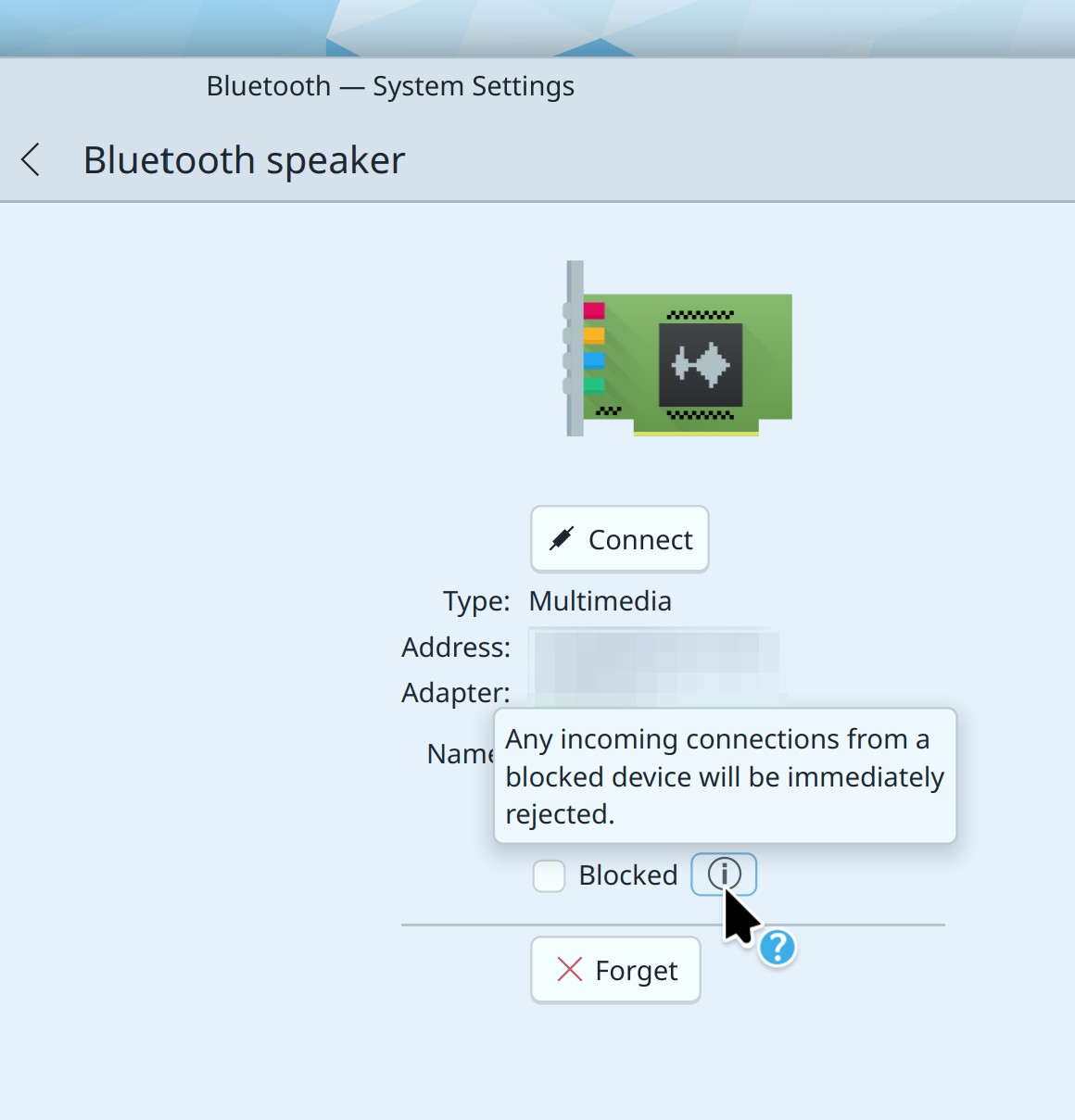
Apps inhibiting sleep and screen locking are now shown by their pretty names, not their technical names (Natalie Clarius, Plasma 6.1. Link):

Adopted the new frameless message header style in Discover, as seen when there’s a distro upgrade available (me: Nate Graham, Plasma 6.1. Link):

Bug Fixes

Kate once again works as expected with multiple virtual desktops, opening files in a new window in the current virtual desktop rather than attaching it to an existing instance in a different virtual desktop (Christoph Cullmann, Kate 24.05. Link)

Fixed Spectacle’s multi-monitor screenshots on X11 not working either at all, or well (Vlad Zahorodnii, and Noah Davis, Plasma 6.0.5. and Spectacle 24.05. Link 1 and link 2)

Fixed a semi-common crash in System Monitor when switching to the Applications page (Arjen Hiemstra, Plasma 6.0.5. Link)

When updating the system using Discover, there are no longer gaps in the updates list as items complete and disappear (Ivan Tkachenko, Plasma 6.0.5. Link)

Plasma’s feature to remember whether Bluetooth was on or off last time now works more reliably (Someone going by the pseudonym “Arctic Lampyrid”, Plasma 6.0.5. Link)

Fixed an issue in Plasma that would cause flickering and stuttering with adaptive sync turned on (Xaver Hugl, Plasma 6.0.5. Link)

Floating panels now de-float when a window reaches the correct distance away from them, as opposed to de-floating too early (Yifan Zhu, Plasma 6.0.5. Link)

Fixed multiple issues involved with LPD printer discovery and queue management (Mike Noe, Plasma 6.1. Link)

When you have multiple Brightness and Color widgets (for example, because you have multiple panels each with a System Tray on it), the Night Light portions of the widgets no longer interfere with one another and interact in strange ways (Natalie Clarius, Plasma 6.1. Link)

Other bug information of note:

Performance & Technical

Improved Spectacle-s startup speed on Wayland (Noah Davis, Spectacle 24.05. Link)

Improved the scrolling performance of long scrollable views in Discover. This is an area of focus, so expect more to come soon (Aleix Pol Gonzalez, Plasma 6.0.5. Link)

Reduced visual glitchiness when the GPU does a reset, which can happen due to driver bugs, or, with NVIDIA, when the system goes to sleep (Xaver Hugl, Plasma 6.1. Link)

Implemented support for the org.freedesktop.impl.portal.Secret portal for KWallet, which lets Flatpak apps use it (Nicolas Fella, Frameworks 6.2. Link)

Automation & Systematization

Added some basic GUI tests for Dolphin (Méven Car, link)

Added basic GUI tests for opening Plasma’s Alternate Calendar config page (Fushan Wen, link)

…And Everything Else

This blog only covers the tip of the iceberg! If you’re hungry for more, check out https://planet.kde.org, where you can find more news from other KDE contributors.

How You Can Help

The KDE organization has become important in the world, and your time and labor have helped to bring it there! But as we grow, it’s going to be equally important that this stream of labor be made sustainable, which primarily means paying for it. Right now the vast majority of KDE runs on labor not paid for by KDE e.V. (the nonprofit foundation behind KDE, of which I am a board member), and that’s a problem. We’ve taken steps to change this with paid technical contractors—but those steps are small due to growing but still limited financial resources. If you’d like to help change that, consider donating today!

Otherwise, visit https://community.kde.org/Get_Involved to discover other ways to be part of a project that really matters. Each contributor makes a huge difference in KDE; you are not a number or a cog in a machine! You don’t have to already be a programmer, either. I wasn’t when I got started. Try it, you’ll like it! We don’t bite!