This week in KDE: more stability, more features, prettier bug tracker

New Features

Skanlite now has a “batch mode” feature for flatbed scanners without an automatic document feeder. This will automatically take a new scan after a few seconds, to speed the process of scanning a lot of things. Skanpage is getting this soon as well! (Alexander Stippich, Skanlite 21.12)

Bugfixes & Performance Improvements

Annotating screenshots with transparency in Spectacle no longer causes the transparency to get replaced with a solid white color (Julius Zint, Spectacle 21.12)

The Plasma Networks applet now lets you successfully connect to an OpenVPN server with passphrase-secured .p12 certificate (Jan Grulich, Plasma 5.23.3)

In the Plasma Wayland session, turning an external monitor off and back on again no longer makes Plasma crash (Oxalica F., Plasma 5.23.3)

Fixed a case where launching System Monitor could cause the ksgrd_network_helper process to crash (Arjen Hiemstra, Plasma 5.23.3)

In the Plasma Wayland session, hovering over the Digital Clock applet to make it show its tooltip no longer sometimes makes Plasma hang (Marco Martin, Plasma 5.23.3)

The Minimize All effect/widget/button now remembers which window was active and makes sure that window ends up on top when restoring all the minimized windows (Vlad Zahorodnii, Plasma 5.23.3)

Switching a panel widget to an alternative one using the “Alternatives…” popup no longer rearranges your widgets (Alexander Lohnau, Plasma 5.23.3)

In the Plasma Wayland session, the show/hide animation for a panel set to auto-hide mode now works (Vlad Zahorodnii, Plasma 5.23.3)

Switching between virtual desktops when there are maximized windows no longer causes the panel to flicker, especially when using a dark color scheme or Plasma theme (Niccolò Venerandi, Plasma 5.23.3)

Fixed one of the most common sources of crashes in System Settings which could be triggered when navigating rapidly between pages (Harald Sitter, Frameworks 5.88)

When using a 3rd-party icon theme, any icons that the app requests which aren’t available in the active theme are now displayed from the theme’s specified fallback icon theme, rather than just being missing (Carl Schwan, Frameworks 5.88)

In the Plasma Wayland session, pasting arbitrary clipboard content into a file now works (Méven Car, Frameworks 5.88)

Excessively long labels in System Settings’ grid-style pages now get elided rather than overflowing (me: Nate Graham, Frameworks 5.88)

User Interface Improvements

KDE’s venerable bug reporting website – https://bugs.kde.org – was given a facelift recently, and it’s now much more attractive and visually pleasant to use! Thanks to Debarpan Debnath for this work!

Spectacle’s notifications about screenshots you took using a global shortcut no longer display duplicate text (Antonio Prcela, Spectacle 21.12)

The “big focus rings” feature in Plasma 5.24 has been backported to Plasma 5.23, as it solves a number of focus-related bugs and issues and has proven stable so far (Noah Davis, Plasma 5.23.3)

Windows now remember the screens they were on when those screens are turned off or unplugged, and will snap back to them when those screens come back. This should fix a huge class of multi-monitor annoyances! (Vlad Zahorodnii, Plasma 5.24)

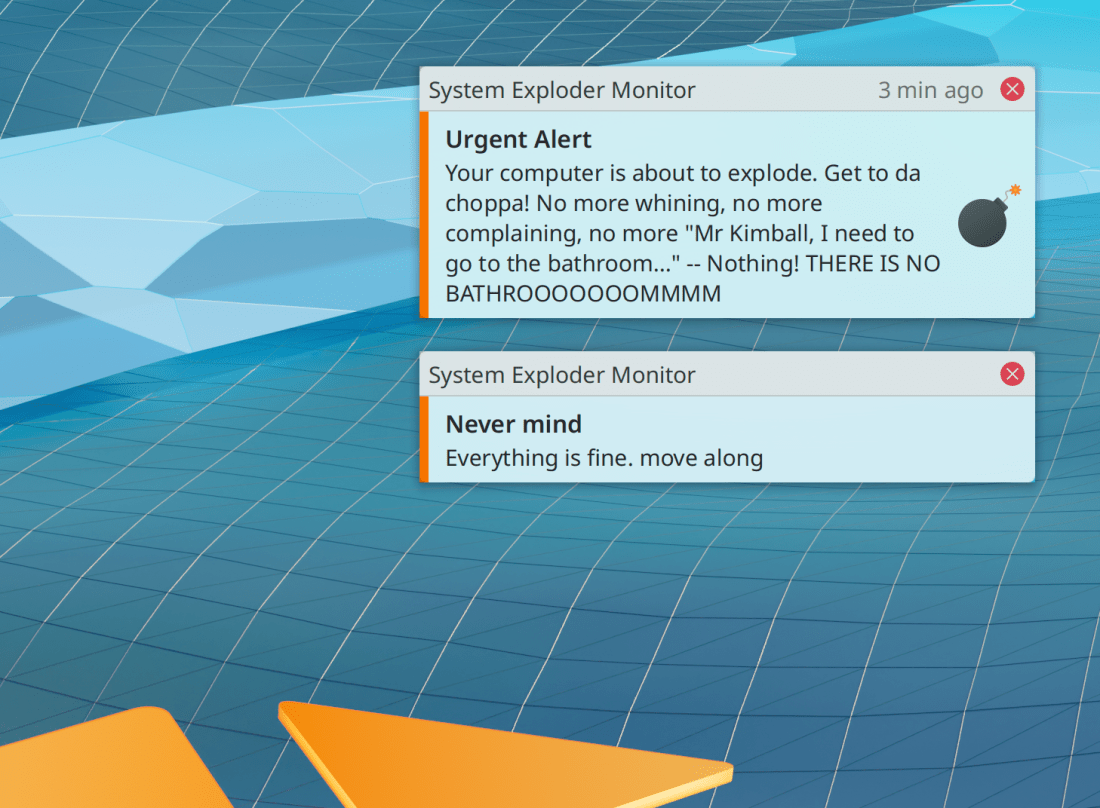
Critical notifications now have a little orange strip on the side to visually distinguish them from background clutter and generally help them stand out so that you will be more likely to notice them (me: Nate Graham, Plasma 5.24):

With a thin-ish panel, System Tray icons now have the same spacing in “Small” mode that they do in “Scale with Panel” mode (Fushan Wen, Plasma 5.24)

The odd behavior of middle-clicking on a panel to create a sticky note has been disabled by removing the relevant entries from the config files of people who still has them in there for some reason (me: Nate Graham, Plasma 5.24)

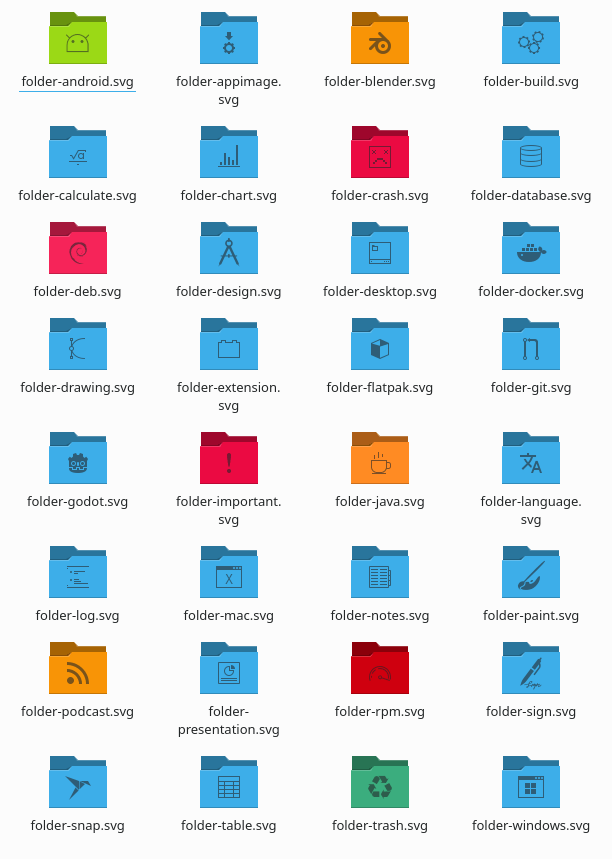
The Breeze icon theme has gained a bunch of folder icon with various different semi-common-ish icons and emblems on them (Andreas Kainz, Frameworks 5.88):

The standard Kirigami placeholder icon for an image that is unavailable or still loading no longer looks like the Windows logo (Aleix Pol Gonzalez, Frameworks 5.88)

…And everything else

Keep in mind that this blog only covers the tip of the iceberg! Tons of KDE apps whose development I don’t have time to follow aren’t represented here, and I also don’t mention backend refactoring, improved test coverage, and other changes that are generally not user-facing. If you’re hungry for more, check out https://planet.kde.org/, where you can find blog posts by other KDE contributors detailing the work they’re doing.

How You Can Help

Have a look at https://community.kde.org/Get_Involved to discover ways to be part of a project that really matters. Each contributor makes a huge difference in KDE; you are not a number or a cog in a machine! You don’t have to already be a programmer, either. I wasn’t when I got started. Try it, you’ll like it! We don’t bite!

Finally, consider making a tax-deductible donation to the KDE e.V. foundation.

This week in KDE: Accent-colored folders and more!

Lotsa good stuff this week, so let’s just jump right in:

New Features

KDE apps have taken their first step towards saving volatile state data (e.g window size and position) in a separate config file from the one that stores explicitly configurable settings! Dolphin now does this, and others will be ported soon (Alexander Lohnau, Frameworks 5.88 with Dolphin 21.12)

In the Plasma Wayland session, Spectacle now has the “Active Window” mode that it has in the X11 session (Vlad Zahorodnii, Spectacle 21.12 with Plasma 5.24)

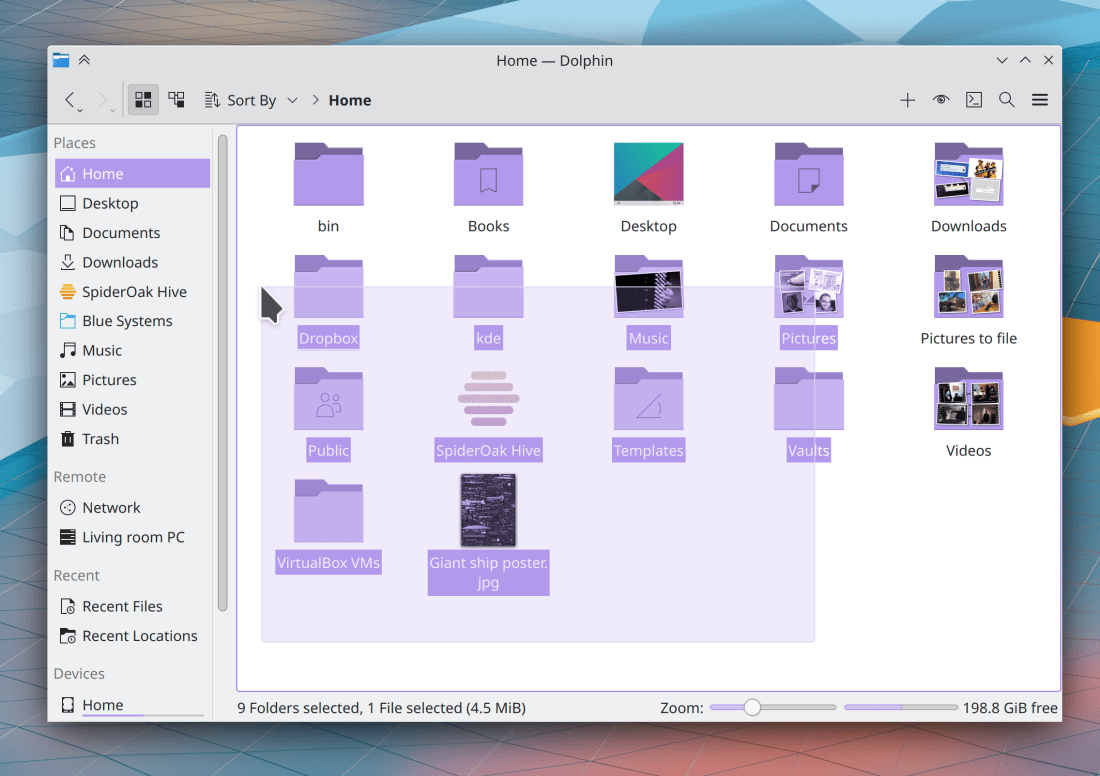
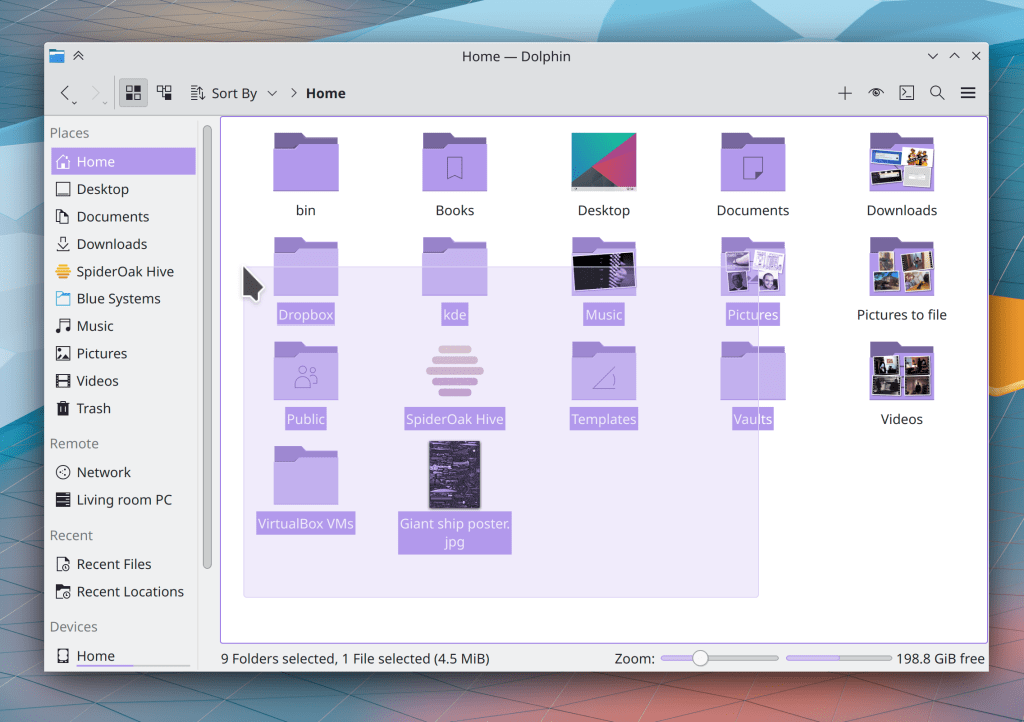
Breeze folders now respect your color scheme’s “Selection” color or your specified Accent color! (Andreas Kainz, Frameworks 5.88):

Bugfixes & Performance Improvements

Dolphin no longer crashes when you use its context menu to archive some files, but then cancel the job in the middle using the notification that appears to show you progress information (David Edmundson, Ark 21.08.3)

Dragging a screenshot from Spectacle into another app no longer causes the dragged preview to become comically enormous when it is much bigger in one dimension than it is in the other (Antonio Prcela, Spectacle 21.12)

Filelight now uses a multi-threaded filesystem scanning algorithm, which should result in much faster scan performance (Martin Tobias Holmedahl Sandsmark, Filelight 21.12)

People using certain NVIDIA GPUs should no longer experience the horrific graphical glitching that started happening after the Plasma 5.23 upgrade (Vlad Zahorodnii, Plasma 5.23.2)

When you open an executable file on the desktop, what happens next now respects your preference set in Dolphin’s settings window (Eugene Popov, Plasma 5.23.2)

Selecting an item in the Clipboard widget using the Enter key no longer moves it to the second position instead of the first (Bharadwaj Raju, Plasma 5.23.2)

In the Plasma Wayland session, the specified keyboard repeat rate setting is now respected (Andrey Butirsky, Plasma 5.23.2)

The refresh rate for all your monitors is now shown correctly even in exotic cases like multiple screens where one of them uses FreeSync (Xaver Hugl, Plasma 5.23.2)

KRunner can now always be closed with a single press of the Escape key (Alexander Lohnau, Plasma 5.23.2)

In the Plasma X11 session, dragging favorites icons in Kickoff no longer causes them to bunch up and overlap. We are trying to figure out why a different problem is still happening in the Wayland session. Help would be appreciated (Noah Davis, Plasma 5.23.2.1)

Right-clicking on the System Tray icon for a GTK app no longer causes all hell to break loose (David Edmundson, Plasma 5.23.3)

Desktop items with emblems in the bottom-right corner (like the “I’m a symlink” emblem) no longer show two slightly-differently-sized emblems, one stacked on top of the other (Fushan Wen, Plasma 5.23.3)

Applying any change in System Settings’ Keyboard page no longer resets the Num Lock setting to its default value (Andrey Butirsky, Plasma 5.23.3)

The back button in System Settings’ subcategory column header is now triggerable with a touchscreen and a stylus (David Redondo, Plasma 5.23.3)

In the Plasma Wayland session, Firefox is now more responsive to dragged-and-dropped files (Vlad Zahorodnii, Plasma 5.23.3)

In the Plasma Wayland session, the panel auto-hide animation now works properly (Vlad Zahorodnii, Plasma 5.23.3)

Task Manager tooltips for large number of open windows for the same app are now significantly faster to load and much more responsive (Fushan Wen, Plasma 5.24)

When the Task Manager is set up to show tooltips when clicking on a grouped task, the tooltip no longer irritatingly changes to show a different app if your cursor happens to pass over another task on the way to the tooltip (Bharadwaj Raju, Plasma 5.24)

In the Plasma Wayland session, hiding and then showing a window’s borders no longer subtly changes the window’s height (Vlad Zahorodnii, Plasma 5.24)

Plasma is now a bit faster and uses less memory every time it loads an icon, which is often! (David Edmundson, Frameworks 5.88)

You can now double-click on the number in a Plasma spinbox to select it, just like you can in other spinboxes (Noah Davis, Frameworks 5.88)

User Interface Improvements

Spectacle’s settings window has been re-done to put more options into comboboxes, making it less huge and visually overwhelming (Antonio Prcela, Spectacle 21.12)

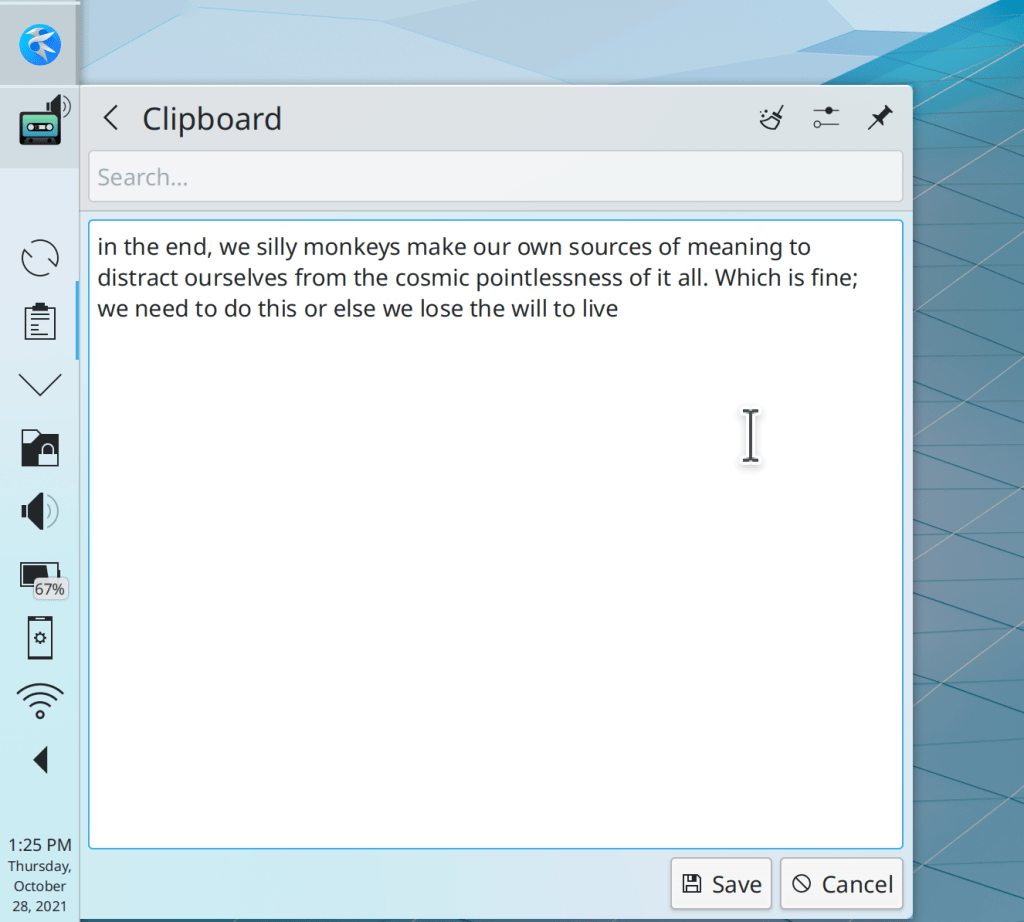
Editing the text of a saved clipboard history item now shows the editing view inline in a new page, rather than in a separate dialog window (Bharadwaj Raju, Plasma 5.24):

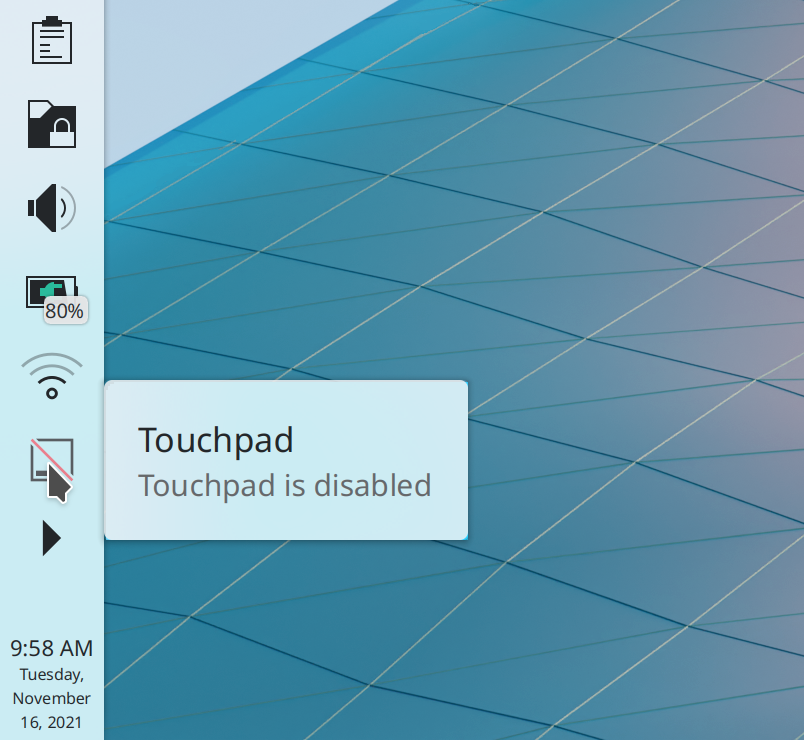
System Settings’ Touchpad page no longer shows a disabled “Device:” combobox when there is only one touchpad connected; now it is simply hidden (me: Nate Graham, Plasma 5.24)

The Battery & Brightness applet can now show you the battery level of any Bluetooth-connected graphics tablets (Sönke Holz, Frameworks 5.88)

…And everything else

Keep in mind that this blog only covers the tip of the iceberg! Tons of KDE apps whose development I don’t have time to follow aren’t represented here, and I also don’t mention backend refactoring, improved test coverage, and other changes that are generally not user-facing. If you’re hungry for more, check out https://planet.kde.org/, where you can find blog posts by other KDE contributors detailing the work they’re doing.

How You Can Help

Have a look at https://community.kde.org/Get_Involved to discover ways to be part of a project that really matters. Each contributor makes a huge difference in KDE; you are not a number or a cog in a machine! You don’t have to already be a programmer, either. I wasn’t when I got started. Try it, you’ll like it! We don’t bite!

Finally, consider making a tax-deductible donation to the KDE e.V. foundation.
This week in KDE: Fingerprint reader and NVIDIA GBM support!

Two big features landed this week: support for fingerprint readers and the NVIDIA driver’s GBM backend!


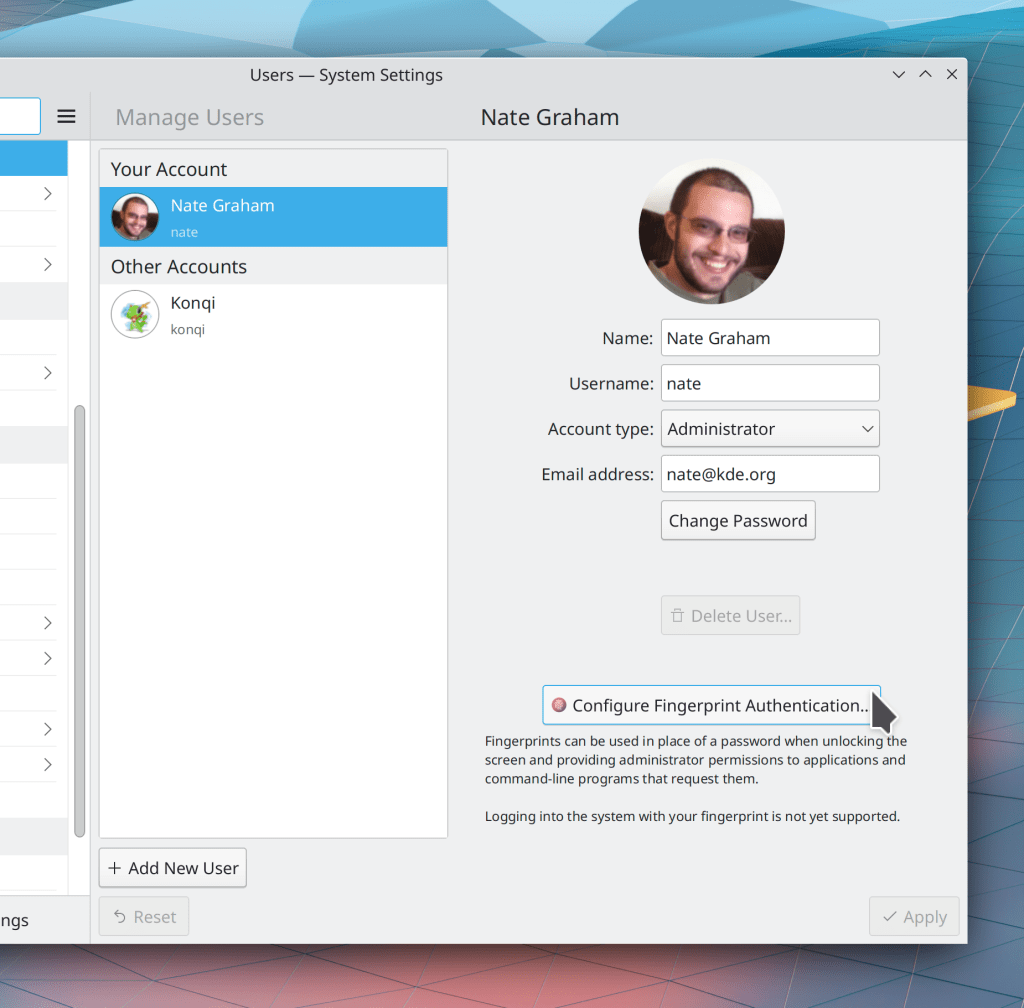
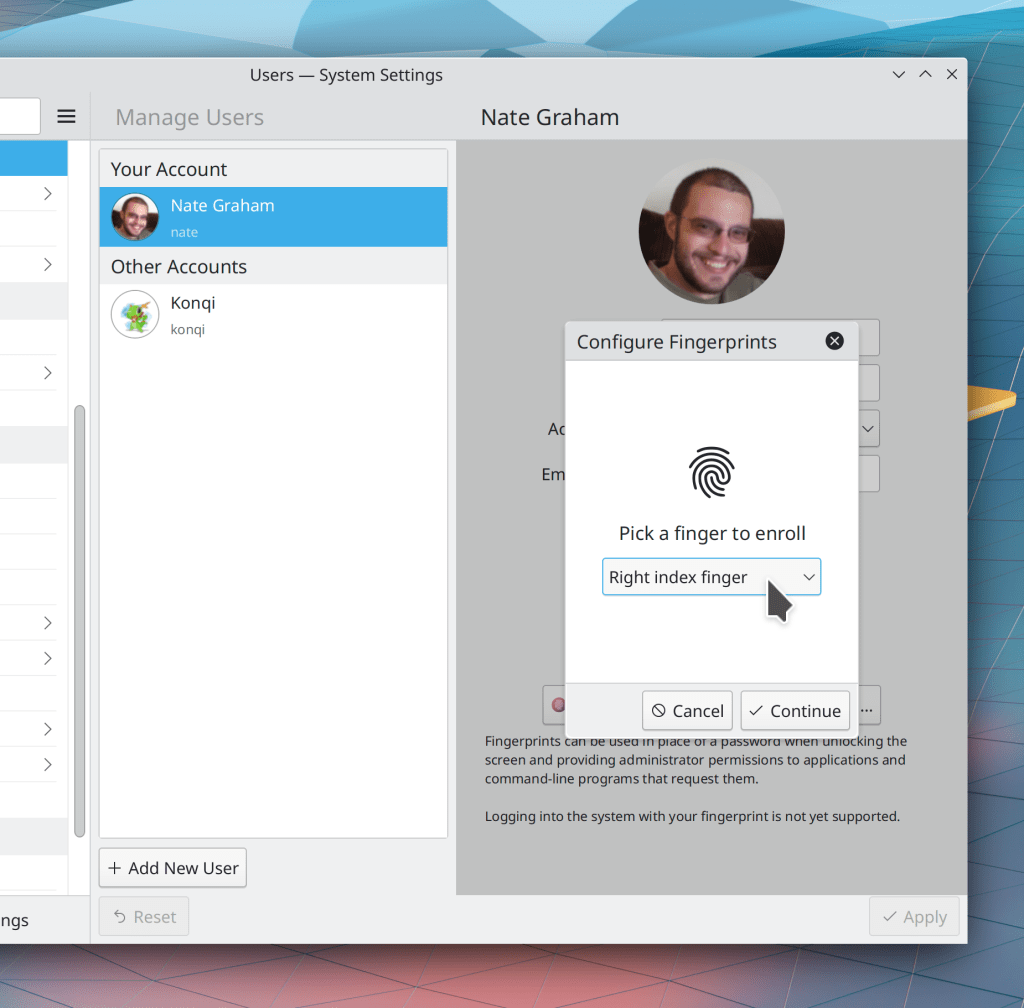
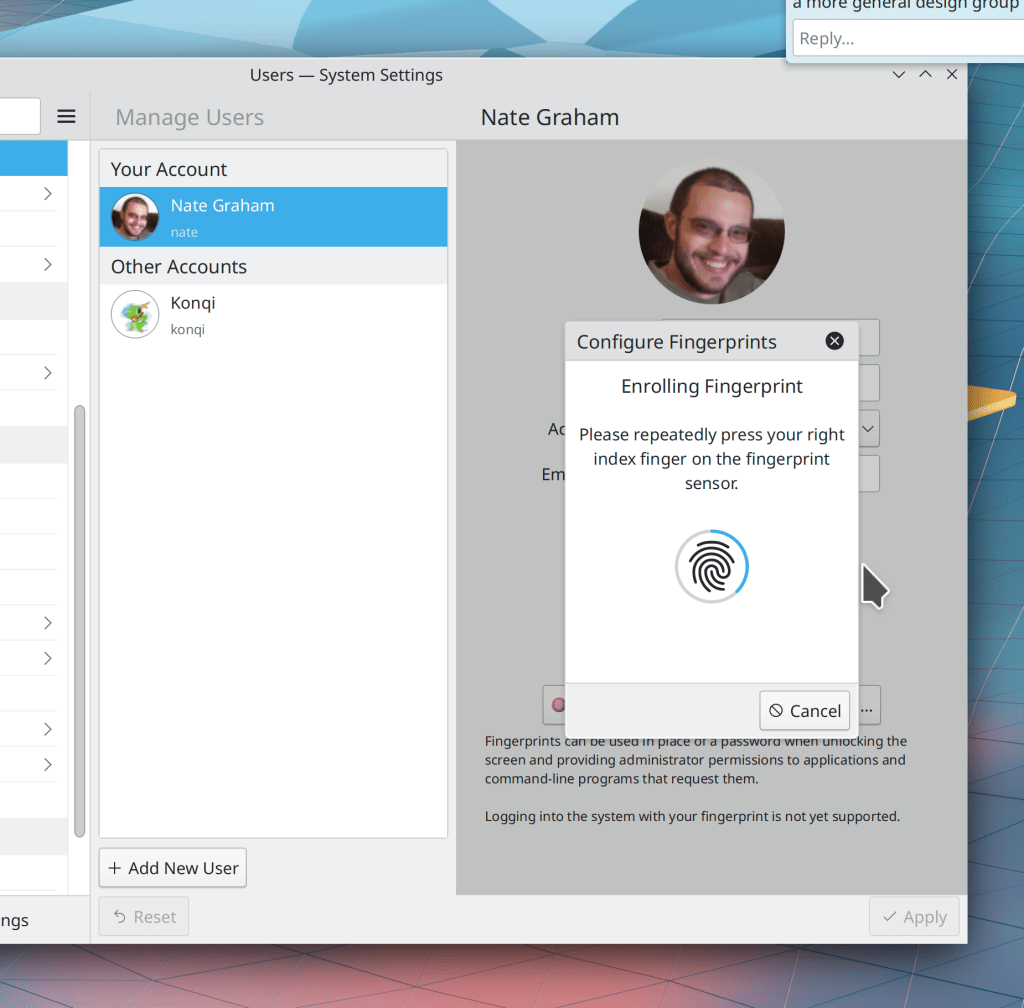
Fingerprint support has been in progress for quite some time thanks to Devin Lin, and this week, it was merged for Plasma 5.24! So far we let you enroll and de-enroll fingers, and any of those fingers can be used to to unlock the screen, provide authentication when an app asks for your password, and also authenticate sudo on the command line! It’s really cool stuff.

That’s not all: Xaver Hugl merged preliminary support for the proprietary NVIDIA driver’s GBM backend for Plasma 5.23.2! Overall this should improve the experience for NVIDIA users in many ways, both now, and also over time.

In addition, a truly titanic number of bugfixes were made this week. We have now addressed most of the issues people have found with Plasma 5.23! Here are the remaining ones which are confirmed and don’t have active work to fix them. Working on these would be a great way for any developers reading along to make a big difference quickly!

Even More New Features

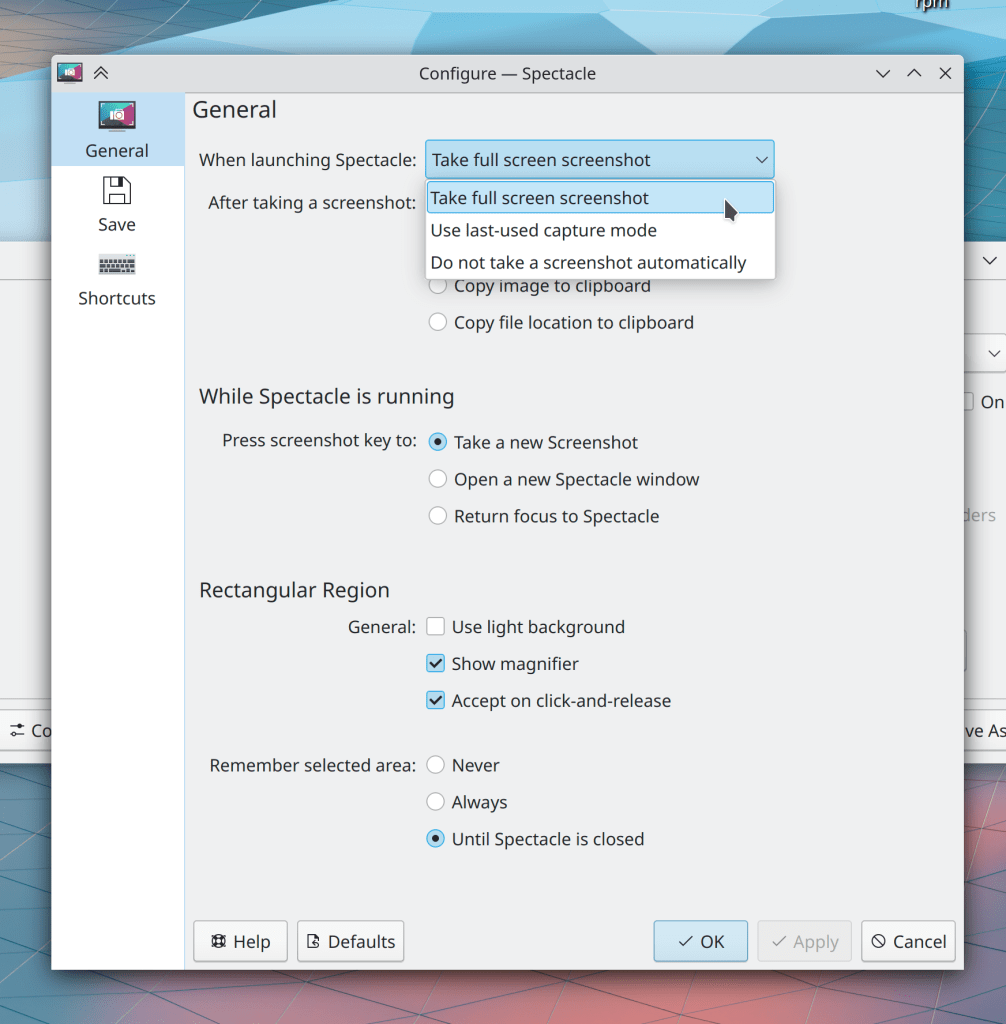
Spectacle now lets you configure it to remember the last-used capture mode for its automatically taken-screenshot on launch, or even to take no screenshot at all (Antonio Prcela, Spectacle 21.12):

In Discover, You can now enable, disable, and remove Flatpak repos, and also enable and disable distro repos (Aleix Pol Gonzalez, Plasma 5.24)

Bugfixes & Performance Improvements

Okular’s quick annotations toolbar button now opens the full annotations toolbar when for some reason there are no quick annotations configured (Bharadwaj Raju, Okular 21.08.3)

Fixed a 5.23 regression that could cause Plasma to crash on launch when logging in (Noah Davis, Plasma 5.23.1)

On multi-screen systems, full-screen overlays such as the Screen Locker, Logout Screen, and image view in Telegram once again open on the correct screen rather than all appearing on top of each other in a big jumbled heap (lol) (Vlad Zahorodnii, Plasma 5.23.1)

The Kicker Application Menu once again displays System Settings pages when searching (Alexander Lohnau, Plasma 5.23.1)

Setting an accent color while using a color scheme that doesn’t have header colors (such as Breeze Classic) no longer inappropriately applies a small number of header colors to the color scheme, which would break it in creative ways (me: Nate Graham, Plasma 5.23.1)

Checkboxes in Discover’s settings page now look unchecked when you uncheck them, and vice versa (lol) (Aleix Pol Gonzalez, Plasma 5.23.1)

When an app is playing audio on a virtual desktop that is not the active one, now its Task Manager tooltip can still be used to interact with it using the inline media controls (Fushan Wen, Plasma 5.23.1)

Clearing emoji history in the Emoji Selector window now actually works (me: Nate Graham, Plasma 5.23.1)

The F10 keyboard shortcut once again works to create a folder on the desktop (Derek Christ, Plasma 5.23.2)

When the Desktop context menu is showing both the “Delete” and “Add to Trash” actions (because both are enabled in Dolphin, as it context menu gets synced with the desktop context menu), both once again work (Fabio Bas, Plasma 5.23.2)

The Shift+Delete shortcut to permanently delete items on the desktop once again works (Alexander Lohnau, Plasma 5.23.2)

In the Plasma Wayland session, System Settings’ touchpad page now correctly shows options for how you can right-click (Julius Zint, Plasma 5.23.2)

On certain distros (such as Fedora), when you install an app with Discover, you can now remove it immediately without having to quit and restart Discover first (Aleix Pol Gonzalez, Plasma 5.23.2)

Discover’s Install buttons once again look correct for people with Plasma 5.23 and Frameworks 5.86, but not 5.87 (Aleix Pol Gonzalez, Plasma 5.23.2)

Plasma now internally ignores the dummy placeholder screen that Qt sometimes creates, which should help with multi-monitor problems related to panels and wallpapers being switched around or going missing (David Edmundson, Plasma 5.23.2)

Search fields throughout Plasma now work properly when you type text using a virtual keyboard (Arjen Hiemstra, Plasma 5.23.2)

The Plasma applet config window is now able to avoid being cut off on a 1024×768 screen resolution with a bottom panel (me: Nate Graham, Plasma 5.23.2)

Discover can now detect when a locally-downloaded package you’ve asked it to open is already installed, so it will show you the option to remove it, rather than letting you try and fail to install it again (Aleix Pol Gonzalez, Plasma 5.23.2)

Kickoff’s new “Keep open” feature now continues to keep the popup open if you use it to open or launch anything, and it no longer continues to show apps in the main view from the last-highlighted category when you hover the cursor over the “Help Center” item in the sidebar (Eugene Popov, Plasma 5.23.2)

In the Plasma Wayland session, using the hidden “BorderlessMaximizedWindows” setting no longer causes maximized windows to stop responding to mouse and keyboard events (Andrey Butirsky, Plasma 5.23.2)

It is once again possible to change the resolution when running in a VM (Ilya Pominov, Plasma 5.24)

In the Plasma Wayland session, idle time detection (e.g for determining when to lock the screen to put the computer to sleep) now works more properly (Vlad Zahorodnii, Plasma 5.24)

Right-clicking on a Task Manager task to display its recent files no longer freezes Plasma when any of those files lives on a slow or inaccessible network location (Fushan Wen, Plasma 5.24)

The free space notifier no longer pointlessly monitors read-only volumes (Andrey Butirsky, Plasma 5.24)

Attempting to share something via email when the system has no email client apps installed no longer crashes the app used to initiate the action (Aleix Pol Gonzalez, Frameworks 5.88)

QtQuick-based apps now display the correct visual appearance for disabled checkboxes (Aleix Pol Gonzalez, Frameworks 5.88)

System Tray applets that use the expandable list item paradigm now, finally, totally, completely display the expanded view with the correct highlight height, taking into consideration the user’s font size and any disabled invisible items and also hopefully cosmic rays and swamp gas (me: Nate Graham, Frameworks 5.88)

The Command Bar in many apps no longer ever displays any actions that lack text and also displays actions in alphabetical order now (Eugene Popov, Frameworks 5.88)

The whole system is now faster to access files when your system’s /etc/fstab file happens to have entries identified with UUID and/or LABEL properties (Ahmad Samir, Frameworks 5.88)

User Interface Improvements

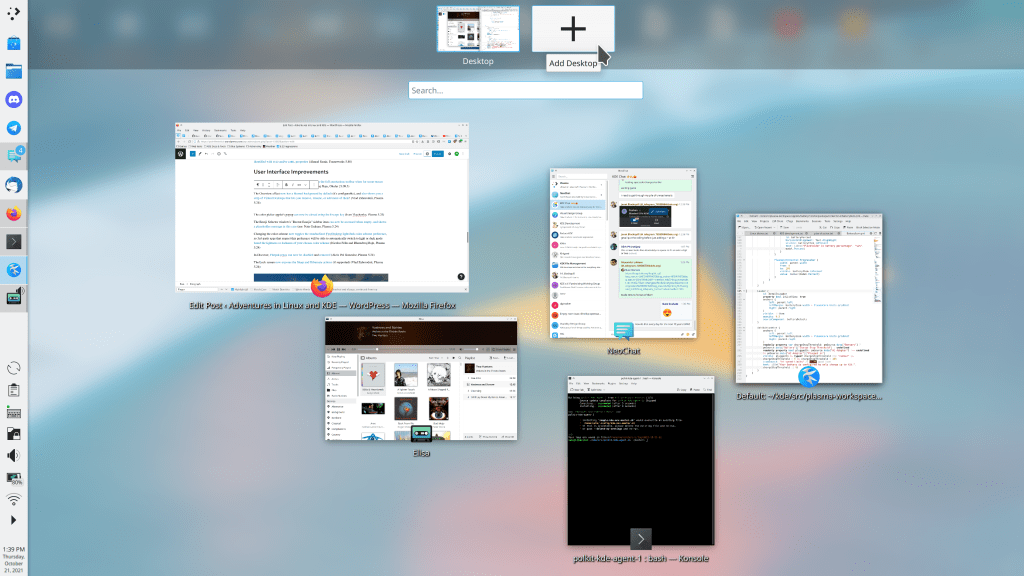
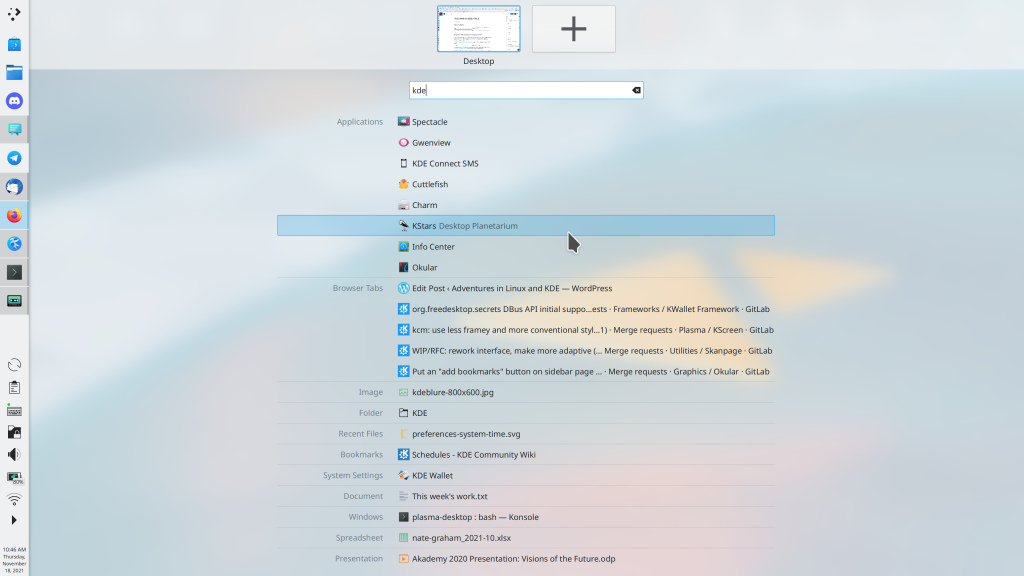
The new Overview effect now has a blurred background by default (it’s configurable), and also shows you a strip along the top that lets you remove, rename, or add more Virtual Desktops! (Vlad Zahorodnii, Plasma 5.24):

😍

Changing the color scheme now toggles the standardized FreeDesktop light/dark color scheme preference, so 3rd-party apps that respect this preference will be able to automatically switch to light or dark mode based the lightness or darkness of your chosen color scheme. Isn’t that incredibly cool!? (Nicolas Fella and Bharadwaj Raju, Plasma 5.24)

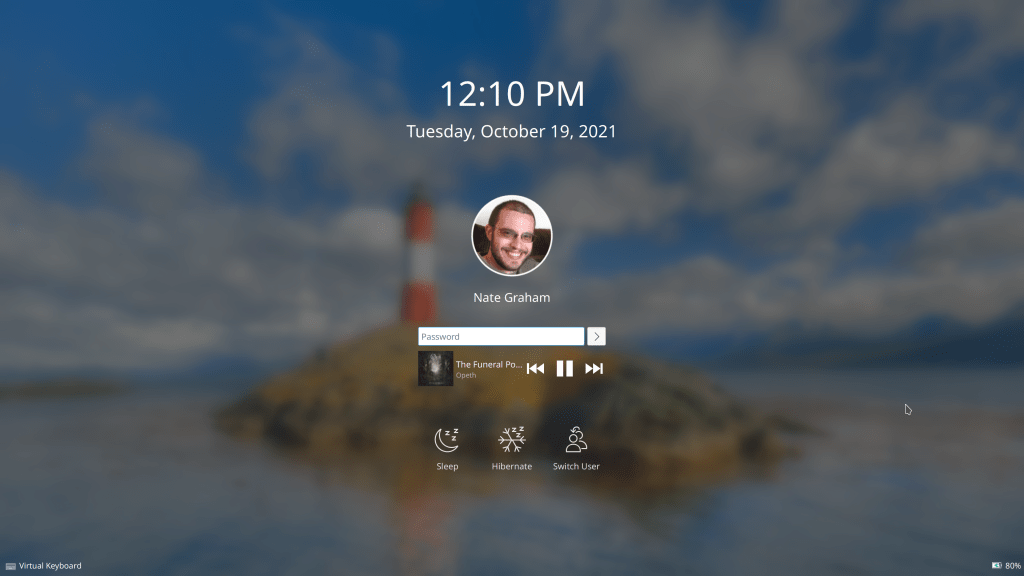
The Lock screen now exposes the Sleep and Hibernate actions, (when supported) (Vlad Zahorodnii, Plasma 5.24):

Obvious question is obvious: “Now when are you going to add Shut Down and Restart Actions!?!?!!” Answer: soon 🙂

The global edit mode toolbar now offers you a way to configure your screens, replacing the button to show the activity switcher (me: Nate Graham, Plasma 5.24):

The Emoji Selector window’s “Recent Emojis” sidebar item can now be accessed when empty, and shows a placeholder message in this case (me: Nate Graham, Plasma 5.24)

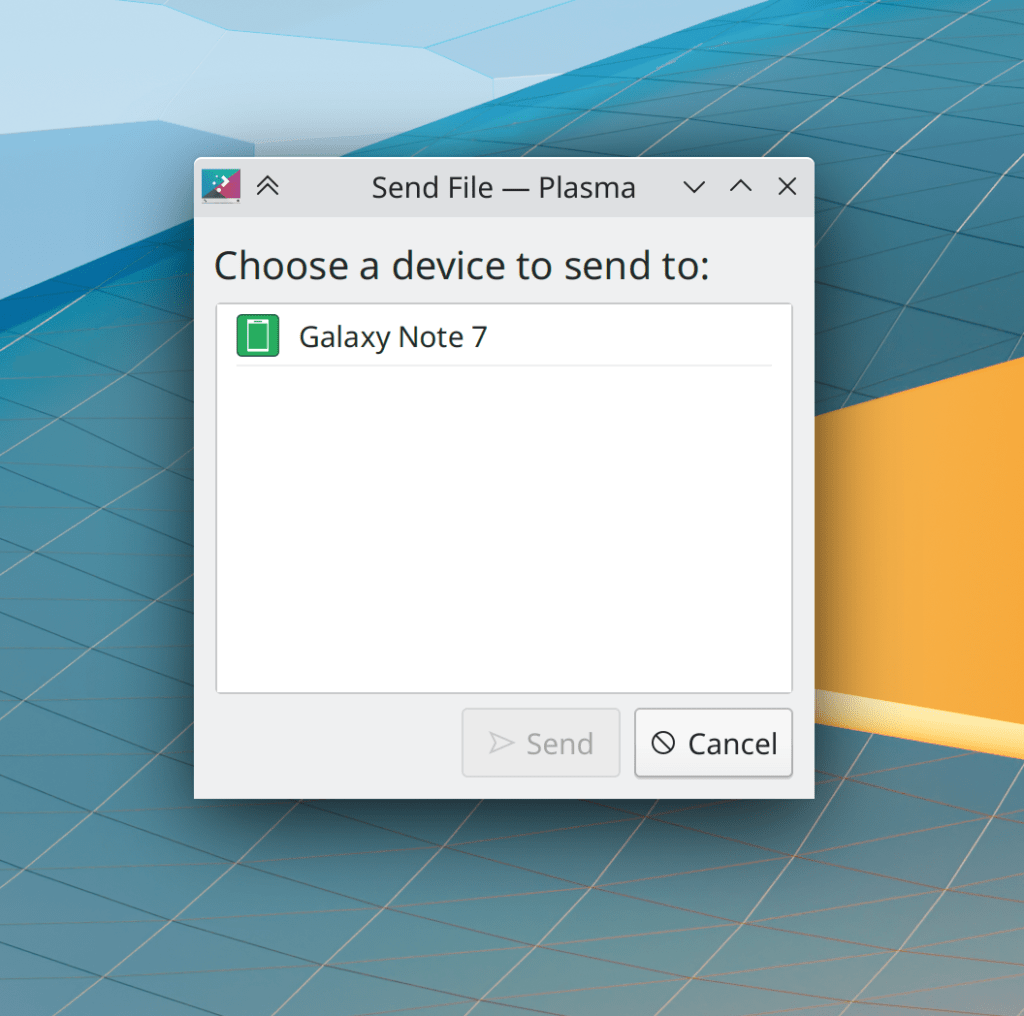
The “Send to Device” and “Send via Bluetooth” windows now set a sensible title, use more standard styling for their buttons, and the “Send” button is only enabled when there’s a device to send to (me: Nate Graham, Frameworks 5.88):

The color picker applet’s popup can now be closed using the Escape key (Ivan Tkachenko, Plasma 5.24)

…And everything else

Keep in mind that this blog only covers the tip of the iceberg! This week it was quite a big tip, but the whole iceberg is still much bigger. Tons of KDE apps whose development I don’t have time to follow aren’t represented here, and I also don’t mention backend refactoring, improved test coverage, and other changes that are generally not user-facing. If you’re hungry for more, check out https://planet.kde.org/, where you can find blog posts by other KDE contributors detailing the work they’re doing.

How You Can Help

Have a look at https://community.kde.org/Get_Involved to discover ways to be part of a project that really matters. Each contributor makes a huge difference in KDE; you are not a number or a cog in a machine! You don’t have to already be a programmer, either. I wasn’t when I got started. Try it, you’ll like it! We don’t bite!

Finally, consider making a tax-deductible donation to the KDE e.V. foundation.
This week in KDE: Plasma 25th anniversary edition is released!

…But after you read this post, I bet you’ll want to jump straight to Plasma 5.24 already! A lot of good keyboard navigation and Discover-related work was done this week, as well as loads of bugfixes.

New Features

Skanlite now supports scanning to PDF! (single page only at this point; Skanpage supports multi-page PDF scan, though) (Alexander Stippich, Skanlite 21.12)

Gwenview now shows you an estimate of the image’s new file size when you’re in the middle of resizing it (Antonio Prcela, Gwenview 21.12):

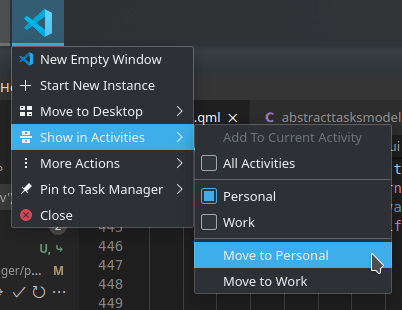
Task Manager tasks now have a “move to Activity” context menu item (Benjamin Navarro, Plasma 5.24):

Bugfixes & Performance Improvements

Okular’s Bookmarks menu now reloads itself properly and continues to display the correct set of bookmarks when switching between open documents (Albert Astals Cid, Okular 21.08.3)

Spectacle now takes correctly-colored screenshots on screens with 10-bit-per-channel color support enabled (Bernie Innocenti, Spectacle 21.12)

Automatic screen rotation now works while the “only in tablet mode” setting is in use (John Clark, Plasma 5.23)

Logging in using the login screen’s “Other…” page where you can enter a username and password once again works (me: Nate Graham, Plasma 5.23.1, and distros should be backporting it immediately)

The Plasma Wayland session no longer crashes immediately after login if you happen to be using the “Right Alt never chooses 3rd level” advanced keyboard setting (Andrey Butirsky, Plasma 5.23.1)

KWin no longer sometimes randomly crashes when you quit Firefox (Vlad Zahorodnii, Plasma 5.23.1)

The kded5 background daemon no longer sometimes randomly crashes when using a multi-screen setup (Fabian Vogt, Plasma 5.23.1)

Discover no longer crashes when clicking on the “Installed” page when using a distro like Gentoo which has no distro-packaged apps and you’re using Discover to get Flatpaks and Snaps (Aleix Pol Gonzalez, Plasma 5.23.1)

Right-clicking on a file on the desktop when multiple files are selected no longer de-selects all the files you didn’t right-click on (me: Nate Graham, Plasma 5.23.1)

OpenConnect VPNs can now be connected to as expected if you have an FSID-protected key passphrase with a user certificate but no private key (Raphael Kubo da Costa, Plasma 5.23.1)

In the Plasma Wayland session, windows of some apps no longer open at the smallest possible size the first time the apps are launched (Vlad Zahorodnii, Plasma 5.23.1)

In the Plasma Wayland session, Maximized GNOME apps now fully update their contents in the whole window, not just most of the window (Vlad Zahorodnii, Plasma 5.23.1)

Switching between views on the Application Dashboard is now nice and fast (David Edmundson, Plasma 5.23.1)

UI elements in the Notifications applet no longer sometimes overlap when there are a lot of notifications form different apps visible (Carl Schwan, Plasma 5.24)

Menus no longer have an extra outline around the edges when using a fractional global scale factor (Tatsuyuki Ishi, Plasma 5.24)

The Widget Explorer sidebar’s vertical scrollbar is no longer always visible when when the current view isn’t scrollable (Méven Car, Plasma 5.24)

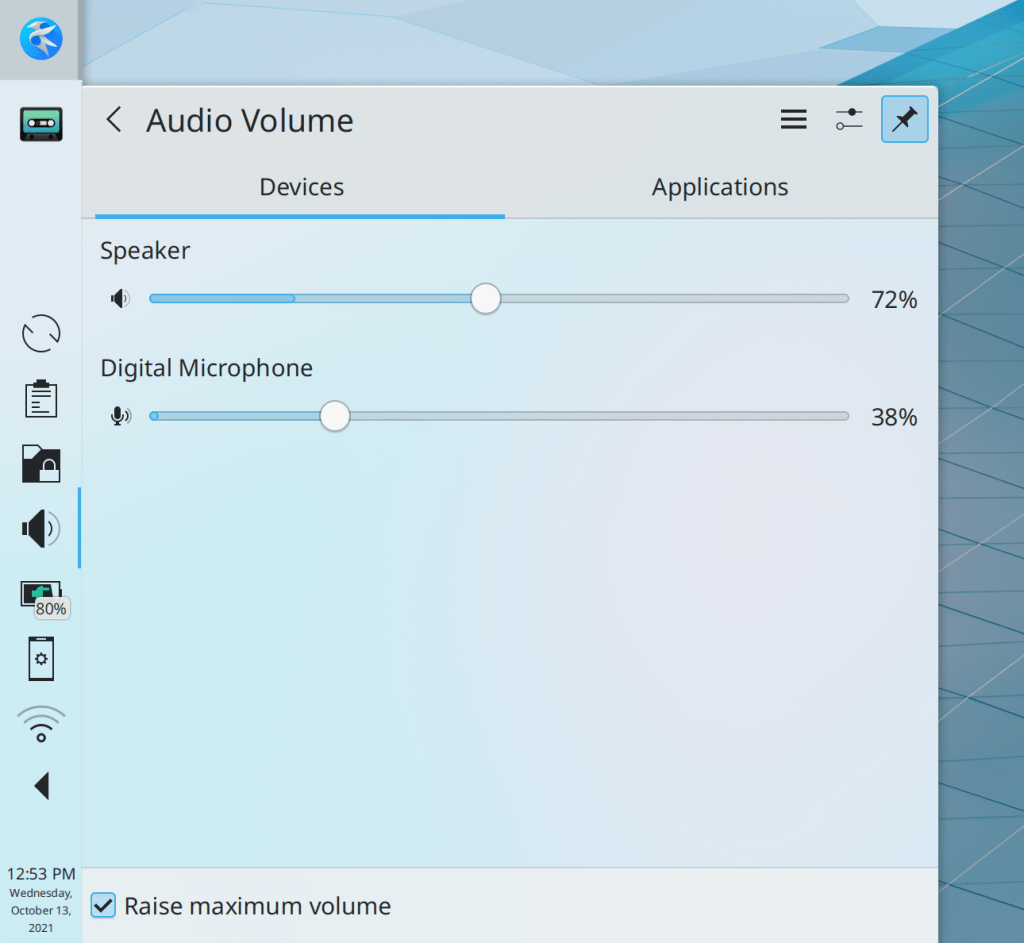
Volume sliders in the Audio Volume applet once again have a background; two different colors are used to distinguish the maximum volume level from the volume of the currently-playing or recording audio (Tanbir Jishan, Plasma 5.24):

The Plasma Wayland session no longer sometimes crashes when you repeatedly hover and un-hover Task Manager thumbnails under certain circumstances (Vlad Zahorodnii, Frameworks 5.88)

Sharing a file to Telegram when installed from a Flatpak once again works (Alexander Kernozhitsky, Frameworks 5.88)

It’s once again possible to change the icons of panel app launchers (Fabio Bas, Frameworks 5.88)

The 16px size of the im-user-offline icon is now displayed with the correct color (me: Nate Graham, Frameworks 5.88)

Spectacle no longer recommends that you install Vokoscreen or OBS if they’re already installed (Anthony Wang, Frameworks 5.88)

A constellation of issues related to windows getting stuck in ghost form after switching virtual desktops or disappearing after using the Show Desktop feature has now been fixed (Vlad Zahorodnii, Qt 5.15.3 via the KDE patch collection)

User Interface Improvements

Dolphin’s prompt to restart the app after changing settings in the version control plugin now offers you a button that will do so when clicked (Someone going by the pseudonym “Blaster goo”, Dolphin 21.12)

Discover no longer shows a redundant tooltip when you hover the cursor over the size text for an app or a package (me: Nate Graham, Plasma 5.23)

In the Plasma Wayland session, the virtual keyboard now only appears when you explicitly focus a text-based UI control with a touch or stylus poke (Aleix Pol Gonzalez, Plasma 5.24)

The Networks applet is now fully keyboard navigable, including niceties like hitting the down arrow key to go to the first item in the list and making the tab key go to the next button in the focused list item (Bharadwaj Raju, Plasma 5.24)

In the same vein, the Clipboard applet is now also fully keyboard navigable! (Bharadwaj Raju, Plasma 5.24)

Discover now tries to help less technical users learn what they can do next if they search for an app they know exists but nothing is found (me: Nate Graham, Plasma 5.24):

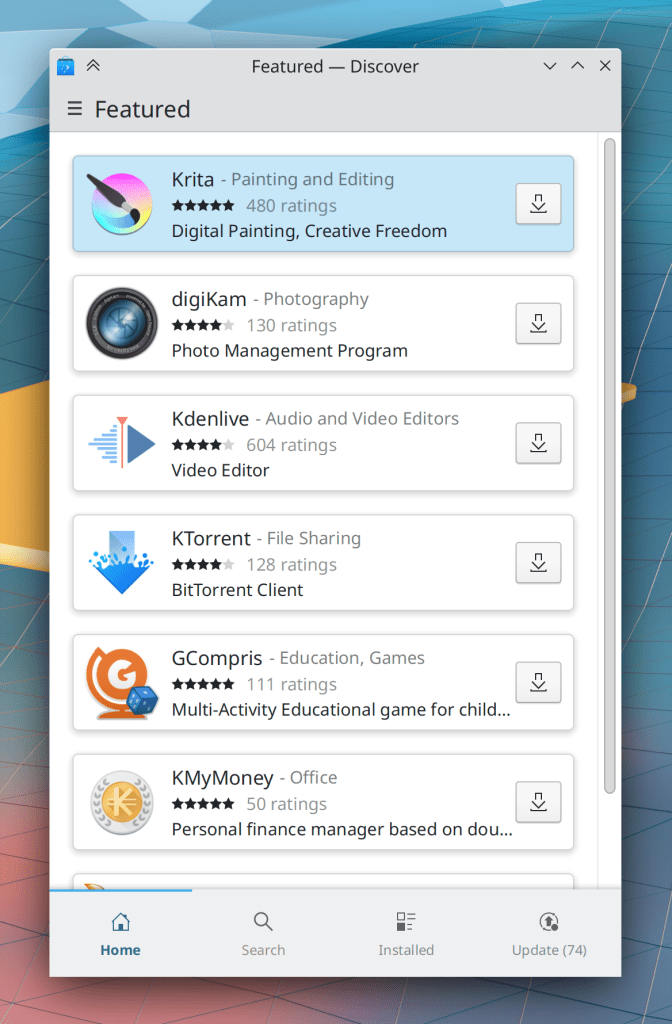
Discover now shows a bottom tab bar in narrow/mobile mode, and its sidebar handles no longer cover up the content area (Aleix Pol Gonzalez, Plasma 5.24):

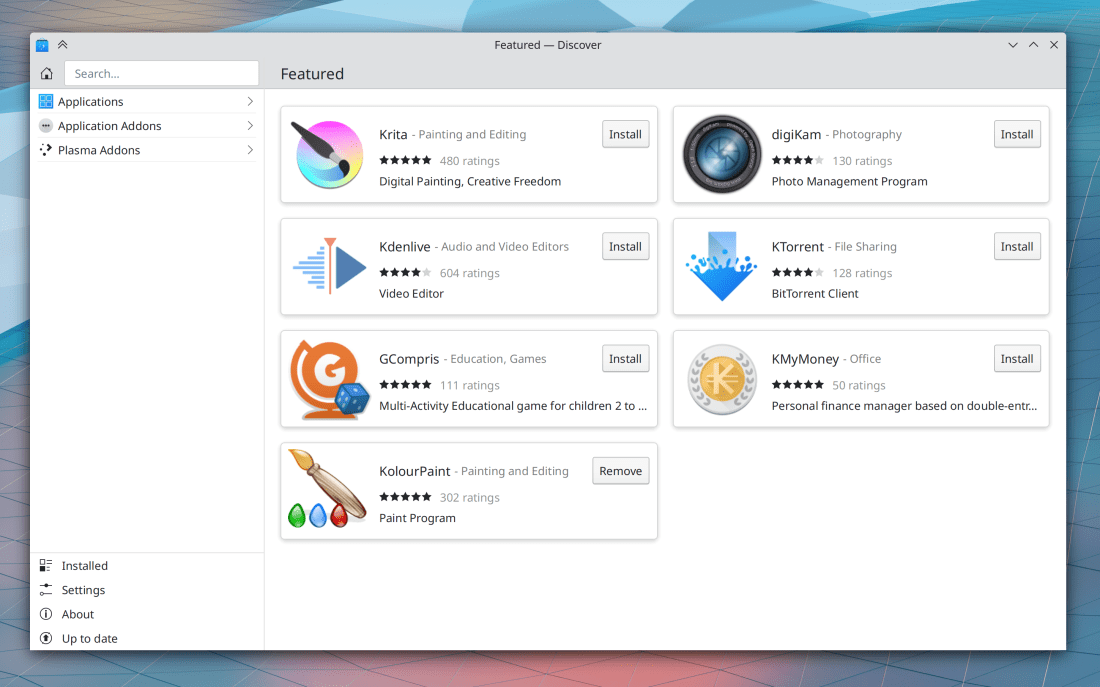
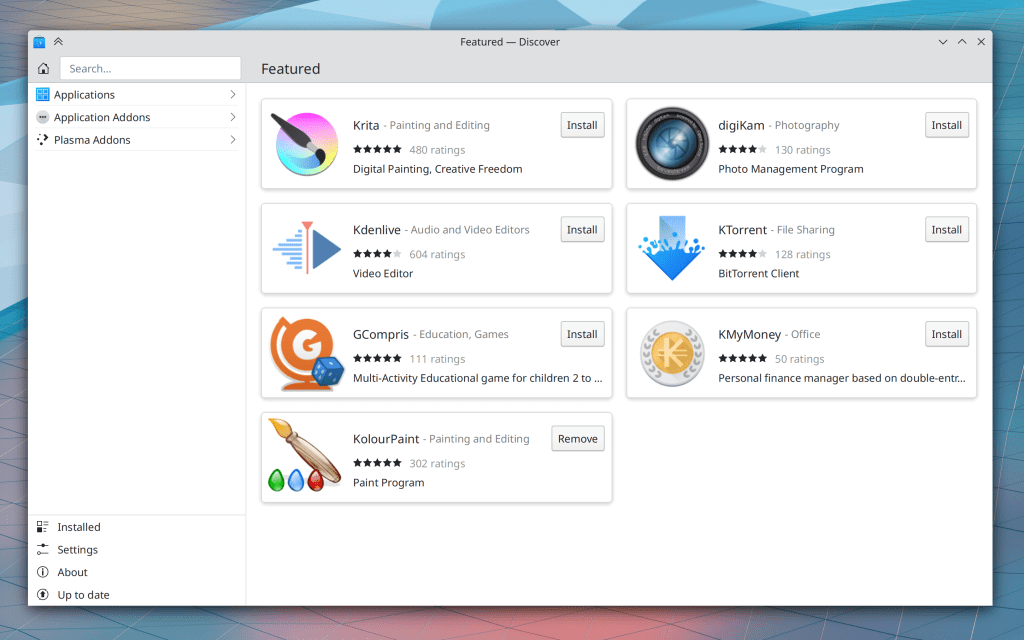
Discover now switches its home page to a two-column card view when the window is very wide (Felipe Kinoshita, Plasma 5.24):

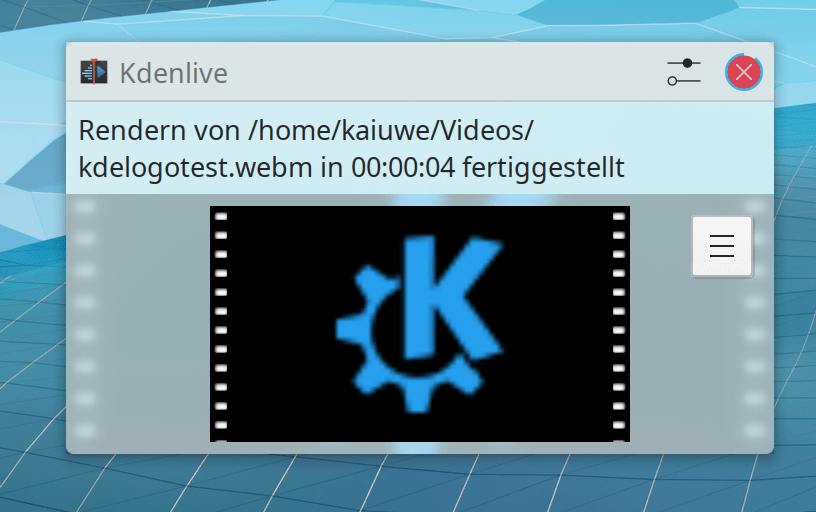
Notifications about video files now display a thumbnail in the notification, just like for image files (Kai Uwe Broulik, Plasma 5.24):

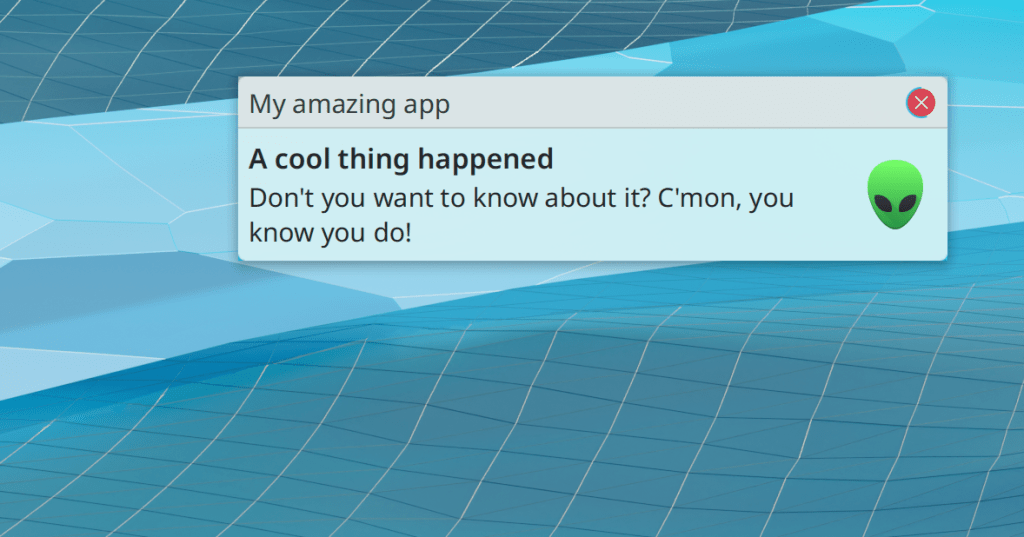
Header and title text in notifications now has better contrast and visibility (me: Nate Graham, Plasma 5.24):

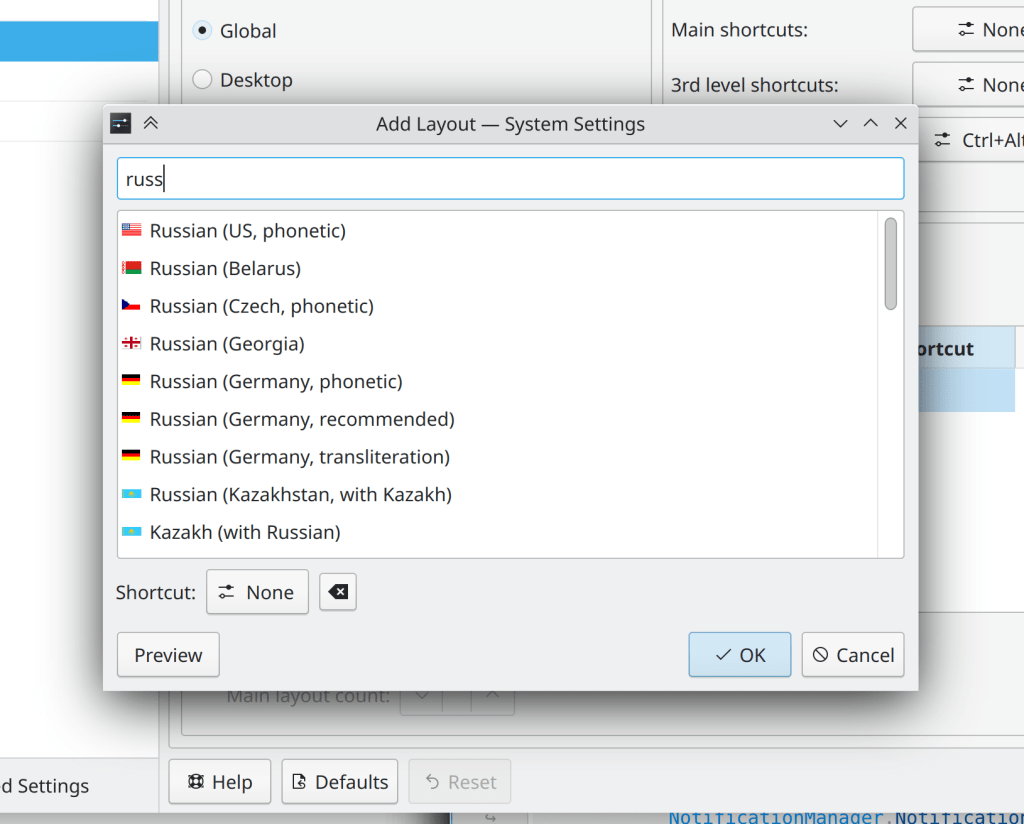
The “add a keyboard layout” dialog is now much simpler and easier to use (Bharadwaj Raju, Plasma 5.24):

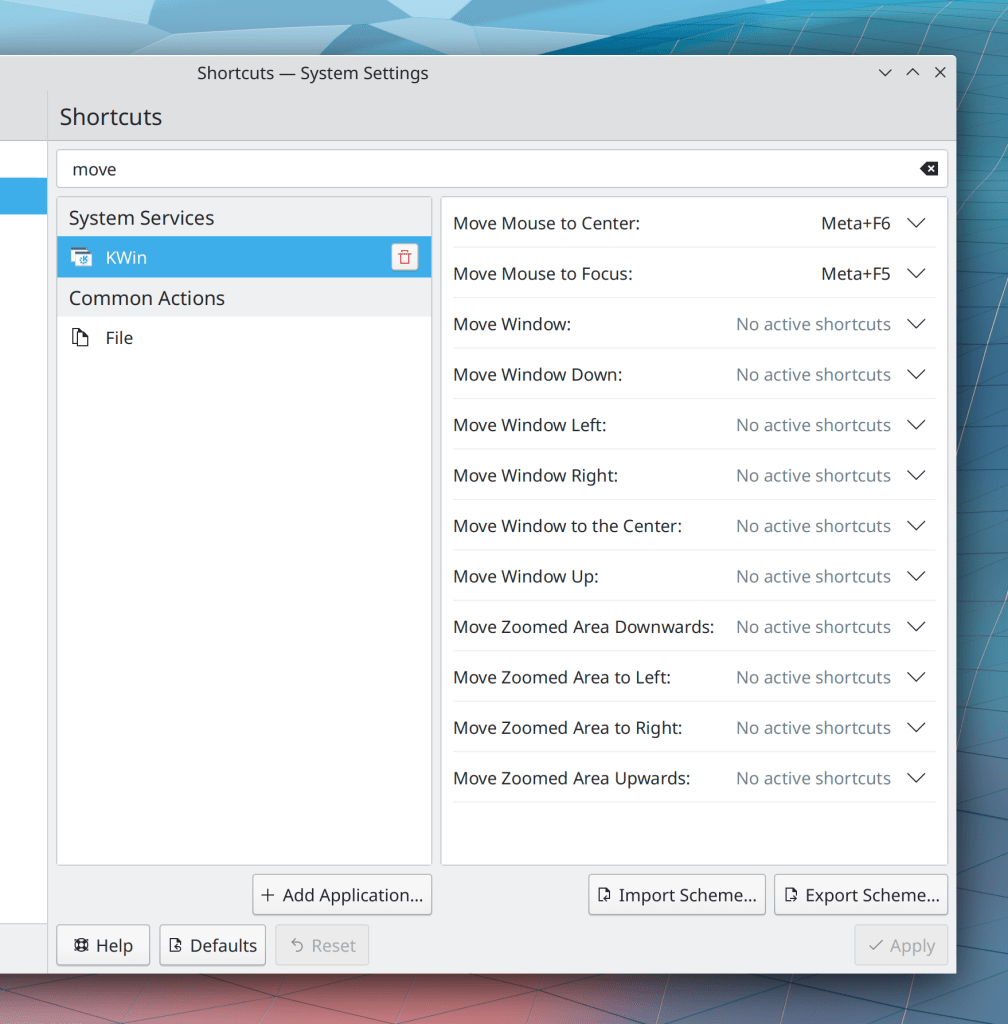
KWin’s “Pack Window X” shortcuts have been renamed to “Move window X” to make their purpose clearer (me: Nate Graham, Plasma 5.24):

The Digital Clock applet now has a “Date always below time” option to complement its “Date always beside time” and “Automatic” options (Yuval Brik, Plasma 5.24)

Section headers in Kirigami FormLayouts are now horizontally centered and slightly larger in size (me: Nate Graham, Frameworks 5.88):

…And everything else

Keep in mind that this blog only covers the tip of the iceberg! Tons of KDE apps whose development I don’t have time to follow aren’t represented here, and I also don’t mention backend refactoring, improved test coverage, and other changes that are generally not user-facing. If you’re hungry for more, check out https://planet.kde.org/, where you can find blog posts by other KDE contributors detailing the work they’re doing.

How You Can Help

Have a look at https://community.kde.org/Get_Involved to discover ways to be part of a project that really matters. Each contributor makes a huge difference in KDE; you are not a number or a cog in a machine! You don’t have to already be a programmer, either. I wasn’t when I got started. Try it, you’ll like it! We don’t bite!

Finally, consider making a tax-deductible donation to the KDE e.V. foundation.
Why I only have one computer

If you’re here for just the KDE-specific stuff, feel free to skip this post.


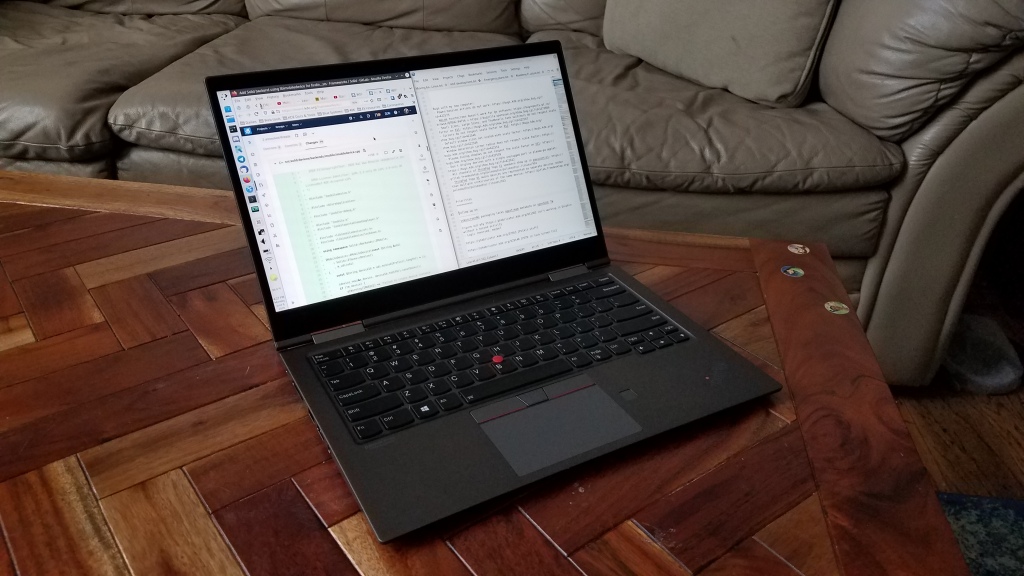
I used to have a desktop and a laptop. But in the end I found that having only a single machine greatly simplified everything and increased my productivity. This is it:

Just a regular old Lenovo ThinkPad X1 Yoga laptop

The biggest problem was always keeping files in sync.

Assuming you’re more than just a consumer of online content, you probably have local files for things that are important to you: school work; in-progress projects; creative pursuits; family photos; a personal music collection; source code repos; saved memes–you name it. With more than one computer, you need to figure out a way to keep these files in sync, and good solutions are elusive.

Cloud services are expensive and may compromise your privacy. Free non-cloud local sync services only work when both machines are on the same network. Any FOSS versions of these are unfortunately buggy and a chore to set up and maintain. Even if your chosen sync solution works perfectly (which it never does), you have to deal with the headaches of:

  • Inevitable sync conflicts
  • The set of files on one computer exceeding the storage capacity of another one
  • A necessary delay before you can work on files which the sync service is still updating after you turn on a computer that was turned off while changes were made on another computer
  • Resisting the temptation to pause syncing when something goes wrong, because you will forget to turn it back on, causing each computer’s files to drift out of sync and making reconciliation that much harder later

If you opt to forgo sync services and instead store common or shared files on a server (say, music or movies), this worsens the problem because now you have an additional location of files to manage, and you acquire the challenge of how to either safely access the files when not on the server’s local network, or automatically keep cached local copies in sync.

Giving up and keeping differing sets of files on each computers defeats one of the advantages of having multiple computers, and makes file management a real nightmare because you will somehow never have the file you want on the computer you happen to be using at any given time.

There’s just no good way out here, at least not that I’ve found.

In the end I settled on using a single computer–a powerful, top-of-the-line laptop. This can do everything a desktop can do–albeit more slowly–but it has the portability I need for travel and working from multiple locations. Interestingly, one really nice laptop that doesn’t need an external screen, mouse, or speakers turns out to be generally cheaper than two decent computers with all their associated peripherals. The only problem is finding one, because the range of high-end PC laptops kind of stinks, unfortunately. More on that tomorrow.

25 ways you can contribute to KDE

In honor of KDE’s impending 25th birthday tomorrow, here are 25 ways you can get involved to help make KDE software the best in the world!

  1. Be kind. Most KDE people are either volunteers, or paid employees who work on KDE stuff far beyond their working hours. These folks put their heart and soul into KDE, and often the most impactful thing you can do is to express appreciation to someone you see going above and beyond the call of duty. Be positive, not negative. KDE is made by people with feelings, like you!
  2. Submit code to fix bugs, implement new features, or improve the accessibility of KDE software!
  3. File a bug report for every problem you encounter! You might be surprised by how many people don’t do this, and assume that KDE’s developers are already aware of your issue. We become aware through bug reports!
  4. Help translate KDE software into your native language!
  5. Volunteer to work on sysadmin stuff. KDE’s sysadmins are always terribly overworked and in need of assistance!
  6. Subtly advocate for FOSS in general and KDE software specifically to the people in your social circle who depend on you for technical advice and support. Don’t be pushy, but make it clear you’re willing to help them migrate once they get sick of Windows, macOS, software that’s riddled with ads or tied to a paid subscription, and proprietary file formats that lock you into one app. Admit it, you’re the nerd who your friends and and family rely on! Your words have power! Use it wisely. 🙂
  7. Work on KDE’s formal promo efforts to get the word out about KDE software!
  8. Donate money to the KDE e.V. to support hiring more employees and paying for development sprints!
  9. Help maintain and expand KDE’s web presence!
  10. Design new icons to fill some of the gaps in the Breeze icon theme!
  11. Help work on the visual design of KDE software!
  12. Purchase FOSS hardware in general, and specifically, hardware with KDE Plasma preinstalled!
  13. Help a local school or small business install a Plasma distro on aging hardware so they don’t need to buy new stuff at high cost!
  14. Start contributing in your distro of choice to help them integrate KDE software better, ship a more appropriate set of default applications, update old themes which have drifted out of sync with what they were forked from, and so on!
  15. Triage bug reports to help developers focus on real issues!
  16. Answer KDE users’ user questions on social media and help people get the most out of KDE software!
  17. Review merge requests in projects you’re familiar with. This is an under-appreciated but very important way to contribute, even if you don’t consider yourself a technical expert. But you can test the changes to see if they work as described, and I bet you can also spot misspellings, obvious code errors, and weird user interfaces that could stand to be improved!
  18. Improve documentation–especially if you used the documentation and found something wanting. The best candidate to fix bad documentation is someone who just read it and found problems with it or didn’t find it as helpful as it would have been!
  19. Help manage stuff. KDE is desperately in need of “big picture people” capable of seeing things from a 10,000 foot view and helping strategically important work move towards completion!
  20. Be nice to other FOSS projects. We may be here for KDE, but GNOME is a good project too. There’s room for more than just one, and in fact healthy competition between projects is a good thing! Do don’t hate on GNOME if you’re a KDE person. They do a lot of things right and they produce quality software. Be a good ambassador!
  21. Start a local KDE user group. You might make some new friends and discover more local users of KDE software than you thought!
  22. Volunteer at your local school or university to teach students about programming or the importance of software freedom–with a KDE tilt, of course! 😉
  23. Attend Akademy, KDE’s yearly conference. Eventually it will be an in-person event again, and let me tell you, it’s a lot of fun to spend several days around members of your digital tribe!
  24. Install Plasma on as many of your home devices as possible! Experience more freedom, as well as testing more esoteric use cases. This is valuable because there is only so much hardware the core developers can test again, we rely on our users to provide reports about problems with the full diversity of what’s available out there!
  25. Don’t sweat it if things aren’t perfect–like this list of 25 things that basically ends at 24. 🙂

Why pre-installation is so important

Linus Sebastian of Linus Tech Tips recently did a long-form chat about the Steam Deck and Linux in general. A major complaint was that Linux is too hard to install, and this gets to the heart of why I believe pre-installing our software on devices like the Steam Deck is so important.

The truth is that Linus is right; a Linux-based OS is too hard to install. Only huge nerds can manage it or even have the courage to try in the first place, and it’s easy to be overwhelmed in the process. But let’s face it: this would be the case for Windows or macOS as well. Imagine if every computer was bought as an empty shell and the user needed to choose an operating system, research compatibility, flash a USB drive with the selected OS or buy a DVD or something, and then install it. You think grandma is gonna do that? I don’t think so. How about a busy professional? Forget it.

The only way this works is if the OS comes pre-installed on the physical hardware that people can buy. Then the overwhelming selection process and the technical fiddliness are gone, and people can just start using what they bought. …Like they can when they get a Steam Deck, which comes with Plasma. Or one of the other devices with Plasma pre-installed.

Pre-installation is the only way to grow Plasma out of the clubhouse of the uber-nerds like us. Which means we need to focus on the kinds of issues that are barriers to vendors wanting to ship their hardware with Plasma, or to regular people using the system normally.

This is what matters!

This week in KDE: 🎶 Continuous integraaaaaaation 🎶

At long last, KDE software is now covered by a GitLab-based continuous integration system, replacing the old Jenkins-based system used until now. The new one is much better and runs automatically on every merge request, making it much less likely that faulty code that fails to compile or regresses unit tests will be committed. The system is still its infancy and has not yet reached its full potential, but already it is helping us to save time and improve the quality of KDE software. Big thanks to KDE’s sysadmins for rolling out this system!

Another thing: Plasma 5.23 has been named the “Plasma 25th anniversary edition“, to commemorate 25 years of KDE! At this point, KDE is older than some of its users and contributors. Such longevity in a project lead largely by volunteers is quite impressive, if you ask me!

But wait, there’s more! A lot more. We’ve got new features, big improvements to the Breeze theme, Wayland bugfixes, keyboard navigation improvements… it’s been a big week!

New Features

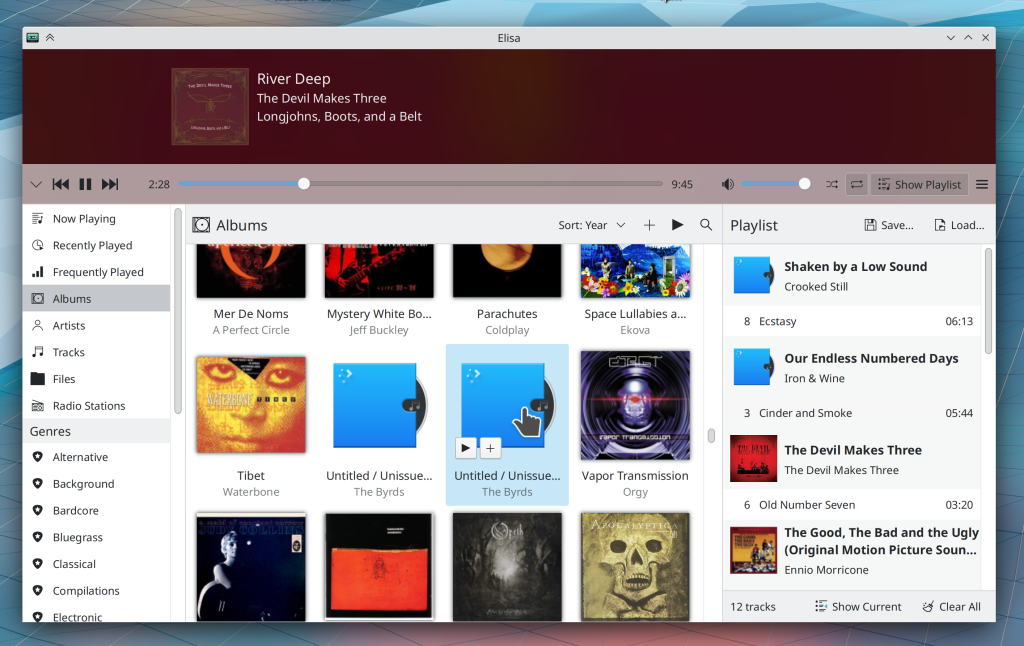
Elisa now lets you optionally use the “favorite/not favorite” style of ratings, where you mark songs as favorites rather than giving them a specific number of stars (me: Nate Graham, Elisa 21.12):

You can now scroll with a mouse wheel or touchpad over the Plasma calendar view to switch the month that is displayed (Tanbir Jishan, Frameworks 5.88)

Bugfixes & Performance Improvements

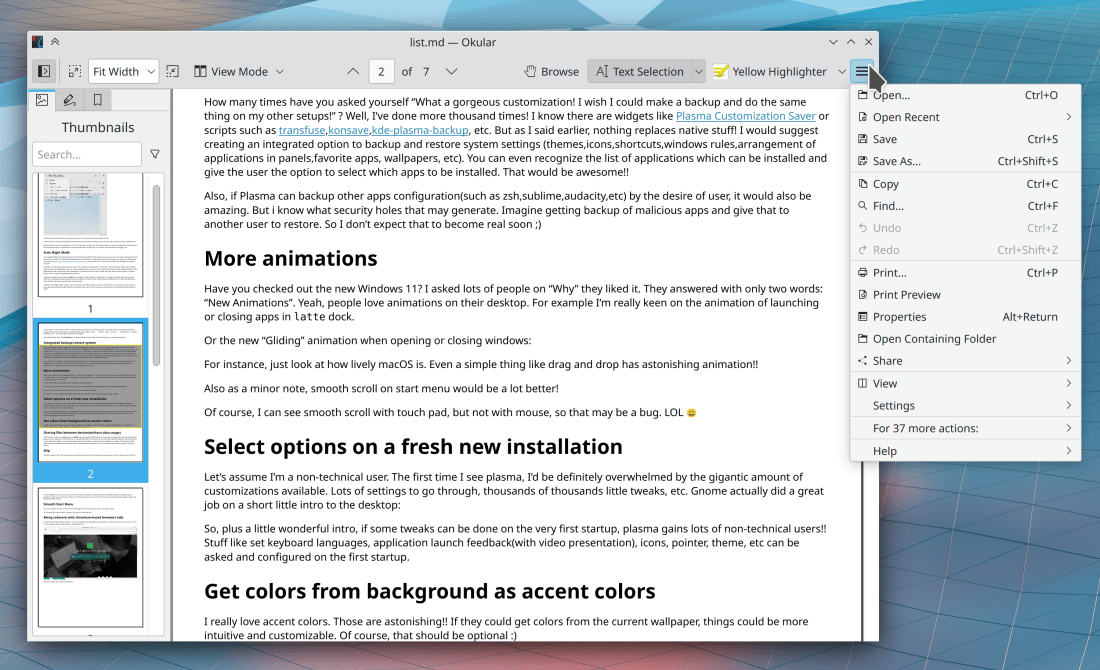
Okular no longer crashes when trying to display a Markdown file which includes an image that doesn’t have its alt text set (Albert Astals Cid, Okular 21.08.2)

Okular no longer crashes when opening a PDF with a malformed date value (Albert Astals Cid, Okular 21.08.3)

When using Dolphin’s filter feature in Details view, folders that lack any files that match the filter are no longer displayed (Eduardo Cruz, Dolphin 21.12)

In the Plasma wayland session, KWin no longer crashes when the computer wakes up but all screens have been marked as disabled; instead it now enabled the first connected but disabled screen so there’s at least one screen that can display things! (Xaver Hugl, Plasma 5.23)

In the Plasma Wayland session, XWayland apps no longer sometimes disappear when switching virtual desktops (Vlad Zahorodnii, Plasma 5.23)

In the Plasma Wayland session, text copied from within Plasma itself (e.g. from KRunner’s search field) now appears in the global clipboard as expected. This fixes the last of the major Wayland clipboard issues we’re aware of! (David Redondo, Plasma 5.23)

In the Plasma Wayland session, closing an app with a maximized window and then re-opening it now causes its window to be opened on the screen with the cursor on it, rather than always appearing on the left-most screen (Xaver Hugl, Plasma 5.23)

Right-clicking on desktop icons no longer shows the menu on the wrong screen of a multi-screen setup (David Redondo, Plasma 5.23)

Discover no longer sometimes shows the wrong installed version for Flatpak apps and runtimes with updates available (Aleix Pol Gonzalez, Plasma 5.23)

Pressing enter after entering a number in the spinbox to choose the thickness of a Plasma panel now makes the change take effect as you would expect (Fushan Wen, Plasma 5.23)

The Alt+O and Ctrl+Enter/Return keyboard shortcuts now work for closing the clipboard item editing window (Bharadwaj Raju, Plasma 5.23)

Right-clicking on the colors in the Color Picker widget’s expanded view now works (Bharadwaj Raju, Plasma 5.23)

In the Plasma Wayland session, the default Meta+Tab shortcut to switch between activities now always works (Andrey Butirsky, Plasma 5.23)

The screen edge highlighting effect now appears more reliably in certain situations (Andrey Butirsky, Plasma 5.23)

Task Manager tooltips that are displaying media controls no longer sometimes overlay a horizontal scrollbar on the bottom (Fushan Wen, Plasma 5.23 with Frameworks 5.88)

Dolphin and Plasma and other apps no longer crash when undoing a file copy (Ahmad Samir, Frameworks 5.87)

Copying files from FAT32-formatted volumes no longer sometimes just fails and hangs forever (Oliver Freyermuth, Frameworks 5.88)

The “B” in the “Background color” label on Gwenview’s status bar is no longer partially cut off (Julius Zint, Frameworks 5.88)

All Plasma applets should be slightly snappier and use less memory thanks to some backend code re-working that was done recently (Noah Davis, Frameworks 5.88)

Colored icons on colored backgrounds in KDE apps should now intelligently re-color themselves to never have the same color as the background (Aleix Pol Gonzalez, Frameworks 5.88)

Plasma now saves any changes you made while in Edit Mode as soon as you exit from that mode, so your changes will be preserved if Plasma later crashes (Jan Blackquill, Frameworks 5.88)

The “Trash is full” error message is now phrased better and no longer overflows in Dolphin (me: Nate Graham, Frameworks 5.88)

User Interface Improvements

Ark’s preview window no longer displays a redundant Close button at the bottom of the window (Eugene Popov, Ark 21.12)

Left-clicking on a desktop icon while multiple icons are selected now de-selects the un-clicked-on icons after opening the one that was clicked on (Bharadwaj Raju, Plasma 5.23)

In the Plasma Wayland session with on a multi-screen setup, the cursor now appears on login in the center of the screen that is itself closest to being in the center of the arrangement (Vlad Zahorodnii, Plasma 5.23)

The focus effect for buttons, text fields, checkboxes, radio buttons, comboboxes, and spinboxes has been enlarged into a “focus ring” that should be much easier to visually distinguish at a glance (Noah Davis, Plasma 5.24):

System Settings’ Formats page has been rewritten in QtQuick, which fixes many UI-related issues with the old one and allows us to begin work on a large-scale overhaul of how locales are presented and configured–which will likely include merging the Languages page into this one to finally make the process of changing the system’s language easy, obvious, and reliable (Han Young, Plasma 5.24):

System Settings’ Night Color page now supports the “Highlight Changed Settings” feature (Benjamin Port, Plasma 5.24)

When you add the Weather applet to your panel or activate the built-in one in the System Tray, its popup now prompts you to configure it, rather than leaving it you you to figure out that this is needed (Bharadwaj Raju, Plasma 5.24):

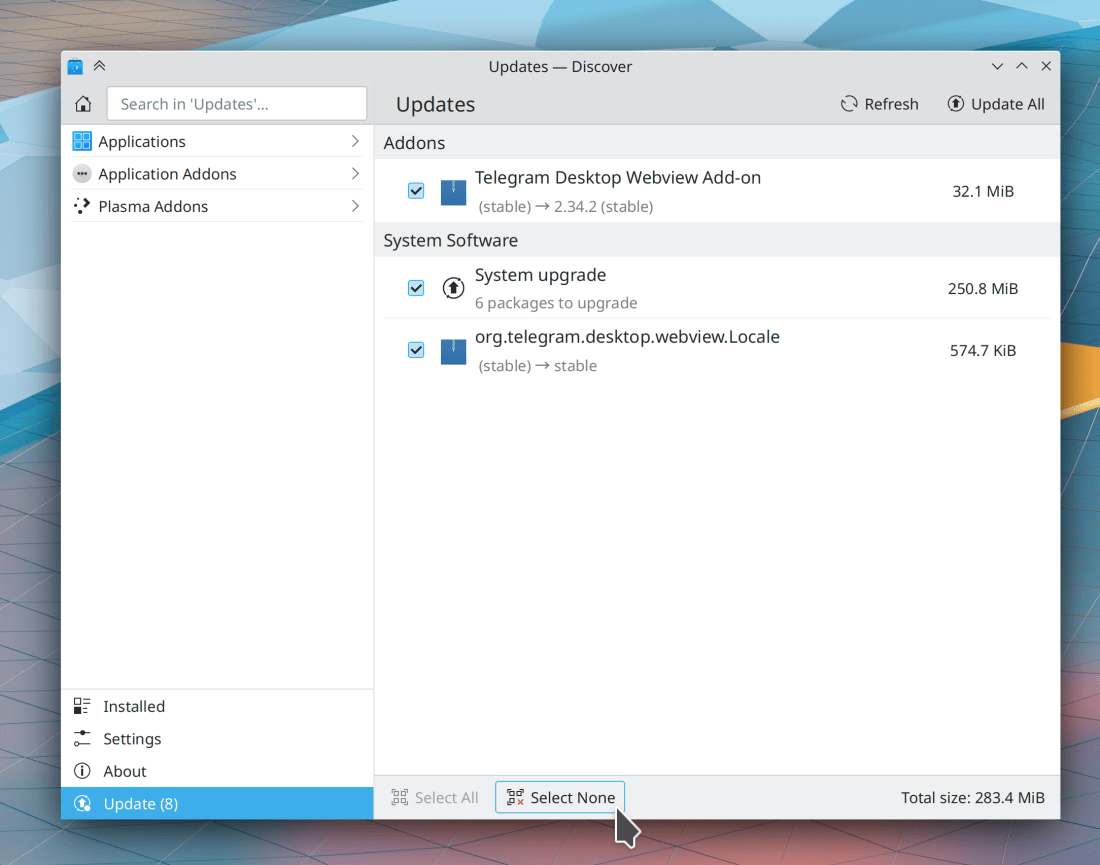
Discover’s Update page now has a lighter weight style by only showing those “pills” on the right side for items that are in progress; otherwise, the size text just appears floating on the right-side of the item (me: Nate Graham, Plasma 5.24):

Basic UI elements in Plasma now follow the same style rolled out recently for KDE apps, which also improves the visibility of the focus effect particularly for sliders and checkboxes (Noah Davis, Frameworks 5.87):

Isn’t that pretty?

By default, KTextEditor-based apps like KWrite, Kate, and KDevelop now let you enclose text in parentheses or brackets by selecting the text and typing the opening parenthesis/bracket/etc. character (Jan Blackquill, Frameworks 5.88)

System Tray applets with expandable list items are now more keyboard-friendly: you can trigger an item’s default button with the Return/Enter key, expand it with the spacebar, collapse it with the Escape key, and show its context menu (if present) using the Menu Key on your keyboard, if it has one (Bharadwaj Raju, Frameworks 5.88)

Grid items in System Settings grid view pages now visually indicate when they have keyboard focus (Arjen Hiemstra, Frameworks 5.88)

…And everything else

Keep in mind that this blog only covers the tip of the iceberg! Tons of KDE apps whose development I don’t have time to follow aren’t represented here, and I also don’t mention backend refactoring, improved test coverage, and other changes that are generally not user-facing. If you’re hungry for more, check out https://planet.kde.org/, where you can find blog posts by other KDE contributors detailing the work they’re doing.

How You Can Help

Have a look at https://community.kde.org/Get_Involved to discover ways to be part of a project that really matters. Each contributor makes a huge difference in KDE; you are not a number or a cog in a machine! You don’t have to already be a programmer, either. I wasn’t when I got started. Try it, you’ll like it! We don’t bite!

Finally, consider making a tax-deductible donation to the KDE e.V. foundation.
This week in KDE: Getting Plasma 5.23 ready for release

We continue to squash bugs in the Plasma 5.23 beta release with the aim of getting it into great shape for general release in about two weeks! As with last week, I’ll again strongly encourage anyone with the skills to do so to focus on fixing these bugs! Every little bit helps.
New Features

Konsole now lets you change the color scheme of the app itself (not its terminal view, but rather than main UI around it) independently of the systemwide color scheme (Maximillien di Dio and Ahmad Samir, Konsole 21.12):

Bugfixes & Performance Improvements

An open split view in Dolphin is no longer randomly closed when you enable or disable the feature to remember the last-closed window’s state (Eugene Popov, Dolphin 21.08.2)

In the Plasma Wayland session, fast user switching now works (Vlad Zahorodnii and Xaver Hugl, Plasma 5.23)

In the Plasma Wayland session, KWin no longer sometimes crashes when certain apps display context menus and other pop-ups (Vlad Zahorodnii, Plasma 5.23)

In the Plasma Wayland session, KWin no longer crashes while logging out so frequently (Vlad Zahorodnii, Plasma 5.23)

In the Plasma Wayland session, KWin no longer crashes when waking up the system (Vlad Zahorodnii, Plasma 5.23)

Discover can once again be used to uninstall apps after an unexpected change in the PackageKit library it uses broke it (Antonio Rojas, Plasma 5.23)

In the Plasma Wayland session, dual monitor setups where both are showing the same output are now properly detected in System Settings’ Display & Monitor page (Xaver Hugl, Plasma 5.23)

Keyboard layouts marked as “spare” in System Settings can now be switched to using the applet’s context menu (Andrey Butirsky, Plasma 5.23)

All items in System Settings’ sidebar now visibly highlight when hovered (me: Nate Graham, Plasma 5.23)

It’s no longer possible to see tooltips for hidden items on Discover’s Updates page while loading/refreshing the updates list (Fushan Wen, Plasma 5.23)

On System Settings’ Activity Power Settings page, the “Define a special behavior” combobox no longer displays duplicated entries (Oleg Solovyov, Plasma 5.23)

Searching in Discover now works much more reliably, especially when searching immediately after launching the app. Checking for updates is much faster too! (Aleix Pol Gonzalez, Plasma 5.24)

In the Plasma Wayland session, idle detection for the purposes of automatic screen locking now works much more reliably (Méven Car, Plasma 5.24)

The Window Rules window accessed from a window’s titlebar context menu (and other System Settings pages displayed standalone in their own windows) once again display their footer content/controls correctly (Ismael Asensio, Frameworks 5.87)

Discover is now faster to load initial content from any of the Addons categories (Aleix Pol Gonzalez, Frameworks 5.87)

KTimeTracker’s icon is now displayed correctly (Manuel Jesús de la Fuente, Frameworks 5.87)

User Interface Improvements

When session restoration is in use, Spectacle no longer gets launched on login if it was open during the last logout (Ivan Tkachenko, Spectacle 21.12)

Thumbnails are now displayed for .cbz comic book files containing WEBP-formatted images (Mitch Bigelow, Dolphin 21.12)

More thumbnails are now displayed for video files (Martin Tobias Holmedahl Sandsmark, Dolphin 21.12)

Elisa no longer sometimes displays a white line below the top header area with certain window sizes (Fushan Wen, Elisa 21.12)

The Home and End keys now navigate to the first and last items (respectively) in KRunner’s results view popup when the search field is not focused (Alexander Lohnau, Plasma 5.24)

Windows centered by KWin’s “Centered” window placement method or the “Move Window to the Center” action now take into accounts the thickness of your Plasma panels when calculating the area available for windows to be centered within (Kristen McWilliam, Plasma 5.24)

System Settings’ Keyboard page now respects the “Show Changed Settings” feature (Cyril Rossi, Plasma 5.24)

There are now pixel-perfect 22x22px versions of the Breeze preferences icons, which should make those icons look better anywhere they’re displayed at that size, such as in System Settings’ sidebar (Manuel Jesús de la Fuente, Frameworks 5.87)

…And everything else

Keep in mind that this blog only covers the tip of the iceberg! Tons of KDE apps whose development I don’t have time to follow aren’t represented here, and I also don’t mention backend refactoring, improved test coverage, and other changes that are generally not user-facing. If you’re hungry for more, check out https://planet.kde.org/, where you can find blog posts by other KDE contributors detailing the work they’re doing.

How You Can Help

In addition to fixing Plasma beta bugs as mentioned above, have a look at https://community.kde.org/Get_Involved to discover ways to be part of a project that really matters. Each contributor makes a huge difference in KDE; you are not a number or a cog in a machine! You don’t have to already be a programmer, either. I wasn’t when I got started. Try it, you’ll like it! We don’t bite!

Finally, consider making a tax-deductible donation to the KDE e.V. foundation.