Help me choose a new laptop

I’ve been doing all my development work on a late 2016 HP Spectre x360 for the past few years. Though a fantastic machine overall, it’s starting to fall apart: the screen backlight has partially burned out, the battery barely holds a charge anymore, and the trackpad sends a double or triple click when I press down on it. This thing has been worked hard and dragged all over the country and the world, so it feels like the time is coming for a replacement.

So I did what a typical OCD nerd does for a major purchase: I made a spreadsheet with all reasonable options and gave myself terrible analysis paralysis! 🙂

Analysis paralysis in action

For my research, I found two resources in particular to be invaluable: notebookcheck.com for its exhaustive long-form technical reviews, and Lisa Gade’s MobileTechReview YouTube channel for focusing on each machine’s overall user experience.

After nearly a month, I made my decision: the late 2019 Dell XPS 13 with a 6-core CPU which I figured would really speed up my code compile times, and the rest of the laptop seemed super high quality. Unfortunately, after it arrived I found that I did not like the feel of the keyboard: the key activation force was quite mushy, and the travel was low. But even worse, the display suffered from unbelievably terrible ghosting–which I had been warned about in reviews, but foolishly ignored–and it emitted an awful coil whine when in use. I sent it back. What a nuisance!

So I moved on to the second laptop in my list: the early 2020 HP Envy 13. I ignored reviews complaining about the trackpad surface not having a glass coating, which again was stupid: I didn’t like the feel at all of the rough plastic texture. But the rest of the laptop was solid, and the trackpad surface wasn’t a fatal flaw as these tend to smooth out over time in my experience. I decided to keep it. Not having yet wiped the disk to install openSUSE Tumbleweed (my current OS of choice), I performed the initial set of Windows updates just in case there were any firmware updates. It completed and I rebooted… and then the laptop became a brick! It was stuck in a half-on-half-off state, with the power LED illuminated, but no activity. The laptop could neither be turned on, nor fully powered down. I returned that one too.

So now I’m kind of feeling stuck. Out of two well-researched laptops, I’ve gotten two lemons, and I’m feeling like it’s time to reach out to the wider KDE community for assistance.

I need your help to find a good laptop!

What I’d like

This will be my one and only computer, used for both work/KDE development and also my personal stuff, so like Mary Poppins, I need for it to be practically perfect in every way (that’s not too much to ask, is it!?):

First, it needs perfect or near-perfect Linux compatibility; there’s no point in buying great hardware if it doesn’t work with your software.

Next, the built-in input and output devices that I’m going to actually use the computer with must be perfect:

  • Perfect keyboard: durable; firm key activation force; at least 1.3mm of travel, preferably more; firm bottoming-out feel; not too noisy; black keycaps that are not too large, with white lettering and backlighting; dedicated Home, End, PageUp, and PageDown keys for faster text editing; ideally dedicated media play/pause, forwards, and backwards keys. The keyboard is very important as I’m typing all day.
  • Perfect screen: 400+ nits of brightness; good refresh rates/no visible ghosting; close to 100% sRGB coverage; good color reproduction; must have touch functionality (I need to be able to test for touch friendliness with my and other people’s patches); 16:10 or taller aspect ratio preferred; full HD resolution is preferred, but 4K is acceptable. Size-wise, I like 13.3″ – 14″ screen sizes, but would consider a 15-incher if the case isn’t so big that it impedes portability in a backpack (more on that later).
  • Perfect trackpad: smooth, ideally glass-covered surface; aspect ratio matches that of the screen; button is durable and will last a long time; uses Microsoft Precision drivers on Windows (sign of good-quality hardware).
  • Excellent speakers: Reasonably loud, forward/upward firing, preferably four, ideally with some woofers for at least a bit of base.

Next, it needs to be powerful. I want 16 GB of RAM with excellent multi-core CPU performance to improve my code compilation times. This means good thermal management too, so that that performance can be maintained and the machine doesn’t damage its battery or other internal components with excessive heat, which I suspect happened with my current machine.

Also, I need for it to not have an NVIDIA GPU. I have no graphical needs beyond what an integrated GPU can accomplish, and don’t want to deal with Plasma-on-NVIDIA drama. Sorry, NVIDIA.

The machine needs to have a solid and durable metal case, as I will be traveling domestically and internationally with it multiple times a year (once the world beats COVID-19, that is). For similar reasons, it should be reasonably lightweight and get very good practical battery life. Extreme thinness is not required, but excessive thickness would be nice to avoid, as I like to travel to Europe for work events and conferences with only a backpack and no checked or hand luggage. An excessively thick laptop takes up space needed for socks and underwear (unless I’m going to Germany, in which case I wash them in my hotel room and dry them on the towel warmer! TMI… sorry-not-sorry!).

Finally, I want the laptop to not look stupid. No bling-bling effects, no gaudy blue and gold two-tone color effects, no flashing multicolored lights, no fake (or real) wood, no trying to look like an expensive watch or a traffic accident, no sharp chiseled edges–none of that attention-getting crap! Just a basic boring matte silver or gray metal case. Ideally it will not be a fingerprint magnet.

Within reason, price is not a practical consideration as this is a business expense for me and I am comfortable spending big bucks on something that provides my livelihood which I expect to keep for several years.

So given these conditions, what do people recommend? Help me, KDE community, you’re my only hope!

This week in KDE: Plasma 5.19 beta and more

The KDE Plasma 5.19 beta has been released! We’re very proud of the work that’s gone into 5.19, but it is no doubt buggy and in need of QA. Please help us find all the bugs we missed! Go test it in your favorite distro; options include KDE Neon Testing or Unstable editions, openSUSE Krypton or KDE:Unstable repos, Arch’s kde-unstable repos, and probably many more I’m not familiar with (please tell me!).

But wait, there’s more…

New Features

Bugfixes & Performance Improvements

User Interface Improvements

How You Can Help

Go test that Plasma 5.19 beta! Read the first paragraph of this post to see how. 🙂

More generally, have a look at https://community.kde.org/Get_Involved to discover ways to help be part of a project that really matters. Each contributor makes a huge difference in KDE; you are not a number or a cog in a machine! You don’t have to already be a programmer, either. I wasn’t when I got started. Try it, you’ll like it! We don’t bite!

Finally, consider making a tax-deductible donation to the KDE e.V. foundation.

Why the animations in your Plasma 5.18 feel slow now, and when it will be fixed

KDE Frameworks 5.70 was just released and should be trickling out to users of rolling release distros at any time. Various Arch users who have already received the update have been complaining about slow animations in Plasma, and I wanted to write a blog post to explain what’s going on here. It is a bit technical so let me start with the TL;DR version: “releasing software is complicated and this will be fixed once Plasma 5.19 comes out next month.”

For the longer version, allow me to explain:

This is caused by an unfortunate timing problem stemming from the different Plasma and Frameworks release schedules.

Plasma and Kirigami-based apps use standard duration values for animations (e.g. units.shortDuration, units.longDuration, etc.) to keep animation timings relatively consistent. These duration values are set in the respective Frameworks: plasma-framework and kirigami.

I recently discovered that Plasma units were far shorter than Kirigami units. For example a Kirigami units.longDuration unit is 250ms, while a Plasma units.longDuration unit was 120ms–over two times faster. A Kirigami units.shortDuration unit was 150ms, while a Plasma units.shortDuration unit was 24ms–almost too fast to see. In practice the Plasma units.shortDuration value was useless and always had to be multiplied by something. Even most of the longDuration values were being multiplied by random numbers too. So we wound with animated transitions throughout Plasma having timings like units.shortDuration * 4 or units.longDuration * 3. It was a classic problem of badly-chosen library constants that force apps to work around them and munge them this way and that, totally defeating defeated the purpose of using standardized values in the library in the first place. There was not actually any standardization at all!

I needed to fix this as a part of my introduction of a new animation-using component, the ExpandableListItem (which I keep meaning to blog about): https://phabricator.kde.org/D28033

I fixed the Plasma units to be the same as the Kirigami units in https://cgit.kde.org/plasma-framework.git/commit/?id=0739113a4477e1eb25bf13b0040af5a502d3ef0a, and then fixed Plasma itself to no longer multiply the units in a series of other commits. However this presented an issue: Plasma and Frameworks have different release schedules! So people will not get both aspects of the change at the same time! This means that for a time, some people would have animations that were undesirably slower or faster. How should this be handled?

Unfortunately there is no easy way to do conditionals depending on a frameworks version in QML code as we can in C++ code, so that easy option was not available. Probably something to look into implementing.

So we had a few options. One was to avoid solving the problem until Plasma 6, several years in the future, at which point we could do everything at once. This was not deemed satisfactory, as the issue was blocking the ExpandableListItem patch which was needed for a task targeted for Plasma 5.19. Another option was to leave the existing units alone for Plasma 5, and add new units with different names now, and have Plasma 5.19 use those new differently-named units. This would have avoided the issues you’re all experiencing, but would have resulted in terribly confusing code. In the end we decided to spare ourselves the potential for new bugs stemming from that.

The final option was to wait to make the Frameworks change in a Frameworks release that lines up as closely as possible with the Plasma 5.19 release. Plasma 5.19 depends on Frameworks 5.70, but always releases about a month later, at which point Frameworks 5.71 will be out. This option therefore presented two sub-options: put the units change in Frameworks 5.70 or 5.71?

If we did it in 5.70, there would be a one-month period in which people using rolling release distros suffer from slow animations, because they have Frameworks 5.70 but not Plasma 5.19 yet.

If we did it in 5.71, the period of time in which people suffered from this issue would still exist, but it would potentially be shorter. However depending on distro release schedules, if a distro released Plasma 5.19 *before* Frameworks 5.71, then animations would become too fast to see! Furthermore, any discrete release distro in the future that shipped Plasma 5.19 with the 5.70 Frameworks version it depends on rather than a newer one would then have all of its users suffer from the bug forever (or at least until its packagers backported the plasma-framework commit).

So shipping the units change in Frameworks 5.71 did not seem to be a realistic option. In the end I shipped the units change in Frameworks 5.70 knowing that rolling release distro users (myself included) would suffer from slow animations for one month. Sorry. 😦 It will all be fixed in Plasma 5.19.

Software is complicated!

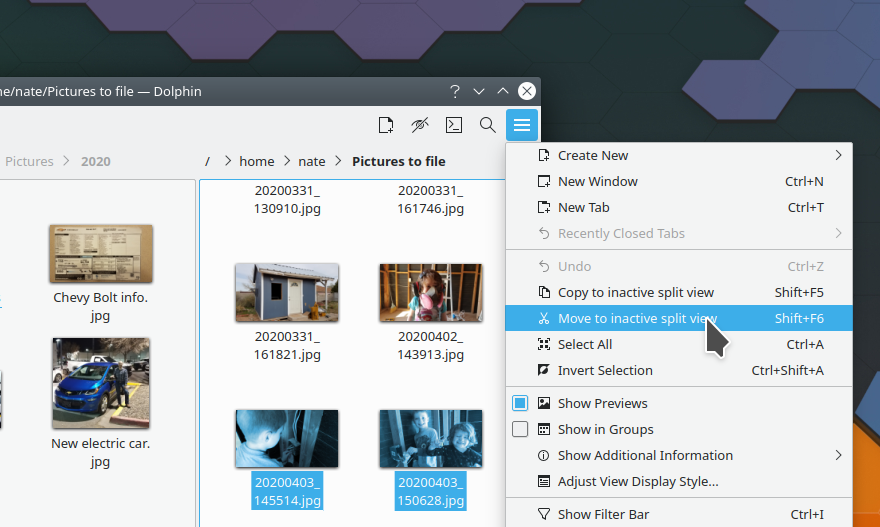
This week in KDE: Get new clipped subsurface Dolphin folder sizes

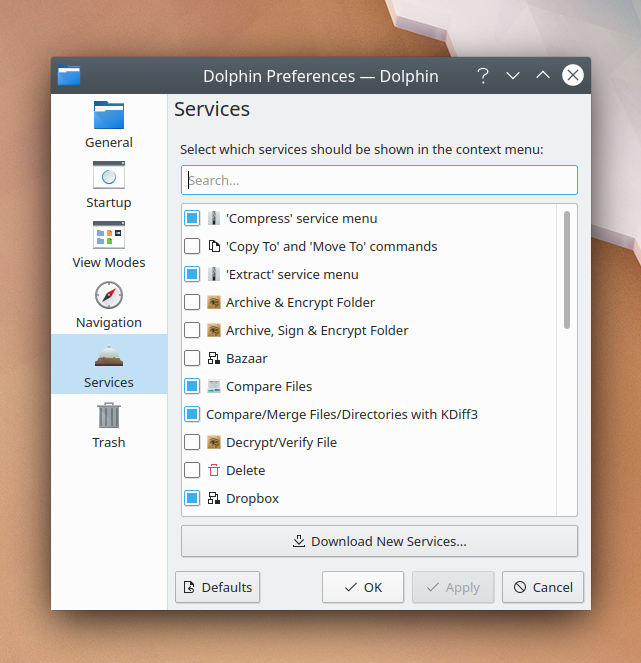
This week a lot of work was put into improving the reliability of the “Get new [thing]” feature integrated into many KDE apps and System Settings pages. Also, several Wayland improvements landed, including subsurface clipping. Finally, a major Dolphin feature request was implemented, allowing the display of on-disk folder sizes! There are also scads of other things, so read the full list and be happy:

New Features

Bugfixes & Performance Improvements

User Interface Improvements

How You Can Help

We recently updated our documentation for how to build and run Plasma Mobile locally on your desktop machine: https://community.kde.org/Get_Involved/development#Plasma_Mobile. Plasma Mobile is really amazing and advancing at warp 9 speed, so please do check it out and see what all the fuss is about! More information can be found at https://www.plasma-mobile.org

More generally, have a look at https://community.kde.org/Get_Involved to discover ways to help be part of a project that really matters. Each contributor makes a huge difference in KDE; you are not a number or a cog in a machine! You don’t have to already be a programmer, either. I wasn’t when I got started. Try it, you’ll like it! We don’t bite!

Finally, consider making a tax-deductible donation to the KDE e.V. foundation.

This week in KDE: Features you’ve been waiting for

This week we have some big stuff for you, including a rewritten global shortcuts settings page, an option to remember Dolphin’s window state across launches, a fix for longstanding kerning issues with centered text in QML-based software, and much more!

New Features

Bugfixes & Performance Improvements

User Interface Improvements

How You Can Help

Have a look at https://community.kde.org/Get_Involved to discover ways to help be part of a project that really matters. Each contributor makes a huge difference in KDE; you are not a number or a cog in a machine! You don’t have to already be a programmer, either. I wasn’t when I got started. Try it, you’ll like it! We don’t bite!

Finally, consider making a tax-deductible donation to the KDE e.V. foundation.

This week in KDE: so many videos for you

Version 20.04.0 of KDE’s apps has been released! Go check it out; there’s amazing stuff in there.

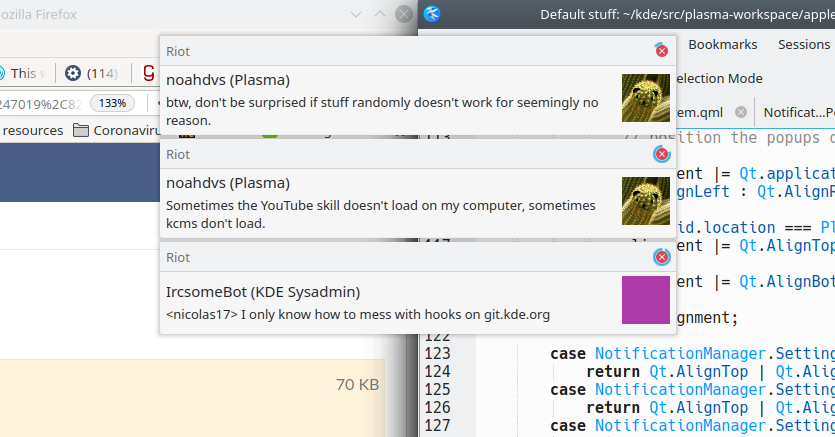
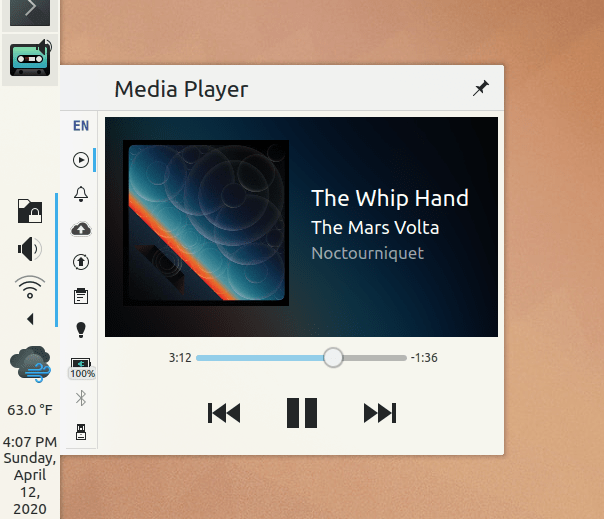
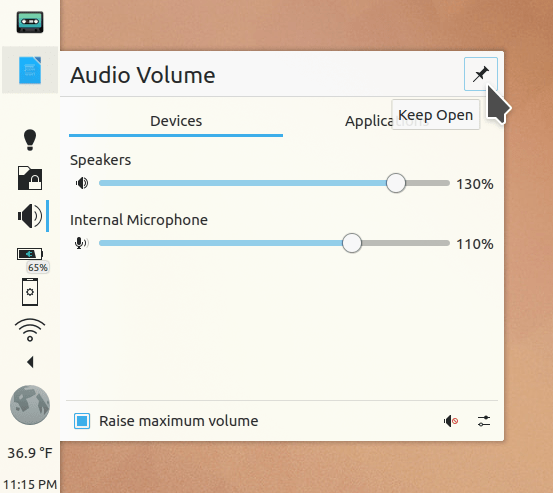
Work proceeds on the Breeze Evolution task for Plasma 5.19. In particular, the System Tray visual overhaul subtask is nearly complete and our tray popups are looking better than ever:

Other work is proceeding nicely as well!

New Features

Bugfixes & Performance Improvements

User Interface Improvements

How You Can Help

Just keep being awesome, and rest when you need it. These are hard times. Don’t beat yourself up for not doing more; it’s enough. We’ll get through it.

This week in KDE: our cup overfloweth with improvements

Three main topics will hold the floor today: Dolphin and other file management stuff, Plasma polish, and Wayland–we’re making a bit of a push on Wayland stuff so you should see more Wayland fixes going forward! For all three, we’re concentrating on fixing longstanding issues. There’s more too, of course!

Also, as you’ve no doubt noticed, I’m going to try out sending these posts on Saturday morning Europe time, instead of Sunday. Hopefully it should be a nice way to start your weekend. 🙂

New Features

Bugfixes & Performance Improvements

User Interface Improvements

How You Can Help

Version 20.04 of the apps using KDE’s release service–such as Dolphin, Gwenview, Okular, Konsole, Spectacle and Elisa–is going to be released soon! Once it’s released, please upgrade and submit bug reports so we can get the issues you find fixed as soon as possible–hopefully by 20.04.1. If your distro features “unstable” or “pre-release” versions, feel free to try out the new apps bundle a week early. It’s a big help!

More generally, have a look at https://community.kde.org/Get_Involved and find out more ways to help be part of a project that really matters. Each contributor makes a huge difference in KDE; you are not a number or a cog in a machine! You don’t have to already be a programmer, either. I wasn’t when I got started. Try it, you’ll like it! We don’t bite!

Finally, consider making a tax-deductible donation to the KDE e.V. foundation.

This week in KDE: Libinput scroll speed, Dolphin remote access improvements, and more

This week’s update includes an eclectic collection of bugfixes and new features, some of them quite annoying or longstanding–such as being able to use Dolphin’s terminal panel on remote locations, set the scroll speed when using the Libinput driver (at least on Wayland), and connect to Samba shared on a workgroup with a space in the name. But wait, there’s more…

New Features

Bugfixes & Performance Improvements

User Interface Improvements

How You Can Help

In Plasma 5.19, we are making a push on our Breeze Theme Evolution work. It’s proceeding, but would go faster with your help! There are tons and tons of mockups in the linked task and its child tasks, and what we really need at this point is people willing to help implement them. QML skills are helpful, and C++ is also useful for the needed work on the Breeze theme itself. If this sounds interesting to you, don’t be shy, step right up! Head over to the VDG channel to find out how you can get involved and coordinate work.

More generally, have a look at https://community.kde.org/Get_Involved and find out more ways to help be part of a project that really matters. Each contributor makes a huge difference in KDE; you are not a number or a cog in a machine! You don’t have to already be a programmer, either. I wasn’t when I got started. Try it, you’ll like it! We don’t bite!

Finally, consider making a tax-deductible donation to the KDE e.V. foundation.

This week in KDE: Moar performance!

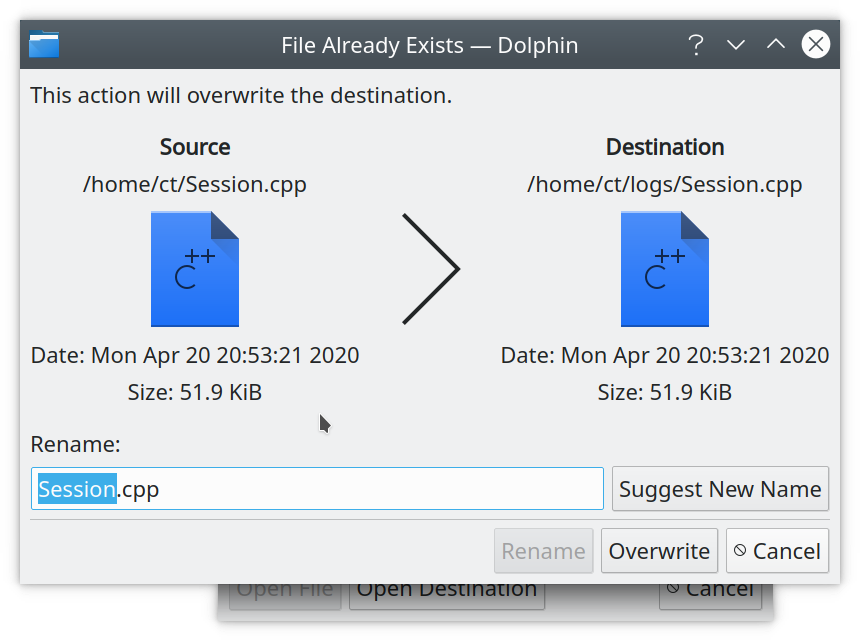
Some very nice performance fixes landed this week, which should substantially boost move and copy speeds for local transfers and transfers to and from Samba shares in particular. But that’s not all, and there’s more on the menu…

New Features

Bugfixes & Performance Improvements

User Interface Improvements

How You Can Help

In Plasma 5.19, we are making a push on our Breeze Theme Evolution work. It’s proceeding, but would go faster with your help! There are tons and tons of mockups in the linked task and its child tasks, and what we really need at this point is people willing to help implement them. QML skills are helpful, and C++ is also useful for the needed work on the Breeze theme itself. If this sounds interesting to you, don’t be shy, step right up! Head over to the VDG channel to find out how you can get involved and coordinate work.

More generally, have a look at https://community.kde.org/Get_Involved and find out more ways to help be part of a project that really matters. Each contributor makes a huge difference in KDE; you are not a number or a cog in a machine! You don’t have to already be a programmer, either. I wasn’t when I got started. Try it, you’ll like it! We don’t bite!

Finally, consider making a tax-deductible donation to the KDE e.V. foundation.

This week in KDE: The calm before the storm (of new features)

This week we worked really hard on a lot of important backend stuff that’s not so user-visible but will pay dividends down the road, such as launching applications using cgroup slices. We also did a ton of work on the Breeze Evolution project, however most of it is still in heavy development and not ready to be announced. It should trickle in during subsequent weeks, but until then, have a look at what did get landed:

New Features

Bugfixes & Performance Improvements

User Interface Improvements

How You Can Help

In Plasma 5.19, we are making a push on our Breeze Theme Evolution work. It’s proceeding, but would go faster with your help! There are tons and tons of mockups in the linked task and its child tasks, and what we really need at this point is people willing to help implement them. QML skills are helpful, and C++ is also useful for the needed work on the Breeze theme itself. If this sounds interesting to you, don’t be shy, step right up! Head over to the VDG channel to find out how you can get involved and coordinate work.

More generally, have a look at https://community.kde.org/Get_Involved and find out more ways to help be part of a project that really matters. Each contributor makes a huge difference in KDE; you are not a number or a cog in a machine! You don’t have to already be a programmer, either. I wasn’t when I got started. Try it, you’ll like it! We don’t bite!

Finally, consider making a tax-deductible donation to the KDE e.V. foundation.