
By now, many of you have probably seen Linus Tech Tips’ “Linux is Easy, right?” video?
The TL;DW version is that yes, things are mostly pretty easy, and the tasks they’re having trouble are becoming become less and less common over time… but pain points remain for the “prosumer/technology enthusiast” crowd: folks who are moderately to very technical, but aren’t software developers.
KDE comes out pretty well, with one exception: network shares.
Network shares.
Yes, network shares.
Still. In 2026!
What the heck is going on here? How is this not a solved problem? Let’s talk about it today.
How it works in KDE’s software
When you access a network share from Dolphin’s built-in network share browser, it doesn’t get mounted as a local path somewhere; Dolphin is connecting to the share using its own communication protocol: smb://, nfs://, or similar.
This is fine for KDE apps; they can use those communication protocols to access files when you double-click them on network shares you’ve accessed using Dolphin.
Everything works.
When you double-click a file on a network share and it opens in a non-KDE app, at that point something called kio-fuse (that we did a ton of work to build a few years ago) secretly creates a FUSE mount of the share in the background, and passes the app a local path to the file on the secret FUSE mount.
This way, the non-KDE app opens the file from a local path as it expects, and everything still works.
No it doesn’t, you liar!
You caught me! Everything works if you open the file from Dolphin… but what if you need to access a file on the share from the “open” dialog in an app, or save a file to the share using the “save” dialog in an app?
Well, then things get more complicated.
If it’s a KDE app, the standard KDE open/save dialog knows how to access the network share so you can open or save new files there. If you’ve created a bookmark for the share in your Places panel (which is our documented recommendation in KDE Linux), it’s already right there; simply click on it to connect to the share, and navigate to the desired file or location. Easy peasy, everything works.
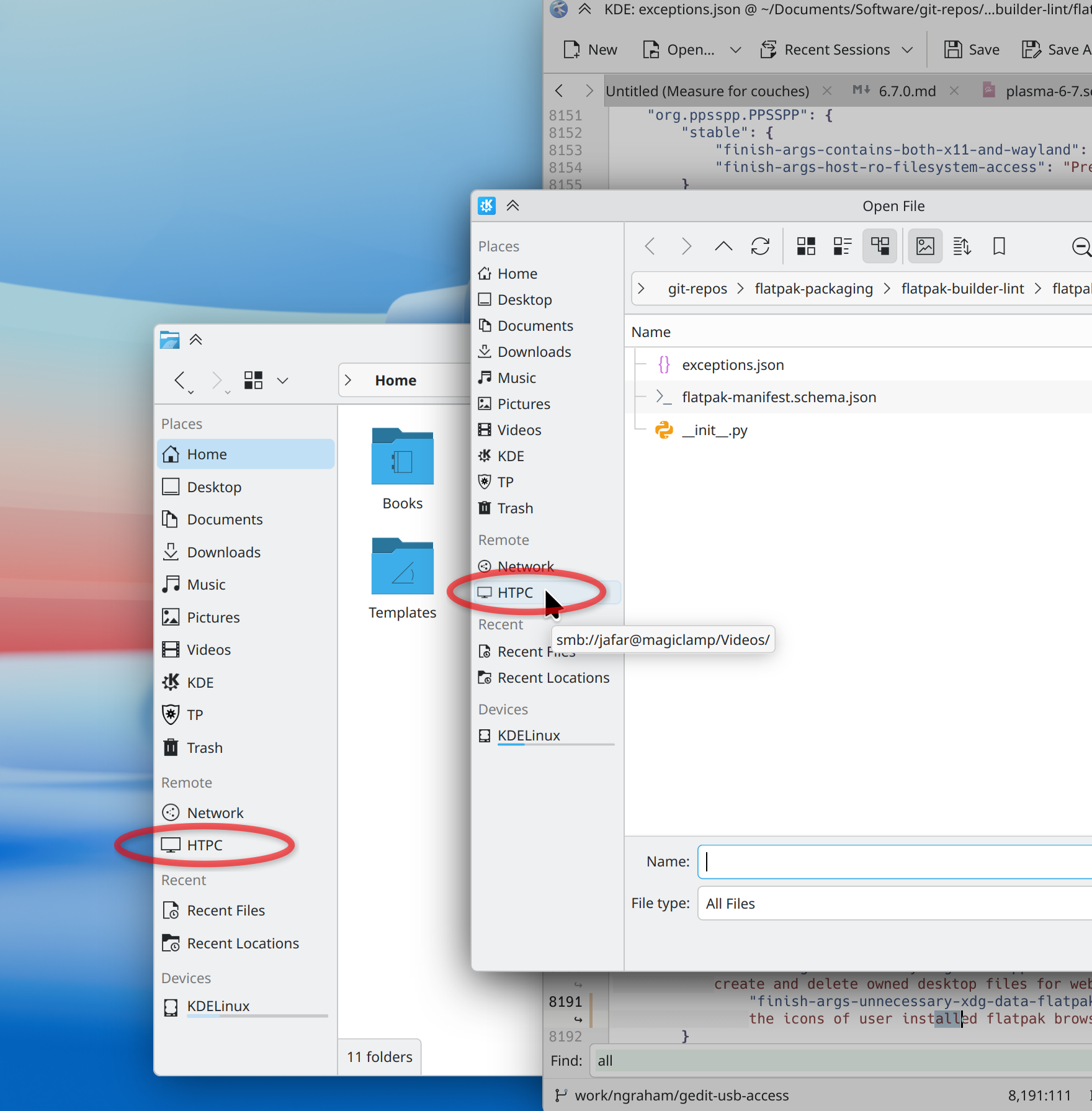
Sounds great! So where’s the complication? Let’s move on.
If it’s a non-KDE app that uses the KDE open/save dialog, it’s the same deal: access the share from the dialog, everything works. Example apps are VLC and LibreOffice (when run with the Qt backend). Still no complication…
If it’s a non-KDE app that uses the portal-based open/save dialog, then everything is lovely here too. The app asks the XDG Desktop Portal for an open/save dialog; the portal offers up the KDE dialog; everything works. In this respect, Flatpak has been encouraging adoption of the portal-based open/save dialogs, which produces a really nice experience: KDE users get a KDE open/save dialog in almost every Flatpak app — something we’ve all wanted for years!
But now we come to the problem:
If it’s a non-KDE app that uses its own non-KDE open/save dialog… then everything becomes terrible. Its dialog will not see any bookmarks you’ve added to the KDE dialog, and will expect you to have the share mounted locally somewhere. Even if kio-fuse created a mount, the non-KDE dialog doesn’t show it nicely in its sidebar! You have to know the secret location of the mount (/run/user/1000/kio-fuse-[something]) and use the dialog to navigate there manually.
If these apps are packaged traditionally, that’s bad enough. If they’re Flatpaks, it’s worse: they have to be packaged with a hole in the security sandbox that allows them to access the kio-fuse mount, or else you can’t access it even if you know it exists and navigate there manually. Most do this for the location where GNOME’s own system mounts shares… but not for the location where kio-fuse mounts them — nor the location of any shares you’ve manually mounted, for that matter.
In addition, the GTK open/save dialog’s built-in network browsing feature is broken unless the app’s Flatpak packaging pokes another sandbox hole for network access — many don’t! And custom dialogs may not even have this feature at all.
What a mess. Unfortunately, as of June 2026 (if you’re reading this later, please verify), apps in this unfortunate situation include some important ones like Blender, GIMP, LibreOffice (from Flathub or with the GTK backend), OnlyOffice, Inkscape, Audacity, DaVinci Resolve, and Gedit.
So, that’s bad.
If it’s a command-line tool or daemon, then everything is terrible in the same way. All previous use cases involved GUI tools accessing or mounting the network share; until and unless that happens, there’s nothing for CLI tools to see. It’s as if the share doesn’t exist. Something would need to mount the share at login. That something usually ends up being driven by changes to /etc/fstab that a random internet tutorial walked you through.
Why not just mount stuff the old-fashioned way using /etc/fstab?
Well, there are a few problems with this — the first one being that /etc/fstab is root-owned, so using it to mount a network share requires administrator privileges. That’s not gonna fly on multi-user or administrated systems.
You could work around this by using a GUI tool that can modify that file using Polkit, and then ship a Polkit rule to auto-allow this app’s requests to modify the file — even for non-admin users.
If it’s a password-protected share, you’ll also have to store the credentials in plaintext somewhere; there’s no provision for storing them in an encrypted password storage system.
This makes a mockery of security, but even if that’s acceptable, it turns out there isn’t just one way to mount a network share using /etc/fstab, but rather about twelve thousand ways. Every online tutorial gives you a slightly different set of steps, and if you don’t do it just right, you’ll end up with a mount that isn’t writable, or delays the boot process if it’s not accessible at that time, or causes apps to hang and freeze if it becomes inaccessible later, or other non-obvious problems that can be really “fun” to troubleshoot.
It’s not impossible to do this properly, but you have to know what you’re doing. So you really want this file to only be touched by a person or organization that qualifies, and to not make changes to it that you don’t fully understand.
How can we fix this?
All is not lost. Happily, KDE just received an investment of over €1.2 million from the Sovereign Tech Fund, and it includes funding for improvements to KDE’s network share handling!
Time for full disclosure: KDE e.V. is contracting with my company Techpaladin Software to run this part of the project. Network shares represent a significant paper cut, and I’m really excited to be a part of the process to finally get this topic sorted.
I’m not micromanaging the project; frankly, I don’t have the time, even if I wanted to! So my involvement so far has mostly been to put smart people in charge, gather them together into a (virtual) room where they can be productive, and make sure they’re adequately funded! Which is what I’ve done, and and I have every confidence in the team.
Here are some of the ideas under discussion:
- Have Dolphin and open/save dialogs automatically create temporary bookmarks for recently-accessed network shares, maybe in the “Recent” section.
This would eliminate the step of manually bookmarking transiently-accessed shares. - Have Dolphin and the open/save dialogs create a FUSE mount for each share they access immediately after accessing it, rather than the first time a file from the share is accessed in a non-KDE app.
This would solve the problem for CLI tools — provided the share is manually accessed at least once beforehand. - Either expose the FUSE-mounted share at a location on the system that lets the legacy GTK open/save dialog see it by default, or submit patches to GTK to let the GTK open/save dialog to see
kio-fuse-created network share mounts at their current location.
This would extend that fix to non-Flatpak apps using the legacy GTK dialog. - If the user manually bookmarks a network share, have
kio-fuseautomatically create a mount for it on login, similar to “mapping a drive letter” on Windows.
This would remove the caveat “…provided the share is manually accessed at least once beforehand.” - Submit patches for apps on Flathub that still use this legacy dialog that let them see the location where
kio-fusemounts network shares.
This would extend the above fixes to these apps’ Flathub packages. - Submit patches to port remaining apps to use the portal-based open/save dialog.
This would reduce the number of GUI apps that need the above fixes in the first place. - Standardize the location and mount arguments for these FUSE mounts so you never end up with GNOME and KDE apps FUSE-mounting the same share to different locations. That’s just ridiculous!
I’m not sure how politically possible this is, but it would be nice to reduce duplication. - Look into using systemd mount units as the underlying implementation if systemd is available, and use the current
kio-fuseimplementation as a fallback only on systems without systemd.
This would let us use an already standardized system and the more performant kernel drivers for remote filesystems. And it might be more feasible than #7.
Lots of ideas. Preliminary work has already started, and I expect it to be an ongoing area of focus in the coming months.
So hopefully soon this topic will finally be in the rear-view mirror. I think it’s clear that KDE is not yet 100% there on network shares, and we can do better. And we will!


I hope you succeed in improving the situation because it can be annoying even for someone who mounted network shares many times before.
LikeLike
One problem I run into is with VLC where its desktop file declares “X-KDE-Protocols=ftp,http,https,mms,rtmp,rtsp,sftp,smb”, but doesn’t use kio for file access. Opening a file on an SFTP or SMB share via Dolphin causes VLC to try and connect itself, which prompts for credentials again. For some setups, it can straight up fail to connect because the SMB library it uses is not quite as full featured as what kio uses.
There probably isn’t anything KDE can do on its side for this though.
(If anyone else reading is running into this, I work around the problem by copying the desktop file to ~/.local/share/applications/ and removing sftp,smb from the X-KDE-Protocols list.)
This would be awesome, especially if the kio thumbnailers could make use of it. I’m not sure if it changed recently, but the last time I submitted a small fix for previewing RAW images, the behavior was to copy the remote files locally to generate a preview (for thumbnailers that require local/mounted paths). If kio-fuse was guaranteed to be available and these thumbnailers could use the mount point, that’d be significantly more efficient.
That would be awesome too! I have a rather niche use case where I frequently access large firmware images on an SMB share over a 40Gbps link. Currently, I’m manually mounting it via fstab because the kernel cifs module is significantly faster than kio (+ kio-fuse) for sequential reads/writes of large files.
LikeLike
This is indeed a major issue, not just with VLC but other apps that declare native support for protocols. It seems the idea of X-KDE-Protocols is fundamentally broken when a remote requires username/password authentication. I would prefer if files always opened via the FUSE layer, even though it’s slower in theory.
LikeLike
Sequential write just need some optimizations, notably kio-fuse could use https://libfuse.github.io/doxygen/structfuse__operations.html#a8dab2194663f561ef7db54de2ca35694
fuse solutions won’t ever be as performant as “native” solution due to fuse inherent overhead, but it can get to a point it is unsignificant/a good tradeoff.
LikeLike
The idea of the X-KDE-Protocol is for apps to specify which KIO protocols they support, in which case they will also share the credentials.
What is broken in this case is that applications claim to support these but actually don’t.
LikeLike
Yeah. Which seems like a relatively simple patch to affected apps.
LikeLike
One more usecase I’d like you to consider (since I haven’t seen that one brought up anywhere before): I use Kate as my main editor, but I also work a lot on remote machines. This works up to a point (open the directory in Dolphin with sftp://… and open the files in Kate), but: None of Kate’s plugins work here: Git, Projects, LSP, etc just don’t see any context. Also, Kate doesn’t notice if the remote file has changed, so I have to remember to manually reload everything when switching branches or similar.
LikeLike
One more corner case is so called “recent documents”. Where app somehow got access to document once and then saved path locally. Surely on next app start after reboot it will not find it again because share is no longer mounted
LikeLike
I would say GVFS is superior on this one. When using a GTK environment, you typically add a network share via a file manager. On a KDE system one can still do this via `gio mount smb://server/share`. And then ANY app, even a Qt/KDE one with `QT_QPA_PLATFORMTHEME=gtk3`, can access it via GTK file dialog. Even if you do it inside a KDE session.
KIO? Even a KDE app, Kdenlive, crashes if choosing a network share in a KDE session via the native KDE dialog which uses the native KIO. But works just fine with the aforementioned environment variable via the GTK dialog and GVFS.
Why? I guess there’s a difference the way those VFS engines work. GVFS mounts a local mount point right when you add it in the file manager/gio mount. Apps transfer only local paths between themselves and get the remote URL only via GIO/GFile API. No D-Bus calls since the one-time mount in file manager.
KIO? Apps have to decide which kind of URL they want to get from clipboard (`KUrlMimeData::urlsFromMimeData`) and then `KUrlMimeData::exportUrlsToPortal` has to do a synchronous D-Bus call in the middle of random clipboard task in the application to create a FUSE mount!
LikeLike
Nate,
I’m not saying it solves everything, but it’s worth considering how Gnome’s GVFS currently operates because IMO it’s superior to what KDE is doing.
https://youtu.be/V3pCbCIKczw?t=147
LikeLike
I switched to autofs based mounts some years ago because of the mentioned caveats.
=> works with the one flatpak app I use (FileBot), works from terminal, and it eliminated the constant hanging/freezing of dolphin (which I think happens when you add non-kio smb mounts to the “Places”)
LikeLike
I’m stoked to hear that efforts are underway to improve the situation with shared drives in KDE!
This prompted me to try again, and using Fedora Kinoite with Okular installed from Flathub, it still cannot open PDFs in Okular from double clicking in Dolphin (using Okular’s File > Open dialog works as expected). The issue seems to be a case of Bug 477615 (“KDE Flatpaks … can’t open remote files”), so hopefully that will receive some attention too, as that’s a pain point on Kinoite as well as KDE Linux.
LikeLike
Thank you very much for this initiative! Looking forward to see any kind of improvements!
One quick question: Is there a possible way or are there ideas to omit Dolphin or the system to freeze if a network share becomes unresponsive when mounted with fstab?
Yes, we should avoid that, but in some organizations with clusters and workstations attached some admin might still prefer to use a general fstab file for everyone I guess.
Second question: I wouldn’t say file transfer is slow over the network, but do you know if there is still room for improvements? If so, do you will explore this area of performance too?
Thanks!
LikeLike
KIO maybe was a beautiful idea, but it just doesn’t work in practice. Even KDE apps had tons of problems with it between the native and Flatpak versions, which is just sad.
In general, people who turn for /etc/fstab mounting want two things out of their mount: to be available right away for any apps to use, including CLI (so yeah, mount on login I guess); to have a predictable path (a randomized path is utterly useless; also the kind of random paths that kio-fuse is using are hard to mount into a Flatpak manifest, so no wonder nobody bothers!). Remember that the mount might not be needed only for simple one-shot open/save operation, it’s a grave design mistake to think in terms like that.
I think gravitating towards systemd user mount units (or rather automount ones perhaps, tu auto-mount them on first actual access on the actual path?) would be the proper play here, at least if this mess is to be ever standardized in any remotely cross-desktop fashion, without every bigger DE thinking they’re cool by inventing their own yet another virtual filesystem standard that then everyone ends up having to go very much out of their way to support. Of course “what about if someone doesn’t use systemd” is then a big flip side consideration here.
Here comes another reason why people would prefer a “classic” /etc/fstab mount instead of relying on a KIO one: KIO workers often suck! And indeed why would you rely on a problematic and possibly unmaintained KDE’s re-implementation of some protocol, where you either have kernel facilities or well-maintained go-to FUSE tool, or even being able to use rclone to mount huge amounts of remote storages that end up working reliably, simply because these options are better maintained. And it’s a single implementation then, where if everyone used it, anyone can contribute a fix or improvement and have that propagate to everyone. So I’d wish for KDE to rely on standard ways of mounting stuff more, figure out a way to integrate with them in a way where you could still show things like custom right-click actions appropriate for given remote storage with those.
There’s of course some beauty in KIO too, browsing any remote storage without making permanent mounts for it, having it show a pretty protocol URL in the Dolphin address bar instead of the raw mount path (for better or for worse, actually). You could figure out how to try to capture these advantages, while moving towards something more unified and shared, without having KIO reinvent many wheels and break stuff in the progress. As currently KIO is designed to allow you to (hopefully!!!) “access” the remote storage, but not “mount” it.
The Windows analogy is actually on point, because you can browse SMB shares (and couple other rarer things like FTP) without permanently mounting it, or “map network drive” to have it “mounted” with a drive letter. It’s on point, because the former gives you a UNC path, which also won’t work with all apps. At the same time, to make our Linux experience not suck, I think creating temporary mounts for temporarily browsed shares could be the reasonable play here (that should still be possible to have predictable paths, based off the protocol URL). And then if they’re bookmarked, have them auto-mounted on login.
The only question then is: should it be a bookmark being conflated with persistent mount? Should that design leave someone unwilling to have a bookmark be unable to create persistent mounts. Perhaps some cross-desktop mounting standard/guideline/practice should be created, like how XDG autostart has .desktop files at known location, and then have some separate settings UI/app be able to set those up (of course Dolphin could have an easy path to create those there in some intuitive way). Consider that such mounts should also work in a headless session (linger on machine auto-start or TTY or SSH session), like how /etc/fstab kind of mounts would work, without starting a KDE session and with minimal components if any required depending on the kind of mount.
So, overall I think these problems will never be fixed if the approach to mounting stuff in KDE isn’t fundamentally re-thought. In terms of what people want from “mounting” and in terms of that KDE isn’t the only thing out there (even if we believe it’s the best thing out there, but with such approach you end up with all GNOME problems lol). And in terms of not reinventing the wheels (do you know how many well-supported backends you’d get for free if you just gave a nice GUI for mounting anything with rclone?!).
Seriously, it’s back to the drawing board moment for the entirety of KIO. Do you think fixing all legacy apps and Flatpaks and apps that don’t use portals is in any way reasonable or feasible?! That’s an open goal that will never be accomplished, there will always be some old app with problems, not to mention CLI ones that have no or limited business supporting desktop stuff like portals. Think of why people mount, what do they expect, and how your solution can convince someone to use it rather than meddling with /etc/fstab, without feeling like they’re making some unpleasant sacrifice.
I think KDE mounting should steer towards supporting standard mount types and augmenting their functionality in the UI, rather than re-inventing or wrapping everything in a custom filesystem wrapper.
Btw speaking of GVFS, the way they do x–gvfs-* options in mount units is nice.
I hope my rambling will help contribute towards making the mounting situation better, thank you for reading.
LikeLike
As a frequent user of SMB shares, I’d cast a strong vote for something FUSE-based for SMB (whether KIO or standalone), ignoring cifs.ko completely for now.
Now in theory, I would *much* prefer a native kernel mount… but currently the kernel driver for SMB is one headache after another. Server down? Mount hangs for several minutes (a bit worse than NFS in my experience). Kerberos ticket expires? Dmesg spam until reboot (the NFS driver handles this situation nicely, the SMB driver does not). Kerberos in itself is more fiddly than with userspace mounts.
Meanwhile GNOME’s libsmbclient-based GVFS smb:// support mostly works these days (I am primarily a GNOME user). Sadly there is no generic “fuse-smb”…
LikeLike
I use my network shares as a normal mount with automount set up (systemd unit files instead of fstab just because). My biggest pain point with network shares is that if I’m not connected to the server with the shares, dolphin freezes trying to automount. I totally get that there’s going to be some issues if I’m not connected to it, but it sucks that that dolphin just completely freezes.
LikeLike
In my experience, network shares are a mess not just on Linux, but on macOS at times it also can give headaches. So I ended up using rclone which smb works more reliably than whatever I encountered on various Linux flavours and macOS too. Sure it has to be used from CLI, but that’s actually great since I can point it to somewhere more accessible than depths of /run/…. Why on Linux we can’t just do something like /Volumes like Apple does to have a predictable path which can be guessed without sidebar on a file manager?
LikeLike
Happy to see that network shares are getting attention, and more happy to find that you are thinking about improving the situation for all apps instead of focusing only on KDE’s own ecosystem.
All the ideas mentioned here will improve the experience a lot. Hope those things get implemented soon.
LikeLiked by 1 person
What about a stupid simple and understandable approach:
doing a real user mount to /home/$user/mnt/$share
write a config line to /home/$user/.config/fstab
and mount pathes from the config after login (and if it fails, the user can be notified)
LikeLike
Laptops. Laptops move around. (People suspend and move their laptops without rebooting them!) Laptops don’t always have access to the server where the share is. The user might need to manually bring up a VPN for that. Sometimes even if the mount succeeds, losing network access often leads to situations where the kernel’s SMB driver is stuck and the share just *has to be* remounted for it to start working again (and good luck if something is preventing it from being unmounted).
Really, as an ex-plan9head I’d love having less funny FUSE and more native kernel mounts for SMB shares, like how UNC paths transparently work in Windows… but it needs a lot of reliability work outside of KDE for it to be a practical solution. Merely having the solution be “simple” is not enough for it to be usable.
(That being said, what about autofs? I’m using NFS at home via autofsd/automountd, and such a combination *does* work reasonably well, even from a laptop. But for one, it is vastly simplified by me exporting the whole rootfs; can’t expect that with SMB where it’s far more likely that there’ll be 20 individual shares that need to be mounted separately. For another, it only works well with NFS – no good way to pass user credentials to SMB mounts via autofsd, not even when Kerberos is involved.)
LikeLike
The main problem with that approach is that it can’t work on Linux with the way “real mounts” are handled: users aren’t allowed to mount things.
That being said, with systemd it can be a lot more manageable and systemd can actually enable user mount units without needing kernel changes.which I hope is what Nate’s option 8 is about.
LikeLiked by 1 person
Would be nice to have this finally be solved 🙂
i will add one more extremely popular “app” to the list of things that don’t work because they have their own file dialog, and that is wine. Maybe there is some way to make that one use the portal too…?
LikeLike
“as of June 2026 (if you’re reading this later, please verify), apps in this unfortunate situation include some important ones like Blender, GIMP, LibreOffice (from Flathub or with the GTK backend), OnlyOffice, Inkscape, Audacity, DaVinci Resolve, and Gedit.”
How old are the versions of these programs that they don’t use portal APIs?
Especially those in Flatpaks?
“Submit patches for apps on Flathub that still use this legacy dialog that let them see the location where
kio-fusemounts network shares.”Wouldn’t it be much better if all of those were handled at the next point instead?
LikeLike
Even the latest released versions of these apps don’t use portal APIs. These are really old apps; porting to modern APIs is always a chore. Inkscape and GIMP have experimental support in their master branches; I have a note to check again once their next major versions are released.
But for Blender, it’s not really possible even in principle; Blender has intentionally used a custom integrated open/save UI for 30 years. The chance of this getting portal support seems very low.
LikeLike
I did indeed not consider custom file pickers, those are obviously “on their own”.
However I am a bit surprised this affects Inkscape or GIMP, I would have expected that their respective toolkit already has support for portals.
Maybe they are just not defaulting to that yet when run outside of a sandbox?
Firefox seems to only use portals when it detects being sandbox and needs user config to use them when running as a host app.
LikeLike
Inkscape has experimental portal support on their git master builds. GIMP is just really old. 🙂 They only just recently ported it to GTK 3!
LikeLike
Even with Qt/KDE apps there are problems :
with VLC on Fedora KDE i can’t read video from my NAS ; fortunately Haruna can
digikam can’t have a collection on a NAS (without mounting before hand with things likde smb4k)
Hope the situation improves
LikeLike
I must admit I love the way smb4k manages the thing, I only have to remember the (simple) path it uses (/run/smb2k/server/share) and use it when my apps don’t use genuine dialogs. Might be an option to implement it by default and have this “readable” path as a backup.
LikeLike
I would advise against automounting bookmarked shares at login: the fact that a bookmark exists doesn’t imply that the share is available (it may be in my home network and I’m at work, or vice versa, which means weird timeouts and errors at every login) and even if it’s available it doesn’t imply that I want to access it (it may be far away, with a 100ms RTT, it may be a NAS that then wakes up and powers all the disks for no reason, and so on). Mounting a network share only when the user tries to open it for the first time is good enough.
My preference would be to improve and leverage kio-fuse more, making it better integrated and “persistent” like a GVFS mount: once a share is mounted it stays mounted until explicitly unmounted, and it’s always available at a predictable path (no more random strings, please!) that then can be used by any CLI app.
LikeLike
Another thing that needs some consideration is a native way to create
Dropbox-like virtual file systems, where a file is only downloaded when
accessed for clients to Nexcloud or generally for webdav hosts.
See https://github.com/nextcloud/desktop/issues/3668
LikeLike
There’s nothing virtual about Dropbox – it works by downloading all the files to your local machine and taking up space. Google’s Drive for Windows is more like that – it downloads files just in time and keeps them locally only as long as they are being used, though from the application perspective it looks like a remote share and all the caching magic is done by the file system driver. Linux have a similar capability where files can be cached in memory and I’m sure some remote file system drivers make use of that feature – though a “cached to local storage” may be a lot more useful and Linux should offer a generic architecture for that.
as for WebDAV – you can use this now, either using Dolphin/kio-fuse , or using the Kernel’s file system driver davfs2.
LikeLike
Glad to see this finally getting funded. The title “…still talking about them in 2026” nicely sums up the problem: people treat network shares as a relic of the past that will quietly vanish on its own. It won’t. For 30 years the Linux ecosystem has under-invested here, and we’ve arrived at a state where it’s a real pain point for anyone who relies on them — while the rest of the world standardized on SMB, and even macOS has used SMB by default for over a decade.
For someone used to how transparent this is on Windows (UNC paths), the Linux story feels like hasty plumbing. smb:// is both totally unreliable and a constant reminder that you’re dealing with something alien to the filesystem. Several people here have already mentioned the buggy X-KDE-Protocols handling; on top of that, you can’t drop files from a remote location into other apps (Bug 432627) or even open a terminal at the kio-fuse path you’re browsing (Bug 448801).
Flatpaks are a disaster. This is a nearly three-year-old bug: Bug 477615 — the root cause being that KIO hands raw smb:// URLs to any app whose .desktop file is tagged Category=KDE, which Flatpak’d apps then can’t resolve. To me it means no one cares.
Dolphin also feels neutered over smb://: you lose all the service menus and file-item actions (like “Extract here” on zip files). One thing I do constantly is browse zip archives on my NAS — and over smb:// Dolphin hands the file to Ark, which unhelpfully downloads the whole multi-gig archive first. When the share is mounted instead, Dolphin browses the zip as fast as it does on Windows. That’s Bug 204323 (“Ark not kio-slave capable”), open since 2009; the SMB-specific version is 397741.
Mounting shares has its own (pun intended) share of problems. This bug is 17 years old: Bug 178678 . And Dolphin isn’t even the worst of it — try using a network share from a Wine app and it takes minutes to walk a hierarchy of three folders. The freezing is brutal too: an unavailable mount locks up Dolphin (and often the whole of Plasma) for minutes — Bug 423187.
Then there are KIO-specific limitations like Bug 98886 — you can’t move or copy a file directly from one remote server to another. 21 years old.
The last thing: SMB is evolving, and KDE/Samba aren’t keeping up. A NAS already indexes your files, and a Windows server lets clients query that index over the Windows Search Protocol instead of crawling. Server-side WSP in Samba is still experimental and unmerged after more than a decade of on-and-off work. Samba 4.20 shipped an experimental WSP command-line client, but nothing in KDE can use it. Synology’s Universal Search exposes Mac’s metadata search protocol which apparently is supported by the Samba client tools, which could mean it might be possible to integrate it into searches in KDE.
The one thing that helps with shares is Smb4k. I’m constantly using it mount my bookmarked shares. But it’s really something I would expect built-in in Dolphin.
I moved from Windows 10 to Fedora with KDE four years ago, and I’ve worked with Linux since Red Hat 5.2, so I’m fairly technical. 90% of the migration was smooth sailing. But of the remaining 10%, 90% has been SMB issues — and this is just a home setup with a couple of NASes.
LikeLike
I have commented on some of the relevant YouTube videos that IMO the correct way to move forward in a desktop agnostic way is to embrace systemd (aka option 8).
There is a missing piece though: systemd user mount units don’t work – not even fuse types, though these should absolutely work. I choose to believe this is an oversight on systemd developers side, though it may be intentional.
If systemd can be fixed to allow user fuse mount units, then the KDE implementation would be easy. If systemd can allow non-fuse user mounts (which I think they can surely do) the that would solve the problem entirely – as part of that process they’d need to whitelist a per-user file system path where user mount units can set mounts, and that will be the cross desktop place to find remote mounts.
LikeLiked by 1 person
In principle I prefer this approach as well, but we couldn’t reap 100% of the benefits of standardization and simplification unless we abandon the non-systemd code path — which would of course enrage the very loud systemd-averse crowd!
LikeLiked by 1 person
Is there any chance drag&drop from SMB shares opened in Dolphin to a different application will end-up working as part of this work?
LikeLike
Possibly! No promises though.
LikeLike