

Welcome to the March 2026 edition of development news for KDE Linux, KDE’s up-and-coming general-purpose operating system.
I’m going to try to publish one of these posts every month, so you get this one just two weeks after the last one! Despite the abbreviated timeframe, the weeks were fairly busy in KDE Linux land.
Hardening updates against breakage
Probably the most consequential thing to happen was several users experiencing a series of bad updates that rendered the system unbootable.
Harald Sitter has root-caused everything and is working on making the issues impossible to experience in the future. But this is the reason why https://kde.org/linux recommends against deploying KDE Linux’s Alpha release on your non-technical uncle’s computer or across the accounting department at work!
“Wait, you told me this distro uses atomic updates that can’t ever make the system unbootable, you filthy liar!”
Well, it turns out that our updates weren’t as atomic as intended. 😬 You see, a system update in KDE Linux consists of multiple steps:
- Download an image file that contains the OS
- Download a “unified kernel image” (UKI) that tells the boot manager about the OS image
- Reboot, choosing the boot manager’s entry for the new OS image
- During the boot process, relevant changes from the new OS image are deployed to
/etc, which is not immutable
A fairly serious bug in systemd’s newly-released version 260 made step 1 fail silently while step 2 succeeded. Thus, the boot manager would let you try to boot into a non-existent OS image, which would fail. Eek.
But no problem, right? Just roll back to the previous OS image!
Well, here’s where a bug in step 4 broke that. Our custom system for deploying changes to /etc was not hardened against the case where the OS image was missing but the boot manager let you try to boot into it anyway; doing so would erase much of the content in /etc and prevent booting into a known-good OS image. Oops.
Fortunately, KDE Linux includes built-in Btrfs snapshots of /etc, so there’s a documented set of recovery steps. And Harald Sitter has since improved error logging for this situation and fixed the bug on our side so rolling back from a botched update won’t damage /etc anymore.
Our focus now shifts towards implementing a system to automatically roll back and forward /etc as you roll back and forward OS builds, so each OS build is permanently associated with the version of /etc it was known to work with. This would have also prevented the issue.
In addition, we’re looking into merging steps 1 and 2 as much as possible so this type of failure can’t even happen in the first place.
But that wasn’t all the “excitement” around updates: systemd-260 also opted the “sysupdate” functionality that KDE Linux uses out of systemd’s API stability guarantee, and then broke compatibility — resulting in Discover being unable to update the system. updatectl update in a terminal window remained working.
Fortunately, Akseli Lahtinen has already adapted Discover’s sysupdate support to the new approach in systemd-260, so that’s working again.
We also uncovered a few more bugs introduced by systemd-260, including https://github.com/systemd/systemd/issues/41303 and https://github.com/systemd/systemd/issues/41299. And if anyone from Systemd is reading, https://github.com/systemd/systemd/issues/41288 is also a highly relevant issue; this really shouldn’t happen.
I’ve been told that sysupdate is expected to return to the API compatibility guarantee in systemd-261 or -262, so expect some more churn here. If it gets too bad, we’ll consider rolling back to systemd-259 (or even -258, since -259 broke many TPM chips).
Thankfully there’s also good news!
Better memory management
I tweaked the parameters of our zram setup to stop causing system freezes when close to the limit. I also fixed our “out of memory” handler so that it works, and now memory-hogging apps will be terminated instead of letting the whole system freeze.
This whole endeavor came out of some deep research into memory management that I expect to yield more positive changes in the future.
More user-friendly handling of incompatible packages
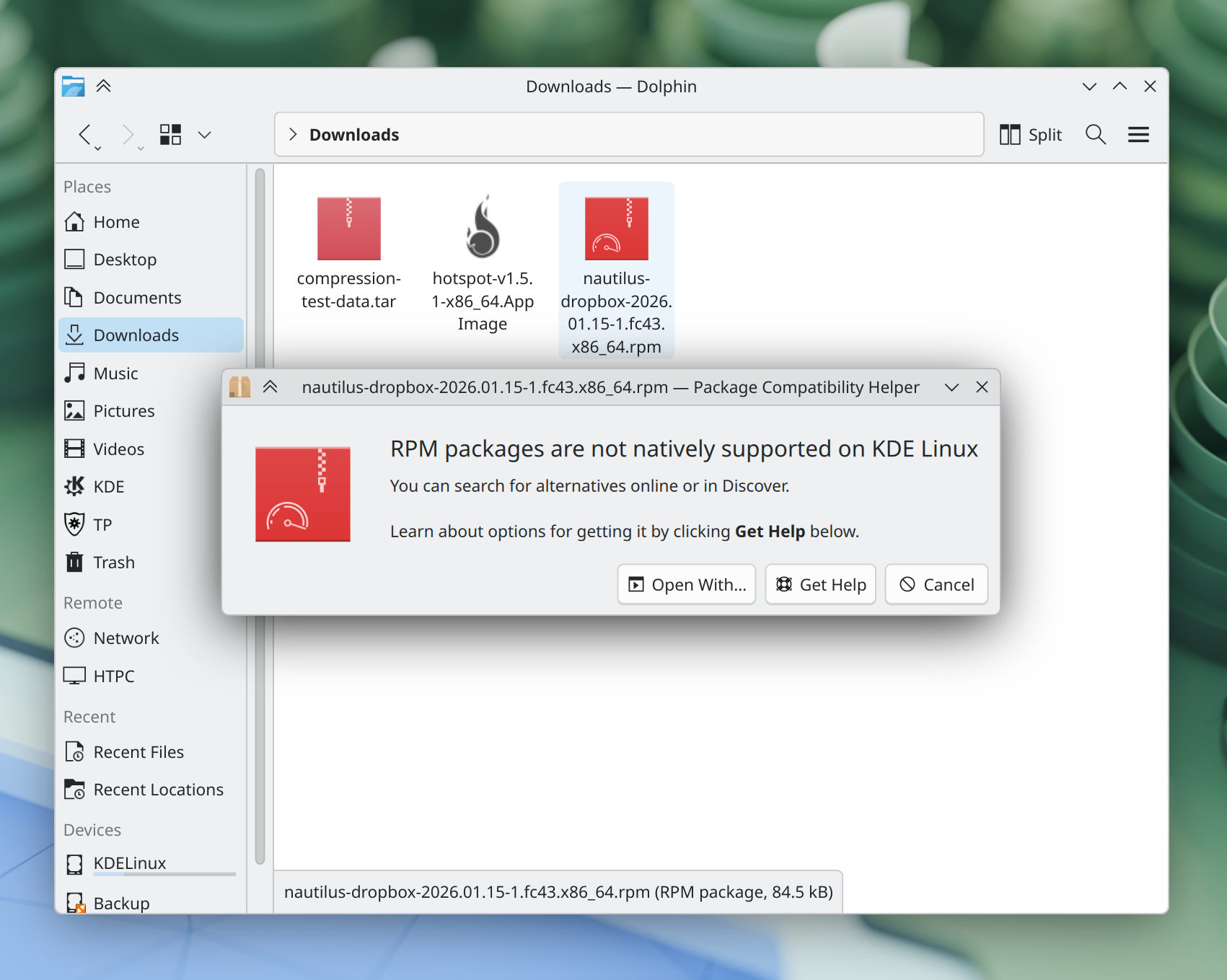
Thomas Duckworth integrated a component he’s been working on that displays sane feedback when you try to open a package or app that isn’t supported on the system, like a Windows .exe or a .rpm package.
Better out-of-the-box hardware support
John Kizer pre-installed usbmuxd, which makes plugged-in Apple iOS devices visible in Dolphin and file dialogs. So now you can, for example, plug in one such device and copy pictures off of it.
Thomas Duckworth fixed an issue that prevented non-NVIDIA systems from fully sleeping. This workaround was only needed for systems with NVIDIA GPUs, and no longer takes effect for systems with other GPUs.
Vishal Rao slightly increased the amount of time that the OS image chooser is visible on screen, making it less likely that you’ll miss it entirely when using KDE Linux with a TV or a slow monitor that takes a while to turn on.
Better out-of-the-box software support
Hadi Chokr added support for mounting optical disk images.
I added support for SSTP VPNs, and also for encoding audio on CDs using the Opus format, indexing really old Microsoft Word documents, and opening archives compressed with more types of compression algorithm.
Internationalized “command not found” handler
I made the “command not found” handler display translated text if you don’t use your KDE Linux system in English. Thanks a lot to Albert Astals Cid for helping me with the details here!
Smarter settings
Yago Raña Gayoso disabled screen locking and update checking while in the live session, as these don’t really make sense there. Yago also disabled canceling the installation in the middle, as this is not supported right now and would produce a broken system.
Thomas Duckworth configured the sudo command-line tool to display a little “*” for every character you type, instead of nothing. This matches the standard behavior in password fields that people are familiar with.
I configured the cp and rsync command-line tools to preserve metadata (such as modification times, extended attributes, and ACLs) when copying files.
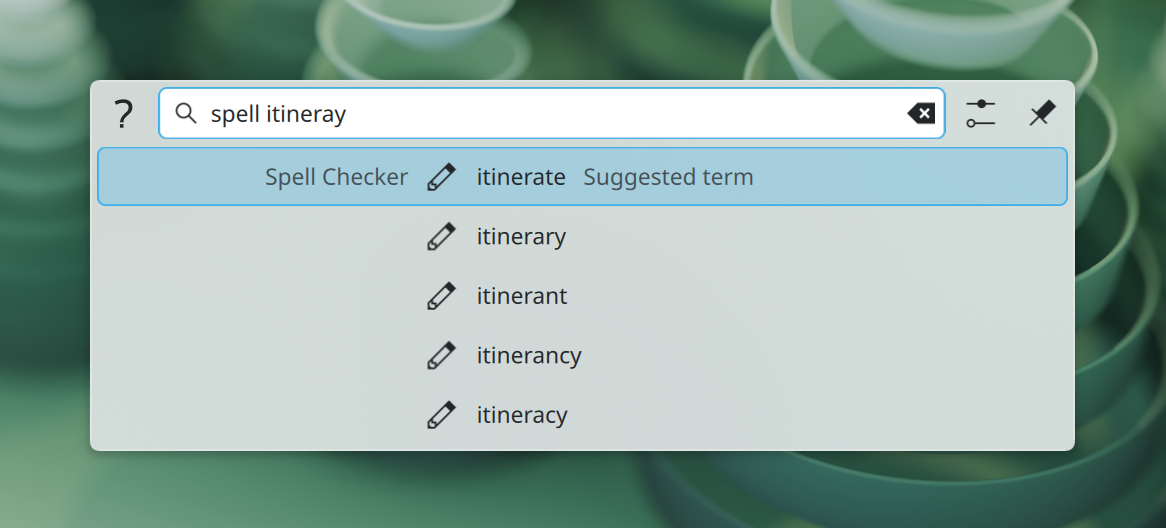
Fixed spellchecking, at least for English
I fixed our spellchecking setup by installing the English backend for hunspell, and removing the redundant aspell to save some space. These language packages can be quite large, so it’s not super feasible to ship them all in the image right now. In the future we’ll be building a system to let them download at runtime.
Technical changes
Thomas Duckworth fixed an issue that made newly-installed OS images sometimes get de-prioritized in the OS image chooser for no good reason.
Akseli Lahtinen set the $SSH_ASKPASS environment variable to to point to KSSHAskPass by default, smoothing out some SSH-based workflows.
Hadi Chokr added ~/.local/bin to every user’s default $PATH variable, allowing kde-builder and other user-installed binaries to work without an extra setup step.
How you can help
Does this project sound exciting? I hope it does! We’re building a general-purpose operating system for normal people, aiming to integrate all components out of the box in a way that rivals Windows and MacOS. If you’d like to help out with the project, there are multiple ways.
If you’re an adventurous and technical person, install KDE Linux and report issues.
If you’re good at writing, KDE Linux’s documentation can always use improvement. Submit merge requests here.
KDE Linux leans heavily on Flatpak, so fixing packaging or code issues in Flatpak-packaged apps is very helpful.
You can even help us build the OS itself! The Beta milestone is currently 71% complete, and there’s plenty to do:
- High priority tasks for technical experts
- Other tasks to make the user builds better
- Tasks for newcomers
And if you’re already using KDE Linux, let us know how your experience has been! Is it good? What can we do better?
 Adventures in Linux and KDE
Sounds like good stuff that keeps adding up!
LikeLike
Looks good, sounds good. Regarding /etc, any mitigation against broken fstab setups?
LikeLike
We actually don’t use /etc/fstab for system mounts in KDE Linux; we use systemd mount units.
People are welcome to add things to /etc/fstab themselves if they want. But these would be user-level mounts that at least couldn’t break the system by being broken.
And if /etc/fstab gets messed up somehow, rolling back to an older snapshot of /etc (or pulling the fstab file out of it) would work. We’ll need a decent GUI around this, of course. That’s planned.
LikeLike