
Another month has gone by since the last time I wrote about KDE Linux, KDE’s upcoming new operating system. The project hasn’t stood still! Here’s an assortment of what’s gone on recently:
Real sizes for system updates
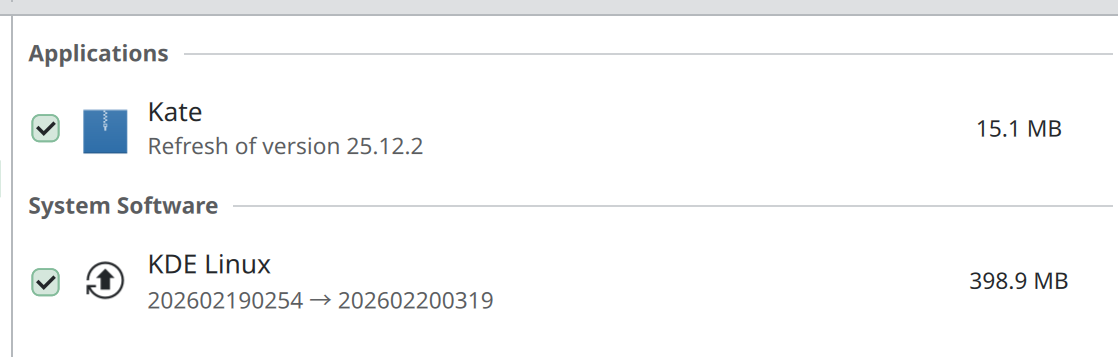
Aleix Pol Gonzalez and Harald Sitter built the machinery to allow update sizes to be calculated for delta updates. This means the sizes listed in Discover are no longer “Unknown”. Instead, you’ll see a real number:
Better tools for extending the OS
Lasath Fernando started building out the new Kapsule system, which is a tool for installing software in long-lived containers with great integration with Konsole and the rest of the OS. Before this, we experimented multiple options for experts to extend the system — including Homebrew, Distrobox, and Nix — but none really hit the sweet spot. They were too limited, too dangerous, too complex, too ephemeral, or too something else.
Kapsule deeply integrates with Konsole, which makes sense because a terminal window is a major interface for touching or extending the system in this way. Integrations with Kate and Discover are planned, too. In other words, we want to go all in on this promising new technology for the “extending the system” story for experts and software developers.
You can read more about Kapsule in these blog posts.
Moving to better infrastructure
Harald did a lot of work to upload KDE Linux images to a better location, in preparation for far higher server loads in the future as the OS gains users and rolls out a user-focused edition.
Pre-installed backup system
I pre-installed KDE’s Kup backup system, which is really quite nice! Basic documentation can be found here.
APFS filesystem support
Hadi Chokr turned on support for reading from and writing to disks formatted with Apple’s APFS filesystem.
Safer Homebrew, ydotool, and AMD GPUs
renner03 put in place a safety mechanism that prevents Homebrew packages from breaking the system in case you install Homeberew and any of its packages would otherwise conflict with system files. Now, the Homebrew packages break instead.
Note that we still don’t recommend Homebrew. But now you can use it without endangering the rest of the system.
I made the ydotool automation tool safer; now it’s an off-by-by-default system service you need to authenticate to turn on.
I also put in place a workaround for total system freezes affecting AMD GPU users. This stubborn AMD driver issue has been unfixed for months, so a workaround here is appropriate.
More languages in pre-installed Flatpak apps
Guilherme Marçal Silva fixed an issue that made the pre-installed Flatpak apps only usable in English.
Longer time for installation
Jonar Harer bumped the installation timeout from 30 minutes to 1 hour to account for slower devices.
Outstanding issues
KDE Linux is still an alpha product with lots of bugs and rough edges. We had our second dev call yesterday and discussed the road to a beta release, which will include user builds. We’re going to be focusing on a number of high priority issues and will consider the other beta-milestoned issues to be done on an “if we can” basis.
Get Involved!
Progress on KDE Linux is steady but nonetheless rather slow. Help is greatly appreciated. In addition to installing it and reporting issues, there are lots of development task that need doing:
 Adventures in Linux and KDE
Your summary of Harald’s work alone says so much!!
Moving to better infrastructure
Harald did a lot of work to upload KDE Linux images to a better location, in preparation for far higher server loads in the future as the OS gains users and rolls out a user-focused edition.
LikeLike
Nice! Looking forward to trying it out when it gets in better shape! \m/
LikeLike
I’m missing the local language issue in the open issues. Unless this issue is resolved, Swiss users won’t be able to use the system
LikeLike
If you’re referring to https://bugs.kde.org/show_bug.cgi?id=516550, it’s not an issue specific to KDE Linux, right? My understanding of this issue is that it’s a problem in System Settings itself, so it’ll manifest everywhere.
LikeLike
Locale: All the other KDE distros I’ve tested work fine. Could it be a problem with the new installer, then?
LikeLike
I’m not sure how it could work fine in other distros since the problem is a design issue in the System Settings page.
Can you describe how specifically it works fine elsewhere? What specifically behaves better in other distros compared to in KDE Linux?
LikeLike
Answer to your question regarding the process of installing and setting the region/language:
I took a closer look at the procedure in Kubuntu. Here’s how it works:
1. When the installer launches, it first asks for the user language; in my example, DE – German.
2. Next, the keyboard layout is requested; here, DE-CH – Swiss German (I suspect this is even suggested automatically based on network settings).
3. Finally, the time zone is required; in my case, Europe – Zurich.
With this information, the installer has everything it needs to correctly set the parameters in System Settings – Region/Language. The corresponding values for language, number format, time, currency, etc., are now already set correctly.
I don’t need to change anything else in the settings.
Note: However, the list of languages stored in the settings does not appear to be complete (Swiss German or Swiss French) are missing from the list. The correct settings for these languages can therefore only be set correctly during installation.
I would therefore not be able to switch to Swiss French later on.
LikeLike
Hi Nate,
Roke Julian Lockhart displayed exactly the behavior of sealioning in order to provoke me into being kicked out. At the time, I did not realize this, and I still did not attack anyone. The kick was completely inappropriate. When one does this with other old-schoolers who could bring their experience into the discussion, but they are deliberately attacked to be kicked out, it really thins out the experienced community and undermines it from within. I also do not approve of this. Having been on the internet for more than 25 years, previously bringing software to Germany, exchanging with people, being involved with Mandrake, and witnessing all the fuss, I find that a bloody outrage that Roke Julian Lockhart applied sealioning to me in order to provoke me long enough to have me removed from the discussion forum.
Sealioning (seal tactic): Definition: A form of online stalking in which the attacker (here Lockhart), under the guise of extreme politeness, constantly asks probing questions or “corrects” technical details. Goal: To provoke the other user for so long until they lose their composure, in order to then report them to moderation as “aggressive”.
and you be one of the admins : https://discuss.kde.org/about
best regards
Blacky
Blackcrack
Blackysgate.de
LikeLike
This isn’t related to the blog post; let’s try to stay on topic.
LikeLike
Hi Nate ,
It is related to a wrong forum ban where a developer abused his power and was Sealioning me.
best regards to you Nate
Blacky
LikeLike
Sure, but it’s not related to the blog post where you posted it as a comment. In general, comments should be related to the topic of the thing they’re posted to.
There are different, more appropriate locations to discuss what you’re talking about with respect to KDE’s forum.
LikeLike
Hi Nate,
Nate, thanks for the heads-up. I’m aware that blog comments aren’t the place for meta-discussions. The reason I’m writing here is that I was blocked on the KDE forum after being the victim of massive Sealioning by rokejulianlockhart, as you yourself witnessed, something I wasn’t aware of until now. He sabotaged the discussions there with feigned politeness and detailed questions until the situation escalated, and I tried to confront him politely, telling him that others would also notice, at which point both his and my posts were deleted. Since I’ve been involved in the Linux world for over 25 years, KDE and the forum are important to me. I just wanted to let you know that an active community member and developer (Roke) is using his position to deliberately push others out of the official channels. I respect your house rules and will let the matter rest here. You already knew, and I hope others are now aware through this feedback. The only option would be for you to insist on having the forum post reinstated within a year to reveal the truth.
For reopen my account again on discuss .. Thank you Nate
best regards
Blacky
LikeLike
Yeah, but none of that is related to this post. I get that it’s a frustrating situation, but this still isn’t the place to bring it up. Private messages or emails to discuss.kde.org moderators or admins would be more appropriate and effective.
BTW Roke is not a developer, he’s a user. He has no elevated privileges on discuss.kde.org as far as I can tell.
LikeLike
Regarding polishing Kup, I recently filled a bug about its usability, which would be easy to fix, but it was closed as wontfix. I still think the current state of affairs is suboptimal. The bug is here: https://bugs.kde.org/show_bug.cgi?id=515720
I know you care about usability and details, so maybe you can have another look :-).
LikeLike
Despite all my criticism, you’re doing a brilliant job. I’m already looking forward to it and can’t wait to see it reach the beta stage. Many thanks to everyone involved
LikeLiked by 1 person
Thank you for the great work you’re doing with KDE. I’m really excited to try this once it goes stable, though there’s one thing I’m curious about. Is it possible to install something like Mullvad VPN on KDE Linux? A flatpak isn’t available and they only publish packages for Debian/Ubuntu and Fedora.
LikeLike
This is a known issue at the moment. You may be able to install the Mullvad app and daemon in a Kapsule container once that system is built out a bit more.
It would be nice if they distributed it on Flathub.
LikeLike
Here’s a suggestion in the meantime, you can just add Mullvad’s Wireguard connections directly into System Settings -> Wi-Fi & Networking. It makes switching super convenient and fast too.
https://mullvad.net/en/help/search?q=wireguard
LikeLike
Oh, that looks interesting. Is there a clear set of instructions for how to do this?
LikeLike
A clear set of instructions for Plasma’s Networking widget? I didn’t see it in their FAQ, but I’m not a customer of Mullvad. I’ve had to do it with a different provider. It requires downloading Wireguard configuration files from their logged-in dashboard. In Mullvad’s case, you click on this link. These are just very simple text files with some key information in them.
Because the WiFi & Networking page in System Settings doesn’t support importing Wireguard .conf files, you have to open up the file and copy & paste the values into the fields when you add a new Wireguard connection. And then once they’re in there, the new Wireguard connection will show up in the system tray’s networking widget. You just click on it, and boom, you are routing through that Wireguard tunnel.
I just tried to import a Wireguard .conf file via the “Import VPN connection…” and it at least gave a descriptive error message saying, “Failed to import VPN connection: The file to import wasn’t a valid OpenVPN client configuration”. So it is looking only for OpenVPN.
LikeLiked by 1 person
I’ve been daily driving KDE Linux for about a month now and honestly, it’s been brilliant. Much more stable than I was expecting. I’m writing this from it on my laptop right now, actually. Getting delta updates has been a gamechanger! The only real issue I’ve run into is having apps not be able to access my webcam. Other than that, it’s been fast, stable and reliable – despite warnings otherwise! 😛
Thanks for all the hard work on it. Already loving it!
LikeLiked by 1 person