
We’re in the home stretch now!
Plasma and Gear apps have branched, which means anything committed to master and not backported is going into the next release after the mega-release next month. For Plasma, the next one is 6.1, and for Gear apps, it’s 24.05. Quite a few new features and UI improvements are starting to accumulate there! Here are a few:
Dolphin now periodically auto-saves its open windows and tabs, so you don’t lose state if the app crashes or the system is restarted unexpectedly (Amol Godbole, Dolphin 24.05. Link)
In Dolphin, you can now configure whether backup and trash files are shown when hidden files are made visible (Méven Car, Dolphin 24.05. Link)
In Dolphin, you can now pop out a split view pane into its own new window (Loren Burkholder, Dolphin 24.05. Link)
Fixed an issue in Dolphin that could cause it to freeze when you use it to duplicate the same file multiple times (Eugene Popov, Dolphin 24.05. Link)
Okular now supports displaying popup menus in certain kinds of PDF documents that include them (Alexis Murzeau, Okular 24.05. Link)
Spectacle now lets you use more placeholders for screenshot and screen recording filenames (Noah Davis, Spectacle 24.05. Link 1 and link 2)
The Networks system tray popup can now tell you a network’s channel in addition to its frequency (Kai Uwe Broulik, link)
KDE 6 Mega-Release
(Includes all software to be released on the February 28th mega-release: Plasma 6, Frameworks 6, and apps from Gear 24.02)
General info – Open issues: 237
UI improvements
Plasma’s global Edit Mode toolbar now has an “Add Panel” button that lets you add panels. With this located there, the desktop context menu has now lost its “Add Widgets” and “Add Panels” menu items since the functionality is fully available in the global Edit Mode. This makes the menu smaller and less overwhelming by default. Of course, if you want those menu items back, you can just re-add them. 🙂 (Akseli Lahtinen and me: Nate Graham, link 1, link 2, and link 3):

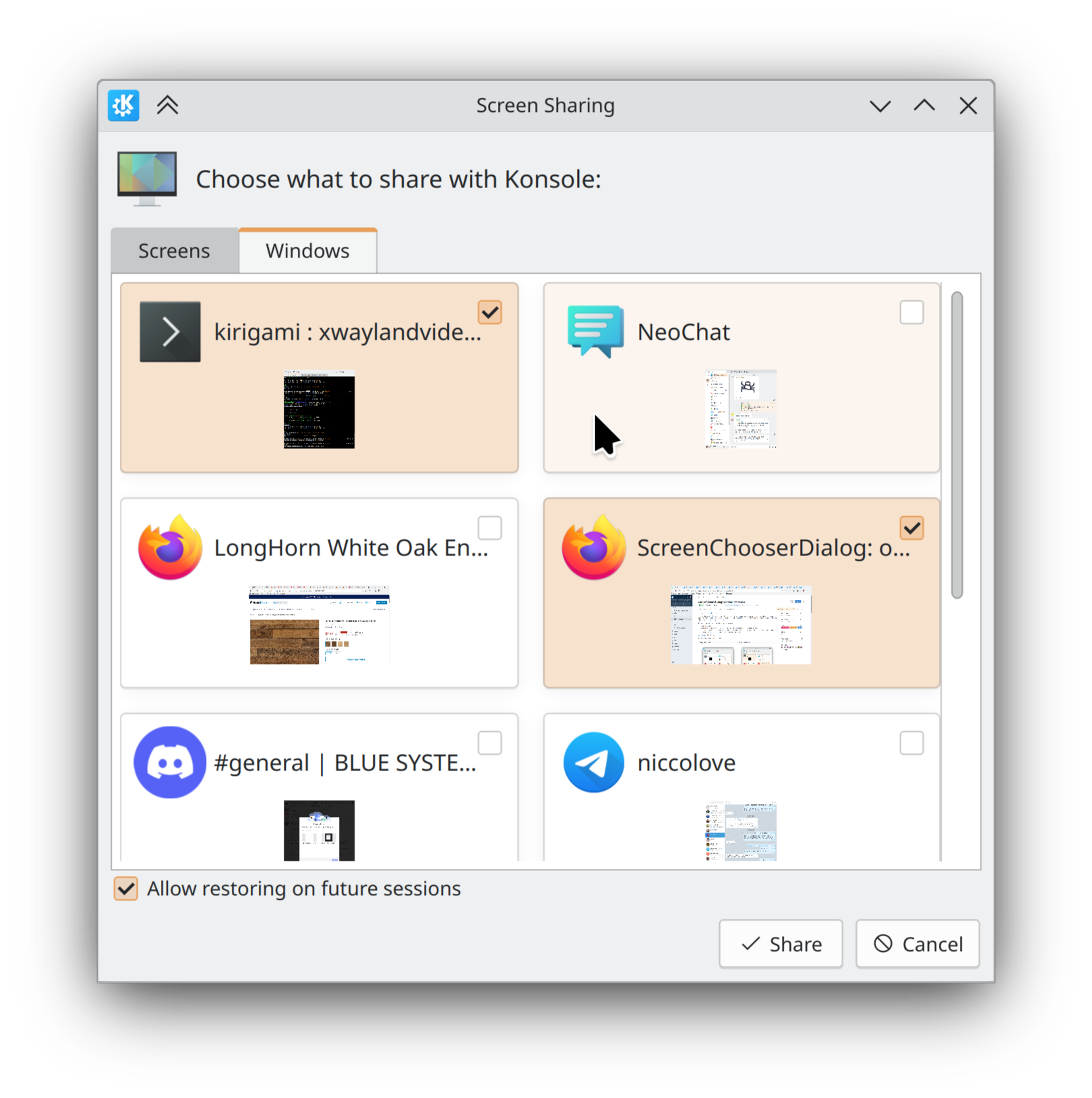
In the portal-based “Choose a screen/window to record” dialog, items are now chosen with a single-click, unless the dialog is in multi-select mode, in which case a double-click will choose one (because a single-click only selects it). Also, in multi-select mode, the items have little checkboxes in the corner so you know that you can select more than one (Yifan Zhu and me: Nate Graham, link 1, and link 2):
Bug fixes
Important note: I don’t mention fixes for bugs that were never released to users; it’s just too much for me (it would probably be too much for you to read as well), and most people never encountered them in the first place. Because we’re in the middle of a big Plasma dev cycle, there are a lot of these bugs! So big thanks to everyone who’s made it a priority to fix them!
Powerdevil no longer fails to start at login when using the ddcutil-2.0.0 library and certain DDC-compatible monitors (David Edmundson, link). Note that we also have reports of new issues for people using ddcutil-2.1.0, but those are different and need separate investigation, which is ongoing.
Did some more work to ensure that visual glitches in QtQuick apps are minimized when using a fractional scale factor. There’s still more work to do for text and window outlines/shadows, but you should no longer see weird tearing-related glitches in buttons and icons (Arjen Hiemstra and Marco Martin, link)
Made KWin more robust when restoring settings for multi-screen arrangements when any of the screens are missing their EDIDs (Stefan Hoffmeister, link)
When using a weather provider that gives forecasts longer than 7 days (like EnvCan), the right edge of the Weather widget’s forecast never gets cut off when viewed in the System Tray (Ismael Asensio, link)
Your Plasma panels will no longer flicker oddly when certain full-screen games do something rather odd by repeatedly switching their windows between full-screen and maximized states (Xaver Hugl, link)
The “Window Type” window rule–which did not work on Wayland–has been replaced with a new “Window Layer” rule which works better for the purposes people typically use it for (Vlad Zahorodnii, link)
Other bug information of note:
- 3 Very high priority Plasma bugs (down from 4 last week). Current list of bugs
- 35 15-minute Plasma bugs (down from 37 last week). Current list of bugs
- 127 KDE bugs of all kinds fixed over last week. Full list of bugs
Performance & Technical
Improved the speed of various config file lookups used very commonly throughout KDE software by 13-16% (Friedrich Kossebau, link)
Fixes for KF5
We’ve also got a few nice fixes for KF5 software this week!
Fixed an issue when moving or copying large number of files that could cause some of them to get skipped (and potentially lost) after skipping duplicated folders (Eugene Popov, Frameworks 5.115. Link)
Fixed an issue that caused folders inside network shares/mounts to be non-expandable in Details view (Alessandro Astone, Frameworks 5.115. Link)
…And Everything Else
This blog only covers the tip of the iceberg! If you’re hungry for more, check out https://planet.kde.org, where you can find more news from other KDE contributors.
How You Can Help
Thanks to you, our Plasma 6 fundraiser has been a crazy success! I originally thought the goal of 500 new KDE e.V. supporting members was over-optimistic, but you’ve all proven me happily wrong. We’re now up to an incredible 665 members and unlocked both stretch goals! It’s pretty humbling. Thank you everyone for the confidence you’ve shown in us; we’ll try not to screw it up! 🙂 For those who haven’t donated to become members yet, spreading the wealth via this fundraiser is a great way to share the love. 🙂
If you’re a developer, work on Qt6/KF6/Plasma 6 issues! Which issues? These issues. Plasma 6 is very usable for daily driving now, but still in need of some final bug-fixing and polishing to get it into a solid state by February.
Otherwise, visit https://community.kde.org/Get_Involved to discover other ways to be part of a project that really matters. Each contributor makes a huge difference in KDE; you are not a number or a cog in a machine! You don’t have to already be a programmer, either. I wasn’t when I got started. Try it, you’ll like it! We don’t bite!
 Adventures in Linux and KDE
I know it’s not a proper place to mention it, but I have a loose thought, that since Firefox became Wayland native and I could make the same for other browsers, I miss in Okular pinch gestures to zoom in/out. It just feels unnatural that I can’t do that in any app…
LikeLike
Congratulations for the improvements. Is it possible to integrate the “add note” function in the context menu in order to add a note on the desktop?
LikeLike
Sure, if someone implements it. It’s not a terrible idea IMO.
LikeLike
Just tested Plasma 6 and noticed that changing the font DPI on the fonts KCM has the same effect as changing the global DPI on the display configuration KCM. If this is intentional, then what is the point?
LikeLike
You’ve just found one of the reasons we got rid of the DPI spinbox. 🙂 Having multiple ways to do the same thing is weird and confusing.
However it’s not *exactly* the same thing. It’s more correct to say that changing the global scale does a superset of what changing the DPI does. So it changes the DPI, and then also does some other things as well.
LikeLike
Any news about KDE Plasma settings sync?
If I’m not mistaken, I remember way back you posted that the “highlighted changes” in settings are a step towards that.
Is that going to be in Plasma 6 perhaps?
LikeLike
While we are on the desktop context menu, I was wondering if Refresh Desktop could also be removed. The only times I have used it is as a workaround when new files I moved to the desktop are not showing. I use my desktop and sometimes folder views on top of it for tasks I have to do and then delete the files/links when done.
The button seems to only be a workaround unless I am missing something. Which means that the button can be removed if an auto-update is implemented to read from the Desktop folder, or alternatively in fixing bugs related to items appearing on the desktop.
Interested in your thoughts in return
LikeLike
Indeed, it’s currently under discussion. Not even Dolphin has this in it by default.
LikeLike
Thanks for Dolphin autosave feature!
I really would like that all session state would be saved periodically, though 🙂
I mostly care about konsole and dolphin to save the tabs which I need to be restored in multiple activities.
So, I’m trying to evaluate whether I will be able to use Plasma 6 wayland for my daily workflow. I heavily rely on plasma-hud and rofi to navigate menus, using this I don’t have to remember where some obscure menu is, I just search for it and I’m good. That does not work on wayland.
Default global menu does not even work on multiple monitors, which is sad. On X I used window appmenu applet, which works for multiple monitors. Is default global menu is going to be changed to support multiple monitors?
Anyhow, one of the things I can’t figure out yet how to trigger a global menu search using a shortcut. Is there such a thing at all?
LikeLike
Fantastic job, as always! Just an idea: would be great if the “Edit Mode toolbar” was on floating mode, like the panels by default in P6. The way this element are presented right now, pinned at the top, shows it as “cropped” and the vertical alignment of the elements does not look centered properly. With a small margin from the top of the screen, or from a hypothetical top panel (if there was one), it would look really cool.
LikeLike
It actually does float now, but only when you enter Edit Mode using a touch. The reason for this is then when you enter Edit Mode using a pointing device, Fitts’ Law dictates that UI elements touching the screen edge have infinite depth and are therefor easier to hit. So it makes sense to have the toolbar touching the screen edge.
We could implement the kind of pointer redirection that the Panel uses to make the buttons get hit even though they’re not visually touching the screen edge, but it’s a lot of work and introduces bugs, so I don’t think it’s worth it here.
LikeLiked by 1 person