This week in KDE: Porting everything to QtQuick

Well OK not literally everything. But… a lot of things! The KWin scripts KCM, Filelight, and DrKonqi. What does this mean? From a user perspective, mostly not much except for better visuals that align them better with modern KDE UI design. But it also means better-separated internals, more modern code, and easier hackability for the UI. The software’s lifespan increases and we get closer to everything using the same tech stack. It’s important stuff.

In addition, you should find lots of nice bugfixes and even a few new features!

15-Minute Bugs Resolved

Current number of bugs: 70, down from 73. 2 added, 2 found to be duplicates of other 15-minute bugs, and 3 resolved:

Certain monitors no longer constantly power-cycle in a loop when connected (Xaver Hugl, Plasma 5.24.5)

Everyone can once again change their Favorites in Kickoff and Kicker and have those changes persist after restarting Plasma or the computer (Méven Car, Plasma 5.24.5)

After installing a Flatpak app using Discover, there’s no longer still a misleading “Install” button there anyway (Aleix Pol Gonzalez, Plasma 5.24.5)

Current list of bugs

New Features

Skanpage now supports exporting searchable PDFs using optical character recognition! (Alexander Stippich, Skanpage 22.08):

Dolphin now lets you sort by file extension if you prefer that (Eugene Popov, Dolphin 22.08)

In the Plasma Wayland session, you can now change the resolution of your screen to resolutions beyond the officially supported ones, just like you can in the X11 session (Xaver Hugl, Plasma 5.25)

Bugfixes & Performance Improvements

Dolphin’s Terminal Panel no longer gets de-synced from the view itself (Felix Ernst, Dolphin 22.04.1)

Elisa’s “Load Playlist…” and “Save Playlist…” actions now work from the global menu (Firlaev-Hans Fiete, Elisa 22.04.1)

Text in Filelight’s tooltips is no longer clipped away at the ends (Harald Sitter, Filelight 22.08)

Plasma no longer sometimes randomly crashes when you have more than one app with multiple windows open and you interact with one of their Task Manager tooltips (Fushan Wen, Plasma 5.24.5)

In the Plasma Wayland session, KWin no longer crashes when connected USB-C monitors wake up from their power-save states (Xaver Hugl, Plasma 5.24.5)

The Global Menu widget no longer shows menus that the app has marked as hidden, such as the “Tools” Menu in Kolourpaint (Kai Uwe Broulik, Plasma 5.24.5)

In the Plasma Wayland session, KWin no longer crashes when you close a laptop and re-open it when its internal screen is set to turn off when closed (Xaver Hugl, Plasma 5.25)

In the Plasma Wayland session, fixed another way that KWin could crash when you disconnect an external screen (Xaver Hugl, Plasma 5.25)

In an app using xdg-desktop-portals (e.g. sandboxed Flatpak and Snap apps), when you use a file dialog to access a file in a remote location that automatically gets mounted using kio-fuse under the hood, the next time you open the file dialog again, it will open showing the original location, not its weird-looking kio-fuse mountpoint (Harald Sitter, Plasma 5.25)

Closing a window that spawned a child “Get New [thing]” window now closes the child window too, rather than letting it keep living, and then the parent app either crashes or has an invisible window that can’t be shown again until you kill the app using System Monitor or a terminal window (Alexander Lohnau, Frameworks 5.94)

Apps like Konsole that allow you to set a custom color scheme for the whole window that overrides the system’s default color scheme are now substantially faster to launch (Nicolas Fella, Frameworks 5.94)

User Interface Improvements

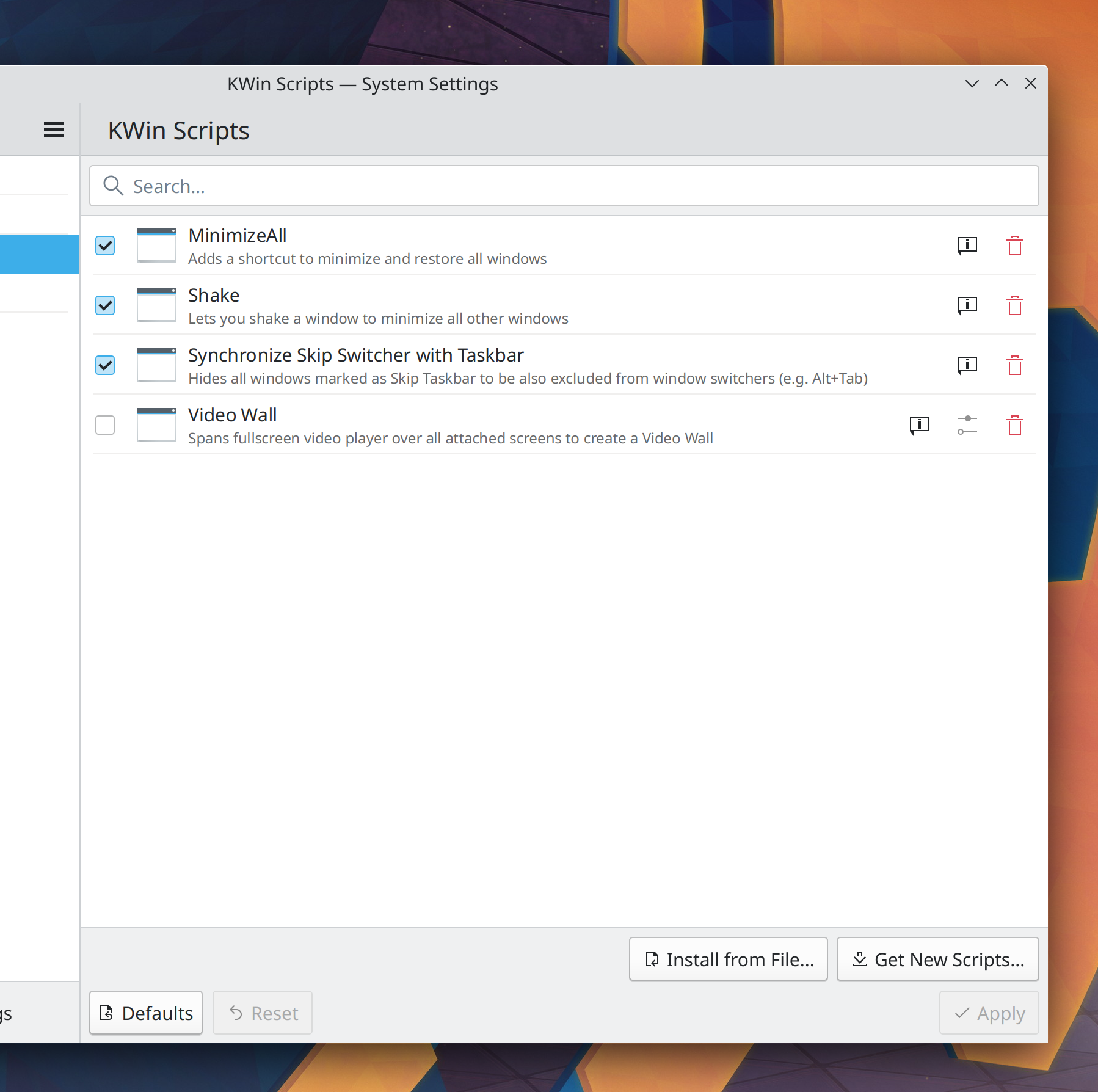
The KWin Scripts KCM has been ported to QtQuick, modernizing its appearance and making future maintenance simpler (Alexander Lohnau, Plasma 5.25):
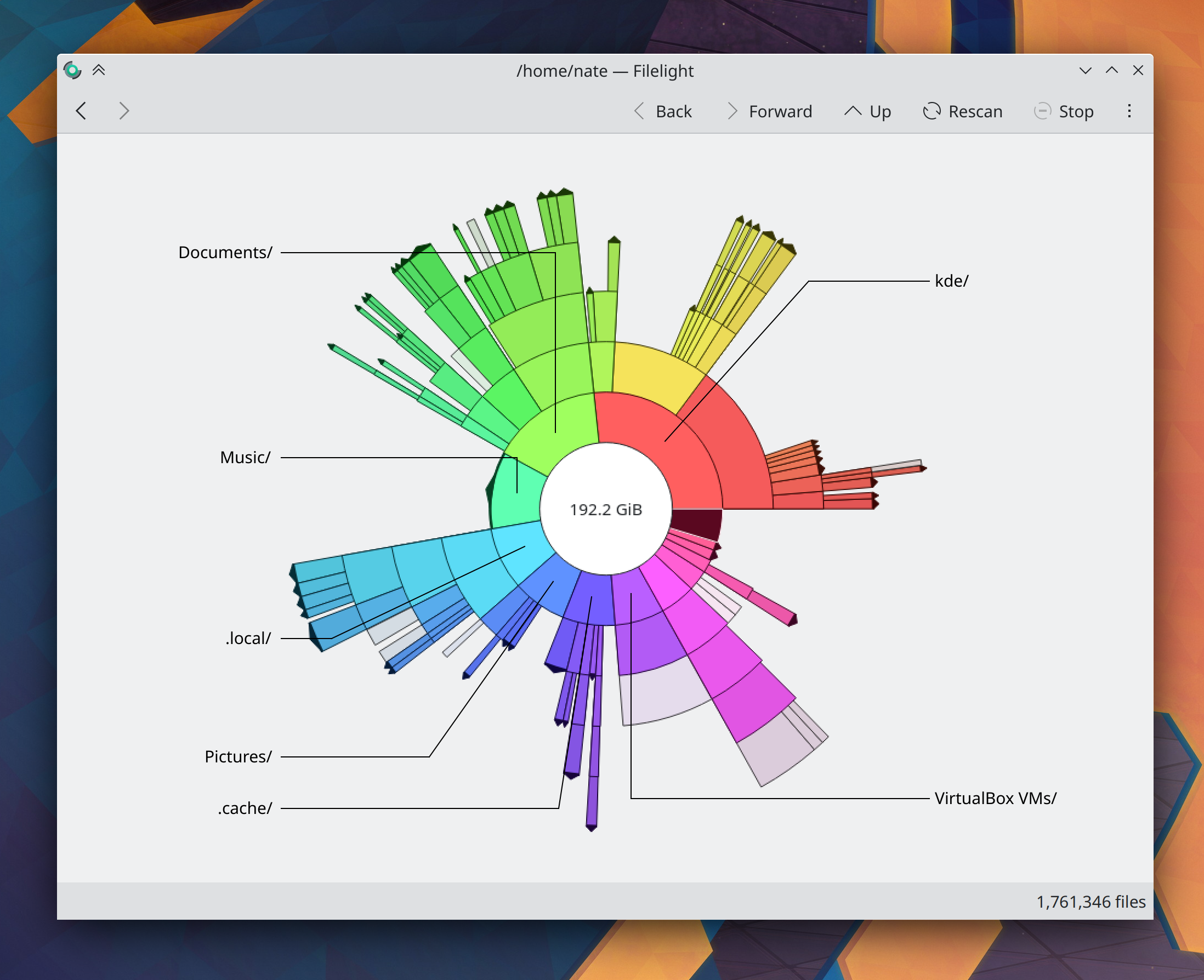
Filelight has been ported to QtQuick, modernizing its appearance and making future maintenance simpler (Harald Sitter, Filelight 22.08):
DrKonqi’s crash reporting wizard has been ported to QtQuick too! But honestly you should barely notice the difference (Harald Sitter, Plasma 5.25)

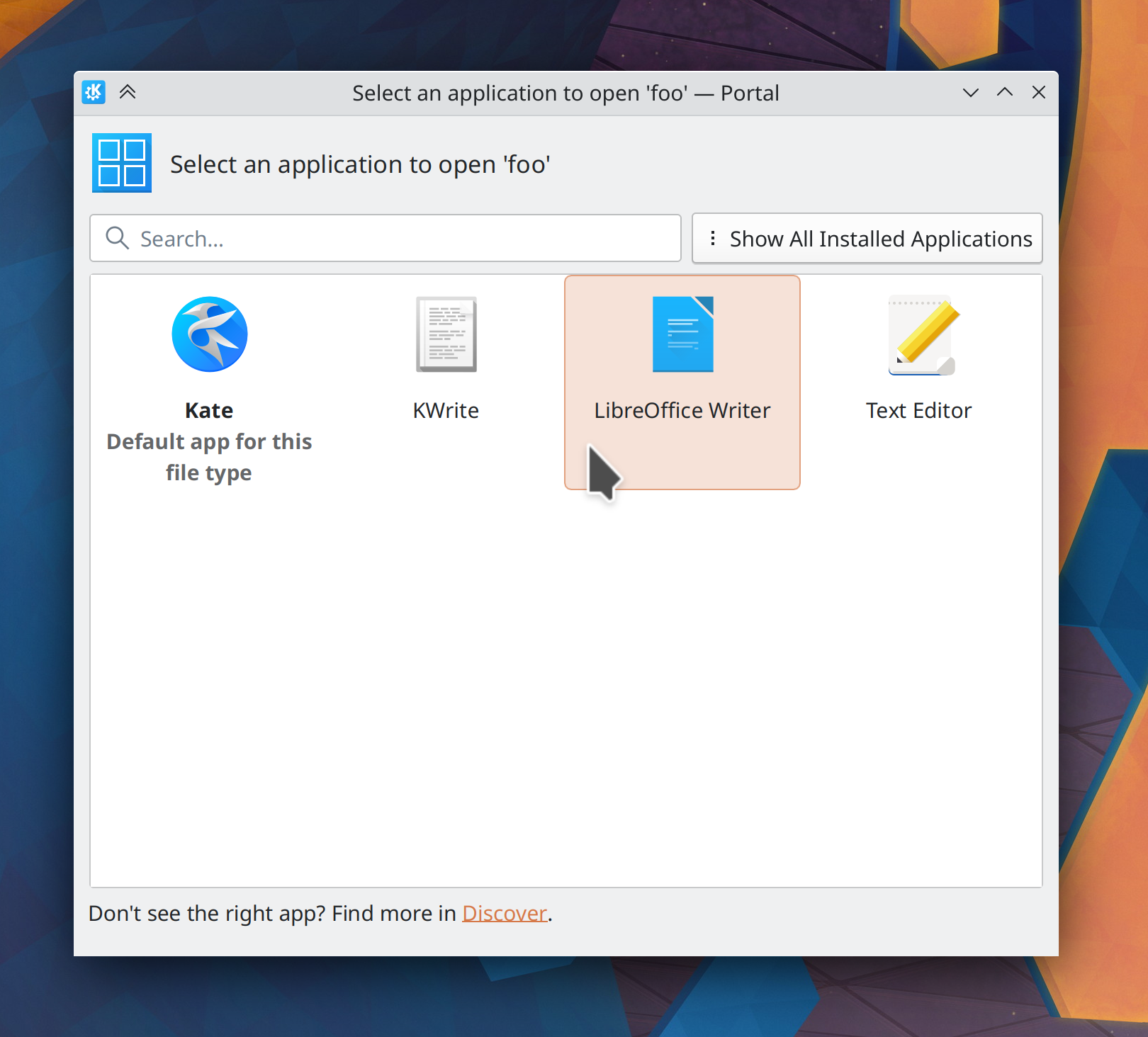
For apps using xdg-desktop-portals, the app chooser dialog now looks and behaves better (me: Nate Graham, Plasma 5.25):
For those of you who disliked the change to always skip minimized tasks when scrolling over the Task Manager to switch tasks, it’s now configurable (Abhijeet Viswa, Plasma 5.25)

…And everything else

This blog only covers the tip of the iceberg! Tons of KDE apps whose development I don’t have time to follow aren’t represented here, and I also don’t mention backend refactoring, improved test coverage, and other changes that are generally not user-facing. If you’re hungry for more, check out https://planet.kde.org, where you can find more news from other KDE contributors.

How You Can Help

If you’re a developer, check out our 15-Minute Bug Initiative. Working on these issues makes a big difference quickly!

Otherwise, have a look at https://community.kde.org/Get_Involved to discover ways to be part of a project that really matters. Each contributor makes a huge difference in KDE; you are not a number or a cog in a machine! You don’t have to already be a programmer, either. I wasn’t when I got started. Try it, you’ll like it! We don’t bite!

Finally, consider making a tax-deductible donation to the KDE e.V. foundation.
This week in KDE: Major accent color and Global Theme improvements

If last week’s post was heavy on the bugfixes, this week we’re overflowing with juicy features! But don’t worry, we didn’t forget about the 5-minute bugs and managed to squash three. Feast your eyes:

15-Minute Bugs Resolved

Current number of bugs: 72, down from 73. 2 added and 3 resolved:

The Battery widget now always appears in the System Tray on login, instead of sometimes being missing until you manually restart Plasma (Jolene K, Plasma 5.24.5)

The date displayed in the Digital Clock widget now always matches the real date (David Edmundson, Plasma 5.24)

In the Plasma X11 session, volume OSDs no longer sometimes appear in the top-left corner of the screen (Jim Jones, Frameworks 5.94)

Current list of bugs

New Features

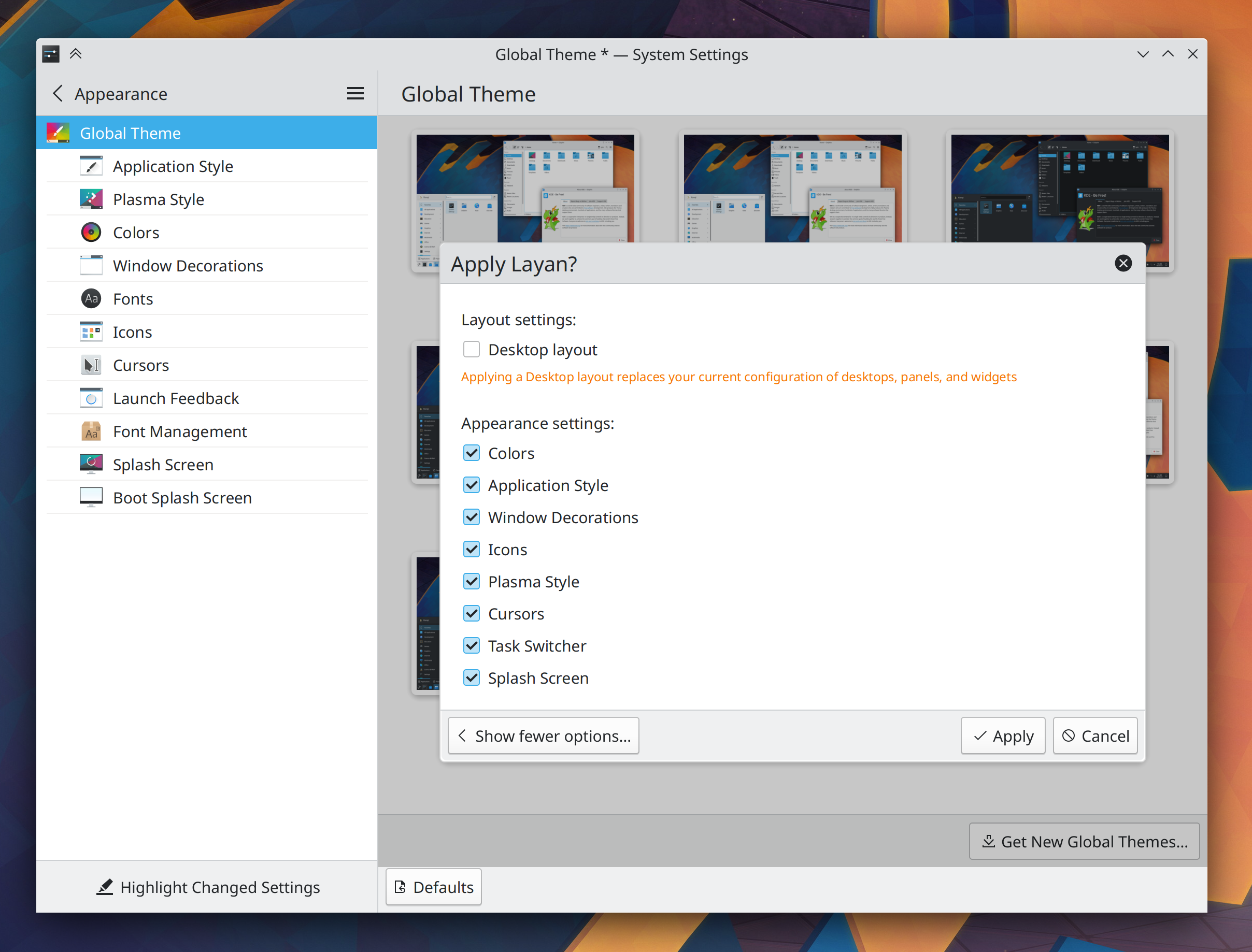
When you click on a Global Theme in System Settings, it will now tell you what changes it’s going to make, and it gives you the opportunity to only apply certain parts of it! (Dominic Hayes, Plasma 5.25):

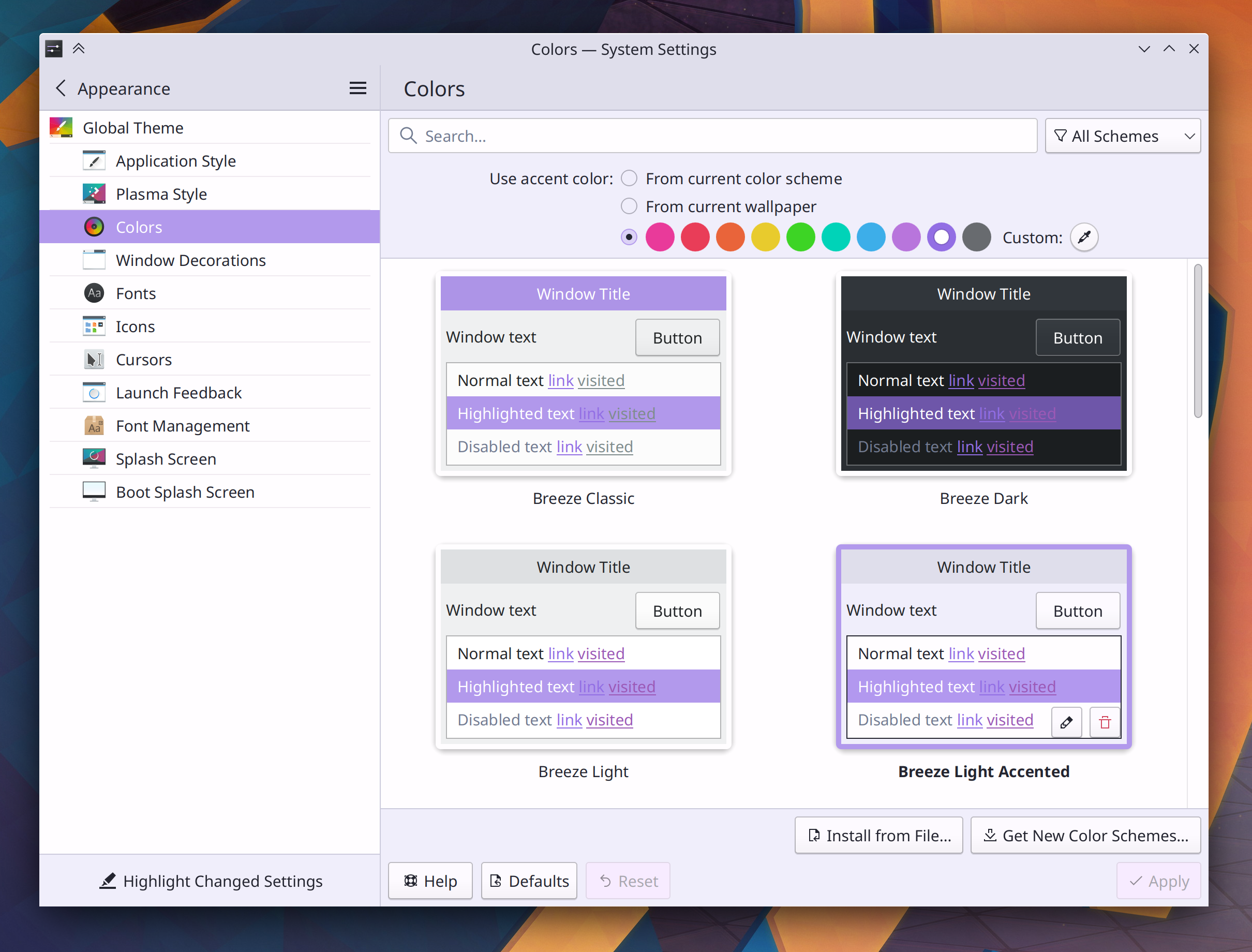
You can now set your accent color to be automatically generated based on the colors in the current wallpaper! It even changes the accent color automatically when the wallpaper changes! (Tanbir Jishan, Plasma 5.25):

You can now edit your color scheme to make the accent color subtly tint all of its colors! And color schemes can now be configured this way by default, so folks uploading color schemes to store.kde.org can also set a tint for them out-of-the-box (Jan Blackquill, Plasma 5.25):

The amount of tint is configurable too, you you can make the tint subtle or ridiculously garish, according to your aesthetic preferences. And yes, this works with wallpaper-aware accent colors too!

For apps using xdg-desktop-portals (e.g. Flatpak and Snap apps), Plasma now supports the new “Dynamic launcher” portal that allows apps to create and edit .desktop files for better system integration (Harald Sitter, Plasma 5.25)

Bugfixes & Performance Improvements

Spectacle no longer disables all the buttons when you cancel taking a screenshot if there was already one in the main window at the time (Antonio Prcela, Spectacle 22.04.1)

Elisa no longer needs to be restarted after you embed a category in the sidebar, or change the thing that’s embedded in the sidebar (me: Nate Graham, Elisa 22.04.1)

In the Plasma Wayland session, SDL apps no longer crash when an external screen is unplugged (Weng Xuetian, Plasma 5.24.5)

The Comics widget once again works (Alexander Lohnau, Plasma 5.24.5)

On System Settings’ Quick Settings page, the “Change Wallpaper…” button now works when you have more than one Activity (Fushan Wen, Plasma 5.24.5)

Searching in KRunner, Application Launcher, Overview (or any other KRunner-powered search) now returns matches that are text files, or use a file format that inherits from the plaintext format (Julian Rolfes and Natalie Clarius, Plasma 5.24.5)

Closing the Widget Explorer sidebar now deletes it, saving some memory and fixing a bug whereby the previous search query would be inappropriately remembered the next time you open it (Fushan Wen, Plasma 5.24.5)

KRunner no longer hangs forever when you ask it to define a “word” with spaces in it (Alexander Lohnau, Plasma 5.25)

For apps using xdg-desktop-portals (e.g. Flatpak and Snap apps), quitting or killing the app while one such portal dialog is open now closes the dialog too (Harald Sitter, Plasma 5.25)

KWin rules are now re-evaluated when the set of active screens changes, so they will be correctly applied at more times (Ismael Asensio, Plasma 5.25)

Plasma no longer sometimes crashes when you change the wallpaper from the context menu item for image files in Dolphin or on the desktop (Jakub Nowak, Frameworks 5.94)

User Interface Improvements

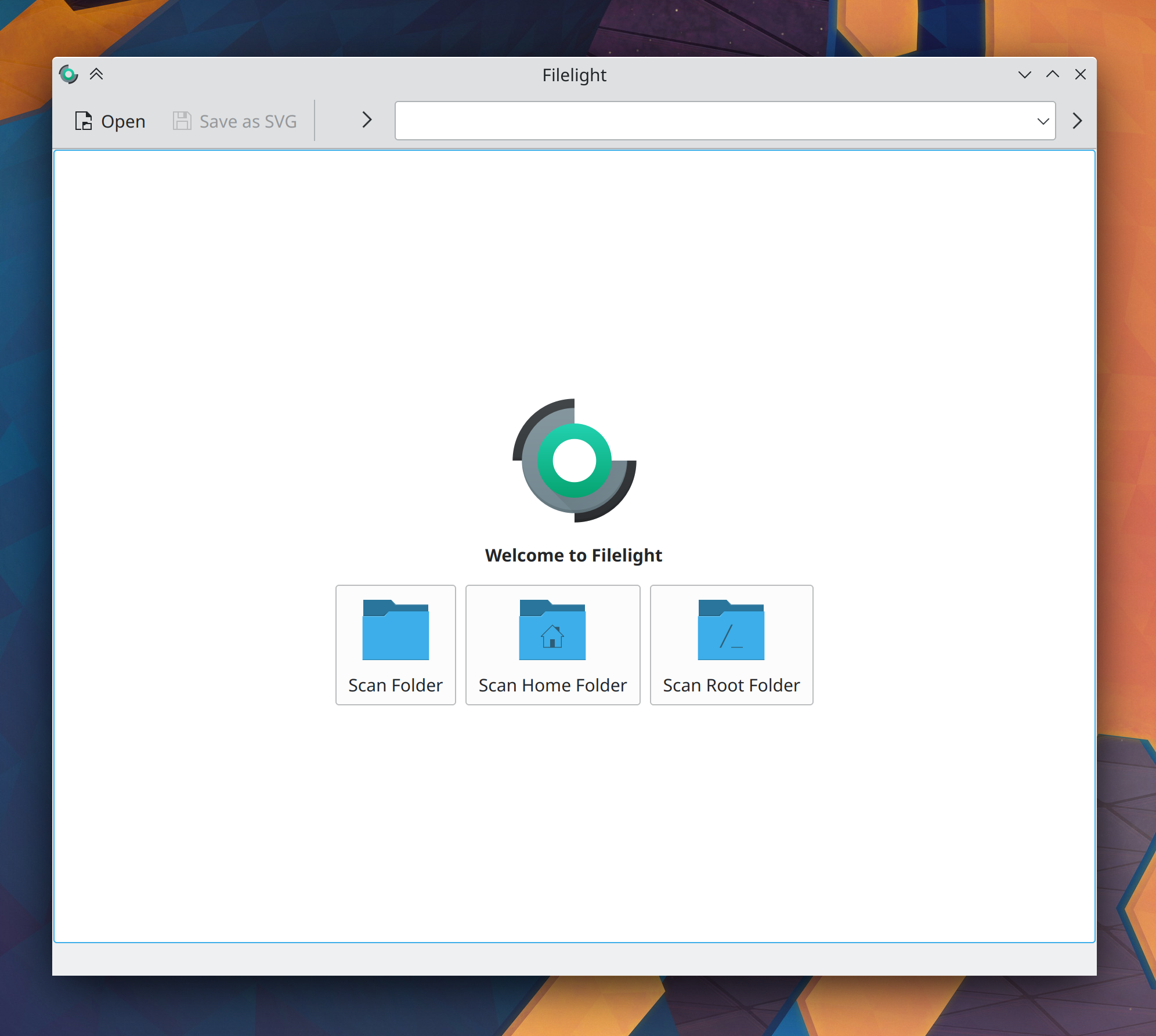
Filelight’s old homepage that displayed subtly inaccurate and incorrect information has been replaced with a standard-style welcome page that doesn’t mislead you (Harald Sitter, Filelight 22.08):

Ark now displays real on-disk sizes for folders inside archives, rather than the number of items they contain (Andrey Butirsky, Ark 22.08)

Dolphin can now optionally display “Author” metadata below filenames in icon mode (Kai Uwe Broulik, Dolphin 22.08)

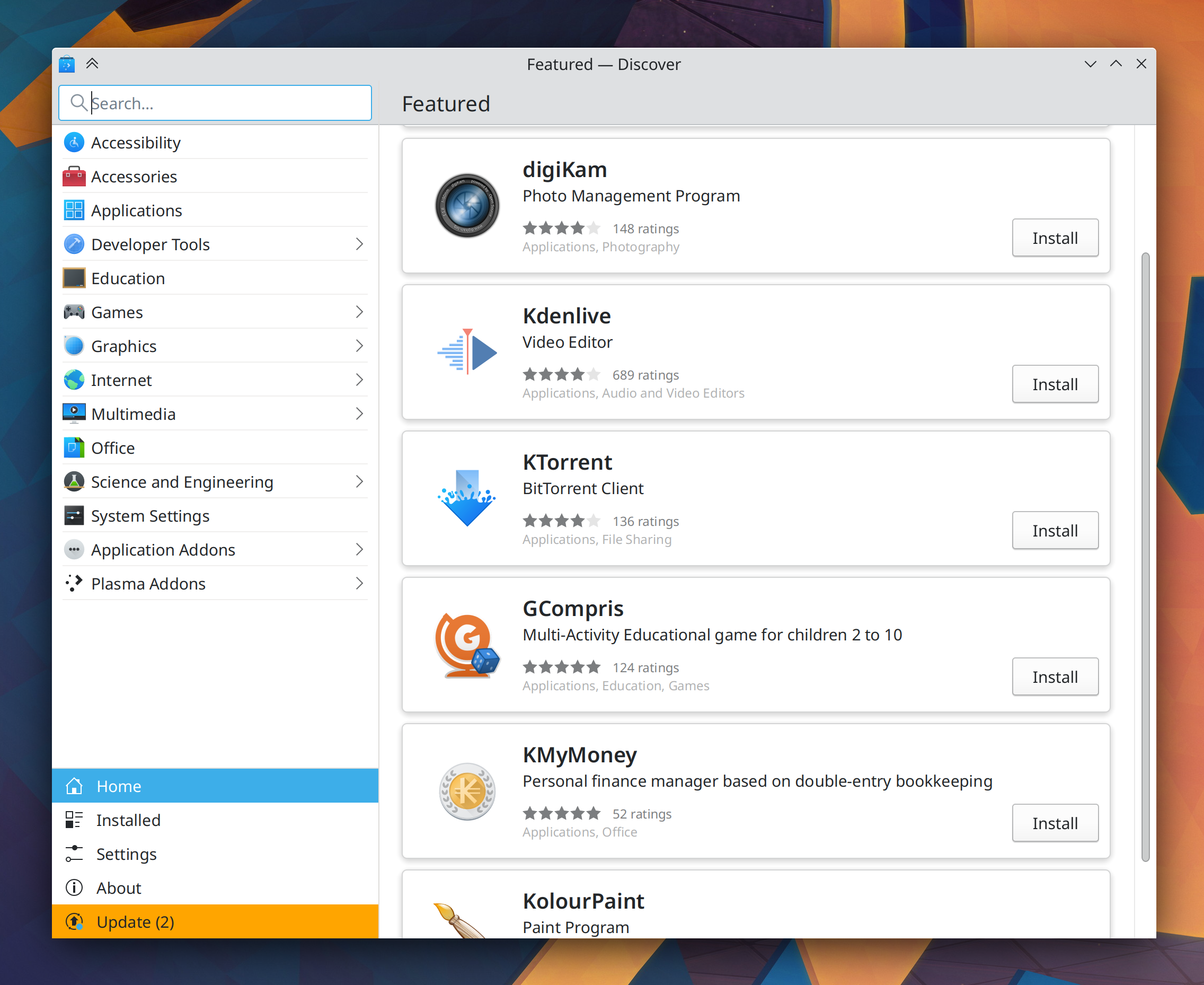
Discover now shows all application categories in the first level of its sidebar, rather than nested one level deep (Taavi Juursalu, Plasma 5.25):

The Networks widget’s details view now shows the frequency and BSSID of the currently connected WiFi network (Ismael Asensio, Plasma 5.25)

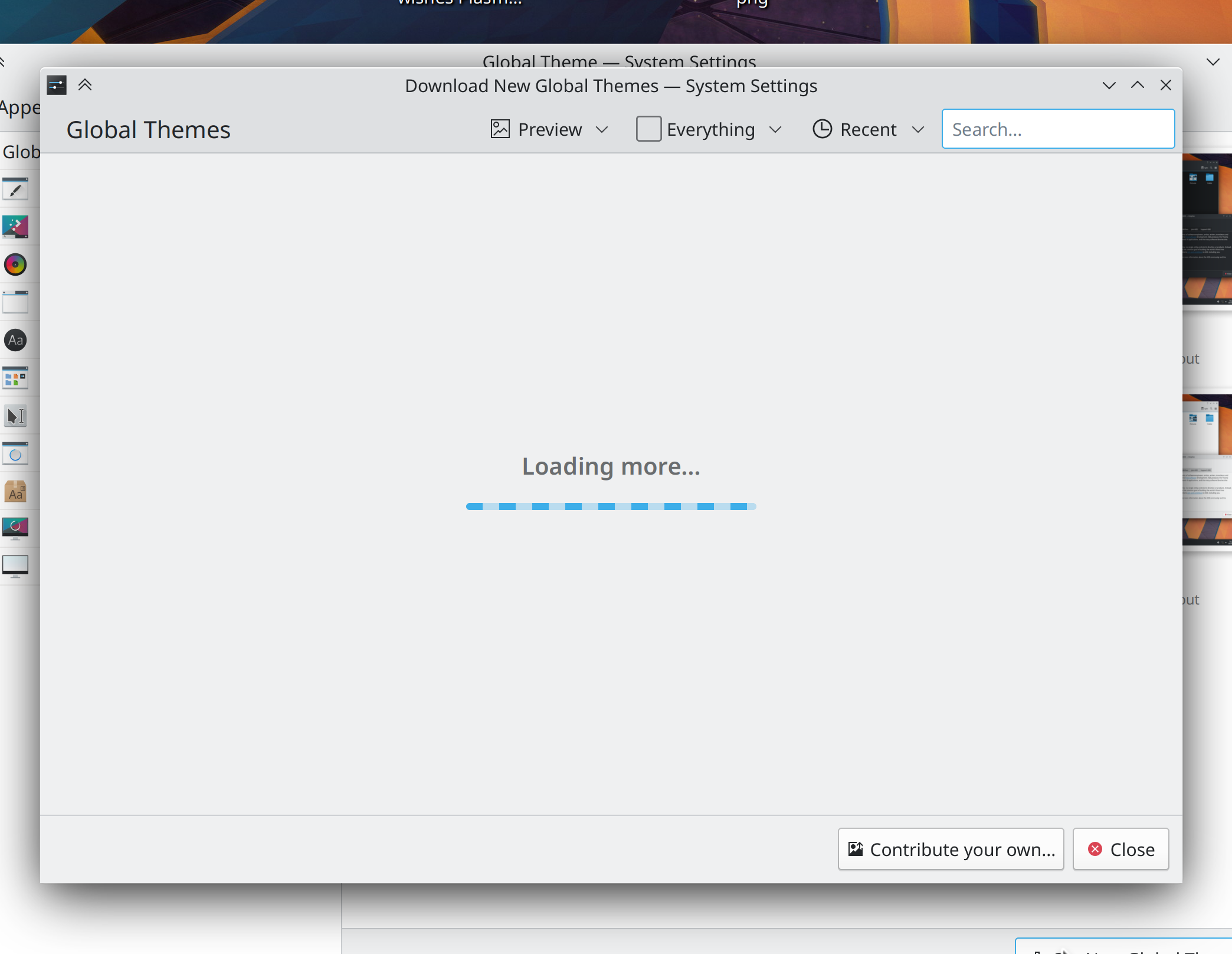
There is now a standard “loading” placeholder component in Kirigami that Kirigami apps are being ported to use, so you will always see a consistent loading indicator (Felipe Kinoshita, Frameworks 5.94):

Right-clicking on path items in URL navigators throughout KDE apps now gives you an option to open that location in a new window if you’d like, not just a new tab (Ahmad Samir, Frameworks 5.94)

…And everything else

This blog only covers the tip of the iceberg! Tons of KDE apps whose development I don’t have time to follow aren’t represented here, and I also don’t mention backend refactoring, improved test coverage, and other changes that are generally not user-facing. If you’re hungry for more, check out https://planet.kde.org, where you can find more news from other KDE contributors.

How You Can Help

If you’re a developer, check out our 15-Minute Bug Initiative. Working on these issues makes a big difference quickly!

Otherwise, have a look at https://community.kde.org/Get_Involved to discover ways to be part of a project that really matters. Each contributor makes a huge difference in KDE; you are not a number or a cog in a machine! You don’t have to already be a programmer, either. I wasn’t when I got started. Try it, you’ll like it! We don’t bite!

Finally, consider making a tax-deductible donation to the KDE e.V. foundation.
This week in KDE: Stable desktop icons and even better gestures

It was a mostly bugfixy week, without so much feature and UI work. As a result, we have some very exciting 15-minute bugfixes this week that should really improve desktop icon stability! But we didn’t forget UI improvements entirely, and now the Wayland session touchpad gesture to switch between virtual desktops follows your fingers! Read about all that and more:

15-Minute Bugs Resolved

Current number of bugs: 73, down from 75. 1 added and 3 resolved:

Discover no longer constantly crashes either on launch or when you visit the Installed page if you have the Flatpak backend activated with certain types of Flatpak remotes (Aleix Pol Gonzalez, Plasma 5.24.5)

Manually-arranged desktop icons no longer get reset to the alphabetical sorting mode when you restart the computer! (Bharadwaj Raju, Plasma 5.24.5)

Desktop icons now remember their positions on a per-resolution basis! (Bharadwaj Raju, Plasma 5.24.5)

Current list of bugs

Bugfixes & Performance Improvements

You can now drag-and-drop things from Ark onto items in Dolphin’s Places panel, and it will extract those items there just like you would expect (Kai Uwe Broulik, Dolphin 22.04)

In the Plasma Wayland session, Yakuake now opens itself on the active screen, just like KRunner also now does (Martin Seher, Yakuake 22.08)

In the Plasma Wayland session, fixed a case where KWin could crash while the screen was locked (Xaver Hugl, Plasma 5.24.5)

In the Plasma Wayland session, unlocking the screen no longer causes various visual glitches all over the place (Aleix Pol Gonzalez, Plasma 5.24.5)

Activating Task Manager tasks by using a Meta+[number] keyboard shortcut now always does what you expect irrespective of how many grouped tasks you have and whether they were last accessed using the mouse or keyboard (Fushan Wen, Plasma 5.24.5)

In the Plasma Wayland session, the “Virtual Desktops” KWin window rule now works properly (Ismael Asensio, Plasma 5.24.5)

In the Plasma X11 session, fixed a case where KWin could crash when you close the lid of your laptop while an external screen is plugged in (Marco Martin, Plasma 5.25)

Grouped Task Manager tasks’ tooltips now resize and arrange themselves properly when using an RTL language (Fushan Wen, Plasma 5.25)

On System Settings’ Cursors page, cursor previews once again display animations when you hover your cursor over them (David Redondo, Plasma 5.25)

In the Plasma Wayland session, the Task Manager no longer shows incorrect icons for XWayland-using web apps (Nicolas Fella, Plasma 5.25)

KDE apps that are capable of opening .psd files no longer crash when opening one such image that is malformed (Albert Astals Cid, Frameworks 5.94)

When you have various widgets in your panel that open popups when clicked, clicking on them no longer opens the popups with an absurdly, unusably small size (Aleix Pol Gonzalez, Frameworks 5.94, though I have emailed distros and asked them to backport it to 5.93)

Highlight effects once again appear on hover in applets still using the old deprecated PlasmaComponents 2 version of the highlight, such as Legacy Kickoff (Aleix Pol Gonzalez, Frameworks 5.94)

User Interface Improvements

In the Plasma Wayland session, the “slide” gesture to switch virtual desktops now follows your fingers and animates the desktops in the correct direction! (Eric Edlund, Plasma 5.25)

System Settings’ Night Color page now tints the screen how it will look in real life as you drag the slider to choose a color, so you can see the effect live (Bharadwaj Raju, Plasma 5.25)

Even though it isn’t 100% technically correct, 1360×768 and 1366×768 screens are now listed as having the “16:9” aspect ratio in System Settings’ Display Configuration page (Felipe Kinoshita, Plasma 5.25)

Changes not in KDE that affect KDE

Jan-Marek Glogowski and Michael Weghorn have done a lot of work recently to fix many LibreOffice bugs affecting KDE users, including the entire interface being too small on Wayland when using scaling, button popups not opening, Math menus being accessible in tabbed mode, and pasting text from Firefox turning it into Chinese. These are all fixed in various bugfix releases of LibreOffice 7.3.x!

…And everything else

This blog only covers the tip of the iceberg! Tons of KDE apps whose development I don’t have time to follow aren’t represented here, and I also don’t mention backend refactoring, improved test coverage, and other changes that are generally not user-facing. If you’re hungry for more, check out https://planet.kde.org, where you can find more news from other KDE contributors.

How You Can Help

If you’re a developer, check out our 15-Minute Bug Initiative. Working on these issues makes a big difference quickly!

Otherwise, have a look at https://community.kde.org/Get_Involved to discover ways to be part of a project that really matters. Each contributor makes a huge difference in KDE; you are not a number or a cog in a machine! You don’t have to already be a programmer, either. I wasn’t when I got started. Try it, you’ll like it! We don’t bite!

Finally, consider making a tax-deductible donation to the KDE e.V. foundation.
This week in KDE: a feast for the eyes

Those finger-following touchscreen gestures have started to land, and we have a lot more than that too! This week is overflowing with positive visual changes that I think you’re all really going to like:

15-Minute Bugs Resolved

Current number of bugs: 75, down from 76. 0 added and 1 resolved:

Accent colors are no longer darkened a bit when using a dark base color scheme (Jan Blackquill, Plasma 5.24.5)

Current list of bugs

New Features

When you change the color scheme, the screen now smoothly cross-fades between the old and new colors! (David Edmundson, Plasma 5.25):

Shamelessly copied from the GNOME effect, which was a really good idea. Soon this will be extended to also cross-fade when you change the Global Theme and Plasma Style too!

Info Center’s “About this System” page now shows you more relevant information about your hardware, such as the product name, manufacturer, and serial number (Harald Sitter, Plasma 5.25):

Showing the serial number requires an extra click so that you don’t accidentally reveal it when you take a screenshot of the window, as many people like to do

The Plasma Wayland session gained support for the “screencast session restore” protocol, which means that apps using XDG portals (such as Flatpaks and Snaps) which implement the protocol (such as OBS since version 27.2.0) won’t have to ask for permission to restore the screen every time you launch them after you’ve granted it once (Aleix Pol Gonzalez, Plasma 5.25)

There’s now a new “Crashed Processes Viewer” app that can be used to graphically see crashes collected by coredumpctl and access their developer details (Harald Sitter, Plasma 5.25):

Bugfixes & Performance Improvements

KIO no longer crashes while trying to open an unreadable file in an SFTP location (Harald Sitter, kio-extras 22.04)

Album list views in Elisa no longer display the tracks in the wrong order (me: Nate Graham, Elisa 22.08)

In the Plasma Wayland session, fixed a case where a misbehaving app could cause KWin to crash (David Edmundson, Plasma 5.24.5)

In the Plasma Wayland session, changing your screen configuration in certain ways (e.g. rotating and moving a screen while not also changing its refresh rate) no longer sometimes causes KWin to crash (Vlad Zahorodnii, Plasma 5.24.5)

In the Plasma Wayland session, when a window requests activation using the official Wayland activation protocol so that it can raise its own window, but this gets denied by KWin for whatever reason, now the window’s Task Manager icon uses the orange “needs attention” background color, just like on X11 (Aleix Pol Gonzalez, Plasma 5.24.5). If you encounter an app that does *not* get the orange background on its Task Manager icon when it fails to activate (e.g. when clicking on a notification sent by Thunderbird or Telegram), this means that the app in question does not implement the activation protocol at all, and it should! So go report this to its developers.

The Global Menu widget now works properly when you turn on its optional “be a hamburger menu” mode that is typically used for vertical panels (David Redondo, Plasma 5.24.5)

In the Plasma Wayland session, KRunner now appears on the active screen when shown, just like it does on X11 (Martin Seher, Plasma 5.25)

Discover no longer sometimes hangs forever when you visit its “About” page (Aleix Pol Gonzalez, Frameworks 5.94)

Kate, KWrite, and other KTextEditor-based apps no longer crash when you define a new file type for the app to open (Waqar Ahmed, Frameworks 5.94)

Checkboxes and radio buttons in Plasma are no longer sometimes blurry, cut off at the bottom, or slightly squashed when you use certain combinations of fonts and font sizes (Noah Davis, Frameworks 5.94)

The Places Panels in Dolphin, open/save dialogs, Gwenview, and all other QtWidgets-based apps are now touch-friendly (Steffen Hartlieb, Frameworks 5.94)

User Interface Improvements

https://kde.org and all of it subdomains now auto-detect your browser language and show you content in your native language, if it’s available (Phu Nguyen, right now!)

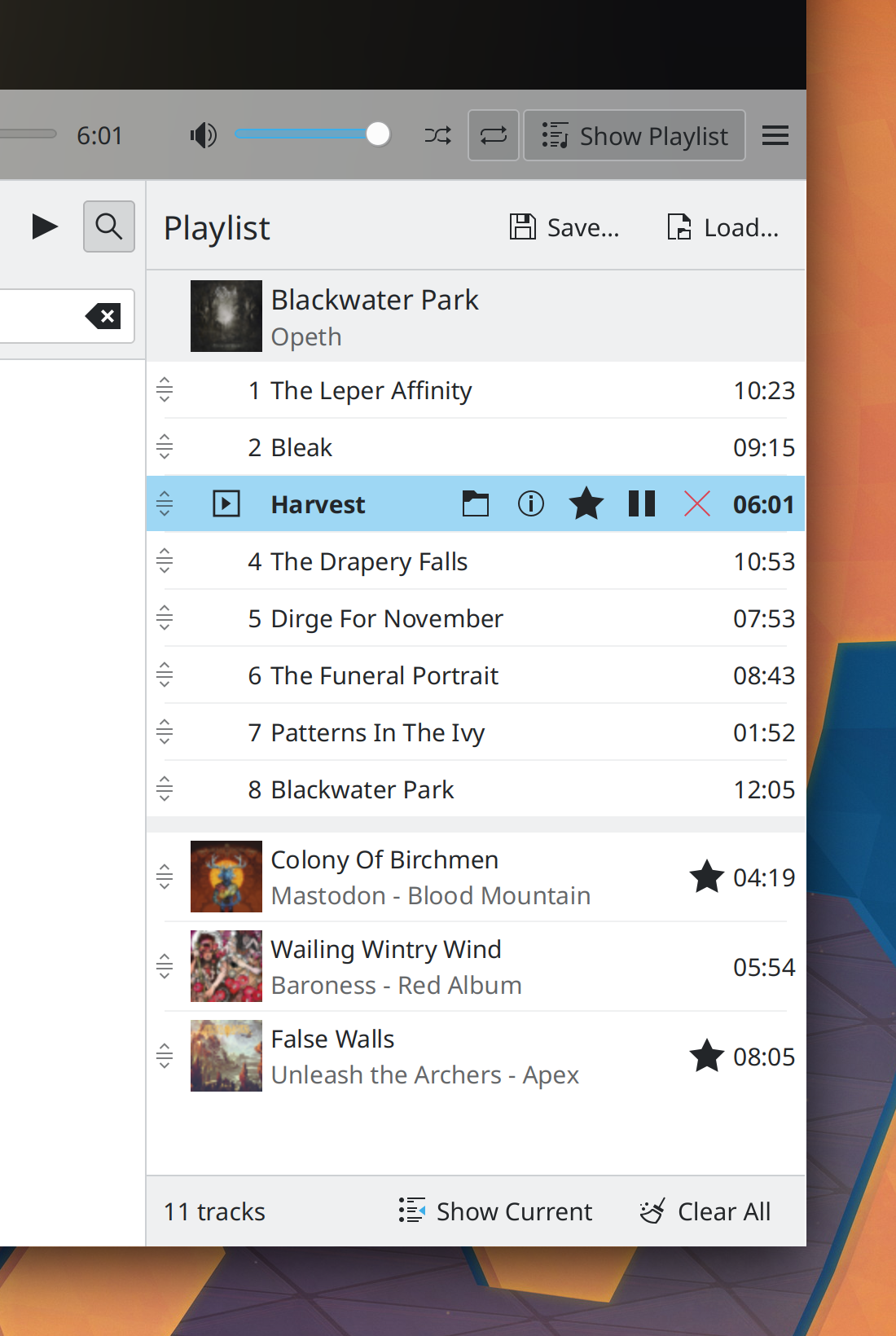
Elisa’s playlist now displays adjacent songs from different albums in a much more compact and prettier way (Tranter Madi, Elisa 22.08):

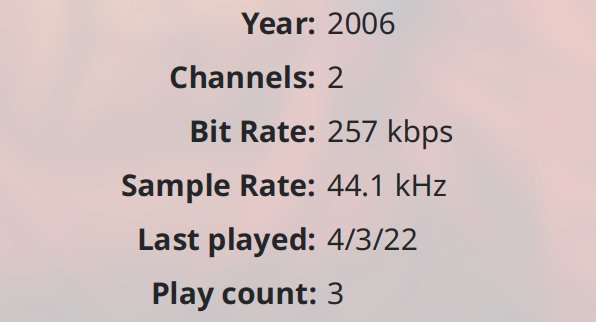
Elisa now displays Bit Rate and Sample Rate metadata using sensical units (Jack Hill, Elisa 22.04):

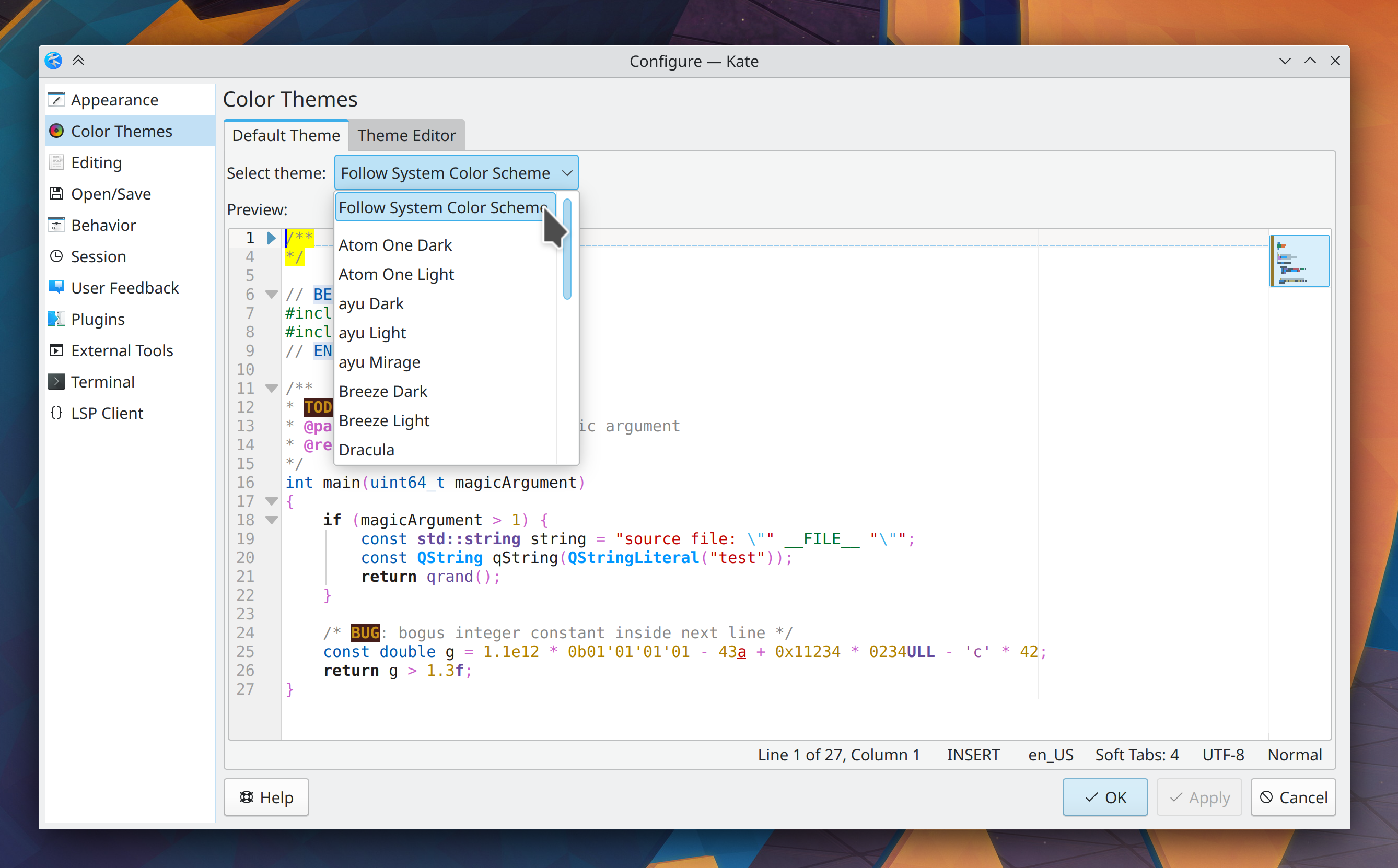
The color theme configuration page in Kate and KWrite has received a big UI overhaul (Waqar Ahmed, Kate & KWrite 22.08):

In Kate and KWrite, typing an opening bracket character now automatically inserts the closing one after the text insertion point by default (Christoph Cullmann, Kate & KWrite 22.08)

The four-finger swipe up gesture to open the Overview effect now follows your fingers! (Marco Martin, Plasma 5.25):

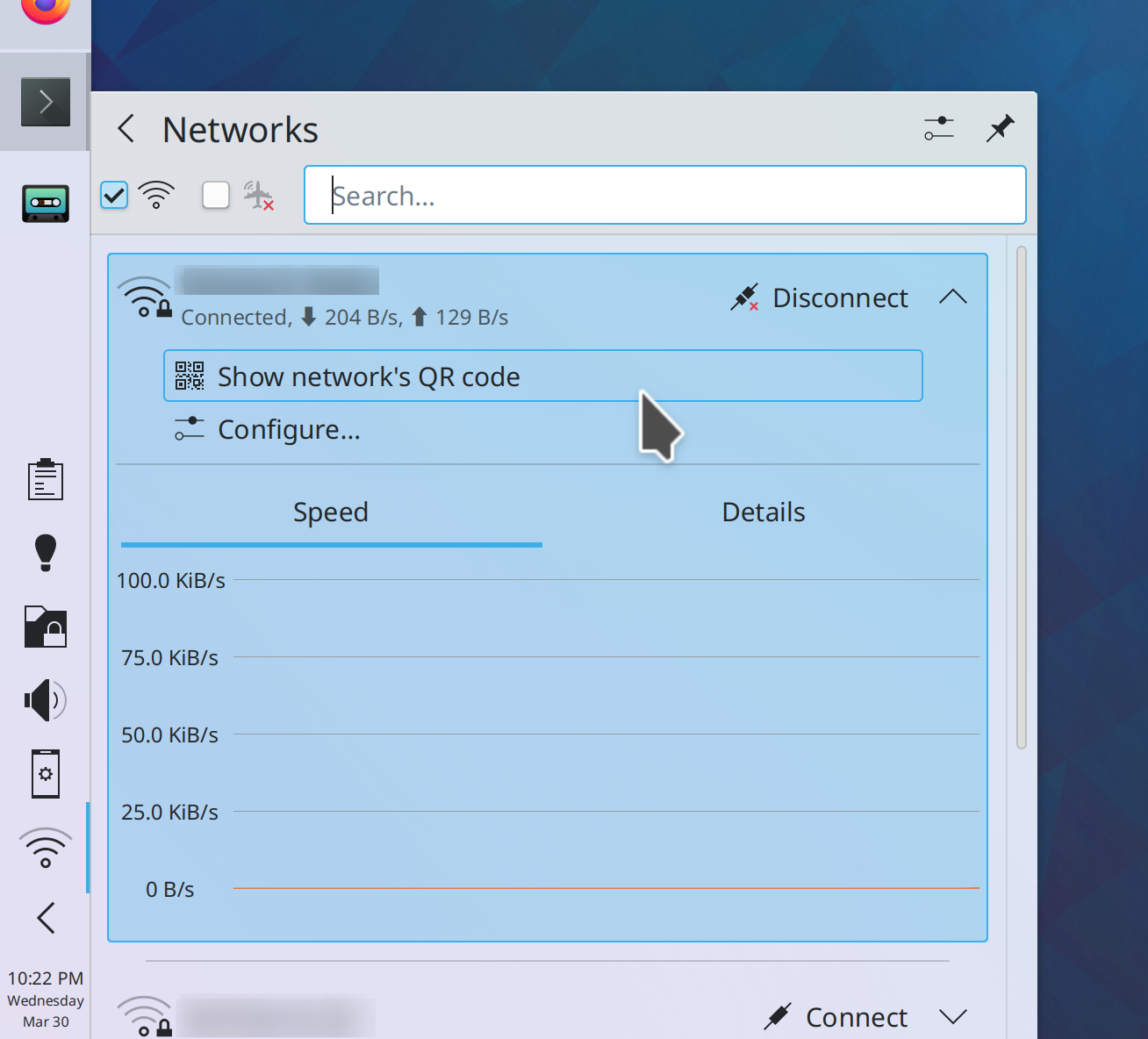
The Network widget now shows contextually-relevant items in the expanded view of each list item, rather than a context menu. This makes them more discoverable and fully touch-compatible (me: Nate Graham, Plasma 5.25):

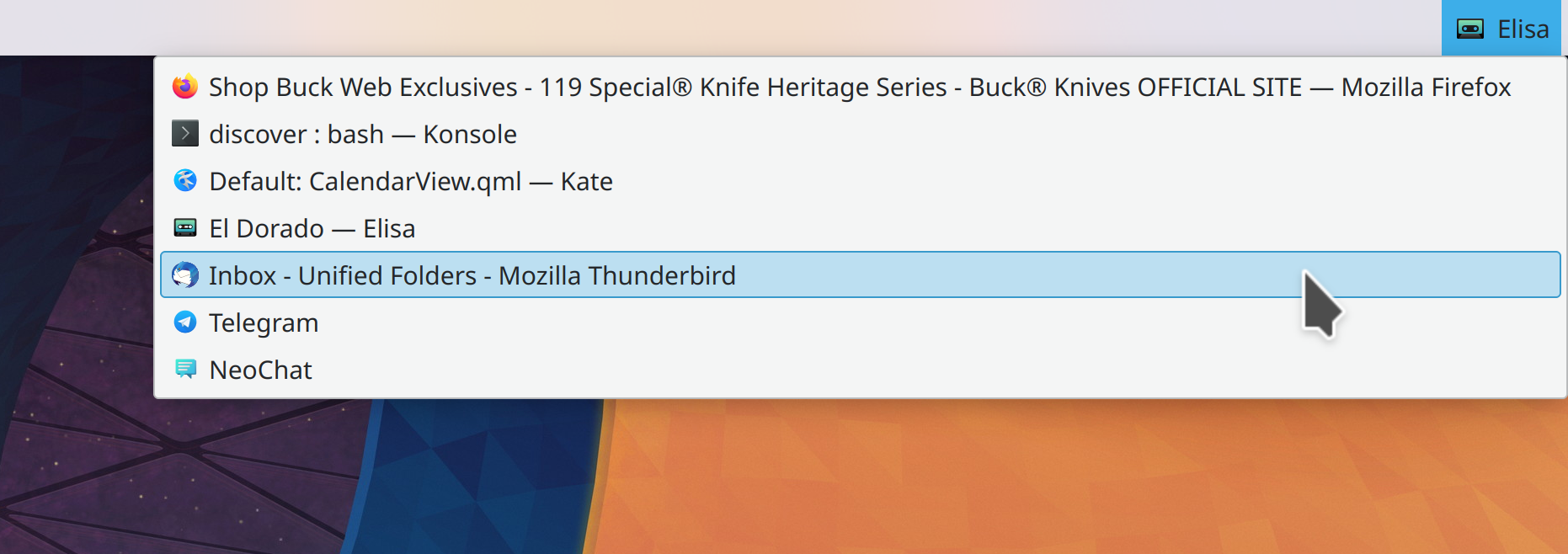
The Window List applet has been rewritten to modernize and future-proof its codebase, which also makes it keyboard-navigable and shows the active window’s icon and name in its Panel version, just like the classic Mac OS window menu did (Jan Blackquill, Plasma 5.25):

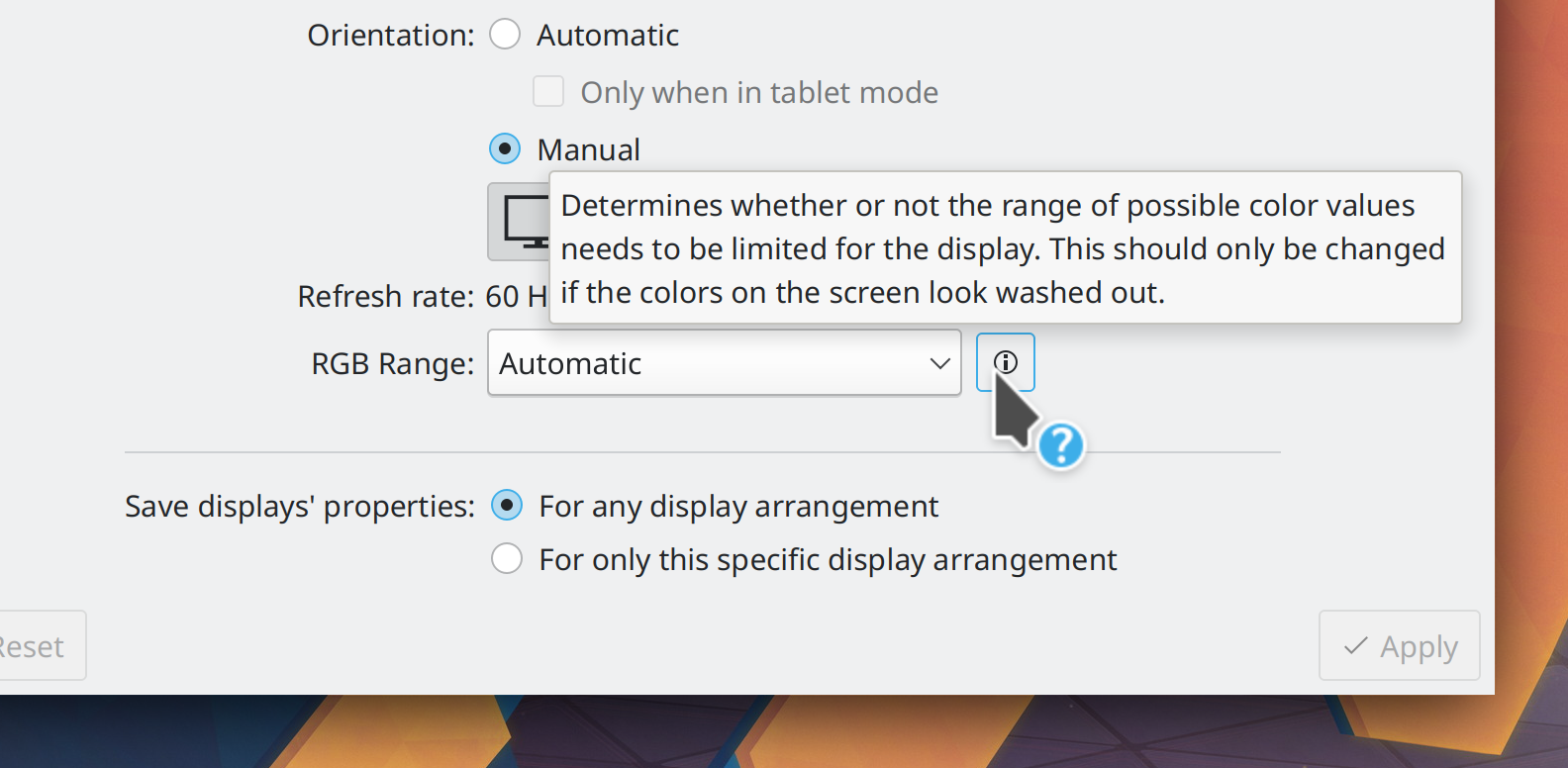
The “RGB Range” and “Overscan” controls in System Settings’ Display Configuration page now have help buttons you can click or hover over to learn what they do, as these are rather technical features need some explanation (Xaver Hugl, Plasma 5.25):

System Settings’ Energy Saving page now displays percentage labels by both of the brightness sliders (Edo Friedman, Plasma 5.25)

KRunner’s help button now disappears when you’ve disabled the Help runner (Alexander Lohnau, Plasma 5.25)

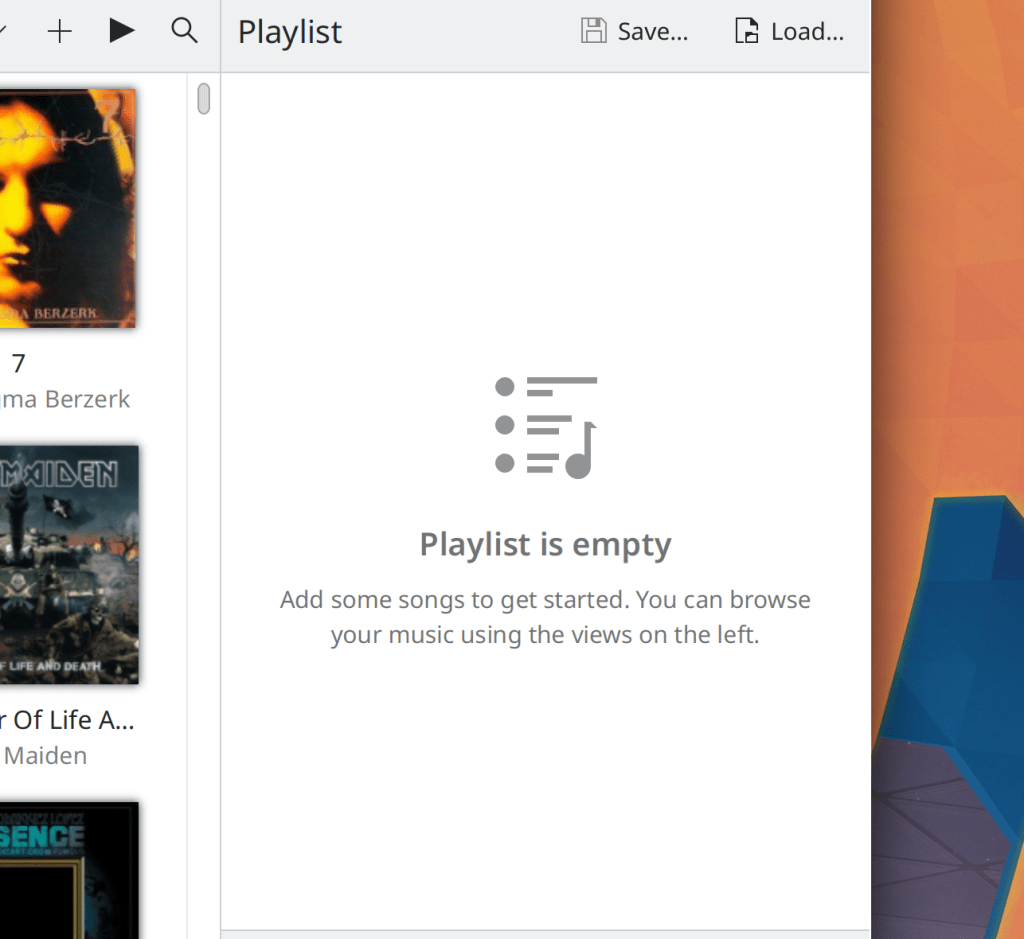
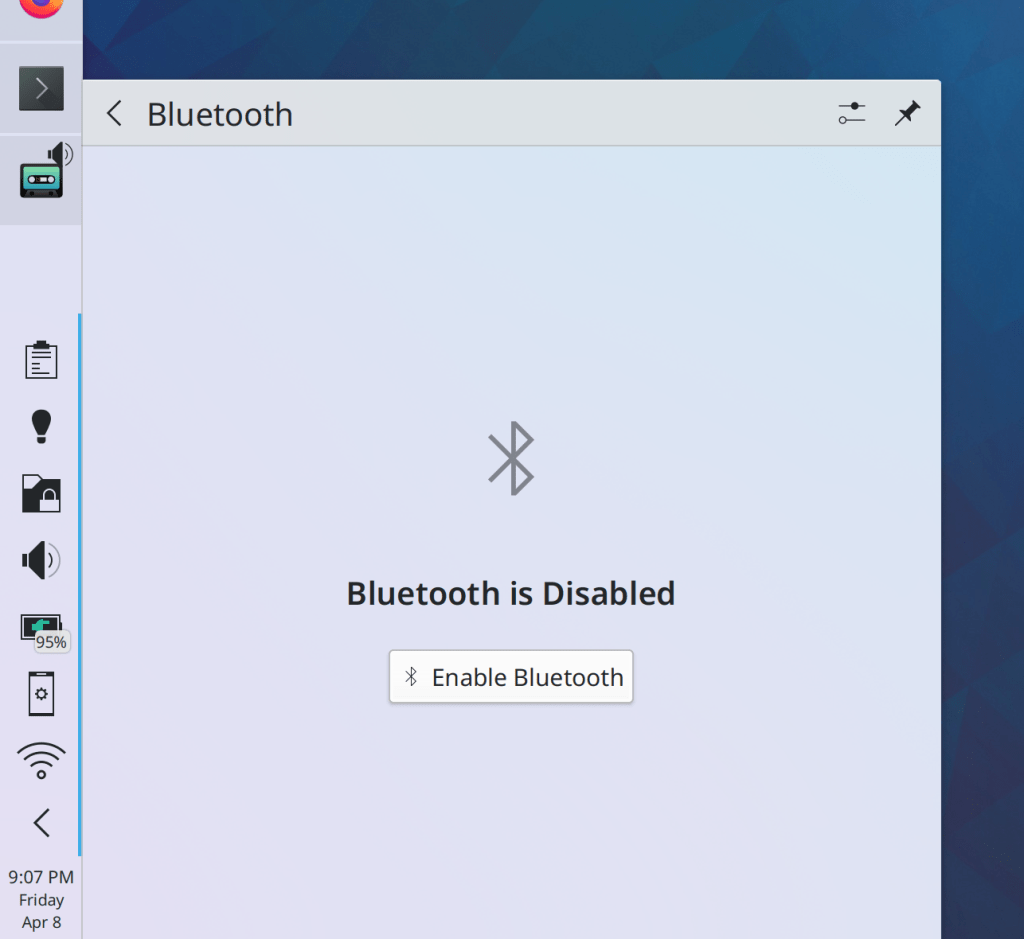
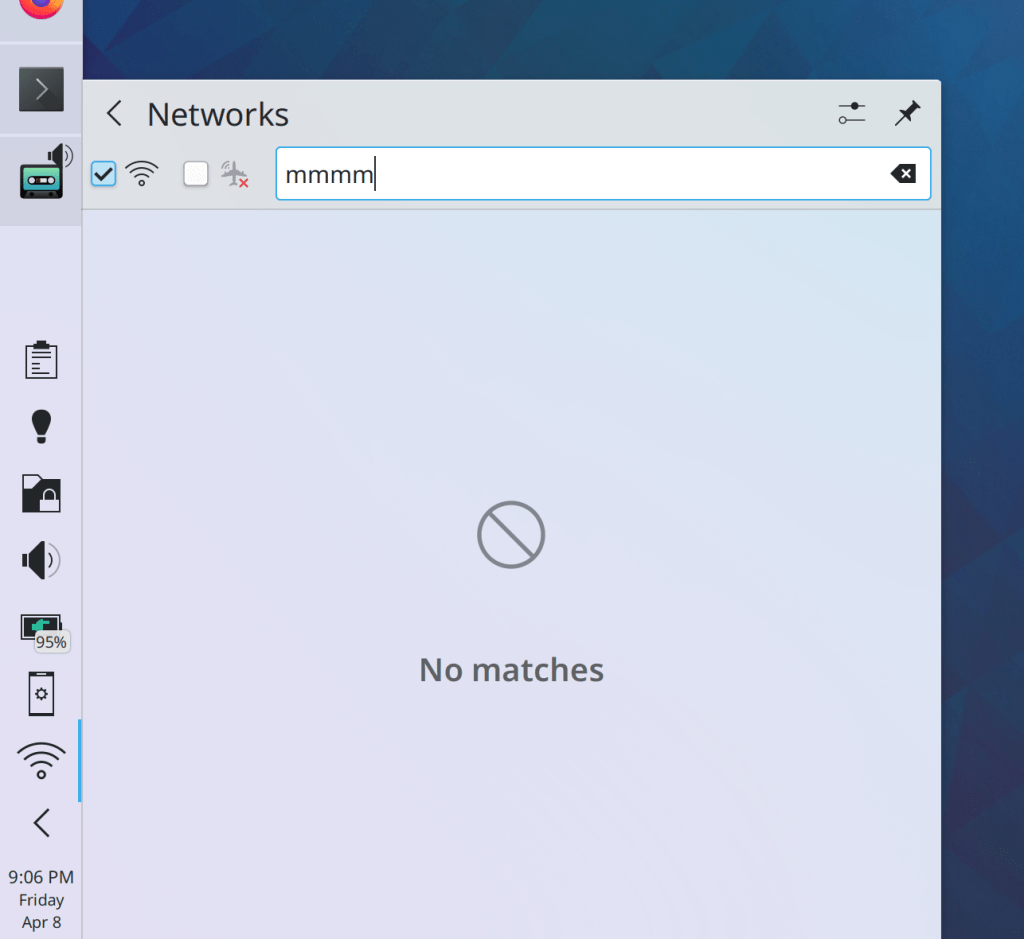
Placeholder messages throughout Kirigami-based KDE apps and Plasma are now more readable, nicer-looking, and have slight visual differences between actionable and informational messages (Felipe Kinoshita, Frameworks 5.94):

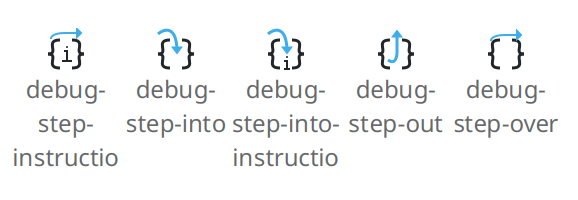
The Breeze icon theme’s “debug step” icons are now more visually clear and nice-looking (Jan Blackquill, Frameworks 5.94):

…And everything else

This blog only covers the tip of the iceberg! Tons of KDE apps whose development I don’t have time to follow aren’t represented here, and I also don’t mention backend refactoring, improved test coverage, and other changes that are generally not user-facing. If you’re hungry for more, check out https://planet.kde.org, where you can find more news from other KDE contributors.

How You Can Help

If you’re a developer, check out our 15-Minute Bug Initiative. Working on these issues makes a big difference quickly!

Otherwise, have a look at https://community.kde.org/Get_Involved to discover ways to be part of a project that really matters. Each contributor makes a huge difference in KDE; you are not a number or a cog in a machine! You don’t have to already be a programmer, either. I wasn’t when I got started. Try it, you’ll like it! We don’t bite!

Finally, consider making a tax-deductible donation to the KDE e.V. foundation.
This week in KDE: Get ready for a big one!

…But first, let me mention up front that those touchpad gesture improvements I teased last week aren’t quiiiite ready, but they’re very close now. Hopefully next week! In their stead, we have an enormous number of Plasma bugfixes and UI improvements, tons of goodies for KWrite users, and finally a truly colossal number of enhancements for touch-friendliness when in Tablet Mode.

“Hey, what is Tablet Mode?”, you might ask. It’s a feature of the Plasma Wayland session in which everything becomes more touch-friendly. If you have a convertible laptop, it’s activated by flipping back the screen to make it into–you guessed it–a tablet! But it will also trigger on phones and other touch devices without a pointing device, such as the Steam deck as long as no mouse is plugged in (only once it uses the Wayland session, of course).

At the moment it is a Wayland-only feature that requires physical hardware support, but that could change and I personally would be in favor of letting people manually toggle it.


Anyway, get ready for a big one!

15-Minute Bugs Resolved

Current number of bugs: 76, same as last week. 2 added and 2 resolved:

The folder popup you can open to show the contents of folders on the desktop is no longer annoyingly two pixels too narrow to display an additional grid cell (me: Nate Graham, Plasma 5.24.5)

When using a Plasma Vault with the GoCryptFS backend, unlocking the vault now causes it to appear in the Places panel, just like vaults using the CryFS and EncFS backends (Ivan Čukić, Frameworks 5.93)

Current list of bugs. Get cracking! 😎

New Features

KWrite now internally uses the exact same codebase as Kate but simply turns off a bunch of programmer-centric features. This makes it much more consistent with Kate, more maintainable, and it will have fewer bugs. And now it has tabs! You can read more about it here on the Kate blog (Christoph Cullmann, KWrite 22.08):

The new KWrite, now with tabs!

Picture of the Day wallpapers now lets you preview the image and see image metadata right there in the config window! (Fushan Wen, Plasma 5.25):

You can even click the preview to go to the image’s source URL, or click the little inline save button to save it locally!

Now, when you enter Tablet Mode, all interactive UI elements (including titlebar buttons) that are styled with the Breeze theme become larger and more touchable! (Marco Martin and Arjen Hiemstra, Plasma 5.25:

You can now manually adjust the spacing between Icons-Only Task Manager icons, and when you’re in Tablet Mode, the spacing is automatically set to its highest level for improved touchability, just like we do for System Tray icons (Tanbir Jishan and me: Nate Graham):

In the Plasma X11 session, you can now configure all the buttons of Wacom ExpressKey Remote devices (Someone going by the pseudonym “oioi 555”, wacomtablet 3.3.0):

Bugfixes & Performance Improvements

Monitors in multi-monitor setups once again power off when you disable them (Xaver Hugl, Plasma 5.24.4)

When Discover installs updates for packages that have multiple architectures available (e.g. both 32-bit and 64-bit versions, due to having Steam installed), it now installs the updates for all architectures rather than a pseudo-random set of them, which would blow up your system! 🤯 (Alessandro Astone, Plasma 5.25, but it may be backported to 5.24.5 soon)

kio-fuse now works within the open/save dialogs of sandboxed apps, meaning that you can now use such apps to open and save files to Samba shares and other network locations, for example (Harald Sitter, Plasma 5.25)

Discover now shows the description and license information for local packages (Fushan Wen, Plasma 5.25)

Discover now shows you the correct author name for packages without a specific author set that live in a project group. In practice, this means that a while bunch of KDE apps will now list “KDE” as the author (Nicolas Fella, Plasma 5.25)

The Bing Picture of the Day wallpaper plugin will now download the 4K versions of images if you have a screen with a resolution greater than 1080p (Fushan Wen and Yunhe Guo, Plasma 5.25)

Headings in Plasma widgets once again appear as expected when you’re using the “Breeze Light” or “Breeze Dark” Plasma themes that have hardcoded colors, rather than the “Breeze” Plasma theme that respects your app color scheme (Marco Martin, Frameworks 5.93)

Draggable list items in Kirigami-based apps now move much more smoothly with no jerks or glitches (Tranter Madi, Frameworks 5.93)

User Interface Improvements

When using per-folder view properties in Dolphin, a variety of locations now use more relevant view settings: for example the search view list includes a column shows you the actual location of all matches; the Trash view list view has columns that show the “original location” and “Deletion time”; the “Recent Files” and “Recent Locations” searches group items by day; and so on (Kai Uwe Broulik, Dolphin 22.04):

Tabs in Kate and KWrite no longer fully span the whole window width by default, and the whole tab bar now only appears after a second document is opened, just like in other tabbed KDE apps (Christoph Cullmann, Kate & KWrite 22.08)

Filelight now has a “go to overview” action that will take you back to the homepage (Harald Sitter, Filelight 22.08)

In the Overview effect, you can now swipe down on a window to close it, and window close buttons are now always visible rather than appearing only on hover (Marco Martin, Plasma 5.25)

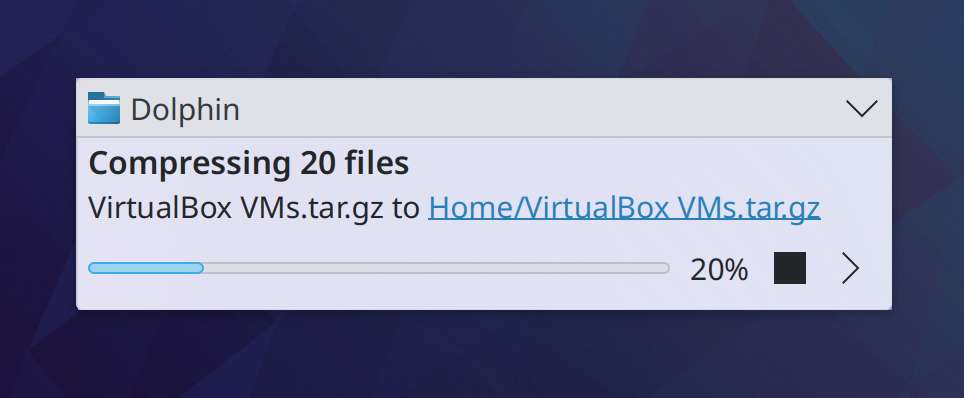
Notifications for job progress now show a percentage value by the progress bar for those of you who prefer reading text to looking at something visual (Jan Blackquill, Plasma 5.25):

The Margins Separator widget is now much smaller, but becomes larger and more visually obvious in Edit Mode (Tanbir Jishan, Plasma 5.25)

The Audio Volume widget no longer shows virtual devices by default, though you can show them again if you do actually use them (Arjen Hiemstra, Plasma 5.25)

System Settings’ Users page no longer lists a placeholder email address in the “Email Address” field, because it’s 2022 and people generally know what an email address is and how it’s structures (David Edmundson, Plasma 5.25)

Album art in the Media Player widget now smoothly cross-fades when it changes, rather than abruptly blinking (Fushan Wen, Plasma 5.25):

All the Plasma widgets that display placeholder messages when empty now show icons too, in addition to text (Fushan Wen and me: Nate Graham, Plasma 5.25):

System Settings’ Display Configuration page can now tell you exactly what setting a screen to be “Primary” actually does! (me: Nate Graham, Plasma 5.25):

Discover’s “What’s the risk of proprietary software?” sheet is now opened by clicking on a more conventional button, rather than a link that might make you think it’s going to open a web browser (me: Nate Graham, Plasma 5.25):

When you create a new file from Dolphin, the desktop, or anything else that uses the standard “create new file” functionality, the pre-selected part of the filename no longer includes the extension (Fushan Wen, Frameworks 5.93):

…And everything else

This blog only covers the tip of the iceberg! Tons of KDE apps whose development I don’t have time to follow aren’t represented here, and I also don’t mention backend refactoring, improved test coverage, and other changes that are generally not user-facing. If you’re hungry for more, check out https://planet.kde.org, where you can find more news from other KDE contributors.

How You Can Help

If you’re a developer, check out our 15-Minute Bug Initiative. Working on these issues makes a big difference quickly!

Otherwise, have a look at https://community.kde.org/Get_Involved to discover ways to be part of a project that really matters. Each contributor makes a huge difference in KDE; you are not a number or a cog in a machine! You don’t have to already be a programmer, either. I wasn’t when I got started. Try it, you’ll like it! We don’t bite!

Finally, consider making a tax-deductible donation to the KDE e.V. foundation.