This week in KDE: System Settings modernization and Wayland color management

Many folks are on vacation right now, but KDE’s tireless contributors still worked hard to bring you a number of improvements anyway, among them some nice System Settings modernization work and improvements to Wayland color management. You’ll find them mentioned below, along with various other improvements!

Notably, we’re back to only 30 15-minute Plasma bugs — the lowest level since February of this year right before Plasma 6 was launched! Essentially, having regained the level of stability we had at the end of Plasma 5 in only 6 months, we’re super well positioned to drive this even further in the coming months. With Plasma 6 offering both stability and features, who says you can’t have it all? 😎

Notable New Features

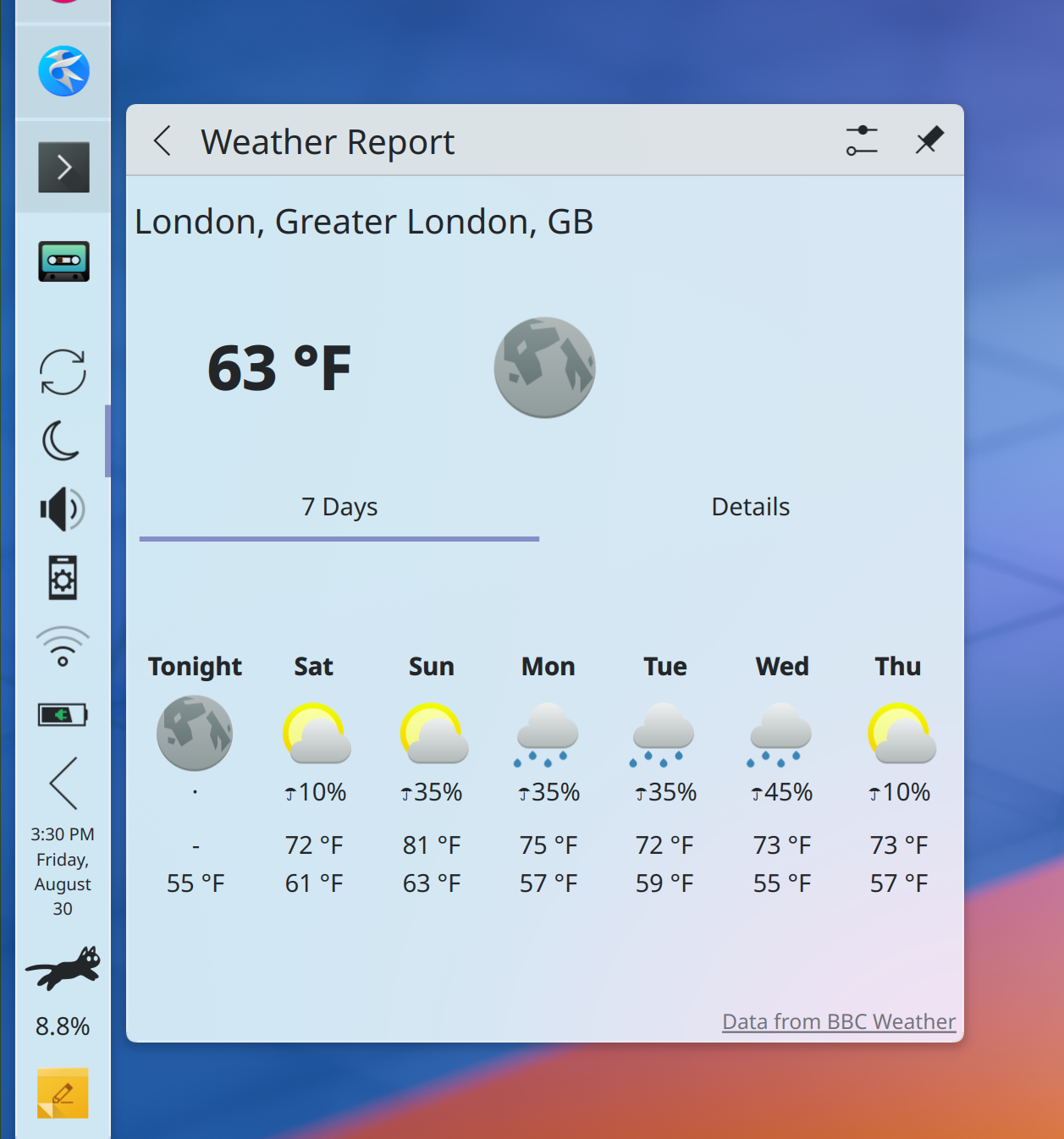
Plasma’s weather widget now shows “feels like” temperatures that take into account the heat index (Ismael Asensio, Plasma 6.2.0. Link 1 and link 2):

And yes, I see that the temperature labels in the forecast view are misaligned! We’ll get that fixed.

Notable UI Improvements

Landed a redesign of System Settings’ Keyboard page to match other similar modern pages and make things easier to find (Evgeniy Chesnokov, Plasma 6.2.0. Link):

Modernized the UI for System Settings’ Thunderbolt page, which also fixed a text readability bug (Ivan Tkachenko, Plasma 6.2.0. Link):

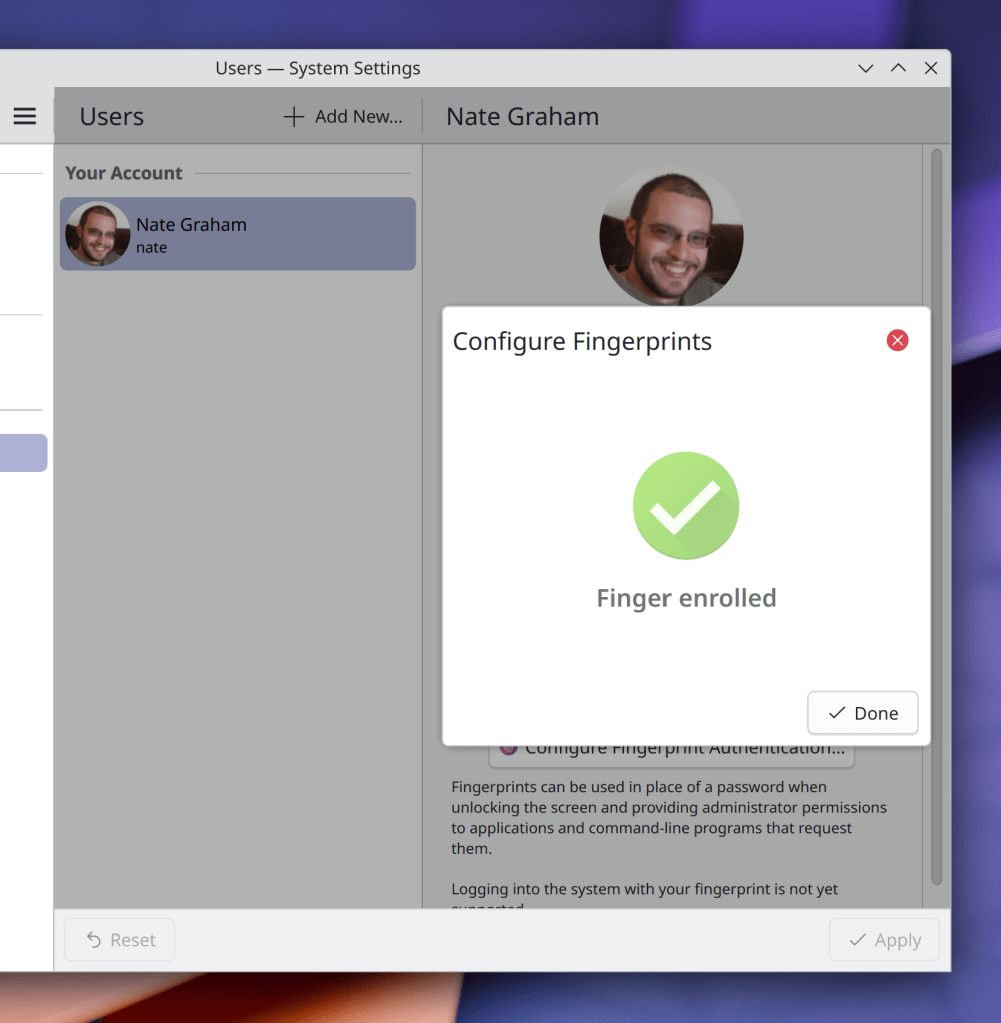
Modernized the UI for multiple pages in System Settings that still use QtWidgets, so that they look a bit more like their more modern QML counterparts (Thomas Duckworth, Plasma 6.2.0 and KDE Gear 24.12.0, link 1, link 2, link 3, link 4, and link 5):

Discover and its System Tray icon now always agree on whether there are any updates available (Harald Sitter, Plasma 6.2.0. Link)

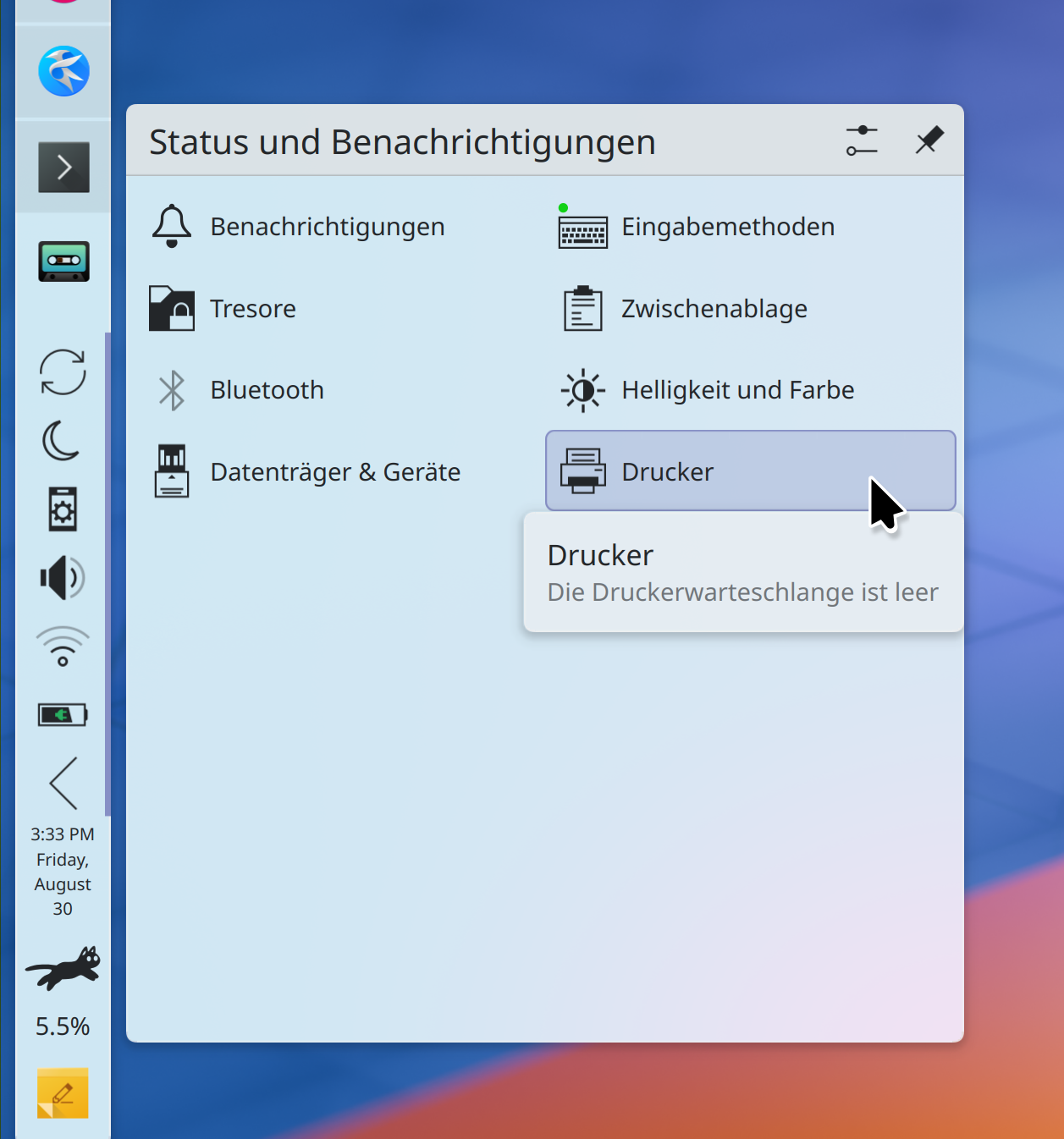
Weather forecasts from the Environment Canada provider now fit in the System Tray popup at its default size, so you don’t have to enlarge it (Ismael Asensio, Plasma 6.2.0. Link)

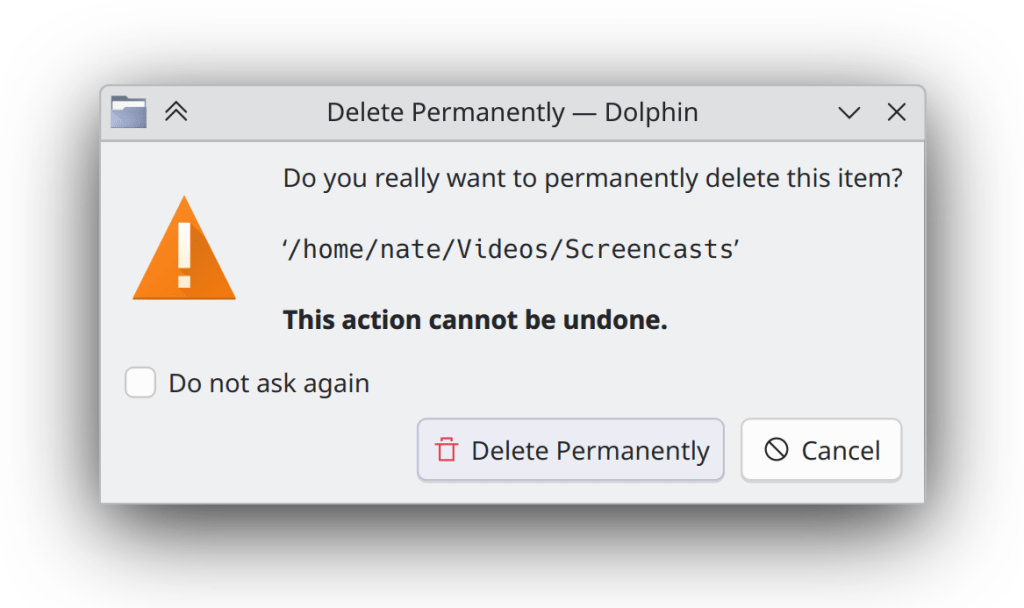
When you drag an image or other file out of a web browser window and onto the desktop or Dolphin, the drop menu now contains only relevant actions, and with better text and icons (me: Nate Graham, Frameworks 6.6. Link 1 and link 2):

Notable Bug Fixes

We accidentally broke SVG wallpaper support in Plasma 6.1.4 with the fixes to Centered placement mode, so now we’ve fixed it again. Sorry about that, everyone! (Marco Martin, Plasma 6.1.5. Link)

Fixed a tricky KWin bug that caused copied text to sometimes not be paste-able into XWayland-using apps (David Edmundson, Plasma 6.2.0. Link)

Worked around a Qt issue that was causing some windows on disconnected screens to sometimes not get moved over to one of the remaining screens as expected (Xaver Hugl, Plasma 6.2.0. Link)

Addressed a few more edge cases for the bug whereby Plasma’s “Show Alternatives” popup wouldn’t close in certain circumstances, so now it should always close when needed (Niccolò Venerandi, Plasma 6.2.0. Link)

Fixed an issue that caused some symbolic icons in Plasma panels to be colored improperly with mixed light/dark global themes (Nicolas Fella, Frameworks 6.6. Link)

Other bug information of note:

Notable in Performance & Technical

Added support for rendering intents and black point compensation to KWin’s implementation of the Wayland color management protocol, and enabled it by default so apps that also implement support for it can make use of it immediately (Xaver Hugl, Plasma 6.2.0. Link 1, link 2, and link 3)

KWin has gained support for the alpha-modifier Wayland protocol (Xaver Hugl, Plasma 6.2.0. Link)

On Wayland, you can now copy to and paste from the system clipboard while in Overview and other KWin effects (Vlad Zahorodnii, Plasma 6.2.0. Link)

Qt 6.8 changed how screen scaling affects icons, so we adapted to those changes to prevent icon blurriness everywhere for people already using Qt 6.8 (Nicolas Fella and Kai Uwe Broulik, Frameworks 6.6. Link 1, and link 2)

Human Interface Guidelines

Expanded the Text and Labels page to include some more symbols that should use real unicode glyphs rather than handmade approximations (Emir SARI, link)

Fixed a number of small typos, punctuation, and grammar issues throughout the text (John Veness, link 1, link 2, link 3, link 4, link 5)

Tweaked a bunch of text labels in Okular to be HIG-compliant by using real ellipses and unicode symbols (Emir SARI, Okular 24.12.0. Link)

KWin’s “Screen Edge” effect has been renamed to “Highlight Screen Edges and Hot Corners” for HIG-compliance and user-comprehensibility (me: Nate Graham, Plasma 6.2.0. Link)

Tweaked the text of Plasma’s critical battery level notifications and System Settings’ unsaved changes dialog to be HIG-compliant and therefore less redundant and more user-friendly (me: Nate Graham, Plasma 6.2.0. Link 1 and link 2)

…And Everything Else

This blog only covers the tip of the iceberg! If you’re hungry for more, check out https://planet.kde.org, where you can find more news from other KDE contributors.

How You Can Help

Otherwise, visit https://community.kde.org/Get_Involved to discover other ways to be part of a project that really matters. Each contributor makes a huge difference in KDE; you are not a number or a cog in a machine! You don’t have to already be a programmer, either. I wasn’t when I got started. Try it, you’ll like it! We don’t bite! Or consider donating instead! That helps too.

This week in KDE: SVG Breeze cursors and more thumbnails

First up is something cool: support for SVG-based cursor themes! This allows compatible themes to always display beautiful sharp cursors at any size, and has already been rolled out for the Breeze Light and Breeze Dark cursor themes. It does not use the Hyprcursor system, and we have not yet upstreamed it to be a different cross-desktop spec. However, we are considering doing so in the near future. This work was done by Jin Liu and Vlad Zahorodnii, and lands in Plasma 6.2.0.

On the subject of cross-desktop specs, KDE apps now does support the cross-desktop thumbnailer spec, meaning that any of these thumbnailers already on the system will now instantly start working! One of the most notable examples would be the STL file thumbnailer, which will be a boon for anyone working with 3D models or 3D printers. This work was done by Akseli Lahtinen and lands in KDE Frameworks 6.6. You can read about it more in this blog post.

That isn’t all, though…

More Notable New Features

Elisa now shows the total duration of the songs from the playlist in its footer (Karl Hoffman, Elisa 24.12.0. Link):

Plasma now lets you escape from the tyranny of time by hiding the clocks on the login and lock screens entirely (Someone going by the pseudonym “Be Ing”, Plasma 6.2.0. Link)

Plasma’s Pager widget now lets you turn off window outlines if you’d prefer a cleaner display of only the virtual desktops (Christian Muehlhaeuser, Plasma 6.2.0. Link)

The Breeze Light and Breeze Dark Plasma styles (not color schemes, Plasma styles) now respect your systemwide accent color too. In particular, this makes the built-in Breeze Twilight Global Theme fully accent-color-aware (Niccolò Venerandi, Plasma 6.2.0. Link):

Notable UI Improvements

Elisa now remembers window maximization state and prior window geometry across launches as expected (me: Nate Graham, Elisa 24.08.0. Link)

Filelight now remembers its window size (and position, on X11) across launches (me: Nate Graham, Filelight, 24.12.0. Link)

When using background blur e.g. in apps like Konsole, there’s no longer a blurry sharp corner poking out of the rounded titlebar corners (Xaver Hugl, Plasma 6.2.0. Link)

Notable Bug Fixes

Fixed a silly bug that caused System Settings’ Display & Monitor page to be unable to show auto-rotate settings the first time it was opened (Marco Martin, Plasma 6.1.4. Link)

When you click on column headers in System Monitor to sort a table by a different column, they’re now ordered top-to-bottom as expected (Arjen Hiemstra, Plasma 6.1.5. Link)

Worked around a quirk in VLC, with the net result that standard MPRIS-compatible play/pause controls (e.g. via global shortcut, dedicated keyboard keys, or the Media Player widget) work again (Fushan Wen, Plasma 6.1.5. Link)

Worked around a Qt bug that caused widgets in Plasma’s Widget Explorer to overlap after clearing the search field text with animations globally disabled (me: Nate Graham and Noah Davis, Plasma 6.1.5. Link)

Fixed a bug that caused the “copy time/date to clipboard” feature of Plasma’s Digital Clock widget to not work on Wayland. This should also more generally help with clipboard issues where the source window disappears after content is copied (David Redondo, Plasma 6.2.0. Link)

The “Small font” setting on System Settings’ Fonts page now works again, because we fixed a subtle Plasma 6 porting error that broke it (Marco Martin, Frameworks 6.6. Link)

Other bug information of note:

Notable in Performance & Technical

Fixed an issue that caused noticeable frame drop when using certain hybrid Intel+NVIDIA GPU setups (Xaver Hugl, Plasma 6.1.4. Link)

You can now drag-and-drop stuff to an Plasma panel in auto-hide mode on Wayland; it un-hides as needed, just like it does on X11 (Yifan Zhu, Plasma 6.1.5. Link)

Changing the language on System Settings Region & Language page is now more reliable, accounting for cases where distros might not set things up quite right themselves (Han Young, Plasma 6.1.5. Link)

Improved the speed and performance of Discover’s search feature (Aleix Pol Gonzalez, Plasma 6.1.5. Link)

Improved system performance when using ICC color profiles (Xaver Hugl, Plasma 6.2.0. Link)

Video players are now more likely to be to able to trigger KWin’s direct scan-out feature, saving power and system resources (Xaver Hugl, Plasma 6.2.0. Link)

Made Plasma’s Global Menu feature work more reliably on Wayland with exported menus from Electron apps like VSCode (David Redondo, Plasma 6.2.0. Link)

…And Everything Else

This blog only covers the tip of the iceberg! If you’re hungry for more, check out https://planet.kde.org, where you can find more news from other KDE contributors.

How You Can Help

Otherwise, visit https://community.kde.org/Get_Involved to discover other ways to be part of a project that really matters. Each contributor makes a huge difference in KDE; you are not a number or a cog in a machine! You don’t have to already be a programmer, either. I wasn’t when I got started. Try it, you’ll like it! We don’t bite! Or consider donating instead! That helps too.

This week in KDE: Discover and more

It was a big week for Discover, which received multiple UI improvements, performance enhancements, and bug fixes that you’ll find mentioned throughout the text!

There are more features and UI improvements to other components as well, plus a bunch of juicy bug fixes. I’m feeling like we’ve turned the corner on those bugs. No really significant Plasma bugs have been reported in the past week or two, just little ones that are easily squashed. Plasma is really feeling solid these days!

Notable New Features

You can now re-bind the buttons on drawing tablet pens to mouse clicks if you’d like, in addition to the existing feature to bind them to keyboard shortcuts. And the user interface for this is now much better and clearer (Joshua Goins, Plasma 6.2.0. Link):

There’s now an on-by-default sound that plays when you connect or disconnect a screen, to help you figure out whether it was connected successfully — just like we already do for USB devices (Kai Uwe Broulik, Plasma 6.2.0. Link)

Notable UI Improvements

Plasma’s Task Manager textual-list-style group popup now scales properly (Christoph Wolk, Plasma 6.1.4. Link)

Plasma’s Battery Monitor widget once again stays visible while plugged in and charging but not fully charged yet (me: Nate Graham, Plasma 6.2.0. Link)

Landed a minor redesign of Discover’s app page to better conform to the HIG, including the following changes:

  • Better and more consistent margins and padding
  • Better and more compact display of the content rating information
  • Use underlined links rather than buttons for opening web URLs
  • Replace internal separator lines with whitespace
  • Move display of distro-packaged apps’ permissions to the bottom

(me: Nate Graham, Plasma 6.2.0. Link 1, link 2, link 3, link 4):

The menu of clipboard items that appears when you press Meta+V now shares its UI with the Plasma Clipboard widget, offering maintenance benefits, a more consistent UI, and better visualization for long text and images (Fushan Wen, Plasma 6.2.0. Link):

In Welcome Center, the pages introducing Overview and Plasma Vaults now have beautiful, rich graphics depicting the features themselves, and like all the others, they respect your system’s active theme settings, too (Oliver Beard, Plasma 6.2.0. Link 1 and link 2):

The frequency with which Discover’s notifier System Tray icon appears now respects the “Notification frequency” setting that you can choose in System Settings, matching the frequency with which system notifications about updates appear (Thomas Duckworth, Plasma 6.2.0. Link)

When you tile a Breeze-themed window to the left or right screen edge, the window’s top-most pixels no longer allow the window to be resized by dragging, breaking Fitts’ Law for those pixels (Vlad Zahorodnii, Plasma 6.2.0. Link)

Plasma’s Activities widget now scales properly and no longer grows too large with a really thick panel (me: Nate Graham, Plasma 6.2.0. Link 1 and link 2)

System Settings’ Night Light page now prevents you from setting manual timings that cause the start and stop transitions to overlap, and shows this visually, too (Ismael Asensio, Plasma 6.2.0. Link)

Made the menu button on System Settings’ Autostart page conform to the HIG (Christoph Wolk, Plasma 6.2.0. Link)

Made the list-remove Breeze icon look like a red X, same as edit-delete-remove. This helps to standardize on the red X symbolism for “remove this abstract thing” that the HIG recommends (me: Nate Graham, Frameworks 6.5. Link):

Notable Bug Fixes

Fixed a somewhat common way that Powerdevil could crash after the system went to sleep due to inactivity (Jakob Petsovits, Plasma 6.1.4. Link)

When Flatpak/sandboxed/portal-using apps request inhibiting sleep, it now actually works! (Jakob Petsovits, Plasma 6.1.4. Link)

When you move a Plasma panel to another screen edge, its widgets no longer inappropriately become interactive until you leave Edit Mode (Marco Martin, Plasma 6.1.4. Link)

Fixed two issues with Plasma’s “Centered” and “Scaled and cropped” wallpaper positioning modes that caused images of certain sizes to be displayed incorrectly with certain screen scales (Marco Martin, Plasma 6.1.4. Link 1 and link 2)

Fixed three Plasma 6 porting regressions in Folder View that caused the widget representation to lose its custom title feature, caused existing labels to remain visible while renaming, and made it impossible to select other items with the keyboard after renaming something (Marco Martin and me: Nate Graham, Plasma 6.1.4. Link 1, link 2, and link 3)

Discover no longer cuts off the first letter of the name of non-SPDX-compatible licenses when it displays them on the app page (me: Nate Graham, Plasma 6.1.4. Link)

When Alt+Tabbing through windows, tab keystrokes no longer leak into XWayland-using apps when using default XWayland app keyboard snooping setting (David Edmundson, Plasma 6.2.0. Link)

Maximized XWayland-using apps no longer leave pixel gaps on the side of the screen with certain fractional scale factors (Xaver Hugl, Plasma 6.2.0. Link)

Fixed a Qt bug that caused many Plasma crashes while performing a variety of everyday activities with multiple screens are connected (David Edmundson, Qt 6.7.4 and 6.8.0. Link)

Other bug information of note:

Notable in Performance & Technical

Made the icon loading code in Discover non-blocking, which speeds up launch time and improves scrolling smoothness (Harald Sitter, Plasma 6.2.0. Link)

The “Ring system bell when modifier keys are used” and “Ring system bell when locking keys are toggled” Sticky Keys features are now implemented on Wayland. This completes the project to gain full Sticky Keys support! (Nicolas Fella, Plasma 6.2.0. Link 1, link 2, and link 3)

KWin no longer chooses an inappropriate default scale factor for really wacky screens that mis-report their physical dimensions badly enough that they say they’re between zero and three millimeters wide or tall (me: Nate Graham, Plasma 6.2.0. Link)

On Wayland, apps that intentionally suppress cursor launch feedback now have more correct activation behaviors (Nicolas Fella, Frameworks 6.5. Link)

Notable in Automation & Systematization

Added an “All bugs reported by me” link to the homepage on https://bugs.kde.org, so now you can truly see all of your bug reports, not just the open ones (me: Nate Graham, link)

Shortened the messages sent by the bug janitor warning that bugs will be auto-closed soon (Oliver Beard, link)

Adjusted the new bug template to be more accurate about how you fill in version numbers, including recommending using the kinfo command-line tool (me: Nate Graham, link)

…And Everything Else

This blog only covers the tip of the iceberg! If you’re hungry for more, check out https://planet.kde.org, where you can find more news from other KDE contributors.

How You Can Help

If you use have multiple systems or an adventurous personality, you can really help us out by installing beta versions of Plasma using your distro’s available repos and reporting bugs. Arch, Fedora, and openSUSE Tumbleweed are examples of great distros for this purpose. So please please do try out Plasma beta versions. It truly does help us! Heck, if you’re very adventurous, live on the nightly repos. I’ve been doing this full-time for 5 years with my sole computer and it’s surprisingly stable.

Does that sound too scary? Consider donating today instead! That helps too.

Otherwise, visit https://community.kde.org/Get_Involved to discover other ways to be part of a project that really matters. Each contributor makes a huge difference in KDE; you are not a number or a cog in a machine! You don’t have to already be a programmer, either. I wasn’t when I got started. Try it, you’ll like it! We don’t bite!

Triaging your own project’s Bugzilla tickets

I’ve been beating the bug triage drum for a number of years, from the perspective of asking for more dedicated bug triagers. And at this point we have some! Which is amazing, and I’d like to thank them. So this time let’s talk about something different: developers triaging their own projects’ new Bugzilla tickets.

When you’re the developer, you know the internals of your software, but Bugzilla tickets are your connection to its users. If you’re not paying attention to them, you’re flying blind. It’s important to know how people use your software and what they’re having trouble with. Bug triage is a part of being a maintainer.

Fortunately, developers are often the fastest bug triagers of all. With your understanding of how the software works, you’ll know instantly which tickets are upstream or downstream issues, duplicates of existing tickets, already fixed in unreleased code or a released version the reporter doesn’t have, and — for valid reports — where the problem might be. For most, you should be able to handle them really quickly.

Even super popular projects like Plasma, Krita, and Dolphin only get a handful of Bugzilla tickets per day, so looking over all of them doesn’t take much time. Even one developer spending 5 minutes a day triaging their project’s new Bugzilla tickets makes a huge difference. Two are even better!

How do I know? With the power of graphs!

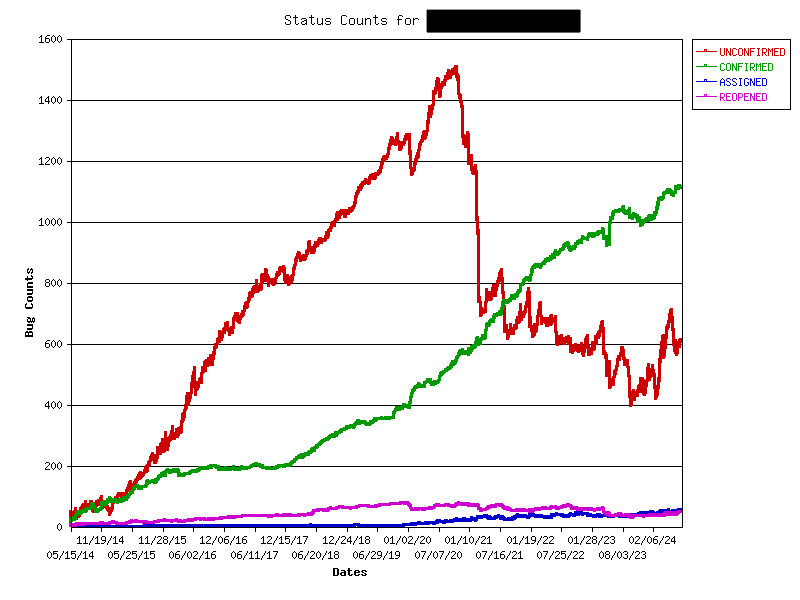
Here’s a graph of the number of Bugzilla tickets over time for an unnamed KDE project that’s had developers actively triaging tickets for the past few years. I bet you can guess when they started!

Note that the numbers include feature requests, which are also Bugzilla tickets. They need triaging too!

See how the number of CONFIRMED reports rises gradually over time, and the number of UNCONFIRMED reports falls in a choppy fashion — indicating new reports being opened and then closed within a few days. But sometimes the number of UNCONFIRMED reports go up for a few weeks, corresponding to times when the developers who do bug triage were too busy or on vacation — highlighting the impact just one or two people can have.

And now for comparison, here’s the graph for a different unnamed KDE project without developers actively triaging Bugzilla tickets:

Eek. How demoralizing.

So now let’s address some anticipated reactions!

If I did this, I’d spend all my time resolving Bugzilla tickets instead of adding new features!

I suspect otherwise, but let’s say you’re right: it would be a sign that the project is actually really buggy and could benefit from you spending more time to fix those bugs! It’s not sustainable to build features on top of a buggy foundation. It’ll catch up with you eventually: the software will become even buggier, the flood of valid yet un-reproducible bug reports will accelerate over time, and you’ll get discouraged by the situation and burn out.

No that’s not what I meant; it’s that all the Bugzilla tickets are really low quality and handling them takes forever!

Ah, this is a better problem to have. It means the software’s foundations are mostly good, but users are getting confused while using it. If you put some time into improving the project’s UI, this type of bug report will fall over time. Clarify complex or confusing features, blame-shift failures caused by 3rd-party services and plugins, improve bad error messages, etc. The KDE Human Interface Guidelines can help!

This could also mean that the tools available for collecting debugging information or reporting bugs are too crude, difficult to use, or hard to find. Spend some time improving these, and the quality of the bug reports will increase.

Finally, it could just mean that your project is just super popular and attracts a lot of attention from normal people not familiar with bug reporting. In this case, in addition to the above, enlist the help of KDE’s bug triagers! Ask us in the kde-bugs:kde.org Matrix room to focus on your project. We can filter out a lot of the obvious junk so you can focus on the real issues.

No no, still not right; it’s that I’m responsible for like 20 projects so I can’t pay attention to such a large number of new Bugzilla tickets every day!

Maybe… but have you verified whether that assumption is accurate? You might be surprised. For example, here’s a list of the Bugzilla tickets opened over the past 24 hours for all KDE Frameworks plus Dolphin, Gwenview, Okular, Filelight, and Elisa. As of the time of writing, there is exactly one Bugzilla ticket. Even broadening it to the past week shows only 16 as of the time of writing! That’s like two per day. How about all of Plasma? As of the time of writing, 6 new tickets in the last 24 hours. Most individual apps get between zero and 2 new tickets per day. These are not overwhelming numbers of Bugzilla tickets to triage. Doing it every day should take only a few minutes.

Ugh, Bugzilla sucks! It’s so clunky and you can’t edit comments or paste images inline! I hate interacting with it!

I definitely won’t deny that Bugzilla is kind of old and clunky-feeling. And not being able to edit comments or paste images inline are indeed pain points. But the grass isn’t greener on the Gitlab side, which would be our alternative. Over the years I’ve compiled a list of showstopper bugs for using Gitlab Issues, including:

  • Moving issues clones them with new comments and history; they can get out of sync and it’s impossible to track issues with persistent URLs!
  • No sub-components, making organization messy unless you apply a soup of tags to every issue. Even then, tags can’t fully replace actual categorization. Finding anything becomes extremely difficult!
  • Only people with developer accounts can add tags, increasing the burden on developers to triage their own issues.
  • Very poor/no support for issue organization with large projects that span multiple git repos.
  • No way to track number of duplicates, making important issues harder to notice and prioritize.
  • Bulk update feature is so limited as to be useless.
  • No fancy graphs like the ones I showed earlier.

It’s not a better product, in my opinion. So yeah, maybe Bugzilla sucks, but so does our available alternative — as well as most of the rest of the competition out there, frankly. Bug trackers are just not sexy projects that attract a lot of money and developer attention. The upstream Bugzilla project itself is struggling hit $200 a month in donations.

Bug triage just isn’t fun. I’m a volunteer, and I want this to be a fun hobby, not work. I don’t wanna do it, sorry.

I totally get it! But let’s take a step back: if you’re volunteering for KDE, you’ve already got a hobby that looks like work to normal people. Don’t deny it, you know it’s true. 🙂 You perform professional-quality software development for free that the average bear demands six figures with benefits for.

And if the volunteer activities you engage in consist of anything other than writing cool new features, then it really starts to look like work! Porting to new APIs? Refactoring old code? Fixing bugs that you don’t personally experience for the good of the project? If you do these tasks out of a sense of responsibility, obligation, or personal pride regarding the state of the project, then bug triage is no different: an under-appreciated task that’s important for project’s long-term health.

OK Mr. Fancypants, how do I do it?

We have extensive documentation on how to do bug triage. But honestly, you’ve been around the block, you probably already know what to do. 🙂

The other topic is how to see daily Bugzilla tickets. If you’ve got good email hygiene, having them emailed right to you is best. Let ’em go to your inbox (don’t filter them into a folder!) and handle them immediately! You can subscribe yourself to the mailing list that new Bugzilla tickets for the project get sent to, or else ask me or a sysadmin to add you personally to the CC list for new tickets (this way is less overwhelming).

The other method is to set aside some time at the beginning of the day for bug triage. Click here and modify the Bugzilla search to include the products and components you care about. Hit “Search”, bookmark the final link, and just visit it once per day.

It’s that easy. And your project and its users will thank you! So go out there and triage your project’s bugs!

This week in KDE: features and UI polish

After last week’s bug-squash-a-thon, this week there was more focus on features and user interface improvements — some of them HIG-driven, as I wrote about yesterday. But we kept the bugs down too! Everything is proceeding nicely, I think.

Notable New Features

Konsole has gained a feature to automatically save all output in a terminal view to a file in real-time (Theodore Wang, Konsole 24.12.0. Link):

Distros can now customize the default set of favorite apps shared across Kickoff, Kicker, and Application Dashboard (Harald Sitter, Plasma 6.2.0. Link)

Info Center has a new page showing technical memory information (Thomas Duckworth, Plasma 6.2.0. Link):
Notable UI Improvements

When KWin is asked to open a window whose minimum height is still taller than the screen, it no longer places it with the titlebar cut off on top, which would make it impossible to move without knowing about the Meta+drag feature. Instead, KWin will ensure the titlebar is visible and instead position the window so only content at the bottom is cut off (Xaver Hugl, Plasma 6.1.4. Link)

Refined how KRunner matches text to System Settings pages, so it will be less aggressive about showing them to you for search text with a very weak match (Fabian Vogt, Plasma 6.1.4. Link)

Plasma’s Digital Clock now requests “tabular numerals” just in case the active font has this feature as an optional but off-by-default thing. This ensures that all number characters are fixed-width so that the time display doesn’t jump around throughout the day (Calum Smith, Plasma 6.2.0. Link)

System Settings’ Drawing Tablet page now tells you when your tablet doesn’t support changing its orientation, so you don’t think it’s our fault (Joshua Goins, Plasma 6.2.0. Link)

Did a round of UI polishing for System Settings’ KWin Rules page, which also fixed a bug related to weird scrolling behavior (Ismael Asensio, Plasma 6.2.0. Link)

The animation speed of the Plasma logout screen’s fade-to-black effect now instantly reacts to changes in the global animation speed, and the technical change to make this happen also happened to fix a performance issue with the animation as well (David Edmundson, Plasma 6.2.0. Link 1 and link 2)

Improved the accessibility of the ContextualHelpButton and KeySequenceItem library components, as well as multiple controls on System Settings’ Shortcuts page (Christoph Wolk, Frameworks 6.5 and Plasma 6.2.0. Link 1, link 2, and link 3)

In the the Places panels visible in Dolphin, the open/save dialogs, and many other places, items now show tooltips with relevant information when hovered. This feature is enabled only when built with Qt 6.8, as 6.7 and earlier suffer from a bug that makes it not work properly (Kai Uwe Broulik, Frameworks 6.5. Link)

Notable Bug Fixes

Discover no longer crashes on distros built with asserts turned on (such as Neon) when run using a language where the categories have been mis-translated and overlap one another (Harald Sitter, Plasma 6.1.4. Link)

After changing the current systemwide time zone in System Settings and quitting the app, it now quits properly, no longer staying secretly open in the background as a zombie and preventing you from opening it again (Nicolas Fella, Plasma 6.1.4. Link)

Dragging screenshots and other files from Plasma notifications into Chromium-based apps (Chrome, Discord, etc) now works as expected (David Edmundson, Plasma 6.1.4. Link)

Fixed a bug in the free space notifier that would cause it to flag nearly-full partitions that are read-only, such as on immutable OS style distros like Fedora Kinoite (Timothée Ravier, Plasma 6.1.4. Link)

Found and fixed the source of the issue that made KWin’s new triple buffering feature sometimes cause stuttering instead of the expected butter-smooth animations (Xaver Hugl, Plasma 6.1.4. Link)

Fixed a recent regression that caused multi-row Task Manager widgets to take up too much space on Plasma panels using the “Fit to content” size mode (Ismael Asensio, Plasma 6.1.4. Link)

Fixed an issue in KWin that caused native Wayland apps to receive incorrect information about the order in which modifier keys were pressed (David Edmundson, Plasma 6.2.0. Link)

The “Click in track to scroll by one page at a time” feature — which broke in Frameworks 6.0 due to changes in Qt — now works again (Ivan Tkachenko, Frameworks 6.5. Link)

Other bug information of note:

Notable in Performance & Technical

The “Disable when two keys are held down” sticky keys feature now works on Wayland (Nicolas Fella, Plasma 6.2.0. Link)

Discover now natively supports package installation and updating for PostmarketOS (Alexey Min and Devin Lin, Plasma 6.2.0. Link)

Prompted by a review from the SUSE security team, we implemented some security hardening that allows KAuth to use file descriptors rather than file paths, and implemented support for this on System Settings’ Login Screen page (Athul Raj Kollareth, Frameworks 6.5 and Plasma 6.2.0. Link 1 and link 2)

Fixed the source of the findInCache with a lastModified timestamp of 0 is deprecated log spam, especially on immutable OS style distros like Fedora Kinoite (Timothée Ravier, Frameworks 6.5. Link)

Notable in Automation & Systematization

In Elisa, added a test for restarting the file indexer, fixed a perpetually broken test, and turned on the “tests must pass” feature to ensure that tests don’t break again in the future (Jack Hill, link)

…And Everything Else

This blog only covers the tip of the iceberg! If you’re hungry for more, check out https://planet.kde.org, where you can find more news from other KDE contributors.

How You Can Help

If you use have multiple systems or an adventurous personality, you can really help us out by installing beta versions of Plasma using your distro’s available repos and reporting bugs. Arch, Fedora, and openSUSE Tumbleweed are examples of great distros for this purpose. So please please do try out Plasma beta versions. It truly does help us! Heck, if you’re very adventurous, live on the nightly repos. I’ve been doing this full-time for 5 years with my sole computer and it’s surprisingly stable.

Does that sound too scary? Consider donating today instead! That helps too.

Otherwise, visit https://community.kde.org/Get_Involved to discover other ways to be part of a project that really matters. Each contributor makes a huge difference in KDE; you are not a number or a cog in a machine! You don’t have to already be a programmer, either. I wasn’t when I got started. Try it, you’ll like it! We don’t bite!

KDE Human Interface Guidelines update

It’s been about a month and a half since I wrote about KDE’s new Human Interface Guidelines (HIG). It turns out there’s a surprising amount to report since then!

First of all, the news got picked up by Linux Magazine which did a story about it, including an interview with me! That felt nice.

Next, there have been a number of contributions and enhancements:

Joshua Goins

  • Fixed a lot of typos, awkward wordings, and small errors.
  • Added information about using Qt to set Task Manager badges directly.
  • Expanded the instructions on contributing to the HIG.

Thiago Sueto

  • Corrected several typos and spelling errors.

Christoph Wolk

  • Improved the grammatical correctness of one of the text recommendations.

Nate Graham (me)

  • Polished up the text some more.
  • Added additional suggested inclusiveness-related text replacements.
  • Clarified when a hamburger menu is and isn’t appropriate.
  • Updated the icon size recommendations.
  • Added examples and suggested replacements for common acronyms.
  • Wrote a recommendation for how to implement “go home” navigation.
  • Mentioned when first-run wizards are and aren’t appropriate, migrating some content from our old “Frequently discussed topics” wiki page.
  • Refined the recommendation for button length and combox text capitalization.
  • Described when it’s appropriate to shorten button labels because nearby context indicates what they affect.
  • Expanded the Icons page to offer more concrete guidelines about how to choose an icon and what style to use, and also added more pictures.

Overall I think it’s looking pretty good now, especially the Icons page which received a lot of attention recently.

In addition, there are more pending merge requests by Christoph Wolk, Emir Sari, and me. So it feels like an actual team project now! I think the goal of encouraging more contribution can be called a success.

Finally, Christoph Wolk and I have been going through System Settings pages and tweaking them to comply with the HIG. System Settings is good low-hanging fruit since it’s almost all QML at this point, so changes are easy. And there are a lot of pages, so it’s not hard to find small inconsistencies.

But were not finished yet! More eyeballs are needed. A few TODOs need resolving. More images could be helpful. So check out these two links to learn how to contribute changes:

Even a beginner developer can help out by tweaking the user interface to conform to the HIG. And if you’re a hardcore developer, we still need some more components for writing powerful QML apps.

Still too scary? Then donate to KDE. Our budget is tiny, so your money genuinely does have an impact!

These past two weeks in KDE: fixing sticky keys and the worst crashes

These past two weeks were big for Wayland accessibility support, as Nicolas Fella did a lot of work to improve support for sticky keys to equal the state they were in on X11. This work is not complete, but so far it’s taken a big bite out of the open issues! The work lands in a mixture of Plasma 6.1.3 and 6.2.0 (link 1, link 2, link 3, link 4, link 5, link 6).

Beyond this, it’s notable that Plasma developers fixed the five most common Plasma crashes, as well as a bunch of less common ones, which you’ll see mentioned below. These were caused by a mix of Qt regressions and our own code defects. The new automatic crash reporting system has been a huge boon here, allowing us to see which crashes are actually affecting people most. So please do continue to report them!

And of course there’s lots more too. Check it out:

New Features

Elisa now offers a feature to add a track, album, etc. directly to the playlist after current song, playing it next (Jack Hill, Elisa 24.08.0. Link):

System Settings’ Drawing Tablet page now has a calibration tool (Joshua Goins, Plasma 6.2.0. Link)

The default width of Icons-and-Text Task Manager items is now user- configurable, and should also exhibit slightly smarter shrinking behavior as space gets filled up (Kisaragi Hiu, Plasma 6.2.0. Link)

Added support for Plasma’s charging threshold feature to OpenBSD (Rafael Sadowski, Plasma 6.2.0. Link)

UI Improvements

Dolphin now features a lovely super premium user experience for installing Filelight if it’s not already installed (Felix Ernst, Dolphin 24.08.0. Link):

Filelight now has a more illuminating and welcoming homepage (me: Nate Graham, Filelight 24.08.0. Link):

Spectacle has now adopted the “inline messages touch the header” paradigm (me: Nate Graham, Spectacle 24.08.0. Link):

System Settings’ Night Light page now accepts creative custom times, no longer internally clamping them to a set of acceptable times (Vlad Zahorodnii, Plasma 6.1.3. Link)

Improved the smoothness of resizing Plasma widgets (Vlad Zahorodnii, Plasma 6.1.4. Link)

Made it impossible to remove administrator privileges from your current user unless there’s at least one other admin user on the system, to ensure that someone is an admin and can reverse the decision if needed! (Thomas Duckworth, Plasma 6.2.0. Link)

The “launch this app” shortcut for apps on System Settings’ Shortcuts page is now named “Launch”, making its purpose clear (me: Nate Graham, Plasma 6.2.0. Link)

Added some relevant clipboard-related keywords to System Settings’ General Behavior page, so you can find it in a search for things like “paste” and “selection” and stuff like that (Christoph Wolk, Plasma 6.2.0. Link)

Plasma’s Digital Clock widget now uses a typographic space to separate the time from the date when in single-row mode, so that it looks better especially when using a monospace font (Kisaragi Hiu, Plasma 6.2.0. Link)

Removed the filter for different job types from Plasma’s Printers widget, because it never worked (seriously) and apparently no one ever noticed because we didn’t even have any bug reports about it! (Mike Noe, Plasma 6.2.0. Link)

Bug Fixes

Filelight no longer fails to initiate a second scan after leaving the first one and going back to the Overview page (Harald Sitter, Filelight 24.08.0. Link)

Fixed one of the most common ways that Plasma could crash randomly, out of the blue (Akseli Lahtinen, Plasma 6.1.3. Link)

Fixed one of the most common ways that Plasma could crash on Wayland when a screen turns off (Marco Martin, Plasma 6.1.3. Link)

Fixed another one of the apparently many ways that Plasma can crash while handling various types of clipboard data, which appeared to be very common (David Edmundson, Plasma 6.1.3. Link)

Fixed a somewhat common way that Powerdevil could crash when waking the system from sleep with certain types of monitors (Jakob Petsovits, Plasma 6.1.3. Link)

Fixed an issue that caused Spectacle to crash after finishing a screen recording on systems using PipeWire 1.2.0 (Arjen Hiemstra, Plasma 6.1.3. Link)

Fixed an issue that caused Plasma on Wayland to crash when dragging a Task Manager task with no .desktop file associated with it (such as a Steam game) onto the desktop (Akseli Lahtinen, Plasma 6.1.3. Link)

Fixed a recent regression that caused System Tray icons for GTK2 apps to stop responding after the first time they’re clicked. Added an autotest to make sure this doesn’t regress again, too (David Edmundson and Fushan Wen, Plasma 6.1.3. Link)

It’s now possible to set your user avatar image to a file those full path contains “special characters” like spaces, ampersands, etc. (Daniil-Viktor Ratkin, Plasma 6.1.3. Link)

It’s now more reliable to change the date or time using System Settings on a distro not using Systemd (Fabio Bas, Plasma 6.1.3. Link)

Plasma’s RDP server now works properly after again a prior failed connection using a non-H.264-capable client app (Arjen Hiemstra, Plasma 6.1.3. Link)

The Fcitx input method’s “show input method info when switching input focus” setting is now compatible with Plasma’s zoom-out style edit mode, and no longer causes it to exit immediately when the input method popup is shown (Weng Xuetian, Plasma 6.1.3. Link)

Fixed a different somewhat common out-of-the-blue Plasma crash (Méven Car, Plasma 6.1.4. Link)

Fixed a case where KWin could crash on X11 when compositing gets toggled on or off (Vlad Zahorodnii, Plasma 6.1.4. Link)

Fixed a regression in Discover that caused various alerts and information items in certain apps’ description pages to not appear as expected (Aleix Pol Gonzalez, Plasma 6.1.4. Link)

Fixed a regression in Plasma 6.0 that caused the “remove this item” hover icons in KRunner’s history view to be invisible (Ivan Tkachenko, Plasma 6.1.4. Link)

OpenVPN VPNs requiring a challenge-response work again with NetworkManager 1.64 or later (Benjamin Robin, Plasma 6.2.0. Link)

“Text Only” System Monitor sensors on horizontal Plasma panels are once again correctly-sized with centered text (Arjen Hiemstra, Plasma 6.2.0. Link)

“Line Chart” System Monitor sensors now show their legends as expected when placed on a wide vertical Plasma panel (Arjen Hiemstra, Plasma 6.2.0. Link)

When using Plasma’s “Raise maximum volume” setting, it now applies to the per-app volume sliders in the System Tray popup as well as the device volume sliders (Roberto Chamorro, Plasma 6.2.0. Link)

Fixed the source of bizarre view corruption in Dolphin introduced in the recently-released Frameworks 6.4 (Vlad Zahorodnii, Frameworks 6.4.1. Link)

Fixed a case where Plasma could crash when trying to re-assign a shortcut for a widget to one already used by something else (Arjen Hiemstra, Frameworks 6.5. Link)

On the “Get New [thing]” dialogs, downloading one file from an entry that includes many now works from the details page (Akseli Lahtinen, Frameworks 6.5. Link)

Fixed another fairly common way that Plasma could crash on Wayland when a screen turns off (David Edmundson, Qt 6.7.3. Link)

Fixed yet another common way that Plasma could crash on Wayland, this time when showing notifications (David Edmundson, Qt 6.7.3. Link)

Fixed a case where Plasma could crash when you trigger the Meta+V keyboard shortcut to open the clipboard history menu over and over again in rapid succession (Vlad Zahorodnii, Qt 6.7.3. Link)

Fixed a case where trying to save a file in a Flatpak or Snap app using the standard Save dialog could fail and cause the saving app to quit instead! (Nicolas Fella, Qt 6.7.3. Link)

Other bug information of note:

Performance & Technical

Receiving a Plasma notification no longer blocks KWin’s “direct scan-out” feature, e.g. while playing a game, so it should no longer briefly reduce performance (Xaver Hugl, Plasma 6.1.3. Link)

Improved KWin’s detection for whether triple buffering on Wayland will improve things so that it won’t occasionally turn on and off repeatedly, impairing performance (Xaver Hugl, Plasma 6.1.3. Link)

Plasma’s RDP server is now capable of listening for IPv6 connections (Arjen Hiemstra, Plasma 6.1.3. Link)

KWin now disables 10 bits-per-color (BPC) support for monitors plugged into a dock, as these often limit the signal to 8 BPC but don’t tell KWin, causing issues when KWin tries to enable 10 BPC mode because it thinks it should be possible (Xaver Hugl, Plasma 6.1.4. Link)

KWin now operates with “realtime” capabilities on systems using musl instead of glibc (Vlad Zahorodnii, Plasma 6.1.4. Link)

Plasma’s RDP server now also works as expected on systems using the OpenH264 video codec (Fabian Vogt, Plasma 6.2.0. Link)

Relevant only for cutting-edge distro-builders: It’s now possible to compile KWin with support for only the Wayland session, so support for X11 apps would be provided exclusively through XWayland (Neal Gompa, Plasma 6.2.0. Link)

Improved performance for everything in KDE that uses KFileItem::isHidden (Volker Krause, Frameworks 6.5. Link)

Created a new WindowStateSaver QML object you can add to apps’ windows to make them remember their size, maximization state (and position, on X11) (Joshua Goins, Frameworks 6.5. Link)

Apps storing their transient state data separately from their persistent configuration data now do so by putting the state config file in the standard XDG state folder of ~/.local/state/ (Harald Sitter, Frameworks 6.5. Link)

Automation & Systematization

Added an autotest to test clearing the clipboard history (Fushan Wen, link)

…And Everything Else

This blog only covers the tip of the iceberg! If you’re hungry for more, check out https://planet.kde.org, where you can find more news from other KDE contributors.

How You Can Help

If you use have multiple systems or an adventurous personality, you can really help us out by installing beta versions of Plasma using your distro’s available repos and reporting bugs. Arch, Fedora, and openSUSE Tumbleweed are examples of great distros for this purpose. So please please do try out Plasma beta versions. It truly does help us! Heck, if you’re very adventurous, live on the nightly repos. I’ve been doing this full-time for 5 years with my sole computer and it’s surprisingly stable.

Does that sound too scary? Consider donating today instead! That helps too.

Otherwise, visit https://community.kde.org/Get_Involved to discover other ways to be part of a project that really matters. Each contributor makes a huge difference in KDE; you are not a number or a cog in a machine! You don’t have to already be a programmer, either. I wasn’t when I got started. Try it, you’ll like it! We don’t bite!

How I manage my KDE email

Every once in a while people ask me about my email routine, so I thought I’d write about it here.

Everything I do starts with the philosophy that work and project email is a task queue. Therefore an email is a to-do list item someone else has assigned to me.

Ugh, how horrible! Better get that stuff done or rejected as soon as possible so I can move on to the stuff I want to do.

This means my target is inbox zero; achieving it means I got all my tasks done. Like everyone, I don’t always achieve it, but zero is the goal. How do I work towards it?

#0: Separate KDE and non-KDE emails

When I’m not in KDE mode, I want to be able to turn that stuff off in my own brain. To accomplish this, I have a home email account and a KDE email account. I adjust all my KDE accounts to only send email to my KDE address.

#1: Use an email client app

To manage multiple email accounts without going insane, I avoid webmail. In addition to not supporting multi-account workflows, it’s usually slow, lacking useful features, and has poor keyboard navigation.

I currently use Thunderbird, but I’m investigating moving to KDE’s KMail. Regardless, it has to be a desktop email client that offers mail rules.

#2: Automatic categorization (0 minutes)

I configure my email client with mail rules to automatically tag emails with colored labels according to what they are, and then mark them as read:

This results in almost all newly-arrived emails becoming colored and marked as read:

When I get a new kind of automated email that didn’t automatically receive a color label, I adjust the rules to match that new email so it gets categorized in the future, too.

#3: Manual categorization (1-3 minutes)

When I first open my email client in the morning, everything will be categorized except 5-15 emails sent by actual people. To see just these, I’ll filter the inbox by unread status, since all the auto-categorized colored emails got automatically marked as read.

Then it’s time to figure out what to do with them. For anything that needs a response or action today, I mark it as urgent by hitting the “1” key. For anything that needs a personal response in the next few days, I hit “9” to tag it as personal and it becomes green. And so on.

Any emails that don’t need a response get immediately deleted. I never miss them. It’s fast and painless. Put those emails out of their misery.

#4: Action all the urgent emails (5-15 minutes)

Urgent means urgent; first I’ll go through these one at a time, and action them somehow. This means one of the following:

  1. If it’s from a person, write a reply and then delete the email.
  2. If it’s from an automated system, open the link to the thing it’s about in a web browser and then delete the email.

The email always ends up deleted! For people like us emails are not historical records, they’re tasks. Do you need to remember what tasks you performed 8 years ago on Tuesday, May 11th? Of course not. Don’t be a digital hoarder; delete your emails. You won’t miss them.

At this point I may realize that I was overzealous in tagging something as urgent. That’s fine; I just re-tag it as something else, and then I’ll get to it later.

#5: Action all the merge request emails (5-10 minutes)

Since my day job is “quality assurance manager”, these are important. I’ll go through every automated email from invent.kde.org about merge requests for repos I’m subscribed to and action them somehow:

  1. Open the link to the merge request in my web browser, and then delete the email.
  2. Decide I don’t need to review this particular merge request, and just delete the email.

More deletion! I never keep these emails around; they’re temporal notifications of other people’s work. Nothing worth preserving.

#6: Action all the bug report emails (5-15 minutes)

My web browser is now filled up with tabs for merge requests to review. Now it’s time to do that for relevant bug reports. I follow the same process here: open the bug report in my web browser because it needs a comment or other action from me, and then delete the email — or else immediately delete the email because it’s not directly actionable. Delete, delete, delete. It’s the happiest word when it comes to email. Everyone hates emails; delete them! Show them you mean business.

#7: Do actual work

At this point I’ve spent between 15 and 40 minutes just on email, ugh. Time to do some actual work! So now I’ll spend the next several hours going through those tabs in my web browser, from left to right. First reviewing merge requests, then handling the relevant bug reports (closing, re-opening, replying to comments, changing metadata, marking as duplicate, CCing others, etc). During this step, I’ll also triage the day’s new bug reports.

Sometimes I’ll check email again while doing these, since more will be coming in. It’s easy to delete or action them individually.

After all these tabs are closed, hooray! I have some time to be proactive instead of reactive! Usually this amounts to 0-120 minutes a day during working hours. I try to spend this time on fixing small bugs I found throughout the day, opening and participating in discussion topics about important matters, working on the KDE HIG, and sometimes helping people out on http://www.discuss.kde.org or http://www.reddit.com/r/KDE.

#8: Action all the rest of the emails (10-25 minutes)

Towards the end of the day I’ll look at the emails marked as “Personal” and “KDE e.V./Akademy” and try to knock a few out. It’s okay if I’m too tired; these aren’t urgent and can wait until tomorrow. After a few days of sitting there, I’ll mark them as urgent.


And that’s pretty much it! This is just my workflow; it doesn’t need to be yours. But in case you want to try it, here are answers to some anticipated objections:

Ugh, that sounds like it takes forever!

It really doesn’t.

On a Monday maybe it takes more like 35 or 40 minutes since there are emails from the weekend to process. But on Tuesday through Friday, it’s closer to 15-20 minutes. Often 10 on Friday. Thanks to the automatic categorization, all of this is much faster than manually looking at every email one by one, and much more effective than getting depressed by hundreds of unread emails in the morning and ignoring them.

Deleting emails is too scary, what if I need them in the future?

You won’t.

But if that’s too scary or painful, set up your email account or client app to archive “deleted” messages in permanent storage rather than truly deleting them. Just keep in mind that you’ll eventually run out of storage space and have to deal with that problem in the future. Once it happens, consider it an opportunity to reconsider, asking yourself how many emails you actually did need to dig out of cold storage. I’m guessing the number will be very low, maybe even 0.

This might work for your workflow, but I get different types of emails!

Maybe so, but the general principle of automatically tagging (but not moving) emails applies to anyone. I firmly believe that anyone can benefit from this part. Make the software do the grunt work for you!

What do I do about all of those the old emails in my inbox? There are too many, I’ll never get through them!

If you’re one of those people who has 50,000 emails in your inbox, select all and delete. You won’t miss any of them.

Seriously. All of them. Every single one. Right now. Just do it.

How do I know this is fine?

  • Old notifications about things like bug reports or merge requests are worthless because they already happened. Delete.
  • Old mailing list conversations long since dried up or got actioned without your input. Delete.
  • Old at-the-time urgent emails from important people are no longer relevant, because the people who sent them long ago concluded that you’re unreliable and decided to not contact you again. Because that’s what happens when you let emails pile up: you’re being rude to all the people whose messages you’ve ignored. Feel sad, resolve to do better, then delete.

The good news is that you can get better at this anytime, but it’s almost impossible without making a clean break with a messy past. You’ll be looking at old stuff forever and won’t have time for new stuff.

I just get too much email, it’s impossible to keep up no matter what I do!

You need to unsubscribe from some things. Maybe a lot of things. Longtime contributors to any project will have accumulated years worth of subscriptions to sources of emails that are no longer relevant. Prune them!

This may trigger Fear Of Missing Out. Recognize that and fight against it. You can almost always reduce your email load by unsubscribing from this stuff:

  • Activity in Git repos for projects you no longer contribute to.
  • Bug reports for products you aren’t involved in or responsible for anymore.
  • Medium to high traffic mailing lists that are mostly or entirely irrelevant to your present interests and activities.
  • Almost all the spam from LinkedIn.
  • All the spam from online stores, newspapers, political campaigns. The “unsubscribe” button will work, don’t give up!

Resist the temptation to filter these emails into folders that you tell yourself you’ll remember to look at once in a while. You probably won’t, and by the time you do, everything in them won’t be actionable anymore — if it ever was in the first place. Unsubscribe and delete!

This week in KDE: autoscrolling

New Features

You can now turn on the “autoscrolling” feature of the Libinput driver, which lets you scroll on any scrollable view by holding down the middle button of your mouse and moving the whole mouse (Evgeniy Chesnokov, Plasma 6.2.0. Link)

UI Improvements

When zooming into or out of a document in Okular using Ctrl+Scroll, it now zooms into or out of the actual cursor position, not the center of the page (Alexis Murzeau, Okular 24.08.0. Link)

Okular now scales radio buttons and checkboxes to the size of the form fields they inhabit, which looks better for forms that have huge or tiny versions of these (Pratham Gandhi, Okular 24.08.0. Link)

Dolphin now supports the systemwide “disable smooth scrolling” setting (Nathan Misner, Dolphin 24.08.0 Link)

Opening and closing Elisa’s playlist panel is no longer somewhat choppy (Jack Hill, Elisa 24.08. Link)

When quick-tiling two adjacent windows and resizing one, the other will resize too. The location of the split between them is now reset to its default position after all adjacent quick-tiled windows are closed or un-tiled (Erwin Saumweber, Plasma 6.1.2. Link)

.Desktop files in sub-folders below your desktop are now shown as they are on the desktop itself (Alexander Wilms, Plasma 6.2.0. Link)

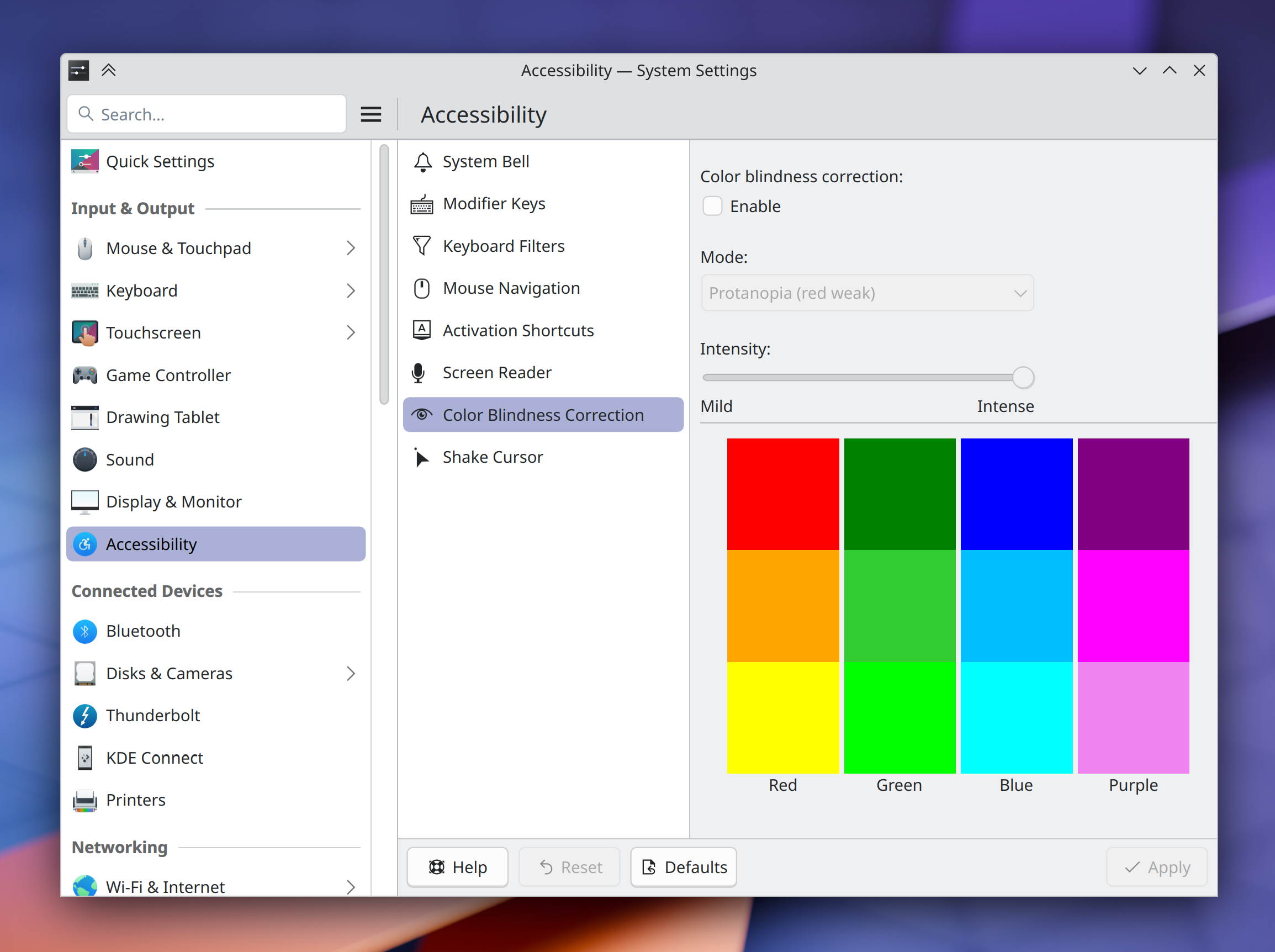
On System Settings’ Accessibility page, the Open dialog for choosing custom bell sounds now accepts .oga files, and also tells you what types of files it supports (me: Nate Graham, Plasma 6.2.0. Link)

On System Settings Desktop Effects page, “internal” effects are no longer listed at all (even in a hidden-by-default state), which makes it more difficult for people to break their systems by accident, and also fixes an odd interaction whereby clicking the “Defaults” button would reset the default settings of internal effects changed elsewhere. You can still see the internal effects in KWin’s debug console window if needed (Vlad Zahorodnii, Plasma 6.2.0. Link)

Made a bunch of small changes to System Settings pages to align them better with the new human interface guidelines (me: Nate Graham, Plasma 6.2.0. Link 1, link 2, link 3, and link 4)

Improved the legibility of the text in Kirigami.NavigationTabBar buttons, especially on low or medium DPI screens (me: Nate Graham, Frameworks 6.4. Link)

Bug Fixes

Fixed a recent regression that caused the Powerdevil power management daemon to sometimes crash randomly when the system has any monitors connected that support DDC-based brightness control (Jakob Petsovits, Plasma 6.1.2. Link)

On the System Settings’ recently re-done Keyboard page, table columns in the layout table are once again resizable, and also have more sensible default widths now (Wind He, Plasma 6.1.2. Link)

Fixed one source of the recent issue with certain System Settings pages being sometimes broken when opened — this one being the issue where opening the Touchpad or Networks pages would break other ones opened afterwards. We’re still investigating the other issues, which frankly make no sense and shouldn’t be happening. Some of them may be Qt regressions. Investigation is ongoing (Marco Martin, Plasma 6.1.3. Link)

Icons in the new Edit Mode’s toolbar buttons are no longer slightly blurry (Akseli Lahtinen, Plasma 6.1.3. Link)

KWin’s “open new windows under pointer” feature now actually does, and ignores the active screen when that screen differs from the screen with the pointer on it (Xaver Hugl, Plasma 6.1.3. Link)

Fixed multiple recent regressions and longstanding issues with System Monitor widgets displayed on panels (Arjen Hiemstra, Plasma 6.2.0):

  • Text in small pie charts overflowing onto the next line awkwardly (link)
  • Adjacent pie charts overlapping at certain panel thicknesses (link)
  • Graphs not taking enough space on a thick panel (link)

With wide color gamut turned on or an ICC color profile in use, transparent windows are no longer too transparent (Xaver Hugl, Plasma 6.2.0. Link)

Showing and hiding titlebars and frames on a scaled display no longer causes XWayland windows to move diagonally by about 1px every time (Vlad Zahorodnii, Plasma 6.2.0. Link)

Fixed multiple issues and glitches affecting floating panels via a significant code refactor (Marco Martin, Plasma 6.2.0. Link 1, link 2, and link 3)

Fixed a recent Qt regression that caused Plasma to sometimes crash when screens were disconnected (David Edmundson, Qt 6.7.3. Link 1 and link 2)

Fixed a Qt regression that caused web pages rendered by QtWebEngine (most notably in KMail’s HTML message viewer window) to display have blocky, blurry, or pixelated text and graphics (David Edmundson, Qt 6.8.0. Link)

Other bug information of note:

Performance & Technical

Made the pam_kwallet library able to build with libgcrypt 1.11, restoring its ability to let the system wallet unlock automatically on login again (Daniel Exner, Plasma 6.1.2. Link)

Automation & Systematization

Added some UI tests to KCalc, ensuring that the recent prominent regression in functionality can’t happen again (Gabriel Barrantes, link)

…And Everything Else

This blog only covers the tip of the iceberg! If you’re hungry for more, check out https://planet.kde.org, where you can find more news from other KDE contributors.

How You Can Help

As I mentioned last week, if you use have multiple systems or an adventurous personality, you can really help us out by installing beta versions of Plasma using your distro’s available repos and reporting bugs. Arch, Fedora, and openSUSE Tumbleweed are examples of great distros for this purpose. So please please do try out Plasma beta versions. It truly does help us! Heck, if you’re very adventurous, live on the nightly repos. I’ve been doing this full-time for 5 years with my sole computer and it’s surprisingly stable.

Does that sound too scary? Consider donating today instead! That helps too.

Otherwise, visit https://community.kde.org/Get_Involved to discover other ways to be part of a project that really matters. Each contributor makes a huge difference in KDE; you are not a number or a cog in a machine! You don’t have to already be a programmer, either. I wasn’t when I got started. Try it, you’ll like it! We don’t bite!