This week in Plasma: polishing like mad

The core Plasma team has entered full-on bug-fixing mode until Plasma 6.2.1, and what a week of bug-fixes it was! We’re nailing regressions reported in the beta release as they appear, as well as older bugs we didn’t manage to get to yet. I’m incredibly impressed with the team and their tremendous work this week!

In addition, a few features and UI changes postponed from Plasma 6.2 have started to land in 6.3.

Notable New Features

Plasma’s Widget Explorer sidebar now gives you the opportunity to remove all instances of a widget, which can help when you have a stuck widget hidden somewhere (Niccolò Venerandi, Plasma 6.3.0. Link):

Notable UI Improvements

With multiple screens showing wallpaper slideshows, the transition times for each screen’s slideshow are now synced so they happen at the same moment (Sebastian Meyer, Plasma 6.3.0. Link)

Loosened the criteria for mouse button re-binding, so for example you can now swap the “Back” and “Middle Click” buttons (Paul Dann, Plasma 6.3.0. Link)

The Emoji Selector window now remembers its window position (on X11) and size (me: Nate Graham, Plasma 6.3.0. Link)

For notifications that you can pause, the “Pause” button now becomes a “Resume” button after you press it, instead of being checkable (me: Nate Graham, Plasma 6.3.0. Link)

In Plasma’s Networks widget, networks you’re not connected to no longer have Configure buttons, because clicking on them didn’t actually do anything useful anyway (me: Nate Graham, Plasma 6.3.0. Link)

The checkboxes on System Settings’ Bluetooth page have been replaced with switches, because they’re for instant-apply settings (Christoph Wolk, Plasma 6.3.0. Link)

Notable Bug Fixes

Fixed a bug that could cause System Settings to crash when leaving its Wallpaper page (Méven Car, Plasma 6.2.0. Link)

Fixed a bug that could cause Plasma to crash under certain circumstances when applying certain global themes (Nicolas Fella, Plasma 6.2.0. Link)

Fixed a case where plasma-browser-integration-host (the process that communicates with web browsers that have Plasma Browser Integration installed) could crash when windows were closed (Méven Car, Plasma 6.2.0. Link)

Closing a Plasma widget while a tooltip for one of its UI elements is open no longer causes the tooltip to remain visible and awkwardly jump to the panel itself; now the tooltip also disappears as you would expect. This also fixes a related crash (Niccolò Venerandi, Plasma 6.2.0. Link 1 and link 2)

Fixed a bug that could cause the logout process to get stuck on a black screen on X11 (David Edmundson, Plasma 6.2.0. Link)

Moving a window to another virtual desktop using a method that does not switch to that desktop no longer leaves no window focused on the current desktop (David Edmundson, Plasma 6.2.0. Link)

Fixed a bug that caused real-fake-session-restore to not work properly on Wayland (David Edmundson, Plasma 6.2.0. Link)

The footer on Discover’s updates page no longer sometimes gets visually broken (Harald Sitter, Plasma 6.2.0. Link)

When configuring Plasma’s Digital Clock widget to show seconds and using 24-hour time, the time display no longer gets cut off on narrow vertical panels (Akseli Lahtinen, Plasma 6.2.0. Link)

Fixed an issue that could cause Plasma’s edit mode to misbehave in strange ways when there are widgets on the desktop and auto-hide panels (Marco Martin, Plasma 6.2.0. Link)

Plasma’s “Minimize All Windows” widget no longer sometimes fails to restore them on Wayland; now this always works (Christoph Wolk, Plasma 6.2.0. Link)

System Settings once again remembers its window size, position (on X11), and maximization state as expected (Akseli Lahtinen, Plasma 6.2.0. Link)

On X11, you can now open the color scheme editor on System Settings’ Colors page more than once (Albert Astals Cid, Plasma 6.2.0. Link)

Fixed the “two clicks to rename” feature on the Plasma desktop when using systemwide double-click mode so that it works properly (Christoph Wolk, Plasma 6.2.0. Link)

Fixed a bug that caused it to be impossible to change power profiles in the Plasma widget under certain circumstances. There may be other such bugs too BTW; this only fixed one of them (Jakob Petsovits, Plasma 6.2.0. Link)

KWin’s global “Move Mouse to Focus” shortcut now does something more sensible on Wayland by moving the pointer to the focused window instead of the top-left corner of the screen (Xaver Hugl, Plasma 6.2.0. Link)

The Audio Volume widget can once again display its complex view (rather than a dumb giant icon) when placed in an extremely thick panel (Christoph Wolk, Plasma 6.2.0. Link)

Made it possible to translate four labels on System Settings’ Touchpad page which were previously untranslatable and hence always shown in English (Victor Ryzhykh, Plasma 6.2.0. Link)

Plasma’s feature to sync your keyboard’s LED color with the system’s accent color (where supported) can now be permanently disabled if you don’t use it or like it (Natalie Clarius, Plasma 6.2.0. Link)

When using an auto-hide Plasma panel, it can no longer be accidentally opened invisibly while in KWin’s Overview effect, which would also cause it to briefly get stuck open after leaving Overview (Xaver Hugl, Plasma 6.2.0. Link)

Plasma’s Power and Battery widget no longer sometimes mis-labels batteries on systems with removable batteries or multiple batteries (Oliver Beard, Plasma 6.2.0. Link)

Fixed a bug that caused some Plasma widgets’ pop-ups to not have their top corners rounded as intended (Niccolò Venerandi, Plasma 6.2.0. Link)

Throughout QtQuick-based KDE software, pressing a keyboard’s “Show Menu” key now opens the menu under the focused item if there is one, rather than always opening it under the cursor (Evgeny Chesnokov, Frameworks 6.7. Link)

Throughout KDE software, the “Upload to Imgur” sharing plugin now only lets you try to upload file types that Imgur actually supports (Nicolas Fella, Frameworks 6.7. Link)

The informational tooltips seen all over the place in System Settings that you can access by clicking on a little button with the info symbol on it no longer flickers between visible and invisible if it opens right under the cursor (Ismael Asensio, Frameworks 6.7. Link)

Global shortcuts for activating Kickoff no longer break if you restart Plasma with plasmashell --replace (David Edmundson, Frameworks 6.7. Link). Also, friendly reminder that if you’re using Plasma’s systemd startup integration — which you probably are since it’s on by default for distros that ship systemd — the correct way to restart Plasma is systemctl restart --user plasma-plasmashell.service.

Other bug information of note:

Notable in Performance & Technical

In Discover, moved the processing of app ratings to another thread so it can’t block the UI thread and make the app feel slow and laggy when the network is slow (Aleix Pol Gonzalez, Plasma 6.2.0. Link)

Launching an app that lacks a .desktop file (e.g. an app packaged as an AppImage) no longer causes a brief screen freeze whose length is proportional to the size of the app’s executable (Vlad Zahorodnii, Plasma 6.2.0. Link)

Optimized how KDE software in general finds mountpoints, which can result in a significant speed-up for various apps’ file-based use cases — up to 80% for one of them! (Kai Uwe Broulik, Frameworks 6.7. Link)

How You Can Help

Please test the Plasma 6.2 beta release! We’ve focused a lot on stability for this release and want to make sure we haven’t missed anything big before the final release in about a month. Your bug reports do not go into a black hole; we triage every one! So enthusiastic testing and bug reporting is encouraged. 🙂 I’ve noticed fewer bug reports for this beta than previous ones, and I don’t believe for an instant that it’s because the release is already perfect! Go out there and file those bug reports!

Otherwise, visit https://community.kde.org/Get_Involved to discover additional ways to be part of a project that really matters. Each contributor makes a huge difference in KDE; you are not a number or a cog in a machine! You don’t have to already be a programmer, either. I wasn’t when I got started. Try it, you’ll like it! We don’t bite! Or consider donating instead! That helps too.

This week in Plasma: 6.2 beta release!

Technically Akademy isn’t part of Plasma, but most of KDE’s movers and shakers were here in Würzburg for Akademy 2024 this week, so the list of technical work merged was understandably light; we were all busy with conference things! I’ve already blogged about my Akademy experience separately; check it out here if you’re interested.

Despite the pressures of Akademy, quite a few things happened anyway, including Plasma’s release manager Jonathan Riddell releasing a beta version of Plasma 6.2 while at the conference. I’m very happy with Plasma 6.2. It feels great already to me. I had no hesitation pulling down git master and compiling everything while at the airport waiting for my return flight, and indeed everything was fine. But please do test the beta and report bugs!

In addition some code work also got merged; check it out below! Expect the pace of work to pick up next week and beyond as we start implementing all the cool stuff we talked about during the conference. 🙂

Notable UI Improvements

Immutable tool view tabs (as opposed to tabs for documents) now have a fancy new style! We’ll be opting into it over the course of Plasma 6.3 and other following gear and Frameworks releases, and replacing other tab-like-but-not-actually-a-tab UI elements with the real one (Carl Schwan, Plasma 6.3.0. Link):

Pressing the Meta+B shortcut to switch power profiles now cycles through them as you continue to press the key, rather than showing an overlay from which you would choose an exact profile (Jakob Petsovits, Plasma 6.2.0. Link)

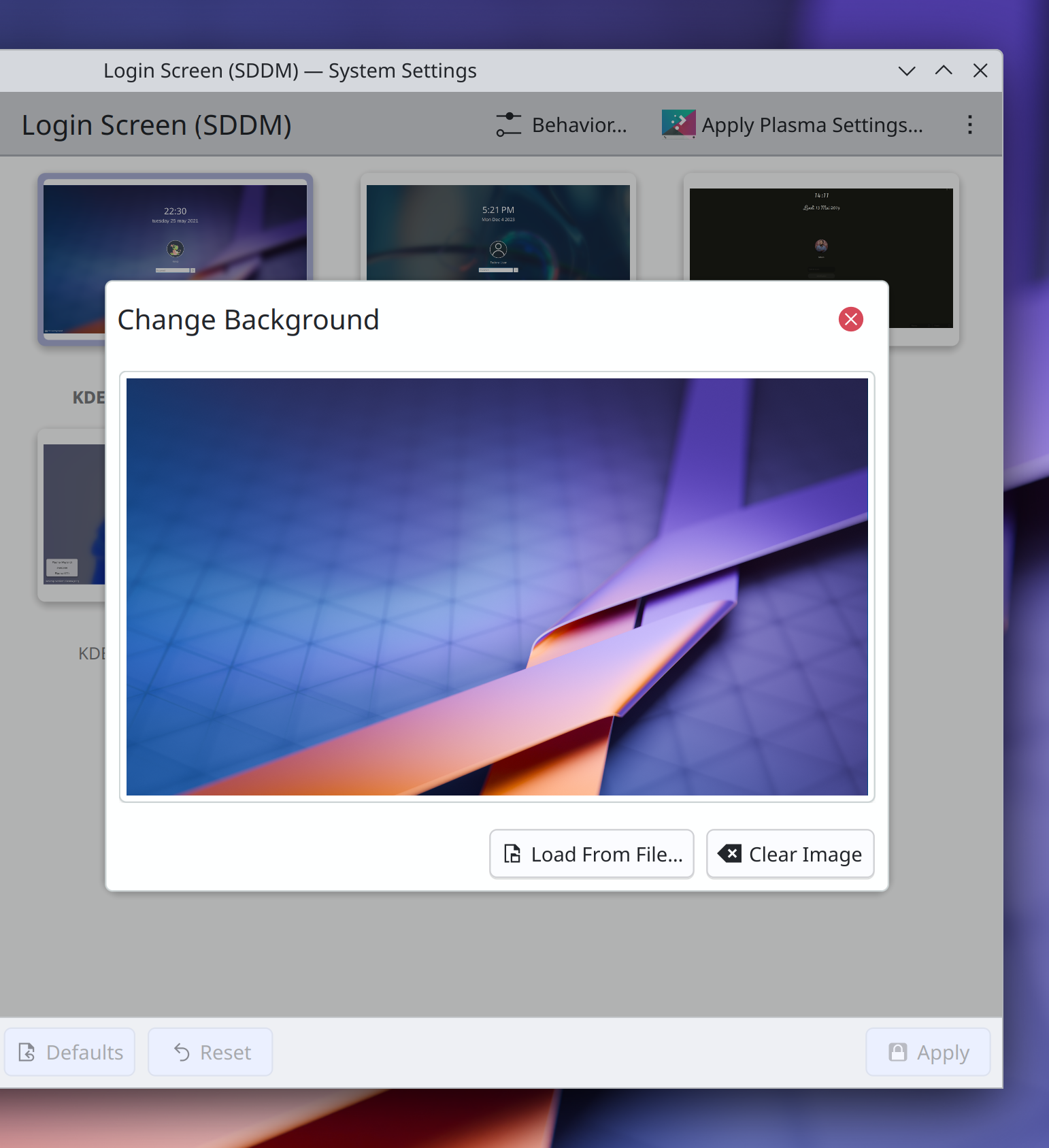
System Settings’ Login Screen (SDDM) page no longer shows blurry preview images, and the dialogs that contain them have been updated to use the new modern dialog style (me: Nate Graham, Plasma 6.2.0. Link):

The alternative actions in the context menus of Plasma’s “Peek at Desktop” and “Minimize All” widgets are now expressed comprehensibly rather than being static and showing a checkbox, which made them look like persistent settings (Christoph Wolk, Plasma 6.2.0. Link)

Pressing Shift+delete to force-quit a process using SIGKILL in System Monitor now tells you that this is what will happen, rather than leaving it a secret (me: Nate Graham, Plasma 6.2.0. Link)

Throughout System System Settings’ grid views, all elided text labels now appear in a tooltip on hover, rather than only some of them (Han Young, Frameworks 6.7. Link)

Notable Bug Fixes

Fixed a high-priority Plasma crash that could happen when certain apps did certain weird things with their windows in a way that the Task Manager didn’t approve of. This also fixed a similar bug whereby certain apps might be missing from the Task Manager (Demetrius Belai, Plasma 6.2.0. Link 1 and link 2)

Fixed an issue that could cause certain added keyboard layouts to not appear in all of Plasma’s various lists of keyboard layouts you can switch between (Ismael Asensio, Plasma 6.2.0. Link)

Custom shortcuts with commands that result in their .desktop files having the same file name as an app’s own .desktop file are no longer capable of shadowing the app in software that fails to respect the NoDisplay=True key in apps’ .desktop files (David Edmundson, Plasma 6.2.0. Link)

In Plasma’s wallpaper chooser view, image previews no longer sometimes have single-pixel lines gaps around some of the edges when using certain fractional scale factors (Méven Car, Frameworks 6.6. Link)

Special KDE-specific keywords of apps and System Settings pages are now translatable into German (Alexander Lohnau, right now! Link)

Other bug information of note:

Notable in Performance & Technical

Fixed a performance bottleneck in KWin that caused it to sometimes unnecessarily copy textures across GPU devices on multi-GPU systems. This fix also happens to make Plasma Mobile work on the Librem 5 phone (Xaver Hugl, Plasma 6.2.0. Link)

How You Can Help

Plasma 6.2 just branched for the beta release, so please test it! We have focused a lot on stability for this release and want to make sure we haven’t missed anything big before the final release in about a month. Your bug reports do not go into a black hole; we triage every one! So enthusiastic testing and bug reporting is encouraged. 🙂

Otherwise, visit https://community.kde.org/Get_Involved to discover additional ways to be part of a project that really matters. Each contributor makes a huge difference in KDE; you are not a number or a cog in a machine! You don’t have to already be a programmer, either. I wasn’t when I got started. Try it, you’ll like it! We don’t bite! Or consider donating instead! That helps too.

Akademy 2024: broadening, professionalizing, and being awesome

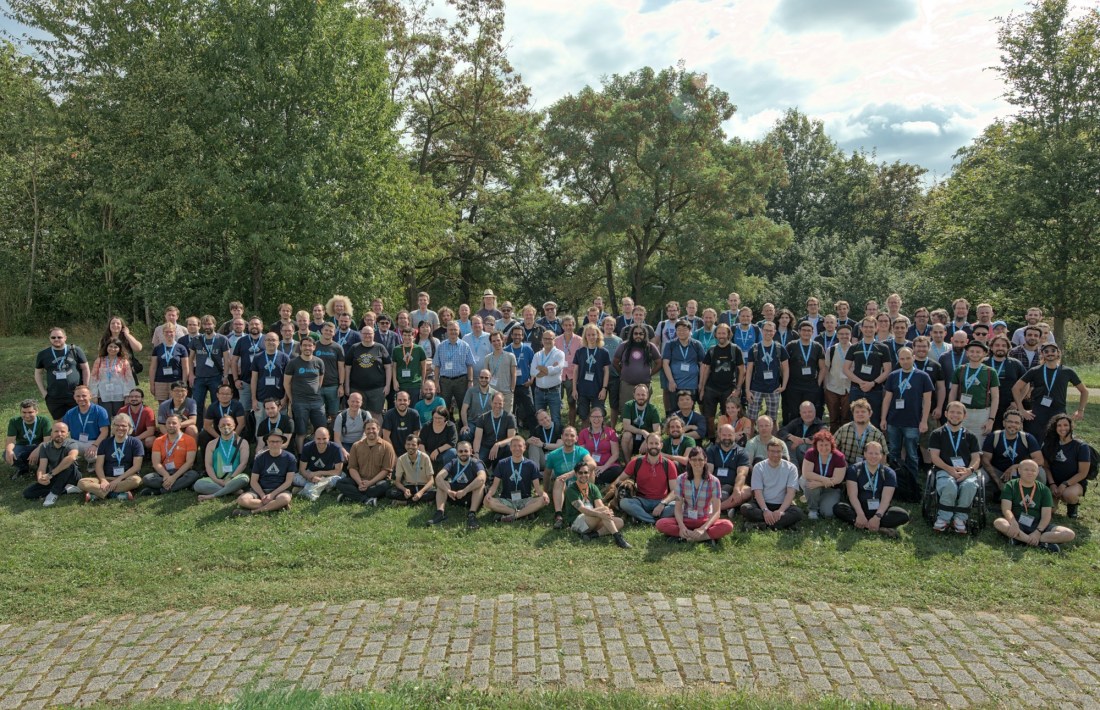
Akademy 2024 is a wrap, and others have already begun to write about the conference in beautiful Würzburg, Germany, with some posts already visible on https://planet.kde.org. This year’s Akademy was fantastic, probably the best one I’ve ever attended. Other than the A/V situation (which we’ll be addressing next year, pinkie-promise), it was well-organized and smoothly run.

But more substantively, the talks and sessions were incredible, and really wove together a coherent narrative: KDE has mature and effective leaders who are pushing forward strategic projects that combine to become more than the sum of their parts. Among them:

Design

Andy Betts introduced us to the concept of the design system and how he and other VDG designers are building one to help unify layout and style across KDE software. …then Arjen Hiemstra introduced us to Union, a new styling system intended to be a single tool to style everything, and it can be informed by the design system’s semantics as well.

Apps

Nicolas Fella explained how our app development platform is lacking, inhibiting the growth of a more vibrant KDE-centric app ecosystem. This is also the topic of one of KDE’s newest high-level goals (full disclosure: I’m a co-champion of this goal along with Nicolas as primary champion). Carl Schwan laid out his “App Initiative” which is directly related, and David Edmundson talked about how we can improve the ability of our software to work in sandboxed environments.

Distribution

Harald Sitter introduced us to “KDE Linux” (tentative name), a new technologically advanced OS that will offer a radically high level of stability, security, and polish for those wishing to get KDE software directly from the source. David Edmundson’s talk about sandboxing is also heavily related here as well.

Recruitment

But how are we going to do all of this? Paul Brown, Aniqa Khokhar, and Johnny Jazeix introduced us to the “KDE Needs You 🫵” goal, aiming to reach more people to broaden the pool of potential contributors so KDE is sustainable for years to come.

Eco

And finally, some perspective on a different sustainability issue: this was the hottest year on record, breaking records set just a few years prior. Our planet’s capacity to sustain human life in certain regions is starting to be impacted, and we need to consider both how our work exacerbates it, and how we can do our part to help make it better. Accordingly, we heard from Joanna Murzyn, Cornelius Schumacher, and Joseph P. De Veaugh-Geiss about KDE’s efforts to prolong the lifespan of old hardware so it doesn’t become e-waste. And Nicole Teale gave us some concrete hope by informing us about a program to introduce German schoolkids to the idea of upcycling old computers by installing Kubuntu on them, very similar to a similar program here in the USA that I was tangentially involved with!

Hopefully the themes and synergies here are clear. KDE is becoming more professional, more comprehensive in scope, will take more initiative for the distribution of its own software, will evolve that software’s design in a way that’s supported by modern design tools and professional designers, and contributes to solving the world’s biggest problems. I find this to be super exciting, and I hope you do too!


My personal role in Akademy was a bit more behind-the-scenes this year. I did take part in two presentations: the former goal wrap-up and the KDE e.V. Board of Directors report.

In these, I described the successes and challenges of my now-concluded Automation & Systematization goal, and helped to inform the community about KDE e.V.’s activities since last Akademy.

I also participated in Many birds-of-a-feather (BoF) sessions about various topics, including:

  • A tech discussion about KDE Linux — install it today and help make it great!
  • Plasma planning and roadmap — Plasma is in a great state, and we’re going to resume Monday meetings, this time in video form. I’ve got five specific features, UI changes, or bug-fixes I want to add to 6.3, and others have even more ideas.
  • Design team decision-making process — super useful; we came up with one to enable us to make important decisions again.

Beyond the BoFs, I found myself constantly talking to people between sessions, during lunch, and in what seemed like every spare moment! Including:

  • Björn Balazs about his work to create https://privact.org, a foundation building a next-generation method to gather metrics from users with zero risk to their privacy.
  • Jos van den Oever about KDE developers applying for sponsorship from https://nlnet.nl to work on important KDE and KDE-relevent projects. Seriously, go do it!
  • Eike Hein about KDE’s history and the 100% drama-free Trinity Desktop Environment.
  • Neal Gompa about the challenges involved in shipping an immutable-base-system OS outside of single-purpose appliances (i.e. as a desktop OS for regular people, enthusiasts, and developers).
  • Xaver Hugl live-debugged an issue on my laptop that he was able to speedily conclude was a Libinput bug.
  • …and many more I didn’t have the remaining brain capacity to remember!

All of this was completely exhausting, and I had to excuse myself from a few group events and dinners to rest and process the day’s events. But Würzburg being a ridiculously beautiful city certainly helped!

This has been my favorite Akademy so far, and thank you so much to everyone who helped to make it possible — David Redondo, Kieryn Darkwater, Victoria Fierce, Lydia Pintscher, and the rest of the Akademy team! Job’s a good ‘un, and I’ll see you around the internet!

This week in Plasma: Stabilization for 6.2

This week I and many other major Plasma contributors are at Akademy, planning the future and having many fruitful in-person discussions! As a result, probably next week’s post will be a bit light. This week though, lots of pre-Akademy changes got merged, most of them bug-fixes and performance improvements scheduled for Plasma 6.2. We want 6.2 to be super duper stable, and are putting in the work to ensure this goal is reached!

In addition, we merged a few final late-breaking features that had been under development for months and were deemed stable enough — likely the last ones before the hard feature freeze in a few days. Check it out!

Late-Breaking New Features

You can now rename audio devices! Additionally, you can now choose the technical data source used to generate default names for audio devices that you don’t choose to manually rename, which helps for hardware like mixer tables which show up as like 50 devices such that renaming each one individually would be a big pain in the butt (Harald Sitter, Plasma 6.2.0. Link)

You can now click/double-click on .ovpn VPN profile files to configure a new VPN (Nicolas Fella, Plasma 6.2.0. Link)

You can now place files in ~/Templates and they will appear as templates in the “Create New…” menu that appears in various places, including Plasma’s Desktop and Dolphin (Antti Savolainen, Frameworks 6.7. Link)

Notable UI Improvements

When copying image data to the clipboard, the Clipboard widget now always shows a preview of the image, instead of sometimes, in a random-seeming manner, showing a symbolic icon instead (Noah Davis, Plasma 6.2.0. Link)

In Discover’s rating preview carousel thingy that provides an overview of an app’s rating including top reviews, it will no longer show reviews that have been voted down more than up (Aleix Pol Gonzales, Plasma 6.2.0. Link)

In Plasma’s Networks widget, the button to create a Wi-Fi hotspot now uses the correct icon (Darshan Phaldesai, Plasma 6.2.0. Link)

Notable Bug Fixes

Fixed an issue that could cause pop-ups for widgets on a Plasma panel to be resized to either their original size or else a much smaller size after the screen configuration changed (Xaver Hugl, Plasma 6.1.5. Link)

Searching for locations with umlauts in their names now works as expected in Plasma’s Weather Report widget (Ismael Asensio, Plasma 6.1.5. Link)

When using the “Toggle Touchpad” global shortcut to turn your touchpad on or off, if you restart the machine with the touchpad disabled, then the next time you start it up again, the state will be correctly reported such that you can press the shortcut only once to turn the touchpad on again (Akseli Lahtinen, Plasma 6.1.5. Link)

System Settings no longer crashes every time you close the “Login Screen (SDDM)” page while on its Behavior sub-page (Nicolas Fella, Plasma 6.1.5. Link)

Fixed two somewhat common ways that Plasma could crash with certain multi-screen setups on X11 (Méven Car, Plasma 6.2.0. Link 1 and link 2)

Fixed a case where Plasma could crash when you drag a widget from the Widget Explorer over an Activity Manager widget (David Redondo, Plasma 6.2.0. Link)

Moving the pointer over tasks in Plasma’s Task Manager widget no longer causes their thumbnail previews to immediately disappear some of the time, depending on which direction you moved it in and your panel’s position on the screen (David Redondo, Plasma 6.2.0. Link)

Clearing the search field in Plasma’s Kickoff Application Launcher widget no longer unexpectedly launches the top item shown in the last search (David Edmundson, Plasma 6.2.0. Link)

The “Charging Rate” sensor in the System Monitor app and its widgets of no longer shows a negative number while the battery is in fact charging — only while it’s discharging (Arjen Hiemstra, Plasma 6.2.0. Link)

Fixed a visual glitch in System Settings’ Region and Language page that caused the selected item on the Binary Dialect sub-page to have unreadable text when not using a custom accent color (Méven Car, Plasma 6.2.0. Link)

Fixed a bug that caused animated cursors to only play their animation while the cursor was being moved when the system was falling back to or forced into using software cursors (Vlad Zahorodnii, Plasma 6.2.0. Link)

Implemented a workaround for the issue that causes the Touchpad and other pages in System Settings to sometimes break when being navigated to after first accessing another page. The root cause is still under investigation, since it seems to be very tricky and complicated (Albert Astals Cid, Frameworks 6.6. Link)

Sharing a file to your device via KDE Connect no longer breaks after the first time you do it until the app you shared the file from is restarted (Nicolas Fella, Frameworks 6.6. Link)

Fixed an issue that would make impossible to use the “Restore” functionality for trashed files or folders moved by an app to the trash using absolute file paths (Nicolas Fella, Frameworks 6.6. Link)

When Discover is maximized, it now remembers the window size it was displayed at before, so when you un-maximize it, it returns to that size (Eamonn Rea and Joshua Goins, Plasma 6.2.0 with Frameworks 6.7. Link 1 and link 2)

Other bug information of note:

Notable in Performance & Technical

Fixed an issue in Discover that could, under certain circumstances, cause the app to freeze right after being launched (Harald Sitter, Plasma 6.2.0. Link)

Optimized search performance in Discover so that it does less unnecessary work (Aleix Pol Gonzalez, Plasma 6.2.0. Link)

Did some performance optimization for KFilePlacesItem which should improve startup speed for anything using the Places panel (Kai Uwe Broulik, Frameworks 6.7. Link)

…And Everything Else

This blog only covers the tip of the iceberg! If you’re hungry for more, check out https://planet.kde.org, where you can find more news from other KDE contributors.

How You Can Help

So yeah, like I said, please test Plasma from current git master and open bug reports about issues you find. Another path is to help triage bug reports that the first crowd will be opening. Ask for more information, make them actionable, move them where needed! And of course, help fix triaged and confirmed bug reports.

Otherwise, visit https://community.kde.org/Get_Involved to discover other ways to be part of a project that really matters. Each contributor makes a huge difference in KDE; you are not a number or a cog in a machine! You don’t have to already be a programmer, either. I wasn’t when I got started. Try it, you’ll like it! We don’t bite! Or consider donating instead! That helps too.

This week in Plasma: inhibiting inhibitions and more!

This is a big one, folks. Plasma 6.2’s soft feature freeze is now in effect, which means the last few features have just been merged! Now we’ll have six weeks of heavy bug-fixing before the final release in October. If you’re an industrious sort, the time to live on git master and report bugs is now! Current git master is completely suitable for daily driving.

And we’ve already been focusing on QA for a while, so new bug reports take priority — both triaging them and fixing them. Over the past few months, we’ve succeeded in dropping plasmashell’s total number of bug reports to 1022, the lowest in several years. And the number of unconfirmed bug reports is currently down to 301, the lowest since late 2015! Triaging and fixing bugs is a priority, and we’re promptly triaging all new Plasma new bug reports daily. Our goal is to push the number of unconfirmed bug reports under 200 by the end of September.

So please do submit bug reports for any issues you encounter; it’s not a black hole. If you’ve complained about bugs on social media recently and haven’t reported them on https://bugs.kde.org, fix that today! Do it! Do it now!

…But first check out the final Plasma 6.2 features; I think they’re pretty awesome. It’s gonna be a big release, full of useful stuff!

Notable New Features

It’s now possible to block apps from inhibiting sleep and screen lock, if you don’t like the fact that they do so (Natalie Clarius, Plasma 6.2.0. Link):

Newly installed Plasma widgets are now shown at the top of the grid view and badged with “New!” for one hour, so it’s easy for you to find them right after installing them (Niccolò Venerandi, Plasma 6.2.0. Link):

While choosing a custom image for a user avatar on System Settings’ Users page, you can now crop the image if needed (someone going by the Pseudonym “Kuneho Cottonears”, Plasma 6.2.0. Link):

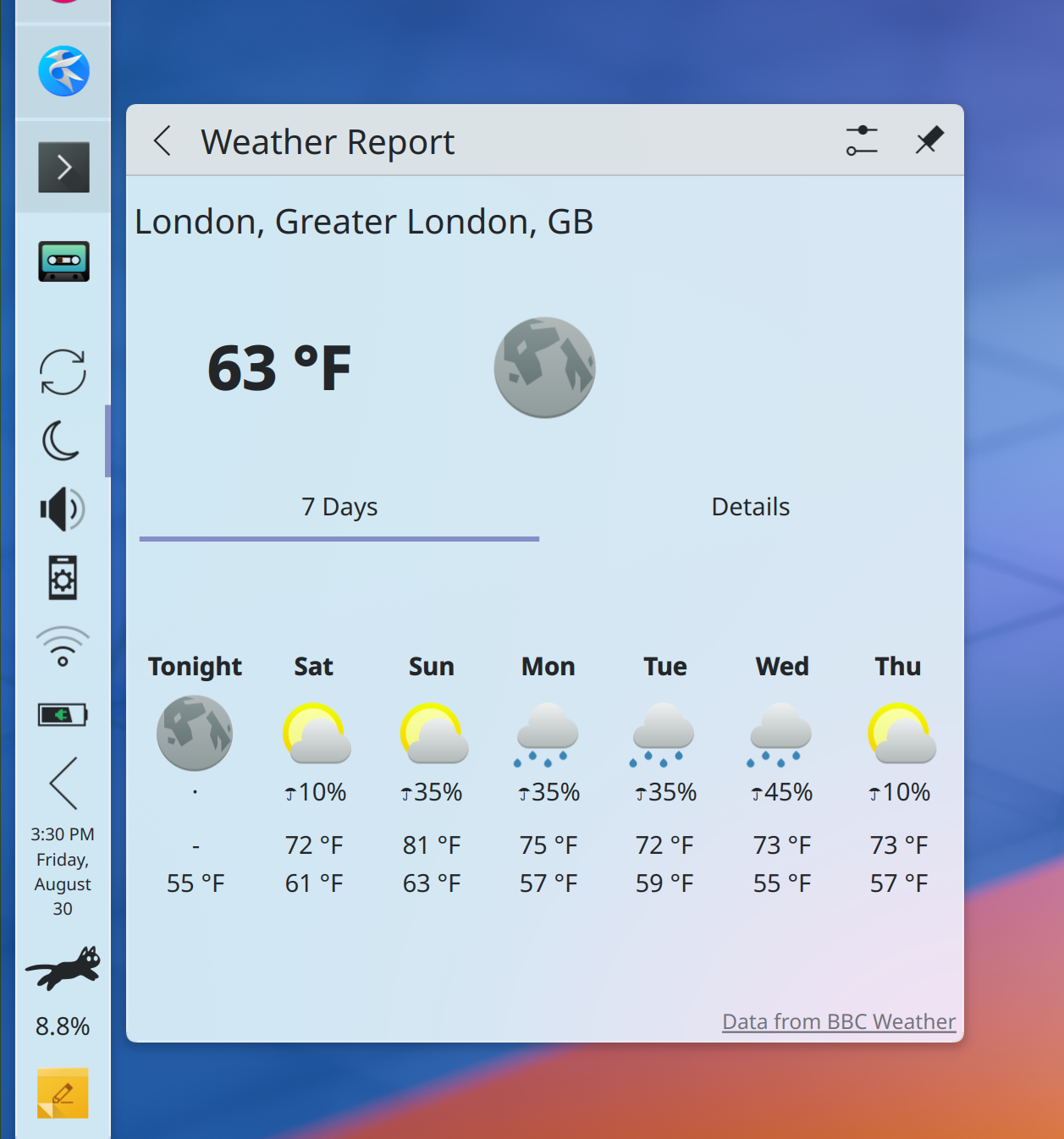
Added support for 7-day weather forecasts and “chance of precipitation” data for BBC UK Met weather stations shown in Plasma’ Weather widget (Ismael Asensio, Plasma 6.2.0. Link):

Discover now gently guides you in the direction of writing better reviews for non-proprietary apps (me: Nate Graham, Plasma 6.2.0. Link):

Added a yearly notification to ask for donations; see this week’s earlier post for more details (TL;DR: optional, once per year, you can permanently disable it) (me: Nate Graham Plasma 6.2.0. Link)

The plasma-apply-wallpaperimage tool now has a --fill-mode option, mirroring the existing GUI option for this, but now in a scriptable form (Heitor Augusto Lopes Nunes, Plasma 6.2.0. Link)

Notable UI Improvements

Due to popular demand, KWin’s Overview effect once again shows a linearized representation of two-dimensional virtual desktop layouts (e.g. 2×2, 3×3, etc) on the primary view, rather than hiding them entirely (Blazer Silving, Plasma 6.2.0. Link)

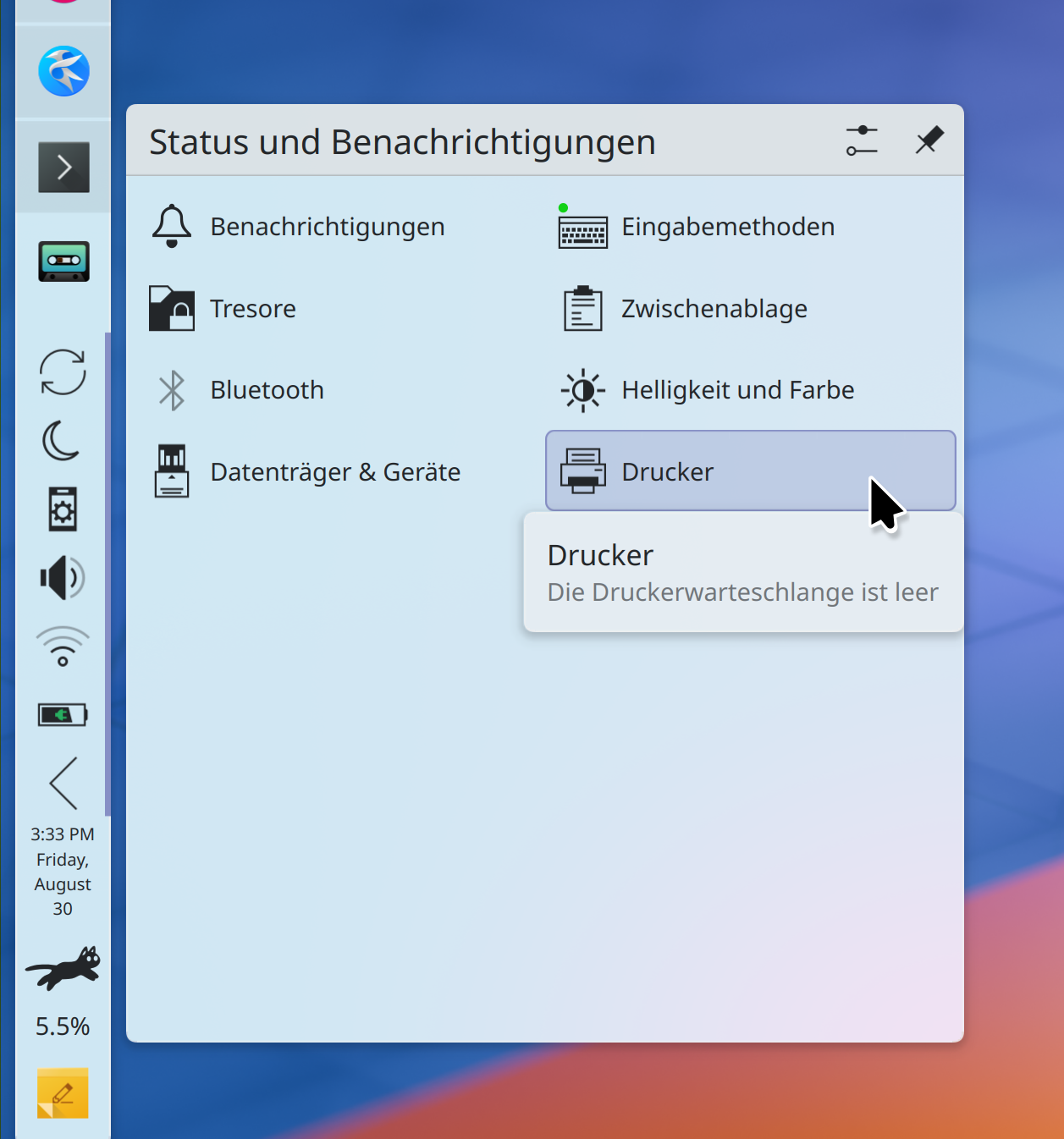
Plasma’s System Tray now uses a better grid layout for the expanded view that leaves more space for text, which is especially important for languages like German and Russian. The new layout saves space, too (me: Nate Graham, Plasma 6.2.0. Link):

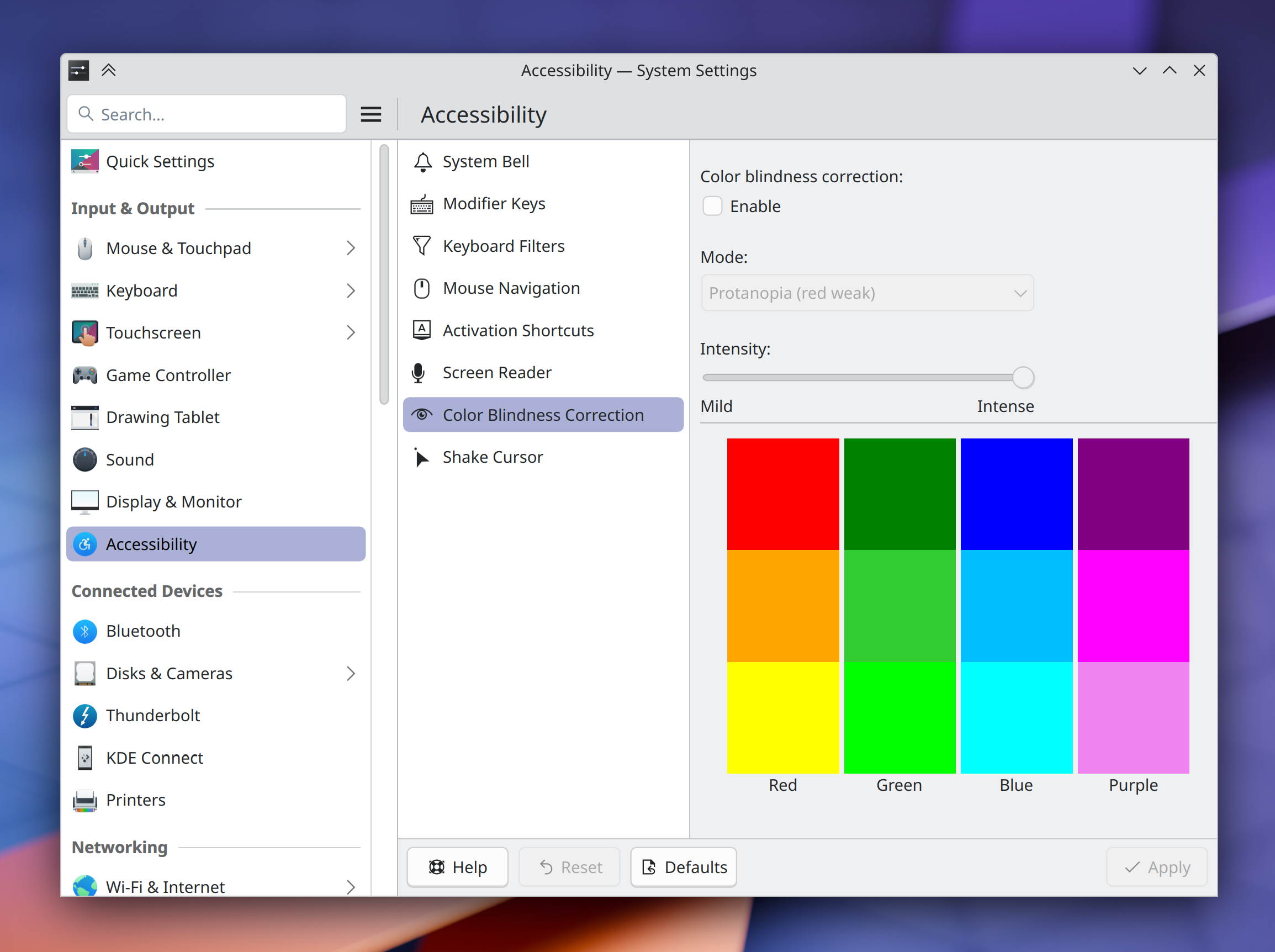
The settings for KWin’s colorblindness correction effect now live in the logical place where you’d expect to find them: on System Settings’ Accessibility page! (Thomas Duckworth, Plasma 6.2.0. Link):

Overhauled the UI of System Settings’ Accessibility page in a lot of little ways to make it actually be more… accessible! (Thiago Sueto, Plasma 6.2.0. Link)

Plasma’s “Minimize All” widget now only minimizes and unminimizes windows on the current virtual desktop and activity, rather than all windows everywhere (Christoph Wolk, Plasma 6.2.0. Link)

If you enter global edit mode, and then from there enter a panel’s own edit mode, closing the panel’s configuration window now simply returns you to the global edit mode, rather than exiting from that too (Niccolò Venerandi, Plasma 6.2.0. Link)

The error message shown when manually installing a Plasma widget fails is now more descriptive, and tells you the actual error so you can troubleshoot it (Nicolas Fella, Plasma 6.2.0. Link)

Made a pass over many areas of Plasma and System Settings to align text and labels with our Human Interface Guidelines’ best practices (Christoph Wolk, Plasma 6.2.0. Too many merge requests to list TBH, so check them all out here!)

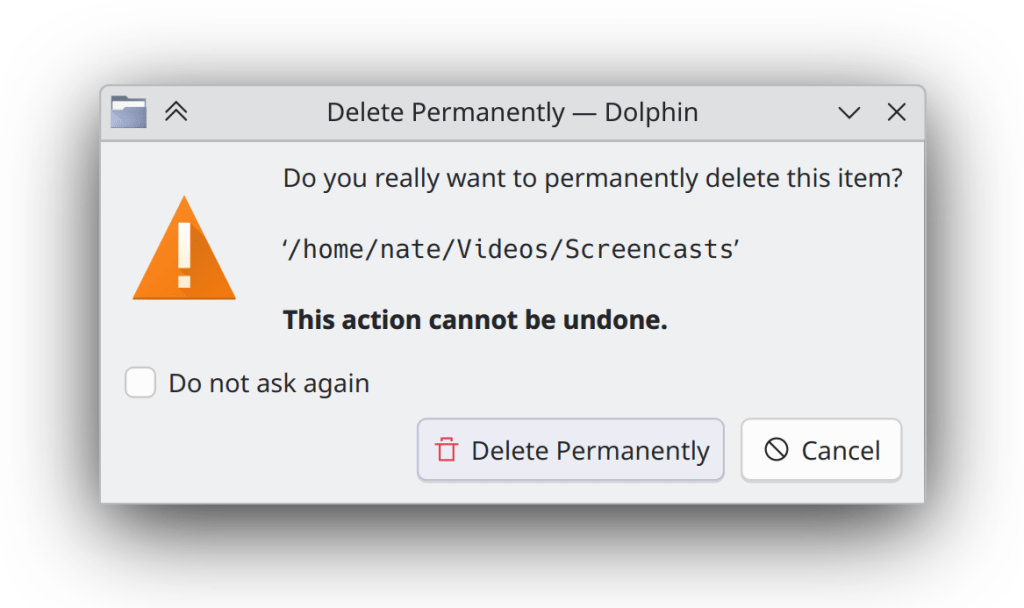
Dialog windows throughout KDE software have new icons again — this time they look nicer and more Breeze-styled (Kai Uwe Broulik, Frameworks 6.6. Link):

Notable Bug Fixes

Fixed a nasty issue that could cause corruption in files on SFTP servers that were edited by opening them from Dolphin in an app and then saving changes (Ser Freeman, kio-extras 24.12.0. Link)

Changing the system’s Global Theme now also changes the colors of any recolorable GTK apps, just like you’d expect (Michael Weghorn, Plasma 6.1.5. Link)

Performing a multi-finger touch swipe/gesture on your touchscreen no longer messes up Plasma and gets it caught in a weird limbo state (Marco Martin, Plasma 6.1.5. Link)

Fixed a recent regression in Plasma’s desktop file/folder view that could cause items to snap back to their previous locations after being dragged somewhere else (David Edmundson, Plasma 6.2.0. Link)

Job progress notifications shown by Plasma no longer let any buttons’ text get cut off in languages where words and phrases are long; now, the popups expand horizontally a bit to make room (Arjen Hiemstra, Plasma 6.2.0. Link)

Fixed two issues in Plasma’s Emoji Selector app seemingly caused during the Plasma 6 port that caused it to lose its prior selection highlight effect, and always copy the first item in the search results view rather than the selected one (Akseli Lahtinen, Plasma 6.2.0. Link 1 and link 2)

Substantially reduced the glitchiness of the tooltips for items in the expanded view of Plasma’s System Tray (me: Nate Graham, Plasma 6.2.0. Link)

Fixed a glitch that could cause the Maliit virtual keyboard to be mis-positioned when using any vertical panels (David Edmundson, Plasma 6.2.0. Link)

When Plasma’s Folder View widget is placed on a panel, its popup can now be resized to smaller than its default size (me: Nate Graham, Plasma 6.2.0. Link)

It’s no longer possible to break System Settings quite terribly by opening a “Get New [thing]” window and then closing System Settings’ own main window (Harald Sitter, Frameworks 6.6. Link)

Other bug information of note:

Notable in Performance & Technical

Substantially improved performance in Discover in multiple ways: launch time, time to load the UI, time to load icons, and smoothness of scrolling through long lists (Harald Sitter, Plasma 6.2.0. Link 1, link 2, link 3, link 4, and link 5)

Discover now behaves more sensibly and only shows one authentication prompt when asked to update multiple Flatpak apps in an environment with hardened security for Flatpaks, as in openSUSE distros (Harald Sitter, Plasma 6.2.0. Link)

Installing a font now places it, by default, in a standardized location (e.g. ~/.local/share/fonts/rather than the legacy location (~/.fonts/), which means that sandboxed apps will be able to find and use them as expected (David Edmundson, Plasma 6.2.0. Link)

…And Everything Else

This blog only covers the tip of the iceberg! If you’re hungry for more, check out https://planet.kde.org, where you can find more news from other KDE contributors.

How You Can Help

So yeah, like I said, please test Plasma from current git master and open bug reports about issues you find. Another path is to help triage bug reports that the first crowd will be opening. Ask for more information, make them actionable, move them where needed! And of course, help fix triaged and confirmed bug reports.

Otherwise, visit https://community.kde.org/Get_Involved to discover other ways to be part of a project that really matters. Each contributor makes a huge difference in KDE; you are not a number or a cog in a machine! You don’t have to already be a programmer, either. I wasn’t when I got started. Try it, you’ll like it! We don’t bite! Or consider donating instead! That helps too.

Asking for donations in Plasma

Why do we ask for donations so often? Because it’s important! As KDE becomes more successful and an increasing number of people use our software, our costs grow as well:

  • Web and server hosting
  • Organizing and hosting larger Akademy events
  • Funding more and larger sprints
  • Paying people to work on stuff the volunteer community doesn’t focus on, and retaining them over time

And so on. If we don’t raise more money while our software becomes more popular, we risk “dying of success,” so to speak. Remember, we give all this stuff away for free, no strings attached! Nobody has to pay a cent if they don’t want to or can’t afford to.

Accordingly, if you’re plugged into KDE social media, you probably see a lot of requests for donations. I end every one of my “This Week in KDE” posts with one, and many others do for their own blog posts as well. KDE’s official social media channels blast it out constantly, and we also do yearly fundraisers that are widely promoted online. If you’re reading this, you may get the impression that we’re always begging for cash!

But if you’re not plugged into these communications channels, you might not have ever seen a donation request at all. We know that the fraction of people who subscribe to these channels is small, so there’s a huge number of people who may not even know they can donate to KDE, let alone that donations are critically important to its continued existence.

Starting in Plasma 6.2, that changes, and I’d like to introduce what it will look like! From 6.2 onwards, Plasma itself will show a system notification asking for a donation once per year, in December:

The idea here is to get the message that KDE really does need your financial help in front of more eyeballs — especially eyeballs not currently looking at KDE’s public-facing promotion efforts.


Now, I know that messages like this can be controversial! The change was carefully considered, and we tried our best to minimize the annoying-ness factor: It’s small and unobtrusive, and no matter what you do with it (click any button, close it, etc) it’ll go away until next year. It’s implemented as a KDE Daemon (KDED) module, which allows users and distributors to permanently disable it if they like. You can also disable just the popup on System Settings’ Notifications page, accessible from the configure button in the notification’s header.

Ultimately the decision to do this came down to the following factors:

  1. We looked at FOSS peers like Thunderbird and Wikipedia which have similar things (and in Wikipedia’s case, the message is vastly more intrusive and naggy). In both cases, it didn’t drive everyone away and instead instead resulted in a massive increase in donations that the projects have been able to use to employ lots of people.
  2. KDE really needs something like this to help our finances grow sustainably in line with our userbase and adoption by vendors and distributors.

So now let me address what I anticipate will be some common concerns:

I think you’re wrong; people hate pop-ups and this is going to turn them off!

Like I said, peer organizations didn’t see that happen, and some were even more in-your-face about it. I do suspect a small but vocal crowd of people will spread doom and gloom about it on social media anyway, of course. This also happened when we implemented off-by-default telemetry — which by the way, was implemented so conservatively that it barely collects any information of value at all. It’s a cautionary tale about the danger of being too timid and ending up with the worst of both worlds.

The worst-case scenario is that we don’t get more donations from this after a couple of years, and end up removing it. That’s always an option. But I think it’s worth venturing out there and being a bit bold! With risk comes opportunity.

KDE shouldn’t need to pay people directly; employment should come from vendors and distributors shipping our software!

To a certain extent this already does happen: by far the largest contributor of paid work is Blue Systems — mostly funded by Valve Corporation, which ships KDE software on the Steam Deck. There are also trickles and spurts of sponsored work from distros, KDAB, and enterprising folks who get funded via grants.

Ultimately a healthy economic ecosystem around KDE includes people employed by many parties, including KDE itself, in my opinion. This is how KDE can help control its own destiny. And that costs money! Money that needs to come from somewhere.

Why does it have to be a notification pop-up? Put this in Welcome Center or something!

We had a request for donations in Welcome center for several years, and it didn’t make a difference, because right after you’ve installed the system wasn’t the right time to ask. At that point, you don’t know if you like Plasma yet, so asking for money is premature.

If KDE is as successful as Thunderbird and Wikipedia have been, what are you going to do with all that money?

This is a question the KDE e.V. board of directors as a whole would need to answer, and any decision on it will be made collectively.

But as one of the five members on that board, I can tell you my personal answer and the one that as your representative, I’d advocate for. It’s basically the platform I ran on two years ago: extend an offer of full-time employment to our current people, and hire even more! I want us to end up with paid QA people and distro developers, and even more software engineers. I want us to fund the creation of a next-generation KDE OS we can offer directly to institutions looking to switch to Linux, and a hardware certification program to go along with it. I want us to to extend our promotional activities and outreach to other major distros and vendors and pitch our software to them directly. I want to see Ubuntu, Red Hat Enterprise Linux, and SUSE Linux Enterprise Desktop ship Plasma by default. I want us to use this money to take over the world — with freedom, empowerment, and kindness.

These have been dreams for a long time, and throughout KDE we’ve been slowly moving towards them over the years. With a lot more money, we can turbocharge the pace! If that stuff sounds good, you can start with a donation today. 🙂


I know talking about money can be awkward. But failure to plan is planning to fail; money is something we can’t ignore and just hope things work out — and we don’t. Raising more money is a part of that plan, and this new yearly donation notification is a part of raising money. It’s my expectation and hope that asking our users for donations will result in more donations, and that we can use these to accelerate KDE’s reach and the quality of our software!

This week in KDE: per-monitor brightness control and “update then shut down”

This week was all about the quality of life features! As we close in on Plasma 6.2 (the soft feature freeze is in four days, eek!), some great work that’s been in progress for a long time got merged.

Notable New Features

Okular now has a “speak text from current page” feature (Athul Raj Kollareth, Okular 24.12.0. Link)

Plasma’s Brightness widget now shows individual brightness sliders for every connected monitor that supports this, so you can control them separately! If you want to adjust all of them together, you can still do that via global shortcut/keyboard key or by scrolling over the widget (Jakob Petsovits, Plasma 6.2.0. Link):

When there’s a pending offline system update, you’ve already got the option to update and then reboot, or just reboot and skip the update. Now, there’s also an option to complete the update and then shut down the computer! This option is exposed both on the logout screen, and also in Discover (Thomas Duckworth, Plasma 6.2.0. Link 1, link 2, and link 3):

Long-pressing an empty area of a Plasma panel using a touchscreen now enters edit mode for that panel (Niccolò Venerandi, Plasma 6.2.0. Link)

Notable UI Improvements

The “Add Widgets” sidebar has received a UX overhaul with numerous usability focused changes, including:

  • Appearing on the right side of the screen when opened from a right-screen-edge panel
  • Using wider grid cells to permit longer text without elision or unnatural word-wrap behaviors
  • Improved appearance of the filter button, so now it looks like it opens a drop-down menu — because it does
  • Sorting is now locale-aware, taking into account, for example, accented characters
  • You access it from buttons and menu items labeled “Add or Manage Widgets,” since it also acts as the place where you get new widgets or delete unwanted ones
  • Spacer widgets can also be found there, no longer only from the panel settings dialog
  • When installing manually-downloaded widgets, the open dialog now accept all valid file types

And believe it or not, that’s not all that’s planned! But the rest will have to wait until next week… (Niccolò Venerandi, Plasma 6.2.0. Link 1, link 2 3, link 4, link 5, link 6, link 7)

When your system is using a non-default power profile, it’s now shown as a badge on the battery icon, so you can see both the power profile and also the battery status at the same time (Louis Moureaux and me: Nate Graham, Plasma 6.2.0. Link 1 and link 2):

A panel popup opened from a widget on the end of a limited-width panel now tries its best to align its edge with that of the panel (Niccolò Venerandi, Plasma 6.2.0. Link):

Maybe I just really like clocks, ok?

You can now give a custom display name to your custom command shortcuts (Yifan Zhu and Thenujan Sandramohan, Plasma 6.2.0. Link):

Discover is now more accurate about how it presents licenses, and communicates the subtle distinctions between “proprietary” and “non-free”, rather than branding everything that isn’t free software as proprietary (me: Nate Graham, Plasma 6.2.0. Link):

When you change keyboard layouts, the labels of the language codes that appear in the system tray no longer subtly change in size based on the shape of their letters (Sauf Lvc, Plasma 6.2.0. Link)

Added a Breeze icon for Applet Wallet bundle files (Kai Uwe Broulik, Frameworks 6.6. Link):

Notable Bug Fixes

When Spectacle is configured to save in a format other than PNG by default, pasting a just-copied screenshot now always works in every target app, with the caveat that some apps that don’t advertise support for non-PNG image pasting (like Firefox and Chromium, annoyingly) will get a PNG version anyway, rather than your preferred file format. This is better than it not working at all, at least! (Noah Davis, Spectacle 24.08.1. Link)

You can once again use the arrow keys to move focus out of Kickoff’s favorites grid view (Arjen Hiemstra, Plasma 6.1.5. Link)

Fixed a complex bug that could cause KWin to crash when X11 or XWayland-using apps monkeyed with the window stacking order in specific ways (Vlad Zahorodnii, Plasma 6.1.5. Link. And thanks to the reporter Peter Strick for being incredibly helpful in making the issue reproducible! All bug reports should be so good.)

Fixed an annoying bug that caused text copied from cells in LibreOffice Calc to never make it onto the clipboard unless you changed the clipboard’s settings to always store images (Fushan Wen, Plasma 6.1.5. Link)

Fixed a bug that caused tooltips to appear at the last location the mouse pointer was located at when interacting with the system using a stylus (David Redondo, Plasma 6.1.5. Link)

Fixed a funny bug that could make Plasma crash when you have a Media Player widget on your panel (not the System Tray, directly on a panel) and play certain specific songs whose titles are exactly the right length to trigger an obscure layout bug (Fushan Wen, Plasma 6.2.0. Link)

Fixed a weird issue that made modifier-only global shortcuts in the X11 session fail to switch keyboard layouts as expected while on the lock screen and other places (Yifan Zhu, Plasma 6.2.0. Link)

Exporting your shortcuts on System Settings’ Shortcuts page now includes any custom script shortcuts you’ve created, so that when you import them elsewhere, they work (Akseli Lahtinen and David Redondo, Plasma 6.2.0. Link)

Other bug information of note:

  • 2 Very high priority Plasma bugs (down from 3 as last week). Current list of bugs
  • 36 15-minute Plasma bugs (up from 30 last week; bug triage activities discovered some more old issues that seemed important to fix soon, which were added to the list). Current list of bugs
  • 156 KDE bugs of all kinds fixed over the last week. Full list of bugs

Notable in Performance & Technical

Improved KWin’s HDR tone mapping, allowing it to do a better job of displaying colors in cases where HDR content specifies a brightness level higher than what the screen is capable of outputting. There’s even more that can be done, but it’s already a big improvement. (Xaver Hugl, Plasma 6.2.0. Link)

Even further optimized the system performance impact in KWin of using an ICC profile to change your screen’s color calibration (Xaver Hugl, Plasma 6.2.0. Link)

Improved KWin’s performance for some multi-GPU systems (Xaver Hugl, Plasma 6.2.0. Link)

Added a bunch of autotests for X11-specific behavior in KWin, since fewer people are exercising that code now that 80+% of Plasma 6 users are using Wayland (Vlad Zahorodnii, Plasma 6.2.0. Link)

…And Everything Else

This blog only covers the tip of the iceberg! If you’re hungry for more, check out https://planet.kde.org, where you can find more news from other KDE contributors.

How You Can Help

Otherwise, visit https://community.kde.org/Get_Involved to discover other ways to be part of a project that really matters. Each contributor makes a huge difference in KDE; you are not a number or a cog in a machine! You don’t have to already be a programmer, either. I wasn’t when I got started. Try it, you’ll like it! We don’t bite! Or consider donating instead! That helps too.

This week in KDE: System Settings modernization and Wayland color management

Many folks are on vacation right now, but KDE’s tireless contributors still worked hard to bring you a number of improvements anyway, among them some nice System Settings modernization work and improvements to Wayland color management. You’ll find them mentioned below, along with various other improvements!

Notably, we’re back to only 30 15-minute Plasma bugs — the lowest level since February of this year right before Plasma 6 was launched! Essentially, having regained the level of stability we had at the end of Plasma 5 in only 6 months, we’re super well positioned to drive this even further in the coming months. With Plasma 6 offering both stability and features, who says you can’t have it all? 😎

Notable New Features

Plasma’s weather widget now shows “feels like” temperatures that take into account the heat index (Ismael Asensio, Plasma 6.2.0. Link 1 and link 2):

And yes, I see that the temperature labels in the forecast view are misaligned! We’ll get that fixed.

Notable UI Improvements

Landed a redesign of System Settings’ Keyboard page to match other similar modern pages and make things easier to find (Evgeniy Chesnokov, Plasma 6.2.0. Link):

Modernized the UI for System Settings’ Thunderbolt page, which also fixed a text readability bug (Ivan Tkachenko, Plasma 6.2.0. Link):

Modernized the UI for multiple pages in System Settings that still use QtWidgets, so that they look a bit more like their more modern QML counterparts (Thomas Duckworth, Plasma 6.2.0 and KDE Gear 24.12.0, link 1, link 2, link 3, link 4, and link 5):

Discover and its System Tray icon now always agree on whether there are any updates available (Harald Sitter, Plasma 6.2.0. Link)

Weather forecasts from the Environment Canada provider now fit in the System Tray popup at its default size, so you don’t have to enlarge it (Ismael Asensio, Plasma 6.2.0. Link)

When you drag an image or other file out of a web browser window and onto the desktop or Dolphin, the drop menu now contains only relevant actions, and with better text and icons (me: Nate Graham, Frameworks 6.6. Link 1 and link 2):

Notable Bug Fixes

We accidentally broke SVG wallpaper support in Plasma 6.1.4 with the fixes to Centered placement mode, so now we’ve fixed it again. Sorry about that, everyone! (Marco Martin, Plasma 6.1.5. Link)

Fixed a tricky KWin bug that caused copied text to sometimes not be paste-able into XWayland-using apps (David Edmundson, Plasma 6.2.0. Link)

Worked around a Qt issue that was causing some windows on disconnected screens to sometimes not get moved over to one of the remaining screens as expected (Xaver Hugl, Plasma 6.2.0. Link)

Addressed a few more edge cases for the bug whereby Plasma’s “Show Alternatives” popup wouldn’t close in certain circumstances, so now it should always close when needed (Niccolò Venerandi, Plasma 6.2.0. Link)

Fixed an issue that caused some symbolic icons in Plasma panels to be colored improperly with mixed light/dark global themes (Nicolas Fella, Frameworks 6.6. Link)

Other bug information of note:

Notable in Performance & Technical

Added support for rendering intents and black point compensation to KWin’s implementation of the Wayland color management protocol, and enabled it by default so apps that also implement support for it can make use of it immediately (Xaver Hugl, Plasma 6.2.0. Link 1, link 2, and link 3)

KWin has gained support for the alpha-modifier Wayland protocol (Xaver Hugl, Plasma 6.2.0. Link)

On Wayland, you can now copy to and paste from the system clipboard while in Overview and other KWin effects (Vlad Zahorodnii, Plasma 6.2.0. Link)

Qt 6.8 changed how screen scaling affects icons, so we adapted to those changes to prevent icon blurriness everywhere for people already using Qt 6.8 (Nicolas Fella and Kai Uwe Broulik, Frameworks 6.6. Link 1, and link 2)

Human Interface Guidelines

Expanded the Text and Labels page to include some more symbols that should use real unicode glyphs rather than handmade approximations (Emir SARI, link)

Fixed a number of small typos, punctuation, and grammar issues throughout the text (John Veness, link 1, link 2, link 3, link 4, link 5)

Tweaked a bunch of text labels in Okular to be HIG-compliant by using real ellipses and unicode symbols (Emir SARI, Okular 24.12.0. Link)

KWin’s “Screen Edge” effect has been renamed to “Highlight Screen Edges and Hot Corners” for HIG-compliance and user-comprehensibility (me: Nate Graham, Plasma 6.2.0. Link)

Tweaked the text of Plasma’s critical battery level notifications and System Settings’ unsaved changes dialog to be HIG-compliant and therefore less redundant and more user-friendly (me: Nate Graham, Plasma 6.2.0. Link 1 and link 2)

…And Everything Else

This blog only covers the tip of the iceberg! If you’re hungry for more, check out https://planet.kde.org, where you can find more news from other KDE contributors.

How You Can Help

Otherwise, visit https://community.kde.org/Get_Involved to discover other ways to be part of a project that really matters. Each contributor makes a huge difference in KDE; you are not a number or a cog in a machine! You don’t have to already be a programmer, either. I wasn’t when I got started. Try it, you’ll like it! We don’t bite! Or consider donating instead! That helps too.

This week in KDE: SVG Breeze cursors and more thumbnails

First up is something cool: support for SVG-based cursor themes! This allows compatible themes to always display beautiful sharp cursors at any size, and has already been rolled out for the Breeze Light and Breeze Dark cursor themes. It does not use the Hyprcursor system, and we have not yet upstreamed it to be a different cross-desktop spec. However, we are considering doing so in the near future. This work was done by Jin Liu and Vlad Zahorodnii, and lands in Plasma 6.2.0.

On the subject of cross-desktop specs, KDE apps now does support the cross-desktop thumbnailer spec, meaning that any of these thumbnailers already on the system will now instantly start working! One of the most notable examples would be the STL file thumbnailer, which will be a boon for anyone working with 3D models or 3D printers. This work was done by Akseli Lahtinen and lands in KDE Frameworks 6.6. You can read about it more in this blog post.

That isn’t all, though…

More Notable New Features

Elisa now shows the total duration of the songs from the playlist in its footer (Karl Hoffman, Elisa 24.12.0. Link):

Plasma now lets you escape from the tyranny of time by hiding the clocks on the login and lock screens entirely (Someone going by the pseudonym “Be Ing”, Plasma 6.2.0. Link)

Plasma’s Pager widget now lets you turn off window outlines if you’d prefer a cleaner display of only the virtual desktops (Christian Muehlhaeuser, Plasma 6.2.0. Link)

The Breeze Light and Breeze Dark Plasma styles (not color schemes, Plasma styles) now respect your systemwide accent color too. In particular, this makes the built-in Breeze Twilight Global Theme fully accent-color-aware (Niccolò Venerandi, Plasma 6.2.0. Link):

Notable UI Improvements

Elisa now remembers window maximization state and prior window geometry across launches as expected (me: Nate Graham, Elisa 24.08.0. Link)

Filelight now remembers its window size (and position, on X11) across launches (me: Nate Graham, Filelight, 24.12.0. Link)

When using background blur e.g. in apps like Konsole, there’s no longer a blurry sharp corner poking out of the rounded titlebar corners (Xaver Hugl, Plasma 6.2.0. Link)

Notable Bug Fixes

Fixed a silly bug that caused System Settings’ Display & Monitor page to be unable to show auto-rotate settings the first time it was opened (Marco Martin, Plasma 6.1.4. Link)

When you click on column headers in System Monitor to sort a table by a different column, they’re now ordered top-to-bottom as expected (Arjen Hiemstra, Plasma 6.1.5. Link)

Worked around a quirk in VLC, with the net result that standard MPRIS-compatible play/pause controls (e.g. via global shortcut, dedicated keyboard keys, or the Media Player widget) work again (Fushan Wen, Plasma 6.1.5. Link)

Worked around a Qt bug that caused widgets in Plasma’s Widget Explorer to overlap after clearing the search field text with animations globally disabled (me: Nate Graham and Noah Davis, Plasma 6.1.5. Link)

Fixed a bug that caused the “copy time/date to clipboard” feature of Plasma’s Digital Clock widget to not work on Wayland. This should also more generally help with clipboard issues where the source window disappears after content is copied (David Redondo, Plasma 6.2.0. Link)

The “Small font” setting on System Settings’ Fonts page now works again, because we fixed a subtle Plasma 6 porting error that broke it (Marco Martin, Frameworks 6.6. Link)

Other bug information of note:

Notable in Performance & Technical

Fixed an issue that caused noticeable frame drop when using certain hybrid Intel+NVIDIA GPU setups (Xaver Hugl, Plasma 6.1.4. Link)

You can now drag-and-drop stuff to an Plasma panel in auto-hide mode on Wayland; it un-hides as needed, just like it does on X11 (Yifan Zhu, Plasma 6.1.5. Link)

Changing the language on System Settings Region & Language page is now more reliable, accounting for cases where distros might not set things up quite right themselves (Han Young, Plasma 6.1.5. Link)

Improved the speed and performance of Discover’s search feature (Aleix Pol Gonzalez, Plasma 6.1.5. Link)

Improved system performance when using ICC color profiles (Xaver Hugl, Plasma 6.2.0. Link)

Video players are now more likely to be to able to trigger KWin’s direct scan-out feature, saving power and system resources (Xaver Hugl, Plasma 6.2.0. Link)

Made Plasma’s Global Menu feature work more reliably on Wayland with exported menus from Electron apps like VSCode (David Redondo, Plasma 6.2.0. Link)

…And Everything Else

This blog only covers the tip of the iceberg! If you’re hungry for more, check out https://planet.kde.org, where you can find more news from other KDE contributors.

How You Can Help

Otherwise, visit https://community.kde.org/Get_Involved to discover other ways to be part of a project that really matters. Each contributor makes a huge difference in KDE; you are not a number or a cog in a machine! You don’t have to already be a programmer, either. I wasn’t when I got started. Try it, you’ll like it! We don’t bite! Or consider donating instead! That helps too.

This week in KDE: Discover and more

It was a big week for Discover, which received multiple UI improvements, performance enhancements, and bug fixes that you’ll find mentioned throughout the text!

There are more features and UI improvements to other components as well, plus a bunch of juicy bug fixes. I’m feeling like we’ve turned the corner on those bugs. No really significant Plasma bugs have been reported in the past week or two, just little ones that are easily squashed. Plasma is really feeling solid these days!

Notable New Features

You can now re-bind the buttons on drawing tablet pens to mouse clicks if you’d like, in addition to the existing feature to bind them to keyboard shortcuts. And the user interface for this is now much better and clearer (Joshua Goins, Plasma 6.2.0. Link):

There’s now an on-by-default sound that plays when you connect or disconnect a screen, to help you figure out whether it was connected successfully — just like we already do for USB devices (Kai Uwe Broulik, Plasma 6.2.0. Link)

Notable UI Improvements

Plasma’s Task Manager textual-list-style group popup now scales properly (Christoph Wolk, Plasma 6.1.4. Link)

Plasma’s Battery Monitor widget once again stays visible while plugged in and charging but not fully charged yet (me: Nate Graham, Plasma 6.2.0. Link)

Landed a minor redesign of Discover’s app page to better conform to the HIG, including the following changes:

  • Better and more consistent margins and padding
  • Better and more compact display of the content rating information
  • Use underlined links rather than buttons for opening web URLs
  • Replace internal separator lines with whitespace
  • Move display of distro-packaged apps’ permissions to the bottom

(me: Nate Graham, Plasma 6.2.0. Link 1, link 2, link 3, link 4):

The menu of clipboard items that appears when you press Meta+V now shares its UI with the Plasma Clipboard widget, offering maintenance benefits, a more consistent UI, and better visualization for long text and images (Fushan Wen, Plasma 6.2.0. Link):

In Welcome Center, the pages introducing Overview and Plasma Vaults now have beautiful, rich graphics depicting the features themselves, and like all the others, they respect your system’s active theme settings, too (Oliver Beard, Plasma 6.2.0. Link 1 and link 2):

The frequency with which Discover’s notifier System Tray icon appears now respects the “Notification frequency” setting that you can choose in System Settings, matching the frequency with which system notifications about updates appear (Thomas Duckworth, Plasma 6.2.0. Link)

When you tile a Breeze-themed window to the left or right screen edge, the window’s top-most pixels no longer allow the window to be resized by dragging, breaking Fitts’ Law for those pixels (Vlad Zahorodnii, Plasma 6.2.0. Link)

Plasma’s Activities widget now scales properly and no longer grows too large with a really thick panel (me: Nate Graham, Plasma 6.2.0. Link 1 and link 2)

System Settings’ Night Light page now prevents you from setting manual timings that cause the start and stop transitions to overlap, and shows this visually, too (Ismael Asensio, Plasma 6.2.0. Link)

Made the menu button on System Settings’ Autostart page conform to the HIG (Christoph Wolk, Plasma 6.2.0. Link)

Made the list-remove Breeze icon look like a red X, same as edit-delete-remove. This helps to standardize on the red X symbolism for “remove this abstract thing” that the HIG recommends (me: Nate Graham, Frameworks 6.5. Link):

Notable Bug Fixes

Fixed a somewhat common way that Powerdevil could crash after the system went to sleep due to inactivity (Jakob Petsovits, Plasma 6.1.4. Link)

When Flatpak/sandboxed/portal-using apps request inhibiting sleep, it now actually works! (Jakob Petsovits, Plasma 6.1.4. Link)

When you move a Plasma panel to another screen edge, its widgets no longer inappropriately become interactive until you leave Edit Mode (Marco Martin, Plasma 6.1.4. Link)

Fixed two issues with Plasma’s “Centered” and “Scaled and cropped” wallpaper positioning modes that caused images of certain sizes to be displayed incorrectly with certain screen scales (Marco Martin, Plasma 6.1.4. Link 1 and link 2)

Fixed three Plasma 6 porting regressions in Folder View that caused the widget representation to lose its custom title feature, caused existing labels to remain visible while renaming, and made it impossible to select other items with the keyboard after renaming something (Marco Martin and me: Nate Graham, Plasma 6.1.4. Link 1, link 2, and link 3)

Discover no longer cuts off the first letter of the name of non-SPDX-compatible licenses when it displays them on the app page (me: Nate Graham, Plasma 6.1.4. Link)

When Alt+Tabbing through windows, tab keystrokes no longer leak into XWayland-using apps when using default XWayland app keyboard snooping setting (David Edmundson, Plasma 6.2.0. Link)

Maximized XWayland-using apps no longer leave pixel gaps on the side of the screen with certain fractional scale factors (Xaver Hugl, Plasma 6.2.0. Link)

Fixed a Qt bug that caused many Plasma crashes while performing a variety of everyday activities with multiple screens are connected (David Edmundson, Qt 6.7.4 and 6.8.0. Link)

Other bug information of note:

Notable in Performance & Technical

Made the icon loading code in Discover non-blocking, which speeds up launch time and improves scrolling smoothness (Harald Sitter, Plasma 6.2.0. Link)

The “Ring system bell when modifier keys are used” and “Ring system bell when locking keys are toggled” Sticky Keys features are now implemented on Wayland. This completes the project to gain full Sticky Keys support! (Nicolas Fella, Plasma 6.2.0. Link 1, link 2, and link 3)

KWin no longer chooses an inappropriate default scale factor for really wacky screens that mis-report their physical dimensions badly enough that they say they’re between zero and three millimeters wide or tall (me: Nate Graham, Plasma 6.2.0. Link)

On Wayland, apps that intentionally suppress cursor launch feedback now have more correct activation behaviors (Nicolas Fella, Frameworks 6.5. Link)

Notable in Automation & Systematization

Added an “All bugs reported by me” link to the homepage on https://bugs.kde.org, so now you can truly see all of your bug reports, not just the open ones (me: Nate Graham, link)

Shortened the messages sent by the bug janitor warning that bugs will be auto-closed soon (Oliver Beard, link)

Adjusted the new bug template to be more accurate about how you fill in version numbers, including recommending using the kinfo command-line tool (me: Nate Graham, link)

…And Everything Else

This blog only covers the tip of the iceberg! If you’re hungry for more, check out https://planet.kde.org, where you can find more news from other KDE contributors.

How You Can Help

If you use have multiple systems or an adventurous personality, you can really help us out by installing beta versions of Plasma using your distro’s available repos and reporting bugs. Arch, Fedora, and openSUSE Tumbleweed are examples of great distros for this purpose. So please please do try out Plasma beta versions. It truly does help us! Heck, if you’re very adventurous, live on the nightly repos. I’ve been doing this full-time for 5 years with my sole computer and it’s surprisingly stable.

Does that sound too scary? Consider donating today instead! That helps too.

Otherwise, visit https://community.kde.org/Get_Involved to discover other ways to be part of a project that really matters. Each contributor makes a huge difference in KDE; you are not a number or a cog in a machine! You don’t have to already be a programmer, either. I wasn’t when I got started. Try it, you’ll like it! We don’t bite!