KDE Contributors: Your work matters to people

Browsing through the list of past donations, I came across this from last December:

This feature was implemented by one of our newer contributors, Andreas Krutzler, who’s already making a name for himself with some high-quality work on Dolphin. Great Job, Andreas!

Sometimes our labors can seem a bit abstract, but as the above screenshot shows, it makes a difference. Our software gets used every day by millions of real people with real needs, frustrations, challenges, and triumphs.

And for potential and current financial contributors: your donations make a huge difference, and we notice these kinds of messages. This support and encouragement is the wind in our sails.

Keep on making the world more awesome, everyone.

Videos on Samba shares

A longstanding complaint about KDE Plasma is that it’s a pain in the butt to stream videos that are located on Samba shares. It’s a usability issue for sure. I’d like to talk a bit about the origins of the problem and how I helped drive a solution.

Background

For KDE Plasma and apps, the KIO framework is responsible for file access and I/O–including files on Samba shares. Software that uses KIO gets this for free; for other software, KIO can either download the file locally before giving it to the program, or else give the program a Samba URL (e.g. smb://share/path/to/file.avi) and let the program figure out what to do.

KDE does have a KIO-aware video player that could do the job: DragonPlayer. Unfortunately, it’s not actively developed, and a bug prevents this from working.

That leaves 3rd party software, like VLC and MPV. These two don’t use KIO, but they do have Samba clients built in, so they’re able to handle the Samba URLs that KIO gives them!

The problem

…Unless the share is password-protected. In this case, the password must be added to the URL, like this: smb://user:password@share/path/to/file.avi. KIO won’t do that because tossing around user passwords in plaintext is an obvious security problem. So it’s up to the video players to either ask the user for the password to the Samba share, or look it up in the user’s KWallet.

The solution

Ideally, KIO would mount remote locations like Samba shares to a local path using FUSE, and then provide that path to non-KDE apps, which is what GNOME’s GVFs does (and why it works without drama in most GTK-based desktop environments). This would let any video player work with with no modifications, but that’s a task I’m not qualified to tackle, so I decided to attack the problem from another angle: make the most popular video players integrate with KWallet so they can prompt for the password and store it in the user’s wallet.

Unfortunately (but understandably), the MPV developers denied the request. But the VLC developers didn’t, and actually implemented KWallet support in VLC 3.0! But when I tested it using nightly builds of VLC 3.0, I found that it didn’t work, and had even regressed from version 2.

Apparently I was the first person to test the feature in VLC 3.0 beta builds. The VLC developers were a joy to work with, and soon enough, both issues were resolved! I re-tested with later builds and verified the fixes.

Behold, the power of QA!

Once VLC 3.0 is out, KDE Plasma users should be able to play videos located on Samba shares accessed with Dolphin. The first time you do it, VLC will ask you for the Samba share’s password:

After that, VLC will look up the password in your KWallet and you’ll never need to think about it ever again.

Lessons learned

QA is important. If people don’t test features, apps could ship broken.

Users like us are the QA. Most Linux software is not developed and sold commercially, and even distros with commercial backing do not have the resources to test most pre-release software. If we don’t test beta versions of our favorite software, we’ll end up doing it after the release once users are disappointed by bugs and broken features.

The easier you make it to test pre-release builds, the more people will do it and the better your volunteer QA will be. All of this was made possible because the VLC developers provide an Ubuntu PPA with nightly builds, so testing pre-release versions was easy and painless. This is great for Ubuntu users like me, but what about users of Debian, Arch, openSUSE, Fedora, or distros based on them? Had I been one of those users, I probably would have given up on doing this kind of testing.

This is why our work in Discover to make it easy to switch app versions is so important for the future. When every app has beta builds available with only a few clicks in a centralized location with a consistent interface, any user can easily become a beta tester.

Like what you see? Please consider testing beta builds of your favorite software and filing high-quality bugs if you find any issues–even ones that seem so obvious that you can’t imagine that the developers could have missed them. They might only be obvious on your hardware or with your use case! We may not pay for most of our software with money, but that just means developers need our time instead. The price of freedom is eternal QA.

Richer Shadows

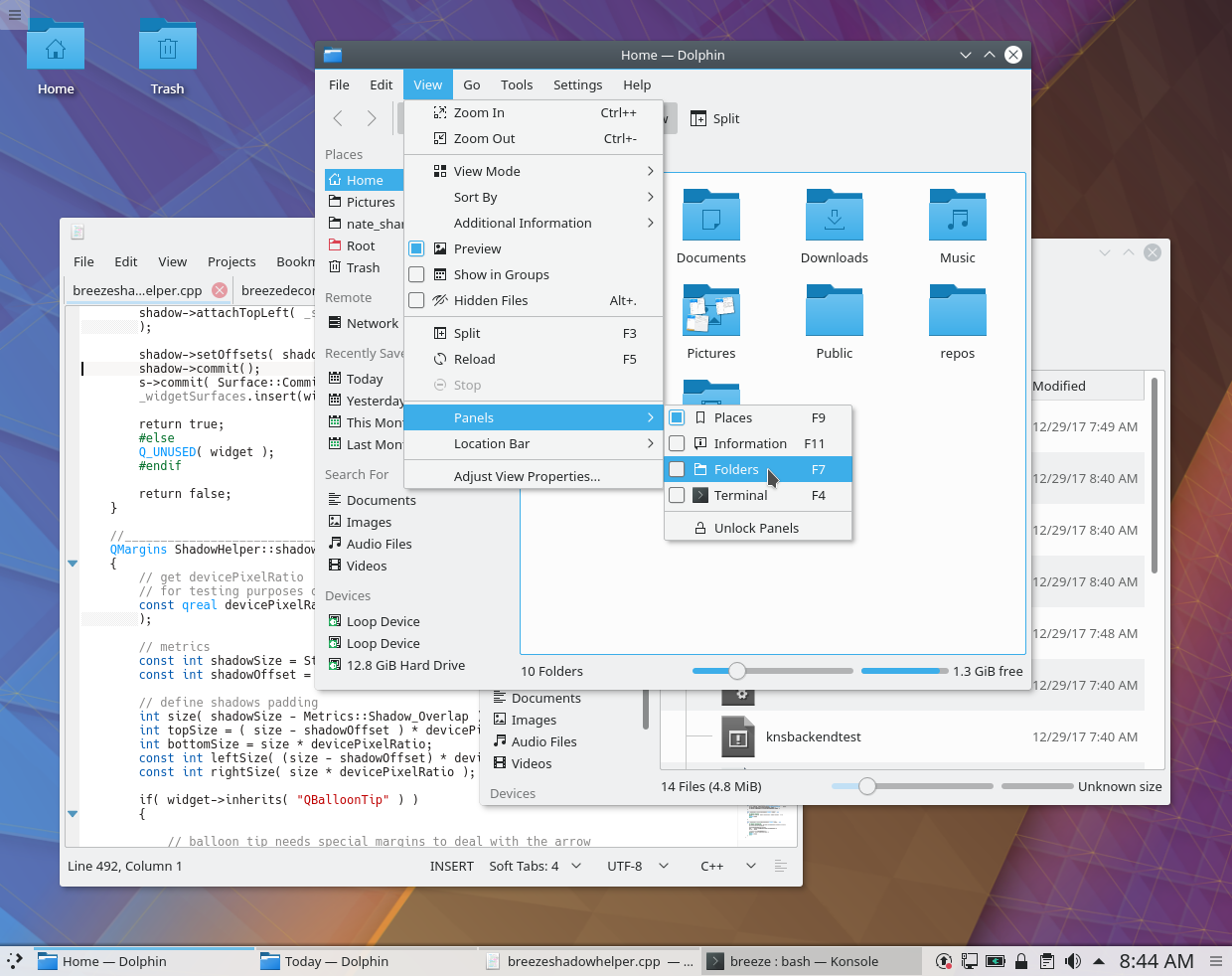
KDE’s Visual Design Group recently put some thought into shadows in Breeze. Right now, the default shadows are rather small, and can be almost entirely invisible on the left edge:

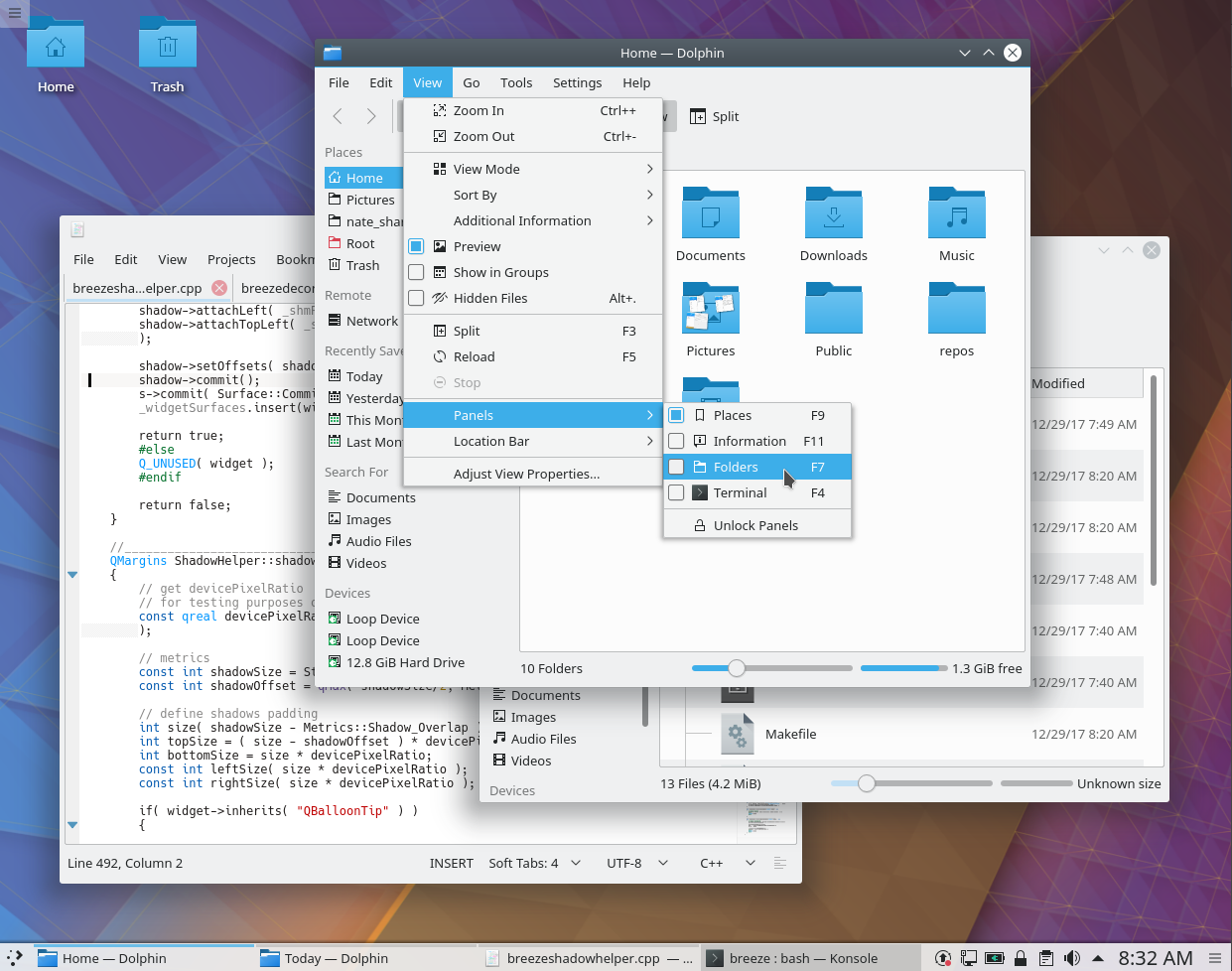
We decided to make them larger and deeper by default, and center them horizontally so that there’s a shadow on the left edges of windows and menus as well. I was honored to produce the patch, and I’m happy to report that it’s been accepted and merged! Starting in Plasma 5.12, here’s how shadows will look:

These are just default settings of course; if you don’t like big shadows, you can tweak to your heart’s content (System Settings > Application Style > Window Decorations > [click on the little menu button in the corner of the Breeze entry] > Shadows). But this new default setting provides a much greater sense of depth that I think most users will find quite welcome.

KDE Goal: Usability and Productivity

It’s been an honor to have had the community select my KDE goal: focus on usability and productivity. This is a topic that’s quite dear to my heart, as I’ve always seen a computer for a vehicle for giving substance to your thoughts. Low-quality computer operating systems and software get in your way and knock you out of a state of flow, while high quality versions let you create at the speed of thought. KDE Plasma is already pretty good in this department, but I think we can make it even better–we can turn it into the obvious choice for people who need to get things done.

To make this happen, I’m proposing to focus on the following broad approaches:

  • Make it easier to find, install, launch, update, and remove new software
  • Increase the speed and efficiency with which files and data can be transferred from one program or context to another
  • Write new features that make common operations easier, faster, more efficient, or less frustrating
  • Make common features look and behave identically to make use of users’ pre-existing muscle memory and knowledge of how things work
  • Fix bugs that make important features not work properly or at all
  • Improve the state of laptop touchpad input with libinput, which is rapidly becoming the new standard
  • Fix commonly-complained-about visual design and UX issues

In the past month, KDE contributors (myself included) have implemented the following important improvements–many of them commonly wished for:

  • Improved the default size of the Clock widget’s text (KDE Bug 375969)
  • Worked with the VLC devs to make VLC 3.0 work out of the box for streaming videos over Samba shares on KDE desktops (VLC Bugs 18993 and 18991)
  • Made sections in Dolphin’s Places panel hide-able (KDE Bug 300247)
  • Added a dedicated section for removable devices to open and save dialogs (Phabricator revision D8348)
  • Made Gwenview open Targa Image (.tga) files KDE Bug 332485)
  • Gave Gwenview’s move/copy/link dialog a title that reflects the selected files (Phabricator revision D8409)
  • Got Discover’s screenshot pop-ups navigation buttons that respond to keyboard arrow keys (KDE Bugs 387816, 387858, and 387879)
  • Implemented a Wayland-compatible Redshift-esque Night Color feature (KDE Bug 371494)
  • Restored advanced print options to the Qt print dialog (Qt Bug 54464)

And we’re just getting started! You can find a longer list of the improvements we’re targeting in the coming months and years on the proposal page, and the full list here on our Bugzilla.

How you can help

If you have programming skills, please feel free to work on any of the above bugs. Patches are submitted using Phabricator; additional developer documentation can be found here.

If you’re more visually inclined, please feel free to start giving feedback and input in the KDE Visual Design Group chatroom.

If you’re detail-oriented and like categorizing things, we’re always in dire need of bug screeners and triagers. Every day, KDE receives on average 15-25 new Bugzilla tickets. Many of these are duplicates of existing bug reports. Many have already been fixed. Many are caused by configuration issues on the reporter’s computer. And many are real bug or legitimate feature requests. But without bug screeners to categorize them appropriately, they just all pile up into an intimidating mountain. It’s an important job; the bug lists above could not have been compiled if not for KDE’s bug triagers. Read more about it here!

And finally, financial contributions are very much appreciated, too. KDE’s annual fundraiser is going on right now, so hop on over and donate! Every little bit helps.