A few corrections about the transition from Blue Systems to Techpaladin

By now, many have probably read Jonathan Riddell’s blog post yesterday about his departure from KDE and the events that led up to it. And today, an article has been published in ItsFoss about the topic that unfortunately seems to have misunderstood some of the details of Jonathan’s post. I didn’t want to have to write this post, but since I’m named personally in both places, and there are inaccuracies spreading out there, I thought it would make sense to correct the record before this becomes too much of a game of telephone.


Overall it’s a very sad situation, and I want to make it clear that I bear no malice or ill will towards Jonathan. As for the internal details of the transition of many of Blue Systems’ personnel to Techpaladin Software, Jonathan is entitled to his interpretation of events, and that’s fair. But it was a delicate transition, and people also have a right to personal and professional privacy. As such, it wouldn’t be appropriate for me to get into anything non-public about individual people’s personal and work situations, motivations, or decisions.

So there are some parts of the story that are going to have to go un-told in public, at least by me. But I can correct the record about misunderstandings and errors, and offer my own perspective!


I’ll start with the ItsFoss article:

First of all, Jonathan never wrote in his post that he saw KDE itself “moving away from the cooperative and transparent model he valued”, or that decision-making was increasingly concentrated under me. Jonathan’s blog post wrote about his relationship with me in the context of the Blue Systems to Techpaladin transition, not about KDE itself. KDE itself is fine — better than fine, really. KDE is thriving, with competitive board elections this year and an increased base of donations it can use to assert a measure of independence from commercial entities.

It’s also not true that Techpaladin was “meant to continue supporting KDE neon after Blue Systems scaled back.” Jonathan didn’t write this, and it was never the case. Techpaladin was and is a vehicle to take over the contract work that Blue Systems had been engaging in, after its manager made the decision to discontinue that work. KDE neon was never a part of this.


There are also a few topics from Jonathan’s original post that need addressing. First of all, Blue Systems is not shutting down. I was just talking to a happy Blue Systems person at Akademy last week. As I mentioned, what actually happened is that Blue Systems divested itself of the consultancy element that it had picked up a few years prior. Blue Systems is still around as a company, and is still employing people who want to work there. Several people opted to stay there rather than moving over to Techpaladin. And at no point was I or Techpaladin ever Jonathan’s employer.

I also want to make it 100% clear that I never made any effort to shut Jonathan out of anything in KDE, never encouraged anyone else to cut off contact with Jonathan or shut him out of anything in KDE, and never pulled strings behind the scenes to make it happen without looking like it was happening. Nothing of the sort! If Jonathan came back to KDE, I would be happy to rebuild a collegial relationship over topics of shared interest.

Finally, regarding company structure and employment details, I went into this a few months ago in https://pointieststick.com/2025/03/10/personal-and-professional-updates-announcing-techpaladin-software/#comment-40233. Techpaladin’s current company structure actually allows people interested in making it more “co-op-like” to buy their way into partnership, which is how Igalia — the “cooperative socialist paradise” that Jonathan mentioned — does this as well. I’m confident that no laws are being broken here; I exhaustively researched the employment laws of 7 countries and then confirmed my conclusions with a lawyer before moving forward with anything. In addition, we practice financial transparency and cooperative decision-making on the topics of hiring, new contracts, etc. So internally it’s quite “co-op like” already.

But this is my first time co-running a company of this size and complexity, so I’m sure I’m making mistakes and can do better. Now that the company has survived the initial setup and been around for 7 months, there’s some breathing room to explore that. But from the start, the whole point has been to put money into the hands of people doing extraordinary KDE work that makes the world a better place, and to provide all of us with more agency over our KDE careers.


Hopefully all of this makes sense. If anyone has any further questions, I’d encourage them to ask publicly or privately, and I’ll do my best to answer what I can that doesn’t compromise anyone’s personal or professional privacy.

If your notifications look kind of stupid in Plasma 6.3.4, it’s my fault

This is for everyone upgrading to Plasma 6.3.4, which was released yesterday. I suspect that some of you will notice something slightly wrong with notifications; the top padding is off, causing text to look not vertically centered most of the time.

This is my fault. The recent bug-fixes I made to notification spacings and paddings were backported to Plasma 6.3.4, but ended up missing a part that positions the text labels nicely when there’s body text or an icon, and didn’t notice this until after 6.3.5 was released. The fix was just merged and backported for Plasma 6.3.5, so unless your distro backports the fix (I’ve already emailed the appropriate mailing list about this) you’ll have to live with slightly ugly label positioning until then. Sorry folks! My bad.

Once you have the fix — either because your distro backports it or because you’ve waited until Plasma 6.3.5 — notification text positioning should look better again:

Packaging recommendations

I’d like to draw attention to a fairly new wiki page that might be of interest to both packagers and users of DIY-style distros like Arch Linux: our Packaging Recommendations. This page is a reference for how Plasma developers would like to see Plasma set up, and it goes over topics like packages to pre-install by default, packages to avoid, and recommended system configuration tweaks.

This data comes from years of experience with distros that didn’t ship a complete Plasma experience, not out of malice or neglect, but rather because it’s really hard to know the full list of things to do and install! Most of us have had the experience of distro-hopping, only to discover that some issue that was solved in one distro is present in another. Maybe you gained video thumbnails by default after switching, but KDE Connect stopped working, or maybe color Emojis started working but Samba sharing broke. Not fun! This page aims to solve that by providing a reference of how to ship and configure Plasma vis-a-vis these topics for an optimal user experience.

So if you’re a KDE packager, please have a look and adjust your packaging if you find that you’re currently missing anything!

It’s normal and it works

I read a comment on Phoronix recently that reminded me why I love KDE Plasma:

“KDE is normal and it works”

We can ignore the argument to which this is a response, and forgive alcade for confusing the name of the community with the desktop environment. Regardless, “KDE is normal and it works” is in a nutshell what I think makes KDE Plasma such a unique and shining point of light in the FOSS world.

Plasma uses a normal, familiar layout: Panel on the bottom with an app launcher, pinned apps, system tray, and clock; desktop icons; visible buttons that mostly have text labels; minimize/maximize/close buttons on windows. You know, normal stuff. You can change everything, but it starts out normal, unlike other desktop environment projects that are explicitly abnormal–being controversially opinionated about matters of design or having an unusual component layout. This is fine! Their departures from what’s normal may in fact be better, and their developers and users they certainly think so. But tons of people out there don’t want “may be better”, they want “normal.” And that’s fine too. Our software is for them.

And KDE Plasma works. It has its bugs, but it is basically a solid and reliable piece of technology that isn’t missing major features, either because of a lack of resources or because design decisions preclude supporting them. It is not a hobbyist science project missing key functionality that might break entirely. It doesn’t re-invent itself every year or two and become something different that might stop meeting your needs or tastes. It has actionable plans for adapting to industry changes surrounding it that are actively being carried out; it is not on a path to become obsolete or a technical dead end. No, it’s just it’s an imperfect and boring piece of infrastructure you can nonetheless rely on.

I think the world needs something with those characteristics, and and that’s why I like it and work on it.

Why I only have one computer

If you’re here for just the KDE-specific stuff, feel free to skip this post.


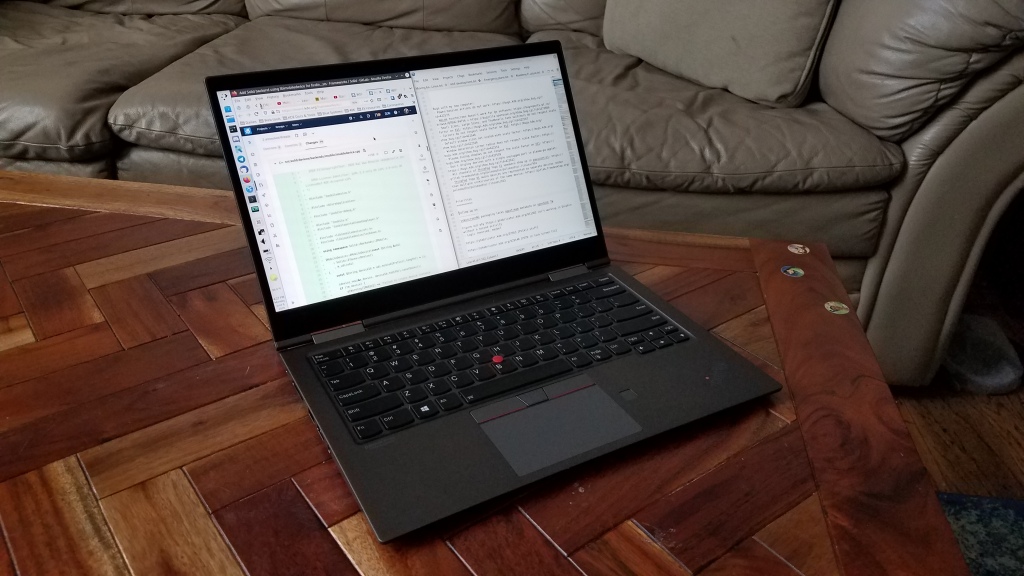
I used to have a desktop and a laptop. But in the end I found that having only a single machine greatly simplified everything and increased my productivity. This is it:

Just a regular old Lenovo ThinkPad X1 Yoga laptop

The biggest problem was always keeping files in sync.

Assuming you’re more than just a consumer of online content, you probably have local files for things that are important to you: school work; in-progress projects; creative pursuits; family photos; a personal music collection; source code repos; saved memes–you name it. With more than one computer, you need to figure out a way to keep these files in sync, and good solutions are elusive.

Cloud services are expensive and may compromise your privacy. Free non-cloud local sync services only work when both machines are on the same network. Any FOSS versions of these are unfortunately buggy and a chore to set up and maintain. Even if your chosen sync solution works perfectly (which it never does), you have to deal with the headaches of:

  • Inevitable sync conflicts
  • The set of files on one computer exceeding the storage capacity of another one
  • A necessary delay before you can work on files which the sync service is still updating after you turn on a computer that was turned off while changes were made on another computer
  • Resisting the temptation to pause syncing when something goes wrong, because you will forget to turn it back on, causing each computer’s files to drift out of sync and making reconciliation that much harder later

If you opt to forgo sync services and instead store common or shared files on a server (say, music or movies), this worsens the problem because now you have an additional location of files to manage, and you acquire the challenge of how to either safely access the files when not on the server’s local network, or automatically keep cached local copies in sync.

Giving up and keeping differing sets of files on each computers defeats one of the advantages of having multiple computers, and makes file management a real nightmare because you will somehow never have the file you want on the computer you happen to be using at any given time.

There’s just no good way out here, at least not that I’ve found.

In the end I settled on using a single computer–a powerful, top-of-the-line laptop. This can do everything a desktop can do–albeit more slowly–but it has the portability I need for travel and working from multiple locations. Interestingly, one really nice laptop that doesn’t need an external screen, mouse, or speakers turns out to be generally cheaper than two decent computers with all their associated peripherals. The only problem is finding one, because the range of high-end PC laptops kind of stinks, unfortunately. More on that tomorrow.

Bug triaging is the foundation of quality and we need more of it

Bug triaging is a largely invisible and often thankless task. But it’s the foundation of quality in our software offerings. Every day, our users file between 30 and 50 bug reports on https://bugs.kde.org, and often up to 100 right after a big release! Many will be duplicates of pre-existing issues and need to be marked as such. Quite a few will be caused by issues outside of KDE’s control and this also needs to be marked as such. Many will be crash reports with missing or useless backtraces, and their reporters need to be asked to add the missing information to make the bug report actionable. And the rest need to be prioritized, moved to the right component, tagged appropriately, and eventually fixed.

All of this sounds pretty boring. And, to be honest, sometimes it is (I’m really selling this, right?). But it’s critically important to everything we do. Because when it’s not done properly:

  1. Users don’t feel listened to, and start trashing us and our software on social media.
  2. Critical regressions in new releases get missed and are still visible when reviewers check out the new version, so they also trash it in high-profile tech articles and videos.
  3. Un-actionable bug reports pile up and obscure real issues, so developers are less likely to notice them and fix them.
  4. Bugs that occur over and over again don’t accumulate dozens of duplicates, don’t look important enough to prioritize, and therefore don’t get fixed.
  5. Easy-to-fix bugs don’t get fixed by anyone and it’s pretty embarrassing.

Do you see a pattern? Most of these results end up with KDE software being buggier and KDE’s reputation being damaged. It’s not an accident that KDE’s software is less buggy than ever before that that we enjoy a good reputation today. These positive developments are driven by everyone involved, but they rest upon an invisible foundation of good bug triage. And as KDE software becomes more popular, users file more bug reports. So the need for bug triage constantly grows. Currently it is done by just a few people, and we need help. Your help! And it will truly be helpful! If you are a meticulous, detail-oriented person with some technical inclination but no programming ability, triaging bug reports may just be the best way to help KDE. If this sounds like something you’d like to get involved with, go over to https://community.kde.org/Guidelines_and_HOWTOs/Bug_triaging and give it a read! I would be happy to offer personal bug triaging mentorship, too. Just click the “Contact me” link here or at the top of the page and I’ll help you get started.

PSA: try turning on WebRenderer in Firefox

This is a new rendering backend for Firefox that’s not yet on by default. Presumably there are some edge cases where it makes things worse or causes some instability, but so far I have not experienced anything bad. On the contrary, without it, I and some other people get terrible flickering in Firefox on Wayland. With it enabled, not only is the flickering gone, but scrolling performance becomes buttery smooth and CPU usage decreases noticeably on both Wayland and X11, resulting in increased battery life! Win-win-win.

To turn it on, visit the about:config page in Firefox, search for “gfx.webrender.all”, and set it to true. That’s all there is to it!

I’m on Patreon now

Howdy everyone! So many folks have asked me to set up a Patreon page that I’ve gone and done it: https://www.patreon.com/ngraham

By supporting me on Patreon, you’re helping me provide the focus, direction, support, and technical contributions that work to turn the KDE software suite into a lean, mean, bug-free productivity machine, and get it distributed well so that our users have great options for getting our software.

Of course, I’m only one man; what really matters is not me, but rather you! KDE’s greatest strength is its passionate community of developers and users, who work tirelessly to develop, improve, polish, promote, and use KDE software. I truly couldn’t do this without all of you, and in fact, I wouldn’t even want to! All of you are the reason why I work so hard on KDE software. Thank you, so very much.

Become a patron

The future of distros

Today KDE released Plasma 5.12 with Long Term Support–the culmination of more than a year of work. It’s really awesome, and we think you’ll love it!

But how do you get it!?

It all depends on your distro! Let’s look at Linux distros today.

What makes a distro a distro?

Today it’s mostly the choice of release model. “Stable release” distros like Ubuntu and Linux Mint lock everything to a specific version, only offering feature upgrades only when a new major version of the distro is released. “Rolling release” distros like Arch and openSUSE Tumbleweed give you everything as close to the developers’ schedules as possible.

Each model has drawbacks:

  • Stable release distros will often saddle users with ancient, years-old software. For example, users of Debian Stable might not get to experience KDE Plasma 5.12 for another 2 or 3 years–or even longer.
  • Rolling release distros expose users to the latest version of everything, turning them into QA. Underlying system libraries often change and break apps that use them. The breakage is usually fixed quickly, but users are exposed to it in the first place.

Certain distros additionally try to go beyond mere packaging and releasing, and actually try to ensure some QA and polish in the final product. Distros like Ubuntu, Linux Mint, Manjaro, and Elementary that follow this model quickly rocket up to the top of the popularity pyramid. Users are desperate for distros with better QA and polish!

But it’s exhausting; if you package all the software, you’re responsible for it too. It’s a huge job, even for distros that base themselves on others, as they find themselves having to patch on top of patches, and manage two release cycles (their own, and the parent distro’s). Turnover and burnout are common.

Flatpak and Snap to the rescue

Flatpack or Snap provide the solution: 3rd party packaging. Instead of the distros doing the packaging, it comes either straight from the developers, or from a 3rd-party intermediary like Flathub.

For distros, the benefits are enormous: liberated from the grunt work chores of packaging and patching software, distros will be free to step wholeheartedly into their natural roles as arbiters of the final user experience, concentrating on impactful tasks like integrating diverse components, managing hardware support, performing QA, polishing the final product, and delivering it to users in an easy-to access manner. Fixes and patches can be submitted upstream, instead of duplicated locally. This is KDE’s relationship to Qt, in fact. It works great.

Snap and Flatpak also improve things for users and developers:

  • Users get to choose whether they want each app to be stable, up-to-date, or cutting-edge according to their preferences, and they get a clear chain of responsibility when there’s a bug.
  • Developers get to package their apps only once to make them available to everyone, and get to determine for themselves their software’s presentation, branding, and release schedule–rather than hoping that packagers for 500 different Linux distros do it for them, and then having to deal with bug reports about versions of their software that are years old.

Ultimately, Flatpak or Snap liberate us from the tyranny of low-quality distros that make Linux software look bad because they don’t do QA, integration, or UX testing to make sure that the final product is of high quality. Many will rightly vanish because they’re not providing much value for users or generating enough developer interest to continue existing. Once this happens, developers and users will gather around the smaller number of remaining distros, increasing each of their levels of manpower and user bases.

So no, distros don’t go away. In fact, the distros that are worth keeping will be able to focus on tasks that offer more value to users than mere software packaging. Far from erasing diversity, this will empower real and meaningful diversity–where we have a handful of really good and strongly differentiated distros whose products embody different philosophies, instead of an overwhelming number of mediocre distros with often only minimal differences, none of which really work well once you dig deeply. We’ll all win, and all of these vastly superior distros will be far stronger contenders when compared to Windows, macOS, and ChromeOS.

How you can help

There are many ways for you to help enter this brave new world of actual QA and polished products.

Users: If your favorite app offers a Flatpak or Snap version, use it! Quite a lot do. If you find problems, file bugs! If you find an app listing in KDE Discover or GNOME Software that doesn’t look good, submit better information! If you find cases where duplicate apps appear when browsing, submit patches to fix it!

Software developers: Provide high-quality AppStream metadata and please submit your apps to Flathub! This goes for KDE developers, too. Krita and Kdenlive are already up, but I want to see Dolphin, Konsole, Kate, and all the rest!

Distro developers: don’t fight Flatpak or Snap; embrace them (and Flathub) and liberate yourself from packaging chores. Focus less on packaging software for your users, and more on performing the QA necessary to make sure that that software actually works well.

As always, consider becoming a KDE contributor if you like what you see! We can’t do this without you.