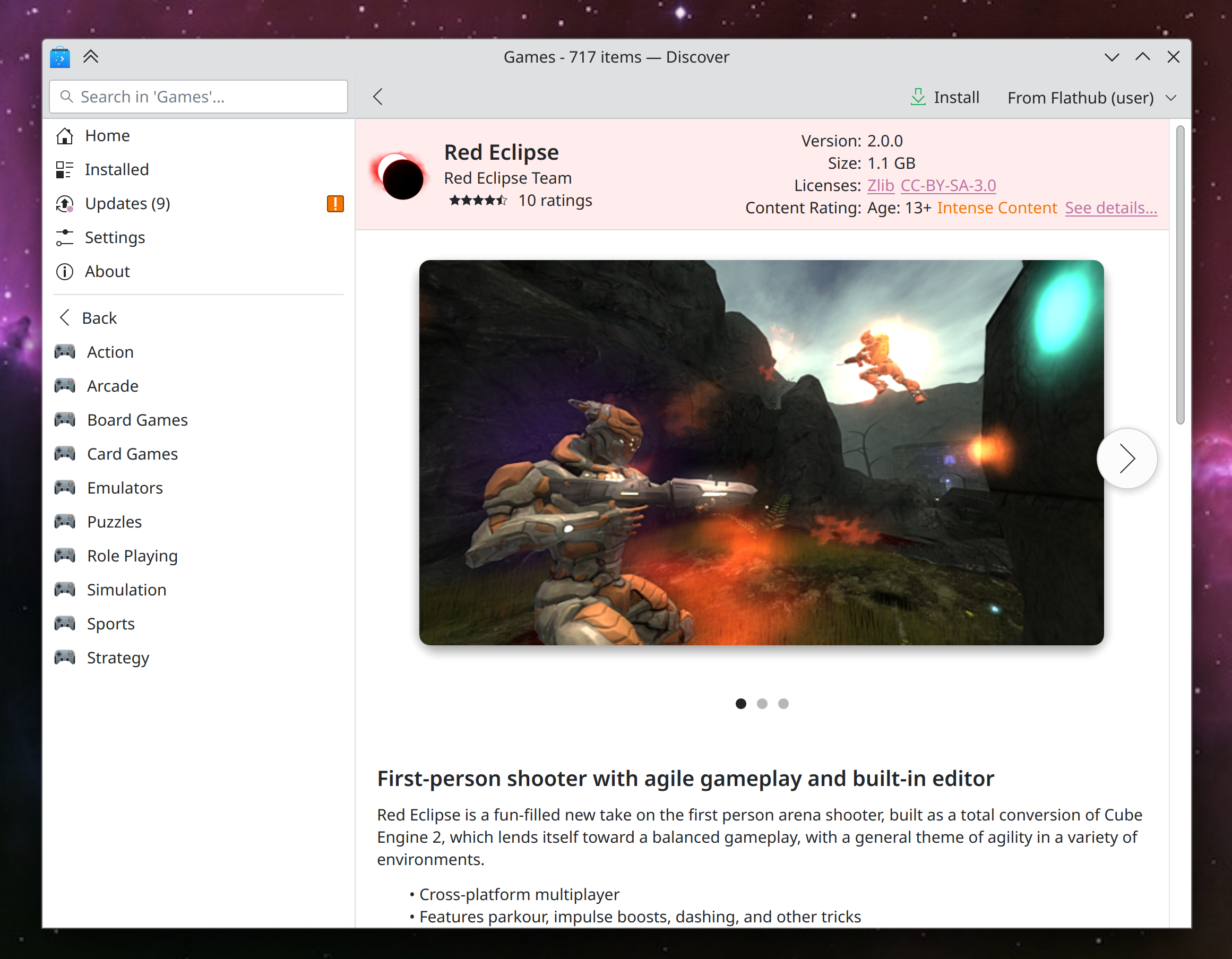
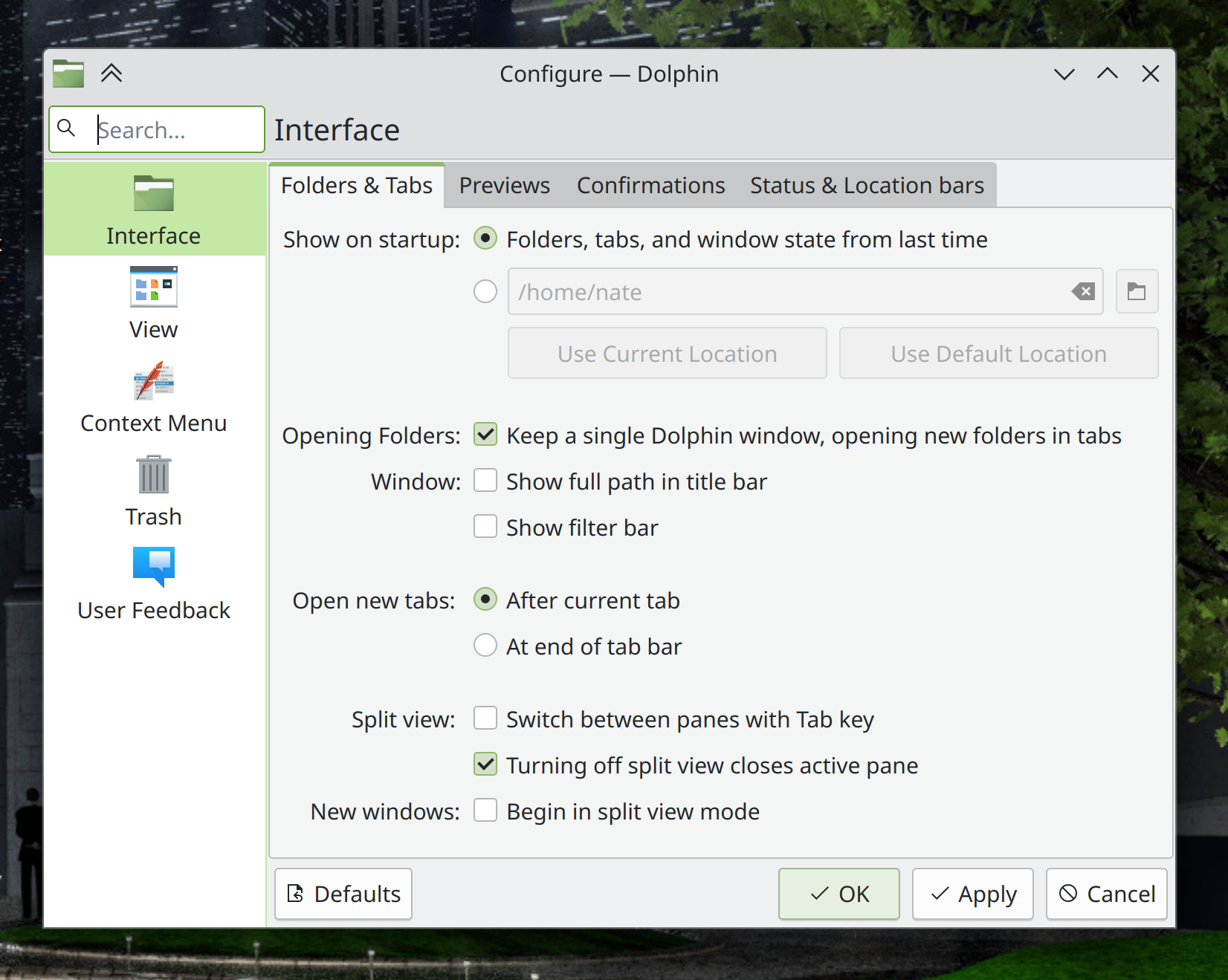
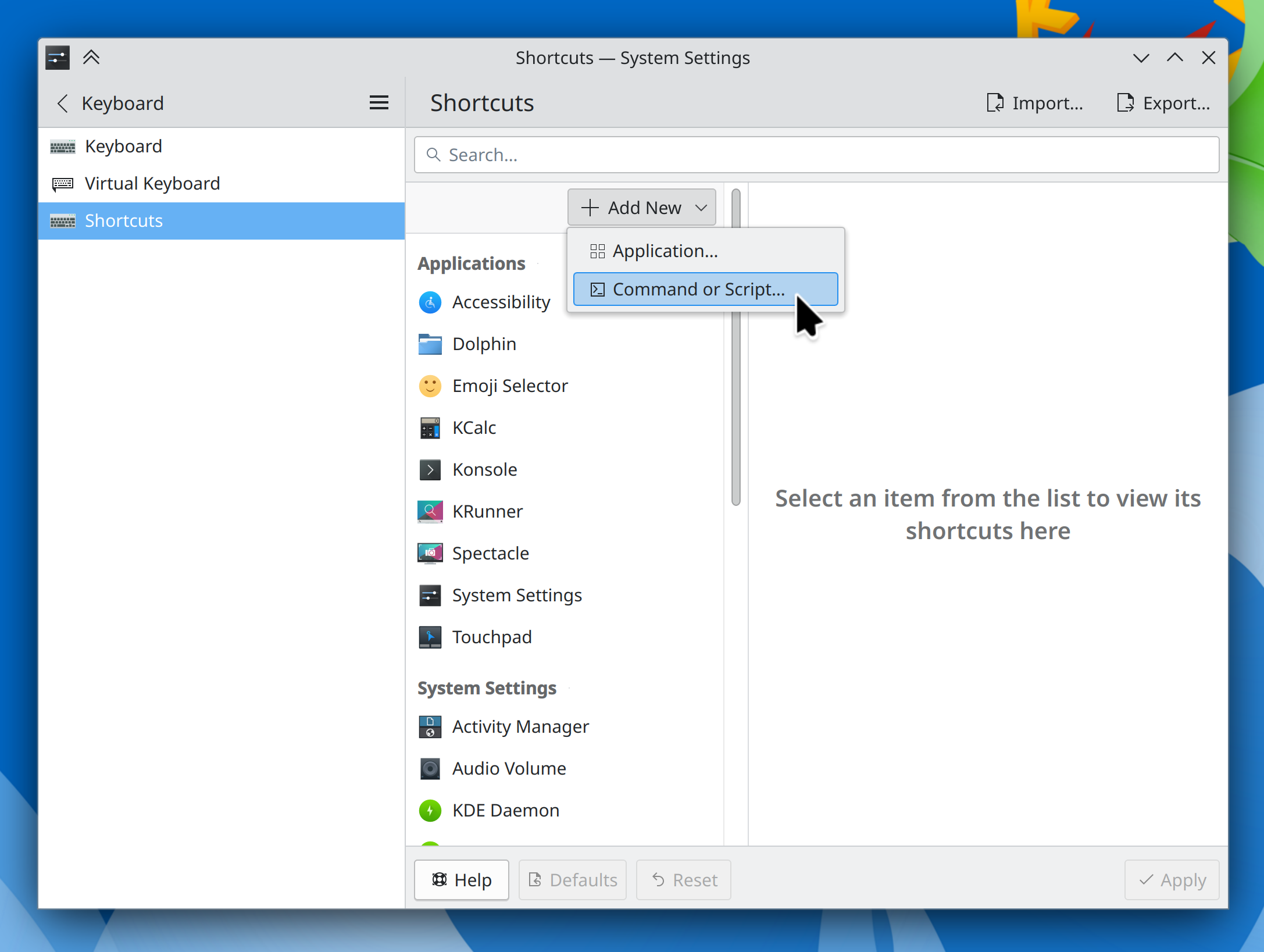
This week in KDE: longstanding issues crushed

This week the focus was on annoying longstanding issues, and a whole bunch of them are now history! If you’ve used KDE software for any significant amount of time, I bet you noticed and were annoyed by at least one of the issues mentioned below, and can now rejoice at their annihilation! This effort has dropped the number of 15-minute Plasma bugs to its lowest level ever–just 30. The Mega-Release will be shipped in under two weeks, and we want it to be as fabulous as possible!

Pre-Mega-Release

…But first, some bugfixes backported to Plasma 5.27!

Fixed a way that KWin could crash in the Plasma Wayland session (Xaver Hugl, Plasma 5.27.11. Link)

Files copied to the clipboard are now made available to sandboxed apps using the portal system, so you can paste them into those apps (Karol Kosek, Plasma 5.27.11. Link)

After opening your laptop’s lid, the brightness of its backlit keyboard is now correctly restored to the same value it had before the lid was closed (Werner Sembach, Plasma 5.27.11. Link)

KDE 6 Mega-Release

(Includes all software to be released on the February 28th mega-release: Plasma 6, Frameworks 6, and apps from Gear 24.02)

UI improvements

When a panel popup is open, clicking on an empty area of the panel will now close it (David Edmundson, link)

When you try out a Global Menu and all your apps’ in-window menubars get hidden, if you later change your mind and remove the Global Menu, all of those apps’ in-window menubars now re-appear automatically instead of remaining hidden until manually shown again (David Edmundson, link)

When any of your physically connected screens are marked as disabled, opening System Settings’ Display & Monitor page now always shows an enabled screen when it opens, rather than sometime showing one of the disabled screens (David Edmundson, link)

Added Breeze icons for OpenVPN and Cisco VPN configuration files (Kai Uwe Broulik, link):

Bug fixes

Important note: I don’t mention fixes for bugs that were never released to users; it’s just too much for me (it would probably be too much for you to read as well), and most people never encountered them in the first place. Because we’re in the middle of a big Plasma dev cycle, there are a lot of these bugs! So big thanks to everyone who’s made it a priority to fix them!

Fixed several common random-seeming crashes in Plasma’s Activities backend code (Harald Sitter, link)

Fixed a significant annoyance that would, in most distros, cause several types of files to be opened in the wrong apps by default (e.g. images opened in Okular rather than Gwenview) until the first time the user changed any of the file associations (Harald Sitter, link)

Fixed a visual glitch in Gwenview that could cause image thumbnails to overlap when using a fractional scale factor (David Edmundson, link)

in Spectacle, drawing annotations with a touchscreen or a stylus no longer draws additional random-seeming straight lines in weird places (Marco Martin, link)

Shift+dragging windows to custom-tile them now works even if you’ve set your keyboard to do something exotic like emulate the Caps Lock key when pressing both Shift keys together (Xaver Hugl, link)

Fixed a case where the cursor failed to disappear as expected in certain WINE games (Vlad Zahorodnii, link)

Fixed a memory leak seen in Spectacle when recording the screen (Aleix Pol Gonzalez, link)

Other bug information of note:

Post-Mega-Release

Gwenview now has a minimal “Spotlight View” mode in which all the normal UI is hidden, and all you see is the image and the window titlebar (Ravi Saifullin, Gwenview 24.05. Link):
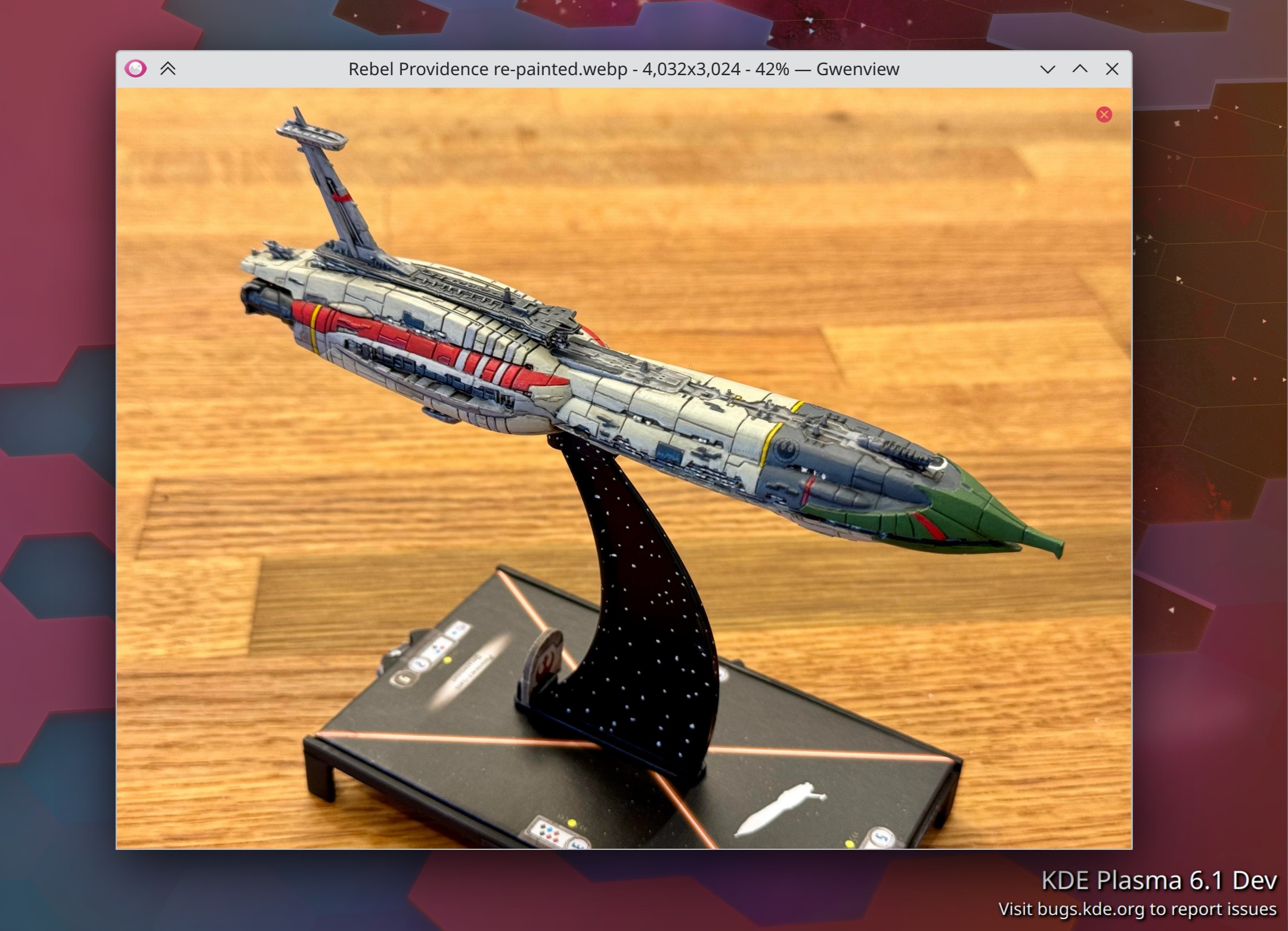
Before you ask, no this is not my paintjob! But I do plan to use it as inspiration 🙂

The warning on System Settings’ Proxy page no longer inaccurately warns you that Chromium-based browsers don’t respect it, which isn’t true anymore (Someone going by the pseudonym “Chaotic Abide”, kio-extras 25.04. Link)

Fixed the most common crash in Discover for Plasma 6.1, and we’re scoping out options for fixing it for 6.0 as well (Ivan Tkachenko, Plasma 6.1. Link)

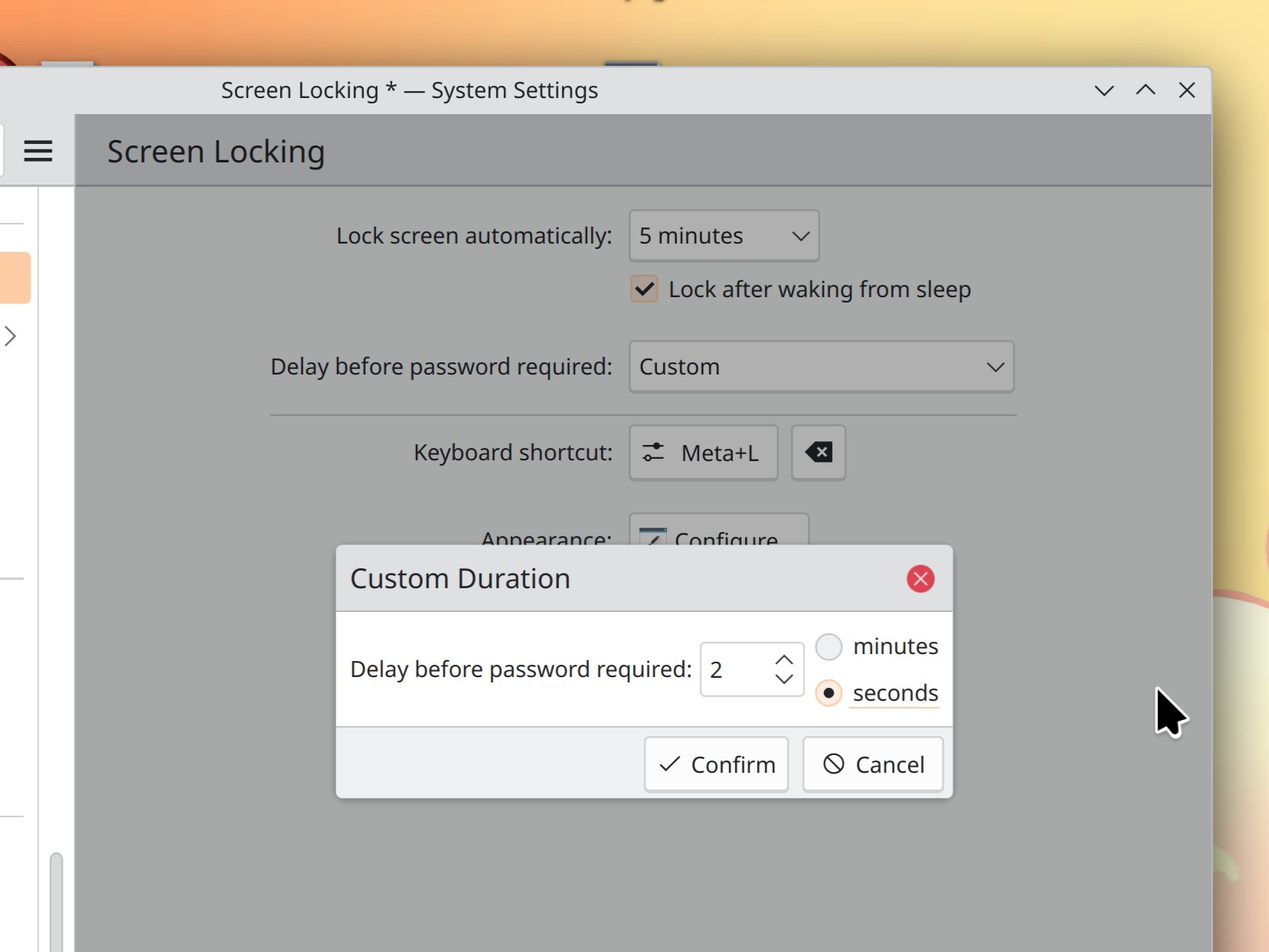
System Settings’ Screen Locking page now has a clearer UI for selecting times (Kristen McWilliam, Plasma 6.1. Link):

There’s now a KWin window rule you can use for controlling the status of Adaptive Sync for individual windows (Ravil Saifullin, Plasma 6.1. Link)

Performance & Technical

KWin now supports direct scan-out when run in a nested manner inside another compositor (Xaver Hugl, Plasma 6.1. Link)

Landed some major performance improvements for thumbnail generation in Gwenview and file listing in general (Arjen Hiemstra, Mega-Release 6. Link 1 and link 2)

Landed some major performance improvements for Spectacle’s Rectangular Region mode (Noah Davis, Spectacle 24.05. Link)

The spacings used throughout Plasma and Kirigami-based apps are no longer based on font sizes, and are now simply hardcoded to various static values, as they are in QtWidgets-based apps. This should slightly increase visual consistency everywhere, and make it possible over time to build UIs with more predictability in their spacings. This is more of a long-term thing, but it’s an exciting first step! (Noah Davis, Kirigami 6.0. Link)

…And Everything Else

This blog only covers the tip of the iceberg! If you’re hungry for more, check out https://planet.kde.org, where you can find more news from other KDE contributors.

How You Can Help

Thanks to you, our Plasma 6 fundraiser has been a crazy success! I originally thought the goal of 500 new KDE e.V. supporting members was over-optimistic, but you’ve all proven me happily wrong. We’re now up to an amazing 825 members, blown past our stretch goals, and 1000 members by launch time seems like it might even be feasible. Thank you everyone for the confidence you’ve shown in us; we’ll try not to screw it up! 🙂 For those who haven’t donated to become members yet, spreading the wealth via this fundraiser is a great way to share the love. 🙂

If you’re a developer, work on final Qt6/KF6/Plasma 6 issues! Which issues? These issues. Plasma 6 is very close to a release and in a good state, but could still benefit from some final bug-fixing and polishing. And as I mentioned before, if you haven’t tried it out yet, please do!

Otherwise, visit https://community.kde.org/Get_Involved to discover other ways to be part of a project that really matters. Each contributor makes a huge difference in KDE; you are not a number or a cog in a machine! You don’t have to already be a programmer, either. I wasn’t when I got started. Try it, you’ll like it! We don’t bite!
This week in KDE: Inching closer

The KDE 6 mega-release is due in a little under three weeks! And folks have remained in diligent bugfixing-and-polishing mode, because we want this release to be as smooth and drama-free as possible! If you haven’t already tried it out, this is a good time to. Find all the bugs that are bugging you so we can hopefully fix them before the final release!

KDE 6 Mega-Release

(Includes all software to be released on the February 28th mega-release: Plasma 6, Frameworks 6, and apps from Gear 24.02)

UI improvements

KWin’s “Active screen follows mouse” setting is now gone; now the active screen is always the one with the cursor on it, or the last one that was tapped with a touchscreen. This turns out to be much simpler and it’s what we think most people wanted anyway, hopefully alleviating complaints about OSDs and new windows opening on unexpected screens (Vlad Zahorodnii, link)

You can now set the data range manually for “horizontal bars” charts in System Monitor and its widgets (Arjen Hiemstra, link)

When you use the System Tray’s “Always show all entries” option, now it actually does always show all entries, instead of sneakily keeping some of them hidden anyway according to some internal logic which was not obvious (Jin Liu, link)

Searching through clipboard entries is now case-insensitive (Yifan Zhu, link)

Bug fixes

Important note: I don’t mention fixes for bugs that were never released to users; it’s just too much for me (it would probably be too much for you to read as well), and most people never encountered them in the first place. Because we’re in the middle of a big Plasma dev cycle, there are a lot of these bugs! So big thanks to everyone who’s made it a priority to fix them!

Fixed an issue affecting the Plasma X11 session that could cause the screen to end up black with only a movable cursor when you wake your system from sleep while using an NVIDIA GPU with its proprietary drivers (David Redondo, link)

CPU temperature sensors now work for a variety of Intel and AMD motherboards where they didn’t previously work (Arjen Hiemstra, link 1 and link 2)

When System Monitor’s window opens in maximized state, de-maximizing it now returns it to its pre-maximized geometry as expected (Arjen Hiemstra, link)

In various Kirigami-based apps, double-clicking on a page to open it multiple times is no longer interpreted that way–because opening the same page multiple times makes no sense–which avoids accidentally breaking the app (Arjen Hiemstra, link)

KScreen is now smarter about choosing better-matching screen settings when told to make one screen mirror another (Yifan Zhu, link)

Buttons and scrollbars in the Sticky Notes widget are now always distinguishable no matter what color you choose for the background of the note and no matter what your system color scheme is (me: Nate Graham, link)

A couple of Plasma UI elements with text on them that weren’t previously translatable now are (Emil Sari, link)

When your Task Manager is set up to only show tasks from the current screen, now this still keeps working when you switch around your screen arrangement without restarting Plasma (Someone awesome, link)

Header text in System Tray applets now elides instead of overflowing with a small window size and very long applet text (me: Nate Graham, link)

Other bug information of note:

Post-Mega-Release

When you hit the Alt+Tab shortcut with no windows open, you’ll now see a nice “No open windows” message instead of a broken-looking task switcher or even nothing (Vlad Zahorodnii, Plasma 6.1. Link)

The ancient feature to add a spacer in your window titlebars returns! (Vlad Zahorodnii, Plasma 6.1, link)

Automation & Systematization

Added an autotest to make sure that loading Digital Clock plugins still works (Fushan Wen, link)

…And Everything Else

This blog only covers the tip of the iceberg! If you’re hungry for more, check out https://planet.kde.org, where you can find more news from other KDE contributors.

How You Can Help

Thanks to you, our Plasma 6 fundraiser has been a crazy success! I originally thought the goal of 500 new KDE e.V. supporting members was over-optimistic, but you’ve all proven me happily wrong. We’re now up to an amazing 800 members, blown past our stretch goals, and 1000 members by launch time seems like it might even be feasible. Thank you everyone for the confidence you’ve shown in us; we’ll try not to screw it up! 🙂 For those who haven’t donated to become members yet, spreading the wealth via this fundraiser is a great way to share the love. 🙂

If you’re a developer, work on Qt6/KF6/Plasma 6 issues! Which issues? These issues. Plasma 6 is very close to a release and in a good state, but could still benefit from some final bug-fixing and polishing. And as I mentioned before, if you haven’t tried it out yet, please do!

Otherwise, visit https://community.kde.org/Get_Involved to discover other ways to be part of a project that really matters. Each contributor makes a huge difference in KDE; you are not a number or a cog in a machine! You don’t have to already be a programmer, either. I wasn’t when I got started. Try it, you’ll like it! We don’t bite!
The last few weeks in KDE: It’s coming… it’s coming… it’s coming

Wow, it feels like it’s been a while! And while many of KDE’s contributors have been enjoying some holiday and vacation time, quite a lot happened too! We’re getting pretty close to the projected February 28th release day for the KDE 6 megarelease, so all hands have been on the bug-fixing deck.

Overall we’re in good shape. Despite the large number of open bug reports, most are not serious, and I have confidence that we’ll get the remaining major ones done before the final release. Of course, the best way to make sure that happens is to help out!

KDE 6 Mega-Release

(Includes all software to be released on the February 28th mega-release: Plasma 6, Frameworks 6, and apps from Gear 24.02)

General infoOpen issues: 238

UI improvements

It’s now possible to quickly apply a wallpaper to all screens at once (Prajna Sariputra, link)

You can now set a custom mouse pointer speed, just like you can for the touchpad (Denis Zhdanov, link)

Discover Notifier no longer appears in your System Tray (even just the inactive area) unless it actually has something to notify you about–which means you can remove it permanently by simply telling Discover to never check for updates automatically on System Settings’ Updates page (Yifan Zhu, link)

Breeze-themed buttons and text field now always have the same height so they’ll never look slightly different when adjacent to one another (Akseli Lahtinen, link)

Throughout KDE software, the way symbolic icons (i.e. those whose names end with -symbolic) are found has been improved: when a symbolic icon is not found and the system has to fall back to a more generic icon, you’ll now get a symbolic version of that icon if it exists (Joshua Goins, link)

You can now configure Plasma to turn off the screen at the same moment when it locks (Jakob Petsovits, link 1 and link 2)

Bug fixes

Important note: I don’t mention fixes for bugs that were never released to users; it’s just too much for me (it would probably be too much for you to read as well), and most people never encountered them in the first place. Because we’re in the middle of a big Plasma dev cycle, there are a lot of these bugs! So big thanks to everyone who’s made it a priority to fix them!

Ark now preserves extended attributes of files in archives when editing and saving their contents (Kristen McWilliam, link)

Fixed a file descriptor leak in Plasma that could cause it to run out of file descriptors and crash under certain circumstances (Moody Liu, link)

Fixed an issue that could prevent the GlobalProtect SAML authentication method in OpenConnect VPNs from working (Rahul Rameshbabu, link)

Night color can now co-exist with color correction using ICC profiles–at least in the Wayland session (Xaver Hugl, link)

When using the weather widget’s DWD weather provider, you’ll no longer sometimes see nonsensically high temperature values shown in the forecast (Ismael Asensio, link)

Tabs in the weather widget no longer sometimes overlap in certain circumstances (Ismael Asensio, link)

Plasma’s “Alternatives” popup now follows the opacity level of its parent panel (Niccolò Venerandi, link)

When showing a preview of the selected Task Switcher style, clicking away from the preview now closes it as expected in the Plasma Wayland session (Ismael Asensio, link)

Other bug information of note:

Performance & Technical

The colord-kde repo has been ported to Qt6, so that color management on X11 works too (Nicolas Fella, link)

Reduced the background CPU usage when moving the pointer (Xaver Hugl, link)

A wide variety of pieces of transient state in QtWidgets-based apps are now stored in the state config file, not the settings file used for persistent user-set settings. This is a part of a very vocal crowd’s favorite bug! (Alexander Lohnau, link)

Automation & Systematization

Added GUI tests to make sure several Plasma bugs don’t recur (Fushan Wen, link 1, link 2, link 3, and link 4)

Added an autotest to make sure symbolic icon fallback works properly (Joshua Goins, link)

…And Everything Else

This blog only covers the tip of the iceberg! If you’re hungry for more, check out https://planet.kde.org, where you can find more news from other KDE contributors.

How You Can Help

Thanks to you, our Plasma 6 fundraiser has been a crazy success! I originally thought the goal of 500 new KDE e.V. supporting members was over-optimistic, but you’ve all proven me happily wrong. We’re now up to an incredible 627 members and unlocked multiple stretch goals! The first one has been met, but the second one is still on offer. So if you like the work we’re doing, spreading the wealth via this fundraiser is a great way to share the love. 🙂

If you’re a developer, work on Qt6/KF6/Plasma 6 issues! Which issues? These issues. Plasma 6 is very usable for daily driving now, but still in need of bug-fixing and polishing to get it into a releasable state by February.

Otherwise, visit https://community.kde.org/Get_Involved to discover other ways to be part of a project that really matters. Each contributor makes a huge difference in KDE; you are not a number or a cog in a machine! You don’t have to already be a programmer, either. I wasn’t when I got started. Try it, you’ll like it! We don’t bite!

This week in KDE: Holiday bug fixes

Like last week, the focus remained on getting the mega-release ready for, well, a mega release! Along the way folks have been starting their well-earned vacations, so the pace of work understandably decreased a bit. Accordingly, this will be the last regular weekly post of the year, with at least next week’s skipped, and possibly the next two. Happy holidays, everyone! Rest and recharge so we can hit the ground running in 2024. 🙂

KDE 6 Mega-Release

(Includes all software to be released on the February 28th mega-release: Plasma 6, Frameworks 6, and apps from Gear 24.02)

General infoOpen issues: 216

UI improvements

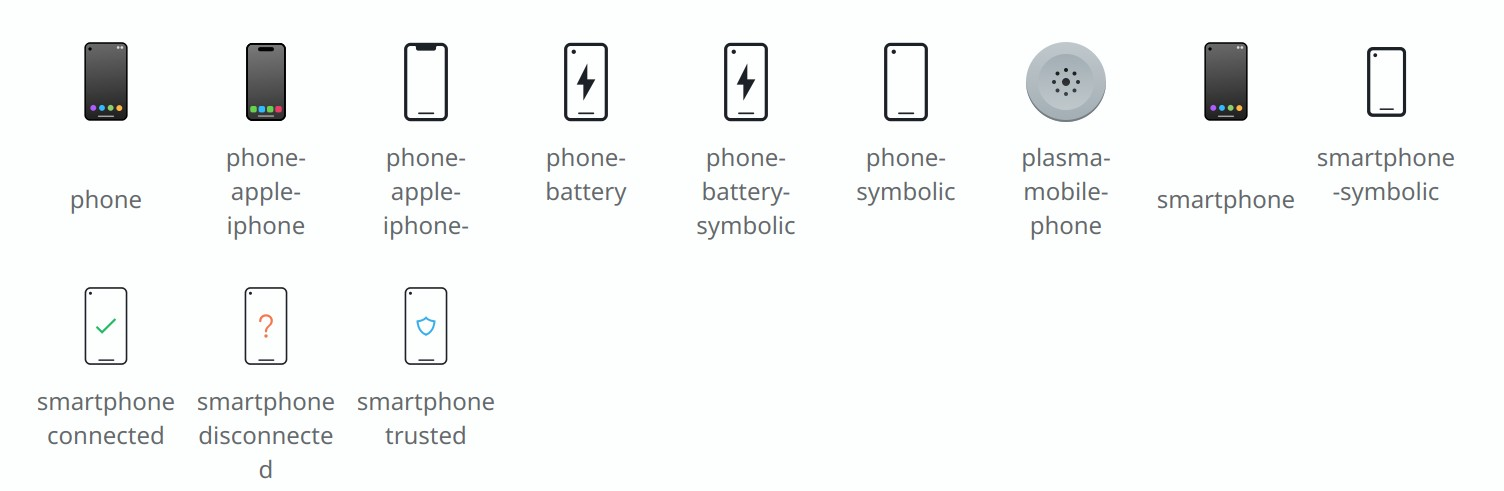
The Breeze icon theme’s smartphone icons have been overhauled and modernized to reflect what phones actually look like today (Áron Kovács, link):

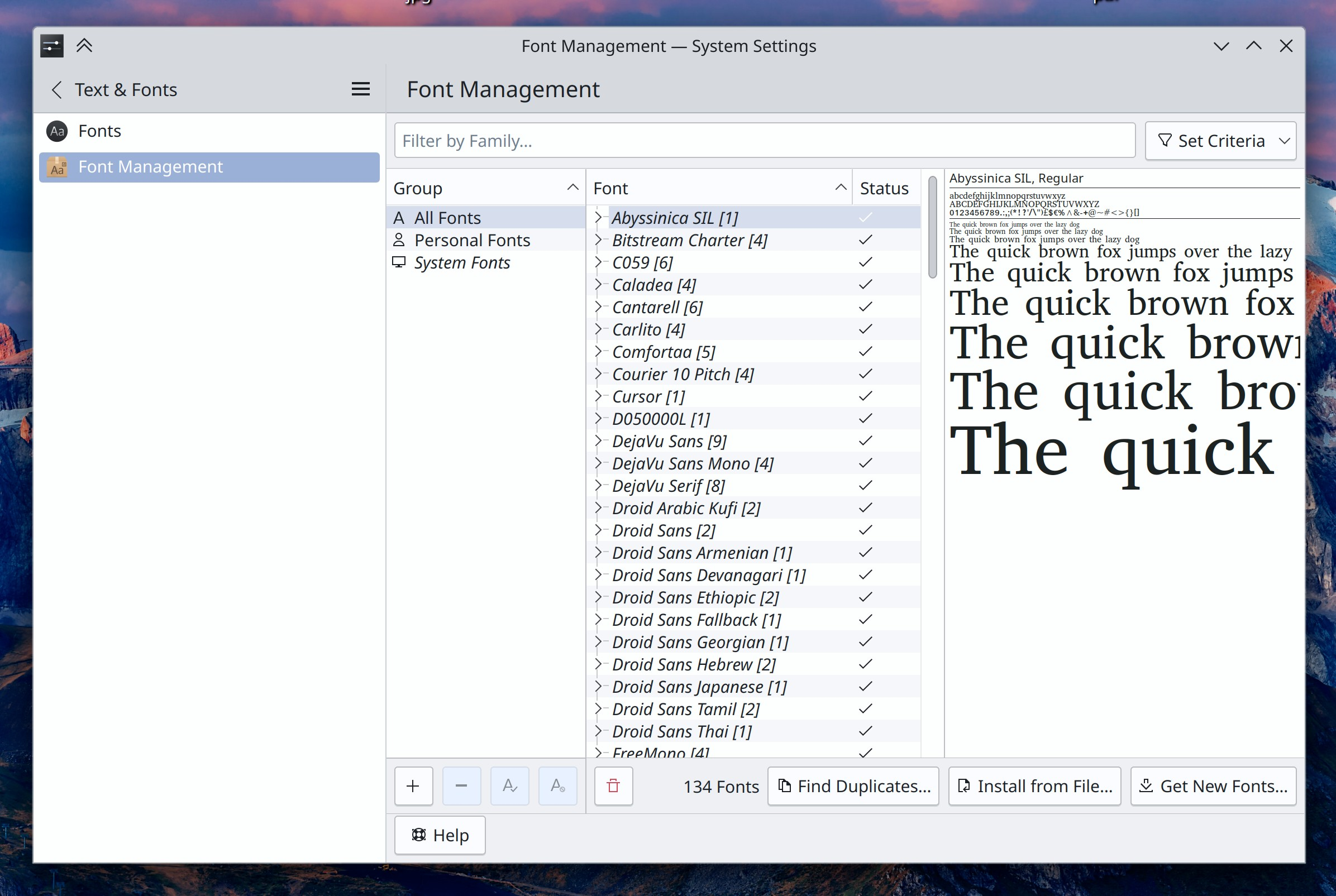
System Settings’ Font Management page has gotten a visual modernization to be more in line with the new frameless style in Plasma 6 (Carl Schwan, link):

Windows that don’t show up in the Task Manager or the Alt+Tab Task Switcher no longer appear semi-invisibly in the Overview effect (Akseli Lahtinen, link)

Breeze-themed non-editable frameless tabs (e.g. the tabs of a tabbed tool view or settings page) now expand to fill the available space by default, as there’s really no reason not to (Carl Schwan, link)

Improved the text contrast for certain accent colors (Akseli Lahtinen, link)

After pasting a file into a Dolphin window, if the file would end up at a location that’s currently out of view, the view scrolls to it so you can see it (Méven Car, link)

Okular’s “Show Signatures Panel” button now also opens the sidebar containing the signatures panel, if it happened to be closed at the time (Albert Astals Cid, link)

Elisa now supports cover images in the Webp format (Jack Hill, link)

Bug fixes

Important note: I don’t mention fixes for bugs that were never released to users; it’s just too much for me (it would probably be too much for you to read as well), and most people never encountered them in the first place. Because we’re in the middle of a big Plasma dev cycle, there are a lot of these bugs! So big thanks to everyone who’s made it a priority to fix them!

The screen locker has a fallback theme that appears when your active lock screen theme is broken. However when the fallback theme itself is broken for some reason, now the screen locker process breaks with the dreaded “your lock screen is broken” message rather than failing to lock the screen at all, which is worse (Joshua Goins, link)

File dialogs from a variety of Qt-yet-non-KDE apps will now have their name filters set correctly (Nicolas Fella, link)

When using a fractional scale factor, the Breeze window decoration theme’s window outlines no longer exhibit minor visual glitches (Vlad Zahorodnii, link)

Fixed an issue that could result in cursors leaving trails behind them when using a fractional scale factor and certain graphics cards that don’t support hardware cursors (Vlad Zahorodnii, link)

Widgets that have been assigned keyboard shortcuts should now be more reliable about remembering them. This probably alleviates or fixes a lot of the “Can’t activate Kickoff with the meta key” bugs! (Akseli Lahtinen, link)

Memory usage for NVIDIA GPUs is now represented with the correct unit in various System Monitor widgets and the app of the same name (Arjen Hiemstra, link)

When using a Bluetooth headset with integrated volume buttons, pushing them now always shows the volume change OSD (Bharadwaj Raju, link)

System Settings’ Task Switcher page no longer confusingly uses the word “backtab”, and the backwards-looking task switching invoked using Alt+Shift+Tab now works continuously if you hold it down (Yifan Zhu, link 1 and link 2)

The scrollbars of scrollable menus in QtQuick-based apps no longer inappropriately overlap the menu items (Tomislav Pap, link)

Other bug information of note:

Performance & Technical

Okular has now been ported to Qt 6 (Nicolas Fella, Sune Vuorela, and Carl Schwan. link)

The Wacom Tablet applet has now been ported to Qt 6 (Nicolas Fella, link)

Fixed one source of hangs in Dolphin when browsing a slow Samba share–this time having to do with bottlenecks generating thumbnails (Harald Sitter, link)

Reduced the memory usage of screen recording using KPipeWire. This won’t entirely fix the issue of screen recording taking up too much memory, but it makes a big difference already and should prevent outright resource exhaustion (Arjen Hiemstra, link 1 and link 2)

The DrKonqi crash reporter is now capable of recording and reporting crashes of the Powerdevil power management subsystem (Harald Sitter, link)

Automation & Systematization

Added an autotest to make sure the Emoji Selector window works (Fushan Wen, link)

…And Everything Else

This blog only covers the tip of the iceberg! If you’re hungry for more, check out https://planet.kde.org, where you can find more news from other KDE contributors.

How You Can Help

We’re hosting our Plasma 6 fundraiser right now and need your help! Thanks to you we’re now at 98% of our goal of 500 new KDE e.V. supporting members! That’s right, 98%!!! I bet we can get over the 500 mark before Christmas, and a little birdie might have told me that if we do, there could be stretch goals. 🙂 So if you like the work we’re doing, spreading the wealth via this fundraiser is a great way to share the love. 🙂

If you’re a developer, work on Qt6/KF6/Plasma 6 issues! Which issues? These issues. Plasma 6 is very usable for daily driving now, but still in need of bug-fixing and polishing to get it into a releasable state by February.

Otherwise, visit https://community.kde.org/Get_Involved to discover other ways to be part of a project that really matters. Each contributor makes a huge difference in KDE; you are not a number or a cog in a machine! You don’t have to already be a programmer, either. I wasn’t when I got started. Try it, you’ll like it! We don’t bite!

This week in KDE: un-flashy important stability work

Everyone kept hammering on the bugs this week. As a result, the number of open Plasma 6 issues decreased, and so did the number of older high and very high priority Plasma issues! I’m feeling really good about this release. Daily driving it is already a pleasure. I think it might be a winner. 🙂

KDE 6 Mega-Release

(Includes all software to be released on the February 28th mega-release: Plasma 6, Frameworks 6, and apps from Gear 24.02)

General infoOpen issues: 199

UI improvements

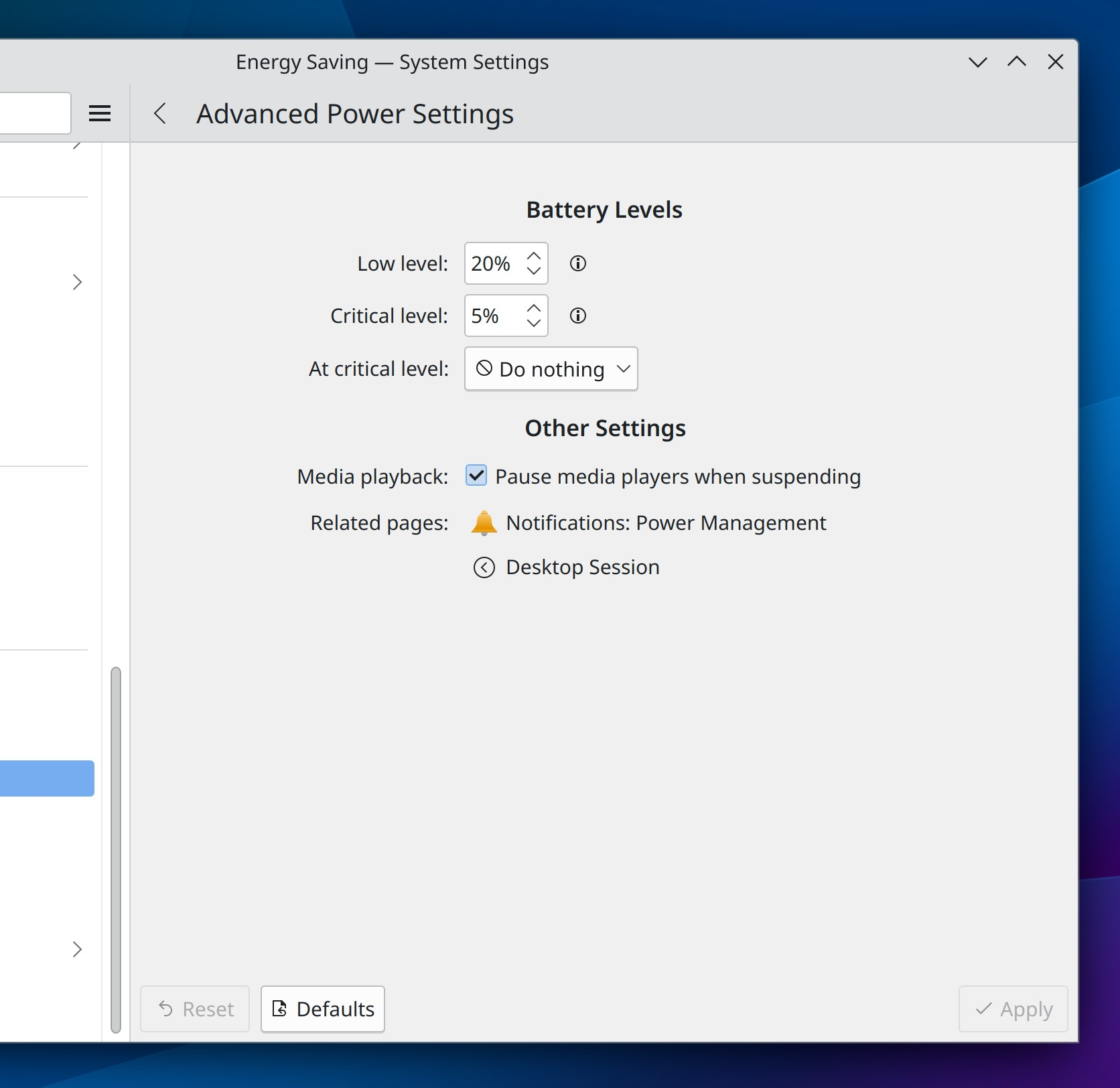
The “Advanced Power Settings” page in System settings has now been folded up into a sub-page of the “Energy Settings” page (Jakob Petsovits, link):

Made a variety of improvements to the way device batteries are shown on Info Center’s “Energy” page: more device types are now identified correctly, and their device models are now shown so you can more easily distinguish batteries from different devices of the same type (Shubham Arora, link 1, link 2, link 3, link 4)

When you try to connect to a Wi-Fi network but enter the wrong password, you’re now informed of this immediately instead of having to wait a while to learn why it didn’t connect successfully (David Redondo, link)

The Breeze-themed Telegram icon has been updated to better match Telegram’s own branding (Onur Ankut, link):

The Breeze cursor theme now includes more pre-generated sizes, making its cursors look better at various scale factors and in more apps and toolkits that don’t yet conform to the cursor-shape-v1 Wayland protocol (Jin Liu, link)

Ark’s integrated viewer window now remembers its window size the next time you open it (Ilya Pominov, link)

In Spectacle’s Rectangular Region mode, you can now hold down the Shift key to see the magnifier while moving the box using arrow keys (Noah Davis, link)

Bug fixes

Important note: I don’t mention fixes for bugs that were never released to users; it’s just too much for me (it would probably be too much for you to read as well), and most people never encountered them in the first place. Because we’re in the middle of a big Plasma dev cycle, there are a lot of these bugs! So big thanks to everyone who’s made it a priority to fix them!

KWin can no longer crash when told by an app to open window with an invalid size (Xaver Hugl, link)

Editing an app’s .desktop file in such a manner that the file’s Exec= value ends up containing an equals sign no longer causes the properties dialog to crash the next time you use it to edit the same file (Harald Sitter, link)

Fixed a common random Plasma crash (David Redondo, link)

You can no longer crash KMenuEdit by creating a new entry, immediately deleting it, and then clicking “Save” (Harald Sitter, link)

In the Plasma Wayland session, the power and session actions once again work after KWin has crashed (David Edmundson, link)

Fixed several visual glitches related to missing pixels when using multiple screens with any of them having a fractional scale factor (Yifan Zhu, link 1 and link 2)

When using Dolphin’s Details mode to view a folder tree, expanding a folder no longer orders the items incorrectly when the parent view was sorted by size (Akseli Lahtinen, link)

Changes to the cursor size now take effect in Plasma immediately, without needing to restart plasmashell (Vlad Zahorodnii and others, link)

Using the “Cut” command on files and folders in Dolphin once again causes them to become visually desaturated (Jin Liu, link)

GTK4 apps now use the current KWin-provided window closing animation, instead of just disappearing immediately (Vlad Zahorodnii, link)

When using Elisa in mobile mode, its playlist sidebar can once again be closed (Kevin Kofler, link)

The Plasma-themed spinbox UI element now works properly with a wider variety of 3rd-party styling–hopefully all of them! (Marco Martin, link)

Other bug information of note:

Performance & Technical

The Overview effect is now much faster to launch and has smoother animations; this work is now largely done and it represents a major improvement! (Vlad Zahorodnii, Marco Martin, and Arjen Hiemstra, link 1 and link 2)

…And Everything Else

This blog only covers the tip of the iceberg! If you’re hungry for more, check out https://planet.kde.org, where you can find more news from other KDE contributors.

How You Can Help

We’re hosting our Plasma 6 fundraiser right now and need your help! Thanks to you we’re now at 91% of our goal of 500 new KDE e.V. supporting members! That’s really close to 95%, which is close to 100%! So I think we might actually make it… if you like the work we’re doing, spreading the wealth is a great way to share the love. 🙂

If you’re a developer, work on Qt6/KF6/Plasma 6 issues! Which issues? These issues. Plasma 6 is very usable for daily driving now, but still in need of bug-fixing and polishing to get it into a releasable state by February.

Otherwise, visit https://community.kde.org/Get_Involved to discover other ways to be part of a project that really matters. Each contributor makes a huge difference in KDE; you are not a number or a cog in a machine! You don’t have to already be a programmer, either. I wasn’t when I got started. Try it, you’ll like it! We don’t bite!
This week in KDE: DMA fence deadlines and lots of bug-fixing

The bug-fixing marathon continued this week, alongside an avalanche of new bug reports! It appears people are indeed testing the Plasma 6 beta release, which is great! Fortunately most of the bugs being reported are minor. Keep it up, everyone! And don’t forget about the Plasma 6 fundraiser; we’re getting really close!

KDE 6 Mega-Release

(Includes all software to be released on the February 28th mega-release: Plasma 6, Frameworks 6, and apps from Gear 24.02)

General infoOpen issues: 205

New features

When using automatic bug reporting, the system notification telling you that a crash report has been automatically reported now also gives you the opportunity to send along a message to tell developers what you were doing or help them understand the context surrounding the crash (Harald Sitter, link)

Bug fixes

Important note: I don’t mention fixes for bugs that were never released to users; it’s just too much for me (it would probably be too much for you to read as well), and most people never saw those bugs in the first place. Because we’re in the middle of a big Plasma dev cycle, there are a lot of these bugs! So big thanks to everyone who’s made it a priority to fix them!

Fixed a case where Dolphin could crash when undoing a mass-rename job (Akseli Lahtinen, link)

Partition Manager no longer lets you set sector alignment to zero (Andrius Štikonas, link)

Switching your language to European Portuguese now works properly (Harald Sitter, link)

System Settings’ Recent Files page now supports non-default settings highlighting (Méven Car, link)

System Settings Energy Saving page now also supports non-default settings highlighting (Jakob Petsovits, link)

On System Settings’ Screen Edges page, the “Remain active when windows are fullscreen” checkbox now correctly highlights when in a non-default state (me: Nate Graham, link)

Scrolling on sliders throughout Plasma now scrolls in the expected direction when using inverted/”natural” scrolling (Ismael Asensio, link)

When taking a screenshot in Spectacle with the “automatically copy to clipboard” setting, the system notification that tells you about this can now be successfully be clicked to open the image in the default image viewer (Noah Davis, link)

The “Add More Timezones” Digital Clock widget popup is no longer sometimes too narrow to read the available timezones (me: Nate Graham, link)

Fixed several window positioning issues when using the “Minimize Overlapping” placement mode with a fractional scale factor in the Plasma Wayland Session (Yifan Zhu, link)

Other bug information of note:

Performance & Technical

Added support for “DMA-Fence deadlines”, which should improve performance and responsiveness on systems with Intel integrated GPUs in the Plasma Wayland session (Xaver Hugl, link)

Did a lot of performance work for the KWin Overview effect; it’s now much smoother, and work is ongoing to make it open faster, too (Vlad Zahorodnii and Marco Martin, link 1, link 2, link 3, link 4, link 5, link 6, link 7)

The Night Color transition no longer wrecks performance when using certain AMD GPUs (Xaver Hugl, link)

Ported the Accounts page in System Settings to work with Qt 6 (Nicolas Fella, link)

Automation & Systematization

Added a test to ensure that the animation speed setting works as expected (Fushan Wen, link)

Added a test to ensure that extracting the accent color from the wallpaper works as expected (Fushan Wen, link)

Added a test to ensure that the Media Controller widget’s time slider works as expected (Fushan Wen, link)

Added a GUI test to ensure that Info Center’s “About This System” page shows data properly (Alexander Wilms, link)

…And Everything Else

This blog only covers the tip of the iceberg! If you’re hungry for more, check out https://planet.kde.org, where you can find more news from other KDE contributors.

How You Can Help

We’re hosting our Plasma 6 fundraiser right now and need your help! Thanks to you we’re now at 88% of our goal of 500 new KDE e.V. supporting members! That’s really close to 90%, which is close to 95%, which is close to 100%! So I think we might actually make it… if you like the work we’re doing, spreading the wealth is a great way to share the love. 🙂

If you’re a developer, work on Qt6/KF6/Plasma 6 issues! Which issues? These issues. Plasma 6 is very usable for daily driving now, but still in need of bug-fixing and polishing to get it into a releasable state by February.

Otherwise, visit https://community.kde.org/Get_Involved to discover other ways to be part of a project that really matters. Each contributor makes a huge difference in KDE; you are not a number or a cog in a machine! You don’t have to already be a programmer, either. I wasn’t when I got started. Try it, you’ll like it! We don’t bite!
This week in KDE: changing the wallpaper from within System Settings

Plasma 6 beta 1 has been released! And so far the feedback has been very positive. A few final features snuck in before we started on the mega bugfixing marathon, which began this week! Please do continue to test the beta and report bugs. Other useful activities include fixing bugs and donating to the Plasma 6 fundraiser. 🙂

KDE 6 Mega-Release

(Includes all software to be released on the February 28th mega-release: Plasma 6, Frameworks 6, and apps from Gear 24.02)

General infoOpen issues: 164

New features

You can now set the wallpaper for any of your screens from a page in System Settings! (Méven Car, link):

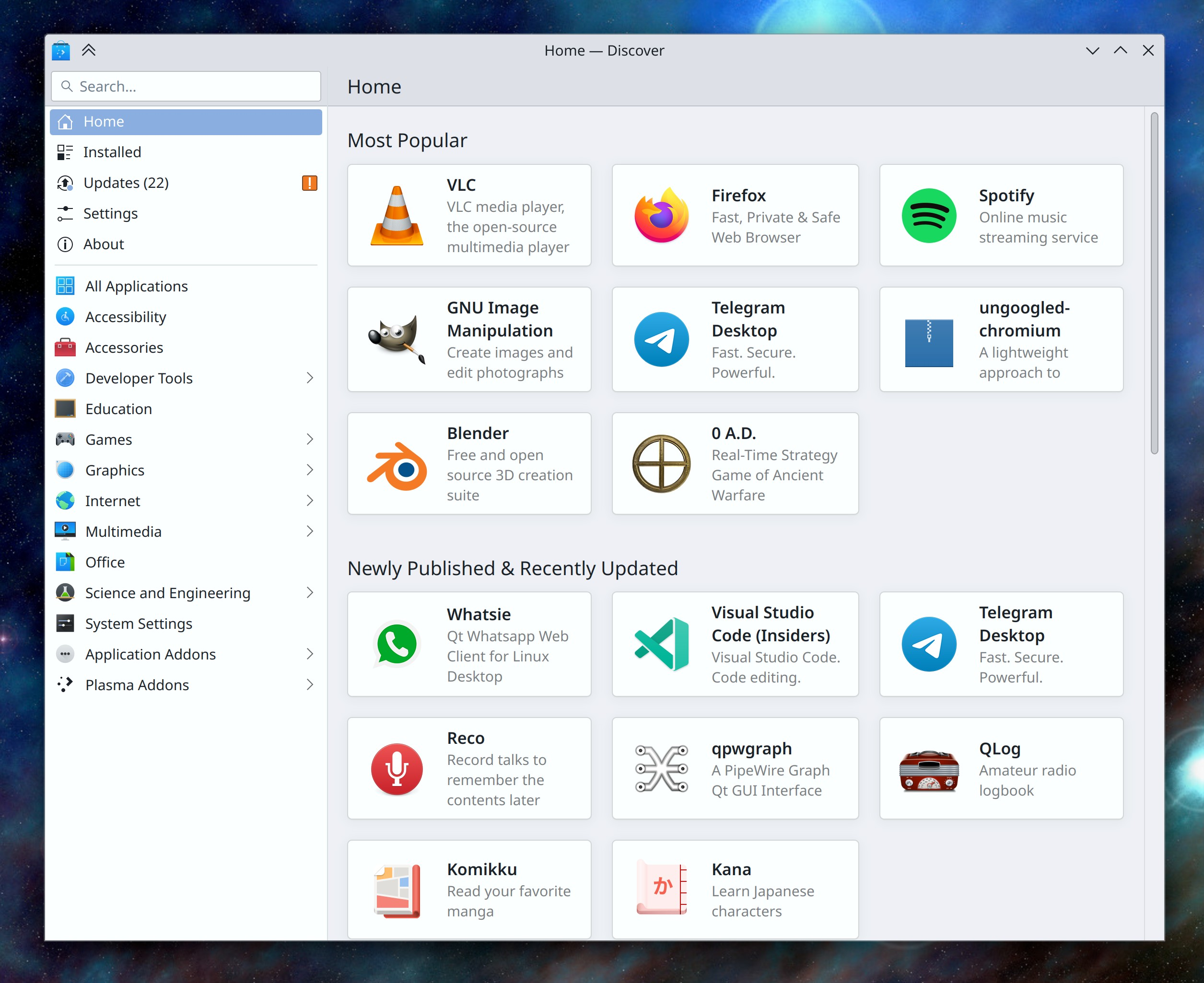
Discover now features a “Newly Published & Recently Updated” section on the main page when using Flatpak or Snap as your default apps backend, which makes the Linux app ecosystem feel more alive! Work is pending to also show this section when using distro packages for your default source, provided the distro actually ships relatively frequent updates to apps and not ancient years-old software all on the same date, which would make the section useless (Ivan Tkachenko, link):

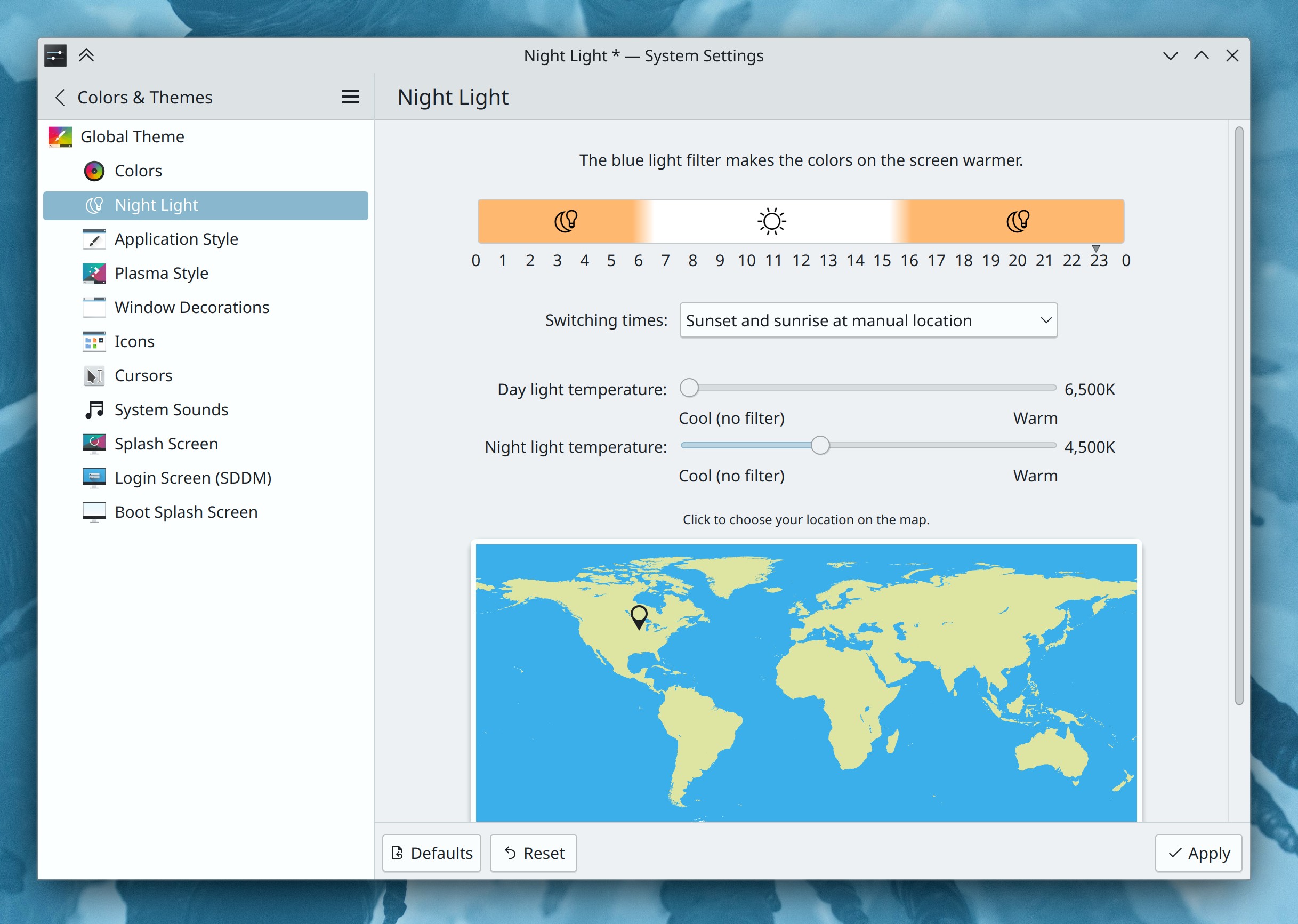
The Night Light page in System Settings now shows you a graphical representation of the active and inactive periods as well as the transition times (Ismael Asensio, link):

Implemented a “Shake to find your cursor” KWin effect, similar to the one in macOS. Note that it’s off by default for now, so you’ll need to manually turn it on in System Settings’ Desktop Effects page if you want to use it (Vlad Zahorodnii, link)

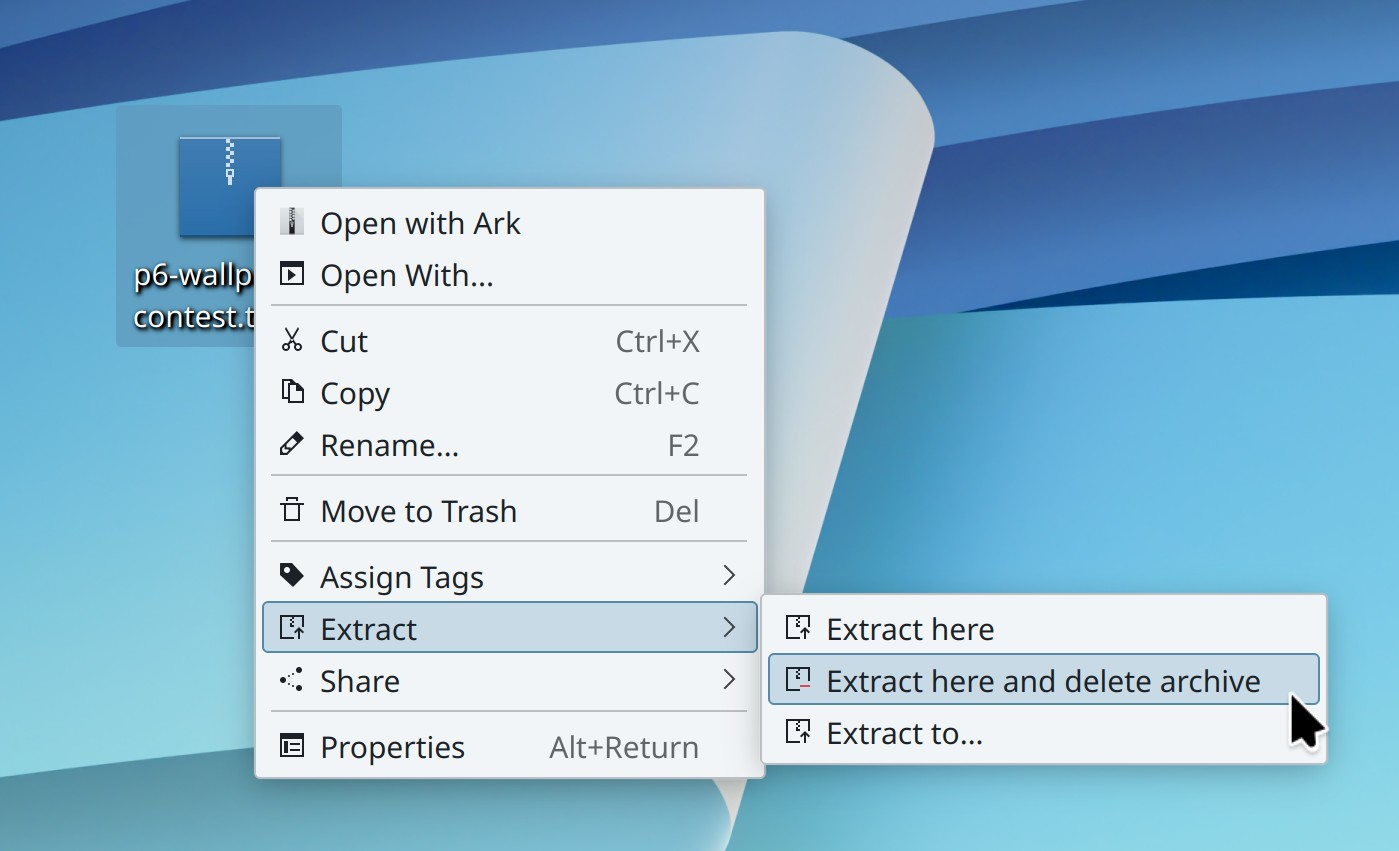
Ark now offers a new “Extract here and delete archive” option for its context menu plugin! As part of the process of making this possible, we decided to remove infrequently-used items in the menu in favor of keeping the “Extract here, autodetect subfolder” option, which was the most useful one and has now been renamed to “Extract here” for clarity (Severin von Wnuck, link):

User Interface improvements

Auto-Hide panels now respect the user-configurable delay setting that currently affects other screen edge effects, so you can configure whether they will un-hide immediately upon being touched, or wait an amount of time of your choosing (Bharadwaj Raju, link)

The glow effect that appears when your pointer gets close to a screen edge or corner that will do something when touched now respects the system’s accent color (Ivan Tkachenko, link)

The Morphing Popups effect now animates with the standard easing curve, which feels more consistent and nicer and also makes it feel faster (Timothy Bautista, link)

KRunner and other KRunner-based searches like the one in Overview now have proper visual click feedback when you click on a search result (Kai Uwe Broulik, link)

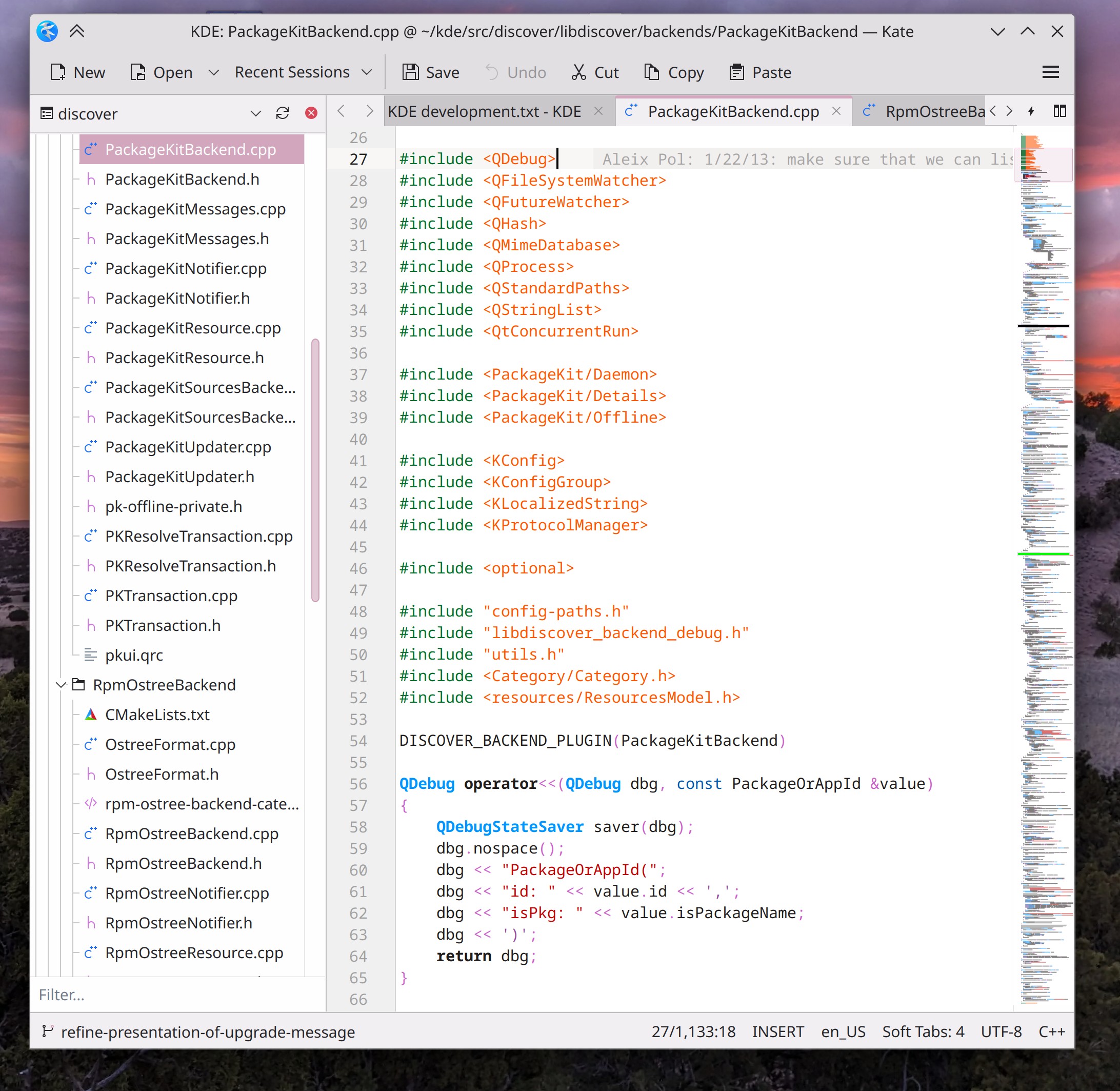
Tool views and sidebar tabs in Kate can now be dragged-and-dropped to other locations (Waqar Ahmed, link 1 and link 2)

Hitting the Escape key in Spectacle while in Rectangular Region mode now takes you back to the main window instead of quitting the app (Noah Davis, link)

Bug fixes

Fixed the most common crash in Dolphin which could happen when copying a large number of files to another location, closing Dolphin’s window, and then interacting with the overwrite/skip dialog (Akseli Lahtinen, link)

Fixed another common crash in Dolphin that could happen after entering edit mode and then changing the Application Style (Akseli Lahtinen, link)

In the Plasma Wayland session, sub-menus from Kicker no longer go underneath a bottom panel, and windows marked “Keep above other windows” no longer also go above panel popups (David Edmundson, link 1 and link 2)

Fixed various visual glitches with the bouncy app launch feedback effect on Wayland when using a scale factor higher than 100% (Vlad Zahorodnii, link 1, link 2, and link 3)

Window titles that contain a hyphen character no longer get mangled when displayed in Task Manager preview popups (Niccolò Venerandi, link)

Fixed OSDs on the lock screen looking pointlessly different from OSDs shown everywhere else (Bharadwaj Raju, link)

When you have multiple Battery widgets, the “Manually block sleep and screen locking” switch is now synced between all of them (Natalie Clarius, link)

Technical

Added support for hardware cursors on NVIDIA GPUs (Doğukan Korkmaztürk, link)

System Settings’ Firewall page has been fully ported to Qt6 (Guillaume Frognier and David Redondo, link)

KDE Connect’s Plasma widget has been fully ported to be compatible with Plasma 6 (Prajna Sariputra, link)

Automation & Systematization

Added an autotest to make sure that files and folders added to the desktop actually show up immediately (Fushan Wen, link)

Added an autotest to make sure that accent colors can be correctly extracted from wallpapers (Fushan Wen, link)

Added an autotest to make sure that Global Theme layouts can be correctly applied (Fushan Wen, link)

…And Everything Else

This blog only covers the tip of the iceberg! If you’re hungry for more, check out https://planet.kde.org, where you can find more news from other KDE contributors.

How You Can Help

We’re hosting our Plasma 6 fundraiser right now and need your help! Thanks to you we’re now at 83% of our goal of 500 new KDE e.V. supporting members now! I think we might actually make it! If you like the work we’re doing, spreading the wealth is a great way to share the love. 🙂

If you’re a developer, work on Qt6/KF6/Plasma 6 issues! Which issues? These issues. Plasma 6 is very usable for daily driving now, but still in need of bug-fixing and polishing to get it into a releasable state by February.

Otherwise, visit https://community.kde.org/Get_Involved to discover other ways to be part of a project that really matters. Each contributor makes a huge difference in KDE; you are not a number or a cog in a machine! You don’t have to already be a programmer, either. I wasn’t when I got started. Try it, you’ll like it! We don’t bite!
This week in KDE: Wayland by default, de-framed Breeze, HDR games, rectangle screen recording

Yep you read that right, we’ve decided to throw the lever and go Wayland by default! The three remaining showstoppers are in the process of being fixed and we expect them to be done soon–certainly before the final release of Plasma 6. So we wanted to make the change early to gather as much feedback as possible.

But that’s not all, of course. This was another big week! Read on to see the rest:

Plasma 6

(Includes all software to be released on the February 28th mega-release: Plasma 6, Frameworks 6, and apps from Gear 24.02)

General infoOpen issues: 118

The Breeze app style has gotten the visual overhaul you’ve all dreamed of: no more frames within frames! Instead Breeze-themed apps adopt the clean design of modern Kirigami apps, with views separated from one another with single-pixel lines! (Carl Schwan, link 1, link 2, link 3, link 4, link 5, link 6, link 7, link 8, link 9, and link 10):

In the Plasma Wayland session, there’s now preliminary support for playing HDR-capable games when using an HDR-capable screen! (Xaver Hugl, link)

Spectacle has gained support for rectangular region screen recording! (Noah Davis, link)

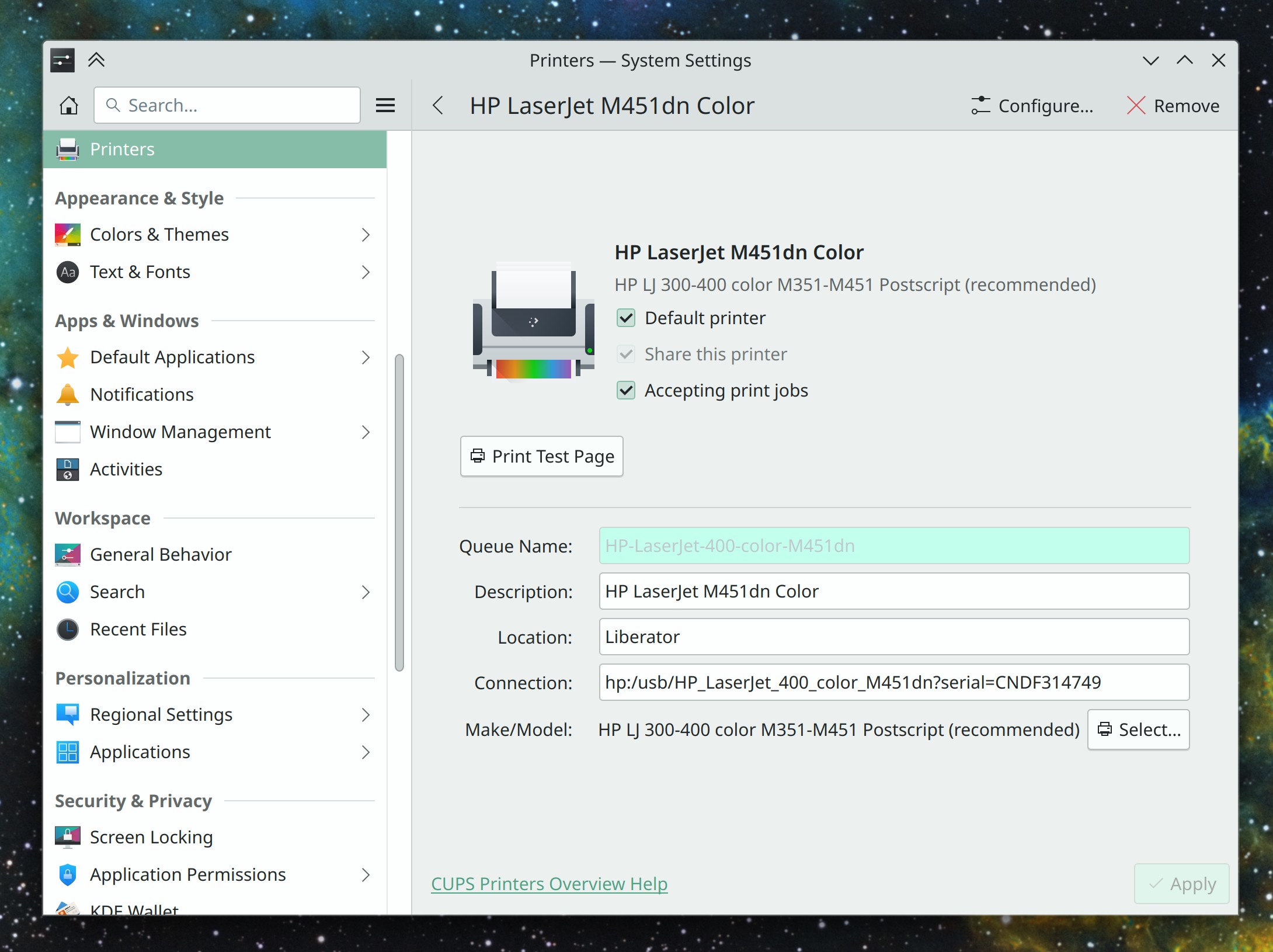
System Settings’ Printers page has gotten a major overhaul and now includes the features internally that it used to direct you to external apps for. The result is much nicer and more integrated, without a cascading soup of dialog windows (Mike Noe, link):

The Plasma Panel settings have been redesigned again, and this time everything is in one dialog; no more nested sub-menus! This work fixed 14 open bug reports (Niccolò Venerandi and Marco Martin, link 1 and link 2):

Ark is now significantly faster to compress files using xz and zstd compression, as they are now multi-threaded (Zhangzhi Hu, link)

When you run Flatpak apps, they’ll no longer prompt you to approve or deny “background activity”; the whole concept of this has been removed as it was kinda sus and not useful at all (David Edmundson, link)

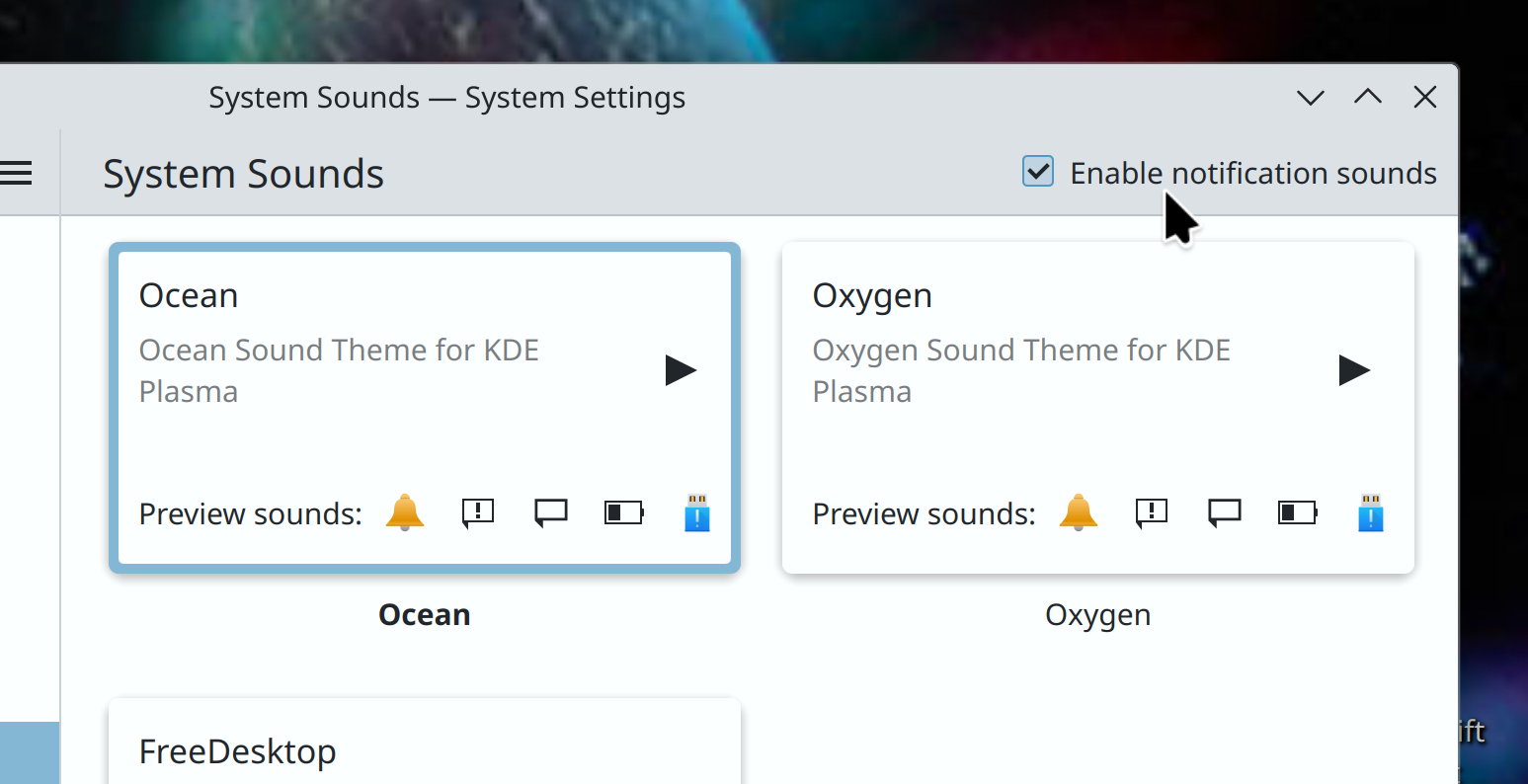
There’s now a simple setting to disable notification sounds systemwide, for those of you who don’t like them (Ismael Asensio, link 1, link 2, and link 3):

Improved Plasma’s start time rather significantly–up to a few whole seconds (Harald Sitter, link)

The double-click speed setting returns, and now lives on System Settings’ General Behavior page. Before you ask why it’s not on the mouse Page, it’s because it affects touchpads too and that has its own page, and duplicating the setting on both pages seemed messy and ugly (Nicolas Fella, link)

Syncing your Plasma settings to SDDM now also syncs your desired NumLock state on boot (Chandradeep Dey, link)

In QtWidgets-based apps, you can open the context menu for the selected thing with the Shift+F10 shortcut (Felix Ernst, link 1 and link 2)

You can now open System Monitor with the Meta+Escape shortcut (Arjen Hiemstra, link)

Significant Bugfixes

(This is a curated list of e.g. HI and VHI priority bugs, Wayland showstoppers, major regressions, etc.)

Fixed a wide variety of multi-screen issues related to screens sometimes not turning on at the right times or becoming visually frozen until going to another VT and back (Xaver Hugl, Plasma 6.0. Link)

Fixed a bug that could cause desktop icon positions to be mis-remembered, especially if the system has ever had multiple screens connected (Harald Sitter, Plasma 5.27.10. Link)

Fixed a bug that could cause Night Color to start transitioning to night mode at inappropriate times when using a certain combination of settings (Sanjay Swain, Plasma 5.27.10. Link)

Just in case you have a window that fails to set a minimum size, KWin no longer lets you resize it to a width of zero pixels, whereupon it would become invisible and impossible to find (Xaver Hugl, Plasma 6.0. Link)

In the “Get new [thing]” dialogs, items’ full descriptions are now visible, instead of getting cut off at some point (Ismael Asensio, Plasma 6.0. Link)

Other bug-related information of interest:

Automation & Systematization

Added a GUI test to make sure that Panel Edit Mode can be entered (Fushan Wen, link)

Added some GUI tests for functionality of the wallpaper chooser dialog (Fushan Wen, link)

Added some GUI tests for KRunner’s plugins and their presence in the relevant System Settings page (Fushan Wen, link)

…And Everything Else

This blog only covers the tip of the iceberg! If you’re hungry for more, check out https://planet.kde.org, where you can find more news from other KDE contributors.

How You Can Help

We’re hosting our Plasma 6 fundraiser right now and need your help! Thanks to you we’re past the 60% mark, but we’re not there yet! So if you like the work we’re doing, spreading the wealth is a great way to share the love. 🙂

If you’re a developer, work on Qt6/KF6/Plasma 6 issues! Which issues? These issues. Plasma 6 is usable for daily driving now, but still in need of bug-fixing and polishing to get it into a releasable state by February.

Otherwise, visit https://community.kde.org/Get_Involved to discover other ways to be part of a project that really matters. Each contributor makes a huge difference in KDE; you are not a number or a cog in a machine! You don’t have to already be a programmer, either. I wasn’t when I got started. Try it, you’ll like it! We don’t bite!

These past 2 weeks in KDE: Wayland color management, the desktop cube returns, and optional shadows in Spectacle

Aaaaaand it’s a big one! I challenge anyone to read this week’s (well, these past two weeks’) report and not find something they’ve been wanting for a long time. 🙂

Plasma 6

(Includes all software to be released on the February 28th mega-release: Plasma, Gear-aligned apps, and Frameworks)

General infoOpen issues: 109

Per-screen color management is now supported in the Plasma Wayland session for up to sRGB screens! You can assign ICC color profiles to each screen and apps will do the right thing. And colors picked using the Color Picker applet are now color-managed appropriately as well (Xaver Hugl, link 1, link 2, link 3, link 4, link 5, and link 6)

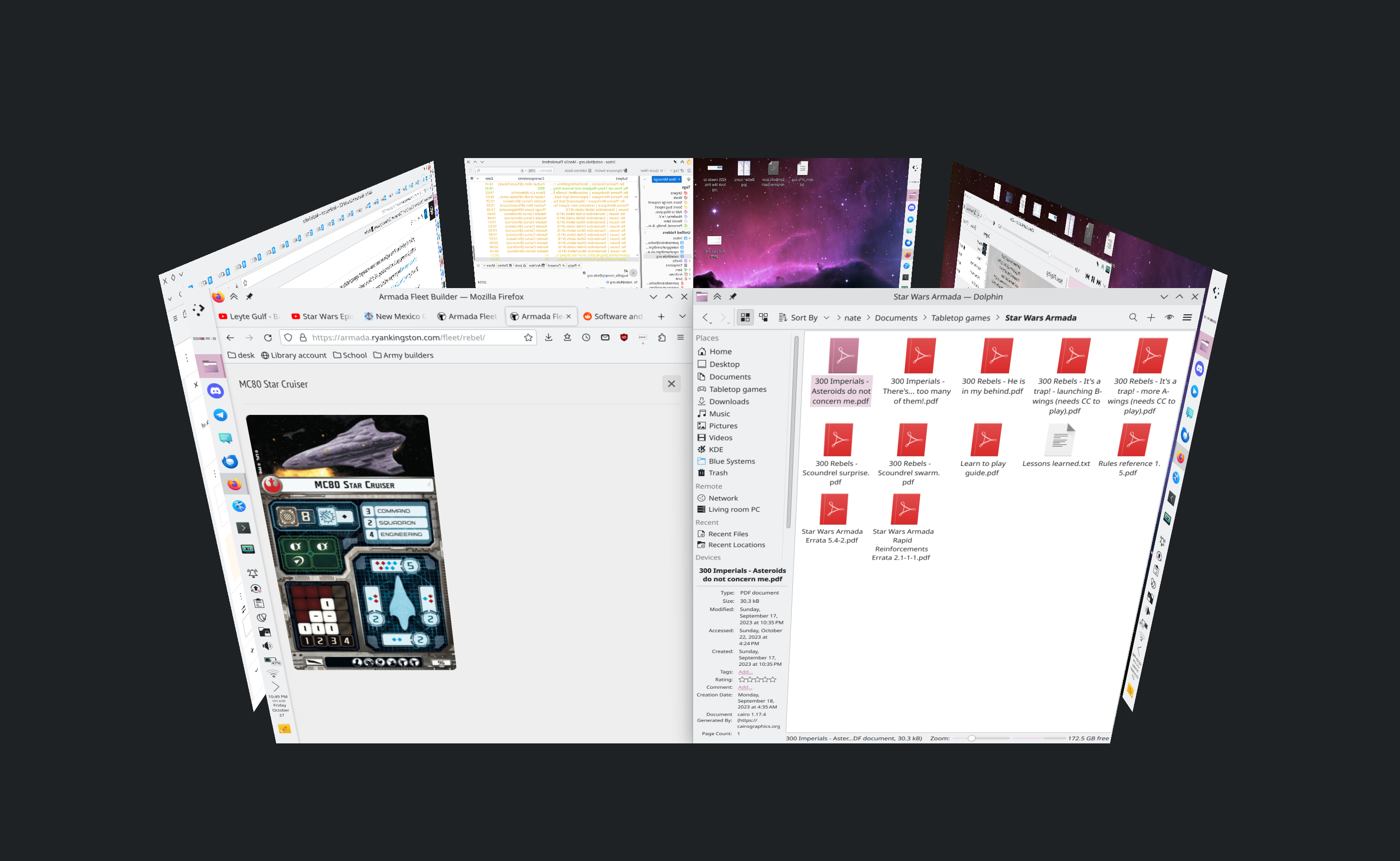
The Desktop Cube effect returns! It now lives in the kdeplasma-addons repo and you can trigger it with the Meta+C shortcut (Vlad Zahorodnii, link):

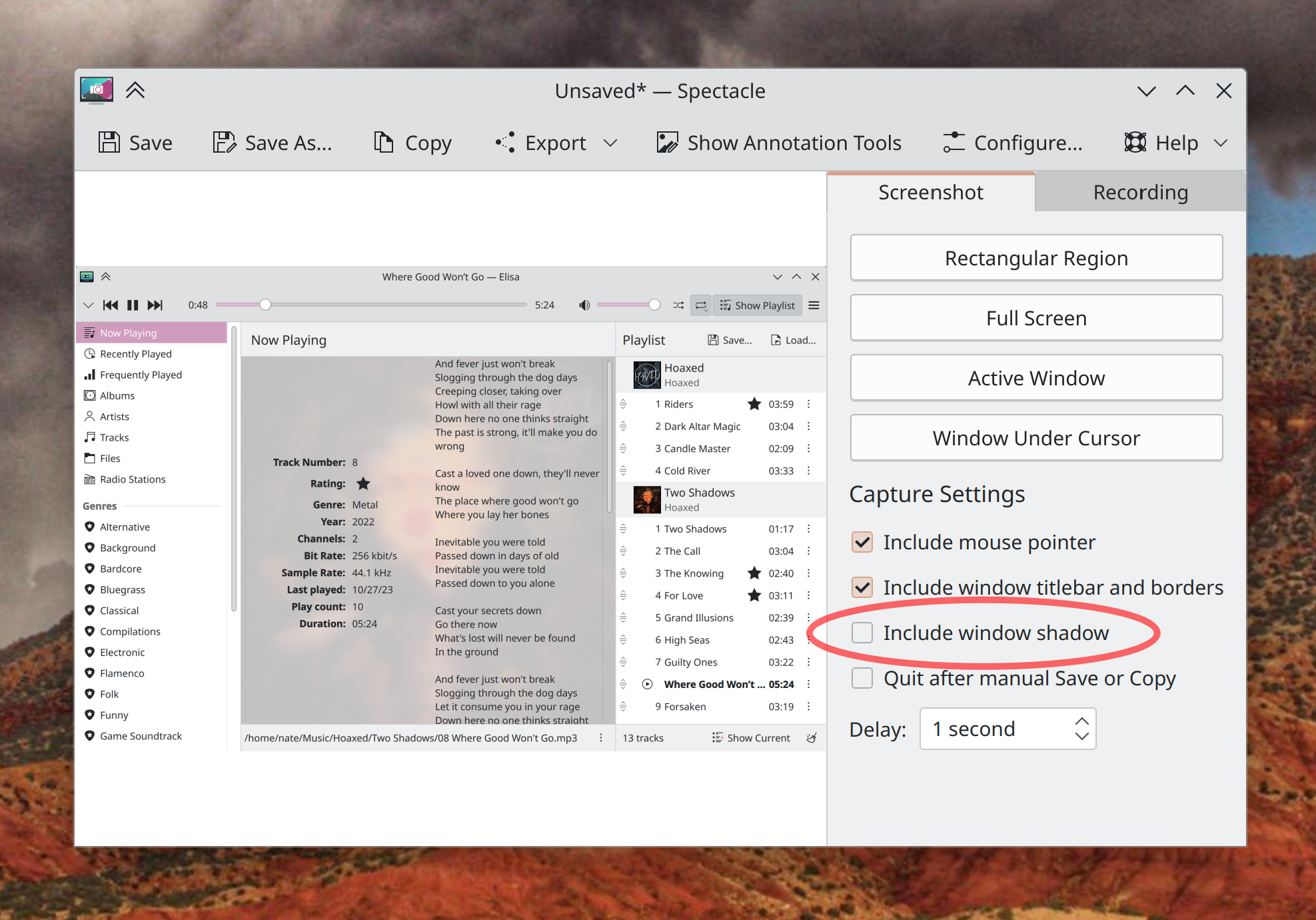
When Spectacle is run on Plasma 6, you can now take “Active Window” and “Window Under Cursor” screenshots that optionally omit window shadows! (Kristen McWilliam, link):

Discover has started to undergo many small UI improvements: a nicer background color for cards views; better visual alignment for cards on search and browse pages; smarter behavior in the sidebar while searching; more robust display of screenshots for apps and backends without thumbnails correctly specified; Flatpak apps with low-level PipeWire access are now correctly marked as having access to the audio system; and app sizes for Flatpak apps are now more concise and readable (Marco Martin, Arjen Hiemstra, Jonah Brüchert, and me: Nate Graham, link 1, link 2, link 3, link 4, link 5, and link 6)

On the subject of Discover, its Application Details page has gotten a new rewritten screenshot viewer, which is vastly better than the old one in every way and fixes multiple bugs (Ivan Tkachenko, link):

The Overview effect now has an option to only perform a KRunner-powered search when searching, rather than also filtering windows based on the search text (Dashon Wells, link)

When you have fingerprint or smartcard authentication set up, you can now use that method on the lock screen, OR your password, rather than only being able to use your password after failing at the other auth method several times. This is only for the lock screen right now and not also the Polkit authentication dialog, but that’s being explored as well (Janet Blackquill, link 1 and link 2)

The headers of settings dialogs in QtWidgets-based apps are now styled to look the same as System Settings and other Kirigami-based apps (Waqar Ahmed, link):

KFontView now works as expected on Wayland (Kai Use Broulik, link)

System Settings’ Shortcuts page has been modernized a bit to avoid the “chunky footer” style used in Plasma 5 (Mike Noe, link):

More than doubled the speed of KRunner’s Recent Documents runner, among other various improvements (Alexander Lohnau, link)

The infinite scrollable calendar in the Digital Clock widget is now vastly more responsive (Fushan Wen, link)

Type-ahead find in Dolphin now causes the matching file to be centered in the window when using Details view (Amol Godbole, link)

In Elisa, playlist items now play on a single-click rather than a double-click, and when you try to play a song that has since been deleted or renamed, you’re warned of this appropriately (me: Nate Graham, link 1 and link 2)

The “Get New [thing]” dialog now has an appropriate minimum size (Oliver Beard, link)

Other Significant Bugfixes

(This is a curated list of e.g. HI and VHI priority bugs, Wayland showstoppers, major regressions, etc.)

Fixed a case in the Plasma Wayland session where logging in would cause KWin to immediately crash and throw you back to the login screen (Xaver Hugl, Plasma 5.27.9. Link)

Fixed the most common crash in Plasma that could manifest when closing notifications, by backporting a Qt patch that fixes it, since it’s already fixed in Plasma 6 (Marco Martin and David Edmundson, the latest release of the KDE Qt 5 Patch Collection, link)

Fixed a semi-common crash in Discover when installing Flatpak apps (David Edmundson, Plasma 5.27.9. Link)

Various KWin-provided global shortcuts that were always intended to be on by default–such as for switching virtual desktops–now are (Joshua Goins, Plasma 5.27.9. Link)

Fixed a race condition that caused the “Show in Activities” menu item in the window menu to only sometimes be visible (David Edmundson, Plasma 5.27.9. Link)

Fixed an irritating screen flicker that would show up when using touchpad gestures to switch virtual desktops with animations globally disabled (Quinten Kock, Plasma 5.27.9. Link)

Fixed the most common crash in System Monitor that could sometimes cause it to blow up when quitting or switching pages (Arjen Hiemstra, Plasma 6.0. Link)

Fixed a case where file associations could be inherited in the wrong order, causing certain document types to open in the wrong apps under certain circumstances (David Redondo, Plasma 6.0. Link)

Fixed an issue that could cause complex display arrangements involving daisy-chained DisplayPort screens to be arranged randomly after wakeup, reboot, or hotplug (Xaver Hugl, Plasma 6.0. Link)

In the Plasma Wayland session, using a stylus to interact with System Settings’ Tablet page no longer makes the rest of System Settings unresponsive to stylus input (Aki Sakurai, Plasma 6.0. Link)

Other bug-related information of interest:

For Developers

You can now easily build a whole Plasma desktop session plus associated apps like System Settings and Discover by running kdesrc-build workspace (Nicolas Fella, link)

When setting up kdesrc-build, it now defaults to building everything against Qt6 (Thiago Sueto and Mariua Pa, link 1 and link 2)

Automation & Systematization

Added some autotests for the Kirigami NavigationTabBar and NavigationTabButton components (Ivan Tkachenko, link)

…And Everything Else

This blog only covers the tip of the iceberg! If you’re hungry for more, check out https://planet.kde.org, where you can find more news from other KDE contributors.

How You Can Help

We’re hosting our Plasma 6 fundraiser right now and need your help! If you like the work we’re doing, spreading the wealth is a great way to share the love. 🙂

If you’re a developer, work on Qt6/KF6/Plasma 6 issues! Plasma 6 is usable for daily driving now, but still in need of bug-fixing and polishing to get it into a releasable state by February.

Otherwise, visit https://community.kde.org/Get_Involved to discover other ways to be part of a project that really matters. Each contributor makes a huge difference in KDE; you are not a number or a cog in a machine! You don’t have to already be a programmer, either. I wasn’t when I got started. Try it, you’ll like it! We don’t bite!
This week in KDE: colorblindness correction filters

This week there’s a lot of news on the accessibility front in particular! Beyond that, we have a fairly juicy assortment of other new features and user interface improvements, so have a look:

Plasma 6

General infoOpen issues: 103

KWin now includes an effect that can change the colors on the whole screen to better support people with various forms of color-blindness! (Fushan Wen, link):

The F10 key is now used in most KDE apps (with more being ported soon) to open the main menu or hamburger menu. This means that the keyboard shortcut to create a new file had to be changed to Ctrl+Shift+N, which also makes it more consistent with what’s used in other environments (Felix Ernst, link)

Kate, KWrite, and other KTextEditor-based apps gained support for speaking text from the document! (Christoph Cullmann, link)

Throughout QtQuick-based KDE software, scrolling using a mouse wheel now smoothly animates the view! Smooth scrolling, baby! Note that this is different from inertial scrolling for touchpads, which is not implemented yet. For more information, see this wiki page. (HeCheng Yu and Fushan Wen, link)

When your Panel has a Task Manager widget on it, the feature to add panel launchers (as opposed to pinned Task Manager apps) has been hidden to avoid confusing people. You can still add them manually if you want, but the way to do it is no longer so in-your-face. As a part of this, the Traditional Task Manager has been changed so that its pinned launchers no longer disappear by default when used to launch an app; they now stay where they are and can be used to open new instances, so they feel more like panel launchers now. This is configurable if you liked the old approach better, of course! (Niccolò Venerandi, link 1 and link 2)

LibreOffice documents now appear in Plasma’s “Recent Documents” list (Méven Car, link)

Cursor theme previews are no longer drawn too small when using scaling on Wayland, and are no longer pixelated when using a fractional scale factor (Fushan Wen, link 1 and link 2)

Locally-downloaded and manually installed packages installed using Discover can now be upgraded and uninstalled (Alessandro Astone, link)

Offline Updates in Discover now report their progress more accurately (Alessandro Astone, link)

In the Plasma Wayland session, it’s now possible to mirror (as in, visually flip) a display if needed (Xaver Hugl, link)

Other User Interface Improvements

The default location where Spectacle saves screenshots and screen recordings has been changed; now they are saved to ~/Pictures/Screenshots and ~/Videos/Screencasts, respectively. And of course these default settings can be changed if you’d prefer them to be saved elsewhere! (Noah Davis, Spectacle 24.02. Link)

Elisa’s color scheme chooser menu now looks native, not kinda weird (Jack Hill, Elisa 24.02. Link)

Other Significant Bugfixes

(This is a curated list of e.g. HI and VHI priority bugs, Wayland showstoppers, major regressions, etc.)

Fast user switching from a passwordless user account now works (Harald Sitter, Plasma 5.27.9. Link)

In Dolphin, the “Create New” menu now correctly enables and disables itself as needed when you switch tabs (Amol Godbole, Dolphin 24.02. Link)

Other bug-related information of interest:

Automation & Systematization

Added an autotest to make sure the Panel’s Edit Mode toolbox works (Fushan Wen, link)

Added some autotests to make sure the new Kirigami list delegates work properly; more on that soon! (Ivan Tkachenko, link)

…And Everything Else

This blog only covers the tip of the iceberg! If you’re hungry for more, check out https://planet.kde.org, where you can find more news from other KDE contributors.

How You Can Help

We’re hosting our Plasma 6 fundraiser right now and need your help! If you like the work we’re doing, spreading the wealth is a great way to share the love. 🙂

If you’re a developer, work on Qt6/KF6/Plasma 6 issues! Plasma 6 is usable for daily driving now, but still in need of bug-fixing and polishing to get it into a releasable state by February.

Otherwise, visit https://community.kde.org/Get_Involved to discover other ways to be part of a project that really matters. Each contributor makes a huge difference in KDE; you are not a number or a cog in a machine! You don’t have to already be a programmer, either. I wasn’t when I got started. Try it, you’ll like it! We don’t bite!