I’m back from Akademy 2025 in Berlin, and what an experience it was.
At this point, I’ve gotten a reputation as a “big picture guy”, so that’s what I’ll focus on here, rather than the details of my experiences in specific events. Lots of other folks are starting to write blog posts you can find on https://planet.kde.org about their Akademy experiences that I’m sure will be full of juicy details!
But basically, to me this year’s Akademy felt like it had a theme: “KDE is on the cusp of something big.”
Here’s one example: at the very cool C-base hackerspace, I was talking with someone who mused that 15 years ago, Akademy was full of KDE hackers talking about the government one day using our software… and then fast-forward 15 years and our two keynote speakers are from the German government talking about using KDE’s software!
Then we had a talk from the “End of 10” crowd about KDE’s campaign encouraging people to upgrade to Linux rather than buying new hardware capable of running Windows 11. And then as if to reflect on the success of this initiative, Patrick Fitzgerald gave a talk about how to do massive migrations from Windows to Linux, with examples provided of cases where literally thousands of machines were migrated to KDE software at a small fraction of the cost of moving to Windows 11.
In the “hallway track”, I had a fascinating discussion about how KDE’s efforts to improve accessibility have the potential to be an industry-wide force multiplier.
And then I gave a talk myself about the big picture of all of these trends — that as the world falls apart around us, everything being on fire includes tremendous opportunities for change that KDE is well-positioned to benefit from.
Basically, at age 29, KDE is all grown up now. Our software solves real problems for real people, at scale. It works for governments and big businesses. It saves or earns money for a lot of people. Our competitors are beginning to falter and look weak. But through it all, KDE remains healthy and strong, and grows in stature.
So I found Akademy 2025 to be an unexpectedly serious conference, full of heavy topics and sharing of priceless wisdom from hard-earned experience. There was of course also a lot of fun hacking and group gatherings and renewing of social bonds, but throughout everything was that underpinning that KDE isn’t just a fun little online community anymore, but rather a player with a growing significance on the world stage.
Pretty cool stuff, I think! Personally, I get energized by working on things that matter, and boy did Akademy 2025 leave me with the impression that KDE matters.
For everyone else, let me briefly explain: KDE Linux is a new operating system intended for daily driving that showcases Plasma and KDE software in the best light, and makes use of modern technologies.
KDE Linux uses Arch packages as a base, but it’s definitely not an “Arch-based distro!” There’s no package manager, and everything except for the base OS is either compiled from source using KDE’s kde-builder tool, or Flatpak. Sounds weird, huh?! We’ll get to that later.
Harald has been leading the charge to build KDE Linux, assisted by myself, Hadi Chokr, Lasath Fernando, Justin Zobel, and others. We’ve built it up to an Alpha release that’s officially ready for use by QA testers, KDE developers, and very enthusiastic KDE fans.
What’s in the Alpha release?
Today we’re releasing KDE Linux’s Testing Edition. This edition provides unreleased KDE software built from source code; a preview of what will become the next stable release.
In practice, we’re being quite conservative, and it’s already pretty darn stable for daily use. In fact, I’ve had KDE Linux on my home theater PC for about six months, and it’s been on my daily driver laptop for one month. Since then, I’ve done all my KDE development on it, as well as everything else I use a laptop for. It really does work. It’s not a toy or a science experiment.
KDE Linux running on an HTPC, a 2 year-old laptop, and a 10-year old laptop — all pretty much flawlessly
Since KDE Linux offers unreleased, in-progress software, you’ll probably notice some bugs if you use it. Good, that’s the point of the testing edition! Report those bugs so we can fix them before they end up shipping to people using released software.
But where to?
If the bug appears to be caused by KDE Linux’s design or integration, use invent.kde.org. Ignore the scary red banner at the top of the page.
If the bug appears to be in a piece of KDE software itself, like Plasma or Dolphin (such that it would eventually manifest on other operating systems as well), use bugs.kde.org.
So if this is an Alpha release, what’s known to be broken?
User experience papercuts in Flatpak KDE apps and updating the system using Discover
We’d love your help getting these and other topics straightened out!
Just what the world needs, another Linux distro…
A sentiment I have in the past expressed myself.
However, there’s a method to our madness. KDE is a huge producer of software. It’s awkward for us to not have our own method of distributing it. Yes, KDE produces source code that others distribute, but we self-distribute our apps on app stores like Flathub and the Snap and Microsoft stores, so I think it’s natural thing for us to have our own platform for doing that distribution too, and that’s an operating system. I think all the major producers of free software desktop environments should have their own OS, and many already do: Linux Mint and ElementaryOS spring to mind, and GNOME is working on one too.
Besides, this matter was settled 10 years ago with the creation of KDE neon, our first bite at the “in-house OS” apple. The sky did not fall; everything was beautiful and nothing hurt.
Speaking of KDE neon, what’s going on with it? Is it canceled? If not, doesn’t this amount to unnecessary duplication?
KDE neon is not canceled. However it has shed most of its developers over the years, which is problematic, and it’s currently being held together by a heroic volunteer. KDE e.V. has been reaching out to stakeholders to see if we can help put in place a continuity or transition plan. No decision has yet been made about its future.
While neon continues to exist, KDE Linux therefore does represent duplication. As for unnecessary? That I’m less sure about that. Harald, myself, and others feel that KDE neon has somewhat reached its limit in terms of what we can do with it. It was a great first product for KDE to distribute our own software and prepare the world for the idea of KDE in that role, and it served admirably for a decade. But technological and conceptual issues limit how far we can continue to develop it.
We wanted KDE Linux to be super safe by default, providing guardrails and tools for rolling back when there are issues.
For example, KDE Linux preserves the last few OS images on disk, automatically. Get a bad build? Simply roll back to the prior one! It’s as easy as pie too; they show up right there on the boot menu:
It’s like being able to roll back to an older kernel, but for the whole OS.
To make this possible, KDE Linux has an “immutable base OS”, shipped as a single read-only image. Btrfs is the base file system, Wayland is the display server, PipeWire is the sound server, Flatpak gets you apps, and Systemd is the glue to hold everything together.
We also wanted to settle on a specific KDE software development story, with the OS built in the same way we compile our software locally — using kde-builder and flatpak-builder. This should minimize differences between dev setups and user packages that cause un-reproducible bugs (yes, this means we would love for you to use the Flatpak versions of KDE software!). There are genuine benefits for KDE developers here.
If these technologies aren’t your cup of tea, that’s fine. Feel free to ignore KDE Linux and continue using the operating system of your choice. There are plenty of them!
Why an immutable base OS? Isn’t that really limiting?
In some ways, yes. But in other ways, it’s quite freeing.
In my opinion, the traditional model of package management in the FOSS world has been one of our strongest features as well as our most bitter curse. A system made of mutable packages you can swap out at runtime is amazing for flexibility and customization, but terrible for long-term stability. I guarantee that every single person reading these words who’s used a terminal-based package manager has used it to blow up their system at least once. C’mon, admit it, you know it’s true! 😀 And in some distros, even using the GUI tools can get you into an unbootable state after an upgrade. If this has never happened to you on a traditional mutable Linux distro… I don’t believe you!
The pitfalls for non-experts are nearly infinite, their consequences can be showstopping, and the recovery procedures usually involve asking an expert for help. No expert around? Back to Windows.
Over the past 30 years, many package-based operating systems have made improvements to their own system-level package management tools to smooth out some of these sharp edges, but the essence of danger remains. It’s inherent in the system.
So in KDE Linux, we take on that risk and do the system-level package management for you, delivering a complete OS all in one piece. If it’s broken, it’s our fault, not yours. And then you’ll roll back to the previous build, yell at us, and we’ll fix it.
By delivering the OS in a complete image-based package, we can perform safe updates by simply swapping out the old OS image for the new one. There’s no risk of a “half-applied update” or “local package conflicts”, or anything like that. It’s also super-fast (once the new OS image is downloaded, that is), unlike the “offline update” system used by PackageKit, where you have to wait minutes on boot following an update. Those issues don’t exist on KDE Linux.
Wait… if the whole system is one piece and you can’t change it, how do you install new software?
Well, only the base OS in /usr is immutable; /etc is writable for making system-level config changes, and your entire home folder is of course yours to do what you want with, including installing software into it. So that’s what you do: use Discover to get software, mostly from Flathub at this point in time, but Snap is also technically supported and you can use snap in a terminal window (support in Discover may arrive later).
That’s fine for apps in Flathub and the Snap Store, but what about software not available there? What about CLI tools and development libraries?
Containers offer a modern approach: essentially you download a tiny tiny Linux-based OS into a container, and then you can install whatever that OS’s own package management system provides into the container. KDE Linux ships with support for Distrobox and Toolbx.
That’s right, after trashing package management, now I’m endorsing package management! The difference? This is user-level packaging and not system-level packaging. System-level packaging is what’s dangerous. Take away the danger by doing it in your home folder, and you regain almost all of the benefits, with almost none of the risks.
AppImage apps work too.
Homebrew also works; it’s an add-on system-level package manager that allows you to download tons of stuff you might want for power user and development purposes. Note that Homebrew packages are not segregated, so they can override system libraries and present problems. This should be considered an experts’ tool.
Compiling anything you want from source code is also possible — provided the dependencies are available, and Homebrew or containers can be used for this.
Finally, there’s nothing stopping folks from making command-line tools available via Flathub or another 3rd-party Flatpak repository. Some are already there. So this could be a potential avenue of improvement too.
But as you can see, the story here is fragmented, with a menu of imperfect options rather than a single unified approach. That’s a valid critique, and it’s something that needs more work if we want an obvious default choice here.
That’s not enough power! I want to change the base OS!
Actually I lied. There’s another option for developers and super power users, one that does allow intermingling stuff: you can use systemd-sysext to overlay files of your choice on top of the base OS.
It’s a really cool tool you might not be aware of. I’ve started using it in KDE Linux to overlay my built-from-source KDE software on top of the base system for development and testing purposes, and it’s just been a super great experience. Way better than compiling stuff to a prefix in $HOME. No more weird random DBus and Polkit failures or stale file conflicts.
Now, this is quite a bit riskier as you can destabilize the OS itself by overlaying broken parts on top of working parts. But undoing any such changes is super simple, since, again, it’s all self-contained. That’s gonna be a common theme here.
However, I think the better answer for “I want to change the base OS” is “please get involved with developing KDE Linux!” That way if your changes are amazing, the whole world can benefit from them, and the burden of maintaining them over time can be shared with others.
Still not enough power! I need to be able to swap out kernel modules and base packages at runtime!
Wow, you really are sounding like an OS developer. Maybe you want to help us develop KDE Linux? The OS could benefit tremendously from your skills and experience!
That said, there’s some truth to the idea that an immutable OS like KDE Linux isn’t the best choice for doing this kind of really low-level development or system optimization. That’s fine; there are hundreds of other traditional Linux-based operating systems out there that can serve this purpose.
If your goal really is to build your own OS for your own personal or commercial purposes, it’s hard to go wrong with Arch Linux; it’s one of the tools we used to build KDE Linux, in fact. In a lot of ways it’s more of an OS building toolkit than it is an OS itself.
If it’s all Flatpak and containers and stuff, does it really showcase Plasma and KDE software in the best light? Really?
Well, we’re kind of cheating a bit here. A couple KDE apps are shipped as Flatpaks, and the rest you download using Discover will be Flatpack’d as well, but we do ship Dolphin, Konsole, Ark, Spectacle, Discover, Info Center, System Settings, and some other System-level apps on the base image, rather than as Flatpaks.
The truth is, Flatpak is currently a pretty poor technology for system-level apps that want deep integration with the base system. We tried Dolphin and Konsole as Flatpaks for a while, but the user experience was just terrible.
So for the Alpha release, these apps are on the base OS where they can properly integrate with the rest of the system. There’s no reason to torture people with issues that we know won’t be fixed anytime soon!
Other apps not needing as as deep a level of system integration are fine as Flatpaks right now, and we’re engaging with Flatpak folks to see how we can push the technology forward to work better for the deep integration use cases.
This is because one of KDE Linux’s other goals is to be a test-bed for bringing new technologies to KDE. Our software that behaves awkwardly when sandboxed or run on a filesystem other than Ext4 represents something for us to fix, because those technologies aren’t going away. We need to be embracing that future, not ignoring it. KDE Linux both helps and forces us to do it.
This should be exciting. New technology is fun! You get to help guide the future. Let’s not get caught up yelling at clouds here!
I’m a KDE developer. Why should I migrate to KDE Linux, and how does KDE development work?
Forget the haters, this project is cool! How can I help?
Great! For starters, install it on your computers. 🙂 We’re looking to get more feedback from daily drivers. The Matrix room is a great place to get in touch with us.
And finally, help spread the news! If you couldn’t tell, I’m really excited about this project, and I think a lot of other folks will be as well… once they hear about it!
I’m sure some of you are chucking over my realization of something so obvious! Yeah, fair enough. Perhaps this will at least burnish my KDE Eco credentials a bit.
Last October, the loud fan noise, poor multi-core CPU performance, and at best 4-hour battery life of my daily driver Lenovo ThinkPad X1 Yoga laptop were starting to become significant hindrances. It’s still a good laptop, but it just wasn’t good for me and my use cases anymore. It now belongs to my daughter.
I’ve gotten pickier over the years as I’ve discovered what I really want in a laptop, and looked for a cheap “good-enough” stop-gap that could be recycled to another family member after I located the perfect final replacement.
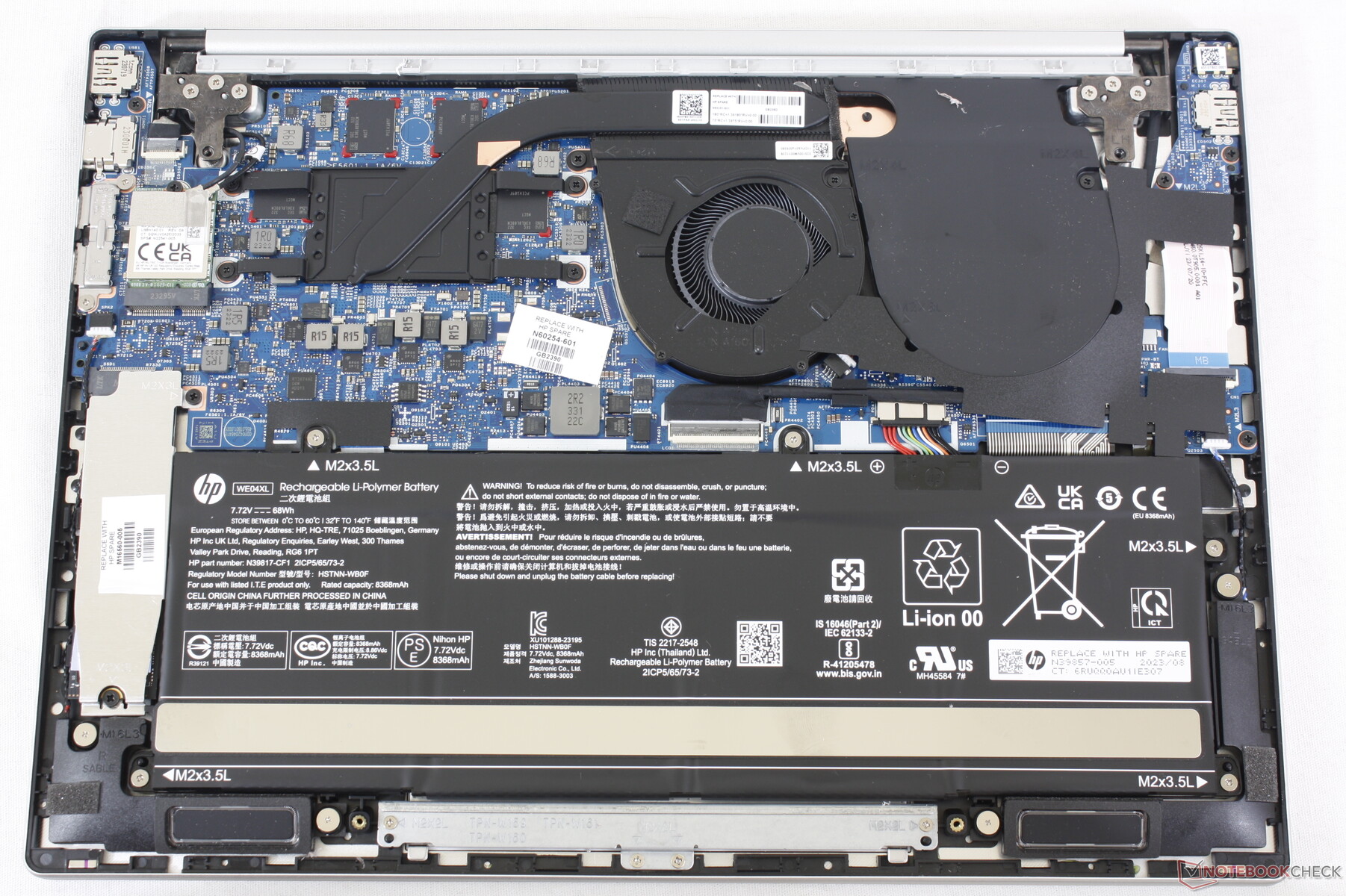
I found an amazing deal on a refurbished 2023 HP Pavilion Plus 14 and pulled the trigger! Here it is driving my workstation:
This basic little Pavilion is the best laptop I’ve ever used.
With a large 68 Watt-hour battery, its energy-efficient AMD 7840U CPU delivers a true 9-hour battery life with normal usage. For real! It also ramps up to do a clean build of KWin in less than 10 minutes! The laptop’s 2.8K 120Hz OLED screen is magnificent. Its keyboard and touchpad are truly the best I’ve ever used on a PC laptop. Linux compatibility is excellent too. Everything works out of the box. It’s just… great.
The problem is, it isn’t perfect. The speakers are awful, the aluminum casing is fairly thin and prone to denting while traveling, and there’s no touchscreen or fingerprint reader. USB 4 ports would also be nice, as would putting one on each side, rather than both on the right.
So I kept looking for the perfect replacement!
I still haven’t found one.
Everything out there sucks. Something important is always bad: usually the battery life, screen, or speakers. Often the keyboard layout is either bad, or just not to my liking. Other times the touchpad is laggy. Or it’s not physically rugged. Or there’s no headphone jack (what the heck). Or the palmrest is coated in some kind of gummy sticky material that will be disgusting with caked-on sweat and skin in a matter of weeks. Or Linux compatibility is poor. Or it’s absurdly expensive.
So for now, I’ll stick with the little Pavilion that could.
If only HP made this exact laptop with a thicker case and better speakers! A fingerprint reader and a touchscreen would be nice-to-haves as well. Replaceable RAM would easily be possible with a small redesign, as there’s empty space in the case. A USB 4 port on each side would be the cherry on top.
This is a bit of a rant; feel free to skip it if you’re here for the KDE content.
This isn’t the first time I’ve blogged about the dearth of truly great PC laptops out there, and I suspect it won’t be the last.
I limit myself to a single computer for simplicity’s sake, so it has to be a laptop. And since I replaced my 2020 Lenovo ThinkPad X1 Yoga a year ago, I haven’t succeeded at finding a truly great replacement yet. From a certain point of view, you could say I’m a picky buyer, judging by my list of requirements. But frankly, I think these requirements are not that unreasonable. All I want is a laptop that gets the basics right:
Good screen with a DPI suitable for 175-200% scaling, generally between 240 and 280 DPI
Good keyboard with text navigation keys (Home, End, Page Up, and Page Down) and a sensible layout: delete at the top right, no stupid replacement of normal modifier keys with fingerprint readers or copilot keys, no tiny arrow keys, etc.
Good touchpad that’s precise, doesn’t lag, and allows clicking on most or all of the total area
Good speakers that get reasonably loud and don’t have downward-facing tweeters
8 hours of battery life with low usage
Reasonably fast CPU
Reasonable GPU performance for desktop compositing and playing couple-year-old games
Replaceable disk
Just the basics; no great world-shattering innovation needed, and that’s before I narrow the search to laptops that lack NVIDIA GPUs and have touch or 2-in-1 capabilities (which I quite like and are highly useful for testing touch support in KDE software). So it has to have great Linux and Plasma compatibility too!
I’ve closely followed the PC laptop market for 9 years, maintaining a giant spreadsheet of every laptop model and how they fare on the above characteristics plus many more:
The multi-year trend is “one step forward, one step back.” Most companies still change their laptops’ keyboard layouts in random negative ways every year; ship with stupid screen resolutions, woefully bad speakers, and disappointing touchpads; and stuff the most powerful processor and GPU in there and don’t focus enough on tuning the cooling, power usage, and fan profiles.
Some examples from my own usage:
My 2016 HP Spectre x360 was slow and had a poor screen DPI and a laggy touchpad. The 2024 model fixed those problems but lost its HDMI ports and text nav keys, and the USB-A port has a fiddly and annoying little hinge that’s hard to use and will eventually break. And then the 14″ version was canceled in 2025.
My 2020 Lenovo ThinkPad X1 Yoga was also slow, had miserable battery life and a loud fan, put the Fn and PrintScreen keys in inconvenient places, and its high resolution 4K screen option had too high a DPI, wasting energy. The 2025 model fixed those issues but lost the excellent quad speaker system, garaged pen, and the third key to the right of the spacebar that let you re-bind one of them into being a second Meta key.
None of this would be a problem if you could customize and upgrade laptops like you can with desktops, but you can’t. Even on the Framework 13 laptop which makes this an explicit selling point and has made huge leaps in 4 years, there still aren’t aftermarket speaker modules that sound good or a keyboard deck with text nav keys. And the touch/2-in-1 capabilities are only offered on the 12″ model.
Where are the great laptops?
Let’s step back a bit and try to figure out what’s going on here. We have an industry of over a dozen PC manufacturers selling thousands of products, but few truly great ones that are satisfactory in all ways, not just a few.
I feel that a major problem is over-complicated product lines. Let’s look at what the big companies offer.
Seven product lines (or is it eight? There’s an extra one in the sidebar not shown in the main view) and 330 distinct models! How can a normal person who isn’t a laptop enthusiast find anything in here? Even my eyes glaze over when I’m trying to distinguish the differences between the models and product lines.
The problem is that maintaining so many product lines at a reasonable level of development and quality is impossible, even for a company of Lenovo’s size with billions of dollars to throw at the problem.
But it’s not just Lenovo: HP further complicates things by having separate sites for consumer laptops and business laptops. First the consumer laptops:
12 product lines with 67 models. Already a lot. But now add in the business laptops:
7 product lines with 352 models! Absurd. HP implicitly acknowledges the problem by advertising a sales advisor you can chat with to help you make heads or tails of this overwhelming mess (and maybe steer you towards more expensive models):
In total, HP offers 19 product lines and 419 models. Madness, I tell you. Sheer madness.
ASUS makes it even harder by dividing their models into micro-targeted audiences, which makes no sense since there’s overlap in all these use cases and only limited differences between what any of them need in a laptop:
Ultimately I found 8 product lines with 289 models on the US site. Yikes!
MSI does similar segmentation but finds a way to make it even worse by putting more models in each high level category and not offering a “See all” page:
Hmm, do I want a Titan gaming laptop, or a Raider? Maybe a Vector ? Perhaps a Cyborg, or is that a Thin? Apparently they can’t even settle on one name for half of them. Ultimately MSI has divided their laptops into no fewer than 16 product lines with 159 models.
10 product lines, 70 models. A bit better than some of the competition, but 70 total is still an objectively ridiculous level of choice to offer, especially considering that most of these models are going to offer various configurations of CPUs, memory, and storage space.
I could go on, but you get the idea.
You might think that this level of choice should provide anything one could want, but that’s not true. Most of the models differ by like 1% and make all the same mistakes, copy-pasted across the whole product line.
These companies are clearly trying to micro-target specific market segments to match prices to buyers’ budgets, but offering so much choice is foolish. Most buyers — even big commercial buyers — are not informed enough to be able to pick the perfect device from among a massive blob of options presented at the same level. The result is choice paralysis, lost sales, disappointing purchases that reduce brand loyalty, and expensive returns.
There has to be a better way!
Who’s doing it right?
There are some bright spots in the industry.
The most notable is Apple, which offers two product lines and five total models. The differences between them are 100% comprehensible. No matter what Apple laptop you choose, it has a world-class touchpad, great speakers, an at-least-good keyboard with a sensible layout, a nice high DPI screen, great performance, and mind-blowing battery life. There are no bad models (if you’re a Mac fan, of course).
Razer is up there too, with one product line and three models, and all of them mostly get the basics right.
Framework also does a great job, also with just three models. The Framework 13 is so close to being the perfect do-it-all general purpose device for me. It just needs text nav keys, better speakers, and a touchscreen (ideally in a 2-in-1 form factor like the 12).
The small Linux-specific StarLabs company does an unexpectedly great job too, with the same three models (hmm, perhaps there’s a pattern here). And these aren’t Clevo or Tongfang units, either! They’re really nice custom engineered Linux-first laptops. I’ve come close to buying one on two occasions within the past year.
And notably, these companies’ laptops tend to get better with each revision, rather than oscillating around a specific level of quality but never consistently improving.
How to not confuse the hell out of people
It’s not that hard: offer a small number of product lines and models with very clear segmentation (by screen size, presence or absence of a GPU, 2-in-1 vs clamshell laptop, etc) and make all of them good. Don’t sell any bad models that have crappy screens, keyboards, touchpads, speakers, or battery life. Don’t sell any models that are 99% identical to other ones. Don’t do this:
No, don’t do this! Stop it! You’re hurting me!
Then make each product better every year. Don’t just put in a new generation of CPUs and ports when they become available; be thoughtful and actually make things better. Reduce power consumption, fan noise, and heat emissions. Tune the speakers to sound better. Increase the screen backlight’s brightness. Put in a nicer, higher-resolution webcam. Increase the number of microphones, and add hardware noise cancellation. Tighten up the ports so they aren’t wobbly. Thicken the case to make it more durable. Beef up the hinges. Use captive screws for the bottom cover. Lighten or roughen the surface a bit to resist fingerprints. Make it easier to remove keys for cleaning without breaking their attachment mechanism. Make the whole keyboard replaceable.
And so on. You know, care about the product! The way we do in KDE for Plasma and our apps. Make it better. Admit and undo your mistakes. Double down on your strengths. And make something great you can be proud of!
A few companies are already there, and I hope someday more follow in their footsteps.
Those of you upgrading to Plasma 6.4.1 (released yesterday) may notice a more substantive change than the type we typically make in bug-fix releases: The “highlight window” effect for Task Manager thumbnails is now off by default. This is the effect that makes other windows fade out when you hover over a window’s thumbnail.
Why did we turn it off? Because we discovered that with certain window arrangements and mouse movements, the current implementation could potentially cause full-screen flickering at greater than 3 Hz, which is potentially capable of triggering seizures in sensitive people.
Now, this is very unlikely. You’d need to open multiple full-screen windows of the same app, hover over their task to show thumbnails for them, move the pointer over one of the thumbnails, and then move it rapidly across all the others.
…Unlikely, but not impossible! And until and unless we can fix the effect to not be so flickery with this specific usage, it’s safer to keep it off. Furthermore, even for people who aren’t photosensitive, it’s currently a really unpleasant visual effect.
This work was done as a part of KDE’s recent accessibility push, and specifically the focused effort to make Plasma fully compliant with new EU accessibility regulations. Work is currently going on at all levels of the software stack, with multiple people involved and multiple sponsors funding it — both KDE e.V. itself, and also outside firms and institutions. If you’d like to see more of this kind of thing, donating to KDE e.V. is always a great idea, as it allows KDE e.V. itself to support an even larger amount and proportion of it.
There seems to be a bit of a doom-and-gloom vibe about accessibility in our community lately, but hopefully it’s clear that not only does KDE care, but it puts its money where its mouth is on this topic! Maybe we’re not 100% there yet, but we’re pointed in the right direction and motivated to continue accelerating towards it.
X11 is in the news again, so I thought it would make sense to be clear about the Plasma team’s plans for X11 support going forward.
Current status: Plasma’s X11 session continues to be maintained.
Specifically, that means:
We’ll make sure Plasma continues to compile and deploy on X11.
Bug reports about the Plasma X11 session being horribly broken (for example, you can’t log in) will be fixed.
Very bad X11-specific regressions will probably be fixed eventually.
Less-bad X11-specific bugs will probably not be fixed unless someone pays for it.
X11-specific features will definitely not be implemented unless someone pays for it.
This is actually not too bad; there are relatively few open and fixable X11-specific bugs (0.76% of all open bug reports as of the time of writing), and when I went looking today, there were only two Bugzilla tickets requesting new X11-specific features that needed closing. Most bugs and features are platform-agnostic, so X11 users will benefit from all of these that get fixed and implemented.
Eventually it’s lights out for X11 though, right? When will that happen?
Yes, the writing is on the wall. X11’s upstream development has dropped off significantly in recent years, and X11 isn’t able to perform up to the standards of what people expect today with respect to HDR, 10 bits-per-color monitors, other fancy monitor features, multi-monitor setups (especially with mixed DPIs or refresh rates), multi-GPU setups, screen tearing, security, crash robustness, input handling, and more.
As for when Plasma will drop support for X11? There’s currently no firm timeline for this, and I certainly don’t expect it to happen in the next year, or even the next two years. But that’s just a guess; it depends on how quickly we implement everything on https://community.kde.org/Plasma/Wayland_Known_Significant_Issues. Our plan is to handle everything on that page such that even the most hardcore X11 user doesn’t notice anything missing when they move to Wayland.
Why are you guys doing this? Why don’t you like X11 anymore?
The Plasma team isn’t emotional about display servers; it’s just obvious that X11 is in the process of outliving its usefulness. Someday Wayland will be in this boat too; such is the eventual fate of all technologies.
In addition to the fact that Wayland is better for modern hardware, maintaining code to interact with two display servers and session types is exactly as unpleasant as it sounds. Our resources are always limited, so we’re looking forward to the day when we can once again focus on programming for a single display server paradigm. It will mean that everything else can improve just a little bit faster.
Regardless of when you pull the trigger, isn’t it premature?
Most major distros have already moved their Plasma sessions to Wayland by default, including Arch, Fedora, KDE neon, Kubuntu, and generally their downstream forks. Several others whose roadmaps I’m familiar with plan to do so in the near future.
At this point in time, our telemetry says that a majority of Plasma users are already using the Wayland session. Currently 73% of Plasma 6 users who have turned on telemetry are using the Wayland session, and a little over 60% of all telemetry-activating users (including Plasma 5 users) are on Wayland.
Interestingly, the percentage of Plasma 6 users on Wayland was 82% a month ago, and now it’s down to 73%. What changed? SteamOS 3.7 was released with Plasma 6 and the X11 session still used by default! Interestingly, since then the Wayland trendline has continued to tick up; a month ago the percentage of Wayland users dropped from 82% to 70%, and now today it’s up to 73%.
So you can see that to a large extent, this is up to distros, not us. It wouldn’t make sense for us to get rid of Plasma’s X11 support while there are still major distros shipping it by default, and likewise, it won’t make sense for us to keep it around long after those distros have moved away from it.
Regardless, Wayland’s numbers are increasing steadily, and I expect upward bumps when the next Debian and Kubuntu LTS releases come out, as both are currently planned to be Wayland by default.
Now, is Plasma’s Wayland session perfect? No. (what is?)
Is it better than the X11 session in literally every way? Also no.
Is it better in most ways that matter to most people? The numbers say yes!
Well I’m not a most people! I’m me, I’m an individual! I’m not a number, I’m a free man!
That’s fine, and you’re the reason why we’re still maintaining the X11 session! We’re going to try very hard not to to get rid of it until you’re happy too.
Ultimately that’s the goal here: make everyone happy! This includes people who have mixed-DPI/refresh rate multi-monitor setups or laptop touchpads, as well as people using AutoKey or graphics tablets with dials on them. Long transitions like this are tough, but ultimately worth it so that we all get something better in the end.
I was recently interviewed by Jonathan Bennett of the FLOSS Weekly show! If you aren’t totally sick of my ugly mug yet, you can hear me talk about some of my favorite topics: KDE on hardware, onboarding people to Plasma, the importance of preserving readiness, and how difficult it is to actually install and uninstall software on a Mac. You can check it out at https://hackaday.com/2025/06/04/floss-weekly-episode-835-board-member-b/, or watch the video version here:
With the release of the Lenovo Legion Go S gaming handheld, we’ve now got a real apples-to-apples comparison of how Windows 11 fares against Linux (specifically, SteamOS with KDE Plasma) on the same 1st-party supported OEM hardware in a gaming context. And the results are pretty devastating for Windows in terms of performance and battery life — according to even windowscentral.com! Neither WindowsCentral nor the original video from Dave2d mention desktop mode, but the answer there is just as clear, as all of us in the FOSS space have known for ages.
We’re winning, folks. If I polish my crystal ball, I see us peeling away groups of users from competing platforms one at a time: developers, gamers, artists, scientists, enthusiasts, and on and on. It’s happening. The snowball is rolling down the hill, gaining momentum.
It can be hard to remember the big picture when we’re nose deep in code, bugs, and icons all day, but that big picture is on our side. Never forget that everything you do in KDE is impactful!
A few days ago I returned home from a wonderful Plasma sprint in Graz, Austria. Between COVID-19 and there being no Plasma sprint last year in favor of the Goals mega-sprint, this was actually only my my third in-person Plasma sprint! So I was very excited to attend. There’s much to talk about!
This was actually not the location, appropriate name notwithstanding!
Sprints are often said to come in two flavors: “talking” sprints, which are mostly about discussing big topics; and “working” sprints, where folks write lots of code. This one was a bit of both — a good mix, I think.
For my part, I wanted to talk about some big topics and see if we could get them unblocked. And talk about them we did! There were many more discussions besides these, but here’s a summary of the ones I led:
Plasma LTS
It’s no secret that our Plasma LTS (“Long-Term Support”) product isn’t great. It really only means we backport bug-fixes for longer than usual — usually without even testing them, since no Plasma developers enjoy living on or testing old branches. And there’s no corresponding LTS product for Frameworks or Gear apps, leaving a lot of holes in the LTS umbrella. Then there’s the fact that “LTS” means different things to different people; many have an expansive definition of the term that gives them expectations of stability that are impossible to meet.
Our conclusion was that the fairly limited nature of the product isn’t meeting anyone’s expectations, so we decided to not continue it. Instead, we’ll lengthen the effective support period of normal Plasma releases a bit by adding on an extra bug-fix release, taking us from five to six.
We also revisited the topic of reducing from three to two Plasma feature releases per year, with a much longer bug-fix release schedule. It would effectively make every Plasma version a sort of mini-LTS, and we’d also try to align them with the twice-yearly release schedules of Kubuntu and Fedora.
For some background, last Akademy we decided to postpone making this schedule change until all the KDE items on the “Wayland known significant issues” wiki page are addressed. During the sprint, we took another look and found the list much shorter than it was last year, with most remaining items in progress or nearing completion! So we agreed to revisit the topic again around this year’s Akademy in about 4 months (reminder to submit a talk!).
I hope that by then we’ve either got everything done, or can consider it close enough that we can pull the trigger on the new schedule anyway — the latter outcome being what we did for the Wayland-by-default rollout.
However, the concept of “Long-Term Support” doesn’t go away just because we’re not giving that label to any of our software releases anymore. Really, it was always a label applied by distros anyway — the distros doing the hard work of building an LTS final product out of myriad software components that were never themselves declared LTS by their own developers. It’s a lot of work.
So we decided to strengthen our messaging that users of KDE software on LTS distros should be reporting issues to their distro, and not to KDE. An LTS software stack is complex and requires a lot of engineering effort to stabilize; the most appropriate people to triage issues on LTS distros are the engineers putting them together. This will free up time among KDE’s bug triagers and developers to focus on current issues they can reproduce and fix, rather than wasting time on issues that can’t be reproduced due to a hugely different software stack, or that were fixed months or years ago yet reported to us anyway due to many users’ unfamiliarity with software release schedules and bug reporting.
3rd-party content and theming
We’ve had some difficulty with the UX for how users get 3rd-party content, and what it does to their system once they’ve gotten it. Many folks will remember the issue last year when a defective 3rd-party Global Theme caused user data loss. It was Very Bad™.
The issue here is that QML-based theming is just inherently dangerous because QML is code; there’s not really a way to make QML theming safe, so we’re working on moving away from it. David Edmundson wrote about this recently, too.
So far we’ve already removed QML-themability from the lock screen (a component that’s very sensitive to stability and security needs!), and during this sprint, we hit the OSDs too. We also made plans to remove QML-themability from splash screens and login screen themes, and instead you’ll simply be able to choose custom images.
However, some things will always have to contain QML code, like 3rd-party widgets and wallpaper plugins. For these, we devised a plan to sandbox them so they can’t blow up the world if they misbehave. This will also make Global Themes safe, since Global Themes can include them. I wasn’t able to follow all the details of the proposed sandboxing system, so others will have to fill in the blanks with their own blog posts!
Finally, we talked about the distribution channel of https://store.kde.org, exposed via the “Get new [thing]” dialogs sprinkled throughout System Settings and KDE apps. What some might not know is that this distribution channel is not actually owned by KDE; it’s simply a themed front-end to https://pling.com. And that’s one of the issues: people think this is owned by KDE, and it’s not! Some other concerns included the lack of approval-required moderation for new content with stability or security implications; lack of automatic linting for content to make sure it’s valid; inability to specify a minimum Plasma version for QML-based content; and the place being sadly flooded with low-effort AI-created junk. We also talked about some UX issues in these dialogs and in Discover, and how we can address them.
We brainstormed what our ideal 3rd-party content distribution mechanism would look like if we were creating one from scratch, and the degree to which our current UX does and doesn’t approach it. I’ll be reaching out to the folks behind Pling to see if we can work on any improvements there so we can make reality converge more with our desires!
Activities
Activities has been in a weird place for a long time now. It’s a feature that’s somewhat difficult to explain in an elevator pitch, and with a more limited scope than you might expect. We all pretty much agreed that it’s not ideal, and not as useful as it could be.
So we brainstormed many alternatives, taking into account feedback and experiences from people at the sprint who currently do use Activities, or would like to if it met their needs.
Something that came up over and over again was the desire to use certain apps differently in different Activities. For example in your “Home” Activity, you could have your email client set up to only show your home email accounts, whereas in your “Work” activity, you could have the same app set up with only the work email accounts, or with both. But it would be the same email client app in each Activity, just configured differently!
This functionality right now needs to be provided by each app implementing its own “profiles” or “sessions” feature — and of course, most don’t. So an idea that stuck was for us to make this into a system service that can basically bolt the functionality of multiple profiles/sessions onto any app! This would be easiest for containerized apps that already have their own separate location for configuration data, so this is where we’ll start. But it’s possible we’ll also be able to open it up to un-containerized traditionally-packaged apps too, using Firejail or another similar technology.
We thought this feature would be useful even outside of Activities, so our conclusion thus far has been to build it first! After it’s in production and the kinks have been worked out, it would then become the basis for the Activities system’s new scope: “configure and use your apps and virtual desktops differently in each Activity.”
There are no timelines for any of this yet; it’s still in the “turn a discussion into a plan” phase.
Telemetry
There was broad agreement that the status quo is not ideal: we collect very little data from people who have opted in (because it’s off by default), and we don’t have a path towards changing what data we collect in response to newly-discovered questions we’d like answered.
For example, let’s say we want to remove a very niche KWin effect that we think probably nobody’s using. Right now, we have no way of knowing how many people have it turned on, and of them, how many people are actually using it — let alone reaching out to ask them why! So we have to just go by gut feelings when we make that decision, or get spooked and not do it at all.
So we decided to change the way we collect telemetry to be more like the common and successful Steam Hardware Survey. Our telemetry UX will be the same: people will see a dialog window asking them to participate in the survey, and in there, they’ll see what data will be collected. They’ll have the opportunity to say yes, say no, or turn it off forever. And for each survey, we can tailor the data collected to what we actually want to know! So we could have it collect information about that KWin effect, and it could even prompt the people using it to write a little bit of text explaining why.
We also discussed how the current place to view collected data is not ideal. Right now there’s a GUI app which is slightly broken, and a web page you have to type raw SQL queries into to see anything besides the default visualizations. Not ideal! We brainstormed a better web UX so we can make better use of the data we do currently collect. We also agreed that we want to make the aggregated data public, just like Valve does with the results of the Steam Hardware Survey.
In addition, I got in a lot of hacking time between discussion sessions, which felt useful. Being able to sit down with other people unblocked some work, both mine and theirs, as a result of some productive face-to-face conversations! And I got to see a lot of old friends again, and meet a few in person for the first time. The city of Graz was lovely too — such a sensible and humane-feeling place.
Thank you to TU Graz for hosting us for this sprint, to Techpaladin Software for sponsoring my travel and lodging costs, and to Harald Sitter for organizing everything!
It looks like Brodie Robertson hasn’t gotten sick of me yet, because we sat down again recently, this time on the subject of Techpaladin! We go over a lot of stuff I wrote in the announcement blog post last month, plus more detail and other topics too. This ends up being a pretty nerdy talk as we additionally meander between finance and exchange rates, Dungeons and Dragons, Alpha Centauri, Maslow’s Hierarchy of needs, the KWin Zoom effect, and, of course, KDE World Domination. 🙂


 Adventures in Linux and KDE