
At this point nearly all the planned features for Plasma 6 are done, and everyone’s focus has begun to shift to bug-fixing and polishing. People are reporting plenty of bugs (most of them fairly minor) and we’re fixing them as fast as we can! In addition to that, some larger and more notable changes went in too:
KDE 6 Mega-Release
(Includes all software to be released on the February 28th mega-release: Plasma 6, Frameworks 6, and apps from Gear 24.02)
General info – Open issues: 162
Shutting down or restarting the machine while in the Plasma Wayland session now causes apps with unsaved changes to prompt the user to save them, rather than just quitting immediately and losing the changes. No new Wayland protocol ended up being necessary after all! This was one of the last three Wayland Showstoppers (David Redondo, link)
“Bounce Keys” now fully work in the Plasma Wayland session. This was the second of the last three Wayland Showstoppers! Now we’re just down to one, and it too is being worked on! (Nicolas Fella, link)
Partition Manager no longer lets you write entries to your fstab file that could prevent mounting a partition in the future by closing the partition editing dialog without changing the mountpoint, when the mountpoint was previously undefined (Arjen Hiemstra, link 1 and link 2)
Files and folders created in ~/Desktop but outside of Plasma itself should now always appear there immediately (Harald Sitter, link)
Changing your user picture in System Settings now results in the picture in Kickoff changing immediately, rather than only after Plasma was restarted (Akseli Lahtinen, link)
Fixed a visual glitch in Kate and other KTextEditor-based apps involving the completion popup (Waqar Ahmed, link)
Since the API for Plasma Widgets has changed in Plasma 6, widgets that you migrate from a Plasma 5 installation but aren’t compatible with Plasma 6 are now shown in a relatively user-friendly way, so at least you know what to do and don’t think that Plasma 6 is just totally broken (Marco Martin, link 1, link 2)
When you’ve downloaded an offline update, there’s now an option to reboot without applying it on the next boot-up. We’re considering adding this as an option when shutting down, too (Kai Uwe Broulik, link)
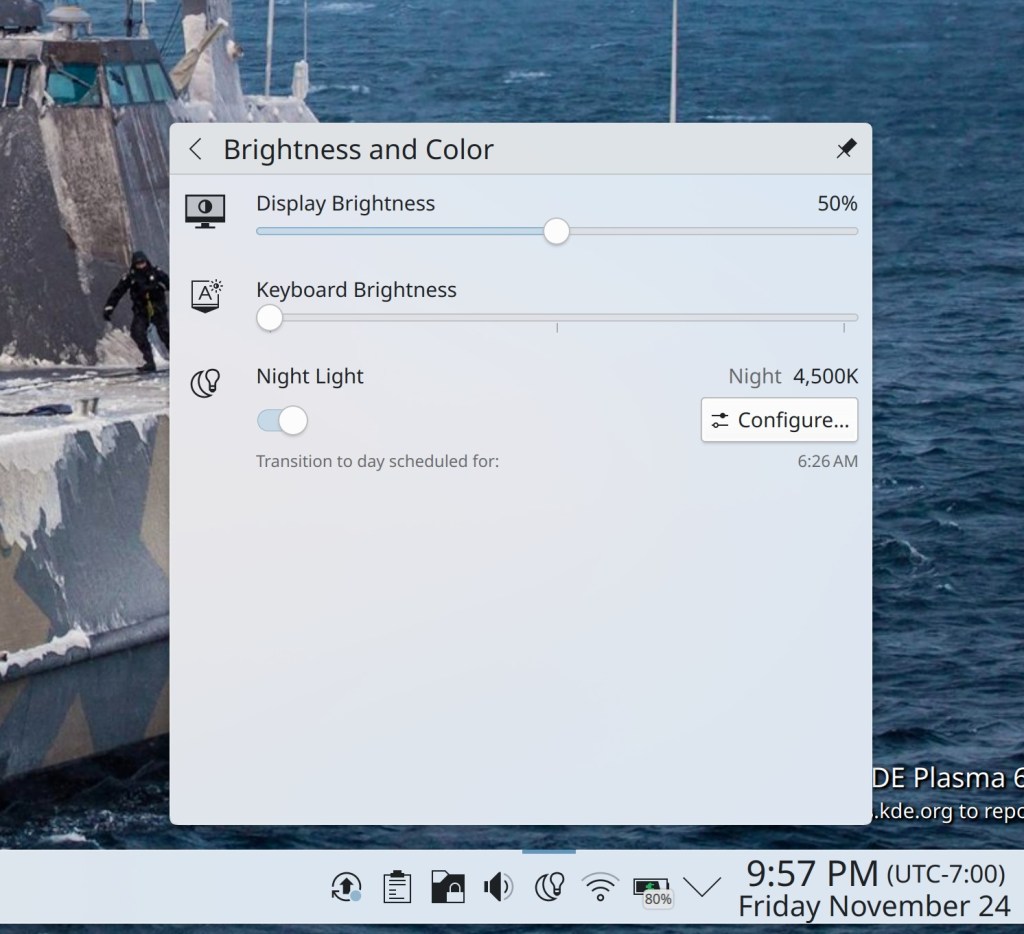
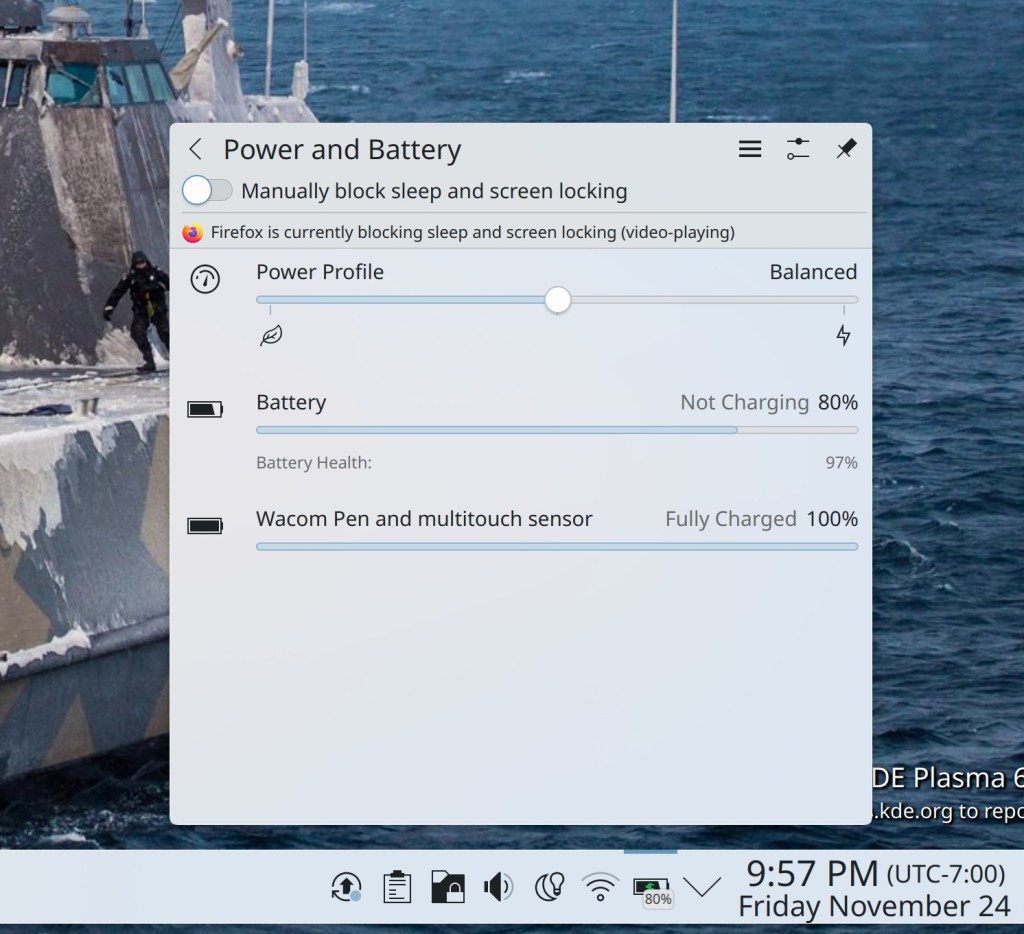
The “Battery and Brightness” widget has been split into two new widgets: “Brightness and Color” and “Power and Battery.” The former one integrates controls for Night Color, so in the end the total number of widgets in your System Tray isn’t increasing; they’re just better organized and relevant now! (Natalie Clarius, link):
KMail now gains support for the beautiful new frameless styling in the Plasma 6 Breeze theme (Carl Schwan, link):

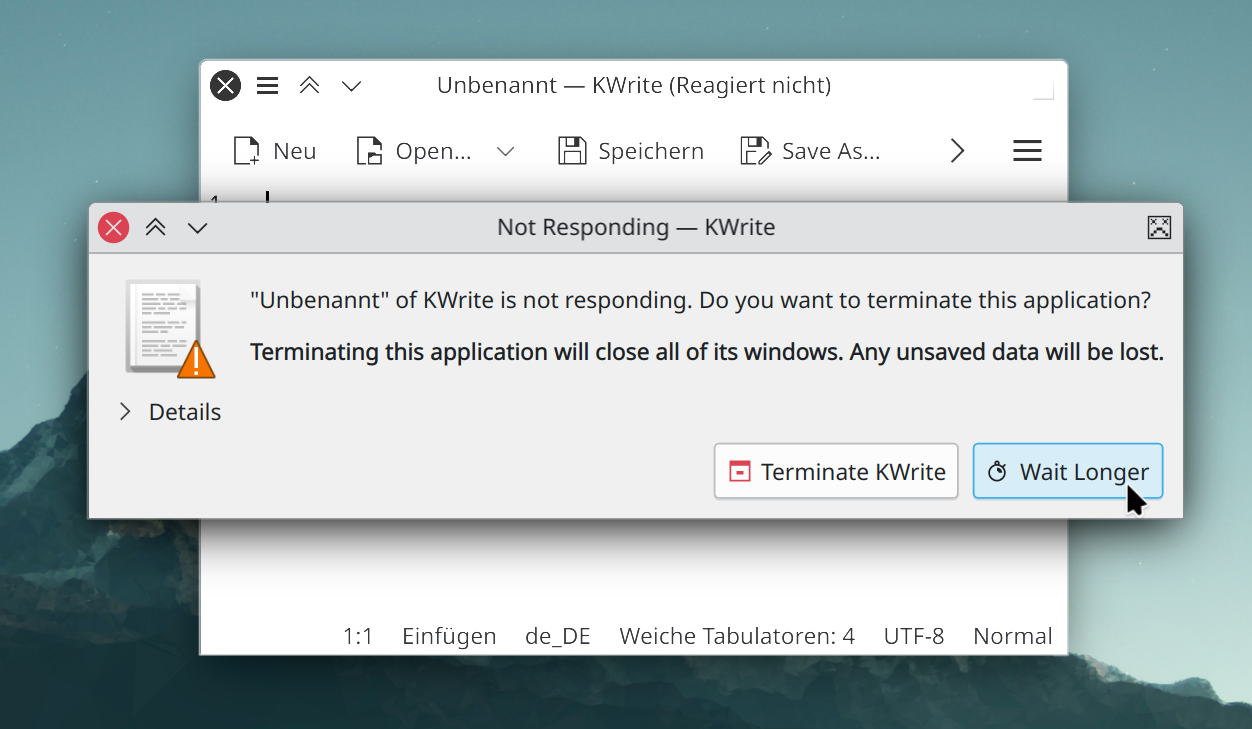
The “Kill unresponsive window?” dialog now exists in the Plasma Wayland session and has received a visual overhaul to brings its UI into the 21st century (Kai Uwe Broulik, link):
Spectacle now opens on Meta+Shift+S, for the benefit of those whose keyboards don’t have a PrintScreen key (Noah Davis, link)
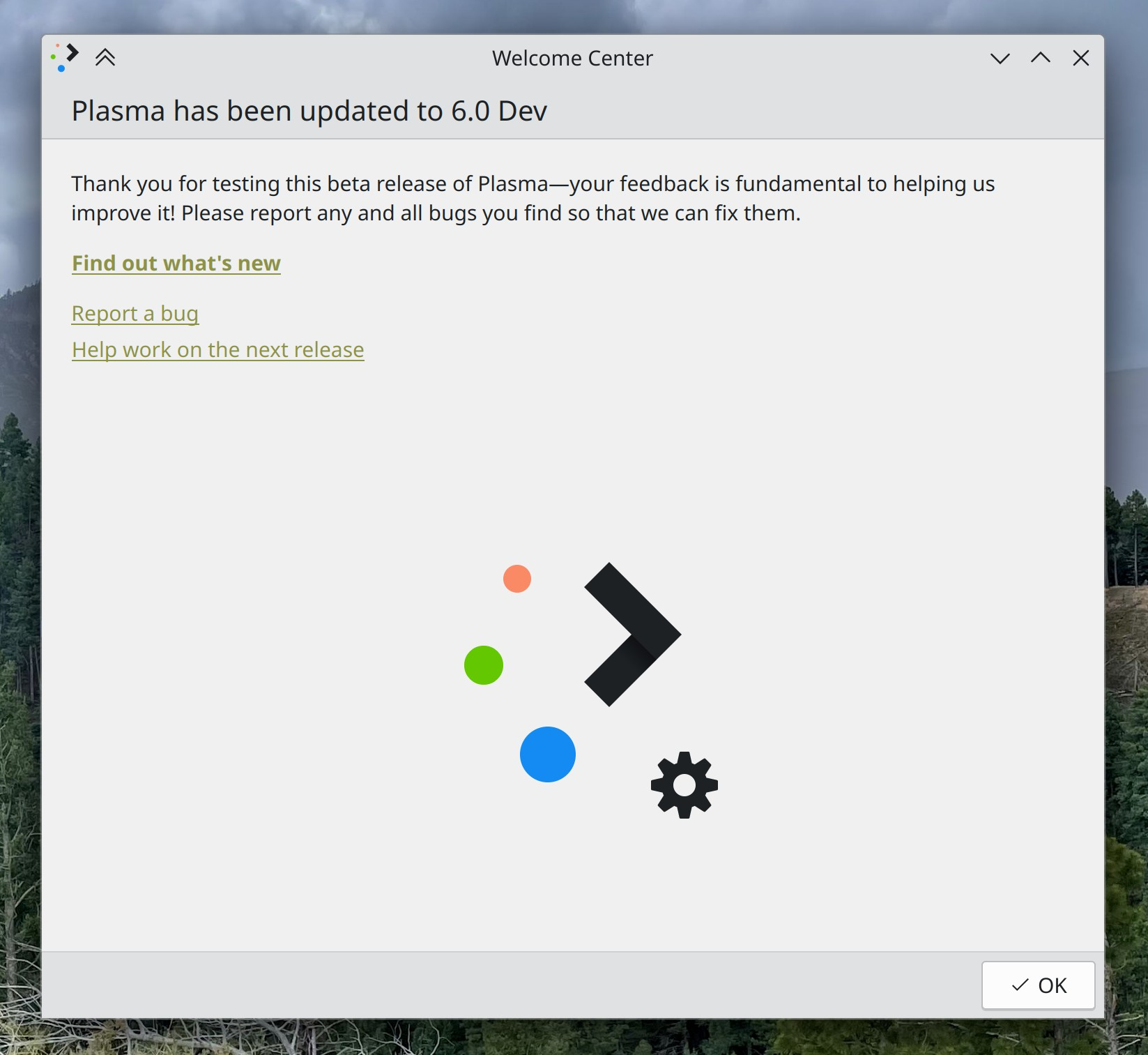
Welcome Center gains a dedicated page shown to people who use the beta version of Plasma (Oliver Beard, link):
The Samba sharing configuration wizard has been fully ported to Qt6 (Harald Sitter, link)
Other Bug-Related Information of Interest:
This section is short because all notable bugfixes are included in the mega-release! Expect this to be more and more true as we get closer to the final release, which, as a reminder, is planned for February 28, 2024.
- 4 Very high priority Plasma bugs (same as last week). Current list of bugs
- 40 15-minute Plasma bugs (down from 44 last week). Current list of bugs
- 221 (!!!) KDE bugs of all kinds fixed this week. Full list of bugs
…And Everything Else
This blog only covers the tip of the iceberg! If you’re hungry for more, check out https://planet.kde.org, where you can find more news from other KDE contributors.
How You Can Help
We’re hosting our Plasma 6 fundraiser right now and need your help! Thanks to you we’re past the 75% mark, but we’re not there yet! So if you like the work we’re doing, spreading the wealth is a great way to share the love. 🙂
If you’re a developer, work on Qt6/KF6/Plasma 6 issues! Which issues? These issues. Plasma 6 is usable for daily driving now, but still in need of bug-fixing and polishing to get it into a releasable state by February.
Otherwise, visit https://community.kde.org/Get_Involved to discover other ways to be part of a project that really matters. Each contributor makes a huge difference in KDE; you are not a number or a cog in a machine! You don’t have to already be a programmer, either. I wasn’t when I got started. Try it, you’ll like it! We don’t bite!
 Adventures in Linux and KDE
I wanted to to join the “Plasma 6 Fundraising” but 100€ per year is too high in my opinion, so I’ve donated 50€ last week. Anyway, I hope you will reach the 100% soon 🙂
LikeLiked by 1 person
Thank you so much! Everything helps. 🙂
LikeLike
Can you add UPI or Google Pay support for the fundraiser, I’m sure a lot of users from India would be willing to pay but are unable due to lack of payment methods.
LikeLike
Unfortunately at the moment we are limited to what our fundraising platform (DonorBox) supports.
LikeLike
Great work this week as always !
But why is there so much wasted place on the pop-up of the system tray widget pop-up ?
LikeLike
I think the same
LikeLike
See https://community.kde.org/Get_Involved/Design/Frequently_Discussed_Topics#System_Tray_popup_sizing
LikeLike
True.
It really should adapt in size to have no wasted space.
LikeLike
Didn’t refresh to read Nate’s comment.
LikeLike
Awesome progress! For me, the experience with Wayland is so much better than it ever was with Xorg. To be fair, Xorg I had experienced with Nvidia Optimus, whereas Wayland I enjoy on a AMD GPU. Yet, how much pain was it on Xorg to configure a tablet screen and map the inputs correctly etc. And now it just works with sensible defaults.
There is one thing, I am wondering if there any plans to improve the situation: I am using a laptop connect to up to three external screens. When I disconnect, the applications are sometimes at least still on the wrong display (i.e., I click on them in the taskbar, and they don’t show up. So I have to right-click on the application in the taskbar and use the ‘move window’ feature).
I have heard that there are window managers (i3?) that would make each of the external screens a virtual screen. With four external screens, I am not using any virtual screens, but just with my laptop screen, the virtual screens would be the solution that I need.
Such a behavior would strike me as a great sensible default. Of course, due to different screen resolutions, and automatic resizing would be necessary, but it seems feasible to me.
Curious what other people think or how they handle such situations.
LikeLiked by 1 person
This situation has improved substantially with Plasma 6. Also, I just started using a docked/external monitor setup myself, which means now I get to experience all these bugs and report them immediately and bug my developer colleagues to fix them. 🙂 This has already resulted in several fixes which will ship in Plasma 6.
LikeLike
> When you’ve downloaded an offline update, there’s now an option to reboot without applying it on the next boot-up. We’re considering adding this as an option when shutting down, too
Do you also plan to add the opposite option that means to install updates when shutting down? 🙂
LikeLike
That’s a lot harder as it requires external changes to the PackageKit library. But I would like to see that as well, yeah.
LikeLike
I too would like to have “install updates and shutdown” a lot!!! It would allow me to walk out while the computer works on the updates and shutdown after, while in the morning it just boots normally without delays caused by the update process!
It would also allow me to use offline updates, which I currently can’t use because of the time-consuming process!!!
LikeLiked by 1 person
“Install updates and shutdown” is easily done by launching a terminal and running this (which is the only way I shutdown these days):
sudo dnf update -y && poweroff || { sleep 30 ; poweroff ; }
The sleep and 2nd poweroff is needed in case there was a VirtualBox update which triggers an akmod rebuild which inhibits poweroff.
LikeLike
The “Battery and Brightness” widget has been split into two new widgets: “Brightness and Color” and “Power and Battery.” This is great!!! I use this widget on my desktop so combining brightness and battery information made no sense.
LikeLiked by 1 person
Hey Nate! I have a question. Is KDE team preparing for explicit sync? I know GNOME devs did their homework and just wait for pieces to land and a wayland protocol to finalize.
https://gitlab.freedesktop.org/wayland/wayland-protocols/-/merge_requests/90
LikeLike
Yes https://invent.kde.org/plasma/kwin/-/merge_requests/4693
LikeLike
My current dGPU (Nvidia GTX 970M) is behaving very nicely with Wayland, even if it’s in hybrid setup. Wayland is my default session now. I don’t even see any issue when using external screen. However, I’m still waiting for native Wine in Wayland and need builtin Xwayland Bridge. I installed it from flatpack but it looks like abandoned. Any info about the state of this project? It’s really necessary for work and in my book, one of serious Wayland stoppers. While the flatpack version works, it is quirky and needs maturing.
Also, I noticed one problematic thing on Wayland recently. The projector we are using at work, is pretty old. It works fine with X11, but recently, when I plugged in in Wayland session, I only got some flickering without image output. Basically, the projector didn’t work with Wayland. Changing refresh rate didn’t change anything. This is concerning, especially if at some point X11 will stop be supported, but old hardware will still be there in various work places. Until the projector works, no one will be buying a new one.
LikeLike
“Plasma Wayland session now causes apps with unsaved changes to prompt the user to save them”
I would prefer to application don’t stop shutting down or restart my PC only save document even calling it as “unsaved document”. I don’t want additionally click to some popup window when I need fast close my PC. IMO this is obsolete way closing the system dating back to time Windows 95.
LikeLike
“Bounce Keys” as showstopper
I regret and cannot understand that such function as restore session of Plasma wasn’t considered as showstopper, only this.
LikeLike
Is there a point to submit bugs to Plasma 5.27.9? On Manjaro unstable branch, we just got update with:
KDE Gear23.08.3 7 , KDE Frameworks 5.112.0, NVIDIA545.29.06 2
I can’t be sure if that is not Nvidia’s fault (I have Optimus laptop), but the update introduced several regressions, like: broken multimonitor support on Wayland (it simply doesn’t recognize monitors and those enter suspend mode), broken startup sound (again – this gets broken every few releases of Plasma…), etc.
I need full multimonitor support for work, and startup sound is also very important for me (because it indicates the sound works, which sometimes doesn’t, because of incompatibility of Linux sound drivers with my dedicated sound card). Because of that I had to roll back to the older version of the system and switched to stable branch, to avoid those updates as long as possible.
It feels like the latest Plasma updates are very weak in quality and breaking more then fixing things. If possible, I would freeze my current version of the system till there will be Plasma 6 and even then, I would wait some time, probably for 6.0.1 or 6.0.2, so my laptop would be still valid for work.
Anyway, back to my question. Is there a point of submiting bugs for Plasma 5.27.9? Will there be some new releases of 5.27 before 6.0? I somehow doubt it.
It’s a bit disheartening, seeing all the talk about Wayland and how this is the future and almost ready, while getting show stopping regressions updates.
LikeLike
There’s a Plasma 5.27.10 planned. But FWIW I haven’t seen a flood of bug reports about these things, so I don’t think they’re universal. I have on the other hand heard a *lot* of complaints about version 545 of the NVIDIA driver, and reports that reverting to 535 fixes many things. So I’d recommend trying that first before blaming Plasma or any other KDE software.
LikeLiked by 1 person
Thanks. This is very likely that this is Nvidia’s fault, because this update broke permanently optimus-manager (which stopped working), so there are some massive changes in this driver, or massive bugs. I intend to delay the update as soon as possible and in meantime, I switched to stable branch, which will keep older drivers for some time.
However, what about lack of startup sound? Should I create a new report or find the old one and re-open it? This is definitely KDE issue and KDE is pretty consistent with braking it, on average every 3 releases… The issue here is, that because I rolled back, I can’t contribute much to the debugging.
LikeLike
That I don’t know about. If there’s an existing bug report, go ahead and re-open it. As you can see, no developers use this feature. 🙂
LikeLike
> KMail now gains support for the beautiful new frameless styling in the Plasma 6 Breeze theme
To become really beautiful, I wish KMail starts to display the
H
T
M
L
Message hint in another way. If you go to https://kde.org/ and take a look at the screenshot displayed under KDE Applications (https://cdn.kde.org/screenshots/kmail/kmail.png) it really feels alien to the rest of the UI.
LikeLike