This week in KDE: The bug slaughterfest continues

Last week’s focus on bugs continues into this week, with the VHI-priority Plasma bugs slashed down to just three! In addition, Plasma 6 UI improvements are starting to land now that it’s stabilized a bit. In fact I’m typing this post from within a Plasma 6 session right now!

User Interface Improvements

In Elisa, double-clicking on a song or clicking its “Play now” button now puts its entire album in the playlist and begins playing from that song (Melissa Autumn and me: Nate Graham, Elisa 23.08. Link)

While annotating a screenshot in Spectacle, annotations now have a nice hover outline so it’s obvious how to select them (Noah Davis, Spectacle 23.08. Link)

In Plasma’s Disks & Devices widget, you’ll no longer see a useless “Mount” action for MTP-connected devices (me: Nate Graham, Plasma 5.27.5. Link)

The way you configure your panels is now much more visual, with explanations too! (Tanbir Jishan and Niccolò Venerandi, Plasma 6.0. Link):
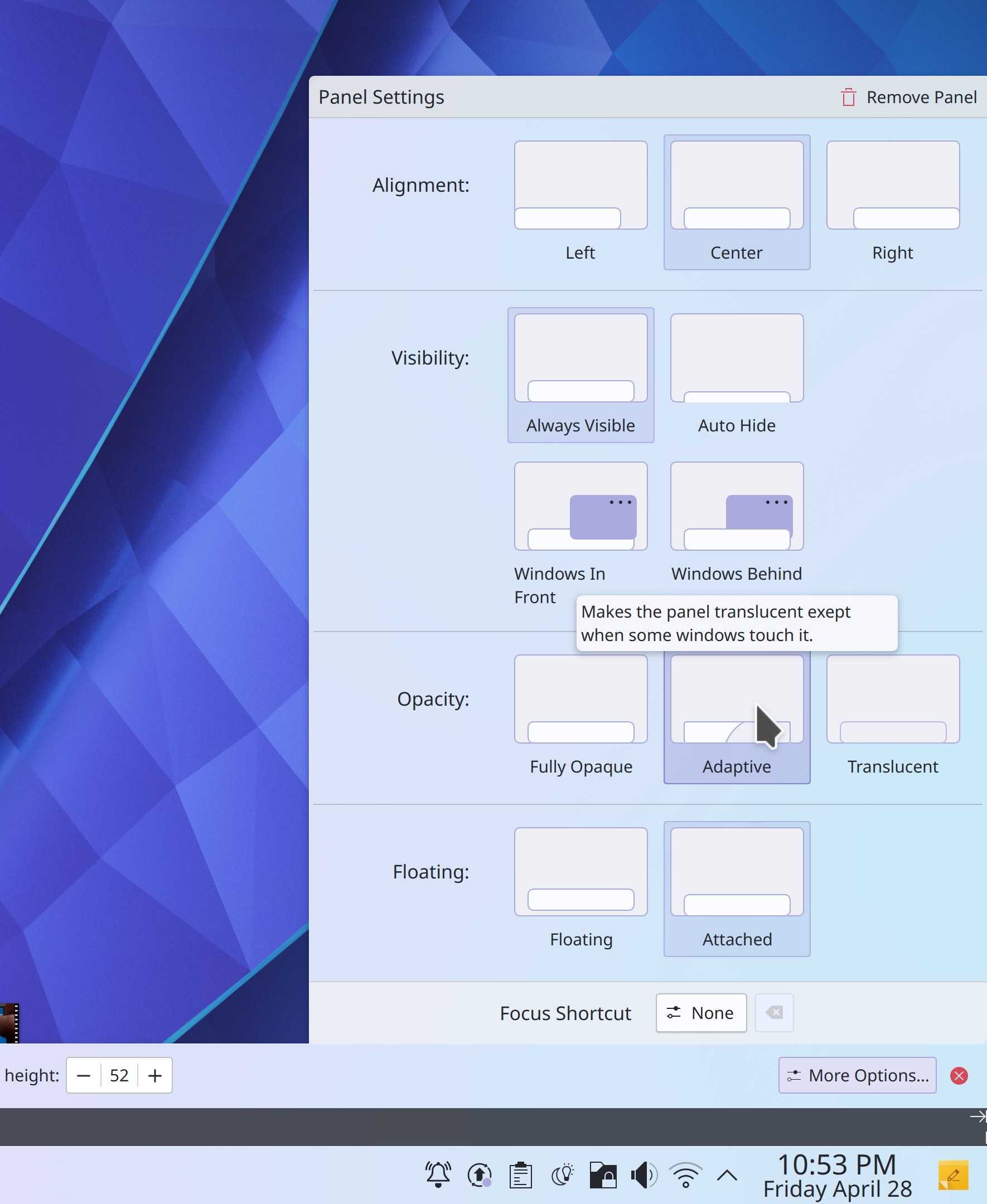
Panel Settings dialog with visual depictions of all the different states

Discover now has smarter search behavior, putting more weight on direct title matches and words that appear in the title, rather than the description (Aleix Pol Gonzalez, Plasma 6.0. Link)

Search results in Kickoff are now ordered the same way they are in KRunner and other KRunner-powered searches (Alexander Lohnau, Plasma 6.0. Link)

It’s now possible to do math function s like sqrt() in KRunner without having to prefix the operation with an equals sign (Alexander Lohnau, Plasma 6.0. Link)

When the current wallpaper’s image file is changed on disk, it will update the wallpaper in real-time (Oleg Solovyov, Plasma 6.0. Link)

You can now convert to and from kilometers per hour using the “kph” keyword (June Knauth, Frameworks 5.106. Link)

Significant Bugfixes

(This is a curated list of e.g. HI and VHI priority bugs, Wayland showstoppers, major regressions, etc.)

Dolphin’s selection mode is no longer inappropriately activated or deactivated by the Spacebar key when it’s pressed despite not being the assigned shortcut for that action, or when pressing it while an interactive UI control is focused (Eugene Popov, Dolphin 23.08. Link)

Fixed a recently-introduced source of KWin crashes in the Plasma Wayland session when hovering over Task Manager icons or closing windows (Aleix Pol Gonzalez, Plasma 5.27.5. Link)

System Settings no longer crashes on launch when your Activities database has become corrupted (Ivan Tkachenko, Plasma 5.27.5. Link)

Fixed another cause of screens overlapping by one pixel in multi-screen setups which would cause various other weird bugs (Harald Sitter, Plasma 5.27.5. Link)

When using a multi-screen arrangement, the lock screen’s unlock button now always works on the first click (Harald Sitter, Plasma 5.27.5. Link)

In the Notifications history, long notification title text can no longer sometimes push that notification’s close button partially out of view (Eugene Popov, Plasma 5.27.5. Link)

When connecting a Bluetooth device, the separator line between connected and disconnected devices no longer briefly overlaps the connected device (Harald Sitter, Plasma 5.27.5. Link)

Invisible Breeze-themed progress bars throughout Qt software no longer sometimes consume CPU resources by animating while out of sight (Ivan Tkachenko, Plasma 5.27.5. Link)

Entering paths with spaces in them now works properly in the Properties dialog, Shortcuts page, and Autostart page in System Settings (Bharadwaj Raju, Plasma 5.27.5 and Frameworks 5.106, Link 1, link 2, and link 3)

Fixed a variety of embarrassing layout glitches in KDE software when used with an RTL language (Ivan Tkachenko, Plasma 5.27.5 and Frameworks 5.106. Link 1, link 2, link 3, and link 4)

Fixed a major source of crashes when copying files in Dolphin and other apps (Fushan Wen, Frameworks 5.106. Link)

Other bug-related information of interest:

Automation & Systematization

Re-did the top-level Plasma documentation page for greater clarity (Thiago Sueto, link)

Massively overhauled the Kirigami API documentation for better clarity and style (Matej Starc, link)

…And everything else

This blog only covers the tip of the iceberg! If you’re hungry for more, check out https://planet.kde.org, where you can find more news from other KDE contributors.

How You Can Help

Check out KDE’s new forum at https://discuss.kde.org! This is a great place to ask for help if you’re experiencing an issue that might not necessarily be a bug, and to help others with their own issues.

If you’re a developer, consider working on known Plasma 5.27 regressions! You might also want to check out our 15-Minute Bug Initiative. Working on these issues makes a big difference quickly!

Otherwise, visit https://community.kde.org/Get_Involved to discover other ways to be part of a project that really matters. Each contributor makes a huge difference in KDE; you are not a number or a cog in a machine! You don’t have to already be a programmer, either. I wasn’t when I got started. Try it, you’ll like it! We don’t bite!

And finally, KDE can’t work without financial support, so consider making a donation today! This stuff ain’t cheap and KDE e.V. has ambitious hiring goals. We can’t meet them without your generous donations!
This week in KDE: Stomping all the bugs!

This week was a veritable fiesta of bugfixing, and we cut Plasma’s list of VHI priority bugs nearly in half! Lots of other apps got bug fixes, too. And finally, KDE’s volunteer contributors landed some great new features and UI improvements!

New Features

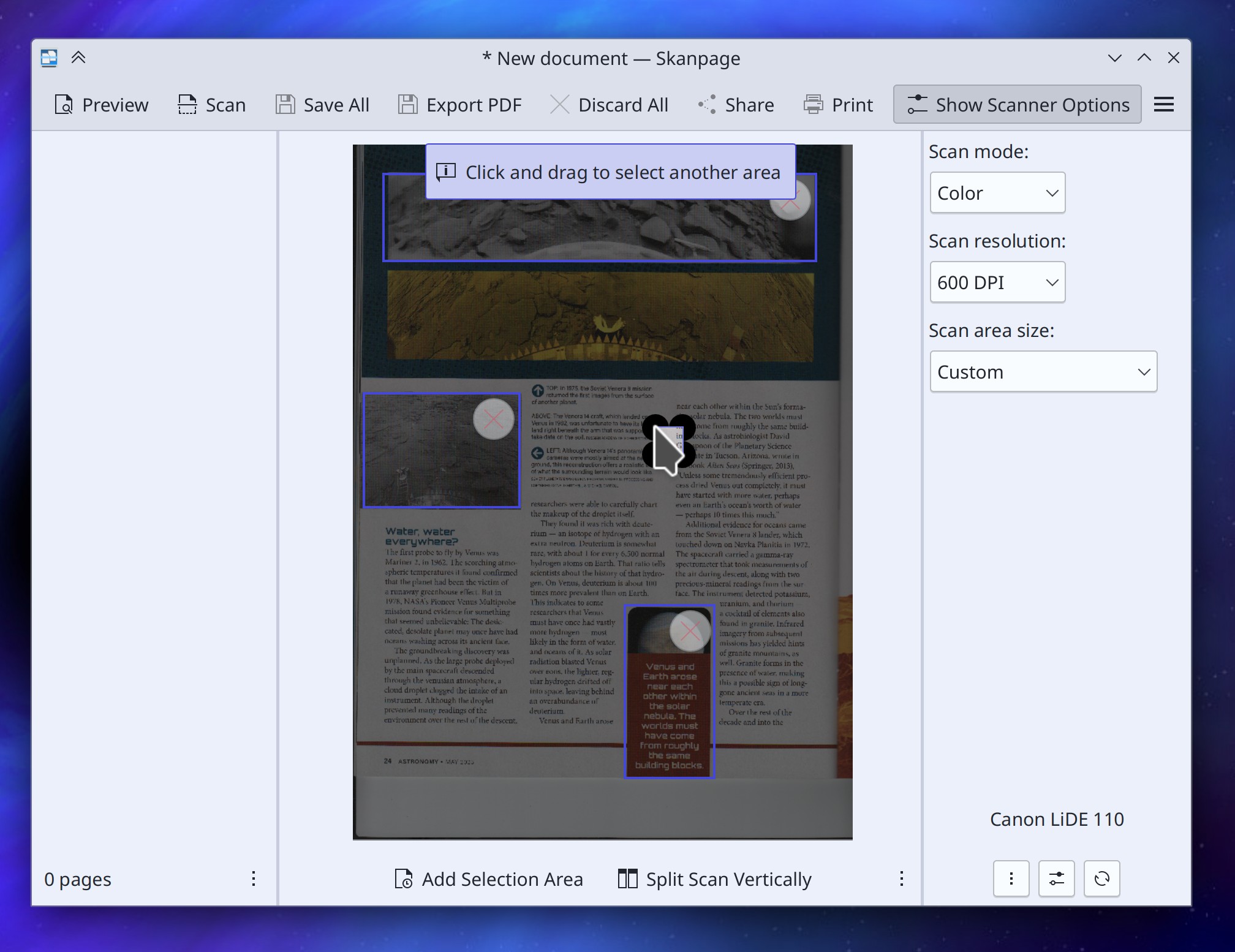
Skanpage now offers a “preview” feature in which you can select multiple specific parts of the image to scan, or automatically split the area into two pages, which can be useful when scanning books (someone going by the pseudonym “John Doe”, Skanpage 23.08. Link):

Skanpage window showing preview scan in center pane with three selected areas and message saying "Click and drag to select another area"

Elisa now supports controlling its Shuffle and Repeat settings via MPRIS, which means that you can now do so via the Media Player widget (Melissa Autumn, Elisa 23.08. Link)

User Interface Improvements

Removed a few less-important items from Gwenview’s Editing Tools sidebar (they’re still present in the menu structure) to make the window fit on a 1366×768 screen again (me: Nate Graham, Gwenview 23.08. Link)

Gwenview no longer appears in its own “Open the image in a different app” menu (Eugene Popov, Gwenview 23.08. Link)

Made various improvements to Gwenview’s Zoom UI: you can now click on any part of the zoom slider to jump to that zoom level, and the zoom combobox is now more keyboard-friendly (Eugene Popov, Gwenview 23.08. Link 1 and link 2)

Plasma Task Manager window previews now display the correct text for windows that don’t show the name of their app in the titlebar or have been customized by the user (me: Nate Graham and Fushan Wen, Plasma 5.27.5. Link)

Refined the way that estimated battery life is calculated to improve its accuracy (Stefan Brüns, Plasma 5.27.5. Link)

Significant Bugfixes

(This is a curated list of, e.g. HI and VHI priority bugs, Wayland showstoppers, major regressions, etc.)

Filelight no longer sometimes fails to launch when your disk is full, which was kind of bad since it’s a tool you can use to see what’s taking up all your space and clean it out (Harald Sitter, Filelight 23.04.1. Link)

In the Plasma X11 session, “Open containing folder” functionality in various apps is now Virtual Desktop- and Activity-aware, meaning you’ll no longer have the experience of an already-open instance of Dolphin in a different Virtual Desktop or Activity becoming focused and switched to. Wayland support will happen later as it requires deeper changes (Méven Car, Dolphin 23.04.1. Link)

Spectacle’s Rectangular Region selector now works properly when using a multi-monitor setup with at least one monitor having a scale factor below 100% (Noah Davis, Spectacle 23.04.1. Link)

Made various UI fixes to Skanpage, so now the “rotate image” buttons rotate the image in the expected directions, and the OCR language list view is scrollable if need be (me: Nate Graham, Skanpage 23.04.1. Link 1 and link 2)

You can no longer crash Dolphin by repeatedly entering and exiting Selection Mode quickly (Felix Ernst, Dolphin 23.08. Link)

In the Plasma Calendar’s “Months” views, months are no longer sometimes randomly and mysteriously missing their names (Harald Sitter, Plasma 5.27.5. Link)

Fixed several ways that Plasma could crash after getting into an inconsistent state when using certain types of multi-monitor setups (Harald Sitter, Plasma 5.27.5. Link 1 and link 2)

Fixed a subtle UI glitch that could cause imported VPN configurations to not be saved to disk unless another setting was also changed at the same time… no longer! (Nicolas Fella, Plasma 5.27.5. Link)

Mouse acceleration profiles now work properly when using Libinput 1.3 or later (Ilia Kats, Plasma 5.27.5. Link)

Fixed a variety of significant bugs found in System Settings’ Flatpak Permissions page: it no longer sometimes generates a broken overrides config; custom environment variable support has been fixed enough that we’ve re-enabled the feature; adding new filesystem paths no longer sometimes interferes with the state of other items in the list; and the “read-write” option of “All User Files” no longer sometimes disappears (Ivan Tkachenko, Plasma 5.27.5. Link 1, link 2, link 3, and link 4)

Fixed a way that your screen arrangement priorities could end up getting scrambled under certain circumstances (Harald Sitter, Plasma 5.27.5. Link)

Middle-clicking various things–including KWin-drawn titlebars–can no longer sometimes randomly crash the app that draws the thing you middle-clicked (David Redondo, Frameworks 5.106. Link)

Fixed an issue that could cause apps and Plasma to hang when using them to move a lot of files at once (Harald Sitter, Frameworks 5.106. Link)

Plasma no longer crashes when playing certain YouTube videos in a browser using Plasma Browser Integration, sometimes also when behind a proxy (Fushan Wen, Frameworks 5.106. Link)

Other bug-related information of interest:

…And everything else

This blog only covers the tip of the iceberg! If you’re hungry for more, check out https://planet.kde.org, where you can find more news from other KDE contributors.

How You Can Help

If you’re a user, upgrade to Plasma 5.27! If your distro doesn’t offer it and won’t anytime soon, consider switching to a different one that ships software closer to its developer’s schedules.

If you’re a developer, consider working on known Plasma 5.27 regressions! You might also want to check out our 15-Minute Bug Initiative. Working on these issues makes a big difference quickly!

Otherwise, visit https://community.kde.org/Get_Involved to discover other ways to be part of a project that really matters. Each contributor makes a huge difference in KDE; you are not a number or a cog in a machine! You don’t have to already be a programmer, either. I wasn’t when I got started. Try it, you’ll like it! We don’t bite!

And finally, KDE can’t work without financial support, so consider making a donation today! This stuff ain’t cheap and KDE e.V. has ambitious hiring goals. We can’t meet them without your generous donations!

This week in KDE: “Make multi GPU not suck”

This week a lot of bugs and other issues got fixed, including a major overhaul of KWin’s multi-GPU infrastructure for Intel and AMD GPUs in Plasma 6 to make it “not suck” anymore! Big thanks to Xaver Hugl for this impactful work.

And here’s a sampling of other cool work:

New features

When performing an action that would otherwise automatically activate a window on another virtual desktop, there’s now an option to not switch to it at all. This can be useful for workflows such as opening a lot of links from an email client in a web browser located on another desktop, because then you won’t have to re-focus the email client after every link you open (Nicolas Fella, Plasma 6.0. Link)

User Interface Improvements

The “Highlight Changed Settings” feature in System Settings now works on the Flatpak Permissions page (Ivan Tkachenko, Plasma 5.27.5. Link)

The Emoji Selector window is now significantly faster to appear when you launch it with Meta+. (Fushan Wen, Plasma 5.27.5. Link)

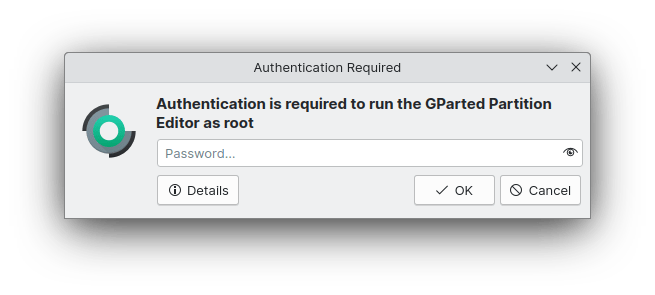
Authentication dialogs now have a streamlined style to better focus the parts that matter (Devin Lin, Plasma 6.0. Link):

When a Folder View widget is using its popup list form, its items are now always opened with a single click because this is a menu style UI and menu items are always activated with a single click (me: Nate Graham, Plasma 6.0. Link)

On the System Settings’ KWin Rules page, various properties’ settings are now explained much more clearly (me: Nate Graham and Ismael Asensio, Plasma 6.0. Link 1, link 2, and link 3)

The Breeze icon theme now includes icons for .abc Alembic files (Áron Kovács, Frameworks 5.106. Link)

Significant Bugfixes

(This is a curated list of e.g. HI and VHI priority bugs, Wayland showstoppers, major regressions, etc.)

In the Plasma Wayland session, Spectacle is now faster to take screenshots and never ever ever includes its main window in screenshots that it takes (Noah Davis, Spectacle 23.04 with Plasma 5.27.4.1 or newer. Link)

Setting screen refresh rates higher than 60Hz when using AMD GPUs is once again possible, working around an issue in the open-source AMD drivers (Xaver Hugl, Plasma 5.27.4.1. Link)

Fixed a major memory leak that could, under certain circumstances, quickly gobble up all memory when an external display was plugged in (Harald Sitter, Plasma 5.27.5. Link)

When an offline system update fails, you’ll no longer be endlessly notified about it on login even after you click the “Repair System” button in the notification that Discover shows you about it (Aleix Pol Gonzalez and me: Nate Graham. Link 1 and link 2)

Discover no longer sometimes mixes up the order of the “from” and “to” version numbers for Flatpak apps, or incorrectly states that an upgrade from one version to the next one is a refresh of the existing version–though sometimes it actually is a refresh of the existing version, so it isn’t always a bug when you see this (Ismael Asensio, Plasma 5.27.5. Link)

Fixed a cause of excessive memory usage that could even crash Plasma when using KRunner to search for unusual things (Fushan Wen, Plasma 5.27.5. Link)

Widgets can now be properly centered between two flexible Panel spacers places on vertical panels, not just horizontal panels (Niccolò Venerandi, Plasma 5.27.5. Link)

Discover now succeeds at applying several types of firmware updates that would trip it up before (Aleix Pol Gonzalez, Plasma 5.27.5. Link)

Other bug-related information of interest:

…And everything else

This blog only covers the tip of the iceberg! If you’re hungry for more, check out https://planet.kde.org, where you can find more news from other KDE contributors.

How You Can Help

If you’re a user, upgrade to Plasma 5.27! If your distro doesn’t offer it and won’t anytime soon, consider switching to a different one that ships software closer to its developer’s schedules.

If you’re a developer, consider working on known Plasma 5.27 regressions! You might also want to check out our 15-Minute Bug Initiative. Working on these issues makes a big difference quickly!

Otherwise, visit https://community.kde.org/Get_Involved to discover other ways to be part of a project that really matters. Each contributor makes a huge difference in KDE; you are not a number or a cog in a machine! You don’t have to already be a programmer, either. I wasn’t when I got started. Try it, you’ll like it! We don’t bite!

And finally, KDE can’t work without financial support, so consider making a donation today! This stuff ain’t cheap and KDE e.V. has ambitious hiring goals. We can’t meet them without your generous donations!

Plasma Products

In the open-source world, we’re quite familiar with projects. Write some code to solve a problem, make sure it works for you, maybe put it in a Git repo, and voila! A project is mostly personal; you scratch an itch and improve your life a bit. It’s how everything starts.

Then you put your Git repo online to share your project with others, and it begins to transform into a product. A product is outward-focused; its purpose is to be of value to others. To succeed, it must grow organizational components such as defined scopes of features and support, documentation, promotion and advertising, methods of distribution and updating, formalized feedback channels, decision-making processes, and so on.

This transition is hard, and it can burn out FOSS maintainers of productized projects who suddenly find themselves corresponding with rude strangers without pay and lacking the time to focus on the parts of the project they found fun. It takes a very special and rare kind of volunteer to consistently do this work for free.

In the commercial world, product development and maintenance is sustained by the money people pay to buy the product. But in the FOSS world, we’re in this awkward valley where our products are frequently competitive in functionality and reach with the commercial ones, but we don’t generally charge money or benefit from a funding stream to keep them going sustainably.

FOSS funding

…But sometimes we do! For example, the Krita foundation pays several engineers to work on the product. KDE e.V. now also pays multiple people to do critical technical work for Plasma and its surrounding app and library ecosystem: porting and platform maintenance, writing and maintaining customer-focused features, documentation, and packaging. This isn’t cheap! And because we give our products away for free, the money to pay the people consistently doing this important work is very limited and comes from corporate patronship, individual donations, grants, and sometimes paid downloads on the proprietary app stores. Keeping this financial flow going is itself a lot of work! This is normally the part where I beg you to donate! 🙂 But not right now. Right now I want to explore alternatives.

Software is hard to sell. Always has been. These days the most successful funding models for software are not a great match for what we typically build, and some even seem sort of fundamentally icky or morally objectionable, like DRM-restricted subscription services, micro-transactions, or being ad-supported. Software sold with these models is exploitative, so that’s no good. And the older model of paying for download makes even less sense for us since the source code of our products is available for free and there’s already an enormous surrounding infrastructure for the packaging and distribution of open source software. Why would anyone pay to download something they can get for free legally and almost effortlessly?

To get people to pay for a product or service, you have to provide something they can’t already easily and legally get themselves for free.

Like hardware devices

This is why I think it’s so important that we have hardware vendor partners: hardware devices are inherently products that people pay for. When KDE’s hardware vendor partners use KDE’s software in their products, it pushes that software more in the direction of being product-friendly–which is to say, user-friendly. Some of our vendor partners even pay people to work on improving KDE software directly, which is amazing and it’s something I’d like to see even more of. There are also financial benefits for KDE e.V. in the form of patronship dues and getting a portion of sales, which can be re-invested to pay for work on the software in general; I think it’s important that a majority of technical decision-making remains in KDE.

But if the product is the laptop or phone or gaming console, what does that make Plasma?

A toolkit for building products

My KDE colleague Niccolò Venerandi published an interesting video about this the other day (and also here in text/blog form). Basically he echoes an Akademy 2022 talk given by KDE e.V. president Aleix Pol Gonzalez about how Plasma itself is a kind of toolkit for building the software UX for products. I’ve also written about this before.

In this way of looking at it, the Plasma Desktop we’re all familiar with is one such UX built by KDE itself, and companies like Valve, Slimbook, Kubuntu Focus, Tuxedo, and Pine64 ship Plasma-powered products using that desktop UX and others. We even learned at least year’s Akademy that Mercedes is driving their in-car UI with KWin, Plasma’s window manager!

Now, this doesn’t mean you should go all “well akshually…” on your friends when they say “Plasma” or “KDE” to mean “Plasma Desktop.” Who cares! It’s obvious. And the Plasma Desktop is probably going to be our biggest thing for a while. It’s got the longest history and the most passion behind it. But the point stands: beneath Plasma Desktop lies a whole flexible system for quickly building other UX paradigms better suited for different kinds of devices.

If you don’t use that capability in your daily life, that’s fine. If you do use it to transform your Plasma Desktop into something totally unique that’s perfectly adapted to your personal needs and desires, that’s fine too! And what’s even more fine is when companies use this functionality to sell products with a Plasma-powered UX and invest in KDE! Seen in this way, Plasma is a powerful tool for all kinds of embedded software-driven products. We’ve already done most of the R&D that you’ll get for free; it just makes sense.

Being product-friendly

If Plasma is a tool to reduce cost and risk when building a product that uses it, we need to treat it more like what it is: a B2B developer tool. This means things like focusing on distro and hardware vendor use cases; ensuring painless and bulletproof customizability; maintaining documentation for all features; providing a rich library of components; offering a friendly and adequate out-of-the-box UX; having our own distribution and updating tools you can use if you want; and pitching our work to potential customers. Do all of those things sound familiar? They should! It’s what many members of the KDE community have been focusing on over multiple years. Documentation in particular is sorely needed to improve adoption by product-focused companies, and that’s why KDE e.V. hired a documentation contractor early this year. And KDE e.V. has a marketing team too, to improve outreach! Hmm, almost sounds like there’s a plan in place!

How to help

If being part of a movement to help get a Plasma-powered UX on all sorts of devices sounds cool and exciting, there a lot of ways to help!

  • Keep using Plasma Desktop, submitting bug reports, and fixing stuff; keep being awesome! Focus in particular on hardware integration and developer UX.
  • Help write developer documentation, particularly around shell customization and theming.
  • Be aware of the larger context and understand how proposed changes will affect others who use Plasma and Plasma-powered products. We don’t exist in a vacuum! The project is larger than us.
  • If the company you work for is using Plasma on their devices, start a conversation internally about becoming a KDE Patron, or about devoting engineering efforts towards direct upstream contributions to Plasma.
  • If the company you work for isn’t using Plasma on their devices, pitch it to them!
  • Donate to KDE e.V. so we can hire more people to technical work and offer expanded hours and work opportunities to the people we already have (they are currently part-time or less).

This week in KDE: All about the apps

This week some of your favorite KDE apps got lots of positive changes! Dolphin, Kate, Okular, Elisa, Partition Manager, and Filelight all received some nice improvements.

In the background, Plasma 6 porting work continues. I’ve now got a working Plasma 6 dev session on my machine. It’s still rough, but it’s usable. Now I can see why more experienced contributors predicted the need to skip a release and give the initial Plasma 6 release at least an 8 month dev cycle, not a 4-month one. But fear not; it’s happening!

New Features

When Dolphin is in split view mode, there are now context menu items and keyboard shortcuts to let you quickly move or copy items to the opposite view (Méven Car, Dolphin 23.08. Link)

Links in files open in Kate are now clickable! (Waqar Ahmed, Kate 23.08. Link)

Note that for now this requires you to manually enable to “Open link” plugin, which is shipped by default but left disabled

User Interface Improvements

Partition Manager now finally has its own icon, instead of re-using Filelight’s icon (Gerson Alvarado, Partition Manager 23.08 and Frameworks 5.106. Link):

Filelight’s default window size is no longer too large to fully fit on a 1366×768 screen (me: Nate Graham, Filelight 23.04. Link)

Dolphin once again tries to tell you what to do instead of running it with sudo (me: Nate Graham, Dolphin 23.04. Link):

Terminal window showing the message: Running Dolphin with sudo is not supported as it can cause bugs and expose you to security vulnerabilities. Instead, install the `kio-admin` package from your distro and use it to manage root-owned locations by right-clicking on them and selecting "Open as Administrator".

Improved the RTL layout and focus indicator lines in various types of Breeze-themed buttons, checkboxes, and radio buttons (Ivan Tkachenko, Plasma 5.27.4. Link 1, link 2, and link 3)

Scrolling on the Task Manager and Pager widgets now works more reliably when you sometimes scroll using a touchpad and sometimes using a mouse wheel (Prajna Sariputra, Plasma 5.27.5 Link 1 and link 2)

You can now press-and-hold with a touchscreen to open a context menu for System Tray icons (Fushan Wen, Plasma 5.27.5. Link)

Scrolling over the Audio Volume, Media Player, and Battery & Brightness widgets now always raises or lowers the volume and brightness based on the direction of the scroll rather than respecting the natural/inverted scroll direction setting (Vlad Zahorodnii and me: Nate Graham, Plasma 6.0. Link 1 and link 2)

Streamlined the appearance of the “cool Plasma features” pages in Welcome Center (Oliver Beard, Plasma 6.0. Link):

Plasma Welcome window showing "Open Settings…"button in header area

When showing the logout screen by pressing the power button or Ctrl+Alt+Del, it now defaults to pre-selecting the “Shut down” action by default, rather than “Log out” (me: Nate Graham, Plasma 6.0. Link)

Significant Bugfixes

(This is a curated list of e.g. HI and VHI priority bugs, Wayland showstoppers, major regressions, etc.)

Fixed a way that Okular could crash when you try to save changes made after filling out forms in a document (Albert Astals Cid, Okular 23.04. Link)

When using Elisa in a language other than English, cover overlay “Play” and “Add to Playlist” buttons now immediately work on startup (Matthieu Gallien, Elisa 23.04. Link)

Fixed a complex multi-monitor bug involving misbehavior with KVM/headless setups that can sometimes prompt people to work around the issue by purchasing and using a bi-directional EDID emulator gizmo (Kai Li, Plasma 5.27.5. Link)

Fixed a recent regression in the size and sharpness of GTK CSD windows’ minimize, maximize, and close buttons when not using any scaling (Fushan Wen, Plasma 5.27.5. Link)

System Monitor sensors that use the “watt-hour” unit now display the unit correctly (Kai Uwe Broulik, Plasma 5.27.5. Link 1 and link 2)

On Info Center’s Networks page, the Refresh button now actually works (Harald Sitter, Plasma 5.27.5. Link)

Dragging from empty areas of the toolbar in Discover and many other Kirigami-based apps now always works, rather than only working on some pages/views and not others (Marco Martin, Kirigami 5.106. Link)

And last but not least… fixed a major source of the infamous Dolphin bug where folders don’t update in real-time when contents are modified in another app (Méven Car, Frameworks 5.106. Link)

Other bug-related information of interest:

Automation & Systematization

Added an autotest to test the various different ways that items can be opened in Dolphin (Felix Ernst, Link)

When you try to change translated text in a KDE git repo, a git hookscript now stops you, because translations are handed elsewhere and merged into the git repos via an automated process (Ben Cooksley, Link)

Changes not in KDE that affect KDE

Logging out of a Wayland session (not shutting down or rebooting, just logging out) now works as expected (Fabian Vogt, SDDM 0.20. Link)

…And everything else

This blog only covers the tip of the iceberg! If you’re hungry for more, check out https://planet.kde.org, where you can find more news from other KDE contributors.

How You Can Help

If you’re a user, upgrade to Plasma 5.27! If your distro doesn’t offer it and won’t anytime soon, consider switching to a different one that ships software closer to its developer’s schedules.

If you’re a developer, consider working on known Plasma 5.27 regressions! You might also want to check out our 15-Minute Bug Initiative. Working on these issues makes a big difference quickly!

Otherwise, visit https://community.kde.org/Get_Involved to discover other ways to be part of a project that really matters. Each contributor makes a huge difference in KDE; you are not a number or a cog in a machine! You don’t have to already be a programmer, either. I wasn’t when I got started. Try it, you’ll like it! We don’t bite!

And finally, KDE can’t work without financial support, so consider making a donation today! This stuff ain’t cheap and KDE e.V. has ambitious hiring goals. We can’t meet them without your generous donations!