This week in KDE: Plasma on the move

Plasma 5.23’s beta period is half over, and we’re busy fixing issues found by our wonderful users. One thing to note is that I don’t mention fixes for regressions that never shipped to users in final releases, and this includes beta versions. If I included those, the list below would be much longer! Because rest assured, we have been fixing tons and tons of the bugs and regressions that all your faithful QA has caught during the beta period. All those bug reports are really valuable. So please do keep filing them! Bug reporting isn’t a black hole!

New Features

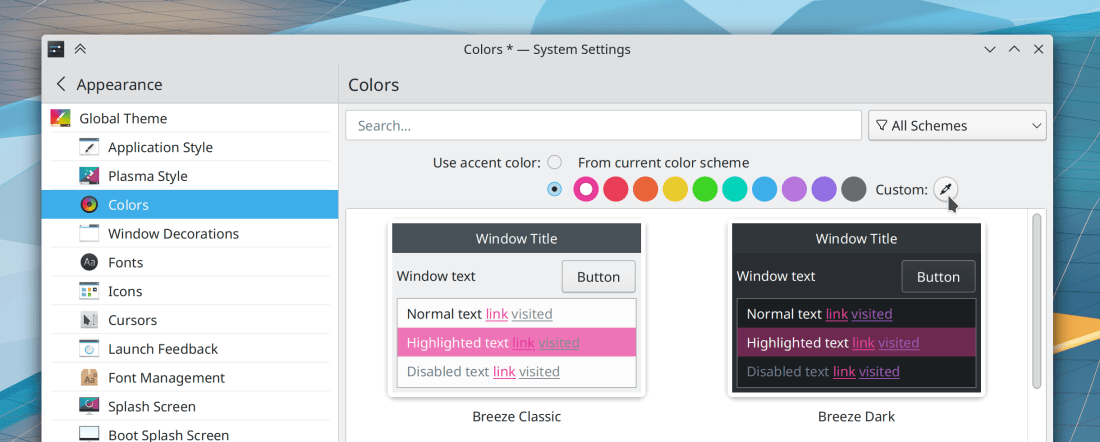
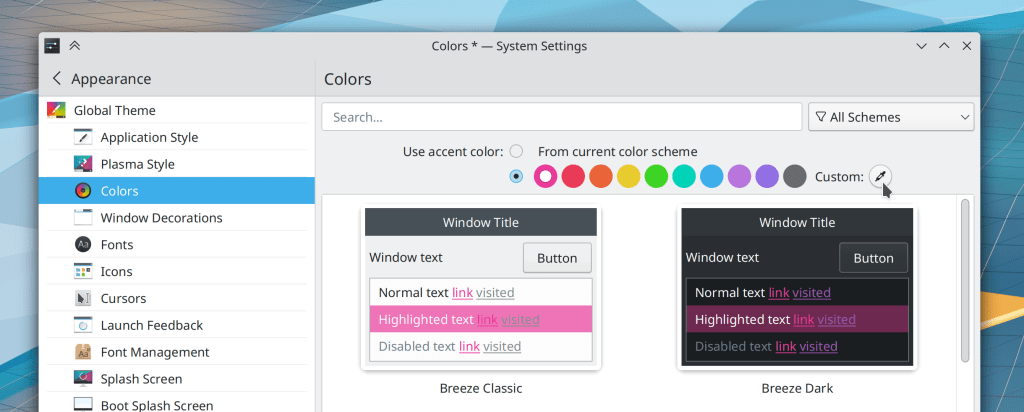
You can now pick your own custom accent color on System Settings’ Colors page (Tanbir Jishan, Plasma 5.24):
In the Plasma Wayland session, KWin now supports “DRM leasing”, which allows us to re-add support for VR headsets and let them achieve optimal performance (Xaver Hugl, Plasma 5.24)

KWin now lets you optionally set a global keyboard shortcut to move a window to the center of its screen (Kristen McWilliam, Plasma 5.24)

The Open dialog now gives you a context menu item to open the selected file in a different external app, in case you want or need to preview it before opening it in the app that asked for the file, and the small preview offered in the dialog itself isn’t big enough (Ahmad Samir, Frameworks 5.87)

Bugfixes & Performance Improvements

When you print a document in Okular and choose a scaling mode that requires the “Force rasterization” setting to be active in order to work, that setting is now enabled automatically so you don’t need to know this and remember to do it manually (me: Nate Graham, Okular 21.08.2)

Kate no longer crashes when quitting while the Replicode plugin is active (Waqar Ahmed, Kate 21.08.2)

Dolphin no longer secretly remains open in the background after compressing/archiving files using the context menu and then quitting the app (Andrey Butirsky, Ark 21.08.2)

Konsole’s tab bar now instantly responds to changes in the systemwide color scheme or font size, rather than having to be restarted (Ahmad Samir, Konsole 21.12)

The background of Elisa’s “Now Playing” page no longer flickers when the window is resized (Fushan Wen, Elisa 21.12)

Fixed a crash in KWin that could bring down the whole Plasma Wayland session (Vlad Zahorodnii, Plasma 5.23)

Installing sandboxed Snap apps in the Plasma Wayland session no longer sometimes makes KWin crash (Vlad Zahorodnii, Plasma 5.23)

In the Plasma Wayland session, the cursor is no longer invisible after a screen turns off and then back on (Xaver Hugl, Plasma 5.23)

The audio balance feature in System Settings’ Audio Volume page now works again (Nicolas Fella, Plasma 5.23)

In the Plasma Wayland session, text copied from a GTK app can now be pasted into other apps after closing the GTK app (David Edmundson, Plasma 5.23)

In the Plasma Wayland session, copying text from apps should insert broken empty items into the clipboard a lot less (hopefully not at all!) (David Edmundson, Plasma 5.23)

In the Plasma Wayland session, screen edges now work correctly in multi-screen setups with auto-hiding panels (Lewis Lakerink, Plasma 5.23)

In the Plasma Wayland session, you can now type numbers into the spinbox used to choose the thickness of a Panel (David Edmundson, Plasma 5.23)

The user picture/avatar element of the Kickoff Application Launcher now shows your initials when you haven’t set a custom picture (Fabian Vogt, Plasma 5.23)

Text in System Settings’ Activities page is now translatable and should be translated soon (Nicolas Fella, Plasma 5.23)

System Settings’ KWin Scripts page no longer has a help button that does nothing (me: Nate Graham, Plasma 5.23)

The slider handle for a volume control in the System Tray Audio Volume applet no longer exhibits visual glitches while its stream is playing audio (Derek Christ, Plasma 5.23)

The “Only automatically mount removable media that has been manually mounted before” setting (what a mouthful) in System Settings’ Removable Devices page now works (Méven Car, Plasma 5.24)

The startup sound (if you have enabled it) now plays as expected when using Plasma’s “Systemd startup” feature (Henri Chain, Plasma 5.24)

Discover is now faster to check for updates (Aleix Pol Gonzalez, Frameworks 5.87)

Files copied using a KDE app now fully respect the system’s umask value and therefore get created in the destination folder with the correct permissions (Ahmad Samir, Frameworks 5.87)

The header bars on the top of many Plasma applets now respect your color scheme for the full width of the line on the bottom (Remi Larroumets, Frameworks 5.87)

User Interface Improvements

Skanlite now remembers the last-used scanner (Alexander Stippich, Skanlite 21.12)

Konsole now has only one option to control menubar visibility and it always works–rather than two options in different places that conflict with one another (Eugene Popov, Konsole 21.12)

Double-clicking on the splitter between two adjacent split views in Konsole now resizes the views so that each one has the same amount of space, just like in Dolphin (Thomas Surrel, Konsole 21.12)

Okular now displays a sensible message when asking you to enter the name of the author for an annotation (Albert Astals Cid, Okular 12.12)

“Positive”, “Neutral”, and “Negative” text colors in KDE apps are now easier to read when they appear within a selected list item (me: Nate Graham, Plasma 5.23)

Discover now makes it more obvious how to file a bug report on your distro when it presents you with an issue that is caused by faulty distro packaging, because there is now a nice big “Report this issue” button that takes you straight to your distro’s bug tracker (me: Nate Graham, Plasma 5.24):
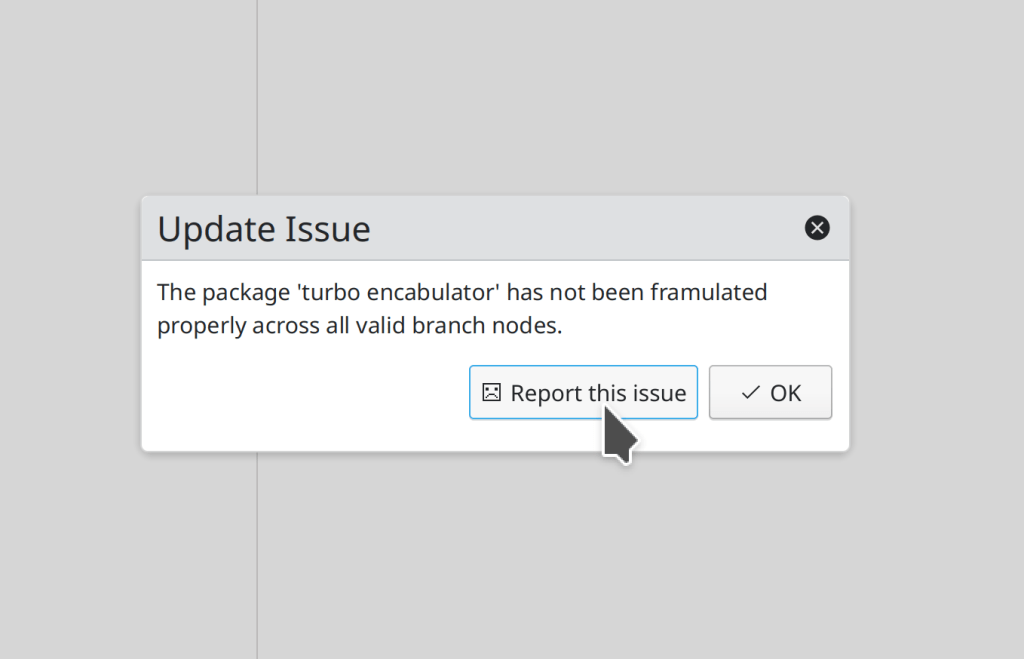
The error message in this screenshot is simulated, since I use a distro that doesn’t ever have update issues 😎

The “Breeze High Contrast” color scheme has been deleted, because it actually offered lower contrast than the most similar-looking color scheme, Breeze Dark. Existing users will be migrated to Breeze Dark (me: Nate Graham, Plasma 5.24)

The Breeze color scheme has been renamed to “Breeze Classic”, to better distinguish it from the Breeze Light and Breeze Dark color schemes (me: Nate Graham, Plasma 5.24)

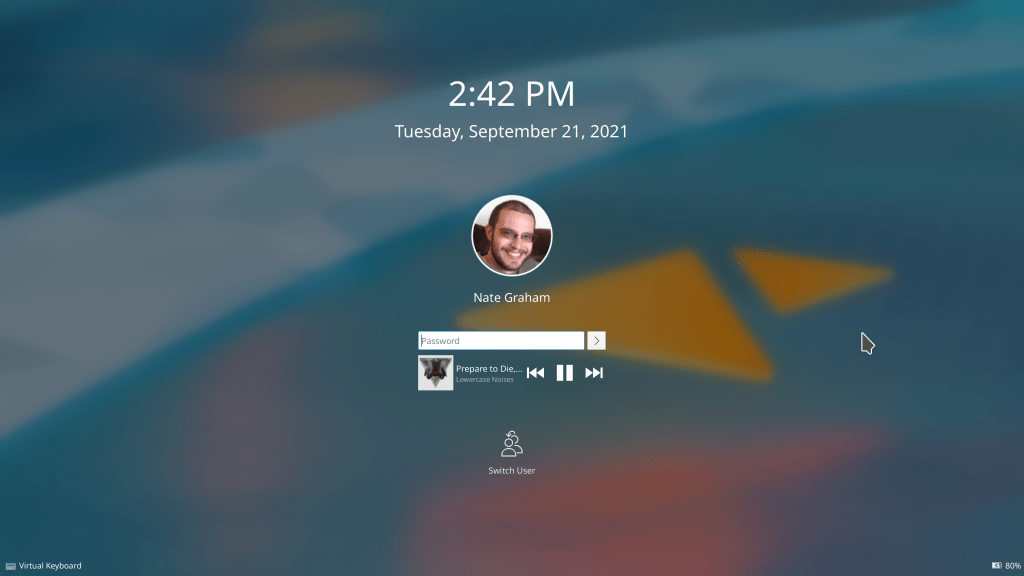
Usernames below avatar images in the login, lock, and logout screens have been made a bit bigger to provide a better scale with the size of the avatar images (me: Nate Graham, Plasma 5.24):
Header text in Kirigami app toolbars is now smaller and matches the scale of everything around it a bit better (Devin Lin, Frameworks 5.87):

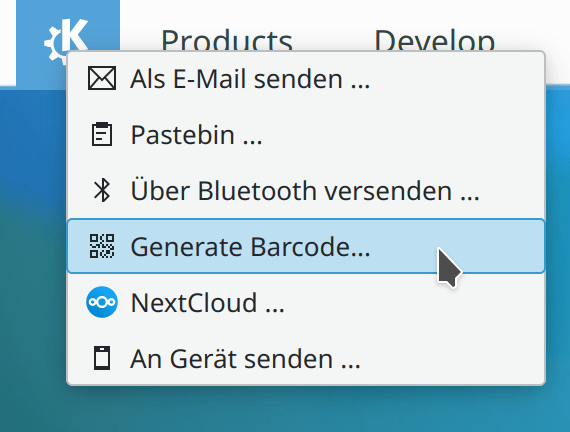
In the Clipboard applet and “Share” menu, when you can generate a QR code from some text, it is now referred to as a QR code, not a barcode (me: Nate Graham, Plasma 5.24 and Frameworks 5.87)

…And everything else

Keep in mind that this blog only covers the tip of the iceberg! Tons of KDE apps whose development I don’t have time to follow aren’t represented here, and I also don’t mention backend refactoring, improved test coverage, and other changes that are generally not user-facing. If you’re hungry for more, check out https://planet.kde.org/, where you can find blog posts by other KDE contributors detailing the work they’re doing.

How You Can Help

If you are an experienced developer or even a novice, work on these Plasma 5.23 regressions. If you are a non-developer and you can reproduce any of those bugs which are not yet marked as CONFIRMED, comment on this and mark the bug as CONFIRMED. We have two weeks to fix these regressions as well as all the other ones that people are continuously reporting, and every little bit of help… helps!

Have a look at https://community.kde.org/Get_Involved to discover ways to be part of a project that really matters. Each contributor makes a huge difference in KDE; you are not a number or a cog in a machine! You don’t have to already be a programmer, either. I wasn’t when I got started. Try it, you’ll like it! We don’t bite!

Finally, consider making a tax-deductible donation to the KDE e.V. foundation.
This week in KDE: so many Wayland improvements, and more!

The Plasma 5.23 beta has been released, so go test it! We’ve got a month to fix all the bugs you find and report, so please do so. 🙂 Many of the improvements already made this week pertain to Plasma’s Wayland session which is rapidly becoming usable for more and more people’s daily usage. I’m using it myself as my primary session, and this is pretty painless now. I’m so impressed by how KDE developers have managed to whip it into shape over the last year! The future truly is now, or something.

Lots of other non-Wayland improvements were made as well:

New Features

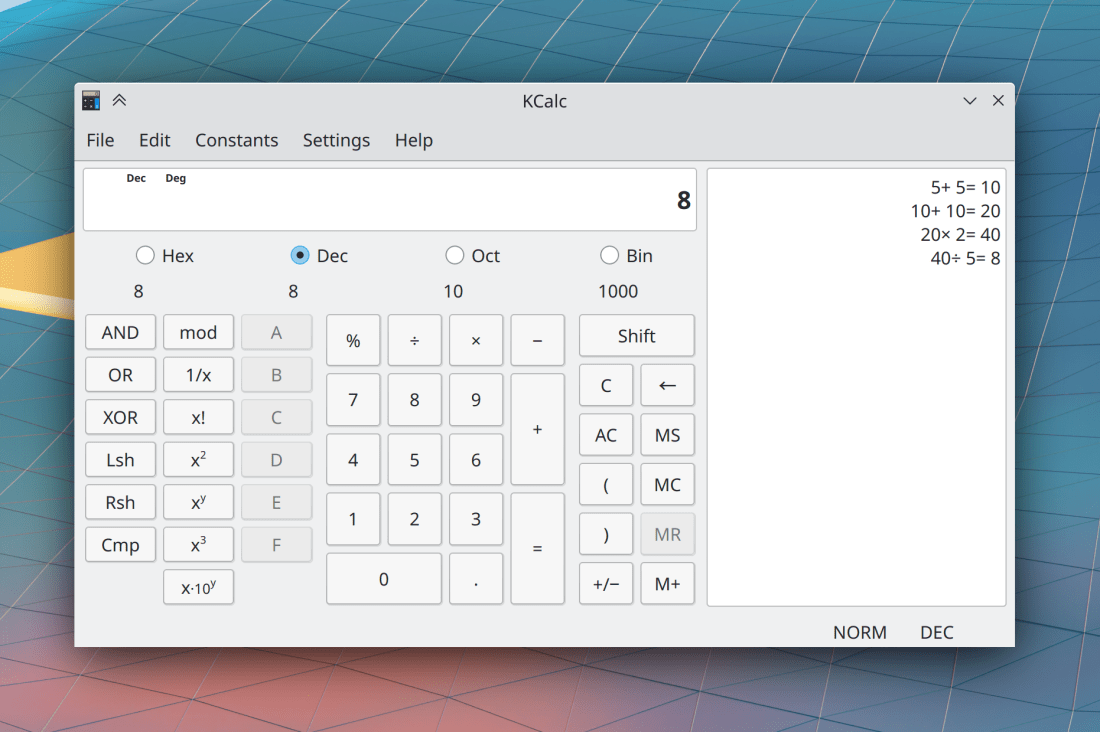
KCalc now has a history view where you can see all recently-run calculations! (Antonio Prcela, KCalc 21.12):

This implements an 18 year-old feature request!

The standard “Share” menu found in various KDE apps now offers the possibility of generating a QR code when the thing being shared is a URL (Kai Uwe Broulik, Frameworks 5.87):

Bugfixes & Performance Improvements

In Gwenview, you can once again switch between the zoom modes with keyboard shortcuts after this broke recently (Eugene Popov, Gwenview 21.08.2)

The Previous and Next buttons in Elisa’s player control bar no longer inappropriately become disabled while the current track is paused (me: Nate Graham, Elisa 21.08.2)

Okular no longer lets you try to save over a read-only file, and instead prompts you to save the file elsewhere (Albert Astals Cid, Okular 21.08.2)

In the Plasma Wayland session, KWin no longer crashes when you disconnect a Bluetooth drawing tablet (Aleix Pol Gonzalez, Plasma 5.23)

System Settings no longer sometimes crashes when deleting certain cursor themes (David Edmundson, Plasma 5.23)

System Settings is now much faster to open top-level categories that have several sub-pages in them (Bharadwaj Raju, Plasma 5.23)

In the Plasma Wayland session, copying text from XWayland apps while Klipper’s “Prevent empty selection” setting is in use now works (David Edmundson, Plasma 5.23)

In the Plasma Wayland session, long menus in apps and sub-menus of the Kicker menu are no longer covered up by Plasma Panels (Andrey Butirsky, Plasma 5.23)

In the Plasma Wayland session, full-screen Chrome web apps should now display properly (Vlad Zahorodnii, Plasma 5.23)

In the Plasma Wayland session, windows that open to a size which is larger than the area they would be maximized to now get resized down to fit in that area (Aleix Pol Gonzalez, Plasma 5.23)

In the Plasma Wayland session, transparent Plasma themes now display transparency correctly when using the proprietary NVIDIA driver (Severin van Wnuck, Plasma 5.23)

Plasma Vaults no longer fail to mount if the mountpoint has a hidden .directory file in it because you browsed that location when using per-directory view settings while the Vault was unmounted (Tom Zander, Plasma 5.23)

Cursor themes with only one size now cause only the size combobox on System Settings’ Cursors page to be disabled, rather than all of the controls on its row (Bharadwaj Raju, Plasma 5.23)

The Link and Active Text colors are now readable in all four Breeze color schemes, fixing issues of unreadable text for apps that were using this color role. Note that you will need to re-apply the color scheme manually to pick up the changes due to this issue (me: Nate Graham, Plasma 5.23)

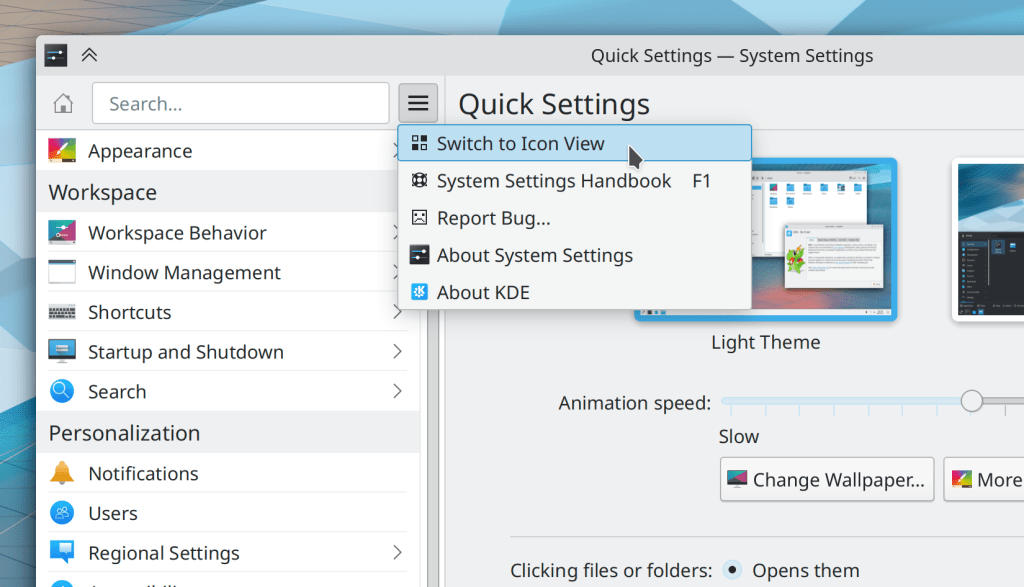
The very minimal contents of System Settings’ own settings window has been moved into its hamburger menu to make access more direct (Ismael Asensio, Plasma 5.24):

The properties dialog once again shows the filename for read-only files (Ahmad Samir, Frameworks 5.87)

File ACLs set via the properties dialog now get applied correctly if you re-open the properties dialog right after changing them (Ahmad Samir, Frameworks 5.87)

Expandable list items in the System Tray once again reserve enough space in the highlight effect to show all of the buttons inside it (me: Nate Graham, Frameworks 5.87)

Some textual headers in Kirigami-based apps that were supposed to be hidden are once again hidden (Devin Lin, Frameworks 5.87)

Narrow and mobile-style form layouts in Kirigami apps now have the correct spacing between items within groups (Ismael Asensio, Frameworks 5.87)

User Interface Improvements

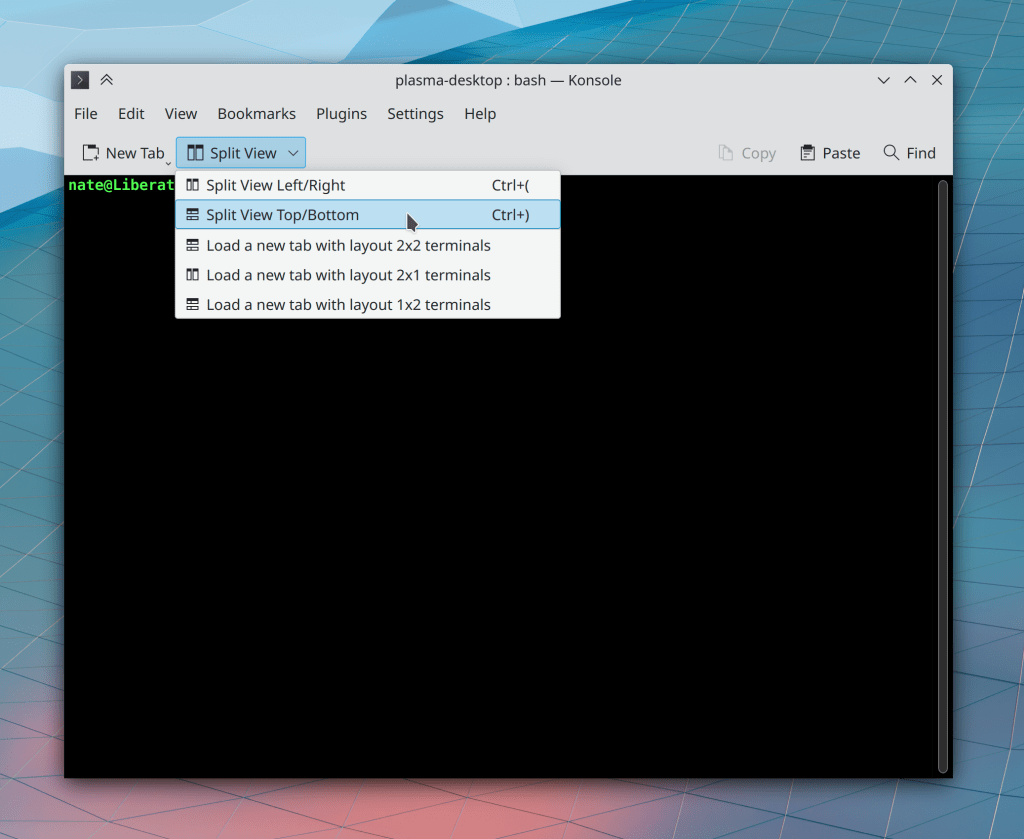
Konsole’s default toolbar has been drastically improved and simplified by putting all of the layout and split-related items into a dropdown menu button (Nathan Sprangers, Konsole 21.12):

Gwenview no longer inappropriately switches to Browse mode when you press the Escape key to close the zoom level combobox’s popup (Gleb Popov, Gwenview 21.12)

Info Center’s S.M.A.R.T. Status page now lets you see more detailed nerdy information if you want (Harald Sitter, Plasma 5.23)

System Settings’ sidebar is now fully keyboard navigable with just the arrow keys (Arjen Hiemstra, Plasma 5.23)

The Breeze application style has gained the ability to display views in older QtWidgets-based apps with a more “frameless” style, such that adjacent views are separated from one another with a single separator line rather than inset frames, just like they are in our more modern QtQuick apps. Apps will need to opt into this change, and they will start doing so over the course of the next year or so (Jan Blackquill, Plasma 5.24):

Note that visuals are not 100% final and support in Dolphin is still in progress has not been merged yet; this is only a sneak peek!

It’s now possible to navigate between sidebar list items in Kirigami-based apps using the arrow and enter/return keys (Arjen Hiemstra, Frameworks 5.87)

We have reverted the recent change to use a gear-style spinner in Plasma for app loading and other spinning progress indicators. It looked okay in some contexts, but not others. We will find a better way (me: Nate Graham, Frameworks 5.87)

The Breeze icon theme now features icons for all of the different types of Godot Engine files (Michael Alexsander, Frameworks 5.87):

No longer will you be left waiting for Godot

…And everything else

Keep in mind that this blog only covers the tip of the iceberg! Tons of KDE apps whose development I don’t have time to follow aren’t represented here, and I also don’t mention backend refactoring, improved test coverage, and other changes that are generally not user-facing. If you’re hungry for more, check out https://planet.kde.org/, where you can find blog posts by other KDE contributors detailing the work they’re doing.

How You Can Help

Have a look at https://community.kde.org/Get_Involved to discover ways to be part of a project that really matters. Each contributor makes a huge difference in KDE; you are not a number or a cog in a machine! You don’t have to already be a programmer, either. I wasn’t when I got started. Try it, you’ll like it! We don’t bite!

Finally, consider making a tax-deductible donation to the KDE e.V. foundation.
This week in KDE: a random grab-bag collection of stuff

Bit of a short list this week, but there’s much more still happening, with merge requests aplenty going through review! Plasma 5.23 is now in “soft feature freeze” and we are working hard to stabilize it for the release next month.

New Features

With Kate’s git integration enabled, you can now delete branches (Waqar Ahmed, Kate 21.12)

Bugfixes & Performance Improvements

Konsole is no longer so slow to close a tab when something is written at the prompt (Christoph Cullmann, Konsole 21.08.2)

Copying text from Okular now strips off any trailing newline characters (Albert Astals Cid, Okular 21.08.2)

Konsole’s “New Tab” menu item now works when there is only one profile, as there is by default (Nathan Sprangers, Konsole 21.12)

Skanlite now respects your chosen default image format when you go to save a file (Alexander Stippich, Skanlite 21.12)

Elisa no longer inappropriately parses HTML in song metadata text (me: Nate Graham, Elisa 21.12)

Unchecking the “Inhibit automatic sleep and screen locking” checkbox in the Battery and Brightness System Tray applet now works properly (Peifeng Yu, Plasma 5.23)

Fixed one of the ways that the ksystemstats daemon could crash on launch, which would cause System Monitor widgets to not display any data (David Edmundson, Plasma 5.23)

In the Plasma Wayland session, when the virtual keyboard has been temporarily disabled, it now stays disabled on the lock screen too (Oleg Solovyov, Plasma 5.23)

In the Plasma Wayland session, when using a multi-screen setup with one screen plugged into an AMD GPU and other ones one plugged into an Intel integrated GPU, the screens driven by the Intel GPU no longer continue to show the login screen after logging in (Xaver Hugl, Plasma 5.23)

No border” and “Is closeble” KWin Window rules now automatically apply as expected, if you’ve set them to do this (Ismael Asensio, Plasma 5.23

System Settings pages launched as standalone windows using kcmshell5 now have the correct icon in their titlebar and Window Switcher visualization (Aleix Pol Gonzalez, Plasma 5.23)

In System Settings’ Virtual Desktops page, you can once again use the mouse to select text while editing the virtual desktop name (me: Nate Graham, Plasma 5.23)

The desktop context menu no longer exhibits a visual glitch at the bottom when pressing the shift key to access the “permanently delete” action, including when a sub-menu is open (Derek Christ, Plasma 5.23)

In the Plasma Wayland session, shadows for Plasma dialogs, notifications, and OSDs are no longer often broken especially when using a left-edge panel (Andrey Butirsky, Plasma 5.23)

KWin window rules now automatically apply themselves as expected after KWin crashes and restarts itself (Ismael Asensio, Plasma 5.23)

It is now possible to create a Plasma Vault using the gocryptfs backend when using version 2.1 of gocryptfs (Ivan Čukić, Plasma 5.23)

User Interface Improvements

Gwenview’s new behavior to preview a zoom level when you hover the cursor no longer applies the new zoom setting instantly, so if you close the combobox without selecting anything, the view snaps back to the original zoom level (Felix Ernst, Gwenview 21.12)

System Settings’ pages now have many many more keywords associated with them, so you can now find things more easily by searching for stuff in the search field (Guilherme Marçal Silva and Nayam Amarshe, Plasma 5.23)

Removing a Bluetooth device now prompts for confirmation, and the action to do so now uses a red-colored icon to hint that something will be removed (Tom Zander, Plasma 5.23)

After searching for an Emoji using the Emoji picker window, using the arrow keys now always navigates between the found emojis, rather than moving the text insertion point in the text field (Kristen McWilliam, Plasma 5.23)

…And everything else

Keep in mind that this blog only covers the tip of the iceberg! Tons of KDE apps whose development I don’t have time to follow aren’t represented here, and I also don’t mention backend refactoring, improved test coverage, and other changes that are generally not user-facing. If you’re hungry for more, check out https://planet.kde.org/, where you can find blog posts by other KDE contributors detailing the work they’re doing.

How You Can Help

Have a look at https://community.kde.org/Get_Involved to discover ways to be part of a project that really matters. Each contributor makes a huge difference in KDE; you are not a number or a cog in a machine! You don’t have to already be a programmer, either. I wasn’t when I got started. Try it, you’ll like it! We don’t bite!

Finally, consider making a tax-deductible donation to the KDE e.V. foundation.
This week in KDE: gazillions of bugfixes

…Including many for the Plasma Wayland session! It’s finally reaching stability. I’m using it myself as a daily driver now. At this point my biggest annoyances are all with 3rd-party apps, not any KDE software. I know it’s taken a while, but I think we’re very nearly there!

Anyway, check out the full list:

New Features

When you click the Apply button in System Settings’ Display Configuration page, it now offers to revert any changed settings that could result in brokenness, and does so automatically in 30 seconds to handle the case where the new settings are so messed up that you can’t even see anything (Chris Rizzitello and Zixing Liu, Plasma 5.23):

In the Plasma Wayland session, it is now possible to adjust the Intel GPU driver’s Broadcast RGB settings (Xaver Hugl, Plasma 5.23)

Bugfixes & Performance Improvements

Renaming a file or folder that matches the current filter text in Dolphin now causes the file or folder to correctly disappear from view when its new name no longer matches the filter text (Eugene Popov, Dolphin 21.08.1)

Dolphin no longer crashes if you try to do something crazy like make the trash entry in the Places panel point to /dev/null, or otherwise edit any entry to point to a location that does not technically or actually exist (Jan Paul Batrina, Dolphin 21.12)

Dolphin no longer sometimes fails to open the terminal app when you use its “Open in Terminal” action (me: Nate Graham, 21.12, though I have encouraged distros to cherry-pick it to 21.08)

Icons for remote folders in Dolphin now always have the correct icon (Méven Car, Dolphin 21.12)

Removable devices, discs, and SD cards once again appear as expected in the Disks & Devices applet after being unplugged and then re-plugged (Fabio Bas, Plasma 5.23)

In the Plasma Wayland session, you can now drag-and-drop stuff between native Wayland and XWayland apps! (David Redondo, Plasma 5.23)

In the Plasma Wayland session, it’s now possible to change the screen resolution when run in a virtual machine (Méven Car, Plasma 5.23)

In the Plasma Wayland session, virtual desktops are now remembered on a per-activity basis (David Redondo, Plasma 5.23)

In System Monitor and the Plasma applets of the same name, the “GPU Usage” sensor is no longer incorrectly represented as always being 100% full, “Total Disk Space” is no longer incorrectly computed when there are encrypted disks present, and the “Uptime” sensor no longer disappears after Plasma is restarted (David Redondo, Plasma 5.23)

Notifications sent by Flatpak’d apps are now correctly identified with the sending app (Kai Uwe Broulik, Plasma 5.23)

The Plasma wallpaper chooser no longer displays a cut-off placeholder label when there are no wallpapers in any of the configured search locations (me: Nate Graham, Plasma 5.23)

In System Settings’ Users page, the list item for your user no longer looks weird if you haven’t filled in a real name (me: Nate Graham, Plasma 5.23)

System Monitor and the Plasma applets of the same name now discover more AMD GPU sensor data (David Redondo, Plasma 5.23)

Fixed multiple issues affecting NVIDIAs GPU users in a Plasma Wayland session, such as windows failing to update their content after being resized and KRunner never showing any search results (David Redondo, Frameworks 5.86)

Currency conversion in KRunner and Kickoff (e.g, type “500 USD” or “500 JPY in EUR”) now works again (Andreas Cord-Landwehr, Frameworks 5.86)

System Tray applets with expandable list items are now fully interactive when using a stylus and no longer sometimes bizarrely exhibit overlapping content when there is enough stuff in the popup to make it scrollable (me: Nate Graham, Frameworks 5.86)

Applications launched from a global shortcut now appear as expected in System Monitor’s “Applications” page (David Redondo and Nikos Chantziaras, Frameworks 5.86)

Kirigami-using apps are now significantly faster to launch (Arjen Hiemstra, Frameworks 5.86)

There is now a default keyboard shortcut to open the “Configure keyboard shortcuts” window: Ctrl+Alt+Comma. Yo dawg, I heard you like keyboard shortcuts… (Someone going by the pseudonym “empeyreal one”, Frameworks 5.86)

In the Plasma Wayland Session, images copied from Spectacle now appear correctly (Jan Blackquill, Qt 6.2 or Qt 5.15.3 with the KDE patch collection)

User Interface Improvements

Double-clicking on the splitter in Dolphin’s split view now resets it to the middle (Eugene Popov, Dolphin 21.12)

Konsole no longer confuses you by letting you try to edit the read-only built-in profile; instead the menu item to do so now says “Create new Profile” and takes you to the place where you can make a new profile (Ahmad Samir, Konsole 21.12)

In the Plasma Wayland session, dragging a file over another window no longer immediately raises that window; there’s now a delay like there is in the X11 session (Xaver Hugl, Plasma 5.22.5)

When using offline updates (the style of update where everything is applied on the next reboot), Discover no longer irritatingly and aggressively asks you to reboot, since you can safely take your time about it (me: Nate Graham, Plasma 5.23)

System Settings’ Audio page now integrates all of the few functions of the configure page into the relevant items of the main view that they affect, making them easier to access and removing a sub-page (Ismael Asensio, Plasma 5.23):

Folder View icons /icons on the desktop now wrap their text at CamelCase word boundaries, like Dolphin’s icon view does (Ivan Tkachenko, Plasma 5.23):

The background blur effect is no longer so grainy on Wayland (Tatsuyuki Ishi, Plasma 5.23)

System Tray popups with expandable list items are now much improved in their visual consistency, scroll responsiveness, keyboard navigability, and overall stability (me: Nate Graham, Frameworks 5.86)

Throughout various QtQuick-based software, buttons that are showing both an icon and text no longer display a redundant tooltip that duplicates the button’s text; now they only show this when the button’s text has been auto-hidden due to space constraints (Kai Uwe Broulik, Frameworks 5.86)

…And everything else

Keep in mind that this blog only covers the tip of the iceberg! Tons of KDE apps whose development I don’t have time to follow aren’t represented here, and I also don’t mention backend refactoring, improved test coverage, and other changes that are generally not user-facing. If you’re hungry for more, check out https://planet.kde.org/, where you can find blog posts by other KDE contributors detailing the work they’re doing.

How You Can Help

Have a look at https://community.kde.org/Get_Involved to discover ways to be part of a project that really matters. Each contributor makes a huge difference in KDE; you are not a number or a cog in a machine! You don’t have to already be a programmer, either. I wasn’t when I got started. Try it, you’ll like it! We don’t bite!

Finally, consider making a tax-deductible donation to the KDE e.V. foundation.