
This was a pretty huge week for KDE. Apparently people had a lot of pent-up work, because right after Akademy finished last week, the floodgates started opening! Amazing stuff has been landing left and right every day this week! Some highlights are touch support in Dolphin, user-configurable per-view sort ordering in Elisa, optional Systemd startup, tons of Okular scrolling improvements, and much, much, much more.
Oh and meet Plasma 5.20’s beautiful new wallpaper, Shell:
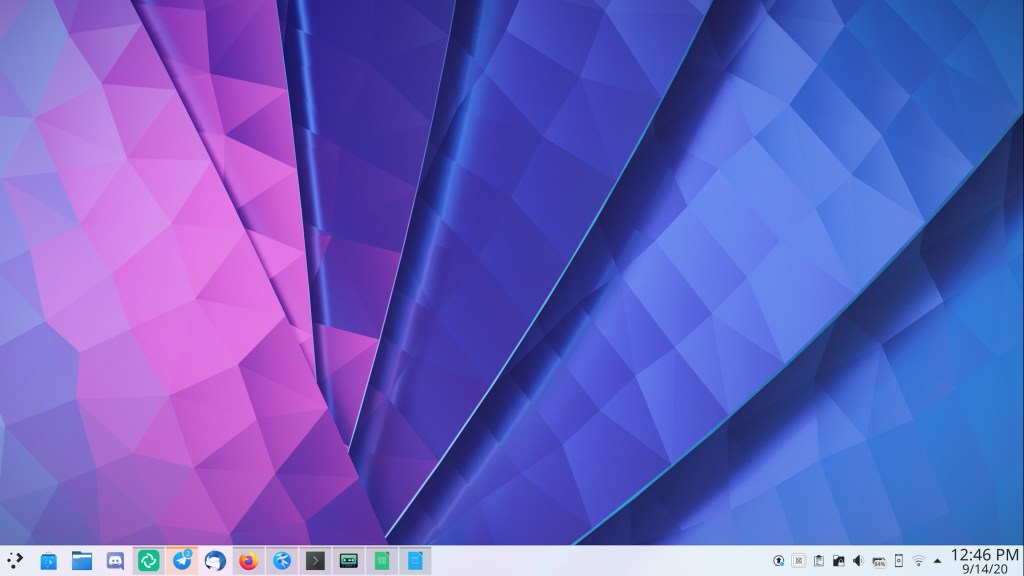
Big thanks to Lucas Andrade for this beautiful wallpaper!
New Features
Dolphin now has full touch support! (Steffen Hartlieb, Dolphin 20.12)
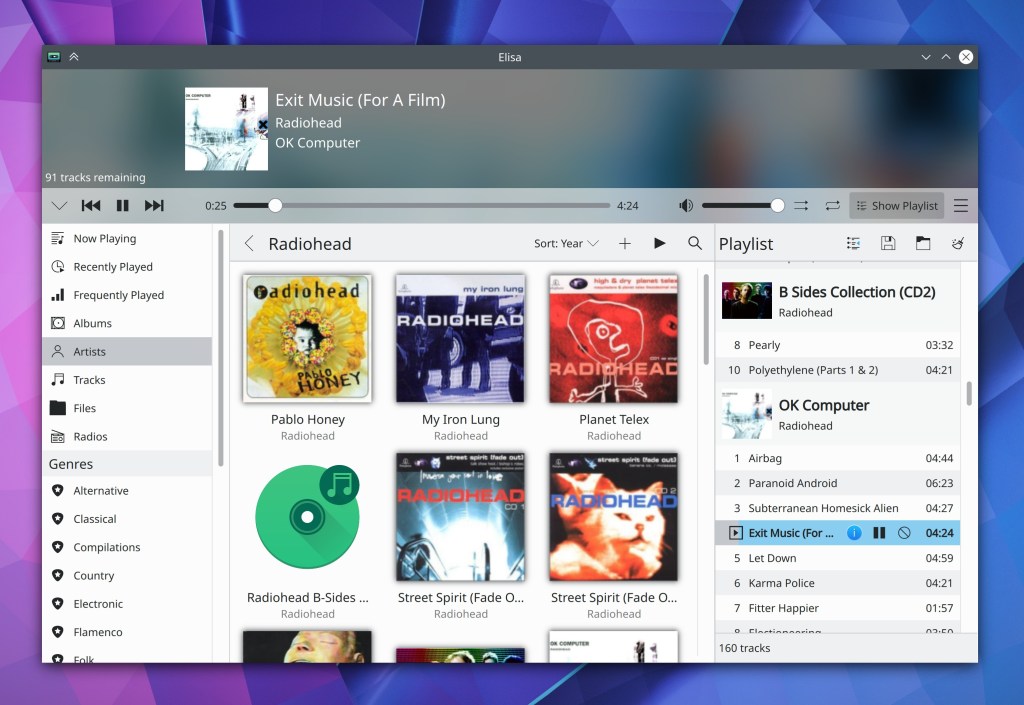
Elisa now lets you sort each view by whatever criteria you want, and defaults to sorting albums by year (Matthieu Gallien, Elisa 20.12)
Konsole now has a “focus follows mouse” feature for its split views that you can turn on to automatically focus the split view that the cursor passes over (Luc Dufresne, Konsole 20.12)
For those of you who liked Kate’s previous tab behavior–where it shows a limited number of tabs and automatically orders them according to recency of access in the sidebar–you can now use it again (Christoph Cullmann, Kate 20.12)
Spectacle now has command-line arguments to include or exclude window decorations or the cursor, overriding whatever is defined in the config file (Nazer Kalinowski, Spectacle 20.12)
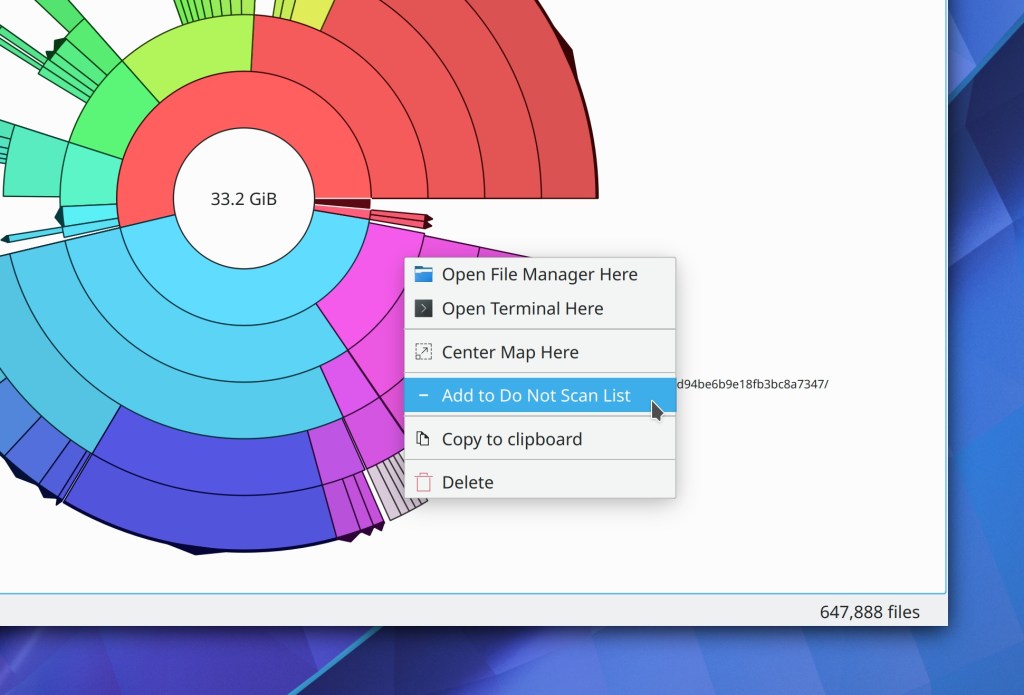
Filelight now offers you an easy way to exclude a folder from further indexing (Efe Çiftci, Filelight 20.12):
Plasma now optionally uses Systemd for startup (when Systemd is available), which brings numerous benefits such as faster startup and load times, no more odd race conditions during startup causing weird bugs, better session cleanup on logout ending the possibility of logout hangs, better logging of what’s going on, the possibility of using slices and cgroups to improve responsiveness and clarity in system monitoring apps, and much more. It’s a very exciting change! This is currently optional and off by default, but it will eventually be turned on by default (only where available of course) once the remaining kinks are worked out. (David Edmundson, 5.21)
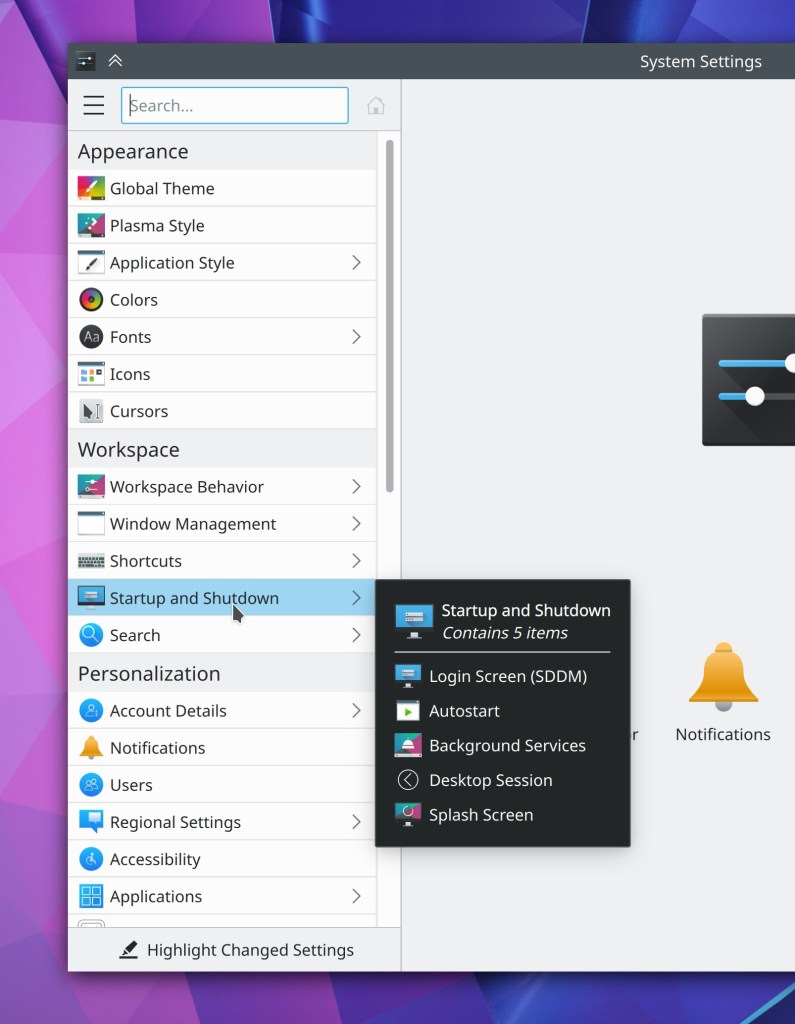
The System Settings Shortcuts page now also shows you which shortcuts have been changed from their defaults when using the “Highlight changed settings” feature (David Redondo, Plasma 5.21)

Bugfixes & Performance Improvements
When scrolling in Okular with a finger on the touchscreen or a mouse drag with the Browse tool, the view no longer “sticks” slightly for the first few pixels of movement (Kezi Olio, Okular 1.11.2)
Okular no longer crashes when trying to open malformed PDF documents with the same digital signature on multiple pages (Albert Astals Cid, Okular 1.11.2)
Middle-clicking on a tab in Kate now closes it again (Christoph Cullmann, Kate 20.08.2)
In Kate’s “Save modified documents” dialog, the Cancel button is now focused by default as it should be (Alexander Lohnau, Kate 20.12)
When annotating a document in Okular, the annotation tool’s tooltip no longer gets mistakenly painted over the document in certain circumstances (Pedro Arthur Pinheiro Rosa Duarte, Okular 20.12)
Partition Manager now correctly modifies the /etc/fstab file after you make changes (Andrius Štikonas, Partition Manager 4.2.0)
The Ctrl+d shortcut no longer unexpectedly moves selected desktop items to the trash (me: Nate Graham, Plasma 5.18.6 and 5.20)
Improved the graphics performance on Wayland (Gang Wu, Plasma 5.20)
It’s now possible to drag windows on Wayland from their empty areas, just like on X11 (Vlad Zahorodnii, Plasma 5.20)
Discover no longer crashes when you visit its Settings page immediately after launching the app (Arjen Hiemstra, Frameworks 5.75 or Plasma 5.20, whichever one you get first)
Running a VNC server inside a Plasma session no longer crashes the Plasma session (Fabian Vogt, Plasma 5.20)
On Wayland, Plasma no longer sometimes crashes when you hover the cursor over an auto-hide Panel (Andreas Haratzis, Plasma 5.20)
Open and Save dialogs can now open and save files containing double quotes in their names (Andreas Bontozoglou, Frameworks 5.75)
It’s once again possible to set custom shortcuts that use the Tab key (David Edmundson, Frameworks 5.75)
Updating icon themes installed using the Get New Icons window now works (Alexander Lohnau, Frameworks 5.75)
Saving a file with a name that begins with a colon no longer causes the file to be saved to the base level of your home folder rather than wherever it is what you actually tried to save it to (Ahmad Samir, Frameworks 5.75)
User Interface Improvements
Single-line text in Elisa’s list-style views is now vertically centered as expected (me: Nate Graham, Elisa 20.08.2)
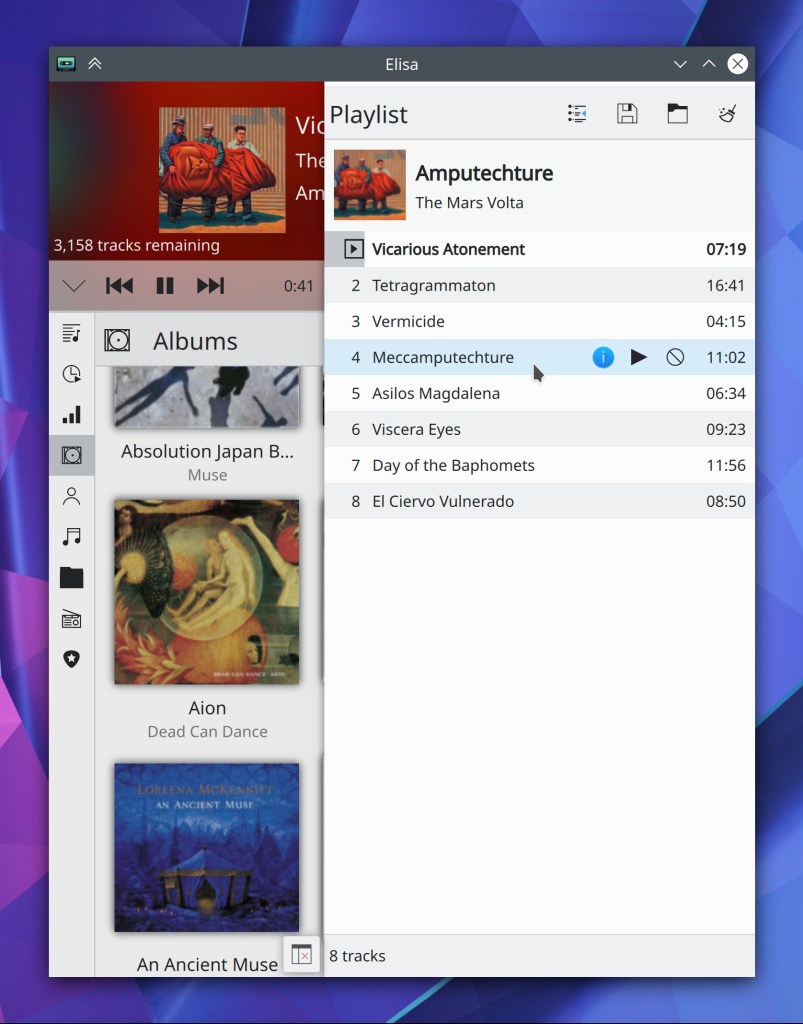
Elisa’s playlist sidebar now turns into a collapsible drawer on mobile or with a very narrow window, which means it’s no longer ever accessible (Stef Lep, Elisa 20.12)
Okular’s recently-added smooth scrolling animated transitions now respect the global animation speed multiplier, which means that people who hate animations and have then turned off globally now don’t have to live with the animated scrolling effects in Okular any longer. We still plan to add an off switch in Okular itself for people who want to disable smooth scrolling in just Okular or are using Okular on non-Plasma platforms (me: Nate Graham, Okular 20.12)
Discover now provides feedback on Arch-based distros when there is a dependency problem preventing updates from being installed (Aleix Pol Gonzalez, Plasma 5.20)
KRunner now prioritizes apps higher than System Settings pages in the results view when there are matches for both (Harald Sitter, Plasma 5.20)
When you try to assign a shortcut on the System Settings Shortcuts page that’s already used, you’re now warned immediately rather than only when you click the “Apply” button (David Redondo, Plasma 5.20)
System Settings’ sidebar view now displays little arrows for list items which are top-level categories containing other items (me: Nate Graham, Plasma 5.20)
You can now middle-click on the Night Color applet to toggle the feature on and off (David Edmundson, Plasma 5.20)
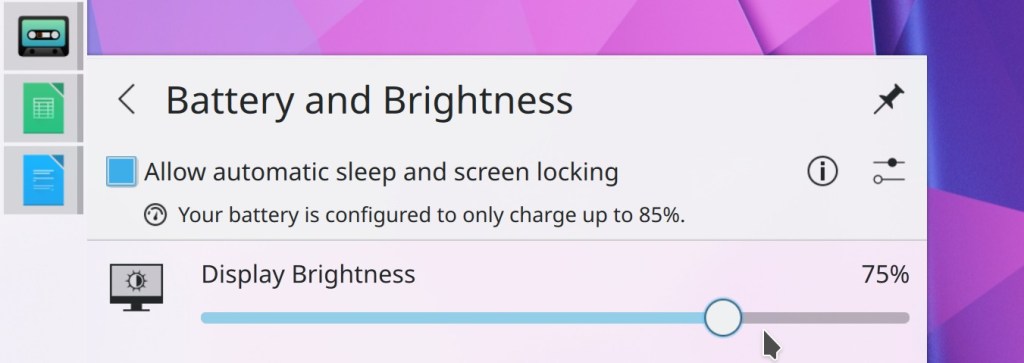
The Battery applet now shows the brightness percentage (Eugene Popov, Plasma 5.20)
VPN-related notifications and network authentication dialogs now use clearer and more consistent terminology (me: Nate Graham, Plasma 5.21)
It’s now possible to configure a keyboard shortcut in Kate to paste the text that was last selected by the mouse (usually you middle-click to paste this text) (Jonathan Poelen, Frameworks 5.75)
How You Can Help
Have a look at https://community.kde.org/Get_Involved to discover ways to be part of a project that really matters. Each contributor makes a huge difference in KDE; you are not a number or a cog in a machine! You don’t have to already be a programmer, either. I wasn’t when I got started. Try it, you’ll like it! We don’t bite!
Finally, consider making a tax-deductible donation to the KDE e.V. foundation.
 Adventures in Linux and KDE
Amazing. Wayland is coming a long way. If only i didn’t encounter window focus bugs that prevent me from using it, it’d be the best thing since sliced bread.
LikeLike
Which bugs? Do you have Bugzilla links?
LikeLiked by 2 people
5.20 will be an outstanding release, thanks to all KDE developers.
Systemd integration looks very promising. 5.21 will be even better I guess.
The only remaining annoyance for me is Firefox’s horrible scrolling performance on KDE.
LikeLike
Probably since the upcoming release it will improve thanks to the enabled hardware acceleration
LikeLike
Can you clarify? Which hardware acceleration are you referring to? Is Firefox enabling hardware acceleration by default on Linux machines now?
LikeLike
Yes. The new upcoming release of x11 firefox runs hardware acceleration.
LikeLike
Thanks, found a source now as well in case somebody is interested: https://9to5linux.com/firefox-81-is-now-available-for-download-heres-whats-new.
LikeLike
I’ve been using Firefox with KDE (and Mint Cinnamon before that, but Firefox performed the same either way) for years, and the buttery smooth scrolling is one thing that I really like about it compared to the 30 fps jank and judder of Chromium. Even on my slow Intel Pentium N4200 (a descendant of Atom) laptop, Firefox scrolling is very smooth.
Firefox has long had the ability for hardware accelerated video rendering/compositing in Linux, but for a long time, it was disabled by default. I set the pref to force enable hardware acceleration years ago, back when it definitely was disabled in Linux across the board, but I don’t know if it’s necessary anymore. Hardware acceleration was supposed to have been turned on when Firefox Quantum arrived, but when I migrated the profiles, the pref just stayed there, and so it has ever since. Either way, this is it:
layers.acceleration.force-enabled: true
It used to also require an environment variable to be set, but that hasn’t been true in a long time.
If it is enabled, about:support should show OpenGL in the Renderer field, unless Webrender is enabled (in which case that’s what it will show). More on that below.
On Linux, Firefox was essentially unusable without this pref, as far as I was concerned. The tearing was just horrendous. I could never tolerate it long enough to know whether scrolling was not smooth… I had to fix it before I could even try using Firefox again! The same pref works on Thunderbird also, btw.
With that pref set, Firefox on Linux on my PCs used OpenGL for rendering and compositing of its display, and it makes all the difference if you’ve been using it with software compositing. On my Intel GPU machines, I just use the modesetting driver with an up to date Mesa (I have had Iris forced on for a while too, and it’s the same situation… I don’t know if that setting is necessary anymore, but it works, so I leave it that way) and have KWin at the default setting under Tearing prevention (Vsync), Automatic, and with hardware accelerated compositing in Firefox, there’s no tearing or jank.
Now Firefox also has the Webrender engine, which will take over the compositing and rendering role if enabled. You can enable it (if it shows “webrender” in the Compositing field in about:support, it’s already enabled) by toggling the prefs that control it to ON. Search for Webrender in about:config and there should be two of them).
Webrender started out shaky when it was first made available, literally… it brought back stuttering and a lack of smoothness, but now it works nicely on my machines in recent Firefox releases. I am not sure if the layers.acceleration…enabled pref above means anything with Webrender enabled. My guess is no, but I haven’t touched that pref in ages. As long as things work, I usually leave them alone.
The new thing that’s coming (well, it is already here as I write this, with FF81 being current) is hardware accelerated video decoding, which is something we’ve been sorely lacking in the most popular Linux browsers for some time. That’s a different animal than hardware accelerated compositing and rendering. Hardware accelerated video decoding won’t change how scrolling works. It allows video streams from any of the many sites out there to be decoded in your GPU’s hardware (including Intel integrated GPUs), leading to much better performance and potentially lower power consumption in laptops.
I have found that the hardware decoding in Firefox 80/81 works well as far as reducing or eliminating frame drop, but the power consumption is still the pretty much the same as with the old, stuttery, frame-dropping software decoding. Media players like VLC or MPV use less energy to decode the same stream on my slow laptop I mentioned above.
I think that the hardware video decode acceleration requires Webrender, though I am not certain about that.
Hope some of this helps.
LikeLiked by 1 person
Thanks for the details. I had Webrender in mind when writing this. Unfortunately that still does not seem to be active by default on Linux. Too bad, so I’ll have to wait a bit more. I don’t like changing config files.
LikeLike
I messed the prefs up a bit in the post above. If you want to turn on hardware video decoding, you can search for ‘vaapi’ in about:config and toggle the two that appear. Webrender has a lot more than two prefs! The ones I flipped to turn on webrender were gfx.webrender.all and gfx.webrender.compositor.
You don’t have to edit the config file directly (unless things go badly wrong and you can’t start Firefox). About:config is much easier.
I can understand the reluctance to edit config files, especially if such a thing had gone wrong before, but you’re limiting yourself. Firefox has webrender ready to use, and all you need to do is turn it on!
I have messed things up more times than I can count, but I have backups that I can use to fix anything that goes wrong. Knowing you can get back to where you were when you started can give you confidence to try things you otherwise may not. In this case, all you would need to do is back up your Firefox profile, which is really not hard. Even just going to the ~/.mozilla/ directory and selecting the profile in Dolphin, then right-click and select compress. It will make an archive file that will contain all the files in the profile in case you need them. In this case, changing things in about:config would be changing prefs.js, so all you would need to do is extract that file into the profile.
It’s up to you, of course.
LikeLike
What do you mean by “horrible scrolling performance” exactly? Lag? Choppiness? Lack of pixel-by-pixel scrolling? If you’re not clear on the terminology, see https://community.kde.org/Get_Involved/Design/Lessons_Learned#Names_of_different_scrolling_effects
LikeLike
Great as always! Too bad that the systemd and cgroup stuff first comes in 5.21. It’s much appreciated!!
Is the clock size in your first screenshot adjustable? It’s sooo HUGE and thus looks like it’s the most important part of the taskbar. *look at the time! It’s running!* 🙂
Can we also have a colorful plasma startmenu (kicker) logo? I tried to change it but all I could find (search for “plasma” in all categories) is start-here-kde-plasma which has colored dots but a black arrow – not suitable for Breeze dark. 😛
And where would I find the default “plasma” logo in case I changed it and want to revert the change?
If you hover the selected logo in the settings dialog, it could display its name in a hint. 🙂
LikeLike
Regarding clock size: It would be even bigger, but since the date is displayed underneath by default now, the size is somewhat moderate now. I agree that it could be smaller, though. This might be treated in a future release with some more adjustments to make the icon sizes in the panel a bit more consistent overall.
LikeLike
There should be an option to set the default logo easily.
However, the default Plasma logos (light and dark) can be found here:
/usr/share/icons/breeze-dark/apps/22/plasma.svg
/usr/share/icons/breeze/apps/22/plasma.svg
LikeLike
So many exciting features for this upcoming 5.20 version of Plasma!
KDE offers for me the best environment dreamable, you all rock so much KDE folks ❤
It makes it even more frustrating to see that the only weak spot -for me- is that it doesn't come with a full-featured-top-notch-killer-app for scanning… When it comes to basic DE applications such as a terminal, folder browser, text editor, file reader, … KDE comes up with pure jewels such as Konsole, Dolphin, Kate, Okular, …
The ability to scan documents sounds to me as essential as being able to browse folders or fiddle on a terminal.
KDE deserves a scanning app that can shamelessly sit alongside Dolphin, Kate and such, offering features like multipages scan, PDF export, OCR capabilities (basically, all that gscan2pdf proposes, but Qt'er 😉 ).
I'm sad to almost never see this being mentioned nor addressed. Is there a specific reason for that?
(and no, sorry, i'm not a developper ^_^, only a delighted user)
LikeLike
Wholeheartedly agree! Most of my scanning is documents, not images, but Skanlite doesn’t support pdf’s so I have to use Simple Scan, which looks totally out of place on Plasma.
Anyway, what a great week of releases! KDE is the best!
LikeLike
We have Skanlite, but sadly it doesn’t have PDF scanning (single-page or multi-page: https://bugs.kde.org/show_bug.cgi?id=299517) which is a dealbreaker. 😦 I use SimpleScan to work around it. I agree with you that this really needs to be improved.
LikeLiked by 1 person
Happy to see i’m not the only one ^_^
Yes, I just can’t use SkanLite… And even SimpleScan is too “simple” for some tasks (OCR for example).
But i wonder how come this rarely shows up as something in need to be addressed. It’s not even in the list of “Projects in need of extra love” on the Get Involved page.
Can this be a good candidate for some google summer of code or other coding marathon?
LikeLike
Good idea. Done!
https://community.kde.org/Get_Involved#Projects_in_need_of_extra_love
LikeLiked by 1 person
🤩 🙏🏻
LikeLike
Hello Nate, by the image that illustrates this post, we can see that now the standard Plasma has a modern and friendly appearance.
It seems that by default we will have the time and date display in the system tray, this is great, but please give the user the possibility to make some small adjustments to the look of the clock, such as choosing between the 12 or 24 hour format , complete the hour field with a leading zero and it is possible to leave the font of the same size in both fields (time and date). One of Plasma’s great differentials is its power of customization.
And to make Plasma look even more modern, the height of the competitors, in terms of visuals, it would be incredible to have a version of Breeze with Blur <3, this would not necessarily have come as a standard, but only as a native option of the system !
LikeLike
You can already manually switch between 12 and 24 hour time in the clock widget and manually specify your own custom time format if you want. 🙂
LikeLiked by 1 person
Exactly Nate, but as for the font size, will we be able to control and leave for example both the same size as in Windows 10?
LikeLike
Am I the only one who gets bugged by those [indicators above the icons](https://imgur.com/zbC8ncu) in the taskbar?
Isn’t it more natural the way it looks in [Windows](https://imgur.com/YpOkGsS)?
LikeLiked by 1 person
Move the taskbar to the top and they will occur at the bottom (always point into the screen). :-]
LikeLike
I guess modern problems require modern solutions.
LikeLike
I’m not bugged by it personally, but have you checked out Latte Dock? It has *tons* of customizing options.
https://store.kde.org/p/1169519/
https://github.com/KDE/latte-dock
LikeLike
Thanks. 🙂
LikeLike
I don’t like it either. To me having those lines between the icon and the content is not consistent with all other usages of such indicators I know of. Unfortunately I did not have the time to create a Phabricator task about this. As a start, are you willing to open a bug report about it on bugzilla and link it here? I will follow up then.
LikeLike
I’d like to know if there’s any chance to add a different behavior to the scrollbar on the icons only taskbar.
Right now if we enable the scrollbar for this:
-If we use the scrollbar while the cursor is on top of a multi-instance program, the scrollbar will switch the focus between the different instances.
-If we use the scrollbar while cursor is on top of a single instance program it won’t focus on that program, instead it will go to the next or previous program in the list (depending on whether you scrolled up or down).
What I’d like is to have the option for plasma to focus on the program in the taskbar that the cursor is under no matter if it’s single or multiple instances, dash to dock (don’t recall if gnome shell iself did it) and latte dock have the option, but as it’s the only the thing I use latte-dock for I’d prefer if the option was added to plasma so I can stick to plasmashell. But I guess without a strong usecase it won’t be considered by devs =(
I’d also like it if there was an option to re-itnroduce the old notification system tray icon behavior. Right now the icon only shows if we have notifications or not, before it used to tell how many, which is useful for when we leave the computer unattended so we actually know if we got new notifications without manually checking it.
LikeLike
Not sure what you mean by “scrollbar”. You might also want to look for bug reports about it or create one if there is none already. There might be also a possibility that this is already fixed previously, not sure there might have been some activity.
Regarding the notification system tray icon: There is https://bugs.kde.org/show_bug.cgi?id=424064 which is currently closed unfortunately. But if you are interested on progress, probably it is best to follow up there by subscribing there.
LikeLike
it’s not a bug, they never intended for it to be used that way, so I’m asking for a different behavior tob e available
LikeLike
Feature requests are also tracked as items named “bugs” on Bugzilla. The terminology is pretty bad there, imho. Still, please open bugs (also for feature requests) on bugs.kde.org. That is the one central single point of truth currently for requests like that.
LikeLike
One of the best features is the restoration of shortcut manager. Why don’t you make available the 5.20 in the next few days?
LikeLike
KDE development doesn’t work like that. There isn’t one person who controls what is developed and released in a few days time. Check the bugs list in https://bugs.kde.org/ to see if it has already been proposed.
LikeLike
> Plasma now uses Systemd for startup
Does that mean autostart entries and scheduled tasks will also be systemd units and it will be possible to e.g. start thunderbird only when network is up?
LikeLike
Forgive me if this is a stupid question, but that SystemD startup stuff… is that the same as just having SDDM enabled in SystemD and starting Plasma like that? Or am I just missing something?
LikeLike
> that SystemD startup stuff… is that the same as just having SDDM enabled in SystemD and starting Plasma like that?
No… It is a bit confusing but there are two different systemd instances involved here: the system manager and the user manager. (The user manager is a unit under the system manager called user@nnn.service, it starts services for that specific user.) Distros where systemd is used already use system manager units to start sddm. This change is about using user manager units to start pieces of the user session.
LikeLike
That screenshot of Elisa reminds me of the old good times when I was using Amarok 1.4… ay, what a great music player. By that time I was sad about not having a powerful video editing software, and now we have Kdenlive.
With every new release of Elisa I get happier and happier. I just wish it will get where Amarok was in the past, and then it will continue for a long time. Plasma has been without a great music player for long enough.
Keep that great work!
LikeLike
You should definitely check-out clementine, then 😉
LikeLike
I will cheer when there is some way to turn off that sodding transparency.
LikeLike
which transparency are you referring to?
LikeLike
Fantastic work! I know when I see something from David Edmundson it’s going to be deep and good. Bravo!
Also I am liking the wallpaper, very nice!
LikeLiked by 1 person
I am happy for new stuff in KDE, really . I use KDE many years, since KDE3.
I want say big thank you to all developers!
Please, just keep systemd really only optionally, not all of us like or use this init.
LikeLike
Currently it seems to be only an option, default is off. The blog post does not reflect this correctly.
LikeLike
Yes it is and will be optional.
LikeLike
seeing so many improvements to kate, but one annoying bug is still unadressed… any chance in looking at this?
https://bugs.kde.org/show_bug.cgi?id=423191
LikeLike
Oh I fixed that recently! Should be better with Frameworks 5.74
LikeLike
sorry, but no… kf5-5.74.0, plasma 5.19.5, kate-20.08.1 still shows the same problems
LikeLike
Let’s continue the conversation in the bug report.
LikeLike
Hi! This is great work and a systemd startup has been long awaited.
Looking at the code, this seems to be a build-time feature that cannot be activated via configuration. Is this correct?
What is the default for the KDE-Neon builds?
Thanks a lot for the great work.
LikeLike
I meant “… that cannot be activated via runtime configuration.”
LikeLike
Nate, could you please look into the mentioned issues here: https://www.reddit.com/r/kde/comments/iw6vjl/kde_plasma_520_beta_tour/ ? I think there some valid points. =)
LikeLike
To me it looks like there are some things mentioned that are already on the radar and maybe even having MRs providing fixes. Best would be to look through those issues and report them at bugzilla or follow up on the already existing reports there. If you have some spare time, I guess it would be highly appreciated if you could help out with this.
LikeLike
> To me it looks like there are some things mentioned that are already on the radar and maybe even having MRs providing fixes.
Question for the VDG team: Does this include the update of Breeze Dark to make it non-flat like Breeze? 🙂
LikeLike
What do you mean “non-flat?”
LikeLike
“non flat”: More contrast between areas, like top header and content. Example for Kicker: https://imgur.com/a/E1S03Ko
Similar goes for systray popups and notifications. There’s more contrast at Breeze than at Breeze Dark. 🙂
LikeLike
Heh that’s a bug, not a conscious design decision. Somehow the header area SVG isn’t being loaded when using the Breeze Dark theme, but only for some people. It works fine for me. See https://bugs.kde.org/show_bug.cgi?id=426537
LikeLike
“Open and Save dialogs can now open and save files containing double quotes in their names”
And resolving that bug has taken only 10 years and a half! :D. Perhaps in other 10 or 11 we’ll have horizontal split in Dolphin or usable Plasma on Wayland. xDD
Ok, enough sarcasm. Excuse me, but sometimes it’s almost inevitable to make jokes when we read about bugs which date from the first years of the century…
Keep up the good work!
LikeLike
Lol we have bugs that are older than the people fixing them at this point
LikeLike
“Plasma now uses Systemd for startup (when Systemd is available)” – This is not correct or at least strongly misleading. Quote from the merge request on GitLab: “Support is toggleable via a configuration option. The default is currently completely off.”
LikeLike
Right, I forgot to mention that it’s off by default. Will re-phrase
LikeLiked by 1 person
Will this bug (Application Launcher won’t add Leave entries to Favorites) finally be fixed?
LikeLike
When somebody fixes it, sure. 🙂
LikeLike
I’m still using Plasma, but pretty dissapointed of constant crashesh of kded5 when pipewire pulse-dropin libs in use..
LikeLike
I’m not familiar with that crash. What’s the URL for the bug report you filed on it?
LikeLike
I haven’t filled yet, but you can try using it yourself: https://gitlab.freedesktop.org/pipewire/pipewire/-/snippets/1165 found there: https://blogs.gnome.org/uraeus/2020/09/04/pipewire-late-summer-update-2020/
In general pipewire pulse emulation(inlcuing alsa pulseaudio plugin) works for every app and sdl/allegro based game I’ve throwed at it except non-functioning mixer in plasma panel(got to use alsamixer) and restarting in loop kded5(causing high cpu-uage, non-functioning global menu)
I guess that with that progress and compatibility, it will replace PulseAudio in less then two years, so Plasma should be ready for that.
Except thatI need to delete ~/.config/plasma-org.kde.plasma.desktop-appletsrc to get plasma desktop(otherwise I got black/empty dekstop), when logging using Plasma X11, after using Plasma Wayland.
LikeLike
This is all good information to put into a bug report. Once you file it, KDE developers will be aware of the issue and can fix it. 🙂
LikeLike
Nate, a question about window placement: right now (plasma 5.19.5) laptop plus ext. 4K monitor – when i open new konsole windows, they are opened on exactly the same position on the screen, covering each other. Previously they were distributed on the screen space, but now? Has this something to do with the window-placement modificiations done recently?
LikeLike
Yes, this is https://bugs.kde.org/show_bug.cgi?id=426725. I hope to fix it soon.
KDE app windows are now saving their position instead of letting KWin position them. You will be able to turn this off in Plasma 5.20 if you don’t like it.
LikeLike