
Believe it or not, the mega-release is coming out in less than a month. So soon! For this reason, all hands are on deck fixing bugs and polishing everything up. Nonetheless, the next releases of Plasma and KDE apps are starting to accumulate some juicy improvements too! Read on to find out…
KDE 6 Mega-Release
(Includes all software to be released on the February 28th mega-release: Plasma 6, Frameworks 6, and apps from Gear 24.02)
UI improvements
When you drag a file in the Plasma Wayland session and it passes over another window during the journey to its final destination, the window it passes over only raises itself to the top when you stop moving the cursor for a full second–up from the previous value of one quarter of a second (Xaver Hugl, link)
Panels in “Auto-Hide” (or the new “Dodge Windows”) mode that are currently hidden no longer inappropriately show themselves when the system wakes from sleep or its screen configuration changes (Vlad Zahorodnii, link 1 and link 2)
Made some more improvements to the ranking of KRunner search results (Alexander Lohnau, link)
The gray groove in scrollbar tracks that shows up on hover has been removed, because it didn’t really add anything since the whole scrollbar area is already framed. In the future if and when we remove that frame, the groove may re-appear, though (Akseli Lahtinen, link 1 and link 2):

When using the Breeze Dark Plasma style or color scheme, Plasma widget popups no longer have a white-ish flash while opening (Niccolò Venerandi, link)
The Clipboard and Keyboard Indicator System Tray applets now hide themselves completely when they have nothing to show, instead of appearing in the expanded part of the system tray and just showing you some kind of generic “there’s nothing to see here, hurr hurr” message when clicked (Jin Liu, link 1 and link 2)
Made the colors and line weights of single-pixel separators and outlines throughout Breeze-themes KDE software consistent, as many were previously using subtly different colors and line weights (Akseli Lahtinen and Marco Martin, link 1, link 2, link 3, link 4, link 5)
Bug fixes
Important note: I don’t mention fixes for bugs that were never released to users; it’s just too much for me (it would probably be too much for you to read as well), and most people never encountered them in the first place. Because we’re in the middle of a big Plasma dev cycle, there are a lot of these bugs! So big thanks to everyone who’s made it a priority to fix them!
It’s no longer possible to crash Plasma by giving a virtual desktop an absurdly long name (Vlad Zahorodnii, link)
It’s now possible to use Alt+PrintScreen as a key combination for global shortcuts (Yifan Zhu, link)
System Monitor’s “Import Page” functionality once again works (Arjen Hiemstra, link)
Plasma tooltips now get their visual styling from the active Plasma style’s Tooltip SVG, instead of its Dialog SVG, which was kinda weird (David Edmundson, link)
Made a bunch of fixes and improvements for windows using fractional scale factors (Akseli Lahtinen and Kai Uwe Broulik, link 1, link 2, link 3, and link 4)
With the Breeze application style, those rare menu items with multiple lines of text are now displayed correctly (Ilya Bizyaev, link)
The kinfo command-line program now correctly reports your graphics platform (i.e. X11 or Wayland) (Harald Sitter, link)
Other bug information of note:
- 4 Very high priority Plasma bugs (same as last week). Current list of bugs
- 32 15-minute Plasma bugs (down from 34 last week). Current list of bugs
- 149 KDE bugs of all kinds fixed over last week. Full list of bugs
Performance & Technical
Fixed a bug affecting with certain GPU setups that could cause KWin to use 100% of a CPU core whenever anything was using PipeWire to record the screen–which is actually quite a lot of things, including window thumbnails in the Task Manager and Overview effect (Xaver Hugl, link)
the Kickoff Application Launcher is now hugely more performant and faster to switch categories when hovering the cursor over multiple list items quickly (David Edmundson and Nicolas Fella, link 1 and link 2)
Made multiple improvements to reduce the amount of blocking when browsing mounted network file systems (Sergey Katunin, link 1 and link 2)
The “Closeable” window rule now works in the Plasma Wayland session (Vlad Zahorodnii, link)
Post-Mega-Release
Spectacle’s text tool now lets you insert line breaks and wrap text (Noah Davis, Spectacle 23.05. Link)
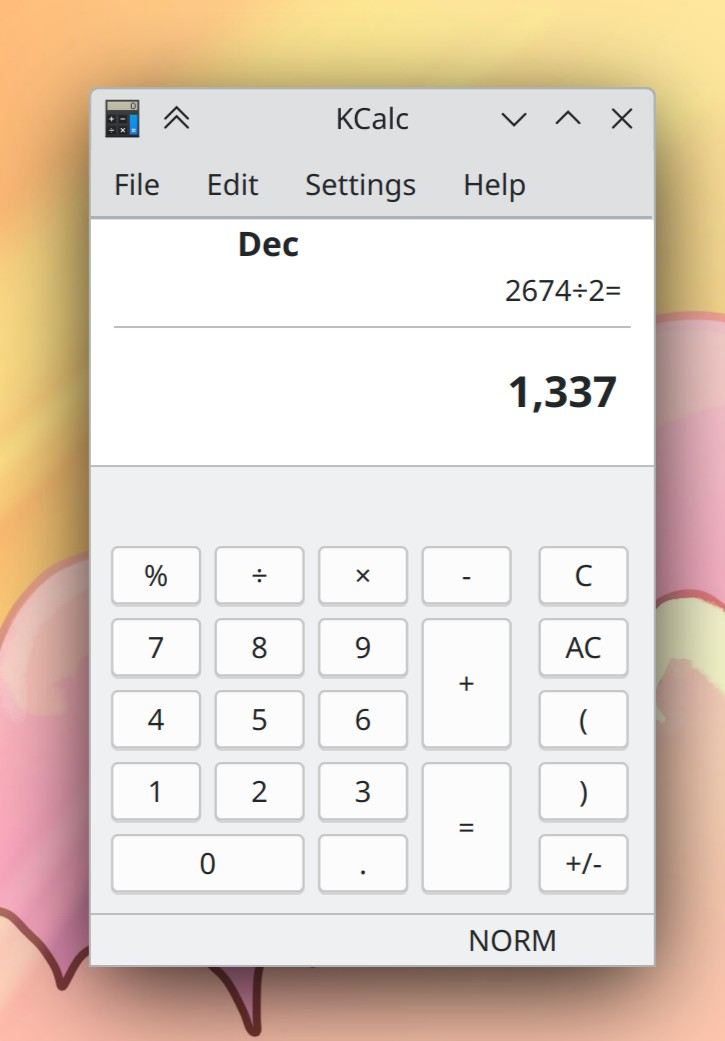
KCalc now uses a more modern frameless style (Carl Schwan, KCalc 24.05. Link):
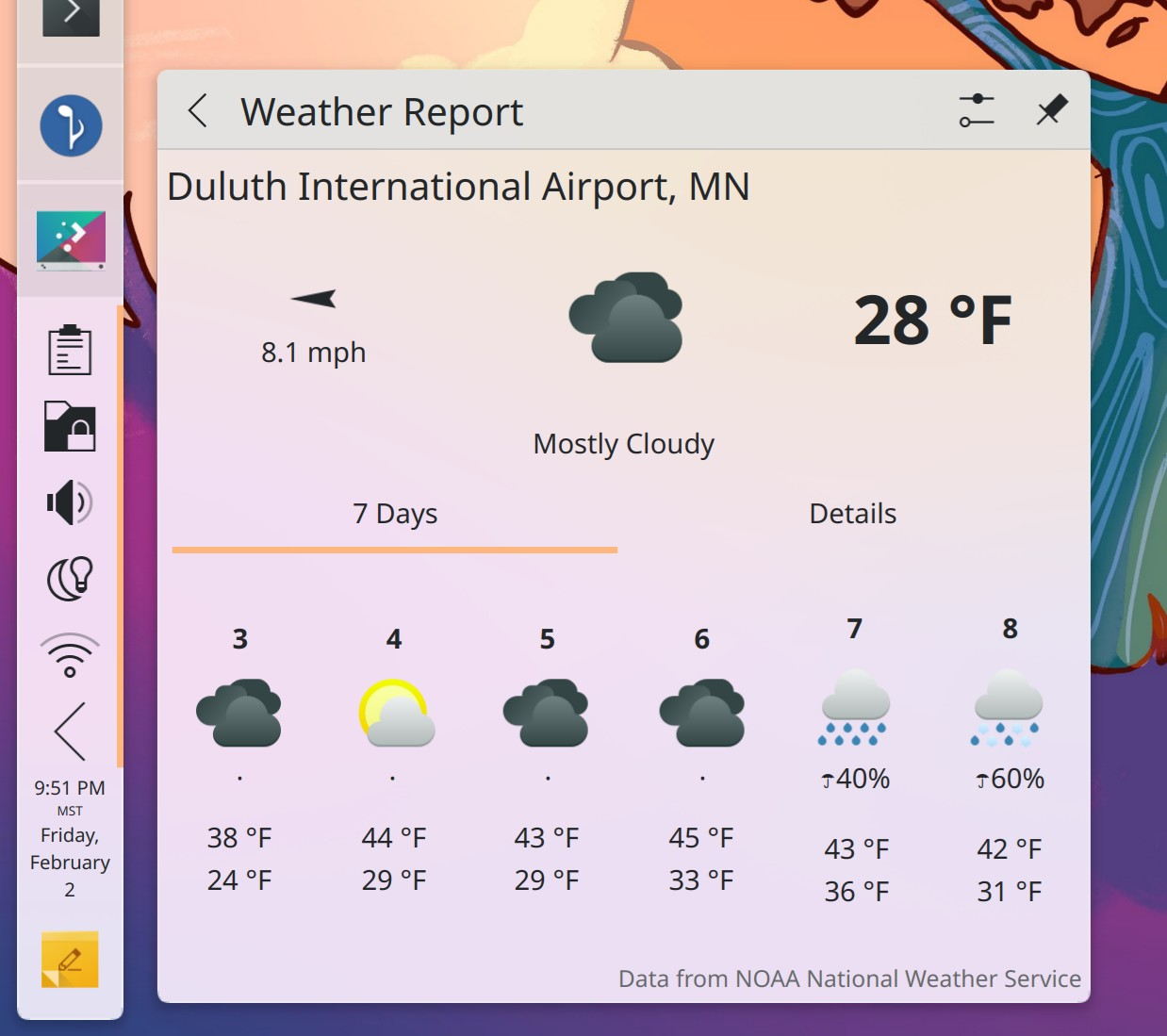
The Weather widget now displays the chance of precipitation for all data providers except for BBC, which doesn’t provide this information (I guess it’s easier to just assume the chance is 100% for any location in the UK) (Ismael Asensio, Plasma 6.1. Link 1 and link 2):
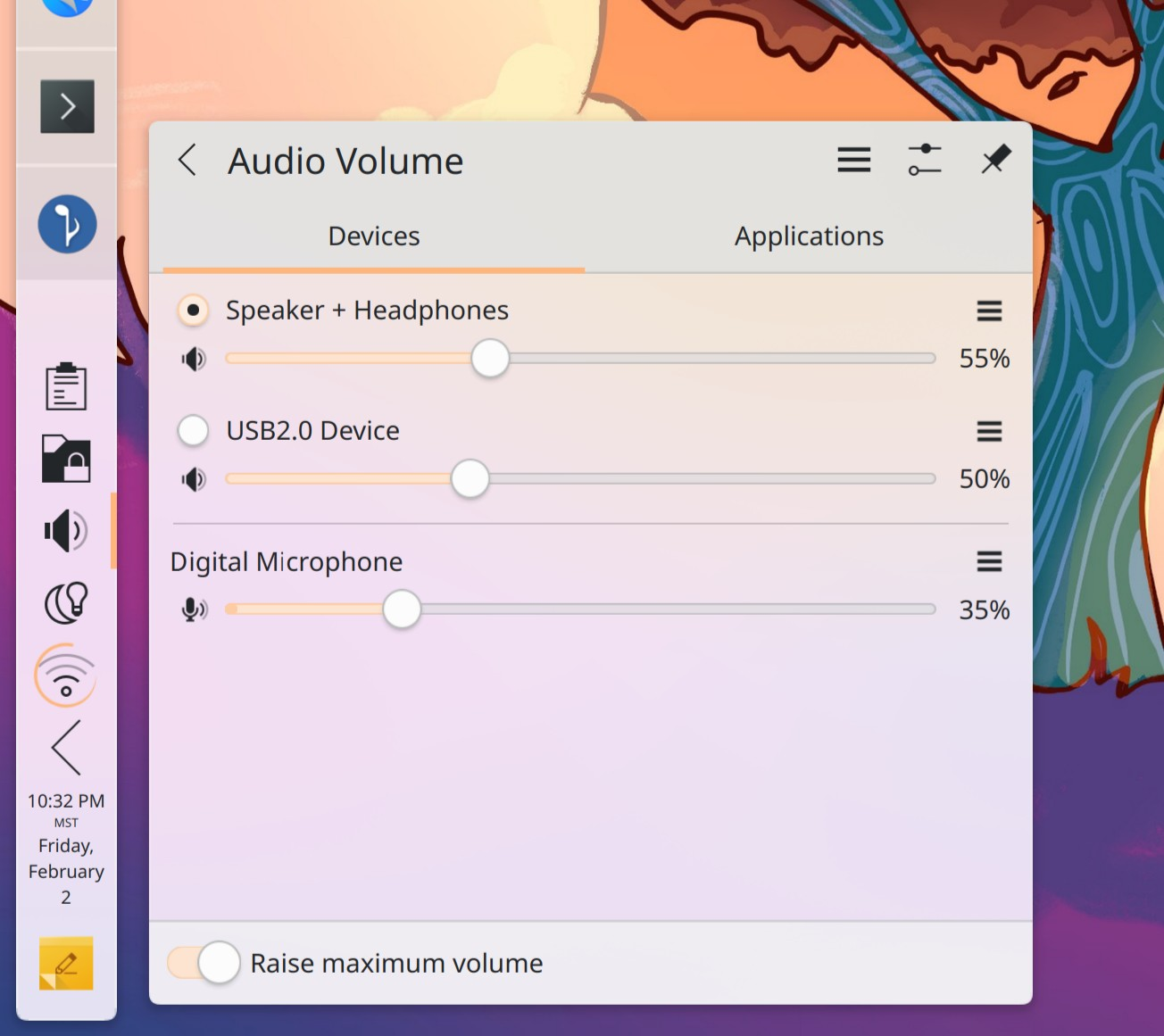
When you have more than one audio input or output device, the name of each one shown in the System Tray widget is now a lot more readable and comprehensible, and doesn’t include weird technical text that often made no sense (Harald Sitter, Plasma 6.1. Link):
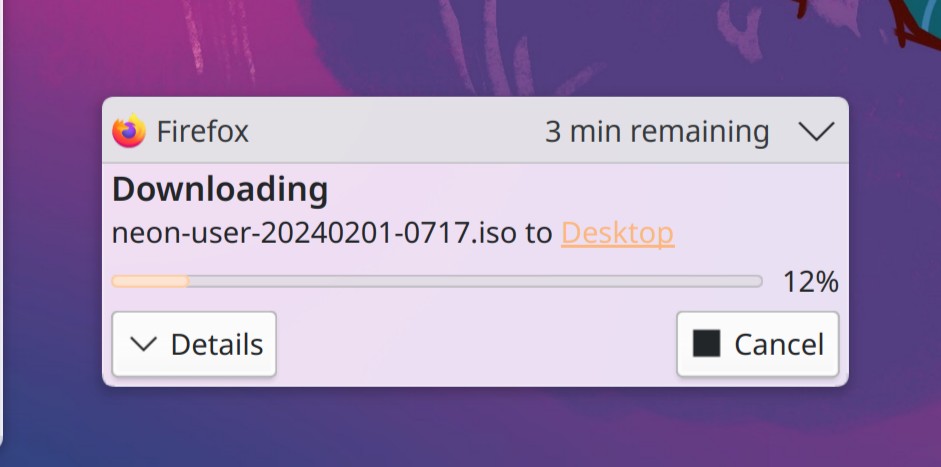
Notifications showing file transfer or download jobs now have a clearer arrangement of buttons (Oliver Beard, Plasma 6.1. Link):
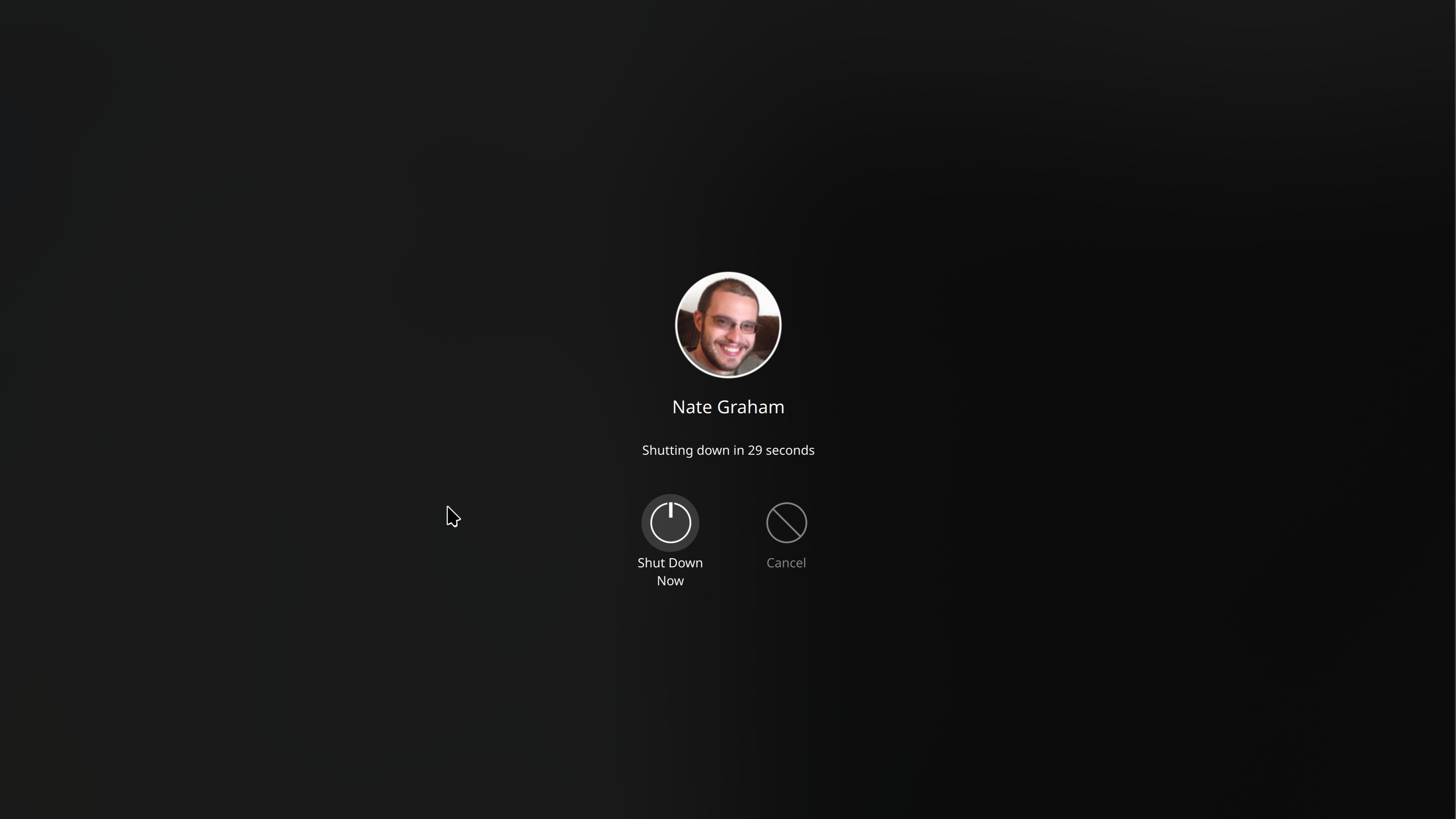
When you activate the logout screen by invoking a specific action (e.g. “Shut Down”), it will now act more like a confirmation screen and only show you that action plus a cancel button (me: Nate Graham, Plasma 6.1. Link):
Right-clicking on a panel now yields a menu item that says “Show Panel Configuration”, which is clearer than the old “Enter Edit Mode” (Marco Martin, link)
…And Everything Else
This blog only covers the tip of the iceberg! If you’re hungry for more, check out https://planet.kde.org, where you can find more news from other KDE contributors.
How You Can Help
Thanks to you, our Plasma 6 fundraiser has been a crazy success! I originally thought the goal of 500 new KDE e.V. supporting members was over-optimistic, but you’ve all proven me happily wrong. We’re now up to an incredible 738 members, unlocked both stretch goals, and 1000 members by launch time seems like it might even be feasible. Thank you everyone for the confidence you’ve shown in us; we’ll try not to screw it up! 🙂 For those who haven’t donated to become members yet, spreading the wealth via this fundraiser is a great way to share the love. 🙂
If you’re a developer, work on Qt6/KF6/Plasma 6 issues! Which issues? These issues. Plasma 6 is very usable for daily driving now, but still in need of some final bug-fixing and polishing to get it into a solid state by February.
Otherwise, visit https://community.kde.org/Get_Involved to discover other ways to be part of a project that really matters. Each contributor makes a huge difference in KDE; you are not a number or a cog in a machine! You don’t have to already be a programmer, either. I wasn’t when I got started. Try it, you’ll like it! We don’t bite!
 Adventures in Linux and KDE
Hello Nate,
Thanks a lot for your updates!
Windows user here, willing to give a try to Linux 🙂
Do you konw wheter there will be some softwares such as ScreenKey or keymon that will be able to run on wayland with KDE 6?
In short, something useful to record your keyboard commands (ctr+c etc) when you record, for video tutorials purposes, your sceeen.
At present I run OBS to record all my video tutorials.
LikeLiked by 1 person
ScreenKey works fine on Linux. It will show up in the OBS input stream.
LikeLiked by 1 person
Thanks. But I have read Screenkey does NOT work on Wayland (ontly with the Xorg backend) In the very long past I have run keymon on Linux (Kubuntu) but, again, I suppose it is not ported to wayland right now. Probably I shouud give a shot to showmethekey 1.12 (by AlxynZhou) which works on wayland and hopefully with OBS Studio as well
LikeLike
Screenkey Wayland ticket.
LikeLike
Something annoying to me after upgrade to Plasma 6.0 RC2, meta/win key doesn’t work at all, it doesn’t captured, someting related to khotkeys removal?
LikeLike
Nah, unrelated; KHotkeys never handled this. I’d recommend posting about this on https://discuss.kde.org, and hopefully someone there can help you.
LikeLike
I thought you were moving towards a frameless UI, but I see such a mess on the first screenshot…
And now the “Always show” (and “Always show all entries”) option has no effect on them. Well done.
Currently I’m using a keyboard shortcut to show the logout screen and select the action I need (“Shut Down”, “Restart”, “Log Out” or “Sleep”). With this change, obviously I will only see the “Log Out” action, and I will have to assign a keyboard shortcut for all other actions. Good job here, too. Can you make this configurable?
LikeLike
Doesn’t Ctrl+Alt+Del invoke the full options screen now? Will it only show a specific option such as logout? That’d be really bad as I used it every day, similar to popov.
LikeLike
I actually read 738 members as of today. 😀
LikeLiked by 1 person
I apologize for the misinformation. As stated in the MR description:
LikeLiked by 1 person
Yep, I made sure those of you who like showing the logout screen with all options aren’t left out in the cold.
LikeLike
Can confirm; this seems like a simple bug. A funny thing happens when you actually exercise the capabilities of your software: you uncover all kinds of bugs due to interactions that never happened before! I’ve submitted a bug report for this: https://bugs.kde.org/show_bug.cgi?id=480781. We’ll get it fixed.
LikeLike
That means I can only configure the clipboard, when I have actually copied something, which not too obvious. It’d be good if were configurable always in the system settings at least, similar as the the keyboard layout is configurable there too.
LikeLike
It is: there’s a configure button for it on the “Entries” page of the System Tray’s config window. All entries–visible or not–are configurable from here.
LikeLike
I wonder if the bug
“When you drag a file in the Plasma Wayland session and it passes over another window during the journey to its final destination, the window it passes over only raises itself to the top when you stop moving the cursor for a full second–up from the previous value of one quarter of a second”
is related to what I am experiencing.
I’m working with sites/apps where you often drag and drop files on (to upload them). The issue on Wayland is, that the site frequently detects the intent of dropping a file (as if I was pressing right click over it while moving) frequently even with normal cursor moving over it. The effect is, that those sites activate the blue overlay, indicating that they are ready for dropping a file on them. If that not happens, those overlay blue areas don’t disappear, making the content of the site (or an app) completely unusable. In most cases, I have to reload the site or restart the app to get rid of it. This is completely annoying.
It also doesn’t happen every time, but because it happens frequently between the dag-drop jobs, it disturbs my workflow, because sometimes I need to interact with the UI elements on the site that are covered and non-clicable below the blue overlay. I have no idea what additional condition must be meet for this bug to happen. I can’t trigger it intentionally, but it happens very, very often during my work sessions, where I do drag-drop files, but not in the moments I really want to do. Maybe it is as if the Wayland kept remembering drag-drop intent and informing windows behind about it after it was already used.
Also, this is not a site/UI issue, because it happens on various sites, various windows and apps. For example, in WordPress library site, on Messenger app window, Transfer files sites and more.
Nate, is that ringing any bells? Is that bug submitted?
There is also another issue with Dolphin drag-drop feature. It may be or may be not related to the above. I need often do drag-drop action TWICE, because it is as if the first action is not registered by the windows where files are dropped. Using WordPress library page (a backend UI for Wodrpress sites) it is visible the most. I mark my files, click and hold them, while moving into the library download area and release the left-click. Nothing happens. When I go to marked files in Dolphin, they are somehow blocked, and I need to left-click on them to unblock them (that doesn’t destroy the chosen-files status) and then I have to click and drag them again to the library. It works the second time always.
Those are very specific, weird bugs that I experience every day on Wayland and I wonder if those are submitted. Because those bugs disturb basic work actions, they are quite important, and I cannot imagine they were overlooked by now. I’m experiencing them since a month or more (could be a couple of months – time flies quickly).
I guess, with new Plasma on its way, it’s better to wait and see if those exist in a new release.
LikeLike
This sounds like a problem I see a lot too, mainly with Firefox or Electron apps.
It’s like the application receives a drag-started event when it receives focus and stays that way.
My workaround is to open Dolphin and drag a file over the application and back out. This usually clears the stuck drag-started event without having to reload the page/app.
I think it’s this bug (Drag and drop: ‘drag-motion’ is triggered when GTK window regains focus on KDE Plasma Wayland) which was re-posted to the KDE tracker as bug #464196. They say it’s related to this GTK bug (False “drag-motion” after “drag-drop” received in Plasma/KDE (Wayland)) too.
LikeLike
Can’t wait for the “mega-release”. The only remaining feature full classic desktop environment in the world. The rest are trying to do less, or different, and they all more or less end up lacking in some area. Keep up the good work.
LikeLiked by 2 people
Thanks so much for the kind words!
LikeLike
So. Much. Good stuff!! I didn’t even know Spectacle had OCR
LikeLike
If I understood it correctly and the clipboard indicator can’t be set to an “Always show” behaviour anymore, that would be super annoying to me.
I would expect from the system tray to be as static as possible (i.e. no appearing/vanishing icons under normal working circumstances) to not draw unnecessary attention to it. Which would be constantly the case if you are used to clear the clipboard every now and then, for example to eliminate the possibility of accidentally inserting content from other contexts.
LikeLike
Yes, this is a bug: https://bugs.kde.org/show_bug.cgi?id=480781. We’ll get it fixed.
LikeLike
+1
I don’t really see the point of hiding/showing clipboard indicator during session.
IMO, It’s useful for the first time when user is not aware of (or forgot about) built-in KDE Plasma clipboard manager. In this case, first copy exposes clipboard indicator icon and that potentially draws user attention to Klipper. But I believe many users constantly copy/paste something so this auto-hiding seem pointless.
@Nate, am I missing something?
LikeLike
What you’re missing is the fact that the Clipboard System Tray item was already hidden when it was empty; it’s just that it was hidden in the expanded part of the system tray, rather than completely. So very little has actually changed compared to the status quo.
LikeLike
@Nate
Ok, I get the reasoning for this to unclutter system tray. Following that logic, empty “Disks & Devices” are not really useful as well.
For Clipboard I just can’t see, how both old and new auto-hiding behavior are useful in practice:
1. Clipboard indicator shows-up if there’s at least 1 item in clipboard history. So, IMO, when clipboard indicator enabled, it’s always active for the majority of users. Also it persists across reboots unless “Save history across desktop sessions” is disabled.
2. Some users might clear clipboard history from time to time (to remove some sensitive information, for example). Indicator disappears/hides from system tray. I imagine that in some very short term during desktop session user will copy something else, making clipboard indicator re-appear.
So, basically, users that don’t change defaults and don’t clear clipboard history, won’t benefit from auto-hiding. And for users that clear clipboard history, frequent indicator re-appearing, will be annoying and they will just enable “Always show”. So, nobody wins…
LikeLike
Are transient scrollbars planned? Too many fat scrollbars in KDE apps for my taste.
LikeLike
No. See https://community.kde.org/Get_Involved/Design/Frequently_Discussed_Topics#Auto-hiding/overlay/invisible_scrollbars
LikeLike
Spectacle still can’t record the screen on X11. Shame on you!
LikeLike
Was screencapture with XShm ever promised..?
LikeLike
The progress bar should have the text inside it rather than next to it, as many applications expect this. The way Breeze does it at the moment completely screws up the visuals for many applications.
For example Transmission: https://github.com/transmission/transmission/issues/491
This is not a problem with the application, but a problem with the way the theme displays progress indicators. It is akin to displaying a checkbox with the style of a radio button, or a combo box with the style of a push button.
LikeLike
“When you have more then one audio input or output device, the name of each one shown in the System Tray widget is now a lot more readable and comprehensible”
Awesome! The little things like this make such a huge difference when I’m introducing friends to Kubuntu.
LikeLike
No System Activity window in Plasma 6? Sadly, Plasma 6 has lost a lot compared to Plasma 5.
LikeLike