Today I’m putting on a different hat and announcing that Techpaladin Software is hiring! Right now we’re looking for a software developer who loves KDE Plasma and wants to see it thrive and shine, with the passion and self-motivation to make that happen.
In this role, you would be working on topics related to KDE Plasma that Techpaladin’s clients want improved, such as general polish and QA, implementing new features, fixing specific bugs, working on private hardware-specific software that supports Plasma, backporting fixes, release management, and so on. It’s always KDE-related!
This is a fully remote contract position open to anyone in the world not living in a country sanctioned by the U.S. government (sorry, it’s just gotta be that way for legal reasons). The start date is flexible and can be whenever you’re ready.
We have no lists of explicit qualifications, minimum years of experience, or formal education requirements. But working for Techpaladin might be a good fit the more this sounds like you:
You’re a KDE contributor. Your profile page on https://invent.kde.org is more blue or purple than it is white, or at least it has been in the past. You’ve used and developed KDE Plasma, or related technologies (Qt, KDE apps and frameworks, C++, QML, etc).
You’re a good communicator. Your “online voice” is gentle, not harsh. You’ve generally got a positive attitude. You keep on top of your email. You can handle working remotely in written and spoken English with a geographically distributed team split across 6 time zones.
You’re a team player. You review other people’s merge requests and triage bug reports. You’re willing to work on what the clients want done. You accept decisions made in public with your input that nonetheless didn’t go your way.
Does this sound a bit like you? We’d love to hear from you at jobs@techpaladinsoftware.com (please don’t send anything clearly written by AI; it will be discarded immediately) with your resumé, KDE Invent profile, links to KDE-related projects you’re proud of, or anything else that seems relevant.
Today I’d like to talk about package management a bit. The lack of a user-facing package manager is a big difference between KDE Linux and most other Linux distros (even immutable/atomic ones), so it bears some discussion!
Let me start by saying:
I absolutely love package management.
No, really!
Before Linux, I came from the Mac world which lacks real package management. To install apps back then, you would fail to successfully drag them to the /Applications folder. Software requiring more integration was installed using Windows-style wizards with no dependency management and no provision for uninstalling them later. (!!!!!)
Moving to Linux was a revelation.
You mean I can just do sudo apt install thingy to get my thingy instantly? And it gets upgraded with the rest of the system automatically? And I can easily remove it if I don’t want it anymore?
It’s just 1000% better. We all know this. It’s a crowning jewel of our ecosystem.
However! There’s package management to get add-on software… and then there’s package management for assembling the base OS on your own computer.
The former is incredibly convenient and amazing. The latter is a Tool Of Power™ best suited for use only by OS builders and true experts.
I feel it’s a problem that historically we’ve used this amazing tool for both of those use cases, because building the base system from packages on users’ computers suffers from a number of nearly unsolvable challenges:
It deteriorates and explodes
As you install, remove, and update packages on your system, you inevitably encounter problems over time:
Conflicts and incompatibilities with add-on repos
Heisenbugs from orphaned packages still present on the system
The ability to uninstall important functionality without realizing it, breaking the system
Updates that break bootability due to some untested condition present only on your system
True experts and OS engineers can usually resolve these issues as they crop up.
What about everyone else? There’s usually no recovery method exposed in a normal-person-friendly manner, or at all. You’re just screwed unless you have a second computer or a phone set up to be able to talk to the distro developers on Matrix or IRC, and one can walk you through fixing it live.
It’s not a targetable platform
No installation of a package-based operating system can be guaranteed to have the same set of system software and libraries as any other one.
This means if you’re a developer, your software can’t make safe assumptions, and it’s running in an untested environment pretty much all of the time. You can contend with this complexity via a forest of conditional “if this thing is present, enable that behavior” logic, but versions of dependent libraries you didn’t test with can still break your app, and users will report bugs that you can’t reproduce.
It’s a barrier to raising quality levels
Package-based OSs allow for and encourage self-service to fix problems. Install this package. Edit that config file. Replace the version of some package with the one from another repo.
This is great for current you in the short term. But it’s less great for future you, after you’ve forgotten about your local fixes and encounter the same bugs the next time you re-install on a new computer, or after the local fixes have become unnecessary and are now causing issues that nobody will be able to debug.
It’s also less great for the whole project, its ecosystem, and others who might encounter the same issues but lack your level of technical skill or available time for troubleshooting.
But what about the really good distros?
I do think these challenges are manageable, even if they can’t be fully eliminated. My best experiences with a package-based KDE-focused distro have been with Fedora KDE, where they do a great job of it:
They prevent removing critical packages that would break the system.
They have a huge main repo with almost everything you could want, and RPMFusion (the only add-on repo you really need), has a close relationship with the primary packagers so conflicts are rare.
They work hard on shipping a good product out of the box, rather than making you fix bugs yourself, and they regularly make bug-fixy tweaks to improve the out-of-the-box experience.
In 4 years of usage, I’ve never had a system update break bootability.
And the result is fantastic. I 100% recommend Fedora KDE to anyone who wants a good experience with a GUI-focused package-based operating system. It’s hard to go wrong with it.
And obviously those of us building KDE Linux also think Arch Linux is great, since we use their packages for building our base system! It’s is an amazing tool for OS builders and experts wanting to create the personal OS of their dreams.
Others that I have less experience with are excellent, too. But still, none of them can fundamentally solve the problems I outlined earlier. It’s not for lack of labor or expertise; these simply aren’t easily solvable problems with a mutable system-level package-based design.
So what’s the solution?
Well the world is messy and everything has drawbacks. So there’s no solution that’s better in every way, and worse in none. But the approach we’ve chosen in KDE Linux does solve the above problems:
Stability
In KDE Linux, we build the base system out of Arch packages, but freeze the contents and take responsibility for the result being functional; we don’t offload responsibility onto the user.
Updating the system swaps out the old OS image for the new one; it’s both fast and safe. And you can keep around the old OS image (three of them, in fact) and easily roll back if you have a problem. It doesn’t become “quirky” and degrade over time.
It isn’t 100% perfect, of course. Users can still mis-configure their software and manually install user-level libraries that conflict with system-provided libraries. But it’ll be more obvious that you’re about to shoot yourself in the foot.
Being a platform
Specifically, Flatpak is a platform.
With Flatpak, developers target a specific version of a discrete SDK and its corresponding runtime. This runtime will be the same on every user’s computer. Now developers can make safe assumptions and reproduce bugs — at least, bugs not caused by hardware problems or users’ configurations differing from their own.
And developers who target this platform make their apps available not only on KDE Linux, but also most other Linux-based operating systems, too.
There are problems with Flatpak, of course; I’m not gonna claim it’s perfect. It’s opinionated, restrictive, can’t be used for deeper parts of the OS the way Snap can, and multiple installed versions of each runtime can end up consuming a lot of space. But it solves the platform problem, and traditional system-level package management just can’t.
Quality
Every KDE Linux user is going to to have image and video thumbnails, all the KDE wallpapers, the Desktop Cube effect, KDE Connect, a working installation of Plasma Vault, well-tuned power management, and support for as much exotic hardware as we could stuff in. None of this comes in optional add-on packages you can find yourself missing. You’ll just automatically have it.
If you find that something significant is missing or broken, you’ll need to tell the developers, and then they can fix it for everyone. If you’re an expert who likes fixing problems, you can still make those fixes; you’ll just be doing it for everyone in the world and not just yourself! The project and its entire userbase will benefit.
But what about the glaring, obvious drawbacks?!
The most obvious drawback of not having a package manager, is, well, not having a package manager. I’m pretty sure I don’t need to explain the lost benefits to anyone reading this. 🙂 We all know how amazingly flexible and powerful real package management is.
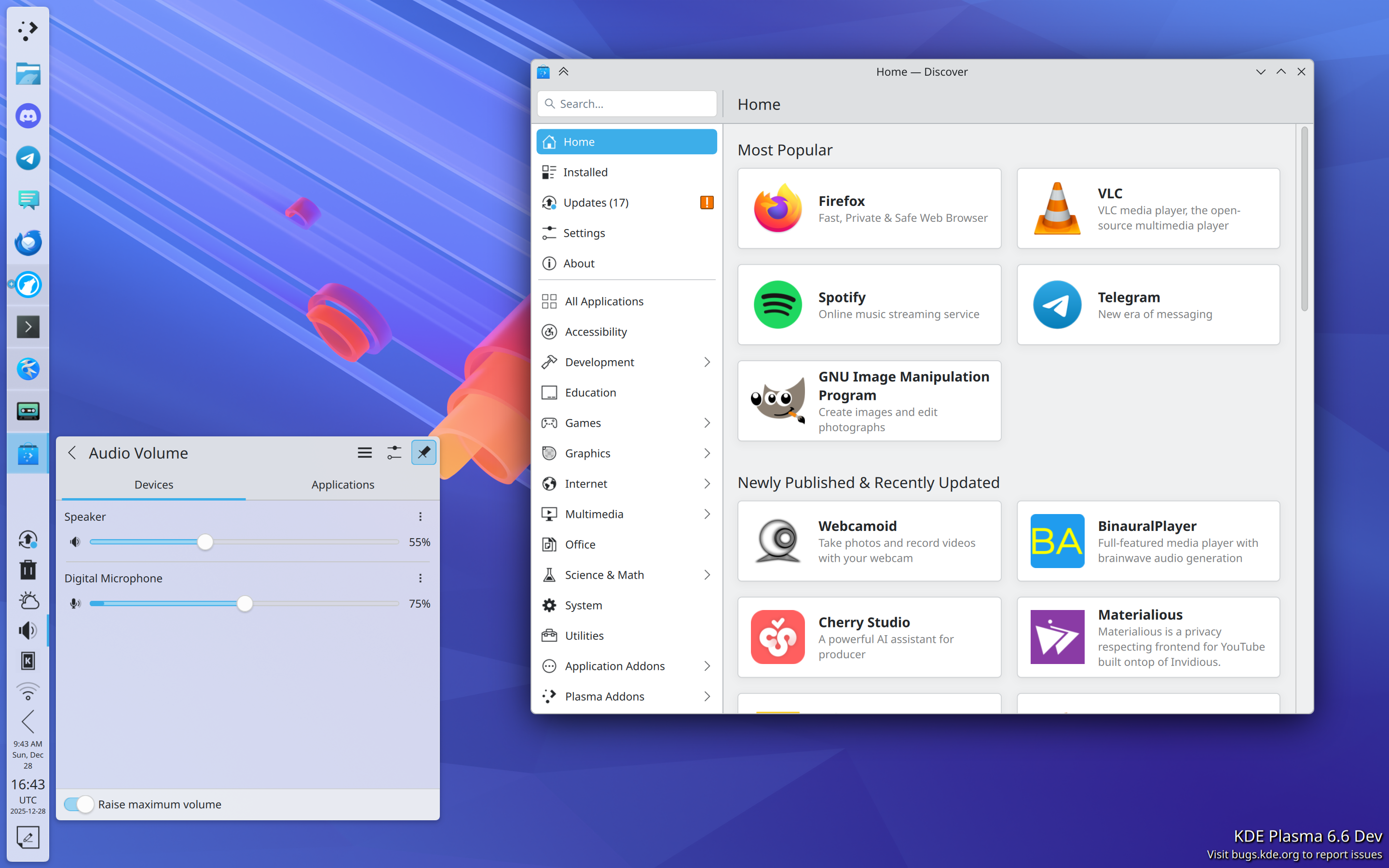
Thing is, its absence isn’t a problem for regular people because they weren’t using package managers to install gimp and rust and waydroid and whatever anyway. The Discover graphical app store is a waaaaaaay more user-friendly way to get GUI apps from Flathub or anywhere else. It isn’t actually a problem.
Pictured: a usable way for normal people to find and install apps
But the lack of a package manager does become a problem for power users and software developers. Let me group the usages into a few broad categories and explain how KDE Linux handles them:
GUI apps not on Flathub
This category shrinks all the time as Flathub cements its position as the de facto repository of GUI apps on Linux.
Still, for the remaining omissions, there are other options such as Snap, finding an AppImage of the app, or installing it using the package manager of another distro using a container. But these don’t offer the level of integration we’re aiming for in KDE Linux, so for that reason, we focus on boosting Flathub as its primary supported repository of GUI apps.
Command-line productivity and software development tools
In KDE Linux, we already pre-install most of the common and modern ones. This includes:
Performance monitoring/debugging:drm-info, htop, iotop, lsof, lspci, lsusb, nvtop, powertop, and loads more
Productivity/automation:kdialog, rg, tree, vim, wget, wl-clipboard, ydotool, and many more
Network management:hostnamectl, ip, iw, resolvectl, tracepath, and more
Version control:git and svn
Compilers etc:ccache, gammaray, gcc, gdb, llvm, and lots of ancillary tools
For anything you need that isn’t pre-installed, there are multiple options including containers and the add-on Homebrew or Nix package managers. We even include a custom “command not found” handler that can direct you to available options:
Drivers and support packages for hardware
This is a tricky one, as a lot of these include kernel drivers or need to be installed systemwide. So we pre-install as many as we possibly can: support for printers, game controllers, filesystems, fingerprint readers, drawing tablets, smart card readers, braille displays, Yubikeys, specialized audio/video processor boxes; lots of stuff. However there are cases where this isn’t possible, which is a legitimate problem with KDE Linux right now.
Input methods
KDE Linux aspires to pre-install state-of-the-art input methods so you don’t have to install and configure everything yourself. However we haven’t reached this goal yet. We’re building a virtual keyboard with built-in support for CJKV languages, but it’s still a work in progress.
Languages
KDE Linux pre-installs support for all available languages; any that are missing are the result of bugs we should fix!
Support packages for VM guest OS integration
KDE Linux pre-installs all the ones that are available on Arch Linux. Similarly, anything missing is something for us to fix.
Software development languages and toolkits
Qt is obviously included, and so is GTK. There’s also Python, JavaScript, and Rust.
But we can’t pre-install everything here, as software dev stuff tends to be huge. If a large high-level toolkit/language/build dependency/etc. that you need isn’t pre-installed, the best way to use it anyway is by installing it or its development environment a container. Distrobox and Toolbox are fully supported.
And that should about cover it, I think!
Basically, we’ve tried to eliminate the need for traditional package management as much as we can, while preserving your ability to use a package management tool if you’re an expert or a developer who benefits from one. It should just be a userspace package manager (via a container, Homebrew, or Nix — your choice) so it can’t impact the stability of the system so strongly, and so any problems can be easily undone.
And to be clear, if you prefer a traditional OS that’s 100% mutable using a system-level package manager, that’s completely fine. There’s no shortage of Linux-based operating systems using this model out there, and KDE Linux is an admittedly opinionated divergence from it.
On the other hand, if all of this seems really exciting, please feel free to install KDE Linux somewhere and help us build it! At the time of writing, we’re a little over 40% of the way through the Beta milestone, at which point we’ll declare it suitable for general use by current Linux users. Progress is steady but slow; with more help, it can become a polished product much faster!
This week marks KDE’s 29th birthday, which is pretty special. Did you know KDE has been around longer than Google, PayPal, Facebook, Instagram, Netflix, Tesla, Spotify, Uber, VMware, LinkedIn, Yelp, and Github? Seriously! That’s a long time producing high quality, autonomy-respecting, non-exploitative software.
And humanity needs and deserves it, so we’re gonna keep going! We’re celebrating KDE’s birthday by kicking off our annual end-of-year fundraiser: https://kde.org/fundraisers/yearend2025/
The money raised here will support the ability of KDE e.V. (the nonprofit behind KDE) to continue hosting Akademy, funding development sprints, affording server hardware and hosting, and employing engineers, marketers, documentation writers, and support personnel (but not board members; we’re unpaid volunteers).
There’s a big set of initiatives, and they’re growing all the time as KDE gains in prominence worldwide! We have extremely ambitious goals of spreading humane software throughout the world.
Looking at the kind messages people have written in their donations, it seems like we’re seeing some success. Here are a few recent examples:
Thanks for KDE Plasma, can’t wait for KDE Linux!!! HB 🎂
To the most consistently feature rich Desktop Environment and just generally awesome set of applications! Thanks for the hard work!
Happy Birthday! Thank you, the Plasma Desktop and the KDE family of applications have made my life so much better. Keep up the good work on the newly-minted KDE Linux.
I’m giving you guys the money that would have gone to Windows 10 ESL had I not switched to Kubuntu earlier this year!
This might sound dumb but the wobbly windows option convinced one of my friends to install Linux so you win
Plasma is the best, very excited for Bigscreen!
KDE’s really great for both enthusiasts and newcomers. Without it, I’d be worried about “the linux desktop” hehe.
Thank you for you great work! One day I’ll find the time to contribute!
I know it’s only the minimum amount, but I love using your DE and software and want to help out any way I can. Thank you!
Thank you for your work and contribution!
Keep up the kood kork!
With love from Spain!! ❤
Keep up the great work!
thank you for a fine desktop 🙂
KDE is my daily driver for personal computing. It’s abundance of features and the distraction-free experience is great. Keep it going! I’ve been an on-and-off user since the KDE 1 Beta 3.
Thank you KDE team for your wonderful work. I use Neon daily and it’s truly a joy to use
Thanks for making the computing world a significantly better place.
Happy Bday, KDE has be rock solid this year!
VIEL ERFOLG von der Alten (84) !! (GOOD LUCK from the old folks (84) !!)
I love your work – thank you for everything! Greetings from Germany 🙂
Hope this helps you keep up the great work!
Thanks for the hard work! Keep it up! From a french user!
To many more birthdays to come.
Great work, KDE!
First time donating. I really love to use KDE.
Thank you, KDE developers & KDE application developers, for 29 years of FOSS-licensed desktop software for Unix.
Grazie mille per tutto quello che fate. Fedora KDE è fantastico!
Thank you for bringing Plasma and Kdenlive to the world. Keep doing what you’re always doing.
Just a small donation for now, more in December 🙂
I dunno why, but I really love what you are doing! I really enjoy KDE’s vibe overall and everything that you guys did!
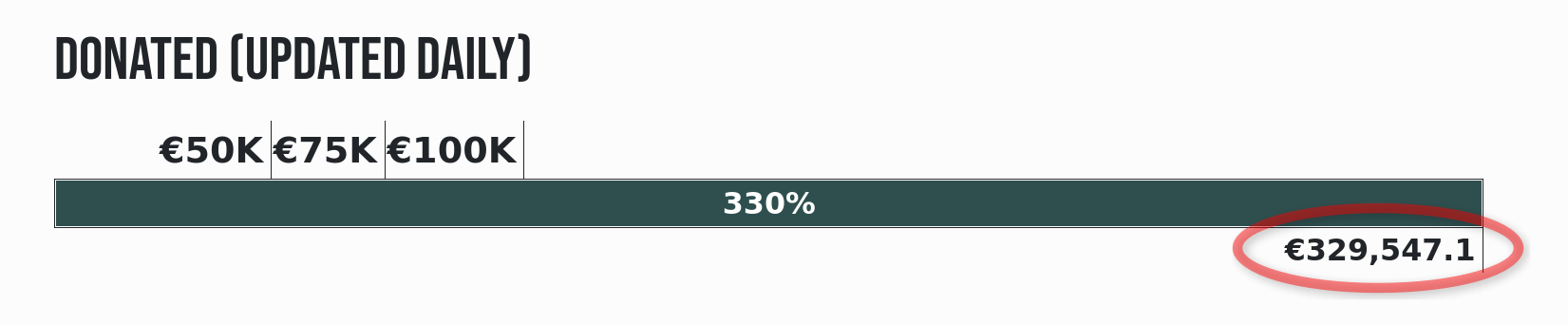
We’ve set the comparatively modest goal of raising €50,000, and I’m happy to see that we’re already a quarter of the way there after only three days. But we need to keep up the push, as typically the first few days see the most donations. So please donate if you can, and spread the word far and wide!
In 2016, after being a Mac guy for 23 years, I took the plunge and made a full-time switch to Linux. I did my research, and over and over again encountered the idea that GNOME was good for MacOS refugees like myself. So I gave it a try!
But my experience didn’t support the meme. I think a lot of people make this assertion without really having a deep understanding of the MacOS user experience, or the actual positive qualities of the software, because I don’t think GNOME offers a particularly Mac-like experience at all.
Don’t get me wrong, I think GNOME shell is pretty good, and largely succeeds at doing what it sets out to do. But that thing does not appear to be “offer an experience that’s a lot like MacOS.”
I still see this mentioned on forums and YouTube videos today. I don’t think it’s helpful, and today I want to provide a bit of context from my perspective.
So let’s compare MacOS and GNOME! Right away we see some obvious differences:
One of the the two major anchoring user interface (UI) elements on MacOS is the dock. It’s an app launcher and switcher, an unread count notifier, a place for minimized windows to go, a quick shortcut to the trash, downloads folder, and any other files or folders you put on it.
GNOME doesn’t have this. Its anchoring UI element is the Activities Overview screen, which contains a small program launcher, but the whole thing is hidden by default, meaning it can’t be easily used for monitoring unread counts or switching between apps. It’s also not customizable at all, while the MacOS dock is extensively customizable. It’s just a very different experience.
Global menubar and app functionality
The other major anchoring UI element is the global menu. Every Mac app exports a global menu structure, including the desktop itself. This allows Mac apps to be visually simple, because all the powerful features are hidden away in the menu structure.
GNOME has a top bar, but there’s no global menu on it. And while GNOME apps do generally have a level of visual simplicity that’s similar to Mac apps, they’re usually more limited in functionality, and they don’t export menu structures full of extra features.
Desktop icons
On MacOS, you can put files and folders on the desktop, and use it for managing frequently or recently used files. Internal and removable drives appear there, too.
GNOME doesn’t have this. The desktop is just a picture; you can’t use it for anything functional.
Window minimize/maximize buttons
On MacOS, if you need to get a window out of your way, you minimize it, just like you do on Windows, Plasma, etc. It flies into the dock and it’s clear how you get it back. You can also maximize a window from another button on the titlebar, and it goes into another.
GNOME apps have neither of these buttons. As a result, it’s not clear how to get a window out of the way or make it bigger without a lot of manual work. You can add those buttons later using the separate Tweaks app, but it’s clear that the system was not designed for it.
At-a-glance app status monitoring
MacOS includes a classic “System Tray” style UI on the top bar holding the global menu. Here apps can put little icons that communicate their state while running but without any visible windows. The MacOS dock also displays unread counts and progress information for running apps.
GNOME doesn’t have these features, either at all, or in a way that’s always visible. Instead, it relies on apps sending notifications about changes to their status.
Configurability
Contrary to popular belief, MacOS is surprisingly rich in personalization options. You can customize the widgets on the desktop or notification center, the text size, highlight colors, sidebar icon sizes, places panel items, screensaver, scrollbar appearance and behavior, lock screen message, menubar positioning, UI alert sound, almost everything about the dock, and so on.
GNOME’s approach to configuration is much more minimal, and the officially-supported options are pretty sparse. Instead, mostly the way you personalize the system is by using Extensions, which can do much more than you can in MacOS, but also offer no long-term compatibility guarantee, so there’s a chance any of the extensions will break with every new release.
So where does the bridge from MacOS lead?
Again, I think GNOME is pretty good… it just doesn’t offer a MacOS-like experience. What it does offer is a near-zero distraction experience. That’s the design goal, and it succeeds. But it’s not MacOS’s design goal.
So if not GNOME, where’s the more MacOS-like experience for refugees? Honestly, KDE Plasma is what I would recommend. It’s where this MacOS refugee ended up, at least. Let’s compare again, but this time with KDE Plasma:
Like MacOS, Plasma has a dock-style panel. Despite a few visual differences, it handles the same things: launching apps, switching between apps, seeing apps’ unread counts, and holding minimized windows. This panel also contains the System Tray UI. It’s here rather than on a top panel, but it’s a small difference.
Though neither screenshot shows files on the desktop, both support it. Similarly, both support desktop widgets for building highly personalized workflows.
You can also minimize and maximize windows in Plasma just like you can on MacOS.
And finally, you can personalize a Plasma system in a wide variety of ways — as much or more than you can can on MacOS, in most cases — and all in a 1st-party supported way. There are also GNOME-style extensions available for people who want even more, but these make use of a stable API that only changes about once every 10 years, so compatibility issues are much rarer.
There are still differences, of course: major ones are Plasma’s Windows-start-menu-style Kickoff Application Launcher and the lack of a global menu. But Kickoff can be swapped out for something else or removed, and the Global Menu is actually a fully-supported 1st-party feature, simply being off by default. If this is a part of MacOS that you really like, turning it on is very easy:
Other smaller differences include disks not appearing on the desktop, and maximized windows not going into new virtual desktops.
But in my opinion and experience, these differences are relatively minor, and I don’t think it’s worth chasing the dream of a 100% pixel-for-pixel clone of MacOS on Linux. Rather, I think it’s best to take the most successful parts and ditch the sources of awkwardness. And in my opinion, KDE Plasma fits the bill.
So if you’re leaving MacOS because you found it too distracting, then I think GNOME may be a good option. But if you’re leaving for other reasons, give Plasma a try!
At Akademy 2025 this year, I had the privilege of giving a talk about a big picture topic close to my heart, and you can watch it here:
For those who prefer reading over watching and listening, I’ll give a quick summary:
I believe that the challenges facing the world today present an opportunity for KDE to grow in importance and reach due to a variety of favorable trends embedded in the chaos and conflict, including:
Increasing skepticism of traditional proprietary American big tech
Increasing EU public funding opportunities
Windows 11 sucking and losing its edge for gaming
*Postscript: MacOS Tahoe stumbling and being publicly mocked as well
But this is a window of opportunity that I think will close. So I encouraged everyone to think about how we can make KDE software ready for adoption from the following perspectives:
Being known about in the first place
Looking good enough to be taken seriously
Being easy to download or otherwise acquire
Working properly and having enough features
Having enough support resources and an articulable “lower total cost of ownership” story
Because if we’ve got all five, our offerings will start to look irresistible, and I think we’ll gain market share very quickly!
By now, many have probably read Jonathan Riddell’s blog post yesterday about his departure from KDE and the events that led up to it. And today, an article has been published in ItsFoss about the topic that unfortunately seems to have misunderstood some of the details of Jonathan’s post. I didn’t want to have to write this post, but since I’m named personally in both places, and there are inaccuracies spreading out there, I thought it would make sense to correct the record before this becomes too much of a game of telephone.
Overall it’s a very sad situation, and I want to make it clear that I bear no malice or ill will towards Jonathan. As for the internal details of the transition of many of Blue Systems’ personnel to Techpaladin Software, Jonathan is entitled to his interpretation of events, and that’s fair. But it was a delicate transition, and people also have a right to personal and professional privacy. As such, it wouldn’t be appropriate for me to get into anything non-public about individual people’s personal and work situations, motivations, or decisions.
So there are some parts of the story that are going to have to go un-told in public, at least by me. But I can correct the record about misunderstandings and errors, and offer my own perspective!
I’ll start with the ItsFoss article:
First of all, Jonathan never wrote in his post that he saw KDE itself “moving away from the cooperative and transparent model he valued”, or that decision-making was increasingly concentrated under me. Jonathan’s blog post wrote about his relationship with me in the context of the Blue Systems to Techpaladin transition, not about KDE itself. KDE itself is fine — better than fine, really. KDE is thriving, with competitive board elections this year and an increased base of donations it can use to assert a measure of independence from commercial entities.
It’s also not true that Techpaladin was “meant to continue supporting KDE neon after Blue Systems scaled back.” Jonathan didn’t write this, and it was never the case. Techpaladin was and is a vehicle to take over the contract work that Blue Systems had been engaging in, after its manager made the decision to discontinue that work. KDE neon was never a part of this.
There are also a few topics from Jonathan’s original post that need addressing. First of all, Blue Systems is not shutting down. I was just talking to a happy Blue Systems person at Akademy last week. As I mentioned, what actually happened is that Blue Systems divested itself of the consultancy element that it had picked up a few years prior. Blue Systems is still around as a company, and is still employing people who want to work there. Several people opted to stay there rather than moving over to Techpaladin. And at no point was I or Techpaladin ever Jonathan’s employer.
I also want to make it 100% clear that I never made any effort to shut Jonathan out of anything in KDE, never encouraged anyone else to cut off contact with Jonathan or shut him out of anything in KDE, and never pulled strings behind the scenes to make it happen without looking like it was happening. Nothing of the sort! If Jonathan came back to KDE, I would be happy to rebuild a collegial relationship over topics of shared interest.
Finally, regarding company structure and employment details, I went into this a few months ago in https://pointieststick.com/2025/03/10/personal-and-professional-updates-announcing-techpaladin-software/#comment-40233. Techpaladin’s current company structure actually allows people interested in making it more “co-op-like” to buy their way into partnership, which is how Igalia — the “cooperative socialist paradise” that Jonathan mentioned — does this as well. I’m confident that no laws are being broken here; I exhaustively researched the employment laws of 7 countries and then confirmed my conclusions with a lawyer before moving forward with anything. In addition, we practice financial transparency and cooperative decision-making on the topics of hiring, new contracts, etc. So internally it’s quite “co-op like” already.
But this is my first time co-running a company of this size and complexity, so I’m sure I’m making mistakes and can do better. Now that the company has survived the initial setup and been around for 7 months, there’s some breathing room to explore that. But from the start, the whole point has been to put money into the hands of people doing extraordinary KDE work that makes the world a better place, and to provide all of us with more agency over our KDE careers.
Hopefully all of this makes sense. If anyone has any further questions, I’d encourage them to ask publicly or privately, and I’ll do my best to answer what I can that doesn’t compromise anyone’s personal or professional privacy.
I’m back from Akademy 2025 in Berlin, and what an experience it was.
At this point, I’ve gotten a reputation as a “big picture guy”, so that’s what I’ll focus on here, rather than the details of my experiences in specific events. Lots of other folks are starting to write blog posts you can find on https://planet.kde.org about their Akademy experiences that I’m sure will be full of juicy details!
But basically, to me this year’s Akademy felt like it had a theme: “KDE is on the cusp of something big.”
Here’s one example: at the very cool C-base hackerspace, I was talking with someone who mused that 15 years ago, Akademy was full of KDE hackers talking about the government one day using our software… and then fast-forward 15 years and our two keynote speakers are from the German government talking about using KDE’s software!
Then we had a talk from the “End of 10” crowd about KDE’s campaign encouraging people to upgrade to Linux rather than buying new hardware capable of running Windows 11. And then as if to reflect on the success of this initiative, Patrick Fitzgerald gave a talk about how to do massive migrations from Windows to Linux, with examples provided of cases where literally thousands of machines were migrated to KDE software at a small fraction of the cost of moving to Windows 11.
In the “hallway track”, I had a fascinating discussion about how KDE’s efforts to improve accessibility have the potential to be an industry-wide force multiplier.
And then I gave a talk myself about the big picture of all of these trends — that as the world falls apart around us, everything being on fire includes tremendous opportunities for change that KDE is well-positioned to benefit from.
Basically, at age 29, KDE is all grown up now. Our software solves real problems for real people, at scale. It works for governments and big businesses. It saves or earns money for a lot of people. Our competitors are beginning to falter and look weak. But through it all, KDE remains healthy and strong, and grows in stature.
So I found Akademy 2025 to be an unexpectedly serious conference, full of heavy topics and sharing of priceless wisdom from hard-earned experience. There was of course also a lot of fun hacking and group gatherings and renewing of social bonds, but throughout everything was that underpinning that KDE isn’t just a fun little online community anymore, but rather a player with a growing significance on the world stage.
Pretty cool stuff, I think! Personally, I get energized by working on things that matter, and boy did Akademy 2025 leave me with the impression that KDE matters.
For everyone else, let me briefly explain: KDE Linux is a new operating system intended for daily driving that showcases Plasma and KDE software in the best light, and makes use of modern technologies.
KDE Linux uses Arch packages as a base, but it’s definitely not an “Arch-based distro!” There’s no package manager, and everything except for the base OS is either compiled from source using KDE’s kde-builder tool, or Flatpak. Sounds weird, huh?! We’ll get to that later.
Harald has been leading the charge to build KDE Linux, assisted by myself, Hadi Chokr, Lasath Fernando, Justin Zobel, and others. We’ve built it up to an Alpha release that’s officially ready for use by QA testers, KDE developers, and very enthusiastic KDE fans.
What’s in the Alpha release?
Today we’re releasing KDE Linux’s Testing Edition. This edition provides unreleased KDE software built from source code; a preview of what will become the next stable release.
In practice, we’re being quite conservative, and it’s already pretty darn stable for daily use. In fact, I’ve had KDE Linux on my home theater PC for about six months, and it’s been on my daily driver laptop for one month. Since then, I’ve done all my KDE development on it, as well as everything else I use a laptop for. It really does work. It’s not a toy or a science experiment.
KDE Linux running on an HTPC, a 2 year-old laptop, and a 10-year old laptop — all pretty much flawlessly
Since KDE Linux offers unreleased, in-progress software, you’ll probably notice some bugs if you use it. Good, that’s the point of the testing edition! Report those bugs so we can fix them before they end up shipping to people using released software.
But where to?
If the bug appears to be caused by KDE Linux’s design or integration, use invent.kde.org. Ignore the scary red banner at the top of the page.
If the bug appears to be in a piece of KDE software itself, like Plasma or Dolphin (such that it would eventually manifest on other operating systems as well), use bugs.kde.org.
So if this is an Alpha release, what’s known to be broken?
User experience papercuts in Flatpak KDE apps and updating the system using Discover
We’d love your help getting these and other topics straightened out!
Just what the world needs, another Linux distro…
A sentiment I have in the past expressed myself.
However, there’s a method to our madness. KDE is a huge producer of software. It’s awkward for us to not have our own method of distributing it. Yes, KDE produces source code that others distribute, but we self-distribute our apps on app stores like Flathub and the Snap and Microsoft stores, so I think it’s natural thing for us to have our own platform for doing that distribution too, and that’s an operating system. I think all the major producers of free software desktop environments should have their own OS, and many already do: Linux Mint and ElementaryOS spring to mind, and GNOME is working on one too.
Besides, this matter was settled 10 years ago with the creation of KDE neon, our first bite at the “in-house OS” apple. The sky did not fall; everything was beautiful and nothing hurt.
Speaking of KDE neon, what’s going on with it? Is it canceled? If not, doesn’t this amount to unnecessary duplication?
KDE neon is not canceled. However it has shed most of its developers over the years, which is problematic, and it’s currently being held together by a heroic volunteer. KDE e.V. has been reaching out to stakeholders to see if we can help put in place a continuity or transition plan. No decision has yet been made about its future.
While neon continues to exist, KDE Linux therefore does represent duplication. As for unnecessary? That I’m less sure about that. Harald, myself, and others feel that KDE neon has somewhat reached its limit in terms of what we can do with it. It was a great first product for KDE to distribute our own software and prepare the world for the idea of KDE in that role, and it served admirably for a decade. But technological and conceptual issues limit how far we can continue to develop it.
We wanted KDE Linux to be super safe by default, providing guardrails and tools for rolling back when there are issues.
For example, KDE Linux preserves the last few OS images on disk, automatically. Get a bad build? Simply roll back to the prior one! It’s as easy as pie too; they show up right there on the boot menu:
It’s like being able to roll back to an older kernel, but for the whole OS.
To make this possible, KDE Linux has an “immutable base OS”, shipped as a single read-only image. Btrfs is the base file system, Wayland is the display server, PipeWire is the sound server, Flatpak gets you apps, and Systemd is the glue to hold everything together.
We also wanted to settle on a specific KDE software development story, with the OS built in the same way we compile our software locally — using kde-builder and flatpak-builder. This should minimize differences between dev setups and user packages that cause un-reproducible bugs (yes, this means we would love for you to use the Flatpak versions of KDE software!). There are genuine benefits for KDE developers here.
If these technologies aren’t your cup of tea, that’s fine. Feel free to ignore KDE Linux and continue using the operating system of your choice. There are plenty of them!
Why an immutable base OS? Isn’t that really limiting?
In some ways, yes. But in other ways, it’s quite freeing.
In my opinion, the traditional model of package management in the FOSS world has been one of our strongest features as well as our most bitter curse. A system made of mutable packages you can swap out at runtime is amazing for flexibility and customization, but terrible for long-term stability. I guarantee that every single person reading these words who’s used a terminal-based package manager has used it to blow up their system at least once. C’mon, admit it, you know it’s true! 😀 And in some distros, even using the GUI tools can get you into an unbootable state after an upgrade. If this has never happened to you on a traditional mutable Linux distro… I don’t believe you!
The pitfalls for non-experts are nearly infinite, their consequences can be showstopping, and the recovery procedures usually involve asking an expert for help. No expert around? Back to Windows.
Over the past 30 years, many package-based operating systems have made improvements to their own system-level package management tools to smooth out some of these sharp edges, but the essence of danger remains. It’s inherent in the system.
So in KDE Linux, we take on that risk and do the system-level package management for you, delivering a complete OS all in one piece. If it’s broken, it’s our fault, not yours. And then you’ll roll back to the previous build, yell at us, and we’ll fix it.
By delivering the OS in a complete image-based package, we can perform safe updates by simply swapping out the old OS image for the new one. There’s no risk of a “half-applied update” or “local package conflicts”, or anything like that. It’s also super-fast (once the new OS image is downloaded, that is), unlike the “offline update” system used by PackageKit, where you have to wait minutes on boot following an update. Those issues don’t exist on KDE Linux.
Wait… if the whole system is one piece and you can’t change it, how do you install new software?
Well, only the base OS in /usr is immutable; /etc is writable for making system-level config changes, and your entire home folder is of course yours to do what you want with, including installing software into it. So that’s what you do: use Discover to get software, mostly from Flathub at this point in time, but Snap is also technically supported and you can use snap in a terminal window (support in Discover may arrive later).
That’s fine for apps in Flathub and the Snap Store, but what about software not available there? What about CLI tools and development libraries?
Containers offer a modern approach: essentially you download a tiny tiny Linux-based OS into a container, and then you can install whatever that OS’s own package management system provides into the container. KDE Linux ships with support for Distrobox and Toolbx.
That’s right, after trashing package management, now I’m endorsing package management! The difference? This is user-level packaging and not system-level packaging. System-level packaging is what’s dangerous. Take away the danger by doing it in your home folder, and you regain almost all of the benefits, with almost none of the risks.
AppImage apps work too.
Homebrew also works; it’s an add-on system-level package manager that allows you to download tons of stuff you might want for power user and development purposes. Note that Homebrew packages are not segregated, so they can override system libraries and present problems. This should be considered an experts’ tool.
Compiling anything you want from source code is also possible — provided the dependencies are available, and Homebrew or containers can be used for this.
Finally, there’s nothing stopping folks from making command-line tools available via Flathub or another 3rd-party Flatpak repository. Some are already there. So this could be a potential avenue of improvement too.
But as you can see, the story here is fragmented, with a menu of imperfect options rather than a single unified approach. That’s a valid critique, and it’s something that needs more work if we want an obvious default choice here.
That’s not enough power! I want to change the base OS!
Actually I lied. There’s another option for developers and super power users, one that does allow intermingling stuff: you can use systemd-sysext to overlay files of your choice on top of the base OS.
It’s a really cool tool you might not be aware of. I’ve started using it in KDE Linux to overlay my built-from-source KDE software on top of the base system for development and testing purposes, and it’s just been a super great experience. Way better than compiling stuff to a prefix in $HOME. No more weird random DBus and Polkit failures or stale file conflicts.
Now, this is quite a bit riskier as you can destabilize the OS itself by overlaying broken parts on top of working parts. But undoing any such changes is super simple, since, again, it’s all self-contained. That’s gonna be a common theme here.
However, I think the better answer for “I want to change the base OS” is “please get involved with developing KDE Linux!” That way if your changes are amazing, the whole world can benefit from them, and the burden of maintaining them over time can be shared with others.
Still not enough power! I need to be able to swap out kernel modules and base packages at runtime!
Wow, you really are sounding like an OS developer. Maybe you want to help us develop KDE Linux? The OS could benefit tremendously from your skills and experience!
That said, there’s some truth to the idea that an immutable OS like KDE Linux isn’t the best choice for doing this kind of really low-level development or system optimization. That’s fine; there are hundreds of other traditional Linux-based operating systems out there that can serve this purpose.
If your goal really is to build your own OS for your own personal or commercial purposes, it’s hard to go wrong with Arch Linux; it’s one of the tools we used to build KDE Linux, in fact. In a lot of ways it’s more of an OS building toolkit than it is an OS itself.
If it’s all Flatpak and containers and stuff, does it really showcase Plasma and KDE software in the best light? Really?
Well, we’re kind of cheating a bit here. A couple KDE apps are shipped as Flatpaks, and the rest you download using Discover will be Flatpack’d as well, but we do ship Dolphin, Konsole, Ark, Spectacle, Discover, Info Center, System Settings, and some other System-level apps on the base image, rather than as Flatpaks.
The truth is, Flatpak is currently a pretty poor technology for system-level apps that want deep integration with the base system. We tried Dolphin and Konsole as Flatpaks for a while, but the user experience was just terrible.
So for the Alpha release, these apps are on the base OS where they can properly integrate with the rest of the system. There’s no reason to torture people with issues that we know won’t be fixed anytime soon!
Other apps not needing as as deep a level of system integration are fine as Flatpaks right now, and we’re engaging with Flatpak folks to see how we can push the technology forward to work better for the deep integration use cases.
This is because one of KDE Linux’s other goals is to be a test-bed for bringing new technologies to KDE. Our software that behaves awkwardly when sandboxed or run on a filesystem other than Ext4 represents something for us to fix, because those technologies aren’t going away. We need to be embracing that future, not ignoring it. KDE Linux both helps and forces us to do it.
This should be exciting. New technology is fun! You get to help guide the future. Let’s not get caught up yelling at clouds here!
I’m a KDE developer. Why should I migrate to KDE Linux, and how does KDE development work?
Forget the haters, this project is cool! How can I help?
Great! For starters, install it on your computers. 🙂 We’re looking to get more feedback from daily drivers. The Matrix room is a great place to get in touch with us.
And finally, help spread the news! If you couldn’t tell, I’m really excited about this project, and I think a lot of other folks will be as well… once they hear about it!
I’m sure some of you are chucking over my realization of something so obvious! Yeah, fair enough. Perhaps this will at least burnish my KDE Eco credentials a bit.
Last October, the loud fan noise, poor multi-core CPU performance, and at best 4-hour battery life of my daily driver Lenovo ThinkPad X1 Yoga laptop were starting to become significant hindrances. It’s still a good laptop, but it just wasn’t good for me and my use cases anymore. It now belongs to my daughter.
I’ve gotten pickier over the years as I’ve discovered what I really want in a laptop, and looked for a cheap “good-enough” stop-gap that could be recycled to another family member after I located the perfect final replacement.
I found an amazing deal on a refurbished 2023 HP Pavilion Plus 14 and pulled the trigger! Here it is driving my workstation:
This basic little Pavilion is the best laptop I’ve ever used.
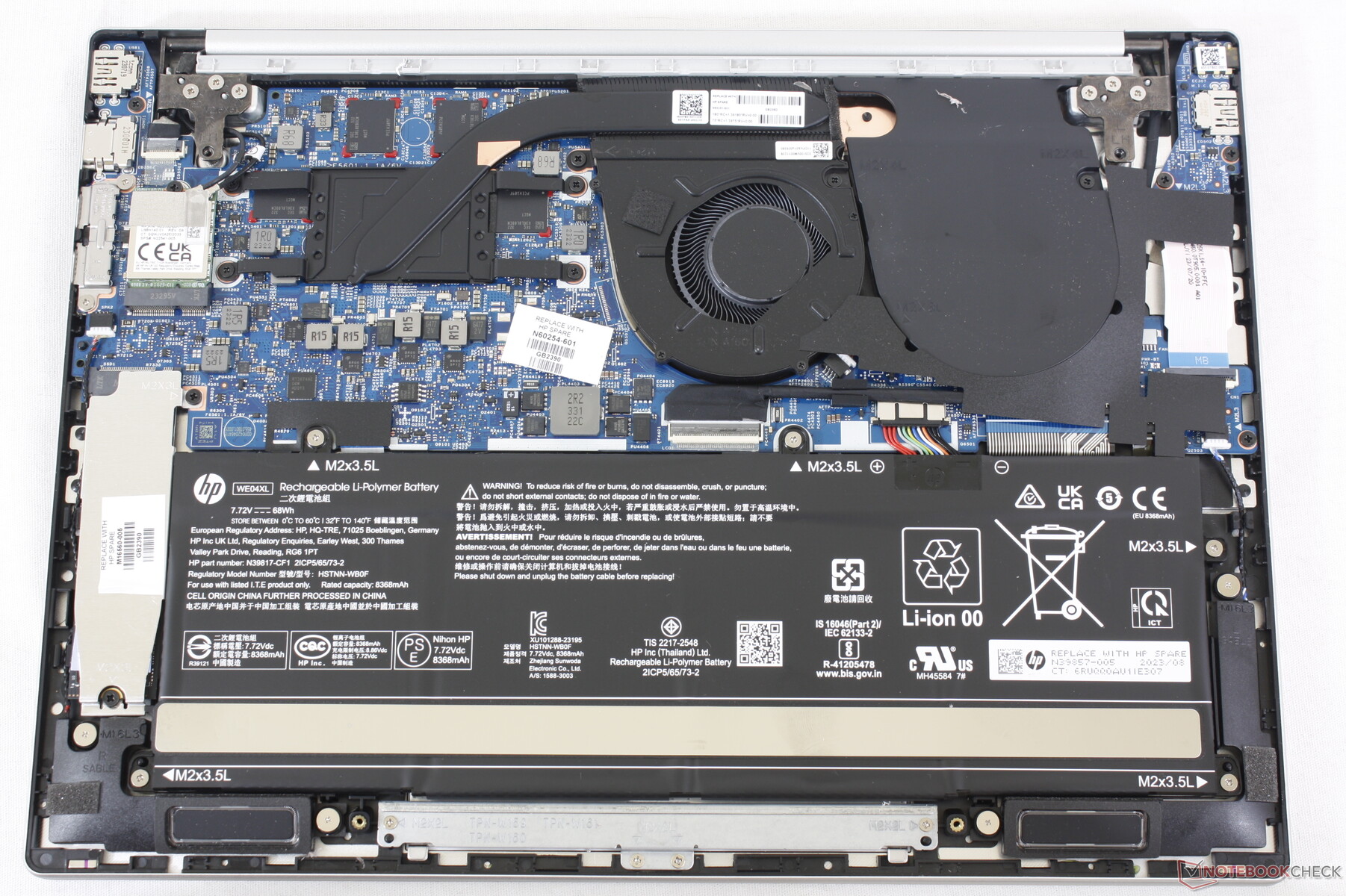
With a large 68 Watt-hour battery, its energy-efficient AMD 7840U CPU delivers a true 9-hour battery life with normal usage. For real! It also ramps up to do a clean build of KWin in less than 10 minutes! The laptop’s 2.8K 120Hz OLED screen is magnificent. Its keyboard and touchpad are truly the best I’ve ever used on a PC laptop. Linux compatibility is excellent too. Everything works out of the box. It’s just… great.
The problem is, it isn’t perfect. The speakers are awful, the aluminum casing is fairly thin and prone to denting while traveling, and there’s no touchscreen or fingerprint reader. USB 4 ports would also be nice, as would putting one on each side, rather than both on the right.
So I kept looking for the perfect replacement!
I still haven’t found one.
Everything out there sucks. Something important is always bad: usually the battery life, screen, or speakers. Often the keyboard layout is either bad, or just not to my liking. Other times the touchpad is laggy. Or it’s not physically rugged. Or there’s no headphone jack (what the heck). Or the palmrest is coated in some kind of gummy sticky material that will be disgusting with caked-on sweat and skin in a matter of weeks. Or Linux compatibility is poor. Or it’s absurdly expensive.
So for now, I’ll stick with the little Pavilion that could.
If only HP made this exact laptop with a thicker case and better speakers! A fingerprint reader and a touchscreen would be nice-to-haves as well. Replaceable RAM would easily be possible with a small redesign, as there’s empty space in the case. A USB 4 port on each side would be the cherry on top.
This is a bit of a rant; feel free to skip it if you’re here for the KDE content.
This isn’t the first time I’ve blogged about the dearth of truly great PC laptops out there, and I suspect it won’t be the last.
I limit myself to a single computer for simplicity’s sake, so it has to be a laptop. And since I replaced my 2020 Lenovo ThinkPad X1 Yoga a year ago, I haven’t succeeded at finding a truly great replacement yet. From a certain point of view, you could say I’m a picky buyer, judging by my list of requirements. But frankly, I think these requirements are not that unreasonable. All I want is a laptop that gets the basics right:
Good screen with a DPI suitable for 175-200% scaling, generally between 240 and 280 DPI
Good keyboard with text navigation keys (Home, End, Page Up, and Page Down) and a sensible layout: delete at the top right, no stupid replacement of normal modifier keys with fingerprint readers or copilot keys, no tiny arrow keys, etc.
Good touchpad that’s precise, doesn’t lag, and allows clicking on most or all of the total area
Good speakers that get reasonably loud and don’t have downward-facing tweeters
8 hours of battery life with low usage
Reasonably fast CPU
Reasonable GPU performance for desktop compositing and playing couple-year-old games
Replaceable disk
Just the basics; no great world-shattering innovation needed, and that’s before I narrow the search to laptops that lack NVIDIA GPUs and have touch or 2-in-1 capabilities (which I quite like and are highly useful for testing touch support in KDE software). So it has to have great Linux and Plasma compatibility too!
I’ve closely followed the PC laptop market for 9 years, maintaining a giant spreadsheet of every laptop model and how they fare on the above characteristics plus many more:
The multi-year trend is “one step forward, one step back.” Most companies still change their laptops’ keyboard layouts in random negative ways every year; ship with stupid screen resolutions, woefully bad speakers, and disappointing touchpads; and stuff the most powerful processor and GPU in there and don’t focus enough on tuning the cooling, power usage, and fan profiles.
Some examples from my own usage:
My 2016 HP Spectre x360 was slow and had a poor screen DPI and a laggy touchpad. The 2024 model fixed those problems but lost its HDMI ports and text nav keys, and the USB-A port has a fiddly and annoying little hinge that’s hard to use and will eventually break. And then the 14″ version was canceled in 2025.
My 2020 Lenovo ThinkPad X1 Yoga was also slow, had miserable battery life and a loud fan, put the Fn and PrintScreen keys in inconvenient places, and its high resolution 4K screen option had too high a DPI, wasting energy. The 2025 model fixed those issues but lost the excellent quad speaker system, garaged pen, and the third key to the right of the spacebar that let you re-bind one of them into being a second Meta key.
None of this would be a problem if you could customize and upgrade laptops like you can with desktops, but you can’t. Even on the Framework 13 laptop which makes this an explicit selling point and has made huge leaps in 4 years, there still aren’t aftermarket speaker modules that sound good or a keyboard deck with text nav keys. And the touch/2-in-1 capabilities are only offered on the 12″ model.
Where are the great laptops?
Let’s step back a bit and try to figure out what’s going on here. We have an industry of over a dozen PC manufacturers selling thousands of products, but few truly great ones that are satisfactory in all ways, not just a few.
I feel that a major problem is over-complicated product lines. Let’s look at what the big companies offer.
Seven product lines (or is it eight; there’s an extra one in the sidebar not shown in the main view) and 330 distinct models! How can a normal person who isn’t a laptop enthusiast find anything in here? Even my eyes glaze over when I’m trying to distinguish the differences between the models and product lines.
HP further complicates things by having separate sites for consumer laptops and business laptops. First the consumer laptops:
12 product lines with 67 models. Already a lot. But now add in the business laptops:
7 product lines with 352 models! Absurd. HP implicitly acknowledges the problem by advertising a sales advisor you can chat with to help you make heads or tails of this overwhelming mess (and maybe steer you towards more expensive models):
In total, HP offers 19 product lines and 419 models. Madness, I tell you. Sheer madness.
ASUS makes it even harder by dividing their models into micro-targeted audiences, which makes no sense since there’s overlap in all these use cases and only limited differences between what any of them need in a laptop:
Ultimately I found 8 product lines with 289 models on the US site. Yikes!
MSI does similar segmentation but finds a way to make it even worse by putting more models in each high level category and not offering a “See all” page:
Hmm, do I want a Titan gaming laptop, or a Raider? Maybe a Vector ? Perhaps a Cyborg, or is that a Thin? Apparently they can’t even settle on one name for half of them. Ultimately MSI has divided their laptops into no fewer than 16 product lines with 159 models.
10 product lines, 70 models. A bit better than some of the competition, but 70 total is still an objectively ridiculous level of choice to offer, especially considering that most of these models are going to offer various configurations of CPUs, memory, and storage space.
I could go on, but you get the idea.
You might think that this level of choice should provide anything one could want, but that’s not true. Most of the models differ by like 1% and make all the same mistakes, copy-pasted across the while product line. Maintaining so many product lines at a reasonable level of development and quality is impossible, even for companies of their size with billions of dollars to throw at the problem.
These companies are clearly trying to micro-target specific market segments to match prices to buyers’ budgets, but offering so much choice is foolish. Most buyers — even big commercial buyers — are not informed enough to be able to pick the perfect device from among a massive blob of options presented at the same level, causing choice paralysis and lost sales, disappointing purchases that reduce brand loyalty, and expensive returns.
There has to be a better way!
Who’s doing it right?
There are some bright spots in the industry.
The most notable is Apple, which offers two product lines and five total models. The differences between them are 100% comprehensible. No matter what Apple laptop you choose, it has a world-class touchpad, great speakers, an at-least-good keyboard with a sensible layout, a nice high DPI screen, great performance, and mind-blowing battery life. There are no bad models (if you’re a Mac fan, of course).
Razer is up there too, with one product line and three models, and all of them mostly get the basics right.
Framework also does a great job, also with just three models. The Framework 13 is so close to being the perfect do-it-all general purpose device for me. It just needs text nav keys, better speakers, and a touchscreen (ideally in a 2-in-1 form factor like the 12).
The small Linux-specific StarLabs company does an unexpectedly great job too, with the same three models (hmm, perhaps there’s a pattern here). And these aren’t Clevo or Tongfang units, either! They’re really nice custom engineered Linux-first laptops. I’ve come close to buying one on two occasions within the past year.
And notably, these companies’ laptops tend to get better with each revision, rather than oscillating around a specific level of quality but never consistently improving.
How to not confuse the hell out of people
It’s not that hard: offer a small number of product lines and models with very clear segmentation (by screen size, presence or absence of a GPU, 2-in-1 vs clamshell laptop, etc) and make all of them good. Don’t sell any bad models that have crappy screens, keyboards, touchpads, speakers, or battery life. Don’t sell any models that are 99% identical to other ones. Don’t do this:
No, don’t do this! Stop it! You’re hurting me!
Then make each product better every year. Don’t just put in a new generation of CPUs and ports when they become available; be thoughtful and actually make things better. Reduce power consumption, fan noise, and heat emissions. Tune the speakers to sound better. Increase the screen backlight’s brightness. Put in a nicer, higher-resolution webcam. Increase the number of microphones, and add hardware noise cancellation. Tighten up the ports so they aren’t wobbly. Thicken the case to make it more durable. Beef up the hinges. Use captive screws for the bottom cover. Lighten or roughen the surface a bit to resist fingerprints. Make it easier to remove keys for cleaning without breaking their attachment mechanism. Make the whole keyboard replaceable.
And so on. You know, care about the product! The way we do in KDE for Plasma and our apps. Make it better. Admit and undo your mistakes. Double down on your strengths. And make something great you can be proud of!
A few companies are already there, and I hope someday more follow in their footsteps.